

De beste Vonage-alternativene tilbyr pålitelig telefontjeneste, fleksible integrasjoner og priser som passer virksomheten din etter hvert som den vokser. Hvis du ser etter Vonage-alternativer, trenger du sannsynligvis en UCaaS-løsning som er enkel å sette opp, skalerer med teamet ditt og kobles sømløst til verktøyene du allerede bruker. Ved å velge riktig plattform for bedriftskommunikasjon kan du håndtere høye samtalevolumer, støtte eksterne eller hybride team og levere jevne kundeopplevelser. I denne veiledningen finner du en nøye utvalgt liste over de beste Vonage-alternativene, med fokus på funksjoner, integrasjoner og bruksområder som er viktigst for fagfolk innen kundeopplevelse.
Hva er Vonage?
Vonage Business er en kommunikasjonsplattform og en skybasert PBX-løsning som gjør det mulig for virksomheter å ringe og motta samtaler over internett i stedet for via tradisjonelle linjer. Som en ledende VoIP-leverandør tilbyr den funksjoner som samtaleruting, telefonsvarer, virtuelle numre og integrasjoner med CRM- og helpdeskverktøy. Vonage brukes av team innen kundeopplevelse til å administrere driften, støtte fjernarbeid og holde kontakt med kunder på tvers av flere kanaler. Fleksibiliteten og skalerbarheten gjør plattformen populær både blant oppstartsbedrifter i tidlig fase og etablerte SMB-er.
Sammenligningstabell for Vonage-alternativer
Denne sammenligningstabellen oppsummerer prisdetaljer for mine beste utvalgte Vonage-alternativer:
| Tool | Best For | Trial Info | Price | ||
|---|---|---|---|---|---|
| 1 | Best for AI-powered appointment scheduling | Free demo available | From $15/user/month (billed annually) | Website | |
| 2 | Best for global number coverage | 14-day free trial | From $25/user/month (billed annually) | Website | |
| 3 | Best with AWS ecosystem compatibility | Free plan available | Pricing upon request | Website | |
| 4 | Best for ticketing system integration | 14-day free trial + free demo available | From $19/user/month (billed annually) | Website | |
| 5 | Best for mobile-first customer interactions | Free demo available | From $65/user/month | Website | |
| 6 | Best for outbound dialing capabilities | Free demo available | From $119/seat/month | Website | |
| 7 | Best for instant number provisioning | 14-day free trial | From $29/user/month (billed annually) | Website | |
| 8 | Best for AI-powered customer journeys | Free demo available | From $75/user/month (billed annually) | Website | |
| 9 | Best for industry-specific automation | Free demo available | From $85/user/month | Website | |
| 10 | Best for omnichannel analytics | Free demo available | Pricing upon request | Website |


Why Trust Our Software Recommendations
6,700+
Reviews
20
Industry experts
16+
Evaluation factors
14
Years
Our team has been testing and reviewing software since 2012. As CX leaders ourselves, we know how difficult—and important—it is to choose the right software.
For this guide, we evaluated tools using hands-on testing and independent research, scoring tools using our selection criteria.
Our reviews reflect our human editorial judgment, not a sales pitch.
 Gui DrusinaCreative Director
 Tim FisherVP of AI
Anmeldelser av Vonage-alternativer
Nedenfor finner du mine detaljerte sammendrag av de beste Vonage-alternativene som kom med på kortlisten. Anmeldelsene mine gir et detaljert innblikk i funksjonene, integrasjonene og de beste bruksområdene for hver programvare, slik at du kan finne den som passer best for deg.
 Best for AI-powered appointment scheduling
- Free demo available
- From $15/user/month (billed annually)
Visit WebsiteCustomer Rating:4.5/5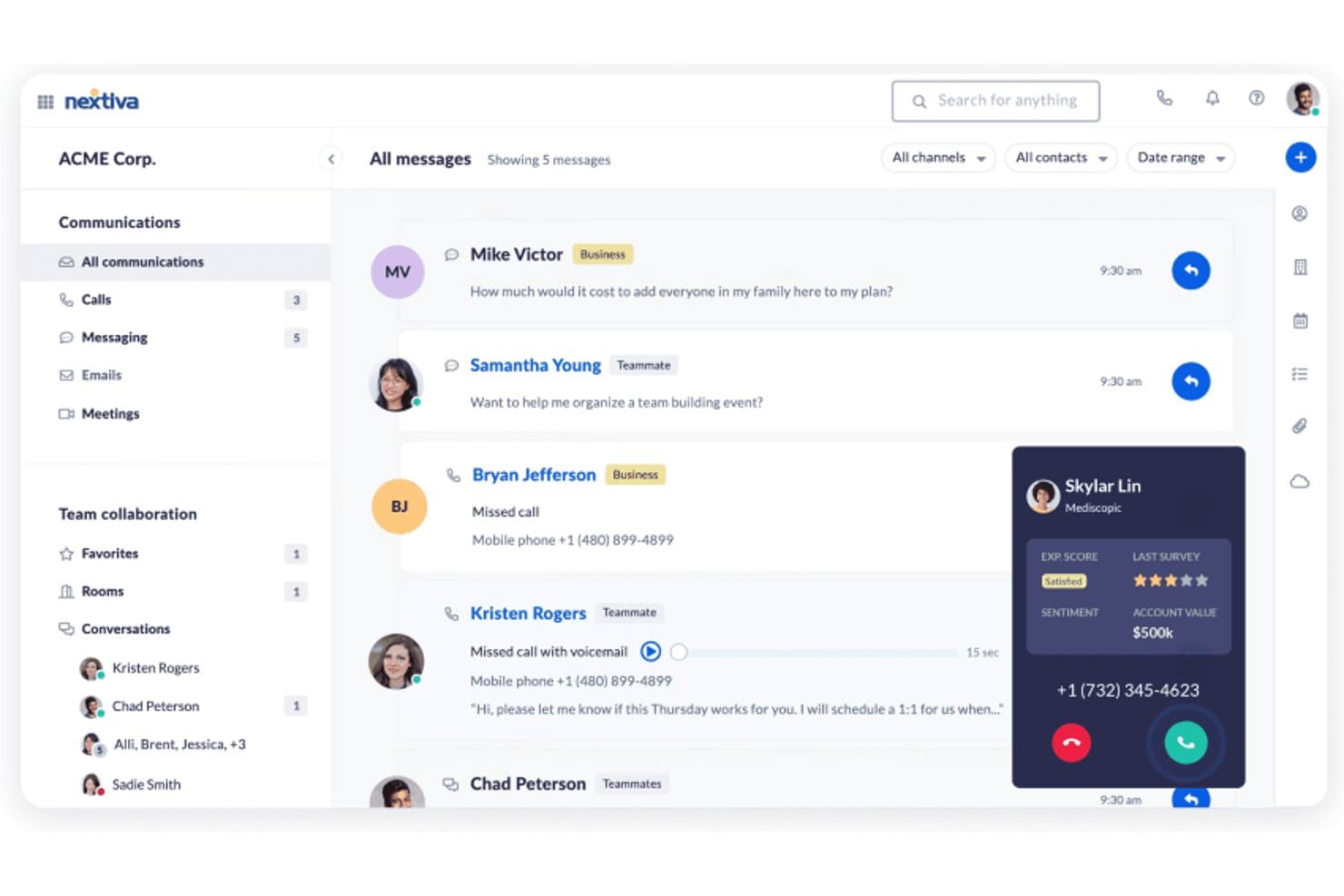
Nextiva offers a unified communications dashboard that displays messages, calls, and team collaboration alongside real-time customer sentiment and account value during active calls. Nextiva is a cloud communications and contact center platform built for mid-size and enterprise teams who want to replace siloed VoIP tools with a unified system that combines voice, digital channels, AI automation, and transparent pricing.
Who Is Nextiva Best For?
Nextiva suits contact center operations managers and CX directors at North American businesses who need a single platform for both internal communications and customer-facing support.
Why Nextiva Is a Good Best Vonage Alternatives
I picked Nextiva as one of the best because its XBert AI suite turns inbound calls into booked appointments without a live agent in the loop. The AI Employee handles the full conversation, checks real-time availability, and confirms the booking autonomously. The AI Receptionist runs 24/7, so appointment scheduling happens at any hour, including nights and weekends when your team is offline.
Nextiva Key Features
- Unified omnichannel inbox: Route and manage customer interactions from voice, SMS, chat, email, and social channels in a single view.
- Skills-based call routing: Assign inbound calls to the best available agent based on skill set and availability.
- Real-time analytics dashboard: Monitor live queue stats, agent performance, and sentiment across all channels.
- Native CRM integrations: Sync communications data with HubSpot, Salesforce, Zendesk, and Microsoft Dynamics for seamless agent workflows.
Nextiva Integrations
Nextiva offers native integrations with Salesforce, HubSpot, Zendesk, Microsoft Dynamics, Zoho CRM, Oracle, ServiceNow, ConnectWise, Google Workspace, Microsoft Teams, and more. An API is available for custom integrations.
Pros and Cons
Pros:
- Built-in workforce management and QA tools
- Unified voice and digital channel routing
- AI handles scheduling without a live agent
Cons:
- Lacks programmable CPaaS APIs for developers
- International coverage is limited outside North America
 Best for global number coverage
- 14-day free trial
- From $25/user/month (billed annually)
Visit WebsiteCustomer Rating:4.4/5
CloudTalk’s global number coverage helps teams serve customers anywhere CloudTalk is a cloud-based phone system designed for teams that need reliable, flexible calling capabilities across multiple locations. If you’re looking for a solution that supports global operations and modern call center workflows, CloudTalk is worth a closer look.
Who Is CloudTalk Best For?
CloudTalk is a good fit for global customer support teams that need local phone numbers in multiple countries.
Why CloudTalk Is a Good Vonage Alternative
I picked CloudTalk because my team needs reliable access to local phone numbers in dozens of countries. With CloudTalk, I can instantly provision numbers in over 160 countries. I appreciate how easy it is to manage international numbers and route calls based on region. This global reach lets us support customers wherever they are without juggling multiple providers.
CloudTalk Key Features
- Call flow designer: Build custom call routing paths with a visual editor.
- Real-time analytics dashboard: Monitor live call metrics and agent activity.
- Call recording: Automatically record inbound and outbound calls for quality assurance.
- Click-to-call browser extension: Place calls directly from your CRM or helpdesk with one click.
CloudTalk Integrations
CloudTalk offers native integrations with Salesforce, HubSpot, Zendesk, Pipedrive, Zoho CRM, Freshdesk, Intercom, Microsoft Dynamics 365, Shopify, and Slack. It also connects with Zapier and provides an API for custom integrations.
Pros and Cons
Pros:
- Deep CRM integrations for call logging
- Real-time agent coaching and call whispering
- Advanced call flow builder with visual editor
Cons:
- Limited SMS and messaging features
- No built-in video conferencing option
 Best with AWS ecosystem compatibility
- Free plan available
- Pricing upon request
Visit WebsiteCustomer Rating:4.5/5
Amazon Connect dashboard shows customer profile, chat, and case details. Amazon Connect is a cloud-based contact center platform built on AWS, designed for businesses that want to manage customer interactions at scale. It appeals to organizations seeking flexible, pay-as-you-go pricing and seamless integration with other AWS services for unified communications.
Who Is Amazon Connect Best For?
Amazon Connect suits enterprises and technology teams that already use AWS and need a scalable, cloud-based contact center solution.
Why Amazon Connect Is a Good Vonage Alternative
I picked Amazon Connect because it plugs directly into the AWS ecosystem, which means my team doesn't need to manage separate infrastructure for contact center operations. I use Amazon Lex to build conversational IVR flows that handle routine inquiries without live agents, and those bots connect natively to Lambda functions for real-time data lookups. I also appreciate that Amazon Connect integrates with Amazon S3 and Kinesis for call recording storage and real-time contact data streaming—something that's hard to replicate without building custom pipelines elsewhere. For teams already running workloads on AWS, that native connectivity removes a significant layer of integration complexity.
Amazon Connect Key Features
- Drag-and-drop workflow designer: A visual tool for building IVR flows, chatbot experiences, and agent step-by-step guides across channels.
- Skills-based routing: Routes contacts to agents based on availability, skillset, customer sentiment, and interaction history.
- Screen recording: Records agent screens alongside audio during customer interactions for quality monitoring and performance evaluation.
- Contact forecasting: Uses AI to generate short- and long-term contact volume predictions to support agent scheduling and capacity planning.
Amazon Connect Integrations
Integrations include Salesforce, Zendesk, ServiceNow, Slack, Microsoft Teams, and AWS ecosystem tools.
Pros and Cons
Pros:
- Rapid deployment
- Global scalability
- Highly programmable
Cons:
- Lacks out-of-box CRM
- Hidden AWS costs
Learn more about Amazon Connect: Best for ticketing system integration
- 14-day free trial + free demo available
- From $19/user/month (billed annually)
Visit WebsiteCustomer Rating:4.2/5
Zendesk Talk interface showing active chat, ticket, and conversation tabs. Zendesk Talk brings voice capabilities directly into the Zendesk platform, letting support teams manage calls alongside tickets and chats. It’s a strong fit for businesses that want to unify customer conversations and streamline agent workflows within a single workspace.
Who Is Zendesk Talk Best For?
Support teams at midsize to large companies that already use Zendesk and need integrated voice and ticket management.
Why Zendesk Talk Is a Good Vonage Alternative
I picked Zendesk Talk because it embeds voice directly into the Zendesk ticketing system, so every call automatically generates a ticket with a full transcript and recording attached. I appreciate that agents never have to switch tools—call context, customer history, and follow-up tasks all live in one place. My team can use IVR routing to direct callers based on queue size and business hours, reducing wait times without manual intervention. For teams already running support through Zendesk, this level of native integration is hard to match elsewhere.
Zendesk Talk Key Features
- Warm transfer: Pass calls to another agent with a private briefing before the customer connects.
- Call blocking: Identify and block unwanted or spam numbers directly within the platform.
- Voicemail transcription: Convert voicemail messages into text and attach them to the relevant ticket.
- Real-time dashboard: Monitor live call queues, agent availability, and wait times from a single view.
Zendesk Talk Integrations
Integrations include Slack, Shopify, Pipedrive, Trustpilot, Harvest, ChannelReply, Sprout Social, Azure DevOps, Maestro QA, and SweetHawk Suite.
Pros and Cons
Pros:
- Simple routing
- Easy for agents
- Unified ticketing
Cons:
- Pricey toll rates
- Lacks advanced PBX
Learn more about Zendesk Talk: 5Best for mobile-first customer interactions
UJET
- Free demo available
- From $65/user/month
Visit WebsiteCustomer Rating:4.6/5
UJET mobile chat interface with messaging, queue, and support options. UJET is a cloud contact center platform designed for businesses that want to unify digital and voice support in a single, mobile-friendly solution. It’s a strong fit for teams needing advanced automation, AI-powered routing, and deep CRM integrations to modernize customer interactions.
Who Is UJET Best For?
UJET suits enterprise contact centers and support teams in industries like retail, finance, and healthcare that require secure, omnichannel customer engagement.
Why UJET Is a Good Vonage Alternative
I picked UJET for its mobile-first approach, which lets my team handle support interactions directly within a branded mobile app—no third-party interface required. I appreciate how UJET's in-app support lets customers share photos, videos, and screenshots mid-conversation, giving agents real context without back-and-forth. In practice, that means my team can resolve issues faster by seeing exactly what the customer sees. For contact centers moving beyond basic VoIP, UJET's AI-driven routing and omnichannel agent desktop make it a genuinely capable upgrade.
UJET Key Features
- Real-time sentiment analysis: Detects customer emotion during calls to help agents adjust their approach mid-interaction.
- Virtual agent: Handles routine customer inquiries automatically using AI-powered self-service flows before escalating to a live agent.
- Omnichannel agent desktop: Consolidates voice, chat, SMS, and email interactions into a single agent workspace.
- CRM screen pop: Automatically surfaces relevant customer data from connected CRMs when an interaction begins.
UJET Integrations
Integrations include Salesforce, Zendesk, Kustomer, ServiceNow, Microsoft Dynamics, and Shopify.
Pros and Cons
Pros:
- Modern architecture
- In-app visual menus
- No stored user data
Cons:
- Pricey for small organizations
- Learning curve
Learn more about UJET: Best for outbound dialing capabilities
- Free demo available
- From $119/seat/month
Visit WebsiteCustomer Rating:4.1/5
Five9 dashboard shows live call controls, transcripts, and agent guidance. Five9 is a cloud-based contact center platform designed for businesses that need advanced call routing, predictive dialing, and real-time analytics. It’s a strong choice for sales teams, support centers, and organizations looking to optimize outbound and inbound communications.
Who Is Five9 Best For?
Five9 is a strong fit for midsize and large sales or support teams that need advanced outbound dialing and call management capabilities.
Why Five9 Is a Good Vonage Alternative
Five9's outbound dialing capabilities go well beyond a basic auto-dialer. I picked it because it offers four distinct dialing modes—predictive, power, progressive, and preview—so my team can match the dialing approach to the campaign type rather than forcing every outreach into a one-size-fits-all workflow. For high-volume sales campaigns, I use the predictive dialer to maximize agent talk time by automatically filtering out unanswered calls, voicemails, and busy signals. What I also appreciate is the built-in compliance tooling: Five9's Certified Caller (STIR/SHAKEN) validation and DNC list management mean my team isn't scrambling to bolt on third-party tools to stay compliant with FCC regulations on outbound calls.
Five9 Key Features
- Agent Assist: A real-time AI tool that surfaces relevant information and suggested responses to agents during live customer interactions.
- Interaction analytics: A speech and text analysis tool that reviews recorded customer conversations to identify trends, sentiment, and compliance gaps.
- Workforce management: A scheduling and forecasting tool that helps supervisors align agent staffing levels with predicted contact volume.
- Intelligent Virtual Agent (IVA): An AI-driven self-service tool that handles routine inbound inquiries over voice and digital channels without live agent involvement.
Five9 Integrations
Integrations include Salesforce, ServiceNow, Microsoft Teams, Oracle, Zendesk, Zoom Phone, Microsoft Dynamics 365, NetSuite, Slack, and Google Workspace.
Pros and Cons
Pros:
- Good workforce tools
- Reliable voice tech
- Strong CRM plugins
Cons:
- Clunky mobile app
- Slower onboarding
Learn more about Five9: Best for instant number provisioning
- 14-day free trial
- From $29/user/month (billed annually)
Visit WebsiteCustomer Rating:4.1/5
JustCall dashboard displaying call analytics, activity, and performance metrics. JustCall is a cloud-based VoIP platform designed for sales and support teams that need fast access to global phone numbers and advanced calling features. It’s a strong fit for businesses seeking integrated SMS, multiple dialer options, and deep CRM connectivity to manage high call volumes.
Who Is JustCall Best For?
Sales and support teams in small to midsize businesses needing global calling, SMS, and CRM integrations for customer communications.
Why JustCall Is a Good Vonage Alternative
I picked JustCall primarily because of how fast you can get a number up and running. Unlike Vonage, which can involve longer provisioning timelines and admin overhead, JustCall lets me activate local or toll-free numbers from 70+ countries in seconds—no waiting, no back-and-forth with support. I also appreciate the country coverage feature, where I simply select a country and area code and I'm ready to make and receive calls. For teams expanding into new markets or needing to spin up regional lines quickly, that kind of instant access is hard to match.
JustCall Key Features
- Sales dialer: Offers auto, predictive, power, and parallel dialer options to automate outbound calling campaigns.
- Live call monitoring: Listen to active calls in real time, whisper to agents during a call, or join the conversation directly.
- SMS workflows: Trigger automated text messages based on specific conditions, such as appointment reminders or follow-up sequences.
- Call scoring: Automatically or manually score calls to evaluate agent performance and identify coaching opportunities.
JustCall Integrations
Integrations include Salesforce, HubSpot, Pipedrive, ActiveCampaign, Slack, Intercom, Help Scout, Zendesk, Zoho CRM, and monday.com.
Pros and Cons
Pros:
- Great for small ops
- Simple integrations
- Very budget friendly
Cons:
- Slow tech support
- Poor mobile app
 Best for AI-powered customer journeys
- Free demo available
- From $75/user/month (billed annually)

Genesys Cloud CX dashboard shows live call handling and interaction details. Genesys Cloud CX is a cloud-based contact center platform designed for organizations that want to unify voice, chat, and digital channels in one place. It appeals to teams seeking advanced automation, omnichannel routing, and real-time analytics to improve customer engagement.
Who Is Genesys Cloud CX Best For?
Large enterprises and global contact centers that need to manage complex, high-volume customer interactions across multiple channels.
Why Genesys Cloud CX Is a Good Vonage Alternative
What draws me to Genesys Cloud CX as a Vonage alternative is how deeply AI is woven into the platform rather than bolted on as an add-on. I use Predictive Routing to automatically match customers with the agent best suited to their needs—not just by availability, but by optimizing for a specific KPI like first-call resolution. That's a level of routing intelligence Vonage simply doesn't offer.
I also rely on the Agent Copilot feature, which surfaces relevant knowledge articles in real time during live calls and then auto-generates a post-call summary using generative AI—cutting the time my agents spend on wrap-up work. For teams managing high interaction volumes across voice and digital channels, Genesys Cloud CX's native AI Studio lets my team build and adjust AI-powered flows without needing a data science team behind every change.
Genesys Cloud CX Key Features
- Omnichannel routing: Routes customer interactions across voice, chat, email, and social channels from a single unified queue.
- Workforce engagement management: Includes scheduling, quality management, and performance tracking tools built directly into the platform.
- Customer journey management: Connects data across touchpoints to track and orchestrate end-to-end customer journeys in real time.
- AppFoundry® Marketplace: Provides access to pre-integrated third-party apps that extend the platform's native capabilities.
Genesys Cloud CX Integrations
Integrations include Salesforce, Microsoft Dynamics 365, Zendesk, ServiceNow, Adobe, and AWS.
Pros and Cons
Pros:
- Advanced analytics
- True omnichannel
- Rich voice features
Cons:
- Overkill for SMBs
- Longer deployment
Learn more about Genesys Cloud CX:

Talkdesk dashboard shows customer profile, call controls, and live call details. Talkdesk offers a cloud-based contact center platform designed for organizations that need advanced automation and integration with industry-specific workflows. It’s a strong fit for businesses in regulated sectors or those seeking to tailor their customer communications with specialized features.
Who Is Talkdesk Best For?
Talkdesk suits midsize to large enterprises in healthcare, finance, retail, and other regulated industries that require customizable contact center automation.
Why Talkdesk Is a Good Vonage Alternative
What drew me to Talkdesk is its Talkdesk Industry Experience Clouds™, which go well beyond generic contact center functionality. These are pre-built integrations with core business systems specific to industries like healthcare, financial services, and retail—so my team isn't starting from scratch when building out workflows. For example, in a healthcare environment, Talkdesk connects directly with patient management systems to support use cases like self-service appointment scheduling via Talkdesk Autopilot. I also appreciate the multi-agent orchestration layer, which lets AI agents work together across channels and systems in real time rather than operating in silos. For teams in regulated industries, the platform's compliance coverage—HIPAA, PCI-DSS, SOC2 Type II, and GDPR—means I don't have to bolt on third-party tools to meet those requirements.
Talkdesk Key Features
- Call barging: Lets supervisors join live calls to speak directly with both the agent and the customer.
- Local presence dialing: Automatically selects an outbound number matching the recipient's area or country code to increase answer rates.
- Voice-to-case: Automatically creates and routes support tickets from call interactions that require follow-up.
- No-code flow builder: Lets admins design and adjust call routing and IVR flows using a visual, click-based interface without developer support.
Talkdesk Integrations
Integrations include Salesforce, Zendesk, Microsoft Teams, Slack, ServiceNow, and Shopify.
Pros and Cons
Pros:
- 100% uptime SLA
- Industry templates
- Strong automation
Cons:
- Add-ons cost extra
- Less API access
Learn more about Talkdesk:

CXone dashboard shows service levels, agent stats, and queue metrics. CXone Mpower is a cloud-based contact center platform designed for organizations that need advanced voice and digital channel management. It appeals to teams seeking unified agent desktops, AI-powered routing, and deep analytics to improve customer interactions and operational efficiency.
Who Is CXone Mpower Best For?
CXone Mpower suits mid-sized to large enterprises with complex customer service operations that require unified voice and digital engagement.
Why CXone Mpower Is a Good Vonage Alternative
I picked CXone Mpower because its omnichannel analytics go well beyond basic reporting—the platform captures intent, sentiment, and outcome data across every voice and digital interaction, then surfaces that intelligence in real time. What makes this particularly useful is Interaction Analytics, which analyzes 100% of interactions rather than a sampled subset, so my team isn't making decisions based on incomplete data. I also appreciate how CXone AI Routing uses that same interaction data to make predictive routing decisions—not just skills-based matching, but predictions about which agent is most likely to achieve the best CSAT or resolution outcome for a specific customer.
CXone Mpower Key Features
- Omnichannel routing: Directs customer contacts across voice and digital channels to the right agent based on skills, availability, and customer context.
- Workforce management: Uses AI-based forecasting and scheduling to align agent staffing with predicted contact volumes across short- and long-term planning horizons.
- Quality management: Evaluates 100% of customer interactions using AI to identify coaching opportunities and compliance gaps.
- Outbound engagement: Automates proactive outreach across voice and digital channels using predictive dialing and AI-driven campaign management.
CXone Mpower Integrations
Integrations include Salesforce, Microsoft Dynamics, Zendesk, ServiceNow, Oracle, and Bullhorn.
Pros and Cons
Pros:
- Handles high volume
- Strong AI insights
- High reliability
Cons:
- Complex contracts
- Slow UI updates
Learn more about CXone Mpower:
Andre Vonage-alternativer
Her er noen flere Vonage-alternativer som ikke kom med på kortlisten min, men som likevel er verdt å se nærmere på:
- 11Webex Contact CenterBest for hybrid workforce support
- 12AircallBest for quick CRM integrations
- 13OomaBest for small business phone systems
- 14DialpadBest for AI-powered call transcription
- 153CXBest with on-premises deployment options
How I Evaluate Vonage Alternatives
I split my evaluation into two layers: the baseline every platform must cover—omnichannel channels, developer APIs, IVR routing—and the differentiators that matter most to CX and contact center teams.
Core Functionality (Table Stakes For This List)
When I'm selecting tools for my list, I rank each one on a scale from 0 (does not offer the functionality) to 5 (excels in this area) for each core functionality listed below. Then, I calculate the tool's total score into a percentage. Each tool needs to achieve a minimum total score of 75% to be considered for inclusion.
- Omnichannel Communication Channels: I check whether the platform unifies voice, SMS, chat, email, and social messaging so agents can handle a customer moving from WhatsApp to a phone call without losing context.
- Programmable APIs & SDKs: Developer documentation, sandbox environments, and SDK language coverage all matter here—especially for teams embedding click-to-call or in-app messaging into their own products.
- Cloud Contact Center Tools: I evaluate whether the platform includes IVR builders, ACD, skills-based routing, and queue management that a mid-size support team would actually use day-to-day.
- CRM & Helpdesk Integrations: I look for native connectors to platforms like Salesforce, HubSpot, and Zendesk that sync interaction history and customer records bidirectionally, not just surface-level CTI pop-ups.
- AI & Automation Capabilities: Chatbots, voicebots, sentiment analysis, and agent assist features get evaluated—particularly how well conversational AI handles routine inquiries like order status or appointment scheduling.
- Global Voice & Messaging Reach: Multi-country number provisioning, local caller ID, and reliable SMS deliverability across regions are what I look for, especially for teams supporting customers across multiple geographies.
Once I have a list of tools that meet this criteria, I consider what sets each platform apart.
Differentiating Factors (What Sets Vendors Apart)
Here's how I compare and contrast different vendors:
Standout Features
A conversational AI studio can save CX teams significant setup time—I look for drag-and-drop bot builders that let non-technical agents design IVR flows and chat automations without filing dev tickets. Real-time analytics dashboards matter just as much, especially for supervisors who need live visibility into queue wait times and agent availability during volume spikes. I also evaluate workforce engagement tools like built-in QA scoring and schedule adherence tracking, which help operations managers coach agents and plan staffing from one platform.
Beyond Features
Compliance certifications like SOC 2, HIPAA, and GDPR readiness matter when your contact center handles sensitive customer data—I check whether vendors offer data residency options and encrypted call recordings. Scalability is another key factor, particularly uptime SLAs and how the platform performs during seasonal spikes like holiday support surges. I also evaluate pricing transparency, comparing per-seat, per-minute, and pay-as-you-go models to understand how costs shift as your team and call volumes grow.
Hvorfor se etter et Vonage-alternativ?
Selv om Vonage er et godt valg av VoIP-programvare, finnes det flere grunner til at enkelte brukere ser etter alternative løsninger. Det kan hende du ser etter et alt-i-ett-Vonage-alternativ fordi …
- Du opplever for mange samtaler som blir brutt, og trenger bedre oppetidsgarantier
- Du trenger en mer sømløs brukeropplevelse med større brukervennlighet
- Du ønsker bedre priser på internasjonale samtaler for å støtte den globale rekkevidden din
- Du trenger tettere integrasjoner mellom softtelefoner og tradisjonelle bordtelefoner
- Du trenger bransjespesifikke samsvarssertifiseringer
- Du ønsker mer detaljerte kontroller for samtaleruting
Hvis noe av dette høres kjent ut, har du kommet til rett sted. Listen min inneholder flere alternativer innen VoIP-programvare som passer bedre for team som står overfor disse utfordringene med Vonage og ser etter alternative løsninger.
Viktige funksjoner i Vonage
Her er en oversikt over funksjonene Vonage tilbyr, slik at du kan sammenligne hva de alternative løsningene har å tilby (se de offisielle vanlige spørsmålene deres for mer informasjon, slik at du kan vurdere hvor lett det er å lære seg plattformen):
- Samtaleruting: Viderekobler innkommende samtaler til riktig person eller avdeling ved hjelp av regler som kan tilpasses, noe som reduserer ventetiden og forbedrer kundetilfredsheten.
- Virtuell resepsjonist: Svarer på og ruter samtaler automatisk med interaktive talemenyer, slik at bedrifter kan håndtere store samtalevolumer uten ekstra bemanning.
- Talemelding til e-post: Sender talemeldinger som lydfiler til e-postinnboksen din, slik at det blir enkelt å få tilgang til og svare på meldinger hvor som helst.
- Samtaleopptak: Tar opp innkommende og utgående samtaler for opplæring, overholdelse av regelverk og kvalitetssikring, med sikker lagring og enkel avspilling.
- Mobilapp: Lar brukere foreta og motta arbeidssamtaler, sjekke talemeldinger og administrere innstillinger direkte fra mobilenhetene sine, noe som støtter fjernarbeid og hybridarbeid.
- Team-meldinger: Tilbyr direktemeldinger og gruppechat i plattformen, slik at team kan kommunisere og samarbeide uten å bytte mellom verktøy.
- Videokonferanser: Støtter HD-videomøter med skjermdeling og chat, slik at det blir mulig å samarbeide på avstand og ha virtuelle kundeinteraksjoner.
- CRM-integrasjoner: Kobler seg til populære CRM-systemer som Salesforce og HubSpot, slik at samtaler kan loggføres automatisk og kundedata kan åpnes under samtaler.
- Analyser og rapportering: Tilbyr oversikter og detaljerte rapporter om samtaleaktivitet, agentprestasjoner og kundeinteraksjoner for å gi grunnlag for forretningsbeslutninger.
- API-tilgang: Lar utviklere bygge tilpassede integrasjoner og arbeidsflyter, slik at Vonages funksjoner kan utvides for å dekke unike forretningsbehov.