

Domo-beoordeling: voor- en nadelen, functies & prijzen
Domo is een klantgegevensplatform dat zich onderscheidt door veelzijdige hulpmiddelen voor gegevensvisualisatie te bieden, waarmee uw team efficiënt datagestuurde beslissingen kan nemen.

We review tools independently, and commissions help fund our testing. See our transparency policy, our methodology, or suggest a tool.
Domo is a cloud-based customer data platform for teams that need to pull data from across the business, visualize it in real time, and share it with stakeholders who don't live in spreadsheets. I'd consider it seriously if you want the data connectivity and dashboard depth of something like Salesforce Data Cloud, but without the heavy implementation overhead that typically comes with a Salesforce deployment.
Domo Evaluation Summary
4.4/5
- Pricing upon request
- 30-day free trial
Waarom u onze softwareaanbevelingen kunt vertrouwen
6,700+
Reviews
20
Industry experts
16+
Evaluation factors
14
Years
Ons team test en beoordeelt software sinds 2012. Als CX-leiders weten we zelf hoe moeilijk — en belangrijk — het is om de juiste software te kiezen.
Voor deze gids hebben we tools geëvalueerd met behulp van praktijktests en onafhankelijk onderzoek, waarbij we tools beoordeelden aan de hand van onze selectiecriteria.
Onze reviews weerspiegelen ons menselijke redactionele oordeel, geen verkooppraatje.
 Gui DrusinaCreative Director
 Tim FisherVP of AI
Domo Overview
Pros
- Transform complex data into clear, actionable insights easily.
- Real-time analytics help your team make informed decisions quickly.
- Supports extensive data visualization options to enhance your reporting.
Cons
- The onboarding process is less intuitive compared to some competitors.
- Interface can be overwhelming for new users not familiar with data platforms.
- Customer support response times might not always meet your expectations.
Is Domo Right For Your Needs?
Who Would be a Good Fit for Domo?
Large enterprises and data-driven teams in industries like retail, finance, and healthcare would benefit from Domo. Its powerful data visualization, BI tools, and real-time analytics allow your team to turn data into actionable insights. If you need to make strategic decisions based on complex data sets, Domo's capabilities in handling and visualizing big data will serve you well.
- Retail AnalyticsDomo offers real-time insights into sales trends, helping your team optimize inventory and marketing strategies.
- Financial ServicesIts robust data visualization tools enable your team to track financial metrics and investment performance efficiently.
- Healthcare ReportingDomo allows your team to manage patient data and operational metrics with precision, improving care outcomes.
- Marketing and Customer Experience TeamsYour teams can use Domo to analyze campaign performance and customer engagement in real-time.
- IT DepartmentsDomo's integration capabilities help your team monitor system performance and security metrics effectively.
- Manufacturing OperationsIt provides insights into production data, allowing your team to enhance efficiency and reduce downtime.
Who Would be a Bad Fit for Domo?
Small businesses or startups with limited data analytics needs might not find Domo suitable. The platform's extensive features and capabilities could be overwhelming and unnecessary for teams that require only basic data tracking. If your team doesn't have dedicated data specialists, Domo's complexity might hinder productivity rather than help it.
- Small StartupsDomo's advanced features might be overkill for your team if you only need simple data tracking and analysis.
- Non-Technical TeamsWithout data specialists, your team might struggle with Domo's complexity and steep learning curve.
- Cost-Conscious BusinessesIf your budget is tight, Domo's pricing might not align with your financial constraints.
- FreelancersFor individual work, Domo's extensive capabilities might be unnecessary and cumbersome.
- Basic Reporting NeedsIf your team only requires minimal reporting, Domo's robust tools may be more than you need.
- Short-Term ProjectsFor temporary projects, the time investment in learning Domo may not be worth it.
How We Test & Score Tools
We’ve spent years building, refining, and improving our software testing and scoring system. The rubric is designed to capture the nuances of software selection and what makes a tool effective, focusing on critical aspects of the decision-making process.
Below, you can see exactly how our testing and scoring works across seven criteria. It allows us to provide an unbiased evaluation of the software based on core functionality, standout features, ease of use, onboarding, customer support, integrations, customer reviews, and value for money.
Core Functionality (25% of final scoring)
The starting point of our evaluation is always the core functionality of the tool. Does it have the basic features and functions that a user would expect to see? Are any of those core features locked to higher-tiered pricing plans? At its core, we expect a tool to stand up against the baseline capabilities of its competitors.
Standout Features (25% of final scoring)
Next, we evaluate uncommon standout features that go above and beyond the core functionality typically found in tools of its kind. A high score reflects specialized or unique features that make the product faster, more efficient, or offer additional value to the user.
We also evaluate how easy it is to integrate with other tools typically found in the tech stack to expand the functionality and utility of the software. Tools offering plentiful native integrations, 3rd party connections, and API access to build custom integrations score best.
Ease of Use (10% of final scoring)
We consider how quick and easy it is to execute the tasks defined in the core functionality using the tool. High scoring software is well designed, intuitive to use, offers mobile apps, provides templates, and makes relatively complex tasks seem simple.
Onboarding (10% of final scoring)
We know how important rapid team adoption is for a new platform, so we evaluate how easy it is to learn and use a tool with minimal training. We evaluate how quickly a team member can get set up and start using the tool with no experience. High scoring solutions indicate little or no support is required.
Customer Support (10% of final scoring)
We review how quick and easy it is to get unstuck and find help by phone, live chat, or knowledge base. Tools and companies that provide real-time support score best, while chatbots score worst.
Customer Reviews (10% of final scoring)
Beyond our own testing and evaluation, we consider the net promoter score from current and past customers. We review their likelihood, given the option, to choose the tool again for the core functionality. A high scoring software reflects a high net promoter score from current or past customers.
Value for Money (10% of final scoring)
Lastly, in consideration of all the other criteria, we review the average price of entry level plans against the core features and consider the value of the other evaluation criteria. Software that delivers more, for less, will score higher.
Core Features
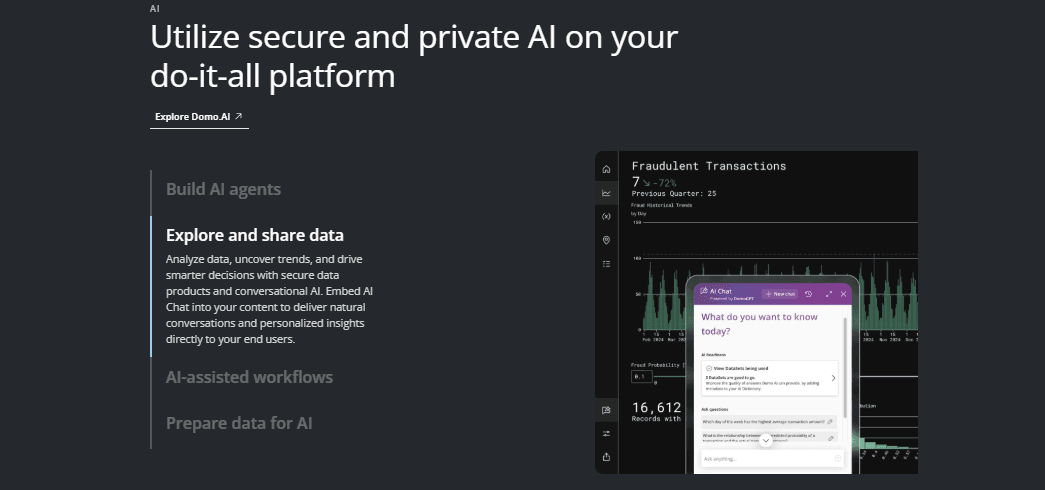
Data Visualization: Domo visualizations turn complex datasets into intuitive visual reports that your team can easily interpret. This aids business intelligence helps you make data-driven decisions quickly and effectively.
Real-Time Analytics: With Domo, you get up-to-the-minute data updates that keep your team informed and agile. This feature is crucial for making timely business decisions.
Data Integration: Connect various data sources seamlessly to have all your information in one place. Domo uses connectors to pull data from a variety of sources, ranging from cloud-based sources to your data warehouse, and from your CRM to your marketing analytics tools. It uses ETL to integrate and unify data, which enhances your ability to analyze comprehensive datasets.
Custom Dashboards: Create dashboards tailored to your team's specific needs. This drag and drop customization allows you to focus on the most relevant KPIs for your business.
Collaboration Tools: Domo facilitates teamwork by allowing your team to share insights and reports easily. This promotes a collaborative environment focused on data-driven results.
Security Features: Domo ensures your data is protected with robust security measures. Domo’s user permissions allow admins to grant varying degrees of access depending on roles and seniority. This gives your team peace of mind when handling sensitive information.
Mobile Accessibility: Access Domo's full suite of tools from any device, empowering your team to work from anywhere. This flexibility ensures business users are never out of touch with crucial data.

Ease of Use
Domo's user interface can be overwhelming for beginners, especially if your team lacks data specialists. Its robust features demand a learning curve that might slow down initial productivity. However, once your team gets accustomed to the interface, the platform's powerful analytics and visualization tools become a valuable asset. The customization options allow you to tailor the experience to your specific needs, enhancing overall usability.

Domo Specs
- A/B Testing: No
- Access Management: No
- Analytics: Yes
- API: Yes
- Conversion Tracking: No
- Custom Reports: Yes
- Customer Management: No
- Dashboards: Yes
- Data Export: Yes
- Data Import: Yes
- Data Mining: Yes
- Data Visualization: Yes
- External Integrations: Yes
- Forecasting: Yes
- Inventory Tracking: No
- Keyword Tracking: No
- Link Tracking: No
- Multi-User: Yes
- Notifications: Yes
- Project Management: Yes
- Reports: Yes
- Scenario Planning: No
- SEO: No
- Supplier Management: No
- Visualization: Yes
Alternatives to Domo


Veelgestelde vragen over Domo
Hoe gaat Domo om met gegevensbeveiliging en naleving van regelgeving?
Domo neemt gegevensbeveiliging serieus en biedt robuuste versleuteling en naleving van industrienormen zoals GDPR en HIPAA. Je team kan vertrouwen op de veilige gegevensopslag en toegangscontroles om gevoelige informatie te beschermen. Regelmatige audits en beveiligingsprotocollen zorgen ervoor dat je gegevens veilig blijven en aan de regelgeving voldoen.
Kan Domo voldoen aan de specifieke behoeften van mijn team op het gebied van gegevensvisualisatie?
Ja, Domo biedt aanpasbare dashboards en een breed scala aan visualisatietools. Je team kan deze afstemmen op specifieke behoeften en voorkeuren, waardoor complexe gegevens gemakkelijker te interpreteren zijn. Deze flexibiliteit zorgt ervoor dat je inzichten zowel relevant als bruikbaar zijn.
Hoe eenvoudig is het om met Domo op te schalen?
Domo is ontworpen om met je bedrijf mee te groeien en biedt schaalbare oplossingen die zich aanpassen aan toenemende gegevensbehoeften. Of je team nu uitbreidt of je gegevens complexer worden, Domo kan de verandering aan. De schaalbare architectuur zorgt voor consistente prestaties.
Welke klantenondersteuning biedt Domo?
Domo biedt verschillende ondersteuningsopties, waaronder handleidingen, communityforums en directe klantenondersteuning. Je team kan deze bronnen gebruiken om problemen op te lossen of meer te leren over de mogelijkheden van het platform. Hoewel de reactietijden kunnen variëren, is de ondersteuning over het algemeen betrouwbaar.
Is Domo geschikt voor niet-technische gebruikers?
Hoewel Domo een leercurve heeft, kunnen niet-technische gebruikers nog steeds profiteren van de gebruiksvriendelijke dashboards en visualisatietools. Met wat aanvankelijke training kan je team de mogelijkheden benutten zonder diepgaande technische kennis. De intuïtieve interface maakt de overstap eenvoudiger.
Hoe zorgt Domo voor nauwkeurige gegevens?
Domo biedt realtime updates van gegevens en integreert naadloos met verschillende gegevensbronnen, waardoor de nauwkeurigheid wordt gewaarborgd. Je team kan erop vertrouwen dat het platform consistente en actuele inzichten levert. De krachtige analysemogelijkheden helpen de gegevensintegriteit overal te handhaven.
Kan ik Domo gebruiken op mobiele apparaten?
Ja, Domo is toegankelijk via mobiele apparaten, zodat je team onderweg toegang heeft tot gegevens en inzichten. De mobiele app is beschikbaar in de meeste appstores en zorgt ervoor dat je verbonden blijft met je gegevens, ongeacht je locatie. Deze functie ondersteunt werken op afstand en flexibel gegevensbeheer.
Hoe ondersteunt Domo teamsamenwerking?
Domo bevat samenwerkingstools waarmee je team eenvoudig inzichten en rapporten kan delen. Je kunt in realtime samenwerken, zodat iedereen geïnformeerd en op één lijn blijft. Dit bevordert een samenwerkingsomgeving waarin datagestuurde beslissingen efficiënt worden genomen.
Wat is de volgende stap?
Abonneer je op onze nieuwsbrief voor de nieuwste CX-inzichten, handleidingen, strategieën en hulpmiddelen van toonaangevende experts op het gebied van CX.