

eDesk-beoordeling: voordelen, nadelen, functies en prijzen uitgelegd
Curious if eDesk is the right fit for your support stack? I break down what truly stands out—and what falls short—in real-world customer service scenarios.

We review tools independently, and commissions help fund our testing. See our transparency policy, our methodology, or suggest a tool.
eDesk is a customer service software built for ecommerce and multi-channel retail teams that handle support across marketplaces like Amazon, eBay, Walmart, and Shopify alongside email, chat, and social. I'd consider it when your agents are drowning in order-related tickets from a dozen sales channels and need marketplace context, order data, and SLA tracking in one shared inbox. Compared with Shopify-first helpdesks, eDesk gives you deeper native integrations with global marketplaces and built-in tools for feedback requests and marketplace-compliant response times, making it the stronger pick if your revenue is spread across Amazon, eBay, and other third-party channels.
eDesk Evaluation Summary

4.4/5
- From $39/user/month (billed annually)
- 14-day free trial + free demo available
Waarom u onze softwareaanbevelingen kunt vertrouwen
6,700+
Reviews
20
Industry experts
16+
Evaluation factors
14
Years
Ons team test en beoordeelt software sinds 2012. Als CX-leiders weten we zelf hoe moeilijk — en belangrijk — het is om de juiste software te kiezen.
Voor deze gids hebben we tools geëvalueerd met behulp van praktijktests en onafhankelijk onderzoek, waarbij we tools beoordeelden aan de hand van onze selectiecriteria.
Onze reviews weerspiegelen ons menselijke redactionele oordeel, geen verkooppraatje.
 Gui DrusinaCreative Director
 Tim FisherVP of AI
eDesk Overview
If you’re judging customer service software for ecommerce, I think eDesk wins on its multi-marketplace integrations and order-aware inbox. The interface feels designed for fast ticket triage without losing key details. Pricing lands on the higher side, but you get built-in feedback requests and SLA tracking many tools skip. Across user reviews the overall rating holds up on integrations and support while dipping on interface polish, and real-time reporting is thinner than the dashboards suggest. I find onboarding straightforward for agents used to retail workflows. Where it can underperform is in customization or advanced automations, so I’d suggest it for teams who need clear Amazon, eBay, and Shopify coverage more than deep workflow tailoring. For teams buried in multi-channel orders, it’s a smart pick.
Pros
- Handles Amazon, eBay, Walmart, and Shopify tickets natively
- Built-in SLA tracking for marketplace response requirements
- Feedback request tools included for post-sale reviews
Cons
- Advanced automation features are limited compared to peers
- Reporting lacks customization and visualization options
- User interface can feel outdated for large teams
Is eDesk Right For Your Needs?
Who Would be a Good Fit for eDesk?
eDesk is a strong choice for retail teams, marketplace sellers, and businesses managing high customer volumes across multiple channels. It’s especially suited for groups where agents need order details surfaced inside tickets, fast onboarding, and built-in marketplace integrations. Teams running several web stores alongside their marketplace listings get the most out of the unified inbox. Teams with strict SLA targets or those who rely heavily on ticket assignment and collision detection will appreciate eDesk’s focus on marketplace compliance and dashboarding, even if advanced customization is less important.
- High-Volume RetaileDesk is built for teams handling large numbers of support tickets from ecommerce marketplaces and can keep up with daily surges and seasonal spikes.
- Marketplace SellersIts native integrations with Amazon, eBay, Walmart, and other channels let marketplace-focused businesses connect orders and conversations with minimal setup.
- Multichannel Support TeamsYou can centralize messages from email, messaging apps, and multiple storefronts in the shared inbox and surface full order and customer details in every ticket.
- Fast-Growing StartupseDesk delivers quick onboarding, straightforward setup, and responsive support, making it easy for new teams to get work done without long delays.
- SLA-Driven OperationsThe platform tracks ticket SLAs and assignment to help teams meet strict marketplace response requirements without manual tracking or extra tools.
- Ecommerce LeadersIf your department manages support for multiple online stores, eDesk’s focus on retail workflows, dashboards, and high-volume ticket compliance is a practical fit.
Who Would be a Bad Fit for eDesk?
eDesk isn’t well suited for highly specialized industries, companies needing deep UI customization, or organizations whose support involves significant non-order requests. Service teams that prioritize an up-to-date interface, unique workflow designs, or non-retail integrations may find eDesk too limited. If your business handles mostly proactive service, technical troubleshooting, or requires extensive onboarding customization, other platforms will fit better.
- SaaS SupporteDesk lacks the product-level integrations, workflow depth, and API-driven support features common in platforms designed for SaaS businesses.
- Enterprise IT HelpdesksTechnical teams looking for robust asset management, advanced automation, and extensive customization will find eDesk’s features and UI limiting.
- B2B Professional ServicesIf your business centers on relationships, contracts, and project-based work—not order-based tickets—eDesk’s retail focus won’t match your support needs.
- Nonprofit OrganizationsNonprofits that need configurable onboarding, custom data fields, and unique intake processes may find eDesk’s onboarding and customization restrictive.
- Product Development TeamsTeams handling feature requests, bug tracking, and feedback from internal or B2B audiences will miss tools found in platforms tailored for product management.
- Design AgenciesAgencies who want detailed project tracking, creative proofing, or collaboration tools beyond ticket support are going to need a more specialized solution.
How We Test & Score Tools
We’ve spent years building, refining, and improving our software testing and scoring system. The rubric is designed to capture the nuances of software selection and what makes a tool effective, focusing on critical aspects of the decision-making process.
Below, you can see exactly how our testing and scoring works across seven criteria. It allows us to provide an unbiased evaluation of the software based on core functionality, standout features, ease of use, onboarding, customer support, integrations, customer reviews, and value for money.
Core Functionality (25% of final scoring)
The starting point of our evaluation is always the core functionality of the tool. Does it have the basic features and functions that a user would expect to see? Are any of those core features locked to higher-tiered pricing plans? At its core, we expect a tool to stand up against the baseline capabilities of its competitors.
Standout Features (25% of final scoring)
Next, we evaluate uncommon standout features that go above and beyond the core functionality typically found in tools of its kind. A high score reflects specialized or unique features that make the product faster, more efficient, or offer additional value to the user.
We also evaluate how easy it is to integrate with other tools typically found in the tech stack to expand the functionality and utility of the software. Tools offering plentiful native integrations, 3rd party connections, and API access to build custom integrations score best.
Ease of Use (10% of final scoring)
We consider how quick and easy it is to execute the tasks defined in the core functionality using the tool. High scoring software is well designed, intuitive to use, offers mobile apps, provides templates, and makes relatively complex tasks seem simple.
Onboarding (10% of final scoring)
We know how important rapid team adoption is for a new platform, so we evaluate how easy it is to learn and use a tool with minimal training. We evaluate how quickly a team member can get set up and start using the tool with no experience. High scoring solutions indicate little or no support is required.
Customer Support (10% of final scoring)
We review how quick and easy it is to get unstuck and find help by phone, live chat, or knowledge base. Tools and companies that provide real-time support score best, while chatbots score worst.
Customer Reviews (10% of final scoring)
Beyond our own testing and evaluation, we consider the net promoter score from current and past customers. We review their likelihood, given the option, to choose the tool again for the core functionality. A high scoring software reflects a high net promoter score from current or past customers.
Value for Money (10% of final scoring)
Lastly, in consideration of all the other criteria, we review the average price of entry level plans against the core features and consider the value of the other evaluation criteria. Software that delivers more, for less, will score higher.
Core Features
Unified Shared Inbox
One unified inbox for Amazon, eBay, Walmart, Shopify, email, chat, and social. Agents see order history and web stores data without switching tabs.
SLA Tracking
Monitor response and resolution times by marketplace or channel automatically. Per-ticket deadlines keep you compliant and avoid account penalties.
Auto-Assignment Rules
Route each customer support ticket by channel, order value, or subject type. The right agent gets it first, which cuts response time.
Feedback Request Automation
Send post-sale feedback and review requests in line with marketplace policies. More 5-star reviews and timely feedback, with minimal manual work.
Order Data Integration
Live order details land in each ticket—SKUs, tracking, the product purchased, full purchase history. Order-related inquiries resolve faster on any channel.
Internal Notes and Collaboration
Add private notes and mention teammates without leaving the shared inbox. Everyone keeps the same context, even through handoffs.

Ease of Use
eDesk is user-friendly for support teams used to handling high ticket volumes from multiple marketplaces. The shared inbox is clear, order data is surfaced directly in each ticket, and onboarding feels quick for agents in retail workflows. Email templates cover the repetitive marketplace replies, so agents aren’t retyping the same order-status answer twenty times a day. Some users mention the interface feels outdated and offers limited customization, but most find everyday tasks like triaging, assigning, and responding to marketplace tickets straightforward, especially when meeting strict response SLAs.

Integrations
eDesk integrates with Amazon, eBay, Walmart, Shopify, BigCommerce, Magento, WooCommerce, Etsy, Linnworks, WhatsApp, and Gmail, among others.
eDesk also offers an API and connects with third-party integration tools.

New Product Updates from eDesk
Closed Tickets automate resolution and follow-ups
eDesk has introduced Closed Tickets to help teams keep inboxes tidy and reduce time spent reopening older conversations. Resolved tickets will automatically close after a period of inactivity, and any later buyer reply becomes a new follow-up ticket with helpful context. Highlights include:
- Automatic Ticket Closure: Close resolved tickets after a customizable period of inactivity.
- Follow-Up Tickets: Create a new ticket automatically when a buyer replies to a closed conversation.
- AI Summaries: Add a summary of the previous thread to each follow-up ticket.
- Message History: Preserve the full conversation history for context.
- Linked Conversations: Connect follow-up tickets with the original closed ticket in both directions.
- Cleaner Reporting: Keep old ticket metadata from carrying into new follow-up conversations.
Visit eDesk’s official site for more details.
eDesk Adds Printemps, Meijer, and MilliporeSigma Integrations
eDesk now supports Printemps, Meijer, and MilliporeSigma, letting sellers manage marketplace messages alongside their other support channels. The integrations also provide real-time ticket context and eDesk automation tools for handling customer inquiries. Highlights include:
- Printemps Integration: Manage Printemps buyer messages in eDesk with smart routing, automated translation, and AI tools.
- Meijer Integration: Centralize Meijer customer communications with AI insights and automated workflows.
- MilliporeSigma Integration: Bring scientific and B2B marketplace inquiries into eDesk with real-time ticket context and automation.
Visit eDesk’s official site for more details.
eDesk Adds AI Ticket Categorization for Email
eDesk now analyzes incoming email and assigns ticket types such as Cancellations, Pre-Sales Queries, and Refund Requests. It also adds a Marketing Communications category for newsletters, promotions, and other non-customer messages. Highlights include:
- AI Ticket Categorization: Automatically classify incoming email by ticket type.
- Email Channel Support: Apply categorization to Gmail, Outlook, and custom email forwarding.
- Marketing Communications: Identify newsletters, promotions, and general inbox noise.
- Workflow Routing: Use ticket types to support cleaner routing and automated workflows.
- Inbox Filtering: Separate promotional content from customer support requests.
Visit eDesk’s official site for more details.
eDesk Adds Galeria and Kaufland Support in Spain and Netherlands
eDesk adds Galeria and two new Kaufland marketplace integrations for Spain and the Netherlands. Teams can manage customer messages from these storefronts alongside other channels while using tools for routing, templates, AI-driven insights, and localized support. Highlights include:
- Galeria Support: Manage marketplace messages with automated routing, templates, and AI-driven insights.
- Kaufland Spain Support: Bring Spanish marketplace messages into eDesk with smart routing and automated translation.
- Kaufland Netherlands Support: Manage Dutch marketplace messages with the same routing and translation tools.
- Unified European Support: Handle more regional marketplace conversations from one workspace.
Visit eDesk’s official site for more details.
eDesk Adds Three B2B Marketplace Integrations
eDesk connects Henry Schein, Driven Brands, and BunzlOne marketplace messages with its unified customer service workspace. Teams can manage B2B inquiries with real-time ticket context, AI capabilities, and automation across these specialized marketplaces. Highlights include:
- Henry Schein Support: Manage healthcare and dental marketplace communications with ticket context and automation.
- Driven Brands Support: Bring automotive procurement inquiries into eDesk alongside other support channels.
- BunzlOne Support: Manage supply chain and commercial buyer messages from a unified workspace.
- Unified B2B Support: Handle specialized marketplace conversations without switching between separate channels.
Visit eDesk’s official site for more details.
eDesk Adds Refund Status Filters
eDesk has introduced new refund-status filters directly within the order screen. This helps teams quickly find and work with the right set of orders based on refund state, improving visibility and workflow efficiency. Highlights include:
- Refund Status Filters: Filter orders by fully refunded, partially refunded, or not refunded.
- Faster Order Review: Find refund-related orders without manually checking each record.
- Support for Audits: Use refund status to review payouts and related support tickets.
- Order Management Integration: Use the filters alongside existing refund-processing tools in eDesk.
Visit eDesk’s official site for more details.
eDesk Adds Amazon Order Cancellations to Ticket View
eDesk has added Amazon order cancellations directly within the ticket view. This helps support teams act faster on cancellation requests without leaving eDesk or switching to Amazon Seller Central. Highlights include:
- In-Ticket Order Cancellations: Cancel eligible Amazon orders directly from the eDesk ticket view.
- Less Context Switching: Handle cancellation requests without opening Amazon Seller Central.
- Unified Customer Support: Process the order update and reply to the customer from the same workspace.
Visit eDesk’s official site for more details.
eDesk Adds Otto Marketplace Support and Facebook Comment Deletion
eDesk adds support for Otto Marketplace and lets Meta users delete Facebook post comments directly from the eDesk mailbox. The updates help teams manage customer conversations across more channels while simplifying social media moderation. Highlights include:
- Otto Marketplace Support: Manage Otto buyer communications alongside other connected channels.
- Facebook Comment Deletion: Delete unwanted or spam Facebook post comments directly from the eDesk mailbox.
- Unified Customer Support: Handle marketplace messages and Facebook interactions from one workspace.
Visit eDesk's official site for more details.
eDesk Enhances Multi-Brand Workflows and Ticket Prioritization
eDesk enhances multi-brand support with improved mailbox filtering, brand-based routing, customizable layouts, and new insights modules, while adding a new Message Rules action to automatically flag high-priority tickets as important. Together, these updates streamline support workflows and improve ticket visibility. Highlights include:
- Multi-Brand Workflow Improvements: Filter mailboxes, customize layouts, and track performance with new brand insights.
- Brand-Based Ticket Routing: Automatically route and update tickets based on their assigned brand.
- Mark as Important: Automatically flag high-priority tickets as important using Message Rules.
Visit eDesk's official site for more details.
 Opens new window
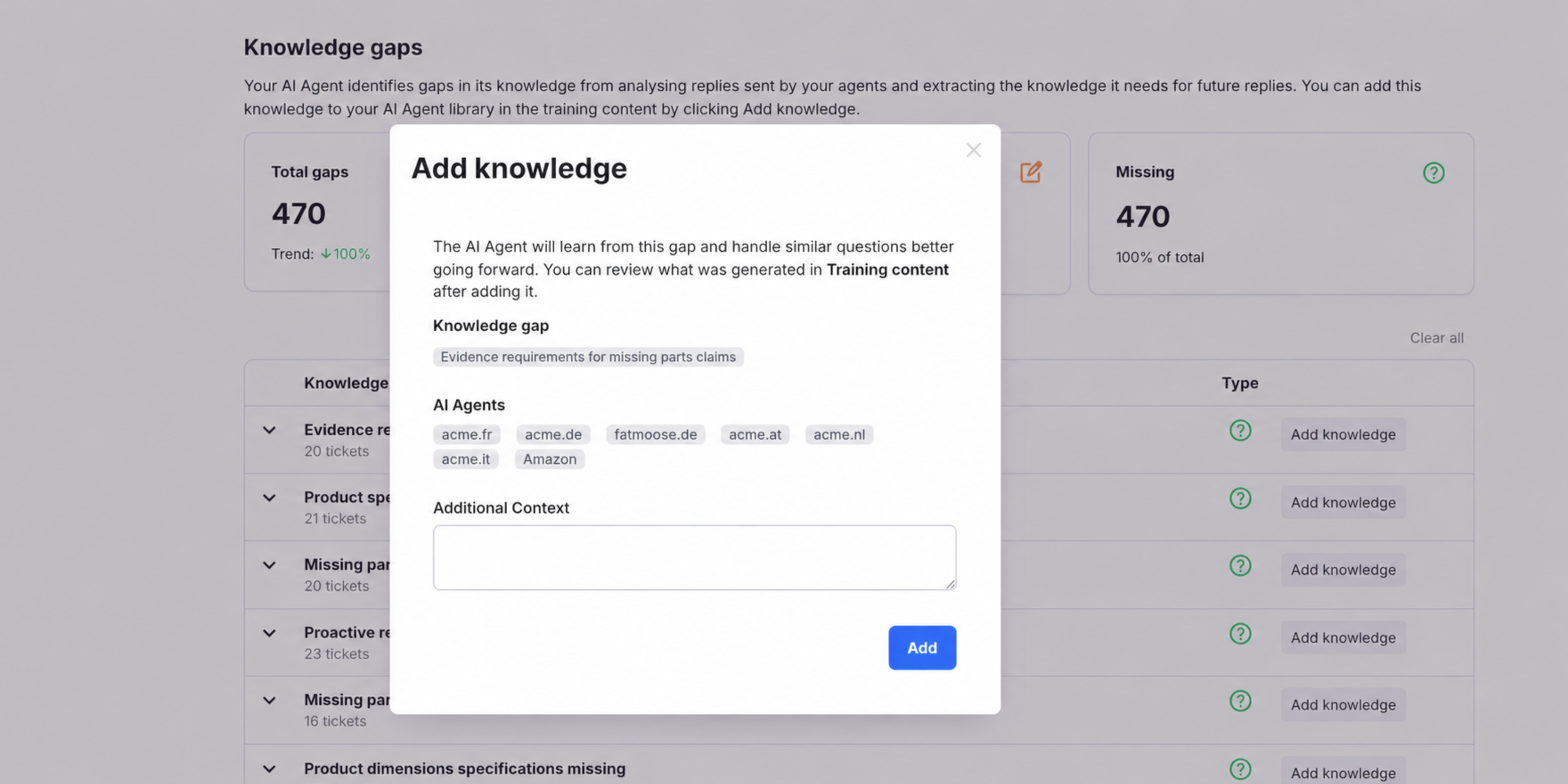
eDesk AI Adds One-Click Knowledge Base Article Generation
eDesk AI automatically detects missing knowledge base content and generates complete articles in one click. The feature uses historical support conversations to create documentation that reflects how your team resolves customer issues. Highlights include:
- AI Knowledge Gap Detection: Identifies missing topics in your knowledge base.
- One-Click Article Generation: Creates complete knowledge base articles instantly.
- Ticket-Based Content Creation: Uses linked tickets, agent replies, and conversation patterns to generate relevant documentation.
Visit eDesk's official site for more details.
eDesk Specs
- API: Yes
- Calendar Management: Yes
- Call Integration: Yes
- Chat: Yes
- Click-to-Dial: Yes
- Contact Management: Yes
- CRM Integration: Yes
- Customer Management: Yes
- Dashboard: Yes
- Data Export: Yes
- Data Import: Yes
- Data Visualization: Yes
- Email Integration: Yes
- Escalation Management: Yes
- External Integrations: Yes
- Google Apps Integration: Yes
- Inventory Tracking: Yes
- Knowledge Base: Yes
- Lead Management: Yes
- Lead Scoring: Yes
- Marketing Automation: Yes
- Multi-User: Yes
- Net Promoter Score: Yes
- Notifications: Yes
- Online Surveys: Yes
- SAP Integration: Yes
- Scheduling: Yes
- Self-service Portal: Yes
- Supplier Management: Yes
- Support Forum: Yes
- Ticket Management: Yes


