


Jira Service Management vs. Zendesk: Comparison & Expert Reviews for 2026

We review tools independently, and commissions help fund our testing. See our transparency policy, our methodology, or suggest a tool.
Jira Service Management (JSM) gives you deep IT workflow control, while Zendesk delivers intuitive, omnichannel support—so choosing between these two customer service software giants can feel like a tug-of-war between technical power and effortless customer experiences. If you’re weighing Jira’s process-driven approach against Zendesk’s user-friendly interface, you’re not alone. Your decision will shape how your team collaborates, resolves issues, and delights customers at scale.
In this guide, you’ll get a side-by-side look at features, pricing, and real-world feedback to help you confidently pick the platform that fits your goals, team, and customers.
Jira Service Management
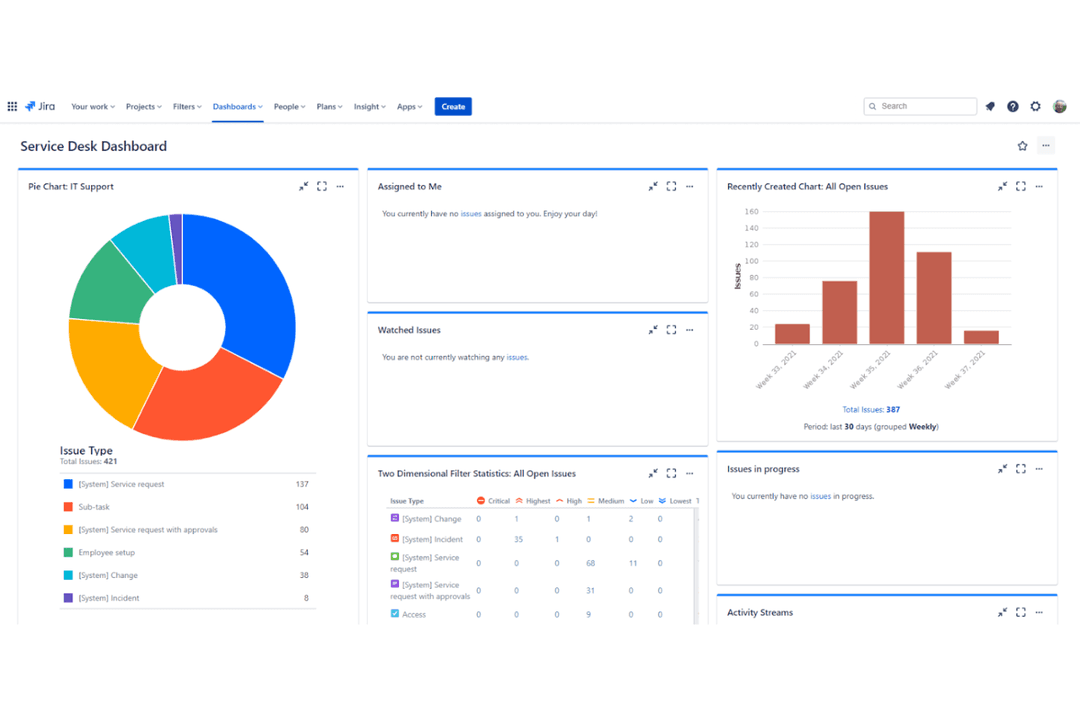

4/5
- Free plan available
- From $21.50/user/month
Zendesk

4.3/5
- Free trial available
- From $25/agent/month (billed annually)
Why Trust Our Software Recommendations
6,700+
Reviews
20
Industry experts
16+
Evaluation factors
14
Years
Our team has been testing and reviewing software since 2012. As CX leaders ourselves, we know how difficult—and important—it is to choose the right software.
For this guide, we evaluated tools using hands-on testing and independent research, scoring tools using our selection criteria.
Our reviews reflect our human editorial judgment, not a sales pitch.
 Gui DrusinaCreative Director
 Tim FisherVP of AI
| Jira Service Management | Zendesk | |
|---|---|---|
| Free Trial | Free plan available | Free trial available |
| Pricing | From $21.50/user/month | From $25/agent/month (billed annually) |
Jira Service Management vs. Zendesk Pricing & Hidden Costs
Jira Service Management uses a tiered subscription model based on the number of agents and feature sets, with costs increasing as you add advanced ITSM capabilities or automation. A free plan is available for up to three agents. Zendesk also offers tiered plans, but pricing depends on both agent seats and the specific support channels or add-ons you activate, such as chat, voice, or analytics. With both platforms, you may encounter extra charges for premium features, integrations, or higher support levels, so it’s important to look beyond the base plan.
To choose the right vendor, map out your current and future support needs—including team size, required channels, and must-have integrations. Request a detailed quote that includes all anticipated add-ons and support tiers, and ask about potential price increases as your usage grows. Comparing total cost of ownership, not just sticker price, will help you avoid surprises and ensure your investment matches your long-term goals.
Jira Service Management and Zendesk overlap as full-featured service desk platforms, both offering ticket routing, customizable workflows, service requests, escalations, SLA tracking, reporting, and real-time tracking of customer interactions. They also offer multichannel support across email, chat, and portals, and have a knowledge base and broader knowledge management capabilities.
For both platforms, many features are available out-of-the-box, with AI capabilities—such as AI agents, intelligent routing, and automation—helping streamline workflows, though more advanced AI features may require higher-tier plans or configuration.
Where they differ is in focus: Jira Service Management stands out with advanced ITSM functionality for technical teams, including built-in incident management, change management, problem management, and asset management, plus deep integration with development workflows. Zendesk, by contrast, excels in customer-facing support with strong tools for managing high-volume customer interactions and self-service portals. It also has robust engagement tools that prioritize seamless, AI-powered customer experiences.
| Jira Service Management | Zendesk | |
|---|---|---|
| Analytics | Yes | Yes |
| API | Yes | Yes |
| Batch Permissions & Access | Yes | No |
| Call Integration | Yes | Yes |
| Chat | Yes | Yes |
| Contact Management | Yes | Yes |
| CRM Integration | Yes | Yes |
| Customer Management | Yes | Yes |
| Data Export | Yes | Yes |
| Data Import | Yes | Yes |
| Email Integration | Yes | Yes |
| Escalation Management | Yes | Yes |
| External Integrations | Yes | Yes |
| Instant Chat Integration | Yes | Yes |
| Knowledge Base | Yes | Yes |
| Multi-User | Yes | Yes |
| Notifications | Yes | Yes |
| Real-time Alerts | Yes | Yes |
| Self-service Portal | Yes | Yes |
| Social Media Integration | Yes | Yes |
| Support Forum | Yes | Yes |
| Ticket Management | Yes | Yes |
| Workflow Management | Yes | Yes |
| Integration | Jira Service Management | Zendesk |
| Slack | ✅ | ✅ |
| Microsoft Teams | ✅ | ✅ |
| Salesforce | ✅ | ✅ |
| Google Workspace | ✅ | ✅ |
| HubSpot | ✅ | ✅ |
| Confluence | ✅ | ✅ |
| Trello | ✅ | ✅ |
| Shopify | ✅ | ✅ |
| GitHub | ✅ | ✅ |
| Mailchimp | ✅ | ✅ |
| API | ✅ | ✅ |
| Zapier | ✅ | ✅ |
Both Jira Service Management and Zendesk cover the most popular integrations, but Jira’s deep connections with Atlassian tools like Confluence and GitHub set it apart for technical teams. With APIs and Zapier available on both platforms, you’ll have plenty of flexibility to connect your favorite tools and automate workflows.
| Factor | Jira Service Management | Zendesk |
| Data Encryption | Encrypts data in transit (TLS) and at rest using industry-standard encryption. | Uses TLS and AES-256 encryption for data in transit and at rest. |
| Regulatory Compliance | Offers GDPR, SOC2, ISO 27001, and HIPAA compliance options. | Supports GDPR, SOC 2, ISO 27001, HIPAA (with BAA), and additional global privacy frameworks (e.g., CCPA, PIPEDA). |
| Access Controls | Provides granular role-based permissions, SAML SSO, and identity management controls. | Includes role-based access, SSO, and multi-factor authentication (MFA). |
| Uptime Guarantee | Offers a 99.9% uptime SLA for cloud plans (via Atlassian Cloud SLA). | Promises 99.9% uptime SLA and publishes live service delivery status updates. |
| Audit Logs | Maintains detailed audit logs for all user and admin activities. | Offers comprehensive audit logs and activity tracking. |
Both Jira Service Management and Zendesk offer strong security and reliability foundations, including encryption in transit and at rest, compliance with standards like GDPR, SOC 2, and ISO 27001, role-based access controls with SSO, audit logging, and a 99.9% uptime SLA.
The key difference lies in execution: Jira Service Management provides more granular permission controls and deeper identity management integration, making it better suited for organizations with strict governance needs, while Zendesk emphasizes broader global compliance coverage and simpler security configuration, making it easier for customer-facing teams to manage security with less administrative complexity.
| Factor | Jira Service Management | Zendesk |
| User Interface | Offers a customizable interface, but can feel complex for new users. | Features a clean, intuitive dashboard that’s easy to navigate. |
| Onboarding | Provides guided setup, though configuration may require technical know-how. | Delivers step-by-step onboarding and helpful in-app tutorials. |
| Workflow Setup | Allows deep workflow customization, which can be powerful but time-consuming. | Enables quick setup of common workflows with prebuilt templates. |
| Support Resources | Includes extensive documentation and community forums. | Offers live chat, help center, and responsive customer support. |
| Learning Curve | Steeper learning curve, especially for teams unfamiliar with Jira, JQL, or multi-project setups. | Minimal learning curve, suitable for teams of all skill levels. |
Zendesk is generally easier to adopt and use day-to-day, thanks to its intuitive interface and streamlined onboarding. Jira Service Management offers more flexibility and depth, but its reliance on concepts like JQL and multi-project configurations can make it more complex to learn and manage. As a result, Zendesk often appeals to teams prioritizing speed and simplicity, while Jira Service Management is better suited for organizations that need advanced customization and are comfortable working within the Atlassian ecosystem.
Jira Service Management
- You can customize workflows to fit your team's processes.
- It offers strong project tracking and issue resolution capabilities.
- The software enhances collaboration with clear communication channels.
- The interface might seem a bit complex at first.
- It could take some time to fully learn all the features.
- You may encounter occasional performance lags with large data sets.
Zendesk
- AI-powered automation helps reduce ticket volume and agent workload.
- Unified workspace for email, chat, voice, social, and messaging.
- Fast deployment with strong out-of-the-box workflows and automation.
- Administration becomes more complex as environments scale.
- Advanced customization may require apps or API development.
- Compliance requirements can require additional configuration effort.
Jira Service Management
- IT DepartmentsJira Service Management's customizable workflows and strong issue tracking make it perfect for handling IT service requests.
- Technology StartupsIf you're in a startup, its agile project management features will help your team stay ahead in a fast-paced environment.
- Software Development TeamsThe software's robust project tracking capabilities support complex development cycles.
- Customer Support CentersEnhance your team's efficiency with its clear communication channels and streamlined processes.
- Agile TeamsYou'll appreciate its flexibility in managing projects and adapting to changes quickly.
- Project Management OfficesIts capabilities for workflow customization and project tracking are ideal for overseeing multiple projects efficiently.
Zendesk
- SaaS Customer SuccessOffers automation, self-service, and analytics to help growing teams improve customer retention and scale support efficiently.
- Retail & Ecommerce SupportDelivers omnichannel support across web, messaging, social, and voice to create seamless customer experiences.
- Enterprise Customer Service OperationsSupports complex routing, governance, security, and multibrand environments for large-scale customer service organizations.
- Global Support TeamsProvides scalable workflows for distributed agents and customers across regions, languages, and support channels.
- IT & Employee Service DesksAutomates internal requests and streamlines service delivery processes to improve efficiency and employee satisfaction.
- High-Volume Customer Support CentersUses AI and automation to improve resolution efficiency while reducing repetitive agent workloads and costs.
Who Should Use Jira Service Management, and Who Should Use Zendesk?
Jira Service Management is best suited for IT teams and organizations already using the Atlassian ecosystem, especially those working closely with development or DevOps. It’s a strong fit if your use cases require advanced customization, complex workflows, or on-premise/Data Center deployment options. IT support teams with technical expertise (e.g., comfortable with JQL and multi-project setups) will get the most value from its flexibility.
Zendesk is better if you have a customer support team that prioritizes ease of use, fast onboarding, and efficient day-to-day operations. It works well for organizations that need a straightforward, scalable help desk without heavy technical configuration. Teams looking for quick deployment and a user-friendly interface will typically find Zendesk easier to adopt and manage.
| Jira Service Management | Zendesk | |
|---|---|---|
| Deployment Options | Jira Service Management Offers cloud and data center options for more control. | Zendesk Primarily cloud-based SaaS with limited deployment flexibility. |
| Integration Focus | Jira Service Management Deep integration with Atlassian products (e.g., Jira Software, Confluence, and Trello) and developer tools. | Zendesk Broad integrations with sales, marketing, and ecommerce tools. |
| ITSM Capabalities | Jira Service Management Built for IT service management with incident, problem, and change tracking. | Zendesk Focuses on customer support, with limited ITSM features. |
| User Interface | Jira Service Management Customizable but complex, best for technical users. | Zendesk Intuitive and streamlined, designed for ease of use. |
| Workflow Customization | Jira Service Management Offers advanced, granular workflow and automation configuration. | Zendesk Provides simple, template-driven workflow setup. |
| Automation | Each platform provides automation tools for routing, notifications, and repetitive task handling, helping teams save time and reduce errors. |
|---|---|
| Multichannel Support | Each supports multiple communication channels, including email and chat, so teams can meet customers where they are. |
| Reporting & Analytics | Both include built-in dashboards and customizable reports to track performance metrics and customer satisfaction trends. |
| Security Standards | Both platforms meet high security and compliance standards, offering encryption, access controls, and audit logs to protect sensitive data. |
| Ticket Management | Both offer robust ticketing systems with assignment, prioritization, and status tracking to streamline support workflows. |