


monday service vs. Zendesk: Comparison & Expert Reviews For 2026

We review tools independently, and commissions help fund our testing. See our transparency policy, our methodology, or suggest a tool.
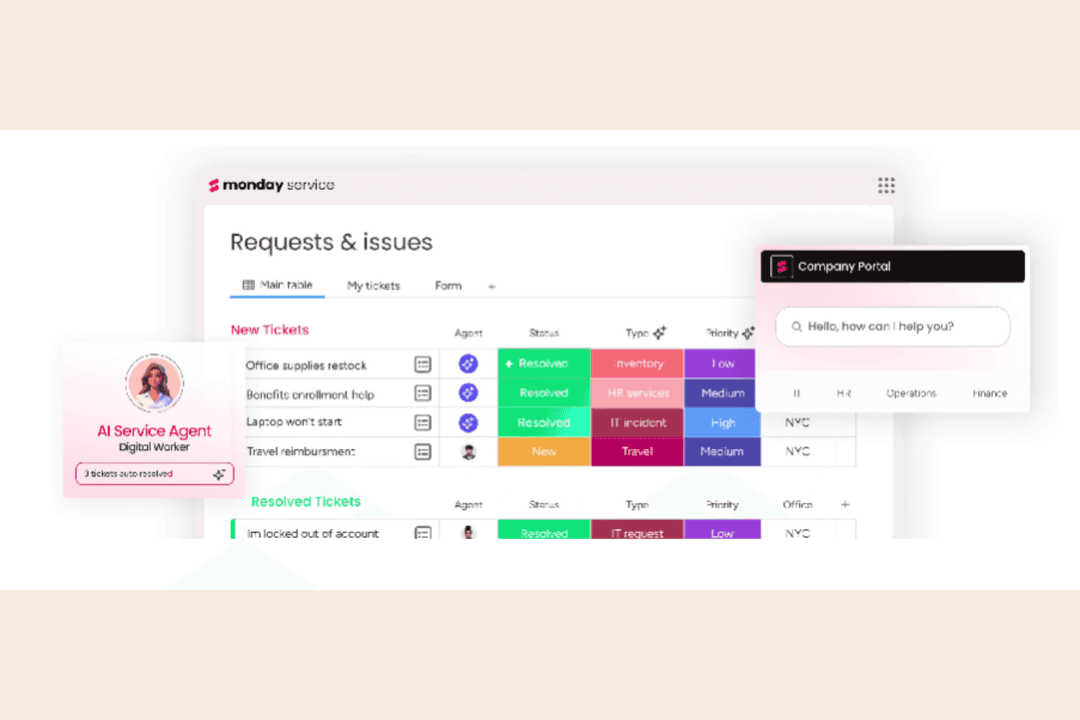
monday service, part of the broader monday.com suite, is a flexible service management tool built to streamline internal and external requests across teams. Zendesk is a customer-focused service platform designed to manage high-volume support with structure and speed. While both aim to improve how your team handles service operations, monday service leans into customization options and visibility, whereas Zendesk is closer to a traditional ticketing system with automation. In this monday service vs. Zendesk comparison, I’ll compare the tools across key features, pricing, pros and cons, and more to help you choose the right service management tool for your team.
monday service
4.6/5
- 14-day free trial
- From $8/user/month (billed annually)
Zendesk


4.3/5
- Free trial available
- From $25/agent/month (billed annually)
Why Trust Our Software Recommendations
6,700+
Reviews
20
Industry experts
16+
Evaluation factors
14
Years
Our team has been testing and reviewing software since 2012. As CX leaders ourselves, we know how difficult—and important—it is to choose the right software.
For this guide, we evaluated tools using hands-on testing and independent research, scoring tools using our selection criteria.
Our reviews reflect our human editorial judgment, not a sales pitch.
 Gui DrusinaCreative Director
 Tim FisherVP of AI
| monday service | Zendesk | |
|---|---|---|
| Free Trial | 14-day free trial | Free trial available |
| Pricing | From $8/user/month (billed annually) | From $25/agent/month (billed annually) |
monday service vs. Zendesk Pricing & Hidden Costs
Both platforms operate under a tiered pricing model, but their value depends on your needs and how deep you plan to go with customization and integrations.
monday service offers a 14-day free trial and charges based on user count and feature tier. Their pricing tiers—Standard, Pro, and Enterprise—scale in functionality, with automation, advanced integrations, and reporting capabilities locked behind higher tiers. Features like SLAs, ticket forms, and customer portal customizations are only available in the Enterprise Pro plans. Add-ons such as extra automation runs or integrations may also increase costs.
Zendesk tiers start with basic Support plans and go up to Suite Enterprise for full-service operations. Advanced features like AI tools, customer satisfaction prediction, and workforce management come with higher-tier plans. Scaling can get expensive with Zendesk, especially when adding agents or unlocking AI and advanced features.
Tip: Always factor in not just the base monthly fee per user, but also the cost of needed add-ons, API access limits, storage usage, and third-party tool integrations.
With monday service’s customizable boards, you can build tailored workflows for handling internal IT or ops requests without switching tools. Zendesk’s AI-powered ticket triage is great for high-volume support teams that need to auto-prioritize customer interactions and issues fast. Both handle service requests well, but monday gives you more workflow control, while Zendesk focuses on speed and scale.
| monday service | Zendesk | |
|---|---|---|
| Analytics | Yes | Yes |
| API | Yes | Yes |
| Call Integration | No | Yes |
| Chat | No | Yes |
| Contact Management | Yes | Yes |
| CRM Integration | No | Yes |
| Customer Management | Yes | Yes |
| Dashboard | Yes | Yes |
| Data Export | Yes | Yes |
| Data Import | Yes | Yes |
| Data Visualization | Yes | Yes |
| Email Integration | No | Yes |
| External Integrations | Yes | Yes |
| Instant Chat Integration | No | Yes |
| Knowledge Base | Yes | Yes |
| Lead Management | No | No |
| Lead Scoring | No | No |
| Multi-User | No | Yes |
| Notifications | Yes | Yes |
| Real-time Alerts | Yes | Yes |
| Scheduling | Yes | Yes |
| Self-service Portal | Yes | Yes |
| Social Media Integration | No | Yes |
| Support Forum | No | Yes |
| Ticket Management | Yes | Yes |
| Workflow Management | Yes | Yes |
Modern teams rely on seamless integrations. Here’s how each platform supports third-party connections:
| Integration | monday service | Zendesk |
| Slack | ✅ | ✅ |
| Google Drive | ✅ | ✅ |
| Salesforce | ✅ | ✅ |
| HubSpot | ✅ | ✅ |
| Miro | ✅ | ❌ |
| Shopify | ❌ | ✅ |
| Trello | ✅ | ❌ |
| Microsoft Teams | ✅ | ✅ |
| QuickBooks | ❌ | ✅ |
| Mailchimp | ✅ | ❌ |
| API | ✅ | ✅ |
| Zapier | ✅ | ✅ |
With monday service’s integration with Google Workspace and Gmail, you can easily connect forms and calendars to track internal requests, log communication, and auto-link emails to tickets. Zendesk, meanwhile, shines in the e-commerce and CRM space. Integration with Shopify makes it a go-to for online retailers.
Zapier and APIs are available on both platforms, enabling teams to build custom workflows or connect niche tools not available natively.
Security and compliance are non-negotiable for most organizations, especially those dealing with customer data. Here’s a comparison:
| Factor | monday service | Zendesk |
| Encryption | Uses TLS and AES-256 for data in transit and at rest across all boards. | Encrypts data with TLS and AES-256, including backups and activity logs. |
| Compliance Standards | Holds SOC 2 Type II and GDPR compliance as part of its service. | Maintains SOC 2 Type II, GDPR, and HIPAA compliance for qualified plans. |
| Uptime Guarantee | 99.9% SLA across all paid plans | 99.9% SLA backed by real-time status tracking |
| Access Controls | Role-based permissions + two-factor authentication | Advanced role controls + multi-factor authentication |
| Data Residency | Allows choosing between US, EU, and APAC data regions in Enterprise plans. | Supports multi-region data residency options in higher-tier plans. |
monday service emphasizes board-level user control and ease of access configuration, especially for small businesses and teams operating across departments. Zendesk prioritizes enterprise-level governance. Its features include audit logs, secure credential storage, and proactive monitoring for regulatory compliance.
Both tools are secure and enterprise-ready. To pick the right one, audit your regulatory requirements, examine support for needed encryption or residency options, and match that against each vendor’s compliance documentation, SLAs, and admin controls.
Ease of use can make or break adoption—especially in teams without technical expertise.
| Factor | monday service | Zendesk |
| User Interface | Uses a flexible, visual, board-style layout. | Features an intuitive interface that’s easy to scan. |
| Onboarding | Self-guided tutorials, templates, knowledge base. | Setup wizard, walkthroughs, and documentation |
| Setup Process | Minimal setup with ready-made templates. Customizing boards and workflows can take time. | Requires ticket form setup, routing rules, etc. Comes with prebuilt flows to get your team live fast. |
| Customer Support | 24/7 via email/chat, plus help center access. | 24/7 via phone, chat, help center, and community forums. |
| Customization | Workspaces, widgets, and workflow automation flexibility. | Macros, triggers, branding, and ticket workflow builders. |
Zendesk feels smooth and fast to adopt when you just need a help desk, while monday service has more upfront effort but delivers flexibility once your task management workflows are set up. If you want something user-friendly or plug-and-play, Zendesk wins; if you need a tailored internal request workflow or dashboards, monday service pays off.
monday service
- You can easily customize workflows to fit your team's processes.
- The user interface is intuitive, and the unified workspace enhances collaboration.
- AI automation of routine ticketing tasks can improve your team’s response time.
- You might find the initial setup a bit complex if you're new to such tools.
- Advanced features might require a bit of a learning curve for your team.
- ITSM modules are only available in the Enterprise plan.
Zendesk
- AI-powered automation helps reduce ticket volume and agent workload.
- Unified workspace for email, chat, voice, social, and messaging.
- Fast deployment with strong out-of-the-box workflows and automation.
- Administration becomes more complex as environments scale.
- Advanced customization may require apps or API development.
- Compliance requirements can require additional configuration effort.
monday service
- Customer Support TeamsYou can track tickets, prioritize requests, and measure SLAs with workflows tailored to how your team actually works.
- Professional ServicesYou can manage service delivery and client support with full visibility across timelines, ownership, and communication.
- SMB Support OrganizationsIt’s great if you’re scaling fast and need structure without the complexity (or cost) of legacy support platforms.
- B2B SaaS CompaniesYou can integrate product, success, and support teams so customer issues don’t fall through the cracks.
- Non-Tech Service TeamsWith its no-code interface, anyone can build and update workflows without waiting on IT or developers.
- Support Operations LeadersYou get real-time dashboards and performance tracking to manage teams, surface bottlenecks, and improve service quality.
Zendesk
- SaaS Customer SuccessOffers automation, self-service, and analytics to help growing teams improve customer retention and scale support efficiently.
- Retail & Ecommerce SupportDelivers omnichannel support across web, messaging, social, and voice to create seamless customer experiences.
- Enterprise Customer Service OperationsSupports complex routing, governance, security, and multibrand environments for large-scale customer service organizations.
- Global Support TeamsProvides scalable workflows for distributed agents and customers across regions, languages, and support channels.
- IT & Employee Service DesksAutomates internal requests and streamlines service delivery processes to improve efficiency and employee satisfaction.
- High-Volume Customer Support CentersUses AI and automation to improve resolution efficiency while reducing repetitive agent workloads and costs.
Who Should Use monday service, and Who Should Use Zendesk?
In my opinion, monday service is the better choice if your team needs flexibility, cross-team coordination, and a platform that adapts to how you work—not the other way around. It’s ideal for customer service leaders supporting both internal and external requests or juggling complex workflows.
Zendesk is better suited for teams that want a fast, out-of-the-box solution focused strictly on external support. If you're looking to scale service operations across departments, I’d bet on monday service.
| monday service | Zendesk | |
|---|---|---|
| Automation Approach | monday service Offers broad automation across boards, items, and timelines. | Zendesk Strong built-in ticket automations like triggers, macros, and SLAs. |
| Pricing | monday service Charges by users and tier, with added cost for advanced automations. | Zendesk Pricing rises with agent count, add-ons, and features like AI and bots. |
| Setup Time | monday service Takes more time upfront to configure, but adapts to many use cases. | Zendesk Quick to launch with prebuilt support flows and defaults. |
| User Interface | monday service Visual, board-based UI built for collaboration and transparency. | Zendesk Traditional help desk layout focused on queues and agent efficiency. |
| Workflow Flexibility | monday service Lets you build custom workflows across teams using boards, forms, and automations. | Zendesk Uses structured ticket flows designed for external customer support. |
| Automation Features | Each tool supports rules-based automation—Zendesk with triggers/macros, monday with custom workflows. |
|---|---|
| Cloud-Based Delivery | Both are cloud-based, no-install tools that offer fast deployment and ongoing updates. |
| Integration Options | Both connect with tools like Slack, Salesforce, and Google Workspace to fit into your stack. |
| Role-Based Access | You can set permissions, assign roles, and control visibility across teams in both platforms. |
| Ticket Management | Both let your customer experience team capture, assign, and track service requests through structured, searchable workflows. |