

Sentry Review: Pros, Cons, Features, and Pricing
Sentry excels in real-time error tracking, providing your team with instant insights and integrations that enhance your web application's reliability and performance.

We review tools independently, and commissions help fund our testing. See our transparency policy, our methodology, or suggest a tool.
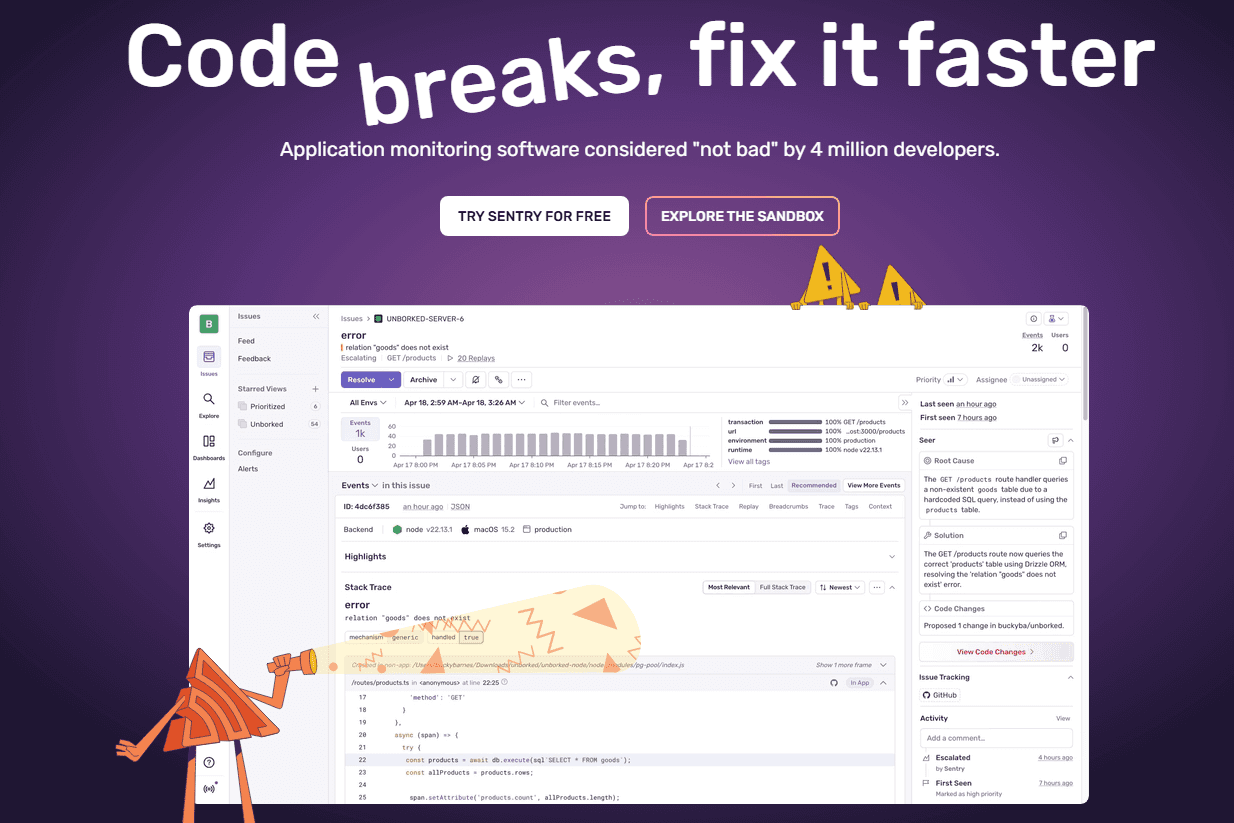
Sentry is a digital monitoring tool built around error tracking and application performance monitoring for engineering and development teams. It's worth considering if your team needs to catch and debug code errors in production, with visibility down to the exact line of code causing the issue. Compared to Datadog, Sentry is a more focused choice for teams whose primary need is code-level error tracking rather than broad infrastructure observability.
Sentry Evaluation Summary
4.5/5
- From $26/month (billed annually)
- Free plan available
Why Trust Our Software Recommendations
6,700+
Reviews
20
Industry experts
16+
Evaluation factors
14
Years
Our team has been testing and reviewing software since 2012. As CX leaders ourselves, we know how difficult—and important—it is to choose the right software.
For this guide, we evaluated tools using hands-on testing and independent research, scoring tools using our selection criteria.
Our reviews reflect our human editorial judgment, not a sales pitch.
 Gui DrusinaCreative Director
 Tim FisherVP of AI
Sentry Overview
In my opinion, Sentry offers a solid platform for digital experience monitoring. It's packed with robust core features that cater well to large teams handling complex projects. However, the onboarding experience could be smoother, and its interface might not be immediately intuitive for all users. When it comes to customer support, Sentry provides decent assistance, but there's room for improvement in response times and support channels. Pricing may not fit smaller budgets, making it more suitable for mid to large enterprises that can fully leverage its capabilities. If your team needs comprehensive error tracking with detailed insights, Sentry is worth considering, but weigh it against your budget and the need against a potentially steeper learning curve.
Pros
- Real-time error tracking helps quickly identify and fix codebase issues.
- User-friendly interface makes navigation easy and enhances ease of use.
- Detailed error reports with full stack traces provide your team with actionable insights.
Cons
- Complex initial setup process when using Sentry for the first time.
- Alert system can overwhelm with frequent notifications unless tuned correctly.
- Limited customization options compared to some niche service providers.


How We Test & Score Tools
We’ve spent years building, refining, and improving our software testing and scoring system. The rubric is designed to capture the nuances of software selection and what makes a tool effective, focusing on critical aspects of the decision-making process.
Below, you can see exactly how our testing and scoring works across seven criteria. It allows us to provide an unbiased evaluation of the software based on core functionality, standout features, ease of use, onboarding, customer support, integrations, customer reviews, and value for money.
Core Functionality (25% of final scoring)
The starting point of our evaluation is always the core functionality of the tool. Does it have the basic features and functions that a user would expect to see? Are any of those core features locked to higher-tiered pricing plans? At its core, we expect a tool to stand up against the baseline capabilities of its competitors.
Standout Features (25% of final scoring)
Next, we evaluate uncommon standout features that go above and beyond the core functionality typically found in tools of its kind. A high score reflects specialized or unique features that make the product faster, more efficient, or offer additional value to the user.
We also evaluate how easy it is to integrate with other tools typically found in the tech stack to expand the functionality and utility of the software. Tools offering plentiful native integrations, 3rd party connections, and API access to build custom integrations score best.
Ease of Use (10% of final scoring)
We consider how quick and easy it is to execute the tasks defined in the core functionality using the tool. High scoring software is well designed, intuitive to use, offers mobile apps, provides templates, and makes relatively complex tasks seem simple.
Onboarding (10% of final scoring)
We know how important rapid team adoption is for a new platform, so we evaluate how easy it is to learn and use a tool with minimal training. We evaluate how quickly a team member can get set up and start using the tool with no experience. High scoring solutions indicate little or no support is required.
Customer Support (10% of final scoring)
We review how quick and easy it is to get unstuck and find help by phone, live chat, or knowledge base. Tools and companies that provide real-time support score best, while chatbots score worst.
Customer Reviews (10% of final scoring)
Beyond our own testing and evaluation, we consider the net promoter score from current and past customers. We review their likelihood, given the option, to choose the tool again for the core functionality. A high scoring software reflects a high net promoter score from current or past customers.
Value for Money (10% of final scoring)
Lastly, in consideration of all the other criteria, we review the average price of entry level plans against the core features and consider the value of the other evaluation criteria. Software that delivers more, for less, will score higher.
Core Features
Real-Time Error Tracking: Sentry helps your team spot and fix errors as they happen, keeping your applications running smoothly. This immediate feedback loop ensures you can address issues before they impact users.
User-Friendly Interface: The intuitive design simplifies navigation and heavily softens the steep learning curve usually associated with monitoring platforms. This ease of use means you spend more time solving problems and less time figuring out the tool.
Detailed Error Reports: Sentry provides comprehensive error details, helping your team understand and resolve issues quickly. These insights are invaluable for maintaining high performance in your applications.
Performance Monitoring: Keep an eye on your application's performance to detect bottlenecks and improve user experience. Sentry's monitoring tools help you optimize your system's efficiency.
Alert Management: Customize alerts to keep your team informed without overwhelming them with notifications. This feature ensures you only get notified about the most critical issues.
Issue Grouping: Sentry groups related errors together, helping your team prioritize and tackle problems efficiently. This organization makes it easier to manage and resolve multiple issues at once.
SDK Support: Sentry offers a wide range of SDKs (Software Development Kits) for various languages and frameworks, ensuring seamless integration with your specific tech stack.
Ease of Use
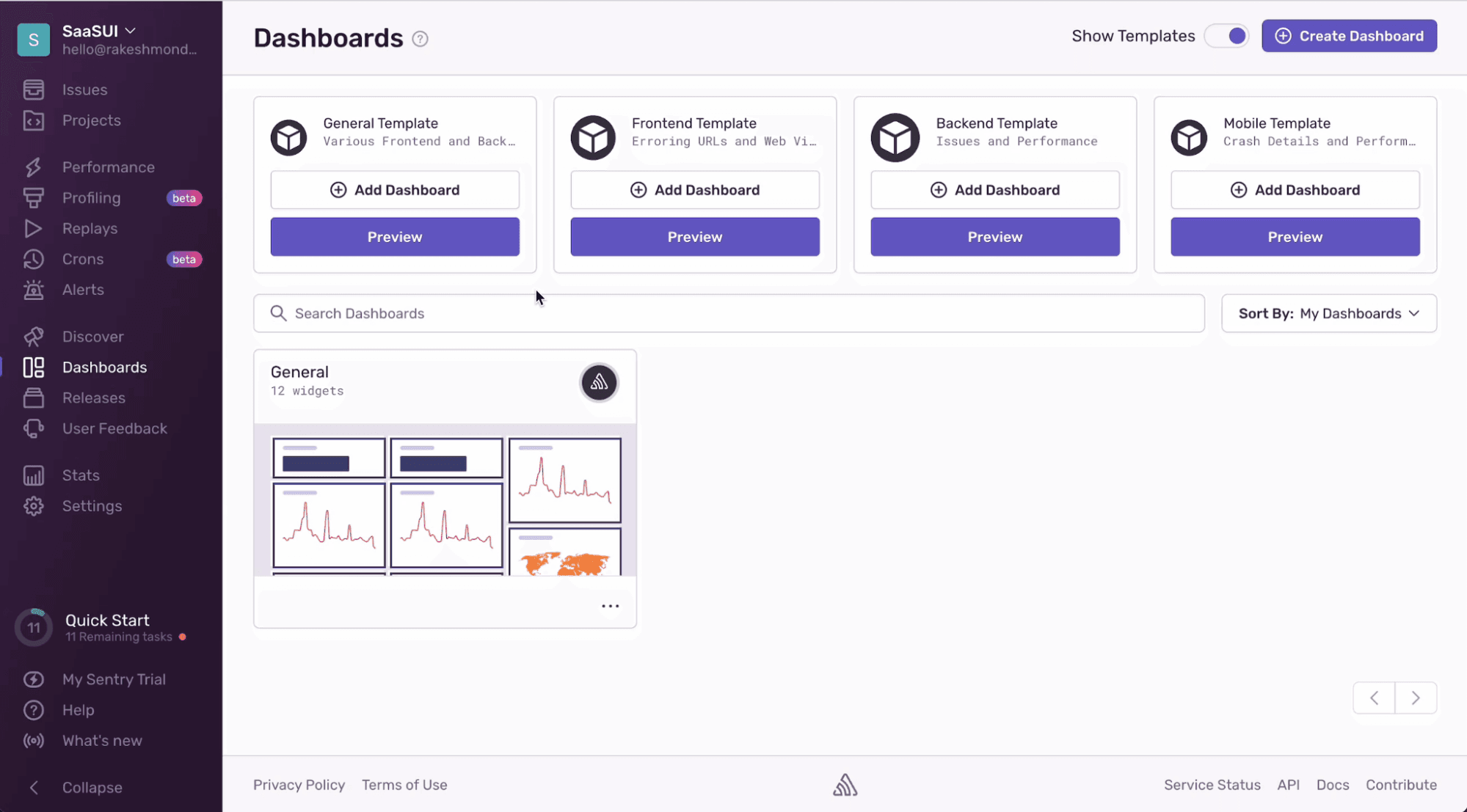
Sentry stands out for its user-friendly interface that simplifies error tracking for your team. You can navigate the platform with ease, focusing on resolving issues rather than learning the tool. The intuitive design means your team can quickly access detailed error reports and performance data. Compared to other platforms, Sentry's straightforward setup and clear layout make it a preferred choice for teams looking to improve their application's reliability without a steep learning curve.
Integrations
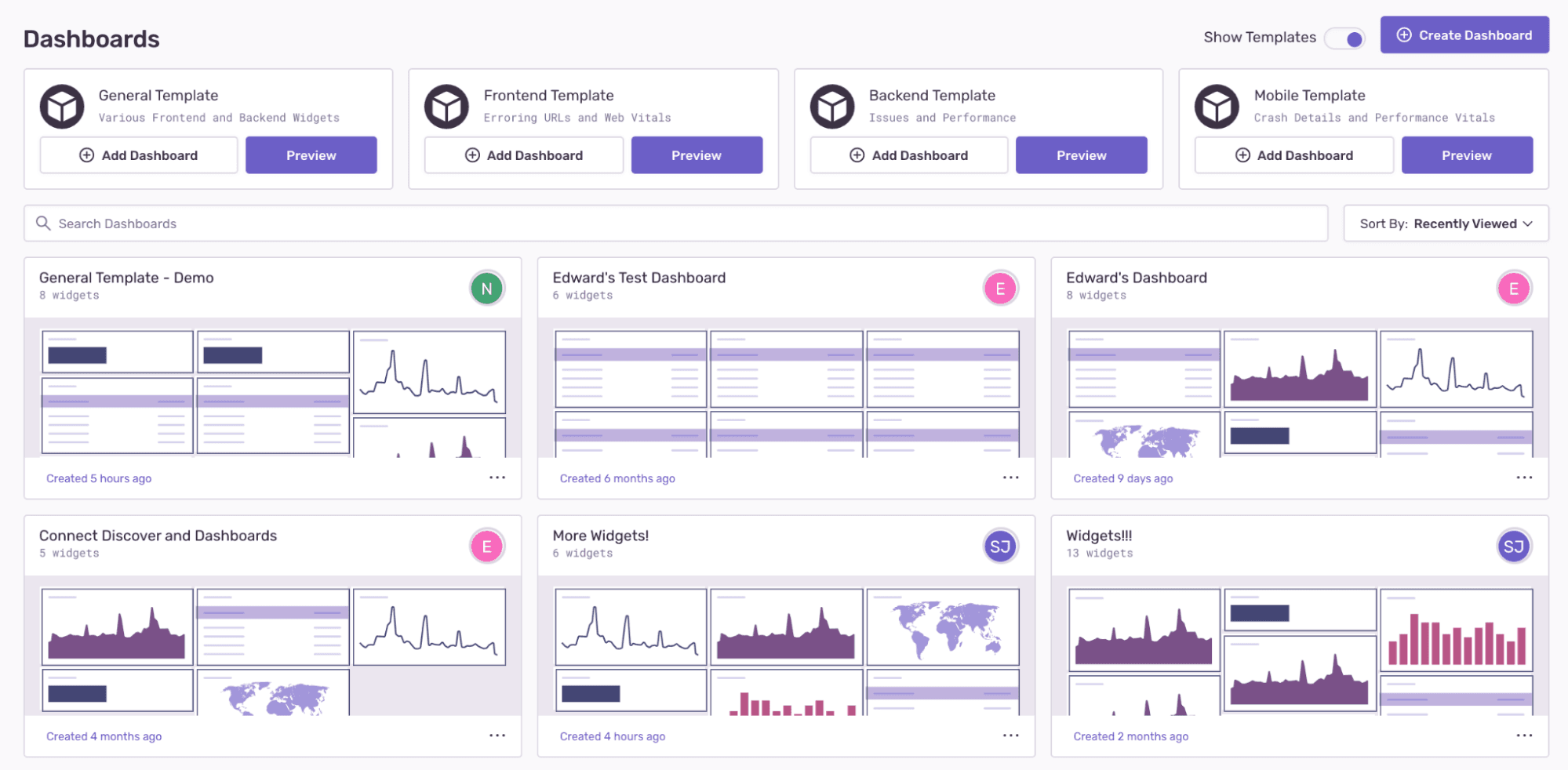
Sentry integrates with GitHub, Bitbucket, GitLab, Azure DevOps, Heroku, Vercel, Trello, Asana, Slack, and Microsoft Teams. You can even link issues directly to your Jira board or code repo.
Sentry also offers an API for custom integrations and connects with third-party integration tools.
New Product Updates from Sentry
 Opens new window
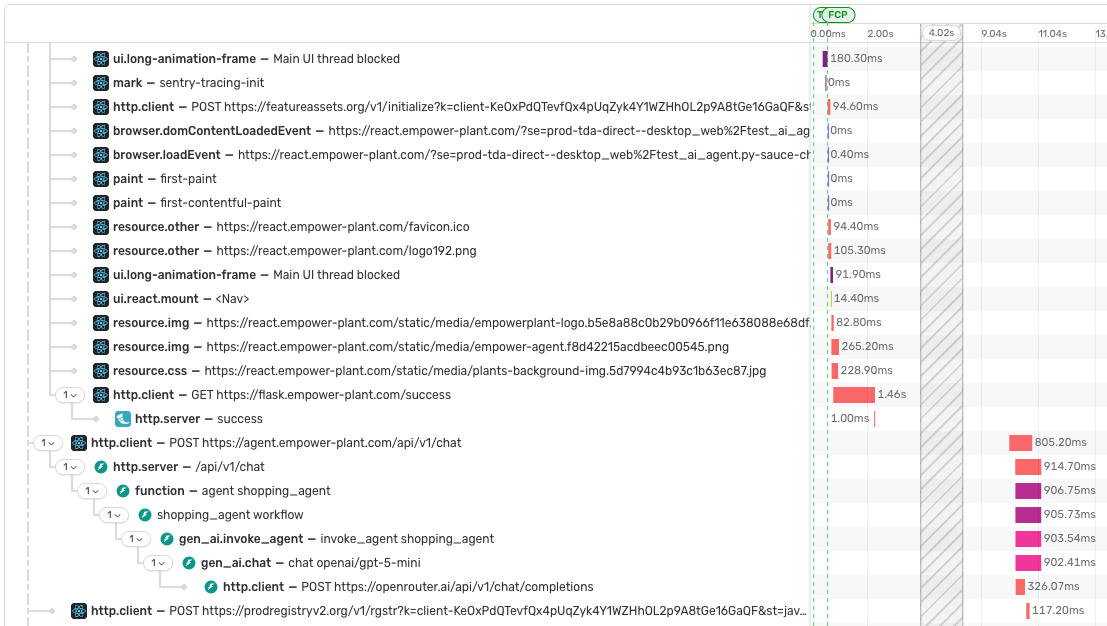
Sentry Expands Trace Waterfall Investigation Tools
Sentry’s trace waterfall can now compress long empty gaps between spans and keep selected attribute values visible across a trace. Users can also click Web Vital pills to jump directly to the point where a metric was recorded. Highlights include:
- Time Compression: Shrink empty gaps between spans to make long traces easier to review.
- Pinned Attributes: Keep selected attribute values visible while exploring a trace.
- Attribute Comparison: Follow how a value changes across different spans.
- Clickable Web Vitals: Jump directly to where a Web Vital was recorded.
- Focused Investigation: Bring surrounding spans into view for faster trace analysis.
Visit Sentry’s official site for more details.
Sentry MCP Adds Dataset Search and Dropped-Event Insights
Sentry’s hosted MCP server now provides dedicated search tools for errors, logs, traces, metrics, profiles, and replays instead of relying on a general event search. It also adds dropped-event insights that compare accepted data with events Sentry received but did not store. Highlights include:
- Dataset-Specific Search: Search errors, logs, traces, metrics, profiles, and replays with dedicated tools.
- Dropped-Event Insights: See which events Sentry received but did not store.
- Outcome Details: Review dropped data by outcome and reason alongside accepted volume.
- Regex Log Search: Run regular-expression filters directly through log searches.
- Time Series Visibility: Identify buckets that are still receiving data before interpreting trends.
- Query Handling: Run supported Sentry search syntax without unnecessary rewriting.
Visit Sentry’s official site for more details.
Sentry CLI Adds Feedback Triage and Replay Downloads
Sentry CLI now lets users resolve, reopen, or mark User Feedback as spam directly from the terminal. It also adds Session Replay downloads as rrweb JSON and DSN listing for projects, monorepos, or organizations. Highlights include:
- Feedback Triage: Resolve, reopen, or mark User Feedback as spam from the CLI.
- Replay Downloads: Save Session Replays as rrweb JSON for playback or further analysis.
- Flexible Replay Lookup: Download replays by replay ID, trace ID, or URL.
- DSN Listing: View public DSNs with key name, enabled status, and creation date.
- Project Coverage: List DSNs for a project, detected monorepo, or organization.
Visit Sentry’s official site for more details.
 Opens new window
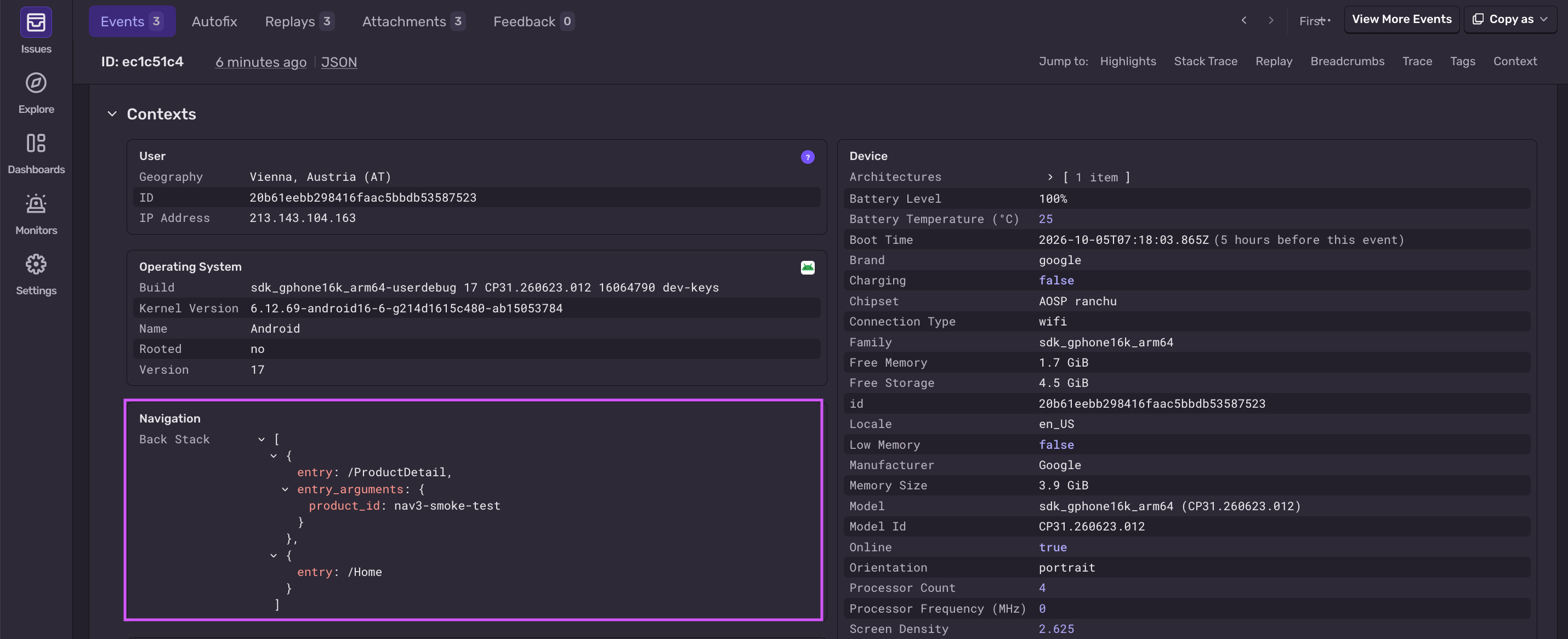
Sentry Expands React Native and Android SDK Monitoring
Sentry’s React Native SDK can now capture TurboModule calls, durations, errors, and active module context during crashes. Its Android SDK also adds Jetpack Navigation 3 support for navigation transactions, breadcrumbs, screen names, and back stack context. Highlights include:
- TurboModule Insights: Track native module calls, durations, and errors in React Native apps.
- Crash Context: Attach the active TurboModule and method to native crash reports.
- Slow Call Breadcrumbs: Record breadcrumbs for slow asynchronous native module calls.
- Jetpack Navigation 3: Capture Android navigation transactions using SentryNavEffect.
- Navigation Context: Record breadcrumbs, screen names, and back stack context.
- Configurable Capture: Use SentryNavOptions to control Android navigation data collection.
Visit Sentry’s official site for more details.
 Opens new window
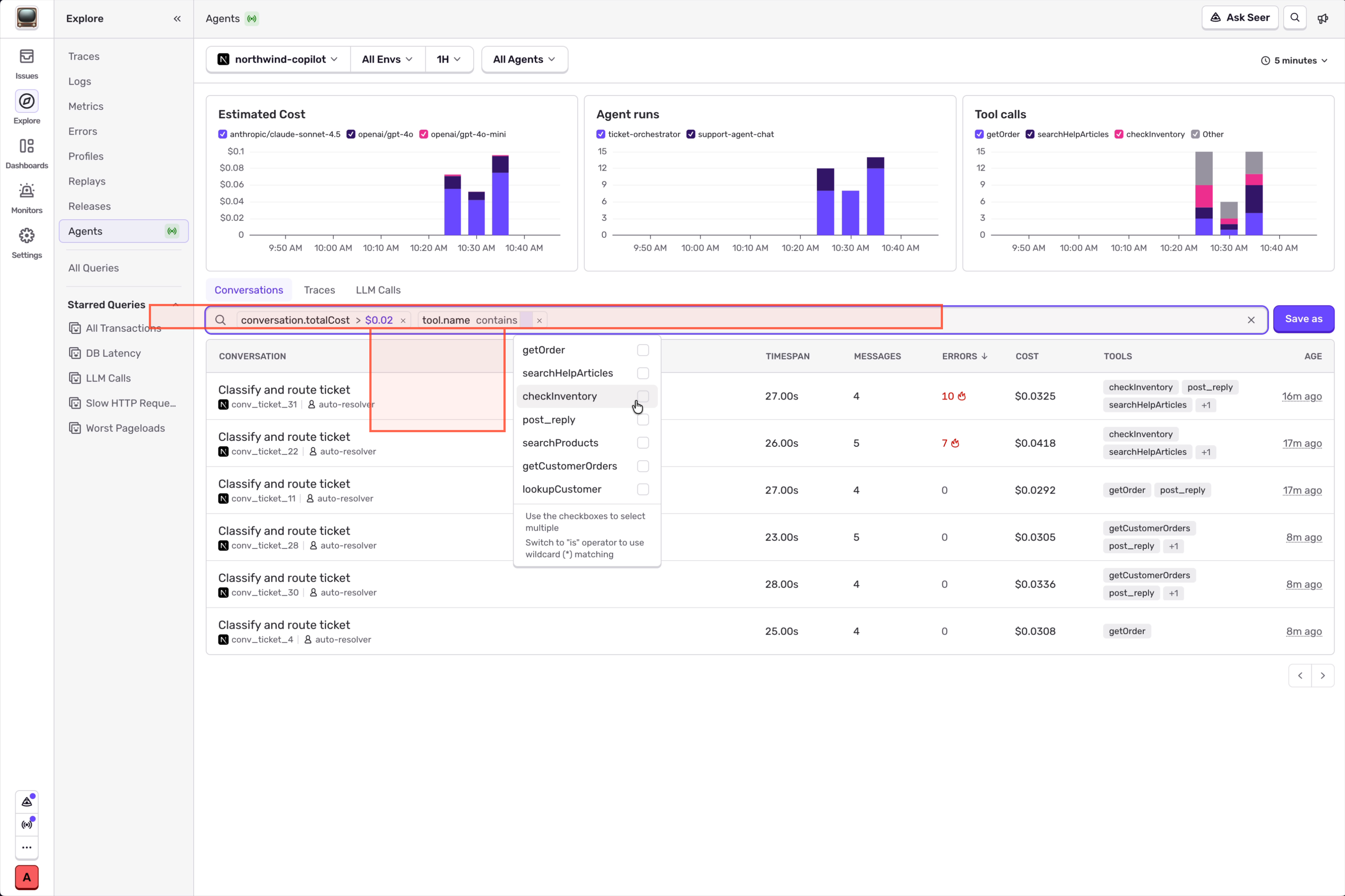
Sentry Adds Agent Conversation Sorting and Filters
Sentry now lets users filter and sort conversations in Explore > Agents using aggregate fields for the entire conversation. Users can compare totals such as cost, tokens, tool calls, errors, messages, and duration. Highlights include:
- Cost Filters: Find conversations based on total cost.
- Token Usage: Filter by total, input, or output token counts.
- Tool Call Filters: Identify conversations with high tool usage.
- Error Sorting: Sort conversations by total errors.
- Conversation Totals: Review messages, duration, generation time, and age.
- Sortable Columns: Order conversation results directly from column headers.
Visit Sentry’s official site for more details.
Sentry Rust SDK Adds Native Crash Reporting
Sentry’s Rust SDK can now capture native crashes caused by unsafe code or FFI calls and send them to Sentry as minidumps. The feature complements existing panic reporting for failures that terminate an application without triggering a Rust panic. Highlights include:
- Native Crash Reporting: Capture crashes such as segmentation faults.
- Minidump Support: Send native crash data to Sentry as minidumps.
- Cross-Platform Coverage: Supports Linux, macOS, and Windows.
- FFI Crash Visibility: Capture failures from unsafe code and C library calls.
- Panic Coverage: Extend existing Rust panic reporting to native application crashes.
Visit Sentry’s official site for more details.
Sentry Expands Agent Tracing for JavaScript SDKs
Sentry adds tracing support for eve, Mastra, Flue, Pi Durable, Groq, Together AI, Mistral AI, and MCP servers, along with more consistent token and conversation data. These updates improve observability across JavaScript AI applications and agent workflows. Highlights include:
- Expanded Framework Support: Trace eve, Mastra, Flue, and Pi Durable agent activity.
- More AI Providers: Add tracing for Groq, Together AI, and Mistral AI.
- MCP Server Tracing: Automatically instrument
McpServerinstances with the default MCP server integration. - Agent Run Visibility: Capture agent runs, model requests, tool calls, and related trace data.
- Normalized Token Usage: Standardize token metrics across providers while preserving cache-token details.
- Conversation Context: Capture conversation IDs from more sources for more consistent traces.
Visit Sentry’s official site for more details.
 Opens new window
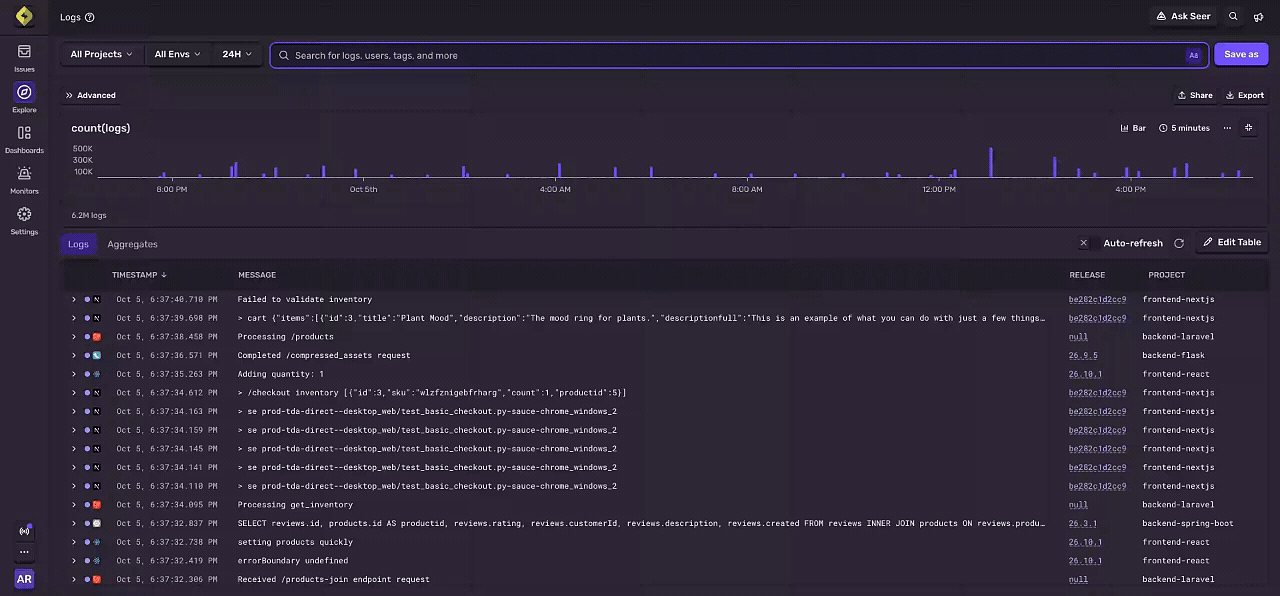
Sentry Adds Regex Search for Logs
Sentry has added regular expression support to Logs search, making it easier to find related log messages even when wording varies. This improves investigations by enabling pattern-based queries directly in the Logs experience. Highlights include:
- Regex Search: Match log entries using patterns instead of exact text.
- String Attribute Filters: Apply regex matching to message fields and other string attributes.
- Exclusion Patterns: Filter out noisy or irrelevant log entries with negative regex matches.
- Case-Insensitive Matching: Use RE2 syntax with optional case-insensitive patterns.
- Pattern-Based Investigation: Search logs when you know the format or structure of an error but not the exact wording.
Visit Sentry’s official site for more details.
Sentry Adds Origin Integration
Sentry has introduced an integration with Origin to enhance how you connect errors and performance issues back to the source code. This helps teams move from detection to resolution faster with better ownership and traceability. Highlights include:
- Stack Trace Linking: Jump from a Sentry stack frame directly to the matching line of code in Origin.
- CODEOWNERS Import: Import email-based ownership rules so issues can be routed to the right people.
- Release Commit Tracking: See which commits shipped in a release and what each one changed.
- Issue Linking: Resolve Sentry issues through commit messages and pull request descriptions using Sentry issue IDs.
Visit Sentry’s official site for more details.
 Opens new window
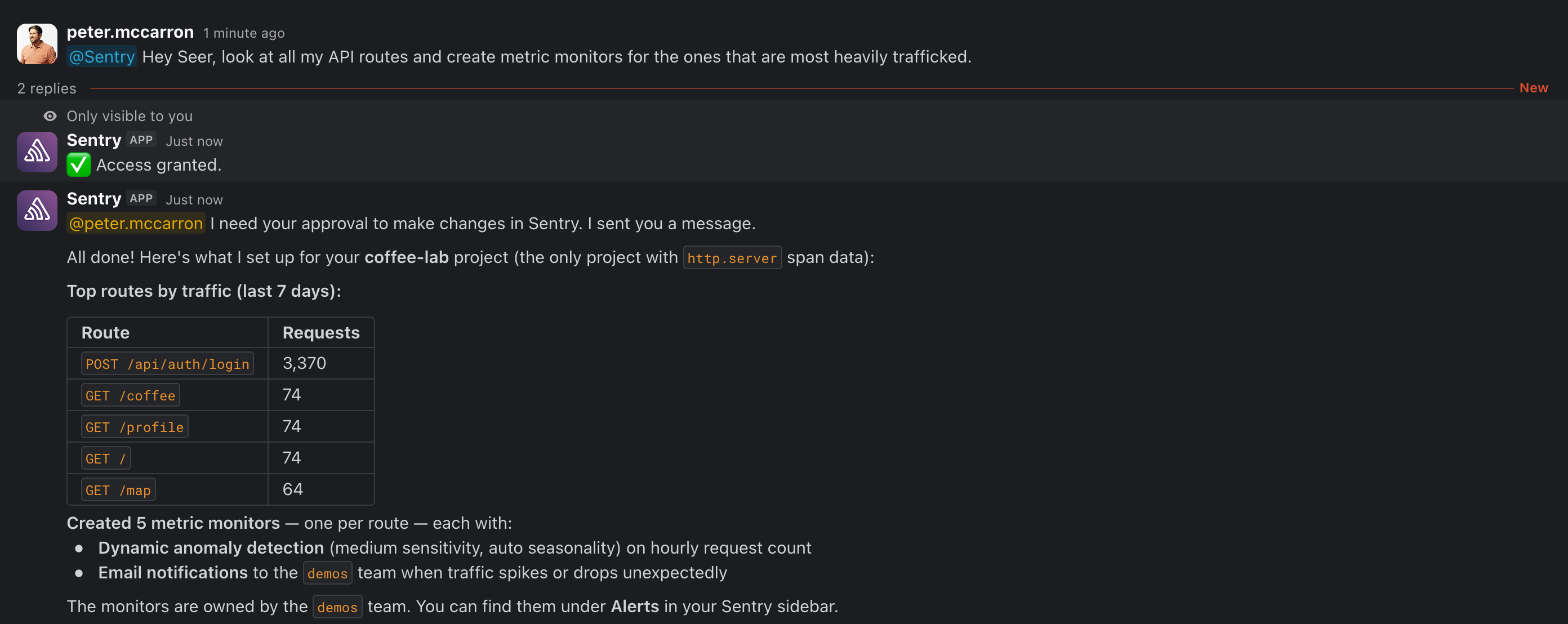
Sentry Expands Seer Agent With API Actions and External Telemetry
Seer Agent now automates more day-to-day Sentry configuration and workflows, reducing manual setup while speeding up troubleshooting. It also broadens diagnostic context by bringing in telemetry from external platforms alongside your Sentry data. Highlights include:
- API Write Access: Let Seer create and manage Sentry assets through the API.
- Dashboard and Alert Creation: Set up custom dashboards, widgets, monitors, and alerts from Seer.
- Issue Management: Assign, resolve, and archive issues through agent actions.
- Saved Views: Save Explore queries and issue views for reuse.
- Seer Connectors: Pull Datadog and Google Cloud Platform telemetry into Seer for diagnosis.
- Permission-Aware Actions: Use existing user permissions and request approval when additional write access is needed.
Visit Sentry’s official site for more details.
Sentry Specs
- AI Integration: Yes
- API: Yes
- Automated Testing: Yes
- Browser Compatibility Testing: No
- Bug Tracking: Yes
- Code Review: Yes
- Custom Reports: Yes
- Data Export: Yes
- Data Import: Yes
- Developer Tools: Yes
- External Integrations: Yes
- Malware Protection: No
- Multi-User: Yes
- Notifications: Yes
- Performance Testing: Yes
- Process Reporting: No
- Static Analysis: No
- Status Notifications: Yes
- Workflow Management: No


