

Os clientes não se limitam a um único canal de apoio. Podem iniciar uma conversa através do chat em direto, continuar por e-mail e voltar a contactar através das redes sociais. O software de atendimento ao cliente omnicanal reúne essas interações para que a sua equipa as possa gerir sem perder o contexto.
De acordo com um inquérito recente da Gartner, uns impressionantes 93% dos clientes afirmaram ter uma maior satisfação do cliente (CSAT) quando conseguiam transitar facilmente de um canal de serviço para outro. Testei e analisei de forma independente várias destas soluções. Este guia irá ajudá-lo a reduzir as suas opções e a encontrar a plataforma certa para a sua equipa de apoio.
Why Trust Our Software Recommendations
6,700+
Reviews
20
Industry experts
16+
Evaluation factors
14
Years
Our team has been testing and reviewing software since 2012. As CX leaders ourselves, we know how difficult—and important—it is to choose the right software.
For this guide, we evaluated tools using hands-on testing and independent research, scoring tools using our selection criteria.
Our reviews reflect our human editorial judgment, not a sales pitch.
 Gui DrusinaCreative Director
 Tim FisherVP of AI
Tabela comparativa de software de atendimento ao cliente omnicanal
Esta tabela comparativa resume os detalhes de preços das minhas principais escolhas de software de atendimento ao cliente omnicanal:
| Tool | Best For | Trial Info | Price | ||
|---|---|---|---|---|---|
| 1 | Best for centralized customer interactions | Free trial available | From $19/user/month (billed annually) | Website | |
| 2 | Best for unifying chat and email | Free plan available; 14-day free trial | From $16/user/month | Website | |
| 3 | Best for AI automation in regulated industries | 30-day free trial | From $31/agent/month (billed annually) | Website | |
| 4 | Best for internal customer service collaboration | Free plan available | From $35/user/month | Website | |
| 5 | Best for organized multi-channel inboxes | Free plan available | From $25/user/month | Website | |
| 6 | Best for B2B communication | Free demo available | From $45/month (billed annually) | Website | |
| 7 | Best for automated ticket distribution | Free trial available | From $15/user/month (billed annually) | Website | |
| 8 | Best for unified ecommerce customer communications | Free trial available | From $39/user/month (billed annually) | Website | |
| 9 | Best for smart AI escalation | 7-day free trial + free plan + free demo available | From $32/month (billed annually) | Website | |
| 10 | Best for collaborative email spaces | 30-day free trial + free demo available | From $14/user/month (billed annually) | Website |


Análise do melhor software de atendimento ao cliente omnicanal
Seguem-se os meus resumos detalhados do melhor software de atendimento ao cliente omnicanal que integrou a minha seleção. As minhas análises apresentam uma análise aprofundada das principais funcionalidades, vantagens e desvantagens, integrações e casos de utilização ideais de cada ferramenta, para o ajudar a encontrar a melhor opção para si.
 Best for centralized customer interactions
- Free trial available
- From $19/user/month (billed annually)
Visit WebsiteCustomer Rating:4.4/5
Freshdesk offers an omnichannel inbox view with AI-powered conversation summaries, tone enhancement tools, and customer order details in a unified agent interface. Freshdesk is an AI-powered omnichannel customer service platform that unifies email, chat, voice, social, and messaging channels into a single agent workspace with built-in ticketing, intelligent routing, and Freddy AI for autonomous resolution and agent assist.
Who Is Freshdesk Best For?
Freshdesk is a strong fit for mid-market and enterprise support teams managing high volumes of customer interactions across multiple digital and voice channels.
Why I Picked Freshdesk
Freshdesk earns its spot on my shortlist because the Command Center pulls every customer conversation (email, chat, WhatsApp, voice, Instagram) into one workspace without requiring agents to toggle between tools. I especially like how Freddy AI Agent sits directly inside that same workspace, resolving a significant share of queries autonomously before they reach a live agent. That means my team handles more volume without opening extra tabs or switching platforms mid-conversation.
Freshdesk Key Features
- Knowledge base and customer portal: Agents and customers access articles, FAQs, and forums directly from the help center.
- Omnichannel analytics dashboard: Track CSAT, SLA, ticket trends, and agent productivity across all connected channels in real time.
- Skill-based and SLA-driven routing: Assigns tickets automatically to agents based on expertise and service level agreements.
- Multilingual helpdesk: Supports customers in multiple languages with localized portals and agent workflows.
Freshdesk Integrations
Freshdesk Omni offers 100+ native integrations, including Salesforce, HubSpot, Slack, Shopify, Microsoft Teams, Jira, Mailchimp, Zoom, Google Workspace, and WhatsApp. An API is available for custom integrations.
Pros and Cons
Pros:
- Built-in CSAT and NPS survey tools
- Unified inbox spans seven-plus channels natively
- Scenario automation reduces manual task load
Cons:
- Voice channel setup can be complex
- Advanced AI features locked behind higher tiers
Learn more about Freshdesk: Best for unifying chat and email
- Free plan available; 14-day free trial
- From $16/user/month
Visit WebsiteCustomer Rating:4.6/5
SparrowDesk offers an omnichannel inbox with all conversations, priority levels, assignees, and status tracking in one unified view. SparrowDesk is an AI-first customer support platform that unifies email and live chat into a shared inbox, with an AI agent, workflow automation, a knowledge base, and built-in CSAT reporting.
Who Is SparrowDesk Best For?
SparrowDesk suits startups and growing SMBs that need to handle high-ticket volumes across email and chat without expanding their support team.
Why I Picked SparrowDesk
SparrowDesk earns its spot on my shortlist because it does something specific really well: it pulls email and live chat into a single shared inbox without making agents switch contexts. I especially like Zoona AI, which auto-resolves over 60% of incoming tickets by learning from your existing docs, help center, and past conversations. The AI Copilot then handles what's left, giving agents instant conversation summaries and reply suggestions on any open ticket.
SparrowDesk Key Features
- Unified customer profile: View a single customer record with aggregated conversation history from email, chat, and integrated sources.
- SLAs and ticket workflows: Manage service levels, automate assignments, and control ticket routing with configurable workflows.
- Embedded help center: Launch a branded, searchable knowledge base for customer self-service powered by your own documentation.
- CSAT collection and reporting: Trigger post-resolution satisfaction surveys and view performance dashboards with agent and team metrics.
SparrowDesk Integrations
Native integrations are not currently listed by SparrowDesk.
Pros and Cons
Pros:
- Built-in CSAT and agent performance reporting
- Shared inbox merges chat and email natively
- AI auto-resolves tickets without agent input
Cons:
- Limited native integrations
- Limited channel support beyond live chat and email
Learn more about SparrowDesk: Best for AI automation in regulated industries
- 30-day free trial
- From $31/agent/month (billed annually)
Visit WebsiteCustomer Rating:4.4/5
Comm100 unifies channels like chat, email, and social in one platform. Comm100 is an omnichannel customer service platform that unifies live chat, email, voice, SMS, and 12+ social and messaging channels in a single agent console, with a built-in AI suite, cross-channel ticketing, and on-premises deployment support.
Who Is Comm100 Best For?
Comm100 is a strong fit for enterprise and mid-market teams in healthcare, government, finance, and higher education that need AI-driven support automation with strict compliance and data sovereignty requirements.
Why I Picked Comm100
I picked Comm100 as one of the best because its compliance stack is genuinely rare at this level: SOC 2 Type II, HIPAA with BAA, PCI DSS, ISO 27001, and TX-RAMP certification, plus full on-premises deployment for teams with strict data sovereignty needs. I also love that its AI Agent resolves up to 80% of queries autonomously across chat, SMS, social, and voice, with real case study evidence from organizations like Global Affairs Canada backing that number up.
Comm100 Key Features
- AI Agent: Uses natural language processing to answer customer questions based on connected knowledge sources.
- Custom actions: Configure the AI Agent to complete tasks during conversations, including booking appointments, checking balances, and triggering custom workflows.
- On-premises deployment: Supports on-premises deployment for organizations with specific data residency or regulatory requirements.
- Reporting dashboard: Track chatbot resolution rates, agent response times, and customer satisfaction scores from a centralized dashboard.
Comm100 Integrations
Comm100 has documented integrations with Salesforce, HubSpot, Microsoft Dynamics 365, Zendesk, ServiceNow, Twilio, Telnyx, Cisco UCCX/UCCE, and Webex Contact Center. It also supports Google Drive, SharePoint Online, Confluence Cloud, Calendly, Microsoft Bookings, an open API, webhooks, and Zapier.
Pros and Cons
Pros:
- Native coverage of Telegram, X, LINE, and WeChat
- Supports SOC 2 Type II, HIPAA, ISO 27001, and GDPR compliance
- Supports configurable tones and natural-language instructions
Cons:
- AI responses rely on the quality of connected knowledge sources
- Some users report challenges with CRM integrations
Learn more about Comm100: Best for internal customer service collaboration
- Free plan available
- From $35/user/month
Visit WebsiteCustomer Rating:4.7/5
Hiver enables support teams to manage omnichannel email tickets directly within Gmail. Hiver is an omnichannel customer service platform that runs natively inside Gmail and Outlook, unifying email, live chat, voice, WhatsApp, SMS, and social channels into a single inbox with ticketing, automation, and AI tools.
Who Is Hiver Best For?
Hiver suits small to mid-sized support teams that want a collaborative, inbox-native help desk without the complexity of a dedicated enterprise platform.
Why I Picked Hiver
I've included Hiver in my top picks because no other omnichannel platform matches its internal collaboration layer. Agents can leave private notes on conversations to share context or ask for help, and ensure the right teammate is looped in instantly. What I find genuinely useful is how these features sit natively inside Gmail, so there's no context switching when a live ticket needs a second opinion or an escalation.
Hiver Key Features
- Omnichannel inbox: Unifies email, live chat, SMS, WhatsApp, Slack, voice, and social messages in a single workspace.
- AI copilot: Drafts replies, summarizes tickets, and suggests next steps for agents across connected channels.
- Customer portal: Provides customers with a secure, branded portal to track ticket status and submit new requests.
- Help center builder: Lets you create and manage a public knowledge base with AI-powered article suggestions.
Hiver Integrations
Hiver offers native integrations with Aircall, Asana, Jira, Okta, QuickBooks, Salesforce, Slack, WhatsApp, and Zapier and 100+ other platforms.
Pros and Cons
Pros:
- Covers email, chat, SMS, WhatsApp, and voice
- Customer support from real humans available 24/7
- Runs natively inside Gmail and Outlook
Cons:
- Mobile experience isn’t as strong as the desktop one
- Fewer third-party integrations
Learn more about Hiver: Best for organized multi-channel inboxes
- Free plan available
- From $25/user/month
Visit WebsiteCustomer Rating:4.5/5
Help Scout offers an omnichannel inbox view with AI draft assistance, customer profiles, and conversation threading for streamlined support. Help Scout is a customer support platform that unifies email, live chat, social messaging, and knowledge base interactions into a shared inbox environment for support teams.
Who Is Help Scout Best For?
Help Scout is a strong fit for small to mid-sized businesses with growing support teams that need to move beyond shared email inboxes.
Why I Picked Help Scout
I picked Help Scout as one of the best because no other inbox-based tool handles multi-channel organization quite like it does. Collision detection stops two agents from responding to the same customer at once, and custom views let my team sort conversations by channel, tag, or status at a glance. Beacon layers live chat and knowledge base access into a single embeddable hub, so customers can find answers or start a conversation without ever leaving the page.
Help Scout Key Features
- AI-powered draft and summarize tools: Agents can quickly generate or condense replies across channels using built-in AI assistance.
- Multi-channel knowledge base (Docs): Create, organize, and publish help articles for self-service across web and chat channels.
- Advanced workflow automation: Set up rules to assign, tag, or escalate conversations based on channel, keywords, or customer properties.
- Out-of-the-box CSAT and NPS surveys: Collect, track, and report on customer satisfaction directly within the agent workspace.
Help Scout Integrations
Help Scout offers native integrations with HubSpot, Salesforce, Slack, Mailchimp, Shopify, Jira, and Aircall, and connects to Zapier and has an API for custom integrations.
Pros and Cons
Pros:
- Easy multi-channel message consolidation
- Embeds chat and self-service together
- Built-in AI tools for faster replies
Cons:
- Limited customization in lower tiers
- No native phone channel support
Learn more about Help Scout: Best for B2B communication
- Free demo available
- From $45/month (billed annually)
Visit WebsiteCustomer Rating:4.5/5
TeamSupport helps B2B teams have a detailed customer profile page with open/closed ticket charts, CDI rating, revenue data, and recent ticket history. TeamSupport is a B2B-focused customer support platform that unifies ticketing, live chat, SMS, and messaging alongside account-level customer intelligence and AI-assisted tools in a single agent workspace.
Who Is TeamSupport Best For?
TeamSupport is a strong fit for mid-market B2B technology and SaaS companies whose support teams manage multi-contact accounts rather than individual consumers.
Why I Picked TeamSupport
TeamSupport earns its spot on my shortlist because no other omnichannel support tool I've used tracks communication at the account level the way it does. The Customer Distress Index monitors sentiment and engagement across every conversation, so my team can spot at-risk accounts before a renewal is on the line. I also like that tickets thread across channels by account, not just by contact, which means nothing gets lost when multiple stakeholders from the same company are involved.
TeamSupport Key Features
- Messaging and live chat: Communicate with customers using chat, SMS, WhatsApp, and Facebook Messenger from one workspace.
- Integration with business systems: Connect natively to Salesforce, HubSpot, Microsoft Teams, and JIRA for data sync and workflow coordination.
- Knowledge base and customer portal: Publish resources for customers and surface relevant articles to agents within the support interface.
- Advanced analytics and reporting: Access dashboards that track CSAT, SLAs, and agent performance across channels.
TeamSupport Integrations
TeamSupport offers native integrations with Salesforce, HubSpot, Jira, Microsoft Teams, and Slack, and has an API for custom integrations.
Pros and Cons
Pros:
- AI powered ticket automation
- Customizable customer self service hub
- Real-time sentiment insights
Cons:
- Limited mobile app functionality
- Limited native social media channel support
Learn more about TeamSupport: Best for automated ticket distribution
- Free trial available
- From $15/user/month (billed annually)
Visit WebsiteCustomer Rating:4.6/5
LiveAgent offers a unified ticket management interface displaying all customer support tickets with status, importance, and agent assignment details. LiveAgent is a help desk and omnichannel customer service platform that unifies email, live chat, voice, and social messaging channels into a single agent workspace, with built-in ticketing, a native call center, and automation tools.
Who Is LiveAgent Best For?
LiveAgent is a strong fit for SMB and mid-market support teams that need multi-channel coverage—email, chat, phone, and social—without the complexity or cost of enterprise platforms.
Why I Picked LiveAgent
I've included LiveAgent in my top picks because its automated ticket distribution goes well beyond basic round-robin assignment. Incoming tickets are automatically routed based on department, agent skill set, and current workload, so a chat about a billing issue doesn't land in a technical support queue. I also like that SLA rules can trigger automatic reassignments when a ticket sits idle too long, keeping response times in check without any manual intervention.
LiveAgent Key Features
- Hybrid ticket stream: Threads conversations from email, chat, phone, and social into a single ticket for each customer.
- Built-in call center: Provides IVR, call queueing, in-call recording, and phone support natively within the platform.
- Knowledge base integration: Offers both internal and public knowledge bases with customizable portals and self-service tools.
- Multi-channel reporting: Delivers prebuilt dashboards that track tickets, agents, SLAs, and customer feedback across all supported channels.
LiveAgent Integrations
LiveAgent offers native integrations with Slack, Facebook, Instagram, WhatsApp, Shopify, Salesforce, Google Analytics, Mailchimp, and Zapier, and provides an API for custom integrations.
Pros and Cons
Pros:
- Strong SLA automation across all channels
- Includes AI tools to assist with drafting responses
- Built-in call center without add-on costs
Cons:
- Social media channels are limited to higher-tier plans
- Some users find the interface to be outdated
Learn more about LiveAgent: Best for unified ecommerce customer communications
- Free trial available
- From $39/user/month (billed annually)
Visit WebsiteCustomer Rating:4.4/5
eDesk organizes ecommerce customer messages from marketplaces and online stores. For online retailers looking to improve customer support, eDesk provides a practical helpdesk solution that consolidates messages from multiple sales channels. Built for ecommerce teams, it automates routine support tasks and offers reporting tools to track response performance. With integrations across many platforms, eDesk helps teams manage customer inquiries more efficiently and maintain consistent support workflows.
Why I Picked eDesk
I chose eDesk for its ability to unify ecommerce customer communications across marketplaces and online store channels, which helps teams manage support across multiple sales channels more easily. Its automation tools reduce manual handling of routine support tasks, allowing agents to focus on more complex customer issues. The built-in pre-sales tools also help ecommerce teams respond to product questions and support purchase decisions.
eDesk Key Features
In addition to its standout capabilities, eDesk offers other valuable features:
- AI Chatbot: Provides 24/7 automated assistance, engaging visitors and supporting customer inquiries.
- Review Management: Automates the process of requesting reviews from satisfied customers to enhance brand reputation.
- Insights & Reporting: Delivers real-time analytics on support metrics and customer interactions, helping you refine your operations.
- Multi-language Support: Accommodates international eCommerce operations with support for various languages.
eDesk Integrations
Integrations include Amazon, eBay, Walmart, Shopify, Magento, WooCommerce, Facebook, WhatsApp, Instagram, and Google Shopping.
Pros and Cons
Pros:
- AI-powered automations improve response efficiency
- Designed to handle high volumes of ecommerce inquiries
- Integrates rich order data for enhanced customer service
Cons:
- Reporting customization is limited for complex analysis
- Primarily built for ecommerce, less flexible for other industries
Learn more about eDesk: Best for smart AI escalation
- 7-day free trial + free plan + free demo available
- From $32/month (billed annually)
Visit WebsiteCustomer Rating:4.4/5
Chatbase allows users to create custom server or client actions with configurable API settings and a live chat preview panel. Chatbase is an AI-powered platform that helps your team deliver consistent, omnichannel customer support through intelligent virtual agents. It deploys autonomous support agents across chat, email, voice, and social messaging channels, with a built-in helpdesk for AI-human collaboration.
Who Is Chatbase Best For?
Chatbase is a strong fit for small to mid-sized businesses that want to deploy AI-powered support agents without a development team.
Why I Picked Chatbase
I picked Chatbase as one of the best because its AI escalation logic is genuinely precise. Through its Guardrails feature, I can define exactly which topics the agent handles and which it routes to a human, like flagging refund requests directly to billing support. What I really like is that the Helpdesk module keeps the full conversation thread intact when that handoff happens, so my human agents pick up mid-conversation with complete context, not a blank slate.
Chatbase Key Features
- Multi-channel deployment: Launch support agents across website chat, email, voice, WhatsApp, Messenger, Instagram, and Slack.
- Procedures builder: Create step-by-step workflows using plain language to automate agent actions and responses.
- Helpdesk module: Manage customer conversations in a shared inbox with agent assignment and conversation history.
- Analytics dashboard: Monitor conversation topics, sentiment, and trends across all supported channels.
Chatbase Integrations
Chatbase offers native integrations with Shopify, Stripe, WhatsApp, Slack, Messenger, and Notion. An API is available for custom integrations.
Pros and Cons
Pros:
- Automate multi-step responses without code
- Deploys agents across 7+ channels
- Easy action configuration setup
Cons:
- Limited native voice channel support
- Requires training for optimization
Learn more about Chatbase: 10Best for collaborative email spaces
Missive
- 30-day free trial + free demo available
- From $14/user/month (billed annually)
Visit WebsiteCustomer Rating:4.8/5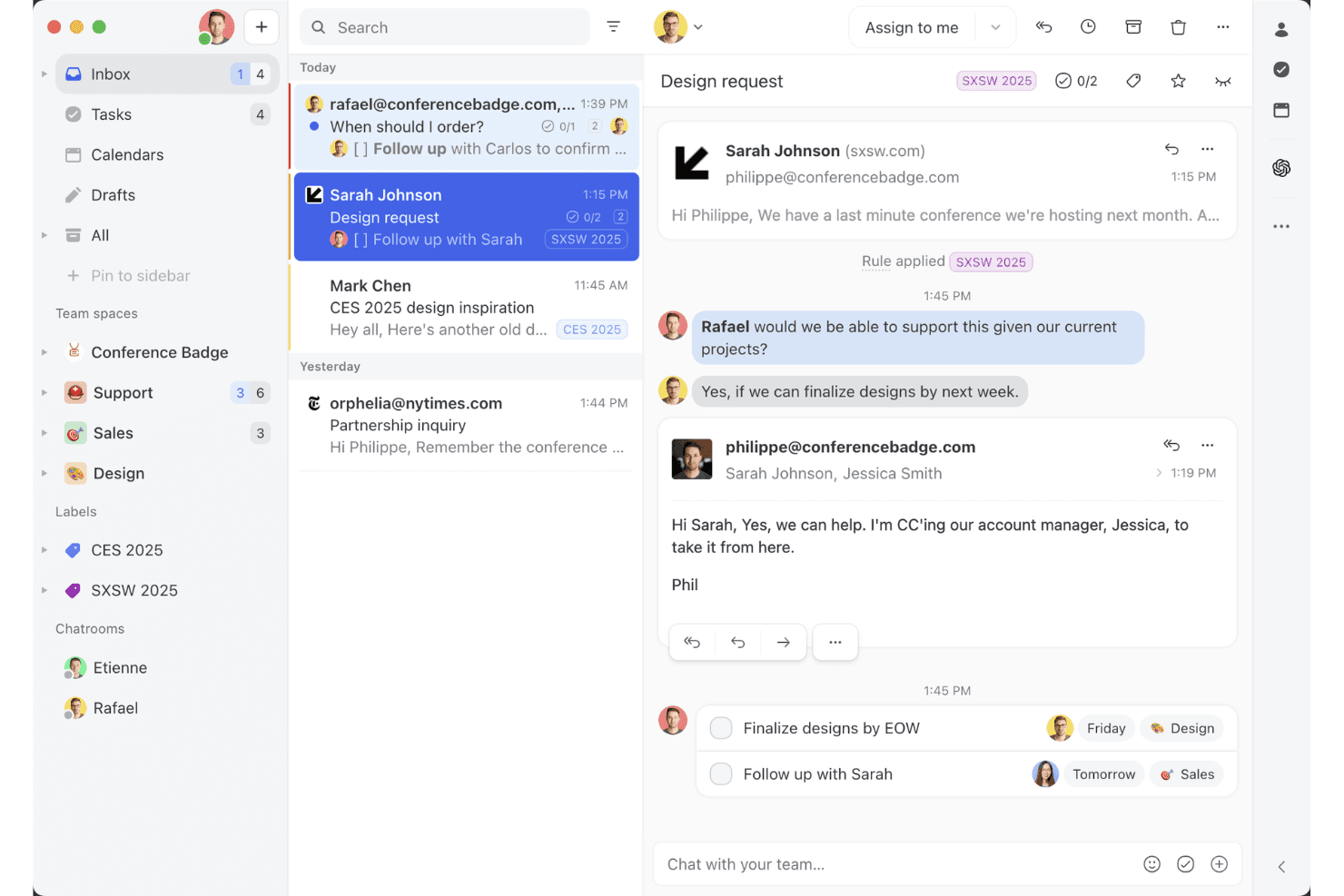
Missive’s shared inbox view shows how teams can collaborate on email threads, assign tasks, and manage client conversations in one workspace. Missive is a collaborative omnichannel inbox that unifies email, SMS, WhatsApp, Messenger, Instagram, and live chat into a single shared workspace with built-in team communication, AI-assisted routing, and cross-channel automation.
Who Is Missive Best For?
Missive is a strong fit for SMB and mid-market teams that handle customer conversations across email, SMS, and social channels and want built-in collaboration baked directly into the inbox.
Why I Picked Missive
I've included Missive in my top picks because its collaborative inbox model does something most omnichannel tools don't: it puts team discussion directly inside the customer conversation thread, so agents can loop in a specialist or escalate mid-reply without switching to Slack. I also like how its AI-powered routing classifies incoming messages by sentiment and language across every connected channel simultaneously, whether that's WhatsApp, SMS, or Instagram DMs. That cross-channel rule consistency is genuinely rare at this price point.
Missive Key Features
- Canned responses: Pre-built reply templates with variable fields let agents send consistent, on-brand messages across email, SMS, and WhatsApp without rewriting from scratch.
- Conversation merging: Threads from the same customer across different channels can be manually merged into one, keeping the full interaction history ina single view.
- Auto-assignment rules: Conversations are distributed across agents using round-robin, least-busy, or random logic, reducing manual triage for teamleads.
- Missive MCP Server: Connect external AI tools (like Claude or ChatGPT) to query customer service threads, check calendars, and draft replies—while keeping agent review required before sending.
Missive Integrations
Missive integrates with HubSpot, Salesforce, Shopify, Aircall, Dialpad, Twilio, and Zapier. Its REST API and webhooks support custom integrations, alongside its new MCP Server on Productive and Business plans (requires admin activation).
Pros and Cons
Pros:
- Flexible, AI-powered multi-channel routing
- Inline team chat in every conversation
- All channels unified in one inbox
Cons:
- No native customer satisfaction surveys
- No built-in AI chatbot for deflection
Learn more about Missive:
Outro software de atendimento ao cliente omnicanal
Eis algumas opções adicionais de software de atendimento ao cliente omnicanal que não integraram a minha seleção, mas que continuam a merecer atenção:
- 11FrontBest for monitoring message quality
- 12IntercomBest for startups
- 13Bright PatternBest for AI-driven insights
- 14TalkdeskBest for call centers
- 15KustomerBest for CRM integration
- 16Assembled AIBest for intelligent case routing systems
- 17SprinklrBest for social media support
- 18CrescendoBest for generating actionable conversation data
- 19FreshworksBest for ease of use
- 20ZendeskBest for scalability
How I Evaluate Omnichannel Customer Service Software
When a customer starts on chat and escalates to a call, I expect one agent record to follow them—that's the baseline I check before weighing what makes a platform stand out.
Core Functionality (Table Stakes For This List)
When I'm selecting tools for my list, I rank each one on a scale from 0 (does not offer the functionality) to 5 (excels in this area) for each core functionality listed below. Then, I calculate the tool's total score into a percentage. Each tool needs to achieve a minimum total score of 75% to be considered for inclusion.
- Multi-Channel Inbox: I check whether email, chat, social, SMS, and voice all land in one agent workspace—so reps aren't toggling between browser tabs.
- Unified Customer Profile: Each tool should surface a customer's full interaction history across channels in one view, including past tickets, purchases, and notes.
- Omnichannel Routing & Assignment: I look at how conversations get assigned—whether the platform supports skills-based routing, SLA priority rules, and load balancing across channels.
- Cross-Channel Ticketing: A customer who starts on chat and follows up via email should stay on one ticket thread, with full context intact for any agent who picks it up.
- Automation & AI Assistance: I evaluate whether workflow triggers, chatbots, and AI features like reply suggestions or auto-tagging work across all connected channels.
- Cross-Channel Analytics: Dashboards should aggregate metrics like CSAT, first response time, and resolution rate across every channel rather than siloing them.
Once I have a list of tools that meet the criteria, I consider what sets each platform apart.
Differentiating Factors (What Sets Vendors Apart)
Here's how I compare and contrast different vendors:
Standout Features
Proactive messaging matters a lot to me. Platforms that let you trigger a chat or SMS based on cart abandonment or onboarding milestones shift support from reactive to strategic. I also evaluate whether a built-in knowledge base surfaces AI-suggested articles to agents mid-conversation and powers a customer-facing self-service portal. For contact center leads managing large teams, native workforce management tools for shift scheduling and volume forecasting can eliminate the need for a separate WFM platform.
Beyond Features
Integration depth is one of the first things I check. A platform that connects natively to your CRM and ecommerce system means agents can pull up order status or account details without switching tools. I also look closely at total cost of ownership, especially whether AI features, premium channels like WhatsApp, or API usage carry add-on fees that inflate the price at scale. For teams in regulated industries like healthcare or finance, compliance certifications such as HIPAA or PCI-DSS can quickly narrow the shortlist.
Como escolher software de atendimento ao cliente omnicanal
Para escolher software de atendimento ao cliente omnicanal, concentre-se na forma como este liga os seus principais canais de apoio, os dados dos clientes e os fluxos de trabalho. Deve fornecer aos agentes o contexto de que necessitam para gerir as conversas sem obrigar os clientes a repetir-se.
Considere os seguintes fatores:
| Considere | O que deve privilegiar |
|---|---|
| ConsidereCanal principal | O que deve privilegiarUm suporte sólido para os canais com maior volume. Se o telefone gerar a maioria das conversas, privilegie as funcionalidades de centro de contacto. Se for o serviço de mensagens, dê prioridade ao WhatsApp, SMS, redes sociais e chat em direto. |
| ConsidereDimensão da equipa | O que deve privilegiarFuncionalidades adequadas à forma como a sua equipa trabalha. As equipas pequenas podem precisar apenas de uma caixa de entrada unificada e de um encaminhamento simples. As equipas maiores podem necessitar de encaminhamento baseado em competências, permissões, garantia de qualidade, gestão da força de trabalho e relatórios avançados. |
| ConsidereVolume de clientes | O que deve privilegiarAutomatização e encaminhamento capazes de gerir o seu volume de apoio. As equipas com maior volume devem dar prioridade ao encaminhamento automatizado, à gestão de filas, à IA e a ferramentas que reduzam o trabalho repetitivo dos agentes. |
| ConsidereComplexidade do apoio | O que deve privilegiarFerramentas para gerir transferências e escalamentos. Se os casos passarem regularmente entre agentes ou departamentos, privilegie um contexto partilhado do cliente, a colaboração interna e os fluxos de trabalho de escalamento. |
| ConsidereSetor | O que deve privilegiarFuncionalidades que cumpram os requisitos do seu setor. As equipas de comércio eletrónico podem precisar de dados de encomendas e integrações de comércio, enquanto os setores regulamentados podem necessitar de controlos de segurança, conformidade e auditoria mais robustos. |
Tendências no software omnicanal de apoio ao cliente
Na minha investigação, consultei inúmeras atualizações de produtos, comunicados de imprensa e registos de lançamentos de diferentes fornecedores de software multicanal de apoio ao cliente. Eis algumas das tendências emergentes que tenho acompanhado:
- Personalização com recurso a IA: Muitos fornecedores estão a utilizar a IA para oferecer interações personalizadas com os clientes. Esta tendência está a crescer à medida que as empresas procuram adaptar as experiências às necessidades individuais dos clientes. Por exemplo, a IA pode analisar todo o histórico de interação com um cliente para sugerir respostas personalizadas e assegurar a continuidade do serviço.
- Tecnologia de reconhecimento de voz: O reconhecimento de voz está a tornar-se mais comum, permitindo que os clientes interajam com os serviços sem utilizar as mãos. Esta tendência melhora a acessibilidade e a conveniência, com alguns fornecedores a integrar comandos de voz nas suas plataformas para melhorar o envolvimento dos clientes.
- Envolvimento proativo dos clientes: As ferramentas estão a evoluir para envolver os clientes antes de estes contactarem a empresa com problemas. Esta tendência envolve a utilização de análise de dados para prever as necessidades dos clientes e oferecer soluções de forma proativa, melhorando a satisfação e reduzindo os pedidos de apoio.
- Análise omnicanal: Os fornecedores estão a concentrar-se na disponibilização de informações que permitam às empresas compreender o comportamento e as preferências dos clientes em diferentes plataformas, ajudando a aperfeiçoar as estratégias e a melhorar os serviços.
- Assistência por videochamada: A videochamada está a ganhar importância enquanto ferramenta de apoio, proporcionando um toque mais pessoal. É útil para problemas complexos que exigem orientação visual, e alguns fornecedores estão a integrar esta funcionalidade para melhorar as interações com os clientes.
O que é o software omnicanal de apoio ao cliente?
O software omnicanal de apoio ao cliente é uma ferramenta que permite às empresas gerir as interações com os clientes de forma integrada em vários canais de comunicação, a partir de uma única plataforma. Os profissionais de apoio ao cliente e as equipas de suporte utilizam geralmente estas ferramentas para melhorar os tempos de resposta e prestar um apoio consistente.
Funcionalidades como a personalização com recurso a IA, o envolvimento proativo e a análise omnicanal ajudam a adaptar as experiências dos clientes, prever necessidades e compreender comportamentos. De um modo geral, estas ferramentas aumentam a satisfação dos clientes ao assegurar um serviço eficiente e personalizado em todos os canais.
Funcionalidades do software omnicanal de apoio ao cliente
Ao escolher um software omnicanal de apoio ao cliente, procure as seguintes funcionalidades essenciais:
- Personalização com recurso a IA: Esta funcionalidade utiliza a IA para adaptar as interações com base nos dados dos clientes, melhorando a experiência do cliente ao tornar as conversas mais relevantes.
- Encaminhamento avançado de chamadas: Encaminha as chamadas para o agente mais adequado, melhorando os tempos de resposta e garantindo que os clientes recebem rapidamente a ajuda de que necessitam.
- Análise multicanal: Fornece informações sobre todos os canais de comunicação, ajudando as empresas a compreender o comportamento dos clientes e a otimizar as estratégias de serviço.
- Envolvimento proativo dos clientes: Utiliza dados para antecipar as necessidades dos clientes e oferecer soluções antes de surgirem problemas, reduzindo os pedidos de apoio e aumentando a satisfação.
- Linha cronológica unificada do cliente: Consolida todas as interações de diferentes canais numa única vista, proporcionando aos agentes o contexto necessário para prestar um apoio informado e personalizado.
- Assistência por videochamada: Oferece uma forma mais pessoal de ajudar os clientes; é especialmente útil para problemas complexos que exigem orientação visual.
- Painéis personalizáveis: Permite às equipas adaptar o seu espaço de trabalho às suas necessidades, melhorando a eficiência e a concentração.
- Automatização de fluxos de trabalho: Simplifica as tarefas repetitivas, permitindo que a sua equipa se concentre em interações mais complexas com os clientes.
- Suporte multilingue: Permite a comunicação com uma base de clientes diversificada, aumentando o alcance e melhorando a acessibilidade.
- Medidas de segurança: Protege os dados dos clientes através do cumprimento das normas do setor e da manutenção da confiança e da fiabilidade.
Benefícios do software omnicanal de apoio ao cliente
A implementação de software omnicanal de apoio ao cliente, incluindo soluções de apoio ao cliente nas redes sociais, proporciona vários benefícios para a sua equipa e para a sua empresa. Eis alguns dos benefícios que pode esperar:
- Maior satisfação dos clientes: Os clientes recebem apoio atempado, relevante e consistente em todos os canais, melhorando a sua experiência geral e, consequentemente, a retenção de clientes.
- Maior eficiência: A automatização dos fluxos de trabalho e o encaminhamento avançado de chamadas ajudam a sua equipa a gerir mais interações com menos esforço, aumentando a produtividade.
- Melhores informações: A análise multicanal proporciona uma visão abrangente do comportamento dos clientes, permitindo tomar decisões baseadas em dados que melhoram a qualidade do serviço.
- Personalização melhorada: As funcionalidades baseadas em IA adaptam as interações às preferências individuais de cada cliente, tornando os contactos mais relevantes e eficazes.
- Poupança de custos: As empresas podem reduzir os custos operacionais ao diminuir a necessidade de várias plataformas e otimizar a alocação de recursos.
- Maior alcance: O suporte multilingue e as opções de videochamada permitem-lhe contactar um público mais vasto, expandindo a sua base de clientes.
- Segurança reforçada: A conformidade com as normas do setor garante a proteção dos dados dos clientes, promovendo a confiança e a fiabilidade.
Custos e preços do software de atendimento ao cliente multicanal
A seleção de software de atendimento ao cliente multicanal exige uma compreensão dos vários modelos de preços e planos disponíveis. Os custos variam consoante as funcionalidades, o tamanho da equipa, os complementos, entre outros fatores. A tabela abaixo resume os planos mais comuns, os seus preços médios e as funcionalidades normalmente incluídas nas soluções de apoio ao cliente multicanal:
Tabela de comparação de planos de software de atendimento ao cliente multicanal
| Tipo de plano | Preço médio | Funcionalidades comuns |
| Plano gratuito | $0 | Gestão básica de tickets, suporte por e-mail e análise limitada. |
| Plano pessoal | $5-$25/utilizador/mês | Suporte por e-mail e chat, relatórios básicos e opções de personalização limitadas. |
| Plano empresarial | $30-$75/ utilizador/mês | Suporte multicanal, automatização de fluxos de trabalho e ferramentas avançadas de elaboração de relatórios. |
| Plano empresarial avançado | $80-$150/ utilizador/mês | Personalização completa, análise baseada em IA e gestão dedicada da conta. |
Perguntas frequentes sobre software de apoio ao cliente omnicanal
Eis algumas respostas a perguntas comuns sobre software de apoio ao cliente omnicanal:
Qual é a diferença entre o apoio ao cliente omnicanal e multicanal?
O apoio ao cliente multicanal disponibiliza suporte através de vários canais, enquanto o apoio ao cliente omnicanal liga esses canais numa experiência contínua. Por exemplo, com o suporte multicanal, um cliente que inicia uma conversa por chat em direto e mais tarde telefona poderá ter de explicar novamente o seu problema. Com o suporte omnicanal, o agente telefónico consegue ver a conversa anterior e continuar a partir do ponto onde esta ficou interrompida.
Quantos canais deve suportar uma plataforma de apoio ao cliente omnicanal?
Não existe um número ideal. Uma plataforma omnicanal deve suportar os canais que os seus clientes realmente utilizam e ligá-los para que os agentes possam alternar entre conversas sem perder o contexto. Para muitas empresas, isso significa começar pelo e-mail, chat em direto, telefone e redes sociais ou aplicações de mensagens.
Que canais devem ser incluídos numa estratégia omnicanal?
Analise os canais através dos quais os clientes já contactam a sua empresa e dê prioridade aos que têm maior procura. Para muitas equipas, isso inclui e-mail, telefone, chat em direto, redes sociais, SMS e aplicações de mensagens como o WhatsApp — mas a combinação de canais deve refletir os seus clientes.
É necessário substituir o CRM para implementar o apoio ao cliente omnicanal?
Normalmente, não. Uma boa plataforma omnicanal deve integrar-se com o seu CRM existente para que os agentes possam aceder aos dados dos clientes juntamente com as conversas de apoio. O que importa é a qualidade da integração: verifique que dados são sincronizados, se as atualizações ocorrem em tempo real e se os agentes conseguem aceder às informações de que necessitam sem alternar entre sistemas.
Qual é a principal desvantagem do software de apoio ao cliente omnicanal?
A principal desvantagem do software omnicanal é a complexidade da implementação. É necessário um sistema bem coordenado que funcione em vários canais. Uma abordagem omnicanal pode ser difícil de implementar em organizações onde existem silos de dados. Garantir experiências consistentes para os clientes em todos os canais pode ser um desafio, sobretudo sem a tecnologia e os processos adequados.
Como implementar o apoio ao cliente omnicanal?
Para implementar o apoio ao cliente omnicanal, comece por compreender as expectativas dos clientes e identificar os canais que irá utilizar (dica: analise os canais utilizados pelos seus clientes). Invista na tecnologia adequada para suportar esses canais e melhore as competências da sua equipa para que possa geri-los eficazmente. Considere também criar opções de autosserviço e garantir a segurança dos dados dos clientes ao longo de todo o processo.
Quais são os 4 C do apoio ao cliente omnicanal?
Os 4 C do apoio ao cliente omnicanal são Experiência do cliente, Contexto, Conteúdo e Colaboração. Estes elementos funcionam em conjunto para criar uma experiência do cliente coesa e envolvente em todos os canais, garantindo que as interações são relevantes e consistentes.
Como é que o software omnicanal melhora a satisfação do cliente (CSAT)?
O software de apoio omnicanal melhora a satisfação do cliente ao proporcionar um suporte consistente através de vários canais, permitindo interações mais personalizadas e eficientes. Funcionalidades como o envolvimento proativo e linhas cronológicas unificadas dos clientes garantem que estes recebem assistência atempada e relevante, melhorando a sua experiência geral.