

O software de gestão das interações com os clientes ajuda as equipas de experiência do cliente e de suporte a controlar o caos multicanal — email, chat, redes sociais e voz — para que possam responder mais rapidamente, colaborar melhor e proporcionar experiências consistentes e personalizadas. Estas plataformas centralizam as conversas, automatizam o encaminhamento, disponibilizam o contexto e fornecem análises claras para melhorar os tempos de resolução, a satisfação e a eficiência da equipa.
Analisei e testei estas ferramentas com base na profundidade da colaboração, na cobertura omnicanal, na automatização e na inteligência artificial, nos relatórios/análises, nas integrações (CRM, comércio eletrónico e telefonia), na escalabilidade e na relação qualidade-preço. Este guia apresenta as melhores opções, os casos em que se adequam e as respetivas vantagens e desvantagens, para que possa escolher uma plataforma adequada à dimensão, ao setor e ao modelo de suporte da sua equipa.
Why Trust Our Software Recommendations
6,700+
Reviews
20
Industry experts
16+
Evaluation factors
14
Years
Our team has been testing and reviewing software since 2012. As CX leaders ourselves, we know how difficult—and important—it is to choose the right software.
For this guide, we evaluated tools using hands-on testing and independent research, scoring tools using our selection criteria.
Our reviews reflect our human editorial judgment, not a sales pitch.
 Gui DrusinaCreative Director
 Tim FisherVP of AI
Tabela comparativa: software de gestão das interações com os clientes
Esta tabela comparativa resume os detalhes de preços das minhas principais escolhas de software de gestão das interações com os clientes.
| Tool | Best For | Trial Info | Price | ||
|---|---|---|---|---|---|
| 1 | Best for shared-inbox team collaboration | 30-day free trial + free demo available | From $14/user/month (billed annually) | Website | |
| 2 | Best for marketplace integrations | Free trial available | From $19/user/month (billed annually) | Website | |
| 3 | Best for shared inbox management | 14-day free trial | From $25/user/month (billed annually) | Website | |
| 4 | Best for small teams | Free plan + free demo available | From $39.99/month | Website | |
| 5 | Best for sales teams | 14-day free trial | From $14/user/month (billed annually) | Website | |
| 6 | Best for social media integration | 30-day free trial | Pricing upon request | Website | |
| 7 | Best for large enterprises | Free demo available | From $75/user/month (billed annually) | Website | |
| 8 | Best for retail businesses | Free demo available | Pricing upon request | Website | |
| 9 | Best for appointment scheduling | Free demo available | Pricing upon request | Website | |
| 10 | Best for manufacturing firms | Free demo available | From $450/month | Website |


Avaliação do melhor software de gestão das interações com os clientes
Apresentamos abaixo os meus resumos detalhados do melhor software de gestão das interações com os clientes que integrou a minha lista restrita. As minhas avaliações oferecem uma análise detalhada das principais funcionalidades, vantagens e desvantagens, integrações e casos de utilização ideais de cada ferramenta, para ajudar a encontrar a melhor opção para si.
 Best for shared-inbox team collaboration
- 30-day free trial + free demo available
- From $14/user/month (billed annually)
Visit WebsiteCustomer Rating:4.8/5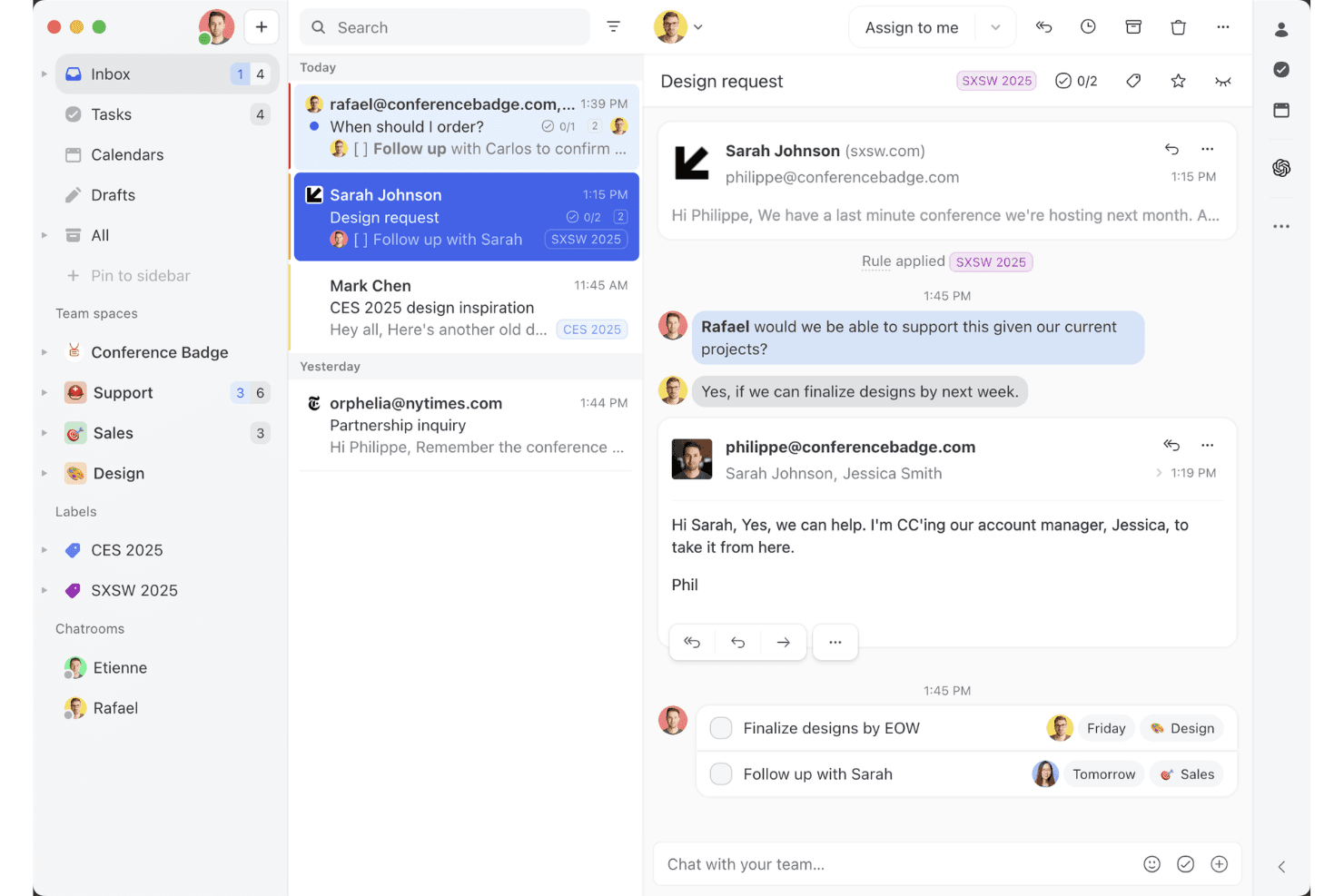
Missive offers a shared inbox feature for team collaboration. Missive is a shared-inbox platform that consolidates email, SMS, WhatsApp, Instagram DMs, Facebook Messenger, and live chat into a single interface, with built-in team collaboration, rule-based routing, and workflow automation.
Who Is Missive Best For?
Missive is a strong fit for small-to-medium support teams that handle high volumes of customer conversations across email, SMS, and social channels and need to collaborate internally without losing the thread.
Why I Picked Missive
Missive earns its spot on my shortlist because of how well it handles shared-inbox collaboration across a multi-channel support environment. I love that internal threads let teammates discuss a customer conversation without the customer ever seeing it, and that assignment rules with round-robin or least-busy routing keep queues moving without manual oversight. In practice, that means my team can handle email, SMS, WhatsApp, and Instagram DMs in one place while staying coordinated internally.
Missive Key Features
- AI-powered rules engine: AI rules analyze incoming messages for intent and urgency, then automatically label, escalate, or draft replies using Claude, GPT, or Gemini models.
- Canned responses with variables: Pre-built reply templates support dynamic variables like customer name and date, letting agents send consistent, personalized responses quickly.
- SOC 2 Type II compliance: Missive is independently audited and certified, with TLS encryption in transit, at-rest encryption, and optional SAML SSO on the Business plan.
- Shopify and CRM sidebar integrations: Agents can view customer order history from Shopify or pull live CRM records from HubSpot, Salesforce, or Pipedrive directly within a conversation.
- Missive MCP Server: Connect external AI tools (like Claude or ChatGPT) to query customer interaction threads, check calendars, and draft replies—while keeping agent review required before sending.
Missive Integrations
Missive offers native integrations with HubSpot, Salesforce, Pipedrive, Close, Daylite, and Shopify, plus REST API and webhooks for custom connections. It also supports Make, Relay.app, Integrately, Lindy.ai, Zapier, and its new MCP Server on Productive and Business plans (requires admin activation).
Pros and Cons
Pros:
- AI rules automate labeling, routing, drafting
- Multi-channel inbox centralizes all digital conversations
- Internal threads enable discreet team discussions
Cons:
- Lacks CSAT and sentiment analytics tools
- No native voice or chatbot included
Learn more about Missive: Best for marketplace integrations
- Free trial available
- From $19/user/month (billed annually)
Visit WebsiteCustomer Rating:4.4/5
Freshdesk offers a unified inbox view to simplify customer interaction management. Freshdesk is a customer interaction management platform that unifies email, chat, phone, and social messaging into a single omnichannel workspace, with AI-powered automation, ticketing, and a 1,200+ app marketplace for connecting your support stack.
Who Is Freshdesk Best For?
Freshdesk is well-suited to mid-size and enterprise support teams managing high volumes of customer interactions across multiple channels and regions.
Why I Picked Freshdesk
Freshdesk earns its spot on my shortlist because its marketplace depth is genuinely hard to match in the customer interaction management space. With 1,200+ apps, I can connect tools like Jira, Slack, Shopify, and Salesforce directly into the agent workspace without building custom middleware. I especially like the curated app collections, like the e-commerce and Office 365 bundles, which cut down the time I'd otherwise spend hunting for the right connectors.
Freshdesk Key Features
- Freddy AI Copilot: Assists agents in real time with reply suggestions, sentiment detection, and conversation summaries directly within the ticket view.
- Omnichannel ticketing: Consolidates customer conversations from email, chat, WhatsApp, phone, and social channels into a single unified inbox.
- Skill-based ticket routing: Automatically assigns incoming tickets to agents based on skill set, workload, or channel expertise.
- Custom analytics dashboards: Lets you build real-time reports tracking CSAT scores, ticket volumes, SLA compliance, and agent performance.
Freshdesk Integrations
Freshdesk offers 1,200+ marketplace integrations through the Freshworks Marketplace, including Slack, Microsoft Teams, Salesforce, Jira, Shopify, Google Calendar, Google Analytics, Playvox, and Aircall. It's also available on Zapier and provides an API for custom integrations.
Pros and Cons
Pros:
- Offers parent-child ticketing for complex issues
- Built-in gamification for agent ticket resolution
- Omnichannel ticketing spans email, chat, and social
Cons:
- Advanced reporting requires higher-tier plans
- Mobile app missing key desktop features
Learn more about Freshdesk: Best for shared inbox management
- 14-day free trial
- From $25/user/month (billed annually)
Visit WebsiteCustomer Rating:4.6/5
Front optimizes team collaboration with shared inbox management for clear communication. Front is a customer interaction management tool that excels in shared inbox management. It's designed for teams that need to collaborate on emails and messages efficiently, ensuring clear and organized communication.
Why I picked Front: It specializes in shared inbox management, offering features like email assignment that helps your team distribute workload effectively. The tool's internal comments allow team members to discuss emails privately without leaving the platform. Customizable workflows let you automate repetitive tasks, saving your team time. With analytics, you can track performance and optimize your team's communication strategies.
Standout features & integrations:
Features include customizable tagging that helps your team categorize and prioritize emails. The snooze function lets you temporarily remove emails from your inbox until you're ready to address them. Front's shared drafts feature allows your team to collaborate on responses before sending them out.
Integrations include Salesforce, Slack, Asana, Trello, HubSpot, Dropbox, Google Drive, Microsoft Teams, Zapier, and Intercom.
Pros and Cons
Pros:
- Shared drafts for collaboration
- Private internal commenting
- Effective email assignment
Cons:
- Occasional sync delays with email
- Basic mobile app functionality
Learn more about Front: Best for small teams
- Free plan + free demo available
- From $39.99/month
Visit WebsiteCustomer Rating:4.7/5
ProProfs Help Desk streamlines customer support for small teams. ProProfs Help Desk is a customer interaction management tool designed for small teams. It helps manage customer communications and support inquiries efficiently. Key functions include ticket management and multichannel support, making it ideal for businesses looking to enhance customer engagement.
Why I picked ProProfs Help Desk: It's tailored for small teams, offering features like a shared inbox and canned responses that simplify communication. SLA management ensures timely responses, while custom reporting provides insights into team performance. The tool's focus on collaboration is evident in its team collaboration features, making it stand out for small groups needing efficient interaction management.
Standout features & integrations:
Features include ticket management, which prioritizes customer queries for efficient resolution. Multichannel support allows interaction through email, chat, and social media, ensuring seamless communication. Customer satisfaction surveys help gather valuable feedback to maintain high service standards.
Integrations include Salesforce, Mailchimp, Trello, Slack, Google Analytics, Shopify, WordPress, Zendesk, Freshdesk, and Zoho CRM.
Pros and Cons
Pros:
- Automated ticket routing
- Multiple language support
- Customizable ticket views
Cons:
- Occasional performance lags
- Limited advanced features
Learn more about ProProfs Help Desk: Best for sales teams
- 14-day free trial
- From $14/user/month (billed annually)
Visit WebsiteCustomer Rating:4.4/5
Pipedrive streamlines sales management by tracking leads and managing pipelines. Pipedrive is a customer management software tailored for sales teams. It helps sales professionals track leads, manage pipelines, and close deals efficiently, focusing on sales process management and organization.
Why I picked Pipedrive: It's designed specifically for sales teams, with features like deal tracking that help your team visualize sales processes. Pipedrive's customizable pipelines let you tailor the stages to fit your sales strategy. The tool's activity reminders ensure your team never misses a follow-up. With its intuitive interface, Pipedrive makes it easy for sales teams to stay organized and focused on closing deals.
Standout features & integrations:
Features include an insights dashboard that provides your team with a visual overview of performance metrics. The tool's sales forecasting helps anticipate revenue based on current deals. Additionally, Pipedrive offers goal-setting features that allow your team to set and track sales targets.
Integrations include Google Workspace, Microsoft Outlook, Slack, Trello, Mailchimp, Zapier, QuickBooks, Xero, HubSpot, and Asana.
Pros and Cons
Pros:
- Visual performance insights
- Strong activity reminder system
- Effective deal tracking
Cons:
- Occasional syncing issues with email
- Basic reporting features
Learn more about Pipedrive: Best for social media integration
- 30-day free trial
- Pricing upon request
Visit WebsiteCustomer Rating:4/5
Sprinklr manages social media interactions to enhance customer service and engagement. Sprinklr is a customer interaction management platform designed for businesses focusing on social media engagement. It helps teams manage customer interactions across various social media channels, enhancing customer service and engagement.
Why I picked Sprinklr: It's ideal for social media integration, offering features like unified messaging that lets your team manage all social interactions in one place. Its social listening capabilities allow you to monitor customer sentiments effectively. The platform's analytics provide insights into social media performance, helping you optimize strategies. Customizable dashboards ensure your team can track relevant metrics easily.
Standout features & integrations:
Features include advanced social listening tools that give you insights into customer conversations. The platform's sentiment analysis helps your team understand customer emotions and respond appropriately. Additionally, automated reporting saves time by providing detailed performance insights without manual effort.
Integrations include Facebook, X, Instagram, LinkedIn, YouTube, WhatsApp, Salesforce, Microsoft Dynamics, Zendesk, and ServiceNow.
Pros and Cons
Pros:
- Detailed reporting capabilities
- Excellent sentiment analysis
- Strong social media focus
Cons:
- Not ideal for small businesses
- Requires training for full use
Learn more about Sprinklr: Best for large enterprises
- Free demo available
- From $75/user/month (billed annually)
Visit WebsiteCustomer Rating:4.4/5
Genesys enhances enterprise customer service across multiple channels. Genesys provides customer interaction management solutions for customer service, engagement, and communication across multiple channels to improve customer experiences, aimed at large enterprises
Why I picked Genesys: It's designed for large enterprises, offering features like omnichannel routing that ensure your customers are connected to the right agent every time. Its workforce optimization tools help you manage and allocate resources efficiently. The platform supports complex workflows, making it suitable for large-scale operations. Real-time analytics provide insights into customer interactions, allowing you to make data-driven decisions.
Standout features & integrations:
Features include advanced call routing that directs customers to the appropriate department quickly. Its workforce management tools help your team schedule and manage shifts efficiently. Additionally, the platform offers customer journey mapping, enabling you to visualize and enhance customer experiences across touchpoints and avoid churns.
Integrations include Salesforce, Microsoft Dynamics 365, Zendesk, ServiceNow, Google Cloud, Amazon Web Services, Twilio, Zoom, Slack, and Oracle.
Pros and Cons
Pros:
- Extensive reporting options
- Detailed customer journey mapping
- Strong omnichannel capabilities
Cons:
- Requires ongoing technical support
- Complex initial setup process with steep learning curve for new users


Gladly streamlines retail customer service with unified, personalized interactions. Gladly is a customer interaction management platform designed for retail businesses. It focuses on enhancing customer service by providing a unified view of customer interactions across various channels, helping teams deliver personalized support.
Why I picked Gladly: It's tailored for retail businesses, featuring a single customer view that consolidates all interactions, enabling your team to provide personalized service. The tool's built-in chat and messaging features allow you to communicate with customers in real time. With its customer timeline, your team can track past interactions to better understand customer needs. Its focus on customer service makes it ideal for retail environments where personalized support is crucial.
Standout features & integrations:
Features include a robust self-service portal that empowers customers to find answers independently. The platform's voice capabilities let your team handle phone interactions efficiently. Additionally, its reporting tools provide insights into customer service performance, helping you identify areas for improvement.
Integrations include Salesforce, Shopify, Zendesk, Slack, Zapier, Magento, Google Calendar, Mailchimp, Twilio, and Stripe.
Pros and Cons
Pros:
- Suitable for high-volume retailers
- Comprehensive customer timeline
- Unified customer interaction view
Cons:
- Not ideal for non-retail sectors
- Higher cost for small businesses
Learn more about Gladly:

Q-nomy optimizes appointment scheduling and customer flow management for businesses. Q-nomy is a customer interaction management tool focused on appointment scheduling and customer flow management. It's designed for businesses that need to manage customer appointments efficiently, providing a streamlined experience for both staff and customers.
Why I picked Q-nomy: It's tailored for appointment scheduling, offering features like online booking and queue management that cater to businesses with high customer traffic. Its real-time analytics help your team monitor and adjust schedules to optimize customer flow. The tool's customization options allow you to adapt the system to your specific needs. With its focus on improving customer experience, Q-nomy ensures appointments are managed smoothly and efficiently.
Standout features & integrations:
Features include real-time queue management that helps your team keep track of customer flow and minimize wait times. The system's reporting tools provide detailed insights into appointment trends and staff performance. Additionally, its customizable interface allows you to tailor the scheduling process to fit your business requirements.
Integrations include Salesforce, Microsoft Dynamics, SAP, Oracle, Google Calendar, Outlook, Zoom, Twilio, Slack, and Mailchimp.
Pros and Cons
Pros:
- Suitable for high-traffic environments
- Customizable scheduling options
- Strong focus on appointment management
Cons:
- Limited to appointment-based businesses
- Complex setup and configuration
Learn more about Q-nomy:

CIMcloud streamlines order management and customer support for manufacturing firms. CIMcloud is a customer interaction management platform tailored for manufacturing firms. It focuses on enhancing business processes like order management and customer support to improve efficiency in manufacturing settings.
Why I picked CIMcloud: It caters specifically to manufacturing firms, offering features like order tracking and inventory management that align with industry needs. Its customer portals allow clients to access information directly, reducing your team's workload. The platform's ERP integration ensures that all your business functions are connected, aiding in smooth operations. Customizable dashboards provide insights into performance metrics, helping your team make informed decisions.
Standout features & integrations:
Features include a sales portal that empowers your sales team to manage orders, track inventory, and handle customer inquiries efficiently. The platform also offers customizable reporting tools that allow you to generate insights specific to your business needs. Additionally, its user-friendly interface ensures your team can adopt the system quickly without extensive training.
Integrations include QuickBooks, Salesforce, Microsoft Dynamics, Sage 100, UPS, FedEx, Shopify, Magento, PayPal, and Authorize.Net.
Pros and Cons
Pros:
- Direct customer portal access
- ERP integration capabilities
- Strong order management
Cons:
- Limited customization options
- Requires technical setup with steep learning curve
Learn more about CIMcloud:
Outro software de gestão das interações com os clientes
Eis algumas opções adicionais de software de gestão das interações com os clientes que não integraram a minha lista restrita, mas que ainda vale a pena conhecer:
- 11Help ScoutBest for remote teams
- 12ZendeskBest for AI-powered ticket automation
- 13Zoho DeskBest for workflow automation
- 14Agentforce Service (formerly Service Cloud)Best for CRM integration
- 15TaskRayBest with Salesforce-native integration
- 16IntercomBest for live chat support
- 17KayakoBest for small business support
- 18DialpadBest for voice communication
- 19OzonetelBest for contact center solutions
- 20Adobe Experience CloudBest for personalized marketing
How I Evaluate Customer Interaction Management Software
I split my evaluation into two layers: the baseline requirements every platform must meet—like omnichannel routing and unified interaction history—and the differentiators that reveal which tools CX teams will actually rely on.
Core Functionality (Table Stakes For This List)
When I'm selecting tools for my list, I rank each one on a scale from 0 (does not offer the functionality) to 5 (excels in this area) for each core functionality listed below. Then, I calculate the tool's total score into a percentage. Each tool needs to achieve a minimum total score of 75% to be considered for inclusion.
- Omnichannel Communication Support: I check whether a platform brings email, live chat, voice, SMS, and social channels into a single system so agents aren't toggling between disconnected tools during a conversation.
- Unified Customer Interaction History: Every touchpoint—a chat from last week, a call from last month, a social DM from yesterday—should roll up into one searchable, chronological timeline per customer.
- Intelligent Routing & Queuing: I evaluate how the platform assigns incoming interactions, looking for skills-based routing, SLA-aware prioritization, and queue management beyond simple round-robin distribution.
- Automation & Workflow Tools: I look for triggered workflows, chatbot builders, and macro support that let teams automate repetitive tasks like tagging tickets, sending follow-ups, or escalating stale conversations.
- Interaction Analytics & Reporting: Dashboards should surface metrics like first response time, resolution rate, and agent utilization with enough filtering to compare performance across channels, teams, or time periods.
- CRM & Third-Party Integrations: The platform should connect to widely used CRMs like Salesforce or HubSpot and offer open APIs or webhooks so customer data stays synchronized across the broader tech stack.
Once I have a list of tools that meet this criteria, I consider what sets each platform apart.
Differentiating Factors (What Sets Vendors Apart)
Here's how I compare and contrast different vendors:
Standout Features
Generative AI assistance is a big differentiator. I look for platforms where agents get AI-drafted replies and conversation summaries that reduce handling time during busy periods. Proactive engagement triggers add real value too. A platform that sends a chat invite when a customer stalls on a checkout page turns support into an active retention tool. I also evaluate real-time sentiment analysis, which helps supervisors spot frustrated customers and intervene before a routine inquiry becomes an escalation.
Beyond Features
Security and compliance matter when your platform handles sensitive customer data. I check for SOC 2 Type II certification, data residency options, and role-based access controls that let you restrict agent visibility by team or region. Implementation and time-to-value also shape my evaluation. A platform with prebuilt workflow templates and guided onboarding gets a CX team operational faster than one that requires weeks of custom configuration. I also consider pricing transparency, especially whether AI features and additional channels come bundled or carry separate costs.
Como escolher software de gestão das interações com os clientes
É fácil ficar perdido entre listas extensas de funcionalidades e estruturas de preços complexas. Para se manter concentrado enquanto percorre o seu processo específico de seleção de software, eis uma lista de verificação dos fatores a ter em conta:
| Fator | O que considerar |
| Escalabilidade | Certifique-se de que o software consegue acompanhar o crescimento da sua empresa. Procure soluções que suportem um aumento das interações com os clientes e a expansão da equipa sem problemas de desempenho. |
| Integrações | Verifique se o software se integra com as ferramentas que já utiliza, como sistemas CRM, plataformas de email e canais de redes sociais, para simplificar o seu fluxo de trabalho. |
| Personalização | Considere até que ponto pode adaptar o software aos processos da sua equipa. Os fluxos de trabalho e os painéis personalizáveis podem aumentar significativamente a produtividade. |
| Facilidade de utilização | Escolha uma interface intuitiva que reduza ao mínimo o tempo de formação. A sua equipa deve conseguir navegar pelo sistema de forma rápida e eficiente. |
| Orçamento | Alinhe o preço do software com o seu orçamento. Avalie os custos totais, incluindo eventuais taxas ocultas, e certifique-se de que o valor justifica a despesa. |
| Medidas de segurança | Verifique as medidas de proteção de dados do software. Certifique-se de que cumpre as normas do setor e disponibiliza funcionalidades como encriptação e controlos de acesso. |
| Suporte ao cliente | Procure opções de suporte rápidas, incluindo chat em direto, telefone e email. Certifique-se de que existe uma base de conhecimentos para obter ajuda autónoma. |
| Capacidades de elaboração de relatórios | Avalie a qualidade das ferramentas de análise e elaboração de relatórios. Precisa de obter informações sobre as interações com os clientes para tomar decisões fundamentadas e melhorar o serviço. |
Tendências no software de gestão das interações com os clientes
Durante a minha pesquisa, recolhi inúmeras atualizações de produtos, comunicados de imprensa e registos de versões de diferentes fornecedores de software de gestão das interações com os clientes. Eis algumas das tendências emergentes que estou a acompanhar:
- Informações baseadas em IA: A IA está a evoluir para oferecer informações mais aprofundadas sobre o comportamento e as preferências dos clientes. Esta tendência ajuda as empresas a personalizar as interações e a prever as necessidades dos clientes. Fornecedores como a Salesforce estão a integrar ferramentas avançadas de IA para melhorar a tomada de decisões e a qualidade do serviço.
- Experiências omnicanal: Cada vez mais fornecedores estão a concentrar-se em proporcionar experiências coesas aos clientes em todos os canais. Esta tendência é crucial, uma vez que os clientes esperam um serviço consistente, quer estejam nas redes sociais, no e-mail ou ao telefone. Plataformas como a Freshdesk Omni estão na vanguarda, com suporte omnicanal integrado.
- Integração de voz e vídeo: O crescimento da comunicação por voz e vídeo no apoio ao cliente está a ganhar força. Estas funcionalidades permitem interações mais pessoais e resoluções mais rápidas. Ferramentas como o Zoom estão a ser cada vez mais integradas nas plataformas de apoio ao cliente para acompanhar esta tendência.
- Análise de sentimentos: A análise de sentimentos em tempo real está a tornar-se um fator decisivo para compreender as emoções dos clientes. Isto ajuda as equipas a responder melhor e a melhorar os níveis de satisfação. Empresas como a Intercom estão a utilizar a análise de sentimentos para adaptar as interações com base no estado de espírito do cliente.
- Mapeamento da jornada do cliente: Os fornecedores estão a melhorar as ferramentas que mapeiam toda a jornada do cliente. Esta tendência ajuda as empresas a visualizar e otimizar cada ponto de contacto, melhorando a experiência global do cliente. A Adobe Experience Cloud é um exemplo de uma plataforma que oferece capacidades avançadas de mapeamento da jornada.
O que é o software de gestão das interações com os clientes?
O software de gestão das interações com os clientes ajuda as empresas a organizar e melhorar as comunicações com os clientes através de canais como o e-mail, o chat, as redes sociais e o telefone. Centraliza as interações, acompanha as conversas e utiliza ferramentas como a automatização e a IA para melhorar a capacidade de resposta, personalizar as experiências e reforçar as relações com os clientes.
Funcionalidades do software de gestão das interações com os clientes
Ao selecionar um software de gestão das interações com os clientes, procure as seguintes funcionalidades principais:
- Suporte omnicanal: Gere as interações com os clientes em várias plataformas, como o e-mail, o chat e as redes sociais, garantindo uma comunicação consistente.
- Informações baseadas em IA: Fornece informações baseadas em dados sobre o comportamento e as preferências dos clientes, para personalizar as interações e melhorar a tomada de decisões.
- Análise de sentimentos: Analisa as emoções dos clientes em tempo real, permitindo às equipas adaptar as respostas e melhorar a satisfação.
- Gestão automatizada de pedidos: Simplifica o processo de atribuição e gestão das questões dos clientes, poupando tempo e reduzindo os erros.
- Fluxos de trabalho personalizáveis: Permite adaptar os processos às necessidades específicas da sua equipa, melhorando a produtividade e a eficiência.
- Mapeamento da jornada do cliente: Apresenta visualmente toda a experiência do cliente, ajudando as empresas a otimizar cada ponto de contacto e a melhorar o serviço.
- Relatórios em tempo real: Fornece informações sobre o desempenho da equipa e as interações com os clientes, permitindo tomar decisões fundamentadas.
- Portal de autosserviço: Permite aos clientes encontrar respostas de forma autónoma, reduzindo a carga de trabalho das equipas de apoio.
- Integração de voz e vídeo: Melhora a comunicação ao permitir interações mais pessoais e resoluções mais rápidas através de chamadas de voz e vídeo.
- Base de conhecimento: Disponibiliza um repositório centralizado de artigos e guias, ajudando os clientes e os membros da equipa a aceder rapidamente à informação.
Benefícios do software de gestão das interações com os clientes
A implementação de um software de gestão das interações com os clientes proporciona vários benefícios à sua equipa e à sua empresa. Eis alguns dos benefícios que pode esperar:
- Maior satisfação dos clientes: Ao gerir as interações em vários canais e personalizar as respostas, a sua equipa pode alcançar níveis mais elevados de satisfação dos clientes.
- Maior eficiência: A gestão automatizada de pedidos e os fluxos de trabalho personalizáveis reduzem as tarefas manuais, permitindo à sua equipa concentrar-se em questões mais importantes.
- Decisões baseadas em dados: As informações baseadas em IA e os relatórios em tempo real fornecem dados valiosos que ajudam a tomar decisões empresariais fundamentadas.
- Melhor colaboração entre equipas: Funcionalidades como caixas de entrada partilhadas e comentários internos permitem à sua equipa trabalhar em conjunto de forma eficaz nas questões dos clientes.
- Melhores informações sobre os clientes: A análise de sentimentos e o mapeamento da jornada do cliente proporcionam uma compreensão mais aprofundada das necessidades e preferências dos clientes.
- Redução de custos: Os portais de autosserviço e as bases de conhecimento permitem aos clientes encontrar soluções de forma autónoma, reduzindo a procura sobre a sua equipa de apoio.
- Resolução mais rápida de problemas: A integração de voz e vídeo permite uma comunicação mais pessoal e rápida, acelerando a resolução de problemas.
Custos e preços do software de gestão das interações com os clientes
Selecionar software de gestão das interações com os clientes requer uma compreensão dos vários modelos de preços e planos disponíveis. Os custos variam consoante as funcionalidades, o tamanho da equipa, os complementos e muito mais. A tabela abaixo resume os planos comuns, os seus preços médios e as funcionalidades normalmente incluídas nas soluções de software de gestão das interações com os clientes:
Tabela de comparação de planos para software de gestão das interações com os clientes
| Tipo de plano | Preço médio | Funcionalidades comuns |
| Plano gratuito | $0 | Gestão básica de tickets, suporte por e-mail e relatórios limitados. |
| Plano pessoal | $5-$25/ utilizador/mês | Suporte por e-mail, análises básicas e integrações limitadas. |
| Plano empresarial | $30-$60/ utilizador/mês | Suporte multicanal, fluxos de trabalho personalizáveis e relatórios avançados. |
| Plano para grandes empresas | $70-$120/ utilizador/mês | Suporte omnicanal, informações baseadas em IA, análise de sentimentos e personalização completa. |
Perguntas frequentes sobre software de gestão das interações com os clientes
Eis algumas respostas a perguntas frequentes sobre software de gestão das interações com os clientes:
Qual é a diferença entre CRM e CIM?
O CRM centra-se na gestão abrangente das relações com os clientes, enquanto o CIM se concentra na gestão de interações individuais através de vários canais. O CRM ajuda a cultivar relações duradouras, enquanto o CIM consiste em gerir interações específicas com os clientes de forma eficiente.
Quais são os 3 principais desafios na gestão das relações com os clientes?
Os principais desafios incluem a falta de comunicação, a falta de utilização em toda a organização e a falta de integração tecnológica. Estes problemas podem dificultar a implementação eficaz dos sistemas de CRM e afetar a capacidade da sua equipa para gerir as interações com os clientes.
Como se avalia a eficácia do software CIM?
Avalie a eficácia do software CIM analisando o seu impacto na satisfação dos clientes, nos tempos de resposta e na produtividade da equipa. Procure melhorias nas métricas de envolvimento dos clientes e tenha em consideração o feedback dos clientes e dos membros da equipa.
Porque é importante o suporte omnicanal no software CIM?
O suporte omnicanal é crucial porque garante uma comunicação consistente em todos os pontos de contacto com os clientes. Permite à sua equipa gerir interações por e-mail, chat, redes sociais e telefone a partir de uma única plataforma, melhorando a experiência do cliente.
Como podem as informações baseadas em IA beneficiar a minha equipa de atendimento ao cliente?
As informações baseadas em IA podem analisar os dados dos clientes para fornecer recomendações práticas, ajudando a sua equipa a personalizar as interações e a antecipar as necessidades dos clientes. Isto resulta numa maior satisfação e retenção dos clientes, bem como numa prestação de serviços mais eficiente.
O que devo ter em consideração ao escolher software CIM para a minha empresa?
Tenha em consideração fatores como a escalabilidade, as capacidades de integração, a facilidade de utilização e o custo. Certifique-se de que o software está alinhado com os objetivos da sua empresa e que consegue responder às necessidades específicas da sua equipa na gestão das interações com os clientes.