

As plataformas de autosserviço para clientes com IA são ferramentas de software que utilizam inteligência artificial para ajudar os clientes a encontrar respostas, resolver problemas e concluir tarefas sem precisarem de falar com um agente humano. Se procura formas de gerir grandes volumes de pedidos de suporte, fornecer soluções mais rápidas ou oferecer assistência 24 horas por dia, 7 dias por semana, estas plataformas podem ajudar a sua equipa a responder às crescentes expectativas dos clientes. Nesta lista, encontrará soluções de IA de confiança que automatizam pedidos comuns, se integram nos seus sistemas existentes e dão aos seus clientes mais controlo — para que se possa concentrar em casos complexos e obter melhores resultados.
Why Trust Our Software Recommendations
6,700+
Reviews
20
Industry experts
16+
Evaluation factors
14
Years
Our team has been testing and reviewing software since 2012. As CX leaders ourselves, we know how difficult—and important—it is to choose the right software.
For this guide, we evaluated tools using hands-on testing and independent research, scoring tools using our selection criteria.
Our reviews reflect our human editorial judgment, not a sales pitch.
 Gui DrusinaCreative Director
 Tim FisherVP of AI
Tabela comparativa de plataformas de autosserviço para clientes com IA
Esta tabela comparativa resume os detalhes de preços das minhas principais escolhas de plataformas de autosserviço para clientes com IA:
| Tool | Best For | Trial Info | Price | ||
|---|---|---|---|---|---|
| 1 | Best for agentic self-service with live data actions | Free plan + free demo available | From $150/month (billed annually) | Website | |
| 2 | Best for AI agents tested on real data | Free demo available | Pricing upon request | Website | |
| 3 | Best with real-time data integrations | 7-day free trial + free plan + free demo available | From $32/month (billed annually) | Website | |
| 4 | Best with no-code workflow customization | Free plan available | From $29/month (billed annually) | Website | |
| 5 | Best for e-commerce customer support automation | 7-day free trial | From $10/month | Website | |
| 6 | Best for automated ticket workflows | 14-day free trial | From $24/user/month (billed annually) | Website | |
| 7 | Best for unified AI customer support | Free demo available | Pricing upon request | Website | |
| 8 | Best for AI-powered support automation | 14-day free trial | From $20/user/month | Website | |
| 9 | Best for AI-driven unified customer support | 30-day free trial | Pricing upon request | Website | |
| 10 | Best for multilingual AI self-service support | Free demo available | From $1.25/solve | Website |


Avaliações de plataformas de autosserviço para clientes com IA
Abaixo encontrará os meus resumos detalhados das melhores plataformas de autosserviço para clientes com IA que entraram na minha lista. As minhas avaliações oferecem uma análise detalhada das funcionalidades, capacidades e integrações de cada plataforma para ajudar a encontrar a melhor opção para si.
 Best for agentic self-service with live data actions
- Free plan + free demo available
- From $150/month (billed annually)
Visit WebsiteCustomer Rating:4.5/5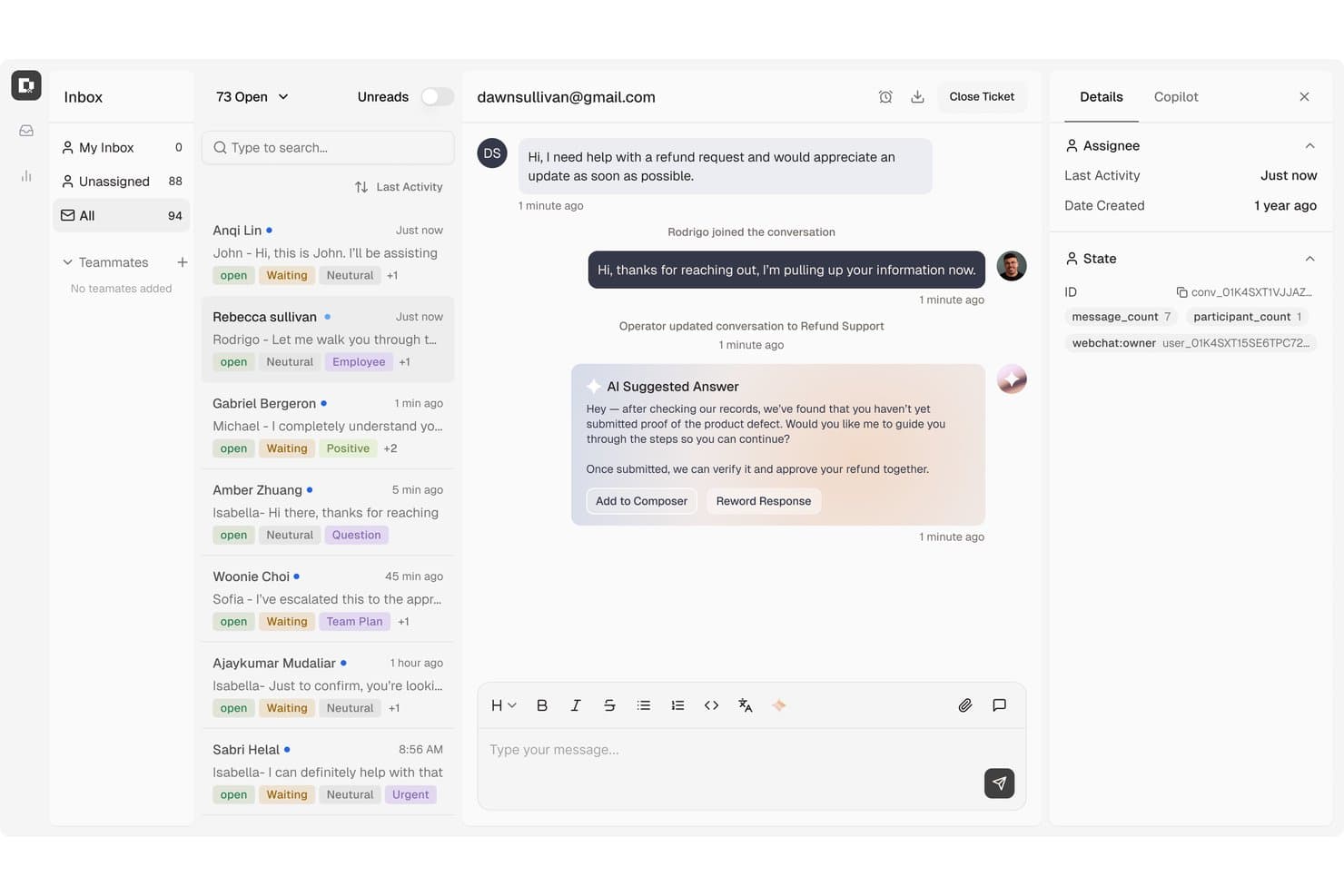
Botpress surfaces AI-suggested replies to speed up customer refund support. Botpress is an AI agent platform for customer self-service that combines a visual flow builder, LLM-powered conversational resolution, multi-channel deployment, and agentic task automation across support, account, and billing workflows.
Who Is Botpress Best For?
Botpress is a strong fit for support and CX teams that need agents to do more than answer questions—think live refunds, account lookups, and record updates without human intervention.
Why I Picked Botpress
I picked Botpress as one of the best because it goes beyond answering questions and actually does things, like processing refunds, pulling live order data, and updating records in connected systems without a human in the loop. I love how AI Actions and Viber Playbooks work together: you define the conditions once, and the agent knows exactly when to trigger a refund versus when to escalate. That kind of structured, agentic execution is what separates Botpress from tools that are purely conversational.
Botpress Key Features
- Multi-channel publishing: Deploy agents to Webchat, WhatsApp, Telegram, Instagram, Messenger, Slack, and voice channels from a single platform.
- Viber Gaps monitoring: Identifies unanswered or low-confidence questions from live conversations so you can correct and retrain agent behavior.
- Botpress Desk ticket management: Handles L1–L3 support tickets with priority routing, custom fields, macros, capacity-based team assignment, and RBAC.
- Knowledge Base ingestion: Pulls in websites, PDFs, spreadsheets, and structured data via API, webhooks, or scheduled jobs to keep agent answers current.
Botpress Integrations
Botpress offers marketplace integrations including Zendesk, Intercom, Salesforce, HubSpot, Slack, WhatsApp, and Shopify. It also provides Chat, Admin, Files, Tables, and Runtime APIs for custom integrations, plus Zapier.
Pros and Cons
Pros:
- Live knowledge gaps guide targeted corrections
- Agents can issue refunds and update records
- Visual flows pair with custom API logic
Cons:
- Conversation reporting offers limited export flexibility
- Complex answers need prompt testing
Learn more about Botpress: Best for AI agents tested on real data
- Free demo available
- Pricing upon request
Visit WebsiteCustomer Rating:5/5
Cresta offers AI-powered simulated visitor testing that evaluates self-service chat flows against distinct customer personas like the 'Self-Sufficient Resolver' to ensure complete and accurate responses. Cresta is an AI customer self-service platform that uses conversational AI, real-time agent assistance, and conversation analytics to automate and optimize service interactions across chat, voice, and messaging channels.
Who Is Cresta Best For?
Cresta is a strong fit for enterprise customer experience teams who manage large volumes of interactions across multiple channels.
Why I Picked Cresta
I picked Cresta as one of the best because it stands out for AI agents tested using real customer data. I like having access to autonomous conversation agents and real-time agent coaching that adapt based on actual, in-production service conversations.
Cresta Key Features
- Multichannel support: Manage customer conversations across chat, voice, and messaging from one unified platform.
- Conversation intelligence: Analyze interactions using natural language processing to surface trends and customer sentiment.
- Automated quality management: Score and review every conversation automatically for compliance and service standards.
- Live workflow automation: Trigger predefined workflows within customer interactions to streamline processes and reduce manual steps.
Cresta Integrations
Cresta offers native integrations with Salesforce, Twilio, Pipedrive, BigCommerce, Five9, Zendesk, and more. An API is available for custom integrations.
Pros and Cons
Pros:
- Real-time feedback for live agents
- Advanced analytics for every interaction
- AI adapts based on real conversations
Cons:
- Occasional intent recognition inaccuracies
- Complex workflows may require extra setup
Learn more about Cresta: Best with real-time data integrations
- 7-day free trial + free plan + free demo available
- From $32/month (billed annually)
Visit WebsiteCustomer Rating:4.4/5
Chatbase self-service AI agent builder displaying source uploads and automation features that enable businesses to deliver automated customer support. Chatbase is an AI chatbot platform designed for businesses and support teams who want to automate customer interactions, deliver instant answers, and reduce manual workload across websites and messaging channels.
Who Is Chatbase Best For?
Chatbase suits support and operations teams at growing businesses that want to automate customer service across digital channels.
Why I Picked Chatbase
I picked Chatbase as one of the best because I can connect my chatbots directly to live databases and APIs, letting them pull up-to-the-minute information for customers. My team uses the real-time data integrations to answer order status questions, check inventory, or provide account updates instantly. I like that we can set up webhooks and custom data sources, so our bots always respond with the latest details.
Chatbase Key Features
- No-code chatbot builder: Build and deploy chatbots using a drag-and-drop interface without coding.
- Multi-language support: Serve customers in multiple languages with built-in translation capabilities.
- Conversation analytics: Track chatbot performance and review detailed conversation logs and metrics.
- Customizable AI agent actions: Define specific actions and workflows for your AI agents to handle complex requests.
Chatbase Integrations
Chatbase offers native integrations with WhatsApp, Facebook Messenger, Telegram, Slack, Google Sheets, Shopify, and Zapier. An API is available for custom integrations.
Pros and Cons
Pros:
- Deploys chatbots across multiple messaging platforms
- Provides detailed conversation analytics and logs
- Enables multi-step, conditional AI agent actions
Cons:
- Custom branding options are only on paid plans
- Lacks built-in voice assistant integration
Learn more about Chatbase:

Weav offers a detailed agent reporting dashboard that tracks customer conversations. Weav is an AI customer self-service platform built around product-trained AI agents, chatbots, a unified human-AI inbox, internal knowledge search, and automated resolution reporting.
Who Is Weav Best For?
Weav is a good fit for small to mid-sized ecommerce and SaaS teams that want to automate customer support without relying on a large support staff.
Why I Picked Weav
I've included Weav in my top picks because its no-code agent customization genuinely sets it apart. You can set conversation tone, cap response length, define prohibited phrases, and inject additional context into agents using simple text prompts, no developer involvement needed. I also like that specialized agents can be built for distinct scenarios, like billing versus technical support, each trained separately on relevant content. The one-click training setup means your team can spin up and adjust agents without touching a single line of code.
Weav Key Features
- Knowledge base training: Train your AI agent by importing content from websites, uploaded files, Q&A pairs, and video transcripts.
- Unified inbox: Manage customer conversations across multiple channels in one view, with AI-drafted reply suggestions for human agents.
- Ask Weav: An internal AI search tool that lets support team members instantly surface answers from your connected knowledge sources.
- Resolution reporting: Track AI resolution rates, ticket volume, and agent performance across your support operations.
Weav Integrations
Weav offers native integrations with Stripe and Shopify, letting AI agents handle billing, subscription, and invoice workflows directly inside customer conversations. It also integrates with Google Drive. Beyond those, Weav supports custom actions that connect agents to any third-party HTTPS API, so you can build integrations with your own backend or tools like order management and booking systems.
Pros and Cons
Pros:
- Built-in automated confidence scoring
- Continuous learning from resolved tickets
- One-click training from existing documentation
Cons:
- Free plan caps AI messages at 20
- Limited native third-party integrations
Learn more about Weav: Best for e-commerce customer support automation
- 7-day free trial
- From $10/month
Visit WebsiteCustomer Rating:4.6/5
Gorgias automates ecommerce support with deep Shopify integration. Gorgias is a customer service platform built for ecommerce brands that want to automate and personalize support at scale. It’s especially useful for online retailers looking to centralize customer conversations and automate repetitive tasks. With Gorgias, support teams can manage tickets from multiple channels and deliver faster, more consistent responses to shoppers.
Who Is Gorgias Best For?
Gorgias is a strong choice for e-commerce support teams at direct-to-consumer brands and online retailers.
Why I Picked Gorgias
I picked Gorgias because its deep Shopify integration makes it uniquely valuable for e-commerce brands that want to automate and personalize customer service. The platform pulls in order details, shipping status, and customer data directly from Shopify, allowing support agents and AI-powered workflows to resolve common e-commerce questions without switching tools. Gorgias also enables automated responses to repetitive inquiries, like order tracking or returns, which helps teams handle high ticket volumes efficiently. This focus on e-commerce-specific automation and data access sets Gorgias apart from more generic AI customer self-service platforms.
Gorgias Key Features
Some other features that make Gorgias a strong option for AI customer self-service platforms include:
- AI-powered intent detection: Automatically identifies the reason for each customer inquiry to route tickets and trigger relevant automations.
- Macros and templated responses: Lets teams create reusable replies for common questions, ensuring consistency and saving time.
- Multi-channel support: Centralizes customer conversations from email, live chat, social media, SMS, and WhatsApp in one dashboard.
- Self-service help center: Allows businesses to build and manage a branded knowledge base that customers can access 24/7.
Gorgias Integrations
Integrations include Shopify, Magento, BigCommerce, WooCommerce, Facebook, Instagram, Slack, Klaviyo, Yotpo, and more.
Pros and Cons
Pros:
- Macros speed up ticket resolution workflows
- Centralizes chat, email, and social messaging
- AI suggests responses for repetitive questions
Cons:
- Lacks advanced workflow branching logic
- No AI voice or phone support features
Learn more about Gorgias: Best for automated ticket workflows
- 14-day free trial
- From $24/user/month (billed annually)
Visit WebsiteCustomer Rating:4.5/5
HappyFox displays a ticketing system with contact history and active call features. If your team needs AI-driven ticketing with multilingual support, HappyFox is worth a look. It’s designed for organizations that want to automate customer service workflows and offer self-service options in multiple languages. HappyFox helps support teams manage complex inquiries while reducing manual workload and improving response consistency.
Who Is HappyFox Best For?
HappyFox suits mid-sized to large organizations that need multilingual AI ticketing and workflow automation for customer support.
Why I Picked HappyFox
What drew me to HappyFox is its focus on AI-powered ticketing combined with multilingual self-service and workflow automation. The platform’s AI can automatically categorize, prioritize, and route tickets, which is especially useful for teams handling large volumes of customer requests in different languages. I also like that HappyFox offers a multilingual knowledge base and self-service portal, making it easier for global customers to find answers on their own. Its workflow automation tools help support teams reduce manual steps and maintain consistent service quality across channels.
HappyFox Key Features
Some other features that make HappyFox a strong option for AI customer self-service platforms include:
- Canned actions: Create and use pre-defined responses for common customer queries to speed up ticket handling.
- Custom ticket fields: Add unique data fields to tickets to capture information specific to your business or workflow.
- Customer satisfaction surveys: Send automated surveys after ticket resolution to gather feedback and measure service quality.
- Role-based permissions: Control access to features and data by assigning roles and permissions to different team members.
HappyFox Integrations
Native integrations are not currently listed.
Pros and Cons
Pros:
- Workflow automation reduces manual ticket handling
- Multilingual self-service portal supports global users
- AI ticket classification improves response accuracy
Cons:
- Ticket sync delays reported across some channels
- AI features limited to higher-tier plans
 Best for unified AI customer support
- Free demo available
- Pricing upon request
Visit WebsiteCustomer Rating:4.5/5
Kustomer AI manages chats with AI booking and multi-conversation support. If your team needs a customer service platform that brings all channels and customer data together, Kustomer is worth a look. It’s designed for support teams in retail, ecommerce, and fast-growing businesses that want to automate and personalize service at scale. Kustomer helps you manage conversations, automate repetitive tasks, and deliver faster, more informed responses using AI.
Who Is Kustomer Best For?
Kustomer suits mid-sized to large support teams in retail and e-commerce that need to manage high volumes of omnichannel customer interactions.
Why I Picked Kustomer
What stands out to me about Kustomer is how it brings together omnichannel support and AI-powered automation in one platform. I picked it for this list because it lets you manage conversations from chat, email, social, and voice in a single timeline, so agents always have the full context. Kustomer’s AI features can automate routine tasks, suggest responses, and even route conversations based on intent, which helps teams handle high volumes without losing the personal touch. For businesses that want to unify customer data and automate service across channels, Kustomer offers a strong foundation.
Kustomer Key Features
Some other features that make Kustomer useful for AI customer self-service platforms include:
- Knowledge base management: Build and maintain a searchable help center for customers to find answers on their own.
- Customer timeline view: See a chronological record of every customer interaction, order, and activity in one place.
- Custom workflows: Design automated processes for ticket handling, escalations, and follow-ups using a visual workflow builder.
- Sentiment analysis: Automatically detect customer sentiment in conversations to prioritize and personalize responses.
Kustomer Integrations
Integrations include Shopify, TikTok Shop, Facebook, WhatsApp, Instagram, Gmail, Twilio, AfterShip, Narvar, and more.
Pros and Cons
Pros:
- Visual workflow builder for custom automations
- Sentiment analysis flags urgent conversations
- Knowledge base supports self-service and chatbots
Cons:
- Occasional delays syncing with e-commerce platforms
- Advanced AI features require higher-tier plans
Learn more about Kustomer: Best for AI-powered support automation
- 14-day free trial
- From $20/user/month
Visit WebsiteCustomer Rating:4.4/5
HubSpot Service Hub tracks contacts, deals, calls, and support tickets. If you’re looking for an AI-driven customer service platform that connects tickets, chat, and a knowledge base in one place, HubSpot Service Hub is worth a look. It’s a strong fit for growing businesses and teams that want to automate support while keeping all customer data unified. With HubSpot Service Hub, you can centralize customer conversations and empower users to find answers on their own.
Who Is HubSpot Service Hub Best For?
HubSpot Service Hub suits small to midsize businesses and support teams that want to unify customer service, automate workflows, and manage all interactions in a single platform.
Why I Picked HubSpot Service Hub
What stands out to me about HubSpot Service Hub is how it brings together ticketing, live chat, and knowledge base tools into a single, unified platform powered by AI automation. This unified approach means your team can automate repetitive support tasks, route tickets intelligently, and surface relevant help articles to customers without switching systems. I also appreciate that HubSpot’s AI tools can analyze conversations and suggest responses, which helps teams deliver faster, more consistent support. For businesses that want to centralize customer service and automate self-service, HubSpot Service Hub offers a strong, all-in-one solution.
HubSpot Service Hub Key Features
Some other features that make HubSpot Service Hub valuable for AI customer self-service platforms include:
- Customer feedback surveys: Collect and analyze customer satisfaction, NPS, and custom survey responses directly within the platform.
- SLAs and automation rules: Set service level agreements and automate ticket prioritization, escalation, and follow-up actions.
- Omnichannel messaging: Manage conversations from email, chat, Facebook Messenger, and more in a single inbox.
- Reporting dashboard: Track team performance, ticket volume, and customer trends with customizable analytics and reports.
HubSpot Service Hub Integrations
Integrations include Salesforce, Gmail, Outlook, Slack, Zoom, Microsoft Teams, Google Calendar, WordPress, Google Meet, and more.
Pros and Cons
Pros:
- Automated ticket routing based on rules
- Knowledge base integrates with live chat
- AI chatbots handle multi-step customer queries
Cons:
- Limited AI analytics for self-service usage
- Chatbot customization requires manual setup
Learn more about HubSpot Service Hub: Best for AI-driven unified customer support
- 30-day free trial
- Pricing upon request
Visit WebsiteCustomer Rating:4/5
Sprinklr analyzes support tickets with exportable reports and date filters. Sprinklr offers a unified platform for businesses that want to manage customer self-service across multiple digital channels. It’s a strong fit for large enterprises and global brands that need advanced AI to automate and personalize support at scale. If your team handles high volumes of customer interactions and wants to centralize service operations, Sprinklr is worth a closer look.
Who Is Sprinklr Best For?
Sprinklr suits large enterprises and global brands that need unified, AI-driven self-service across multiple digital channels.
Why I Picked Sprinklr
What drew me to Sprinklr is its ability to unify AI-powered self-service across a wide range of digital channels. For teams managing customer interactions on web, social, messaging, and voice, Sprinklr’s platform brings everything together in one place. I appreciate how its AI can automate responses, route inquiries, and personalize self-service experiences based on customer context. This unified approach helps large organizations deliver consistent, scalable support without juggling multiple tools or fragmented workflows.
Sprinklr Key Features
Some other features that make Sprinklr useful for AI customer self-service platforms include:
- Knowledge base management: Build and manage a centralized library of articles and FAQs for customer self-service.
- Case management: Track, assign, and resolve customer issues with automated workflows and escalation rules.
- Sentiment analysis: Analyze customer messages in real time to detect tone and urgency.
- Multilingual support: Deliver AI-powered self-service and automated responses in multiple languages.
Sprinklr Integrations
Integrations include Salesforce, ServiceNow, Zendesk, Microsoft Teams, Slack, HubSpot, Google Analytics, Adobe Experience Manager, Freshdesk, and more.
Pros and Cons
Pros:
- Advanced analytics link performance to business outcomes
- AI-powered social listening surfaces trends insights
- Smart inbox consolidates messages across all social platforms
Cons:
- Custom reports need manual dashboard building
- Workflow setup requires navigating multiple modules
Learn more about Sprinklr: Best for multilingual AI self-service support
- Free demo available
- From $1.25/solve
Visit WebsiteCustomer Rating:4.9/5
Crescendo automates multilingual customer support with an AI knowledge base. Crescendo offers AI-powered customer self-service designed for teams that need to support users across multiple languages and channels. It’s a strong fit for businesses with global audiences or complex knowledge bases that want to automate answers and reduce manual ticket handling. Crescendo helps customer experience teams deliver consistent, accurate information while freeing up agents for higher-value work.
Who Is Crescendo Best For?
Crescendo is a good fit for global support teams and organizations that need multilingual AI self-service to manage complex customer inquiries across multiple regions.
Why I Picked Crescendo
I chose Crescendo for this list because its AI-driven self-service stands out with advanced multilingual support and automated knowledge base management. The platform uses natural language processing to understand and respond to customer queries in multiple languages, which is essential for businesses serving diverse audiences. I also appreciate how Crescendo automates the creation and updating of knowledge base articles, reducing manual effort for support teams. These capabilities make it a strong option for organizations that need scalable, accurate self-service across regions and languages.
Crescendo Key Features
Some other features that make Crescendo a versatile choice for AI customer self-service platforms include:
- Omnichannel support: Manage customer interactions across chat, email, and messaging apps from a single platform.
- Automated ticket triage: Route incoming requests to the right workflows or agents based on AI-driven intent detection.
- Customizable workflows: Design and automate support processes tailored to your business needs without coding.
- Analytics dashboard: Track self-service usage, resolution rates, and customer satisfaction with real-time reporting tools.
Crescendo Integrations
Integrations include Grindr, Miro, Headway, Loom, and more.
Pros and Cons
Pros:
- Analytics dashboard tracks self-service performance
- Fast deployment with minimal IT involvement
- Omnichannel support covers chat, email, and messaging
Cons:
- Reporting features lack deep customization options
- Limited customization for advanced workflow logic
Learn more about Crescendo:
Outras plataformas de autosserviço para clientes com IA
Eis algumas opções adicionais de plataformas de autosserviço para clientes com IA que não entraram na minha lista, mas que ainda vale a pena conhecer:
- 11ZendeskBest for AI-driven customer service tools
- 12Zoho DeskBest for AI ticket routing and resolution
- 13Freshdesk Best for AI-powered help desk automation
- 14ZowieBest for AI chatbot customer support
- 15HiverBest for managing customer support via Gmail
- 16TidioBest for instant AI chatbot responses
- 17Comm100Best for omnichannel AI customer engagement
- 18DevRevBest for AI-powered support and product ops
- 19FinBest for automating support workflows with AI
- 20FeaturebaseBest for AI-driven feedback and self-service
- 21AiseraBest for enterprise service desk automation
- 22Help ScoutBest for simple customer support and knowledge bases
- 23IBM watsonx AssistantBest for enterprise AI chatbots
- 24NiCEBest for AI-driven customer experience analytics
- 25NiCE CognigyBest for conversational AI in contact centers
- 26Agentforce ServiceBest for AI support in Salesforce
How I Evaluate AI Customer Self-Service Platforms
I only consider platforms where the AI actually resolves customer issues—processing a return, answering a billing question, or guiding a troubleshooting flow—without routing everything to a live agent. From there, I evaluate each tool on two levels: the core functionality it needs to qualify and the differentiating factors that separate good options from great ones.
Core Functionality (Table Stakes For This List)
When I'm selecting tools for my list, I rank each one on a scale from 0 (does not offer the functionality) to 5 (excels in this area) for each core functionality listed below. Then, I calculate the tool's total score into a percentage. Each tool needs to achieve a minimum total score of 65% to be considered for inclusion.
- Conversational AI Agents: I evaluate whether the AI can hold multi-turn conversations that actually resolve issues, like walking a customer through a subscription change step by step.
- Generative AI Answers: Each tool should generate grounded, accurate responses from your content rather than just matching keywords to canned replies from a static FAQ.
- Knowledge Base Integration: I look at how well the platform ingests sources like Zendesk Guide articles, Confluence pages, or PDF documentation and keeps that content in sync.
- Multi-Channel Deployment: The AI experience should carry across web chat, mobile, email, and messaging apps so customers get the same quality of help regardless of channel.
- Human Agent Handoff: I check whether the platform passes full conversation context and intent data to the live agent, so the customer doesn't repeat themselves after escalation.
- Self-Service Analytics: Strong reporting on deflection rates, unresolved queries, and content gaps matters here—these insights are what help CX teams continuously close coverage holes.
Once I have a list of tools that meet the criteria, I consider what sets each platform apart.
Differentiating Factors (What Sets Vendors Apart)
Here's how I compare and contrast different vendors:
Standout Features
Agentic action execution is a major differentiator. Some platforms only answer questions, but I look for AI that can process a refund, cancel a subscription, or update shipping details through backend API connections. A no-code bot builder also matters because it lets CX teams adjust conversation flows without filing engineering tickets. I check for AI guardrails too—hallucination prevention, brand voice controls, and restricted topic settings keep responses accurate and on-brand.
Beyond Features
I evaluate each platform's integration ecosystem closely—native connectors to tools like Zendesk, Salesforce, or Intercom determine how smoothly the AI fits into your existing support workflow. Pricing transparency matters too, especially whether the vendor charges per resolution, per conversation, or per seat, since unpredictable costs can erode ROI as ticket volume scales. Security and compliance round out my review. I check for SOC 2 Type II certification, GDPR readiness, and clear policies on whether customer data is used to train shared models.
Como escolher plataformas de autosserviço para clientes com IA
É fácil perder-se em listas extensas de funcionalidades e estruturas de preços complexas. Para o ajudar a manter-se concentrado enquanto percorre o seu processo específico de seleção de software, eis uma lista de fatores a ter em conta:
| Fator | O que considerar |
|---|---|
| FatorEscalabilidade | O que considerarA plataforma conseguirá gerir os seus volumes atuais e previstos de pedidos de suporte sem problemas de desempenho? |
| FatorIntegrações | O que considerarÉ possível ligá-la nativamente ao seu CRM, às ferramentas de gestão de pedidos, análise e comunicação? |
| FatorPersonalização | O que considerarPode adaptar os fluxos de trabalho, a marca e o conteúdo da base de conhecimento às necessidades da sua organização? |
| FatorFacilidade de utilização | O que considerarA sua equipa e os seus clientes considerarão a interface intuitiva ou será necessária formação extensa? |
| FatorImplementação e integração inicial | O que considerarQuanto tempo demorará a implementar a plataforma, migrar os dados e preparar a sua equipa? |
| FatorCusto | O que considerarOs níveis de preços são claros e estão alinhados com os seus padrões de utilização e limitações orçamentais? |
| FatorMedidas de segurança | O que considerarA plataforma cumpre os seus requisitos de privacidade dos dados, encriptação e controlo de acesso? |
| FatorDisponibilidade do suporte | O que considerarQue canais de suporte e tempos de resposta oferece o fornecedor, especialmente durante problemas críticos? |
O que são plataformas de autosserviço para clientes com IA?
As plataformas de autoatendimento ao cliente com IA são softwares de serviço ao cliente que utilizam IA generativa, agentes de IA e copilotos para ajudar os clientes a resolver problemas ou encontrar informações sem assistência humana direta. Estas plataformas incluem normalmente chatbots, agentes virtuais e bases de conhecimento automatizadas que apoiam toda a jornada do cliente, respondem a perguntas comuns, orientam os utilizadores ao longo dos processos e encaminham os casos complexos quando necessário. Com funcionalidades como configuração sem código e orquestração de fluxos de trabalho, ajudam as equipas a otimizar as operações de suporte, melhorar os tempos de resolução e acompanhar métricas importantes como o CSAT. Ao fornecer informações valiosas e aprender com histórias de clientes e estudos de caso, estas plataformas melhoram o serviço ao cliente com IA, mantendo-se fáceis de utilizar e escaláveis.
Funcionalidades das plataformas de autoatendimento ao cliente com IA
Ao selecionar plataformas de autoatendimento ao cliente com IA, tenha em atenção as seguintes funcionalidades principais:
- Chatbots com tecnologia de IA: Estes agentes virtuais utilizam o processamento de linguagem natural para responder às perguntas dos clientes, orientar os utilizadores e resolver problemas comuns em tempo real.
- Base de conhecimento automatizada: Uma biblioteca pesquisável de artigos e perguntas frequentes a que os clientes podem aceder a qualquer momento, frequentemente atualizada de forma automática com base em novas questões e tendências.
- Suporte omnicanal: A capacidade de proporcionar experiências de autoatendimento consistentes na Web, em dispositivos móveis, nas redes sociais, em aplicações de mensagens e muito mais.
- Encaminhamento de casos: Deteção e encaminhamento automáticos de problemas complexos ou sensíveis para agentes humanos quando o autoatendimento não consegue resolver o problema.
- Análise de sentimentos: Ferramentas de IA que analisam as mensagens dos clientes para detetar o tom, a urgência e a satisfação, ajudando a dar prioridade às respostas e a personalizá-las.
- Capacidades multilingues: Suporte para vários idiomas, permitindo que clientes de diferentes regiões acedam ao autoatendimento no seu idioma preferido.
- Automatização de fluxos de trabalho: Ferramentas para conceber e automatizar processos de suporte repetitivos, como a criação de pedidos, os acompanhamentos e as atualizações de estado.
- Integração com CRM e ferramentas de suporte: Ligações nativas a sistemas de gestão das relações com os clientes e de assistência técnica para sincronizar dados e manter o contexto.
- Análise e relatórios: Painéis e relatórios que acompanham a utilização, as taxas de resolução e a satisfação dos clientes, identificando áreas a melhorar.
- Personalização da marca: Opções para adaptar o aspeto, a experiência e o tom das interfaces de autoatendimento de modo a corresponderem à marca e à voz da sua organização.
Benefícios das plataformas de autoatendimento ao cliente com IA
A implementação de plataformas de autoatendimento ao cliente com IA proporciona vários benefícios à sua equipa e à sua empresa. Eis alguns dos benefícios que pode esperar:
- Redução do volume de pedidos de suporte: Os chatbots e as bases de conhecimento automatizados resolvem questões comuns, reduzindo o número de pedidos encaminhados para agentes humanos.
- Tempos de resposta mais rápidos: As ferramentas de autoatendimento com tecnologia de IA fornecem respostas e orientações instantâneas, ajudando os clientes a obter soluções sem terem de esperar numa fila.
- Experiências consistentes para os clientes: O suporte omnicanal e os fluxos de trabalho automatizados garantem que os clientes recebem a mesma qualidade de serviço em todos os canais.
- Maior produtividade dos agentes: Ao responderem a questões repetitivas, estas plataformas libertam as equipas de suporte para se concentrarem em casos complexos ou de elevado valor.
- Informações acionáveis: A análise e a análise de sentimentos fornecem dados sobre as necessidades, a satisfação e as tendências dos clientes, apoiando a melhoria contínua.
- Operações de suporte escaláveis: As plataformas de autoatendimento com IA conseguem lidar com grandes volumes de interações sem pessoal adicional, facilitando o crescimento.
- Acessibilidade global: As capacidades multilingues e as interfaces personalizáveis permitem-lhe servir bases de clientes diversificadas em todo o mundo.
Custos e preços das plataformas de autoatendimento ao cliente com IA
A seleção de plataformas de autoatendimento ao cliente com IA exige uma compreensão dos vários modelos de preços e planos disponíveis. Os custos variam consoante as funcionalidades, a dimensão da equipa, os complementos e outros fatores. A tabela abaixo resume os planos comuns, os respetivos preços médios e as funcionalidades normalmente incluídas nas soluções de plataformas de autoatendimento ao cliente com IA:
Tabela de comparação de planos para plataformas de autoatendimento ao cliente com IA
| Tipo de plano | Preço médio | Funcionalidades comuns |
|---|---|---|
| Tipo de planoPlano gratuito | Preço médio$0 | Funcionalidades comunsFuncionalidade básica de chatbot, acesso limitado à base de conhecimento, suporte para um único canal e análises básicas. |
| Tipo de planoPlano pessoal | Preço médio$10-$30/utilizador/mês | Funcionalidades comunsCapacidades de chatbot expandidas, suporte multicanal, integrações limitadas e automatização básica de fluxos de trabalho. |
| Tipo de planoPlano empresarial | Preço médio$40-$80/utilizador/mês | Funcionalidades comunsFuncionalidades avançadas de IA, suporte omnicanal, integrações com CRM, painéis de análise e personalização da marca. |
| Tipo de planoPlano empresarial avançado | Preço médio$100-$200/utilizador/mês | Funcionalidades comunsConjunto completo de automatização, segurança avançada, suporte multilíngue, gestão dedicada de contas e integrações personalizadas. |
Perguntas frequentes sobre plataformas de autoatendimento ao cliente com IA
Eis algumas respostas a perguntas comuns sobre plataformas de autoatendimento ao cliente com IA:
Como é que as plataformas de autoatendimento ao cliente com IA melhoram a satisfação do cliente?
As plataformas de autoatendimento ao cliente com IA melhoram a satisfação do cliente ao fornecerem respostas imediatas e precisas, bem como suporte 24 horas por dia, 7 dias por semana. Os clientes podem resolver problemas rapidamente sem esperar por um agente humano, o que conduz a resoluções mais rápidas e a uma experiência mais positiva.
As plataformas de autoatendimento ao cliente com IA podem integrar-se com as ferramentas de suporte existentes?
Sim, a maioria das plataformas de autoatendimento ao cliente com IA oferece integrações com ferramentas populares de CRM, assistência técnica e comunicação. Isto permite sincronizar os dados dos clientes, manter o contexto entre canais e simplificar os fluxos de trabalho sem interromper os sistemas atuais.
Que tipos de problemas podem as plataformas de autoatendimento ao cliente com IA resolver?
As plataformas de autoatendimento ao cliente com IA tratam de perguntas de rotina, reposições de palavras-passe, acompanhamento de encomendas e outros pedidos comuns. Também podem orientar os utilizadores nas etapas de resolução de problemas e encaminhar questões complexas ou sensíveis para agentes humanos quando necessário.
As plataformas de autoatendimento ao cliente com IA são seguras?
Sim, as plataformas conceituadas incluem medidas de segurança, como encriptação de dados, controlos de acesso e conformidade com os regulamentos de privacidade. Consulte sempre a documentação de segurança do fornecedor para garantir que cumpre os requisitos da sua organização.
Quanto tempo demora a implementar uma plataforma de autoatendimento ao cliente com IA?
O tempo de implementação varia, mas muitas plataformas oferecem recursos de integração, como visitas guiadas ao produto, modelos e vídeos de formação. As configurações simples podem demorar alguns dias, enquanto as integrações ou personalizações mais complexas podem exigir várias semanas.