
O software para centros de atendimento ajuda as equipas de suporte a gerir grandes volumes de interações de voz com maior rapidez, estrutura e controlo. Foi concebido para reduzir os tempos de espera, melhorar o encaminhamento das chamadas e fornecer aos agentes as ferramentas de que precisam para resolver problemas rapidamente.
Com uma vasta experiência na avaliação de ferramentas de experiência do cliente quanto à funcionalidade, facilidade de utilização e retorno do investimento, identifiquei o melhor software para centros de atendimento para gerir chamadas recebidas e efetuadas com consistência e à escala. Isto ajudará a encontrar o software para centros de atendimento adequado à sua equipa, para que possa prestar um melhor serviço ao cliente sem acrescentar complexidade.
Porque pode confiar nas nossas recomendações de software
6,700+
Reviews
20
Industry experts
16+
Evaluation factors
14
Years reviewing software
A nossa equipa testa e analisa software desde 2012. Como líderes de experiência do cliente (CX), sabemos o quão difícil — e importante — é escolher o software certo.
Para este guia, avaliámos as ferramentas através de testes práticos e pesquisa independente, pontuando-as de acordo com os nossos critérios de seleção.
As nossas análises refletem o juízo da nossa equipa editorial, e não um discurso de vendas.
 Gui DrusinaCreative Director
 Tim FisherVP of AI
Tabela de comparação de software para centros de atendimento
Esta tabela de comparação resume os detalhes de preços das minhas principais escolhas de software para centros de atendimento:
Sorted by: Default
| Tool | Starting Price | Website | |
|---|---|---|---|
Best for call monitoring features | 4.3 out of 5 | $30/user/month Free trial available | Book Demo |
Best for automation-driven processes | 5.0 out of 5 | $30/user/month Free demo available | Website |
Best for a scalable and versatile solution | 4.8 out of 5 | $25/user/month Free demo available | Website |
Best for global call centers | 4.2 out of 5 | €25/user/month 14-day free trial + demo available | Website |
Best for handling multiple calls | 4.4 out of 5 | $19/month 7-day free trial | Website |
Best with enterprise-grade security and compliance | 4.3 out of 5 | $110/user/month Free demo available | Website |
Best for managing high call volumes | 4.1 out of 5 | $119/user/month Free demo available | Website |
Best with unified journey management | Not rated | $75/user/month Free demo available | Website |
Best for easy deployment and administration | Not rated | Pricing upon request Free demo available | Website |
Best with deep CRM integration capabilities | Not rated | Pricing upon request Free demo available | Website |


Avaliações do melhor software para centros de atendimento
Forneci resumos detalhados das minhas principais escolhas de software para centros de atendimento e expliquei por que incluí cada sistema nesta lista.
 Best for call monitoring features
- Free trial available
- From $30/user/month (billed annually)
Customer Rating:4.3/5
Track call performance in real-time through Aircall’s analytics dashboard. If you need a call center platform that connects quickly with your existing CRM and helpdesk tools, Aircall is worth a look. It’s built for fast-moving sales and support teams that want to launch new phone lines and integrations without IT delays. Aircall helps you centralize customer conversations and automate call logging, so your team can focus on the next interaction.
Who is Aircall Best For?
Customer support managers, contact center leaders, and sales operations teams at small to mid-sized organizations that need live call monitoring and coaching as part of their phone system. It suits companies operating distributed support or sales teams that require centralized visibility into call activity and real-time supervision across channels.
Why I Picked Aircall
What stands out about Aircall is how quickly you can get a new call center up and running, even if your team is distributed or remote. The platform’s fast setup process lets you create new numbers and onboard agents in minutes, which is ideal for businesses that need to scale or pivot quickly. I appreciate how Aircall’s deep CRM integrations automatically sync call data and notes, so your team always has the latest customer context at their fingertips. These features make Aircall a strong choice for teams that want to minimize downtime and keep customer records unified across channels.
Aircall Key Features
Some other features in Aircall that are especially useful for call center teams include:
- Call Whispering: Supervisors can listen in and provide guidance to agents during live calls without the customer hearing.
- Shared Call Inbox: Teams can view, assign, and manage missed calls and voicemails from a central dashboard.
- Power Dialer: Automatically dials through lists of numbers to speed up outbound calling campaigns.
- Warm Transfer: Agents can speak with a colleague before transferring a call, ensuring smoother handoffs.
Aircall Integrations
Integrations include Salesforce, HubSpot, Intercom, Zendesk, Pipedrive, Microsoft Dynamics, Slack, Shopify, Freshdesk, and Zoho CRM.
Pros and Cons
Pros:
- Deep communication insights
- Accessible on multiple devices
- Excellent customer support
Cons:
- No built-in workforce management tools
- Loudspeaker functionality is unpredictable
 Best for automation-driven processes
- Free demo available
- From $30/user/month (billed annually)
Visit WebsiteCustomer Rating:5/5
Visualize call center performance in a centralized dashboard. RingCentral Contact Center offers a cloud-based platform that integrates AI-driven insights and automation to enhance customer interactions. It appeals to industries ranging from retail to healthcare, where efficient customer service is paramount. By providing omnichannel support across voice, messaging, and social media, RingCentral helps businesses streamline communication and optimize agent performance, thus addressing challenges such as managing high call volumes and improving customer satisfaction.
Who is RingCentral Contact Center Best For?
Customer service and support managers, contact center leaders, and operations teams at mid-sized to large organizations that need a unified platform to manage omnichannel customer interactions with automation, routing, and analytics. It suits companies that handle high volumes of inbound and outbound support or sales activity and require centralized oversight of performance, workforce management, and CRM-integrated workflows.
Why I Picked RingCentral Contact Center
I picked RingCentral Contact Center for its strong focus on automation-driven processes, which is essential for any modern call center operation. With features like Interactive Voice Response (IVR) and Intelligent Virtual Agents (IVAs), you can automate routine customer interactions, reducing wait times and allowing your team to focus on more complex issues. This not only enhances customer satisfaction but also optimizes operational efficiency, ensuring your call center runs smoothly. Additionally, the use of AI-powered conversation intelligence provides real-time insights, helping your agents deliver personalized support and improving overall service quality.
RingCentral Contact Center Key Features
In addition to its automation-driven processes, RingCentral Contact Center offers a variety of key features that enhance its utility as a call center software.
- Omnichannel Support: Engage with customers through multiple channels including voice, chat, email, and social media, ensuring a seamless customer experience.
- Workforce Management: Optimize your team's schedules and monitor performance with tools designed to enhance productivity and service quality.
- Analytics and Reporting: Gain insights into your call center's performance with detailed analytics and reporting tools, helping you make informed decisions.
- Security and Compliance: Protect sensitive data and ensure compliance with industry regulations through advanced security features.
RingCentral Contact Center Integrations
Integrations include Salesforce, HubSpot, Zendesk, Slack, Microsoft Teams, Google Workspace, ServiceNow, Microsoft Dynamics 365, Oracle, and SugarCRM.
Pros and Cons
Pros:
- Built-in workforce and quality management tools
- Omnichannel support across voice, chat, and social
- AI-powered routing for complex customer journeys
Cons:
- Initial customization requires significant effort and resources
- Limited support for polycom phones
Learn more about RingCentral Contact Center: Best for a scalable and versatile solution
- Free demo available
- From $25/user/month
Visit WebsiteCustomer Rating:4.8/5
Keep track of your team's time and tasks to ensure your call center is running as efficiently as possible through the system. If your team needs to manage international calling and messaging from one platform, Squaretalk is built for you. This cloud-based call center software is especially useful for businesses with remote or distributed agents who need local numbers and automated workflows across multiple countries. Squaretalk helps simplify global communication and compliance for customer support and sales teams working at scale.
Who is Squaretalk Best For?
Squaretalk suits customer support and sales teams at growing small to mid-sized companies that need a scalable communications platform. It works well for organizations operating across multiple regions that require flexible voice infrastructure and centralized management of distributed teams.
Why I Picked Squaretalk
Squaretalk caught my attention because it’s designed for teams that need global voice and messaging capabilities from a single platform. I picked it for this list since it offers local phone numbers in over 100 countries and supports automated call distribution, which is essential for managing remote or distributed agents. The platform’s cloud-based telephony infrastructure helps businesses simplify international calling and stay compliant with local regulations. If your call center needs to reach customers worldwide without juggling multiple systems, Squaretalk’s unified approach is a strong fit.
Squaretalk Key Features
I also found several other features that support call center operations:
- Smart Dialer: Automatically dials numbers from call lists and skips busy or unanswered calls to keep agents focused on live conversations.
- Call Recording: Records inbound and outbound calls for quality assurance and compliance purposes.
- IVR Designer: Lets you create custom interactive voice response menus using a drag-and-drop interface.
- Real-Time Analytics Dashboard: Shows live call metrics and agent performance data for supervisors to monitor activity.
Squaretalk Integrations
Integrations include Zoho, Salesforce, Freshworks, Pipedrive, Lynx, Programmable Messaging, Programmable Voice Access, and Call Me Back widget.
Pros and Cons
Pros:
- User-friendly and intuitive interface
- Extensive reporting and analytics features
- High security standards
Cons:
- No mobile application
- Limited customization options
Learn more about Squaretalk: Best for global call centers
- 14-day free trial + demo available
- From €25/user/month (billed annually)
Visit WebsiteCustomer Rating:4.2/5
Monitor customer service representatives’ activity from CloudTalk’s dashboard. CloudTalk is designed for teams that need advanced call routing and analytics across multiple locations or remote setups. It’s a strong fit for businesses managing distributed support or sales teams who want to track performance and optimize workflows. The platform helps you handle high call volumes while keeping every interaction organized and measurable.
Who is CloudTalk Best For?
CloudTalk supports operations leaders and IT teams at mid-sized to enterprise organizations running global call centers. It is well-suited to companies with distributed sales and support teams that require centralized call management across multiple countries and regions.
Why I Picked CloudTalk
I chose CloudTalk because its advanced call routing and analytics are especially useful for teams working across different locations or time zones. The platform offers skills-based routing, so calls reach the right agent based on expertise, and real-time analytics dashboards that let you monitor call activity as it happens. I also like that you can set up custom call flows to match your team’s structure, which helps keep distributed operations running smoothly. These features make CloudTalk a strong option for businesses that need to coordinate and measure performance across remote or multi-site call centers.
CloudTalk Key Features
Some other features in CloudTalk that stand out for call center teams include:
- Voicemail Drop: Agents can leave pre-recorded voicemail messages with one click, saving time on repetitive follow-ups.
- Call Recording: Automatically record calls for quality assurance, training, and compliance purposes.
- Interactive Voice Response (IVR): Set up multi-level IVR menus to guide callers to the right department or information.
- Click-to-Call: Initiate calls directly from your CRM or helpdesk with a single click, reducing manual dialing errors.
CloudTalk Integrations
Integrations include Salesforce, HubSpot, Zendesk, Pipedrive, Zoho CRM, Intercom, Freshdesk, Microsoft Teams, Monday, and Shopify.
Pros and Cons
Pros:
- Simple rep management
- User-friendly interface
- Stable call quality
Cons:
- Updates can cause issues
- Needs better API support


Talkroute provides a unified communication platform that enables businesses to manage calls, text messages, voicemails, and meetings from a single interface. If you’re looking for a virtual phone system that works across devices, Talkroute is built for small businesses and remote teams that need flexible call handling. It’s especially useful for companies that want to route calls to multiple locations or mobile phones without extra hardware. Talkroute helps you manage business calls professionally, even if your team is always on the go.
Who is Talkroute Best For?
TalkRoute fits small business owners and customer-facing teams that need to manage multiple inbound calls without adding complex infrastructure. It serves early-stage to mid-sized companies across industries that want a straightforward virtual phone system to route calls across distributed staff in the U.S. or other supported regions.
Why I Picked Talkroute
Talkroute stands out for its virtual phone system with call routing designed for small teams that need flexibility. I picked it because you can direct calls to any phone, whether your team is in the office, remote, or using mobile devices, so you never miss a customer call. The platform also lets you set up custom greetings and voicemail boxes for each user, which helps small businesses look professional. If you want a solution that brings advanced call handling to a distributed or mobile team, Talkroute is built for that purpose.
Talkroute Key Features
In addition to its flexible call routing and professional voicemail options, I also found these features worth noting:
- Call Stacking: Lets multiple callers wait in a queue instead of getting a busy signal.
- Text Messaging: Allows you to send and receive SMS messages from your business number.
- Desktop and Mobile Apps: Gives you access to your phone system from any device.
- Call Reporting: Provides detailed call logs and analytics for tracking team activity.
Talkroute Integrations
Integrations are not publicly listed.
Pros and Cons
Pros:
- Call stacking keeps callers in a queue
- Easy setup process
- Consistent call quality and reliability
Cons:
- Some users may want more sophisticated functionalities
- Additional costs for extra phone numbers and users
Learn more about TalkRoute: Best with enterprise-grade security and compliance
- Free demo available
- From $110/user/month
Visit WebsiteCustomer Rating:4.3/5
NiCE CXone offers an AI-powered agent workspace with real-time chat summaries, sentiment tracking, and automated contact notes to streamline customer interactions. NiCE CXone is an AI-powered cloud contact center platform that unifies inbound and outbound voice, digital channels, workforce engagement management, and interaction analytics on a single platform.
Who Is NiCE CXone Best For?
It's a strong fit for enterprise contact centers in regulated industries like healthcare, banking, insurance, and government that need rigorous compliance built into their platform.
Why I Picked NiCE CXone
NiCE CXone earns its spot as one of the best on my shortlist because of how deeply compliance is woven into the platform itself. I like that recording and compliance tools aren't an add-on here; they're included at every pricing tier, which matters in regulated industries where audit trails are non-negotiable. Features like complete Teams recording coverage and HIPAA-ready infrastructure mean I'm not patching together a compliance stack from third-party tools.
NiCE CXone Key Features
- Omnichannel agent desktop: Manage voice, chat, email, SMS, and social messages in one unified interface.
- AI-powered IVR: Deploy conversational IVR flows using natural language understanding and automation.
- Workforce engagement management: Forecast, schedule, record, and manage agent performance on a single cloud platform.
- Real-time analytics dashboard: Monitor live queue activity, agent status, and contact center KPIs with custom reporting tools.
NiCE CXone Integrations
NiCE CXone offers native integrations with Salesforce, Zendesk, Microsoft Dynamics 365, ServiceNow, Microsoft Teams, Oracle Service Cloud, and Zoom. An API is available for custom integrations.
Pros and Cons
Pros:
- Extensive certifications for regulated industries
- Built-in workforce management and scheduling tools
- AI-powered routing across all digital channels
Cons:
- Reporting customization requires technical expertise
- Complex implementation requires IT involvement
Learn more about NiCE CXone: Best for managing high call volumes
- Free demo available
- From $119/user/month
Visit WebsiteCustomer Rating:4.1/5
Create custom call flows from the admin dashboard. Five9 offers a cloud-based contact center platform designed for organizations that want to blend AI automation with live agent support. It’s a strong choice for teams looking to unify voice, chat, email, and social channels while using analytics to optimize performance. Five9 helps businesses automate routine interactions and deliver more personalized service at scale.
Who is Five9 Best For?
Five9 supports contact center and operations leaders at mid-sized to enterprise organizations that manage high inbound and outbound call volumes. It fits companies in service-driven and regulated industries that require centralized oversight and workforce management across regional or global operations.
Why I Picked Five9
What drew me to Five9 is its focus on combining AI-powered automation with deep analytics for contact centers. The platform’s intelligent virtual agents handle routine customer inquiries, freeing up live agents for more complex issues. I also like that Five9’s analytics suite provides real-time and historical insights into agent performance and customer interactions. This approach helps teams continuously improve service quality and efficiency while managing high volumes across multiple channels.
Five9 Key Features
Some other features that make Five9 a strong option for call center teams include:
- Predictive Dialer: Automatically dials numbers and connects answered calls to available agents.
- Omnichannel Routing: Routes customer interactions from voice, chat, email, and social media to the right agent.
- CRM Integrations: Connects natively with Salesforce, ServiceNow, Microsoft Dynamics, and other leading CRMs.
- Call Recording and Monitoring: Records calls and allows supervisors to monitor live interactions for quality assurance.
Five9 Integrations
Integrations include Salesforce, ServiceNow, Microsoft Dynamics 365, Oracle, Zendesk, Oracle NetSuite, Zoom, Microsoft Teams, Slack, and Mitel.
Pros and Cons
Pros:
- Predictive dialer increases outbound call efficiency
- Extensive documentation
- Includes gamification to improve agent performance
Cons:
- Integration analytics are limited to their top-level paid plan
- Feature add-ons can be expensive
 Best with unified journey management
- Free demo available
- From $75/user/month (billed annually)
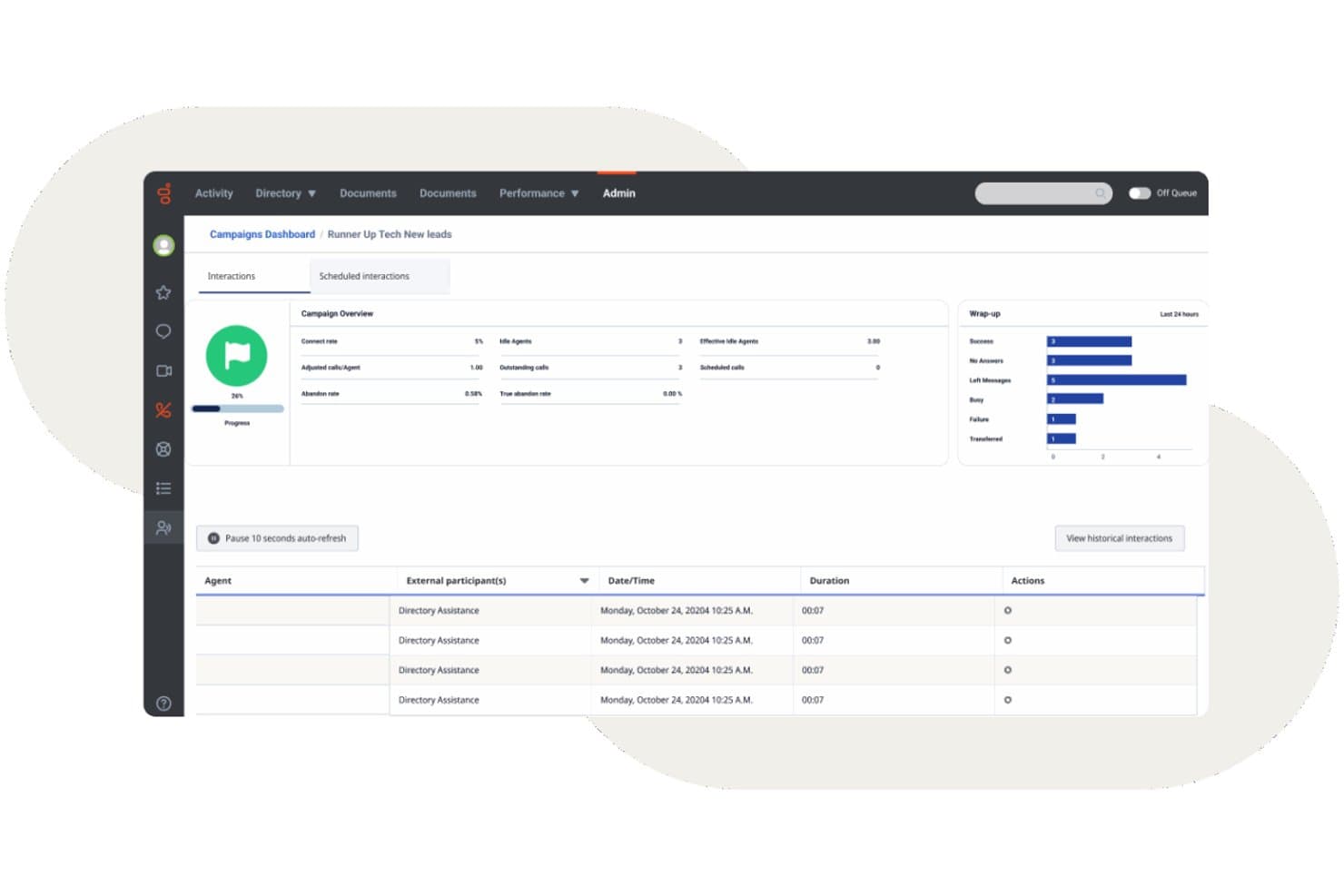
Genesys Cloud CX offers an outbound campaigns dashboard with real-time interaction tracking, wrap-up metrics, and agent activity logs. Genesys Cloud CX is a cloud-native contact center platform that combines omnichannel routing, AI-powered IVR, outbound dialling, workforce engagement management, and real-time analytics across voice and digital channels.
Who Is Genesys Cloud CX Best For?
Genesys Cloud CX is a strong fit for mid-size to enterprise contact centers that need a single platform to manage high interaction volumes across voice and digital channels.
Why I Picked Genesys Cloud CX
I've included Genesys Cloud CX in my top picks because its journey management capabilities go beyond standard routing. The platform's Journey Flows give me a real-time visual map of how customers move across every touchpoint, so I can spot drop-off points and reroute interactions before they escalate. Paired with Predictive Engagement, it actively identifies at-risk customers mid-web-session and triggers a proactive chat or callback before they abandon.
Genesys Cloud CX Key Features
- Omnichannel routing: Route voice, chat, email, SMS, and social interactions to agents in a single workspace.
- Workforce engagement management: Manage forecasting, scheduling, and time-off with AI-powered WEM tools.
- Speech and sentiment analytics: Analyze transcriptions, keywords, and sentiment for 100% of agent-customer conversations.
- CRM integration ecosystem: Connect natively with Salesforce, ServiceNow, Microsoft Dynamics, and hundreds of other business tools.
Genesys Cloud CX Integrations
Genesys Cloud CX offers native integrations with Salesforce, ServiceNow, Zendesk, Microsoft Teams, Microsoft Dynamics 365, Zoom, Jira, Slack, Active Directory, and Google Workspace. An API is available for custom integrations.
Pros and Cons
Pros:
- Speech analytics scores 100% of call interactions
- Built-in workforce management with native forecasting
- AI-powered predictive routing across all channels
Cons:
- Advanced reporting requires significant configuration time
- Initial setup often requires professional help
Learn more about Genesys Cloud CX: Best for easy deployment and administration
- Free demo available
- Pricing upon request

GoTo Connect offers a unified interface combining messaging, voicemail, camera preview, and meeting join capabilities for call center agents. GoTo Connect is a cloud-based contact center and phone system that combines VoIP calling, omnichannel customer engagement, intelligent call routing, and real-time agent monitoring in a single platform.
Who Is GoTo Connect Best For?
GoTo Connect is a strong fit for small to mid-sized businesses that need a full-featured contact center without a large IT team to manage it.
Why I Picked GoTo Connect
GoTo Connect earns its spot on my shortlist because of how quickly a team can go from signup to live calls. The unified Admin hub lets me manage users, dial plans, and call queues from a single interface, and the visual dial plan builder makes configuring complex call flows something I can do without writing a single line of code. I've also found Admin GoPilot genuinely useful for flagging configuration issues before they reach callers.
GoTo Connect Key Features
- Omnichannel platform: Connect with customers through voice, SMS, chat, email, WhatsApp, and social media from a single dashboard.
- Real-time analytics: Monitor call queues, agent activity, and performance data with configurable live dashboards.
- Call disposition and wrap-up: Assign outcomes to calls and manage required post-call notes directly in the agent interface.
- AI-powered call summaries: Automatically generate interaction summaries and sentiment analysis after customer calls.
GoTo Connect Integrations
GoTo Connect offers native integrations with Salesforce, Zendesk, ServiceNow, Microsoft Teams, Miro, and Gmail. An API is available for custom integrations.
Pros and Cons
Pros:
- Unified admin hub manages users and queues
- Visual dial plan editor simplifies call routing
- Quick setup without dedicated IT support
Cons:
- Reporting less customizable than enterprise platforms
- Limited predictive dialer for outbound campaigns
Learn more about GoTo Connect: Best with deep CRM integration capabilities
- Free demo available
- Pricing upon request

Vonage Contact Center offers an omnichannel agent desktop with AI-suggested responses, next best action guidance, and real-time interaction metrics across voice and chat. Vonage Contact Center is a cloud-based contact center platform that combines inbound and outbound calling, IVR, skills-based routing, call recording, omnichannel support, and real-time analytics with native CRM integrations.
Who Is Vonage Contact Center Best For?
Mid-market to enterprise teams already standardized on Salesforce, ServiceNow, or Microsoft Dynamics 365 who need a contact center that connects directly to their CRM.
Why I Picked Vonage Contact Center
Vonage Contact Center earns its spot on my shortlist because of how deeply it embeds into Salesforce, ServiceNow, and Microsoft Dynamics 365. I love that when an agent picks up a call, customer history surfaces instantly via screen pops, with bi-directional CRM sync logging the interaction automatically. Vonage even joined Salesforce's BYOC for CCaaS pilot, meaning its omnichannel and AI capabilities run natively inside Service Cloud Voice.
Vonage Contact Center Key Features
- Skills-based routing: Route inbound calls to agents based on skill sets, availability, or priority rules.
- Disaster recovery and emergency call routing: Automatically reroute calls in the event of outages or emergencies to maintain business continuity.
- Omnichannel engagement: Handle voice, web chat, SMS, and more from a single interface for all agents.
- Speech analytics add-on: Gain insights from call transcriptions, keyword detection, and sentiment analysis across interactions.
Vonage Contact Center Integrations
Vonage Contact Center offers native integrations with Salesforce, ServiceNow, Microsoft Dynamics 365, Zendesk, and Microsoft Teams. An API is available for custom integrations.
Pros and Cons
Pros:
- Real-time screen pops surface full caller context
- Omnichannel queues unify voice and digital channels
- Deep native Salesforce embedding for agents
Cons:
- Complex initial configuration requires professional services support
- Historical reporting has limited customization options
Learn more about Vonage Contact Center:
Outro software para centros de atendimento
Eis mais algumas opções que não entraram na lista do melhor software para centros de atendimento:
- 11Bright PatternBest for omnichannel communication
- 12TalkdeskBest for answering customers’ questions
- 13TwilioBest for highly customizable contact centers
- 14DialpadBest multichannel solution with advanced AI functionality
- 15Zoho VoiceBest for integrated telephony in CRM
- 16CallHippoBest for AI-powered customer interactions
- 17Freshdesk Contact CenterBest for an affordable virtual contact center
- 18Webex Contact CenterBest with built-in AI agent coaching and insights
- 19Creatio AI CRMBest for personalizing communication
- 20LiveAgentBest for integrated helpdesk and ticketing tools
- 21NextivaBest for phone, SMS, video, & email customer support
- 22ZendeskBest for unifying communication channels
- 238x8Best for omnichannel communication
- 24VerintBest for workforce optimization
- 25Avaya Best for enhancing business outcomes
- 26AWS ConnectBest for onboarding new representatives
- 27Intermedia UniteBest for all-in-one cloud contact center
- 28Aspect SoftwareBest for high-performance contact center solution
How I Evaluate Call Center Software
I evaluate every platform against a baseline—skills-based routing, IVR, call recording, live monitoring—before weighing the differentiators that determine whether a tool fits your operation.
Core Functionality (Table Stakes For This List)
When I'm selecting tools for my list, I rank each one on a scale from 0 (does not offer the functionality) to 5 (excels in this area) for each core functionality listed below. Then, I calculate the tool's total score into a percentage. Each tool needs to achieve a minimum total score of 75% to be considered for inclusion.
- Automatic Call Distribution: I check whether the platform supports skills-based and priority routing, since a basic round-robin queue falls apart fast when you're handling technical support and billing on the same number.
- IVR System: A good IVR lets callers self-serve for order status or account balances before ever reaching an agent, so I look for multi-level menus with a visual call flow editor.
- Inbound & Outbound Calling: I evaluate whether the platform handles both directions natively—teams running renewal campaigns and fielding support calls need blended queues, not two separate tools.
- Call Recording & Monitoring: Supervisors need more than playback; I look for live listen, whisper, and barge so team leads can coach agents during difficult calls in real time.
- Real-Time & Historical Analytics: Dashboards that show queue depth, wait times, and agent status in real time matter just as much as historical SLA and CSAT reporting for post-shift reviews.
- CRM & Business Tool Integration: I evaluate whether the platform connects with systems like Salesforce, HubSpot, or Zendesk to surface caller context through screen pops and log interactions automatically.
Once I have a list of tools that meet this criteria, I consider what sets each platform apart.
Differentiating Factors (What Sets Vendors Apart)
Here's how I compare and contrast different vendors:
Standout Features
AI agent assist is a major differentiator. I look for platforms that surface knowledge articles and suggested responses mid-call, cutting handle time during complex troubleshooting. Workforce management matters just as much for teams juggling seasonal spikes, where built-in forecasting and adherence tracking replace spreadsheet guesswork. Speech and sentiment analytics round out the picture—automated scoring across all interactions gives QA leads a far more complete view than random sample reviews.
Beyond Features
Compliance and security are top of mind—I check for PCI DSS and SOC 2 certifications, especially when agents handle payment info over the phone. Pricing transparency matters too, since hidden telephony or overage charges can blow up budgets after go-live. I also evaluate uptime SLAs and carrier redundancy, because even brief outages during peak hours mean missed calls and lost revenue. Finally, implementation timelines vary wildly across vendors, and a faster time-to-value is a real advantage for teams migrating from a legacy system.
Como escolher um software para centros de atendimento
Está a tentar escolher o software adequado para o seu centro de atendimento? Comece por relacionar as suas principais prioridades de experiência do cliente com funcionalidades que respondam aos desafios reais dos centros de contacto:
| Se a sua prioridade for... | Procure... |
|---|---|
| Se a sua prioridade for...Resposta rápida em vários canais | Procure...Caixa de entrada unificada que abranja telefone, chat e e-mail |
| Se a sua prioridade for...Encaminhamento preciso para questões complexas | Procure...Distribuição baseada em competências e orientada por dados |
| Se a sua prioridade for...Visibilidade sobre o desempenho dos agentes | Procure...Painéis em tempo real e monitorização detalhada |
| Se a sua prioridade for...Acesso flexível aos dados dos clientes | Procure...Integrações abrangentes com CRM e ferramentas empresariais |
| Se a sua prioridade for...Operações globais ou regulamentadas | Procure...Conformidade integrada com PCI DSS, GDPR e HIPAA |
Como avaliar a sua seleção
- Teste alegações verdadeiramente omnicanal: Faça um teste de um dia, encaminhando três tipos de pedidos (telefone, chat, e-mail), para verificar se os agentes obtêm sempre o contexto completo.
- Valide a profundidade da integração: Agende uma demonstração ao vivo que mostre as janelas de contexto e a sincronização bidirecional do Salesforce ou do HubSpot — peça um vídeo para rever mais tarde.
- Avalie a exatidão da análise: Exporte um relatório do painel de controlo relativo a 48 horas e compare as métricas com os resultados da sua plataforma anterior relativamente ao volume de chamadas, ao sentimento e ao tempo de atendimento.
- Confirme a cobertura da conformidade: Peça ao fornecedor as declarações de conformidade atuais com a PCI DSS, a HIPAA e o RGPD, ou a documentação de segurança correspondente.
- Escolha a flexibilidade ou a dependência do fornecedor: Decida se as funcionalidades pré-construídas avançadas (personalização limitada) ou as APIs abertas (integração desenvolvida internamente, com maior esforço) se adequam melhor às competências e necessidades da sua equipa.
O que é o software de centro de atendimento?
O software de centro de atendimento é uma plataforma digital que gere as comunicações com os clientes através de telefone, chat, e-mail e outros canais numa única interface. Ajuda as equipas a gerir interações recebidas e efetuadas, encaminhar as conversas para os agentes adequados e monitorizar a qualidade do serviço. Estas plataformas incluem frequentemente ferramentas de distribuição de chamadas, resposta interativa de voz (IVR), gravação de chamadas, análise e integrações com sistemas CRM para apoiar experiências de cliente eficientes e consistentes.
Software de centro de atendimento vs. software de centro de contacto: qual é a diferença?
Na minha experiência, a escolha entre estes dois sistemas depende de gerir uma equipa centrada no telefone ou de unificar as jornadas dos clientes em vários canais para evitar silos de dados.
- Software de centro de atendimento: centra-se principalmente na comunicação por voz (chamadas recebidas/efetuadas, VoIP, IVR, encaminhamento de chamadas e apoio telefónico). Funciona melhor para equipas que dependem da voz como canal principal e necessitam de elevada qualidade de áudio.
- Software de centro de contacto (CCaaS): fornece uma plataforma única que unifica o apoio telefónico com canais digitais, como chat em direto, e-mail, SMS, aplicações de mensagens e redes sociais. Funciona melhor para empresas SaaS em crescimento que pretendam consolidar os históricos de interações entre canais e o agendamento dos agentes.
Nesta análise, abordo tanto sistemas de centros de atendimento centrados na voz como plataformas empresariais de centros de contacto, para lhe apresentar opções independentemente da dimensão da sua operação.
Tipos de software de centro de atendimento
- Software de centro de atendimento baseado na nuvem: funciona numa infraestrutura de nuvem alojada pelo fornecedor, suportando equipas remotas ou distribuídas com baixos custos iniciais.
- Software de centro de atendimento no local: funciona em hardware físico instalado nas suas instalações, proporcionando um controlo dedicado sobre a segurança dos servidores e o armazenamento de dados.
- Software de centro de atendimento para chamadas recebidas: gere as questões recebidas dos clientes utilizando menus de resposta interativa de voz, distribuição automática de chamadas e regras de encaminhamento com base nas competências.
- Software de centro de atendimento para chamadas efetuadas: permite realizar campanhas de prospeção comercial e acompanhamentos de contas utilizando sistemas de marcação automática preditiva, intensiva e progressiva.
- Software de centro de atendimento misto: unifica as filas de chamadas recebidas e os sistemas de marcação de chamadas efetuadas numa única interface, transferindo dinamicamente os agentes com base no volume de chamadas em tempo real.
- Software de centro de contacto omnicanal: centraliza chamadas de voz, chat em direto, mensagens de texto e conversas por e-mail numa única cronologia contínua do cliente.
Tendências no software de centro de atendimento
- IA agêntica e fluxos de trabalho automatizados: Os fornecedores de software estão a ir além dos robôs de conversação básicos, implementando agentes de IA autónomos. Estes sistemas avaliam o contexto, executam tarefas com várias etapas, atualizam registos de CRM e concluem fluxos de trabalho de rotina sem intervenção humana.
- Assistência ao agente em tempo real: As aplicações de software escutam chamadas em direto para transcrever áudio, analisar o sentimento do cliente e apresentar instantaneamente artigos da base de conhecimento. Esta orientação em tempo real ajuda os representantes a resolver mais rapidamente problemas complexos dos clientes.
- Garantia de qualidade automatizada: As plataformas utilizam agora modelos de aprendizagem automática para analisar 100 por cento das interações com os clientes. A pontuação automática relativa ao cumprimento dos guiões, às regras de conformidade e ao tom substitui a amostragem manual na orientação dos gestores.
- Personalização sem código: As ferramentas incluem criadores de fluxos de chamadas, regras de encaminhamento e integrações através de operações de arrastar e largar. As equipas de operações podem modificar rapidamente as regras das filas e as automatizações sem a ajuda de programadores.
- Camadas de dados unificadas: Os sistemas unificam os históricos de voz, conversação, mensagens de texto e e-mail numa única linha cronológica do cliente. Esta estrutura unificada proporciona às equipas de suporte híbridas e remotas uma visibilidade completa de todos os pontos de interação.
- Omnicanal e preparado para o trabalho remoto por predefinição: À medida que as expectativas dos clientes aumentam, as plataformas de centros de atendimento telefónico continuam a unificar voz, conversação, e-mail e redes sociais numa única interface — oferecendo simultaneamente acessibilidade remota total, fiabilidade da nuvem e ferramentas integradas de gestão da força de trabalho.
Funcionalidades do software de centro de atendimento telefónico
Ao selecionar software de centro de atendimento telefónico, procure as seguintes funcionalidades essenciais:
- Distribuição automática de chamadas: Encaminha as chamadas recebidas para o agente ou departamento mais adequado, garantindo tempos de espera mais curtos para os interlocutores e uma maior produtividade dos agentes.
- Resposta interativa de voz: Permite que os interlocutores interajam com um menu de autosserviço através da voz ou do teclado, ajudando-os a aceder rapidamente ao departamento certo ou a resolver pedidos simples sem envolver um agente.
- Gravação de chamadas: Grava automaticamente as chamadas para formação, controlo de qualidade e resolução de litígios, permitindo-lhe rever as interações, orientar os agentes e manter a conformidade.
- Relatórios e análises em tempo real: Fornece painéis e relatórios detalhados sobre métricas essenciais, como o volume de chamadas, o desempenho dos agentes e a satisfação dos clientes, facilitando a melhoria das suas operações.
- Suporte omnicanal: Permite que os clientes o contactem por telefone, e-mail, conversação ou redes sociais, para que a sua equipa possa gerir todas as conversações num só lugar e prestar um apoio consistente.
- Integração com CRM: Liga-se às suas ferramentas de gestão da relação com os clientes, permitindo que os agentes acedam a informações e ao histórico importantes dos clientes durante as chamadas, para prestar um suporte mais personalizado.
- Monitorização de chamadas: Permite que os supervisores ouçam chamadas em direto, transmitam orientações discretas aos agentes ou assumam o controlo das conversações quando necessário — ideal para orientação e garantia de qualidade.
- Filas de chamadas: Coloca os interlocutores em filas virtuais com tempos de espera estimados e atualizações, reduzindo a frustração e atenuando os períodos de maior afluência de chamadas.
- Gestão da força de trabalho: Ajuda-o a definir turnos, prever a procura e acompanhar a disponibilidade dos agentes, mantendo os níveis de pessoal alinhados com os volumes de chamadas.
- Marcação de chamadas efetuadas: Automatiza tarefas como acompanhamentos, inquéritos ou chamadas de vendas, para que os agentes passem menos tempo a marcar números e mais tempo a falar com os clientes.
Funcionalidades comuns de IA do software de centro de atendimento telefónico
Para além das funcionalidades padrão do software de centro de atendimento telefónico indicadas acima, muitas destas soluções estão a incorporar IA com funcionalidades como:
- Assistência de IA aos agentes: Apresenta sugestões em tempo real, artigos da base de conhecimento e próximas ações recomendadas durante as chamadas em direto, ajudando os agentes a responder mais rapidamente e com maior precisão às perguntas dos clientes.
- Análise da fala e do sentimento: Utiliza IA para analisar gravações de chamadas e conversações em direto em busca de tom, emoção e palavras-chave, fornecendo aos supervisores informações sobre a satisfação dos clientes e as tendências de desempenho dos agentes.
- Encaminhamento preditivo de chamadas: Utiliza IA para associar os interlocutores ao melhor agente disponível com base em resultados históricos, competências e perfis de clientes, com o objetivo de melhorar as taxas de resolução no primeiro contacto.
- Garantia de qualidade automatizada: Aplica IA para rever e classificar chamadas quanto à conformidade, ao cumprimento dos guiões e às competências interpessoais, reduzindo a necessidade de amostragem manual de garantia de qualidade e acelerando os ciclos de feedback.
- Agentes virtuais e robôs de conversação: Tratam pedidos e tarefas de rotina através de IA conversacional, libertando os agentes humanos para questões mais complexas e fornecendo suporte 24 horas por dia, 7 dias por semana, em vários canais.
Vantagens do software de centro de atendimento telefónico
A implementação de software de centro de atendimento telefónico proporciona várias vantagens à sua equipa e à sua empresa. Eis algumas das que pode esperar:
- Maior satisfação dos clientes: O encaminhamento eficiente das chamadas e o suporte omnicanal garantem que os clientes sejam rapidamente encaminhados para o agente certo.
- Maior produtividade da equipa: Os dados obtidos através de IA, funcionalidades como marcadores inteligentes ou opções de clique para ligar e a gestão avançada da força de trabalho ajudam a sua equipa a concentrar-se nas tarefas prioritárias e a otimizar o seu fluxo de trabalho.
- Melhor gestão de dados: A integração com as ferramentas existentes mantém as informações dos clientes organizadas e acessíveis, reduzindo os erros no tratamento dos dados.
- Maior flexibilidade: As capacidades de trabalho remoto permitem que a sua equipa preste um serviço consistente a partir de qualquer localização, adaptando-se a ambientes de trabalho em mudança.
- Informações úteis para a tomada de decisões: A análise em tempo real e os painéis personalizáveis disponibilizam dados valiosos para orientar a tomada de decisões e melhorar as operações.
- Redução de custos: O agendamento automatizado e a atribuição eficiente de recursos ajudam a reduzir os custos operacionais, mantendo a qualidade do serviço.
- Maior segurança dos dados: As medidas de segurança protegem as informações sensíveis dos clientes, garantindo a conformidade com os regulamentos e reforçando a confiança.
Custos e preços do software de centro de atendimento
A seleção de software de centro de atendimento exige uma compreensão dos vários modelos de preços e planos disponíveis. Os custos variam consoante as funcionalidades, o tamanho da equipa, os complementos, entre outros fatores. A tabela abaixo resume os planos mais comuns, os respetivos preços médios e as funcionalidades normalmente incluídas nas soluções de software de centro de atendimento:
Tabela de comparação de planos de software de centro de atendimento
| Tipo de plano | Preço médio | Funcionalidades comuns |
|---|---|---|
| Tipo de planoPlano gratuito | Preço médio$0-$15/utilizador/mês | Funcionalidades comunsInclui encaminhamento básico de chamadas, opções limitadas de IVR, relatórios básicos e integração simples com CRM. |
| Tipo de planoPlano pessoal | Preço médio$15-$35/utilizador/mês | Funcionalidades comunsAdiciona chamadas ilimitadas, gravação de chamadas, painéis de análise melhorados e integrações com CRMs populares. |
| Tipo de planoPlano empresarial | Preço médio$35-$70/utilizador/mês | Funcionalidades comunsDisponibiliza IVR avançado, encaminhamento baseado em competências, assistência de agentes por IA, monitorização de chamadas, relatórios personalizados e mensagens omnicanal. |
| Tipo de planoPlano empresarial avançado | Preço médio$70-$150/utilizador/mês | Funcionalidades comunsDisponibiliza gestão da força de trabalho, análise preditiva, suporte 24 horas por dia, 7 dias por semana, controlos rigorosos de conformidade e SLA personalizados. |