

O software de centro de contacto para serviços financeiros é uma plataforma para gerir interações com clientes através de canais de voz e digitais, com ferramentas para agentes e ligações a sistemas financeiros.
Esta lista compara opções para equipas que escolhem software para responder a questões sobre contas e empréstimos, manter o contexto do cliente durante as transferências e gerir interações sensíveis de forma responsável. Compare a abordagem de cada produto à gravação, aos dados de pagamento, à supervisão da IA e à integração com fluxos de trabalho para encontrar a solução adequada às suas necessidades de serviço.
Porque pode confiar nas nossas recomendações de software
6,700+
Reviews
20
Industry experts
16+
Evaluation factors
14
Years
A nossa equipa testa e analisa software desde 2012. Como líderes de experiência do cliente (CX), sabemos o quão difícil — e importante — é escolher o software certo.
Para este guia, avaliámos as ferramentas através de testes práticos e pesquisa independente, pontuando-as de acordo com os nossos critérios de seleção.
As nossas análises refletem o juízo da nossa equipa editorial, e não um discurso de vendas.
 Gui DrusinaCreative Director
 Tim FisherVP of AI
Tabela de comparação: software de centro de contacto para serviços financeiros
Compare os preços e as especificações lado a lado do software de centro de contacto para serviços financeiros que entrou na minha lista restrita.
Score legend (out of 5)
- Excellent4.5–5
- Good4–4.4
- Average3–3.9
- Below average2–2.9
- Poor1–1.9
Sorted by: Default
| Tool | Starting Price | Website | |||||||
|---|---|---|---|---|---|---|---|---|---|
Best for automating account and loan servicing | 3.5 out of 5 | 3 | 4 | 4 | 4 | 3 | 3 | $85/user/month Free plan + free demo available | Website |
Best for financial query handoffs with context | 3.3 out of 5 | 4 | 4 | 3 | 4 | 1 | 4 | $0.010 per message Not available | Website |
Best for keeping agents out of payment data | 3.3 out of 5 | 4 | 4 | 4 | 4 | 2 | 2 | $65/user/month Free demo available | Website |
Best for financial journey orchestration | 3.5 out of 5 | 4 | 4 | 4 | 4 | 1 | 4 | $75/user/month Free demo available | Website |
Best for audited AI actions across systems | 4.2 out of 5 | 4 | 5 | 4 | 5 | 3 | 4 | $119/user/month Free demo available | Website |
Best for linking branches and service teams | 3.3 out of 5 | 4 | 4 | 3 | 4 | 2 | 3 | Pricing upon request Free demo available | Website |
Best for using governed data during service | 3.3 out of 5 | 3 | 4 | 3 | 4 | 3 | 3 | Pricing upon request Free demo available | Website |
Best for banking with core-system context | 3.7 out of 5 | 4 | 4 | 4 | 4 | 3 | 3 | $110/user/month Free demo available | Website |
Best for journeys using core banking data | Not rated | 4 | 4 | 4 | 4 | Not rated | 3 | Pricing upon request Not available | Website |
Best for verifying regulated recording capture | 3.8 out of 5 | 5 | 3 | 4 | 4 | 2 | 5 | Pricing upon request Free demo available | Website |


Avaliações de software de centro de contacto para serviços financeiros
Abaixo encontram-se os meus resumos detalhados do software de centro de contacto para serviços financeiros incluído na minha lista restrita. As minhas avaliações abrangem as funcionalidades, os casos de utilização e a abordagem de cada plataforma às interações sensíveis, para ajudar a encontrar a solução adequada.
 Best for automating account and loan servicing
- Free plan + free demo available
- From $85/user/month (billed annually)
Visit WebsiteCustomer Rating:4.4/5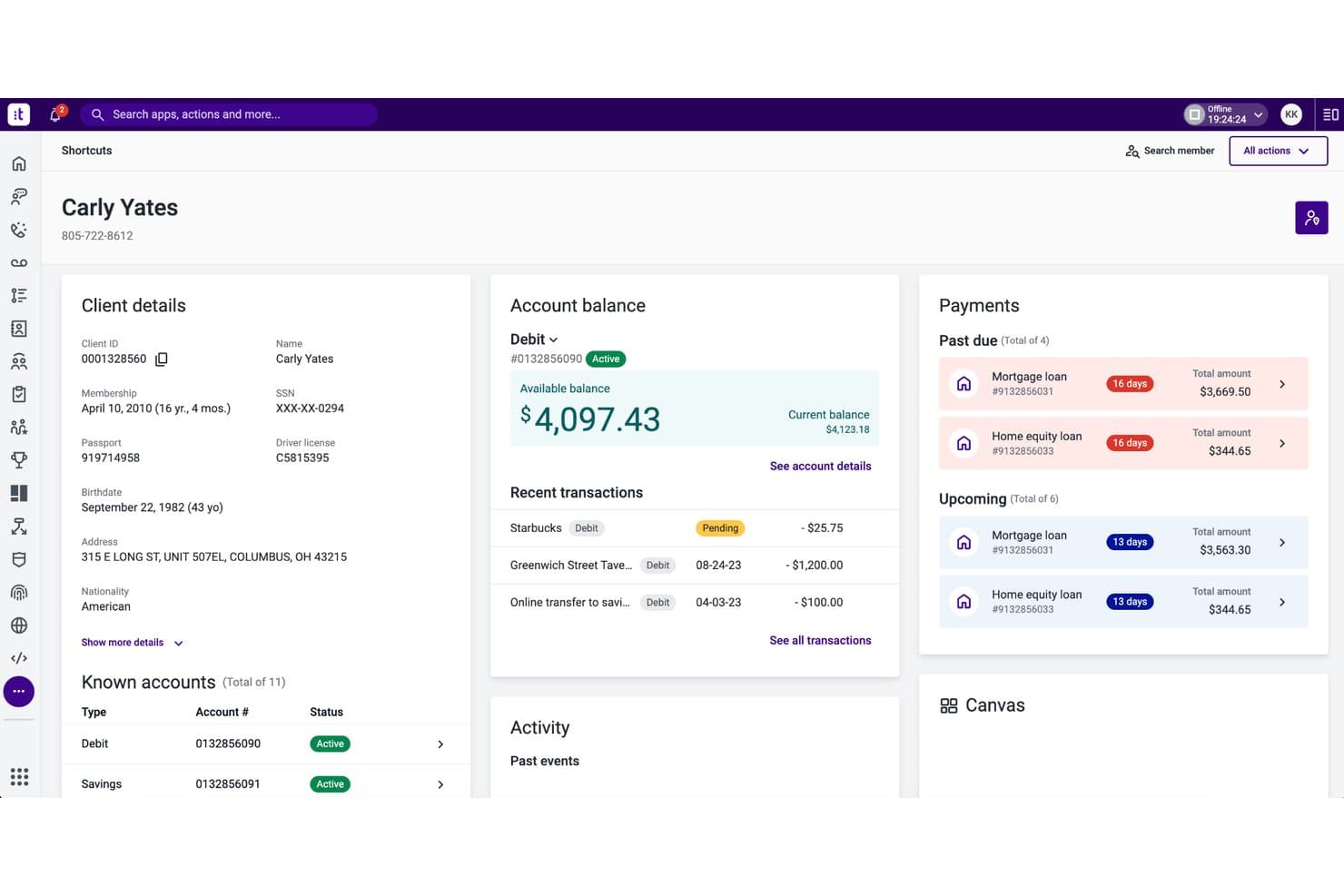
Talkdesk displays full client profiles with balances and payment alerts. Talkdesk is an AI-powered contact center platform that offers a financial services solution with omnichannel engagement, banking workflow automation, customer self-service, and AI-assisted agent support.
Who Is Talkdesk Best For?
Talkdesk is a strong fit for banking and financial services contact centers that need AI-assisted customer service, account management, and payment collection workflows.
Why I Picked Talkdesk
I picked Talkdesk as one of the best because its Financial Services Experience Cloud for Banking includes tools for account servicing, payment reminders, and collections workflows. I particularly like its Banking Workspace, which provides agents with customer account details, recent transactions, and payment information during interactions. Its Banking Connector also supports access to banking data for customer self-service and agent-assisted requests.
Talkdesk Key Features
- Talkdesk Copilot: Provides real-time call transcription, contextual agent guidance, and automatic conversation summaries.
- Talkdesk Shield: Supports customer authentication, fraud prevention, and workforce security monitoring.
- Omnichannel engagement: Supports customer interactions across voice, chat, SMS, email, and social messaging channels.
- QM Assist: Provides automated interaction scoring, sentiment analysis, and searchable call transcripts for quality evaluations.
Talkdesk Integrations
Talkdesk offers integrations with Jack Henry, Fiserv, FIS, HubSpot, Microsoft Dynamics 365, Zendesk, and ServiceNow, plus 60+ contact-center software integrations. Its low-code custom integration builder and APIs support connections to other banking, CRM, and operational systems.
Pros and Cons
Pros:
- Call recordings support coaching and QA
- Unified banking context supports complex calls
- Supports loan servicing and collections automation
Cons:
- Call evaluations require recording enabled
- Copilot recommendations exclude email interactions
Learn more about Talkdesk: Best for financial query handoffs with context
- Not available
- From $0.010 per message
Visit WebsiteCustomer Rating:4.5/5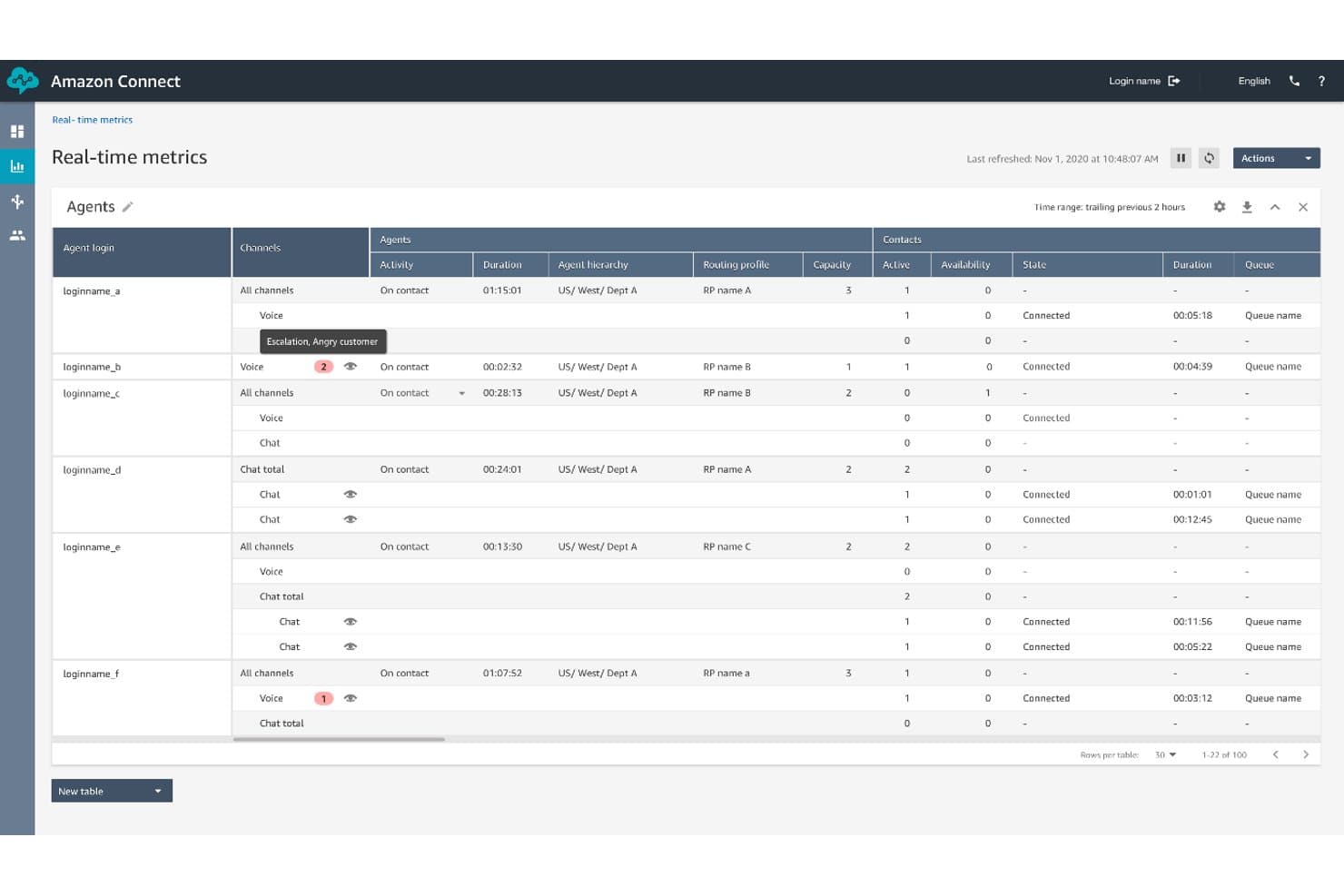
Amazon Connect displays live agent activity and contact states in real time. Amazon Connect is a cloud-based contact center platform from AWS that offers omnichannel routing, AI-powered self-service, agent workspace tools, workforce management, and conversational analytics across voice, chat, email, and SMS channels.
Who Is Amazon Connect Best For?
Amazon Connect is a strong fit for large financial institutions and enterprise contact centers that need omnichannel routing, AI-powered self-service, and conversation analytics across voice and digital channels.
Why I Picked Amazon Connect
I picked Amazon Connect because its AI-powered self-service tools support customer inquiries and transfers to live agents with relevant conversation context. Its AI agents can answer questions and perform configured actions before escalating requests that need human assistance. I also like how its agent workspace provides customer profiles, contact history, and AI-generated guidance to help agents continue conversations.
Amazon Connect Key Features
- Omnichannel routing: Routes voice, chat, email, SMS, and tasks to agents, with customer context available across supported interactions.
- Conversation analytics: Analyzes agent-customer conversations for potential compliance risks, supports automated contact categorization, and provides interaction search.
- Data redaction: Detects and redacts sensitive information in supported recordings and transcripts, with permissions for accessing redacted and unredacted content.
- Contact forecasting: Uses machine learning to forecast contact workloads in 15- or 30-minute intervals, with intraday forecasts updated every 15 minutes.
Amazon Connect Integrations
Amazon Connect offers a native AWS Lambda connection and prebuilt integrations with Salesforce and Zendesk through Amazon AppFlow. It also supports custom connections to AWS data services through Lambda, with APIs and SDKs available for additional integrations.
Pros and Cons
Pros:
- Forecasts staffing for shifting contact volumes
- Redacts sensitive data in recorded interactions
- Preserves context during agent handoffs
Cons:
- Advanced workflows require technical configuration
- Native Voice ID fraud detection discontinued
Learn more about Amazon Connect: 3Best for keeping agents out of payment data
UJET
- Free demo available
- From $65/user/month
Visit WebsiteCustomer Rating:4.6/5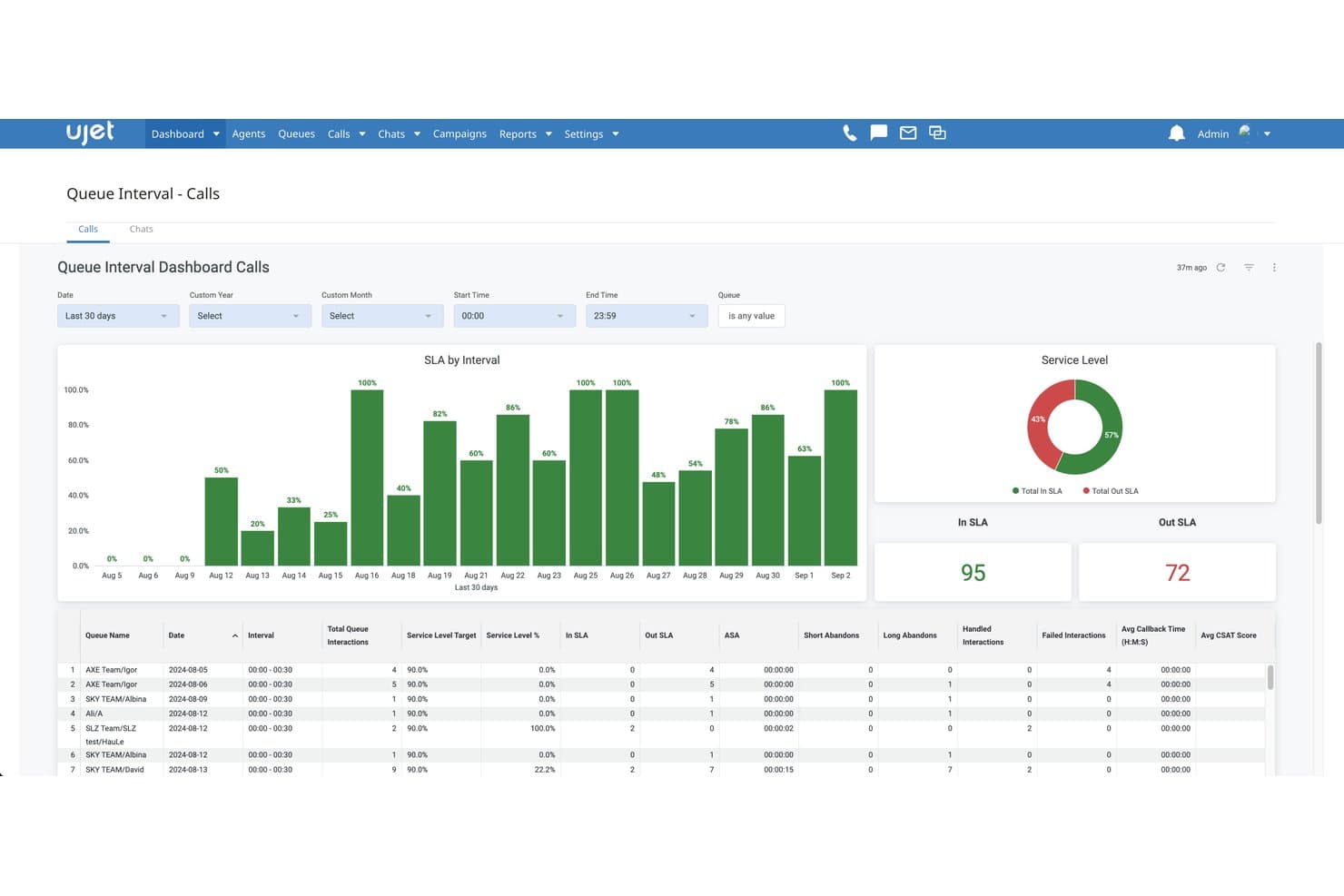
UJET tracks call queue SLA performance across intervals and dates. UJET is a cloud-based contact center platform that offers omnichannel customer support, AI-powered virtual agents, agent assistance, workforce management, and secure payment capabilities for financial services teams.
Who Is UJET Best For?
UJET is best for financial services contact centers that need AI-powered virtual agents to process payments and collect sensitive customer information without exposing payment details to live agents.
Why I Picked UJET
I picked UJET because its financial services virtual agents can process payments without exposing sensitive card information to live agents. When a customer makes a payment, the virtual agent handles the transaction, while the live agent receives confirmation and any resulting account updates. I also like that UJET supports PCI DSS-compliant payment processing and offers virtual task assistants for caller verification, account inquiries, and sensitive information collection.
UJET Key Features
- Omnichannel routing: Routes voice and digital interactions based on customer intent, sentiment, and interaction context.
- Workforce management: Forecasts staffing requirements, automates scheduling, and tracks real-time adherence across communication channels.
- Virtual task assistants: Handle caller verification, payment processing, and sensitive customer information collection during live interactions.
- Automatic conversation summaries: Generates AI-powered summaries of voice and chat interactions for post-interaction review.
UJET Integrations
UJET offers integrations with Salesforce, Microsoft Dynamics, Oracle, SAP, Zendesk, HubSpot, Kustomer, and ServiceNow. It also provides APIs and SDKs for custom development.
Pros and Cons
Pros:
- AI-generated voice and chat summaries
- Virtual agents support caller authentication
- Agents see payment completion, not card details
Cons:
- Workforce management requires separate add-on
- Advanced reporting unavailable in Basic plan
Learn more about UJET: Best for financial journey orchestration
- Free demo available
- From $75/user/month (billed annually)
Visit WebsiteCustomer Rating:4.4/5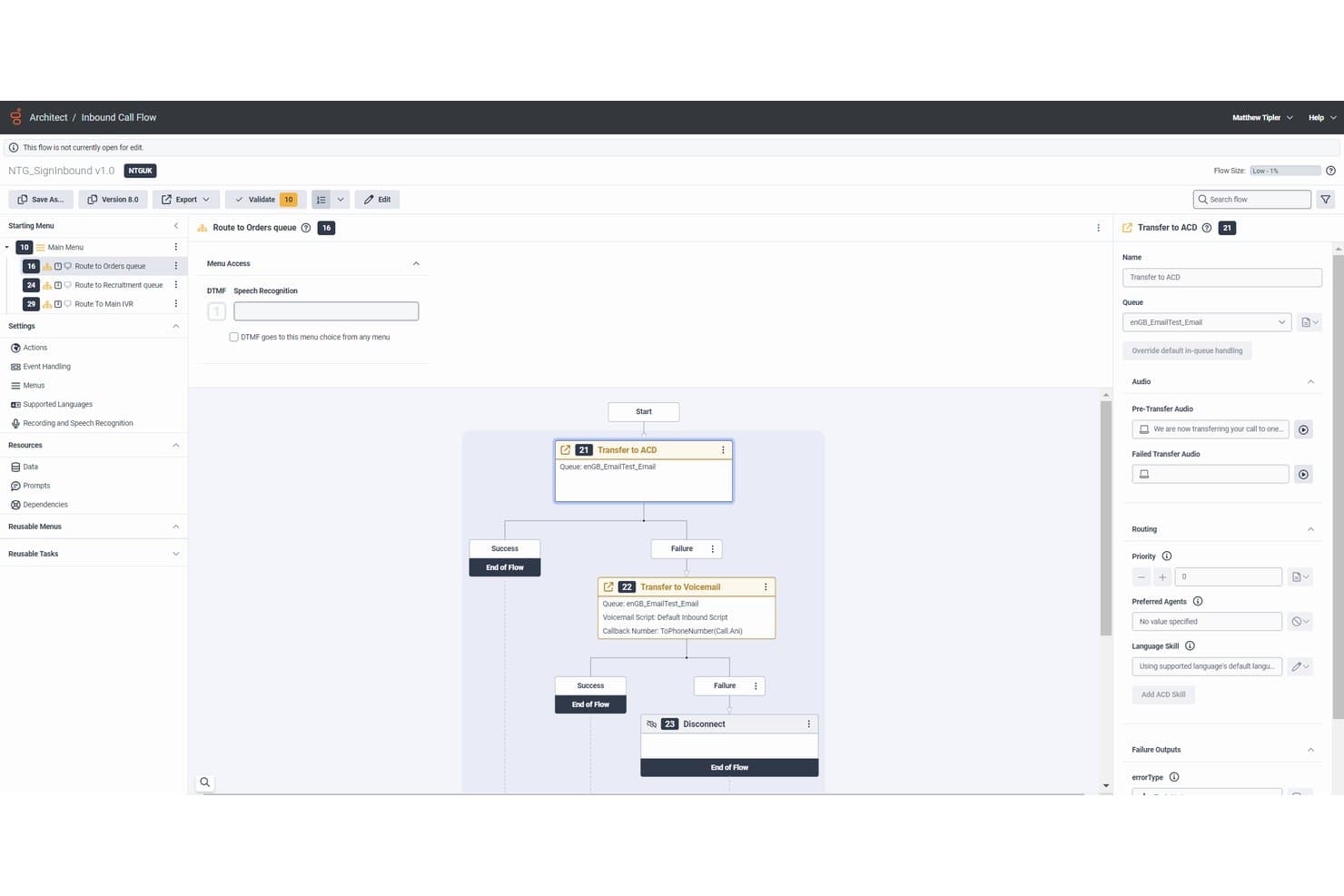
Genesys Cloud CX lets users build and manage inbound call flow routing visually. Genesys Cloud CX is a cloud-based contact center platform that offers omnichannel routing, AI-powered virtual agents, workforce management, and speech and text analytics across voice and digital channels.
Who Is Genesys Cloud CX Best For?
Genesys Cloud CX is designed for financial services contact center teams managing customer interactions across voice and digital channels that require AI-assisted routing and workforce management.
Why I Picked Genesys Cloud CX
I picked Genesys Cloud CX because its customer journey management capabilities help financial services teams analyze customer interactions across channels and identify points of friction. I particularly like its journey analytics and orchestration tools, which support the analysis of interaction patterns and the configuration of customer engagement workflows. Its predictive engagement capabilities also use website activity and AI-based predictions to trigger proactive customer engagement, such as chat invitations or chatbot interactions.
Genesys Cloud CX Key Features
- Speech and text analytics: Transcribes and analyzes customer interactions using topic detection, sentiment analysis, and conversation analytics across voice and digital channels.
- Omnichannel routing: Routes voice and digital interactions using skills-based routing and AI-powered predictive routing.
- Quality management and evaluations: Records customer interactions and agent screens, with structured evaluation workflows to assess performance against defined criteria.
- Workforce management: Supports interaction forecasting, agent scheduling, time-off management, and adherence monitoring with AI-assisted planning tools.
Genesys Cloud CX Integrations
Genesys Cloud CX offers over 600 apps and integrations through its AppFoundry marketplace, including Salesforce, ServiceNow, Microsoft Dynamics 365, Zendesk, Microsoft Teams, Zoom Meetings, and Zoom Phone. It also supports API-based integrations, webhooks, and developer tools for custom applications.
Pros and Cons
Pros:
- Supports voice, chat, email, and messaging channels
- Records voice, digital interactions, and agent screens
- Maps customer journeys across touchpoints
Cons:
- Workforce management availability varies by plan
- Complex deployments require implementation planning
Learn more about Genesys Cloud CX: Best for audited AI actions across systems
- Free demo available
- From $119/user/month
Visit WebsiteCustomer Rating:4.1/5
Five9 Agent Assist showing live call guidance and summaries. Five9 is a cloud contact center platform offering omnichannel routing, AI virtual agents, workforce management, and interaction analytics for voice, chat, email, SMS, and social messaging.
Who Is Five9 Best For?
Five9 is a strong fit for financial services contact centers that need AI governance, interaction monitoring, and auditable customer service workflows.
Why I Picked Five9
I've included Five9 in my top picks because its AI Trust & Governance capabilities provide audit trails, policy controls, and monitoring for AI-driven customer service workflows. Five9 supports permission-based AI actions across business systems, with controls that define which operations AI agents are authorized to perform. I also like its agentic workflow capabilities, which coordinate multi-step processes while maintaining records of AI decisions and actions for compliance review.
Five9 Key Features
- Intelligent routing: Routes customer interactions based on agent skills, language, proficiency, and availability.
- Interaction and speech analytics: Analyzes voice and digital interactions for keywords, sentiment, conversation topics, and agent performance.
- Workforce management: Forecasts contact volumes, schedules agents, monitors adherence, and supports intraday staffing adjustments.
- Campaign manager: Manages outbound contact lists and campaigns with predictive, progressive, power, and preview dialing modes.
Five9 Integrations
Five9 offers prebuilt integrations with Salesforce, ServiceNow, Microsoft Dynamics 365, Zendesk, and Oracle. It also supports an Epic Toolbox-approved integration and a Microsoft Teams unified communications integration. Open APIs and SDKs support custom integrations with other business systems.
Pros and Cons
Pros:
- Supervisors can review recordings and agent activity
- Skills-based routing handles complex service queues
- Auditable AI actions across customer systems
Cons:
- Agentic Quality Management has controlled availability
- Advanced AI features vary by bundle
 Best for linking branches and service teams
- Free demo available
- Pricing upon request
Visit WebsiteCustomer Rating:4.1/5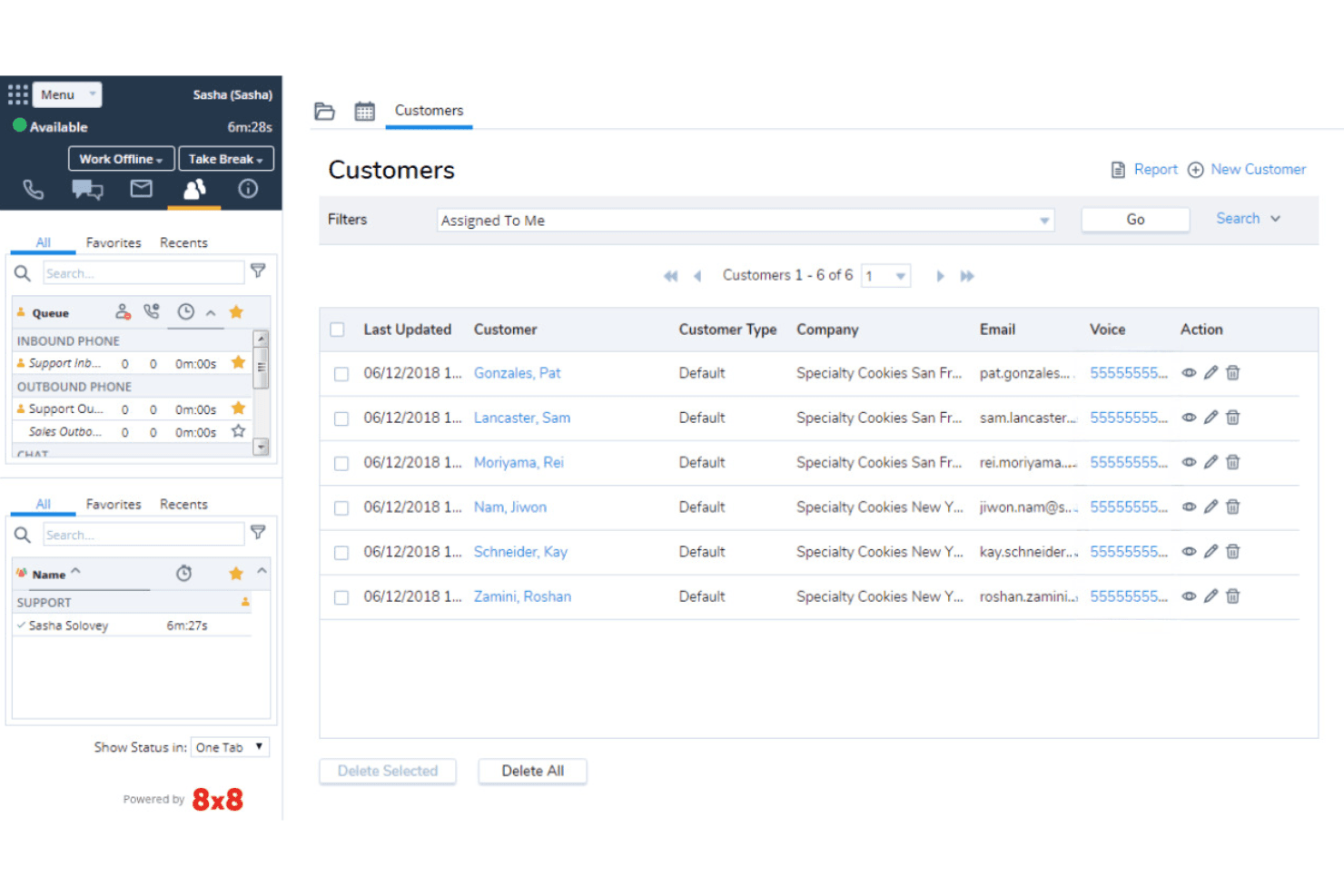
The 8x8 Contact Center agent desktop showing queue status and the customer list with voice contact numbers. 8x8 Contact Center is a cloud-based contact center platform offering omnichannel routing, AI-assisted agent tools, workforce management, analytics, and secure payment capabilities across voice and digital channels.
Who Is 8x8 Contact Center Best For?
8x8 Contact Center is a strong fit for banks and financial services organizations that need coordinated call routing between branch employees and centralized contact center teams.
Why I Picked 8x8 Contact Center
I picked 8x8 Contact Center because of its voice routing capabilities for organizations with distributed customer service teams. Its ICA Voice Intelligent Directory lets callers say the name of a person, department, or service they want to reach, using speech recognition to direct their calls. I also like its skills-based routing, which assigns interactions based on agent availability, skills, and customer context. These capabilities make it worth considering for financial institutions coordinating service across branches and contact center teams.
8x8 Contact Center Key Features
- Agent Workspace: Supports voice and digital interactions, interaction history, recordings, transcripts, and customer communication tools.
- Supervisor Workspace: Provides real-time agent status, queue activity, interaction volumes, and performance metrics.
- Secure Pay: Supports card payments through masked keypad entry, speech recognition, and secure payment links sent through digital channels.
- Analytics for Contact Center: Provides customizable reports on agent activity, interaction metrics, and customer journeys across supported channels.
8x8 Contact Center Integrations
8x8 Contact Center offers integrations with NetSuite, Pipedrive, Microsoft Teams, Salesforce, and Zendesk. Its technology partner ecosystem also includes PCI Pal for secure payment processing and Smarsh for compliance call recording.
Pros and Cons
Pros:
- Skills-based routing across service teams
- Real-time agent and queue performance metrics
- Voice and digital interaction history
Cons:
- Archived recordings require supervisor retrieval
- Interaction history excludes certain call types
Learn more about 8x8 Contact Center: Best for using governed data during service
- Free demo available
- Pricing upon request
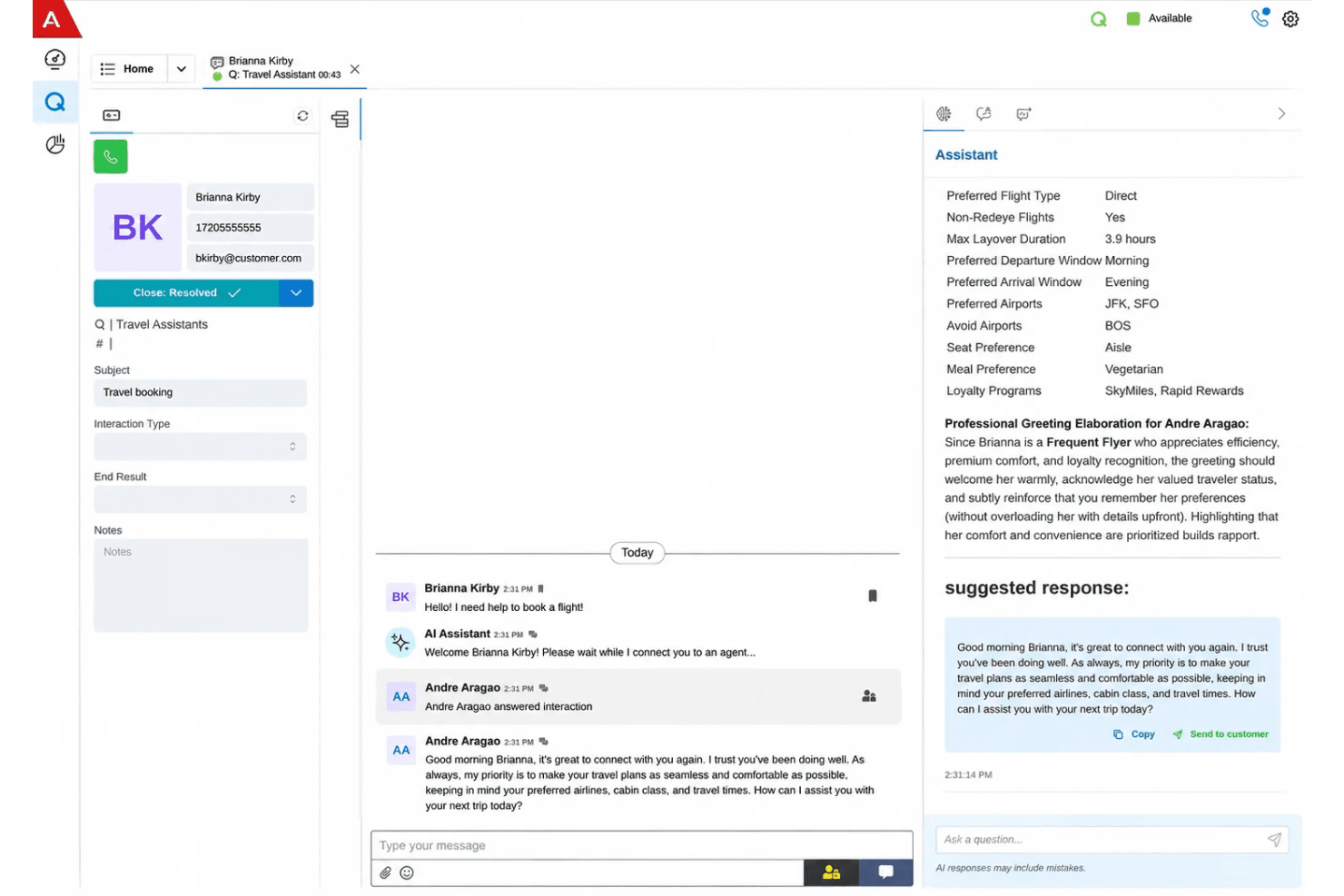
Avaya offers AI-powered agent assistance for customer conversations. Avaya Experience Platform, now known as Avaya Infinity, is an enterprise contact center platform that combines omnichannel engagement, AI-assisted workflow orchestration, real-time analytics, and governed enterprise data access for financial services organizations.
Who Is Avaya Infinity Best For?
Avaya Infinity is a strong fit for large financial services enterprises that need governed access to account, transaction, and fraud data during customer interactions.
Why I Picked Avaya Infinity
I picked Avaya Infinity as one of the best because of its approach to governed enterprise data access during customer interactions. I particularly like how the platform supports real-time financial context, including account records, transaction activity, and fraud information, while maintaining organization-defined access controls. Its workflow orchestration capabilities also stand out, allowing teams to coordinate authentication, routing, and AI-assisted guidance within ongoing customer interactions.
Avaya Infinity Key Features
- Omnichannel routing and queuing: Routes voice, email, chat, and messaging interactions using intelligent routing, queuing, and IVR capabilities.
- Low-code/no-code workflow builder: Lets authorized business users create and modify CX workflows through visual tools while IT maintains governance.
- Real-time analytics and AI-assisted insights: Provides live queue metrics, agent performance reporting, and AI-assisted insights for operational monitoring.
- Outbound preview mode: Provides pre-call customer context, campaign management, compliance controls, and real-time outbound reporting.
Avaya Experience Platform Integrations
Avaya Infinity supports integrations with Salesforce, Microsoft Dynamics 365, ServiceNow, Zendesk, Microsoft Teams, Databricks, and Verint WEM. The platform also supports APIs and Model Context Protocol (MCP) for connecting enterprise applications and AI systems.
Pros and Cons
Pros:
- Real-time analytics support queue monitoring
- Flexible cloud, hybrid, and on-premises deployment
- Governed financial context informs live interactions
Cons:
- Deployment requirements vary by environment
- Advanced workflows may require technical administration
Learn more about Avaya Experience Platform: Best for banking with core-system context
- Free demo available
- From $110/user/month
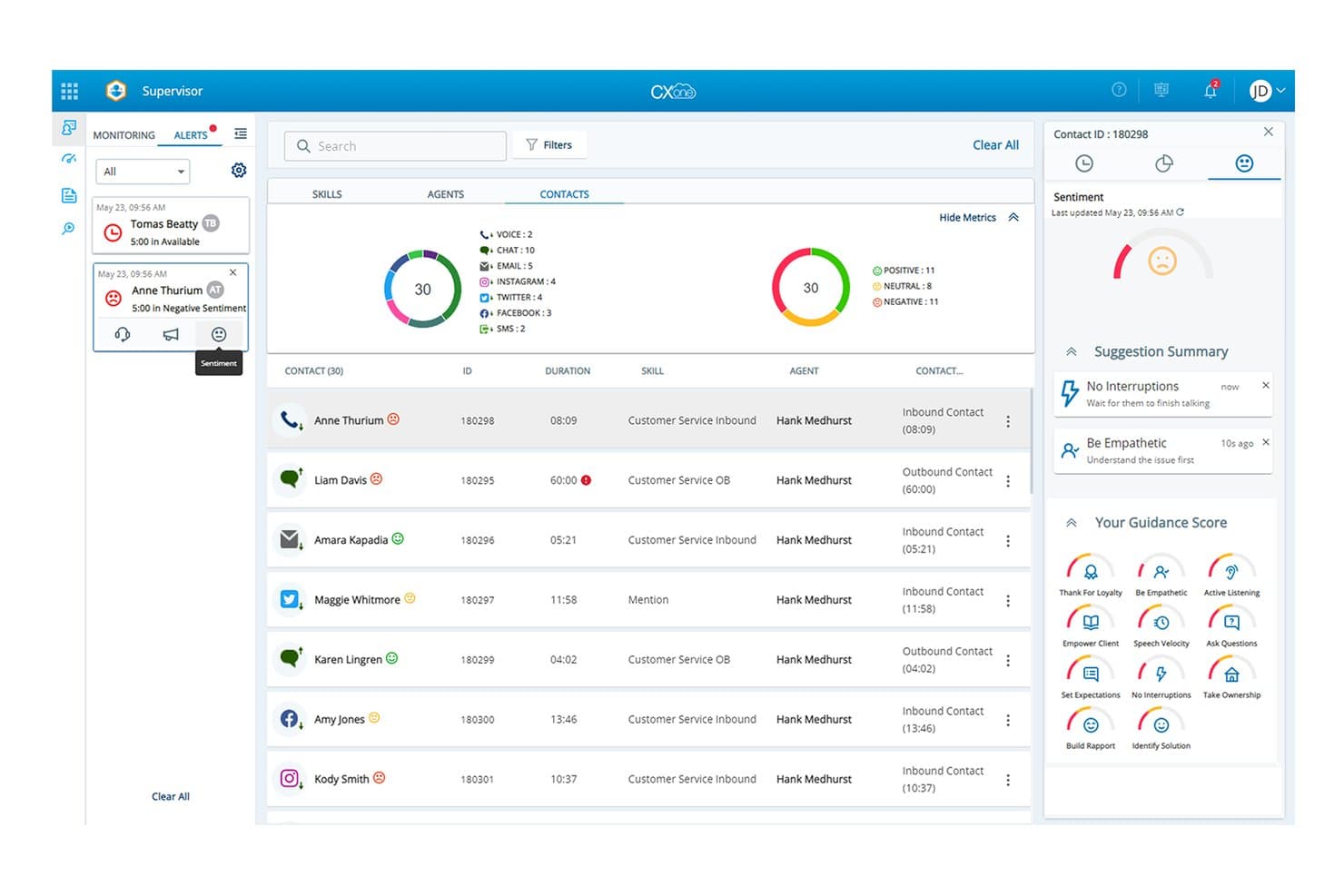
CXone Mpower tracks agent sentiment and guidance scores in real time. CXone Mpower is a cloud-native contact center AI platform from NiCE that combines omnichannel routing, workforce management, interaction analytics, and AI-powered agent assistance for customer service operations across industries, including financial services.
Who Is CXone Mpower Best For?
CXone Mpower is best for banks and financial institutions that need omnichannel customer service, workforce management, and AI-assisted agent workflows across large contact center operations.
Why I Picked CXone Mpower
I picked CXone Mpower because its Banking Engagement Hub is designed to bring financial system information into customer service workflows, giving agents access to relevant context when handling banking inquiries. I also like its trusted identity capabilities, which include voice biometrics for customer authentication during sensitive interactions. Its Bank Agent Assist offering adds industry-specific knowledge and AI guidance to support agents handling financial services requests.
CXone Mpower Key Features
- Omnichannel routing: Routes customer interactions across voice, chat, email, and digital messaging channels based on routing rules and agent availability.
- Interaction analytics: Analyzes customer conversations to identify sentiment, interaction trends, and agent performance patterns.
- Workforce management: Supports contact volume forecasting, agent scheduling, and real-time adherence monitoring.
- AI-powered agent assistance: Provides contextual knowledge, suggested responses, and real-time guidance during customer interactions.
CXone Mpower Integrations
CXone Mpower offers prebuilt CRM integrations with Salesforce, Oracle Service Cloud, Microsoft Dynamics 365, Zendesk, and ServiceNow. It also provides access to 200+ pre-integrated solutions through NiCE's marketplace, along with RESTful APIs, SDKs, and developer tools for custom integrations.
Pros and Cons
Pros:
- AI-assisted agent guidance during interactions
- Voice biometrics for customer authentication
- Core banking context in agent workspace
Cons:
- Custom workflows may require technical configuration
- Advanced capabilities vary by package
Learn more about CXone Mpower: Best for journeys using core banking data
- Not available
- Pricing upon request
Content Guru's customer experience solutions for finance. Content Guru is a cloud-based contact center platform offering omnichannel routing, AI-assisted customer interactions, configurable journey workflows, workforce management, and contact center analytics for financial services operations.
Who Is Content Guru Best For?
Content Guru is a strong fit for financial services contact centers that need configurable customer routing, personalized service workflows, and access to customer information during banking support interactions.
Why I Picked Content Guru
I've included Content Guru in my top picks because storm CX combines configurable customer journey workflows with real-time customer information for contact center agents. I particularly like storm CKS, which provides customer context through AI-powered screen-pops during interactions. storm FLOW also offers a visual workflow builder for configuring customer journeys and routing decisions, making it useful for financial services teams managing different types of customer inquiries.
Content Guru Key Features
- storm WFM scheduling: Uses AI-powered scheduling and omnichannel demand forecasts to plan agent shifts based on staffing needs and agent preferences.
- storm QM interaction analysis: Provides AI-assisted interaction scoring, customizable evaluation forms, and agent coaching feedback.
- storm RECORDER: Records voice and digital interactions for compliance monitoring, quality reviews, and interaction history tracking.
- storm AGENT ASSIST: Provides real-time AI-generated script suggestions, customer context, and relevant knowledge articles during interactions.
Content Guru Integrations
Content Guru's storm INTEGRATE supports hundreds of off-the-shelf and custom API integrations, including TCS BaNCS, Fiserv, Jack Henry, Salesforce, and Microsoft Dynamics. It also supports payment integrations with GlobalPayments and WorldPay, along with two-way data exchange through custom APIs.
Pros and Cons
Pros:
- AI-assisted scheduling considers forecast staffing demand
- Real-time reporting tracks cross-channel service trends
- Configurable routing supports complex customer journeys
Cons:
- Customers must validate AI configurations
- Internet access required for platform use
Learn more about Content Guru: 10Best for verifying regulated recording capture
Verint
- Free demo available
- Pricing upon request
Visit WebsiteCustomer Rating:4.5/5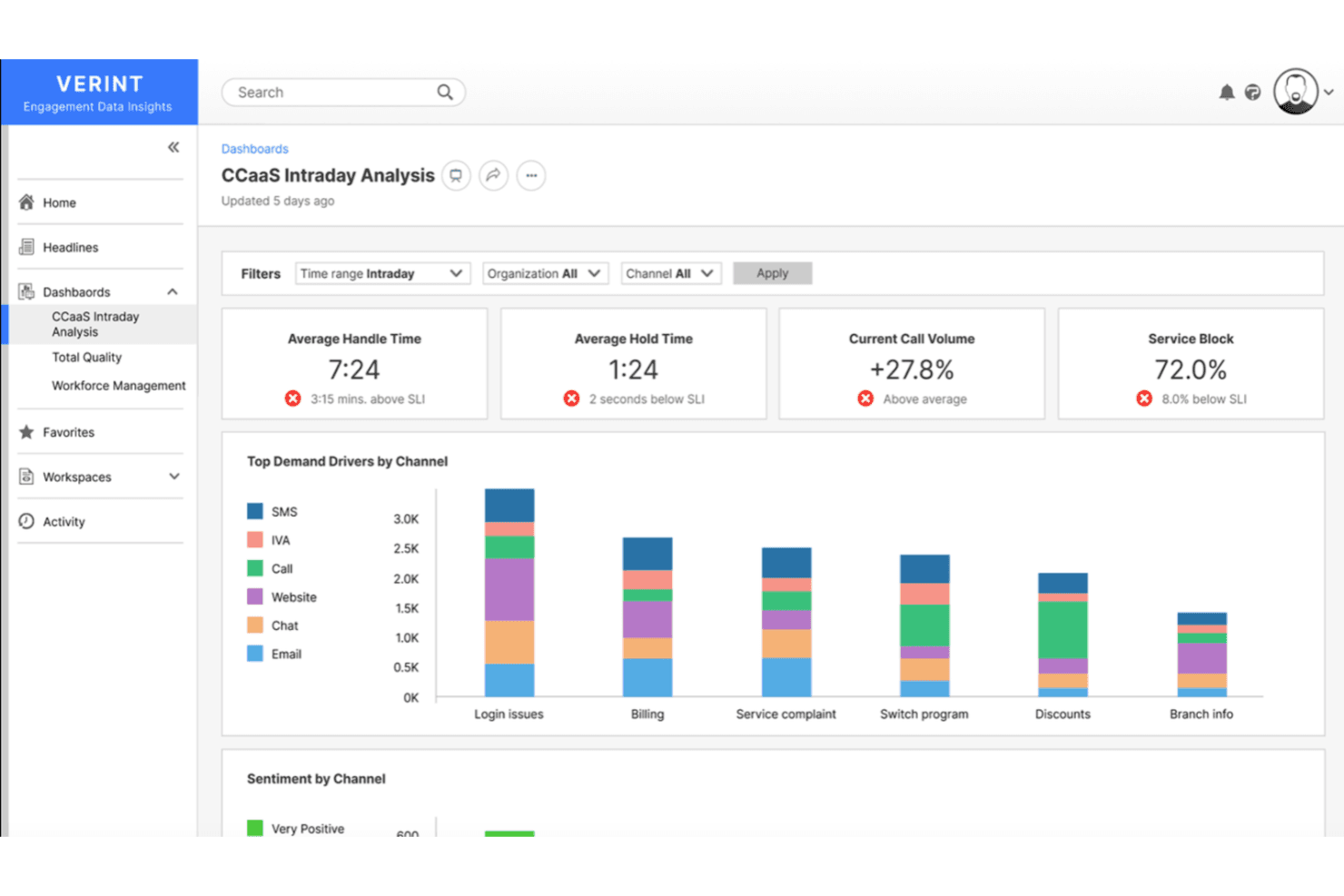
Verint dashboard tracking contact center performance. Verint provides AI-powered contact center and financial compliance software with interaction recording, compliance monitoring, workforce management, quality intelligence, and omnichannel analytics for financial services organizations.
Who Is Verint Best For?
Verint is a strong fit for compliance and risk teams at financial services organizations that need to monitor regulated communications, verify recording capture, and maintain records for regulatory audits.
Why I Picked Verint
I've included Verint in my top picks because its Financial Compliance Capture Verification solution monitors calls in real time to identify recording discrepancies and audio quality issues, including silence, crosstalk, and decoding errors. I also like its pause-and-resume recording capabilities, which help prevent sensitive payment information from being captured during interactions. These features are particularly relevant to financial services teams managing regulated communications and recording requirements.
Verint Key Features
- Financial Compliance Capture Verification: Monitors call recording in real time, identifies capture discrepancies, and detects audio quality issues such as silence, crosstalk, and decoding errors.
- Interaction recording: Captures voice and digital interactions with configurable retention policies, legal holds, deletion controls, and export workflows.
- Quality Intelligence: Uses AI to evaluate human and automated interactions, identify quality gaps, and provide evaluation results for coaching.
- Branch workforce management: Forecasts branch staffing demand, supports employee scheduling, and provides mobile access to shift swaps and time-off requests.
Verint Integrations
Verint Integration Studio offers more than 500 application connectors across 300 vendors, including Salesforce, Microsoft, Workday, and ServiceNow. It supports low-code and pro-code integration development, while Verint's API capabilities provide options for custom connections.
Pros and Cons
Pros:
- AI-powered quality evaluation supports coaching
- Supports multichannel compliance recording and retention
- Verifies regulated call capture in real time
Cons:
- Branch scheduling requires specialized functionality
- Compliance capabilities span separate product offerings
Learn more about Verint:
Outro software de centro de contacto para serviços financeiros
Eis algumas opções adicionais que não entraram na minha lista restrita, mas que ainda vale a pena analisar:
- 11DialpadBest for live guidance and agent coaching
- 12AVOXIBest for global calls on existing platforms
- 13Bright PatternBest for CRM-linked financial campaigns
- 14Zendesk TalkBest for reviewing human and AI conversations
- 15Sprinklr ServiceBest for public social and private service
- 16Vonage Contact CenterBest for Financial Services Cloud workflows
- 17Microsoft Dynamics 365Best for Microsoft users keeping their CRM
- 18Nextiva Contact CenterBest for spotting churn signals in service
- 19Enghouse InteractiveBest for tying investment orders to CRM profiles
- 20Mitel MiCloud Connect Contact CenterBest for guiding verified financial clients
How I Evaluate Financial Services Contact Center Software
I split my evaluation into three parts. Core functionality carries the most weight—I look for tools that route and queue interactions across voice and digital channels and support compliant recording with audit trails. Then I check for standout features like PCI DSS-compliant payment capture. Beyond features, I consider deployment options, regulatory certification depth, and vendor stability.
Core Functionality (Table Stakes for This List)
When I'm selecting tools for my list, I score each one on a scale from 0 (does not offer the functionality) to 5 (excels in this area) for each core functionality listed below. I then convert the total into a percentage to help assess each tool's overall fit, with extra weight on any functionalities I've deemed essential.
- Omnichannel Routing (Essential): I check whether routing spans voice, chat, email, and messaging with skills-based or data-driven logic that adapts to real-time conditions.
- Compliant Recording (Essential): Secure recording with configurable retention, audit trails, and access controls matters—I look for alignment with PCI DSS, SOC 2, and GDPR.
- Identity Verification: I evaluate how the platform authenticates callers, from knowledge-based checks to biometric or voice verification embedded in the interaction flow.
- Real-Time and Historical Analytics: Dashboards should cover service levels, agent performance, and queue health across channels—I look for customizable views and trend reporting.
- CRM and Core Banking Integrations: I check whether the platform surfaces customer data at the point of interaction through native connectors to CRMs, core banking, or policy systems.
- Workforce Management: Forecasting accuracy and scheduling flexibility are what I focus on, including intraday adjustments and adherence tracking during peak periods.
Once I have a list of tools that meet the criteria, I consider what sets each platform apart.
Differentiating Factors (What Sets Vendors Apart)
Here's how I compare and contrast different vendors:
Standout Features
PCI DSS-compliant payment capture is the first thing I look for. I check whether agents stay fully descoped from card data through DTMF masking or pause-and-resume recording, since even brief exposure creates risk during audits. Sentiment and emotion analytics matter too—I evaluate whether the platform can flag caller distress in real time and route to a supervisor before a complaint escalates. For proactive outbound notifications, I look at whether fraud alerts or payment reminders fire automatically from core system events rather than requiring manual campaign setup.
Beyond Features
I check whether a vendor holds audited certifications like SOC 2 Type II and PCI DSS Level 1, since self-attested claims don't hold up during regulatory examinations. Data residency controls matter just as much—I look for options to specify where voice recordings and interaction data are stored. Elastic licensing is another focus: volume spikes during fraud events or tax season shouldn't trigger punitive overage costs. I also evaluate vendor financial stability and roadmap transparency, because a multi-year platform commitment needs a partner that will still be investing in the product.
Como escolher software de centro de contacto para serviços financeiros
Escolha uma plataforma relacionando os seus requisitos de serviço com controlos documentados e, em seguida, teste se esses controlos se mantêm durante interações reais com clientes.
| Se a sua prioridade for… | Procure… |
|---|---|
| Se a sua prioridade for…Governação das gravações | Procure…Termos escritos sobre retenção, controlo de acesso e registos de auditoria |
| Se a sua prioridade for…Limitar a exposição a dados de pagamento | Procure…Um diagrama do fluxo de pagamento e limites claros de responsabilidade relativos à PCI DSS |
| Se a sua prioridade for…Preservar o contexto durante as transferências | Procure…Uma lista definida dos dados do cliente e do caso disponíveis para os agentes |
| Se a sua prioridade for…Gestão previsível dos dados e dos custos | Procure…Termos contratuais relativos à localização dos dados, à retenção e às cobranças baseadas no volume |
Como avaliar a sua lista restrita
- Verifique os controlos de gravação: Solicite o calendário de retenção e um exemplo de registo de auditoria; compare ambos com a sua política interna antes de um projeto-piloto.
- Defina as responsabilidades relativas aos pagamentos: Obtenha a Declaração de Conformidade PCI DSS atual do fornecedor e a matriz de responsabilidades e, em seguida, analise-as com a sua equipa de conformidade.
- Teste uma transferência: Durante um teste de 30 minutos, faça uma consulta sobre uma conta através de dois canais e registe quais os dados do cliente que são transferidos.
- Analise os termos contratuais: Peça cláusulas escritas sobre a localização e a retenção dos dados e, em seguida, calcule os custos com o seu volume normal e durante um pico relacionado com fraude.
- Escolha o compromisso adequado: Dê preferência a uma solução integrada com governação definida no contrato quando a sua equipa não puder assumir controlos personalizados; dê preferência a uma implementação na nuvem configurável quando a flexibilidade dos fluxos de trabalho for mais importante.
O que é o software de centro de contacto para serviços financeiros?
O software de centro de contacto para serviços financeiros gere as interações com clientes através de canais como telefone, conversação e correio eletrónico, para bancos, seguradoras e outras organizações financeiras. Combina encaminhamento, ferramentas para agentes e ligações a sistemas de clientes ou contas. Funcionalidades como controlos de gravação, verificações de identidade e proteções dos dados de pagamento ajudam as equipas a gerir interações de serviço sensíveis.
Funcionalidades
Eis as principais funcionalidades que procuro num software de centro de contacto para serviços financeiros:
- Encaminhamento omnicanal: Direciona chamadas, conversas, e-mails e mensagens para filas ou agentes com base nas competências, na disponibilidade e nos detalhes da interação. Dependendo da configuração, o contexto do cliente pode ser mantido entre os canais compatíveis.
- Gravação segura e registos de auditoria: Regista as interações com os clientes, com controlos configuráveis de acesso, retenção e revisão. Os registos de auditoria acompanham o acesso às gravações e as alterações administrativas para apoiar revisões internas e verificações de conformidade.
- Verificação de identidade: Permite a autenticação dos clientes através de métodos como perguntas baseadas em conhecimentos ou verificação através de sistemas ligados. Os agentes podem confirmar a identidade antes de discutir detalhes da conta ou efetuar alterações.
- Recolha de pagamentos PCI DSS: Permite fluxos de pagamento protegidos, como a introdução através do teclado, que limitam o acesso dos agentes aos dados dos titulares dos cartões. Os controlos de gravação podem impedir que informações de pagamento sensíveis sejam captadas.
- Integrações com CRM e sistemas financeiros: Permite o acesso a informações relevantes sobre clientes, contas ou casos a partir de sistemas de CRM, bancários ou de apólices ligados. Os dados e as ações disponíveis dependem da configuração da integração.
- Análise e relatórios: Acompanha o volume das filas, os níveis de serviço e o desempenho dos agentes nos canais compatíveis. Os relatórios históricos apoiam a análise da procura, enquanto as métricas em tempo real acompanham as condições atuais das filas.
- Gestão da força de trabalho: Permite a previsão do volume de interações, o planeamento dos horários dos agentes, a monitorização da adesão aos horários e os ajustes intradiários do pessoal com base na procura prevista.
- Automatização de fluxos de trabalho: Utiliza regras configuráveis para encaminhar interações, atualizar registos ou desencadear ações de acompanhamento. Por exemplo, um fluxo de trabalho pode direcionar questões relacionadas com fraude para uma fila especializada.
Vantagens
Eis algumas vantagens comuns que pode esperar do software de centros de contacto para serviços financeiros:
- Serviço mais consistente entre canais: O contexto partilhado das interações pode ajudar os agentes a dar continuidade às conversas com os clientes nos canais de comunicação compatíveis, sem repetir informações recolhidas anteriormente.
- Menor exposição a dados de pagamento: Os fluxos de pagamento protegidos e os controlos de gravação podem limitar o acesso dos agentes a informações sensíveis dos titulares dos cartões durante as transações.
- Governação mais robusta das gravações: As políticas de retenção configuráveis, as permissões de acesso e os registos de auditoria apoiam as revisões internas e a monitorização da conformidade.
- Acesso às contas mais controlado: As etapas de autenticação dos clientes ajudam os agentes a verificar a identidade antes de fornecer informações da conta ou processar pedidos.
- Transferências de clientes mais bem informadas: O acesso aos registos dos clientes e ao histórico das interações pode ajudar os agentes a manter o contexto relevante ao transferir questões entre equipas.
- Decisões de pessoal mais informadas: Os dados históricos das interações e as métricas das filas em tempo real apoiam a previsão da carga de trabalho, o planeamento dos horários dos agentes e os ajustes do pessoal.
- Acompanhamento dos clientes mais estruturado: Os fluxos de trabalho automatizados podem desencadear lembretes de pagamento, alertas de conta ou encaminhamentos para especialistas com base em regras configuradas e eventos do sistema.
Preços
O software de centros de contacto para serviços financeiros utiliza diferentes modelos de preços, incluindo subscrições por utilizador, lugares simultâneos, custos baseados na utilização e propostas empresariais personalizadas. Os exemplos abaixo ilustram preços iniciais publicados, e não médias do setor.
Tabela de comparação de planos para software de centros de contacto de serviços financeiros
| Modelo de preços | Exemplo de preços publicados (USD) | Principais considerações |
|---|---|---|
| Modelo de preçosSubscrição por utilizador | Exemplo de preços publicados (USD)Genesys Cloud CX 1: A partir de $75/utilizador/mês, com faturação anual | Principais consideraçõesO nível de entrada centra-se na voz; as capacidades omnicanal e de gestão da força de trabalho podem exigir planos superiores |
| Modelo de preçosSubscrição por lugar simultâneo | Exemplo de preços publicados (USD)Five9 Digital: A partir de $119/lugar simultâneo/mês | Principais consideraçõesMínimo de 50 lugares; podem aplicar-se custos de utilização; as capacidades de voz exigem um pacote adequado |
| Modelo de preçosPreços baseados na utilização | Exemplo de preços publicados (USD)Amazon Connect: $0.038/minuto de voz ou $0.010/mensagem de conversa | Principais consideraçõesAs telecomunicações, a região, os serviços adicionais e a utilização afetam o total |
| Modelo de preçosPreços agrupados ou baseados em sessões | Exemplo de preços publicados (USD)UJET Pro CX: A partir de $129/utilizador/mês ou $0.377/sessão | Principais consideraçõesOs preços dependem do pacote selecionado, do modelo de utilização e das capacidades adicionais |
Perguntas frequentes
Algumas respostas a perguntas comuns sobre software de centros de contacto para serviços financeiros:
O software de centro de contacto na nuvem é adequado para serviços financeiros?
Sim, o software de centro de contacto na nuvem pode ser adequado para organizações de serviços financeiros, dependendo dos respetivos requisitos de segurança e obrigações regulamentares. Antes de escolher um fornecedor, confirme os locais de armazenamento dos dados, os controlos de acesso, as políticas de retenção das gravações e as certificações de conformidade disponíveis. Analise a documentação de segurança do fornecedor, as dependências de terceiros e os procedimentos de recuperação de catástrofes. As suas equipas de segurança e conformidade devem avaliar estes requisitos antes da implementação.
O software de centro de contacto pode ligar-se a um sistema bancário central?
Sim, o software de centro de contacto pode ligar-se a sistemas bancários centrais através de conectores compatíveis, APIs ou middleware de integração. As capacidades disponíveis dependem do software e da configuração da integração. Antes de efetuar a compra, confirme a que registos de clientes, dados de contas e informações sobre transações os agentes podem aceder. Teste a autenticação, a sincronização de dados e as permissões de acesso durante uma prova de conceito. Verifique também o suporte à integração e as responsabilidades de manutenção do fornecedor.
O que deve ser testado num projeto-piloto para além do encaminhamento básico de chamadas?
Um projeto-piloto deve avaliar as interações com os clientes, os controlos de segurança e o desempenho do sistema em condições realistas. Teste as transferências entre canais de comunicação, as falhas na autenticação dos clientes, os encaminhamentos para especialistas e o processamento seguro de pagamentos, quando aplicável. Verifique se as informações dos clientes permanecem disponíveis durante as transferências e se os dados sensíveis são tratados de forma segura nas gravações e nos registos. Inclua volumes elevados de chamadas, interrupções do serviço e procedimentos de recuperação para identificar potenciais problemas antes da implementação.