

Com tantas soluções de software de chatbots diferentes disponíveis, é difícil perceber qual é a opção certa para a sua empresa. Sabe que quer automatizar as respostas às perguntas mais comuns dos clientes para melhorar a experiência dos clientes, mas precisa de perceber qual é a melhor opção. Neste artigo, vou ajudá-lo a tornar esta escolha mais fácil, partilhando as minhas perspetivas sobre os melhores softwares de chatbots para automatizar as suas interações com os clientes, com base na minha experiência pessoal em CX.
O que é um software de chatbots?
O software de chatbots é uma ferramenta digital que utiliza inteligência artificial para responder às perguntas dos clientes, simulando uma conversa humana. Os chatbots tratam dos pedidos sem intervenção dos funcionários, o que significa que a sua equipa pode ajudar muito mais clientes sem aumentar o número de recursos. Enquanto os chatbots tratam dos primeiros níveis de perguntas, a sua equipa trata dos pedidos especiais.
A utilização de software de chatbots permite às empresas prestar assistência aos clientes 24 horas por dia, 7 dias por semana, em todo o mundo, reduzindo os custos com pessoal e mão de obra e acelerando os tempos de resposta aos clientes para proporcionar uma melhor experiência.
Why Trust Our Software Recommendations
6,700+
Reviews
20
Industry experts
16+
Evaluation factors
14
Years
Our team has been testing and reviewing software since 2012. As CX leaders ourselves, we know how difficult—and important—it is to choose the right software.
For this guide, we evaluated tools using hands-on testing and independent research, scoring tools using our selection criteria.
Our reviews reflect our human editorial judgment, not a sales pitch.
 Gui DrusinaCreative Director
 Tim FisherVP of AI
Tabela comparativa de softwares de chatbots
Esta tabela comparativa resume os detalhes dos preços das minhas principais escolhas de software de chatbots:
| Tool | Best For | Trial Info | Price | ||
|---|---|---|---|---|---|
| 1 | Best with a low-code chatbot builder | Free trial available | From $19/user/month (billed annually) | Website | |
| 2 | Best for mixing LLMs across workflow steps | Free plan + free demo available | From $150/month (billed annually) | Website | |
| 3 | Best for no-code AI workflow orchestration | Free demo available | Pricing upon request | Website | |
| 4 | Best for AI deployment in existing helpdesks | 30-day free trial | From $199/month | Website | |
| 5 | Best for AI-driven customer support | Free plan available | From $25/user/month | Website | |
| 6 | Best with AI summaries for agents | Free plan available; 14-day free trial | From $16/user/month | Website | |
| 7 | Best with multi-agent automation | Free plan available | From $0.09/interaction | Website | |
| 8 | Best for providing in-app chat support | 15-day free trial | Pricing upon request | Website | |
| 9 | Best for advanced language model chatbots | 7-day free trial + free plan + free demo available | From $32/month (billed annually) | Website | |
| 10 | Best for no-code conversational interface design | Free plan available | From $29/month (billed annually) | Website |


Visão geral dos 10 melhores softwares de chatbots
Eis uma breve descrição dos 10 melhores chatbots que destaquei em detalhe neste artigo, apresentando o melhor caso de utilização e as funcionalidades mais relevantes de cada ferramenta. Também adicionei capturas de ecrã para lhe dar uma visão geral da respetiva interface de utilizador. Além disso, encontrará abaixo 18 opções adicionais, caso queira considerar ainda mais possibilidades.
 Best with a low-code chatbot builder
- Free trial available
- From $19/user/month (billed annually)
Visit WebsiteCustomer Rating:4.4/5
Build your chatbot with Freshdesk to automate routine inquiries. Freshdesk brings conversational AI into your support stack through built-in and integrated chat capabilities, letting you provide real-time help and ticket creation without forcing your agents to answer every common question. Whether you’re a support lead at a small e-commerce brand or part of a growing customer service team handling multichannel inquiries, Freshdesk’s chatbot options can keep customers engaged and deliver answers outside business hours.
Why I Picked Freshdesk
I picked Freshdesk because it embeds AI-driven chat and automation directly into the customer support workflow, giving you conversational bots that can deflect basic queries and turn interactions into tracked tickets. Its Freddy AI Agent uses natural-language understanding to answer routine questions and escalate complex ones to human agents, which means your team can focus on higher-value work.
You also get a low-code chatbot builder through the Freshworks Marketplace to customize dialogue flows without engineering resources. This combination of native AI and no-code bot configuration makes Freshdesk a practical choice for support teams prioritizing both automation and continuity of service.
Freshdesk Key Features
Aside from these core AI chatbot capabilities, Freshdesk offers several features that broaden its usefulness for conversational support:
- Omnichannel Messaging: Connect live chat, social messages, WhatsApp, and other channels into a single support inbox so your bots and agents can respond from one view.
- AI Copilot Suggestions: Provide agents with reply suggestions, summaries, and automated responses drawn from previous conversations and knowledge bases.
- Multiple Channel Support: Enables your team to manage customer interactions across various platforms from a single interface.
- Customizable Dashboard: Gives you the flexibility to tailor the workspace to fit your specific business needs.
Freshdesk Integrations
Integrations include Slack, Shopify, Jira, Microsoft Teams, Google Workspace, Mailchimp, Salesforce, HubSpot, QuickBooks, and Trello. Freshdesk also offers an API for custom integrations.
Pros and Cons
Pros:
- AI automation improves response times and reduces workload.
- Omnichannel support integrates various communication platforms.
- Customizable dashboards provide real-time support metrics.
Cons:
- Mobile app lacks some advanced features available on desktop, limiting on-the-go support.
- Lacks integrated calling solutions, requiring separate tools.
Learn more about Freshdesk: Best for mixing LLMs across workflow steps
- Free plan + free demo available
- From $150/month (billed annually)
Visit WebsiteCustomer Rating:4.5/5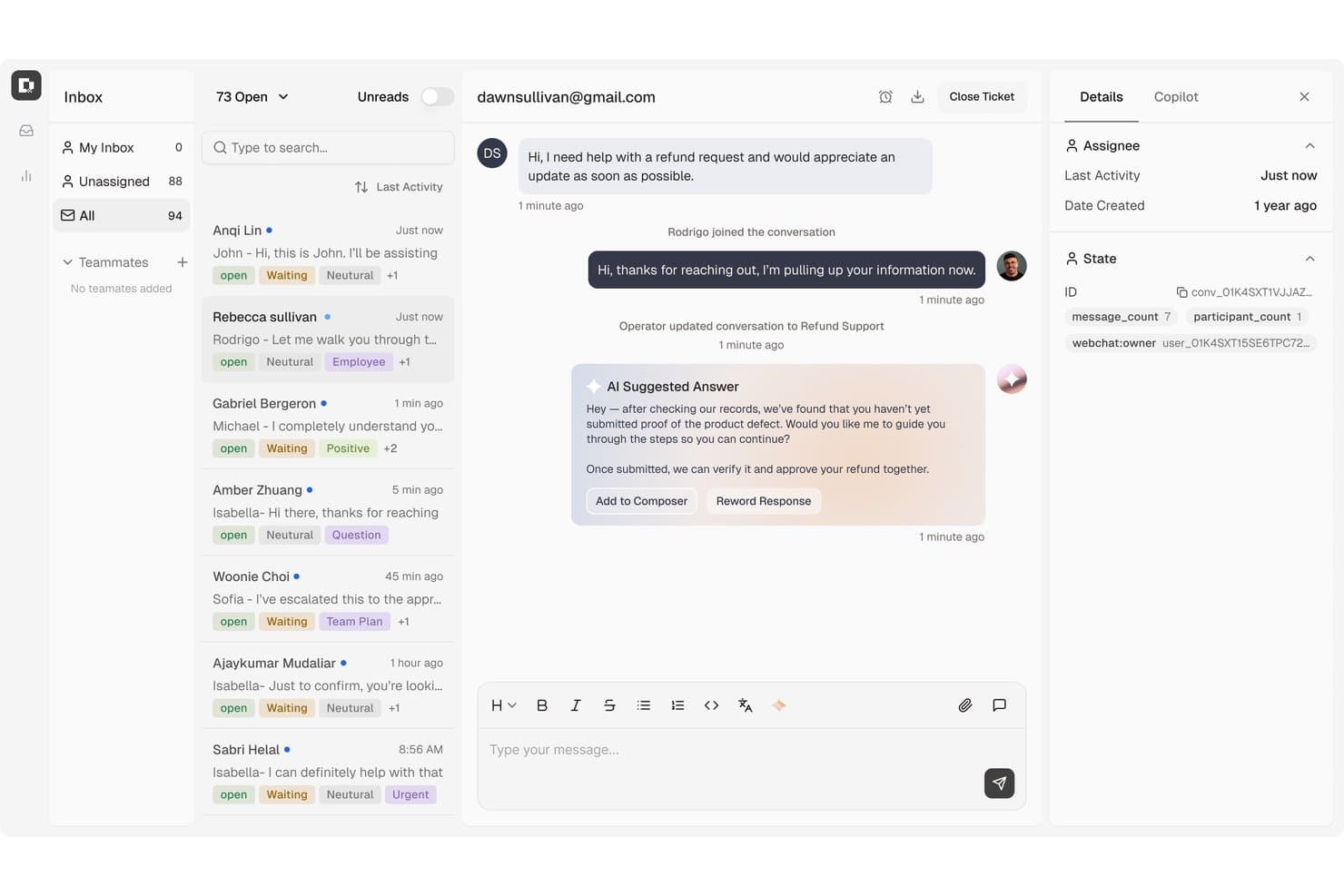
Botpress lets agents manage conversations with AI-suggested replies. Botpress is an AI agent platform that lets you build, deploy, and monitor conversational chatbots across support, lead generation, and sales workflows using a visual flow builder, knowledge bases, and a broad integration ecosystem.
Who Is Botpress Best For?
Botpress is a strong fit for technical teams and developers who want granular control over how different LLMs are used across the steps of a conversational workflow.
Why I Picked Botpress
Botpress earns its spot on my shortlist because of its multi-LLM flexibility, letting you assign different models to different steps in the same workflow. In practice, that means you can run a lightweight model for intent detection and a more capable one for complex response generation without rebuilding your flow. Botpress Studio's Autonomous Engine and visual canvas make it straightforward to wire up these LLM combinations alongside structured branching logic.
Botpress Key Features
- Knowledge base ingestion: Connect websites, PDFs, Word documents, and spreadsheets as searchable knowledge sources that agents draw on to answer user questions.
- Botpress Desk: A built-in helpdesk that handles L1, L2, and L3 support tickets with AI, including team routing, conversation tagging, and human escalation with full context.
- AI Actions: Agents can look up live order and account data, update CRM or billing records, and process eligible refunds directly within a conversation.
- Multi-channel publishing: Deploy bots across Webchat, WhatsApp, Telegram, Instagram, Messenger, Slack, and Twilio voice and SMS from a single workspace.
Botpress Integrations
Botpress offers marketplace integrations with HubSpot, Salesforce, Shopify, Slack, WhatsApp, Google Sheets, Intercom, and Zapier. Its Chat, Admin, Files, Tables, and Runtime APIs, plus custom code actions and webhooks, support custom connections.
Pros and Cons
Pros:
- Knowledge-backed agents can update customer records
- Visual flow design needs little coding
- Mixes LLMs across workflow steps
Cons:
- Reviewers report occasional knowledge-base and flow glitches
- Advanced setup can feel technically demanding
Learn more about Botpress: Best for no-code AI workflow orchestration
- Free demo available
- Pricing upon request
Visit WebsiteCustomer Rating:5/5
Cresta offers an AI-powered voice and chat assistant that retrieves cross-channel search history and suggests personalized flight options based on user preferences. Cresta is an AI-driven chatbot platform that equips CX teams with advanced conversational AI, no-code workflow automation, omnichannel deployment, and deep integration capabilities for customer support operations.
Who Is Cresta Best For?
Cresta suits enterprise contact centers and CX teams looking for AI-driven automation and integrated workflow orchestration in support-heavy environments.
Why I Picked Cresta
I picked Cresta as one of the best because its no-code AI workflow orchestration lets my team build and update multi-step automated chat experiences quickly. I use the visual flow editor to automate responses, trigger integrations, and enable instant agent handoff.
Cresta Key Features
- Real-time agent assist: Delivers AI-driven suggestions to human agents during live conversations.
- Multilingual conversational AI: Supports customer interactions in multiple languages using advanced language models.
- AI-powered quality assurance: Automatically scores chat and call quality for supervisor review.
- Comprehensive analytics dashboards: Visualizes intent recognition accuracy, containment rates, and customer sentiment metrics.
Cresta Integrations
Cresta offers native integrations with Salesforce, Zendesk, Twilio, Amazon Connect, and Genesys. An API is available for custom integrations.
Pros and Cons
Pros:
- Advanced conversational analytics and reporting
- Visual AI workflow builder with drag-and-drop
- Real-time coaching for live support agents
Cons:
- Limited SMB focus compared to enterprise solutions
- Workflow customization may require technical guidance
Learn more about Cresta: Best for AI deployment in existing helpdesks
- 30-day free trial
- From $199/month
Visit WebsiteCustomer Rating:4.5/5
My AskAI integrates with your existing helpdesk like HubSpot and has the feature to automatically notify a human agent and leave an internal comment when a user requests to speak to a person. My AskAI is an LLM-powered AI chatbot that layers directly onto existing helpdesks like Zendesk, Intercom, and Freshdesk, using generative AI to answer customer queries, escalate conversations to human agents, and self-learn from resolved tickets.
Who Is My AskAI Best For?
It's a strong fit for small to mid-sized ecommerce and SaaS support teams that already run a helpdesk and want to automate ticket resolution without rebuilding their tech stack.
Why I Picked My AskAI
My AskAI earns its spot on my shortlist because it's the only chatbot I've found that genuinely plugs into your existing helpdesk rather than replacing it. I especially like the self-learning feature: when a human agent steps in and writes a better answer, My AskAI reads that response, compares it to its own, and auto-drafts a new knowledge article from the gap. That means the AI gets sharper with every escalation, without anyone manually retraining it.
My AskAI Key Features
- Multilingual auto-translation: Instantly translates and responds in over 95 languages without requiring separate bots or manual translation.
- Agent assist copilot: Suggests AI-powered draft replies for agents directly inside supported helpdesks during live conversations.
- Proactive engagement triggers: Initiates AI chat interactions based on user actions like time on page or page navigation.
- Real-time conversation analytics: Tracks unresolved queries, response quality, and intent performance across tickets and chat channels.
My AskAI Integrations
My AskAI offers native integrations with Zendesk, Intercom, Gorgias, Freshdesk, HubSpot, and Freshchat.
Pros and Cons
Pros:
- Supports 95+ languages without separate bot builds
- Self-learns from agent-resolved conversations automatically
- Deploys inside existing helpdesks without rebuilding
Cons:
- No visual drag-and-drop conversation flow builder
- Limited value without a pre-existing helpdesk
Learn more about My AskAI: Best for AI-driven customer support
- Free plan available
- From $25/user/month
Visit WebsiteCustomer Rating:4.5/5
Help Scout’s dashboard displays shared inboxes across teams, centralizing customer conversations in one workspace. Help Scout is designed for businesses that prioritize personalized customer interactions while scaling their support operations. It blends AI technology with human touch, offering solutions that manage routine inquiries and team collaboration. This makes it an ideal choice for industries such as SaaS, education, and hospitality, where maintaining a personal connection with customers while handling high volumes of requests is crucial.
Why I Picked Help Scout
I picked Help Scout as a standout option for chatbot software because of its unique approach to integrating AI with human support. The AI Assistant is particularly noteworthy, as it manages routine inquiries, freeing up your team to handle more complex issues. Additionally, the shared inbox feature enhances team collaboration by keeping all communications organized in one place. These features directly address the need for efficient, yet personalized, customer service solutions, making Help Scout a valuable asset for any support-focused organization.
Help Scout Key Features
In addition to its AI Assistant and shared inbox, some other features of Help Scout that might catch your interest include:
- Beacon: An embeddable support hub that provides instant, AI-driven answers and allows customers to access previous conversations effortlessly.
- Proactive Messaging: Tools that enable your business to send targeted messages and updates, enhancing customer engagement.
- In-App Messaging: Allows your team to welcome and onboard customers directly within your product, improving the overall user experience.
- Feedback Collection: Utilizes NPS surveys and other tools to gather customer feedback, helping you refine your service offerings.
Help Scout Integrations
Integrations include Salesforce, Slack, HubSpot, Shopify, Mailchimp, Jira, Trello, WordPress, Google Apps, and WooCommerce.
Pros and Cons
Pros:
- Built-in knowledge base powers accurate automated replies
- Smooth handoff preserves conversation context for agents
- AI Answers resolves common tickets without agent involvement
Cons:
- AI effectiveness depends heavily on knowledge base quality
- Not a standalone chatbot outside Help Scout ecosystem
Learn more about Help Scout: Best with AI summaries for agents
- Free plan available; 14-day free trial
- From $16/user/month
Visit WebsiteCustomer Rating:4.6/5
SparrowDesk offers a live chatbot interface for real-time customer support. SparrowDesk offers a comprehensive solution for businesses seeking to enhance their customer interaction through chatbot software. It is particularly appealing to organizations aiming to automate routine customer inquiries and streamline support processes. By leveraging AI-driven technologies, SparrowDesk addresses challenges like reducing response times and improving customer satisfaction.
Why I Picked SparrowDesk
I picked SparrowDesk because of its AI-driven capabilities that set it apart in the chatbot software landscape. With its AI Agent, Luna, SparrowDesk can auto-resolve a significant portion of customer inquiries, allowing your team to focus on more complex issues. Combined with its AI Copilot feature that generates summaries and smart-reply drafts for agents, the platform supports chat-centric teams who need to keep response times low and context strong. It’s a fit when you’re looking for a chatbot/agent solution that works alongside human agents, not just a standalone bot.
SparrowDesk Key Features
In addition to its AI-driven capabilities, SparrowDesk offers several other features that can benefit your team:
- Unified Workspace: This feature allows your team to manage all customer interactions from a single platform, enhancing collaboration and efficiency.
- Self-Service Portals: Customers can find answers to their questions independently, reducing the workload on your support team.
- No-Code Workflow Automation: You can automate repetitive tasks without the need for coding, saving time and resources.
- Chat Widget & Live Messaging: SparrowDesk’s live chat module allows you to add a chat widget to your website, track visitor behavior (pages visited, browser, device) and engage in real time or hand off to humans.
SparrowDesk Integrations
Native integrations are not currently listed by SparrowDesk.
Pros and Cons
Pros:
- Personalized recommendations enhance customer experience.
- AI-driven features reduce customer service workload.
- Self-service portals empower customers to find answers independently.
Cons:
- Lacks detailed customization options for advanced users.
- Limited native integrations compared to competitors.
Learn more about SparrowDesk:

Aissist offers a subagents dashboard displaying session counts, traffic trends, resolution ratios, NPS scores, and diagnosis actions for each chatbot sub-agent. Aissist is an AI chatbot and customer support automation platform built on a multi-agent architecture that handles conversational support, ticket resolution, lead qualification, and workflow automation across web, messaging, and email channels.
Who Is Aissist Best For?
Aissist is a strong fit for customer support and CX operations teams managing high ticket volumes across multiple helpdesk platforms who need more than simple FAQ deflection.
Why I Picked Aissist
I picked Aissist as one of the best because its AgentMesh architecture does something most chatbots can't: it coordinates multiple specialized AI agents to complete multi-step tasks rather than just generating a reply. I also like how the Evolve layer detects live signals, like checkout failures or churn risk, and automatically executes fixes without waiting for a human to notice. That kind of closed-loop automation is genuinely rare in this category.
Aissist Key Features
- Conversational AI with multilingual support: Handles text, image, video, and voice messages in over 65 languages with automatic language detection.
- Native omnichannel deployment: Seamlessly integrates chatbots across web, in-app, WhatsApp, SMS, email, and social channels.
- CRM and helpdesk integrations: Connects to Zendesk, Intercom, Freshdesk, HubSpot, Salesforce, Front, and more for bi-directional data sync.
- Pulse analytics engine: Delivers real-time reporting on CSAT, intent recognition, resolution rates, and customer sentiment.
Aissist Integrations
Aissist offers native integrations with Zendesk, Intercom, Freshdesk, Front, Gorgias, Kustomer, Salesforce, eDesk, and HubSpot. An API is available for custom integrations.
Pros and Cons
Pros:
- Proactive triggers initiate chats based on behavior
- Handles 65+ languages with automatic detection
- Multi-agent coordination tackles complex, multi-step workflows
Cons:
- Limited public user reviews and community forums
- Visual flow builder is less mature
Learn more about Aissist: Best for providing in-app chat support
- 15-day free trial
- Pricing upon request
Visit WebsiteCustomer Rating:4.3/5
Businesses can design chatbots that can handle various tasks, from answering frequently asked questions to providing in-depth product information. Zoho SalesIQ is a live chat software that businesses can use to manage customer interactions.
Why I picked Zoho SalesIQ: The chatbot feature has a no-code drag-and-drop builder that can be used to craft scripts to respond to common customer queries. It can also use AI to understand the context of a visitor's question and provide answers directly from your customer resource hub. Both your support agents and your customers will have access to their chat history, helping everyone catch up on the situation at hand when an agent needs to step in to handle a request.
What's particularly noteworthy about the software is its capacity to manage live chats on your website and social media profiles, but it can also be used directly in your app. Customers can connect with your support team (or support bot) straight from your product, cutting out the need to visit your site or send an email to get in touch.
Zoho SalesIQ Standout Features & Integrations
Features include chatbot templates, drag-and-drop script builder, social media message management, visitor tracking, lead scoring, ticket routing, and analytics.
Integrations include Zoho CRM, Zoho Desk, and Zoho Campaigns, as well as Google Analytics and Salesforce.
Zoho SalesIQ Plans & Pricing
Plans start at $7/operator/month, and they offer a 15-day free trial.
Learn more about Zoho SalesIQ: Best for advanced language model chatbots
- 7-day free trial + free plan + free demo available
- From $32/month (billed annually)
Visit WebsiteCustomer Rating:4.4/5
Chatbase interface for creating AI agents that automate customer workflows. Chatbase is chatbot software built for creating AI-powered support agents that can handle complex customer interactions. It’s designed to be intuitive for both technical and non-technical users, making it easy to build, train, and deploy chatbots that learn from your business data.
Why I picked Chatbase: I picked Chatbase because it focuses on helping you create sophisticated AI support agents powered by large language models. This means your bots can understand context, handle nuanced questions, and escalate conversations to human agents when necessary. The platform also includes a real-time data sync capability, so your bots can pull information directly from CRMs, payment systems, or scheduling tools to provide instant, accurate responses.
Another reason I chose Chatbase is that it continuously learns from previous conversations. Over time, your AI agents become more capable, improving both customer satisfaction and resolution rates. Combined with its detailed analytics dashboard, you can monitor chatbot performance, identify gaps, and fine-tune responses for better accuracy.
Chatbase Standout Features & Integrations
Standout features include action configuration for automating routine workflows within integrated apps, AI model comparison to test different models for response accuracy, and smart escalation to human support when issues fall outside bot capabilities. It also supports multilingual chat in over 80 languages and includes advanced reporting to track interaction quality and agent performance.
Integrations include Make, Zendesk, Notion, Slack, Stripe, Salesforce, Cal.com, Calendly, WhatsApp, Zapier, and Messenger.
Chatbase Plans & Pricing
Chatbase pricing starts with a free plan, then scales from $32/month for the Hobby plan to $400/month for Pro, with an Enterprise option offering custom limits, SLAs, and priority support.
Learn more about Chatbase: 10Best for no-code conversational interface design
Weav
- Free plan available
- From $29/month (billed annually)

Weav uses AI to prioritize customer conversations and generate response drafts, helping support teams resolve inquiries faster. Weav is an AI chatbot platform that lets you build and deploy custom support agents trained on your own content, with no-code configuration, live agent handoff, and API-based workflow integrations.
Who Is Weav Best For?
Weav is a strong fit for small to mid-sized ecommerce and SaaS teams that want to deploy AI-powered support chatbots without relying on a dedicated engineering team.
Why I Picked Weav
I picked Weav as one of the best for no-code conversational interface design because configuring a chatbot here requires zero engineering involvement. You sync your existing website or upload documentation, and Weav automatically trains on that content to build a deployable chatbot. What I find genuinely useful are the agent configuration controls: you can set conversation tone, cap response length, and define prohibited phrases directly in the dashboard, giving non-technical teams real control over how the chatbot sounds and behaves without touching a line of code.
Weav Key Features
- Live agent handoff: Route conversations from the chatbot to a human support agent when a query falls outside the bot's knowledge or escalation rules are triggered.
- Multi-source knowledge training: Train your chatbot using Q&A pairs, uploaded files, video content, or direct URL syncs alongside website content.
- Conversation analytics: Track chatbot resolution rates, unanswered questions, and interaction volume to identify knowledge gaps.
- Custom actions: Trigger external workflows mid-conversation using configurable action blocks connected to your existing tools.
Weav Integrations
Native integrations are not clearly documented. Weav offers a developer-first REST API where every action available in the dashboard can be accessed programmatically, along with real-time webhooks for building custom workflows.
Pros and Cons
Pros:
- Agents monitor and join bot chats live
- Continuous self-learning from resolved tickets
- AI trains directly from your existing docs
Cons:
- Free plan caps at 20 AI messages
- Very few native third-party integrations
Learn more about Weav:
Outras opções de chatbots
Eis vários outros chatbots que não entraram na minha lista dos 10 melhores, mas que ainda vale a pena considerar. Se nenhuma das opções acima responder às suas necessidades, talvez uma das ferramentas abaixo o faça:
- 11TarsBest for its vast template library
- 12FrontBest for complex multi-team workflows
- 13KoreBest AI-powered chatbots
- 14IntercomBest for customized chat widgets
- 15KommunicateBest for fast setup
- 16DriftBest for sales and marketing teams
- 17AcquireBest for reporting and analytics
- 18LiveHelpNowBest for omnichannel customer support
- 19CrescendoBest for personalized customer onboarding
- 20GuruBest to connect your knowledge base
- 21GenesysBest chatbot for contact centers
- 22Yellow.aiBest for omnichannel customer experiences
- 23Quiq MessagingBest for conversations involving humans and bots
- 24QuidgetBest for automating repetitive frontline support
- 2514.aiBest intent-aware customer response engine
- 26BotmockBest for team collaboration
- 27BirdeyeBest chatbot and reputation management in one
- 28HiverBest for automated response drafting
How I Evaluate Chatbot Software
I split my evaluation into baseline criteria every bot must meet—like NLU quality and live agent handoff—and differentiators that separate tools built for real CX scale from those that aren't.
Core Functionality (Table Stakes For This List)
When I'm selecting tools for my list, I rank each one on a scale from 0 (does not offer the functionality) to 5 (excels in this area) for each core functionality listed below. Then, I calculate the tool's total score into a percentage. Each tool needs to achieve a minimum total score of 65% to be considered for inclusion.
- Conversational AI & NLU Quality: I check whether the bot can handle multi-turn conversations and understand intent from natural phrasing, not just rigid keyword triggers.
- Omnichannel Deployment Options: A CX chatbot needs to work where customers already are, so I evaluate channel coverage across web, mobile, WhatsApp, Messenger, and SMS.
- Live Agent Handoff: I look at how context transfers when the bot escalates to a human—whether the agent sees the full transcript, detected intent, and customer details.
- No-Code Bot Builder: CX teams should be able to build and adjust flows without filing engineering tickets, so the visual builder's depth and flexibility matter here.
- CRM & Helpdesk Integrations: The bot has to pull and push data to platforms like Zendesk, Salesforce, or HubSpot so agents and bots both work from the same customer record.
- Conversation Analytics & Reporting: I evaluate whether the platform surfaces actionable CX metrics like containment rate, CSAT, and unresolved query trends beyond basic volume counts.
Once I have a list of tools that meet this criteria, I consider what sets each platform apart.
Differentiating Factors (What Sets Vendors Apart)
Here's how I compare and contrast different vendors:
Standout Features
Generative AI knowledge ingestion is a major differentiator. I look at whether a bot can pull from your existing help center articles and docs to generate accurate answers without manual intent training. Sentiment detection also matters because it lets the bot flag frustrated customers for faster escalation before they churn. Then there's agent assist, where the AI drafts replies and summarizes conversations for the human who picks up after handoff. This bridge between bot and agent is where I see the biggest impact on handle time and resolution quality.
Beyond Features
Implementation speed varies widely in this space. I check whether a vendor offers pre-built CX intent libraries and templates so your team isn't building every flow from scratch. Security also weighs heavily—I evaluate SOC 2 Type II certification, PII redaction capabilities, and data residency options, especially for teams handling sensitive customer data in regulated industries like healthcare or finance. Pricing model fit matters too. Some vendors charge per resolution, others per seat or conversation volume, and the wrong structure can quietly erode ROI as your support traffic scales.
Interface de utilizador (UI)
Uma boa interface de utilizador simplifica as complexidades da criação e implementação de um chatbot e torna a experiência mais intuitiva. Os elementos visuais devem facilitar a identificação do acesso às funcionalidades principais, apresentar informações sobre métricas de forma clara e melhorar, de modo geral, a experiência do utilizador.
Facilidade de utilização
As melhores ferramentas simplificam o processo de criação de chatbots para que qualquer pessoa possa criar um. Todas as ferramentas desta lista não exigem código, o que significa que pode criar bots sem conhecimentos de programação. Normalmente, estes construtores baseiam-se numa funcionalidade de arrastar e largar que lhe permite criar facilmente fluxos de conversação e modelos de comportamento.
Integrações de software
Os chatbots precisam de se integrar com ferramentas de mensagens e com o seu CRM ou software de assistência técnica. Apresentei uma lista de algumas das integrações pré-construídas, quaisquer informações sobre a integração de aplicações através de software de terceiros ou opções personalizadas através da API da ferramenta.
Preços
As ferramentas desta lista estão disponíveis numa ampla variedade de preços. Incluí opções adequadas para pequenas empresas e outras mais indicadas para clientes empresariais. No entanto, penso que todas oferecem uma boa relação qualidade-preço para a empresa certa.
Software de chatbot: perguntas frequentes
Aqui estão algumas respostas às perguntas frequentes relacionadas com o software de chatbot e o seu funcionamento:
O que é um chatbot?
Um chatbot é um software que utiliza um algoritmo para imitar a comunicação humana através de conversação. O seu objetivo é fazer com que sinta que está a falar com outra pessoa, mas, ao contrário das pessoas com quem fala, os chatbots não têm iniciativa. Por isso, as conversas que mantiver seguirão uma sequência de pergunta-resposta-pergunta-resposta.
Para saber mais sobre chatbots, consulte o nosso artigo que explica detalhadamente como funcionam os chatbots.
Como funciona o software de chatbot?
O software de chatbot é um programa que inclui chatbots pré-construídos que pode utilizar para automatizar partes do seu negócio voltadas para o cliente, como as vendas e o apoio ao cliente.
Além disso, o software de chatbot inclui normalmente um criador de bots que o ajuda a criar o seu próprio chatbot de raiz. Depois de ter o seu chatbot, pode implementá-lo num site ou através de uma aplicação e deixá-lo tratar de questões iniciais e repetitivas. No entanto, se um cliente precisar de informações adicionais, o software de chatbot pode encaminhar a comunicação para uma pessoa real e deixá-la tratar do resto.
Se precisar de dicas sobre como começar, consulte este artigo que explica detalhadamente como pode criar um chatbot por si próprio.
Existem diferentes tipos de chatbots?
Existem dois tipos principais de chatbots: baseados em regras e baseados em IA (inteligência artificial). Os chatbots baseados em regras permitem-lhe configurar fluxos de trabalho para responder a perguntas pré-programadas, como descobrir o horário de funcionamento ou fazer reservas.
Os chatbots de IA conversacional vão mais longe, utilizando o processamento de linguagem natural (NLP) para avaliar a intenção de uma questão colocada por um cliente e fornecer uma resposta adequada.
Para que pode utilizar os chatbots?
Os chatbots têm muitos casos de utilização, todos eles destinados a retirar aos seus funcionários o peso do apoio básico e repetitivo ao cliente. As equipas de apoio podem utilizar chatbots para resolver problemas dos clientes e diagnosticar problemas. As equipas de vendas e marketing podem utilizá-los para qualificar e converter potenciais clientes. As lojas de comércio eletrónico podem utilizá-los para responder a perguntas dos clientes sobre produtos. Estas interações ocorrerão 24 horas por dia, 7 dias por semana, sem que a sua equipa tenha de fazer qualquer esforço.
Também pode utilizar chatbots como parte de um modelo híbrido que combine apoio em direto e ajuda automatizada. Por exemplo, pode utilizar o chatbot para recolher informações dos clientes e, em seguida, transferir a conversa para um representante em direto.
Qual é a popularidade dos chatbots?
A utilização de chatbots está a crescer. De acordo com um inquérito da Gartner realizado em 2021, 37.5% dos líderes de apoio ao cliente planeiam implementar chatbots em 2023. E numa altura em que o ChatGPT e outras soluções de inteligência artificial (IA) estão a tornar-se o tema de conversa de todos, espera-se que esta percentagem aumente.
O que é a automatização do apoio ao cliente?
A automatização do apoio ao cliente ocorre quando uma máquina é o primeiro ponto de contacto. Como provavelmente já percebeu, o software de chatbot é um tipo de automatização do apoio ao cliente, tal como a Resposta de Voz Interativa e a automatização de email.
Saiba mais sobre os seus benefícios e o papel da IA na automatização.