

Pulsar Review: Pros, Cons, Features and Pricing
Pulsar excels in delivering precise customer insights, making it a standout choice for teams aiming to refine their segmentation strategy.

We review tools independently, and commissions help fund our testing. See our transparency policy, our methodology, or suggest a tool.
Pulsar is a customer segmentation tool built on social and audience intelligence, designed for teams that need to understand not just who their customers are, but what they care about and why. I'd consider it over Audiense if your team wants to combine segmentation with real-time trend tracking and content strategy insights. Pulsar's visual audience mapping and cultural analysis features give you a richer picture of audience behavior than a more survey- or CRM-focused tool typically provides.
Pulsar Evaluation Summary

4.3/5
- Pricing upon request
- Free demo available
Why Trust Our Software Recommendations
6,700+
Reviews
20
Industry experts
16+
Evaluation factors
14
Years
Our team has been testing and reviewing software since 2012. As CX leaders ourselves, we know how difficult—and important—it is to choose the right software.
For this guide, we evaluated tools using hands-on testing and independent research, scoring tools using our selection criteria.
Our reviews reflect our human editorial judgment, not a sales pitch.
 Gui DrusinaCreative Director
 Tim FisherVP of AI
Pulsar Overview
From my perspective, Pulsar excels in providing valuable audience insights, making it a solid choice for teams focused on audience segmentation. Its intuitive and user-friendly interface, and reliable core features set it apart, but its onboarding could be smoother.
While it offers a good balance of features for the price, support could be more responsive. In my opinion, Pulsar is best for businesses that prioritize detailed audience analytics and have a team ready to handle some initial setup challenges. If you're seeking a platform that integrates well and offers competitive insights, Pulsar is worth considering.
Pros
- The onboarding process is excellent.
- Intuitive UI makes it easy to manage multiple resources.
- Reports provide valuable insights from sales and operations.
Cons
- Not great if you're trying to reduce the number of tools you use.
- Integrations can fail or not update at times.
- No financial-related features like budgets and expenses.
Is Pulsar Right For Your Needs?
Who Would be a Good Fit for Pulsar?
Pulsar is ideal for marketing teams and businesses focused on actionable insights harnessed via data science. If your work revolves around understanding audience behavior, Pulsar's robust analytics and social listening tools offer valuable insights. Its features are particularly beneficial for brands aiming for scalability, enhancing their engagement strategies, and improving social media management by analyzing trends and sentiment in real-time.
- Marketing AgenciesUse Pulsar for its comprehensive social listening capabilities that help craft targeted campaigns for your digital audiences.
- Retail BrandsPulsar’s analytics platforms aid in understanding customer sentiment, driving better product decisions.
- Public Relations TeamsMonitor brand reputation and respond to crises with Pulsar’s real-time data insights.
- Media CompaniesUtilize Pulsar to track trending topics and audience preferences for content creation.
- NonprofitsLeverage the Pulsar platform to gauge public opinion and interest, and improve outreach efforts with data-driven strategies.
- Event PlannersPlan successful events by using Pulsar to analyze public sentiment and adjust your messaging accordingly.
Who Would be a Bad Fit for Pulsar?
Pulsar may not be ideal for small businesses or startups. Its comprehensive feature set could be overwhelming for teams with limited resources or those seeking a straightforward, budget-friendly solution. If your team prefers simplicity and minimal setup time, Pulsar's complex functionalities might not align with your needs.
- Small StartupsPulsar's extensive features may overwhelm small teams, making it a poor choice if you're looking for simplicity.
- Low-Budget TeamsThe cost of Pulsar might not justify its use for teams with tight budgets, as it offers more than basic needs.
- Non-Technical StaffIf your team lacks technical expertise, navigating Pulsar's complex features could be challenging.
- Single-Person OperationsFor solo entrepreneurs, Pulsar's collaborative features are unnecessary and could be cumbersome.
- Simple ProjectsPulsar's advanced segmentation tools aren't needed for straightforward projects, making it excessive.
- Industries with Minimal DataIf your work involves little customer data, Pulsar’s segmentation capabilities may not be fully utilized.
How We Test & Score Tools
We’ve spent years building, refining, and improving our software testing and scoring system. The rubric is designed to capture the nuances of software selection and what makes a tool effective, focusing on critical aspects of the decision-making process.
Below, you can see exactly how our testing and scoring works across seven criteria. It allows us to provide an unbiased evaluation of the software based on core functionality, standout features, ease of use, onboarding, customer support, integrations, customer reviews, and value for money.
Core Functionality (25% of final scoring)
The starting point of our evaluation is always the core functionality of the tool. Does it have the basic features and functions that a user would expect to see? Are any of those core features locked to higher-tiered pricing plans? At its core, we expect a tool to stand up against the baseline capabilities of its competitors.
Standout Features (25% of final scoring)
Next, we evaluate uncommon standout features that go above and beyond the core functionality typically found in tools of its kind. A high score reflects specialized or unique features that make the product faster, more efficient, or offer additional value to the user.
We also evaluate how easy it is to integrate with other tools typically found in the tech stack to expand the functionality and utility of the software. Tools offering plentiful native integrations, 3rd party connections, and API access to build custom integrations score best.
Ease of Use (10% of final scoring)
We consider how quick and easy it is to execute the tasks defined in the core functionality using the tool. High scoring software is well designed, intuitive to use, offers mobile apps, provides templates, and makes relatively complex tasks seem simple.
Onboarding (10% of final scoring)
We know how important rapid team adoption is for a new platform, so we evaluate how easy it is to learn and use a tool with minimal training. We evaluate how quickly a team member can get set up and start using the tool with no experience. High scoring solutions indicate little or no support is required.
Customer Support (10% of final scoring)
We review how quick and easy it is to get unstuck and find help by phone, live chat, or knowledge base. Tools and companies that provide real-time support score best, while chatbots score worst.
Customer Reviews (10% of final scoring)
Beyond our own testing and evaluation, we consider the net promoter score from current and past customers. We review their likelihood, given the option, to choose the tool again for the core functionality. A high scoring software reflects a high net promoter score from current or past customers.
Value for Money (10% of final scoring)
Lastly, in consideration of all the other criteria, we review the average price of entry level plans against the core features and consider the value of the other evaluation criteria. Software that delivers more, for less, will score higher.
Core Features
Advanced Customer Profiling: Pulsar gives you a detailed view of your customer base by analyzing demographics, behavior, and preferences to create data visualizations. This lets your team tailor marketing strategies effectively.
Automated Segmentation: The software automatically groups customers into segments based on data analysis, saving you time and ensuring workflow optimization. This means you can focus on crafting personalized campaigns based on relevant conversations and interactions.
Real-Time Analytics: With Pulsar's real-time analytics, your team can track customer interactions and trends as they happen. This insight helps you make timely decisions to maximize engagement.
Predictive Insights: The predictive insights feature forecasts customer behavior, allowing you to anticipate needs and act proactively. This can boost customer satisfaction and retention.
Customizable Dashboards: You can create dashboards that highlight the metrics most important to your business. This customization ensures that your team stays focused on key performance indicators.
Data Integration: Pulsar integrates seamlessly with your existing data sources, providing a comprehensive view of customer information. This integration ensures that you have all necessary social data in one place.

Ease of Use
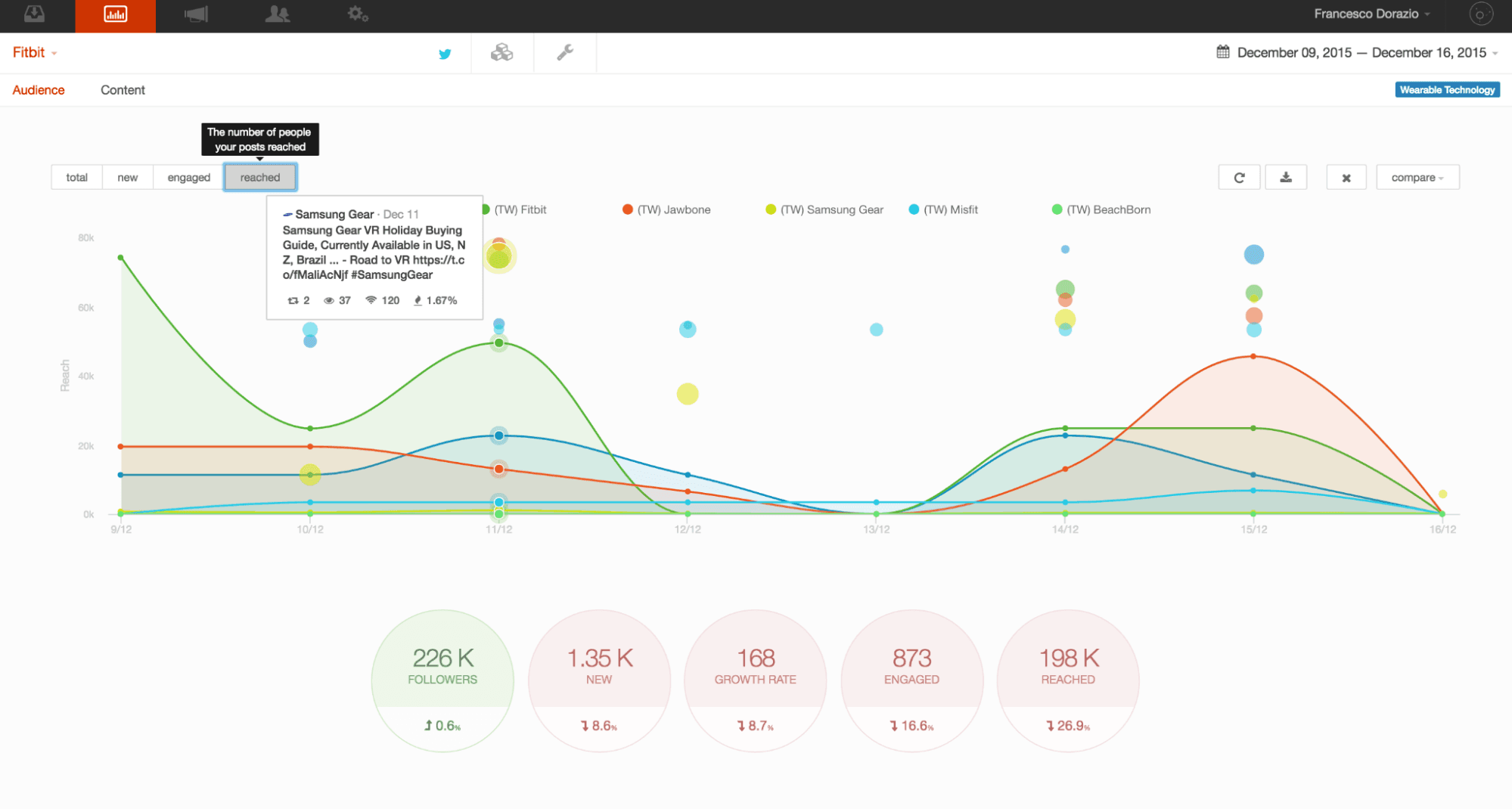
Pulsar is an incredibly user-friendly audience intelligence platform, making navigation straightforward with its intuitive interface. The left navigation menu allows you to easily switch between features, and the clear layout ensures smooth transitions within projects. You’ll find navigating between high-level views and detailed project screens intuitive, thanks to the well-placed hamburger menu icon and top-right ‘X’ for returning to previous views. This setup ensures that you and your team can efficiently manage and streamline customer segmentation tasks without hassle.
Integrations
Pulsar integrates with Tiktok.

Pulsar Specs
- Analytics: Yes
- API: Yes
- Approval Workflows: No
- Audience Targeting: Yes
- Brand Management: Yes
- Calendar Management: No
- Campaign Management: Yes
- Collaboration Support: Yes
- Conversion Tracking: No
- Custom Reports: Yes
- Dashboard: Yes
- Data Export: Yes
- Data Import: Yes
- Data Visualization: Yes
- External Integrations: Yes
- Feedback Management: Yes
- Keyword Tracking: Yes
- Knowledge Base: No
- Landing Pages: No
- Link Tracking: No
- Marketing Automation: No
- Multi-Account: Yes
- Multi-User: Yes
- Notifications: Yes
- Review Monitoring: Yes
- Scheduling: No
- Sentiment Analysis: Yes
- Social Media Monitoring: Yes
- Social-Media Integration: Yes
- Third-Party Plugins/Add-Ons: Yes
- Workflow Management: No


