

Tawk.to Review 2026: Pros, Cons, Features and Pricing
I see Tawk.to as more than a free chat widget: it’s a support option worth weighing on its own merits. This review looks at what you get for free—and the trade-offs behind its features and pricing.

We review tools independently, and commissions help fund our testing. See our transparency policy, our methodology, or suggest a tool.
Tawk.to is a free customer service software with live chat, ticketing, and a knowledge base. I’d consider it if you need website chat and follow-up tools without adding a paid plan; compared with Tidio, Tawk.to’s free offer is a better fit for teams that don’t want Tidio’s 50-conversation monthly limit on its free plan.
Tawk.to Evaluation Summary
4.2/5
- From $29/month
- Free plan available
Why Trust Our Software Recommendations
6,700+
Reviews
20
Industry experts
16+
Evaluation factors
14
Years
Our team has been testing and reviewing software since 2012. As CX leaders ourselves, we know how difficult—and important—it is to choose the right software.
For this guide, we evaluated tools using hands-on testing and independent research, scoring tools using our selection criteria.
Our reviews reflect our human editorial judgment, not a sales pitch.
 Gui DrusinaCreative Director
 Tim FisherVP of AI
Tawk.to Overview
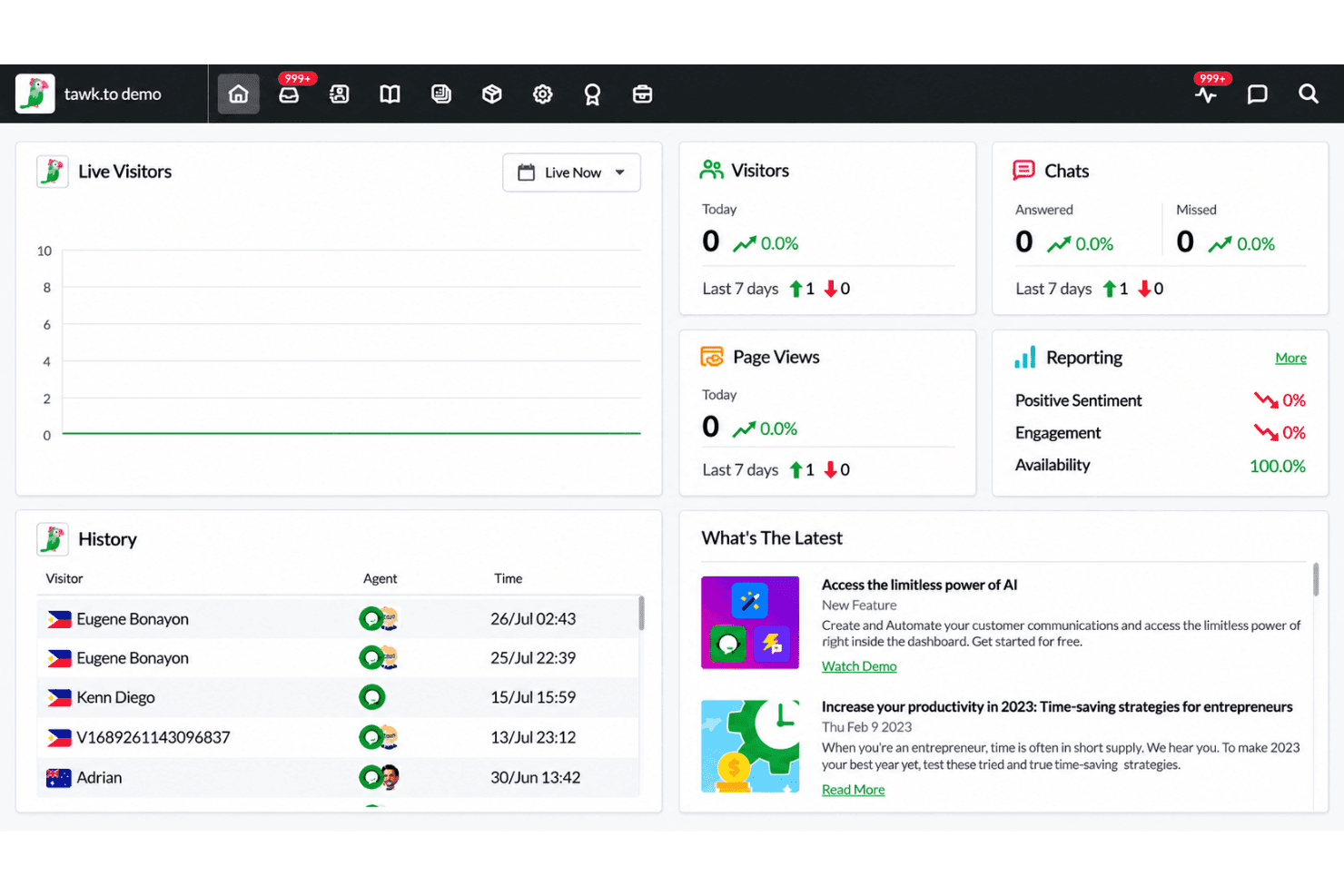
I’d choose Tawk.to when you need free live chat, ticketing, and a knowledge base without a conversation cap; its free offer compares well with capped alternatives. The shared inbox also includes contact records, while integrations cover channels such as email, WhatsApp, and Facebook Messenger, plus platforms including Shopify and WordPress. Setup requires a JavaScript snippet, and Tawk.to says it takes about two minutes. I like the range, but the interface may take time to navigate, and branding removal and AI Assist cost extra. Tawk.to suits small teams testing website support; compare paid add-ons and support needs before selecting it for complex operations.
Pros
- Free live chat supports unlimited agents and conversations.
- Free ticketing and knowledge base extend support beyond chat.
- Visitor monitoring and canned replies help agents handle active chats.
Cons
- Removing widget branding and scaling AI Assist require payment.
- Reviewers report cluttered dashboards and inconsistent mobile notifications.
- Larger teams report manual routing and missing advanced CRM sync.


How We Test & Score Tools
We’ve spent years building, refining, and improving our software testing and scoring system. The rubric is designed to capture the nuances of software selection and what makes a tool effective, focusing on critical aspects of the decision-making process.
Below, you can see exactly how our testing and scoring works across seven criteria. It allows us to provide an unbiased evaluation of the software based on core functionality, standout features, ease of use, onboarding, customer support, integrations, customer reviews, and value for money.
Core Functionality (25% of final scoring)
The starting point of our evaluation is always the core functionality of the tool. Does it have the basic features and functions that a user would expect to see? Are any of those core features locked to higher-tiered pricing plans? At its core, we expect a tool to stand up against the baseline capabilities of its competitors.
Standout Features (25% of final scoring)
Next, we evaluate uncommon standout features that go above and beyond the core functionality typically found in tools of its kind. A high score reflects specialized or unique features that make the product faster, more efficient, or offer additional value to the user.
We also evaluate how easy it is to integrate with other tools typically found in the tech stack to expand the functionality and utility of the software. Tools offering plentiful native integrations, 3rd party connections, and API access to build custom integrations score best.
Ease of Use (10% of final scoring)
We consider how quick and easy it is to execute the tasks defined in the core functionality using the tool. High scoring software is well designed, intuitive to use, offers mobile apps, provides templates, and makes relatively complex tasks seem simple.
Onboarding (10% of final scoring)
We know how important rapid team adoption is for a new platform, so we evaluate how easy it is to learn and use a tool with minimal training. We evaluate how quickly a team member can get set up and start using the tool with no experience. High scoring solutions indicate little or no support is required.
Customer Support (10% of final scoring)
We review how quick and easy it is to get unstuck and find help by phone, live chat, or knowledge base. Tools and companies that provide real-time support score best, while chatbots score worst.
Customer Reviews (10% of final scoring)
Beyond our own testing and evaluation, we consider the net promoter score from current and past customers. We review their likelihood, given the option, to choose the tool again for the core functionality. A high scoring software reflects a high net promoter score from current or past customers.
Value for Money (10% of final scoring)
Lastly, in consideration of all the other criteria, we review the average price of entry level plans against the core features and consider the value of the other evaluation criteria. Software that delivers more, for less, will score higher.
Core Features
Live Chat
The website widget lets visitors start real-time conversations with your team, which can handle unlimited agents and conversations on the free offer. For example, a small support team can answer product questions without paying per agent or chat.
Ticketing
Create tickets from chats, missed messages, or new requests, then assign them and track replies in the inbox. Priority levels and tags help your team sort follow-ups, such as separating urgent account issues from routine questions.
Knowledge Base
Build a help center with articles and FAQs that visitors can browse from your site or chat widget. You can also let visitors submit questions from the knowledge base, giving them a self-service option and your team a path for follow-up.
Visitor Monitoring
See who’s browsing your site and which pages they’re viewing in the Monitoring section. Your team can use that context to start a relevant chat, such as offering help to someone viewing a setup guide.
Shortcuts and Canned Replies
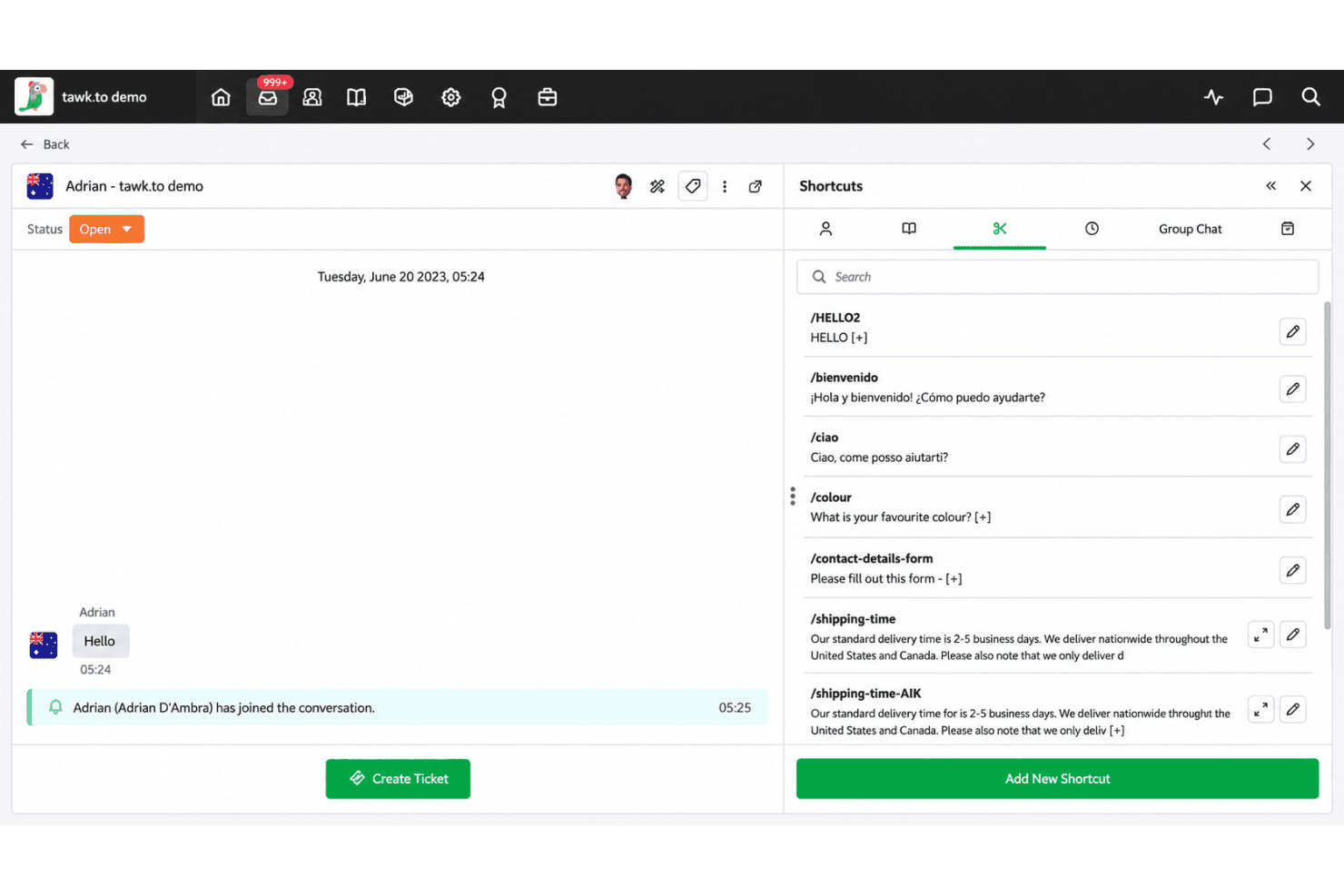
Save reusable responses as shortcuts and insert them into conversations when customers ask repeat questions. For example, agents can send the same accurate instructions for password resets without retyping them.
Shared Inbox and Contact Records
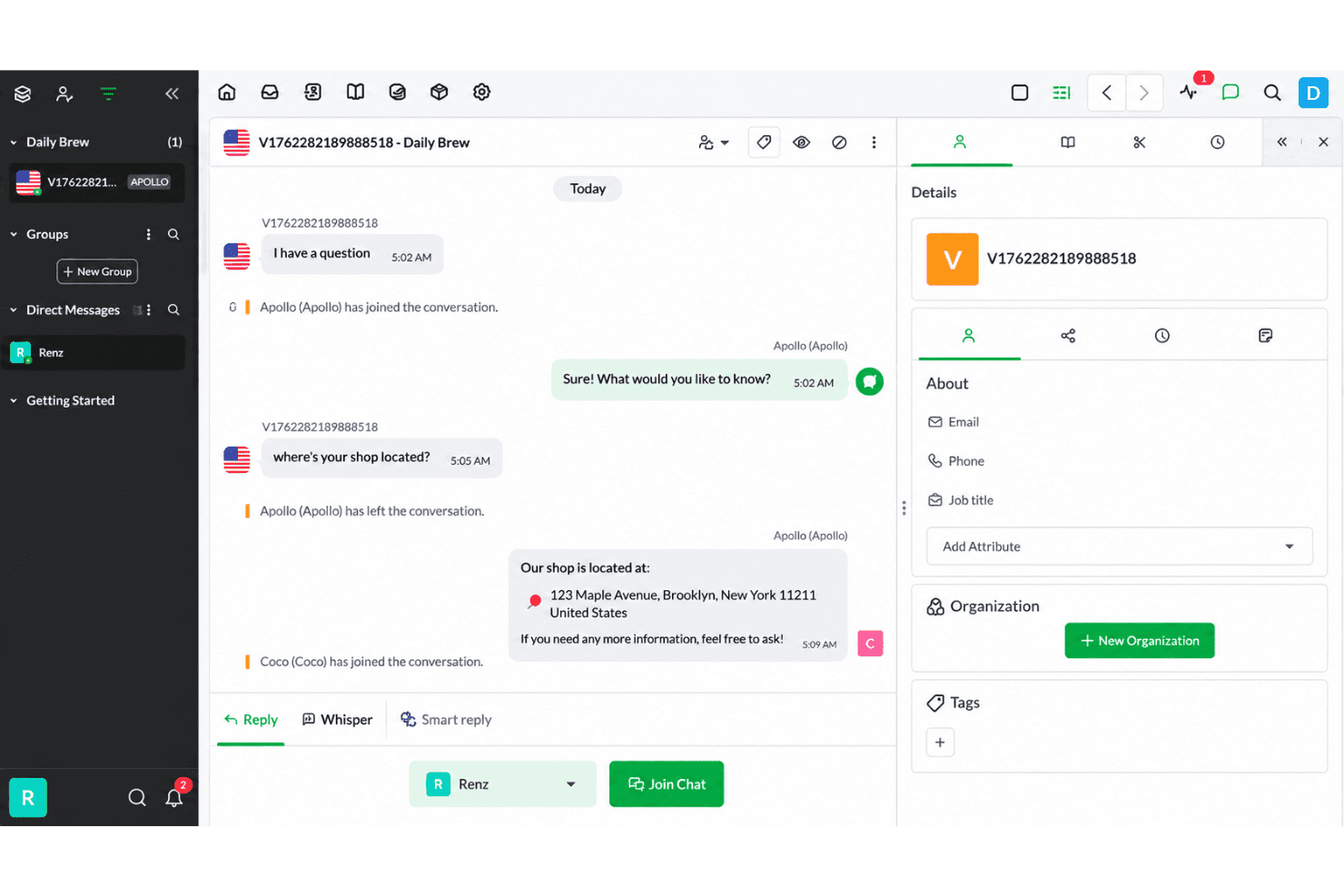
Manage chats and tickets in the inbox, with contact records that show conversation history. Agents can review prior chats or tickets before replying, which helps them continue a support request with its context.
Ease of Use
Tawk.to is easy to start with, though its busy interface can slow daily use. The JavaScript widget takes about two minutes to install, and the free plan combines unlimited chats and agents with ticketing, canned replies, visitor monitoring, and a knowledge base. However, cluttered dashboards, hard-to-find settings, and inconsistent mobile notifications can affect usability. It's a practical choice for small teams that prioritize features over polished navigation.
Integrations
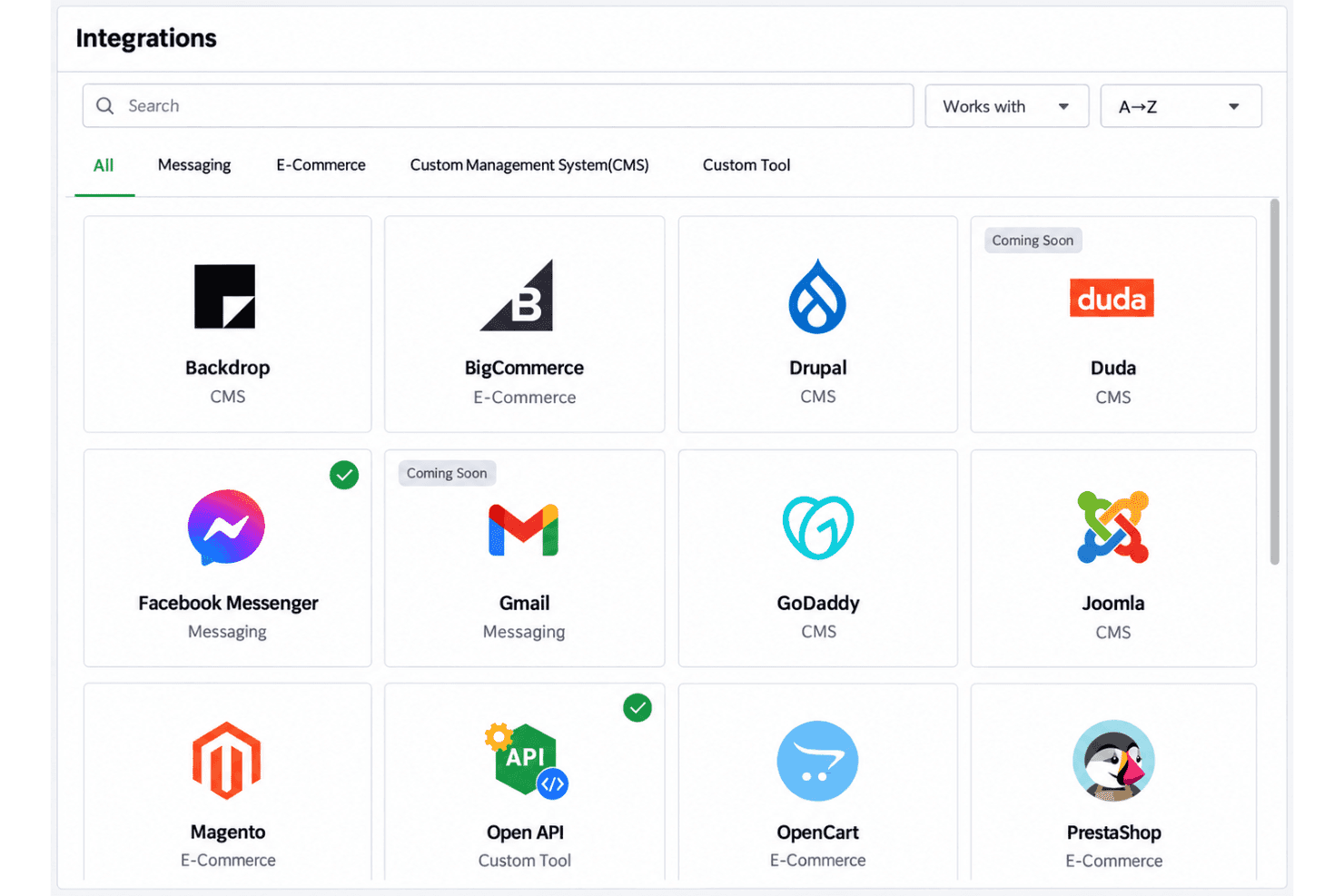
Tawk.to supports integrations with WordPress, Shopify, BigCommerce, WooCommerce, Magento 2, PrestaShop, OpenCart, Wix, and Squarespace. It also supports Google Analytics tracking, offers a JavaScript API for custom integrations, and connects with third-party automation platforms such as Zapier and Make.
Tawk.to Specs
- 2-Factor Authentication: Yes
- Access Management: Yes
- Anti-Virus: No
- API: Yes
- Audit Trail: No
- Bug Tracking: No
- Calendar Management: No
- Customer Management: Yes
- Dashboard: Yes
- Data Export: Yes
- Data Import: Yes
- Data Visualization: Yes
- Email Integration: Yes
- External Integrations: Yes
- File Sharing: Yes
- File Transfer: Yes
- Firewall: No
- Google Apps Integration: Yes
- Inventory Tracking: No
- Malware Protection: No
- Multi-User: Yes
- Network Device Performance Monitoring: No
- Network Traffic Monitoring: No
- Network Visualization: No
- Notifications: Yes
- Project Management: No
- Remote Access: No
- Risk Assessment: No
- SAP Integration: No
- Scheduling: Yes
- Software Integration: Yes
- Third-Party Plugins/Add-Ons: Yes
- Ticket Management: Yes


