

En iyi sağlık hizmetleri CRM yazılımı, bakım süreci boyunca hasta, yönlendirme, planlama ve iletişim verilerini düzenleyen bir platformdur.
Bu rehberde sağlık sistemleri, hastaneler, uzmanlık klinikleri ve bağımsız muayenehaneler için sağlık hizmetleri CRM araçları karşılaştırılmaktadır. EHR entegrasyonu, hasta kazanımı, çağrı merkezi iş akışları, randevu planlama, yönlendirme yönetimi ve otomatik iletişim seçeneklerini bulabilirsiniz.
Bu karşılaştırmaları, her platformun ekiplerinize, iş akışlarınıza, gizlilik gereksinimlerinize ve hasta deneyimi hedeflerinize uygunluğunu değerlendirmek için kullanın.
Why Trust Our Software Recommendations
6,700+
Reviews
20
Industry experts
16+
Evaluation factors
14
Years
Our team has been testing and reviewing software since 2012. As CX leaders ourselves, we know how difficult—and important—it is to choose the right software.
For this guide, we evaluated tools using hands-on testing and independent research, scoring tools using our selection criteria.
Our reviews reflect our human editorial judgment, not a sales pitch.
 Gui DrusinaCreative Director
 Tim FisherVP of AI
Sağlık Hizmetleri CRM Yazılımları Karşılaştırma Tablosu
Kısa listeme giren sağlık hizmetleri CRM yazılımlarının fiyatlarını ve teknik özelliklerini yan yana karşılaştırın:
Score legend (out of 5)
- Excellent4.5–5
- Good4–4.4
- Average3–3.9
- Below average2–2.9
- Poor1–1.9
Sorted by: Default
| Tool | Starting Price | Website | |||||||
|---|---|---|---|---|---|---|---|---|---|
Best for allied-health records and billing | 3.5 out of 5 | 4 | 4 | 3 | 4 | 3 | 3 | $29/user/month 14-day free trial + free demo available | Website |
Best for health systems running Oracle EHR | 3.3 out of 5 | 4 | 2 | 2 | 4 | 4 | 4 | Pricing upon request Free demo available | Website |
Best for EHR-connected patient and referral tracking | 4.0 out of 5 | 4 | 5 | 5 | 4 | 3 | 3 | $350/user/month 30-day free trial | Website |
Best for multi-channel patient acquisition campaigns | 3.8 out of 5 | 4 | 3 | 4 | 4 | 4 | 4 | Pricing upon request Free demo available | Website |
Best for independent practice scheduling automation | 3.3 out of 5 | 4 | 3 | 2 | 5 | 4 | 2 | Pricing upon request Free demo available | Website |
Best for scheduling automation across 400+ EHR systems | 3.2 out of 5 | 4 | 2 | 1 | 5 | 4 | 3 | Pricing upon request Free demo available | Website |
Best for call center-driven patient scheduling | 3.7 out of 5 | 3 | 4 | 3 | 5 | 4 | 3 | Pricing upon request Free demo available | Website |
Best for EHR-integrated patient scheduling automation | 4.0 out of 5 | 5 | 3 | 3 | 5 | 4 | 4 | Pricing upon request 90-day free trial + free demo available | Website |
Best for CRM and referral management combined | 4.3 out of 5 | 4 | 5 | 5 | 4 | 4 | 4 | Pricing upon request Free demo available | Website |
Best for EHR-native AI call center scheduling | 4.0 out of 5 | 4 | 3 | 3 | 5 | 5 | 4 | $499/provider/month Free demo available | Website |


Sağlık Hizmetleri CRM Yazılımları İncelemeleri
Aşağıda kısa listemde yer alan en iyi sağlık hizmetleri CRM yazılımları hakkındaki özetlerimi bulabilirsiniz. İncelemelerimde, doğru seçeneği belirlemenize yardımcı olmak için her sağlık hizmetleri CRM platformunun özelliklerini, entegrasyonlarını ve kullanım alanlarını inceliyorum.
 Best for allied-health records and billing
- 14-day free trial + free demo available
- From $29/user/month
Visit WebsiteCustomer Rating:4.7/5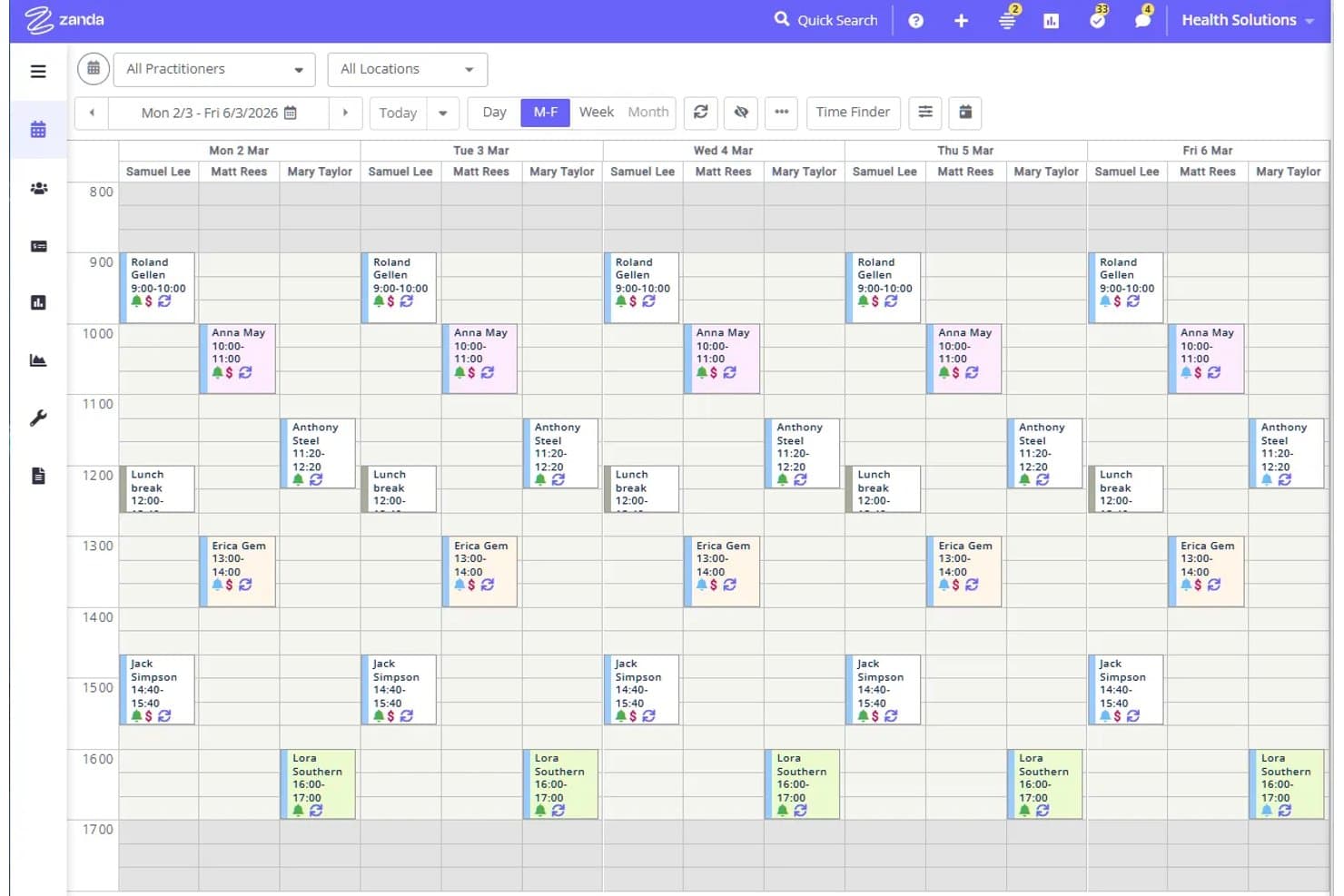
Zanda displays a weekly multi-practitioner appointment calendar view. Zanda is an all-in-one practice management platform for health practices that combines client records, scheduling, billing, clinical notes, intake forms, and automated communications in one system.
Who Is Zanda Best For?
Zanda is a strong fit for allied health practices—think physiotherapy, psychology, and occupational therapy—that need client records, scheduling, and billing in one place.
Why I Picked Zanda
I picked Zanda as one of the best because it handles allied health records and billing in a way that feels purpose-built for practices like physiotherapy, psychology, and occupational therapy. I love how client profiles pull together referral records, ICD-10 diagnoses, insurance details, and session notes in one place, so nothing gets siloed. Automated invoicing and third-party billing to insurers or plan managers mean billing follows directly from the clinical record without extra admin work.
Zanda Key Features
- Client classifications: Tag and filter clients using custom labels—such as language preference, health status, or demographic—to organize your caseload and target communications.
- Bulk SMS and email messaging: Send outreach to selected client lists using Advanced Search filters, including marketing source, to coordinate targeted campaigns.
- Post-appointment automations: Trigger SMS, email, or internal tasks based on conditions like appointment status, service type, client classification, or location.
- Practice reporting suite: Access reports covering client retention, inactive clients, appointment counts, practitioner utilization, and client acquisition sources.
Zanda Integrations
Zanda has native integrations with Stripe, Xero, Physitrack, Google Calendar, Apple Calendar, Outlook Calendar, Mailchimp, Zoom, and Google Analytics. It also offers a read-oriented public API beta for custom connections, though the beta is closed to new practices.
Pros and Cons
Pros:
- Referral and client-source reports support targeted outreach
- Online booking and reminders reduce manual follow-up
- Centralizes client records, notes, forms, and billing
Cons:
- Campaign reporting doesn’t connect outreach to revenue
- Calendar sync may not block personal events
Learn more about Zanda: Best for health systems running Oracle EHR
- Free demo available
- Pricing upon request
Visit WebsiteCustomer Rating:4.6/5
Oracle tracks patient care coordination, team roles, and activity logs. Oracle is a healthcare IT platform that brings together patient communications, appointment scheduling, population health segmentation, and EHR-integrated outreach tools across its Oracle Health and Oracle CX product lines.
Who Is Oracle Best For?
Oracle is a strong fit for large health systems already running Oracle Health EHR that want scheduling automation, population health outreach, and HIPAA-compliant patient communications within one ecosystem.
Why I Picked Oracle
I picked Oracle as one of the best because it's the natural choice if your health system is already running Oracle Health EHR (Cerner Millennium) and you want patient communications and population outreach to pull directly from clinical data. I particularly like the Unified Consumer Communications tool, which ties automated multi-channel reminders to live scheduling data and has shown documented no-show reductions of 35–50% at Oracle Health customers. The HIPAA-compliant segmentation in Oracle CX for Healthcare also lets you build and launch clinically informed outreach campaigns without involving IT.
Oracle Key Features
- Drag-and-drop patient segmentation: Build and launch clinically informed outreach campaigns across large patient populations without involving IT, using Oracle CX for Healthcare's visual segmentation tools.
- Care gap and quality program tracking: Monitor HEDIS, ACO, MIPS, and eCQM quality measures directly within Oracle Health's population health tools to identify and act on care gaps.
- Omnichannel agent workspace: Oracle Service Center gives contact center agents a unified view of email, chat, phone, SMS, and video interactions with built-in rules-based routing and case management.
- Social determinants of health mapping: Map patient populations against census block group social-risk data to factor socioeconomic context into outreach and care coordination planning.
Oracle Integrations
Oracle Health products integrate with Oracle Health EHR (Cerner Millennium), Oracle Fusion Cloud Apps, Oracle Unity Customer Data Platform, and third-party systems. Documented adapters support Salesforce and SAP, while REST APIs support custom integrations.
Pros and Cons
Pros:
- HIPAA-focused patient communications
- Clinical outreach segmentation without IT
- Advanced population health targeting
Cons:
- No dedicated physician liaison workflows
- Patient relationship tracking spans separate products
Learn more about Oracle: Best for EHR-connected patient and referral tracking
- 30-day free trial
- From $350/user/month (billed annually)
Visit WebsiteCustomer Rating:4.4/5
Salesforce Agentforce Health tracks patient calls, referrals, and appointments. Salesforce Agentforce Health is a healthcare CRM built on Salesforce's agentic platform that combines patient relationship tracking, referral management, appointment scheduling, care coordination, and EHR interoperability in one system.
Who Is Salesforce Agentforce Health Best For?
Salesforce Agentforce Health is built for large health systems and payers that need enterprise-grade EHR interoperability across patient access, referral management, and care coordination.
Why I Picked Salesforce Agentforce Health
I picked Salesforce Agentforce Health as one of the best because its referral management is genuinely built around the clinical data model, not bolted on. Every inbound referral runs on a Clinical Service Request record, where AI processes faxes into structured data, scores cases by urgency and time in queue, and auto-checks eligibility before a human touches it. Pair that with real-time FHIR connections to Epic, Oracle Cerner, and athenahealth, and your team gets full EHR context inside the CRM without duplicating data.
Salesforce Agentforce Health Key Features
- Patient 360 health timeline: A longitudinal view of each patient that pulls together clinical data, social determinants of health, care team information, and household context in one record.
- Intelligent Appointment Management: A scheduling console that connects Salesforce Scheduler with EHR scheduling engines, offering real-time provider availability, guest self-scheduling, and automated reminders.
- Omni-Channel Routing: Routes inbound patient contacts across phone, chat, and social channels to the right agent, with supervisor monitoring built in.
- OmniStudio workflow automation: A suite of tools including OmniScript and FlexCards that lets your team build guided patient-facing workflows and automate multi-step care processes without custom code.
Salesforce Agentforce Health Integrations
Salesforce Agentforce Health integrates with Epic, Oracle Cerner, and athenahealth through FHIR clients, including athenahealth scheduling. It supports HL7 v2, SMART on FHIR, CDS Hooks, TEFCA through Kno2, Da Vinci APIs, MuleSoft connectors, and custom integrations.
Pros and Cons
Pros:
- Real-time insurance verification
- Referral queues include urgency and SLA tracking
- Generates targeted care plans
Cons:
- Clinical workflows often need administrator support
- Lacks native billing tools
Learn more about Salesforce Agentforce Health: Best for multi-channel patient acquisition campaigns
- Free demo available
- Pricing upon request
Visit WebsiteCustomer Rating:4.4/5
LeadSquared patient profile with activity history, documents, and contact details. LeadSquared is a healthcare CRM platform that combines referral management, multi-channel patient communication, appointment scheduling, call center tooling, and marketing automation with campaign segmentation and journey orchestration.
Who Is LeadSquared Best For?
LeadSquared is a strong fit for healthcare marketing and patient access teams running multi-channel acquisition campaigns across referrals, call centers, and digital channels.
Why I Picked LeadSquared
I picked LeadSquared as one of the best because of how it handles multi-channel patient acquisition end to end, from first touch to booked appointment. I especially like its alias management for referring providers, which merges variant practice names into a single record so referral source reporting stays accurate. Paired with its native call center AI, including live sentiment analysis and automated follow-up sequencing, it's built for teams running coordinated acquisition campaigns across referrals, digital, and phone channels.
LeadSquared Key Features
- EHR integration: LeadSquared connects with Epic, AthenaHealth, eClinicalWorks, and other major EHR systems via HL7, FHIR, and API-based frameworks, with bidirectional data sync.
- HIPAA-compliant security controls: The platform includes AES-256 encryption, role-based access, audit trails, IP whitelisting, and a BAA, and holds ISO 27001 and SOC 2 Type 2 certifications.
- Appointment scheduling with waitlist backfill: Patients can self-book 24/7 against real-time provider availability, and the system automatically fills cancelled slots from a waitlist.
- AI call coaching and sentiment analysis: The native call center module scores agent calls for quality, flags sentiment in real time, and surfaces coaching prompts during live patient interactions.
LeadSquared Integrations
Documented integrations include Epic, AthenaOne, eClinicalWorks, DrChrono, AdvancedMD, ModMed, CallTrackingMetrics, RingCentral, pVerify, and HealthHarbourr. LeadSquared supports custom connectivity through HL7, FHIR, REST APIs, and webhooks.
Pros and Cons
Pros:
- Native AI call coaching guides agents
- Waitlist backfill supports appointment access
- Closed-loop referral tracking supports provider relationships
Cons:
- Advanced reports sometimes require paid support
- Lacks direct patient invoicing
Learn more about LeadSquared: Best for independent practice scheduling automation
- Free demo available
- Pricing upon request
Visit WebsiteCustomer Rating:3.9/5
Tebra lets users view charges, payments, and balances per appointment. Tebra is a cloud-based EHR and practice management platform for independent practices that combines clinical records, appointment scheduling, billing, patient communications, and practice marketing in one system.
Who Is Tebra Best For?
Tebra is a strong fit for independent practice administrators who need scheduling, billing, and patient communications managed in one system.
Why I Picked Tebra
I've included Tebra in my top picks because its scheduling automation is built directly into the same system your providers use for clinical notes and billing. I particularly like the AI Voice Assistant, which handles inbound calls to book, reschedule, or cancel appointments around the clock, and the multi-channel reminder engine, which Tebra credits with a 38% reduction in no-shows. For independent practices tired of juggling separate tools, having online booking, real-time calendar sync, and automated reminders all native to the EHR is a meaningful operational advantage.
Tebra Key Features
- Patient portal: Gives patients 24/7 access to visit summaries, test results, and secure messaging directly within the platform.
- Reputation management: Automatically requests reviews after visits, generates AI-written review replies, and surfaces sentiment insights through AI Review Insights.
- Telehealth: Built-in virtual visits with dedicated provider URLs, virtual waiting rooms, and group sessions for up to 200 participants.
- Automated recall messaging: Lets staff configure recurring care reminders per patient, set in weeks, months, or years, to prompt follow-up appointments.
Tebra Integrations
Tebra supports integrations with Google Business Profile, Appriss Health, and DrFirst, plus electronic lab and imaging connections. It offers a SOAP API and an approved partner marketplace for custom integrations.
Pros and Cons
Pros:
- Native payment processing capabilities
- Unified EHR links communication with patient records
- AI Voice Assistant handles routine appointment calls
Cons:
- Referral tracking lacks deeper relationship analytics
- Patient broadcasts offer limited audience targeting
Learn more about Tebra: Best for scheduling automation across 400+ EHR systems
- Free demo available
- Pricing upon request
Visit WebsiteCustomer Rating:4/5
SolutionReach tracks daily appointments and their confirmation statuses. SolutionReach is a patient engagement platform built exclusively for healthcare that covers two-way texting, appointment reminders, automated recall, online scheduling, digital intake, reputation management, and payments—all synced with your practice management or EHR system.
Who Is SolutionReach Best For?
SolutionReach is a strong fit for dental, eye care, and medical practices that want to reduce no-shows and automate patient outreach without replacing their existing EHR or PM system.
Why I Picked SolutionReach
I picked SolutionReach as one of the best because its scheduling automation is genuinely built around your existing PM or EHR system, not around replacing it. SyncAssure, its native sync engine, connects with 400+ practice management systems to trigger timed reminders automatically as appointments are booked or changed. Its AI receptionist, Stella, goes further by booking directly into your PMS calendar in real time, after hours or when front desk staff are occupied.
SolutionReach Key Features
- Two-way texting: Patients and staff can exchange text messages directly from the practice's office number, including prescription updates, insurance photos, and payment links.
- Digital intake: Patients complete intake forms before their visit, with completed data downloadable for import into the practice's EHR or PM system.
- Reputation management: Automates review invitations post-appointment, runs AI sentiment analysis on responses, and manages business listings across platforms.
- Data Hub: Exports standardized SolutionReach and PMS data to BI tools like Power BI, Tableau, Looker, Snowflake, or BigQuery for enterprise-level reporting.
SolutionReach Integrations
SolutionReach offers 400+ native PM/EHR integrations, including Epic, athena, NextGen, Dentrix, Eaglesoft, and OfficeMate. Data Hub connects with Power BI, Tableau, Looker, Snowflake, and BigQuery; public API documentation isn't available.
Pros and Cons
Pros:
- Recall workflows support patient reactivation
- Built-in reputation management
- Automated reminders reduce missed appointments
Cons:
- Patient profiles lack longitudinal CRM context
- Sync errors can trigger incorrect reminders
Learn more about SolutionReach: Best for call center-driven patient scheduling
- Free demo available
- Pricing upon request

Keona Health guides patients through online appointment booking in steps. Keona Health is an AI-driven healthcare CRM built around patient access, combining call center management, intelligent appointment scheduling, nurse triage, self-scheduling, and multi-channel patient communication in one platform.
Who Is Keona Health Best For?
Keona Health is a strong fit for health systems and multi-location practices that run high-volume patient access call centers and need AI-assisted scheduling, triage, and EHR integration in one platform.
Why I Picked Keona Health
I picked Keona Health as one of the best because its CareDesk platform is purpose-built for patient access call centers in a way that most healthcare CRMs aren't. I love that the intelligent scheduling engine checks referrals, prior authorizations, and imaging requirements before confirming a booking, so agents aren't manually chasing prerequisites. Kara, its AI voice agent, handles inbound calls around the clock and passes full patient context to a human agent on transfer, which keeps handle times down without dropping the handoff.
Keona Health Key Features
- Nurse triage with clinical protocols: Built-in Schmitt-Thompson clinical decision support adapts to patient age, pregnancy status, and existing conditions, guiding nurses through documentation and escalation.
- Multi-channel messaging manager: Handles HIPAA-compliant text, secure messaging, and fax in one interface, with automated outbound messaging across email, SMS, and phone.
- Provider 360: Stores provider preferences, specialties, schedules, and performance data in a single profile accessible during scheduling and referral workflows.
- Real-time call center analytics: Overwatch dashboard displays live queue length, average handle time, and call deflection metrics so supervisors can adjust staffing on the fly.
Keona Health Integrations
Keona Health offers integrations with 40+ EHR and practice management systems, including Epic, Oracle Health Cerner, NextGen, athenahealth, eClinicalWorks, Veradigm, and Greenway. It also integrates with RingCentral, Salesforce, Microsoft Dynamics, and Microsoft Active Directory.
Pros and Cons
Pros:
- Triage protocols guide consistent nurse decisions
- Prerequisite checks prevent scheduling errors
- Call handoffs preserve patient context
Cons:
- Appointment management can feel complicated
- Protocol setup can take significant preparation
Learn more about Keona Health: Best for EHR-integrated patient scheduling automation
- 90-day free trial + free demo available
- Pricing upon request

Luma Health's waiting room tracks arrived and checked-in patients in real time. Luma Health is a patient engagement platform built around EHR-integrated scheduling, automated reminders, AI-driven outreach, referral management, and multi-channel patient communication.
Who Is Luma Health Best For?
Luma Health is a strong fit for health systems and large medical groups that run Epic, Oracle Health, or MEDITECH and need to automate patient scheduling, reminders, and follow-up outreach at scale.
Why I Picked Luma Health
Luma Health earns its spot on my shortlist because of how deeply it connects to EHRs like Epic, Oracle Health, and MEDITECH to automate patient scheduling end to end. I love that its Smart Waitlist automatically fills cancelled slots by pulling from a queue of waiting patients, and its AI-driven reminders read patient intent rather than requiring a strict "Yes/No" reply. The guided self-scheduling flow syncs directly to the EHR, so there's no double-entry and no data lag.
Luma Health Key Features
- Smart Waitlist: Automatically fills cancelled appointment slots by pulling from a queue of patients waiting for earlier availability.
- Navigator AI agent: Handles inbound and outbound voice calls, managing cancellations, rescheduling, and after-hours patient inquiries without staff involvement.
- Patient Pipeline: Connects open Epic scheduling slots to Google Ads, refreshing availability every 15 minutes and tracking HIPAA-compliant attribution for downstream visits and procedures.
- Workflow Builder: A pre-built and customizable workflow library covering referral management, care gap closure, readmission reduction, and new-patient acquisition campaigns.
Luma Health Integrations
Documented integrations include Epic, Oracle Health, MEDITECH, eClinicalWorks, athenahealth, Salesforce, Cisco, Stripe, Waystar, and Optum. Luma Health also offers an API-first architecture and MCP server for custom connectivity.
Pros and Cons
Pros:
- Referral workflows track appointment conversion
- Two-way texting supports patient follow-up
- Automated scheduling and reminder workflows
Cons:
- Messaging customization can feel limited
- No standalone CRM database
Learn more about luma health: Best for CRM and referral management combined
- Free demo available
- Pricing upon request

Innovaccer tracks referrals with AI-powered scheduling status updates. Innovaccer CRM is a healthcare-native CRM platform that combines patient relationship tracking, provider relationship management, marketing automation, and AI-powered scheduling and referral tools built on a unified consumer data platform.
Who Is Innovaccer Best For?
Innovaccer CRM is built for large health systems and enterprise healthcare organizations that need patient marketing, provider relationship management, and referral tracking in one platform.
Why I Picked Innovaccer
I picked Innovaccer as one of the best because it's the only platform I've seen that genuinely unifies CRM and provider relationship management in a single healthcare-native product. Its Network Management suite tracks referral analytics, provider group messaging, and liaison ROI in one dashboard, so you're not piecing together data from separate tools. On top of that, the AI Referral Agent captures referrals, checks eligibility, matches patients to specialists, and books appointments automatically.
Innovaccer Key Features
- AI cohort builder: Generates patient segments using pre-built cohorts for common conditions and machine learning-based propensity scoring to prioritize outreach.
- Omnichannel communications: Coordinates patient messaging across email, SMS, calls, and patient portals, adjusting in real time based on patient behaviour and preferences.
- Access Center with Sara AI: A native contact center module where the Sara AI assistant handles inbound calls, writes call summaries, and recommends next steps for staff.
- Patient journey automation: Pre-built journey templates cover post-discharge follow-up, care gap closure, and no-show re-engagement across the full patient lifecycle.
Innovaccer Integrations
Innovaccer CRM integrates with Epic, Oracle Cerner, and MEDITECH. Its Consumer Data Platform connects clinical, claims, pharmacy, social determinants of health, consumer, and digital health data sources.
Pros and Cons
Pros:
- Healthcare-native profiles support targeted outreach
- Automated referral workflows handle eligibility and booking
- Unified patient and provider relationship management
Cons:
- Public CRM review coverage remains limited
- Enterprise setup requires substantial implementation work
Learn more about Innovaccer: Best for EHR-native AI call center scheduling
- Free demo available
- From $499/provider/month

eClinicalWorks daily scheduling calendar with provider availability and time slots. eClinicalWorks is a cloud-based EHR and practice management suite that layers patient engagement, multi-channel automated outreach, AI-powered contact center scheduling, and population health tools on top of a unified clinical record.
Who Is eClinicalWorks Best For?
eClinicalWorks is a strong fit for outpatient practices and ambulatory health systems that want scheduling, patient outreach, and clinical documentation in one platform.
Why I Picked eClinicalWorks
I picked eClinicalWorks because its Healow Genie AI contact center is built directly into the EHR, which means scheduling, call transcripts, and patient records all live in one system rather than syncing across separate platforms. In practice, Genie handles inbound and outbound calls 24/7, books appointments by phone, and routes after-hours calls to on-call providers without any staff involvement. I'm also a fan of the No-Show Predictive Module, which uses machine learning to flag high-risk appointments so staff can proactively rebook them before the slot goes empty.
eClinicalWorks Key Features
- eClinicalMessenger campaigns: Send automated reminders and outreach to patients via voice, SMS, email, and the healow portal, with campaign types covering disease management, wellness, and custom criteria.
- PRISMA health information search: Pull a patient's records from outside providers and hospitals into a single searchable timeline inside the EHR.
- Patient segmentation tools: Use Disease Explorer, HEDIS quality measures, and HCC risk-adjustment gap lists to identify and target specific patient populations for outreach.
- Safety & Compliance Dashboard: Automatically tracks 200+ operational metrics—including referrals, phone encounters, and medication transmissions—to support audit readiness.
eClinicalWorks Integrations
eClinicalWorks supports custom integrations through SMART on FHIR and bulk FHIR APIs, plus PRISMA, EHI Export, and TEFCA/QHIN connectivity. Documented ecosystem examples include Smart Meter RPM devices; no named Epic, Cerner, HubSpot, or Salesforce connectors are documented.
Pros and Cons
Pros:
- Integrated referral and no-show workflows
- Clinically triggered patient outreach
- EHR-native AI call scheduling
Cons:
- Reporting requires advanced configuration
- Lacks marketing attribution and lifetime value
Learn more about eClinicalWorks:
Diğer Sağlık Hizmetleri CRM Yazılımları
İşte en iyi listeme giremeyen ancak yine de incelemeye değer birkaç ek seçenek:
- 11Microsoft for HealthcareBest for Microsoft-native health system CRM
- 12MDprospectsBest for specialty practice referral management
- 13WeaveBest for front-desk communication and scheduling
- 14DoctibleBest for filling cancelled slots in dental practices
- 15ReferralMDBest for closing referral loops with EHR write-back
- 16HubSpot for HealthcareBest for BAA-backed patient data in a general CRM
- 17RelatientBest for EHR-integrated scheduling automation
How I Evaluate Healthcare CRM Software
I split my evaluation into three parts. First, core functionality carries the most weight: I look for tools that handle protected health information in compliance with HIPAA and maintain a unified patient record with full interaction history. Second, I evaluate standout features like EHR bidirectional integration. Third, I consider onboarding support and interoperability with clinical systems.
Core Functionality (Table Stakes For This List)
When I'm selecting tools for my list, I score each one on a scale from 0 (does not offer the functionality) to 5 (excels in this area) for each core functionality listed below. I then convert the total into a percentage to help assess each tool's overall fit, with extra weight on any functionalities I've deemed essential.
- HIPAA-Compliant Data Handling (Essential): I check for signed BAAs, role-based access controls, encryption, and audit logging that support PHI management across departments.
- Patient Relationship Tracking (Essential): Each tool should centralize contact details, interaction history, and communication records so any team member can see a patient's full journey.
- Multi-Channel Communication: I evaluate whether the platform coordinates outreach across email, SMS, and phone from one place rather than forcing teams to toggle between systems.
- Referral and Provider Management: Tracking referral sources, provider relationships, and referral status matters—especially for health systems that need to close referral loops and measure network performance.
- Segmentation and Campaign Tools: I look for dynamic patient segmentation and the ability to run targeted campaigns, such as preventive care reminders for specific age groups or re-engagement outreach for lapsed patients.
- Scheduling and Reminders: The platform should support automated scheduling workflows and multi-channel reminders that reduce no-shows and keep patient flow on track.
Once I have a list of tools that meet the criteria, I consider what sets each platform apart.
Differentiating Factors (What Sets Vendors Apart)
Here's how I compare and contrast different vendors:
Standout Features
I look for EHR/EMR integration depth—whether a platform offers bidirectional syncing with systems like Epic or Cerner, or just a one-way data pull. That distinction shapes how useful the CRM is for front-desk and clinical teams alike. I also evaluate built-in call center modules, since many health systems route scheduling and triage through centralized phone teams. Platforms like eClinicalWorks and Keona Health handle this differently, so I compare queue management, call logging, and agent workflow tools. Finally, I check for analytics dashboards that tie campaign activity directly to patient acquisition and retention metrics.
Beyond Features
I evaluate onboarding support closely—vendors like Salesforce and Oracle offer healthcare-specific implementation teams, which matters when you're migrating data from legacy EHR or practice management systems. Compliance certifications beyond HIPAA, such as SOC 2 Type II or HITRUST, signal how seriously a vendor treats PHI security across multi-location deployments. I also check whether licensing scales from a single practice to a multi-entity health system without forcing a full re-implementation.
Sağlık hizmetleri CRM yazılımı nasıl seçilir?
Sağlık hizmetleri CRM yazılımını, yönetişiminin, veri işleme yöntemlerinin ve iş akışlarının hasta hizmeti süreçlerinize ne kadar uyduğunu test ederek seçin.
| Önceliğiniz... | Şunları arayın... |
|---|---|
| Önceliğiniz...Departmanlar genelinde PHI yönetişimi | Şunları arayın...İmzalanmış bir BAA ve belgelenmiş erişim kontrolleri |
| Önceliğiniz...Güvenilir hasta geçmişleri | Şunları arayın...Yazılı kimlik eşleştirme ve yinelenen kayıt prosedürleri |
| Önceliğiniz...Yönlendirme hesap verebilirliği | Şunları arayın...Tanımlanmış yönlendirme durumları, sorumluluk kuralları ve denetim kayıtları |
| Önceliğiniz...Rızaya dayalı iletişim | Şunları arayın...Belgelenmiş rıza, iletişimi reddetme ve mesaj onay süreçleri |
Kısa listenizi nasıl değerlendirmelisiniz?
- Uyumluluk belgelerini isteyin: BAA'yı, güvenlik anketini ve en güncel bağımsız güvenlik raporunu beş iş günü içinde isteyin, ardından bunları gizlilik sorumlusuna iletin.
- Veri akışını haritalandırın: Uygulamanın hayata geçirilmesini onaylamadan önce güncel bir veri akış şeması ile hasta, yönlendirme ve randevu kayıtları için yazılı bir eşleştirme talep edin.
- Tanımlı bir deneme gerçekleştirin: 14 gün içinde üç durumu test etmek için kimliksizleştirilmiş kayıtları kullanın: yinelenen bir hasta, değişen bir yönlendirme durumu ve iletişimi reddetme talebi.
- Sözleşme koşullarını yazılı olarak alın: Tedarik sürecinden önce veri iadesi, silme, ihlal bildirimi, alt yükleniciler ve kayıtların geri alınmasına ilişkin yardımı kapsayan maddeleri isteyin.
- Operasyon modelinizi seçin: Değerlendirmenizde iletişim ve yönlendirme koordinasyonu ön plandaysa özel bir CRM'i, klinik sisteme yakınlık daha önemliyse EHR'ye özgü bir platformu tercih edin.
Sağlık Hizmetleri CRM Yazılımı Nedir?
Sağlık hizmetleri CRM yazılımı; hasta, yönlendirme, planlama ve iletişim verilerini tek bir sistemde düzenleyen bir platformdur. Sağlık hizmetleri ekiplerinin, hasta ediniminden randevu almaya ve takip bakımına kadar hasta yolculuğu boyunca etkileşimleri yönetmesine yardımcı olur. Yaygın özellikler arasında EHR entegrasyonu, yönlendirme takibi, otomatik hatırlatıcılar, segmentasyon, onay yönetimi ve çok kanallı iletişim yer alır. Bu araçlar; hastaneleri, sağlık sistemlerini, uzmanlık kliniklerini ve bağımsız muayenehaneleri hasta ilişkileri iş akışlarıyla destekler.
Özellikler
Sağlık hizmetleri CRM yazılımında aradığım başlıca özellikler şunlardır:
- Hasta profilleri: İletişim bilgilerini, bakım tercihlerini, onay kayıtlarını, randevu geçmişini ve iletişimleri erişilebilir tek bir kayıtta merkezileştirir.
- EHR entegrasyonu: Hasta, randevu, yönlendirme ve sağlayıcı verilerini sistemler arasında senkronize etmek için CRM'yi elektronik sağlık kayıtlarına bağlar.
- Yönlendirme yönetimi: Yönlendirme kaynaklarını, atanan sağlayıcıları, durum değişikliklerini, takip görevlerini ve tamamlanan randevuları ilk başvurudan kapanışa kadar izler.
- Randevu planlama: Personelin uygunluk durumunu yönetmesine, randevu almasına, ziyaretleri yeniden planlamasına ve sağlayıcılar ya da konumlar arasındaki programları koordine etmesine olanak tanır.
- Otomatik hatırlatıcılar: Randevular, takipler, formlar ve koruyucu bakım faaliyetleri için onaya dayalı e-posta, SMS veya sesli hatırlatıcılar gönderir.
- Çok kanallı iletişim: Telefon görüşmelerini, e-postaları, kısa mesajları ve diğer hasta etkileşimlerini birbirine bağlı iletişim iş akışları üzerinden yönetir.
- Segmentasyon ve kampanyalar: Hastaları demografik özelliklere, durumlara, ziyaret geçmişine veya etkileşime göre gruplandırır, ardından her segmente hedefli iletişim gönderir.
- Onay ve erişim kontrolleri: İletişim tercihlerini kaydeder, PHI erişimini role göre sınırlar ve gizlilik ile yönetişim incelemeleri için etkinlik günlüklerini korur.
- Analiz ve raporlama: Panolar ve raporlar aracılığıyla randevu dönüşümlerini, yönlendirme faaliyetlerini, kampanya yanıtlarını, hasta edinimini ve iletişim performansını ölçer.
Avantajlar
Deneyimlerime göre sağlık hizmetleri CRM yazılımı aşağıdakiler dahil olmak üzere çeşitli avantajlar sunar:
- Merkezileştirilmiş hasta bilgileri: Hasta profilleri; iletişim bilgilerini, onay kayıtlarını, randevu geçmişini ve iletişim kayıtlarını erişilebilir tek bir sistemde birleştirir.
- Daha iyi PHI yönetişimi: Role dayalı erişim kontrolleri, şifreleme, denetim günlükleri ve imzalanmış BAA'lar, korunan sağlık bilgilerinin sorumlu şekilde yönetilmesini destekler.
- Koordineli hasta iletişimi: E-posta, SMS, telefon ve sesli iletişim iş akışları, ekiplerin onaya dayalı iletişimi yönetebileceği tek bir alan sağlar.
- Daha hesap verebilir yönlendirmeler: Yönlendirme takibi; kaynakları, atanan sağlayıcıları, durum değişikliklerini, takip görevlerini ve tamamlanan randevuları kaydeder.
- Daha az kaçırılan randevu: Planlama araçları ve otomatik hatırlatıcılar, hastaların rezervasyonları, yeniden planlamayı, formları ve takip ziyaretlerini yönetmesine yardımcı olur.
- Daha ilgili iletişim: Segmentasyon ve kampanya araçları, ekiplerin hastaları demografik özelliklere, ziyaret geçmişine, bakım ihtiyaçlarına veya etkileşim düzeyine göre hedeflemesine olanak tanır.
- Daha anlaşılır performans raporlaması: Panolar; randevu dönüşümlerini, yönlendirme faaliyetlerini, kampanya yanıtlarını, hasta edinimini ve iletişim sonuçlarını ölçer.
Maliyetler ve Fiyatlandırma
Maliyetler; özelliklere, ekip büyüklüğüne, entegrasyonlara, eklentilere ve uyumluluk gereksinimlerine göre değişir. Sağlık hizmetleri CRM yazılımında genellikle karşılaşabileceğiniz fiyat aralıkları şunlardır:
Sağlık Hizmetleri CRM Yazılımı İçin Plan Karşılaştırma Tablosu
| Plan Türü | Ortalama Fiyat | Yaygın Özellikler |
|---|---|---|
| Plan TürüÜcretsiz Plan | Ortalama Fiyat$0/user/month | Yaygın ÖzelliklerTemel kişi yönetimi, sınırlı kullanıcı kontenjanı, standart raporlar ve e-posta desteği. |
| Plan TürüKişisel Plan | Ortalama Fiyat$20-$75/user/month | Yaygın ÖzelliklerHasta profilleri, randevu hatırlatıcıları, e-posta iletişimi, temel segmentasyon ve role dayalı erişim. |
| Plan Türüİşletme Planı | Ortalama Fiyat$75-$200/user/month | Yaygın ÖzelliklerEHR entegrasyonları, yönlendirme yönetimi, çok kanallı iletişim, kampanya otomasyonu ve analiz panoları. |
| Plan TürüKurumsal Plan | Ortalama Fiyat$200-$500/user/month | Yaygın ÖzelliklerÖzel entegrasyonlar, gelişmiş erişim kontrolleri, özel destek, uygulama hizmetleri ve yapılandırılabilir raporlama. |
Sıkça Sorulan Sorular
Sağlık hizmetleri CRM yazılımı hakkında sık sorulan soruların bazı yanıtları:
Sağlık hizmetleri CRM yazılımı bir EHR'nin yerini alır mı?
Hayır, bir sağlık hizmetleri CRM sistemi elektronik sağlık kayıtlarınızı (EHR) tamamlar. Bir EMR, doğrudan hasta bakımı için tıbbi geçmişi, tanıları ve tedavi planlarını yönetir. Buna karşılık müşteri ilişkileri yönetimi platformları, sağlık hizmeti sağlayıcılarının iletişimi, sevkleri ve iş akışı otomasyonunu yönetmesine yardımcı olur. Yinelenen kayıtları önlemek için CRM çözümlerini uygulamadan önce veri sahipliğini ve güncellemelerin nasıl senkronize edileceğini açıkça tanımlayın.
Bir sağlık hizmetleri CRM'si için iş ortağı sözleşmesi neleri kapsamalıdır?
Sağlık hizmetleri için CRM yazılımına yönelik bir BAA, katı HIPAA uyumluluğunu sağlamak üzere satıcının verileri nasıl koruduğunu açıklamalıdır. İzin verilen kullanımı, güvenlik önlemlerini, veri ihlali bildirimlerini ve veri iadesini kapsamalıdır. Sağlık kuruluşları, hasta ilişkileri yönetimi için herhangi bir veriyi paylaşmadan önce bunu incelemelidir. Tek başına bir BAA yeterli olmadığından, bakım yolculuğunun her adımını güvence altına almak için erişim kontrollerini, şifrelemeyi ve denetim günlüklerini doğrulayın.
Sağlık hizmetleri CRM yazılımının uygulanması ne kadar sürer?
Uygulama, küçük bir muayenehanede genellikle birkaç hafta, bir sağlık sisteminde ise birkaç ay sürer. Takvim; veri temizliğine, entegrasyonlara, izinlere, iş akışı tasarımına ve personel eğitimine bağlıdır. Sevk takibi veya randevu hatırlatıcıları gibi sınırlı bir kullanım senaryosuyla başlayın. Üretim sistemlerini bağlamadan önce çözümü kimlikten arındırılmış kayıtlarla test edin. Veri eşleme, izin kuralları, kullanıcı erişimi ve kabul testleri için sorumlular atayın. Proje planınıza yinelenen kayıtların çözümü ve iş akışı değişiklikleri için zaman ekleyin.
Bir sağlık hizmetleri CRM'si hasta onamlarını ve iletişimden çıkma taleplerini yönetebilir mi?
Evet, bazı sağlık hizmetleri CRM platformları onam tercihlerini kaydedebilir ve iletişimden çıkma talebinden sonra mesajları engelleyebilir. Sistemin e-posta, SMS ve sesli aramalar dâhil hangi kanalları desteklediğini doğrulayın. Personelin onam geçmişini görüntüleyip görüntüleyemediğini ve platformun bir denetim izi tutup tutmadığını kontrol edin. Ekibiniz ayrıca mesaj onay kurallarını ve eskalasyon prosedürlerini tanımlamalıdır. Değerlendirme sırasında iletişimden çıkma taleplerini test edin. Örnek bir kampanya gönderin, onamı geri çekin ve gelecekteki mesajların bağlı tüm iletişim kanallarında durduğunu doğrulayın.