

Bu kadar çok farklı müşteri hizmetleri yazılımı çözümü mevcutken, küçük işletmeniz için hangisinin doğru olduğunu belirlemek zor olabilir. Müşterilerinizin ihtiyaçlarına etkili bir şekilde yanıt vererek memnuniyetlerini ve sadakatlerini artırmanıza yardımcı olacak bir yazılım istediğinizi biliyorsunuz, ancak hangi yazılımın en iyi olduğunu belirlemeniz gerekiyor.
Bu makalede, müşteri taleplerini takip etmenize, yönetmenize, önceliklendirmenize ve çözmenize, ayrıca her temas noktasında olağanüstü bir müşteri deneyimi sunmanıza yardımcı olacak küçük işletmeler için en iyi müşteri hizmetleri yazılımı hakkındaki görüşlerimi paylaşarak seçiminizi kolaylaştırmanıza yardımcı olacağım.
Why Trust Our Software Recommendations
6,700+
Reviews
20
Industry experts
16+
Evaluation factors
14
Years
Our team has been testing and reviewing software since 2012. As CX leaders ourselves, we know how difficult—and important—it is to choose the right software.
For this guide, we evaluated tools using hands-on testing and independent research, scoring tools using our selection criteria.
Our reviews reflect our human editorial judgment, not a sales pitch.
 Gui DrusinaCreative Director
 Tim FisherVP of AI
Karşılaştırma Tablosu: Küçük İşletmeler için Müşteri Hizmetleri Yazılımı
Bu karşılaştırma tablosu, özellikle küçük işletmeler için en iyi müşteri hizmetleri yazılımı seçimlerimin her biriyle ilgili temel ayrıntıları özetlemektedir.
Score legend (out of 5)
- Excellent4.5–5
- Good4–4.4
- Average3–3.9
- Below average2–2.9
- Poor1–1.9
Sorted by: Default
| Tool | Starting Price | Website | |||||||||||||
|---|---|---|---|---|---|---|---|---|---|---|---|---|---|---|---|
Best for implementing call center operations | Not rated | 4 | 5 | 5 | 4 | 4 | 4 | Not rated | Not rated | Not rated | Not rated | Not rated | Not rated | $29/user/month 14-day free trial available | Book Demo |
Best for building custom AI chatbots | Not rated | 3 | 4 | 3 | 4 | 2 | 2 | Not rated | Not rated | Not rated | Not rated | Not rated | Not rated | $32/month 7-day free trial + demo available | Website |
Best for AI-driven ticket deflection and handoff | Not rated | Not rated | Not rated | Not rated | Not rated | Not rated | Not rated | 3 | 4 | 4 | 4 | 3 | 3 | $150/month Free plan + free trial + free demo available | Website |
Best for AI driven customer interactions | Not rated | 3 | 4 | 4 | 4 | 5 | 4 | Not rated | Not rated | Not rated | Not rated | Not rated | Not rated | $25/user/month Free plan + 15-day free trial + free demo available | Website |
Best for monitoring ticketing systems with AI | Not rated | 3 | 3 | 5 | 4 | 5 | 4 | Not rated | Not rated | Not rated | Not rated | Not rated | Not rated | $7/user/month Free plan + 15-day trial + demo available | Website |
Best for omnichannel inbox support | Not rated | 3 | 3 | 4 | 4 | 5 | 4 | Not rated | Not rated | Not rated | Not rated | Not rated | Not rated | $16/agent/month Free plan + 14-day trial + free demo available | Website |
Best for AI-powered call management | Not rated | 3 | 1 | 1 | 4 | 4 | 1 | Not rated | Not rated | Not rated | Not rated | Not rated | Not rated | $25/user/month Free plan + 14-day trial + free demo available | Website |
Best for call insights and analytics | Not rated | 1 | 2 | 3 | 4 | 5 | 1 | Not rated | Not rated | Not rated | Not rated | Not rated | Not rated | $29/month Free plan available | Website |
Best for inbox collaboration with lean support teams | Not rated | 2 | 5 | 3 | 5 | 4 | Not rated | Not rated | Not rated | Not rated | Not rated | Not rated | Not rated | $14/user/month 30-day free trial available | Website |
Best for managing interactions with digital workflows | Not rated | 2 | 1 | 2 | 4 | Not rated | 1 | Not rated | Not rated | Not rated | Not rated | Not rated | Not rated | $5,000/year Free trial + free demo available | Book Demo |


Küçük İşletmeler için En İyi Müşteri Hizmetleri Yazılımı İncelemesi
Kısa listeme giren küçük işletmeler için en iyi 10 müşteri hizmetleri yazılımının kısa açıklamalarını burada bulabilirsiniz. Her sistemin öne çıkan özelliklerini vurguladım ve kullanıcı arayüzünü göstermek için bir ekran görüntüsü ekledim.
Değerlendirmek üzere ek seçenekler isterseniz, müşteri sorunlarınızı takip etmek için aşağıda 12 ek bonus seçeneğe de yer verdim.
 Best for implementing call center operations
- 14-day free trial available
- From $29/user/month (billed annually)
Visit WebsiteCustomer Rating:4.4/5
Freshdesk offers a unified inbox with AI-powered conversation summaries, contact details, and order history to help small business support teams manage customer requests efficiently. Freshdesk is an omnichannel customer service platform that unifies email, live chat, social media, voice, and messaging into a single inbox, with built-in ticketing, a self-service knowledge base, workflow automation, and AI-assisted support tools.
Who Is Freshdesk Best For?
Freshdesk suits small and mid-sized businesses running lean support teams who need a structured, multi-channel help desk without the complexity of enterprise-grade platforms.
Why I Picked Freshdesk
I picked Freshdesk as one of the best because its voice channel integrates directly into the same unified inbox as email, chat, and social, so call center agents aren't toggling between tools mid-shift. I particularly like skill-based routing, which automatically directs incoming calls to the agent best equipped to handle them based on predefined competencies. Freddy AI Copilot's real-time sentiment analysis gives agents a live read on how a call is trending, so they can course-correct before the conversation deteriorates.
Freshdesk Key Features
- Unified inbox: Manage email, chat, social, and SMS conversations in a single, organized workspace.
- Customer portal: Provide customers with branded self-service options, knowledge base access, and community forums.
- Collision detection: Prevent duplicate responses by alerting agents when another team member is viewing or replying to a ticket.
- Customizable workflows: Build rule-based automations for ticket assignment, escalation, and follow-up based on your team's needs.
Freshdesk Integrations
Freshdesk offers native integrations with Shopify, Slack, HubSpot, Salesforce, Mailchimp, Google Workspace, Microsoft 365, WooCommerce, and WhatsApp, plus connects with Zapier and provides an API for custom integrations.
Pros and Cons
Pros:
- Freddy AI summarizes tickets automatically
- AI reply suggestions cut agent response time
- Voice channel built in for call centers
Cons:
- Onboarding complexity grows with additional channels
- Reporting customization limited on lower-tier plans
Learn more about Freshdesk: Best for building custom AI chatbots
- 7-day free trial + demo available
- From $32/month (billed annually)
Visit WebsiteCustomer Rating:4.4/5
Chatbase offers AI-powered agents that handle customer support interactions and automate actions like booking meetings and updating subscriptions for small businesses. Chatbase is a no-code platform for building and deploying AI-powered customer support agents that are trained on your own business data, with smart escalation to human agents, omnichannel deployment, and built-in analytics.
Who Is Chatbase Best For?
Chatbase is a strong fit for small business owners and solo operators who want to automate customer support without hiring developers or managing complex software.
Why I Picked Chatbase
I picked Chatbase as one of the best because training an AI agent on your own business data is where it really stands out. You connect it to your existing sources, such as PDFs, help docs, or live CRM and order management data, and the agent answers questions using that specific knowledge. I also like the AI-powered guardrails, which prevent the agent from going off-script or generating inaccurate responses based on information outside your data sources.
Chatbase Key Features
- Human escalation: Route conversations from the AI agent to a live human agent when a customer's question falls outside what the bot can handle.
- Omnichannel deployment: Embed your AI agent on your website or connect it to WhatsApp, Messenger, Slack, and email from one place.
- Conversation analytics: Track message volume, resolution rates, and unanswered questions to identify gaps in your agent's knowledge.
- No-code agent builder: Build, configure, and update your AI agent through a visual dashboard without writing any code.
Chatbase Integrations
Chatbase offers integrations across 15+ platforms, including WordPress, Shopify, WhatsApp, Slack, Zendesk, as well as Salesforce, Stripe, Calendly, Cal.com, Notion, and Messenger. It's also available on Zapier and Make, and provides an API for custom integrations.
Pros and Cons
Pros:
- Supports 80+ languages without separate setup
- AI Actions let the bot perform tasks
- Deploys a working chatbot within minutes
Cons:
- Bot occasionally invents URLs or answers
- No visual flow builder for multi-step logic
Learn more about Chatbase: Best for AI-driven ticket deflection and handoff
- Free plan + free trial + free demo available
- From $150/month (billed annually)
Visit WebsiteCustomer Rating:4.5/5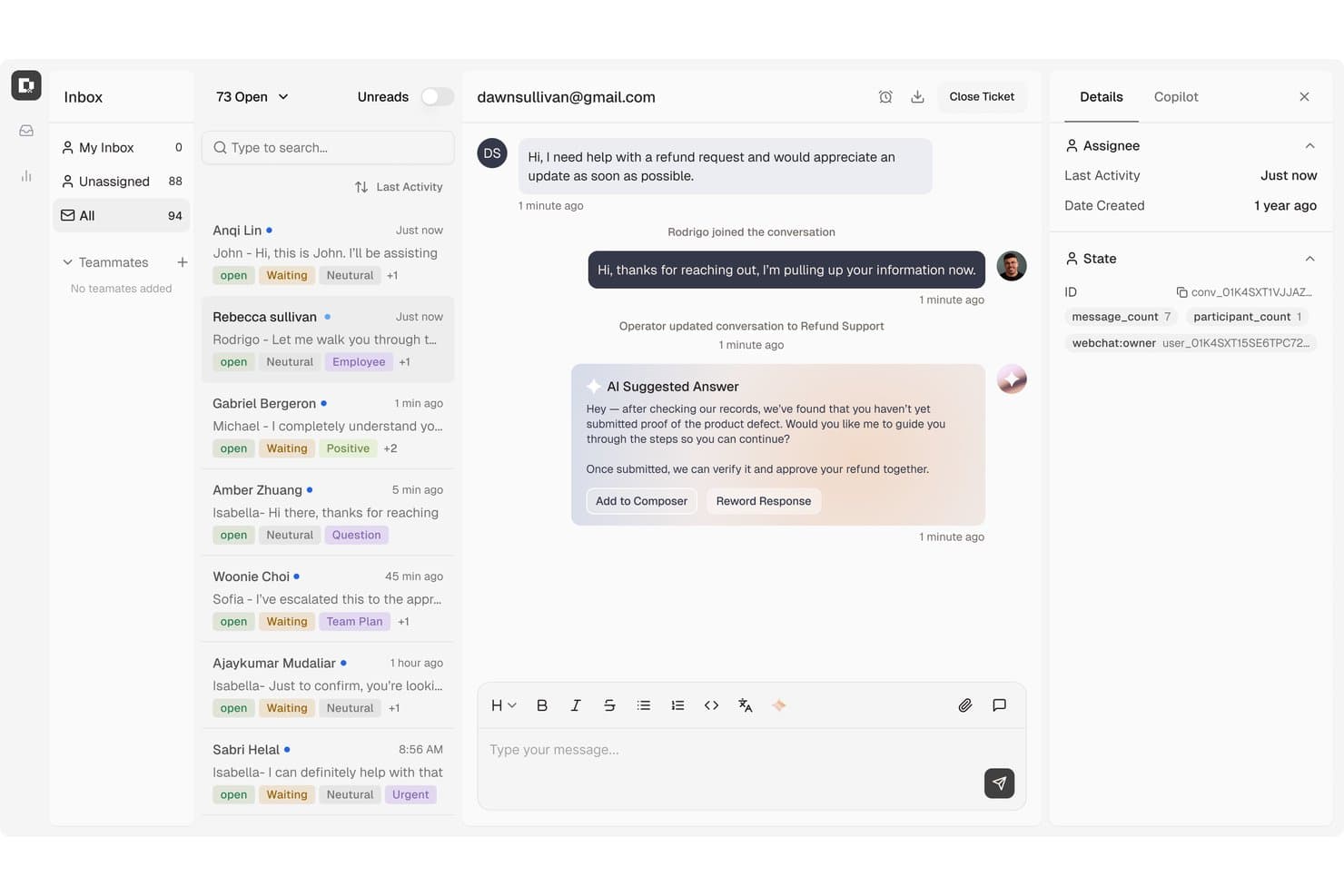
Botpress centralizes customer support tickets with AI-suggested replies. Botpress is an AI-powered helpdesk that unifies customer conversations from webchat, email, WhatsApp, and social channels into a single inbox, with built-in ticket management, knowledge base, and automated escalation tools.
Who Is Botpress Best For?
Botpress is a strong fit for small support teams that want AI to handle the bulk of incoming tickets before a human ever needs to get involved.
Why I Picked Botpress
I picked Botpress as one of the best because its AI deflection and handoff capabilities go well beyond basic chatbot routing. The ticket deflection engine searches your connected knowledge base, detects the customer's language, and responds with a cited source, so agents only step in when the AI's confidence drops below a threshold you set. When escalation does happen, the handoff includes the full conversation history, an AI-generated summary, and a suggested next step, which means your agent doesn't start from zero.
Botpress Key Features
- Unified multi-channel inbox: Consolidates conversations from webchat, email, WhatsApp, Slack, Telegram, Instagram, and Messenger into a single shared inbox.
- CSAT dashboard: Tracks post-resolution survey scores with localized survey questions that display in the customer's language.
- Macro responses: Lets agents save replies with automatic follow-up actions to handle common requests without typing from scratch.
- Team routing rules: Directs incoming tickets to specialized groups like billing or technical support based on configurable assignment criteria.
Botpress Integrations
Botpress offers native integrations with HubSpot, Salesforce, Shopify, Stripe, Gmail, Google Drive, Slack, Zendesk, and Intercom, plus API access for custom integrations and Zapier.
Pros and Cons
Pros:
- Macros trigger follow-up actions
- Handoffs carry summaries and next steps
- Reviewers praise source-grounded chatbot answers
Cons:
- Advanced bot setups need careful testing
- Usage costs can be hard to predict
Learn more about Botpress: Best for AI driven customer interactions
- Free plan + 15-day free trial + free demo available
- From $25/user/month (billed annually)
Visit WebsiteCustomer Rating:4.5/5
Help Scout offers a live chat interface where agents can view customer profiles, browsing history, and product inquiries alongside real-time messaging. Help Scout is a customer support platform that brings email, live chat, social messaging, and a self-service knowledge base together in a shared inbox built for small teams.
Who Is Help Scout Best For?
Help Scout is a strong fit for small to mid-sized teams that handle most customer communication over email and want a straightforward, low-overhead support setup.
Why I Picked Help Scout
Help Scout earns its spot as one of the best on my shortlist because of how naturally its AI features fit into a small team's daily workflow. I love that AI Assist helps agents draft responses directly in the inbox without switching tools, while AI Summarize condenses long conversation threads into a quick brief. The AI Answers chatbot takes it further, automatically resolving routine questions before they ever reach the queue.
Help Scout Key Features
- Shared inbox and collision detection: Multiple agents can manage emails collaboratively with real-time updates and internal notes.
- Docs knowledge base: Create a branded self-service help center with search, categories, and article analytics.
- Customizable workflows: Build rule-based automations for ticket assignment, tagging, auto-replies, and SLAs.
- Mobile agent app: Respond to customer conversations and manage support tickets directly from iOS or Android.
Help Scout Integrations
Help Scout offers native integrations with HubSpot, Salesforce, Shopify, Mailchimp, Slack, Jira, Aircall, Asana, WooCommerce, and Facebook Messenger. It also connects with Zapier and provides an API for custom integrations.
Pros and Cons
Pros:
- Knowledge base deflects repetitive support tickets
- Shared inbox supports collaborative small team resolution
- AI tools built directly into the inbox
Cons:
- No native voice or phone channel support
- Reporting lacks advanced customization options
Learn more about Help Scout: Best for monitoring ticketing systems with AI
- Free plan + 15-day trial + demo available
- From $7/user/month (billed annually)
Visit WebsiteCustomer Rating:4.4/5
Zoho Desk offers a comprehensive analytics dashboard displaying ticket volume, traffic sources, reply times, and customer happiness ratings for support teams. Zoho Desk is a context-aware help desk platform that unifies customer support tickets from email, social media, live chat, phone, and messaging apps into a single workspace with built-in AI, automation, and self-service tools.
Who Is Zoho Desk Best For?
Zoho Desk is a strong fit for small businesses already using Zoho CRM or other Zoho apps who want a deeply integrated, AI-assisted support platform.
Why I Picked Zoho Desk
I picked Zoho Desk as one of the best because Zia, its built-in AI, actively monitors your ticket queue and flags anomalies before they snowball into backlogs. Zia reads incoming tickets, detects customer sentiment, and auto-tags issues so my team can prioritize the right conversations first. I also like that AI Agents handle routine requests end-to-end, escalating to a human only when the situation genuinely calls for it.
Zoho Desk Key Features
- Customer context panel: See a full customer profile, including CRM history, past tickets, and order details alongside every conversation.
- Multichannel inbox: Manage email, social, live chat, messaging apps, and voice interactions from one place.
- Self-service help center: Build and customize a branded knowledge base, FAQ, and community forum for customers.
- Mobile agent app: Let agents view, respond to, and manage tickets on iOS or Android devices wherever they are.
Zoho Desk Integrations
Zoho Desk offers native integrations with Zoho CRM, Shopify, Slack, Jira, Microsoft Teams, Trello, Mailchimp, Salesforce, HubSpot, and Google Workspace. An API is available for custom integrations.
Pros and Cons
Pros:
- No-code chatbot resolves routine tickets autonomously
- Collision detection prevents duplicate agent responses
- Zia AI flags incoming ticket sentiment automatically
Cons:
- Setup complexity grows with multiple channels
- Advanced AI features locked to paid plans
Learn more about Zoho Desk: Best for omnichannel inbox support
- Free plan + 14-day trial + free demo available
- From $16/agent/month (billed annually)
Visit WebsiteCustomer Rating:4.6/5
SparrowDesk’s omnichannel inbox centralizes conversations, priorities, and assignments in one workspace. SparrowDesk offers a user-friendly platform tailored for small businesses seeking to enhance their customer service capabilities. By integrating AI-driven solutions, it helps your team efficiently handle customer inquiries while maintaining a consistent brand voice. The ability to manage omnichannel interactions from a single inbox addresses the challenge of fragmented communication, ensuring that your customers receive timely and coherent support.
Why I Picked SparrowDesk
I picked SparrowDesk for its unique integration of AI capabilities that cater specifically to small businesses' needs. The AI colleague, Zoona, stands out by providing personalized resolutions, ensuring that your brand's voice is consistently maintained. Furthermore, its Service Level Agreements (SLAs) feature helps your team manage and meet customer expectations effectively. These functionalities, combined with the AI Copilot that assists agents with instant summaries and context-aware replies, make it an excellent choice for businesses looking to elevate their customer support operations.
SparrowDesk Key Features
In addition to its standout AI capabilities, I also found the following features valuable for small businesses:
- Interactive Analytics: Provides real-time data and insights to help your team make informed decisions and improve service quality.
- Custom Views: Allows you to tailor the interface according to your team's preferences, enhancing workflow and productivity.
- Multilingual Support: Ensures you can communicate with customers in their preferred language, broadening your reach and improving user experience.
- Omnichannel Support: Centralizes all customer interactions in a single inbox, making it easier to manage conversations across different platforms.
SparrowDesk Integrations
Native integrations include Okta, Plumsail Forms, and Plumsail Documents. Additional integrations may be available through third-party platforms like Zapier. Native integrations are not currently listed comprehensively by SparrowDesk.
Pros and Cons
Pros:
- Customizable analytics with real-time data
- Unified omnichannel shared inbox
- AI Copilot assists complex tickets
Cons:
- SLA tools require configuration effort
- API documentation lacks public detail
Learn more about SparrowDesk: Best for AI-powered call management
- Free plan + 14-day trial + free demo available
- From $25/user/month (billed annually)
Visit WebsiteCustomer Rating:4.2/5
CloudTalk tracks call volume and talk time to support AI-driven phone support. For small business owners seeking a reliable customer service solution, CloudTalk offers a practical option. This cloud-based call center software helps teams manage customer calls more efficiently, making it suitable for businesses in retail, tech support, and other service-driven industries. With AI-driven phone support and real-time monitoring, CloudTalk helps teams handle calls consistently while keeping staffing and operating costs under control.
Why I Picked CloudTalk
I picked CloudTalk because its AI-powered features are particularly beneficial for small businesses aiming to enhance customer service. The AI Dialer automates dialing processes, reducing waiting times and increasing agent productivity. Additionally, AI Conversation Intelligence provides automatic call summaries and sentiment analysis, offering actionable insights to improve customer interactions. These features directly address the need for efficient resource management and quality service delivery, making CloudTalk a smart choice for small businesses.
CloudTalk Key Features
In addition to its AI capabilities, CloudTalk offers:
- Call Management: Custom call routing, IVR, call queuing, and recording streamline communication processes.
- Real-Time Monitoring: Provides live call listening and performance analytics to help you manage and improve your service.
- Communication Tools: SMS and WhatsApp messaging expand your team's communication options.
- Number Management: Offers local numbers in over 160 countries, allowing for an international reach.
CloudTalk Integrations
Integrations include HubSpot, Salesforce, Zoho, Pipedrive, Zendesk, Intercom, Freshdesk, Help Scout, Microsoft Dynamics, and Shopify.
Pros and Cons
Pros:
- Call analytics help track performance and trends
- Provides real-time monitoring and analytics for call management
- AI-powered features enhance call efficiency and insights
Cons:
- Limited customization options in dashboards
- Occasional call connection issues reported by users
 8Best for call insights and analytics
Weav
- Free plan available
- From $29/month (billed annually)
Visit WebsiteCustomer Rating:4.7/5
Weav offers a detailed agent reporting dashboard showing individual customer interactions for support teams. Weav is an AI-powered customer service platform that combines AI agents, a unified inbox, and automated query resolution trained on your own product documentation and support history.
Who Is Weav Best For?
Weav is a good fit for small business teams that want to automate first-line customer support without hiring additional support staff.
Why I Picked Weav
I picked Weav as one of the best because its reporting module gives small support teams clear visibility into what's actually happening across customer interactions. Rather than drowning you in raw data, Weav's reporting is built around outcomes: you can see where support flows break down, which query types your AI agents are resolving, and where human escalation is happening most. I also like that the training system ties directly into this feedback loop, so when patterns emerge in the data, you can upload new materials and the agent sharpens its responses automatically.
Weav Key Features
- Unified inbox: Consolidates customer conversations from chat and email into a single queue for your support team to manage.
- AI-drafted replies: Weav's AI agent generates suggested responses to incoming queries, which teammates can review, edit, and send.
- Smart routing rules: Automatically directs incoming messages to the right team member or department based on rules you configure.
- Human handoff: Lets the AI agent escalate a conversation to a live agent mid-session without losing the conversation history.
Weav Integrations
Weav offers a smaller set of native integrations, including Shopify, Google Drive, and Stripe. It also supports custom actions, and its REST API and real-time webhooks are available on Pro plans and above for building custom integrations.
Pros and Cons
Pros:
- Deploys trained AI agents in minutes
- Tone and response controls per agent
- AI learns from your resolved tickets
Cons:
- No built-in voice or phone channel
- Requires existing docs for best results
Learn more about Weav: Best for inbox collaboration with lean support teams
- 30-day free trial available
- From $14/user/month (billed annually)
Visit WebsiteCustomer Rating:4.8/5
Missive’s shared inbox view shows how teams can collaborate on email threads, assign tasks, and manage client conversations in one workspace. Missive is a shared inbox and team messaging platform that consolidates email, SMS, WhatsApp, live chat, and social messaging channels into a single collaborative workspace.
Who Is Missive Best For?
Missive is a strong fit for lean support teams that handle customer conversations across email, WhatsApp, and social channels and need tight internal collaboration without the overhead of a full helpdesk.
Why I Picked Missive
Missive earns its spot on my shortlist because of how genuinely it's built around team collaboration inside a shared inbox. I love that internal threads let my team discuss a customer email privately before anyone hits send, and collision detection means two agents never accidentally fire off duplicate replies to the same person. The native WhatsApp Business integration (no third-party account required) is a real differentiator for lean teams handling messaging-heavy customer bases across multiple channels from one workspace.
Missive Key Features
- Round-robin assignment: Automatically distributes incoming conversations across available agents using round-robin, least-busy, or random routing methods.
- Canned responses: Save and insert templated replies with variable substitution to keep responses fast and consistent across your team.
- Missive MCP Server: Connect external AI clients (like Claude or ChatGPT) to mcp.missiveapp.com to query your customer inbox, check calendars, and draft replies—keeping human approval required before sending.
- Guest access: Invite external collaborators into specific conversations without assigning them a paid seat.
- Live chat widget: Manage website visitor conversations directly inside the shared inbox alongside email and social channels.
Missive Integrations
Missive offers 25+ native integrations, including HubSpot, Shopify, WhatsApp Business, Aircall, Dialpad, Twilio, Google Drive, and Dropbox. It also supports custom integrations through its REST API, webhooks, Zapier, and its new MCP Server on Productive and Business plans (requires admin activation).
Pros and Cons
Pros:
- Collision detection prevents duplicate responses
- Native WhatsApp Business integration included for teams
- Internal collaboration threads for private team discussions
Cons:
- No built-in CSAT or satisfaction surveys
- No native customer-facing knowledge base
Learn more about Missive: 10Best for managing interactions with digital workflows
Moxo
- Free trial + free demo available
- From $5,000/year (billed annually)
Visit WebsiteCustomer Rating:4.4/5
Moxo provides a business interaction management system focused on virtual workspaces. Moxo is an AI workflow platform that combines client portals, service request tracking, live chat, document management, and workflow automation into a single operational hub.
Who Is Moxo Best For?
Moxo is a strong fit for professional services teams in industries like legal, finance, and real estate that need to coordinate client-facing workflows with document collection, approvals, and eSignatures in one branded portal.
Why I Picked Moxo
I've included Moxo in my top picks because it structures client interactions around digital workflows in a way that keeps every document request, approval, and status update tied to a single branded portal. I particularly like the Service Requests module, which lets clients submit and track issues while agents manage assignment and resolution without juggling separate inboxes. The AI chat assistant also handles routine status questions automatically, so your team focuses on the interactions that actually need a human.
Moxo Key Features
- Live Support module: Clients connect with agents or bots in real time through a dedicated support channel built into their portal.
- Client Resources library: Admins upload and organize files into folders that clients can browse, preview, and download directly from their portal.
- eSignature collection: Signature requests are built into workflow steps, so clients can sign documents without leaving the portal.
- Magic link access: Clients enter their portal through a single link—no account creation or password required.
Moxo Integrations
Moxo offers integrations with HubSpot, Salesforce, QuickBooks, Stripe, Google Drive, Slack, and Zendesk. It also supports webhooks, REST APIs, and Zapier for custom connectivity.
Pros and Cons
Pros:
- Magic links reduce client login friction
- Workflow automation handles approvals and follow-ups
- Branded portals keep client requests organized
Cons:
- Service requests lack documented SLA controls
- No shared inbox across support channels
Learn more about Moxo:
Diğer Müşteri Hizmetleri Yönetim Araçları
En iyi müşteri hizmetleri yazılımı kısa listeme giremeyen, ancak yine de daha yakından incelenmeye değer birkaç seçenek şunlardır:
- 11LiveAgentBest for cross-channel ticket history in one view
- 12TidioBest for multichannel AI chat support
- 13ZendeskBest for scaling support without adding headcount
- 14CrispBest for flat-rate workspace pricing with AI included
- 15TalkdeskBest for conversation quality and resolution speed
- 16GorgiasBest for ecommerce support driven by macros
- 17FrontBest for cross-team customer request routing
- 18monday serviceBest for automatic ticket classification
- 19HubSpot Free Service ToolsBest for VoIP functionality from the platform
- 20QuidgetBest for automating repetitive frontline support
- 2114.aiBest for intent-aware AI responses
How I Evaluate Customer Service Software for Small Business
I look at two things: the baseline features a small team juggling email, chat, and social needs just to keep up, and the differentiators that separate one tool from another.
Core Functionality (Table Stakes For This List)
When I'm selecting tools for my list, I rank each one on a scale from 0 (does not offer the functionality) to 5 (excels in this area) for each core functionality listed below. Then, I calculate the tool's total score into a percentage. Each tool needs to achieve a minimum total score of 65% to be considered for inclusion.
- Omnichannel Inbox: I check whether email, live chat, social media, and phone conversations land in a single workspace rather than forcing agents to tab-switch between platforms.
- Ticket Management: Routing, tagging, priority levels, and SLA tracking all matter here. I look at how a tool handles assignment when, say, three agents share a queue of 200 tickets.
- Knowledge Base & Self-Service: A good help center deflects repeat questions like "where's my order?" before they become tickets. I evaluate the article editor, search, and public-facing design.
- Automation & Workflows: Small teams rely on canned responses, auto-assignment rules, and triggers to keep up with volume. I look at how many conditions and actions you can chain together.
- Reporting & CSAT: Beyond basic volume counts, I evaluate whether the tool tracks first-response time, resolution time, agent workload, and lets you send satisfaction surveys after a ticket closes.
- SMB-Friendly Pricing & Setup: Transparent per-agent pricing, a low-cost entry tier, and self-serve onboarding are what I look for. Tools like Freshdesk and Zoho Desk offer free starter plans, while others like Help Scout keep paid tiers accessible.
Once I have a list of tools that meet this criteria, I consider what sets each platform apart.
Differentiating Factors (What Sets Vendors Apart)
Here's how I compare and contrast different vendors:
Standout Features
AI-powered features like reply suggestions and ticket summarization can make a three-person team feel like six. I also evaluate whether a tool offers a no-code chatbot that handles FAQs around the clock, which matters when you can't staff overnight coverage. A customer context panel that surfaces order history and past tickets alongside the active conversation speeds up resolution. For owners who answer tickets between meetings, a solid mobile app makes a real difference.
Beyond Features
Total cost matters beyond the sticker price. I look at whether adding channels or agents later forces a jump to a much higher tier. Integrations also weigh heavily; a support tool that connects natively to Shopify, HubSpot, or Stripe saves small teams from manual data entry between systems. I also consider how fast a team can go live. If setup requires a consultant or weeks of configuration, that's a poor fit for a five-person company that needs to start answering tickets this week.
Küçük İşletmeler için Müşteri Hizmetleri Yazılımı Nasıl Seçilir?
Uzun özellik listeleri ve karmaşık fiyatlandırma yapıları arasında kaybolmak kolaydır. Kendinize özgü yazılım seçimi sürecinizi yürütürken odağınızı korumanıza yardımcı olmak için aklınızda bulundurmanız gereken faktörlerin bir kontrol listesi şöyle:
| Etken | Dikkat Edilmesi Gerekenler |
|---|---|
| EtkenÖlçeklenebilirlik | Dikkat Edilmesi GerekenlerYazılım işletmenizle birlikte büyüyecek mi? Ekibiniz genişledikçe daha fazla kullanıcıyı veya artan veri miktarını işleyip işleyemeyeceğini değerlendirin. |
| EtkenEntegrasyonlar | Dikkat Edilmesi GerekenlerMevcut araçlarınıza bağlanabiliyor mu? Sorunsuz iş akışları sağlamak için CRM, e-posta ve diğer önemli sistemlerinizle uyumluluğunu kontrol edin. |
| EtkenÖzelleştirilebilirlik | Dikkat Edilmesi GerekenlerSüreçlerinize uyacak şekilde özelleştirebilir misiniz? İş akışlarını, panoları ve kullanıcı izinlerini ekibinizin ihtiyaçlarına göre ayarlama seçenekleri arayın. |
| EtkenKullanım Kolaylığı | Dikkat Edilmesi GerekenlerEkibiniz için kullanıcı dostu mu? Eğitim süresini en aza indirmek ve benimsenme oranını artırmak için arayüzü basitlik ve sezgisellik açısından test edin. |
| EtkenUygulama ve Oryantasyon | Dikkat Edilmesi GerekenlerBaşlamak ne kadar sürecek? Sorunsuz bir geçiş sağlamak için eğitimler ve destek gibi mevcut kaynaklar da dâhil olmak üzere oryantasyon sürecini değerlendirin. |
| EtkenMaliyet | Dikkat Edilmesi GerekenlerBütçenize uygun mu? Fiyatlandırma planlarını karşılaştırın ve finansal esnekliğinizi etkileyebilecek gizli ücretlere veya uzun vadeli sözleşmelere dikkat edin. |
| EtkenGüvenlik Önlemleri | Dikkat Edilmesi GerekenlerVerileriniz ve müşteri bilgileriniz korunuyor mu? Şifreleme ve veri koruma standartlarına uyumluluk gibi mevcut güvenlik önlemlerini doğrulayın. |
| EtkenDestek Kullanılabilirliği | Dikkat Edilmesi Gerekenlerİhtiyaç duyduğunuzda yardım alabiliyor musunuz? Sorunlar ortaya çıktığında zamanında yardım alabilmek için 7/24 erişilebilirlik, sohbet ve telefon desteği gibi sunulan destek seçeneklerini değerlendirin. |
Küçük İşletmeler için Müşteri Hizmetleri Yazılımı Nedir?
Küçük işletmeler için müşteri hizmetleri yazılımları, müşteri hizmetleri ekiplerinin destek taleplerini ve müşterilerle diğer iletişimleri yönetmesine yardımcı olan bulut tabanlı SaaS araçlarıdır. Bu araçlar özellikle KOBİ'lerin iş akışlarını kolaylaştırmasına, tekrarlayan süreçleri otomatikleştirmesine, çağrıları uygun temsilcilere yönlendirmesine, müşteri talepleri üst kademelere aktarılırken iletişimi geliştirmesine ve yanıt sürelerini iyileştirmesine yardımcı olmak üzere tasarlanmıştır.
Müşteri hizmetleri yazılımı kullanmak, kapsamlı bir müşteri hizmetleri kadrosuna duyulan ihtiyacı ortadan kaldırarak küçük işletmelerin genel giderlerini azaltmasına yardımcı olurken yanıtların verimliliğini, hızını ve tutarlılığını aynı anda artırabilir. Bu yazılımlar ayrıca müşteri ihtiyaçları hakkında yararlı veriler toplayarak genel olarak daha iyi müşteri hizmetleri sunmanıza yardımcı olur.
Özellikler
Küçük işletmeler için müşteri hizmetleri yazılımı seçerken aşağıdaki temel özelliklere dikkat edin:
- Talep yönetimi: Müşteri taleplerini yönetilebilir talepler hâlinde düzenleyerek ekiplerin sorunları daha verimli bir şekilde takip edip çözmesine yardımcı olur.
- Çok kanallı destek: E-posta, sohbet ve sosyal medya gibi çeşitli kanallar üzerinden müşterilerle iletişim kurulmasını sağlayarak erişilebilirliği güvence altına alır.
- Raporlama ve analiz: Müşteri etkileşimleri ve ekip performansı hakkında içgörüler sunarak karar alma ve strateji planlamasına yardımcı olur.
- Özelleştirilebilir iş akışları: İşletmelerin süreçleri kendi özel ihtiyaçlarına uyacak şekilde düzenlemesini sağlayarak operasyonel verimliliği artırır.
- Entegrasyon olanakları: Diğer araç ve sistemlere bağlanarak işlevselliği artırır ve işletme operasyonlarını kolaylaştırır.
- Mobil uygulama erişilebilirliği: Müşteri bilgilerine ve destek görevlerine hareket hâlindeyken erişim sunarak uzaktan çalışma için esnekliği artırır.
- Yapay zekâ destekli içgörüler: Verileri analiz etmek ve uygulanabilir içgörüler sunmak için yapay zekâdan yararlanarak hizmet kalitesini iyileştirir.
- Güvenlik önlemleri: Şifreleme ve standartlara uyumlulukla veri koruması sağlayarak müşteri bilgilerini güvence altına alır.
- Kullanıcı dostu arayüz: Gezinmeyi ve kullanımı kolaylaştırarak eğitim süresini azaltır ve ekip tarafından benimsenme oranını artırır.
- 7/24 müşteri desteği: Günün her saati yardım sağlayarak zamanında destek sunar ve hizmet sürekliliğini korur.
Avantajlar
Küçük işletmeler için müşteri hizmetleri yazılımını uygulamak, ekibiniz ve işletmeniz için çeşitli avantajlar sağlar. Yararlanmayı bekleyebileceğiniz avantajlardan bazıları şunlardır:
- Artan verimlilik: Talep yönetimi ve özelleştirilebilir iş akışları süreçleri kolaylaştırarak ekibinizin daha kısa sürede daha fazla talebi ele almasını sağlar.
- Gelişmiş müşteri memnuniyeti: Çok kanallı destek, müşterilerin size tercih ettikleri yöntemle ulaşabilmesini sağlayarak deneyimlerini iyileştirir.
- Daha iyi karar alma: Raporlama ve analiz, müşteri etkileşimleri hakkında içgörüler sunarak bilinçli strateji geliştirmeyi mümkün kılar.
- Artan esneklik: Mobil uygulama erişilebilirliği, ekibinizin müşteri hizmetleri görevlerini her yerden yönetmesine olanak tanıyarak uzaktan çalışmaya uyum sağlar.
- Veri güvenliği: Güçlü güvenlik önlemleri müşteri verilerini koruyarak güven oluşturur ve düzenlemelere uyumluluk sağlar.
- Maliyet tasarrufu: Otomasyon ve yapay zekâ destekli içgörüler manuel görevleri azaltarak hizmet kalitesini korurken operasyonel maliyetleri düşürür.
Küçük İşletmeler İçin Müşteri Hizmetleri Yazılımındaki Trendler
Müşteri hizmetleri yazılımları daha yapay zekâ odaklı, otomatikleştirilmiş ve çok kanallı hâle geliyor; bu sayede küçük işletmeler ekiplerini önemli ölçüde büyütmeden daha hızlı destek sunabiliyor.
- Yapay Zekâ Destekli Müşteri Hizmetleri: Yapay zekâ temsilcileri ve yardımcıları rutin soruları giderek daha fazla yanıtlıyor, görüşmeleri özetliyor, yanıtlar öneriyor ve insan temsilcilere yardımcı oluyor.
- Daha Akıllı Self Servis: Bilgi tabanları, yapay zekâ araması ve otomatikleştirilmiş destek, müşterilerin bir temsilciyle iletişime geçmeden yaygın sorunları çözmesine yardımcı oluyor.
- Birleşik Çok Kanallı Destek: Platformlar e-posta, canlı sohbet, mesajlaşma, sosyal medya, sesli iletişim ve diğer kanalları tek bir müşteri görüşmesinde bir araya getiriyor.
- Daha Kişiselleştirilmiş Destek: Müşteri geçmişi ve CRM verileri, bağlamı korumak ve kanallar arasındaki etkileşimleri kişiselleştirmek için giderek daha fazla kullanılıyor.
- İnsan Temsilciye Aktarımla Yapay Zekâ: Otomasyon artıyor, ancak insan temsilcilere kolayca aktarım yapılabilmesi önemini koruyor—ankete katılan müşterilerin %87'si, şirketler hizmet sunmak için GenAI kullandığında bir insan temsilciye erişimin gerekli olduğunu belirtti.
Küçük işletmeler için en güçlü müşteri hizmetleri platformları, giderek daha fazla uygun maliyetli otomasyon, yapay zekâ, self servis ve çok kanallı desteği tek bir sistemde birleştiriyor.
Maliyetler ve Fiyatlandırma
Küçük işletmeler için müşteri hizmetleri yazılımı seçmek, mevcut çeşitli fiyatlandırma modellerini ve planları anlamayı gerektirir. Maliyetler özelliklere, ekip büyüklüğüne, eklentilere ve diğer unsurlara göre değişir.
Aşağıdaki tablo, küçük işletmelere yönelik müşteri hizmetleri yazılımı çözümlerinde yaygın planları, bu planların ortalama fiyatlarını ve içerdikleri tipik özellikleri özetlemektedir:
Küçük İşletmeler İçin Müşteri Hizmetleri Yazılımı Plan Karşılaştırma Tablosu
| Plan Türü | Ortalama Fiyat | Yaygın Özellikler |
|---|---|---|
| Plan TürüÜcretsiz Plan | Ortalama Fiyat$0 | Yaygın ÖzelliklerTemel talep yönetimi, e-posta desteği ve sınırlı raporlama. |
| Plan TürüKişisel Plan | Ortalama Fiyat5-$25/kullanıcı/ay | Yaygın ÖzelliklerÇok kanallı destek, temel entegrasyonlar ve basit analizler. |
| Plan Türüİşletme Planı | Ortalama Fiyat30-$60/kullanıcı/ay | Yaygın ÖzelliklerGelişmiş raporlama, özelleştirilebilir iş akışları ve mobil uygulama erişimi |
| Plan TürüKurumsal Plan | Ortalama Fiyat$70-$120/kullanıcı/ay | Yaygın ÖzelliklerYapay zekâ odaklı içgörüler, öncelikli destek, gelişmiş güvenlik önlemleri ve kapsamlı özelleştirme seçenekleri. |
Küçük İşletmeler için Müşteri Hizmetleri Yazılımı SSS
Müşteri hizmetleri yazılımı ve bunun küçük işletmenize nasıl yardımcı olabileceği konusunda hâlâ sorularınız mı var? Sıkça sorulan sorulara verilen bu yanıtlar sizi doğru yöne yönlendirecektir:
Küçük işletmeler için en iyi yardım masası yazılımı hangisidir?
Freshdesk ve Zoho Desk, küçük işletmeler için güçlü yardım masası seçenekleridir; kurumsal ölçekte bir destek operasyonu gerektirmeden çok kanallı bilet yönetimi, otomasyon, self servis, yapay zekâ özellikleri ve entegrasyonlar sunarlar.
Müşteri hizmetleri yazılımı güvenli midir?
Evet, saygın yazılım sağlayıcılarının çoğu güvenli veri koruma önlemleri sunar. Şifreleme, düzenli güvenlik güncellemeleri ve veri koruma düzenlemelerine uyumluluk gibi özellikleri arayın. Müşteri verilerinizin güvende olduğundan emin olmak için sağlayıcının güvenlik politikalarını değerlendirmek ve incelemeleri okumak önemlidir.
En iyi 3 CRM aracı hangileridir?
Müşteri hizmetlerine öncelik veren işletmeler için Zoho, HubSpot ve Salesforce önde gelen üç CRM ekosistemidir; özellikle Zoho Desk, müşteri desteğini doğrudan Zoho CRM’e bağlar.
Yeni başlayanlar için kullanımı kolay CRM hangisidir?
Zoho, küçük işletmeler için yeni başlayanların kolayca kullanabileceği bir CRM ekosistemidir; özellikle müşteri ilişkileri yönetimini Zoho Desk üzerinden uygun fiyatlı bir yardım masasıyla bir araya getirmek isteyen ekipler için uygundur.
Küçük işletmeler için ücretsiz bir CRM var mı?
Evet. HubSpot CRM, küçük işletmeler için ücretsiz bir plan sunar; bu plan kişiler, müşteri etkileşimleri, anlaşmalar ve temel satış faaliyetlerini yönetmeye yönelik araçlar içerir. Peşin bir yazılım maliyeti olmadan CRM işlevselliği isteyen küçük ekipler için iyi bir başlangıç noktası olabilir.