Müşteri hizmetleri biletleme yazılımı destek ekiplerinin müşteri sorunlarını verimli bir şekilde takip etmesine, önceliklendirmesine ve çözmesine yardımcı olur. Takiplerin gözden kaçması, yinelenen yanıtlar veya kontrol edilemeyen gelen kutularıyla uğraşıyorsanız yalnız değilsiniz. Doğru biletleme platformu; görüşmeleri düzenleyerek, iş akışlarını kolaylaştırarak ve ekibinize hızlı ve etkili destek sunmak için ihtiyaç duyduğu bağlamı sağlayarak karmaşık süreçlere düzen getirir.
Bu makalede, ekip verimliliğini artırmanıza, yanıt sürelerini iyileştirmenize ve kaliteden ödün vermeden desteği ölçeklendirmenize yardımcı olmak için en iyi müşteri hizmetleri biletleme yazılımlarını bağımsız olarak test edip inceledim.
Why Trust Our Software Recommendations
6,700+
Reviews
20
Industry experts
16+
Evaluation factors
14
Years
Our team has been testing and reviewing software since 2012. As CX leaders ourselves, we know how difficult—and important—it is to choose the right software.
For this guide, we evaluated tools using hands-on testing and independent research, scoring tools using our selection criteria.
Our reviews reflect our human editorial judgment, not a sales pitch.
 Gui DrusinaCreative Director
 Tim FisherVP of AI
Müşteri Hizmetleri Biletleme Yazılımları Karşılaştırma Tablosu
Bu karşılaştırma tablosu, en iyi müşteri hizmetleri biletleme yazılımı seçimlerimin her biriyle ilgili temel ayrıntıları özetlemektedir:
Score legend (out of 5)
- Excellent4.5–5
- Good4–4.4
- Average3–3.9
- Below average2–2.9
- Poor1–1.9
Sorted by: Default
| Tool | Starting Price | Website | |||||||
|---|---|---|---|---|---|---|---|---|---|
Best for teams growing into admin controls | 4.0 out of 5 | 4 | 4 | 4 | 4 | 4 | 4 | $29/user/month 14-day free trial available | Book Demo |
Best for an AI copilot assistant | 4.2 out of 5 | 5 | 4 | 4 | 4 | 4 | 4 | $16/agent/month Free plan + 14-day trial + free demo available | Website |
Best with a free forever option | 4.5 out of 5 | 5 | 4 | 5 | 4 | 5 | 4 | $25/user/month 7-day free trial + free demo available | Book Demo |
Best for shared inbox collaboration | 3.8 out of 5 | 4 | 3 | 5 | 4 | 4 | 3 | $25/user/month Free plan + 15-day free trial + free demo available | Website |
Best for B2B omnichannel support | 3.8 out of 5 | 4 | 4 | 4 | 4 | 3 | 4 | $45/month Free demo available | Book Demo |
Best for Shopify support with order actions | 4.0 out of 5 | 5 | 4 | 3 | 4 | 4 | 4 | $10/month Free trial + free demo available | Website |
Best for hybrid ticket streams | 4.3 out of 5 | 5 | 4 | 4 | 5 | 4 | 4 | $15/user/month Free trial available | Website |
Best for support across Zoho's business suite | 4.2 out of 5 | 4 | 4 | 4 | 5 | 4 | 4 | $7/user/month Free plan + 15-day trial + demo available | Website |
Best for automated feedback collection | 4.2 out of 5 | 5 | 4 | 4 | 4 | 4 | 4 | $45/user/month 14-day free trial + free demo available | Website |
Best for AI-powered workflow automation | 4.5 out of 5 | 4 | 4 | 5 | 5 | 5 | 4 | $75/user/month Free trial available | Website |
Best with extensive integration and API options | 4.3 out of 5 | 4 | 4 | 4 | 5 | 4 | 5 | $29/month 21-day free trial | Website |
Best for compliance-conscious support teams | 4.5 out of 5 | 5 | 4 | 4 | 5 | 5 | 4 | $25/agent/month Free trial available | Book Demo |
Best for support work inside Microsoft Teams | 3.7 out of 5 | 3 | 3 | 4 | 4 | 4 | 4 | $12/user/month Free plan + 21-day trial + demo available | Website |


En İyi Müşteri Hizmetleri Biletleme Yazılımları İncelemeleri
Size en uygun müşteri hizmetleri biletleme yazılımını bulmanıza yardımcı olmak için en iyi seçimlerimin ayrıntılı özetlerini sundum ve her sistemi bu listeye neden dahil ettiğimi açıkladım. Ayrıca hangi çözümün işletmenizin ihtiyaçlarına en uygun olduğunu belirlemenize yardımcı olmak için öne çıkan özelliklerini de vurguladım.
 Best for teams growing into admin controls
- 14-day free trial available
- From $29/user/month (billed annually)
Visit WebsiteCustomer Rating:4.4/5
Freshdesk’s “Freddy” aims to increase employee productivity using AI-powered workflow suggestions. Freshdesk is a cloud-based customer service platform built for support teams in fast-growing businesses and enterprises that need to manage high volumes of customer inquiries across multiple channels while automating repetitive tasks and maintaining service quality.
Who Is Freshdesk Best For?
Freshdesk is a strong fit for mid-size to enterprise support teams that handle large ticket volumes across multiple channels and need automation to keep response times in check.
Why I Picked Freshdesk
Freshdesk earns its spot as one of the best on my shortlist because of how deeply its AI engine, Freddy AI, is woven into the actual ticketing workflow. I particularly like Freddy AI Copilot, which gives agents real-time reply suggestions, live translations, and conversation summaries directly inside the ticket view—so my team isn't switching tabs or guessing at tone. Freddy AI Agent handles repetitive inbound queries autonomously, resolving them end-to-end without routing them to a human agent. For enterprise teams dealing with thousands of tickets daily, skill-based routing and load-balanced assignment mean the right ticket lands with the right agent automatically.
Freshdesk Key Features
- Omnichannel shared inbox: Manage tickets from email, chat, phone, and social media in a single unified inbox.
- Multiple SLA policies: Set different SLA rules for different customer segments, products, or business hours to meet varied service commitments.
- Knowledge base: Build a multilingual self-service portal with article versioning, ticket templates, and a flexible content hierarchy.
- Custom real-time dashboards: Monitor live support operations with configurable dashboards that track agent availability, ticket trends, and queue health.
Freshdesk Integrations
Integrations include Playvox, Slack, MS Teams, Shopify, Salesforce, and Jira, plus connector apps to link with external tools via APIs.
Pros and Cons
Pros:
- Self-service portal
- Automated ticket routing
- Multi-channel ticketing
Cons:
- Learning curve for new users
- Limited reporting options
Learn more about Freshdesk: Best for an AI copilot assistant
- Free plan + 14-day trial + free demo available
- From $16/agent/month (billed annually)
Visit WebsiteCustomer Rating:4.6/5
SparrowDesk shows agents a unified live chat queue while guiding customers through AI-assisted conversations in real time. SparrowDesk is a customer service ticketing platform for support teams that need to automate ticket management, streamline workflows, and improve response times with modern AI-driven tools.
Who Is SparrowDesk Best For?
SparrowDesk is a good fit for small to mid-sized support teams looking for a ticketing system with built-in AI tools to handle growing ticket volumes.
Why I Picked SparrowDesk
SparrowDesk earns its spot as one of the best on my shortlist because of how its AI Copilot works directly inside the ticket composer. I like that agents get instant conversation summaries and AI-drafted replies without switching tabs or tools—when a ticket comes in with a long back-and-forth history, the copilot condenses it into a quick takeaway so my team can respond without re-reading the whole thread. I also use the knowledge-on-demand feature, which pulls verified answers about policies, refunds, and product details right into the agent view. The built-in translation feature is another thing I rely on, since it automatically converts customer messages into the agent's language and translates replies back—no manual workaround needed.
SparrowDesk Key Features
- Rule-based workflows: Automatically route, tag, and escalate tickets to the right agent based on conditions you define.
- SLA compliance automation: Track resolution deadlines in real time and trigger alerts or escalations before an SLA is breached.
- Round-robin assignment: Distribute incoming tickets evenly across your team so no agent gets overloaded.
- Custom views and filters: Let agents build personalized inbox views filtered by priority, channel, or customer segment.
SparrowDesk Integrations
Integrations include Microsoft Teams, Slack, Jira, TeamViewer, Azure Active Directory, Dropbox, Google Workspace, Trello, Salesforce, and DocuSign.
Pros and Cons
Pros:
- No code workflow builder automates routing and notifications
- Copilot features summarize long conversations inside the agent inbox
- AI agents designed to auto resolve many repetitive tickets
Cons:
- Limited native integrations could hinder seamless connectivity
- Channels currently focus on email and live chat, not voice or social
Learn more about SparrowDesk: Best with a free forever option
- 7-day free trial + free demo available
- From $25/user/month (billed annually)
Visit WebsiteCustomer Rating:4.7/5
Hiver lets you respond, resolve, and organize customer queries from an email-like interface. Hiver transforms Gmail into a customer service ticketing system, helping support teams at small and midsize businesses manage, assign, and track customer queries directly from their inbox.
Who Is Hiver Best For?
Hiver is a strong fit for small to midsize teams that already run on Google Workspace and want to handle customer support without leaving Gmail.
Why I Picked Hiver
Hiver earns its spot on my shortlist because it's one of the few customer service ticketing tools that offers a genuinely usable free plan—not just a trial. The free tier supports up to 10 users and includes shared inboxes, email assignments, and collision alerts, enabling small teams to manage real support workflows without paying. I also like that upgrading unlocks SLA management and automation rules, allowing the tool to scale with your team. It's a rare setup where the free plan isn't a stripped-down teaser but a functional starting point.
Hiver Key Features
- Live chat widget: Embed a chat widget on your website to handle real-time customer conversations directly from Hiver.
- CSAT surveys: Send automated customer satisfaction surveys after ticket resolution to collect feedback on support quality.
- Analytics and reporting: Track team performance with reports on response times, resolution rates, and workload distribution.
- Multi-channel support: Manage customer queries from email, chat, and voice channels within a single shared workspace.
Hiver Integrations
Integrations include Salesforce, HubSpot, Slack, Asana, Jira, QuickBooks, Shopify, NetSuite, Okta, Aircall, and an open API for custom integrations.
Pros and Cons
Pros:
- SOC 2 Type II, ISO 27001, and GDPR compliant
- Free for unlimited users
- Customer support from real humans available 24/7 via chat or email
Cons:
- Mobile experience isn’t as strong as the desktop one
- Compared to some other platforms, Hiver offers fewer third-party integrations
Learn more about Hiver: Best for shared inbox collaboration
- Free plan + 15-day free trial + free demo available
- From $25/user/month (billed annually)
Visit WebsiteCustomer Rating:4.5/5
Help Scout offers a comprehensive customer conversations platform. Help Scout is a customer service platform built for support teams who want to manage email, chat, and customer conversations in one place, making it easier for businesses to deliver fast, organized, and personalized support without the complexity of traditional ticketing systems.
Who Is Help Scout Best For?
Help Scout is a great fit for small to mid-sized businesses with dedicated support teams who need a straightforward, collaborative tool for managing customer conversations across email and chat.
Why I Picked Help Scout
Help Scout earns its spot on my shortlist because of how well it handles shared inbox collaboration for support teams. I love that multiple agents can work out of the same inbox without stepping on each other's toes—collision detection alerts you when a teammate is already viewing or replying to a conversation. I also use private notes to loop in colleagues on tricky tickets without the customer ever seeing the internal back-and-forth. For teams juggling high conversation volumes, the ability to assign, tag, and leave notes directly in the thread keeps everyone on the same page without switching tools.
Help Scout Key Features
- Automated workflows: Set up rule-based automations to route, tag, or close conversations based on conditions like keywords, sender, or mailbox.
- Docs knowledge base: Build and publish a self-service help center so customers can find answers without contacting support.
- Customer profiles: View a customer's full conversation history and profile data directly alongside any open ticket.
- Live chat widget (Beacon): Embed a chat widget on your site that lets customers search your knowledge base or start a conversation in real time.
Help Scout Integrations
Integrations include Salesforce, HubSpot, Shopify, Jira, Slack, Stripe, Mailchimp, WhatsApp, FullStory, and Trello.
Pros and Cons
Pros:
- Built-in AI tools for faster replies
- Comprehensive reporting and analytics
- Easy multi-channel message consolidation
Cons:
- Limited customization in lower tiers
- Some advanced features on higher plans
Learn more about Help Scout: Best for B2B omnichannel support
- Free demo available
- From $45/month (billed annually)
Visit WebsiteCustomer Rating:4.5/5
TeamSupport interface displaying customer support features and platform navigation. TeamSupport is a customer service ticketing platform built for B2B companies that need to manage complex client relationships, streamline support workflows, and keep teams aligned across multiple communication channels.
Who Is TeamSupport Best For?
TeamSupport is a strong fit for B2B support teams at small to mid-sized companies that manage ongoing client relationships and need visibility across accounts, not just individual tickets.
Why I Picked TeamSupport
I picked TeamSupport as one of the best because I love how it handles omnichannel support with a B2B-first mindset. Its unified ticketing system pulls in conversations from email, live chat, phone, and social media into one place, so my team isn't jumping between tools to piece together a customer's history. It provides account-level context—when a ticket comes in, I can see the full customer story, not just the isolated message. The Customer Distress Index is a useful feature, since it monitors engagement patterns and sentiment across all those channels to flag at-risk accounts before things escalate.
TeamSupport Key Features
- SLA management: Set and track service level agreements with automated alerts that notify your team when tickets are approaching or have breached their deadlines.
- Internal collaboration tools: Add private notes, @mention teammates, and link related tickets so your team can work together on complex issues without leaving the platform.
- Custom reporting and dashboards: Build reports on ticket volume, response times, and agent performance using filters and metrics specific to your support operation.
- Customer self-service portal: Give customers a branded portal where they can submit tickets, check status updates, and search a knowledge base for answers on their own.
TeamSupport Integrations
Integrations include Salesforce, HubSpot CRM, Zoho CRM, Microsoft Dynamics 365, Jira Software, Slack, Microsoft Teams, Azure DevOps, Mailchimp, and Dropbox.
Pros and Cons
Pros:
- Customizable customer self service hub
- Real time sentiment insights
- AI powered ticket automation
Cons:
- Limited mobile app functionality
- Knowledge base lacks configurability
Learn more about TeamSupport: Best for Shopify support with order actions
- Free trial + free demo available
- From $10/month
Visit WebsiteCustomer Rating:4.6/5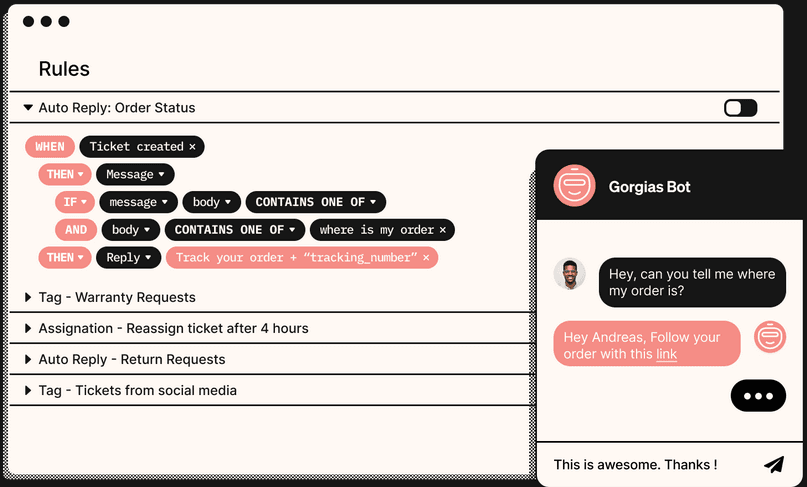
Automate repetitive tasks like cutting and pasting with the Gorgias bot. Gorgias is an ecommerce-focused customer service ticketing platform that consolidates email, live chat, social media, SMS, and voice into a single inbox, with native Shopify integration that surfaces order context and lets agents take order actions directly from the helpdesk.
Who Is Gorgias Best For?
Gorgias is a natural fit for ecommerce support teams running on Shopify who need to manage orders and resolve tickets from a single workspace.
Why I Picked Gorgias
Gorgias earns its spot on my shortlist because of how deeply it integrates with Shopify, bringing live order context into every ticket so agents never have to leave the helpdesk to look something up. I love that agents can action orders directly from a conversation, like issuing refunds or editing orders, using the Customer Sidebar. The Customer Timeline also gives full visibility into a shopper's order history and cross-channel interactions, so agents have everything they need to resolve tickets without asking customers to repeat themselves.
Gorgias Key Features
- Omnichannel inbox: Consolidates email, live chat, social media, SMS, and voice tickets into a single shared workspace.
- Macros: Lets agents send canned responses that auto-populate customer data, apply labels, and trigger order updates in connected tools.
- AutoQA: Uses AI to score agent interactions and generate conversation-quality overviews for coaching and performance review.
- CSAT surveys: Collects customer satisfaction ratings directly after ticket resolution to track service quality over time.
Gorgias Integrations
Gorgias offers 100+ marketplace integrations, including Shopify, Facebook, TikTok Shop, Recharge, Loop Returns, and AfterShip Tracking. It also provides a REST API and open API for custom integrations.
Pros and Cons
Pros:
- Macros and rules speed repetitive ticket handling
- Multiple channels converge in one inbox
- Order actions stay inside support conversations
Cons:
- Reporting depth can fall short for managers
- AI replies can need human editing
Learn more about Gorgias: Best for hybrid ticket streams
- Free trial available
- From $15/user/month (billed annually)
Visit WebsiteCustomer Rating:4.6/5
The universal inbox in LiveAgent brings all customer communications from various platforms into a single view. LiveAgent brings together email, chat, phone, and social messages into a single ticketing platform for support teams who need to manage high volumes of customer inquiries across multiple channels.
Who Is LiveAgent Best For?
LiveAgent is a good fit for small to mid-sized support teams that handle customer requests across email, chat, phone, and social media from a single shared inbox.
Why I Picked LiveAgent
LiveAgent earns its spot on my shortlist because of how well it handles hybrid ticket streams—pulling conversations from email, live chat, phone calls, and social media into a single thread. I particularly like the hybrid ticket stream feature, which links related messages from different channels into one ticket so nothing gets duplicated or lost. This lets my team follow a customer's full conversation history whether they started on chat and followed up by email, without switching between tools or losing context.
LiveAgent Key Features
- Automated ticket routing: Routes incoming tickets to the right agent or department based on rules you define.
- SLA management: Set response and resolution time targets, with alerts that notify agents when deadlines are approaching.
- Internal notes: Agents can leave private notes on tickets to share context with teammates without the customer seeing them.
- Agent collision detection: Alerts agents in real time when another team member is already viewing or replying to the same ticket.
LiveAgent Integrations
Integrations include ActiveCampaign, 3CX, BigCommerce, Braintree, Facebook, ClickUp, Clockify, CloudApp, Drupal, and AWeber.
Pros and Cons
Pros:
- Self-service features, including a knowledge base
- Internal notes feature facilitates private team discussions
- Manages multi-channel communication
Cons:
- User interface can be complex for new users
- Spam filter could be improved
Learn more about LiveAgent: Best for support across Zoho's business suite
- Free plan + 15-day trial + demo available
- From $7/user/month (billed annually)
Visit WebsiteCustomer Rating:4.4/5
Zoho Desk packs all the automation and analytics necessary to scale to any volume of customers. Zoho Desk is a cloud-based customer service ticketing platform built for support teams in growing businesses who need to manage high volumes of customer inquiries across multiple channels and deliver fast, organized responses.
Who Is Zoho Desk Best For?
Zoho Desk is a good fit for small to mid-sized businesses that need a scalable, multi-channel support platform and already use—or plan to use—other tools in the Zoho ecosystem.
Why I Picked Zoho Desk
I picked Zoho Desk as one of the best because of how well its context-aware automation works in practice. Its workflow rules don't just trigger on basic conditions—they fire based on ticket context such as customer history, sentiment, and department. When Zia auto-tags an incoming ticket and updates fields like category and priority, those updates immediately set the right automation workflows in motion without any manual input. I also like Blueprint, which lets my team map out multi-step support processes visually, defining exactly who does what and when at each stage of ticket resolution. That level of process control is something most ticketing tools don't offer out of the box.
Zoho Desk Key Features
- Omnichannel ticket management: Consolidate tickets from email, live chat, phone, social media, and web forms into a single shared inbox.
- SLA management: Set response and resolution time targets by ticket priority, with automatic escalations when deadlines are at risk.
- Self-service portal: Give customers access to a branded help center with a knowledge base, community forums, and AI-assisted search.
- Customer happiness ratings (CSAT): Collect post-resolution feedback directly from customers to track satisfaction at the ticket level.
Zoho Desk Integrations
Integrations include Zoho CRM, Jira, Slack, Salesforce, Trello, Microsoft Teams, HubSpot, Asana, Mailchimp, and Pipedrive.
Pros and Cons
Pros:
- Mobile app for ticket management
- Scalable for growing businesses
- Context-aware customer insights
Cons:
- Requires some initial setup
- Basic reporting capabilities
Learn more about Zoho Desk: Best for automated feedback collection
- 14-day free trial + free demo available
- From $45/user/month (billed annually)
Visit WebsiteCustomer Rating:4.4/5
eDesk offers an all-in-one mailbox with ticket filtering, customer profiles with order history, AI reply suggestions for automation, and personalized tagging to help support teams respond quickly and track ticket ownership across 200+ integrations. eDesk is a customer service ticketing platform built for ecommerce businesses and online retailers who need to manage multichannel support, automate repetitive tasks, and keep customer conversations organized across marketplaces, email, chat, and social channels.
Who Is eDesk Best For?
eDesk is a strong fit for ecommerce businesses selling across multiple online marketplaces who need a centralized place to manage customer support at scale.
Why I Picked eDesk
eDesk earns its spot on my shortlist because of how well it handles automated feedback collection after ticket resolution. I like that it lets you set up triggered feedback requests that go out automatically once a support interaction closes, so you're capturing sentiment without any manual follow-up from your team. It also ties feedback data directly to individual tickets and agents, which means I can see exactly where satisfaction dips and which interactions are driving it. That kind of closed-loop visibility is genuinely useful when you're trying to improve support quality across a high-volume ecommerce operation.
eDesk Key Features
- Smart inbox: Consolidates messages from marketplaces, email, social, and live chat into a single, unified workspace with full order context attached to each ticket.
- AI ticket routing: Automatically assigns incoming tickets to the right agent or team based on rules you configure, reducing manual triage.
- Pre-sales mailbox: Separates pre-purchase inquiries from post-sale support tickets so your team can prioritize and respond to buying intent without delay.
- Knowledge base: Lets you publish self-service help articles directly on your webstore to reduce incoming ticket volume.
eDesk Integrations
Integrations include Amazon, eBay, Shopify, Magento, BigCommerce, WooCommerce, Walmart, Facebook, Instagram, and Klaviyo.
Pros and Cons
Pros:
- SLA management and performance analytics included
- Revenue tracking linked to support tickets
- Centralizes tickets from marketplaces and webstores
Cons:
- Mobile app functionality is limited compared to desktop
- Some integrations require higher-tier plans
Learn more about eDesk: Best for AI-powered workflow automation
- Free trial available
- From $75/user/month
Visit WebsiteCustomer Rating:4.4/5
The built-in AI, with automation and contextual recommendations, allows agents to close cases faster and keep customers satisfied. Salesforce Service Cloud gives customer service teams in fast-paced industries a unified platform for managing tickets, automating case workflows, and delivering support across every channel.
Who Is Salesforce Service Cloud Best For?
Salesforce Service Cloud is a strong fit for mid-size to enterprise teams that need a scalable, CRM-connected support platform to manage complex, high-volume customer service operations.
Why I Picked Salesforce Service Cloud
I picked Salesforce Service Cloud as one of the best because of how deeply AI is woven into the actual case workflow—not just bolted on as a chatbot. The Service Rep Assistant uses incoming case data and customer history to generate dynamic, step-by-step action plans for agents in real time, so my team no longer has to manually triage or decide next steps for every ticket. I also like the AI-powered case classification feature, which analyzes resolved cases to automatically categorize and route new ones to the right agent or queue. Additionally, Agentforce for Service can handle customer conversations autonomously across channels like WhatsApp and SMS, resolving routine cases without human intervention.
Salesforce Service Cloud Key Features
- Omnichannel routing: Automatically directs incoming tickets from email, chat, phone, and social media to the right agent based on skill set and availability.
- Knowledge base management: Lets agents create, manage, and surface help articles directly within a ticket to resolve cases faster.
- Service-level agreement (SLA) management: Tracks response and resolution deadlines per ticket and escalates cases automatically when SLAs are at risk.
- Customer self-service portal: Gives customers a branded portal to submit tickets, track case status, and find answers without contacting an agent.
Salesforce Service Cloud Integrations
Integrations include Slack, Jira, Microsoft Teams, Zoom, Genesys, Five9, Vonage, DocuSign, QuickBooks, and SAP.
Pros and Cons
Pros:
- Highly scalable for growing businesses
- Strong reporting and analytics
- AI-powered chatbots
Cons:
- High resource consumption
- Complex setup process
Learn more about Agentforce Service (formerly Service Cloud): Best with extensive integration and API options
- 21-day free trial
- From $29/month
Visit WebsiteCustomer Rating:4.4/5
Jitbit Helpdesk offers a multi-column ticket list view with status, priority, due dates, and category filtering for efficient customer service management. Jitbit Helpdesk is an email-first ticketing system that combines shared inbox management, automation workflows, a customer-facing knowledge base, asset tracking, and AI-powered reply suggestions for support teams.
Who Is Jitbit Helpdesk Best For?
IT and support teams at small to mid-sized businesses that need a no-fuss, email-driven ticketing system with strong API flexibility and self-hosted deployment options.
Why I Picked Jitbit Helpdesk
I've included Jitbit Helpdesk in my top picks because its REST API and native webhook support let my team connect it directly to internal tools, not just the apps on a pre-approved list. When a customer submits a ticket, I can trigger HTTP requests to third-party servers automatically via the automation module. Native integrations with Jira, GitHub, and Slack cover the everyday workflow connections, while 500+ Zapier-connected apps handle the edge cases my team runs into.
Jitbit Helpdesk Key Features
- Asset tracking: Manage hardware and IT assets within the same interface as your support tickets.
- Customer-facing knowledge base: Offer searchable help articles to deflect common questions and reduce ticket volume.
- Mobile apps: Access, update, and manage support tickets on both iOS and Android devices.
- Automation triggers: Create rules to auto-assign agents, set priorities, or send alerts based on ticket criteria.
Jitbit Helpdesk Integrations
Jitbit Helpdesk offers native integrations with Jira, Slack, GitHub, Microsoft 365, Active Directory, and Azure DevOps, and connects with Zapier. An API is also available for custom integrations.
Pros and Cons
Pros:
- Lightweight setup with fast time-to-launch
- Automation rules are quick to configure
- Self-hosted deployment option available
Cons:
- No native live chat channel
- Reporting lacks depth for CX leadership
Learn more about Jitbit Helpdesk: 12Best for compliance-conscious support teams
Zendesk
- Free trial available
- From $25/agent/month (billed annually)
Visit WebsiteCustomer Rating:4.3/5
Zendesk Explore dashboard displaying real-time chat, call, and ticket performance metrics. Zendesk is a customer service ticketing platform designed for support teams in businesses of all sizes who need to manage high volumes of customer inquiries across multiple channels and deliver fast, organized responses.
Who Is Zendesk Best For?
Zendesk is a strong fit for mid-size to enterprise support teams that handle customer inquiries across email, chat, social media, and phone from a single platform.
Why I Picked Zendesk
Zendesk earns its spot on my shortlist because of how well it handles omnichannel ticket management at scale. I like that every customer interaction—whether it comes in through email, live chat, WhatsApp, or social media—gets automatically converted into a ticket and routed to the right agent using its Skills-based routing engine. My team is able to view the full conversation history across all channels in a single unified thread, which means no context gets lost when a customer switches from chat to email mid-conversation. The Omnichannel agent workspace pulls all of this together in one view, so agents aren't toggling between tools.
Zendesk Key Features
- AI-powered triage: Automatically categorizes and prioritizes incoming tickets based on intent, sentiment, and language detection.
- Custom ticket fields and forms: Create tailored intake forms that capture the specific information agents need before they start working a ticket.
- SLA management: Set and track service level agreements with automated escalation rules that trigger when response or resolution deadlines are at risk.
- Reporting and analytics dashboards: Monitor ticket volume, agent performance, and customer satisfaction scores using pre-built and customizable reports.
Zendesk Integrations
Integrations include Slack, Shopify, Salesforce, Google Workspace, Microsoft Teams, Jira, Mailchimp, HubSpot, Talkdesk, and Pipedrive.
Pros and Cons
Pros:
- Useful self-service knowledge base
- Wide range of third-party integrations
- Strong ticketing and automation features
Cons:
- Pricing may feel high to some
- Steep learning curve for new users
Learn more about Zendesk: 13Best for support work inside Microsoft Teams
Desk365
- Free plan + 21-day trial + demo available
- From $12/user/month (billed annually)
Visit WebsiteCustomer Rating:4.8/5
Desk365 dashboard showing ticket analytics, status breakdowns, and knowledge base metrics. Desk365 is a cloud-based customer service ticketing platform designed for teams who want to manage support requests from multiple channels, automate repetitive tasks, and deliver fast, organized responses to customers.
Who Is Desk365 Best For?
Desk365 is a strong fit for small to mid-sized businesses that need a straightforward, Microsoft Teams-friendly ticketing system without the complexity of enterprise platforms.
Why I Picked Desk365
I picked Desk365 as one of the best because of how its AI Agent and AI Copilot work together to cut down on repetitive response work. The AI Agent is trained directly on your knowledge base, website content, and FAQs to generate contextual replies to incoming tickets, so common questions are answered without agent intervention. The AI Copilot's ticket summarization feature condenses long conversation threads into a quick overview so agents can jump in mid-ticket without reading every message. The AI Copilot also drafts replies in 30+ languages, benefiting teams that support a global customer base.
Desk365 Key Features
- Omnichannel ticket creation: Capture support tickets from email, web forms, Microsoft Teams, and chat in a single shared inbox.
- SLA management: Set response and resolution time targets with automated escalation rules when deadlines are at risk.
- Custom ticket views and filters: Build saved views to sort and prioritize tickets by status, assignee, tag, or any custom field.
- Self-service support portal: Give customers a branded portal to submit tickets, track request status, and browse knowledge base articles.
Desk365 Integrations
Integrations include Microsoft Teams, Microsoft 365 Copilot, and a native API for custom integrations.
Pros and Cons
Pros:
- Ai-generated ticket responses
- User-friendly interface
- Responsive customer service
Cons:
- Lack of mobile application
- Limited advanced features
Learn more about Desk365:
Diğer Müşteri Hizmetleri Biletleme Yazılımları
İşte değerlendirmeye değer birkaç seçenek daha:
- 14MissiveBest for support tasks tied to conversations
- 15HappyFoxBest for annual plans with included migration
- 16KayakoBest for validating support automations
- 17IssuetrakBest for air-gapped support operations
- 18Re:amazeBest for agents handling Shopify order actions
- 19CrispBest for teams priced per workspace
- 20Jira Service ManagementBest for tickets tied to service reliability
- 21InvGate Service ManagementBest for cross-department employee requests
- 22KustomerBest for measuring AI and human support
- 23TidioBest for guided help desk setup
- 24monday serviceBest for customer and employee service requests
- 25GladlyBest for support across the shopping journey
- 26SysAidBest for separate departmental workflows
- 27HelpDeskBest for teams avoiding complex help desks
- 28ServiceNow Customer Service ManagementBest for outsourced support SLA oversight
- 29TrengoBest for Shopify support with live stock data
- 30NinjaOneBest for endpoint-linked issue remediation
- 31Microsoft Dynamics 365 Customer ServiceBest for forecasting service team staffing
- 32ZammadBest for linking support and IT operations
- 33DixaBest for support and public review replies
Müşteri Biletleme Yazılımı Nedir?
Müşteri biletleme yazılımı destek ekiplerinin sorunları verimli bir şekilde yönetmesine ve çözmesine yardımcı olmak için müşteri taleplerini düzenleyen ve takip eden bir araçtır. İletişimi kanallar arasında kolaylaştırarak ve temel destek iş akışlarını otomatikleştirerek yanıt sürelerini ve hizmet kalitesini iyileştirir.
How I Evaluate Customer Service Ticketing Software
I split my evaluation into three parts, giving the most weight to core functionality: capturing requests across channels, routing them, and tracking them through resolution. Next, I consider standout features such as AI ticket triage. Finally, I look at factors beyond features, including onboarding, support, and pricing value.
Core Functionality (Table Stakes For This List)
When I'm selecting tools for my list, I score each one on a scale from 0 (does not offer the functionality) to 5 (excels in this area) for each core functionality listed below. I then convert the total into a percentage to help assess each tool's overall fit, with extra weight on any functionalities I’ve deemed essential.
- Ticket Tracking (Essential): I look for a clear ticket history from creation to resolution, including status changes and timestamps that help agents pick up a case midstream.
- Multi-Channel Intake (Essential): I check whether email, web forms, and chat requests feed one queue, so agents can see a customer's support history together.
- Assignment & Routing: I assess manual and rule-based assignment, including whether teams can route requests by topic or direct escalations to the right group.
- Status & Priority: I look for status and priority controls that help teams sort urgent issues, track progress, and flag tickets needing follow-up.
- Reporting & Analytics: I consider whether reports show ticket volume, resolution times, and agent activity, with filters that help managers spot workload patterns.
- Ticket Collaboration: I check for internal notes, tags, and shared visibility so agents can coordinate handoffs without mixing internal discussion with customer replies.
Once I have a list of tools that meet the criteria, I consider what sets each platform apart.
Differentiating Factors (What Sets Vendors Apart)
Here's how I compare and contrast different vendors:
Standout Features
I look for AI-powered triage that goes beyond basic routing to categorize, tag, and summarize tickets before an agent opens them. Customer sentiment detection matters just as much—when a frustrated customer sends their third reply, agents need that flag before they read the message. I also check whether the platform surfaces order history, past conversations, and CRM data inside the ticket view, since switching tabs to piece together context slows every interaction down.
Beyond Features
I check whether a platform's integration ecosystem covers the tools your team already uses—CRM, ecommerce, and communication apps—since rebuilding workflows around a new system stalls adoption. Scalability matters just as much: a five-agent team that doubles in a year needs pricing tiers and performance that grow with it, not a forced migration. I also evaluate total cost of ownership, watching for add-on fees on AI features or extra channels that inflate the sticker price.
Müşteri Biletleme Yazılımı Nasıl Seçilir?
Uzun özellik listeleri ve karmaşık fiyatlandırma yapıları arasında kaybolmak kolaydır. Kendinize özgü yazılım seçim sürecinizi yürütürken odaklanmanızı korumanıza yardımcı olmak için göz önünde bulundurmanız gereken faktörlerden oluşan bir kontrol listesi aşağıda yer alıyor:
| Etken | Dikkat Edilmesi Gerekenler |
|---|---|
| EtkenÖlçeklenebilirlik | Dikkat Edilmesi GerekenlerYazılımın ekibinizle birlikte büyüyebildiğinden emin olun. Artan destek talebi hacmini yavaşlamadan yönetebilen seçenekleri arayın. |
| EtkenEntegrasyonlar | Dikkat Edilmesi GerekenlerYazılımın ekibinizin hâlihazırda kullandığı CRM sistemleri, e-posta istemcileri veya sohbet platformları gibi araçlarla entegre olup olmadığını kontrol edin. |
| EtkenÖzelleştirilebilirlik | Dikkat Edilmesi GerekenlerÖzelleştirilebilir iş akışları ve gösterge panelleri arayın. Ekibiniz, yazılımı süreçlerinize uyacak şekilde düzenleyebilmelidir. |
| EtkenKullanım Kolaylığı | Dikkat Edilmesi GerekenlerEkibinizin öğrenmesi kolay ve sezgisel bir yazılım seçin. Karmaşık bir arayüz üretkenliği yavaşlatabilir. |
| EtkenBütçe | Dikkat Edilmesi GerekenlerBütçe kısıtlamalarınızı göz önünde bulundurun. Mali durumunuza uygun esnek fiyatlandırma planlarına sahip yazılımları arayın. |
| EtkenGüvenlik ve Gizlilik | Dikkat Edilmesi GerekenlerMüşteri bilgilerini korumak için yazılımın veri şifreleme ve düzenli yedekleme gibi güçlü güvenlik özelliklerine sahip olduğundan emin olun. |
| EtkenDestek Seçenekleri | Dikkat Edilmesi GerekenlerSorunlar ortaya çıktığında ekibinize yardımcı olmak için canlı sohbet veya telefon desteği gibi sunulan destek hizmetlerini değerlendirin. |
| EtkenRaporlama Araçları | Dikkat Edilmesi GerekenlerPerformans ölçümlerini izlemenize ve iyileştirme alanlarını belirlemenize olanak tanıyan kapsamlı raporlama seçeneklerini kontrol edin. |
Müşteri Destek Talebi Yazılımlarındaki Trendler
Araştırmam sırasında farklı müşteri destek talebi yazılımı sağlayıcılarından sayısız ürün güncellemesi, basın bülteni ve sürüm kaydı derledim. Takip ettiğim yeni trendlerden bazıları şunlar:
- Yapay Zekâ Destekli Sohbet Botları: Birçok sağlayıcı, rutin talepleri yönetmek için yapay zekâ destekli sohbet botlarını entegre ediyor ve ekibinizin daha karmaşık görevlere zaman ayırmasını sağlıyor. Bu botlar etkileşimlerden öğrenerek zaman içinde gelişiyor, daha hızlı ve doğru yanıtlar sunuyor.
- Çok Kanallı Destek: Kullanıcılar sosyal medya, e-posta veya canlı sohbet fark etmeksizin tercih ettikleri kanallar üzerinden iletişim kurmak istiyor. Sağlayıcılar, ekibinizin tüm bu etkileşimleri tek bir yerden yönetmesine yardımcı olan birleşik platformlar sunuyor.
- Duygu Analizi: Yazılımlar, müşteri duygularını gerçek zamanlı olarak ölçmek için duygu analizini kullanmaya başlıyor. Bu, ekibinizin sorunları erken tespit etmesine ve müşteri memnuniyetini artırmasına yardımcı oluyor. Bazı sağlayıcılar, acil taleplere öncelik vermek için bu verileri kullanıyor.
- Kendi Kendine Hizmet Portalları: SSS ve bilgi tabanları gibi kendi kendine hizmet seçeneklerine yönelik talep giderek artıyor. Müşteriler yanıtları kendi başlarına bulabilmekten memnuniyet duyuyor ve bu durum ekibinizin iş yükünü azaltıyor. Sağlayıcılar, bu portalları arama ve kişiselleştirme özellikleriyle geliştiriyor.
- Uzaktan Çalışma Geliştirmeleri: Daha fazla ekip uzaktan çalıştıkça yazılımlar sanal iş birliği araçları ve güvenli uzaktan erişim gibi özellikler ekliyor. Bu sayede ekibiniz, nerede bulunursa bulunsun tutarlı destek sunabiliyor.
Özellikler
Her başarılı müşteri destek talebi yazılımında bulunması gereken temel özellikler şunlardır:
- Otomatik talep yönlendirme: Talepleri doğru ekip üyelerine yönlendirerek hızlı ve verimli yanıtlar verilmesini sağlar.
- Çok kanallı destek: Ekibinizin e-posta, sohbet ve sosyal medya gibi birden fazla kanaldan gelen etkileşimleri tek bir yerden yönetmesini sağlar.
- Kendi kendine hizmet portalları: Müşterilere SSS ve bilgi tabanlarına erişim sağlayarak ekibinizin iş yükünü azaltır.
- Yapay zekâ destekli sohbet botları: Rutin talepleri yönetir ve zaman içinde gelişerek ekibinizin daha karmaşık sorunlara odaklanmasını sağlar.
- Özelleştirilebilir iş akışları: Süreçleri işletmenizin ihtiyaçlarına uyacak şekilde düzenlemenize olanak tanıyarak üretkenliği ve verimliliği artırır.
- Duygu analizi: Acil taleplere öncelik vermenize ve memnuniyeti artırmanıza yardımcı olmak için müşteri duygularını ölçer.
- Mobil erişim: Ekibinizin hareket hâlindeyken talepleri yönetmesini ve müşterilere destek vermesini sağlar.
- Gelişmiş analizler: Performans ölçümlerine ilişkin içgörüler sunarak ekibinizin veriye dayalı kararlar almasına yardımcı olur.
- Birden fazla marka desteği: Birden fazla markayı veya bölümü tek bir hesaptan yönetmenizi sağlayarak operasyonları merkezileştirir.
- Entegrasyon özellikleri: CRM sistemleri ve pazarlama platformları gibi mevcut araçlara bağlanarak sorunsuz bir iş akışı sağlar.
Faydalar
Müşteri destek talebi yazılımını uygulamak ekibiniz ve işletmeniz için çeşitli faydalar sağlar. Yararlanabileceğiniz birkaç fayda şunlardır:
- İyileştirilmiş yanıt süreleri: Otomatik talep yönlendirme, soruların hızlı bir şekilde doğru ekip üyesine ulaşmasını sağlayarak müşterilerin bekleme sürelerini azaltır.
- Geliştirilmiş müşteri memnuniyeti: Çok kanallı destek ve self servis portalları, müşterilere yardım alabilmeleri için uygun seçenekler sunarak genel deneyimlerini iyileştirir.
- Artan üretkenlik: Özelleştirilebilir iş akışları ve yapay zekâ destekli sohbet robotları rutin görevleri üstlenerek ekibinizin daha önemli sorunlara odaklanmasını sağlar.
- Daha iyi karar alma: Gelişmiş analizler, performans ölçümleri hakkında içgörüler sunarak ekibinizin hizmeti iyileştirmek için bilinçli kararlar almasına yardımcı olur.
- Tutarlı hizmet sunumu: Çok markalı destek ve entegrasyon özellikleri, ekibinizin birden fazla markayı hiçbir aksaklık yaşamadan verimli bir şekilde yönetebilmesini sağlar.
- Maliyet tasarrufu: Self servis portalları ve yapay zekâ sohbet robotları, ek personel ihtiyacını azaltarak operasyonel maliyetleri düşürür.
- Ölçeklenebilirlik: Yazılımın artan talep hacimlerini yönetebilmesi, işletmeniz büyürken onu destekleyerek verimliliğin sürmesini sağlar.
Maliyetler ve Fiyatlandırma
Müşteri destek talebi yazılımını seçmek, mevcut çeşitli fiyatlandırma modellerinin ve planların anlaşılmasını gerektirir. Maliyetler özelliklere, ekip büyüklüğüne, eklentilere ve diğer unsurlara göre değişir. Aşağıdaki tabloda müşteri destek talebi yazılımı çözümlerinde yaygın olarak sunulan planlar, bunların ortalama fiyatları ve tipik özellikleri özetlenmektedir:
Müşteri Destek Talebi Yazılımı İçin Plan Karşılaştırma Tablosu
| Plan Türü | Ortalama Fiyat | Yaygın Özellikler |
|---|---|---|
| Plan TürüÜcretsiz Plan | Ortalama Fiyat$0/kullanıcı/ay | Yaygın ÖzelliklerTemel talep yönetimi, e-posta desteği ve sınırlı entegrasyonlar. |
| Plan TürüKişisel Plan | Ortalama Fiyat$5-$25/kullanıcı/ay | Yaygın ÖzelliklerTalep yönetimi, temel raporlama ve e-posta desteği. |
| Plan Türüİşletme Planı | Ortalama Fiyat$30-$60/kullanıcı/ay | Yaygın ÖzelliklerGelişmiş raporlama, çok kanallı destek ve özel iş akışları. |
| Plan TürüKurumsal Plan | Ortalama Fiyat$70-$150/kullanıcı/ay | Yaygın ÖzelliklerYapay zekâ destekli özellikler, 7/24 müşteri desteği ve gelişmiş güvenlik önlemleri. |
SSS
Müşteri hizmetleri biletleme yazılımının neler sunduğu hakkında hâlâ sorularınız mı var? Sık sorulan soruların bu yanıtları başlamak için iyi bir yer:
Müşteri hizmetleri biletleme yazılımı nasıl çalışır?
Bir müşteri bir sorun veya soruyla bir işletmeyle iletişime geçtiğinde, müşteri hizmetleri biletleme yazılımı; müşterinin iletişim bilgileri, sorunun niteliği ve müşteriyle daha önce yapılan görüşmeler gibi sorunla ilgili tüm bilgileri içeren benzersiz bir bilet oluşturur. Ardından bilet, biletin durumunu takip edebilen, müşteriyle iletişim kurabilen ve sorunu çözebilen bir müşteri hizmetleri temsilcisine atanır.
Biletleme yazılımı; küçük, orta ve büyük işletmeler, iletişim merkezleri ve sağlık hizmeti sağlayıcıları dâhil olmak üzere müşteri veya kullanıcı taleplerini ve isteklerini etkili bir şekilde takip etmek, yönetmek ve bunlara yanıt vermek isteyen her kuruluş tarafından kullanılabilir.
Müşteri hizmetleri biletleme sistemi nasıl oluşturulur?
Bir müşteri hizmetleri biletleme sistemi oluşturmak aşağıdakiler de dâhil olmak üzere birkaç temel adımı içerir:
\u003c!– wp:paragraph –\u003e \u003c!– /wp:paragraph –\u003e
\u003col\u003e
\u003cli\u003e\u003cstrong\u003eİşletme gereksinimlerinizi belirleyin\u003c/strong\u003e: Müşteri hizmetleri biletleme sistemi için temel işletme gereksinimlerini belirleyerek başlayın. Bu kapsamda kuruluşunuzun aldığı müşteri taleplerinin ve isteklerinin türlerini, gerekli yanıt süresini ve müşterilerin bilet gönderebileceği farklı iletişim kanallarını anlayın.\u003c/li\u003e
\u003cli\u003e\u003cstrong\u003eBir biletleme yazılımı seçin\u003c/strong\u003e: Farklı müşteri hizmetleri biletleme yazılımı seçeneklerini özelliklerine, işlevlerine ve kullanım kolaylığına göre değerlendirin. İşletme gereksinimlerinizi karşılayan, diğer işletme araçlarıyla entegre olan ve bütçenize uygun bir yazılım arayın.\u003c/li\u003e
\u003cli\u003e\u003cstrong\u003eBiletleme sistemini yapılandırın\u003c/strong\u003e: Biletleme yazılımınızı seçtikten sonra işletme gereksinimlerinizle uyumlu olacak şekilde yapılandırın. Bu kapsamda bilet kategorilerini ayarlayın, bilet iş akışlarını tanımlayın ve otomatik yanıtlar ile bildirimler oluşturun.\u003c/li\u003e
\u003cli\u003e\u003cstrong\u003eEkibinizi eğitin\u003c/strong\u003e: Müşteri hizmetleri ekibinizin biletleme sistemini nasıl kullanacağını; bilet oluşturma, takip etme ve çözme süreçlerini öğrendiğinden emin olun. Ekibin sistemi etkili bir şekilde kullanmasını sağlamak için sürekli eğitim ve destek sunun.\u003c/li\u003e
\u003cli\u003e\u003cstrong\u003eTest edin ve iyileştirin\u003c/strong\u003e: Doğru çalıştığından emin olmak için biletleme sistemini kullanıma sunmadan önce kapsamlı bir şekilde test edin. İyileştirilmesi gereken alanları belirlemek ve gerekli düzenlemeleri yapmak için müşteri hizmetleri ekibinizden ve müşterilerinizden geri bildirim toplayın.\u003c/li\u003e
\u003cli\u003e\u003cstrong\u003eKullanıma sunun ve bakımını yapın\u003c/strong\u003e: Biletleme sistemi kullanıma sunulduktan sonra performansını düzenli olarak izleyin ve gerektiğinde düzenlemeler yapın. Sistemin güncel kalmasını ve zaman içinde işletme gereksinimlerinizi karşılamaya devam etmesini sağlayın.\u003c/li\u003e
\u003c/ol\u003e
Müşteri hizmetleri biletleme yazılımının uygulanmasından beklenebilecek ortalama yatırım getirisi (ROI) nedir?
Kesin bir ortalama yatırım getirisi (ROI) sunmak zor olsa da müşteri hizmetleri biletleme yazılımını uygulamak; operasyonel verimliliğin ve müşteri memnuniyetinin artmasına katkıda bulunan, nihayetinde kuruluşun kârlılığını etkileyen çeşitli potansiyel faydalar sağlayabilir. Bu faydalardan bazıları şunlardır:
\u003col\u003e
\u003cli\u003e\u003cstrong\u003eGeliştirilmiş üretkenlik:\u003c/strong\u003e Biletleme yazılımı; bilet oluşturma, atama ve takip etme gibi çeşitli müşteri hizmetleri süreçlerini kolaylaştırıp otomatikleştirebilir. Bu, müşteri hizmetleri ekiplerinin talepleri daha verimli bir şekilde ele almasına ve manuel çalışmayı azaltmasına yardımcı olarak üretkenliğin artmasını ve maliyet tasarrufu sağlanmasını mümkün kılabilir.\u003c/li\u003e
\u003cli\u003e\u003cstrong\u003eGeliştirilmiş müşteri deneyimi:\u003c/strong\u003e Biletleme yazılımı, kuruluşların müşteri taleplerine tutarlı ve zamanında yanıt vermesini sağlar. Biletlerin önceliklendirilmesine ve uygun temsilcilere veya departmanlara yönlendirilmesine yardımcı olarak daha hızlı çözüm süreleri sunar. Bu da müşteri memnuniyetinin, sadakatinin ve elde tutma oranının artmasını sağlayabilir.\u003c/li\u003e
\u003cli\u003e\u003cstrong\u003eDaha iyi kaynak tahsisi:\u003c/strong\u003e Biletleme yazılımı; bilet hacimleri, yanıt süreleri ve müşteri memnuniyeti ölçümleri hakkında içgörüler ve analizler sunar. Bu veriler, kuruluşların darboğazları belirlemesine, kaynakları etkili bir şekilde tahsis etmesine ve müşteri hizmetleri operasyonlarını optimize etmek için bilinçli kararlar almasına yardımcı olabilir.\u003c/li\u003e
\u003cli\u003e\u003cstrong\u003eAzaltılmış çözüm süresi:\u003c/strong\u003e Biletleme yazılımı, müşteri taleplerini merkezileştirip kolaylaştırarak sorunları çözmek için gereken ortalama süreyi azaltmaya yardımcı olabilir. Bu, daha hızlı yanıt süreleri, daha kısa çözüm döngüleri ve daha yüksek müşteri memnuniyeti sağlar.\u003c/li\u003e
\u003cli\u003e\u003cstrong\u003eMaliyet tasarrufu:\u003c/strong\u003e Yazılım otomasyonu aracılığıyla verimli bilet yönetimi, ek müşteri hizmetleri personeline veya kaynaklarına duyulan ihtiyacı azaltabilir. Ayrıca hata ve yeniden çalışma riskini en aza indirerek kuruluş için maliyet tasarrufu sağlayabilir.\u003c/li\u003e
\u003c/ol\u003e
Müşteri hizmetleri biletleme yazılımının uygulanmasından elde edilen yatırım getirisinin (ROI); kuruluşun büyüklüğü ve niteliği, mevcut müşteri hizmetleri süreçlerinin verimliliği ve uygulanan yazılımın belirli özellikleri ile yetenekleri dâhil olmak üzere çeşitli etkenlere bağlı olarak değişebileceğini unutmayın.
Hangi ölçümleri yapacağınıza karar verirken kuruluşunuzun ihtiyaçlarını ve hedeflerini mutlaka dikkate alın. Hatta bazı müşteri hizmetleri OKR’ları ve hedefleri belirlemeyi, ardından biletleme sisteminizin bunlara ulaşmanıza nasıl yardımcı olabileceği konusunda beyin fırtınası yapmayı deneyebilirsiniz.
Çalışanların tükenmişliğini azaltmak ve iş memnuniyetini artırmak için biletleme araçlarında hangi özellikler bulunur?
Araştırmalar, çağrı merkezi müşteri hizmetleri sektöründe ortalama çalışan devir oranının %30-40 olduğunu göstermektedir. Bir çağrı merkezinde çalışmıyor olsanız bile müşteri destek sektöründeki tükenmişlik önemli bir sorundur. Daha da kötüsü, tükenmişliğin neden olduğu çalışan devri, olumlu müşteri deneyimleri sunmayı daha da zorlaştırabilir.
Müşteri hizmetleri biletleme yazılımı, genel olarak çalışanların tükenmişliğini azaltmayı ve iş memnuniyetini artırmayı amaçlayan çeşitli özellikler içerebilir. Bu hedeflere katkıda bulunabilecek beş yaygın özellik şunlardır:
\u003col\u003e
\u003cli\u003e\u003cstrong\u003eBilet atama ve yönlendirme:\u003c/strong\u003e Biletleme yazılımı genellikle akıllı bilet atama ve yönlendirme özellikleri içerir. Bu özellik, biletlerin ekip üyeleri arasında eşit şekilde dağıtılmasını sağlayarak çalışanların aşırı yüklenmesini önler. Ayrıca biletleri en uygun temsilcilere yönlendirmek için temsilcinin uygunluğu, becerileri ve iş yükü gibi etkenleri dikkate alabilir; böylece verimliliği artırır ve çalışan stresini azaltır.\u003c/li\u003e
\u003cli\u003e\u003cstrong\u003eHizmet düzeyi anlaşması (SLA) yönetimi:\u003c/strong\u003e Biletleme yazılımındaki hizmet düzeyi anlaşması (SLA) yönetimi özellikleri, farklı bilet türleri için yanıt ve çözüm süresi hedeflerinin belirlenmesine yardımcı olur. Yazılım, SLA’leri uygulayarak biletlerin belirtilen zaman aralıklarında ele alınmasını sağlar ve çalışanların iş yüklerini sürekli olarak önceliklendirme ve yönetme baskısını azaltır.\u003c/li\u003e
\u003cli\u003e\u003cstrong\u003eBilgi tabanı ve self servis seçenekleri:\u003c/strong\u003e Birçok biletleme yazılımı çözümü, yaygın sorunların ve bunların çözümlerinin belgelendiği bir bilgi tabanı içerir. Bu, çalışanların sık sorulan sorulara ve yaygın sorunlara hızlıca yanıt bulmasını sağlayarak tekrarlayan veya zaman alan görevlere duyulan ihtiyacı azaltır. Müşterilere sunulan self servis seçenekleri de çalışanların ele aldığı biletlerin hacmini azaltabilir ve çalışanların daha karmaşık veya kritik sorunlara odaklanmasına olanak tanır.\u003c/li\u003e
\u003cli\u003e\u003cstrong\u003eİş birliği ve kurum içi iletişim:\u003c/strong\u003e Biletleme yazılımı genellikle ekip üyelerinin biletler üzerinde kurum içinde iletişim kurmasını ve iş birliği yapmasını sağlayan iş birliği özellikleri içerir. Bu, çalışanların meslektaşlarından yardım isteyebileceği, bilgi paylaşabileceği ve sorunları çözmek için birlikte çalışabileceği destekleyici bir çalışma ortamını teşvik eder. Geliştirilmiş iş birliği, bireysel iş yüklerini azaltır ve iş memnuniyetini artırır.\u003c/li\u003e
\u003cli\u003e\u003cstrong\u003eOtomasyon ve iş akışı otomasyonu:\u003c/strong\u003e Biletleme yazılımındaki otomasyon özellikleri, tekrarlayan ve manuel görevleri otomatikleştirerek çalışanların zamanını daha anlamlı ve karmaşık etkileşimlere ayırmasını sağlar. İş akışı otomasyonu süreçleri kolaylaştırır, hataları azaltır ve verimliliği artırarak tükenmişliğin azalmasına ve iş memnuniyetinin artmasına katkıda bulunur.\u003c/li\u003e
\u003c/ol\u003e
Müşteri hizmetlerini etkili bir şekilde otomatikleştirip takip edebilen başka hangi yazılımlar vardır?
Geleneksel biletleme sistemlerinin yanı sıra müşteri hizmetlerini etkili bir şekilde otomatikleştirip takip edebilen çeşitli yazılım türleri vardır. Bunlardan bazıları şunlardır:
\u003c!– wp:list –\u003e
\u003cul\u003e
\u003cli style=\u0022list-style-type: none;\u0022\u003e
\u003cul\u003e\u003c!– wp:list-item –\u003e
\u003cli\u003e\u003ca href=\u0022https://thecxlead.com/tools/best-ai-customer-service-software/\u0022\u003eMüşteri Deneyimi Profesyonelleri için Yapay Zekâ Müşteri Hizmetleri Yazılımı\u003c/a\u003e\u003c/li\u003e
\u003cli\u003e\u003ca href=\u0022https://thecxlead.com/tools/best-customer-service-tracking-software/\u0022\u003eMüşteri Hizmetleri Takip Yazılımı\u003c/a\u003e\u003c/li\u003e
\u003cli\u003e\u003ca href=\u0022https://thecxlead.com/tools/best-customer-tracking-software/\u0022\u003eMüşteri Takip Yazılımı\u003c/a\u003e\u003c/li\u003e
\u003cli\u003e\u003ca href=\u0022https://thecxlead.com/tools/best-ai-chatbot-for-customer-service/\u0022\u003eMüşteri Hizmetleri için Yapay Zekâ Sohbet Robotları\u003c/a\u003e\u003c/li\u003e
\u003c/ul\u003e
\u003c/li\u003e
\u003c/ul\u003e
\u003c!– /wp:list-item –\u003e \u003c!– wp:list-item –\u003e
\u003cul\u003e
\u003cli style=\u0022list-style-type: none;\u0022\u003e
\u003cul\u003e
\u003cli\u003e\u003ca href=\u0022https://thecxlead.com/tools/best-customer-service-software-for-small-business/\u0022\u003eKüçük İşletmeler için Müşteri Hizmetleri Yazılımı\u003c/a\u003e\u003c/li\u003e
\u003c/ul\u003e
\u003c/li\u003e
\u003c/ul\u003e
\u003c!– /wp:list-item –\u003e \u003c!– wp:list-item –\u003e
\u003cul\u003e
\u003cli style=\u0022list-style-type: none;\u0022\u003e
\u003cul\u003e
\u003cli\u003e\u003ca href=\u0022https://thecxlead.com/tools/best-customer-service-automation-software/\u0022\u003eMüşteri Hizmetleri Otomasyon Yazılımı\u003c/a\u003e\u003c/li\u003e
\u003c/ul\u003e
\u003c/li\u003e
\u003c/ul\u003e
\u003c!– /wp:list-item –\u003e \u003c!– wp:list-item –\u003e
\u003cul\u003e
\u003cli style=\u0022list-style-type: none;\u0022\u003e
\u003cul\u003e
\u003cli\u003e\u003ca href=\u0022https://thecxlead.com/tools/best-customer-service-chat-software-small-business/\u0022\u003eKüçük İşletmeler için Müşteri Hizmetleri Sohbet Yazılımı\u003c/a\u003e\u003c/li\u003e
\u003c/ul\u003e
\u003c/li\u003e
\u003c/ul\u003e
\u003c!– /wp:list-item –\u003e \u003c!– wp:list-item –\u003e
\u003cul\u003e
\u003cli style=\u0022list-style-type: none;\u0022\u003e
\u003cul\u003e
\u003cli\u003e\u003ca href=\u0022https://thecxlead.com/tools/best-customer-success-software/\u0022\u003eMüşteri Başarısı Yazılımı\u003c/a\u003e\u003c/li\u003e
\u003c/ul\u003e
\u003c/li\u003e
\u003c/ul\u003e
\u003c!– /wp:list-item –\u003e \u003c!– wp:list-item –\u003e
\u003cul\u003e
\u003cli style=\u0022list-style-type: none;\u0022\u003e
\u003cul\u003e
\u003cli\u003e\u003ca href=\u0022https://thecxlead.com/tools/customer-experience-management-software/\u0022\u003eMüşteri Deneyimi Yönetimi Yazılımı\u003c/a\u003e\u003c/li\u003e
\u003c/ul\u003e
\u003c/li\u003e
\u003c/ul\u003e
\u003c!– /wp:list-item –\u003e \u003c!– wp:list-item –\u003e
\u003cul\u003e
\u003cli style=\u0022list-style-type: none;\u0022\u003e
\u003cul\u003e
\u003cli\u003e\u003ca href=\u0022https://thecxlead.com/tools/best-customer-communications-management-software/\u0022\u003eMüşteri İletişimleri Yönetimi Yazılımı\u003c/a\u003e\u003c/li\u003e
\u003c/ul\u003e
\u003c/li\u003e
\u003c/ul\u003e
\u003c!– /wp:list-item –\u003e
\u003c!– /wp:list –\u003e \u003c!– wp:paragraph –\u003e
Ya da genel giderlerinizi artırmayacak bir şey arıyorsanız, gelişmiş özelliklere ihtiyacınız yoksa \u003ca href=\u0022https://thecxlead.com/tools/best-free-customer-service-software/\u0022\u003een iyi ücretsiz müşteri hizmetleri yazılımları\u003c/a\u003e listemize de göz atabilirsiniz.