

Müşteriler tek bir destek kanalına bağlı kalmaz. Bir görüşmeyi canlı sohbet üzerinden başlatabilir, e-posta ile takip edebilir ve sosyal medyadan yeniden iletişime geçebilirler. Çok kanallı müşteri hizmetleri yazılımları bu etkileşimleri bir araya getirerek ekibinizin bağlamı kaybetmeden bunları yönetmesini sağlar.
Yakın tarihli bir Gartner araştırmasının bulgularına göre, müşterilerin ezici bir çoğunluğu, bir hizmet kanalından diğerine kolayca geçebildiklerinde daha yüksek Müşteri Memnuniyeti (CSAT) bildirdi; bu oran %93'tü. Bu çözümlerden birkaçını bağımsız olarak test edip inceledim. Bu rehber, seçeneklerinizi daraltmanıza ve destek ekibiniz için doğru platformu bulmanıza yardımcı olacak.
Why Trust Our Software Recommendations
6,700+
Reviews
20
Industry experts
16+
Evaluation factors
14
Years
Our team has been testing and reviewing software since 2012. As CX leaders ourselves, we know how difficult—and important—it is to choose the right software.
For this guide, we evaluated tools using hands-on testing and independent research, scoring tools using our selection criteria.
Our reviews reflect our human editorial judgment, not a sales pitch.
 Gui DrusinaCreative Director
 Tim FisherVP of AI
Çok Kanallı Müşteri Hizmetleri Yazılımları Karşılaştırma Tablosu
Bu karşılaştırma tablosu, en iyi çok kanallı müşteri hizmetleri yazılımı seçimlerimin fiyatlandırma ayrıntılarını özetlemektedir:
Sorted by: Default
| Tool | Starting Price | Website | |
|---|---|---|---|
Best for centralized customer interactions | 4.4 out of 5 | $29/user/month 14-day free trial available | Book Demo |
Best for unifying chat and email | 4.6 out of 5 | $16/agent/month Free plan + 14-day trial + free demo available | Website |
Best for AI automation in regulated industries | 4.4 out of 5 | $31/agent/month 30-day free trial | Book Demo |
Best for internal customer service collaboration | 4.7 out of 5 | $25/user/month 7-day free trial + free demo available | Book Demo |
Best for organized multi-channel inboxes | 4.5 out of 5 | $25/user/month Free plan + 15-day free trial + free demo available | Website |
Best for B2B communication | 4.5 out of 5 | $45/month Free demo available | Book Demo |
Best for automated ticket distribution | 4.6 out of 5 | $15/user/month Free trial available | Website |
Best for unified ecommerce customer communications | 4.4 out of 5 | $45/user/month 14-day free trial + free demo available | Website |
Best for smart AI escalation | 4.4 out of 5 | $32/month 7-day free trial + demo available | Website |
Best for collaborative email spaces | 4.8 out of 5 | $14/user/month 30-day free trial available | Website |


En İyi Çok Kanallı Müşteri Hizmetleri Yazılımları İncelemesi
Aşağıda, kısa listeme giren en iyi çok kanallı müşteri hizmetleri yazılımlarının ayrıntılı özetlerini bulabilirsiniz. İncelemelerim, her aracın temel özelliklerine, artılarına ve eksilerine, entegrasyonlarına ve ideal kullanım alanlarına derinlemesine bir bakış sunarak sizin için en iyisini bulmanıza yardımcı olur.
 Best for centralized customer interactions
- 14-day free trial available
- From $29/user/month (billed annually)
Visit WebsiteCustomer Rating:4.4/5
Freshdesk offers an omnichannel inbox view with AI-powered conversation summaries, tone enhancement tools, and customer order details in a unified agent interface. Freshdesk is an AI-powered omnichannel customer service platform that unifies email, chat, voice, social, and messaging channels into a single agent workspace with built-in ticketing, intelligent routing, and Freddy AI for autonomous resolution and agent assist.
Who Is Freshdesk Best For?
Freshdesk is a strong fit for mid-market and enterprise support teams managing high volumes of customer interactions across multiple digital and voice channels.
Why I Picked Freshdesk
Freshdesk earns its spot on my shortlist because the Command Center pulls every customer conversation (email, chat, WhatsApp, voice, Instagram) into one workspace without requiring agents to toggle between tools. I especially like how Freddy AI Agent sits directly inside that same workspace, resolving a significant share of queries autonomously before they reach a live agent. That means my team handles more volume without opening extra tabs or switching platforms mid-conversation.
Freshdesk Key Features
- Knowledge base and customer portal: Agents and customers access articles, FAQs, and forums directly from the help center.
- Omnichannel analytics dashboard: Track CSAT, SLA, ticket trends, and agent productivity across all connected channels in real time.
- Skill-based and SLA-driven routing: Assigns tickets automatically to agents based on expertise and service level agreements.
- Multilingual helpdesk: Supports customers in multiple languages with localized portals and agent workflows.
Freshdesk Integrations
Freshdesk Omni offers 100+ native integrations, including Salesforce, HubSpot, Slack, Shopify, Microsoft Teams, Jira, Mailchimp, Zoom, Google Workspace, and WhatsApp. An API is available for custom integrations.
Pros and Cons
Pros:
- Built-in CSAT and NPS survey tools
- Unified inbox spans seven-plus channels natively
- Scenario automation reduces manual task load
Cons:
- Voice channel setup can be complex
- Advanced AI features locked behind higher tiers
Learn more about Freshdesk: Best for unifying chat and email
- Free plan + 14-day trial + free demo available
- From $16/agent/month (billed annually)
Visit WebsiteCustomer Rating:4.6/5
SparrowDesk offers an omnichannel inbox with all conversations, priority levels, assignees, and status tracking in one unified view. SparrowDesk is an AI-first customer support platform that unifies email and live chat into a shared inbox, with an AI agent, workflow automation, a knowledge base, and built-in CSAT reporting.
Who Is SparrowDesk Best For?
SparrowDesk suits startups and growing SMBs that need to handle high-ticket volumes across email and chat without expanding their support team.
Why I Picked SparrowDesk
SparrowDesk earns its spot on my shortlist because it does something specific really well: it pulls email and live chat into a single shared inbox without making agents switch contexts. I especially like Zoona AI, which auto-resolves over 60% of incoming tickets by learning from your existing docs, help center, and past conversations. The AI Copilot then handles what's left, giving agents instant conversation summaries and reply suggestions on any open ticket.
SparrowDesk Key Features
- Unified customer profile: View a single customer record with aggregated conversation history from email, chat, and integrated sources.
- SLAs and ticket workflows: Manage service levels, automate assignments, and control ticket routing with configurable workflows.
- Embedded help center: Launch a branded, searchable knowledge base for customer self-service powered by your own documentation.
- CSAT collection and reporting: Trigger post-resolution satisfaction surveys and view performance dashboards with agent and team metrics.
SparrowDesk Integrations
Native integrations are not currently listed by SparrowDesk.
Pros and Cons
Pros:
- Built-in CSAT and agent performance reporting
- Shared inbox merges chat and email natively
- AI auto-resolves tickets without agent input
Cons:
- Limited native integrations
- Limited channel support beyond live chat and email
Learn more about SparrowDesk: Best for AI automation in regulated industries
- 30-day free trial
- From $31/agent/month (billed annually)
Visit WebsiteCustomer Rating:4.4/5
Comm100 unifies channels like chat, email, and social in one platform. Comm100 is an omnichannel customer service platform that unifies live chat, email, voice, SMS, and 12+ social and messaging channels in a single agent console, with a built-in AI suite, cross-channel ticketing, and on-premises deployment support.
Who Is Comm100 Best For?
Comm100 is a strong fit for enterprise and mid-market teams in healthcare, government, finance, and higher education that need AI-driven support automation with strict compliance and data sovereignty requirements.
Why I Picked Comm100
I picked Comm100 as one of the best because its compliance stack is genuinely rare at this level: SOC 2 Type II, HIPAA with BAA, PCI DSS, ISO 27001, and TX-RAMP certification, plus full on-premises deployment for teams with strict data sovereignty needs. I also love that its AI Agent resolves up to 80% of queries autonomously across chat, SMS, social, and voice, with real case study evidence from organizations like Global Affairs Canada backing that number up.
Comm100 Key Features
- AI Agent: Uses natural language processing to answer customer questions based on connected knowledge sources.
- Custom actions: Configure the AI Agent to complete tasks during conversations, including booking appointments, checking balances, and triggering custom workflows.
- On-premises deployment: Supports on-premises deployment for organizations with specific data residency or regulatory requirements.
- Reporting dashboard: Track chatbot resolution rates, agent response times, and customer satisfaction scores from a centralized dashboard.
Comm100 Integrations
Comm100 has documented integrations with Salesforce, HubSpot, Microsoft Dynamics 365, Zendesk, ServiceNow, Twilio, Telnyx, Cisco UCCX/UCCE, and Webex Contact Center. It also supports Google Drive, SharePoint Online, Confluence Cloud, Calendly, Microsoft Bookings, an open API, webhooks, and Zapier.
Pros and Cons
Pros:
- Native coverage of Telegram, X, LINE, and WeChat
- Supports SOC 2 Type II, HIPAA, ISO 27001, and GDPR compliance
- Supports configurable tones and natural-language instructions
Cons:
- AI responses rely on the quality of connected knowledge sources
- Some users report challenges with CRM integrations
Learn more about Comm100: Best for internal customer service collaboration
- 7-day free trial + free demo available
- From $25/user/month (billed annually)
Visit WebsiteCustomer Rating:4.7/5
Hiver enables support teams to manage omnichannel email tickets directly within Gmail. Hiver is an omnichannel customer service platform that runs natively inside Gmail and Outlook, unifying email, live chat, voice, WhatsApp, SMS, and social channels into a single inbox with ticketing, automation, and AI tools.
Who Is Hiver Best For?
Hiver suits small to mid-sized support teams that want a collaborative, inbox-native help desk without the complexity of a dedicated enterprise platform.
Why I Picked Hiver
I've included Hiver in my top picks because no other omnichannel platform matches its internal collaboration layer. Agents can leave private notes on conversations to share context or ask for help, and ensure the right teammate is looped in instantly. What I find genuinely useful is how these features sit natively inside Gmail, so there's no context switching when a live ticket needs a second opinion or an escalation.
Hiver Key Features
- Omnichannel inbox: Unifies email, live chat, SMS, WhatsApp, Slack, voice, and social messages in a single workspace.
- AI copilot: Drafts replies, summarizes tickets, and suggests next steps for agents across connected channels.
- Customer portal: Provides customers with a secure, branded portal to track ticket status and submit new requests.
- Help center builder: Lets you create and manage a public knowledge base with AI-powered article suggestions.
Hiver Integrations
Hiver offers native integrations with Aircall, Asana, Jira, Okta, QuickBooks, Salesforce, Slack, WhatsApp, and Zapier and 100+ other platforms.
Pros and Cons
Pros:
- Covers email, chat, SMS, WhatsApp, and voice
- Customer support from real humans available 24/7
- Runs natively inside Gmail and Outlook
Cons:
- Mobile experience isn’t as strong as the desktop one
- Fewer third-party integrations
Learn more about Hiver: Best for organized multi-channel inboxes
- Free plan + 15-day free trial + free demo available
- From $25/user/month (billed annually)
Visit WebsiteCustomer Rating:4.5/5
Help Scout offers an omnichannel inbox view with AI draft assistance, customer profiles, and conversation threading for streamlined support. Help Scout is a customer support platform that unifies email, live chat, social messaging, and knowledge base interactions into a shared inbox environment for support teams.
Who Is Help Scout Best For?
Help Scout is a strong fit for small to mid-sized businesses with growing support teams that need to move beyond shared email inboxes.
Why I Picked Help Scout
I picked Help Scout as one of the best because no other inbox-based tool handles multi-channel organization quite like it does. Collision detection stops two agents from responding to the same customer at once, and custom views let my team sort conversations by channel, tag, or status at a glance. Beacon layers live chat and knowledge base access into a single embeddable hub, so customers can find answers or start a conversation without ever leaving the page.
Help Scout Key Features
- AI-powered draft and summarize tools: Agents can quickly generate or condense replies across channels using built-in AI assistance.
- Multi-channel knowledge base (Docs): Create, organize, and publish help articles for self-service across web and chat channels.
- Advanced workflow automation: Set up rules to assign, tag, or escalate conversations based on channel, keywords, or customer properties.
- Out-of-the-box CSAT and NPS surveys: Collect, track, and report on customer satisfaction directly within the agent workspace.
Help Scout Integrations
Help Scout offers native integrations with HubSpot, Salesforce, Slack, Mailchimp, Shopify, Jira, and Aircall, and connects to Zapier and has an API for custom integrations.
Pros and Cons
Pros:
- Easy multi-channel message consolidation
- Embeds chat and self-service together
- Built-in AI tools for faster replies
Cons:
- Limited customization in lower tiers
- No native phone channel support
Learn more about Help Scout: Best for B2B communication
- Free demo available
- From $45/month (billed annually)
Visit WebsiteCustomer Rating:4.5/5
TeamSupport helps B2B teams have a detailed customer profile page with open/closed ticket charts, CDI rating, revenue data, and recent ticket history. TeamSupport is a B2B-focused customer support platform that unifies ticketing, live chat, SMS, and messaging alongside account-level customer intelligence and AI-assisted tools in a single agent workspace.
Who Is TeamSupport Best For?
TeamSupport is a strong fit for mid-market B2B technology and SaaS companies whose support teams manage multi-contact accounts rather than individual consumers.
Why I Picked TeamSupport
TeamSupport earns its spot on my shortlist because no other omnichannel support tool I've used tracks communication at the account level the way it does. The Customer Distress Index monitors sentiment and engagement across every conversation, so my team can spot at-risk accounts before a renewal is on the line. I also like that tickets thread across channels by account, not just by contact, which means nothing gets lost when multiple stakeholders from the same company are involved.
TeamSupport Key Features
- Messaging and live chat: Communicate with customers using chat, SMS, WhatsApp, and Facebook Messenger from one workspace.
- Integration with business systems: Connect natively to Salesforce, HubSpot, Microsoft Teams, and JIRA for data sync and workflow coordination.
- Knowledge base and customer portal: Publish resources for customers and surface relevant articles to agents within the support interface.
- Advanced analytics and reporting: Access dashboards that track CSAT, SLAs, and agent performance across channels.
TeamSupport Integrations
TeamSupport offers native integrations with Salesforce, HubSpot, Jira, Microsoft Teams, and Slack, and has an API for custom integrations.
Pros and Cons
Pros:
- AI powered ticket automation
- Customizable customer self service hub
- Real-time sentiment insights
Cons:
- Limited mobile app functionality
- Limited native social media channel support
Learn more about TeamSupport: Best for automated ticket distribution
- Free trial available
- From $15/user/month (billed annually)
Visit WebsiteCustomer Rating:4.6/5
LiveAgent offers a unified ticket management interface displaying all customer support tickets with status, importance, and agent assignment details. LiveAgent is a help desk and omnichannel customer service platform that unifies email, live chat, voice, and social messaging channels into a single agent workspace, with built-in ticketing, a native call center, and automation tools.
Who Is LiveAgent Best For?
LiveAgent is a strong fit for SMB and mid-market support teams that need multi-channel coverage—email, chat, phone, and social—without the complexity or cost of enterprise platforms.
Why I Picked LiveAgent
I've included LiveAgent in my top picks because its automated ticket distribution goes well beyond basic round-robin assignment. Incoming tickets are automatically routed based on department, agent skill set, and current workload, so a chat about a billing issue doesn't land in a technical support queue. I also like that SLA rules can trigger automatic reassignments when a ticket sits idle too long, keeping response times in check without any manual intervention.
LiveAgent Key Features
- Hybrid ticket stream: Threads conversations from email, chat, phone, and social into a single ticket for each customer.
- Built-in call center: Provides IVR, call queueing, in-call recording, and phone support natively within the platform.
- Knowledge base integration: Offers both internal and public knowledge bases with customizable portals and self-service tools.
- Multi-channel reporting: Delivers prebuilt dashboards that track tickets, agents, SLAs, and customer feedback across all supported channels.
LiveAgent Integrations
LiveAgent offers native integrations with Slack, Facebook, Instagram, WhatsApp, Shopify, Salesforce, Google Analytics, Mailchimp, and Zapier, and provides an API for custom integrations.
Pros and Cons
Pros:
- Strong SLA automation across all channels
- Includes AI tools to assist with drafting responses
- Built-in call center without add-on costs
Cons:
- Social media channels are limited to higher-tier plans
- Some users find the interface to be outdated
Learn more about LiveAgent: Best for unified ecommerce customer communications
- 14-day free trial + free demo available
- From $45/user/month (billed annually)
Visit WebsiteCustomer Rating:4.4/5
eDesk organizes ecommerce customer messages from marketplaces and online stores. For online retailers looking to improve customer support, eDesk provides a practical helpdesk solution that consolidates messages from multiple sales channels. Built for ecommerce teams, it automates routine support tasks and offers reporting tools to track response performance. With integrations across many platforms, eDesk helps teams manage customer inquiries more efficiently and maintain consistent support workflows.
Why I Picked eDesk
I chose eDesk for its ability to unify ecommerce customer communications across marketplaces and online store channels, which helps teams manage support across multiple sales channels more easily. Its automation tools reduce manual handling of routine support tasks, allowing agents to focus on more complex customer issues. The built-in pre-sales tools also help ecommerce teams respond to product questions and support purchase decisions.
eDesk Key Features
In addition to its standout capabilities, eDesk offers other valuable features:
- AI Chatbot: Provides 24/7 automated assistance, engaging visitors and supporting customer inquiries.
- Review Management: Automates the process of requesting reviews from satisfied customers to enhance brand reputation.
- Insights & Reporting: Delivers real-time analytics on support metrics and customer interactions, helping you refine your operations.
- Multi-language Support: Accommodates international eCommerce operations with support for various languages.
eDesk Integrations
Integrations include Amazon, eBay, Walmart, Shopify, Magento, WooCommerce, Facebook, WhatsApp, Instagram, and Google Shopping.
Pros and Cons
Pros:
- AI-powered automations improve response efficiency
- Designed to handle high volumes of ecommerce inquiries
- Integrates rich order data for enhanced customer service
Cons:
- Reporting customization is limited for complex analysis
- Primarily built for ecommerce, less flexible for other industries
Learn more about eDesk: Best for smart AI escalation
- 7-day free trial + demo available
- From $32/month (billed annually)
Visit WebsiteCustomer Rating:4.4/5
Chatbase allows users to create custom server or client actions with configurable API settings and a live chat preview panel. Chatbase is an AI-powered platform that helps your team deliver consistent, omnichannel customer support through intelligent virtual agents. It deploys autonomous support agents across chat, email, voice, and social messaging channels, with a built-in helpdesk for AI-human collaboration.
Who Is Chatbase Best For?
Chatbase is a strong fit for small to mid-sized businesses that want to deploy AI-powered support agents without a development team.
Why I Picked Chatbase
I picked Chatbase as one of the best because its AI escalation logic is genuinely precise. Through its Guardrails feature, I can define exactly which topics the agent handles and which it routes to a human, like flagging refund requests directly to billing support. What I really like is that the Helpdesk module keeps the full conversation thread intact when that handoff happens, so my human agents pick up mid-conversation with complete context, not a blank slate.
Chatbase Key Features
- Multi-channel deployment: Launch support agents across website chat, email, voice, WhatsApp, Messenger, Instagram, and Slack.
- Procedures builder: Create step-by-step workflows using plain language to automate agent actions and responses.
- Helpdesk module: Manage customer conversations in a shared inbox with agent assignment and conversation history.
- Analytics dashboard: Monitor conversation topics, sentiment, and trends across all supported channels.
Chatbase Integrations
Chatbase offers native integrations with Shopify, Stripe, WhatsApp, Slack, Messenger, and Notion. An API is available for custom integrations.
Pros and Cons
Pros:
- Automate multi-step responses without code
- Deploys agents across 7+ channels
- Easy action configuration setup
Cons:
- Limited native voice channel support
- Requires training for optimization
Learn more about Chatbase: 10Best for collaborative email spaces
Missive
- 30-day free trial available
- From $14/user/month (billed annually)
Visit WebsiteCustomer Rating:4.8/5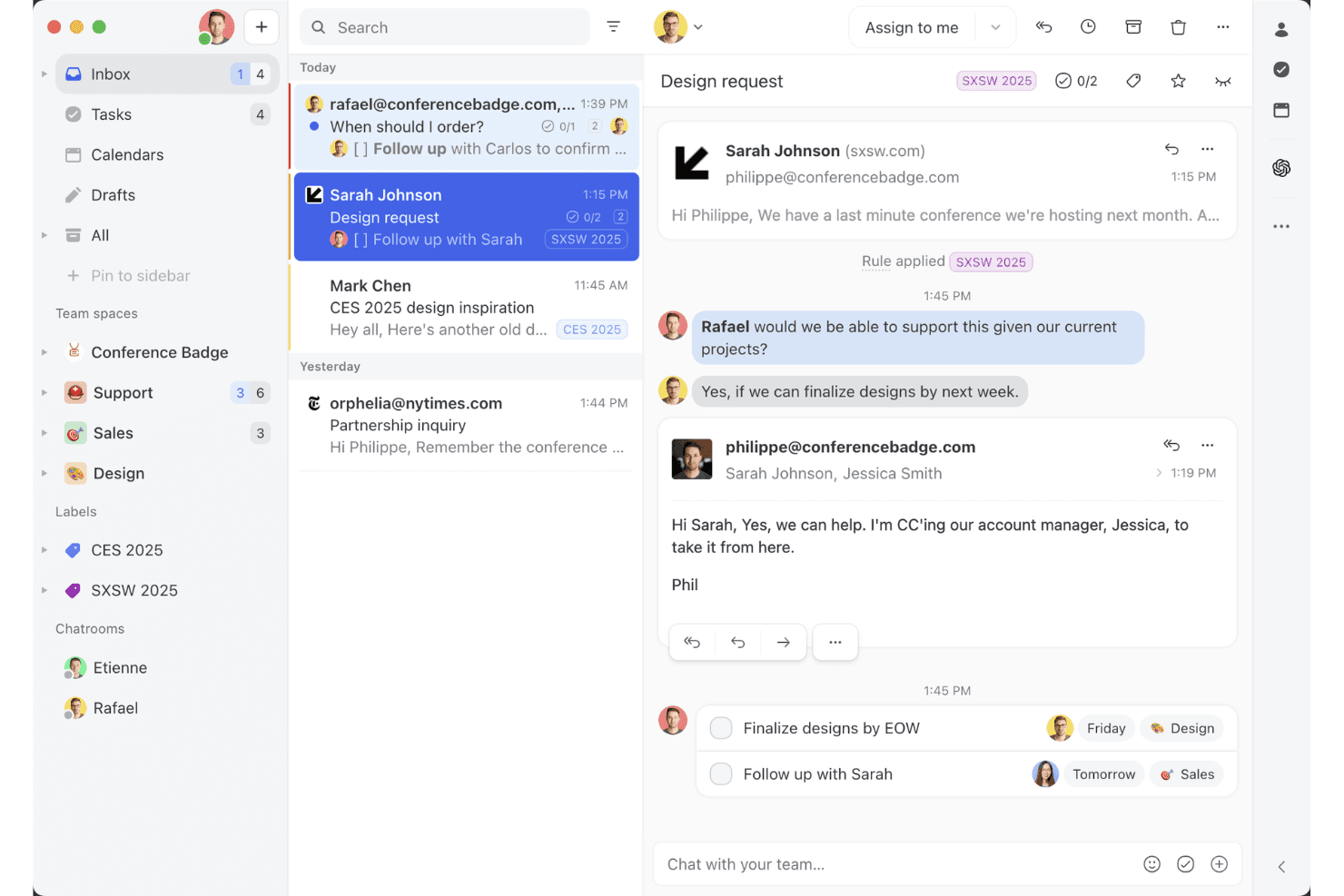
Missive’s shared inbox view shows how teams can collaborate on email threads, assign tasks, and manage client conversations in one workspace. Missive is a collaborative omnichannel inbox that unifies email, SMS, WhatsApp, Messenger, Instagram, and live chat into a single shared workspace with built-in team communication, AI-assisted routing, and cross-channel automation.
Who Is Missive Best For?
Missive is a strong fit for SMB and mid-market teams that handle customer conversations across email, SMS, and social channels and want built-in collaboration baked directly into the inbox.
Why I Picked Missive
I've included Missive in my top picks because its collaborative inbox model does something most omnichannel tools don't: it puts team discussion directly inside the customer conversation thread, so agents can loop in a specialist or escalate mid-reply without switching to Slack. I also like how its AI-powered routing classifies incoming messages by sentiment and language across every connected channel simultaneously, whether that's WhatsApp, SMS, or Instagram DMs. That cross-channel rule consistency is genuinely rare at this price point.
Missive Key Features
- Canned responses: Pre-built reply templates with variable fields let agents send consistent, on-brand messages across email, SMS, and WhatsApp without rewriting from scratch.
- Conversation merging: Threads from the same customer across different channels can be manually merged into one, keeping the full interaction history ina single view.
- Auto-assignment rules: Conversations are distributed across agents using round-robin, least-busy, or random logic, reducing manual triage for teamleads.
- Missive MCP Server: Connect external AI tools (like Claude or ChatGPT) to query customer service threads, check calendars, and draft replies—while keeping agent review required before sending.
Missive Integrations
Missive integrates with HubSpot, Salesforce, Shopify, Aircall, Dialpad, Twilio, and Zapier. Its REST API and webhooks support custom integrations, alongside its new MCP Server on Productive and Business plans (requires admin activation).
Pros and Cons
Pros:
- Flexible, AI-powered multi-channel routing
- Inline team chat in every conversation
- All channels unified in one inbox
Cons:
- No native customer satisfaction surveys
- No built-in AI chatbot for deflection
Learn more about Missive:
Diğer Çok Kanallı Müşteri Hizmetleri Yazılımları
Kısa listeme giremeyen ancak yine de göz atmaya değer bazı ek çok kanallı müşteri hizmetleri yazılımı seçenekleri şunlardır:
- 11FrontBest for monitoring message quality
- 12IntercomBest for startups
- 13Bright PatternBest for AI-driven insights
- 14TalkdeskBest for call centers
- 15KustomerBest for CRM integration
- 16Assembled AIBest for intelligent case routing systems
- 17SprinklrBest for social media support
- 18CrescendoBest for generating actionable conversation data
- 19FreshworksBest for ease of use
- 20ZendeskBest for scalability
How I Evaluate Omnichannel Customer Service Software
When a customer starts on chat and escalates to a call, I expect one agent record to follow them—that's the baseline I check before weighing what makes a platform stand out.
Core Functionality (Table Stakes For This List)
When I'm selecting tools for my list, I rank each one on a scale from 0 (does not offer the functionality) to 5 (excels in this area) for each core functionality listed below. Then, I calculate the tool's total score into a percentage. Each tool needs to achieve a minimum total score of 75% to be considered for inclusion.
- Multi-Channel Inbox: I check whether email, chat, social, SMS, and voice all land in one agent workspace—so reps aren't toggling between browser tabs.
- Unified Customer Profile: Each tool should surface a customer's full interaction history across channels in one view, including past tickets, purchases, and notes.
- Omnichannel Routing & Assignment: I look at how conversations get assigned—whether the platform supports skills-based routing, SLA priority rules, and load balancing across channels.
- Cross-Channel Ticketing: A customer who starts on chat and follows up via email should stay on one ticket thread, with full context intact for any agent who picks it up.
- Automation & AI Assistance: I evaluate whether workflow triggers, chatbots, and AI features like reply suggestions or auto-tagging work across all connected channels.
- Cross-Channel Analytics: Dashboards should aggregate metrics like CSAT, first response time, and resolution rate across every channel rather than siloing them.
Once I have a list of tools that meet the criteria, I consider what sets each platform apart.
Differentiating Factors (What Sets Vendors Apart)
Here's how I compare and contrast different vendors:
Standout Features
Proactive messaging matters a lot to me. Platforms that let you trigger a chat or SMS based on cart abandonment or onboarding milestones shift support from reactive to strategic. I also evaluate whether a built-in knowledge base surfaces AI-suggested articles to agents mid-conversation and powers a customer-facing self-service portal. For contact center leads managing large teams, native workforce management tools for shift scheduling and volume forecasting can eliminate the need for a separate WFM platform.
Beyond Features
Integration depth is one of the first things I check. A platform that connects natively to your CRM and ecommerce system means agents can pull up order status or account details without switching tools. I also look closely at total cost of ownership, especially whether AI features, premium channels like WhatsApp, or API usage carry add-on fees that inflate the price at scale. For teams in regulated industries like healthcare or finance, compliance certifications such as HIPAA or PCI-DSS can quickly narrow the shortlist.
Çok Kanallı Müşteri Hizmetleri Yazılımı Nasıl Seçilir?
Çok kanallı müşteri hizmetleri yazılımı seçerken temel destek kanallarınızı, müşteri verilerinizi ve iş akışlarınızı ne kadar iyi birbirine bağladığına odaklanın. Yazılım, müşterilerin kendilerini tekrar etmek zorunda kalmadan görüşmeleri yönetebilmeleri için temsilcilere ihtiyaç duydukları bağlamı sağlamalıdır.
Şu faktörleri göz önünde bulundurun:
| Göz önünde bulundurun | Öncelik verilecekler |
|---|---|
| Göz önünde bulundurunBirincil kanal | Öncelik verileceklerEn yüksek hacimli kanallarınız için güçlü destek. Görüşmelerin çoğunu telefon yönlendiriyorsa çağrı merkezi özelliklerine öncelik verin. Mesajlaşma ön plandaysa WhatsApp, SMS, sosyal medya ve canlı sohbete öncelik verin. |
| Göz önünde bulundurunEkip büyüklüğü | Öncelik verileceklerEkibinizin çalışma biçimine uygun özellikler. Küçük ekiplerin yalnızca birleşik bir gelen kutusuna ve basit yönlendirmeye ihtiyacı olabilir. Daha büyük ekipler ise beceriye dayalı yönlendirme, izinler, kalite güvencesi, iş gücü yönetimi ve gelişmiş raporlamaya ihtiyaç duyabilir. |
| Göz önünde bulundurunMüşteri hacmi | Öncelik verileceklerDestek hacminizi yönetebilecek otomasyon ve yönlendirme. Daha yüksek hacimli ekipler otomatik yönlendirmeye, kuyruk yönetimine, yapay zekâya ve temsilcilerin tekrarlayan işlerini azaltan araçlara öncelik vermelidir. |
| Göz önünde bulundurunDestek karmaşıklığı | Öncelik verileceklerDevirleri ve eskalasyonları yönetmeye yönelik araçlar. Talepler düzenli olarak temsilciler veya departmanlar arasında aktarılıyorsa paylaşılan müşteri bağlamına, şirket içi iş birliğine ve eskalasyon iş akışlarına öncelik verin. |
| Göz önünde bulundurunSektör | Öncelik verileceklerSektörünüzün gereksinimlerini karşılayan özellikler. E-ticaret ekipleri sipariş verilerine ve ticaret entegrasyonlarına ihtiyaç duyabilirken, düzenlemeye tabi sektörler daha güçlü güvenlik, uyumluluk ve denetim kontrollerine ihtiyaç duyabilir. |
Çok Kanallı Müşteri Hizmetleri Yazılımındaki Trendler
Araştırmam sırasında, farklı çok kanallı müşteri hizmetleri yazılımı sağlayıcılarından sayısız ürün güncellemesi, basın bülteni ve sürüm kaydı inceledim. Takip ettiğim yeni trendlerden bazıları şunlar:
- Yapay zekâ destekli kişiselleştirme: Birçok sağlayıcı, kişiselleştirilmiş müşteri etkileşimleri sunmak için yapay zekâ kullanıyor. İşletmeler deneyimleri müşterilerin bireysel ihtiyaçlarına göre uyarlamayı hedefledikçe bu trend giderek büyüyor. Örneğin yapay zekâ, kişiselleştirilmiş yanıtlar önermek ve hizmet sürekliliğini sağlamak için müşterinin tüm etkileşim geçmişini analiz edebilir.
- Ses tanıma teknolojisi: Ses tanıma giderek yaygınlaşıyor ve müşterilerin hizmetlerle ellerini kullanmadan etkileşim kurmasına olanak tanıyor. Bu trend, erişilebilirliği ve kolaylığı artırıyor; bazı sağlayıcılar daha iyi müşteri etkileşimi için sesli komutları platformlarına entegre ediyor.
- Proaktif müşteri etkileşimi: Araçlar, müşteriler sorunlarıyla iletişime geçmeden önce onlarla etkileşim kuracak şekilde gelişiyor. Bu trend, müşteri ihtiyaçlarını öngörmek ve proaktif olarak çözümler sunmak için veri analitiğinden yararlanmayı içeriyor; böylece memnuniyet artırılıyor ve destek talepleri azaltılıyor.
- Çok kanallı analitik: Sağlayıcılar, işletmelerin platformlar genelinde müşteri davranışlarını ve tercihlerini anlamasına olanak tanıyan içgörüler sunmaya odaklanıyor. Bu da stratejilerin geliştirilmesine ve hizmetlerin iyileştirilmesine yardımcı oluyor.
- Görüntülü sohbet desteği: Görüntülü sohbet, daha kişisel bir yaklaşım sunduğu için bir destek aracı olarak ilgi görüyor. Görsel yönlendirme gerektiren karmaşık sorunlarda kullanışlıdır ve bazı sağlayıcılar müşteri etkileşimlerini geliştirmek için bu özelliği entegre ediyor.
Çok Kanallı Müşteri Hizmetleri Yazılımı Nedir?
Çok kanallı müşteri hizmetleri yazılımı, işletmelerin birden fazla iletişim kanalındaki müşteri etkileşimlerini tek bir platform üzerinden sorunsuz bir şekilde yönetmesini sağlayan bir araçtır. Müşteri hizmetleri profesyonelleri ve destek ekipleri, yanıt sürelerini iyileştirmek ve tutarlı destek sunmak için genellikle bu araçları kullanır.
Yapay zekâ destekli kişiselleştirme, proaktif etkileşim ve çok kanallı analitik gibi özellikler, müşteri deneyimlerinin kişiselleştirilmesine, ihtiyaçların öngörülmesine ve davranışların anlaşılmasına yardımcı olur. Genel olarak bu araçlar, tüm kanallarda verimli ve kişiselleştirilmiş hizmet sunulmasını sağlayarak müşteri memnuniyetini artırır.
Çok Kanallı Müşteri Hizmetleri Yazılımının Özellikleri
Çok kanallı müşteri hizmetleri yazılımı seçerken aşağıdaki temel özelliklere dikkat edin:
- Yapay zekâ destekli kişiselleştirme: Bu özellik, etkileşimleri müşteri verilerine göre uyarlamak için yapay zekâ kullanır ve konuşmaları daha ilgili hâle getirerek müşteri deneyimini geliştirir.
- Gelişmiş çağrı yönlendirme: Çağrıları en uygun temsilciye yönlendirerek yanıt sürelerini iyileştirir ve müşterilerin ihtiyaç duydukları yardımı hızla almasını sağlar.
- Çok kanallı analitik: Tüm iletişim kanallarına ilişkin içgörüler sunarak işletmelerin müşteri davranışlarını anlamasına ve hizmet stratejilerini optimize etmesine yardımcı olur.
- Proaktif müşteri etkileşimi: Müşteri ihtiyaçlarını öngörmek ve sorunlar ortaya çıkmadan önce çözümler sunmak için verileri kullanır; destek taleplerini azaltır ve memnuniyeti artırır.
- Birleştirilmiş müşteri zaman çizelgesi: Farklı kanallardaki tüm etkileşimleri tek bir görünümde birleştirerek temsilcilere bilinçli ve kişiselleştirilmiş destek sunmaları için ihtiyaç duydukları bağlamı sağlar.
- Görüntülü sohbet desteği: Müşterilere yardımcı olmak için daha kişisel bir yöntem sunar; görsel yönlendirme gerektiren karmaşık sorunlar için özellikle kullanışlıdır.
- Özelleştirilebilir panolar: Ekiplerin çalışma alanlarını ihtiyaçlarına göre uyarlamasını sağlayarak verimliliği ve odağı artırır.
- İş akışı otomasyonu: Tekrarlayan görevleri kolaylaştırarak ekibinizin daha karmaşık müşteri etkileşimleriyle ilgilenmesine olanak tanır.
- Çoklu dil desteği: Farklı müşteri kitleleriyle iletişim kurulmasını sağlayarak erişimi genişletir ve erişilebilirliği artırır.
- Güvenlik önlemleri: Sektör standartlarına uyarak müşteri verilerini korur, güveni ve güvenilirliği sürdürür.
Çok Kanallı Müşteri Hizmetleri Yazılımının Faydaları
Sosyal müşteri hizmetleri çözümleri de dâhil olmak üzere çok kanallı müşteri hizmetleri yazılımını uygulamak, ekibiniz ve işletmeniz için çeşitli faydalar sağlar. Yararlanabileceğiniz birkaç fayda şunlardır:
- Geliştirilmiş müşteri memnuniyeti: Müşteriler kanallar genelinde zamanında, ilgili ve tutarlı destek alarak genel deneyimlerini ve dolayısıyla müşteri sadakatini artırır.
- Artan verimlilik: İş akışı otomasyonu ve gelişmiş çağrı yönlendirme, ekibinizin daha az çabayla daha fazla etkileşimi yönetmesine yardımcı olarak üretkenliği artırır.
- Daha iyi içgörüler: Çok kanallı analizler, müşteri davranışına ilişkin kapsamlı bir görünüm sunarak hizmet kalitesini iyileştiren veri odaklı kararlar alınmasını sağlar.
- Geliştirilmiş kişiselleştirme: Yapay zekâ destekli özellikler, etkileşimleri müşterilerin bireysel tercihlerine göre uyarlayarak iletişimi daha anlamlı ve etkili hâle getirir.
- Maliyet tasarrufu: İşletmeler, birden fazla platforma duyulan ihtiyacı azaltıp kaynak tahsisini optimize ederek operasyonel maliyetlerden tasarruf edebilir.
- Daha geniş erişim: Çok dilli destek ve görüntülü sohbet seçenekleri, daha geniş bir kitleyle bağlantı kurmanıza ve müşteri tabanınızı büyütmenize olanak tanır.
- Daha güçlü güvenlik: Sektör standartlarına uyum, müşteri verilerinin korunmasını sağlayarak güven ve güvenilirlik oluşturur.
Çok Kanallı Müşteri Hizmetleri Yazılımının Maliyetleri ve Fiyatlandırması
Çok kanallı müşteri hizmetleri yazılımı seçmek, mevcut çeşitli fiyatlandırma modellerinin ve planların anlaşılmasını gerektirir. Maliyetler özelliklere, ekip büyüklüğüne, eklentilere ve diğer unsurlara göre değişir. Aşağıdaki tablo, çok kanallı müşteri destek çözümlerinde yaygın planları, ortalama fiyatlarını ve genellikle sunulan özellikleri özetlemektedir:
Çok Kanallı Müşteri Hizmetleri Yazılımı İçin Plan Karşılaştırma Tablosu
| Plan Türü | Ortalama Fiyat | Yaygın Özellikler |
| Ücretsiz Plan | $0 | Temel bilet yönetimi, e-posta desteği ve sınırlı analiz. |
| Bireysel Plan | $5-$25/kullanıcı/ay | E-posta ve sohbet desteği, temel raporlama ve sınırlı özelleştirme seçenekleri. |
| İşletme Planı | $30-$75/ kullanıcı/ay | Çok kanallı destek, iş akışı otomasyonu ve gelişmiş raporlama araçları. |
| Kurumsal Plan | $80-$150/ kullanıcı/ay | Tam özelleştirme, yapay zekâ destekli analiz ve özel hesap yönetimi. |
Çok Kanallı Müşteri Hizmetleri Yazılımı SSS
Çok kanallı müşteri destek yazılımı hakkında sık sorulan bazı soruların yanıtları:
Çok kanallı ve çoklu kanallı müşteri hizmetleri arasındaki fark nedir?
Çoklu kanallı müşteri hizmetleri birden fazla kanal üzerinden destek sunarken, çok kanallı müşteri hizmetleri bu kanalları tek ve kesintisiz bir deneyimde birleştirir. Örneğin, çoklu kanallı destekte canlı sohbette görüşmeyi başlatıp daha sonra telefonla arayan bir müşterinin sorununu yeniden açıklaması gerekebilir. Çok kanallı destekte ise telefon temsilcisi önceki sohbeti görebilir ve görüşmenin kaldığı yerden devam edebilir.
Çok kanallı bir müşteri hizmetleri platformu kaç kanalı desteklemelidir?
İdeal bir sayı yoktur. Çok kanallı bir platform, müşterilerinizin gerçekten kullandığı kanalları desteklemeli ve temsilcilerin bağlamı kaybetmeden görüşmeler arasında geçiş yapabilmesi için bu kanalları birbirine bağlamalıdır. Birçok işletme için bu, e-posta, canlı sohbet, telefon ve sosyal medya ya da mesajlaşma uygulamalarıyla başlamak anlamına gelir.
Çok kanallı bir stratejiye hangi kanallar dahil edilmelidir?
Müşterilerin sizinle halihazırda nerelerden iletişime geçtiğine bakın ve talebin en yüksek olduğu kanallara öncelik verin. Birçok ekip için bunlar e-posta, telefon, canlı sohbet, sosyal medya, SMS ve WhatsApp gibi mesajlaşma uygulamalarını içerir; ancak kanal karması müşterilerinizi yansıtmalıdır.
Çok kanallı müşteri hizmetlerini uygulamak için CRM'nizi değiştirmeniz gerekir mi?
Genellikle hayır. İyi bir çok kanallı platform, temsilcilerin müşteri verilerine destek görüşmelerinin yanında erişebilmesi için mevcut CRM’nizle entegre olmalıdır. Önemli olan entegrasyonun kalitesidir: hangi verilerin senkronize edildiğini, güncellemelerin gerçek zamanlı olarak gerçekleşip gerçekleşmediğini ve temsilcilerin sistemler arasında geçiş yapmadan ihtiyaç duydukları bilgilere erişip erişemediğini kontrol edin.
Çok kanallı müşteri hizmetleri yazılımının başlıca dezavantajı nedir?
Çok kanallı yazılımın başlıca dezavantajı uygulamanın karmaşıklığıdır. Birden fazla kanalda işleyen, iyi koordine edilmiş bir sistem gerektirir. Veri silolarının bulunduğu kuruluşlarda çok kanallı bir yaklaşımın uygulanması zor olabilir. Her yerde tutarlı müşteri deneyimleri sağlamak, özellikle doğru teknoloji ve süreçler mevcut değilse, zorlu olabilir.
Çok kanallı müşteri hizmetlerini nasıl uygularsınız?
Çok kanallı müşteri hizmetlerini uygulamak için öncelikle müşteri beklentilerini anlayın ve kullanacağınız kanalları belirleyin (ipucu: müşterilerinizin kullandığı kanallara bakın). Bu kanalları destekleyecek doğru teknolojiye yatırım yapın ve ekibinizin bunları etkili bir şekilde yönetebilmesi için yetkinliklerini geliştirin. Ayrıca self servis seçenekleri oluşturmayı değerlendirin ve süreç boyunca müşteri verilerinin güvenliğini sağlayın.
Çok kanallı müşteri hizmetlerinin 4 C'si nedir?
Çok kanallı müşteri hizmetlerinin 4 C’si Müşteri deneyimi, Bağlam, İçerik ve İş birliğidir. Bu unsurlar, tüm kanallarda tutarlı ve ilgi çekici bir müşteri deneyimi oluşturmak için birlikte çalışır ve etkileşimlerin ilgili ve tutarlı olmasını sağlar.
Çok kanallı yazılım müşteri memnuniyetini (CSAT) nasıl artırır?
Çok kanallı hizmet yazılımı, birden fazla kanalda tutarlı destek sunarak ve daha kişiselleştirilmiş ve verimli etkileşimlere olanak tanıyarak müşteri memnuniyetini artırır. Proaktif etkileşim ve birleştirilmiş müşteri zaman çizelgeleri gibi özellikler, müşterilerin zamanında ve ilgili yardım almasını sağlayarak genel deneyimlerini iyileştirir.