

Kurumsal ortak çalışma masası rezervasyon yazılımları, büyük kuruluşlarda masa rezervasyonlarını otomatikleştirmenize ve yönetmenize olanak tanır. Böylece ofis otelciliğini optimize ederek ekiplerinizin çalışma alanlarına kolayca erişmesini sağlarken lojistiği kontrol altında tutabilirsiniz. Doğru platformu arıyorsanız ölçeklenmeyi destekleyen, esnek çalışmayı mümkün kılan ve ek yönetim yükü oluşturmadan net kullanım analizleri sunan özelliklere ihtiyacınız vardır.
Bu kılavuzda, 2026 yılında daha akıllı ve uyarlanabilir bir çalışma alanı oluşturmanıza yardımcı olacak en iyi kurumsal düzeydeki ortak çalışma masası rezervasyon araçlarını bulacaksınız.
Why Trust Our Software Recommendations
6,700+
Reviews
20
Industry experts
16+
Evaluation factors
14
Years
Our team has been testing and reviewing software since 2012. As CX leaders ourselves, we know how difficult—and important—it is to choose the right software.
For this guide, we evaluated tools using hands-on testing and independent research, scoring tools using our selection criteria.
Our reviews reflect our human editorial judgment, not a sales pitch.
 Gui DrusinaCreative Director
 Tim FisherVP of AI
Kurumsal Ortak Çalışma Masası Rezervasyon Yazılımları Karşılaştırma Tablosu
Aşağıdaki tablo, en iyi kurumsal ortak çalışma masası rezervasyon yazılımı seçimlerimin fiyatlandırma ayrıntılarını karşılaştırır.
Sorted by: Default
| Tool | Starting Price | Website | |
|---|---|---|---|
Best with integrated health and safety compliance | 4.7 out of 5 | $500/month Free demo available | Book Demo |
Best for multilingual platform support | 4.7 out of 5 | €1.7/user/month Free plan available; 14-day free trial; free demo available | Website |
Best for customizable interactive floor plans | 3.6 out of 5 | Pricing upon request Free demo available | Website |
Best for intuitive desk assignment automation | 4.8 out of 5 | $5/bookable resource/month Free demo available | Website |
Best for mobile-first desk reservations | 4.8 out of 5 | $1.79/user/month 7-day free trial + free demo available | Website |
Best for powerful analytics on workspace usage | 4.5 out of 5 | Pricing upon request Free demo available | Website |
Best for native Microsoft Teams integration | 4.5 out of 5 | $99/month Free demo available | Website |
Best for instant QR code desk check-in | 4.7 out of 5 | $13.50/month 30-day free trial + free demo available | Website |
Best for hardware-integrated desk booking | 4.5 out of 5 | $51/month 30-day free trial available | Website |
Best for configurable workspace permissions | Not rated | Pricing upon request Free demo available | Website |


En İyi Kurumsal Ortak Çalışma Masası Rezervasyon Yazılımı İncelemeleri
Kısa listeme giren en iyi kurumsal ortak çalışma masası rezervasyon yazılımlarıyla ilgili ayrıntılı özetlerimi aşağıda bulabilirsiniz. İncelemelerim, size en uygun seçeneği bulmanıza yardımcı olmak için her platformun özelliklerine, en uygun kullanım alanlarına ve entegrasyonlarına ayrıntılı bir bakış sunar.
 1Best with integrated health and safety compliance
elia
- Free demo available
- From $500/month
Visit WebsiteCustomer Rating:4.7/5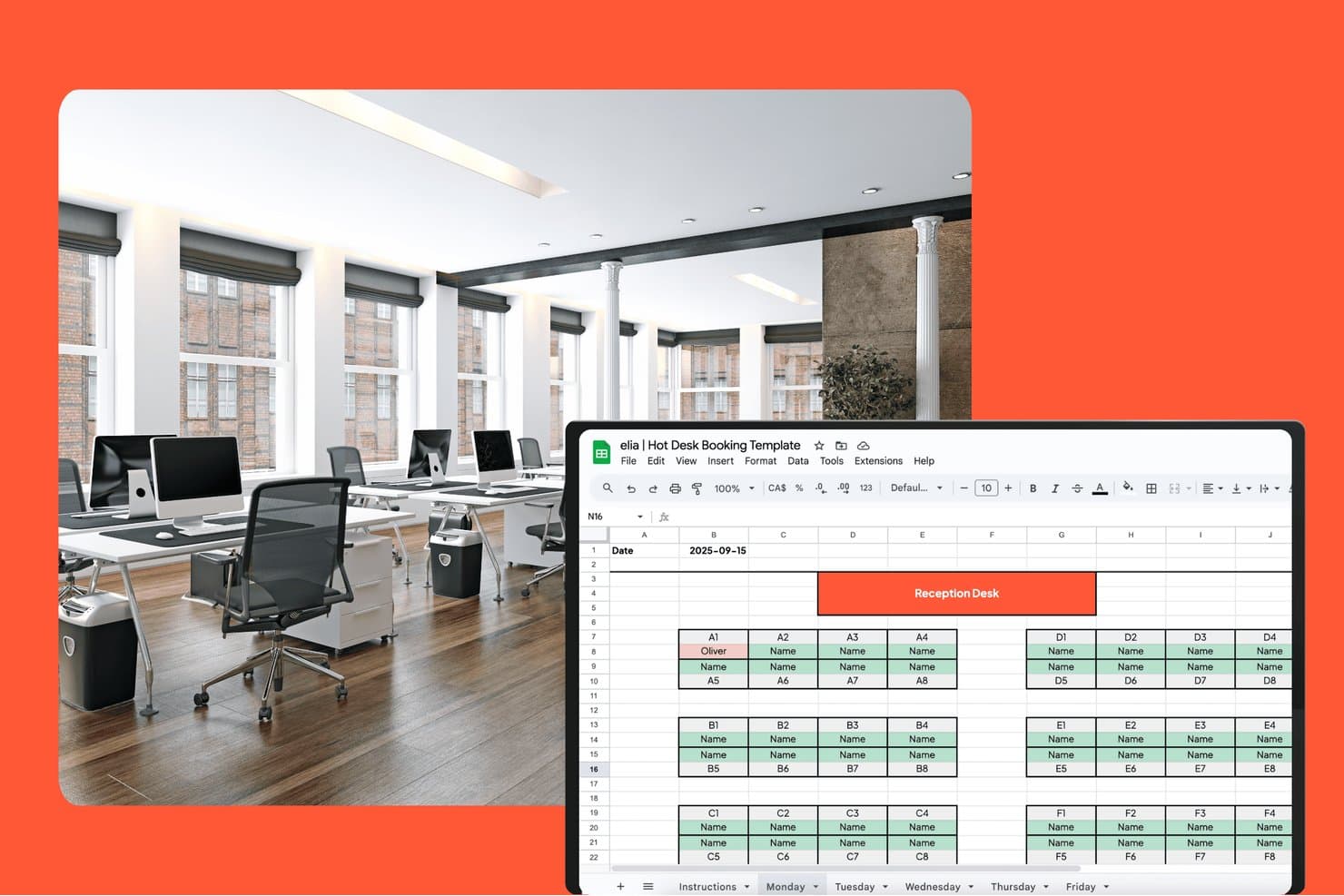
elia offers a Google Sheets-based hot desk booking template with a visual floor map layout showing desk assignments by zone for a selected date. elia is a modular workplace management platform that combines desk and meeting room booking, interactive floor plans, visitor management, occupancy analytics, and health and safety compliance tools in one system.
Who Is elia Best For?
elia suits workplace and facilities teams at mid-to-large organizations that manage hybrid offices and need built-in regulatory compliance alongside day-to-day space booking.
Why I Picked elia
I picked elia as one of the best because no other desk booking tool I've reviewed builds health and safety compliance into the core workflow the way it does. First responder tracking lets me see exactly who is on-site and where, in real time, which matters the moment something goes wrong. Incident reporting lives inside the same platform I use to manage bookings, so there's no switching between tools to log or review a workplace event.
elia Key Features
- Interactive floor plans: Employees can reserve desks and rooms directly from a visual floor map with filters for location and amenities.
- Neighborhood and team zones: Admins assign specific desk areas to teams or departments for easy coordination.
- Mobile app booking: Native iOS and Android apps let users book, check maps, or manage reservations from anywhere.
- Occupancy sensor integration: Real-time desk and room usage data flows in from connected sensor hardware.
elia Integrations
elia offers native integrations with Microsoft 365, Google Workspace, Google Calendar, Microsoft Teams, Outlook, and Slack. An API is available for custom integrations.
Pros and Cons
Pros:
- Automated visitor and first responder management
- Real-time occupancy tracking with sensors
- Built-in health and safety compliance features
Cons:
- Floor plans lack 3D or wayfinding options
- Limited third-party ecosystem connectivity
Learn more about elia: Best for multilingual platform support
- Free plan available; 14-day free trial; free demo available
- From €1.7/user/month (billed annually)
Visit WebsiteCustomer Rating:4.7/5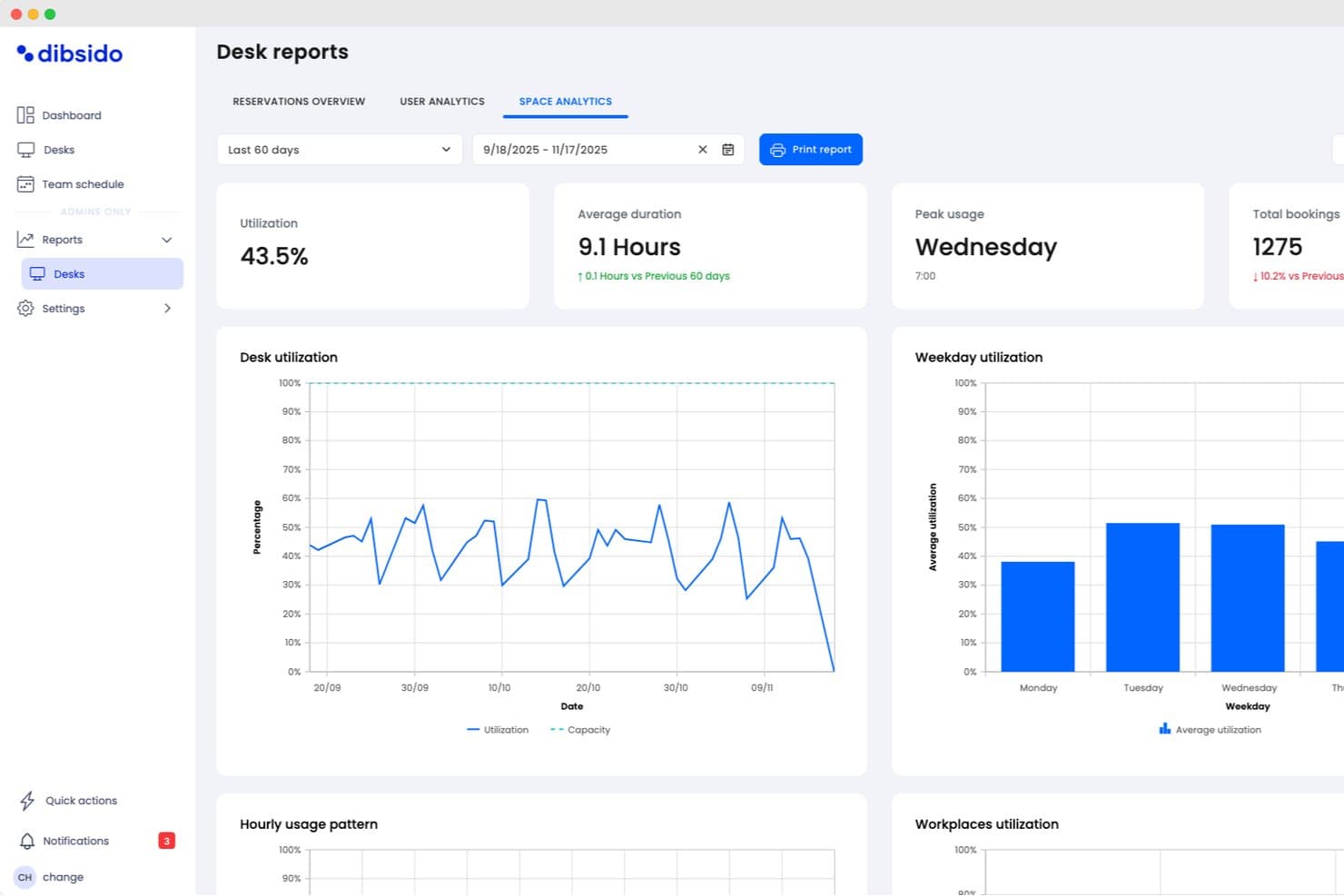
Dibsido offers detailed desk space analytics including utilization rates, average booking duration, peak usage days, and weekday utilization charts. Dibsido is a desk booking platform that covers hot desking, meeting rooms, and parking, with interactive floor maps, utilization analytics, and integrations with Microsoft Teams, Outlook, and Google Calendar.
Who Is Dibsido Best For?
Dibsido is a strong fit for distributed or European teams that need a multilingual booking platform their entire workforce can navigate in their own language.
Why I Picked Dibsido
I picked Dibsido as one of the best because its multilingual platform genuinely sets it apart: the interface runs in 11 European languages, so a distributed team spanning Germany, Poland, and Portugal can each navigate the platform in their own language without a workaround. I also love the hybrid office policy feature, which lets admins set required in-office days per group and automatically counts attendance, with sick days and travel adjusting the target. Pair that with Analytics 2.0's plain-language recommendations like "12 fewer desks needed" and you get real decision-making power.
Dibsido Key Features
- SAML 2.0 SSO and SCIM provisioning: Enterprise plan users get single sign-on via Entra ID, Okta, or Google, plus automated user provisioning with silent SCIM sync.
- Waiting list with fair ordering: Cancelled desk spots are automatically redistributed, with an option to prioritize users who've had fewer recent bookings.
- Hybrid office policy enforcement: Admins set required in-office days per team group, and the system counts attendance automatically while adjusting targets for sick days and travel.
- QR code booking shortcuts: QR codes can trigger instant desk reservations without requiring a separate check-in step, speeding up the on-site booking flow.
Dibsido Integrations
Dibsido offers native integrations with Microsoft Teams, Outlook, Copilot, Slack, Google Calendar, and Microsoft 365. Enterprise plans add API access for custom HRIS and internal-tool integrations, plus SAML SSO, SCIM, and Entra ID.
Pros and Cons
Pros:
- Reviewers praise quick setup and responsive support
- Analytics identifies underused desks and attendance gaps
- Fair ordering improves access to scarce desks
Cons:
- Frankfurt-only hosting limits residency options
- Enterprise security controls require the highest plan
Learn more about Dibsido: Best for customizable interactive floor plans
- Free demo available
- Pricing upon request
Visit WebsiteCustomer Rating:3.6/5
OfficeSpace offers customizable floor plans with desk assignments. OfficeSpace is a hybrid workplace management platform for enterprises that offers desk booking, interactive floor plan mapping, move management, usage analytics, and facility requests in one system.
Who Is OfficeSpace Best For?
OfficeSpace suits workplace experience teams in large enterprises that need to manage, update, and visualize complex floor plans across multiple global office locations.
Why I Picked OfficeSpace
OfficeSpace earns its spot on my shortlist because I rely on its interactive floor plans that I can fully customize for my locations and brand. I update zones, add social distancing, and assign room amenities directly on the floor plan every week.
OfficeSpace Key Features
- Desk booking with QR codes: Employees reserve, check in, and release desks by scanning QR codes.
- Move management tools: Manage, schedule, and track employee moves on a global scale.
- Automated desk assignment rules: Set custom logic to automatically assign desks based on user groups or protocols.
- Capacity and distancing controls: Configure capacity limits and spacing policies to comply with health guidelines.
OfficeSpace Integrations
OfficeSpace offers native integrations with Microsoft 365, Okta, Google Workspace, Slack, Cisco Webex, Brivo, ADP, Density, Oracle, Rippling, and more, and provides an API and webhooks for custom integrations.
Pros and Cons
Pros:
- Advanced move management for large-scale offices
- Real-time desk availability and occupancy tracking
- Customizable visual floor plans for each location
Cons:
- Mobile app UI feels somewhat outdated
- Some floor plan updates require admin intervention
Learn more about OfficeSpace: Best for intuitive desk assignment automation
- Free demo available
- From $5/bookable resource/month (billed annually)
Visit WebsiteCustomer Rating:4.8/5
Envoy offers automated desk assignments with attendance insights. Envoy is a workplace management platform for enterprise hot desk booking that elevates the employee experience by offering automated desk assignment, desk reservation, floor plan mapping, office analytics, visitor management, and employee scheduling.
Who Is Envoy Best For?
Envoy is a good fit for office managers and facilities teams in growing or large organizations that want to automate workspace coordination across multiple locations.
Why I Picked Envoy
I picked Envoy as one of the best because I use its desk assignment automation rules to match employees with available spots based on work schedules, office zones, or neighborhood preferences. I can visualize occupancy on real-time floor plans and set booking policies by team.
Envoy Key Features
- Interactive floor plans: Users can see desk availability and office zones visually.
- Mobile desk booking app: Employees reserve, check in, or release desks from their phones.
- Visitor management integration: Teams track, notify, and welcome office guests in one place.
- Desk amenities filter: Users can filter and reserve desks with specific equipment or features.
Envoy Integrations
Envoy offers 100+ integrations through its app directory, including Slack, Microsoft Teams, Google Calendar, Microsoft Outlook, Okta, Salesforce, Brivo, Kisi, Avigilon Alta, and DocuSign. It also connects with Zapier and provides an API for custom integrations.
Pros and Cons
Pros:
- Supports multi-location workspace management
- Interactive floor plans for workspace mapping
- Granular admin controls for large organizations
Cons:
- Mobile app sync lags for some users
- Advanced feature add-ons are expensive
Learn more about Envoy: Best for mobile-first desk reservations
- 7-day free trial + free demo available
- From $1.79/user/month (billed annually)
Visit WebsiteCustomer Rating:4.8/5
WorkInSync offers mobile-first desk booking and check-in tools. WorkInSync is an enterprise hot desk booking platform that offers mobile-driven desk reservations, space scheduling, floor plan visualization, health attestations, and visitor management for hybrid workplaces.
Who Is WorkInSync Best For?
WorkInSync is a great fit for facilities teams and corporate offices that need to prioritize mobile booking for their hybrid workforces.
Why I Picked WorkInSync
I picked WorkInSync as one of the best because I rely on its mobile-first reservation workflow to let my team book desks, check availability, and manage workplace attendance with just their phones. I use geofencing for auto check-in and quick QR code scans.
WorkInSync Key Features
- Interactive floor plans: Users can view and select specific desks and zones on a visual map.
- Occupancy analytics dashboard: Administrators see real-time usage, trends, and capacity reports for all workspaces.
- Multi-location management: Manage desk booking policies and inventory across multiple offices from a single system.
- Visitor management system: Register, track, and manage guest access and sign-ins within the platform.
WorkInSync Integrations
WorkInSync offers native integrations with Google Workspace, Microsoft Outlook, Cisco, Okta, OneLogin, SAP, Workday, Zoom, and more. An API is available for custom integrations.
Pros and Cons
Pros:
- Analytics dashboard for workspace utilization
- Visual floor plans for space selection
- Mobile check-in with geofencing and QR code
Cons:
- Web portal interface can lag occasionally
- Admin setup required for complex workflows
Learn more about WorkInSync: Best for powerful analytics on workspace usage
- Free demo available
- Pricing upon request
Visit WebsiteCustomer Rating:4.5/5
Robin offers workplace insights with desk and space usage metrics. Robin is an enterprise hot desk booking platform that centralizes workspace reservations, supports desk assignment management, enables neighborhood booking, and offers admin tools to oversee multi-location office environments.
Who Is Robin Best For?
Robin is a solid choice for workplace leaders at mid-sized or large companies who need detailed insights into how desks and office spaces are actually used.
Why I Picked Robin
I picked Robin as one of the best because I rely on its workspace analytics to break down detailed desk usage data by team, location, and day. I can easily spot office patterns and justify layout adjustments with real-time reporting dashboards.
Robin Key Features
- Interactive floor plans: Visual floor maps let users find and reserve desks in real time.
- Neighborhood booking: Group desks by team or function for flexible workspace assignment.
- Mobile desk booking app: Reserve, release, or check into desks from iOS and Android.
- Guest and visitor management: Register and track external visitors in the office.
Robin Integrations
Robin offers native integrations across the Microsoft ecosystem, including Microsoft Teams, Outlook, Exchange, Entra ID, Intune, and Microsoft 365, as well as Google Calendar and Google Workspace. It also integrates with Slack, Zoom, Okta, OneLogin, Rippling, and access control systems like Avigilon, Brivo, and Kisi. An API is available for custom integrations.
Pros and Cons
Pros:
- Multi-location workspace management within one platform
- Interactive floor plans for complex offices
- Granular desk-level admin permission controls
Cons:
- Some mobile users report slow sync
- Desk booking UI isn't fully intuitive
Learn more about Robin: Best for native Microsoft Teams integration
- Free demo available
- From $99/month
Visit WebsiteCustomer Rating:4.5/5
YAROOMS offers workspace booking directly within Microsoft Teams. YAROOMS is an enterprise hot desk booking software solution that provides advanced desk reservations, workspace resource management, visual floor plans, occupancy tracking, and centralized scheduling for workplace environments.
Who Is YAROOMS Best For?
YAROOMS is a strong match for organizations with a Microsoft Teams-driven workflow that want enterprise-level desk and room management.
Why I Picked YAROOMS
I picked YAROOMS as one of the best because I can book desks and rooms directly inside Microsoft Teams without switching platforms. I use its approvals and advanced permissions to control workspace access and keep all the booking activity synced with my Microsoft environment.
YAROOMS Key Features
- Interactive floor plans: Users select desks by clicking on dynamic office maps.
- Occupancy analytics: View live and historical desk usage data for optimization.
- Role-based access control: Set granular permissions by department or location.
- Visitor management system: Register and track office guests through the same platform.
YAROOMS Integrations
YAROOMS offers native integrations across the Microsoft ecosystem, including Microsoft Teams, Microsoft 365, Outlook, and Azure AD, along with Google Calendar, Google Meet, Slack, Zoom, MappedIn, and SAML 2.0 for SSO. A REST API is also available for custom integrations.
Pros and Cons
Pros:
- Built-in occupancy and resource usage analytics
- Visual office maps for workspace selection
- Desk and room bookings from Microsoft Teams
Cons:
- Mobile app features sometimes lag behind the web
- Per-user pricing scales up quickly
Learn more about YAROOMS: Best for instant QR code desk check-in
- 30-day free trial + free demo available
- From $13.50/month (billed annually)
Visit WebsiteCustomer Rating:4.7/5
Clearooms offers QR code desk check-in settings for attendance tracking. Clearooms is a workspace management platform for enterprises that offers desk and room booking, interactive floor plans, visitor management, calendar sync, and QR code-enabled check-in for shared office environments.
Who Is Clearooms Best For?
Clearooms fits facilities managers and admins who need a digital desk and meeting room booking platform with QR-based check-in for hybrid office environments.
Why I Picked Clearooms
I picked Clearooms because I can set up instant QR code desk check-in, so my team simply scans a desk’s code to reserve or check in on the spot. I use interactive floor plans and set booking rules to control who can book which desks.
Clearooms Key Features
- Visitor management: Allows reception staff to register and track all visitors entering the building.
- Calendar sync: Syncs desk bookings with Microsoft 365 and Google Calendar.
- Book on behalf: Admins can book desks or rooms on behalf of others.
- Custom roles and permissions: Lets admins set granular access controls for users and teams.
Clearooms Integrations
Clearooms has native integrations across the Microsoft ecosystem, and Jumpcloud, Okta, Slack, Salto, and more. An API is available for custom integrations.
Pros and Cons
Pros:
- Visual floor plan for desk selection
- Role-based access for admin control
- QR code check-in is built into every desk
Cons:
- No native visitor badge printing
- The mobile app can lag during peak check-in times
Learn more about Clearooms: 9Best for hardware-integrated desk booking
Joan
- 30-day free trial available
- From $51/month
Visit WebsiteCustomer Rating:4.5/5
Joan offers hardware-connected desk booking with live floor maps. Joan is an enterprise hot desk booking platform that provides digital workspace reservation, desk and room scheduling, hardware display integration, and workplace resource management.
Who Is Joan Best For?
Joan fits facilities teams and IT managers looking to coordinate office desk bookings with on-site hardware displays.
Why I Picked Joan
I picked Joan because I can connect custom e-paper desk displays directly to its desk booking platform, making reservations and check-ins visible at the desk. My team books, releases, and manages desks on the spot using Joan’s hardware integration.
Joan Key Features
- Mobile booking app: Employees can reserve desks and rooms from their smartphones.
- Calendar integration: Syncs with Outlook, Microsoft 365, or Google Calendar for direct booking.
- QR code check-in: Users confirm desk reservations by scanning a QR code at the desk.
- Analytics dashboard: Admins view workspace utilization and reservation reports in real time.
Joan Integrations
Joan offers native integrations across the Microsoft ecosystem, including Microsoft 365, Microsoft Teams, Outlook, Exchange, and Azure AD, along with Google Workspace, Google Calendar, Slack, Zoom, Cisco Webex, Okta, JumpCloud, and iCal. It also connects with Zapier and IFTTT, and has an API for custom integrations.
Pros and Cons
Pros:
- Mobile booking app with QR code check-in
- Real-time office and occupancy analytics
- Desk booking with dedicated e-paper hardware displays
Cons:
- Limited reporting customization options
- Setup requires proprietary hardware purchases
Learn more about Joan:

Eptura offers work request creation and work order tracking. Eptura is an enterprise desk booking solution and software platform that centralizes workspace reservations, supports organization-wide space management, and enables advanced permission controls for complex workplace environments.
Who Is Eptura Best For?
Eptura is a solid pick for large organizations or enterprises that need granular control over workspace access across multiple locations or departments.
Why I Picked Eptura
I picked Eptura as one of the best because I can set highly granular workspace permissions for different team members by location, department, or user group. This lets my team manage multi-floor, multi-tenant offices without worrying about unauthorized desk reservations.
Eptura Key Features
- Interactive floor plans: Visualize available and occupied desks across entire office layouts.
- Mobile reservations: Book, check in, or release desks directly from the Eptura mobile app.
- Desk sensor integration: Connect with hardware sensors to automate desk status updates.
- Reporting dashboard: Access detailed data on space utilization and desk booking trends.
Eptura Integrations
Eptura offers more than 30 native integrations, including the Microsoft ecosystem, Zoom, Salesforce, Dropbox, Azure, AWS, Power BI, and Slack. It integrates with Zapier, and an API is also available for custom integrations.
Pros and Cons
Pros:
- Supports multi-location workspace management
- Interactive floor plans for large offices
- Advanced desk-level permission controls
Cons:
- Customer service response is often slow
- The admin dashboard can feel overwhelming
Learn more about Eptura:
Diğer Kurumsal Ortak Çalışma Masası Rezervasyon Yazılımları
Kısa listeme giremeyen ancak yine de göz atmaya değer bazı ek kurumsal ortak çalışma masası rezervasyon yazılımı seçenekleri şunlardır:
- 11GoBrightBest for real-time occupancy monitoring
- 12Mapiq Best for optimizing office utilization insights
- 13SkeddaBest for advanced scheduling automation
- 14deskbirdBest for customizable booking experiences
- 15KadenceBest for hybrid workplace coordination
- 16TacticBest for floor plan visual selection
- 17ArchieBest for mobile-first desk management
- 18Smartway2Best for automated booking workflows
- 19FlexwhereBest for instant QR code desk access
How I Evaluate Enterprise Hot Desk Booking Software
My evaluation has two layers: the core requirements—multi-site booking, SSO, floor maps—a tool must clear, and the differentiators that show how well it handles true enterprise scale.
Core Functionality (Table Stakes For This List)
When I'm selecting tools for my list, I rank each one on a scale from 0 (does not offer the functionality) to 5 (excels in this area) for each core functionality listed below. Then, I calculate the tool's total score into a percentage. Each tool needs to achieve a minimum total score of 65% to be considered for inclusion.
- Interactive Floor Maps: I check whether floor plans are clickable and dynamic, showing real-time desk availability, amenities, and teammate locations across multiple floors and buildings.
- Real-Time Booking Engine: Same-day, advance, and recurring reservations with check-in and auto-release are what I evaluate here, since no-show handling is a daily reality in hybrid offices.
- Enterprise Scalability & SSO: Each tool needs to support SSO/SAML, directory sync, and multi-site management so IT teams can deploy across dozens of global offices from one admin console.
- Calendar & Workplace Integrations: I look for two-way sync with Microsoft 365 and Google Workspace, plus native Slack or Teams bots that let employees book a desk without leaving their chat window.
- Space Utilization Analytics: Dashboards that surface occupancy rates, peak-day trends, and no-show percentages help workplace leaders right-size their real estate, so I evaluate reporting depth and exportability.
- Team & Neighborhood Management: The ability to assign desk zones by department and coordinate team days matters here, especially for CX teams that need to cluster on-site for collaborative sessions.
Once I have a list of tools that meet this criteria, I consider what sets each platform apart.
Differentiating Factors (What Sets Vendors Apart)
Here's how I compare and contrast different vendors:
Standout Features
IoT sensor integration is a major differentiator. Tools that pull data from under-desk sensors give workplace teams accurate occupancy numbers instead of relying on manual check-ins alone. I also evaluate whether a platform offers AI-powered desk recommendations that surface suggestions based on teammate schedules and past booking preferences. Beyond desks, I look for unified platforms covering meeting rooms, parking, and visitor management, since CX teams often coordinate on-site sessions that involve external guests.
Beyond Features
Enterprise security matters when desk booking data flows through SSO, HRIS, and access control systems. I check for SOC 2 Type II certification and data residency options, especially for organizations with offices across multiple regions. Implementation support is another factor I weigh heavily. Rolling out a new booking tool to thousands of hybrid employees requires CAD floor plan conversion and change management guidance. Pricing transparency also shapes my evaluation, since per-user and per-desk models scale very differently as headcounts fluctuate.
Kurumsal Ortak Çalışma Masası Rezervasyon Yazılımı Nasıl Seçilir?
Uzun özellik listeleri ve karmaşık fiyatlandırma yapıları içinde kaybolmak kolaydır. Özel yazılım seçimi sürecinizi yürütürken odaklanmanıza yardımcı olmak için göz önünde bulundurmanız gereken faktörlerin bir kontrol listesi aşağıda yer alıyor:
| Faktör | Dikkate Alınması Gerekenler |
|---|---|
| FaktörÖlçeklenebilirlik | Dikkate Alınması GerekenlerPlatform, mevcut ve gelecekteki ofis büyüklüğünüzü, büyüme planlarınızı ve gerektiğinde birden fazla konumu destekliyor mu? |
| FaktörEntegrasyonlar | Dikkate Alınması GerekenlerMevcut takvimlerinize, İK sistemlerinize, kimlik yönetiminize veya iş birliği araçlarınıza yerel olarak bağlanabiliyor mu? |
| FaktörÖzelleştirilebilirlik | Dikkate Alınması GerekenlerFarklı departmanlar veya ofis yerleşimleri için rezervasyon kurallarını, izin kümelerini ve markalamayı yapılandırabiliyor musunuz? |
| FaktörKullanım kolaylığı | Dikkate Alınması GerekenlerÇalışanlar kullanmayı ne kadar hızlı öğrenebilir? Masa rezervasyonu, giriş yapma ve değişiklikler günlük iş akışlarına sorunsuz şekilde uyum sağlıyor mu? |
| FaktörUygulama ve işe alıştırma | Dikkate Alınması GerekenlerOfis yerleşiminizi kurmak, kullanıcıları eğitmek ve sözleşmeyi imzaladıktan sonra tamamen faaliyete geçmek ne kadar sürecek? |
| FaktörMaliyet | Dikkate Alınması GerekenlerKullanıcı veya modül bazlı ücretler, kurulum ücretleri ya da zorunlu yıllık taahhütler var mı? Bunlar bütçenizle nasıl örtüşüyor? |
| FaktörGüvenlik önlemleri | Dikkate Alınması GerekenlerPlatform, coğrafi bölgeniz ve şirket politikalarınız için GDPR, SSO ve gerekli veri gizliliği gereksinimlerini karşılıyor mu? |
| FaktörDestek erişilebilirliği | Dikkate Alınması GerekenlerBölgenizde çalışma saatleri içinde güvenilir desteğe erişebiliyor musunuz? Sorunlar ortaya çıktığında hangi iletişim kanalları sunuluyor? |
Kurumsal Ortak Çalışma Masası Rezervasyon Yazılımı Nedir?
Kurumsal ortak çalışma masası rezervasyon yazılımı, kuruluşların esnek masa rezervasyonlarını ve çalışma alanı tahsisini geniş ölçekte yönetmesi için tasarlanmış dijital bir platformdur. Bu sistemler, çalışanların masa rezerve etmesine, gerçek zamanlı uygunluğu görmesine ve şirketin alan kullanımı politikalarına uymasına olanak tanır. Güvenliği ve yönetimsel kontrolü korurken tesis ekiplerinin ofis yerleşimlerini optimize etmesine, doluluk oranlarını izlemesine ve hibrit ya da etkinlik tabanlı çalışma ortamlarını desteklemesine yardımcı olur.
Kurumsal Ortak Çalışma Masası Rezervasyon Yazılımının Özellikleri
Kurumsal esnek masa rezervasyon yazılımı seçerken aşağıdaki temel özelliklere dikkat edin:
- Masa rezervasyon portalı: Çalışanların masa paylaşımını yönetebileceği ve tarih, saat ve konum tercihlerine göre masa rezerve edebileceği bir web veya mobil arayüz sağlar.
- Etkileşimli kat planları: Kullanıcıların ofis yerleşimlerini ayrıntılı olarak görüntülemesine ve sabit bir listeden seçim yapmak yerine uygun masaları görsel olarak seçmesine olanak tanır.
- Gerçek zamanlı uygunluk: Kullanıcıların ve yöneticilerin her zaman en güncel seçenekleri görmesi için masa ve oda durumlarını anında günceller.
- Otomatik rezervasyon kuralları: Yöneticilerin maksimum rezervasyon süresi, önceden rezervasyon dönemleri veya departmana dayalı erişim gibi masa rezervasyonlarına yönelik kısıtlamalar ve kurallar belirlemesine olanak tanır.
- Takvim entegrasyonu: Rezervasyonları Microsoft 365 veya Google Workspace gibi şirket takvimleriyle senkronize ederek rezervasyonların diğer planlanmış işler yanında görünmesini sağlar.
- Giriş ve çıkış işlemleri: Kullanımı doğrulamak, gelmeme durumlarını azaltmak ve kullanılmayan masaları otomatik olarak serbest bırakmak için QR kodları veya yakınlık sensörleri gibi özellikler sunar.
- Analiz ve raporlama: Alan planlaması ve gayrimenkul kararlarına yön vermek için masa kullanımını, doluluk eğilimlerini ve rezervasyon geçmişini izler.
- Role dayalı erişim denetimi: Yöneticiler, ekip liderleri ve kullanıcılar için farklı izinler tanımlayarak kuruluşların hassas ayarları ve verileri korumasına yardımcı olur.
- Ziyaretçi yönetimi: Konuk kaydı ve takibini masa rezervasyonu sürecine entegre ederek ön büro ekiplerinin beklenen ziyaretçilerden haberdar olmasını sağlar.
- Mobil uygulama desteği: Her zaman masasında bulunmayan çalışanları desteklemek üzere hareket hâlindeyken rezervasyon, yol bulma ve bildirimler için bir uygulama sağlar.
Kurumsal Esnek Masa Rezervasyon Yazılımının Faydaları
Kurumsal esnek masa rezervasyon yazılımını uygulamak, ekibiniz ve işletmeniz için çeşitli faydalar sağlar. Yararlanabileceğiniz avantajlardan bazıları şunlardır:
- Optimize edilmiş alan kullanımı: Etkileşimli kat planları ve gerçek zamanlı uygunluk, masa paylaşımını optimize etmenize, mevcut masa kapasitesinden en iyi şekilde yararlanmanıza ve az kullanılan çalışma alanlarından kaçınmanıza yardımcı olur.
- Hibrit çalışmaya destek: Masa rezervasyon portalları ve otomatik rezervasyon kuralları, uzaktan ve ofisten çalışma düzenlerini birlikte sürdüren çalışanları ağırlamanıza olanak tanır.
- Sorunsuzlaştırılmış iş yeri deneyimi: Mobil uygulama desteği, takvim entegrasyonları ve giriş özellikleri, çalışanların masaları hızlıca rezerve etmesini ve bulmasını kolaylaştırır.
- Veriye dayalı kararların güçlendirilmesi: Raporlama ve analiz özellikleri, tesis ekiplerine doluluk eğilimleri hakkında içgörü sunar ve gelecekteki ofis planlamasına yön vermeye yardımcı olur.
- Geliştirilmiş yönetim denetimi: Role dayalı izinler ve otomatik politikalar, masa erişimini şirket ihtiyaçları ve uyumluluk gereklilikleriyle uyumlu hâle getirmenizi sağlar.
- Azalan gelmeme durumları ve kaynak israfı: Giriş ve çıkış sistemleri, rezerve edilen alanların gerçekten kullanılmasını ve kullanılmayan masaların yeniden kullanıma açılmasını sağlar.
- Daha iyi ziyaretçi yönetimi: Ziyaretçi yönetimi özelliklerinin entegrasyonu, ön büro çalışanlarının gelişleri takip etmesini ve sorunsuz bir karşılama deneyimi sunmasını destekler.
Kurumsal Esnek Masa Rezervasyon Yazılımının Maliyetleri ve Fiyatlandırması
Kurumsal esnek masa rezervasyon yazılımı seçmek, sunulan çeşitli fiyatlandırma modellerini ve planları anlamayı gerektirir. Maliyetler özelliklere, ekip büyüklüğüne, eklentilere ve diğer etkenlere göre değişir. Aşağıdaki tabloda, kurumsal esnek masa rezervasyon yazılımı çözümlerinde yaygın olarak sunulan planlar, ortalama fiyatları ve tipik özellikleri özetlenmiştir:
Kurumsal Esnek Masa Rezervasyon Yazılımı İçin Plan Karşılaştırma Tablosu
| Plan Türü | Ortalama Fiyat | Yaygın Özellikler |
|---|---|---|
| Plan TürüÜcretsiz Plan | Ortalama Fiyat$0 | Yaygın ÖzelliklerKüçük bir ekip için masa rezerve edin, temel rezervasyon portalına erişin ve sınırlı destek alın. |
| Plan TürüKişisel Plan | Ortalama Fiyat$5-$10/kullanıcı/ay | Yaygın ÖzelliklerBireysel masa rezervasyonu, takvim senkronizasyonu, mobil uygulama erişimi ve basit raporlama. |
| Plan Türüİşletme Planı | Ortalama Fiyat$10-$25/kullanıcı/ay | Yaygın ÖzelliklerEtkileşimli kat planları, gerçek zamanlı uygunluk, yönetici denetimleri, gelişmiş analiz ve öncelikli destek. |
| Plan TürüKurumsal Plan | Ortalama Fiyat$20-$40/kullanıcı/ay | Yaygın ÖzelliklerÖzel entegrasyonlar, role dayalı izinler, ziyaretçi yönetimi, özel hesap yöneticisi ve SLA destekli destek. |
Kurumsal Ortak Masa Rezervasyon Yazılımı SSS
Kurumsal ortak masa rezervasyon yazılımı hakkında sık sorulan soruların bazı yanıtları:
Kurumsal ortak masa rezervasyon yazılımı birden fazla ofis konumunu nasıl yönetir?
Kurumsal ortak masa rezervasyon yazılımı genellikle konum yönetimini destekler. Böylece tek bir sistem üzerinden birden fazla bina veya kampüs için kat planları oluşturup yönetebilirsiniz. Bu, çalışanların programlarına ve seyahat ihtiyaçlarına göre herhangi bir konumdaki masaları rezerve etmelerini sağlar.
Masa rezervasyon yazılımı mevcut takvim ve iletişim araçlarımızla entegre olabilir mi?
Evet, kurumsal çözümlerin çoğu Microsoft 365, Google Workspace ve Slack gibi araçlarla entegrasyon sunar. Bu entegrasyonlar, masa rezervasyonlarının ekip takvimleriyle senkronize edilmesine yardımcı olur ve planlamayı halihazırda kullandığınız sistemler arasında görünür kılar.
Önceden rezervasyonları sınırlamak gibi rezervasyon kurallarını otomatikleştirmek mümkün mü?
Evet, yöneticiler genellikle masaların ne kadar süre önceden rezerve edilebileceğini sınırlamak, belirli günleri kapatmak veya departmana özel kurallar uygulamak için rezervasyon politikaları oluşturabilir. Bu kontroller, masa kullanımını şirket politikalarıyla uyumlu hale getirir ve rezervasyon çakışmalarını önler.
Bu platformlarda ne tür analizler sunulur?
Çoğu platform masa kullanım oranı, rezervasyon sıklığı, yoğun doluluk saatleri ve alan uygunluğu hakkında analizler sunar. Bu bilgiler, tesis ekiplerinin ofis yerleşimlerini optimize etmesine ve daha bilinçli iş yeri planlamasını desteklemesine yardımcı olur.
Bu sistemler hibrit çalışma modellerini nasıl destekler?
Bu platformlar, hibrit çalışanların ofiste oldukları günlerde masa rezerve etmelerini kolaylaştırır. Tekrarlanan veya tek seferlik rezervasyon seçenekleri ve gerçek zamanlı uygunluk sayesinde çalışanlar programlarını koordine edebilir ve geldiklerinde kendileri için hazır bir yer olduğundan emin olabilir.