

Küçük bir işletme yürütmek, özellikle müşteri desteği söz konusu olduğunda, çoğu zaman birçok farklı sorumluluğu üstlenmek anlamına gelir. Müşterilerinizi memnun etmek istersiniz, ancak talepleri yönetmek bunaltıcı olabilir. Yardım masası yazılımları tam da bu noktada devreye girerek görevleri düzenleyip önceliklendirir ve ekibiniz için önemli bir destek sunar.
Bir yazılım incelemecisi olarak edindiğim deneyimde, doğru araçların müşteri deneyimi çalışmalarınızı nasıl dönüştürebildiğini gördüm. İşletmeniz için gerçekten fark yaratabileceğine inandığım en iyi yardım masası yazılımı seçeneklerini paylaşacağım.
Özellikler, fiyatlandırma ve her aracı benzersiz kılan unsurlar hakkında bilgiler bulacaksınız. Bu rehber, destekle ilgili zorluklarınızı hafifletmek ve ekibinizin verimliliğini artırmak için doğru çözümü seçmenize yardımcı olmayı amaçlıyor.
Why Trust Our Software Recommendations
6,700+
Reviews
20
Industry experts
16+
Evaluation factors
14
Years
Our team has been testing and reviewing software since 2012. As CX leaders ourselves, we know how difficult—and important—it is to choose the right software.
For this guide, we evaluated tools using hands-on testing and independent research, scoring tools using our selection criteria.
Our reviews reflect our human editorial judgment, not a sales pitch.
 Gui DrusinaCreative Director
 Tim FisherVP of AI
Küçük İşletmeler İçin Yardım Masası Yazılımları Karşılaştırma Tablosu
Bu karşılaştırma tablosu, küçük işletmeler için en iyi yardım masası yazılımı seçimlerimin fiyatlandırma ayrıntılarını özetlemektedir:
Sorted by: Default
| Tool | Starting Price | Website | |
|---|---|---|---|
Best for AI-driven support automation | 4.4 out of 5 | $29/user/month 14-day free trial available | Book Demo |
Best for automated troubleshooting suggestions | 4.5 out of 5 | $209/month/technician 30-day free trial available | Website |
Best for fast, no-training setup | 4.7 out of 5 | $25/user/month 7-day free trial + free demo available | Book Demo |
Best for IT service management | 4.6 out of 5 | Pricing upon request 14-day free trial | Website |
Best small business help desk software for multi-channel ticket support | 4.4 out of 5 | $7/user/month Free plan + 15-day trial + demo available | Website |
Best for scheduling send times | 4.5 out of 5 | $25/user/month Free plan + 15-day free trial + free demo available | Website |
Best for ecommerce unified inbox management | 4.4 out of 5 | $45/user/month 14-day free trial + free demo available | Website |
Best for AI-driven ticket auto-resolution | 4.6 out of 5 | $16/agent/month Free plan + 14-day trial + free demo available | Website |
Best for AI-driven ticket handling | 4.5 out of 5 | $150/month Free plan + free trial + free demo available | Website |
Best for managing shared inboxes | 4.8 out of 5 | $14/user/month 30-day free trial available | Website |


Küçük İşletmeler İçin En İyi 20 Yardım Masası Yazılımına Genel Bakış
Aşağıda, küçük işletmeler için her bir yardım masası yazılımının kısa bir açıklamasını bulabilirsiniz. Her aracın en uygun kullanım alanını, dikkat çeken özelliklerini ve bazı artılarını ve eksilerini öne çıkarıyorum. Ayrıca kullanıcı arayüzleri hakkında genel bir fikir vermek için ekran görüntülerine de yer verdim.
 Best for AI-driven support automation
- 14-day free trial available
- From $29/user/month (billed annually)
Visit WebsiteCustomer Rating:4.4/5
Freshdesk provides a ticketing system that captures customer queries from various channels and presents them in an intuitive interface. Freshdesk is a cloud-based help desk platform designed for small businesses that need to manage customer inquiries across email, chat, phone, and social channels from one place.
Who Is Freshdesk Best For?
Freshdesk is a good fit for small support teams that need a straightforward, multichannel help desk without a steep learning curve or a large IT budget.
Why I Picked Freshdesk
Freshdesk is one of my top picks because I love how its Freddy AI suite handles repetitive, high-volume tasks that bog down small support teams. Freddy AI Agent uses pre-built agentic workflows to auto-resolve most incoming queries across chat, email, and messaging apps—and it goes live in minutes, which matters when you don't have a dedicated IT team to manage setup. I also rely on Freddy AI Copilot day-to-day: it suggests replies, summarizes conversations, and translates messages in real time, all inside the agent workspace, so there's no context-switching. For a small team handling a big ticket volume, this in-the-moment assistance noticeably improves response quality and speed.
Freshdesk Key Features
- Shared inbox: Consolidates customer emails from multiple support addresses into one queue so agents can triage and respond without switching between accounts.
- Skill-based ticket assignment: Routes incoming tickets to agents based on their specific expertise, so the right person handles each issue from the start.
- Knowledge base: Provides a multilingual self-service portal where customers can find answers to common questions without submitting a ticket.
- SLA policies: Sets response and resolution time targets by ticket priority, with automatic escalations when deadlines are at risk.
Freshdesk Integrations
Integrations include Slack, Microsoft Teams, Shopify, Salesforce, Jira, Playvox, and connector apps for custom integrations via API.
Pros and Cons
Pros:
- Designed to scale with growing businesses
- Offers continuous development of new features
- Easy-to-use interface
- Provides customizable features
- Easy-to-use interface
Cons:
- Limited flexibility for creating custom reports
- Pricing structure can be confusing
Learn more about Freshdesk: Best for automated troubleshooting suggestions
- 30-day free trial available
- From $209/month/technician (billed annually)
Visit WebsiteCustomer Rating:4.5/5
Robin performing autonomous computer analysis to identify high memory usage and system performance issues in real time. Robin Autonomous IT is an AI-driven IT help desk agent built on the Atera platform that autonomously handles ticket intake, troubleshooting diagnostics, and issue resolution through natural language conversations across email, Slack, and Microsoft Teams.
Who Is Robin Autonomous IT Best For?
Robin Autonomous IT is a strong fit for small IT teams and MSPs that need to handle a high volume of internal IT support requests without adding more technician headcount.
Why I Picked Robin Autonomous IT
I've included Robin Autonomous IT in my top picks because its automated troubleshooting goes well beyond surfacing suggestions. When a ticket comes in, Robin analyzes the issue like a human technician, checks CPU and memory usage, tests DNS resolution, resets network adapters, and runs disk cleanup on its own. It also detects patterns across existing tickets and suggests new knowledge base articles and playbooks, which means your troubleshooting logic gets sharper over time without manual upkeep.
Robin Autonomous IT Key Features
- Multi-channel ticket intake: Employees can submit IT support requests through email, Microsoft Teams, Slack, or a self-service portal.
- Autonomous password reset: Robin handles password reset requests end-to-end without technician involvement, including identity verification steps.
- AI ticket categorization and routing: Incoming tickets are automatically categorized by issue type and routed to the right queue or technician.
- SLA tracking: Built-in SLA management monitors response and resolution time targets across all open tickets.
Robin Autonomous IT Integrations
Robin offers built-in integrations with identity providers like Google, Azure AD, and Okta, plus channels including Slack, Microsoft Teams, WhatsApp, and HubSpot. It also supports connectivity via MCP, custom API-based cloud actions, and Zapier.
Pros and Cons
Pros:
- AI drafts context-aware replies from history
- Per-technician pricing covers unlimited devices
- Resolves tickets autonomously at the endpoint
Cons:
- Popular non-AI feature requests remain unaddressed
- Reporting options limited on lower-tier plans
Learn more about Robin Autonomous IT: Best for fast, no-training setup
- 7-day free trial + free demo available
- From $25/user/month (billed annually)
Visit WebsiteCustomer Rating:4.7/5
Hiver chat analytics can be viewed straight from Gmail. Hiver transforms Gmail into a shared help desk, giving small businesses and support teams a way to manage customer queries, assign emails, and track conversations without leaving their inbox.
Who Is Hiver Best For?
Hiver is a strong fit for small support teams that already run on Google Workspace and want a shared inbox without switching to a new platform.
Why I Picked Hiver
Hiver earns its spot on my shortlist because it's genuinely the fastest help desk to get off the ground—no new interface to learn, no migration headaches. Since it runs as a Chrome extension inside Gmail, my team was handling tickets from day one without a single training session. I particularly like the collision alerts feature, which flags when two agents are looking at the same email, so no one sends a duplicate reply. The automatic assignment rules also mean incoming queries get routed to the right person without anyone manually triaging the queue. For a small support team that can't afford downtime or a long ramp-up period, that combination is hard to beat.
Hiver Key Features
- Shared inbox: Manage customer emails from a single Gmail inbox that your whole support team can access and act on.
- Email notes: Leave internal comments on customer threads so teammates can share context without sending external replies.
- SLA alerts: Set response time targets and get notified when conversations are at risk of breaching those deadlines.
- Analytics dashboard: Track open conversations, response times, and team workload from a built-in reporting view.
Hiver Integrations
Integrations include Salesforce, HubSpot, Slack, QuickBooks, Okta, Jira, Asana, Shopify, NetSuite, and WhatsApp.
Pros and Cons
Pros:
- Strong internal collaboration features
- Customer support from real humans available 24/7 via chat or email, across all plans (including free one)
- AI-features embedded at all stages of customer support journey
Cons:
- Mobile experience isn’t as strong as the desktop one
- Compared to some other platforms, Hiver offers fewer third party integrations
Learn more about Hiver: Best for IT service management
- 14-day free trial
- Pricing upon request
Visit WebsiteCustomer Rating:4.6/5
SuperOps recommends AI-generated solutions to IT tickets directly within the service desk view. SuperOps is a cloud-based help desk platform built for small IT teams and managed service providers who need to manage tickets, automate workflows, and keep client information organized in one place.
Who Is SuperOps Best For?
SuperOps is a strong fit for small managed service providers and internal IT teams that handle multi-client support and need a unified platform for ticketing and service delivery.
Why I Picked SuperOps
SuperOps earns its spot on my shortlist because it's one of the few help desk platforms that genuinely bridges ticketing and IT service management in a single, unified system. I like how the service desk ties directly into asset and endpoint data, so when a ticket comes in, technicians already have device context without switching tools. The unified runbooks feature is particularly useful—you can convert your SOPs into automated, step-by-step processes that trigger on specific ticket types, which cuts resolution time on repeat issues. Monica AI also adds real value here by surfacing relevant fixes from similar past tickets right inside the active ticket view.
SuperOps Key Features
- SLA management: Set and track response and resolution time targets across tickets to keep service delivery on schedule.
- Client portal: Give end users a branded self-service portal to submit tickets, check status, and access knowledge base articles.
- Canned responses: Build a library of pre-written replies that technicians can insert into tickets to speed up common interactions.
- Reporting and analytics: Generate reports on ticket volume, technician performance, and SLA compliance to monitor team output.
SuperOps Integrations
Integrations include TeamViewer, Splashtop, ConnectWise Control, Xero, QuickBooks Online, Bitdefender, Webroot, Stripe, Entra ID, and Pax8.
Pros and Cons
Pros:
- Monica AI assists in ticket resolution by suggesting fixes
- Built-in time tracker ensures accurate logging of time spent on tickets
- Manages resource allocation and technician availability
Cons:
- Compared to competitors, SuperOps offers fewer third-party integrations
- While powerful, customization options can be complex to navigate
Learn more about SuperOps: Best small business help desk software for multi-channel ticket support
- Free plan + 15-day trial + demo available
- From $7/user/month (billed annually)
Visit WebsiteCustomer Rating:4.4/5
Zoho Desk Ticket Peek allows agents to quickly see the customer’s support history. Zoho Desk is a cloud-based help desk platform for small businesses that manage customer support across multiple channels and streamline ticket resolution.
Who Is Zoho Desk Best For?
Zoho Desk is a great fit for small support teams that handle customer inquiries across email, chat, social media, and phone from a single platform.
Why I Picked Zoho Desk
Zoho Desk earns its spot on my shortlist because of how well it handles multi-channel ticket support in one place. I like that tickets from email, live chat, social media, and phone all land in a single queue, so my team isn't jumping between tools to track conversations. The channel-specific ticket views let us filter and prioritize by source, which helps when social tickets need faster turnaround than email. I also rely on the multi-channel SLA policies, which let me set different response time rules depending on where a ticket came from.
Zoho Desk Key Features
- AI assistant (Zia): Zia automatically tags incoming tickets, suggests relevant knowledge base articles to agents, and flags tickets with negative sentiment.
- Workflow automation: Set up rule-based automations to assign, escalate, or update tickets based on conditions like ticket source, priority, or customer type.
- Self-service portal: Build a branded help center with a knowledge base and community forums so customers can find answers without submitting a ticket.
- Reports and dashboards: Track ticket volume, agent performance, and response times using pre-built and customizable reports.
Zoho Desk Integrations
Integrations include Zoho CRM, Zoho Books, Zoho Analytics, Slack, Microsoft Teams, Jira, Trello, Shopify, Salesforce, and Google Workspace.
Pros and Cons
Pros:
- Customizable ticketing system
- Multichannel capabilities
- Detailed dashboard provides context
Cons:
- Steep learning curve
- Limited customization on some web forms
Learn more about Zoho Desk: Best for scheduling send times
- Free plan + 15-day free trial + free demo available
- From $25/user/month (billed annually)
Visit WebsiteCustomer Rating:4.5/5
Help Scout offers a comprehensive customer conversations platform. Help Scout gives small businesses and support teams a shared inbox, automation, and customer management tools to organize conversations, respond faster, and deliver a more personal customer experience.
Who Is Help Scout Best For?
Help Scout is a great fit for small support teams that need a straightforward, collaborative help desk without a steep learning curve.
Why I Picked Help Scout
Help Scout earns its spot on my shortlist because of how well its send later feature handles the reality of distributed support teams. I can draft a reply at any hour and schedule it to land in a customer's inbox at exactly the right time—whether that's their business hours, a follow-up window, or just a moment when they're more likely to respond. Paired with the snooze feature, which lets me set a reminder to revisit a conversation later, my team stays on top of pending threads without losing track of anything. For small teams juggling multiple time zones or working outside of 9-to-5 hours, these two features alone change how you manage your inbox day to day.
Help Scout Key Features
- Shared inbox: Route incoming emails to a shared team inbox where agents can assign, reply to, and collaborate on customer conversations.
- Saved replies: Store pre-written responses to common questions that agents can insert into replies with a single click.
- Customer profiles: View a customer's full conversation history and profile data alongside every support thread.
- Workflows: Set up automated rules to assign, tag, or prioritize conversations based on conditions like sender, subject, or keyword.
Help Scout Integrations
Integrations include Salesforce, Shopify, HubSpot, Jira, Slack, Stripe, Mailchimp, WhatsApp, FullStory, and WooCommerce.
Pros and Cons
Pros:
- Built-in AI tools for faster replies
- Comprehensive reporting and analytics
- Easy multi-channel message consolidation
Cons:
- Limited customization in lower tiers
- Some advanced features on higher plans
Learn more about Help Scout: Best for ecommerce unified inbox management
- 14-day free trial + free demo available
- From $45/user/month (billed annually)
Visit WebsiteCustomer Rating:4.4/5
eDesk centralizes marketplace, email, and order-related support messages into a single inbox. eDesk is a help desk platform built for e-commerce businesses and online retailers who need to manage customer conversations, orders, and support tickets across multiple sales channels from one place.
Who Is eDesk Best For?
eDesk is a strong fit for small ecommerce businesses selling across multiple marketplaces like Amazon, eBay, and Shopify who need a single place to handle all customer support.
Why I Picked eDesk
eDesk earns its spot on my shortlist because of how well its unified inbox handles the reality of selling across multiple e-commerce channels at once. I like that when a ticket comes in from Amazon, eBay, or Shopify, the inbox automatically pulls in the relevant order details, shipping status, and customer history right alongside the message—so my team isn't switching between tabs or logging into separate portals to piece together context. The AI ticket classification also does a lot of the organizational heavy lifting, automatically sorting and grouping incoming messages so nothing slips through. For a small team managing high message volumes across several storefronts, that kind of built-in structure makes a real operational difference.
eDesk Key Features
- SLA tracking: Monitors response time targets across channels so your team detects and addresses compliance gaps before they affect customers.
- AI chatbot: Answers common customer questions about orders, products, and shipping without agent involvement.
- CSAT reporting: Collects and surfaces customer satisfaction scores to measure support quality and identify where agent performance needs attention.
- Knowledge base: Publishes self-service help articles on your website to reduce incoming ticket volume.
eDesk Integrations
Integrations include Amazon, eBay, Shopify, Walmart, WooCommerce, BigCommerce, Magento, Facebook, Instagram, and Klaviyo.
Pros and Cons
Pros:
- Designed to handle high volumes of ecommerce inquiries
- AI-powered automations improve response efficiency
- Integrates rich order data for enhanced customer service
Cons:
- Reporting customization is limited for complex analysis
- Primarily built for ecommerce, less flexible for other industries
Learn more about eDesk: Best for AI-driven ticket auto-resolution
- Free plan + 14-day trial + free demo available
- From $16/agent/month (billed annually)
Visit WebsiteCustomer Rating:4.6/5
SparrowDesk uses AI-powered workflows to automate customer support responses. SparrowDesk is an AI-native help desk platform for small businesses that unifies email, live chat, WhatsApp, Facebook Messenger, and Slack into a single inbox, with built-in workflow automation, a self-service knowledge base, and autonomous ticket resolution.
Who Is SparrowDesk Best For?
SparrowDesk is a strong fit for small teams that want AI to handle routine tickets autonomously, freeing agents to focus on complex issues without growing headcount.
Why I Picked SparrowDesk
SparrowDesk earns its spot on my shortlist because its Zoona AI agent doesn't just draft replies, it fully resolves tickets without any agent involvement. I'm particularly impressed by how Zoona trains itself on real resolved conversations, spots knowledge gaps, and queues drafted articles for one-click approval. In practice, a three-person support team can handle ticket volumes that would otherwise require hiring, with users reporting 60–67% auto-resolution rates on routine requests.
SparrowDesk Key Features
- Omnichannel inbox: Routes tickets from email, live chat, WhatsApp, Facebook Messenger, and Slack into a single shared queue with unified workflow rules.
- CSAT surveys: Automatically sends customizable satisfaction surveys after every resolved ticket, with scores linked to individual conversations and segmentable by agent or channel.
- SLA policies: Lets you set response and resolution targets by priority, channel, or customer type, with business-hours-aware timers that pause and resume automatically.
- AI Copilot: Gives agents on escalated tickets AI-drafted replies, thread summaries, and next-step suggestions directly within the ticket view.
SparrowDesk Integrations
SparrowDesk offers native integrations with Gmail, Slack, WhatsApp, Facebook Messenger, HubSpot, Shopify, Notion, Jira, and Linear. It also provides a developer API and Zapier integration for custom connectivity.
Pros and Cons
Pros:
- Fast setup with clean, intuitive interface
- Self-service articles drafted from real conversations
- AI resolves most routine tickets autonomously
Cons:
- Advanced analytics only available on Enterprise
- AI Copilot charged as separate add-on
Learn more about SparrowDesk: Best for AI-driven ticket handling
- Free plan + free trial + free demo available
- From $150/month (billed annually)
Visit WebsiteCustomer Rating:4.5/5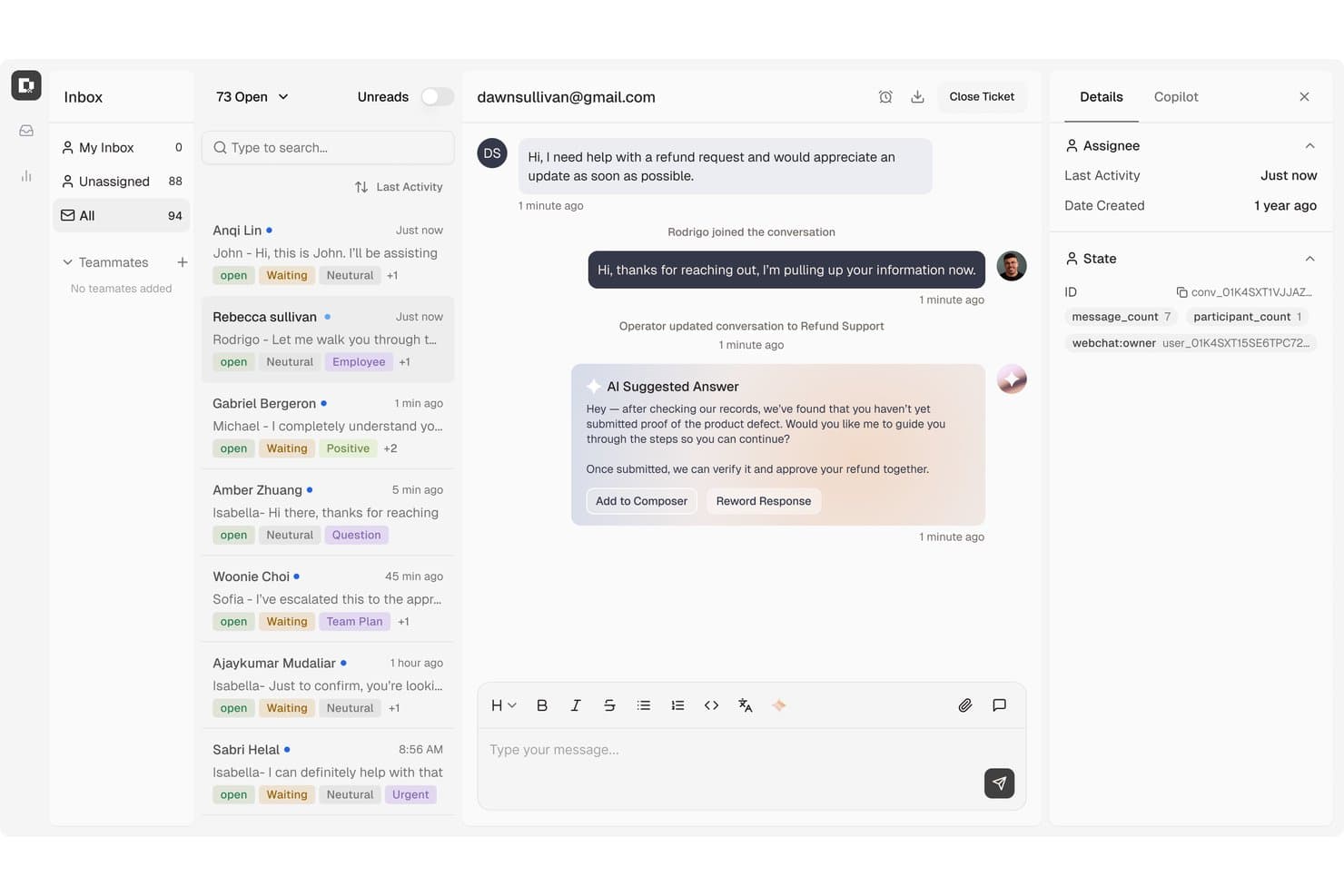
Botpress centralizes customer support tickets with AI-suggested replies. Botpress Desk is an AI-powered help desk that handles customer support tickets across L1, L2, and L3, with built-in automation, multi-channel intake, a self-service Help Center, and native connections to Zendesk and Intercom.
Who Is Botpress Best For?
Botpress Desk suits customer service teams that want AI to resolve tickets autonomously across multiple tiers without paying more as headcount grows.
Why I Picked Botpress
I've included Botpress in my top picks because it's one of the few help desk platforms that charges zero per-seat fees, so your support costs don't spike as you add agents. What I really like is how its AI handles tickets across L1, L2, and L3 autonomously, including multi-step workflows like issuing refunds or checking account status, without routing everything to a human. The built-in Help Center also lets AI reference published content mid-conversation, cutting repeat ticket volume at the source.
Botpress Key Features
- CSAT surveys: Sends localized customer satisfaction surveys after ticket resolution, with language-matched questions and rating labels.
- Conversation organization tools: Agents can apply priorities, tags, custom fields, snooze options, and threaded replies to manage tickets.
- Public Help Center: A branded, customer-facing knowledge base your team publishes and AI references live during support conversations.
- Zendesk and Intercom sync: Connects to your existing helpdesk so actions taken on either platform stay in sync without a full migration.
Botpress Integrations
Botpress Desk has native integrations with Zendesk and Intercom, helping small teams retain existing helpdesk data. Marketplace integrations include Slack, HubSpot, Shopify, Stripe, and WhatsApp; APIs support custom connections, and Zapier is available.
Pros and Cons
Pros:
- Help Center gives customers self-service answers
- Multi-step workflows handle refunds and account checks
- AI handles repetitive customer inquiries
Cons:
- Desk access requires a request
- Complex flows can be difficult to debug
Learn more about Botpress: 10Best for managing shared inboxes
Missive
- 30-day free trial available
- From $14/user/month (billed annually)
Visit WebsiteCustomer Rating:4.8/5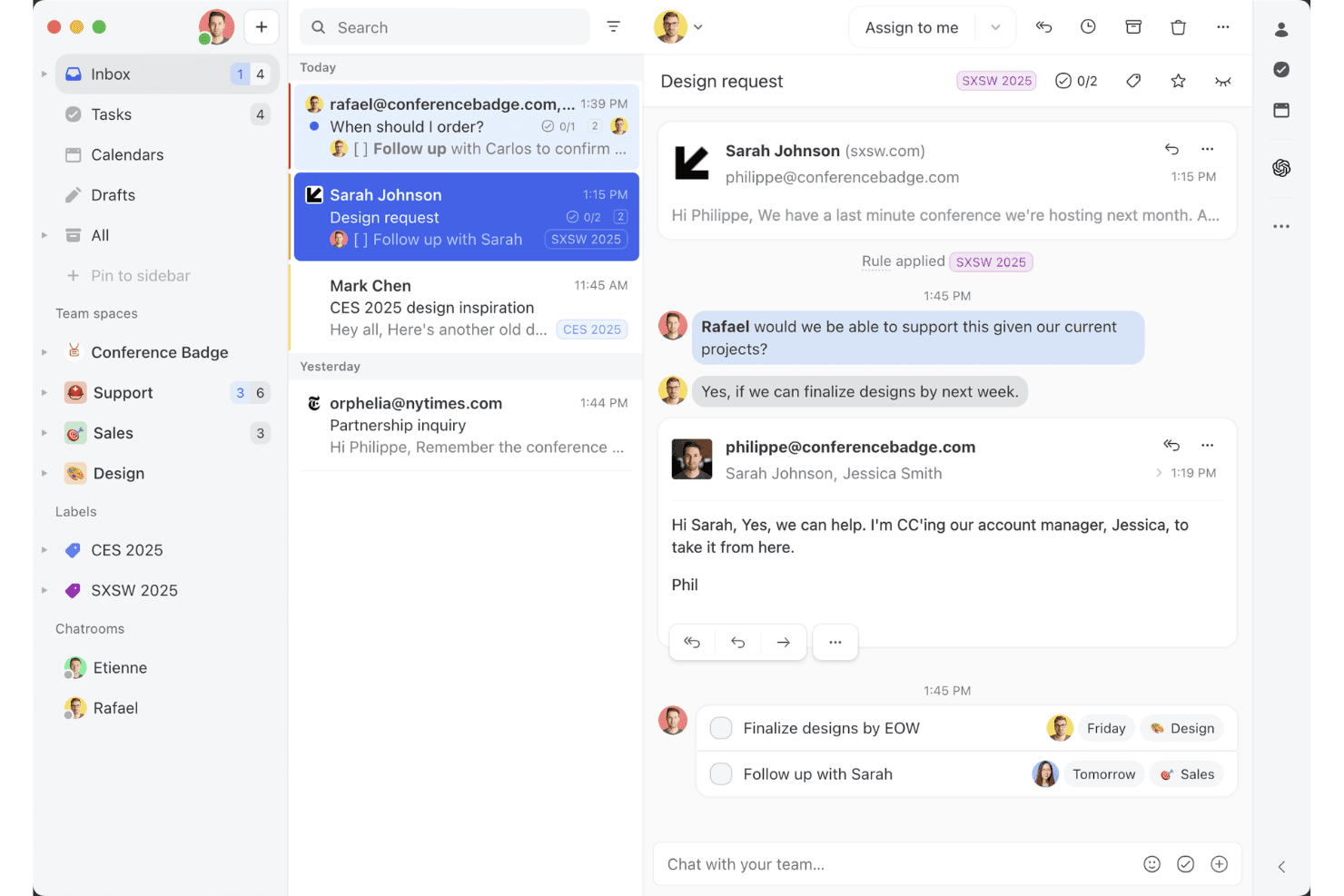
Missive’s shared inbox view shows how teams can collaborate on email threads, assign tasks, and manage client conversations in one workspace. Missive is a shared inbox and collaborative messaging platform that brings email, SMS, WhatsApp, Instagram DMs, and live chat into a single team workspace.
Who Is Missive Best For?
Missive is a great fit for small teams and solo founders who manage customer conversations across email, SMS, and social channels and need a shared inbox that multiple people can work in together.
Why I Picked Missive
Missive earns its spot on my shortlist because real-time collaborative drafting sets it apart from every other shared inbox tool I've tested. When two agents open the same conversation, they co-write the reply simultaneously, like a Google Doc, and collision detection blocks duplicate sends automatically. I also love that internal comment threads sit inline within the conversation, so my team can debate a tricky reply without cluttering the customer's inbox with accidental "reply all" messages.
Missive Key Features
- Multi-channel inbox: Consolidates email, SMS, WhatsApp, Instagram DMs, Facebook Messenger, and live chat into a single shared workspace.
- Automation rules engine: Supports up to 1,000 rules for auto-assignment, routing, labeling, and follow-up triggers on Productive and Business plans.
- AI reply drafting: Generates draft replies using full conversation context, with support for OpenAI, Anthropic, and Google Gemini via your own API key.
- Canned responses: Pre-built reply templates with variable fields let agents send consistent, personalized replies in seconds.
- Missive MCP Server: Connect external AI tools (like Claude or ChatGPT) to query help desk threads, check calendars, and draft replies—while keeping agent review required before sending.
Missive Integrations
Missive offers 25+ native integrations, including HubSpot, Salesforce, Shopify, Asana, ClickUp, Trello, and Aircall. Productive and Business plans include an open API, Zapier connectivity, and its new MCP Server (requires admin activation).
Pros and Cons
Pros:
- Mobile apps support full inbox management
- Multi-channel inbox on entry-level plan
- Real-time collaborative drafting for faster replies
Cons:
- No native CSAT or NPS surveys
- No built-in knowledge base for customers
Learn more about Missive:
Diğer Seçenekler
Küçük işletmeler için en iyi yardım masası yazılımları listesine giremeyen, ancak değerlendirmeye değer birkaç seçenek daha şunlardır:
- 11ZendeskBest AI-powered help desk software for scaling businesses
- 12Agentforce Service (formerly Service Cloud)Best for AI-powered personalization
- 13ManageEngine ServiceDesk PlusBest for free, self-hosted IT ticketing
- 14EngageBayBest small business help desk software for scalability
- 15HaloBest small business help desk software for customer self-service portals
- 16monday serviceBest for tracking and managing support queries
- 17GorgiasBest small business help desk software for monitoring agent performance
- 18FrontBest for automating repetitive tasks
- 19IssuetrakBest for omnichannel help desk support
- 20AvochatoBest small business help desk software for mobile functionality
How I Evaluate Help Desk Software
I split my evaluation into two layers: baseline capabilities every help desk needs—like ticket management and SLA enforcement—and the differentiators that set tools apart for specific CX teams.
Core Functionality (Table Stakes For This List)
When I'm selecting tools for my list, I rank each one on a scale from 0 (does not offer the functionality) to 5 (excels in this area) for each core functionality listed below. Then, I calculate the tool's total score into a percentage. Each tool needs to achieve a minimum total score of 75% to be considered for inclusion.
- Ticket Management System: I look at the full ticket lifecycle—creation, assignment, prioritization, tagging, and resolution—plus whether agents can merge, split, or link related tickets.
- Multi-Channel Support: Each tool should unify email, chat, phone, social, and web form inquiries in one inbox so agents aren't toggling between separate queues.
- Automation & Workflows: I evaluate whether routing rules, escalation triggers, and macros can handle real scenarios like auto-assigning billing tickets to a specialized team.
- Knowledge Base & Self-Service: A built-in help center with search, categorization, and public publishing matters—especially for deflecting common "how do I reset my password" tickets.
- Reporting & Analytics: Dashboards should cover core KPIs like first response time, resolution rate, and CSAT, with filtering by agent, team, or ticket category.
- SLA Management: I check whether you can set up SLA policies with business-hours rules and escalation alerts, like flagging tickets that approach a breach threshold.
Once I have a list of tools that meet the criteria, I consider what sets each platform apart.
Differentiating Factors (What Sets Vendors Apart)
Here's how I compare and contrast different vendors:
Standout Features
AI-powered features are a major differentiator. I check whether a tool can draft reply suggestions, summarize long threads, or surface relevant knowledge base articles mid-conversation. A customer context panel also matters—agents who can see prior tickets, account details, and purchase history alongside the active issue deliver more personal support. Built-in collaboration tools like side conversations and @mentions help agents loop in product or engineering teams without leaving the ticket.
Beyond Features
Integrations shape how well a help desk fits your existing stack. I evaluate whether a tool connects natively with CRMs like Salesforce or HubSpot, ecommerce platforms like Shopify, and team communication tools like Slack. Pricing structure also matters—per-agent models can get costly for growing teams, so I check whether vendors offer volume-based or tiered alternatives. Implementation speed is another factor I weigh, especially migration tools that let you import tickets and workflows from a previous platform without starting from scratch.
Küçük İşletmeler İçin Yardım Masası Yazılımı Nasıl Seçilir?
Uzun özellik listeleri ve karmaşık fiyatlandırma yapıları arasında kaybolmak kolaydır. Benzersiz yazılım seçimi sürecinizde ilerlerken odağınızı korumanıza yardımcı olmak için göz önünde bulundurmanız gereken faktörleri içeren bir kontrol listesi hazırladım:
| Faktör | Göz önünde bulundurulması gerekenler |
|---|---|
| FaktörÖlçeklenebilirlik | Göz önünde bulundurulması gerekenlerYazılımın işletmenizle birlikte büyüyebildiğinden emin olun. İhtiyaçlarınız genişledikçe büyük kesintiler yaşamadan kullanıcı veya özellik eklemenize olanak tanıyan seçenekleri tercih edin. |
| FaktörEntegrasyonlar | Göz önünde bulundurulması gerekenlerHer şeyin bağlantılı kalması için yazılımın ekibinizin hâlihazırda kullandığı CRM'ler, e-posta platformları veya sosyal medya kanalları gibi araçlarla entegre olup olmadığını kontrol edin. |
| FaktörÖzelleştirilebilirlik | Göz önünde bulundurulması gerekenlerYazılımı iş akışınıza uyacak şekilde ne ölçüde uyarlayabileceğinizi değerlendirin. Esnek ayarlar ve seçenekler, yazılımı benzersiz ihtiyaçlarınıza daha uygun hâle getirebilir. |
| FaktörKullanım Kolaylığı | Göz önünde bulundurulması gerekenlerEkibinizin kapsamlı bir eğitim almadan kullanabileceği sezgisel bir arayüz arayın. Kullanıcı dostu bir tasarım zamandan tasarruf sağlar ve hayal kırıklığını azaltır. |
| FaktörBütçe | Göz önünde bulundurulması gerekenlerGizli ücretler de dâhil olmak üzere toplam maliyeti değerlendirin. Yatırımınızın karşılığını en iyi şekilde aldığınızdan emin olmak için özellikleri ve fiyatlandırma kademelerini karşılaştırın. |
| FaktörGüvenlik Önlemleri | Göz önünde bulundurulması gerekenlerYazılımın veri korumaya ilişkin sektör standartlarına uyduğundan emin olun. Şifreleme ve erişim kontrolleri gibi özellikler bilgilerin korunması açısından zorunludur. |
Küçük İşletmeler İçin Yardım Masası Yazılımlarındaki Trendler
Araştırmamda, küçük işletmelere yönelik farklı yardım masası yazılımı sağlayıcılarının sayısız ürün güncellemesini, basın bültenini ve sürüm günlüğünü inceledim. Takip ettiğim yeni ortaya çıkan trendlerden bazıları şunlar:
- Yapay Zekâ Yardım Masası Araçları: Kuruluşların %70'i, yapay zekânın müşteri hizmetleri operasyonlarını önemli ölçüde iyileştireceğine inanıyor. Daha fazla araç, müşteri etkileşimlerini analiz etmek ve uygulanabilir içgörüler sunmak için yapay zekâyı entegre ediyor. Örneğin bazı sağlayıcılar, yaygın sorunları öne çıkarmak ve çözümler önermek için yapay zekâ destekli analizler sunuyor.
- Kendi Kendine Hizmet Portalları: Müşterileri kendi kendilerine hizmet seçenekleriyle güçlendirmeye yönelik eğilim giderek artıyor. Bu portallar, kullanıcıların yanıtları kendi başlarına bulmasını sağlayarak destek ekiplerinin iş yükünü azaltıyor. Sağlayıcılar bu portalları sezgisel arayüzler ve kapsamlı bilgi tabanlarıyla geliştiriyor.
- Omni Kanal Destek: İşletmelerin artık müşteri etkileşimlerini birden fazla kanal üzerinden sorunsuz bir şekilde yönetmesi bekleniyor. Bu trend kapsamında sağlayıcılar, e-postaları, sohbetleri, sosyal medyayı ve daha fazlasını tek bir kontrol panelinden yönetmek için entegre platformlar sunuyor.
- Uzaktan Destek Olanakları: Uzaktan çalışma yaygınlaştıkça yardım masası çözümleri, uzaktan sorun gidermeyi destekleyen özelliklere odaklanıyor. Buna, fiziksel olarak bulunmaya gerek kalmadan sorunları verimli bir şekilde çözmek için sanal yardım araçları ve uzak masaüstü erişimi de dahil.
- Veriye Dayalı Kişiselleştirme: Veri içgörülerini kullanarak müşteri deneyimini özelleştirmek kritik hâle geliyor. Araçlar artık geçmiş davranışlara ve tercihlere dayalı olarak etkileşimleri kişiselleştiren özellikler sunuyor; bu da kullanıcı memnuniyetini ve sadakatini artırıyor.
Küçük İşletmeler İçin Yardım Masası Yazılımı Nedir?
Küçük işletmelere yönelik yardım masası yazılımı, müşteri sorularını ve destek taleplerini verimli bir şekilde yönetmek için tasarlanmış bir araçtır. Bu araçlar genellikle müşteri hizmetleri uzmanları, BT personeli ve küçük işletme sahipleri tarafından müşteri memnuniyetini artırmak ve destek operasyonlarını kolaylaştırmak amacıyla kullanılır.
Talep yönetimi, kendi kendine hizmet portalları ve omni kanal destek özellikleri; taleplerin düzenlenmesine, müşterilerin güçlendirilmesine ve farklı kanallardaki etkileşimlerin yönetilmesine yardımcı olur. Genel olarak bu araçlar, işletmelere daha iyi ve daha hızlı yanıt veren müşteri desteği sunma olanağı sağlar.
Küçük İşletmelere Yönelik Yardım Masası Yazılımının Özellikleri
Küçük işletmelere yönelik yardım masası yazılımını seçerken aşağıdaki temel özelliklere dikkat edin:
- Talep yönetimi: Müşteri sorularını yönetilebilir talepler hâlinde düzenleyerek ekibinizin sorunları önceliklendirmesine ve verimli bir şekilde ele almasına olanak tanır.
- Kendi kendine hizmet portalları: Müşterilerin yanıtları kendi başlarına bulmasını sağlayarak destek ekibinizin iş yükünü azaltır ve yanıt sürelerini iyileştirir.
- Omni kanal destek: E-posta, sohbet ve sosyal medya gibi birden fazla platformdaki müşteri etkileşimlerinin tek bir arayüzden yönetilmesini sağlar.
- Yardım masalarında yapay zekâ araçları: Yapay zekâ veri analizinden yapay zekâ sohbet robotlarına ve temsilcilere yönelik üretken yapay zekâ desteğine kadar yapay zekâ, müşteri hizmetlerini desteklemek için güçlü bir araçtır.
- Uzaktan destek olanakları: Uzak kullanıcıların sorunlarını etkili bir şekilde çözmek için sanal yardım ve uzak masaüstü erişimi gibi araçlar sunar.
- Veriye dayalı kişiselleştirme: Müşteri etkileşimlerini geçmiş davranışlara göre özelleştirerek kullanıcı memnuniyetini artırır ve sadakati güçlendirir.
- Özelleştirilebilir kontrol panelleri: Ekiplerin arayüzü kendi iş akışı gereksinimlerine göre uyarlamasına olanak tanıyarak kullanılabilirliği ve verimliliği artırır.
- CRM sistemleriyle entegrasyon: Yardım masanız ile müşteri ilişkileri yönetimi araçlarınız arasında sorunsuz veri akışı sağlayarak müşteri içgörülerini geliştirir.
- Raporlama ve analiz: Performans ölçümleri hakkında ayrıntılı içgörüler sunarak ekiplerin verimliliği takip etmesine ve iyileştirme alanlarını belirlemesine yardımcı olur.
- Otomasyon özellikleri: Tekrarlayan ve zaman alan görevleri otomatikleştirerek ekibinizin daha yaratıcı ve stratejik çalışmalara zaman ayırmasını sağlar.
Yardım Masası Yazılımı: Güvenlik ve Uyumlulukla İlgili Hususlar
Yardım masası yazılımını seçerken güvenlik ve uyumluluk, hassas verileri korumak ve sektörel düzenlemelere uymak açısından kritik öneme sahiptir. Dikkate alınması gereken temel hususlar şunlardır:
- Veri Şifreleme: Yetkisiz erişimi önlemek için verilerin aktarım sırasında (SSL/TLS) ve bekleme durumunda şifrelendiğinden emin olun.
- Erişim Kontrolleri: Erişimi kısıtlamak için role dayalı izinler ve çok faktörlü kimlik doğrulama (MFA) kullanın.
- Denetim Günlükleri: Değişiklikleri izlemek ve güvenlik olaylarını tespit etmek için kullanıcı etkinliklerinin ayrıntılı günlüklerini tutun.
- Uyumluluk Standartları: İşletmenize bağlı olarak GDPR, HIPAA veya ISO 27001 gibi sektörel düzenlemelere uyulduğunu doğrulayın.
- Veri Yedekleme ve Kurtarma: Düzenli yedeklemeler ve felaket kurtarma planları veri kaybına karşı koruma sağlar.
- Güvenli Entegrasyonlar: Güvenlik açıklarını önlemek için üçüncü taraf entegrasyonlarının güvenlik açısından en iyi uygulamaları izlediğinden emin olun.
- Kullanıcı Gizliliğinin Korunması: Müşteri verilerini korumak ve gereksiz veri toplama işlemlerini sınırlamak için politikalar uygulayın.
- Olay Müdahale Planı: Güvenlik ihlallerini etkili bir şekilde tespit etmek, bildirmek ve bunlara müdahale etmek için bir stratejiniz olsun.
Bu önlemler, yasal ve sektörel gerekliliklere uyumu sağlarken yardım masanızın güvenli kalmasına yardımcı olur.
Küçük İşletmeler İçin Yardım Masası Yazılımının Faydaları
Küçük işletmeler için yardım masası yazılımı uygulamak, ekibiniz ve işletmeniz için çeşitli faydalar sağlar. Yararlanabileceğiniz avantajlardan bazıları şunlardır:
- Geliştirilmiş verimlilik: Talep yönetimi ve otomasyon özellikleri, ekibinizin sorunları önceliklendirmesine ve daha hızlı çözmesine yardımcı olarak zamandan ve kaynaklardan tasarruf sağlar.
- Artırılmış müşteri memnuniyeti: Kendi kendine hizmet portalları ve çok kanallı destek, müşterilerin tercih ettikleri platformlar üzerinden zamanında ve doğru yardım almasını sağlar.
- Veriye dayalı kararlar: Yapay zekâ destekli içgörüler ve raporlama araçları, destek stratejilerinizi iyileştirmek ve hizmet kalitesini artırmak için değerli veriler sağlar.
- Maliyet tasarrufu: Taleplerin verimli bir şekilde ele alınması ve destek ekiplerinin iş yükünün azaltılması, zaman içinde daha düşük operasyonel maliyetler sağlayabilir.
- Artırılmış esneklik: Özelleştirilebilir panolar ve CRM sistemleriyle entegrasyon, ekibinizin yazılımı belirli işletme gereksinimlerine uyacak şekilde uyarlamasına olanak tanır.
- Daha iyi güvenlik: Güvenlik önlemleri, hassas müşteri verilerini koruyarak sektörel standartlara uyumu sağlar ve müşterilerinizin güvenini oluşturur.
- Ölçeklenebilirlik: İşletmeniz büyüdükçe ölçeklenebilir çözümler, yardım masası yazılımınızın kesinti olmadan ihtiyaçlarınız doğrultusunda genişleyebilmesini sağlar.
Küçük İşletmeler İçin Yardım Masası Yazılımı Maliyetleri ve Fiyatlandırması
Küçük işletmeler için yardım masası yazılımı seçerken mevcut çeşitli fiyatlandırma modellerini ve planları anlamak gerekir. Maliyetler özelliklere, ekip büyüklüğüne, eklentilere ve daha fazlasına göre değişir. Aşağıdaki tablo, küçük işletmelere yönelik yardım masası yazılımı çözümlerinde yaygın planları, ortalama fiyatlarını ve genellikle sunulan özellikleri özetlemektedir:
Küçük İşletmeler İçin Yardım Masası Yazılımı Plan Karşılaştırma Tablosu
| Plan Türü | Ortalama Fiyat | Yaygın Özellikler |
|---|---|---|
| Plan TürüÜcretsiz Plan | Ortalama Fiyat$0/user/month | Yaygın ÖzelliklerTemel talep yönetimi, e-posta desteği ve sınırlı raporlama. |
| Plan TürüKişisel Plan | Ortalama Fiyat$5-$25/user/month | Yaygın ÖzelliklerGelişmiş talep yönetimi, kendi kendine hizmet portalı ve temel analizler. |
| Plan Türüİşletme Planı | Ortalama Fiyat$30-$60/user/month | Yaygın ÖzelliklerÇok kanallı destek, otomasyon araçları ve CRM sistemleriyle entegrasyon. |
| Plan TürüKurumsal Plan | Ortalama Fiyat$70-$120/user/month | Yaygın ÖzelliklerÖzelleştirilebilir panolar, yapay zekâ destekli içgörüler ve gelişmiş güvenlik özellikleri. |
nMemnun Müşteriler = Geri Dönen Müşteriler
n
İstatistiksel olarak konuşursak, gelirinizin %65'inin mevcut müşterilerden gelmesi muhtemeldir. Müşteri ilişkilerinizi geliştirdiğinizde, onların küçük işletmenize olan bağlılığını doğal olarak artırır ve bunun sonucunda daha fazla satış gerçekleştirirsiniz.
Müşteri temas noktalarınızın faydalı, açık, nazik ve verimli etkileşimlerle nitelendirilmesini sağlamak, müşterilerinizin onlara ne kadar değer verdiğinizi anlamalarını sağlar. Küçük işletmeler için yardım masası yazılımına yapacağınız yatırım, her bir temas noktasındaki etkileşimlerinizin kalitesini önemli ölçüde artırabilir. Öyleyse ne bekliyorsunuz?