

Yardım masası yazılımı, destek ekiplerine e-posta, sohbet ve diğer önemli kanallar üzerinden müşteri sorunlarını alımdan çözüme kadar verimli bir şekilde yönetmeleri için gerekli araçları sunar. Günde birkaç düzine destek talebiyle ilgileniyor veya küresel bir destek operasyonunu koordine ediyor olun, doğru yardım masası aracı iş akışlarını kolaylaştırabilir, ekip üretkenliğini artırabilir, yanıt sürelerini iyileştirebilir ve müşteri deneyimini geliştirebilir.
Tarafsız bir rehber sunmak amacıyla bu çözümleri test edip inceledim. Bu makalede, en iyi seçimlerimi ayrıntılı şekilde ele alacak ve her birinin ekibinizin olağanüstü hizmet sunmasına nasıl destek olabileceğine odaklanacağım.
Why Trust Our Software Recommendations
6,700+
Reviews
20
Industry experts
16+
Evaluation factors
14
Years
Our team has been testing and reviewing software since 2012. As CX leaders ourselves, we know how difficult—and important—it is to choose the right software.
For this guide, we evaluated tools using hands-on testing and independent research, scoring tools using our selection criteria.
Our reviews reflect our human editorial judgment, not a sales pitch.
 Gui DrusinaCreative Director
 Tim FisherVP of AI
Yardım Masası Yazılımı Karşılaştırma Tablosu
Bu karşılaştırma tablosu, en iyi yardım masası yazılımı seçimlerimin fiyatlandırma ayrıntılarını özetlemektedir:
Sorted by: Default
| Tool | Starting Price | Website | |
|---|---|---|---|
Best for an advanced customer self-service portal | 4.4 out of 5 | $29/user/month 14-day free trial available | Book Demo |
Best for automating repetitive IT requests | 4.5 out of 5 | $209/month/technician 30-day free trial available | Website |
Best for AI-driven IT service management | 4.6 out of 5 | $19/user/month 14-day free trial | Book Demo |
Best help desk software for creating no-code automations | 4.5 out of 5 | $25/user/month Free plan + 15-day free trial + free demo available | Website |
Best for AI-driven customer support | 4.6 out of 5 | $16/agent/month Free plan + 14-day trial + free demo available | Website |
Best for IT help desk management | 4.6 out of 5 | Pricing upon request 14-day free trial | Website |
Best for AI-driven ticket management | 4.4 out of 5 | $7/user/month Free plan + 15-day trial + demo available | Website |
Best for conversation-based AI ticket handling | 4.5 out of 5 | $150/month Free plan + free trial + free demo available | Website |
Best for AI-powered ecommerce inbox management | 4.4 out of 5 | $45/user/month 14-day free trial + free demo available | Website |
Best with extensive third-party integrations | 4.4 out of 5 | $29/month 21-day free trial | Website |


En İyi Yardım Masası Yazılımı İncelemeleri
Size en uygun yardım masası yazılımını bulmanıza yardımcı olmak için en iyi 10 seçimimin ayrıntılı özetlerini sundum ve her sistemi bu listeye neden dahil ettiğimi açıkladım.
Ayrıca, size en uygun yardım masası yazılımını bulmanıza yardımcı olmak amacıyla farklı kullanım alanlarına yönelik ek seçenekleri de aşağıda listeledim.
 Best for an advanced customer self-service portal
- 14-day free trial available
- From $29/user/month (billed annually)
Visit WebsiteCustomer Rating:4.4/5
Freshdesk's powerful shared inbox puts detailed customer information and advanced features within easy reach for your agents. Freshdesk is a cloud-based help desk platform built for support teams in businesses of all sizes who need to manage customer inquiries across multiple channels and automate repetitive tasks.
Who Is Freshdesk Best For?
Freshdesk is a good fit for growing support teams that need a scalable help desk with multichannel ticket management and self-service tools built in from the start.
Why I Picked Freshdesk
Freshdesk earns its spot as one of the best on my shortlist because of how far its self-service portal goes beyond a basic knowledge base. I like that you can build fully branded portals where customers search articles, browse community forums, and submit tickets—all in one place. Article versioning and approval workflows mean my team can keep content accurate without publishing outdated answers. Freddy AI Agent automatically responds to incoming emails using knowledge base content, so customers get cited answers instantly without creating a ticket.
Freshdesk Key Features
- Omnichannel ticket management: Consolidate customer conversations from email, chat, phone, and social media into a single shared inbox.
- Automation rules: Set up ticket assignment, priority tagging, and follow-up actions based on conditions you define.
- Collision detection: Get real-time alerts when multiple agents are viewing or replying to the same ticket simultaneously.
- Custom reporting and dashboards: Build reports that track ticket volume, response times, and agent performance across your support team.
Freshdesk Integrations
Integrations include Playvox, Slack, MS Teams, Shopify, Salesforce, Jira, and connector apps for custom integrations using APIs and pre-built templates.
Pros and Cons
Pros:
- Supports canned responses to offer consistent responses to common questions
- Includes a thank you detector tool that prevents tickets from being reopened when a customer says "thanks"
- Supports SLA management
Cons:
- Multilingual features are only available in their Pro or Enterprise plans
- Intelligent AI-based features and chat-bots are limited to their top-level paid plan (Enterprise)
Learn more about Freshdesk: Best for automating repetitive IT requests
- 30-day free trial available
- From $209/month/technician (billed annually)
Visit WebsiteCustomer Rating:4.5/5
Robin performing autonomous computer analysis to identify high memory usage and system performance issues in real time. Robin Autonomous IT is Atera's AI-driven service agent that takes ownership of IT requests from intake through resolution, handling device actions, cloud workflows, and ticket management autonomously.
Who Is Robin Autonomous IT Best For?
Robin is a strong fit for IT teams and managed service providers using the Atera platform who need to handle high ticket volumes with a small team of technicians.
Why I Picked Robin Autonomous IT
I picked Robin as one of the best because of how it handles the high-volume, repetitive requests that clog up most help desk queues. Think password resets, app installs, network adapter resets, and disk cleanups—Robin executes those actions directly on devices and in the cloud without a technician touching the ticket. What I especially like is the playbook-based workflow automation: when a trigger condition is met, Robin runs a predefined sequence of steps from start to close.
Robin Autonomous IT Key Features
- Multi-channel request intake: Robin receives IT requests from Slack, Microsoft Teams, and email, then routes and processes them without manual triage.
- User identity verification: Before taking any action, Robin confirms the requester's identity and gathers device context to validate the issue.
- AI-powered ticket tagging: Robin automatically categorizes and tags incoming tickets to keep queues organized without technician input.
- Technician escalation routing: When Robin can't resolve an issue autonomously, it escalates the ticket to the right technician with full diagnostic context already attached.
Robin Autonomous IT Integrations
Robin Autonomous IT is part of the Atera platform and connects to identity providers like Okta, Azure AD, and Google Workspace for user verification. It receives requests from Microsoft Teams, Slack, and email, and integrates with third-party ITSM tools. The broader Atera platform includes native integrations with Acronis, Bitdefender, Splashtop, AnyDesk, ScreenConnect, TeamViewer, IT Glue, QuickBooks, and Xero, and it connects with Zapier. An API is available for custom integrations, and Robin supports MCP-based connections to execute dynamic API-based cloud actions against in-house systems.
Pros and Cons
Pros:
- AI generates scripts from plain-text prompts
- Supports multiple remote access tool options
- Resolves tickets end-to-end without technicians
Cons:
- Mac management trails behind Windows support
- AI features require a separate paid add-on
Learn more about Robin Autonomous IT: Best for AI-driven IT service management
- 14-day free trial
- From $19/user/month (billed annually)
Visit WebsiteCustomer Rating:4.6/5
Freshservice has a robust ticket management system for filtering incidents and their statuses. Freshservice is a cloud-based help desk platform built for IT teams and service departments that need to manage requests, automate workflows, and deliver fast support across multiple channels.
Who Is Freshservice Best For?
Freshservice is a strong fit for mid-size to enterprise IT teams that need a structured, scalable platform for managing internal service requests and incidents.
Why I Picked Freshservice
Freshservice earns its spot on my shortlist because of how deeply AI is woven into the service desk workflow, not just bolted on. I particularly like Freddy AI Copilot, which lets agents draft responses, summarize long ticket threads, and generate knowledge base articles without leaving the ticket view. Freddy AI Agent also handles 24/7 self-service on Slack and Microsoft Teams, so my team isn't fielding repetitive requests around the clock. The AI-driven incident auto-routing also means tickets land with the right agent based on availability and workload, which cuts down on manual triage.
Freshservice Key Features
- SLA management: Set and track service level agreements with automated escalations when response or resolution deadlines are at risk.
- Self-service portal: Give employees a branded portal to submit tickets, track request status, and search the knowledge base without contacting an agent.
- Change management: Plan, review, and approve IT changes with built-in workflows, risk assessment, and a visual change calendar.
- Asset management: Discover, track, and manage hardware and software assets directly within the help desk, linking them to related tickets and incidents.
Freshservice Integrations
Integrations include Microsoft Teams, SecPod, Slack, TeamViewer, Jira, Azure AD, Workato, and over 1,200 additional enterprise apps through the Freshservice Marketplace.
Pros and Cons
Pros:
- Supports self-service tools and expert directories for efficient issue resolution
- Asset management functionality
- Robust automation capabilities
Cons:
- Freddy copilot is a paid add-on
- Reporting capabilities are a bit limited
Learn more about Freshservice: Best help desk software for creating no-code automations
- Free plan + 15-day free trial + free demo available
- From $25/user/month (billed annually)
Visit WebsiteCustomer Rating:4.5/5
Proactively contact website visitors with messages targeted to the page they're viewing. Help Scout gives customer support teams a shared inbox, live chat, and knowledge base tools that help small businesses and growing companies manage customer conversations and deliver fast, personalized support.
Who Is Help Scout Best For?
Help Scout is a great fit for small to mid-sized support teams that need a straightforward, easy-to-use help desk without a steep learning curve.
Why I Picked Help Scout
Help Scout earns its spot on my shortlist because of how well its no-code workflow automation handles the repetitive routing and tagging work that quietly eats up a support team's day. I like that you can build workflows using simple if/then logic—no developer needed—for example, automatically assigning refund requests to a billing specialist or tagging and escalating conversations that have been waiting over 24 hours. Additionally, saved replies let my team answer common questions in a few clicks rather than rewriting the same response from scratch. The combination of automated routing and ready-made replies means my team spends less time on inbox management and more time on conversations that actually need a human touch.
Help Scout Key Features
- Shared inbox: Manage all customer email conversations in one collaborative inbox where teammates can assign, comment on, and track threads.
- Live chat widget: Embed a chat widget on your site to handle real-time customer conversations directly from the Help Scout interface.
- Docs knowledge base: Build and publish a self-service help center where customers can find answers without contacting your team.
- Customer profiles: View a customer's full conversation history and profile data alongside every support ticket for added context.
Help Scout Integrations
Integrations include Salesforce, Shopify, Slack, HubSpot, Mailchimp, Jira, Google Apps, Segment, WhatsApp, and SurveyMonkey.
Pros and Cons
Pros:
- Has an intuitive and user-friendly interface
- Decent feature coverage in their most affordable plan
- Includes mobile apps for iOS and Android devices
Cons:
- Enterprise security and HIPPA compliance features are only available as add-ons
- Additional charges apply to send proactive messages to engage customers
Learn more about Help Scout: Best for AI-driven customer support
- Free plan + 14-day trial + free demo available
- From $16/agent/month (billed annually)
Visit WebsiteCustomer Rating:4.6/5
SparrowDesk inbox view showing active support tickets, priorities, and assignees. SparrowDesk is a help desk platform designed for teams who want to manage customer inquiries across multiple channels and automate routine support tasks using AI, making it a strong choice for businesses that want fast, consistent service.
Who Is SparrowDesk Best For?
SparrowDesk is a good fit for small to mid-sized support teams that need a centralized help desk with AI-powered tools to handle growing ticket volumes without adding headcount.
Why I Picked SparrowDesk
SparrowDesk earns its spot on my shortlist because of how well its AI handles the repetitive, high-volume side of customer support. The AI automatically categorizes and routes incoming tickets based on content, so my team isn't manually triaging every request. The AI-suggested responses are useful too—when a customer asks a common billing question, SparrowDesk surfaces a relevant draft reply that agents can send or tweak in seconds. Ticket automation paired with a multichannel inbox makes it a strong pick for AI-driven customer support.
SparrowDesk Key Features
- Self-service knowledge base: Build and publish a searchable help center where customers can find answers to common questions without contacting support.
- SLA management: Set response and resolution time targets, with automatic alerts when tickets are at risk of breaching agreed service levels.
- Collision detection: Alerts agents when multiple team members are viewing or replying to the same ticket to prevent duplicate responses.
- Customer satisfaction (CSAT) surveys: Automatically send post-resolution surveys to collect feedback on individual support interactions.
SparrowDesk Integrations
Integrations include Attio, Zapier, SurveySparrow, HubSpot, and Okta.
Pros and Cons
Pros:
- AI Copilot boosts agent productivity
- SLA tracking supports accountability
- Omnichannel inbox centralizes conversations
Cons:
- Pricing may challenge smaller teams
- Limited native integrations available
Learn more about SparrowDesk: Best for IT help desk management
- 14-day free trial
- Pricing upon request
Visit WebsiteCustomer Rating:4.6/5
SuperOps helps MSPs provide better customer service with its service desk module for ticket management and client communication. SuperOps is a cloud-based help desk platform built for IT teams and managed service providers who need to manage tickets, automate workflows, and track assets in one place.
Who Is SuperOps Best For?
SuperOps is a strong fit for managed service providers and internal IT teams that need a unified platform for handling tickets, managing assets, and supporting end users.
Why I Picked SuperOps
SuperOps is on my shortlist because it's one of the few help desk platforms built specifically for IT operations, where ticket context and device data live together. I like that every ticket is automatically enriched with asset information from the connected RMM layer, so technicians aren't switching between tools to understand what's happening on a user's machine. The Monica AI feature surfaces relevant fixes from similar past tickets and auto-generates worklogs from technician replies, reducing manual documentation. For IT teams managing high ticket volumes, that built-in intelligence makes a real operational difference.
SuperOps Key Features
- SLA management: Set and track response and resolution time targets across different ticket priorities and client tiers.
- Canned responses: Build a library of pre-written replies that technicians can insert into tickets to handle common requests faster.
- Customer portal: Give end users a self-service portal to submit tickets, check request status, and access knowledge base articles.
- Automation rules: Trigger ticket assignments, priority changes, and notifications based on conditions like ticket type, source, or keyword.
SuperOps Integrations
Integrations include TeamViewer, Splashtop, ConnectWise Control, Xero, QuickBooks Online, Bitdefender, Webroot, Stripe, Pax8, and Acronis.
Pros and Cons
Pros:
- User-friendly interface
- Good automation capabilities
- All-in-one RMM and PSA features
Cons:
- Client portal could be improved
- Limited support for other languages
Learn more about SuperOps: Best for AI-driven ticket management
- Free plan + 15-day trial + demo available
- From $7/user/month (billed annually)
Visit WebsiteCustomer Rating:4.4/5
Create processes for common tasks with the visual blueprint builder. Zoho Desk is a cloud-based help desk platform built for customer service teams who need to manage high volumes of support tickets across multiple channels and automate repetitive tasks.
Who Is Zoho Desk Best For?
Zoho Desk is a good fit for small to mid-sized businesses that need a scalable, multi-channel support platform without the enterprise price tag.
Why I Picked Zoho Desk
Zoho Desk earns its spot on my shortlist because of how well its AI assistant, Zia, handles the repetitive cognitive work of ticket management. I like that Zia automatically tags incoming tickets, detects customer sentiment, and suggests relevant knowledge base articles to agents in real time. My team also uses the AI-powered response suggestions to cut down on reply time without sacrificing quality. The auto-tagging alone saves a noticeable amount of manual triage work when ticket volumes spike.
Zoho Desk Key Features
- Omnichannel ticket inbox: Manage tickets from email, phone, live chat, social media, and web forms in a single unified interface.
- Blueprint process builder: Design step-by-step process flows that guide agents through ticket resolution according to your business workflows.
- SLA management: Set response and resolution time targets, with automatic escalations when deadlines are at risk.
- Knowledge base: Create, organize, and publish help articles that agents and customers can access directly within the support portal.
Zoho Desk Integrations
Integrations include Zoho CRM, Zoho Voice, Zoho Analytics, Zoho SalesIQ, Zoho Books, Zoho BugTracker, Jira, Slack, Microsoft Teams, and Trello.
Pros and Cons
Pros:
- Good reporting and analytics features for performance tracking
- Comprehensive ticket management features
- Effective automation tools that enhance productivity
Cons:
- Mobile experience is less polished
- Limited flexibility in rule customization
Learn more about Zoho Desk: Best for conversation-based AI ticket handling
- Free plan + free trial + free demo available
- From $150/month (billed annually)
Visit WebsiteCustomer Rating:4.5/5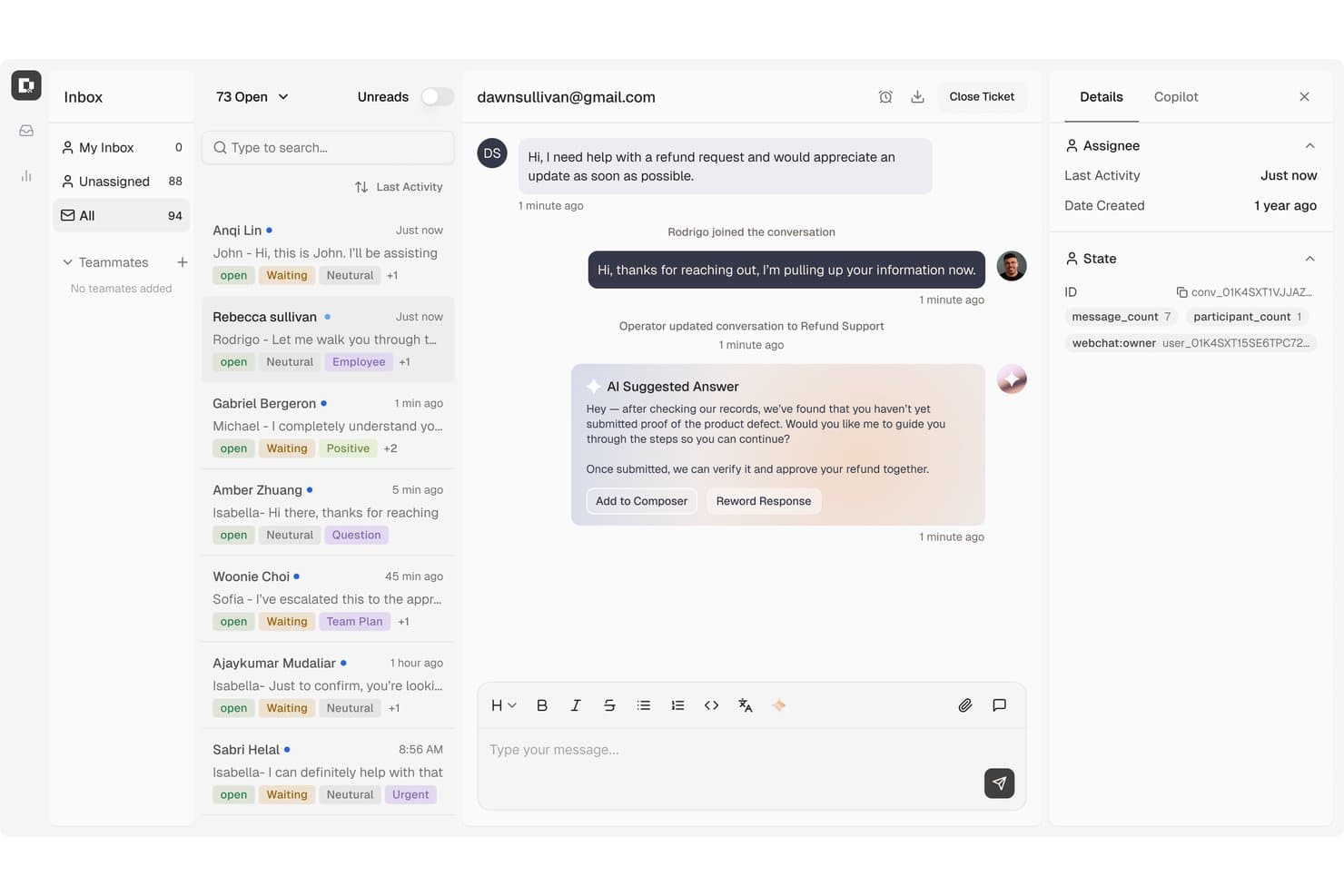
Botpress surfaces AI-suggested replies to speed up agent responses. Botpress Desk is an AI-powered help desk platform that handles ticket classification, routing, and resolution through conversational AI agents, with support for channels like webchat, email, WhatsApp, and voice, plus native connections to Zendesk and Intercom.
Who Is Botpress Best For?
Botpress Desk is a strong fit for CX teams that want AI agents to handle ticket resolution end-to-end, especially if they're already using Zendesk or Intercom and want to layer conversational AI on top without replacing their existing setup.
Why I Picked Botpress
I picked Botpress as one of the best because it handles ticket resolution through actual conversation, not just routing. Its AI agents classify tickets by issue type, language, and customer tier, then take action, like pulling live order data or issuing refunds under defined conditions, without a human touching the queue. I also like that it connects to existing Zendesk or Intercom setups via OAuth, so teams don't have to rip out what's already working to get AI-driven resolution running.
Botpress Key Features
- AI draft replies: Agents can generate AI-written draft responses directly in the ticket composer before sending.
- CSAT scoring: Each ticket captures an effective CSAT score, prioritizing explicit customer ratings over AI-inferred ones.
- SLA notifications: Configurable alerts fire at personal, team, and workspace levels when SLAs are approaching or breached.
- Help Center with custom domain: Teams can publish a public-facing self-service portal, with custom domain support available on Plus and above.
Botpress Integrations
Botpress offers 190+ native integrations, including Zendesk, Intercom, HubSpot, Salesforce, Shopify, Stripe, Slack, WhatsApp, and Twilio. It also provides Chat, Admin, Files, Tables, and Runtime APIs for custom integrations, plus Zapier.
Pros and Cons
Pros:
- Visual flows support tailored support automation
- Agents get reply drafts and customer context
- AI classifies, prioritizes, and routes tickets
Cons:
- Flow debugging can slow support changes
- Complex conversations need prompt testing
Learn more about Botpress: Best for AI-powered ecommerce inbox management
- 14-day free trial + free demo available
- From $45/user/month (billed annually)
Visit WebsiteCustomer Rating:4.4/5
eDesk automates ecommerce inbox organization using AI-based ticket sorting. eDesk is a help desk platform built for ecommerce businesses and online retailers who need to manage customer messages, orders, and support tickets across multiple sales channels in one place.
Who Is eDesk Best For?
eDesk is a strong fit for ecommerce businesses selling across multiple online marketplaces and storefronts who need a centralized place to manage customer support.
Why I Picked eDesk
eDesk earns its spot on my shortlist because of how well its AI Agent handles the specific demands of ecommerce support. I picked it because the AI Agent doesn't just auto-reply—it pulls live order details, checks your return policies, and applies your rules before sending a response, so it makes decisions rather than merely pattern-matching. I also like the AI ticket classification in the inbox, which groups similar tickets automatically so my team can work through high volumes without losing context. The combination of a unified multichannel inbox and an AI layer that understands ecommerce-specific intent—returns, cancellations, pre-sales questions—distinguishes eDesk from general-purpose help desk tools.
eDesk Key Features
- Automation rules: Set up custom triggers to auto-assign, tag, or escalate tickets based on channel, keyword, or order status.
- Live chat widget: Add a chat widget to your storefront so customers can reach your team directly while browsing or checking out.
- Customer view: See a full history of a customer's orders, past tickets, and interactions pulled together in a single profile.
- Reporting dashboard: Track ticket volume, response times, and agent performance across all channels in one view.
eDesk Integrations
Integrations include Amazon, eBay, Walmart, Shopify, Magento, WooCommerce, BigCommerce, Facebook, Instagram, and Klaviyo.
Pros and Cons
Pros:
- Centralizes customer messages from marketplaces and stores
- Organized ticket views improve daily workflow efficiency
- AI automations reduce repetitive support tasks
Cons:
- Primarily built for ecommerce, less flexible for other industries
- Reporting and analytics, while present, can be less customizable than more enterprise dashboards
Learn more about eDesk: Best with extensive third-party integrations
- 21-day free trial
- From $29/month
Visit WebsiteCustomer Rating:4.4/5
Jitbit Helpdesk ticket management dashboard showing categorized support tickets, priority levels, status tracking, and mobile access for streamlined help desk operations. Jitbit Helpdesk is a ticketing and support platform for managing customer requests, automating workflows, building a knowledge base, and connecting with third-party tools through cloud or on-premises deployment.
Who Is Jitbit Helpdesk Best For?
IT teams and customer support departments in small to mid-sized businesses that need flexible deployment and integration options.
Why I Picked Jitbit Helpdesk
I picked Jitbit Helpdesk as one of the best because I can connect it with a huge range of third-party tools, from Slack and Microsoft Teams to Active Directory and Zapier. My team uses these integrations to automate ticket creation from emails and chat messages, and we sync user data directly from our directory. In practice, that means we can keep our support workflows tightly connected to the rest of our tech stack.
Jitbit Helpdesk Key Features
- Custom ticket fields: Add and configure custom fields to capture the exact information your team needs on every ticket.
- Knowledge base: Build and maintain a searchable library of articles for both agents and end users.
- Automated ticket assignment: Set up rules to automatically route tickets to the right agent or team based on category or priority.
- SLA management: Define and track service level agreements to monitor response and resolution times.
Jitbit Helpdesk Integrations
Jitbit Helpdesk offers native integrations with Slack, Jira, GitHub, Dropbox, Google Drive, Asana, Harvest, Visual Studio Online, Microsoft Teams, TeamViewer, Google Calendar, Basecamp, ChatGPT, OneDrive, and WhatsApp. It also connects with Zapier and provides an API and webhooks for custom integrations.
Pros and Cons
Pros:
- Built-in knowledge base for self-service
- Custom ticket fields for tailored workflows
- Native integrations with Slack, Jira, and Teams
Cons:
- SLA management lacks advanced configuration options
- Limited automation options for complex workflows
Learn more about Jitbit Helpdesk:
Diğer Yardım Masası Yazılımları
Yardım masası yönetimi için değerlendirmeye değer birkaç seçenek daha burada yer alıyor. En iyi 20 seçimim arasına girememiş olsalar da daha fazla seçeneğe ihtiyacınız varsa göz atmaya değer:
- 11LiveAgentBest help desk and knowledge base in one
- 12ZendeskBest AI-powered customer service solution for companies of all sizes
- 13Agentforce Service (formerly Service Cloud)Best for creating personalized experiences with AI
- 14MissiveBest for collaborative email-based help desks
- 15Desk365Best for AI-powered ticketing
- 163CXBest for managing multiple communication methods
- 17WeavBest for customer interaction analytics
- 18monday serviceBest for no-code customization
- 19FrontBest for removing silos with a shared inbox
- 20IntercomBest help desk chat widget for websites & apps
- 21IssuetrakBest for omnichannel ticket submission
- 22InvGate Service ManagementBest for smart ticket routing
- 23Jira Service ManagementBest help desk software for internal departments
- 24SysAidBest help desk software for IT services
- 25GladlyBest for advanced telephony features
- 26NinjaOneBest for endpoint management & alerting
- 27HiverBest for Gmail-based team collaboration
- 28SAAS FirstBest for AI-powered chatbots
- 29SolarWinds IT Service Desk SoftwareBest for comprehensive CMDB
- 3014.aiBest for intent-aware responses
- 31Applied Labs AIBest for automating support tickets
- 32Creatio AI CRMBest for omnichannel support
- 33TidioBest for its mix of live support and chatbots
- 34TeamSupportBest for real-time sentiment analysis
- 35Zoho AssistBest for providing remote access support
- 36HelpDeskBest for ticket collaboration
- 37Re:amazeBest help desk software for online businesses
- 38ProProfs Help DeskBest for managing customer emails using shared inbox
How I Evaluate Help Desk Software
I split my evaluation into two layers: baseline capabilities every help desk needs—like ticket management and SLA enforcement—and the differentiators that set tools apart for specific CX teams.
Core Functionality (Table Stakes For This List)
When I'm selecting tools for my list, I rank each one on a scale from 0 (does not offer the functionality) to 5 (excels in this area) for each core functionality listed below. Then, I calculate the tool's total score into a percentage. Each tool needs to achieve a minimum total score of 75% to be considered for inclusion.
- Ticket Management System: I look at the full ticket lifecycle—creation, assignment, prioritization, tagging, and resolution—plus whether agents can merge, split, or link related tickets.
- Multi-Channel Support: Each tool should unify email, chat, phone, social, and web form inquiries in one inbox so agents aren't toggling between separate queues.
- Automation & Workflows: I evaluate whether routing rules, escalation triggers, and macros can handle real scenarios like auto-assigning billing tickets to a specialized team.
- Knowledge Base & Self-Service: A built-in help center with search, categorization, and public publishing matters—especially for deflecting common "how do I reset my password" tickets.
- Reporting & Analytics: Dashboards should cover core KPIs like first response time, resolution rate, and CSAT, with filtering by agent, team, or ticket category.
- SLA Management: I check whether you can set up SLA policies with business-hours rules and escalation alerts, like flagging tickets that approach a breach threshold.
Once I have a list of tools that meet the criteria, I consider what sets each platform apart.
Differentiating Factors (What Sets Vendors Apart)
Here's how I compare and contrast different vendors:
Standout Features
AI-powered features are a major differentiator. I check whether a tool can draft reply suggestions, summarize long threads, or surface relevant knowledge base articles mid-conversation. A customer context panel also matters—agents who can see prior tickets, account details, and purchase history alongside the active issue deliver more personal support. Built-in collaboration tools like side conversations and @mentions help agents loop in product or engineering teams without leaving the ticket.
Beyond Features
Integrations shape how well a help desk fits your existing stack. I evaluate whether a tool connects natively with CRMs like Salesforce or HubSpot, ecommerce platforms like Shopify, and team communication tools like Slack. Pricing structure also matters—per-agent models can get costly for growing teams, so I check whether vendors offer volume-based or tiered alternatives. Implementation speed is another factor I weigh, especially migration tools that let you import tickets and workflows from a previous platform without starting from scratch.
Yardım Masası Yazılımı Nasıl Seçilir?
Kapsamlı yardım masası işlevleri ve karmaşık fiyatlandırma yapıları içinde kaybolmak kolaydır. Kendinize özgü yazılım seçim sürecinizde ilerlerken odağınızı korumanıza yardımcı olmak için işletmeniz veya ekibiniz için yardım masası yazılımının nasıl seçileceğine dair bir kontrol listesi hazırladım:
| Faktör | Dikkat Edilmesi Gerekenler |
|---|---|
| FaktörÖlçeklenebilirlik | Dikkat Edilmesi GerekenlerYazılımın ekibinizle birlikte büyüyebildiğinden emin olun. İşletmeniz büyüdükçe kullanıcı veya özellik eklemenize olanak tanıyan çözümler arayın. |
| FaktörEntegrasyonlar | Dikkat Edilmesi Gerekenlerİş akışını kolaylaştırmak için mevcut CRM sistemleriniz veya e-posta platformlarınız gibi araçlarınıza bağlanıp bağlanmadığını kontrol edin. |
| FaktörÖzelleştirilebilirlik | Dikkat Edilmesi Gerekenlerİş akışlarını ve arayüzleri ekibinizin özel ihtiyaçlarına uyacak şekilde düzenlemenize olanak tanıyan bir yazılım seçin. |
| FaktörKullanım Kolaylığı | Dikkat Edilmesi GerekenlerEğitim süresini en aza indiren ve ekibinizin hızlı bir şekilde kullanmaya başlamasına yardımcı olan kullanıcı dostu arayüzleri tercih edin. |
| FaktörBütçe | Dikkat Edilmesi GerekenlerHem başlangıç maliyetlerini hem de devam eden giderleri göz önünde bulundurun. Uzun vadede mali planınıza uygun olduğundan emin olun. |
| FaktörGüvenlik Önlemleri | Dikkat Edilmesi GerekenlerHassas bilgileri korumak için veri şifreleme ve kullanıcı kimlik doğrulaması gibi güçlü güvenlik özellikleri arayın. |
| FaktörMüşteri Desteği | Dikkat Edilmesi GerekenlerSorunlar ortaya çıktığında yardımcı olmak için 24/7 hizmet veya özel hesap yöneticileri gibi sunulan desteğin düzeyini değerlendirin. |
| FaktörRaporlama Araçları | Dikkat Edilmesi GerekenlerPerformansı izlemenize ve iyileştirme alanlarını belirlemenize yardımcı olacak analiz ve raporlama özelliklerinin yazılımda bulunduğundan emin olun. |
Yardım Masası Yazılımındaki Trendler
Araştırmamda farklı yardım masası yazılımı sağlayıcılarından sayısız ürün güncellemesi, basın bülteni ve sürüm günlüğü derledim. Takip ettiğim yeni trendlerden bazıları şunlar:
- Yapay Zekâ Destekli İçgörüler: Yapay zekâ yardım masası yazılımı, müşteri etkileşimleri hakkında daha derin içgörüler sağlamak için AI'dan yararlanır. Bu, işletmelerin müşteri ihtiyaçlarını öngörmesine ve yanıtları otomatikleştirmesine yardımcı olarak verimliliği artırabilir. Zoho'nun ChatGPT ile entegrasyonu, akıllı içerik önerileri sunan AI sohbet robotu Zia'yı geliştirir.
- Çok Kanallı Destek: Sohbet, e-posta ve telefon gibi birden fazla kanal üzerinden destek sağlamak standart hâle geliyor. Bu trend, işletmelerin müşterilere bulundukları kanaldan ulaşmasını ve hiçbir etkileşimin gözden kaçmamasını sağlıyor. Günümüzde birçok platform, bu kanalları birleşik bir arayüze entegre etmeyi kolaylaştırıyor.
- Öz Hizmet Portalları: Daha fazla yardım masası çözümü, müşterilerin doğrudan insan müdahalesi olmadan yanıtları ve çözümleri bulabileceği öz hizmet seçeneklerini bünyesine katıyor. Bu, destek personelinin iş yükünü azaltırken kullanıcıların sorunları kendi başlarına çözmesini sağlıyor. Bazı sağlayıcılar, kullanıcıların birbirlerine yardımcı olmasını kolaylaştırmak için topluluk forumlarını entegre ediyor.
- Veriye Dayalı Kişiselleştirme: Yardım masası araçları, destek deneyimlerini kişiselleştirmek için müşteri verilerinden yararlanıyor. Destek ekipleri geçmiş etkileşimleri ve tercihleri analiz ederek daha kişiselleştirilmiş yardım sunabilir ve müşteri memnuniyetini artırabilir. Bu trend, özellikle CRM entegrasyonları sunan platformlarda güçlü bir şekilde görülüyor.
- Büyüyen İşletmeler İçin Ölçeklenebilirlik: Şirketler büyüdükçe, kendileriyle birlikte ölçeklenebilen yardım masası çözümlerine ihtiyaç duyar. Sağlayıcılar, hem küçük ekiplerin hem de büyük işletmelerin ihtiyaçlarını karşılayabilecek ölçeklenebilir fiyatlandırma planları ve esnek özellikler oluşturmaya odaklanıyor. Bu, her büyüklükteki işletmenin aynı düzeyde destek özelliklerinden yararlanabilmesini sağlıyor.
Yardım Masası Yazılımı Nedir?
Yardım masası yazılımı, işletmelerin müşteri veya çalışan destek taleplerini yönetmesine, izlemesine ve çözmesine yardımcı olan bir platformdur. İletişimi merkezileştirir, talep iş akışlarını otomatikleştirir ve destek ekiplerinin birden fazla kanalda verimli bir şekilde yanıt vermesini sağlar.
Yardım Masası Yazılımının Özellikleri
Yardım masası yazılımı seçerken aşağıdaki temel özelliklere dikkat edin:
- Talep yönetimi: Bu özellik, tüm müşteri sorularını talep olarak kaydetmenizi, izlemenizi ve düzenlemenizi sağlar. Talepleri ekip üyelerine atayabilir, öncelik belirleyebilir ve ilerlemeyi takip edebilirsiniz; böylece hiçbir talep gözden kaçmaz.
- Çok kanallı destek: Müşterilerinizle e-posta, sohbet, telefon ve hatta sosyal medya üzerinden tek bir yerden iletişim kurun. Böylece görüşmeleri sürdürmek için farklı araçlar arasında geçiş yapmak zorunda kalmazsınız.
- Bilgi tabanı: SSS'lerden, nasıl yapılır kılavuzlarından ve sorun giderme ipuçlarından oluşan aranabilir bir kütüphane oluşturun. Bu, kullanıcılarınızın yaygın sorunları kendi başlarına çözmesini sağlayarak destek ekibinizin iş yükünü azaltır.
- Otomasyon araçları: Tekrarlayan görevleri yönetmek için iş akışlarını, tetikleyicileri ve otomatik yanıtları kullanın. Örneğin talepleri otomatik olarak atayabilir veya alındı e-postaları gönderebilirsiniz. Bu, süreçleri hızlandırır ve manuel iş yükünü azaltır.
- Hizmet düzeyi sözleşmesi (SLA) yönetimi: Yanıt ve çözüm sürelerini belirleyip takip ederek müşterilere verdiğiniz taahhütleri yerine getirmenizi ve gidermeniz gereken darboğazları tespit etmenizi kolaylaştırır.
- Raporlama ve analiz: Talep hacmi, yanıt süreleri ve müşteri memnuniyeti gibi metrikler hakkında içgörüler elde edin. Bu, trendleri belirlemenize ve hizmetinizi sürekli olarak geliştirmenize yardımcı olur.
- Entegrasyon özellikleri: Yardım masası yazılımınızı CRM sistemleri, proje yönetimi araçları veya kullandığınız diğer uygulamalarla bağlayın. Böylece iş akışlarınız kesintisiz ilerler ve herkes aynı bilgilere sahip olur.
- Özelleştirilebilir iş akışları: Özel talep alanları, durumlar veya onay adımları oluşturmak da dâhil olmak üzere yazılımı kendinize özgü süreçlere uyacak şekilde uyarlayın.
- Kullanıcı erişim denetimleri: Hassas bilgileri korumak ve herkesin doğru görevlere odaklanmasını sağlamak için sistemde kimlerin neleri görebileceğine ve yapabileceğine karar verin.
- Müşteri portalı: Kullanıcılarınıza talep gönderebilecekleri, ilerlemeyi takip edebilecekleri ve çözümler bulabilecekleri bir öz hizmet merkezi sunarak desteğinizi 7/24 erişilebilir tutun.
Yardım Masası Yazılımlarında Yaygın AI Özellikleri
Yukarıda sıralanan standart yardım masası yazılımı özelliklerinin yanı sıra, bu çözümlerin çoğu aşağıdaki gibi özelliklerle AI'ı bünyesine katıyor:
- Yapay zekâ destekli talep yönlendirme: Talep türüne, aciliyetine veya temsilcinin yetkinliklerine göre talepleri otomatik olarak en uygun temsilciye atayın. Bu, daha hızlı çözümler ve daha mutlu müşteriler anlamına gelir.
- Akıllı sohbet botları: Rutin talepleri anında ve 7/24 ele almak için yapay zekâ destekli botları kullanın. Destek ekibiniz karmaşık sorunlara daha fazla zaman ayırırken kullanıcılar da günün her saati hızlı yanıtlar alır.
- Otomatik yanıt önerileri: Yazılım, bilgi bankası makalelerine veya önceki çözümlere dayanarak gelen taleplere yanıtlar önerebilir; böylece yanıt sürelerini kısaltır ve tutarlı yanıtlar verilmesini sağlar.
- Duygu analizi: Yapay zekâ, mesajları üslup ve aciliyet açısından tarayarak hemen insan müdahalesi gerektirebilecek taleplere öncelik vermenize yardımcı olur.
- Öngörücü analiz: Yapay zekâ, yaygın sorunları veya talep hacmindeki artışları öngörerek sizi önceden bilgilendirir ve destek kaynaklarınızı önceden hazırlamanıza olanak tanır.
Destek Masası Yazılımının Faydaları
Destek masası yazılımının uygulanması ekibiniz ve işletmeniz için çeşitli faydalar sağlar. Destek masası sisteminin size sunabileceği faydalardan bazıları şunlardır:
- Geliştirilmiş müşteri desteği: Destek masası yazılımı, taleplerin verimli bir şekilde yönetilmesini sağlayarak müşteri sorunlarının hızlı ve sistematik biçimde ele alınmasına olanak tanır.
- Merkezi bilgi yönetimi: Tüm müşteri etkileşimleri ve verileri tek bir yerde bulunduğunda ekipler gerekli bilgilere hızla erişebilir; bu da yanıt sürelerini kısaltır ve hizmet kalitesini artırır.
- Geliştirilmiş ekip iş birliği: Paylaşılan talep görünümleri ve dahili notlar gibi özellikler, ekip üyelerinin etkili bir şekilde birlikte çalışmasına yardımcı olarak sorunların daha iyi çözülmesini sağlar.
- Veriye dayalı içgörüler: Destek masası çözümleri, müşteri etkileşimleri ve ekip performansı hakkında değerli içgörüler sağlayan raporlama araçları sunarak iyileştirilmesi gereken alanların belirlenmesine yardımcı olur.
- Diğer araçlarla entegrasyon: Birçok destek masası sistemi CRM ve diğer işletme araçlarıyla entegre olarak iş akışlarını kolaylaştırır ve platformlar arasında tutarlılık sağlar.
Destek Masası Yazılımının Maliyetleri ve Fiyatlandırması
Destek masası yazılımı seçerken mevcut çeşitli fiyatlandırma modellerini ve planları anlamak gerekir. Maliyetler özelliklere, ekip büyüklüğüne, eklentilere ve diğer unsurlara göre değişir. Aşağıdaki tablo, destek masası yazılımı çözümlerinde yaygın olarak sunulan planları, ortalama fiyatlarını ve tipik özelliklerini özetlemektedir:
Destek Masası Yazılımı İçin Plan Karşılaştırma Tablosu
| Plan Türü | Ortalama Fiyat | Yaygın Özellikler |
|---|---|---|
| Plan TürüÜcretsiz Plan | Ortalama Fiyat$0 | Yaygın ÖzelliklerTemel talep sistemi, sınırlı müşteri desteği ve topluluk forumuna erişim. |
| Plan TürüKişisel Plan | Ortalama Fiyat$5-$25/kullanıcı/ay | Yaygın ÖzelliklerE-posta desteği, temel raporlama, mobil uygulamaya erişim ve sınırlı entegrasyonlar. |
| Plan Türüİşletme Planı | Ortalama Fiyat$30-$60/kullanıcı/ay | Yaygın ÖzelliklerGelişmiş raporlama, birden fazla entegrasyon, özelleştirme seçenekleri ve otomasyon. |
| Plan TürüKurumsal Plan | Ortalama Fiyat$80-$150/kullanıcı/ay | Yaygın ÖzelliklerÖzel hesap yöneticisi, özel güvenlik özellikleri, gelişmiş analizler ve üst düzey destek. |
Destek Masası Yazılımı: Sıkça Sorulan Sorular
Destek masası yazılımlarının sundukları veya kuruluşunuz için en iyi seçeneği nasıl belirleyeceğiniz hakkında genel sorularınız mı var? SSS’lere verilen bu yanıtlar sizi doğru yöne yönlendirmelidir:
Yeni bir destek masası yazılımına geçerken nelere dikkat etmeliyim?
Yeni bir destek masası yazılımına geçerken temiz veri aktarımını, entegrasyon gereksinimlerini ve ekip eğitimini planlayın. Yeni aracınızın eski sisteminizdeki talepleri, kullanıcı verilerini ve özel alanları içe aktarmayı desteklediğinden emin olun. Geçiş yapmadan önce CRM, sohbet veya e-posta gibi temel platformlarınızla entegrasyonları test edin. Kesinti süresini sınırlamak için kullanıma alma ve eğitim takvimi oluşturun.
Destek masası yazılımı yanıt süresini ve müşteri memnuniyetini nasıl artırabilir?
Destek masası yazılımı, talepleri otomatik olarak yönlendirerek, acil istekleri önceliklendirerek ve şablon yanıtlar sunarak yanıt süresini hızlandırır. SLA’ler ve dahili notlar gibi özellikler ekibinizin düzenli ve sorumlu çalışmasını sağlar. Talepleri daha hızlı kapatarak ve daha tutarlı hizmet sunarak müşteri memnuniyetinin arttığını göreceksiniz.
Müşteri destek ekipleri için en değerli destek masası entegrasyonları hangileridir?
E-posta, canlı sohbet, CRM ve bilgi bankası entegrasyonları destek ekipleri için en çok tercih edilen seçeneklerdir. CRM’nizle entegrasyon, temsilcilerin sekmeler arasında geçiş yapmadan müşteri geçmişini görmesini sağlar. Sohbet ve mesajlaşma uygulamaları çok kanallı yanıtları destekler. Bilgi bankası entegrasyonu, self servis hizmetini otomatikleştirerek talep hacmini azaltmaya yardımcı olur.
Destek ekibimin performansını destek masası yazılımıyla nasıl ölçerim?
Çoğu destek masası platformu ilk yanıt süresi, çözüm süresi, talep hacmi ve müşteri memnuniyeti puanları gibi ölçümleri takip eder. Eğilimleri tespit edebilmek ve ekibinize koçluk yapabilmek için bu KPI’larla panolar oluşturun. Birçok araç ayrıca raporları planlamanıza ve sonuçları paydaşlarla paylaşmanıza olanak tanır.
Destek masası yazılımı ile müşteri hizmetleri yazılımı arasındaki fark nedir?
Destek masası yazılımı, müşteri sorunlarını talepler aracılığıyla yönetmeye ve çözmeye odaklanır. Müşteri hizmetleri yazılımı destek masası araçlarını içerebilir; ancak canlı sohbet, geri bildirim anketleri ve çok kanallı destek gibi daha kapsamlı özellikleri de kapsar. Ekibinizin temel ihtiyacı merkezi talep yönetimiyse destek masası çözümleri en iyi seçenektir.
Hangi farklı destek masası yazılımı türleri kullanılabilir?
Belirli ihtiyaçlara veya kuruluş büyüklüklerine göre uyarlanmış bir çözüm arıyorsanız inceleyebileceğiniz farklı destek masası yazılımı türleri şunlardır:
- Küçük İşletmeler için Destek Masası Yazılımı: Daha küçük ekipler için tasarlanan bu yazılım uygun fiyatlıdır, kullanımı kolaydır ve müşteri taleplerini verimli bir şekilde yönetmeye yardımcı olur.
- E-posta Destek Masası Yazılımı: E-posta yoluyla gönderilen müşteri sorularını düzenlemeye ve bunları yönetilebilir taleplere dönüştürmeye odaklanır.
- Dahili Destek Masası Yazılımı: Çalışanların şirket içinde BT veya İK desteği almasına, taleplerinin takip edilip çözülmesine yardımcı olur.
- Kurumsal Destek Masası Yazılımı: Büyük kuruluşlar için geliştirilen bu yazılım, yüksek talep hacimlerini yönetir ve karmaşık iş akışlarını destekler.
- Müşteri Hizmetleri için Destek Masası Bilgi Bankaları: Müşterilerin ve temsilcilerin sorunları daha hızlı çözmesine yardımcı olmak için merkezi bir makale ve kılavuz kütüphanesi sunar.
- Bulut Destek Masası Yazılımı: Çevrim içi olarak barındırılır ve işletmelerin cihazlarına yazılım yüklemeden müşteri desteğini yönetmesine olanak tanır.
Destek masası yazılımı otomasyon ve yapay zekâyı nasıl kullanır?
Destek masası yazılımı; talepleri doğru departmanlara otomatik olarak yönlendirerek, istekleri kategorilere ayırıp önceliklendirerek, durum güncellemeleri göndererek ve çözülmemiş sorunlar için hatırlatıcılar tetikleyerek ekibinizin iş akışını kolaylaştırır. Yapay zekâ özellikleri müşterilere ilgili yardım makalelerini önerebilir, temsilci yanıtlarını otomatik olarak tamamlayabilir ve acil durumları tespit etmek için talep duyarlılığını analiz edebilir. Bu işlevler, basit görevler arka planda yürütülürken ekibinizin karmaşık sorulara odaklanmasına yardımcı olur; böylece hızı artırır ve müşterilerin memnun kalmasını sağlar.
Destek masalarında ITIL ve ITSM uyumluluğu nedir?
ITIL (Bilgi Teknolojileri Altyapı Kütüphanesi) ve ITSM (BT Hizmet Yönetimi) uyumluluğu, destek masası yazılımınızın BT desteği sunmaya yönelik küresel en iyi uygulamaları izlemek üzere geliştirildiği anlamına gelir. Bu kapsamda olay takibi, değişiklik yönetimi iş akışları, sorunların üst seviyeye aktarılması ve varlık yönetimi için yapılandırılmış süreçler bulunur. Destek ekibi yöneticileri için ITIL/ITSM uyumluluğu; özellikle katı düzenleyici veya kurumsal gereksinimlerle çalışıyorsanız tutarlılık, daha yüksek hizmet kalitesi ve daha kolay denetimler sağlar.
Destek masası yazılımında hangi güvenlik özellikleri bulunur?
Destek masası yazılımlarında bulunan yaygın güvenlik özelliklerinin listesi aşağıdadır:
- Role Dayalı Erişim Denetimi (RBAC): Kullanıcıların yalnızca rolleriyle ilgili bilgilere ve araçlara erişmesini sağlar.
- Veri Şifreleme: Şifreleme protokollerini kullanarak hassas verileri aktarım ve depolama sırasında korur.
- Denetim Günlükleri: Değişiklikleri takip etmek ve yetkisiz etkinlikleri tespit etmek için sistemde gerçekleştirilen işlemlerin ayrıntılı kayıtlarını tutar.
- İki Faktörlü Kimlik Doğrulama (2FA): Kullanıcı girişleri için ikinci bir doğrulama adımı gerektirerek ek bir güvenlik katmanı sağlar.
- Güvenli API Entegrasyonları: Veri sızıntılarını veya ihlallerini önlemek için üçüncü taraf bağlantıların güvenlik standartlarına uymasını sağlar.
- Düzenli Güvenlik Güncellemeleri: Güvenlik açıklarını gidermek ve korumayı geliştirmek için sık sık düzeltme ve güncelleme sağlar.
- IP Beyaz Listeye Alma: Ek kontrol sağlamak için destek masası sistemine erişimi belirli, onaylanmış IP adresleriyle sınırlar.
Destek masası özelleştirmesinde ve kullanıcı arayüzünde nelere dikkat edilmeli?
Destek masası özelleştirmesini ve kullanıcı arayüzünü değerlendirirken şu temel özellikleri göz önünde bulundurun:
- Özelleştirilebilir İş Akışları: Talep ve destek süreçlerini ekibinizin kendine özgü ihtiyaçlarına uyarlama olanağı.
- Markalı Kullanıcı Arayüzü: Portalı şirketinizin logosu, renkleri ve marka kimliğiyle kişiselleştirme seçenekleri.
- Sürükle ve Bırak Araçları: Panoların ve raporların düzenini kodlama yapmadan kolayca ayarlamanızı sağlar.
- Dinamik Alanlar: Formları ve talepleri belirli sorular veya sorunlar için ilgili alanlarla özelleştirmenizi sağlar.
- Dil ve Yerelleştirme: Küresel ekipler ve müşteriler için birden fazla dili ve bölgesel ayarları destekler.
- Role Özel Panolar: Temsilciler, yöneticiler veya müşteriler gibi kullanıcı rollerine dayalı özel görünümler sunar.
- Kolay Gezinme: Açık menüler, hızlı erişim düğmeleri ve minimum karmaşayla sezgisel bir tasarım sunar.