

AI müşteri içgörüleri araçları, kullanıcı davranışlarını değerlendirmek, etkileşimleri analiz etmek ve geri bildirimleri yorumlamak için yapay zekâ kullanan platformlardır. Böylece trendleri, sorunlu noktaları ve fırsatları daha hızlı fark edebilirsiniz. Ham müşteri verilerini net ve uygulanabilir içgörülere dönüştürmenin yollarını arıyorsanız bu araçlar, tahmine dayalı hareket etmenin ötesine geçmenize yardımcı olur ve ekibinize müşterileriniz için en önemli konular hakkında daha net bir bakış sunar.
Bu listede, 2026 yılının en iyi AI müşteri içgörüleri araçları için seçtiklerimi bulabilirsiniz. Böylece öne çıkan seçenekleri karşılaştırabilir ve hedeflerinize, iş akışınıza ve bütçenize en uygun olanı seçebilirsiniz.
Why Trust Our Software Recommendations
6,700+
Reviews
20
Industry experts
16+
Evaluation factors
14
Years
Our team has been testing and reviewing software since 2012. As CX leaders ourselves, we know how difficult—and important—it is to choose the right software.
For this guide, we evaluated tools using hands-on testing and independent research, scoring tools using our selection criteria.
Our reviews reflect our human editorial judgment, not a sales pitch.
 Gui DrusinaCreative Director
 Tim FisherVP of AI
Karşılaştırma Tablosu: AI Müşteri İçgörüleri Araçları
Bu karşılaştırma tablosu, en iyi AI müşteri içgörüleri araçları seçimlerim için fiyatlandırma ayrıntılarını özetler.
Sorted by: Default
| Tool | Starting Price | Website | |
|---|---|---|---|
Best for enterprise-scale VoC programs | 4.4 out of 5 | Pricing upon request Free demo available | Website |
Best for survey insight integration | 4.4 out of 5 | €7,000/year Free demo available | Website |
Best for product feedback monitoring in CPG brands | 4.7 out of 5 | Pricing upon request Free demo available | Website |
Best for rapid root cause detection | 4.6 out of 5 | Pricing upon request 30-day free trial | Website |
Best for ongoing social and digital listening | Not rated | Pricing upon request Free demo available | Website |
Best for linking text analytics to outcomes | 4.7 out of 5 | Pricing upon request Free demo available | Website |
Best for real-time feedback ingestion at scale | 4.6 out of 5 | Pricing upon request Free demo available | Website |
Best for fully automated theme discovery | 4.8 out of 5 | $25,000/year Free demo available | Website |
Best for configurable taxonomy and language | Not rated | Pricing upon request Free demo available | Website |
Best for unified analysis across feedback channels | Not rated | Pricing upon request Free demo available | Website |


En İyi AI Müşteri İçgörüleri Araçları İncelemeleri
Aşağıda, kısa listeme giren en iyi AI müşteri içgörüleri araçlarının ayrıntılı özetlerini bulabilirsiniz. İncelemelerim, size en uygun olanı bulmanıza yardımcı olmak için her platformun yeteneklerine, özelliklerine ve en iyi kullanım alanlarına ayrıntılı bir bakış sunar.
 Best for enterprise-scale VoC programs
- Free demo available
- Pricing upon request
Visit WebsiteCustomer Rating:4.4/5
Chattermill's dashboard shows feedback volume, top themes, and how each theme affects your key metrics. Chattermill is an AI customer feedback analysis platform that pulls unstructured feedback from 65+ sources and applies aspect-based sentiment analysis, automated theme discovery, and natural-language querying to surface issue-level insights.
Who Is Chattermill Best For?
Chattermill is built for enterprise CX and VoC teams that process high volumes of feedback across multiple channels and need insights tied to business metrics like NPS, retention, and revenue.
Why I Picked Chattermill
I picked Chattermill because it's built for enterprise VoC programs that handle large feedback volumes across many channels. Its Lyra AI engine attaches sentiment to specific parts of the customer experience instead of labeling a whole review as positive or negative. With Lyra Agent, you can ask questions in plain language, like "what's driving the NPS drop in our mobile app?", and get answers backed by real customer quotes. Proactive Insights and Anomaly Detection also run in the background, so your team can catch emerging issues before they escalate.
Chattermill Key Features
Beyond its AI analysis, Chattermill includes several features that help you act on what your customers are telling you.
- Impact analysis: Links feedback themes to NPS, CSAT, retention, and revenue so you can size and prioritize issues.
- Multilingual analysis: Analyzes feedback in 100+ languages, so global teams can review every market in one place.
- Alert routing: Sends real-time alerts to Slack, Jira, or email when unusual feedback patterns appear.
- Role-based access control: Lets you scope permissions by department, region, or product line with custom Admin and Reader roles.
Chattermill Integrations
Integrations include Zendesk, Intercom, Qualtrics, SurveyMonkey, Trustpilot, Salesforce, Slack, Jira, Snowflake, and Databricks.
Pros and Cons
Pros:
- Sends real-time alerts to Slack or Jira
- Covers global feedback in 100+ languages
- Connects feedback themes to business metrics
Cons:
- Initial setup may require manual configuration
- High feedback volume required for access
Learn more about Chattermill: Best for survey insight integration
- Free demo available
- From €7,000/year (billed annually)
Visit WebsiteCustomer Rating:4.4/5
Netigate offers a customer data overview dashboard displaying App Feedback, NPS scores, and impact metrics alongside a mobile survey interface. Netigate is an AI-powered experience management platform that collects and analyzes customer and employee feedback from surveys, digital channels, support tools, and public reviews using generative AI text analytics and automated theme detection.
Who Is Netigate Best For?
Netigate is a strong fit for enterprise teams in Europe running large-scale, multi-touchpoint VoC programs that require GDPR-compliant feedback infrastructure.
Why I Picked Netigate
I picked Netigate as one of the best because Ask AI genuinely changes how you work with survey data at scale. You can type a plain-language question and instantly surface patterns across thousands of open-text responses, without manually coding themes. The automated topic detection links each identified theme to a metric like NPS or CSAT. That connection makes it clear which survey topics are actually driving score changes.
Netigate Key Features
- Multi-channel feedback ingestion: Collects responses from email, SMS, app, web, and public review sources in one unified platform.
- APIs and native integrations: Connects directly with tools like Salesforce, HubSpot, Zendesk, and Microsoft Dynamics via built-in integrations and API access.
- Role-based access controls: Lets organizations assign permissions and manage access for teams, departments, or regions.
- GDPR-first data infrastructure: Stores all customer data in secure, EU-based servers and ensures full GDPR compliance for enterprise users.
Netigate Integrations
Netigate offers native integrations with Salesforce, HubSpot, Microsoft Dynamics, Zendesk, Freshdesk, Intercom, Dixa, Jira, ServiceNow, Genesys, and more. An open API is available for custom integrations.
Pros and Cons
Pros:
- Supports multi-language and multinational programs
- GDPR-first infrastructure for enterprise compliance
- AI surfaces key survey themes automatically
Cons:
- Dashboard customization options are somewhat limited
- Emotion analysis is less granular than peers
Learn more about Netigate: Best for product feedback monitoring in CPG brands
- Free demo available
- Pricing upon request
Visit WebsiteCustomer Rating:4.7/5
Birdie offers an AI-powered customer insights exploration dashboard that surfaces themes like account access issues from tickets, complaints, and social media data. Birdie is an AI customer intelligence platform that unifies feedback from surveys, support tickets, reviews, and social channels, then applies NLP-powered analytics, sentiment detection, and automated theme discovery to surface actionable insights.
Who Is Birdie Best For?
Birdie suits growth-stage and enterprise product and CX teams that handle large volumes of customer interactions across multiple feedback channels.
Why I Picked Birdie
I picked Birdie as one of the best because its AI-Powered Taxonomy learns the specific language consumers use around your products, mapping feedback from review platforms like PowerReviews and social channels like TikTok and Reddit into a single intelligence layer. I particularly like the Emerging Themes & Signals feature, which surfaces rising product complaints before they escalate. That early detection matters most when a formulation or packaging issue starts gaining traction across channels simultaneously.
Birdie Key Features
- Skye AI Analyst: Lets you query customer data in plain language and receive AI-generated summaries with source citations.
- Agent QA scoring: Automatically evaluates 100% of customer interactions across chat, email, and voice for quality assurance.
- Initiatives and action plans: Assigns insights to owners and timelines, linking customer signals to specific projects.
- Role-based custom dashboards: Allows teams to create tailored data visualizations without code or SQL knowledge.
Birdie Integrations
Birdie offers 80+ native integrations, including Zendesk, Intercom, Salesforce Gong, BigQuery, Freshdesk, Amplitude, Telegram, and more, with an API available for custom integrations.
Pros and Cons
Pros:
- Executive dashboards require no coding or SQL
- Skye AI enables conversational natural language queries
- Multimodal feedback analysis including social media
Cons:
- Workflow automations are less advanced than competitors
- Data taxonomy customization can require expert setup
Learn more about Birdie: Best for rapid root cause detection
- 30-day free trial
- Pricing upon request
Visit WebsiteCustomer Rating:4.6/5
SentiSum offers a unified metrics dashboard displaying Zendesk contacts, CSAT scores, NPS sentiment, top contact themes, negative NPS drivers, and main reasons for contact with volume breakdowns. SentiSum is an AI-native voice-of-customer platform that automatically analyzes unstructured feedback from support tickets, surveys, reviews, and social channels using NLP-powered tagging, sentiment detection, and generative querying.
Who Is SentiSum Best For?
SentiSum is a strong fit for CX and VoC teams at mid-market to enterprise companies handling high volumes of multi-channel customer feedback.
Why I Picked SentiSum
I picked SentiSum as one of the best because of how Kyo handles root cause detection. I can ask it "What's driving our refund requests this week?" and get an explanation backed by cited customer conversations, not just a chart to interpret. Specialized AI agents like the Early Warning Agent run hourly anomaly checks, so issues like a sentiment spike after a pricing change surface automatically, with context already attached.
SentiSum Key Features
- Multilingual feedback analysis: Analyze customer feedback and conversations in multiple languages without extra configuration.
- Unified signal ingestion: Connect and ingest data from help desks, surveys, reviews, and social platforms in one dashboard.
- Custom taxonomy training: Train the AI using your specific brand terms, support processes, and industry needs.
- Configurable insights delivery: Deliver insights directly into Slack, Salesforce, Zendesk, or Microsoft Teams for stakeholder access.
SentiSum Integrations
SentiSum offers native integrations with Zendesk, Salesforce, Genesys, AWS Connect, Intercom, Dixa, Gorgias, Gladly, Freshdesk, Help Scout, Typeform, and more, with an API available for custom integrations.
Pros and Cons
Pros:
- Domain-trained models for brand-specific tagging
- Multilingual analysis across support and survey data
- Identifies emerging issues with hourly anomaly alerts
Cons:
- Lacks contact center speaker-level analysis
- Exporting insights can have range limits
Learn more about SentiSum: Best for ongoing social and digital listening
- Free demo available
- Pricing upon request

Sprinklr Insights offers a Product Insights dashboard displaying Share of Voice, conversation streams, and mentions summary metrics for brand monitoring. Sprinklr Insights is an AI-native consumer intelligence platform that combines social listening, sentiment analysis, brand monitoring, competitor benchmarking, and multi-channel feedback ingestion across 30+ digital and social sources.
Who Is Sprinklr Insights Best For?
It's a strong fit for enterprise CX and insights teams that need to monitor brand health and consumer sentiment across a large number of digital channels simultaneously.
Why I Picked Sprinklr Insights
I picked Sprinklr Insights as one of the best because its listening coverage spans 30+ social channels, 400K+ media sources, and over 1B websites simultaneously. Sprinklr Copilot lets my team run real-time social research queries conversationally and returns citation-backed answers instantly. The Visual Insights module also detects brand logos across images, GIFs, and video, catching untagged brand mentions that text analysis alone would miss.
Sprinklr Insights Key Features
- LLM insights module: Analyze large-scale unstructured data with domain-tuned, generative AI models for text analytics.
- Visual insights detection: Identify brand logos and context in images and videos automatically with multimodal AI.
- Custom dashboard builder: Build, filter, and share real-time insight dashboards tailored to different roles or regions.
- Real-time alerting engine: Receive automated notifications for sentiment shifts and anomalies across multiple digital sources.
Sprinklr Insights Integrations
Sprinklr Insights offers 100+ native integrations, including SAP Ariba, Bynder, Oracle Eloqua, Freshdesk, Jira, Looker Studio, MailChimp, Okta, and more, and provides an API for custom integrations.
Pros and Cons
Pros:
- Real-time conversational research with Copilot
- Advanced AI for theme and trend detection
- Multimodal analysis across text, video, and images
Cons:
- Complex setup process for multi-region deployments
- Customization depends on enterprise support services
Learn more about Sprinklr Insights: Best for linking text analytics to outcomes
- Free demo available
- Pricing upon request
Visit WebsiteCustomer Rating:4.7/5
InMoment offers a Contact Center Scorecard dashboard displaying NPS, QA scores, agent performance, and complaint analytics for retail operations. InMoment is one of the top AI tools for customer experience analytics, ingesting unstructured feedback from surveys, reviews, calls, and support tickets to deliver text analytics, sentiment and emotion detection, and predictive insights.
Who Is InMoment Best For?
InMoment is a strong fit for mid-to-large enterprise CX and insights teams running mature voice-of-the-customer programs across multiple feedback channels.
Why I Picked InMoment
InMoment earns its spot on my shortlist because of how it connects text analytics directly to business outcomes. I love the Impact Scores feature, which quantifies how specific experience factors drive metrics like CSAT or retention. The Impact Simulator lets my team model the effect of CX changes before committing resources. Intent Detection also flags whether a customer is trending toward churn or repurchase, adding a predictive layer that goes beyond standard sentiment scoring.
InMoment Key Features
- Multichannel data ingestion: Collects and unifies feedback from surveys, calls, chats, emails, social reviews, and tickets.
- Anomaly detection alerts: Proactively notifies users of sudden spikes or shifts in customer sentiment or behavior.
- Customizable dashboards: Offers configurable role-based views and templates for different teams and insights needs.
- Self-serve text analytics: Enables users to analyze open-ended comments and conversations without heavy manual configuration.
InMoment Integrations
InMoment offers native integrations with Salesforce, Dynamics 365, Zendesk, Google My Business, Trustpilot, Tableau, Power BI, Adobe, and Marketo. Zapier is supported, and an API is available for custom integrations.
Pros and Cons
Pros:
- Predictive impact modeling for CX drivers
- Automated anomaly detection with proactive alerts
- Granular emotion and intent analysis capabilities
Cons:
- Steep setup process for advanced analytics
- Dashboard customization can be unintuitive
Learn more about InMoment: Best for real-time feedback ingestion at scale
- Free demo available
- Pricing upon request
Visit WebsiteCustomer Rating:4.6/5
Medallia's Contact Center Suite provides key metrics including Net Promoter Score, Agent Satisfaction, Ease of Doing Business, and First Call Resolution on an overview dashboard. Medallia is an AI-powered experience management platform that ingests customer feedback signals across voice, digital, social, and survey channels, then applies NLP, sentiment analysis, and predictive analytics to surface themes, drivers, and actionable insights.
Who Is Medallia Best For?
Medallia is built for large enterprises running complex, multi-touchpoint CX programs with dedicated VoC teams and the infrastructure to support an enterprise-grade deployment.
Why I Picked Medallia
I picked Medallia as one of the best because its real-time signal ingestion spans voice, digital, IoT, social, and surveys simultaneously. In practice, that means my team doesn't have to stitch together feedback from separate tools. Themes with GenAI automatically surface emerging topics without any manual tagging, and Root Cause Assist identifies the drivers behind those themes without waiting on analyst intervention.
Medallia Key Features
- Conversational query interface: Ask natural language questions about customer data and get synthesized, AI-generated answers.
- Customizable analytics dashboards: Tailor interactive dashboards to visualize AI-driven insights by team, role, or department.
- Multilingual text and speech analysis: Analyze feedback and detect sentiment, emotion, and intent across multiple languages and formats.
- Automated real-time alerting: Receive instant notifications for unusual spikes in complaints, sentiment shifts, or emerging issues as they happen.
Medallia Integrations
Medallia offers native integrations with Five9, Zendesk, ServiceNow, Jira, Salesforce, Workday, Genesys, Slack, Microsoft Dynamics 365, and includes an API for custom integrations.
Pros and Cons
Pros:
- Automated discovery of new CX themes
- Multilingual text and speech analytics
- Real-time omnichannel feedback ingestion
Cons:
- Slow dashboard performance with large datasets
- Report customization often requires Medallia consultants
 Best for fully automated theme discovery
- Free demo available
- From $25,000/year (billed annually)
Visit WebsiteCustomer Rating:4.8/5
Thematic analyzes customer feedback by grouping responses into themes and subthemes, displaying volume, sentiment, and NPS impact in an interactive dashboard. Thematic is an AI-powered customer intelligence platform that ingests unstructured feedback from surveys, support tickets, reviews, and chat to automate complex data analysis, discover themes, detect sentiment, and generate predictive scoring.
Who Is Thematic Best For?
Thematic is a strong fit for enterprise VoC and CX insights teams that manage high volumes of feedback across multiple channels and need a single, governed source of customer intelligence.
Why I Picked Thematic
Thematic earns its spot on my shortlist because its Theming Agent discovers themes from the bottom up, without any predefined taxonomy. When I analyze thousands of NPS verbatims, I'm not locked into categories set up months ago. Thematic surfaces what customers actually said and traces every theme back to the exact phrases that created it. I also rate the Scoring Agent, which predicts NPS and churn propensity directly from unstructured text, without waiting on new survey cycles.
Thematic Key Features
- Role-based dashboards: Provide tailored views with filtering, drill-down, and access controls for different teams across your organization.
- Natural language query interface: Lets you ask questions about customer feedback in plain English and receive synthesized answers.
- Multi-language support: Automatically analyzes customer feedback across 13 languages for global organizations.
- One-click integrations: Connects with survey tools, CX platforms, CRMs, and support systems to ingest feedback data without custom setup.
Thematic Integrations
Thematic offers native integrations with Salesforce, Qualtrics, SurveyMonkey, Zendesk, Intercom, Freshdesk, Looker, Tableau, Power BI, and Jotform. An API is available for custom integrations.
Pros and Cons
Pros:
- Predicts NPS and churn from text
- Explains every theme with verbatim source quotes
- Fully automated theme discovery without setup
Cons:
- Minimum data volume required for onboarding
- No built-in survey or feedback collection
Learn more about Thematic: Best for configurable taxonomy and language
- Free demo available
- Pricing upon request
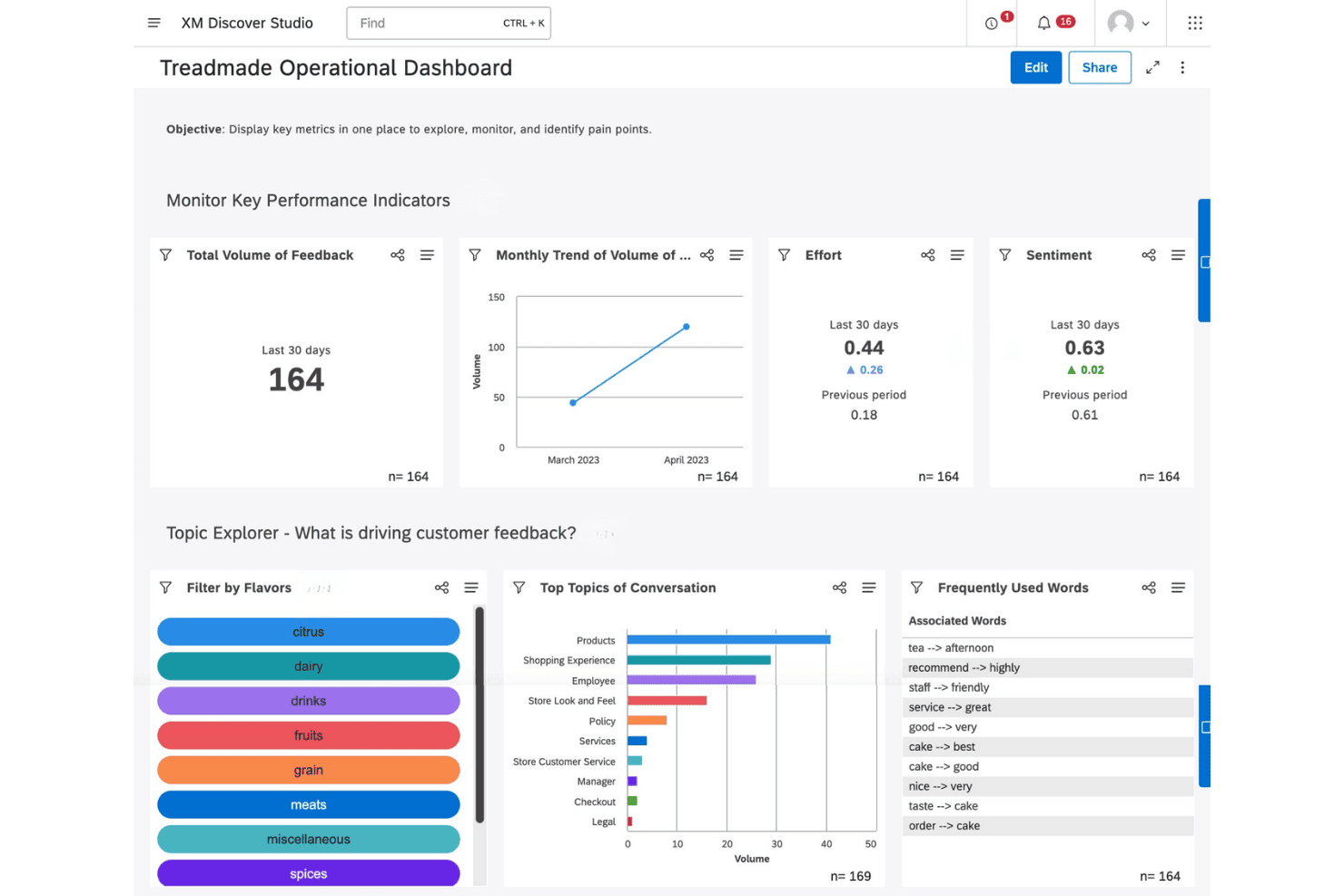
Qualtrics XM Discover offers an operational dashboard with KPIs, topic exploration, and customer feedback analysis tools. Qualtrics XM Discover is a conversational analytics platform that uses NLP and machine learning to analyze unstructured feedback from calls, chats, surveys, reviews, and social media, detecting sentiment, emotion, intent, and effort across omnichannel customer interactions.
Who Is Qualtrics XM Discover Best For?
It's a strong fit for enterprise CX and VoC teams that manage high volumes of multi-channel customer interactions and need deep, customizable analytics at scale.
Why I Picked Qualtrics XM Discover
I picked Qualtrics XM Discover as one of the best because the Designer module lets my team build and refine custom taxonomies that map directly to our product vocabulary, rather than forcing us into a rigid prebuilt category structure. On top of that, the platform ships with 150+ industry-specific NLU models that detect emotion, effort, and intent at the phrase level, across multiple languages. That combination means I can configure how the AI reads and classifies feedback to match exactly how our customers actually talk.
Qualtrics XM Discover Key Features
- Omnichannel data connectors: Ingests customer interactions from calls, chat, email, surveys, reviews, and social platforms.
- Real-time sentiment and emotion detection: Surfaces emotion, intent, and effort signals directly within conversation transcripts.
- Automated anomaly alerts: Detects and notifies teams of spikes in complaints, sudden sentiment shifts, or emerging issues.
- Customizable executive dashboards: Enables detailed, role-based views of insights and conversational trends with real-time updates.
Qualtrics XM Discover Integrations
Qualtrics XM Discover offers native integrations with Qualtrics, Zendesk, Tableau, ServiceNow, Twilio, Jira, Five9, Freshdesk, Tethr, and more. An API is available for custom integrations.
Pros and Cons
Pros:
- Real-time anomaly and trend detection
- Detects emotion, intent, and effort signals
- Custom taxonomy builder for nuanced analysis
Cons:
- Taxonomy management can require ongoing analyst effort
- Lengthy onboarding process for configuration
Learn more about Qualtrics XM Discover: Best for unified analysis across feedback channels
- Free demo available
- Pricing upon request

Chattermill offers an AI-powered feedback insights dashboard that displays sentiment distribution and trending customer themes across categories like meals, recipes, and brand. Chattermill is an AI-native customer experience intelligence platform that uses its proprietary Lyra AI engine to analyze unstructured feedback from surveys, support tickets, reviews, social media, and voice across a unified analytics layer.
Who Is Chattermill Best For?
It's a strong fit for enterprise CX and e-commerce teams at high-volume organizations collecting at least 5,000 pieces of customer feedback per month across multiple channels.
Why I Picked Chattermill
Chattermill earns its spot on my shortlist because of how it handles feedback from radically different sources without losing analytical depth. I love that Lyra AI applies aspect-based sentiment tagging consistently across Zendesk tickets, Reddit posts, and NPS survey responses alike, so I'm comparing like-for-like signals no matter the channel. Real-time anomaly detection then fires alerts the moment a sentiment shift emerges across that unified data pool, which means I'm catching issues as they develop rather than after the fact.
Chattermill Key Features
- Lyra AI insights engine: Analyzes feedback using proprietary models tuned specifically for customer experience data.
- Role-based dashboards: Allows different teams to access tailored views and drill down into insights relevant to their function.
- Real-time alerting: Sends instant notifications about feedback anomalies or emerging issues to Slack, email, or Jira.
- 50+ language sentiment analysis: Processes unstructured feedback in over 50 languages for multilingual, global organizations.
Chattermill Integrations
Chattermill offers native integrations with Zendesk, Intercom, Salesforce, Jira, Gong, Codex, Spriklr, Databricks, Freshdesk, Qualaroo, and more. An API is available for custom integrations.
Pros and Cons
Pros:
- Real-time alerts on emerging feedback trends
- Aspect-based sentiment detection across 50+ languages
- Unifies all feedback channels in one platform
Cons:
- Lacks automated action recommendation workflows
- Dashboard customization is limited by default
Learn more about Chattermill:
Diğer AI Müşteri İçgörüleri Araçları
Kısa listeme giremeyen ancak yine de göz atmaya değer bazı ek AI müşteri içgörüleri araçları şunlardır:
- 11KapicheBest for analyst-configurable feedback analytics
- 12VerintBest for advanced conversation analytics
- 13EnterpretBest for customizable AI model tuning
- 14Zonka FeedbackBest for actionable feedback workflows
- 15Observe.AIBest for agent performance insights from calls
- 16Lumen by TalkwalkerBest for visual analytics on cross-channel data
- 17ForstaBest for advanced market research capabilities
- 18VoxpopmeBest for video-driven qualitative analysis
- 19unitQBest for quality monitoring in digital products
How I Evaluate AI Customer Insights Tools
To make this list, a tool needs to deliver real AI value—like surfacing churn signals or complaint trends your team wouldn't catch manually. I split my evaluation into two layers: core functionality every tool must offer, and differentiating factors that set one vendor apart from another.
Core Functionality (Table Stakes for This List)
When I'm selecting tools for my list, I rank each one on a scale from 0 (does not offer the functionality) to 5 (excels in this area) for each core functionality listed below. Then, I calculate the tool's total score into a percentage. Each tool needs to achieve a minimum total score of 65% to be considered for inclusion.
- AI Text Analytics: I look for NLP that goes beyond keyword matching to extract meaningful themes from open-ended survey responses, app reviews, and support tickets.
- Sentiment & Emotion Detection: The tool should classify more than just positive or negative—I evaluate whether it can pick up on intent, frustration, or urgency within customer interactions.
- Multi-Source Data Ingestion: Pulling in feedback from surveys, chat, email, social, and review sites matters. I check how many native integrations a tool offers and whether it supports real-time data streaming.
- Automated Theme Discovery: I look at whether the tool can surface emerging complaint patterns or trending topics on its own, without requiring my team to build and maintain manual tag libraries.
- Predictive & Generative Insights: Beyond descriptive dashboards, I evaluate whether the platform can flag likely churn drivers or generate AI summaries that help CX leaders prioritize next steps.
- Insight Visualization & Reporting: Dashboards need to be more than static charts. I check for drill-down capabilities, role-based views, and the ability to share findings with product or leadership teams.
Once I have a list of tools that meet the criteria, I consider what sets each platform apart.
Differentiating Factors (What Sets Vendors Apart)
Here's how I compare and contrast different vendors:
Standout Features
Automated theme discovery is a key differentiator. I look for tools that use unsupervised AI clustering to surface unknown pain points—things your team hasn't tagged or anticipated. A conversational query interface also matters, since it lets non-technical users ask questions like "why are enterprise customers churning?" and get sourced answers without building custom reports. Real-time alerting rounds this out by flagging sudden spikes in complaints or sentiment shifts before they escalate into larger issues.
Beyond Features
Integrations with your existing stack matter a lot here. I check whether a tool connects natively to platforms like Salesforce, Zendesk, or Intercom, so insights flow into the workflows your team already uses. AI transparency is another factor I evaluate closely—I want to see source citations that trace a theme or sentiment score back to the original customer quote. Time-to-value also varies widely; some platforms need months of taxonomy setup while others offer pre-built templates that get teams running in days.
AI Müşteri İçgörüleri Araçları Nasıl Seçilir?
Uzun özellik listeleri ve karmaşık fiyatlandırma yapıları arasında kaybolmak kolaydır. Kendinize özgü yazılım seçimi süreciniz üzerinde çalışırken odaklanmanıza yardımcı olmak için göz önünde bulundurmanız gereken faktörleri içeren bir kontrol listesi hazırladım:
| Faktör | Dikkat Edilmesi Gerekenler |
|---|---|
| FaktörÖlçeklenebilirlik | Dikkat Edilmesi GerekenlerProgramınız büyüdükçe araç artan geri bildirim hacmini, daha fazla kullanıcıyı ve yeni kaynakları destekleyebilir mi? Veri sınırlarını, birden fazla ekibin kullanımını ve yerelleştirmeyi sorun. |
| FaktörEntegrasyonlar | Dikkat Edilmesi GerekenlerCRM sistemlerinize, yardım masanıza veya analiz araçlarınıza yerel olarak bağlanıyor mu? Entegrasyon kataloğunu inceleyin ve gerekirse API veya webhook desteğini sorun. |
| FaktörÖzelleştirilebilirlik | Dikkat Edilmesi GerekenlerKategorileri, gösterge panellerini ve taksonomileri benzersiz iş akışlarına uyacak şekilde özelleştirebilir misiniz? Değişikliklerin nasıl yapıldığını ve bunları kimin yönettiğini (satıcı mı yoksa ekibiniz mi) öğrenin. |
| FaktörKullanım kolaylığı | Dikkat Edilmesi GerekenlerArayüz, teknik olmayan ekip arkadaşlarının kullanabileceği kadar sezgisel mi? Temel kullanıcılarla canlı demolar deneyin ve araç ipuçları, işe alıştırma yönlendirmeleri ile net menüler arayın. |
| FaktörUygulama ve işe alıştırma | Dikkat Edilmesi GerekenlerCanlı kullanıma geçmek için ne kadar zaman ve çaba gerekiyor? Şablonlar, özel işe alıştırma desteği veya ekibiniz için zorlu bir öğrenme eğrisi olup olmadığını öğrenin. |
| FaktörMaliyet | Dikkat Edilmesi GerekenlerFiyatlandırma koltuk, veri hacmi veya analiz edilen geri bildirim başına mı yapılandırılıyor? Gizli maliyetler ya da sınırlar nedeniyle şaşırmamak için gelecekteki ekip büyümesini hesaba katın. |
| FaktörGüvenlik önlemleri | Dikkat Edilmesi GerekenlerSatıcı, veri gizliliği ve güvenlik standartlarınızı karşılıyor mu? Sertifikaları, şifrelemeyi, erişim denetimlerini ve ilgiliyse veri yerleşimini sorun. |
| FaktörDestek erişilebilirliği | Dikkat Edilmesi GerekenlerYardım almak için hangi kanalları kullanabilirsiniz: canlı sohbet, e-posta, telefon? Destek saatlerini, SLA taahhütlerini ve üst düzey destek için ek ücret uygulanıp uygulanmadığını doğrulayın. |
AI Müşteri İçgörüleri Araçları Nedir?
AI müşteri içgörüleri araçları, yapılandırılmamış müşteri geri bildirimlerini analiz etmek, kalıpları fark etmek ve kanallar genelinde uygulanabilir trendleri ortaya çıkarmak için yapay zekâ kullanan platformlardır. Bu araçlar temel analizlerin ötesine geçerek duygu durumunu, amacı ve ortaya çıkan sorunları tespit eder; müşteri deneyimi liderlerinin bilinçli kararlar almasına ve iyileştirmelere hızla öncelik vermesine yardımcı olur.
Özellikler
Yapay zekâ müşteri içgörüleri araçlarını seçerken aşağıdaki temel özelliklere dikkat edin:
- Yapay zekâ metin analizi: Büyük hacimli, açık uçlu müşteri geri bildirimlerindeki temaları otomatik olarak belirlemek, kategorilere ayırmak ve çıkarmak için doğal dil işleme kullanır.
- Duygu ve his tespiti: Anket yanıtlarında, sohbet dökümlerinde ve incelemelerde memnuniyet, hayal kırıklığı, aciliyet ve sadakat gibi ince farklılıklar içeren duyguları tanır.
- Birden fazla kaynaktan veri alımı: Anketlerden, incelemelerden, sohbetlerden, e-postalardan, sosyal medyadan ve destek taleplerinden gelen geri bildirimleri tek ve birleşik bir panoda toplar.
- Otomatik tema keşfi: Manuel etiketleme veya önceden tanımlanmış sınıflandırmalar gerektirmeden yeni ve ortaya çıkan trendleri, sorunlu noktaları veya müşteri ihtiyaçlarını ortaya çıkarır.
- Gerçek zamanlı uyarılar: Şikâyetlerdeki olağandışı artışlar, duygu değişimleri veya ortaya çıkan sorunlar hakkında ekipleri anında bilgilendirir; böylece ekipler sorunlar büyümeden harekete geçebilir.
- Tahmine dayalı içgörüler: Müşteri kaybının, memnuniyetin veya savunuculuğun olası nedenlerini öne çıkarır ve geçmiş ile gerçek zamanlı verilere dayanarak proaktif kararlar için öngörü sağlar.
- Özelleştirilebilir panolar: Kullanıcıların içgörüleri özelleştirilmiş grafikler, filtreler ve raporlarla görselleştirmesine olanak tanır; bulguların ekipler ve yöneticiler arasında paylaşılmasını kolaylaştırır.
- Role dayalı erişim denetimleri: Yalnızca yetkili kişilerin belirli müşteri verilerine veya eyleme geçirilebilir içgörülere erişebilmesini sağlayarak güvenlik ve uyumluluk hedeflerini destekler.
Avantajlar
Yapay zekâ müşteri içgörüleri araçlarını uygulamak ekibiniz ve işletmeniz için çeşitli avantajlar sağlar. Yararlanabileceğiniz avantajlardan bazıları şunlardır:
- Daha akıllı karar alma: Yapay zekâ destekli analizler, müşteri duyarlılığının ardındaki eyleme geçirilebilir örüntüleri ve nedenleri ortaya çıkararak ekiplerin daha hızlı ve kanıta dayalı seçimler yapmasını sağlar.
- Birleşik müşteri anlayışı: Birden fazla kanaldan gelen geri bildirimleri bir araya getirmek ekibinize bütünsel bir görünüm sunar, veri silolarını ortadan kaldırır ve aksi takdirde gözden kaçırabileceğiniz trendleri ortaya çıkarır.
- Sorunların proaktif çözümü: Duygu değişimleri veya ortaya çıkan şikâyetlerle ilgili gerçek zamanlı uyarılar, olası krizleri yaygın sorunlara dönüşmeden fark etmenize yardımcı olur.
- Kişiselleştirilmiş etkileşim: Duygu ve niyet tespitinden elde edilen içgörüler, farklı müşteri ihtiyaçlarına daha özel ve empatik yanıtlar verilmesini sağlar.
- Artan ekip verimliliği: Otomatik analizler ve panolar, geri bildirimleri kategorilere ayırmak, etiketlemek ve yorumlamak için gereken manuel çabayı azaltarak CX kaynaklarının serbest kalmasını sağlar.
- Gelişmiş elde tutma ve sadakat: Tahmine dayalı içgörüler, müşteri kaybı risklerini ve memnuniyetin nedenlerini belirlemeye yardımcı olarak daha etkili elde tutma stratejilerine ve ürün iyileştirmelerine rehberlik eder.
Maliyetler ve Fiyatlandırma
Yapay zekâ müşteri içgörüleri araçlarını seçmek, mevcut çeşitli fiyatlandırma modellerinin ve planların anlaşılmasını gerektirir. Maliyetler özelliklere, ekip büyüklüğüne, eklentilere ve daha fazlasına göre değişir. Aşağıdaki tablo, yapay zekâ müşteri içgörüleri aracı çözümlerinde yaygın planları, ortalama fiyatlarını ve genellikle sunulan özellikleri özetlemektedir:
Yapay Zekâ Müşteri İçgörüleri Araçları için Plan Karşılaştırma Tablosu
| Plan Türü | Ortalama Fiyat | Yaygın Özellikler |
|---|---|---|
| Plan TürüÜcretsiz Plan | Ortalama Fiyat$0 | Yaygın ÖzelliklerTemel analizler, sınırlı veri alımı, temel duygu tespiti ve kısıtlı panolar. |
| Plan TürüKişisel Plan | Ortalama Fiyat$20–$80/kullanıcı/ay | Yaygın ÖzelliklerÇok kanallı geri bildirim içe aktarma, basit panolar, standart yapay zekâ metin analizi ve e-posta desteği. |
| Plan Türüİşletme Planı | Ortalama Fiyat$100–$300/kullanıcı/ay | Yaygın ÖzelliklerGelişmiş tema keşfi, CRM'lerle entegrasyonlar, gerçek zamanlı uyarılar, role dayalı erişim ve özelleştirilebilir panolar. |
| Plan TürüKurumsal Plan | Ortalama Fiyat$400+/kullanıcı/ay | Yaygın ÖzelliklerSınırsız entegrasyon, tahmine dayalı içgörüler, gelişmiş güvenlik, özel başlangıç süreci, özel destek ve uyumluluk araçları. |
Yapay Zekâ Müşteri İçgörüleri Araçları SSS
Yapay zekâ müşteri içgörüleri araçlarıyla ilgili sık sorulan bazı soruların yanıtları aşağıda yer almaktadır:
Yapay zekâ müşteri içgörüleri araçları yapılandırılmamış geri bildirimleri nasıl işler?
Yapay zekâ müşteri içgörüleri araçları; açık uçlu yanıtları, sohbet kayıtlarını ve incelemeleri analiz etmek için doğal dil işleme teknolojisini kullanır. Temaları ve duygu durumunu otomatik olarak tespit ederek ekibinizin manuel etiketleme veya kodlama yapmadan müşteri ihtiyaçlarını anlamasına yardımcı olur.
Bu araçlar mevcut CRM'imle veya yardım masamla entegre olabilir mi?
Evet, çoğu yapay zekâ müşteri içgörüleri aracı Salesforce, Zendesk ve HubSpot gibi popüler CRM’ler ve destek platformlarıyla yerel entegrasyonlar sunar. Mevcut teknoloji yığınınızla uyumluluğu doğrulamak için her sağlayıcının entegrasyon kataloğunu kontrol edin.
Bu platformlardan ne tür veri güvenliği beklemeliyim?
Şifreleme, erişim kontrolleri, SOC 2 veya GDPR uyumluluğu ve veri yerleşimiyle ilgili açık politikalar dâhil olmak üzere sektör standardı güvenlik önlemlerini beklemelisiniz. Hassas bilgiler için gerektiğinde HIPAA veya CCPA uyumluluğunu sorun.
Yapay zekâ müşteri içgörüleri araçlarını kullanmak için teknik becerilere ihtiyacım var mı?
Hayır, çoğu araç sezgisel panolar ve doğal dil sorguları kullanacak şekilde tasarlanmıştır; bu da onları teknik olmayan kullanıcılar için erişilebilir kılar. Daha gelişmiş özellikler için genellikle eğitim ve kullanıma başlama desteği sunulur.
Uygulanabilir içgörüleri ne kadar hızlı elde etmeyi bekleyebilirim?
Hızlı veri alımı ve önceden oluşturulmuş taksonomiler sunan bir platform seçerseniz genellikle birkaç gün içinde önemli eğilimleri fark etmeye başlayabilirsiniz. Bazı kurumsal platformlar daha fazla kurulum gerektirir, ancak karmaşık ihtiyaçlar için daha kapsamlı özelleştirme seçenekleri sunar.