Net Tavsiye Skoru (NPS) yazılımı, CX ekiplerinin müşteri duyarlılığını yakalamasına, analiz etmesine ve işletmeye değer katacak şekilde harekete geçmesine yardımcı olur. NPS anketi araçlarını araştırıyorsanız verilerinizin güvenilmez olduğunu düşünüyor, skorlar toplamanıza rağmen bunları eyleme dönüştürmekte zorlanıyor veya anket spam'inin kısır döngüsünde sıkışmış olabilirsiniz. Belki de geri bildirimleri gelire bağlamanız yönünde baskı altındasınız.
CX alanında on yılı aşkın deneyimim boyunca geri bildirimlerin ne kadar kolay gözden kaçırıldığını, yanlış yorumlandığını veya görmezden gelindiğini gördüm. Doğru yazılım yalnızca anket göndermez; geri bildirim döngüsünü kapatmanıza ve elde tutma, büyüme ve ürün kararlarını yönlendiren içgörüleri ortaya çıkarmanıza yardımcı olur.
Bu makalede, geri bildirimleri geniş ölçekte toplamanıza, müşteri kaybı riskini erkenden belirlemenize ve müşteri sadakatini geliştirmenize yardımcı olmak için en iyi NPS yazılımlarını ve anket araçlarını inceledim. İster yeni başlıyor olun ister görevini yeterince iyi yerine getirmeyen bir aracı değiştirmek isteyin, burada deneyime dayalı, pratik öneriler bulacaksınız.
NPS Yazılımı Nedir?
Net tavsiye skoru (NPS) yazılımı, markanızın, ürünlerinizin veya hizmetlerinizin aktif destekçileri olan müşteri sayısını hesaplamak için müşteri geri bildirimlerini toplayan ve analiz eden bir araçtır. Duyarlılığı ölçmek, eğilimleri belirlemek ve önemli temas noktalarında müşteri deneyimini iyileştirmek için kullanılır.
NPS araçları, müşteri sadakatini ve genel marka sağlığınızı zaman içinde analiz etmenizi sağlar.
Why Trust Our Software Recommendations
6,700+
Reviews
20
Industry experts
16+
Evaluation factors
14
Years
Our team has been testing and reviewing software since 2012. As CX leaders ourselves, we know how difficult—and important—it is to choose the right software.
For this guide, we evaluated tools using hands-on testing and independent research, scoring tools using our selection criteria.
Our reviews reflect our human editorial judgment, not a sales pitch.
 Gui DrusinaCreative Director
 Tim FisherVP of AI
Net Tavsiye Skoru Yazılımı Karşılaştırma Tablosu
Bu karşılaştırma tablosu, en iyi NPS yazılımı seçimlerimin her biri hakkında temel bilgileri özetlemektedir.
Sorted by: Default
| Tool | Starting Price | Website | |
|---|---|---|---|
Best for multi-channel NPS survey distribution | 4.5 out of 5 | Pricing upon request Free demo available | Website |
Best for customer journey tracking with NPS | 4.7 out of 5 | Pricing upon request 14-day free trial available | Website |
Best NPS survey building with AI | 4.4 out of 5 | $19/user/month Free plan available | Website |
Best for customizable NPS beyond simple surveys | 4.4 out of 5 | $55/user/month 7-day free trial | Book Demo |
Best NPS surveys with integrated workflows | 4.6 out of 5 | $114/month 10-day free trial | Website |
Best for in-app NPS with session replay context | 4.8 out of 5 | $9/user/month Free plan available | Website |
Best for engaging mobile surveys | 4.5 out of 5 | $19/month Free plan available | Website |
Best for custom-triggered NPS surveys | 4.7 out of 5 | $25/month Free plan available | Website |
Best net promoter score software with a free plan | 4.6 out of 5 | $30/user/month Free plan available | Website |
Best user onboarding software that includes NPS and in-app surveys | 4.7 out of 5 | $96/month Free trial available | Website |


En İyi 20 NPS Yazılımına Genel Bakış
İşte net tavsiye skoru yazılımı için en iyi 20 seçimimin her birinin neyi en iyi yaptığını gösteren kısa açıklamalar ve bazı özellikleri sergileyen ekran görüntüleri. Ayrıca değerlendirmek için daha fazla seçeneğe göz atmak isterseniz aşağıda ek bonus seçenekler de sundum.
 Best for multi-channel NPS survey distribution
- Free demo available
- Pricing upon request
Visit WebsiteCustomer Rating:4.5/5
Users can monitor customer satisfaction in real-time with Sogolytics' dynamic dashboard, featuring detailed NPS metrics and insightful analytics. Sogolytics is an advanced online survey and feedback management platform designed to help businesses gather valuable insights through various forms of surveys. It offers a comprehensive solution for creating, distributing, and analyzing surveys, enabling organizations to make data-driven decisions.
Why I picked Sogolytics: Sogolytics stands out with its robust features tailored specifically for NPS tracking and analysis. The platform allows for the creation of customized NPS surveys that can be distributed through multiple channels. It also offers real-time reporting and analytics, enabling businesses to monitor their NPS in real time and act on the feedback quickly. The ability to segment respondents based on their NPS ratings helps organizations identify promoters, passives, and detractors, allowing for targeted follow-ups and personalized engagement strategies
Sogolytics Standout Features and Integrations:
Features include advanced survey logic, multi-channel distribution, real-time analytics, automated reminders, customizable survey templates, anonymous survey options, sentiment analysis, quiz creation tools, and detailed reporting.
Integrations include Salesforce, Zapier, Google Analytics, Slack, Microsoft Teams, HubSpot, and Mailchimp.
Pros and Cons
Pros:
- Robust analytics and segmentation for action-oriented insights
- Multi-channel distribution covers mobile, email, web
- Strong logic and branching for complex surveys
Cons:
- Some advanced features require considerable setup time
- Interface layout can feel cluttered and outdated
Learn more about Sogolytics: Best for customer journey tracking with NPS
- 14-day free trial available
- Pricing upon request
Visit WebsiteCustomer Rating:4.7/5
Ask questions in plain language and get instant answers from your customer feedback with Zonka Feedback AI. Zonka Feedback is an AI-powered NPS and customer feedback platform that combines multichannel survey distribution, real-time score calculation, closed-loop workflows, and AI-driven thematic analysis across email, SMS, web, in-app, and offline touchpoints.
Who Is Zonka Feedback Best For?
Zonka Feedback suits CX and customer success teams at small to mid-sized businesses that need to run NPS programs across multiple touchpoints and close the feedback loop quickly.
Why I Picked Zonka Feedback
Zonka Feedback earns its spot as one of the best on my shortlist because of how well it maps NPS scores to specific moments in the customer journey. I particularly like the contact and user journey tracking feature, which lets me see exactly where in the lifecycle a score was given, whether at onboarding, renewal, or post-support. NPS Impact Analysis then shows me which journey stages are driving detractor responses, so I know exactly where to focus first.
Zonka Feedback Key Features
- AI text analytics: Automatically surfaces common themes and sentiment from open-text NPS responses.
- Multi-language survey engine: Allows users to create and deliver surveys in multiple languages.
- Role-based dashboards: Provides distinct analytics views and permissions for executives, managers, and frontline users.
- Native CRM and helpdesk integrations: Connects directly with tools like Salesforce, HubSpot, Zendesk, and Intercom to sync NPS data.
Zonka Feedback Integrations
Zonka Feedback offers native integrations with Salesforce, HubSpot, Zendesk, Intercom, Freshdesk, Jira, Slack, Microsoft Teams, Google Sheets, and Mailchimp. It also supports Zapier and provides an API for custom integrations.
Pros and Cons
Pros:
- Supports kiosk and offline survey collection
- Built-in AI for open-text feedback analysis
- Maps NPS scores to specific customer journeys
Cons:
- Advanced feature setup carries learning curve
- Reporting customizations can be limited for teams
Learn more about Zonka Feedback: Best NPS survey building with AI
- Free plan available
- From $19/user/month (billed annually)
Visit WebsiteCustomer Rating:4.4/5
SurveySparrow collects CX data, conveys it into easy-to-read charts and graphs, and delivers an NPS. SurveySparrow offers a dynamic Net Promoter Score software solution that caters to a diverse range of industries. This tool is particularly appealing to organizations looking to enhance customer loyalty and satisfaction through customizable surveys and real-time data analytics. Whether you're in healthcare, education, retail, or any other sector, SurveySparrow provides the resources needed to understand and improve customer experiences by integrating with existing systems and offering a user-friendly interface for continuous engagement.
Why I Picked SurveySparrow
I picked SurveySparrow for its AI-powered survey feature, which stands out in the realm of Net Promoter Score software. This feature allows you to create customizable surveys efficiently, generating up to 10 questions in seconds, and catering to various formats like multiple-choice and open-ended questions. The integration with CRM systems facilitates deeper data analysis, enabling your team to derive actionable insights from customer feedback. Additionally, its multichannel sharing options make it easier to reach your audience, ensuring that you gather comprehensive feedback that can drive meaningful improvements in customer satisfaction.
SurveySparrow Key Features
In addition to its AI-powered survey capabilities, SurveySparrow offers a range of features that make it a versatile choice for Net Promoter Score software.
- Conversational Surveys: Transform surveys into engaging, conversational experiences to increase response rates and gather more insightful feedback.
- Executive Dashboard: Visualize survey data using various chart types to gain a deeper understanding of customer feedback and trends.
- Ticket Management: Convert survey responses into actionable tasks, allowing your team to prioritize and address customer feedback effectively.
- Workflows & Automations: Streamline processes by automating actions based on survey responses, ensuring timely follow-ups and task completion.
SurveySparrow Integrations
Integrations include Salesforce, HubSpot, Zendesk, Mailchimp, Slack, Google Sheets, Microsoft Teams, Intercom, Freshdesk, and Shopify.
Pros and Cons
Pros:
- Integrates smoothly with CRM and collaboration tools
- Embedded NPS flows within product or UX contexts supported
- Conversational survey format tends to boost NPS response rates
Cons:
- Logic complexity can confuse non-technical users initially
- Analytics depth—especially for large-scale NPS programmes—is limited
Learn more about SurveySparrow: Best for customizable NPS beyond simple surveys
- 7-day free trial
- From $55/user/month
Visit WebsiteCustomer Rating:4.4/5
The Alchemer dashboard displays Net Promoter Score rankings by brand across all product lines with corresponding market share percentages by category. Alchemer offers a flexible platform for teams that need to gather, analyze, and act on customer feedback through net promoter score surveys. It’s well-suited for organizations that want to customize survey workflows and integrate feedback into their existing business systems. If you’re looking for a solution that adapts to complex requirements and supports advanced reporting, Alchemer is worth considering.
Who Is Alchemer Best For?
Alchemer is a good fit for mid-sized to large organizations that need advanced survey customization and integration capabilities to support customer experience, product, or operations teams.
Why I Picked Alchemer
When I need net promoter score software that connects easily with the rest of my tech stack, Alchemer stands out for its extensive integration options. With support for over 400 business systems, I can automate the flow of NPS data into CRM, marketing, and analytics platforms without manual work. This level of connectivity means I can trigger follow-up actions or alerts based on NPS responses in real time. I also appreciate that Alchemer’s integrations help centralize feedback, making it easier to share insights across teams.
Alchemer Key Features
Some other features in Alchemer that support NPS programs include:
- NPS survey templates: Pre-built templates let you launch net promoter score surveys quickly and customize them to fit your brand.
- Role-based access controls: Assign permissions to users based on their role, ensuring sensitive feedback data is only accessible to the right team members.
- Automated survey distribution: Schedule and send NPS surveys through multiple channels, including email, SMS, and web links.
- Advanced reporting dashboards: Visualize NPS trends and segment results by customer group, product, or region for deeper analysis.
Alchemer Integrations
Integrations include Salesforce, Microsoft Dynamics 365, HubSpot, Zendesk, Slack, Power BI, Tableau, Snowflake, Marketo, and Google Sheets.
Pros and Cons
Pros:
- Real-time NPS response tracking and alerts
- Advanced survey logic and branching options
- SAML 2.0 single sign-on for secure access
Cons:
- Survey customization can be complex for new users
- Some advanced analytics require higher-tier plans
Learn more about Alchemer: Best NPS surveys with integrated workflows
- 10-day free trial
- From $114/month (billed annually)
Visit WebsiteCustomer Rating:4.6/5
Reach your customers on the web or mobile. Survicate is an online survey tool for measuring NPS, CSAT, CES, and other customer service variables. It has customizable surveys that allow you to change the colors, fonts, and layouts and brand your survey to make it unique. You can use Survicate to automate surveys using customer behaviors like exit intents, length of website visits, and website scrolling speed.
Why I picked Survicate: Understanding your NPS data can guide you on how to improve your products and services, and Survicate has a built-in analytics feature to help you. It lets you view the NPS completion rates on different channels, knowing which channels are not eliciting customer responses. Additionally, Survicate's integrated workflows automate NPS data collection and follow-up actions by triggering surveys, segmenting respondents based on their scores, and integrating feedback into CRM, email, or task management tools.
Standout Features and Integrations:
Standout features include a range of survey distribution methods, encompassing link sharing, email, and embedded forms. In addition, Survicate offers question-branching logic that helps to create a personalized, targeted survey experience.
The software also includes a Feedback Hub where all collected feedback can be viewed in a single location, helping team members analyze the data and draw actionable conclusions.
Integrations include Mailchimp, Marketo, Microsoft Teams, and Google Analytics.
Pros and Cons
Pros:
- Allows embedding surveys inside products or websites for context
- Strong segmentation and filtering help analyse NPS results
- Multi-channel NPS support reaching users via web/email/app
Cons:
- Some analytics visualisation options feel basic
- Advanced logic and custom workflows require setup effort
Learn more about Survicate: Best for in-app NPS with session replay context
- Free plan available
- From $9/user/month
Visit WebsiteCustomer Rating:4.8/5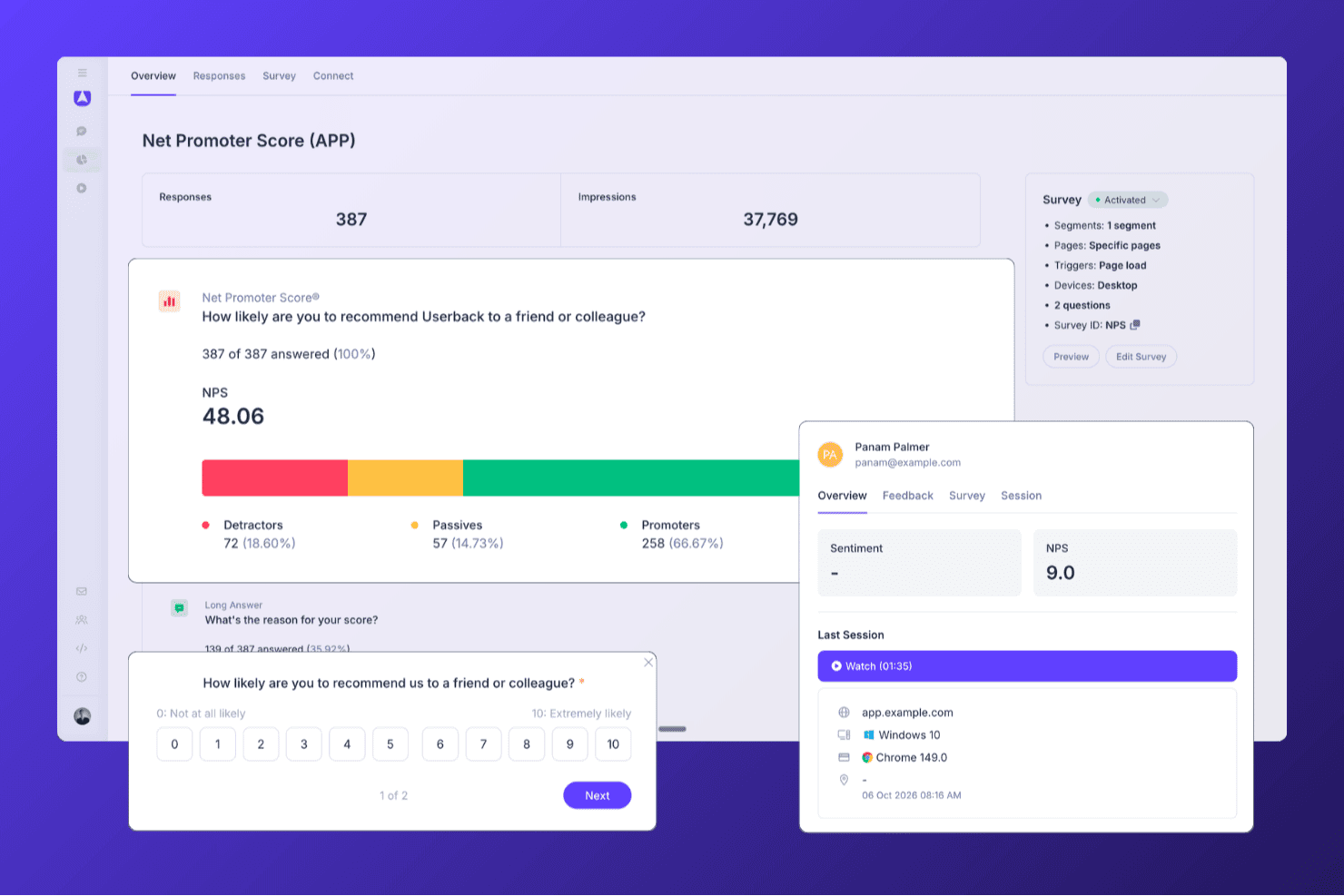
Userback helps teams run NPS surveys and analyze responses, promoter segments, and customer feedback from one dashboard. Userback is a product feedback platform that combines in-app NPS, CSAT, and CES surveys with session replay, AI-powered feedback analysis, and automated closed-loop workflows.
Who Is Userback Best For?
Userback is a strong fit for product teams that want to collect in-app NPS alongside session replay, so they can see exactly what users experienced before submitting a score.
Why I Picked Userback
Userback earns its spot on my shortlist because it pairs in-app NPS surveys with session replay, so when a user scores your product a 3, you can watch exactly what they experienced before submitting that score. I love how behavioral targeting lets you trigger the NPS survey at a specific in-app moment, like after a user completes a key workflow, rather than blasting it to your entire list. The AI-powered feedback automation then routes detractor responses to the right team member automatically, with status updates synced back to tools like Jira or Slack.
Userback Key Features
- NPS, CSAT, and CES survey templates: Pre-built survey templates for all three major satisfaction metrics, each with a standard rating scale and a follow-up open-text question.
- Behavioral and event-based survey triggers: Surveys can be triggered by specific in-app events, user segments, page targets, or device type to reach the right users at the right moment.
- AI feedback categorization and routing: AI automatically tags incoming responses by theme and sentiment, then routes them to the right team member with configurable due dates.
- Bi-directional integration sync: Status updates flow two ways between Userback and connected tools like Jira, ClickUp, and Linear, keeping feedback resolution visible across your stack.
Userback Integrations
Userback offers 20+ native integrations, including Zendesk, Intercom, Jira, Slack, ClickUp, Linear, and Microsoft Teams, plus REST API, webhooks, and Zapier.
Pros and Cons
Pros:
- AI routes detractor feedback to teams
- Behavioral targeting for in-app NPS prompts
- Combines NPS surveys with session replay
Cons:
- NPS surveys are not available on the free plan
- No native email or SMS survey delivery
Learn more about Userback:

SurveyLegend allows you to drag and drop a multitude of question types into an attractive template. SurveyLegend is a web-based platform designed to create, distribute, and analyze surveys, forms, and polls. Its emphasis on mobile-ready design and interactive elements positions it as a suitable choice for conducting engaging surveys on mobile devices, catering to the increasing number of users who prefer to interact with content on-the-go.
Why I picked SurveyLegend: I selected SurveyLegend due to its user-friendly interface that simplifies the creation of surveys that are visually appealing and engaging on both desktop and mobile devices. What distinguishes SurveyLegend is its emphasis on design aesthetics, allowing for the creation of branded surveys with a variety of question types and fields, such as picture selection and file uploads. I believe SurveyLegend is best for engaging mobile surveys because of its mobile optimization, which ensures a smooth experience for respondents using their smartphones or tablets, thereby potentially increasing response rates and the quality of feedback received.
Standout Features and Integrations:
Features include elegant pre-designed templates, language localization, offline survey collection, and extensive customization options, including custom branding and question formatting, conditional logic, and customizable buttons and icons.
Integrations include Google Drive, Dropbox, Mailchimp, and Salesforce, as well as social media platforms like Facebook and Twitter for survey sharing.
Pros and Cons
Pros:
- Clear UI supports users with minimal survey experience
- Quick to set up simple NPS surveys with style
- Highly visual and mobile-responsive survey experience for NPS
Cons:
- Scale and role-governance features less mature
- Logic, branching and segmentation limited
Learn more about SurveyLegend: Best for custom-triggered NPS surveys
- Free plan available
- From $25/month
Visit WebsiteCustomer Rating:4.7/5
Mouseflow allows you to choose from free text, rating scale NPS, and multiple choice to conduct surveys. Mouseflow is a comprehensive analytics tool designed to provide deep insights into user behavior on websites. It offers a variety of features, including session replay, heatmaps, funnels, form analytics, and user feedback tools. By capturing user interactions and visualizing them through reports and recordings, Mouseflow enables businesses to understand how visitors navigate their websites.
Why I picked Mouseflow: The tool allows for the creation of custom-triggered surveys that can be strategically placed at different touchpoints in the user journey. It allows for various types of surveys including NPS, multiple choice, free text, and rating scales, ensuring businesses can gather precise and contextual feedback, directly contributing to an accurate Net Promoter Score (NPS).
Mouseflow Standout Features and Integrations:
Features that complement Mouseflow's user feedback tools include session replay, which allows businesses to watch recordings of individual user sessions, and heatmaps, which offer a visual representation of user engagement, highlighting the most and least interacted with areas of a webpage.
Integrations include HubSpot, AB Tasty, Convert Experiences, BigCommerce, WooCommerce, Google Analytics, Google Tag Manager, Zendesk, Omniconvert, Adobe Target, Shopify, Intercom, WordPress, and others.
Pros and Cons
Pros:
- Combines behavior analytics (heatmaps, session replays) with feedback tools
- Users report it helps uncover ‘why’ behind low NPS scores
- Good for embedding NPS and feedback widgets where UX matters.
Cons:
- Survey/feedback modules lacking advanced features
- Setup and filtering can get complex for non-analyst teams
Learn more about Mouseflow: Best net promoter score software with a free plan
- Free plan available
- From $30/user/month (billed annually)
Visit WebsiteCustomer Rating:4.6/5
Simple NPS questions to track customer satisfaction. SurveyMonkey is a comprehensive survey tool that offers a free plan with out-of-the-box surveys to get you started. Under their free plan, you can create a survey with up to 10 questions and collect up to 100 responses per survey.
Why I picked SurveyMonkey: Their free plan includes a lot of helpful features that you need to pay for in other survey tools, including skip logic, data exports, a selection of question types, basic analysis & reporting features, and simple visuals to help you digest your data more easily. You can view summary statistics such as response counts and percentages.
I also like the fact that you can integrate SurveyMonkey's net promoter score software with Salesforce to enrich your Salesforce dashboard by incorporating NPS calculations.
SurveyMonkey Standout Features and Integrations:
SurveyMonkey is an excellent net promoter score software because it allows you to prompt customers to provide real-time feedback after using your product. You can integrate SurveyMonkey into your website to gauge NPS without disrupting customers’ shopping experience. SurveyMonkey also lets you target a customer demographic to get the NPS of a specific customer group.
Using SurveyMonkey, you can also collect metadata on website users like browser type, location, and device to help you optimize customers’ online experience.
Integrations include Slack, Microsoft Teams, Akita, Freshservice, HubSpot, Zendesk, Google Sheets, Google Analytics, Adobe Analytics, A/B Tasty, Zoho CRM, Gainsight, and Salesforce.
Pros and Cons
Pros:
- Strong logic branching and analytics for NPS plus beyond
- Easy distribution via web link, email invite or panel
- Massive template and question-type library
Cons:
- Interface designed for general use rather than NPS workflows
- Free plan very limited in survey depth and analytics
Learn more about SurveyMonkey: Best user onboarding software that includes NPS and in-app surveys
- Free trial available
- From $96/month (billed annually)
Visit WebsiteCustomer Rating:4.7/5
Use Product Fruits' embedded NPS survey tool to collect customer feedback to improve future experiences and satisfaction. Product Fruits is a user onboarding platform that provides a variety of features to guide users through applications and encourage the completion of necessary steps with the goal of improving product activation rates, conversions, NPS scores, and reducing support tickets.
Why I picked Product Fruits: I selected Product Fruits because it lets you build and deploy NPS surveys through its platform, collect feedback, and then use this central repository to measure satisfaction and extract valuable insights. Unlike other tools that let you do the same, Product Fruits goes the extra mile and allows you to alter your survey designs so they can match your brand and feel more personalized. As your users provide responses, you can track them in real-time in the analytics dashboard or push the data into your CRM.
Standout Features and Integrations:
This platform stands out because it offers a wide range of features including tours, checklists, hints, surveys, support options, feedback tools, announcements, and a knowledge base. It also provides custom events, AI writing, and security measures, making it a versatile tool for enhancing customer experience.
Other key features include interactive tours that guide users through an application, in-app NSP & survey functionalities, and hints that provide contextual information. The platform also offers surveys for feedback collection, support options such as live chat and email, and a knowledge base for self-help resources.
Integrations include mixpanel, Heap, Google Analytics, Slack, Smartlook, Segment, customer.io, and HubSpot.
Pros and Cons
Pros:
- Easy setup—no code required for implementation
- Combines onboarding guides, checklists, and NPS collection
- In-app surveys capture user sentiment in context
Cons:
- Survey design customization options are fairly minimal
- Limited analytics depth for large-scale NPS programs
Learn more about Product Fruits:
Diğer Net Tavsiye Skoru Yazılımı Seçenekleri
İşte en iyi listede yer almayan ancak yine de incelemeye değer bazı NPS anketi yazılımları. Bu NPS sistemlerinden herhangi birini kullanarak müşterilere kuruluşunuzun tamamıyla etkileşimleri sırasında kritik temas noktalarında ulaşabilirsiniz.
- 11SatisMeterBest NPS software for translating your surveys into different languages
- 12NicereplyBest lightweight option for user-friendly NPS software
- 13ProProfs Survey MakerBest for polls, popups, sidebar, and in-app surveys.
- 14PodiumBest for contextual feedback, like which channel respondents come from
- 15SprigBest for capturing and analyzing customer feedback at scale with AI
- 16CustomerSureBest NPS software for accessing multiple feedback channels: email, SMS, in-app, and in-website
- 17OrbitricsBest for optional open-ended questions after the NPS
- 18InputKitBest NPS software for small companies and start-ups
- 19JotformBest for B2B companies wanting to quickly build and deploy NPS surveys
- 20UserGuidingBest for collecting real-time insights
- 21VelarisBest for automated feedback collection
- 22InformizelyBest customizable email surveys.
- 23BazaarvoiceBest sample services to spur reviews.
- 24Reputation.comBest for customer journey tracking.
- 25BirdeyeBest for being the customer experience software with the most awards.
- 26SightMillBest for plotting follow-up surveys.
- 27DelightedBest for survey delivery: email, SMS, or a link.
- 28ChattermillBest collaborative platform for building surveys.
- 29Zonka Feedback Best for offline CSAT, CES, and NPS surveys.
- 30CannyBest transactional NPS.
- 31WootricBest NPS question feedback loop.
- 32VitallyBest real-time survey results.
- 33eNPSBest for employee-based NPS score.
- 34DownrightBest for customer segments.
- 35Ask NicelyBest focus on modern, relatable customer loyalty.
- 36RelentlyBest email and in-app templates.
- 37ChekkitBest way for customers to text you directly from your website.
- 38Satmetrix Systems, IncBest for automated analytics using text and speech.
How I Evaluate Net Promoter Score Software
I evaluate NPS tools on two layers: the baseline a tool must have—like automated scoring and closed-loop workflows—and the differentiators that set the best options apart for CX teams.
Core Functionality (Table Stakes For This List)
When I'm selecting tools for my list, I rank each one on a scale from 0 (does not offer the functionality) to 5 (excels in this area) for each core functionality listed below. Then, I calculate the tool's total score into a percentage. Each tool needs to achieve a minimum total score of 65% to be considered for inclusion.
- NPS Survey Builder: I look for a dedicated NPS template with the 0–10 scale, follow-up question, and branding options—not just a generic form builder with a rating field.
- Multi-Channel Survey Distribution: Whether it's an in-app prompt after onboarding or a post-support email, I check that tools can reach customers across at least three channels.
- Automatic Score Calculation: Real-time promoter, passive, and detractor categorization with a live NPS dashboard matters here—I evaluate whether the math happens automatically.
- Segmentation & Trend Analysis: I look at how each tool lets you slice scores by cohort, product line, or region and track movement over time to spot emerging patterns.
- Closed-Loop Feedback Workflows: Tools like Medallia and Qualtrics route detractor alerts to account owners automatically. I evaluate how each platform handles follow-up triggers and task assignment.
- CRM & Business Tool Integrations: Connecting NPS data to customer records in tools like Salesforce or HubSpot is essential, so I check for native connectors, open API access, and webhook support.
Once I have a list of tools that meet the criteria, I consider what sets each platform apart.
Differentiating Factors (What Sets Vendors Apart)
Here's how I compare and contrast different vendors:
Standout Features
AI-powered text analytics is a major differentiator. I evaluate whether a tool can surface recurring themes from thousands of open-ended responses without manual tagging. Benchmarking data also matters—knowing your score is 42 means little until you can compare it against your industry. I also look at predictive churn signals, where platforms correlate detractor patterns with renewal or usage data to flag at-risk accounts before they leave.
Beyond Features
Pricing structure is something I evaluate closely. Some vendors charge per response while others price per user or contact, and the right model depends on your survey volume and team size. Compliance also matters when NPS surveys collect customer PII—I check for GDPR readiness, SOC 2 certification, and data residency options. Time-to-value is another factor I consider, since a CX team launching its first relational NPS program needs pre-built templates and quick setup, not a months-long implementation.
Net Tavsiye Skoru Yazılımı Nasıl Seçilir?
Uzun özellik listeleri ve karmaşık fiyatlandırma yapıları arasında kaybolmak kolaydır. Kendinize özgü yazılım seçimi sürecinizde ilerlerken odağınızı korumanıza yardımcı olmak için aklınızda bulundurmanız gereken faktörleri aşağıda bir kontrol listesi halinde bulabilirsiniz:
| Faktör | Dikkate Alınması Gerekenler |
|---|---|
| FaktörÖlçeklenebilirlik | Dikkate Alınması GerekenlerYazılım işletmenizle birlikte büyüyebilir mi? Performans sorunları yaşamadan artan veri hacmini ve kullanıcı sayılarını işleyebilen çözümler arayın. |
| FaktörEntegrasyonlar | Dikkate Alınması GerekenlerCRM veya yardım masası yazılımı gibi mevcut sistemlerinizle entegre oluyor mu? Manuel veri girişini önlemek için platformlar arasında kesintisiz veri akışı sağladığından emin olun. |
| FaktörÖzelleştirilebilirlik | Dikkate Alınması GerekenlerYazılımı özel ihtiyaçlarınıza uyacak şekilde uyarlayabilir misiniz? İş akışınıza uygun özel anketlere, markalamaya ve raporlamaya olanak tanıyıp tanımadığını kontrol edin. |
| FaktörKullanım kolaylığı | Dikkate Alınması GerekenlerYazılım ekibiniz için sezgisel mi? Karmaşık bir arayüz benimsenmeyi engelleyebilir. Basit gezinme sunan, kullanıcı dostu seçenekleri arayın. |
| FaktörUygulama ve işe alıştırma | Dikkate Alınması GerekenlerYazılımın kullanıma hazır hâle gelmesi ne kadar sürecek? Sorunsuz bir geçiş sağlamak için sağlayıcının destek ve eğitim kaynaklarını değerlendirin. |
| FaktörMaliyet | Dikkate Alınması GerekenlerGizli ücretler var mı? Fiyatlandırma modellerini karşılaştırın ve ek kullanıcılar veya özellikler için ilave ücret olup olmadığını kontrol edin. |
| FaktörGüvenlik önlemleri | Dikkate Alınması GerekenlerYazılım verilerinizi nasıl koruyor? Sektör standartlarına uygun olduğunu ve şifreleme ile erişim denetimleri sunduğunu doğrulayın. |
| FaktörDestek erişilebilirliği | Dikkate Alınması GerekenlerSağlayıcı ne tür bir destek sunuyor? Sorunlar ortaya çıktığında müşteri hizmetlerinin ve teknik desteğin erişilebilirliğini göz önünde bulundurun. |
Net Destekçi Skoru Yazılımının Özellikleri
Net destekçi skoru yazılımını seçerken aşağıdaki temel özelliklere dikkat edin:
- Anket özelleştirme: Anketleri kuruluşunuzun sesine ve tarzına uyacak şekilde oluşturun, değiştirin ve markanıza uyarlayın; böylece kitlenizle kolayca bağlantı kurabilir ve en önemli içgörüleri toplayabilirsiniz.
- Çok kanallı dağıtım: Anketleri e-posta, SMS, web veya uygulama içi bildirimler aracılığıyla gönderin; böylece kullanıcılara bulundukları her yerde ulaşabilir ve yanıt oranlarınızı en üst düzeye çıkarabilirsiniz.
- Gerçek zamanlı analiz: Geri bildirimleri geldikleri anda canlı olarak görüntüleyin; böylece eğilimleri fark edebilir ve içgörülere gecikmeden göre harekete geçebilirsiniz. Bu, sorunları hızla ele almanıza ve müşteri deneyimlerini iyileştirmenize yardımcı olur.
- Otomatik takip iş akışları: Memnuniyetsiz, pasif veya destekçi müşterilere otomatik olarak yanıt vermek için tetikleyiciler ayarlayın. Bu zahmetsiz yaklaşım, zamanında yanıtlar sunmanızı ve müşterilere görüşlerine değer verdiğinizi göstermenizi sağlar.
- Yanıt segmentasyonu: Verileri müşteri türüne, segmente, bölgeye veya diğer kategorilere göre ayırın; böylece farklı grupların ne hissettiğini anlayabilir ve stratejilerinizi buna göre uyarlayabilirsiniz.
- Geçmiş takibi: NPS puanlarını zaman içinde izleyin; böylece nelerin değiştiğini görmeniz, çalışmalarınızın etkilerini anlamanız ve ilerlemenizi kutlamanız kolaylaşır.
- Veri entegrasyonu: NPS verilerini CRM, yardım masası veya pazarlama platformlarınızla bağlayın; böylece müşteri yolculuğuna dair daha kapsamlı bir görünüm elde edebilir ve öğrendiklerinize göre harekete geçebilirsiniz.
- İzin denetimleri: Ekibinizde kimlerin anket verilerini görüntüleyebileceğine veya yönetebileceğine karar verin; böylece hassas bilgileri güvende ve doğru kişilerin ellerinde tutabilirsiniz.
Yaygın Net Destekçi Skoru Yazılımı Yapay Zekâ Özellikleri
Yukarıda listelenen standart net destekçi skoru yazılımı özelliklerinin yanı sıra, bu çözümlerin birçoğu aşağıdaki gibi özelliklerle yapay zekâyı da kullanmaya başlıyor:
- Duygu analizi: Açık uçlu anket yanıtlarını otomatik olarak yorumlayarak geri bildirimin olumlu, olumsuz veya tarafsız olup olmadığını belirleyin; böylece saatler kazanın ve gözden kaçırmış olabileceğiniz içgörüleri ortaya çıkarın.
- Tahmine dayalı müşteri kaybı tespiti: Ayrılma olasılığı en yüksek müşterileri belirlemek için yapay zekâdan yararlanın; böylece çok geç olmadan onları elde tutmak için proaktif adımlar atabilirsiniz.
- Otomatik tema çıkarma: Yapay zekânın geri bildirimleri ortak konular veya temalar altında gruplandırmasını sağlayın; böylece NPS puanlarınızın ardındaki temel nedenleri kolayca fark edebilir ve iyileştirmelere öncelik verebilirsiniz.
- Yapay zekâ destekli yanıt önerileri: Farklı geri bildirim türleri için önerilen takip eylemlerini alın; böylece yaklaşımınızı tekrar tekrar sorgulamak zorunda kalmadan müşterilerle anlamlı biçimde etkileşim kurabilirsiniz.
- Metin özetleme: Uzun müşteri yorumlarını hızlı ve kolay anlaşılır içgörülere dönüştürün; böylece veriler içinde kaybolmadan gelişmelerden haberdar olabilirsiniz.
Net Destekçi Skoru Yazılımının Faydaları
Net destekçi skoru yazılımını uygulamak ekibiniz ve işletmeniz için çeşitli faydalar sağlar. Yararlanabileceğiniz avantajlardan bazıları şunlardır:
- Veriye dayalı içgörüler: Yazılım, müşteri geri bildirimleri ve puanlarına dayalı içgörüler sunarak bilinçli kararlar alınmasına yardımcı olur.
- Geliştirilmiş iş birliği: Birden fazla kullanıcının müşteri geri bildirimlerine ve stratejiye katkıda bulunmasına olanak tanıyarak ekip iş birliğini geliştirir.
- Müşteri segmentasyonu: Yazılım, geri bildirimlerin müşteri türüne göre segmentlere ayrılmasını sağlar; bu da farklı müşteri ihtiyaçlarının anlaşılmasına yardımcı olur.
- Kullanıcı dostu arayüz: Sezgisel tasarım, ekip üyelerinin yazılımda gezinmesini ve yazılımı etkili bir şekilde kullanmasını kolaylaştırır.
- Entegrasyon olanakları: Yazılım, mevcut araçlarla entegre edilebilir ve mevcut iş akışlarına sorunsuz bir şekilde dahil edilmesine olanak tanır.
- Ölçeklenebilirlik: Artan geri bildirim ve müşteri verilerine uyum sağlayarak işletmenizin büyümesini destekler.
- Stratejik uyum: Yazılım, müşteri memnuniyeti ölçümlerine net bir şekilde odaklanarak ekibinizin çabalarının stratejik iş hedefleriyle uyumlu olmasını sağlar.
Net Tavsiye Skoru Yazılımının Maliyetleri ve Fiyatlandırması
Net Tavsiye Skoru yazılımı seçerken mevcut çeşitli fiyatlandırma modellerini ve planları anlamak gerekir. Maliyetler özelliklere, ekip büyüklüğüne, eklentilere ve daha fazlasına göre değişir. Aşağıdaki tabloda, yaygın planlar, ortalama fiyatları ve Net Tavsiye Skoru yazılım çözümlerinde genellikle sunulan özellikler özetlenmektedir:
Net Tavsiye Skoru Yazılımı İçin Plan Karşılaştırma Tablosu
| Plan Türü | Ortalama Fiyat | Yaygın Özellikler |
|---|---|---|
| Plan TürüÜcretsiz Plan | Ortalama Fiyat$0 | Yaygın ÖzelliklerTemel anket oluşturma, sınırlı yanıt sayısı ve temel analizler. |
| Plan TürüBireysel Plan | Ortalama Fiyat$10-$30/kullanıcı/ay | Yaygın ÖzelliklerÖzel markalama, orta düzeyde yanıt sınırları ve temel entegrasyonlar. |
| Plan Türüİşletme Planı | Ortalama Fiyat$50-$100/kullanıcı/ay | Yaygın ÖzelliklerGelişmiş analizler, ekip iş birliği araçları ve öncelikli destek. |
| Plan TürüKurumsal Plan | Ortalama FiyatÖzel fiyatlandırma | Yaygın ÖzelliklerTam API erişimi, özel destek, gelişmiş kullanıcı yönetimi ve SSO seçenekleri. |
Müşteri Geri Bildirimi İçin Daha Fazla Yazılım
NPS yazılımı değerlendirmeye değer tek seçenek değil. Buradayken, şu diğer geri bildirim anketi araçlarında aradığınızı tam olarak bulabilirsiniz:
- Müşteri Geri Bildirimi Yazılımı
- Çevrimiçi Anket Yazılımı
- Müşteri Deneyimi Yönetimi Yazılımı
- Anket Analizi Yazılımı
- Ücretsiz Anket Araçları