

A chatbot is a software application that simulates human conversation through text or voice. It uses predefined rules or artificial intelligence (AI) to understand what a person types or says and respond with an answer or action. Businesses use chatbots to answer customer questions instantly, complete simple tasks like order tracking or booking, and hand complex issues to human agents, around the clock.
Chatbots range from simple menu-driven bots that follow a script to AI-powered chatbots built on large language models (LLMs) that can hold open-ended conversations. Below, I'll cover how chatbots work, the main types, how they compare with virtual assistants and AI agents, what they integrate with, and how to choose the right one for your customer service team.
What is a chatbot?
A chatbot is a computer program that conducts conversations with people, usually through a chat window on a website or app, a messaging channel like WhatsApp or Facebook Messenger, or a voice interface. Its job is to understand a request and either answer it or take an action, such as checking an order status, resetting a password, or booking an appointment.
Chatbots are different from live chat, which connects customers with a real human agent in real time. Live chat offers a human touch but is limited by agent availability, while chatbots respond instantly at any hour. Most modern support teams use both, with the chatbot handling routine questions and handing off to a person when needed. (See our full breakdown of chatbot vs live chat.)
How Do Chatbots Work?
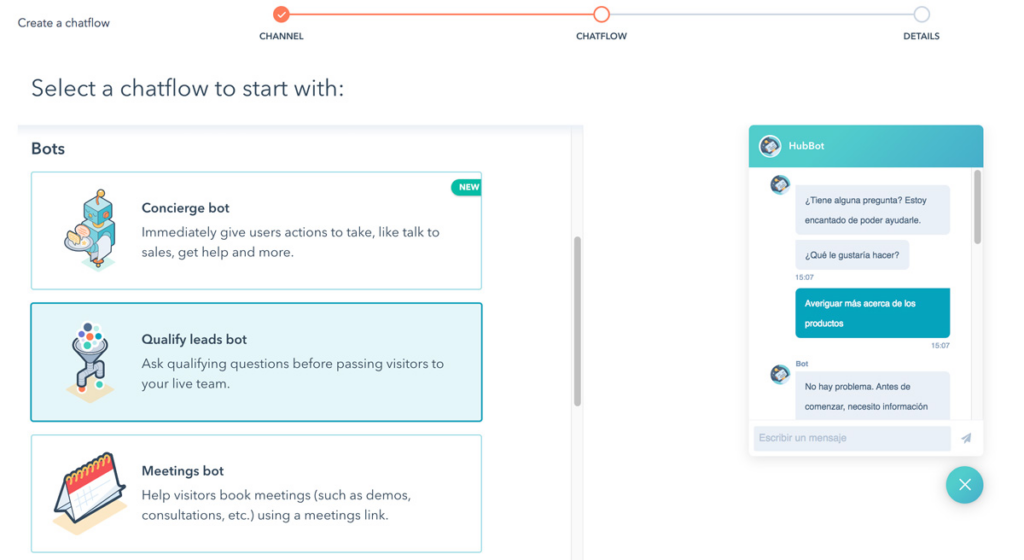
Every chatbot follows the same basic loop: a user sends a message, the bot works out what they want, finds or generates a response, and replies. What changes between chatbot types is how sophisticated each step is.
- The user sends a message. A customer types or speaks a question into a conversational interface, such as a website chat widget, an in-app messenger, a social messaging channel, or a voice assistant.
- The chatbot interprets the request. Rule-based bots look for keywords or button clicks. AI chatbots use NLP to identify the user's intent (what they want to do, like "track my order") and entities (key details, like an order number).
- The chatbot finds or generates an answer. It might follow a scripted decision tree, pull an article from a knowledge base, look up data in a connected system like a CRM or order database, or use an LLM to write a response grounded in your company's content.
- The chatbot responds or takes action. It replies in the chat, completes a task (like updating a booking), or escalates the conversation to a human agent with the context attached.
- The chatbot improves over time. Conversation logs and analytics show which questions the bot handled well and where it failed, so teams can refine answers, add content, or retrain models.
Chatbots and AI: From Scripts to Generative AI
Chatbot technology has come a long way from its rule-based beginnings. Early chatbots could only respond to exact keywords or commands. They worked for simple FAQs but broke down when customers phrased questions in unexpected ways.
Have an account? Log In
NLP and Machine Learning
As AI advanced, chatbots began using natural language processing to understand questions written in the customer's own words, and machine learning to improve from past interactions. Instead of typing an exact phrase, customers could ask naturally and still get an accurate answer.
Generative AI and Large Language Models
Generative AI chatbots, built on large language models like the GPT family, generate original responses instead of relying on pre-written scripts. They can handle complex, open-ended conversations, summarize information, and adjust their tone to the customer. Tools like ChatGPT brought this style of chatbot into the mainstream.
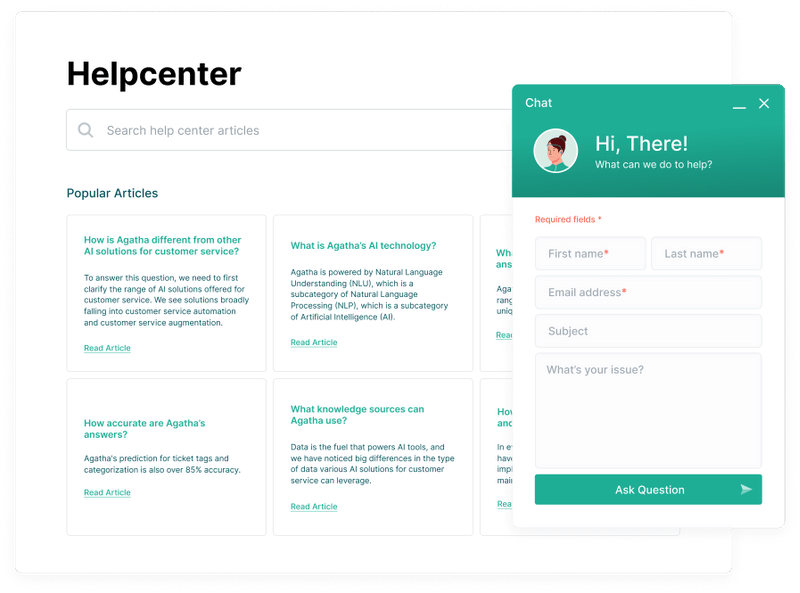
For customer service, the best generative AI chatbots are grounded in your own help center, policies, and product data, so they answer from approved information rather than making things up. This approach, often called retrieval-augmented generation (RAG), is now a standard feature in many customer service platforms, including most of the best AI chatbots for customer service.
Conversational AI
"Conversational AI" is the umbrella term for the technologies that let machines understand and respond to human language, including NLP, speech recognition, machine learning, and generative AI. AI chatbots are one application of conversational AI; voice assistants and AI agents are others. Learn more about the broader role of AI in customer experience.
Chatbot vs AI Virtual Assistant vs AI Agent
These terms are often used interchangeably, but they describe different levels of capability. The simplest way to think about it: chatbots answer, virtual assistants help, and AI agents act.
| Chatbot | AI Virtual Assistant | AI Agent | |
|---|---|---|---|
| Main job | ChatbotAnswer questions and handle simple, defined tasks in a conversation | AI Virtual AssistantHelp a person get things done across apps and tasks | AI AgentPursue a goal and complete multi-step work with some autonomy |
| Typical user | ChatbotCustomers and website visitors | AI Virtual AssistantAn individual user or employee | AI AgentCustomers, employees, or other systems |
| How it works | ChatbotRules, decision trees, NLP, or an LLM | AI Virtual AssistantConversational AI plus access to personal data like calendars, email, and contacts | AI AgentAn LLM that plans steps, calls tools and APIs, and checks its own results |
| Takes action? | ChatbotLimited, usually within one workflow | AI Virtual AssistantYes, mostly simple tasks for one person | AI AgentYes, across multiple systems, often end to end |
| Examples | ChatbotWebsite support bot, FAQ bot, order-status bot | AI Virtual AssistantSiri, Alexa, Google Assistant, AI meeting assistants | AI AgentAn agent that processes a refund, updates the CRM, and emails the customer |
In practice the lines are blurring. Many customer service platforms now market "AI agents" that started life as chatbots, and the best tools can both converse and act. When you evaluate vendors, focus on what the tool can actually do (answer, resolve, or act across systems) rather than what it's called.
What Do Chatbots Integrate With?
A chatbot is only as useful as the systems it can reach. Integrations let a bot personalize answers, take real actions, and hand off smoothly to people. The most common integrations for customer service chatbots include:
- Help desk and ticketing software: Create, update, and route tickets automatically with integrated help desk software when the bot can't resolve an issue.
- Live chat: Hand conversations to a human agent, with the full chat history attached, so customers don't have to repeat themselves.
- CRM: Recognize returning customers, personalize responses with account details, and log every interaction to the customer record.
- Knowledge base: Pull answers from help articles and internal documentation so responses stay accurate and on-brand. This is the backbone of strong customer self-service.
- Messaging and voice channels: Deploy the same bot on your website, mobile app, WhatsApp, Facebook Messenger, Instagram, SMS, and phone (IVR) for a consistent omnichannel customer service experience.
- Ecommerce and order systems: Check order status, process returns, recommend products, and recover abandoned carts.
- Scheduling, billing, and payment tools: Book appointments, update subscriptions, or take payments inside the conversation.
- Analytics and QA tools: Track resolution rates, containment, CSAT, and failed intents to keep improving the bot.
Types of Chatbots
Chatbots are usually grouped by the technology that powers them. Most tools today combine more than one approach.
| Type | How it works | Best for | Limitations |
|---|---|---|---|
| TypeRule-based (menu or button) chatbots | How it worksFollow a predefined decision tree; users click options or type set commands | Best forSimple FAQs, routing, and lead capture | LimitationsCan't handle questions outside the script |
| TypeKeyword-based chatbots | How it worksMatch keywords in a message to stored responses | Best forBasic support questions with predictable wording | LimitationsEasily confused by synonyms, typos, or complex questions |
| TypeAI-powered (NLP) chatbots | How it worksUse NLP and machine learning to recognize intent and context | Best forSupport conversations where customers phrase things differently | LimitationsNeed training data and ongoing tuning |
| TypeGenerative AI (LLM) chatbots | How it worksUse large language models to generate original responses, ideally grounded in your content | Best forOpen-ended questions, complex support, and natural conversation | LimitationsCan produce inaccurate answers without proper guardrails |
| TypeHybrid chatbots | How it worksCombine rules and AI, with escalation to human agents | Best forMost customer service teams | LimitationsMore setup to design flows and handoffs |
Chatbots can also be described by where they live or what they do:
- Voice chatbots: Interact through spoken language on phone lines, smart speakers, or voice assistants.
- Social media and messaging chatbots: Built for WhatsApp, Facebook Messenger, Instagram, and similar channels.
- Transactional chatbots: Complete specific tasks such as bookings, payments, or account changes.
- Knowledge-based chatbots: Answer detailed or technical questions from a knowledge base or documentation.
- Feedback chatbots: Collect survey responses and customer feedback conversationally.
Chatbot Use Cases
Chatbots show up across nearly every industry. Here are the most common ways organizations use them:
- Customer support: Answer FAQs, troubleshoot common issues, reset passwords, and create tickets 24/7, freeing agents for complex cases. This is part of broader customer support automation.
- Ecommerce: An ecommerce chatbot can recommend products, check stock, track orders, process returns, and nudge shoppers who abandon their carts.
- Banking and financial services: AI chatbots for banking handle balance checks, transaction questions, card freezes, and fraud alerts, with strong security controls.
- Sales and lead generation: Qualify website visitors, answer pre-sales questions, and book demos with the right sales rep.
- HR and IT help desks: Internal chatbots answer employee questions about policies, benefits, and IT issues.
- Healthcare and hospitality: Schedule appointments, send reminders, and answer common questions about services, hours, and bookings.
- Proactive engagement: Reach out when a customer seems stuck on a page or has an unfinished task. See how AI in proactive customer service works.
- Customer feedback: Collect CSAT and NPS responses conversationally at the end of an interaction.
Real-world example: Domino's AnyWare lets customers order pizza through a range of channels, including messaging apps, social media, smart speakers, and even by texting a pizza emoji. Making ordering available wherever customers already are is a strong example of chatbots removing friction from the buying journey.
By the way, since introducing AnyWare, Domino’s has seen its stock go up 217 percent.
More Articles
How to Choose a Chatbot
You can create a chatbot with zero coding skills, but most teams get further by choosing an established chatbot platform. Use these criteria to narrow your options:
- Define your purpose: Decide what the chatbot needs to do, such as deflect FAQs, resolve issues end-to-end, qualify leads, or support employees. This determines whether a simple rule-based bot is enough or if you need generative AI.
- Know your channels: List where customers contact you (website, app, WhatsApp, social, phone) and make sure the platform supports them.
- Check AI capabilities and accuracy: Test how well the bot understands real customer questions, whether it grounds answers in your content, and what guardrails prevent wrong answers.
- Prioritize integrations: Confirm native integrations with your help desk, CRM, knowledge base, and ecommerce or billing tools.
- Plan the human handoff: The bot should recognize when to escalate and pass the full conversation to an agent.
- Assess ease of use: Low-code or no-code builders let support teams update flows and content without developers.
- Look at analytics: You'll want reporting on resolution rate, containment, CSAT, and the questions the bot can't answer.
- Review security and compliance: Check data handling, privacy controls, and compliance with regulations relevant to your industry.
- Compare pricing models: Chatbots may be priced per seat, per conversation, per resolution, or by message volume. Read our guides to chatbot software pricing and AI customer service chatbot pricing.
10 Best Chatbots for Customer Service
Here are my recommendations if youare looking to invest in a customer service chatbot.
Clicks on the links below may earn a commission, which supports our independent testing and review of software and services. Learn more about how we stay transparent.
Benefits of Chatbots for Customer Service
- 24/7 availability: Customers get help at any hour, including nights, weekends, and holidays.
- Instant responses: Chatbots handle many conversations at once, so there's no queue for common questions.
- Lower support costs: Automating repetitive requests reduces cost per contact and lets teams scale without hiring at the same rate.
- More time for complex issues: With FAQs and order tracking covered, agents can focus on high-value, sensitive, or complicated cases.
- Personalized experiences: Connected to your CRM, a chatbot can tailor answers and recommendations to each customer.
- Consistent answers: Grounded in a single knowledge base, chatbots give the same accurate answer every time.
- Useful data: Chat logs reveal what customers ask most, where they get stuck, and what content is missing.
Curious which metrics improve most? See which KPIs customer service AI tools improve.
Customer Service Chatbots: FAQ
Here are some common questions about CX chatbots that I wanted to cover.
Chatbots Can Level Up Customer Experience
Chatbots are powerful tools that help businesses improve customer experience by providing quick, convenient, and personalized support. By using chatbots wisely, choosing the right type, addressing their limitations, and integrating them with other tools, businesses can create a better experience for their customers while saving time and resources. Chatbots aren’t just about automation; they’re about making life easier for customers and businesses alike. Understanding chatbot software costs helps ensure you select the most cost-effective solution for your needs.
You can sign up for The CX Lead newsletter to stay up-to-date on all the latest trends and insights in customer experience from leading industry experts.