


Key Takeaways
System Overview: Learn what is help desk ticketing system and how it turns scattered support requests into manageable, organized workflows.
Core Features: Top ticketing systems provide omnichannel intake, automated routing, SLA tracking, knowledge base integration, and actionable reporting tools.
Who Benefits: Customer support, IT, ecommerce, SaaS, and multi-site teams use ticketing systems to streamline recurring requests and improve service.
Business Impact: Help desk ticketing systems boosts efficiency and satisfaction, but improper setup can create workflow, compliance, or data risks.
Evaluation Guidance: Understanding what is help desk ticketing system assists in comparing solutions, identifying key features, and avoiding common implementation pitfalls.
A help desk ticketing system is software that turns scattered customer support requests into organized, trackable tickets your team can manage from one place. Help desk ticketing software helps prevent requests from falling through the cracks, reduces response delays, and gives support teams clearer ownership of every issue.
I've seen support teams drown in email threads and Slack messages before making the switch—and the difference is stark. This guide walks you through how these systems work, what features matter most, how to evaluate options, and what to look for before you commit to a platform.
What Is Help Desk Ticketing Software?
A help desk ticketing system is software that captures, organizes, assigns, and tracks customer support requests. Each request becomes a ticket with details such as the customer’s message, priority, status, owner, and response history.
Support teams use ticket queues, routing rules, internal notes, and reporting to manage requests across email, chat, web forms, and other channels.
How Does a Help Desk Ticketing System Work?
A help desk ticketing system turns incoming support requests into tickets that can be tracked from initial contact through resolution. Requests can arrive through channels such as email, chat, web forms, phone, or social media and are collected in a shared support queue.
From there, the system typically follows a simple workflow:
- Ticket creation: The request is recorded as a ticket with customer details, issue information, status, and conversation history.
- Categorization and prioritization: Tickets are organized by factors such as issue type, urgency, customer segment, or service-level requirements.
- Routing and assignment: Rules or automation send each ticket to the appropriate team or agent and establish clear ownership.
- Response and escalation: Agents investigate the issue, communicate with the customer, add internal notes, and escalate the ticket when additional expertise is needed.
- Resolution and reporting: Once the issue is resolved, the ticket is closed while its data remains available for reporting, collecting customer feedback, and identifying recurring support problems.
This gives support teams a consistent process for managing requests while giving managers visibility into workloads, response times, and unresolved issues.
Examples of Help Desk Ticketing Software
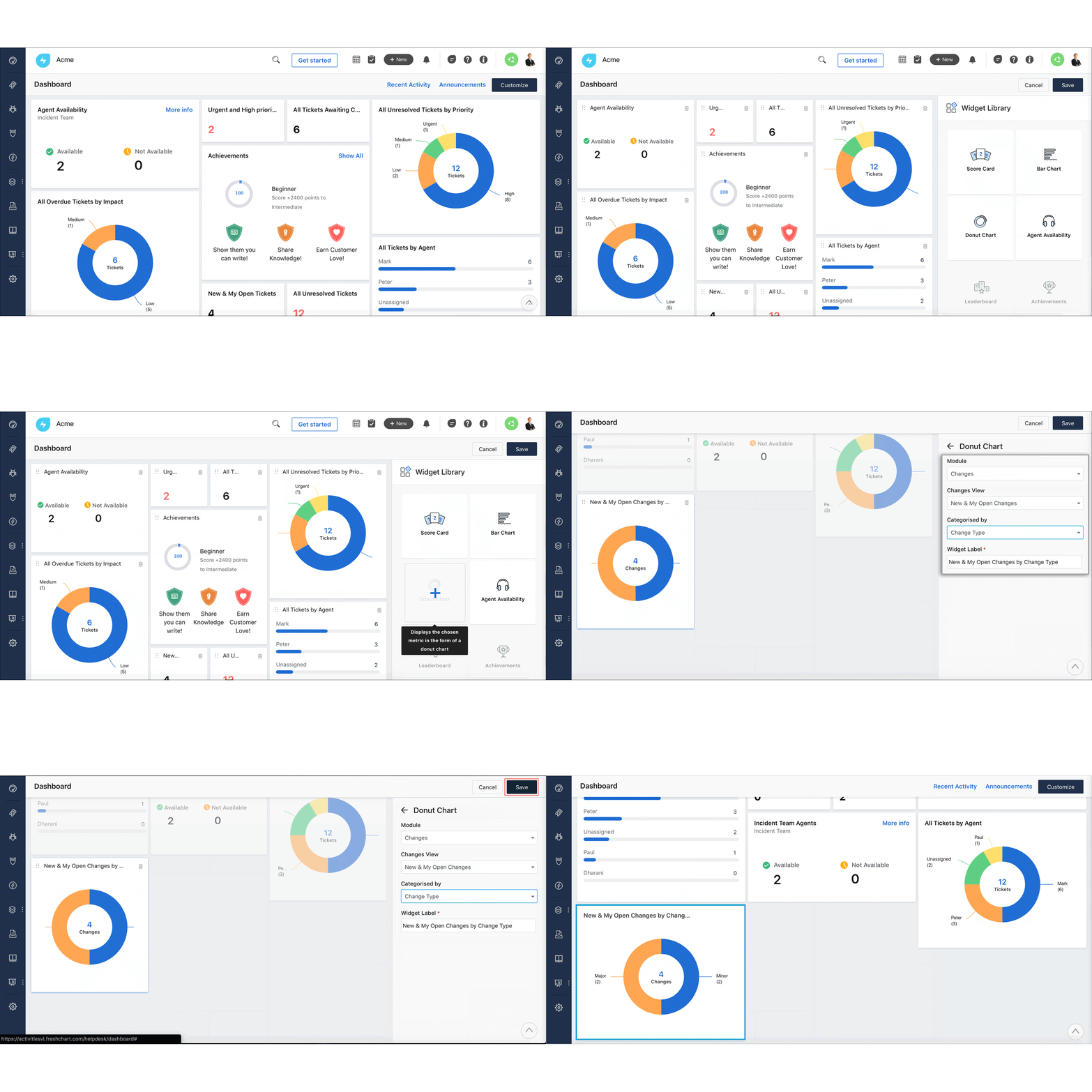
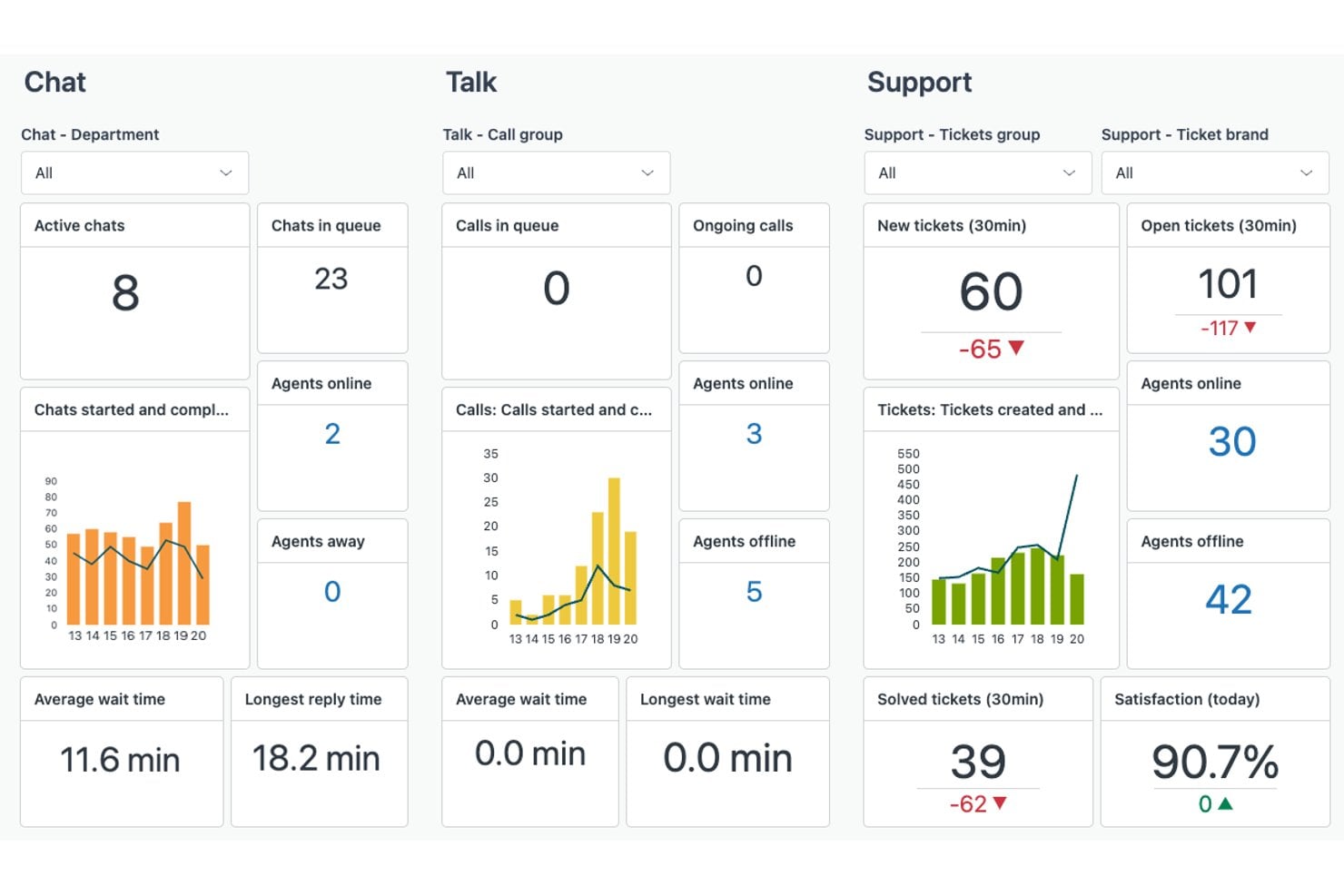
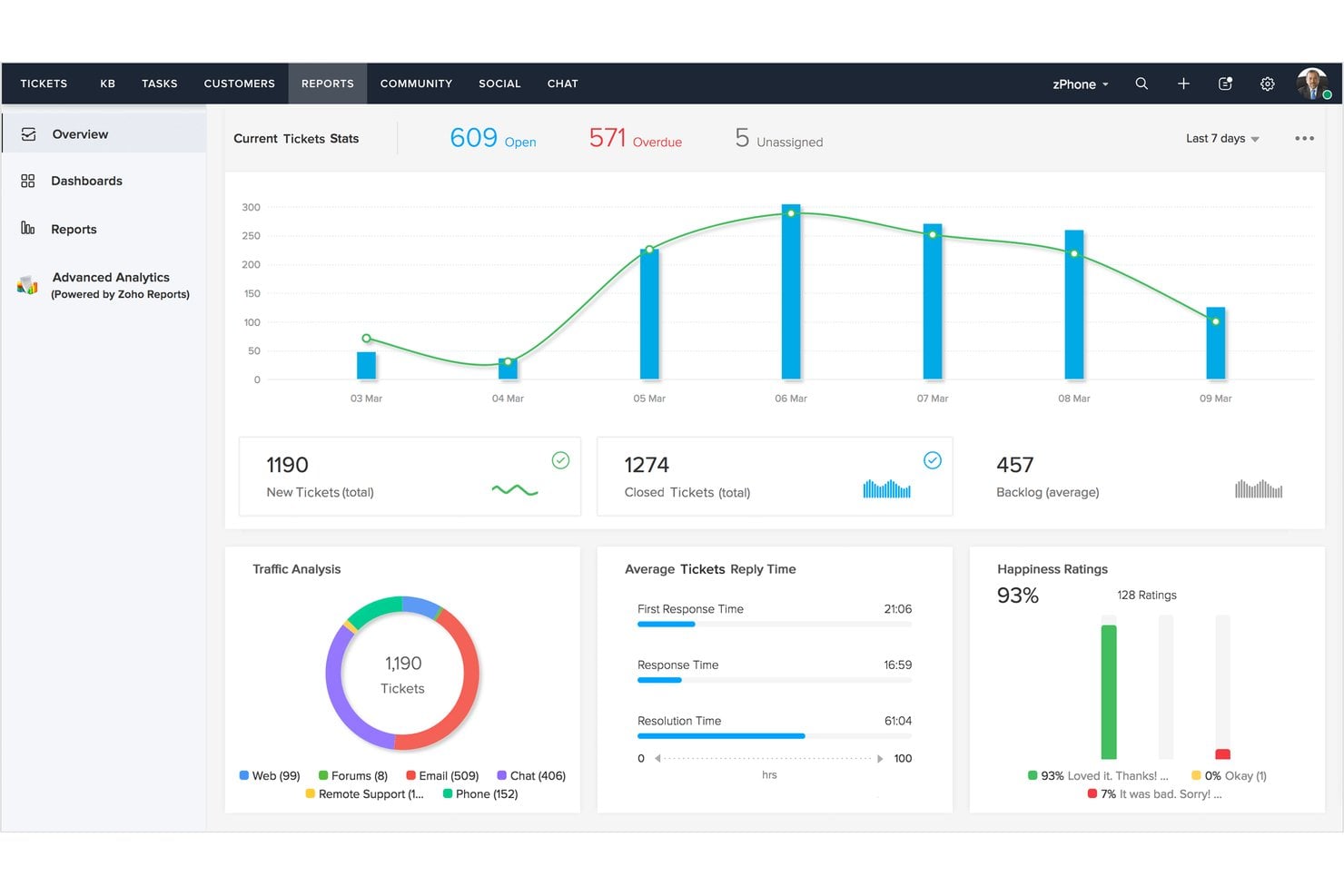
These interface examples show how help desk ticketing software organizes queues, ticket details, and agent actions:
Have an account? Log In
Top Help Desk Ticketing Software to Consider
Here's my shortlist of the best help desk ticketing software solutions:
Who Uses Help Desk Ticketing Software?
Help desk ticketing software fits teams that manage recurring requests, shared queues, ownership, response targets, and customer communication:
- Customer support teams: Track questions, complaints, technical issues, and follow-ups from email, chat, forms, and social channels.
- Customer success teams: Manage onboarding requests, escalations, service tasks, and account-specific issues that require coordination across departments.
- Internal IT teams: Handle employee requests for access, devices, software, incidents, and technical troubleshooting through an internal service desk.
- Ecommerce and retail teams: Organize order questions, returns, refunds, delivery issues, and product support across multiple customer contact channels.
- SaaS and subscription businesses: Support users with login problems, billing questions, integrations, product defects, and feature requests.
- Multi-location service organizations: Give distributed teams a shared system for routing requests, tracking service levels, and maintaining consistent response records.
Key Help Desk Ticketing Software Benefits and Business Impacts
Help desk ticketing software is the system support teams use to capture, organize, route, and track customer requests.
A help desk refers to the broader support function, while service desks or IT service management (ITSM) platforms typically extend beyond ticketing into areas such as incident, change, problem, and asset management.
Used effectively, help desk ticketing software can reduce missed requests, improve operational efficiency, support audit trails, and help teams meet service-level targets. However, implementation, integrations, security, and poor configuration can introduce additional costs and risks.
Review the table below to compare the main benefits with the potential trade-offs:
| Benefits | Risks |
|---|---|
| BenefitsCentralizes email, chat, and form requests in one queue, giving managers a complete view of customer demand. | RisksPoor channel configuration can split conversations across queues and create duplicate or missed tickets. |
| BenefitsAssigns ticket owners and priorities, making responsibility visible across support and success teams. | RisksIncorrect routing rules can send requests to the wrong team and delay resolution. |
| BenefitsTracks response and resolution times, helping managers monitor service-level targets and team workload. | RisksUnrealistic targets can encourage rushed replies or create pressure that affects service quality. |
| BenefitsStores conversation history, internal notes, and customer details for more consistent interactions. | RisksWeak access controls can expose personal data or sensitive account information. |
| BenefitsAutomates acknowledgments, reminders, escalations, and recurring workflows for predictable request handling. | RisksPoorly designed automation can send irrelevant messages or escalate tickets unnecessarily. |
| BenefitsProvides reports on ticket volume, resolution time, backlog, and recurring issue categories. | RisksIncomplete data or inconsistent ticket tagging can produce misleading reports and decisions. |
| BenefitsConnects support trends with product, billing, and customer success workflows to support cross-team follow-up. | RisksIntegration costs, migration work, and training demands can exceed the planned implementation budget. |
Help Desk Ticketing Software Case Studies
These case studies show how teams moved from scattered requests and unclear ownership to organized ticket queues and trackable workflows. Each example highlights the before-and-after impact of implementing help desk ticketing software in real-world support operations.
Case Study: Liberty London's Implementation of Zendesk
Liberty London, a premium UK department store, moved from a shared email inbox and switchboard setup to Zendesk's full support platform—adding phone, chat, email, and WhatsApp to its support mix.
The team then adopted Zendesk AI to automatically classify incoming tickets by intent, sentiment, and language, routing them to the right agent without manual triage.
Here are the results of Liberty London's implementation of help desk ticketing software:
- First reply time: Reduced by 73%, cutting the time customers waited for an initial response across all support channels.
- Ticket resolution time: Decreased by 11%, reflecting faster end-to-end handling of customer issues.
- Customer satisfaction (CSAT): Increased by 9%, with 90% of customer feedback highlighting quick responses, pleasant interactions, and accurate answers.
- Help center savings: The team saved $21,461 annually through self-service options that reduced inbound ticket volume.
Case Study: Brandt Companies' Implementation of Freshdesk
Brandt Companies, a Texas-based mechanical, electrical, and plumbing contractor with over 1,500 employees, replaced a legacy help desk that had created clunky workflows, poor ticket assignment, and missed service-level agreements.
By adopting Freshdesk with ticketing, Dispatch'r automation rules, reporting, gamification, and a custom API-driven Kanban onboarding board, the team limited agents to two active tickets at a time and automated routing for better visibility.
Here are the results of Brandt Companies' implementation of help desk ticketing software:
- Ticket execution and efficiency: Improved by 100%, with agents handling requests through a structured, automated queue instead of an ad hoc email system.
- Open ticket volume: Dropped from approximately 200 to 85, giving the team a more manageable and visible queue.
- First response time: Improved by 25%, with automated routing getting tickets to the right agent faster.
- SLA compliance and agent morale: Both improved as agents worked within clearer limits and managers gained actionable reporting for staffing and process decisions.
Core Features & Capabilities of Help Desk Ticketing Software
When evaluating a help desk ticketing system, focus on the features that match your support channels, workflows, service-level requirements, reporting needs, and existing tools.
The right platform should make ticket management easier to scale while giving agents the context and automation they need to resolve requests efficiently:
- Omnichannel intake: Collect email, chat, web form, phone, and social requests in one ticketing system. This gives your team a complete view of customer demand across each support channel.
- Ticket routing: Assign requests by topic, priority, customer segment, language, or agent availability. Routing rules direct work to the right team and reduce manual triage.
- Priorities and SLAs: Set urgency levels, response targets, and resolution deadlines for different ticket types. Service-level tracking helps managers identify overdue work before it affects the customer experience.
- Agent workspaces: Give agents customer history, ticket context, internal notes, and recommended actions in one view. Agents can respond with fewer handoffs and less repeated questioning.
- Workflow automation: Trigger acknowledgments, reminders, escalations, status changes, and follow-up tasks based on ticket conditions. Automation keeps routine actions consistent without removing human judgment from complex cases.
- Knowledge base integration: Connect tickets to help center articles and internal guidance. Agents can share relevant answers, while customers can resolve straightforward questions through self-service.
- Reporting and dashboards: Monitor ticket volume, backlog, first response time, resolution time, reopen rates, and customer satisfaction. These metrics help you identify workload issues and recurring service problems.
- Customer feedback tools: Collect ratings, surveys, and written feedback after interactions. Managers can connect feedback to tickets, agents, channels, and issue categories when reviewing service quality.
More Articles
Help Desk Ticketing Software Use Cases: Typical Processes & Workflows
Help desk ticketing software supports request intake, ticket routing, incident management, escalations, customer follow-ups, and internal service workflows. Centralized queues, ownership rules, status tracking, and automated reminders help teams manage requests consistently from initial submission through resolution.
Use this table to see which customer experience processes help desk ticketing software supports:
| Process | Description | How Software Helps |
|---|---|---|
| ProcessCapture And Categorize Requests | DescriptionCollect customer questions, complaints, and service requests from each support channel. Classify them by topic, urgency, customer segment, or language. | How Software HelpsOmnichannel intake combines email, chat, forms, phone, and social messages in one queue. Custom fields and categorization rules give managers a consistent view of customer demand. |
| ProcessRoute And Assign Tickets | DescriptionSend each request to the team or agent best equipped to handle it. Make ownership clear from the first response through resolution. | How Software HelpsRouting rules assign tickets using criteria such as topic, priority, language, or availability. Shared queues and ticket owners reduce manual triage and make unassigned work visible. |
| ProcessManage Responses And Escalations | DescriptionTrack response deadlines, resolution targets, follow-ups, and escalations. Keep customers informed when an issue requires additional investigation. | How Software HelpsSLA timers flag overdue responses and resolution targets. Automated acknowledgments, reminders, status changes, and escalation rules support consistent follow-up without relying on spreadsheets or personal reminders. |
| ProcessSupport Self-Service And Resolution | DescriptionHelp customers find answers to routine questions while giving agents the context needed for complex issues. Record the final resolution for future reference. | How Software HelpsKnowledge base integrations let agents share relevant articles from tickets. Help center analytics and ticket categories show which questions need new or improved documentation. |
| ProcessMeasure Experience And Improve Processes | DescriptionReview customer feedback, ticket volume, backlog, response times, and resolution patterns. Use those findings to identify service gaps and recurring issues. | How Software HelpsDashboards connect operational metrics and customer feedback to channels, agents, ticket types, and issue categories. Managers can use these records to adjust routing, staffing, service targets, and self-service content. |
Types of Help Desk Ticketing Software & Similar Tools
Help desk ticketing software covers a range of tools—from customer-facing support desks to internal IT service platforms—and is sometimes confused with adjacent tools that handle customer communication differently:
| Type | Differentiator |
|---|---|
| TypeCustomer support help desk | DifferentiatorExternal-facing; designed to manage customer inquiries, complaints, and service requests across channels like email, chat, and web forms |
| TypeIT service management (ITSM) platform | DifferentiatorInternal-facing; built around ITIL frameworks for incident management, change requests, and IT asset tracking |
| TypeShared inbox software | DifferentiatorCollaborative email tool with assignment and threading features, but no structured ticket lifecycle, SLA tracking, or categorization rules |
| TypeCRM software | DifferentiatorManages customer relationships, sales pipelines, and account history; not built to handle support queues, ownership rules, or resolution workflows |
| TypeLive chat software | DifferentiatorSupports real-time customer conversations but lacks ticket creation, status tracking, and asynchronous request management |
Ready to See What a Help Desk Can Do for Your Team?
Now that you know what help desk ticketing software is and how it works, exploring the benefits of a help desk is a natural next step for figuring out whether it's the right fit for your support operation.


