

Help desk ticketing software is a digital platform your team uses to track, manage, and resolve customer support requests across every channel. If you’re comparing top help desk tools, you’re likely balancing pressures to deliver faster and more personalized support without losing oversight or burning out your team. This guide helps you cut through the noise by showing exactly how different solutions stack up for omnichannel workflows, automation, team collaboration, and integration with wider customer operations—so you can find what really fits your support strategy.
Why Trust Our Software Recommendations
6,700+
Reviews
20
Industry experts
16+
Evaluation factors
14
Years
Our team has been testing and reviewing software since 2012. As CX leaders ourselves, we know how difficult—and important—it is to choose the right software.
For this guide, we evaluated tools using hands-on testing and independent research, scoring tools using our selection criteria.
Our reviews reflect our human editorial judgment, not a sales pitch.
 Gui DrusinaCreative Director
 Tim FisherVP of AI
Help Desk Ticketing Software Comparison Table
This comparison table summarizes pricing details for my top help desk ticketing software selections.
| Tool | Best For | Trial Info | Price | ||
|---|---|---|---|---|---|
| 1 | Best for AI-native escalation and deflection | Free plan + free demo available | From $150/month (billed annually) | Website | |
| 2 | Best for unified customer data and insights | Free demo available | Pricing upon request | Website | |
| 3 | Best for Gmail-based multichannel support | Free plan available | From $35/user/month | Website | |
| 4 | Best for intuitive team collaboration tools | Free plan available | From $25/user/month | Website | |
| 5 | Best for AI-powered omnichannel automation | Free trial available | From $25/agent/month (billed annually) | Website | |
| 6 | Best for fast multi-department implementation | 14-day free trial | From $24/user/month (billed annually) | Website | |
| 7 | Best for native AI agent and human collaboration | 14-day free trial | From $29/user/month (billed annually) | Website | |
| 8 | Best for CRM service integration | 14-day free trial | From $20/user/month | Website | |
| 9 | Best for open source ticketing flexibility | Free plan available | From $12/user/month | Website | |
| 10 | Best for cross-team customer operations management | 14-day free trial | From $25/user/month (billed annually) | Website |


Help Desk Ticketing Software Reviews
Below are my detailed summaries of the best help desk ticketing software that made it onto my shortlist. My reviews offer a detailed look at the features, integrations, and best use cases of each platform to help you find the best one for you.
 Best for AI-native escalation and deflection
- Free plan + free demo available
- From $150/month (billed annually)
Visit WebsiteCustomer Rating:4.5/5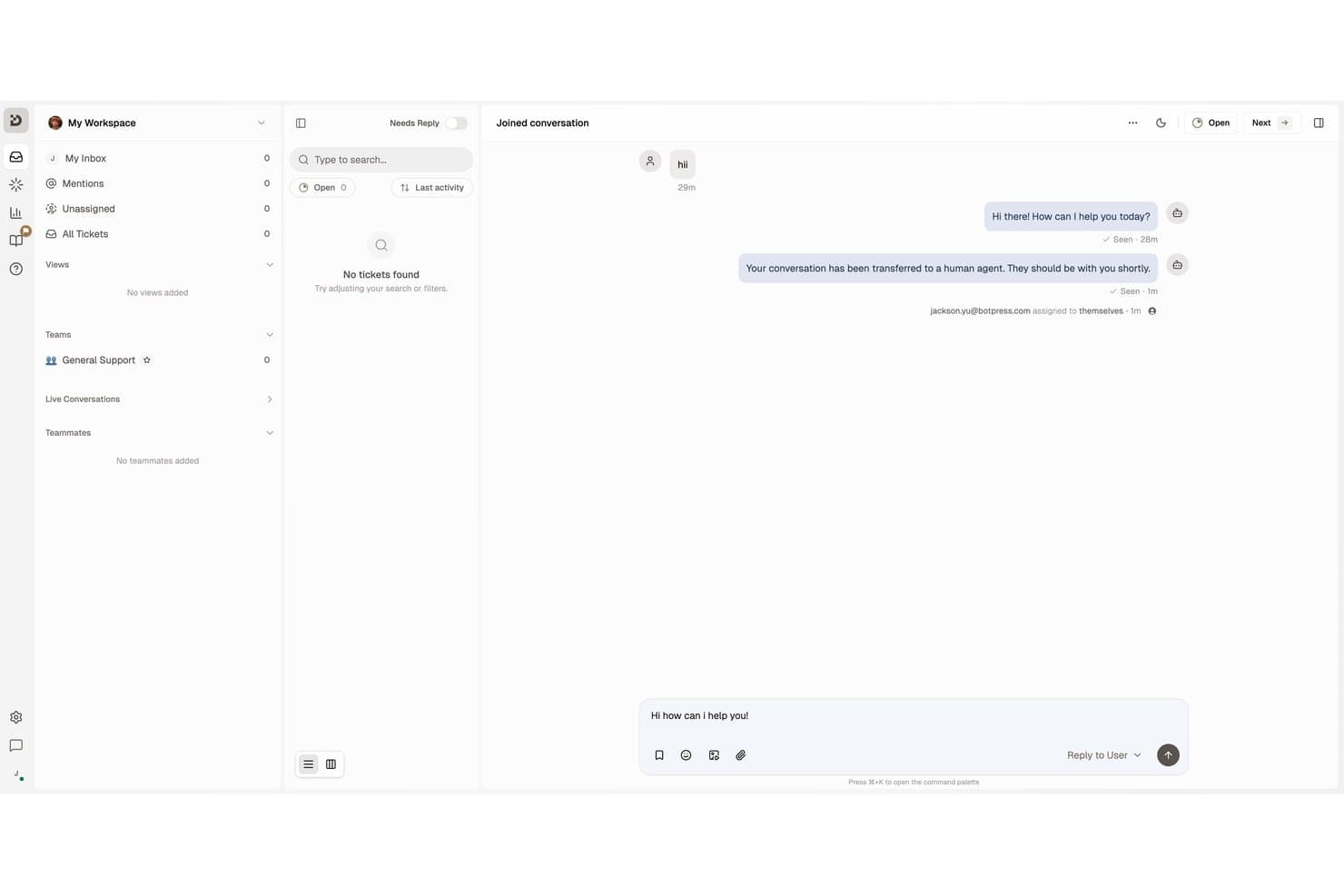
Botpress lets agents manage live conversations and reply to users in one inbox. Botpress Desk is an AI-native help desk ticketing platform that handles support tickets across webchat, email, WhatsApp, and voice, with built-in escalation routing, SLA tracking, and a self-service Help Center.
Who Is Botpress Best For?
Botpress Desk is a strong fit for customer support teams that want AI to handle deflection and escalation automatically before a human agent ever gets involved.
Why I Picked Botpress
I've included Botpress in my top picks because it's one of the few help desk platforms where AI handles deflection and escalation as core functions, not add-ons. Before a ticket ever reaches an agent, Botpress can answer questions from your existing knowledge base and hand off only when its confidence drops below a threshold you set. When escalation does happen, the agent receives an AI-generated summary of what was asked, what was tried, and a suggested next step.
Botpress Key Features
- Multi-channel intake: Desk captures conversations from webchat, email, WhatsApp, Slack, Discord, Telegram, Instagram, and Facebook Messenger into a single ticketing workspace.
- SLA timers and breach notifications: Configurable SLA clocks track first-response and follow-up targets, with alerts at personal, team, and workspace levels when deadlines approach or are missed.
- Capacity-based routing: Conversations are automatically assigned to agents based on capacity and business hours, with teams, routing rules, and RBAC available on the Team plan.
- CSAT surveys: Localized satisfaction surveys are sent automatically after ticket resolution, with rating labels and reminders adapted to the ticket's language.
Botpress Integrations
Botpress Desk offers two documented native integrations, Zendesk and Intercom, with OAuth connections, synced customer data, and pre-enriched handoffs. Botpress also provides HTTP Chat, Admin, Files, Tables, and Runtime APIs for custom integrations.
Pros and Cons
Pros:
- SLA alerts track human response targets
- Escalations carry summaries and conversation context
- AI answers deflect routine support tickets
Cons:
- Agent collaboration workflows are thinly documented
- Advanced bot setup can burden support teams
Learn more about Botpress: Best for unified customer data and insights
- Free demo available
- Pricing upon request
Visit WebsiteCustomer Rating:4.5/5
Kustomer centralizes customer conversations with real-time ticket insights. Kustomer is an AI-native customer service CRM that replaces traditional ticket queues with a unified customer timeline, combining omnichannel inbox management, workflow automation, AI agents, and real-time reporting in one platform.
Who Is Kustomer Best For?
Kustomer is a strong fit for mid-market and enterprise B2C brands running high-volume, omnichannel support operations across multiple teams and channels.
Why I Picked Kustomer
I've included Kustomer in my top picks because its unified customer timeline is unlike anything a traditional ticket-based system offers. Instead of treating each inquiry as an isolated ticket, every email, chat, call, and social message appears in one chronological view per customer. I also like that sentiment tracking and CSAT data surface directly in that same view, so agents aren't digging through separate dashboards to understand how a customer feels before responding.
Kustomer Key Features
- Multichannel intake: Consolidates customer messages from email, chat, voice, SMS, and social media into a single workspace.
- Automated workflow builder: Lets you automate repetitive tasks with customizable, no-code rules and macros.
- Knowledge base portal: Provides both internal and customer-facing help center tools with multilingual support.
- SLA and escalation management: Supports setting and tracking SLA policies with automated breach alerts and escalation triggers.
Kustomer Integrations
Kustomer offers native integrations with Salesforce, Shopify, Jira, Slack, Magento, Microsoft Teams, Facebook, Instagram, WhatsApp Business, and Twilio. An API is available for custom integrations.
Pros and Cons
Pros:
- Sentiment and CSAT surfaced in agent view
- AI triage routes tickets without manual rules
- Full conversation history per customer, not ticket
Cons:
- Reporting dashboards limited without custom development
- Complex to configure without dedicated admin support
Learn more about Kustomer: Best for Gmail-based multichannel support
- Free plan available
- From $35/user/month
Visit WebsiteCustomer Rating:4.7/5
Hiver lets teams collaborate on support tickets via Slack-style threads. Hiver is a help desk ticketing platform built around Gmail and Outlook, combining shared inboxes, ticket management, omnichannel intake, automated routing, and AI-driven support workflows.
Who Is Hiver Best For?
Hiver is a strong fit for small and mid-sized support teams already running on Google Workspace who want ticketing without leaving Gmail.
Why I Picked Hiver
Hiver earns its spot on my shortlist because it's the only help desk that runs inside Gmail rather than alongside it. I like how shared inboxes, ticket assignment, and internal notes all appear directly in the Gmail interface, so my team never has to context-switch into a separate tool. The omnichannel layer pulls live chat and WhatsApp threads into the same queue, and the AI Copilot drafts replies by drawing from connected help docs in real time.
Hiver Key Features
- Omnichannel queue: Collects support requests from email, live chat, WhatsApp, and voice into one unified workspace.
- SLA management: Lets teams define, track, and escalate tickets based on response and resolution targets.
- Knowledge base builder: Provides a public help center for customers to search articles and resolve common issues.
- Advanced analytics: Offers dashboards for monitoring ticket trends, agent metrics, and customer satisfaction scores.
Hiver Integrations
Hiver offers native integrations with Aircall, Slack, WhatsApp Business, and Google Workspace. An API is available for custom integrations.
Pros and Cons
Pros:
- Shared inboxes with threaded collision detection
- AI Copilot drafts replies from help docs
- Lives entirely inside Gmail's interface
Cons:
- Not viable for teams outside Google Workspace
- Thin reporting compared to standalone help desks
Learn more about Hiver: Best for intuitive team collaboration tools
- Free plan available
- From $25/user/month
Visit WebsiteCustomer Rating:4.5/5
Help Scout offers all customer conversations in a shared team inbox. Help Scout is a shared inbox and help desk platform that combines email-based ticket management, live chat, a knowledge base, AI-assisted replies, and team collaboration tools into a single support workspace.
Who Is Help Scout Best For?
Help Scout is a strong fit for small to mid-sized support teams that run email-first operations and want a clean, collaborative workspace without the complexity of enterprise ticketing systems.
Why I Picked Help Scout
Help Scout earns its spot on my shortlist because of how naturally it handles team collaboration inside a live support queue. Collision detection flags when two agents open the same conversation, which prevents duplicate replies before they happen. Internal lets me pull in a subject matter expert without leaving the thread, and conversations can be grouped by company, so my team always has full account context before responding.
Help Scout Key Features
- Multi-channel inbox: Collects customer inquiries from email, chat, social media, and SMS in a unified workspace.
- Beacon widget: Lets you embed chat, contact forms, and knowledge base content directly into your site or app.
- Configurable SLA policies: Enables you to set, track, and escalate support tickets based on response and resolution commitments.
- Docs knowledge base: Offers a public help center with search, categories, analytics, and multi-site management.
Help Scout Integrations
Help Scout offers native integrations with Slack, HubSpot, Salesforce, Jira, Shopify, Mailchimp, Zapier, and provides an API for custom integrations.
Pros and Cons
Pros:
- Built-in CSAT surveys on every conversation
- AI drafts replies directly within conversations
- Collision detection prevents duplicate agent replies
Cons:
- No native voice or phone channel
- Weak reporting depth for high-volume teams
Learn more about Help Scout: Best for AI-powered omnichannel automation
- Free trial available
- From $25/agent/month (billed annually)
Visit WebsiteCustomer Rating:4.3/5
Zendesk auto-assists agents by suggesting actions and responses for tickets. Zendesk is a customer service platform that centralizes ticket management, omnichannel support, AI-powered automation, and self-service across email, chat, voice, social media, and messaging apps.
Who Is Zendesk Best For?
Zendesk is a strong fit for mid-market and enterprise support teams managing high ticket volumes across multiple channels who need structured workflows and automation at scale.
Why I Picked Zendesk
I've included Zendesk in my top picks because of how its AI layer works across every support channel simultaneously. Intelligent Triage auto-classifies incoming tickets by intent and routes them before a human ever touches them. Paired with AI Agents that can resolve interactions across 80+ languages without escalating to a human, my team is able to handle significantly more volume without adding headcount.
Zendesk Key Features
- Configurable SLA management: Set custom SLAs with breach alerts, escalation triggers, and business hours tracking.
- Multi-brand help center: Publish distinct self-service portals for different product lines or customer segments from a single account.
- Advanced CX analytics: Build custom dashboards with ticket, agent, and CSAT/NPS metrics plus real-time monitoring capabilities.
- Marketplace integrations: Access thousands of apps for CRM, collaboration, and workflow automation through the Zendesk Marketplace.
Zendesk Integrations
Zendesk offers native integrations with Salesforce, Slack, Microsoft Teams, Shopify, Jira, Google Workspace, Mailchimp, and Trello. Thousands more apps are available through the Zendesk Marketplace. An API is available for custom integrations.
Pros and Cons
Pros:
- Deep SLA configuration with multi-policy support
- Omnichannel inbox covers voice, chat, and email
- AI triage routes tickets without manual input
Cons:
- Advanced analytics require significant configuration time
- Setup complexity increases with advanced workflow configuration
Learn more about Zendesk: Best for fast multi-department implementation
- 14-day free trial
- From $24/user/month (billed annually)
Visit WebsiteCustomer Rating:4.5/5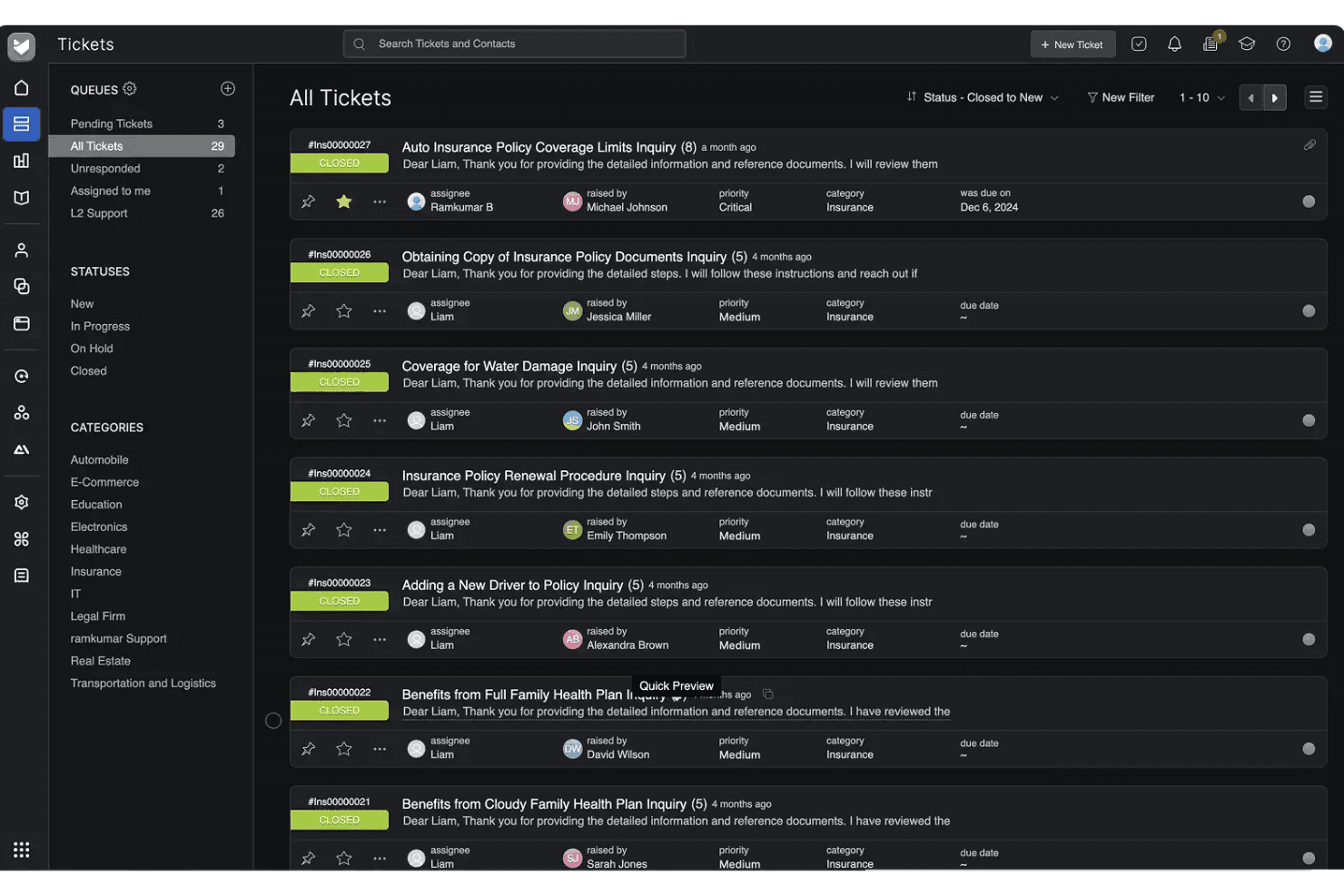
HappyFox organizes all support tickets in a centralized queue view. HappyFox is a cloud-based help desk ticketing platform that centralizes customer inquiries from email, chat, phone, social media, and web forms into a unified queue with SLA management, automation rules, and a self-service knowledge base.
Who Is HappyFox Best For?
HappyFox is a strong fit for small to mid-sized businesses running support across multiple departments, like IT, HR, and customer service, from a single platform.
Why I Picked HappyFox
HappyFox earns its spot on my shortlist because of how quickly you can stand up separate support queues for distinct departments. I love that IT, HR, and customer service teams each get their own ticket queues, SLA policies, and canned responses without any overlap or configuration conflict. The multi-brand helpdesk feature also lets each department run its own branded support portal and knowledge base from day one.
HappyFox Key Features
- AI-powered ticket triage: Uses machine learning to categorize, prioritize, and route incoming tickets automatically.
- Omnichannel ticket capture: Consolidates tickets from email, web forms, chat, phone, and social media into a single queue.
- SLA management and escalation: Lets you define custom SLAs, trigger automated escalations, and track business hours for compliance.
- Custom workflow automation: Offers rule builders and macros to automate assignment, status changes, and follow-up notifications.
HappyFox Integrations
HappyFox offers native integrations with Slack, Salesforce, Jira, Microsoft Teams, Zoom, Aircall, RingCentral, Shopify, Microsoft 365, and Google Workspace. An API is available for custom integrations.
Pros and Cons
Pros:
- Built-in knowledge base per department
- Configurable SLA policies with breach alerts
- Fast multi-department queue setup
Cons:
- Mobile app lacks full desktop functionality
- Advanced reporting requires manual workarounds
 Best for native AI agent and human collaboration
- 14-day free trial
- From $29/user/month (billed annually)
Visit WebsiteCustomer Rating:4.4/5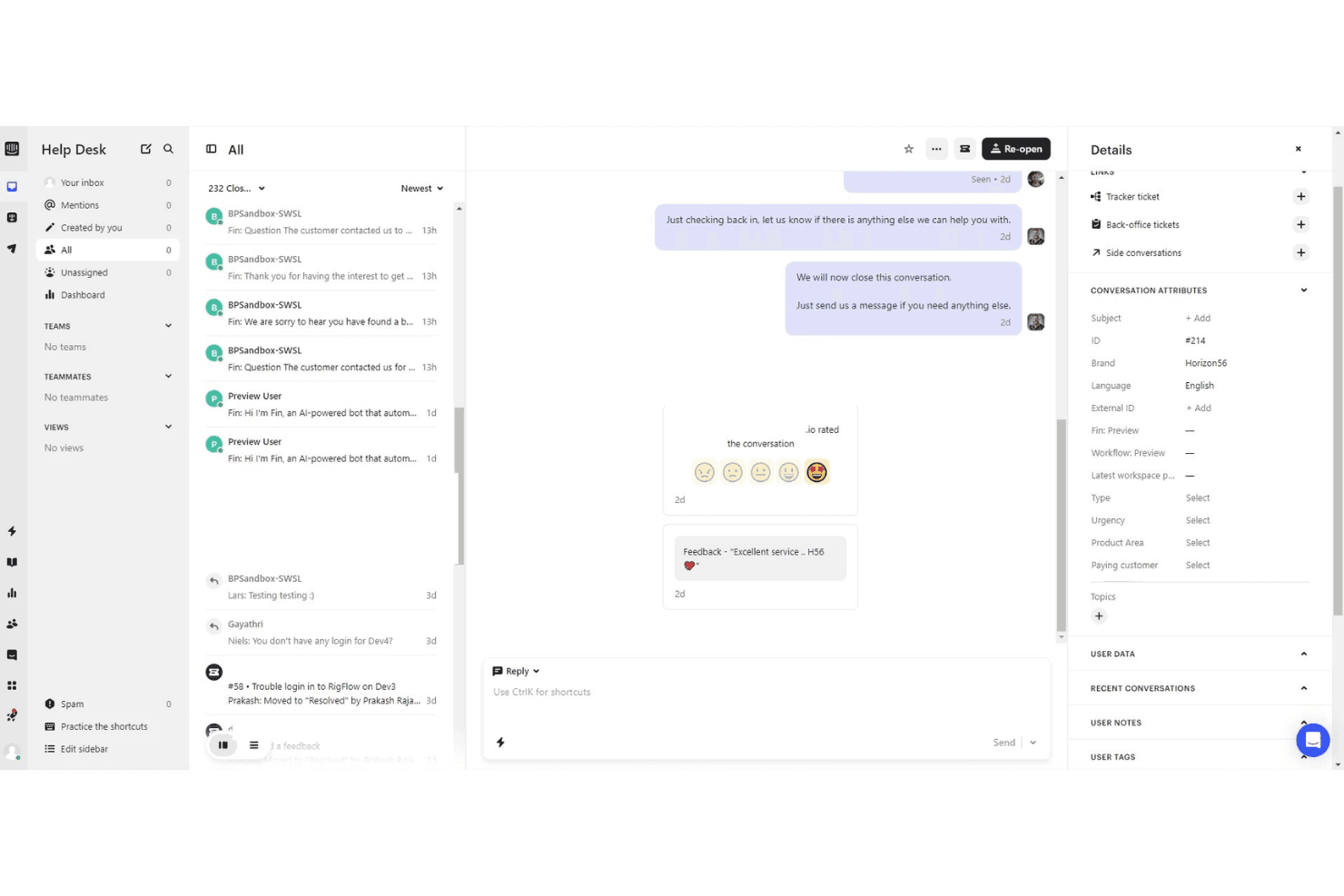
Intercom centralizes customer conversations with details and CSAT ratings. Intercom is an AI-native customer service platform that unifies omnichannel ticketing, a built-in AI agent, no-code workflow automation, knowledge base management, and agent-facing AI assistance in one workspace.
Who Is Intercom Best For?
Intercom is a strong fit for mid-market and enterprise support teams that want to automate a significant share of customer interactions through AI before routing to human agents.
Why I Picked Intercom
I've included Intercom in my top picks because the collaboration between its Fin AI Agent and human agents is genuinely native, not a bolt-on. Fin resolves conversations autonomously and, when it can't, hands off to a human agent with the full conversation context already attached. I also like Copilot, which sits inside the agent inbox and drafts replies and surfaces relevant knowledge base articles in real time, so agents aren't context-switching to find answers mid-conversation.
Intercom Key Features
- Omnichannel inbox: Combine email, chat, phone, WhatsApp, SMS, and social messages in a single agent view.
- Workflow automation: Use no-code tools to automate ticket routing, prioritization, and repetitive actions.
- Integrated knowledge base: Manage a searchable public or private help center with support for multiple brands and languages.
- Advanced reporting and insights: Access dashboards for ticket volume, resolution times, CSAT, and agent performance metrics.
Intercom Integrations
Intercom offers native integrations with Salesforce, HubSpot, Slack, Zendesk, WhatsApp, Facebook, Google Analytics, Shopify, Stripe, Zapier, and provides an API for custom integrations.
Pros and Cons
Pros:
- Omnichannel inbox unifies email, chat, and social
- Copilot surfaces answers inside the agent inbox
- Fin AI agent resolves tickets autonomously
Cons:
- Custom report building limited on lower plans
- Costs scale steeply with added seats
 Best for CRM service integration
- 14-day free trial
- From $20/user/month
Visit WebsiteCustomer Rating:4.4/5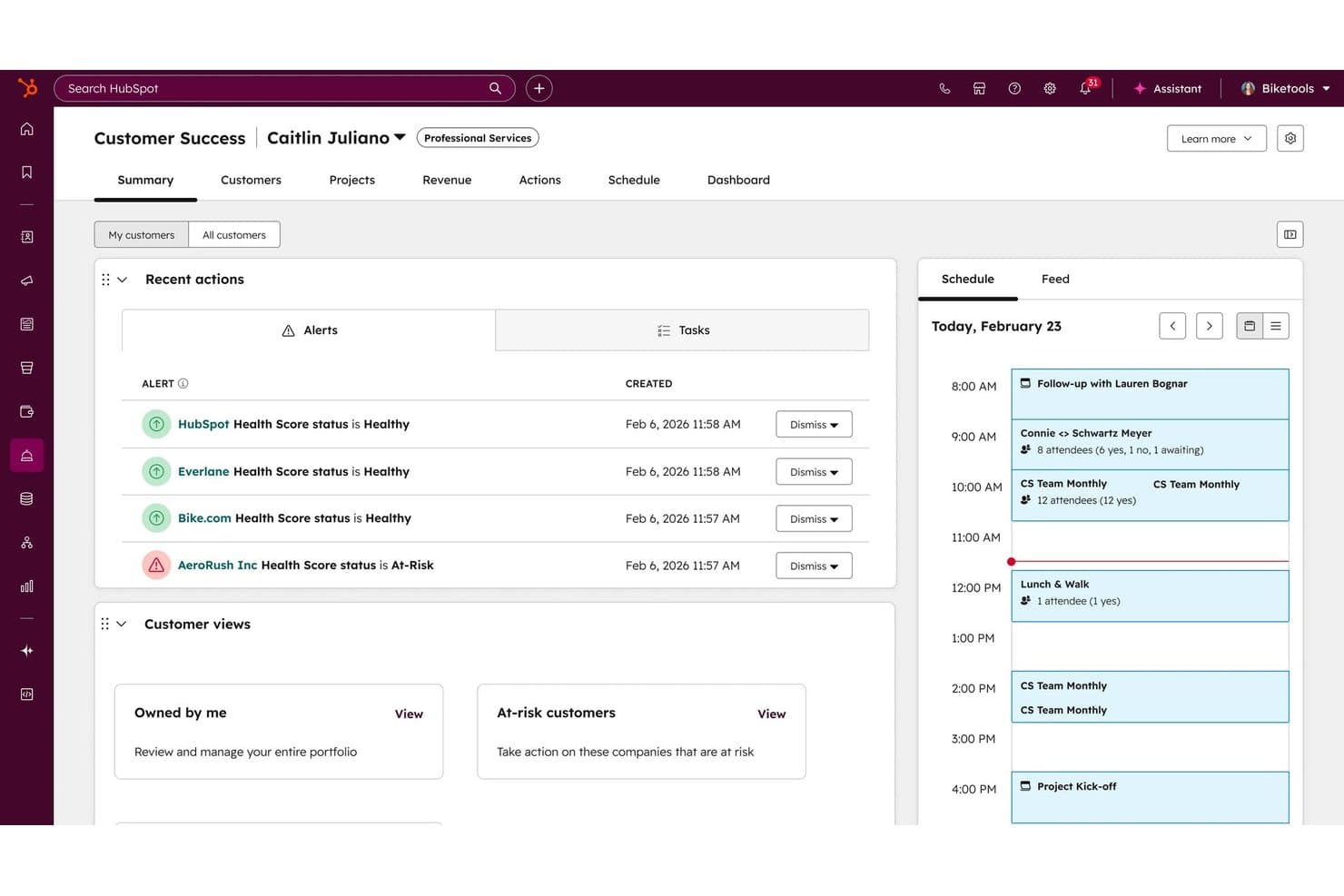
HubSpot Service Hub centralizes customer health alerts and daily schedules in one workspace. HubSpot Service Hub is an AI-powered help desk and ticketing platform that combines omni-channel support, SLA management, a knowledge base, and customer success tools within HubSpot's native CRM.
Who Is HubSpot Service Hub Best For?
It's a natural fit for mid-market teams already running sales and marketing on HubSpot who want support operations on the same platform.
Why I Picked HubSpot Service Hub
I've included HubSpot Service Hub in my top picks because the CRM integration isn't a bolt-on connector. Every ticket opens with the customer's full deal history, marketing touchpoints, and lifecycle stage already visible. I love how the Customer Success Workspace pulls health scoring and account data directly from the CRM, so my team can prioritize high-risk accounts without switching tools. The Customer Agent uses that same CRM context to personalize AI responses for email ticketing and live chat.
HubSpot Service Hub Key Features
- Omnichannel messaging: Manage customer inquiries from email, chat, social, phone, and SMS in a single agent workspace.
- Knowledge base management: Create, organize, and analyze a public-facing help center to deflect repetitive tickets.
- SLA management: Set custom SLA targets, automate escalation, and receive alerts if tickets approach breach.
- Service analytics dashboard: Track ticket volume, agent workload, and satisfaction metrics with prebuilt and customizable reports.
HubSpot Service Hub Integrations
HubSpot Service Hub offers native integrations with Salesforce, Slack, Jira, Zoom, Microsoft Teams, Shopify, Facebook Messenger, WhatsApp, and Mailchimp, plus Zapier and an API for custom integrations.
Pros and Cons
Pros:
- Customer health scores tied to open tickets
- AI agent handles chat and email replies
- Native CRM data visible on every ticket
Cons:
- Setup complexity grows with CRM data volume
- Advanced reporting locked behind higher tiers
Learn more about HubSpot Service Hub: Best for open source ticketing flexibility
- Free plan available
- From $12/user/month
Visit WebsiteCustomer Rating:4.3/5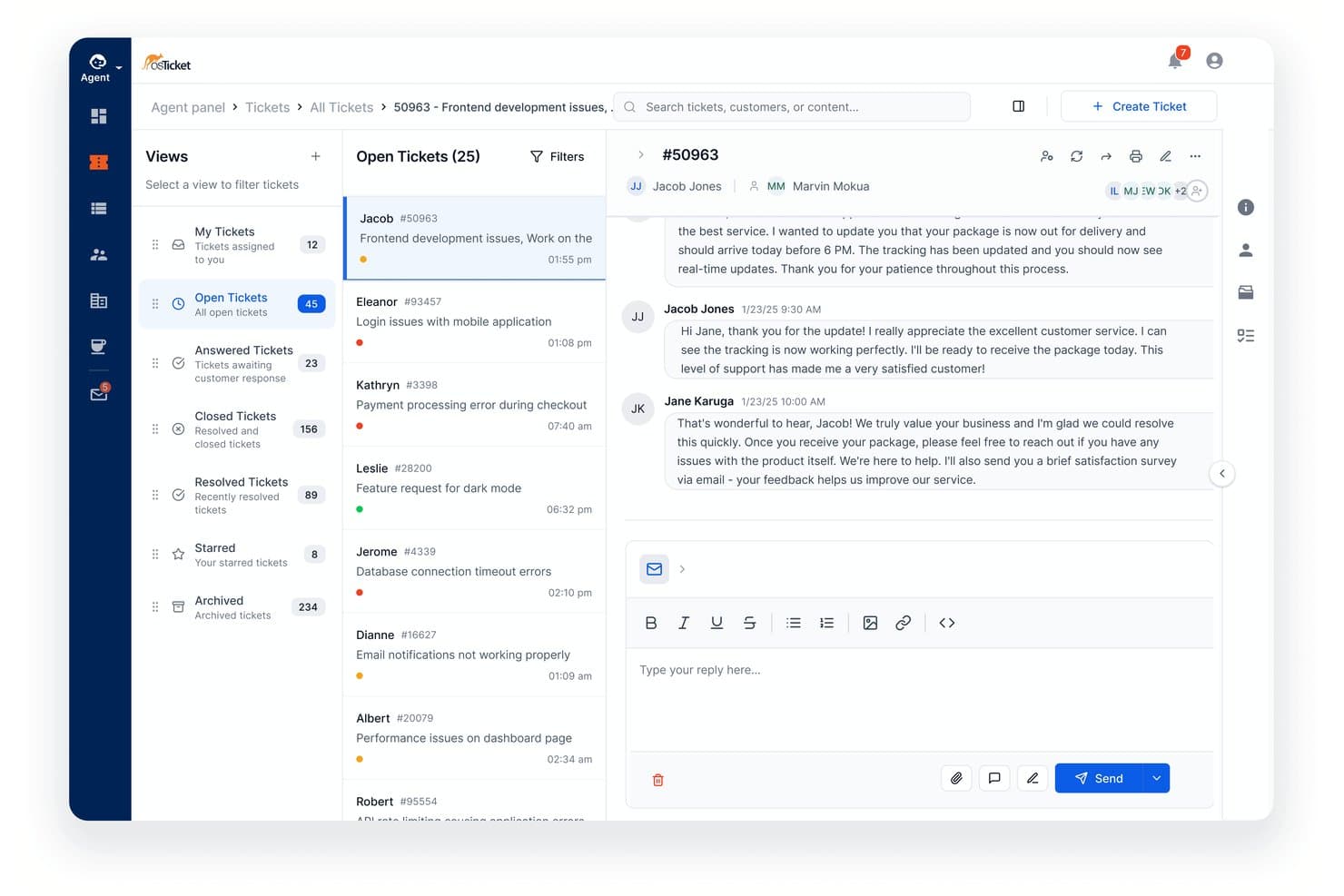
osTicket allows agents manage and reply to support tickets in one view. osTicket is an open-source ticketing system that consolidates email, web form, and API-based support requests into a unified queue with configurable routing, SLA tracking, and a customer-facing portal.
Who Is osTicket Best For?
It's a strong fit for small to mid-sized support teams with technical resources to self-host and a need for a fully customizable, zero-licensing-cost ticketing setup.
Why I Picked osTicket
I've included osTicket in my top picks because the level of structural customization it offers is rare in a free ticketing system. I like that you can build custom intake forms tied to specific help topics, so a billing ticket and a technical issue never share the same fields or queue. Ticket filters then let you define granular routing rules across multiple attributes, and since the source code is fully open, my team is able to modify behavior at the code level when built-in options fall short.
osTicket Key Features
- Agent collision avoidance: Locks tickets while an agent is replying to prevent simultaneous responses.
- Custom columns and queues: Lets you design views with fields and filters tailored to each team's process.
- Thread actions: Supports creating a new ticket or task directly from an entry within a ticket thread.
- Advanced search and export: Enables saving custom searches and exporting selected ticket data to CSV.
osTicket Integrations
Native integrations are not clearly documented. osTicket provides an API for custom integrations.
Pros and Cons
Pros:
- Ticket filters support granular multi-attribute routing
- Custom intake forms per help topic
- Self-hosted with full source code access
Cons:
- Reporting lacks customizable dashboards and CSAT tracking
- No native live chat channel support
 10Best for cross-team customer operations management
Front
- 14-day free trial
- From $25/user/month (billed annually)
Visit WebsiteCustomer Rating:4.6/5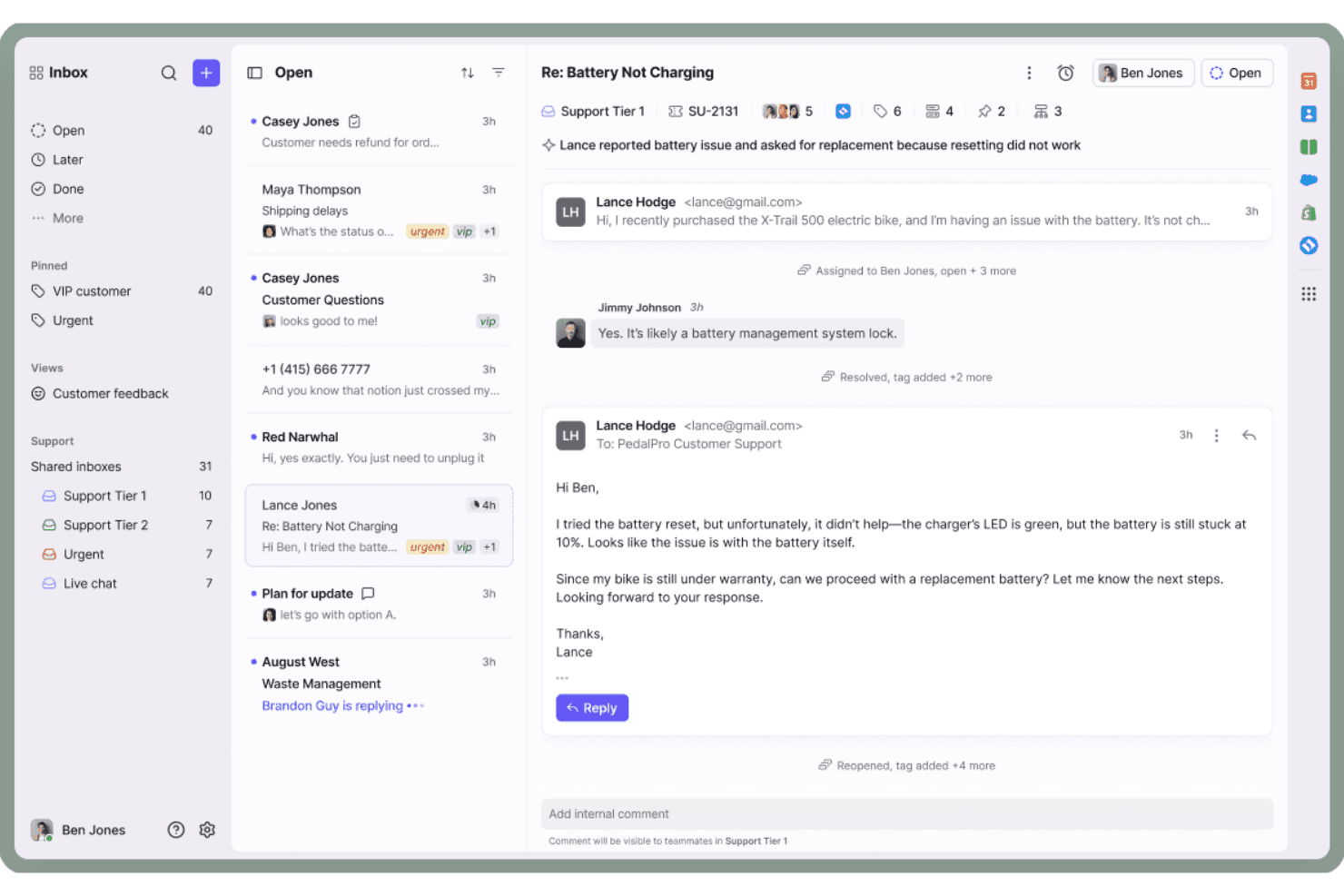
Front centralizes customer emails with threaded replies and team assignments. Front is a customer operations platform that combines shared inbox management, omnichannel ticketing, workflow automation, live chat, and a built-in knowledge base into a single collaborative workspace.
Who Is Front Best For?
Front is a strong fit for mid-sized teams where support, operations, and customer success work across the same conversations and need more than a traditional ticket queue.
Why I Picked Front
Front earns its spot as one of the best on my shortlist because of how it handles cross-team ticket ownership. I love that support, ops, and success agents can all work inside the same conversation thread using internal comments and assignments, without creating duplicate replies or losing context mid-resolution. Front's AI Topics automatically categorize incoming conversations, so my team can route and prioritize without relying on manual tagging across a high-volume shared inbox.
Front Key Features
- Omnichannel inbox: Consolidates email, chat, social, SMS, WhatsApp, and voice channels in one platform.
- Configurable SLAs: Lets you set, track, and escalate tickets against custom service level agreements.
- No-code knowledge base: Publishes public self-service help sites with article search and feedback collection.
- Real-time CX analytics: Provides dashboards for ticket volume, resolution times, CSAT, and team performance.
Front Integrations
Front offers 100+ native integrations, including Salesforce, HubSpot, Jira, Slack, Microsoft Teams, Aircall, Dialpad, WhatsApp, Shopify, and Asana. It connects with Zapier and provides an API for custom integrations.
Pros and Cons
Pros:
- Built-in CSAT tracking per conversation thread
- AI Topics auto-categorizes incoming conversations
- Shared inbox keeps all teams in sync
Cons:
- Not built for IT help desk workflows
- Search across archived conversations can be slow
Learn more about Front:
Other Help Desk Ticketing Software
Here are some additional help desk ticketing software options that didn’t make it onto my shortlist, but are still worth checking out:
- 11FreshdeskBest for guided AI onboarding support
- 12Zoho DeskBest for fast self-service help center setup
- 13Agentforce Service (formerly Service Cloud)Best for complex enterprise service needs
- 14SparrowDeskBest for outcome-based AI ticket resolution
- 15KayakoBest for unified customer journey views
- 16Jitbit HelpdeskBest for quick on-premise deployment
- 17Re:amazeBest for integrated live chat and ticketing
- 18ProProfs Help DeskBest for simple ticketing with shared inboxes
- 19GorgiasBest for ecommerce platform integration
- 20TidioBest for chatbot-driven ticket automation
How I Evaluate Help Desk Ticketing Software
I evaluate help desk platforms on two layers: baseline capabilities like SLA management, multi-channel intake, and ticket workflows, plus differentiators like AI triage and automation depth.
Core Functionality (Table Stakes For This List)
When I'm selecting tools for my list, I rank each one on a scale from 0 (does not offer the functionality) to 5 (excels in this area) for each core functionality listed below. I then calculate the tool's total score into a percentage, using 75% as a benchmark to help assess its overall fit for the list.
- Ticket Management: I look for full lifecycle tracking with status workflows, conversation threading, and custom fields so agents can handle anything from a simple password reset to a multi-touch billing dispute without losing context.
- Multi-Channel Intake: Every tool should consolidate inquiries from email, chat, social media, phone, and web forms into a single queue rather than forcing agents to jump between disconnected dashboards.
- Automated Routing & Assignment: I evaluate how the platform assigns incoming tickets—whether it uses round-robin, skill-based matching, or AI-driven intent detection to get the right issue to the right agent fast.
- SLA Management: Configurable SLA policies with escalation rules and breach alerts matter here, especially for teams juggling different response targets across customer tiers or regions.
- Knowledge Base & Self-Service: I check whether the platform offers a public-facing help center with search, categorization, and ideally AI-suggested articles so customers can resolve common questions before ever creating a ticket.
- Reporting & CX Analytics: Dashboards covering ticket volume, resolution times, CSAT, and agent performance give support leaders the visibility they need to spot bottlenecks and justify staffing decisions.
Once I have a list of tools that meet the criteria, I consider what sets each platform apart.
Differentiating Factors (What Sets Vendors Apart)
Here's how I compare and contrast different vendors:
Standout Features
AI-powered ticket triage is a major differentiator. I look for platforms where machine learning auto-categorizes and prioritizes incoming tickets, so a billing complaint gets flagged as urgent and routed to a specialist without manual sorting. Custom workflow automation also separates strong tools from basic ones. No-code rule builders that handle tagging, status updates, and follow-up notifications save agents from repetitive clicks they'd otherwise repeat hundreds of times a day.
Beyond Features
Integrations carry a lot of weight in my evaluation. I check whether a platform connects natively to CRMs like Salesforce or HubSpot and collaboration tools like Slack, plus whether it offers open APIs for custom builds. Pricing structure matters too—per-agent models can get expensive as your team scales, so I look at whether tiered or volume-based plans are available. Implementation speed is the other factor I focus on, especially whether migration tools exist to move tickets from a legacy system without losing history.
How to Choose a Help Desk Ticketing Software
Which help desk ticketing software actually matches your team’s support priorities and workflow demands? Use this table to align your selection with the outcomes that matter most to your operation:
| If your priority is… | Look for… |
|---|---|
| If your priority is…Omnichannel support without channel gaps | Look for…A unified inbox for email, chat, and social requests |
| If your priority is…Keeping response/resolution times on target | Look for…Automated SLA alerts and escalation workflows |
| If your priority is…Deflecting repetitive queries | Look for…A self-service knowledge base and help center |
| If your priority is…Time-saving automation | Look for…No-code workflow builders and rule engines |
| If your priority is…Integrating with your CRM or collaboration stack | Look for…Prebuilt connectors and open API support |
How to Vet Your Shortlist
- File a multi-channel test ticket: Submit requests from at least three channels and check if they land in one queue, threaded by contact.
- Review SLA tracking and escalation setup: Ask support to walk you through real SLA breach alerts and escalation actions.
- Audit knowledge base usability: Create and publish a help article, then have a colleague locate it via search as an end user would.
- Request integration documentation: Ask for up-to-date API docs or a list of native third-party connectors—review for depth and clarity.
- Tradeoff—Simplicity vs. Customization: Decide if you value turnkey setup more than deep customization, since platforms rarely offer both equally.
What Is Help Desk Ticketing Software?
Help desk ticketing software is a platform your team uses to capture, organize, and resolve customer inquiries from every support channel in one central workspace. It keeps track of every ticket’s status, automates assignment and escalation, and maintains a complete record of interactions for each issue. This helps support teams respond faster, consistently meet SLAs, and build a searchable archive of historical conversations.
Features
When selecting help desk ticketing software, keep an eye out for the following key features:
- Ticket management: Tracks every incident, question, or request as a ticket, records updates, assigns status, and creates a history of all customer interactions from intake to resolution.
- Multi-channel support: Consolidates messages from email, chat, web forms, phone, and social media so agents can work from a single, unified inbox.
- Automated routing: Uses rules or AI to assign and prioritize tickets by agent skills, workload, or ticket urgency, ensuring customers reach the right person quickly.
- SLA tracking: Monitors response and resolution deadlines, triggering alerts and escalations when service level agreements are at risk or breached.
- Self-service portal: Gives customers access to FAQs, help articles, and a searchable knowledge base, helping them solve common issues without agent support.
- Reporting and analytics: Visualizes team metrics like ticket volume, resolution time, CSAT, and trends in customer issues to help leaders make data-backed decisions.
- Internal collaboration tools: Enables agents to add private notes, mention colleagues, or start side conversations within tickets to share context and solve issues as a team.
- Custom workflow automation: Lets admins set up rules to automate repetitive processes such as tagging, notifications, or ticket escalation for better consistency and speed.
- Integration capabilities: Connects with CRM, collaboration, and business tools so agents can access customer context, trigger cross-platform actions, or report on service data.
- Customizable fields and forms: Allows teams to create tailored data fields, ticket types, and intake forms to collect information that’s specific to their business needs.
Benefits
Implementing help desk ticketing software provides several benefits for your team and your business. Here are a few you can look forward to:
- Faster response times: Automated routing and a unified ticket queue help agents address incoming requests from any channel without missing urgent issues.
- Consistent customer experiences: Workflow automation, SLA tracking, and conversation history ensure support processes are followed and every customer gets reliable service.
- Greater team efficiency: Self-service options, internal collaboration features, and custom workflows free up agents’ time and reduce repetitive manual work.
- Data-driven improvements: Reporting and analytics give managers visibility into performance trends, ticket volume, and customer satisfaction so they can optimize operations.
- Easier scalability: Multi-channel intake, integration capabilities, and flexible user management make it simple to expand or adapt your support operation as your business grows.
- Higher customer satisfaction: Quick resolutions, self-help options, and personalized support lead to happier customers who are more likely to return.
- Centralized knowledge management: Knowledge bases and searchable ticket archives capture agent expertise and make it easy for new team members to get up to speed.
Costs and Pricing
Selecting help desk ticketing software requires an understanding of the various pricing models and plans available. Costs vary based on features, team size, add-ons, and more. The table below summarizes common plans, their average prices, and typical features included in help desk ticketing software solutions:
Plan Comparison Table
| Plan Type | Average Price | Common Features |
|---|---|---|
| Plan TypeFree Plan | Average Price$0 | Common FeaturesBasic ticket management, limited channels, email support, and a simple knowledge base. |
| Plan TypePersonal Plan | Average Price$5-$25/user/month | Common FeaturesMulti-channel intake, automation basics, SLA tracking, reporting, and integrations with other software. |
| Plan TypeBusiness Plan | Average Price$25-$60/user/month | Common FeaturesAdvanced workflow automation, custom fields, performance dashboards, internal collaboration, and API access. |
| Plan TypeEnterprise Plan | Average Price$60-$150/user/month | Common FeaturesCustom SLAs, security options, audit logs, premium support, dedicated onboarding, and advanced integrations. |
Help Desk Ticketing Software FAQs
Here are some answers to common questions about help desk ticketing software:
What channels can I manage with help desk software?
You can manage customer inquiries from email, live chat, web forms, social media, and sometimes phone or messaging apps in one unified inbox.
Can help desk ticketing software automate ticket assignments?
Yes, most systems offer rule-based or AI-driven routing that automatically assigns tickets to the right agent or team based on priority, skills, or workload.
How does SLA tracking work in help desk ticketing software?
SLA tracking lets you set response and resolution deadlines, then monitors tickets for compliance, sending alerts or escalations if targets risk being missed.
Is there a way for customers to solve their own issues?
Yes, many platforms include a self-service portal or knowledge base where customers can find answers, submit requests, and check ticket status anytime.
What integrations should I expect from help desk ticketing software?
You should expect integrations with popular CRM platforms, team chat tools, and productivity apps, as well as API access for custom connections.