

10 mejores herramientas de monitoreo de la experiencia digital para 2026

Lista corta de las mejores herramientas de monitoreo de la experiencia digital


Gestionar la experiencia del cliente no es tarea fácil, desde comprender el comportamiento del usuario hasta garantizar interacciones fluidas. Las herramientas de monitoreo de experiencia digital ayudan proporcionando información para optimizar el rendimiento y mejorar la satisfacción del usuario.
Según mi experiencia, estas herramientas ofrecen una visión clara de las interacciones de los usuarios, facilitando la toma de decisiones basadas en datos. En este artículo, compartiré mis mejores opciones con una reseña imparcial y bien investigada para ayudarte a encontrar la más adecuada para tu equipo.
Por qué confiar en nuestras recomendaciones de software
Nuestro equipo lleva probando y evaluando software desde 2012. Como líderes de CX, sabemos lo difícil —y lo importante— que es elegir el software adecuado.
Para esta guía, evaluamos las herramientas mediante pruebas prácticas e investigación independiente, puntuando las herramientas según nuestros criterios de selección.
Nuestras reseñas reflejan nuestro criterio editorial humano, no un discurso de ventas.
Hemos estado probando y revisando software de experiencia del cliente desde 2020. Como gestores de experiencia del cliente nosotros mismos, sabemos lo crítico y difícil que es tomar la decisión correcta al seleccionar software. Invertimos en una investigación profunda para ayudar a nuestra audiencia a tomar mejores decisiones de compra de software.
Hemos probado más de 2.000 herramientas para distintos casos de uso de experiencia del cliente y escrito más de 1.000 reseñas completas de software. Descubre cómo mantenemos la transparencia y revisa nuestra metodología de reseñas de software.
Resumen de las mejores herramientas de monitoreo de experiencia digital
Esta tabla comparativa resume los detalles de precios de mis principales selecciones de herramientas de monitoreo de experiencia digital para ayudarte a encontrar la mejor para tu presupuesto y necesidades de negocio.
| Tool | Best For | Trial Info | Price | ||
|---|---|---|---|---|---|
| 1 | Ideal para monitoreo de pila completa con soporte en la nube | Prueba gratuita de 30 días + demo gratis disponible | Desde $10/mes (facturado anualmente) | Website | |
| 2 | Ideal para el monitoreo en tiempo real del rendimiento de sitios web | Prueba gratuita de 30 días + demo disponible | Desde $10/mes | Website | |
| 3 | Ideal para pruebas de experiencia móvil y de IoT | Demo gratuita disponible | Desde $39/mes (facturado anualmente) | Website | |
| 4 | La mejor para observabilidad y análisis de extremo a extremo | Plan gratuito disponible | Desde $49/usuario/mes | Website | |
| 5 | Ideal para el análisis del rendimiento de redes y aplicaciones | Demostración gratuita disponible | Precio a consultar | Website | |
| 6 | Ideal para el monitoreo de sitios web y APIs | Prueba gratuita de 30 días + demo gratis disponible | Desde $5.10/crédito/mes (facturado anualmente) | Website | |
| 7 | Ideal para la visibilidad del rendimiento de Internet y la nube | Prueba gratuita de 15 días | Desde $20/usuario/mes (facturado anualmente) | Website | |
| 8 | La mejor opción para obtener información e inteligencia automatizada mediante IA | Prueba gratuita de 14 días + demo disponible | Desde $75/mes | Website | |
| 9 | Ideal para integrar ITSM con el monitoreo de la experiencia | Demostración gratuita disponible | Precio bajo pedido | Website | |
| 10 | Ideal para el monitoreo de entornos de escritorios virtuales | Prueba gratuita de 21 días + Demostración gratuita disponible | Precio a consultar | Website |
Reseñas de las mejores herramientas de monitoreo de experiencia digital
A continuación, tienes mis resúmenes detallados de las mejores herramientas de monitoreo de experiencia digital que han entrado en mi lista corta. Mis reseñas ofrecen una mirada detallada a las características clave, pros y contras, integraciones y casos de uso ideales de cada herramienta para ayudarte a encontrar la mejor para ti.

Site24x7
Ideal para monitoreo de pila completa con soporte en la nube
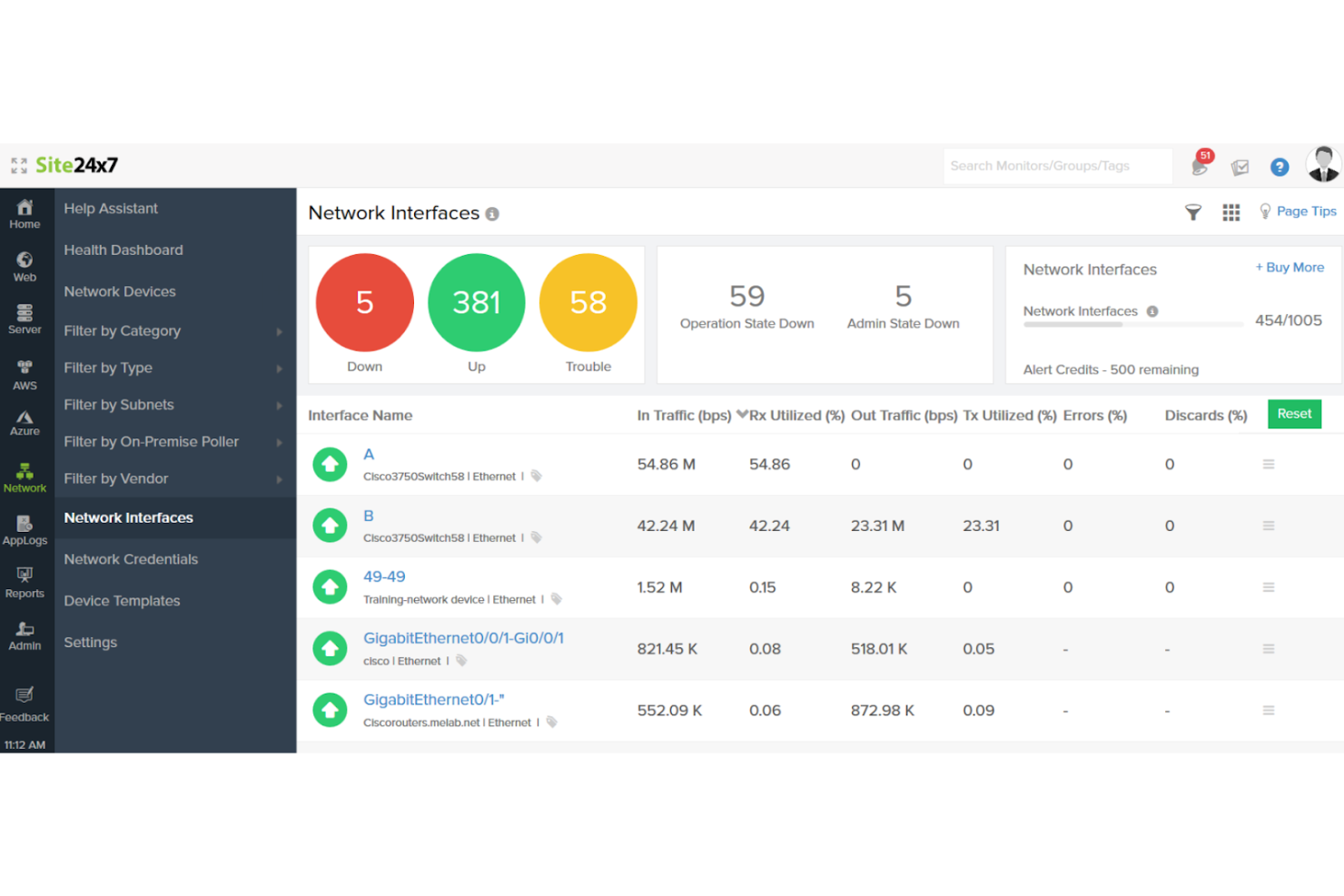
Site24x7 es una solución de monitoreo diseñada para proporcionar visibilidad integral de todo tu entorno de TI. Está orientada a equipos de operaciones de TI, desarrolladores e ingenieros DevOps, ofreciendo herramientas para supervisar sitios web, servidores, redes, aplicaciones y servicios en la nube.
Por qué elegí Site24x7: Ofrece una plataforma de monitoreo completa que cubre varios aspectos de la infraestructura de TI. Con el monitoreo de usuarios reales para rastrear las interacciones de los usuarios y el monitoreo sintético para simular transacciones de usuarios, Site24x7 ayuda a identificar y abordar proactivamente los problemas de rendimiento. Además, su monitoreo de rendimiento de aplicaciones admite múltiples lenguajes de programación, ofreciendo información detallada sobre el comportamiento de las aplicaciones.
Funciones destacadas e integraciones:
Las funciones incluyen monitoreo del rendimiento de la red para evaluar el estado de los dispositivos de red, asegurando una conectividad confiable. La plataforma también ofrece gestión de registros, permitiendo que tu equipo recopile, indexe y analice registros de diversas fuentes para la resolución de problemas. Además, Site24x7 proporciona páginas de estado para comunicar incidentes y períodos de inactividad de manera transparente a tus usuarios.
Las integraciones incluyen AWS, Azure, Google Cloud Platform, Docker, Kubernetes, VMware, Slack, Microsoft Teams, PagerDuty y ServiceNow.
Pros and Cons
Pros:
- Capacidades de informes detallados
- Escalable para adaptarse a infraestructuras en crecimiento
- Alertas en tiempo real para la detección inmediata de problemas
Cons:
- Retrasos ocasionales en la presentación de datos
- Acceso limitado a los datos de monitoreo sin conexión
New Product Updates from Site24x7

Site24x7 Adds Discovery Profiles for Network Devices
Site24x7 adds Discovery Profiles for network device onboarding, IP range scans, CSV imports, and NetFlow or NCM setup. This helps teams discover and configure devices from one workflow. For more information, visit Site24x7’s official site.
 .
.
Pingdom
Ideal para el monitoreo en tiempo real del rendimiento de sitios web

Pingdom es un servicio de monitoreo de sitios web diseñado para ayudar a empresas y desarrolladores web a garantizar que sus páginas estén siempre disponibles y funcionando de manera óptima. Ofrece herramientas para monitorear el tiempo de actividad, la velocidad de carga y las interacciones de los usuarios, brindando información valiosa para mantener una presencia en línea sin interrupciones.
Por qué elegí Pingdom: Pingdom ofrece funciones de monitoreo en tiempo real que proporcionan información inmediata sobre el rendimiento del sitio web. Incluye monitoreo de tiempo de actividad para alertarte cuando tu sitio se cae, análisis de velocidad de carga para identificar páginas lentas y monitoreo de transacciones para que las interacciones críticas de los usuarios funcionen correctamente.
Características destacadas e integraciones:
Características incluyen monitoreo real de usuarios para rastrear el rendimiento del sitio a través de diferentes dispositivos y ubicaciones, monitoreo sintético para detectar problemas antes de que afecten a los usuarios y reportes detallados con alertas para mantener informados a los equipos.
Integraciones incluyen Slack, Microsoft Teams, PagerDuty, Opsgenie, VictorOps, Webhooks y varias API para integraciones personalizadas.
Pros and Cons
Pros:
- Opciones de alertas completas reducen los tiempos de respuesta
- Informes detallados mejoran el análisis del rendimiento
- Red global de puntos de control garantiza un monitoreo preciso
Cons:
- Alertas falsas
- Presentación de datos compleja

HeadSpin
Ideal para pruebas de experiencia móvil y de IoT
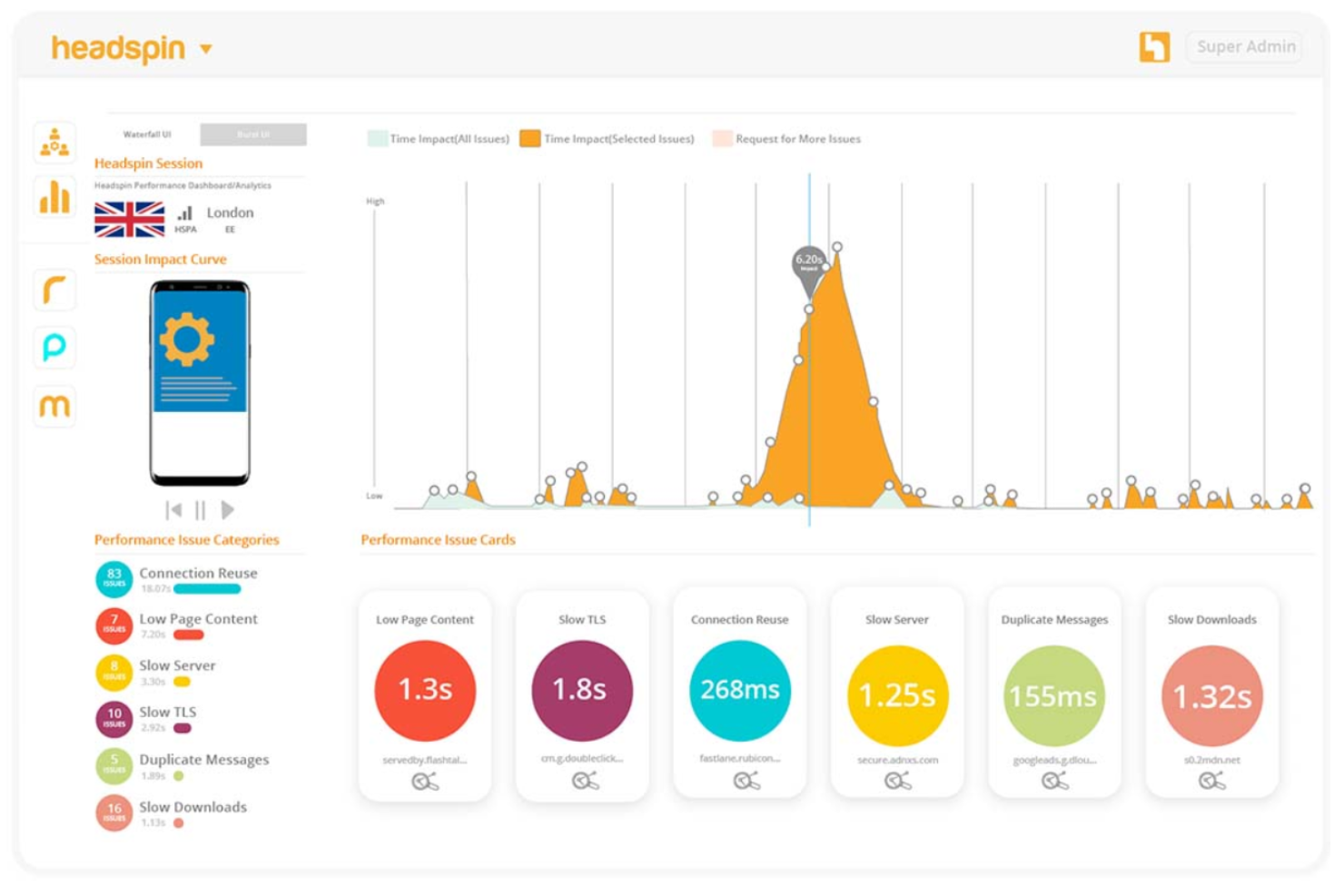
HeadSpin es una plataforma que permite a las empresas probar y monitorizar aplicaciones en dispositivos reales en diversas ubicaciones, centrándose en mejorar la experiencia del usuario. Está orientada a equipos de desarrollo y aseguramiento de calidad que buscan optimizar el rendimiento y la fiabilidad de las aplicaciones.
Por qué elegí HeadSpin: HeadSpin garantiza el rendimiento óptimo de aplicaciones móviles y de IoT permitiendo pruebas en dispositivos reales bajo condiciones del mundo real, lo que proporciona información precisa sobre el desempeño. Gracias a su analítica impulsada por IA, ayuda a identificar y resolver problemas antes de que afecten a los usuarios. Además, la plataforma admite tanto pruebas manuales como automatizadas.
Funciones y integraciones principales:
Las funciones incluyen monitorización de la calidad de experiencia basada en IA para detectar en tiempo real problemas de rendimiento percibidos por el usuario. La plataforma también ofrece análisis integral de escenarios de extremo a extremo para evaluar las interacciones del usuario e identificar posibles cuellos de botella. Además, las pruebas en dispositivos reales aseguran evaluaciones precisas de rendimiento en entornos reales.
Las integraciones incluyen Jira, Slack, PagerDuty, ServiceNow, Appium y Selenium nativos, y varios frameworks de automatización a través del HeadSpin bridge.
Pros and Cons
Pros:
- Acceso a infraestructura global de dispositivos reales
- Admite pruebas manuales y automatizadas
- Análisis integral de escenarios de extremo a extremo
Cons:
- Posible sobrecarga en el análisis de datos de rendimiento
- Dependencia de la infraestructura en la nube

La mejor para observabilidad y análisis de extremo a extremo
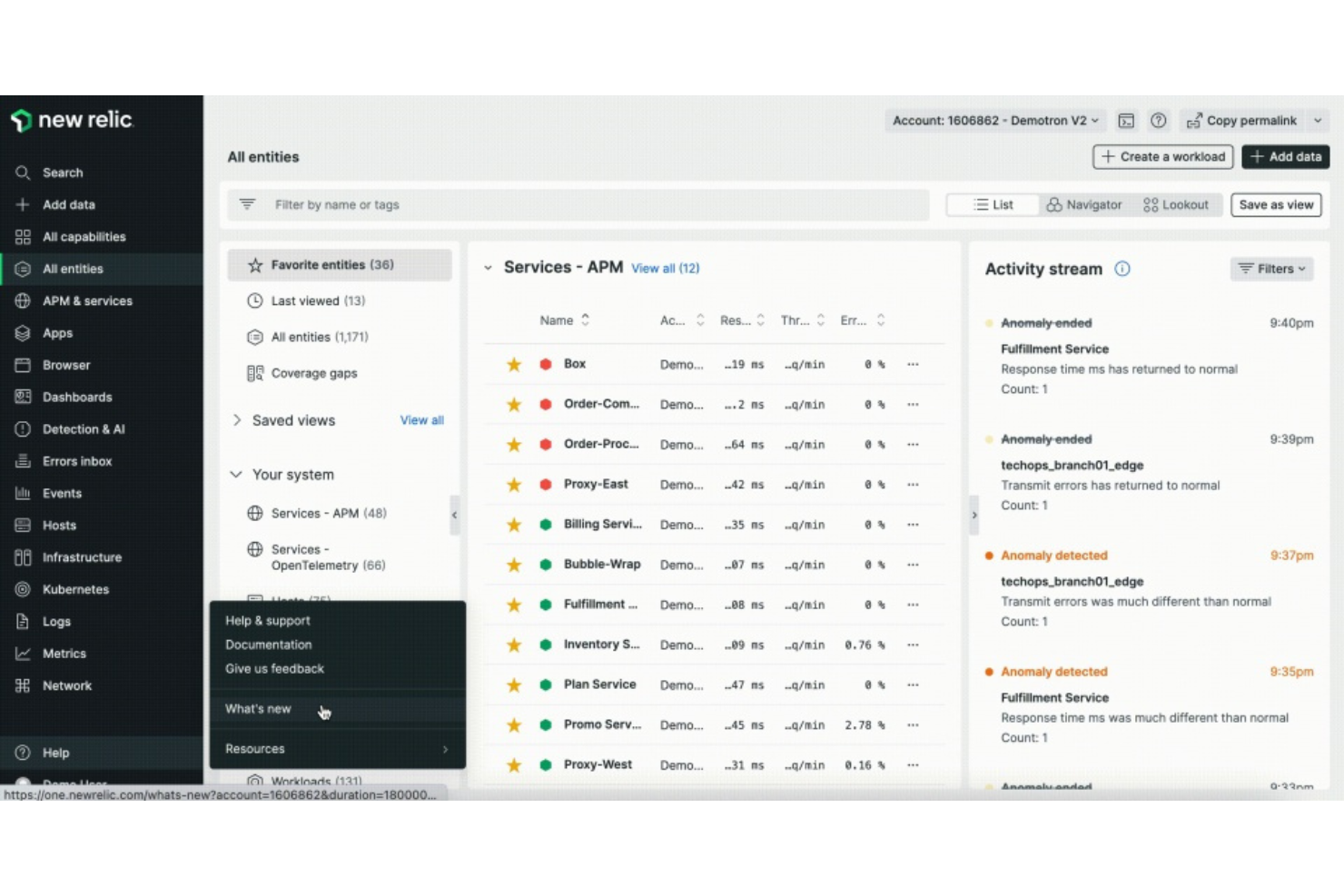
New Relic es una plataforma de monitoreo de software y análisis de rendimiento diseñada para desarrolladores, equipos de operaciones de TI y líderes empresariales. Como solución DEM, ofrece monitoreo en tiempo real de la experiencia del usuario final, proporcionando información sobre el rendimiento de aplicaciones, la infraestructura y las interacciones con los clientes para ayudar a los equipos a detectar y resolver problemas rápidamente.
Por qué elegí New Relic: Ofrece una plataforma unificada que integra capacidades de Monitoreo de Usuario Real (RUM), como el monitoreo de navegadores y dispositivos móviles, junto con Monitoreo del Rendimiento de Aplicaciones (APM) y análisis impulsados por IA. Esta combinación permite que tu equipo obtenga visibilidad integral tanto de los sistemas front-end como back-end, asegurando una experiencia digital fluida para tus usuarios.
Características destacadas e integraciones:
Características incluyen resúmenes de sesión impulsados por IA para identificar rápidamente problemas de los clientes, monitoreo sintético para probar experiencias de usuario en condiciones específicas y reproducción de sesiones para obtener una visión detallada y precisa de las interacciones del usuario.
Integraciones incluyen Amazon Web Services, Microsoft Azure, Google Cloud Platform, Kubernetes, Docker, Jenkins, GitHub, Slack, PagerDuty y ServiceNow.
Pros and Cons
Pros:
- Observabilidad integral de extremo a extremo
- Integración fluida a través de múltiples plataformas
- Escalable para adaptarse a las necesidades de crecimiento empresarial
Cons:
- Datos y alertas abrumadores sin una adecuada configuración
- Impacto potencial en el rendimiento de los sistemas monitoreados

Zscaler
Ideal para el análisis del rendimiento de redes y aplicaciones
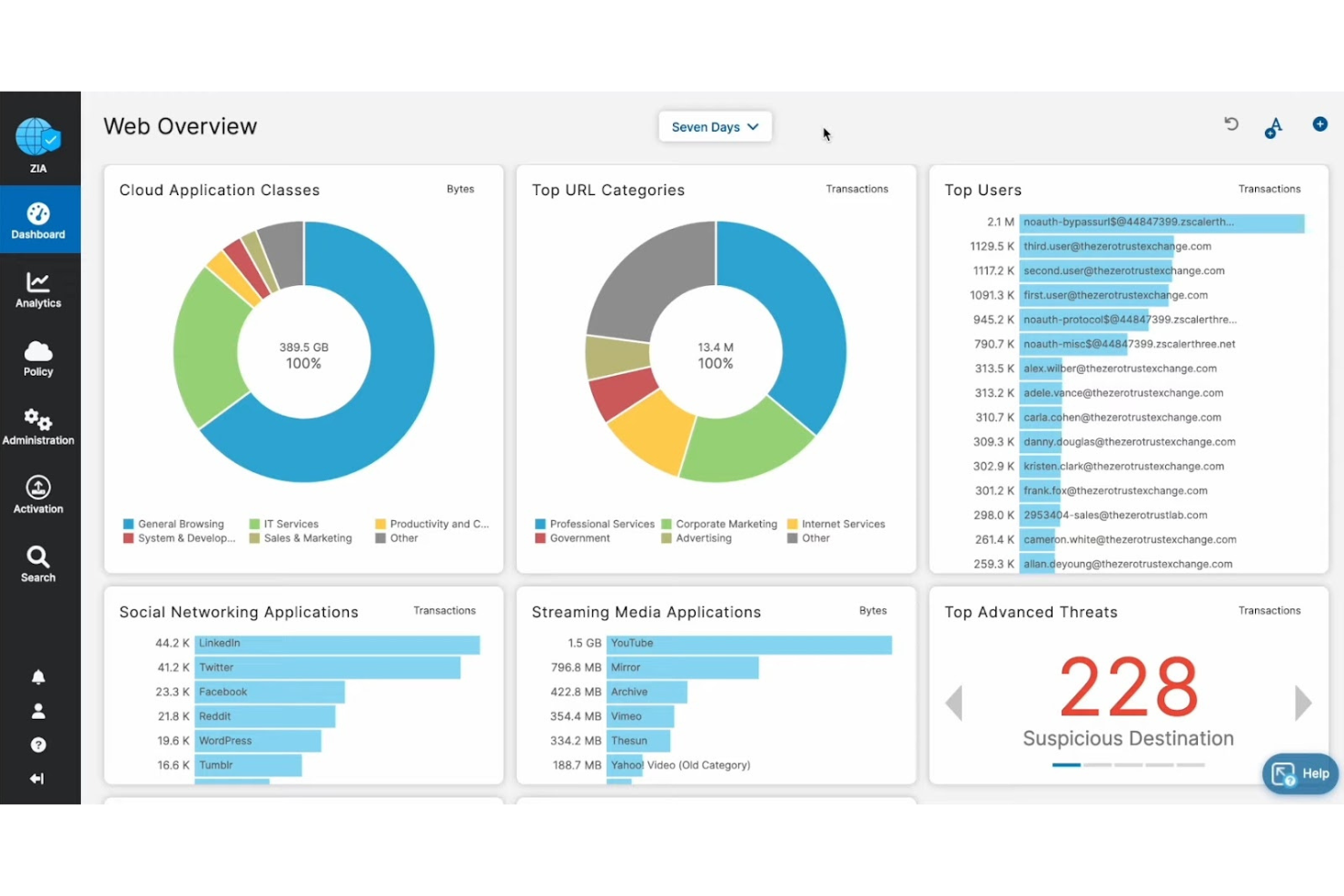
Zscaler es una solución de monitoreo de experiencia diseñada para equipos de operaciones de TI y mesas de servicio, con el objetivo de optimizar las experiencias de los usuarios en diferentes ubicaciones, dispositivos y aplicaciones web. Admite iniciativas enfocadas en la detección rápida de problemas, la solución de problemas y su resolución para mejorar el rendimiento general.
Por qué elegí Zscaler: Ofrece una visión integral monitoreando el rendimiento desde los dispositivos de los usuarios, a través de redes y hasta aplicaciones SaaS, en la nube o en centros de datos. Este enfoque holístico permite a tu equipo identificar y abordar rápidamente los cuellos de botella en el rendimiento. Además, Zscaler aprovecha la IA para detectar problemas de manera temprana y localizar eficientemente las causas raíz, asegurando la máxima productividad para tus usuarios.
Características e integraciones destacadas:
Características incluyen visibilidad unificada en dispositivos, redes y aplicaciones, detección impulsada por IA para una rápida resolución de problemas y análisis profundos del rendimiento que permiten una gestión proactiva.
Integraciones incluyen Microsoft, CrowdStrike, AWS, Okta, Rubrik y SAP.
Pros and Cons
Pros:
- Detección y resolución de problemas impulsada por IA
- Gestión proactiva de la experiencia del usuario
- Admite arquitecturas de confianza cero
Cons:
- Complejidad en la configuración inicial
- Posible dependencia excesiva de la IA para la detección de problemas

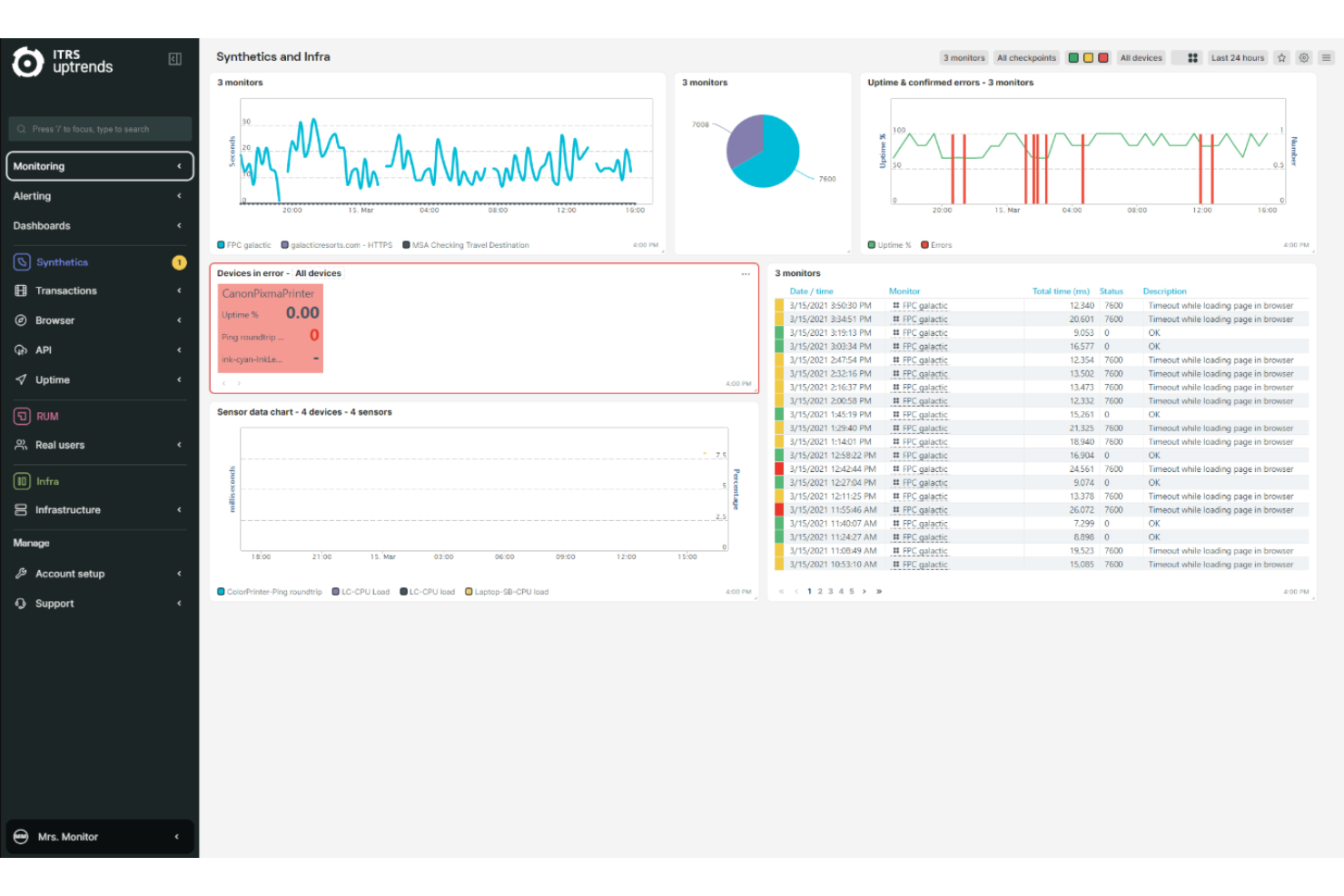
Uptrends es una solución de monitoreo diseñada para proporcionar información integral sobre tu infraestructura digital. Sirve a equipos de operaciones de TI, desarrolladores y empresas que buscan garantizar el rendimiento y la fiabilidad óptimos de sus sitios web y APIs.
Por qué elegí Uptrends: Ofrece herramientas especializadas para monitorizar de manera efectiva tanto sitios web como APIs. Uptrends garantiza una experiencia digital fluida con monitorización de disponibilidad para rastrear el tiempo en línea del sitio web y monitorización de rendimiento para analizar los tiempos de carga e interacciones de los usuarios. Además, sus capacidades de monitoreo de API supervisan APIs internas, externas y de terceros, asegurando que funcionen correctamente y cumplan con los estándares de rendimiento. Este enfoque integral ayuda a mantener la fiabilidad y el rendimiento óptimo de los activos digitales.
Funcionalidades destacadas & integraciones:
Funcionalidades incluyen monitoreo sintético de transacciones, que simula interacciones de usuarios para identificar posibles problemas antes de que afecten a usuarios reales. La plataforma también ofrece monitoreo real de usuarios, proporcionando información sobre cómo los usuarios experimentan tu sitio web o aplicación. Además, Uptrends admite la monitorización del rendimiento web, ayudando a tu equipo a optimizar los tiempos de carga y el rendimiento general del sitio.
Integraciones incluyen Slack, Microsoft Teams, PagerDuty, AlertOps, Grafana e integraciones personalizadas mediante webhooks.
Pros and Cons
Pros:
- Opciones de alerta completas que reducen los tiempos de respuesta
- El monitoreo escalable es adecuado para diferentes tamaños de empresa
- La red global de puntos de control garantiza un monitoreo preciso
Cons:
- Retrasos ocasionales en la generación de informes de datos
- Acceso limitado a los datos de monitoreo sin conexión

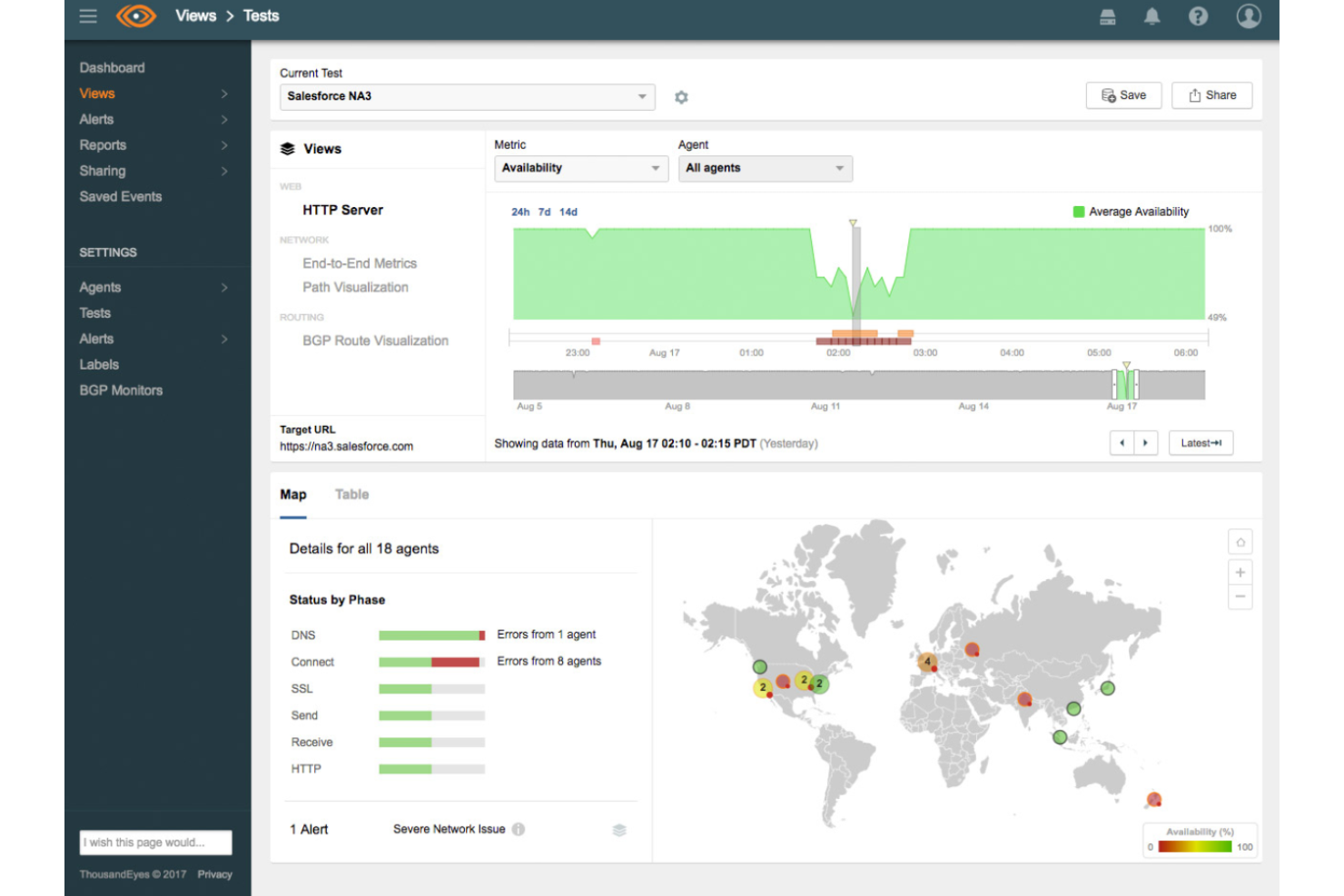
ThousandEyes es una plataforma de software como servicio diseñada para proporcionar a las organizaciones información completa sobre el rendimiento de redes y aplicaciones. Está dirigida a profesionales de TI y administradores de redes que buscan monitorear y optimizar las experiencias digitales en infraestructuras complejas.
Por qué elegí ThousandEyes: Ofrece una visibilidad extensa tanto en redes internas como en rutas externas de Internet, permitiendo que tu equipo identifique y resuelva rápidamente los problemas de rendimiento que afectan la experiencia de los usuarios.
Características e integraciones destacadas:
Características incluyen monitoreo en tiempo real de la red para detectar problemas antes de que afecten a los usuarios, recomendaciones automatizadas para la resolución proactiva de problemas y un mapeo topológico de servicios en la nube para una visión clara de las dependencias de los servicios.
Integraciones incluyen Cisco ISR 1000, Meraki, Webex by Cisco, Microsoft 365 y otras plataformas SaaS principales.
Pros and Cons
Pros:
- Capacidades detalladas de visualización de rutas
- Información automatizada y procesable
- Amplia integración con productos Cisco
Cons:
- Posibles preocupaciones sobre la privacidad de los datos en industrias sensibles
- Requiere una configuración extensa para obtener todos los beneficios

Instana
La mejor opción para obtener información e inteligencia automatizada mediante IA
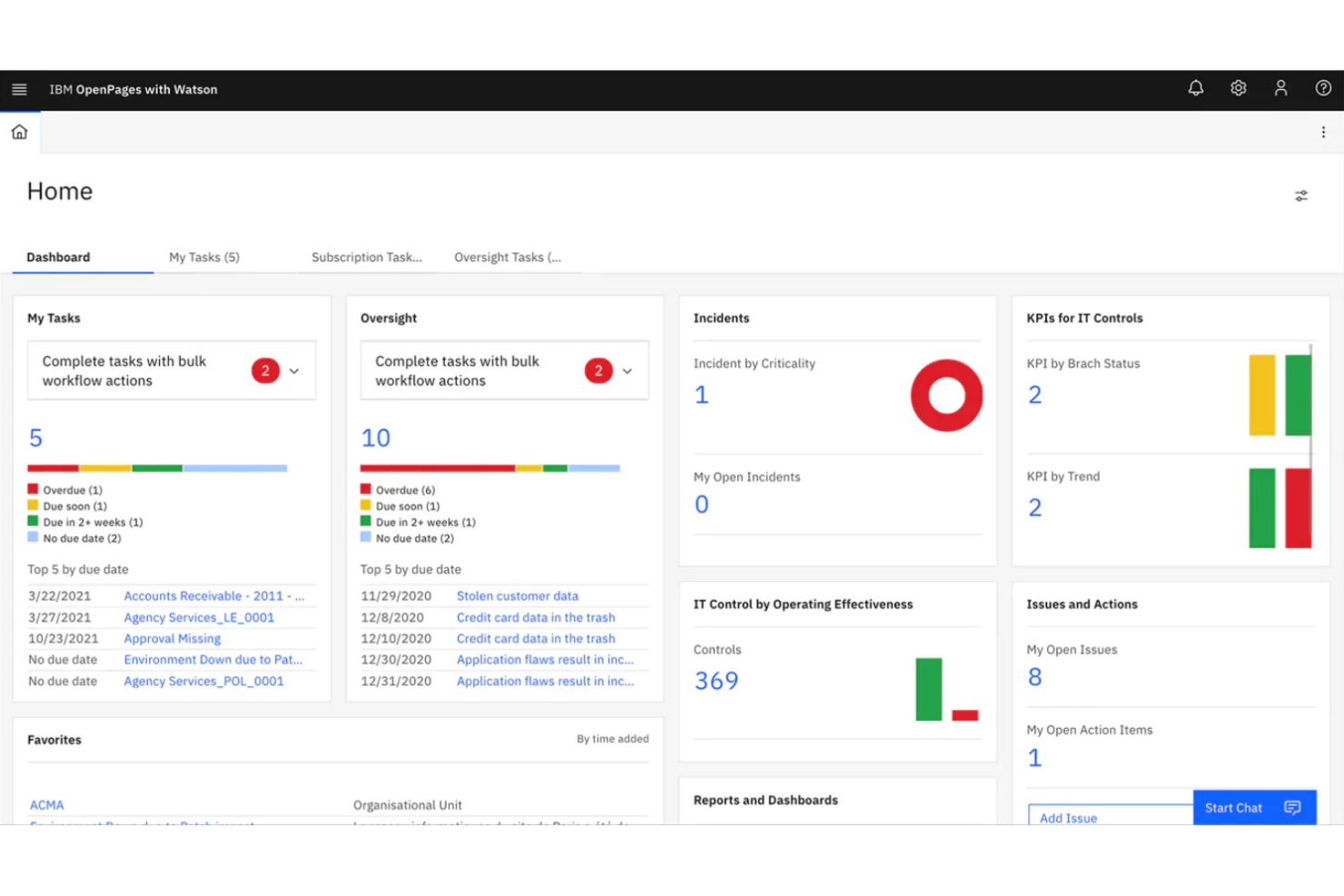
Instana es una plataforma diseñada para proporcionar monitoreo y gestión en tiempo real de aplicaciones e infraestructura. Está dirigida a equipos de operaciones de TI y desarrollo que buscan asegurar un rendimiento óptimo y la satisfacción del usuario.
Por qué elegí Instana: Ofrece detección de anomalías impulsada por IA y análisis automatizado de la causa raíz mediante Instana, lo que permite un monitoreo proactivo y la resolución de problemas antes de que afecten a los usuarios. Además, las capacidades de descubrimiento y monitoreo continuo de Instana se adaptan a entornos dinámicos, garantizando información siempre actualizada. Esta combinación de inteligencia impulsada por IA y automatización mejora la eficiencia operativa, haciendo de Instana una excelente opción para las operaciones de TI modernas.
Características destacadas e integraciones:
Las características incluyen observabilidad de pila completa con visibilidad en tiempo real sobre aplicaciones e infraestructura, trazabilidad distribuida para descubrir dependencias y cuellos de botella de rendimiento, y monitoreo sintético para detectar de forma proactiva problemas antes de que afecten a los usuarios.
Integraciones incluyen Kubernetes, Docker, AWS, Azure, Google Cloud Platform, Instana Cloud, Red Hat OpenShift, Jenkins, PagerDuty y Slack.
Pros and Cons
Pros:
- Recolección de datos de alta frecuencia para análisis detallados
- Paneles personalizables para vistas adaptadas
- Alertas basadas en IA que reducen el ruido
Cons:
- Alto consumo de recursos en los hosts monitorizados
- Acceso offline a datos limitado

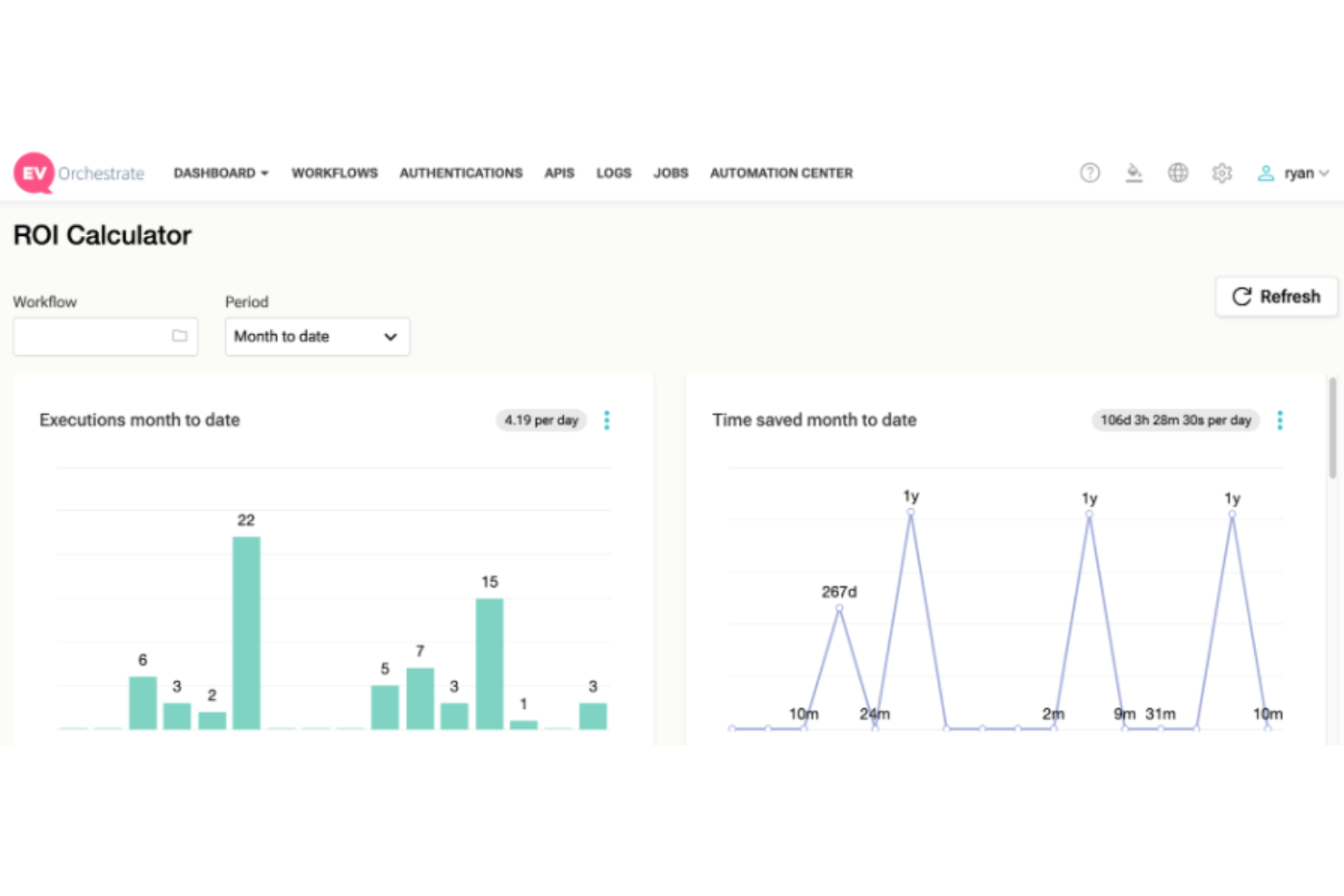
EasyVista ofrece una plataforma que combina capacidades de gestión de servicios y monitoreo, diseñada para ayudar a los equipos de TI a supervisar y mejorar las interacciones de los usuarios con aplicaciones y servicios. Sus herramientas mejoran las experiencias digitales proporcionando información en tiempo real sobre las actividades de los usuarios.
Por qué elegí EasyVista: Ofrece una solución integral que integra la gestión de servicios de TI con el monitoreo de la experiencia del usuario. La plataforma incluye monitoreo de usuarios reales y monitoreo de transacciones sintéticas, lo que permite a los equipos rastrear las interacciones de los usuarios con los servicios en tiempo real. Este enfoque proactivo ayuda a identificar y resolver problemas rápidamente, garantizando una experiencia digital fluida para los usuarios.
Características y integraciones destacadas:
Características incluyen monitoreo de usuarios en tiempo real, pruebas de transacciones sintéticas para detectar problemas antes de que impacten a los usuarios, y amplia compatibilidad con diferentes aplicaciones y servicios.
Integraciones incluyen Microsoft Active Directory, SCCM, Office 365, Salesforce, SAP, ServiceNow, BMC Remedy, Jira y Cherwell.
Pros and Cons
Pros:
- Permite a personas sin conocimientos de programación realizar personalizaciones avanzadas
- Ofrece un motor de flujo de trabajo de arrastrar y soltar
- Proporciona notificaciones y recordatorios automáticos
Cons:
- Los tiempos de respuesta del soporte al cliente pueden ser prolongados
- La complejidad puede hacer que las tareas lleven mucho tiempo

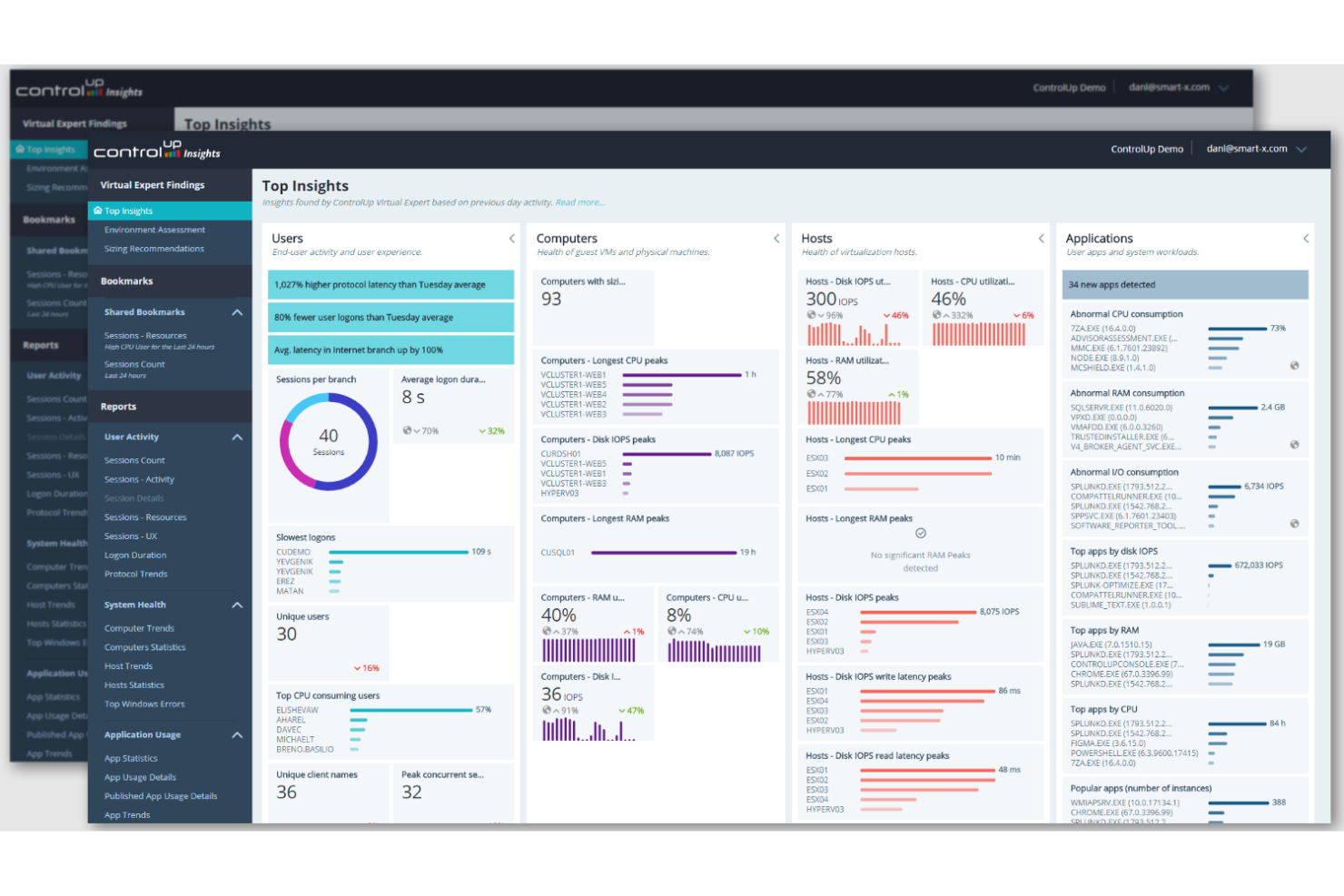
ControlUp es una plataforma diseñada para mejorar la experiencia digital del empleado ofreciendo monitoreo en tiempo real y remediación automatizada en varios entornos de escritorio. Está orientada a los equipos de TI que gestionan Infraestructuras de Escritorio Virtual (VDI) y espacios de trabajo digitales, proporcionando información sobre métricas de rendimiento y experiencias de usuario.
Por qué elegí ControlUp: ControlUp proporciona visibilidad en tiempo real sobre los entornos virtuales, permitiendo monitoreo proactivo del rendimiento y detección rápida de incidencias. Sus capacidades de remediación automatizada aseguran respuestas ágiles a problemas comunes, minimizando el tiempo de inactividad. La plataforma admite diversos entornos de escritorio, ofreciendo flexibilidad a través de varias infraestructuras de TI. Además, su integración con herramientas como Microsoft Intune y ServiceNow agiliza los flujos de trabajo, mejorando la eficiencia operativa general.
Características destacadas e integraciones:
Características incluyen monitoreo sintético proactivo para detectar incidencias antes de que afecten a los empleados, prevención de desviaciones de configuración para mantener la coherencia del sistema, y monitoreo de comunicaciones unificadas para optimizar las herramientas de colaboración.
Integraciones incluyen Microsoft Intune, ServiceNow, VMware, Citrix, IGEL, Nutanix, Omnissa, Nerdio, Stratodesk y Unicon.
Pros and Cons
Pros:
- La remediación automatizada reduce intervenciones manuales
- Admite diversos entornos de escritorio
- Ofrece monitoreo sintético proactivo
Cons:
- Puede requerir capacitación para un uso óptimo
- Posibles problemas de compatibilidad con sistemas antiguos
Otras herramientas de monitoreo de experiencia digital
Aquí tienes algunas opciones adicionales de herramientas de monitoreo de experiencia digital que no entraron en mi lista corta pero que aún vale la pena considerar:


Wie ich Digital Experience Monitoring-Tools bewerte
Ich bewerte DEM-Tools auf zwei Ebenen: die grundlegenden Funktionen – RUM, Session Replay, synthetische Prüfungen – die eine Plattform für diese Liste qualifizieren, und die Unterscheidungsmerkmale, die für CX-Teams am wichtigsten sind.
Kernfunktionen (Grundvoraussetzung für diese Liste)
Wenn ich Tools für meine Liste auswähle, bewerte ich jedes einzelne auf einer Skala von 0 (bietet die Funktion nicht an) bis 5 (überzeugt in diesem Bereich) für jede der unten aufgeführten Kernfunktionen. Anschließend berechne ich die Gesamtpunktzahl des Tools als Prozentsatz. Jedes Tool muss mindestens eine Gesamtpunktzahl von 65 % erreichen, um in die Auswahl aufgenommen zu werden.
- Real User Monitoring: Ich überprüfe, ob ein Tool reale Besucher-Sitzungen mit Segmentierung nach Gerät, Browser, Geografie und Netzwerk erfasst – und nicht nur aggregierte Durchschnittswerte für Ladezeiten.
- Synthetisches Monitoring: Hier spielen mehrstufige, geskriptete Transaktionen eine Rolle, etwa das Simulieren eines Login-bis-Checkout-Ablaufs aus verschiedenen Regionen, um Probleme zu erkennen, noch bevor echte Kunden darauf stoßen.
- Session Replay & Journey Analytics: Ich achte auf eine Kombination aus Replay und Trichter- sowie Pfadanalyse, sodass Sie eine frustrierte Nutzer-Session ansehen und anschließend herauszoomen können, um zu sehen, wie verbreitet dieses Absprungmuster ist.
- Frontend-Performance-Metriken: Core Web Vitals, JavaScript-Fehlererfassung und die Korrelation von API-Latenzen fließen gleichermaßen ein – ich bewerte, wie gut ein Tool einen langsamen LCP oder eine erhöhte Fehlerquote auf spezifische Seiten oder Releases zurückführen kann.
- Alarmierung & Anomalie-Erkennung: Die besten Lösungen gehen über statische Schwellwerte hinaus. Ich achte auf Alarme, die den Normalzustand berücksichtigen und an Tools wie Slack, PagerDuty oder ITSM-Plattformen weitergeleitet werden, die Ihr Team bereits nutzt.
- Kanalübergreifende Experience-Abdeckung: Ich prüfe, ob eine Plattform Web-, Mobile App- und Drittanbieter-API-Monitoring in einer Ansicht zusammenführt, anstatt jeden Kanal in separaten Dashboards zu isolieren.
Sobald ich eine Liste von Tools habe, die die Kriterien erfüllen, sehe ich mir an, was jede Plattform besonders macht.
Unterscheidungsmerkmale (Was Anbieter abhebt)
So vergleiche und differenziere ich zwischen den Anbietern:
Herausragende Funktionen
Die Erkennung von Frustrationssignalen ist ein wesentlicher Differenzierungsfaktor. Ich suche nach Tools, die automatisch Rage Clicks, Dead Clicks und Formularabbrüche markieren, sodass CX-Teams Reibungsverluste quantifizieren können, ohne Sitzungen manuell prüfen zu müssen. Die Korrelation von geschäftlichen KPIs ist gleichermaßen relevant – ein Tool, das eine langsame Seitenladezeit direkt mit einem Rückgang bei der Conversion oder Warenkorbabschlüssen verknüpft, liefert die Daten, um Maßnahmen gegenüber Stakeholdern zu rechtfertigen. KI-gesteuerte Einblicke setzen noch eins drauf, indem sie Probleme nach deren Einfluss auf Kunden priorisieren, statt nur nach bloßem Fehleraufkommen.
Mehr als Funktionen
Das Integrations-Ökosystem bewerte ich als Erstes. Ein DEM-Tool muss sich in Ihren CX-Stack einbinden – etwa Zendesk, Salesforce Service Cloud oder was immer Sie nutzen –, damit Agenten Sitzungsinformationen neben den Tickets sehen. Datenschutz und Compliance-Fähigkeit wiegen ebenso schwer, insbesondere konfigurierbare PII-Maskierung und Datenresidenz-Optionen, die den Einsatz in regulierten Märkten erlauben. Auch die Skalierbarkeit ist entscheidend: Ich prüfe, ob ein Anbieter bei hohem Traffic Daten abtastet, denn verpasste Sitzungen bedeuten, dass tatsächlich auftretende Reibungspunkte unentdeckt bleiben.
Cómo elegir una herramienta de monitoreo de experiencia digital
Es fácil atascarse en largas listas de características y estructuras de precios complejas. Para ayudarte a mantenerte enfocado durante tu proceso único de selección de software, aquí tienes una lista de factores que debes tener en cuenta:
| Factor | Qué considerar |
| Escalabilidad | Asegúrate de que la herramienta pueda crecer con tu negocio, manejando mayores cantidades de datos y usuarios. |
| Integraciones | Busca compatibilidad con los sistemas que ya tienes, como CRM, ERP o servicios en la nube. |
| Personalización | Comprueba si puedes adaptar los paneles e informes a las necesidades de tu equipo. |
| Facilidad de uso | Considera la curva de aprendizaje y si tu equipo puede usarla sin capacitación extensa. |
| Presupuesto | Adapta el costo de la herramienta a tu presupuesto, considerando tanto gastos iniciales como recurrentes. |
| Medidas de seguridad | Verifica las medidas de protección de datos, el cumplimiento de normativas y los controles de acceso seguro. |
| Soporte | Evalúa la disponibilidad de soporte al cliente y recursos como documentación o foros. |
| Métricas de rendimiento | Busca información en tiempo real sobre la experiencia del usuario, la salud de las aplicaciones y el rendimiento de la red. |
Tendencias en las herramientas de monitoreo de experiencia digital
En mi investigación consulté innumerables actualizaciones de productos, notas de prensa y registros de lanzamientos de diferentes proveedores de herramientas de monitoreo de experiencia digital. Aquí tienes algunas de las tendencias emergentes que estoy siguiendo de cerca:
- Información basada en IA: Cada vez más herramientas utilizan IA para proporcionar información procesable a partir de grandes conjuntos de datos. Esto ayuda a los equipos a predecir problemas antes de que ocurran y a mejorar la experiencia del usuario. Proveedores como Dynatrace están integrando IA para mejorar las capacidades de monitoreo en tiempo real.
- Análisis del comportamiento del usuario: Analizar las interacciones de los usuarios para entender patrones de comportamiento se vuelve crucial. Esta tendencia ayuda a las empresas a adaptar sus ofertas para satisfacer las necesidades de los usuarios. Herramientas como Contentsquare se centran en visualizar los recorridos de los usuarios para optimizar el rendimiento del sitio.
- Visibilidad de extremo a extremo: Las empresas demandan una visión completa de su ecosistema digital. Las herramientas que ofrecen visibilidad de extremo a extremo ayudan a identificar cuellos de botella entre aplicaciones y redes. Riverbed trabaja en proporcionar información integral sobre redes.
- Monitoreo nativo en la nube: A medida que las empresas migran a la nube, se demandan herramientas de monitoreo que soporten entornos nativos en la nube. Estas herramientas garantizan operaciones fluidas en instalaciones híbridas y multinube. Proveedores como New Relic están mejorando sus funciones de monitoreo en la nube.
- Enfoque en la experiencia del usuario: Hay un énfasis creciente en herramientas que mejoran directamente la experiencia del usuario (UX). Esto incluye características como retroalimentación en tiempo real y recorridos personalizados. Qualtrics lidera en ofrecer soluciones centradas en mejorar la experiencia digital del cliente.
¿Qué son las herramientas de monitoreo de experiencia digital?
Las herramientas de monitoreo de experiencia digital (DEM) son soluciones de software que rastrean y analizan las interacciones de los usuarios con plataformas digitales. Estas herramientas suelen ser utilizadas por profesionales de TI, responsables de experiencia del cliente y especialistas en marketing digital para aumentar la satisfacción del usuario y optimizar el rendimiento de las aplicaciones. El monitoreo en tiempo real, los análisis del comportamiento de usuario y la información impulsada por IA ayudan a identificar rápidamente los problemas, entender las necesidades de los usuarios y mejorar los recorridos digitales. En general, estas herramientas proporcionan a las empresas la información necesaria para mejorar la experiencia del usuario y asegurar operaciones digitales eficientes.
Características de las herramientas de monitoreo de experiencia digital
Al seleccionar herramientas de monitoreo de experiencia digital, presta atención a las siguientes características clave:
- Monitoreo en tiempo real: Proporciona información inmediata sobre las interacciones del usuario, ayudando a los equipos a abordar los problemas a medida que surgen.
- Análisis del comportamiento del usuario: Analiza los patrones de los usuarios para mejorar el rendimiento del sitio y adaptar la experiencia del usuario.
- Información basada en IA: Hace uso de la inteligencia artificial para predecir problemas y optimizar los procesos de toma de decisión.
- Monitoreo sintético de transacciones: Simula interacciones de los usuarios para detectar proactivamente posibles problemas de la aplicación.
- Visibilidad de extremo a extremo: Ofrece una visión completa de los entornos digitales, ayudando a identificar cuellos de botella de rendimiento.
- Reproducción de sesiones: Permite a los equipos revisar las interacciones de los usuarios para comprender y resolver mejor los problemas.
- Soporte nativo en la nube: Garantiza la compatibilidad con entornos en la nube, facilitando operaciones fluidas en múltiples plataformas.
- Paneles personalizables: Permite a los usuarios adaptar la visualización de datos para satisfacer las necesidades específicas del equipo.
- Salvaguardas de seguridad: Proporciona funciones de protección de datos para cumplir con las regulaciones de la industria.
- Análisis de rendimiento: Ofrece informes detallados sobre la salud de las aplicaciones y métricas de satisfacción del usuario.
Beneficios de las herramientas de monitoreo de experiencia digital
Implementar herramientas de monitoreo de experiencia digital beneficia a tu equipo y a tu empresa. Aquí algunos de los beneficios a los que puedes aspirar:
- Mayor satisfacción del usuario: Analizando el comportamiento y las interacciones de los usuarios, estas herramientas ayudan a adaptar las experiencias para satisfacer sus necesidades.
- Resolución proactiva de problemas: El monitoreo en tiempo real y la información basada en IA permiten a los equipos abordar problemas antes de que afecten a los usuarios.
- Mejora en la toma de decisiones: Con visibilidad de extremo a extremo y análisis de rendimiento, tu equipo puede tomar decisiones informadas para optimizar las operaciones.
- Mayor eficiencia operativa: El monitoreo sintético, la grabación de sesiones y la reproducción permiten identificar y resolver rápidamente los cuellos de botella en el rendimiento.
- Mejor cumplimiento de seguridad: Las salvaguardas de seguridad aseguran la protección de los datos y ayudan a cumplir con las normativas del sector.
- Adaptabilidad al crecimiento: Las características de escalabilidad permiten que las herramientas crezcan junto con tu empresa, gestionando más usuarios y datos sin problemas.
Costos y precios de las herramientas de monitoreo de experiencia digital
Seleccionar herramientas de monitoreo de experiencia digital requiere comprender los diversos modelos y planes de precios disponibles. Los costes varían según las características, el tamaño del equipo, complementos y más. La siguiente tabla resume los planes comunes, sus precios promedio y las funciones típicas incluidas en soluciones de herramientas de monitoreo de experiencia digital:
Tabla Comparativa de Planes para Herramientas de Monitorización de la Experiencia Digital
| Tipo de Plan | Precio Promedio | Funciones Comunes |
| Plan Gratuito | $0 | Monitorización básica, datos de usuario limitados y alertas esenciales. |
| Plan Personal | $5-$25/ usuario/mes | Monitorización en tiempo real, analíticas básicas y seguimiento del comportamiento del usuario. |
| Plan Empresarial | $25-$70/ usuario/mes | Analíticas avanzadas, paneles personalizables, monitorización sintética y soporte multiplataforma. |
| Plan Corporativo | $70-$250/ usuario/mes | Supervisión de stack completo, información basada en IA, visibilidad de extremo a extremo, seguridad avanzada y escalabilidad. |
Preguntas Frecuentes sobre las Herramientas de Monitorización de la Experiencia Digital
Aquí tienes algunas respuestas a preguntas comunes sobre las herramientas de monitorización de la experiencia digital:
¿Cómo mejoran las herramientas de monitorización de la experiencia digital la satisfacción del usuario?
Las herramientas de monitorización de la experiencia digital rastrean las interacciones de los usuarios y datos de rendimiento para identificar problemas que afectan la satisfacción. Al ofrecer información en tiempo real, ayudan a tu equipo a abordar inconvenientes rápidamente y aseguran una experiencia de usuario más fluida. Este enfoque proactivo puede llevar a una mayor retención y satisfacción de los usuarios.
¿Qué tipos de datos recopilan las herramientas de monitorización de la experiencia digital?
Estas herramientas recopilan diferentes tipos de datos, incluyendo interacciones de usuario, métricas de rendimiento de aplicaciones y estado de la red. Esta información ayuda a tu equipo a obtener una visión integral de la experiencia digital, permitiendo tomar decisiones informadas para mejorar el rendimiento y la satisfacción del usuario. Los conocimientos obtenidos son esenciales para optimizar plataformas digitales.
¿Pueden integrarse las herramientas de monitorización de la experiencia digital con sistemas existentes?
Sí, la mayoría de las herramientas de monitorización de la experiencia digital ofrecen integraciones con plataformas populares como CRM, ERP y servicios en la nube. Esto garantiza que tu equipo pueda incorporar la monitorización fácilmente a los flujos de trabajo existentes, mejorando la eficiencia y efectividad generales. Las capacidades de integración son un aspecto clave durante el proceso de selección.
¿Cómo benefician los análisis basados en IA a la monitorización de la experiencia digital?
Los conocimientos basados en IA ayudan a predecir problemas potenciales antes de que afecten a los usuarios. Al analizar grandes conjuntos de datos, la IA puede identificar patrones y anomalías, permitiendo a tu equipo tomar medidas proactivas. Esto reduce el tiempo de inactividad y mejora la experiencia general del usuario, haciendo que la IA sea un componente valioso de las herramientas de monitorización modernas.
¿Cuáles son algunos desafíos al implementar herramientas de monitorización de la experiencia digital?
Los desafíos pueden incluir la configuración inicial e integración con los sistemas existentes, así como la curva de aprendizaje para nuevos usuarios. Garantizar la seguridad de los datos y el cumplimiento normativo también puede ser complejo. Sin embargo, la mayoría de los proveedores ofrecen soporte y recursos para ayudar a tu equipo a superar estos obstáculos de manera efectiva.
¿Cómo apoyan las herramientas de monitorización de la experiencia digital a los entornos de trabajo remoto?
Estas herramientas ofrecen funciones como monitoreo en tiempo real y visibilidad de extremo a extremo, esenciales para gestionar entornos de trabajo remoto. Ayudan a garantizar que los empleados remotos tengan acceso óptimo a aplicaciones y datos, minimizando interrupciones y manteniendo la productividad. Esto es cada vez más importante a medida que el trabajo remoto se vuelve más habitual.
¿Qué Sigue?
Suscríbete a nuestro boletín para descubrir las últimas novedades de CX, guías prácticas, estrategias y recursos de los principales expertos en el sector de la experiencia del cliente.