

New Relic Review: Pros, Cons, Features and Pricing
New Relic excels in providing deep visibility into applications, making it a top choice for tech-driven organizations seeking reliable performance data.

We review tools independently, and commissions help fund our testing. See our transparency policy, our methodology, or suggest a tool.
New Relic is a digital experience platform for engineering and operations teams that need to monitor application performance, infrastructure health, and end-user experience in one place. I'd consider it if you want a more unified observability setup than Datadog offers—particularly if your team is tired of stitching together separate tools for APM, logs, and infrastructure monitoring and wants a single platform with one consistent data model underneath everything.
New Relic Evaluation Summary

4.3/5
- From $10/user/month
- Free plan available
Why Trust Our Software Recommendations
6,700+
Reviews
20
Industry experts
16+
Evaluation factors
14
Years
Our team has been testing and reviewing software since 2012. As CX leaders ourselves, we know how difficult—and important—it is to choose the right software.
For this guide, we evaluated tools using hands-on testing and independent research, scoring tools using our selection criteria.
Our reviews reflect our human editorial judgment, not a sales pitch.
 Gui DrusinaCreative Director
 Tim FisherVP of AI
New Relic Overview
In my opinion, New Relic is a solid choice for tech-driven teams needing deep insights into digital performance. It excels with its advanced monitoring tools and integrations, but its pricing might deter smaller businesses. Compared to competitors, New Relic offers superior data visualization but can be complex for new users. It's best for large enterprises that value detailed analytics and have the resources to manage its comprehensive capabilities. If your team prioritizes thorough data analysis and performance tracking, New Relic should be on your shortlist.
Pros
- Detailed insights into application performance.
- AI-driven alerts, helping teams address the root cause of incidents automatically.
- Visual dashboards make monitoring data easy to understand.
- Automated workflows help streamline issue detection, notification, and remediation.
Cons
- Your team might find the interface overwhelming at first.
- It can be complex for new users to set up.
- You may experience occasional delays in customer support response.
Is New Relic Right For Your Needs?
Who Would be a Good Fit for New Relic?
New Relic is ideal for tech-driven companies that need deep, real-time visibility into their digital experiences. If your team relies on live data to spot and fix issues quickly, New Relic delivers exactly that. Its clear, detailed dashboards make it easy for IT and DevOps teams to understand what’s happening across their systems, making it especially useful for larger organizations that depend on data-driven decision-making.
If your team needs real-time data and AI-driven insights to quickly identify and fix issues, New Relic fits well. Its detailed dashboards help IT and DevOps teams visualize performance metrics effectively, making it suitable for large enterprises that prioritize data-driven decision-making.
- Large EnterprisesLarge-scale operations benefit from New Relic’s comprehensive monitoring, detailed analytics, and strong debugging capabilities. The platform makes it easier to track performance across complex systems, so you can quickly identify error rates and bottlenecks that could impact users.
- IT DepartmentsYour IT team can leverage New Relic’s real-time alerts to identify and resolve issues efficiently.
- E-commerce BusinessesYou can track user interactions and performance to improve conversion rates.
- Healthcare ProvidersYour organization can monitor application performance to streamline patient experiences.
- DevOps TeamsDevelopers and software engineers benefit from New Relic’s network monitoring tools, deep insights, and AI-driven alerts for rapid problem-solving.
- Financial ServicesYou can use New Relic to ensure secure and reliable transaction processing.
Who Would be a Bad Fit for New Relic?
New Relic might not be suitable for small businesses or startups with limited budgets, since the platform can be both complex and costly. And if your team lacks technical expertise, you might find the setup and interface overwhelming. Industries that don't rely heavily on digital platforms or real-time data may also not need New Relic's extensive monitoring capabilities, making it an unnecessary expense.
- Small BusinessesYour small team might find New Relic’s cost and complexity more than you need.
- Non-Tech IndustriesIf your work doesn’t rely on digital platforms, New Relic’s features may be excessive.
- StartupsYour early-stage company may struggle with New Relic’s pricing and steep learning curve.
- Low-Tech DepartmentsDepartments with minimal tech needs might not benefit from New Relic’s advanced capabilities.
- FreelancersIf you work independently, New Relic’s features could be too extensive and costly.
- Basic Web ServicesIf your services don’t require deep monitoring, New Relic’s capabilities might be unnecessary.
How We Test & Score Tools
We’ve spent years building, refining, and improving our software testing and scoring system. The rubric is designed to capture the nuances of software selection and what makes a tool effective, focusing on critical aspects of the decision-making process.
Below, you can see exactly how our testing and scoring works across seven criteria. It allows us to provide an unbiased evaluation of the software based on core functionality, standout features, ease of use, onboarding, customer support, integrations, customer reviews, and value for money.
Core Functionality (25% of final scoring)
The starting point of our evaluation is always the core functionality of the tool. Does it have the basic features and functions that a user would expect to see? Are any of those core features locked to higher-tiered pricing plans? At its core, we expect a tool to stand up against the baseline capabilities of its competitors.
Standout Features (25% of final scoring)
Next, we evaluate uncommon standout features that go above and beyond the core functionality typically found in tools of its kind. A high score reflects specialized or unique features that make the product faster, more efficient, or offer additional value to the user.
We also evaluate how easy it is to integrate with other tools typically found in the tech stack to expand the functionality and utility of the software. Tools offering plentiful native integrations, 3rd party connections, and API access to build custom integrations score best.
Ease of Use (10% of final scoring)
We consider how quick and easy it is to execute the tasks defined in the core functionality using the tool. High scoring software is well designed, intuitive to use, offers mobile apps, provides templates, and makes relatively complex tasks seem simple.
Onboarding (10% of final scoring)
We know how important rapid team adoption is for a new platform, so we evaluate how easy it is to learn and use a tool with minimal training. We evaluate how quickly a team member can get set up and start using the tool with no experience. High scoring solutions indicate little or no support is required.
Customer Support (10% of final scoring)
We review how quick and easy it is to get unstuck and find help by phone, live chat, or knowledge base. Tools and companies that provide real-time support score best, while chatbots score worst.
Customer Reviews (10% of final scoring)
Beyond our own testing and evaluation, we consider the net promoter score from current and past customers. We review their likelihood, given the option, to choose the tool again for the core functionality. A high scoring software reflects a high net promoter score from current or past customers.
Value for Money (10% of final scoring)
Lastly, in consideration of all the other criteria, we review the average price of entry level plans against the core features and consider the value of the other evaluation criteria. Software that delivers more, for less, will score higher.
Core Features
Application Performance Monitoring: You can track the performance of your applications in real-time. This helps team members spot and fix issues quickly.
Real User Monitoring: Your team can see how actual users interact with your site. This feature provides insights into user experience and potential bottlenecks.
Synthetic Monitoring: You can simulate user interactions to test and monitor your application's performance. This helps you make sure your site functions well for users at go-live.
Infrastructure Monitoring: Your team gains insights into your servers and hosts. This helps you maintain optimal infrastructure performance.
Alerts and AI Insights: You receive instant alerts when issues arise. AI-driven insights help your team prioritize and resolve problems quickly.
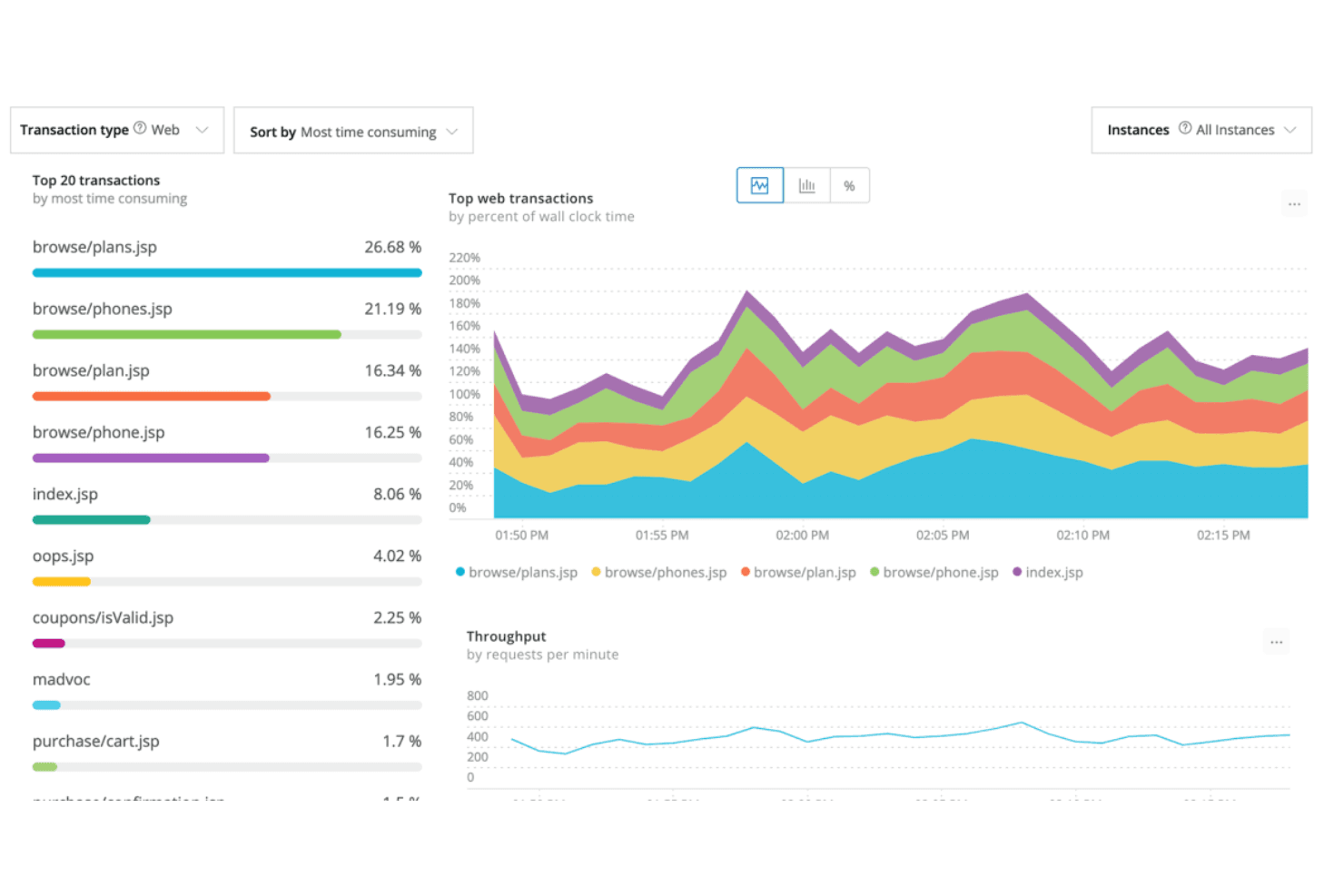
Dashboards and Visualizations: You can create custom dashboards to visualize data. This makes it easier for your team to understand and act on performance metrics.
Ease of Use
New Relic offers a wealth of features, but its interface can be overwhelming for new users. You might find the initial setup complex, especially if your team lacks technical expertise. However, once you get the hang of it, the intuitive dashboards and visualizations make monitoring straightforward. Compared to other platforms, New Relic does come with a learning curve, but its powerful insights and real-time data make it worth the effort for those who need detailed performance tracking.

Integrations
New Relic integrates with AWS, Microsoft Azure, Google Cloud Platform, Kubernetes, PagerDuty, Slack, ServiceNow, Atlassian Jira, and Prometheus.
New Relic also offers an API for custom integrations and connects with third-party integration tools.

New Relic Specs
- AI Integration: Yes
- API: Yes
- Automated Testing: No
- Browser Compatibility Testing: No
- Bug Tracking: No
- Code Review: No
- Custom Reports: Yes
- Data Export: Yes
- Data Import: Yes
- Developer Tools: Yes
- External Integrations: Yes
- Malware Protection: No
- Multi-User: Yes
- Notifications: Yes
- Performance Testing: No
- Process Reporting: Yes
- Static Analysis: No
- Status Notifications: No
- Workflow Management: No


