

Reseña de Zoho Analytics: ventajas, desventajas, funciones y precios
Zoho Analytics destaca por su interfaz intuitiva y su integración fluida con el conjunto de herramientas de Zoho, lo que facilita el análisis de datos para tu equipo.

Revisamos las herramientas de manera independiente, y las comisiones ayudan a financiar nuestras pruebas. Consulta nuestra política de transparencia, nuestra metodología o sugiere una herramienta.
Zoho Analytics is a big data customer analytics platform that lets CX teams build dashboards, blend data from multiple sources, and surface trends across the customer journey. I'd consider it if your team needs self-service reporting without depending on a data engineering team to pull every insight. Compared to Tableau, Zoho Analytics delivers much of the same analytical depth at a significantly lower price point—making it a practical fit for mid-sized teams that need real answers without the enterprise overhead.
Zoho Analytics Evaluation Summary

4.3/5
- From $30/month (billed annually)
- 15-day free trial
Por qué confiar en nuestras recomendaciones de software
6,700+
Reviews
20
Industry experts
16+
Evaluation factors
14
Years
Nuestro equipo lleva probando y evaluando software desde 2012. Como líderes de CX, sabemos lo difícil —y lo importante— que es elegir el software adecuado.
Para esta guía, evaluamos las herramientas mediante pruebas prácticas e investigación independiente, puntuando las herramientas según nuestros criterios de selección.
Nuestras reseñas reflejan nuestro criterio editorial humano, no un discurso de ventas.
 Gui DrusinaCreative Director
 Tim FisherVP of AI
Zoho Analytics Overview
Pros
- You can easily create custom reports and dashboards without needing technical expertise.
- User-friendly interface that allows your team to quickly access and analyze data from a range of data sources.
- The tool provides strong data visualization capabilities to help you make sense of complex data sets.
Cons
- Some users find the customer support response time slower than expected.
- The initial setup can be a bit challenging for teams without prior experience.
- Advanced users might find the depth of reporting options limited in lower-tier plans.
Is Zoho Analytics Right For Your Needs?
Who Would be a Good Fit for Zoho Analytics?
Small to medium-sized businesses and teams in marketing, finance, and operations would benefit from Zoho Analytics. If your team needs to create custom reports without heavy IT involvement, Zoho's intuitive interface and robust visualization tools make it easy. For example, marketing teams can track campaign performance, while finance departments can analyze budgetary data efficiently. Its capacity to handle data from various sources allows diverse departments to gain insights quickly, aligning well with organizations looking for accessible yet powerful analytics.
- Small BusinessesZoho Analytics provides an affordable and comprehensive analytics software that small businesses can leverage without needing a large IT team.
- Marketing TeamsYou can track and visualize campaign data effectively, helping your team make informed decisions on marketing strategies.
- Finance DepartmentsThe BI platform's ability to integrate financial data from multiple sources allows your finance team to keep a close eye on budgets and financial performance.
- Operations ManagersOperations teams can benefit from its real-time data analytics to monitor and optimize workflow processes efficiently.
- Retail BusinessesYou can analyze customer purchase trends and inventory data to make smarter stocking and sales strategies.
- Project ManagersWith its reporting capabilities, project managers can track project progress and resource allocation easily, keeping projects on track.
Who Would be a Bad Fit for Zoho Analytics?
Large enterprises with complex data needs and advanced analytics requirements might find Zoho Analytics lacking. If your team relies heavily on real-time data processing and advanced machine learning capabilities, Zoho's offerings may not suffice. Enterprises needing highly customizable solutions with extensive third-party integrations may also struggle, as Zoho's customization options and integration support might not meet your expectations.
- Large EnterprisesZoho Analytics may not scale well with the extensive data and complex analytics requirements typical of large enterprises.
- Data ScientistsThe tool lacks advanced machine learning capabilities that data scientists require for predictive analytics and complex modeling and forecasting.
- Tech-Savvy TeamsTeams with advanced technical skills might find Zoho's simplicity limiting, as it doesn't offer extensive customization.
- Industry SpecialistsSpecialized industries needing niche analytics features may find Zoho's generalized toolset insufficient.
- Real-Time AnalystsIf your work demands real-time data processing, Zoho's capabilities might not be robust enough for your needs.
- Custom SolutionsSeekers Organizations needing a highly tailored BI tool or self-service customization might find Zoho's customization options too restrictive.
Cómo Probamos y Evaluamos Herramientas
Hemos pasado años construyendo, refinando y perfeccionando nuestro sistema de evaluación y puntuación de software. La rúbrica está diseñada para capturar los matices de la selección de software y lo que hace que una herramienta sea eficaz, centrándose en los aspectos críticos del proceso de toma de decisiones. A continuación, puedes ver exactamente cómo funcionan nuestras pruebas y puntuaciones en siete criterios. Esto nos permite ofrecer una evaluación imparcial del software basada en funcionalidad principal, características destacadas, facilidad de uso, incorporación, soporte al cliente, integraciones, opiniones de clientes y la relación calidad-precio.
Funcionalidad Principal (25% de la puntuación final)
El punto de partida de nuestra evaluación siempre es la funcionalidad principal de la herramienta. ¿Tiene las funciones básicas que un usuario esperaría? ¿Alguna de esas funciones principales está bloqueada en planes de precios más altos? Consideramos que una herramienta debe estar a la par de las capacidades básicas de sus competidores.
Características Destacadas (25% de la puntuación final)
A continuación, evaluamos aquellas características poco comunes y destacadas que superan la funcionalidad principal típica de herramientas de ese tipo. Una puntuación alta refleja funciones especializadas o únicas que hacen que el producto sea más rápido, eficiente o que aporte un valor adicional al usuario. También evaluamos lo fácil que es integrar la herramienta con otras que típicamente se utilizan en el ecosistema tecnológico para ampliar la funcionalidad y utilidad del software. Las herramientas que ofrecen abundantes integraciones nativas, conexiones de terceros y acceso a API para integraciones personalizadas obtienen la mejor puntuación.
Facilidad de Uso (10% de la puntuación final)
Consideramos lo rápido y sencillo que es ejecutar las tareas definidas en la funcionalidad principal usando la herramienta. El software que puntúa alto está bien diseñado, es intuitivo, ofrece aplicaciones móviles, proporciona plantillas y hace que tareas relativamente complejas parezcan sencillas.
Incorporación (10% de la puntuación final)
Sabemos lo importante que es la rápida adopción del equipo en una nueva plataforma, así que evaluamos lo fácil que es aprender y usar una herramienta con poca formación. Evaluamos cuán rápido un miembro del equipo puede configurarse y comenzar a usar la herramienta sin experiencia. Las soluciones mejor puntuadas requieren poco o ningún soporte.
Soporte al Cliente (10% de la puntuación final)
Revisamos lo rápido y sencillo que es salir de un atasco y encontrar ayuda por teléfono, chat en vivo o una base de conocimientos. Las herramientas y empresas que brindan soporte en tiempo real obtienen la mejor puntuación, mientras que los chatbots obtienen la peor.
Opiniones de Clientes (10% de la puntuación final)
Más allá de nuestras propias pruebas, consideramos el puntaje neto del promotor de los clientes actuales y anteriores. Revisamos la probabilidad de que elijan la herramienta nuevamente para la funcionalidad principal. Un software con alta puntuación refleja un alto puntaje neto del promotor por parte de clientes actuales o anteriores.
Relación Calidad-Precio (10% de la puntuación final)
Por último, considerando todos los demás criterios, analizamos el precio promedio de los planes de nivel inicial frente a las funciones principales y valoramos el resto de los criterios de evaluación. El software que ofrece más por menos obtiene una mayor puntuación.
Core Features
Data Visualization: Create engaging charts, graphs, and dashboards that help your team understand complex data at a glance. This feature allows you to present data in a visually appealing way, enhancing decision-making.
Custom Reporting: Build tailored Zoho reports to suit your specific needs without needing technical expertise. You can easily drag and drop elements to create reports that best fit your objectives.
Data Blending: Combine data from different sources to get a comprehensive view of your business. This data integration and blending feature enables you to analyze data holistically, providing deeper insights.
Collaboration Tools: Share reports and dashboards with your team to foster collaboration and transparency. You can set permissions to control who views or edits the data.
Real-Time Analytics: Access up-to-date insights to make timely decisions. This feature ensures your team always works with the latest data.
Scheduled Reporting: Automate the delivery of reports to keep your team informed without manual intervention. Set schedules to send reports at regular intervals to relevant stakeholders.

Ease of Use
Zoho Analytics is generally user-friendly, thanks to its intuitive interface and straightforward setup, making it accessible for teams without a technical background. The drag-and-drop functionality in report building simplifies the process, allowing you to create custom views effortlessly. While some users note a learning curve with more advanced features, the overall experience is smooth compared to other tools. Your team can quickly get up to speed, benefiting from clear visualizations and easy data access.

Integrations
Zoho Analytics integrates natively with Zoho apps such as Zoho CRM, Zoho Campaigns, and Zoho One. It also integrates with Salesforce, Microsoft Dynamics, HubSpot, Google Analytics, MailChimp, Eventbrite, Shopify, and WooCommerce.
Zoho Analytics also offers API connectors and connects with third-party integration tools like Zapier.

New Product Updates from Zoho Analytics
 Opens new window
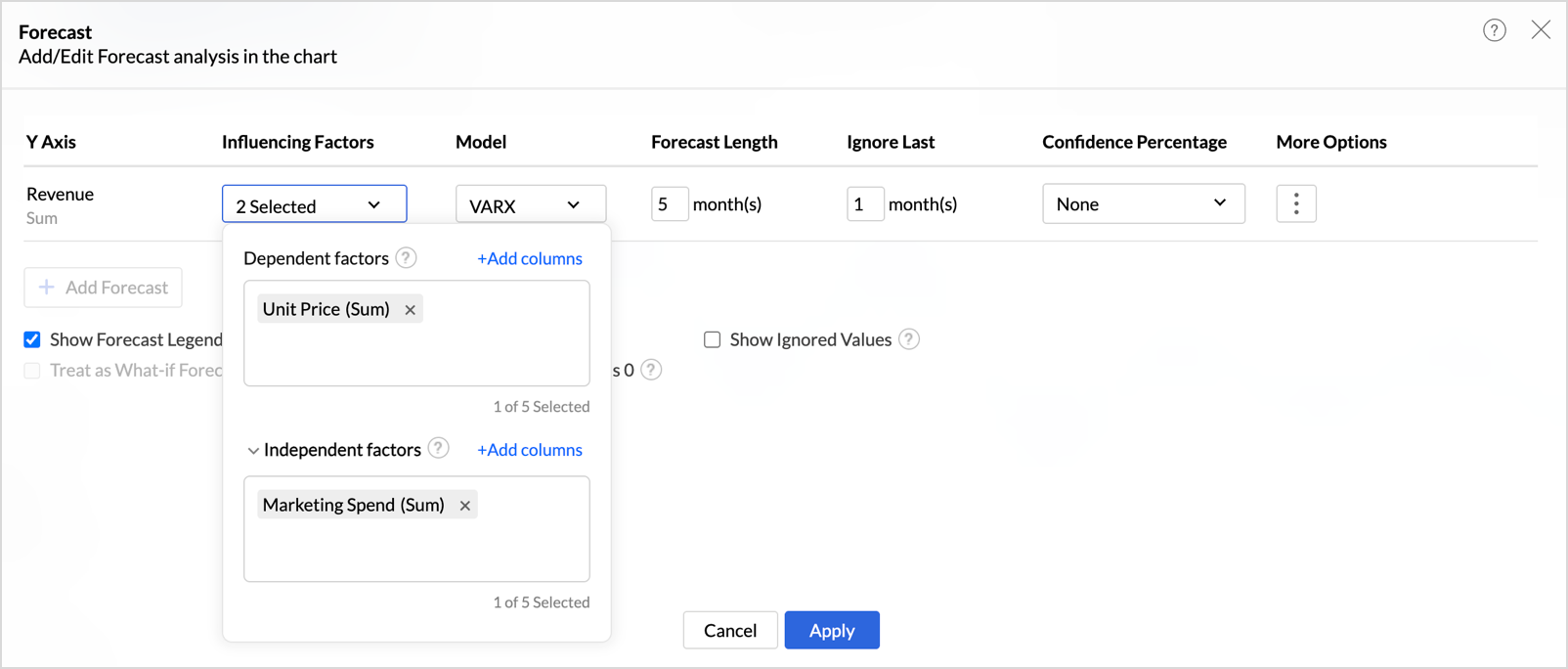
Zoho Analytics Adds Exogenous Variables to Multivariate Forecasting
Zoho Analytics has enhanced multivariate forecasting by adding support for exogenous variables. This helps you build forecasts that reflect real-world influences and produce more context-aware predictions. Highlights include:
- Exogenous Variables: Adds external drivers to multivariate forecasting models.
- VARX Forecasting: Uses the VARX model to incorporate related external factors.
- External Drivers: Supports inputs such as marketing spend, discounts, and seasonality.
Visit Zoho Analytics’ official site for more details.
Zoho Analytics Specs
- A/B Testing: No
- Access Management: No
- Analytics: Yes
- API: Yes
- Conversion Tracking: No
- Custom Reports: No
- Customer Management: No
- Dashboards: Yes
- Data Export: Yes
- Data Import: Yes
- Data Mining: No
- Data Visualization: Yes
- External Integrations: Yes
- Forecasting: Yes
- Inventory Tracking: No
- Keyword Tracking: No
- Link Tracking: No
- Multi-User: Yes
- Notifications: Yes
- Project Management: No
- Reports: Yes
- Scenario Planning: No
- SEO: No
- Supplier Management: No
- Visualization: Yes


