

Avis sur Pipedrive : avantages, inconvénients, fonctionnalités et tarifs
Le CRM Pipedrive se distingue par sa gestion visuelle du pipeline et son automatisation, ce qui en fait une solution idéale pour les équipes commerciales et les petites entreprises.

Nous évaluons les outils indépendamment ; les commissions aident à financer nos tests. Consultez notre politique de transparence et notre méthodologie.
Pipedrive is a CRM software designed to help sales teams manage customer relationships and streamline the sales process. It's particularly beneficial for small to medium-sized businesses and startups that rely on tracking sales activities and managing contact data efficiently. Pipedrive offers a user-friendly interface that simplifies deal management and enhances sales productivity through automation and AI-powered features.
Pipedrive addresses common pain points such as disorganized sales pipelines and inefficient communication within sales teams. In this Pipedrive CRM review, I'll cover Pipedrive features, pros and cons, use cases, Pipedrive’s pricing, and more to help you decide if it meets your specific needs and goals.
Pipedrive CRM Evaluation Summary
4.5/5
- From $14/user/month (billed annually)
- 14-day free trial
Pourquoi faire confiance à nos recommandations de logiciels
6,700+
Reviews
20
Industry experts
16+
Evaluation factors
14
Years
Notre équipe teste et évalue des logiciels depuis 2012. En tant que leaders CX nous-mêmes, nous savons à quel point il est difficile — et important — de choisir le bon logiciel.
Pour ce guide, nous avons évalué les outils grâce à des tests pratiques et une recherche indépendante, en notant les outils selon nos critères de sélection.
Nos avis reflètent notre jugement éditorial humain, et non un argumentaire de vente.
 Gui DrusinaCreative Director
 Tim FisherVP of AI
Pipedrive CRM Overview
In my opinion, Pipedrive stands out as a solid choice for CRM software and the best CRM consideration for sales teams. Its user-friendly interface and robust functionality make it a particularly appealing option for small businesses, startups, and medium-sized sales teams. Pipedrive CRM excels in automation,lead management, and pipeline management, outperforming many competitors with its seamless integrations and customization options.
The platform includes AI-powered features like an AI sales assistant, forecasting, email templates, web forms, notifications, and real-time dashboards. Key add-ons include LeadBooster (with chatbot and web visitors tracking), Smart Docs, Projects with Kanban boards, and Campaigns for email marketing.
Although it lacks some marketing automation functions compared to HubSpot, the platform's ease of use, drag-and-drop builder, and affordability make it a practical option for businesses looking to enhance their sales processes without breaking the bank.
Pros
- Visual pipeline and drag-and-drop interface.
- Drive sales through automation and real-time notifications.
- Automation features and workflows help save time on repetitive tasks
Cons
- Reporting tools are limited in scope unless you opt for higher-tier plans.
- Steep learning curve, particularly for workflows and custom fields.
- Mobile app prone to lagging according to user reports.
Is Pipedrive CRM Right For Your Needs?
Who Would be a Good Fit for Pipedrive CRM?
Pipedrive is a great choice for small businesses, startups, and medium-sized sales teams looking to manage their sales pipeline efficiently through CRM software. If your team values a straightforward interface that focuses on the sales process, Pipedrive offers customizable pipeline management stages and activity reminder automation tools, web forms for lead generation, and real-time dashboards. Businesses in industries like real estate or retail, where tracking leads through a visual pipeline and improving conversion rates is crucial, will find Pipedrive’s deal management, contact management, and reporting features particularly beneficial.
- Small BusinessesPipedrive's user-friendly interface, visual pipeline, and affordable pricing make it ideal for small businesses wanting to stay organized without breaking the bank.
- Sales TeamsWith its focus on sales pipeline management and sales process optimization, Pipedrive helps your team track deals, manage follow-ups, and track deals and close them efficiently through automation, real-time updates, and sales data analysis.
- Real EstateReal estate agents can benefit from Pipedrive's lead management, contact management, and follow-up reminders through notifications, email templates, and visual pipeline tracking, ensuring no potential buyer slips through the cracks.
- RetailRetail teams can use Pipedrive to manage supplier relationships and optimize their sales process with its customization options, custom fields, templates, and workflow automation capabilities.
- Marketing AgenciesMarketing teams will appreciate Pipedrive's integrations, allowing seamless collaboration with other platforms to manage through Zapier, API, and native connections to manage campaigns apart from CRM functions.
- FreelancersFreelancers can organize their client interactions and projects using Pipedrive's simple yet effective CRM functionalities, contact management, deal management, and basic project management features at affordable pricing.
Who Would be a Bad Fit for Pipedrive CRM?
Pipedrive isn't ideal for businesses that need extensive financial tracking, as it lacks budgeting and expense management features. If your team relies heavily on marketing automation like HubSpot offers, without add-ons you might find Pipedrive's options limiting. It's also not the best choice for organizations with complex project management needs. If you need in-depth advanced reporting, with custom dashboards beyond what pricing plans include, Pipedrive might not meet your expectations. Lastly, teams that require robust customer support over the phone may find Pipedrive's offerings fall short in the lower pricing plans, as the Growth plan only offers live chat support. Organizations heavily invested in Salesforce or HubSpot ecosystems might find switching challenging due to workflow differences.
- Financial ServicesPipedrive doesn't offer the financial tracking features with budgeting tools that are crucial for this industry’s comprehensive fiscal management needs.
Comment nous testons et évaluons les outils
Nous avons passé des années à bâtir, affiner et améliorer notre système de test et de notation des logiciels. Notre grille d’évaluation est conçue pour saisir les subtilités des sélections logicielles et ce qui fait qu’un outil est efficace, en se concentrant sur les éléments essentiels du processus de décision. Vous trouverez ci-dessous le détail de notre méthodologie d’évaluation et de notation selon sept critères. Cela nous permet de fournir une évaluation impartiale des logiciels basée sur les fonctionnalités principales, les options uniques, la facilité d’utilisation, l’intégration, la prise en main, l’assistance, les avis clients et le rapport qualité/prix.
Fonctionnalité principale (25% de la note totale)
Le point de départ de notre évaluation concerne toujours la fonctionnalité principale de l’outil. Possède-t-il les fonctions que l’on attend normalement, et ces fonctions sont-elles accessibles pour toutes les offres ? Nous attendons qu’un outil soit au niveau des capacités minimales de ses concurrents.
Fonctionnalités différenciantes (25% de la note totale)
Nous évaluons ici les fonctionnalités qui se distinguent de la fonction de base habituellement présente dans ce type de logiciel. Un score élevé récompense des fonctions spécialisées qui rendent le produit plus efficace ou unique et offrent une valeur ajoutée à l’utilisateur. Nous évaluons également la capacité à s’intégrer facilement avec d’autres solutions courantes, ce qui accroît l’intérêt et l’utilité de l’outil. Les logiciels qui proposent de nombreuses intégrations natives, des connexions tierces ou une API pour les intégrations personnalisées obtiennent une meilleure note.
Facilité d’utilisation (10% de la note totale)
Nous mesurons la rapidité et la simplicité pour effectuer les tâches clés avec l’outil. On valorise le design intuitif, les applications mobiles, les templates préconçus et la capacité à simplifier les tâches complexes.
Accompagnement à la prise en main (10% de la note totale)
L’adoption rapide est essentielle. Nous examinons donc la facilité pour un nouvel utilisateur à prendre l’outil en main avec peu de formation. Nous vérifions la rapidité d’installation et d’utilisation sans expérience préalable. Les meilleurs logiciels exigent peu ou pas de support pour démarrer.
Assistance (10% de la note totale)
Nous évaluons la réactivité et la facilité d’obtenir de l’aide par téléphone, chat ou base de connaissances. Les outils offrant un support humain en temps réel ont le meilleur score ; les chatbots sont moins bien valorisés.
Avis clients (10% de la note totale)
En plus de notre expertises, nous prenons en compte le score NPS (Net Promoter Score) accordé par les utilisateurs actuels et passés. Nous analysons la probabilité qu’ils réutilisent l’outil. Les outils à score élevé possèdent un excellent NPS utilisateur.
Rapport qualité/prix (10% de la note totale)
Après examen des autres critères, nous considérons le prix moyen des offres principales par rapport aux fonctionnalités essentielles évaluées. Les solutions offrant plus pour un prix inférieur obtiennent un meilleur score.
Core Features
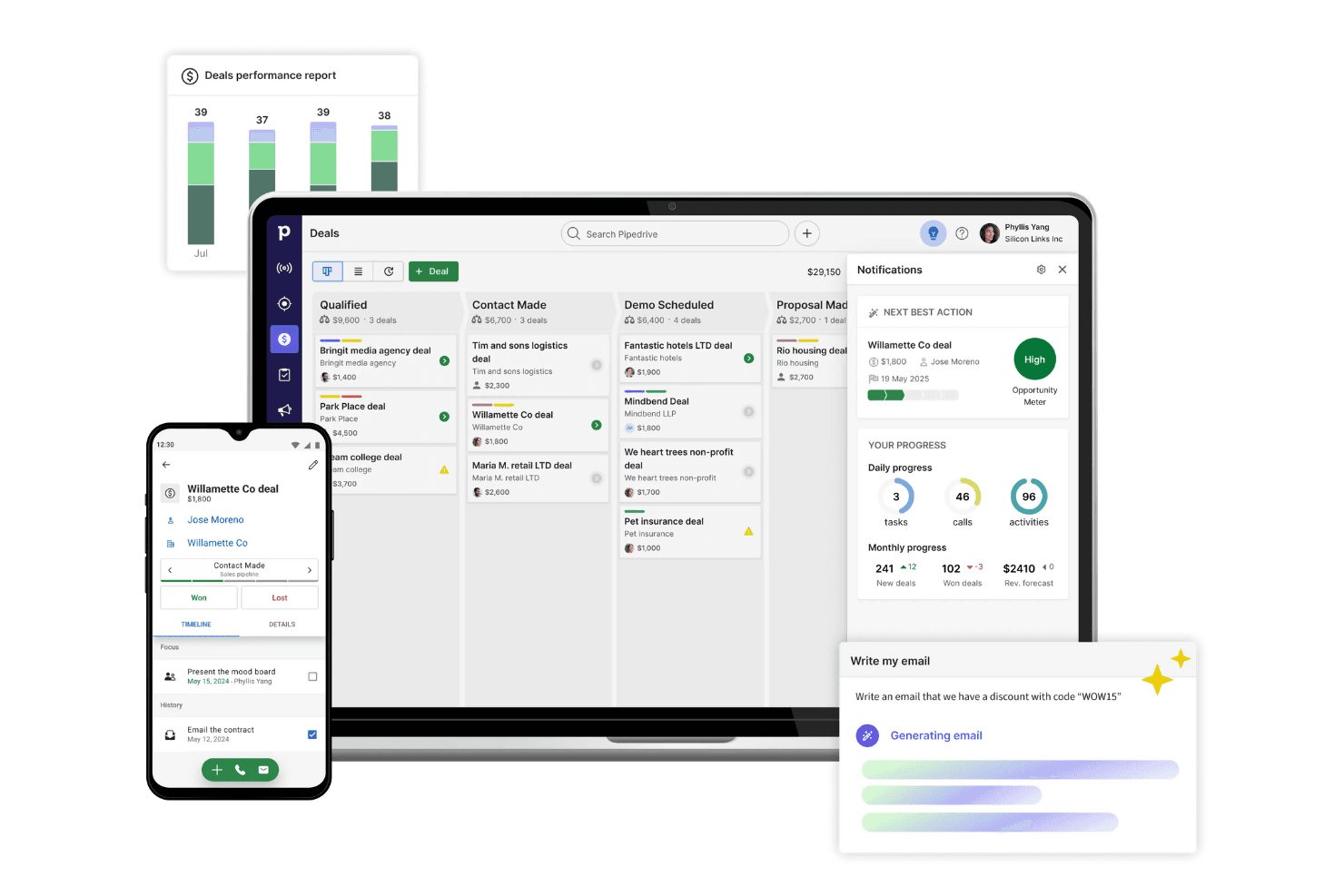
Visual Sales Pipeline: Pipedrive's visual sales pipelines helps you organize and track deals and activities with drag-and-drop functionality. Pipedrive offers custom fields, stage customization, and real-time updates to help sales teams track deals efficiently and systematically move them through the sales process.
Contact Management: Store and manage all contact data including leads, customers, and organizations. Track communication history, email sync with Gmail/Outlook, follow-up reminders through notifications, and relationship building activities that drive customer relationship success.
Sales Automation: Automate repetitive tasks and workflows with Pipedrive’s automation features. Create automation rules, use email templates, set up follow-ups and email reminders, schedule notifications, and build workflows that guide sales reps through your sales process consistently using templates and triggers.
Lead Management: Capture and organize leads efficiently with Pipedrive's lead management tools. You can prioritize leads based on their potential, ensuring your team focuses on the most promising opportunities.
Smart Docs: Create trackable quotes, proposals, and contracts with e-signatures. Smart Docs streamline document management and accelerate deal closure.
AI Sales Assistant: AI-powered recommendations provide tailored sales tips, suggest next steps, identify at-risk deals, and help salespeople prioritize activities. The AI sales assistant learns from sales data to improve performance.
Email Integration: Pipedrive integrates email directly into its platform, allowing you to send and receive emails without leaving the CRM. This feature keeps your communication organized and linked to the corresponding deals.
Reporting Dashboards: Create customizable dashboards to track key sales data, sales forecasting, and performance, and create custom reports. Real-time dashboards provide insights into sales pipeline health, conversion rates, and revenue projections.
Mobile Access: Pipedrive's mobile app for both iOS and Android ensures sales reps can manage deals, update contact data, log activities, access dashboards, and receive notifications whether in office or on the go.
Projects: The Projects add-on adds project management capabilities with Kanban boards, templates, task tracking, and automation to manage complex projects alongside your sales pipeline.

Ease of Use
Pipedrive is straightforward and intuitive, making it accessible for you and your team to hit the ground running. Its focus on delivering an intuitive user experience reduces the learning curve, allowing you to focus on managing customer relationships effectively through the visual pipeline. Users appreciate its drag-and-drop functionality for organizing sales pipelines, which simplifies tracking and managing deals. In addition, the Kanban-style board, dashboards, templates, and custom fields make navigation seamless. While some workflows and automation customizations may require time to master, the overall ease of use and clear layout make it the best CRM software for enhancing productivity in customer service operations. Plus, the mobile app extends this usability to iOS and Android devices.
Integrations
Pipedrive integrates with Zapier, Talkdesk, PandaDoc, Yesware, MailChimp, snapADDY, Ecquire, Niftyquoter, Google Apps, Gmail, and Drip. Native integrations include Slack, Microsoft Teams, Zoom, Trello, Asana, and QuickBooks.
Pipedrive also offers an API for integration with over 400 third-party tools through its marketplace, enabling businesses to connect easily with various applications.

Pipedrive CRM Specs
- 2-Factor Authentication: No
- API: Yes
- Calendar Management: Yes
- Call Tracking: Yes
- Campaign Management: No
- Click-to-Dial: Yes
- Contact Management: Yes
- Contact Sharing: Yes
- Custom Data Forms: No
- Customer Management: Yes
- Dashboard: Yes
- Data Export: Yes
- Data Import: Yes
- Data Visualization: Yes
- Email Integration: Yes
- External Integrations: Yes
- File Sharing: Yes
- File Transfer: Yes
- Google Apps Integration: Yes
- Lead Management: Yes
- Lead Scoring: Yes
- Marketing Automation: No
- Mobile App: Yes
- Multi-User: Yes
- Notifications: Yes
- Pipeline Management: Yes
- Sales Automation: Yes
- Scheduling: Yes
- Social-Media Integration: No
- Task Scheduling/Tracking: Yes
- Third-Party Plugins/Add-Ons: Yes


