


Unwrap contre Chattermill : comparaison et avis d’experts pour 2026

Nous évaluons les outils indépendamment ; les commissions aident à financer nos tests. Consultez notre politique de transparence et notre méthodologie.
Si vous comparez Unwrap et Chattermill, il y a de fortes chances que vous recueilliez déjà beaucoup de commentaires clients, mais que vous ayez du mal à les transformer en informations claires, exploitables et dignes d’être prises en compte. Les commentaires bruts, les réponses aux enquêtes et les tickets d’assistance s’accumulent rapidement, et choisir la mauvaise plateforme peut signifier davantage de tableaux de bord, plus de configuration et des réponses toujours aussi peu claires.
Ce guide explique en détail comment Unwrap et Chattermill se comparent réellement en tant que plateformes d’intelligence client, afin que vous puissiez comprendre comment chaque solution aborde l’analyse des retours et déterminer laquelle correspond le mieux au fonctionnement et aux modes de décision de votre équipe.
Unwrap

4.8/5
- Free demo available
- Pricing upon request
Chattermill

0/5
- Free demo available
- Pricing upon request
Pourquoi faire confiance à nos recommandations de logiciels
6,700+
Reviews
20
Industry experts
16+
Evaluation factors
14
Years
Notre équipe teste et évalue des logiciels depuis 2012. En tant que leaders CX nous-mêmes, nous savons à quel point il est difficile — et important — de choisir le bon logiciel.
Pour ce guide, nous avons évalué les outils grâce à des tests pratiques et une recherche indépendante, en notant les outils selon nos critères de sélection.
Nos avis reflètent notre jugement éditorial humain, et non un argumentaire de vente.
 Gui DrusinaCreative Director
 Tim FisherVP of AI
| Unwrap | Chattermill | |
|---|---|---|
| Free Trial | Free demo available | Free demo available |
| Pricing | Pricing upon request | Pricing upon request |
Tarifs et coûts cachés d’Unwrap et de Chattermill
Unwrap applique une tarification personnalisée basée sur le volume de retours et les intégrations, et non sur le nombre d’utilisateurs, tous les forfaits incluant des fonctionnalités telles que le SSO, la conformité au RGPD, l’accès à l’API, les alertes en temps réel et la suppression des informations personnelles identifiables. Les coûts peuvent augmenter avec la hausse du volume de retours ou du nombre de sources connectées.
Chattermill applique des forfaits personnalisés par niveaux, basés sur les sources de données et la profondeur de l’analyse. Les coûts peuvent augmenter lors du passage à des niveaux supérieurs ou de l’ajout de nouvelles sources de données.
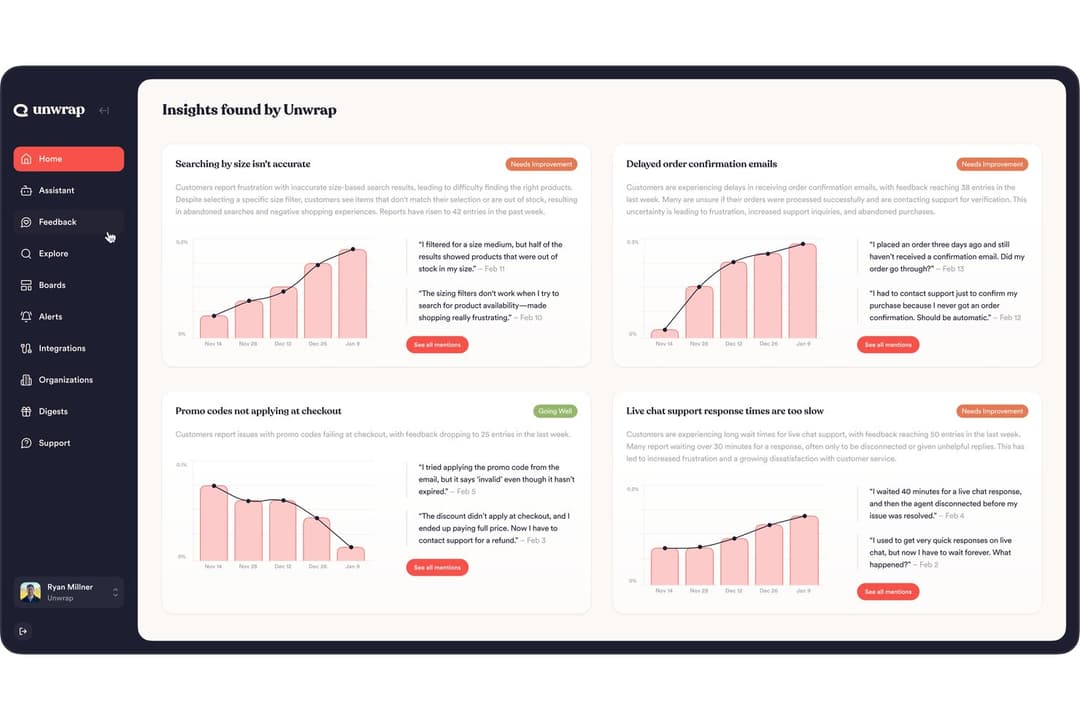
Unwrap se concentre sur la mise à disposition rapide des informations auprès des équipes. SupportIQ analyse les conversations d’assistance afin de montrer quelles résolutions fonctionnent réellement, tandis que la détection proactive des tendances fait automatiquement émerger les problèmes naissants sans recherche manuelle. La solution unifie également les retours provenant de différents canaux grâce à des tableaux de bord, au balisage automatique, aux requêtes par IA et aux alertes en temps réel.
Chattermill est conçu autour de programmes structurés de Voix du client. Son analyse d’impact relie les thèmes des retours aux indicateurs métier, tandis que les flux de travail et les alertes aident les équipes à transformer les informations en actions dans toute l’organisation. La solution prend également en charge les retours unifiés provenant de plusieurs canaux, les tableaux de bord et l’analyse des sentiments pilotée par l’IA pour une exploration plus approfondie.
| Unwrap | Chattermill | |
|---|---|---|
| API | Yes | Yes |
| Contact Management | Yes | No |
| CRM Integration | Yes | Yes |
| Customer Management | Yes | Yes |
| Data Export | Yes | Yes |
| Data Import | Yes | Yes |
| Data Visualization | Yes | Yes |
| Google Apps Integration | Yes | No |
| Lead Management | No | Yes |
| Marketing Automation | Yes | No |
| Multi-User | Yes | Yes |
| Intégration | Unwrap | Chattermill |
| Zendesk | ✅ | ✅ |
| Salesforce | ✅ | ✅ |
| Intercom | ✅ | ✅ |
| App Store Connect | ✅ | ✅ |
| Google Play | ✅ | ✅ |
| Trustpilot | ❌ | ✅ |
| Qualtrics | ✅ | ✅ |
| Slack | ✅ | ✅ |
| API | ✅ | ✅ |
| Zapier | ✅ | ✅ |
Unwrap et Chattermill prennent en charge les mêmes intégrations principales dans les domaines de l’assistance, du CRM, des retours produit, des enquêtes et des outils internes, ce qui facilite la centralisation des retours clients provenant de plusieurs sources, sans lacunes au niveau des intégrations.
| Facteur | Unwrap | Chattermill |
| Confidentialité des données | Assure la conformité au RGPD et la suppression automatique des informations personnelles identifiables afin de protéger les données sensibles. | Est conforme au RGPD et au CCPA, et dispose des certifications SOC 2 Type II et ISO 27001 pour assurer la sécurité des entreprises. |
| Normes de conformité | Certification SOC 2 Type II et protections de niveau entreprise. | Respecte la norme ISO 27001:2022 et les normes de sécurité du secteur. |
| Fiabilité | Utilise des contrôles de sécurité SOC 2 Type II pour prendre en charge une analyse des retours sécurisée et évolutive. | Utilise une surveillance documentée et des contrôles d’environnement pour assurer un traitement fiable des retours à l’échelle de l’entreprise. |
En général, Unwrap et Chattermill respectent tous deux les principales normes de sécurité et de conformité, notamment le RGPD et SOC 2 Type II, Chattermill détenant en plus la certification ISO 27001.
| Facteur | Unwrap | Chattermill |
| Interface utilisateur | L’interface est facile à parcourir et visuellement soignée, ce qui rend la plateforme agréable à utiliser. | L’interface permet aux nouveaux utilisateurs de toutes les équipes de se familiariser rapidement avec la plateforme. |
| Configuration | Effectuez l’intégration complète de la plateforme et bénéficiez d’un accès total à Unwrap en environ trois semaines. | Chattermill inclut un spécialiste dédié à l’intégration, avec un accompagnement individuel au cours des 30 premiers jours. |
| Courbe d’apprentissage | L’intégration est fluide et facile à adopter au quotidien. | Simplifie la collecte et l’interprétation des commentaires non structurés. |
Unwrap est facile à parcourir et offre une expérience d’intégration fluide. Chattermill est également facile à prendre en main pour les nouveaux utilisateurs, grâce à un accompagnement dédié lors de l’intégration et à des outils permettant de travailler avec des commentaires non structurés.
Unwrap
- Proactive insight discovery without manual tagging
- Early issue detection through alerts and trend monitoring
- Verifiable, traceable insights that link each theme back to the original feedback.
- Limited value for low feedback volume teams
- Takes longer to get started than instant sign-up alternatives
- Customization depth is intentionally limited
Chattermill
- Combines feedback from surveys, support, social, speech, and product sources.
- Support ongoing Voice of Customer initiatives across CX, support, and product teams.
- Enterprise-grade security and governance
- Configuring multiple data sources, dashboards, and taxonomies can require more time compared to lighter feedback tools.
- The breadth of features and analytics views may feel busy for teams.
- Pricing can increase as feedback volume grows, more data sources are added, or advanced analytics are required.
Unwrap
- Product ManagersUnwrap helps product managers identify recurring customer pain points and feature requests at scale, making roadmap prioritization easier and more evidence-based.
- Customer Experience (CX) TeamsCX teams use Unwrap to automatically surface trends and sentiment shifts across customer feedback, helping them address issues before they escalate.
- Support LeadershipSupport leaders rely on Unwrap to detect systemic issues from support tickets and reviews, allowing them to reduce repeat problems and improve service quality.
- Survey & Research TeamsUnwrap’s AI-powered surveys help research teams collect richer, more actionable qualitative feedback without increasing survey fatigue.
- Executives & Strategic LeadersExecutives use Unwrap to stay informed on customer sentiment and emerging issues through clear summaries instead of raw data dashboards.
- Enterprise OrganizationsLarge organizations benefit from Unwrap’s ability to analyze massive volumes of multi-channel feedback while supporting cross-team visibility and governance.
Chattermill
- Customer Experience (CX) TeamsChattermill works well for CX teams running structured Voice of Customer programs that track sentiment and themes across multiple feedback channels.
- Customer Support TeamsSupport teams use Chattermill to analyze large volumes of tickets and interactions to identify recurring issues and service gaps.
- Product TeamsProduct teams rely on Chattermill to unify feedback from surveys, support, and reviews to inform roadmap and prioritization decisions.
- Enterprise OrganizationsChattermill fits enterprises that need strong governance, role controls, and compliance while sharing insights across departments.
- Industry-Specific TeamsTeams in industries like retail, finance, travel, subscriptions, and utilities use Chattermill to monitor ongoing customer sentiment tied to operations.
- Teams Focused on Impact AnalysisChattermill is suited for teams that want to connect customer feedback insights to business outcomes through dashboards, workflows, and impact tracking.
Qui devrait utiliser Unwrap et qui devrait utiliser Chattermill ?
Si vous souhaitez faire émerger rapidement des informations sans devoir effectuer de longues recherches, Unwrap met l’accent sur des fonctionnalités telles que SupportIQ et la détection proactive des tendances afin de porter les schémas importants à votre attention, tout en prenant en charge les tableaux de bord et les analyses approfondies lorsque cela est nécessaire.
Si vous gérez les commentaires des clients dans le cadre d’un programme structuré et continu, Chattermill s’appuie sur les tableaux de bord, les flux de travail et l’analyse de l’impact pour vous aider à organiser les informations au fil du temps et à agir sur celles-ci au sein de vos équipes, tout en prenant en charge l’analyse en temps réel.
Le choix dépend essentiellement de votre préférence : souhaitez-vous que les informations émergent automatiquement, ou préférez-vous travailler dans un environnement plus structuré afin de les organiser au fil du temps ?
| Unwrap | Chattermill | |
|---|---|---|
| Data Security | Unwrap Publicly lists GDPR compliance and SOC 2 Type II controls. | Chattermill Publicly lists GDPR, SOC 2 Type II, and ISO 27001:2022 certification. |
| Industry Positioning | Unwrap Positions itself broadly across use cases and teams without strong industry-specific framing. | Chattermill Explicitly markets solutions by industry, such as retail, finance, travel, subscriptions, and utilities. |
| Onboarding | Unwrap Offers guided onboarding designed to get teams operational quickly with minimal friction. | Chattermill Provides a dedicated onboarding specialist and structured setup, which can involve more configuration upfront. |
| Project Structure | Unwrap Optimized for fast insight consumption and action across teams with lighter configuration. | Chattermill Built to support long-running, structured Voice of Customer programs across multiple teams. |
| Real-Time Insights | Unwrap Prioritizes proactive alerts and surfaced trends to help teams act quickly on emerging issues. | Chattermill Emphasizes structured, AI-driven analysis across unified feedback sources to support deeper insight exploration. |
| Compliance | Both support GDPR compliance and enterprise security controls suitable for larger organizations. |
|---|---|
| Continuous Feedback | Both unify feedback from multiple sources, such as surveys, reviews, support tickets, and product feedback. |
| Cross-Platform Access | Both are designed for use by CX, product, support, and leadership teams to align around customer insights. |
| Feedback Analysis | Both platforms use AI to analyze large volumes of unstructured customer feedback and surface themes, trends, and sentiment. |
| Scalability | Both platforms are built to handle growing feedback volumes and scale alongside organizational needs. |