


monday CRM contro Zoho CRM: confronto e recensioni di esperti per il 2026

Recensiamo gli strumenti in modo indipendente e le commissioni aiutano a finanziare i nostri test. Consulta la nostra politica di trasparenza, la nostra metodologia o suggerisci uno strumento.
monday CRM è uno spazio di lavoro visivo e flessibile progettato per aiutare i team a gestire relazioni, trattative e processi interni tutto in un unico posto. Zoho CRM è una piattaforma consolidata, focalizzata sulla semplificazione dei punti di contatto di vendita, marketing e assistenza lungo l'intero ciclo di vita del cliente.
Rispetto a monday CRM, Zoho CRM offre funzionalità aziendali più avanzate, mentre monday si distingue per la facilità d'uso e la configurazione rapida. In questo articolo confronterò direttamente i due strumenti, analizzandone funzionalità, vantaggi e svantaggi, prezzi e il modo in cui si posizionano come software di gestione delle relazioni con i clienti (CRM) per il tuo team.
monday CRM
4.6/5
- 14-day free trial + free demo available
- From $12/seat/month (billed annually)
Zoho CRM

4.2/5
- 15-day free trial + free plan available
- From $14/user/month (billed annually)
Perché fidarsi dei nostri consigli sui software
6,700+
Reviews
20
Industry experts
16+
Evaluation factors
14
Years
Il nostro team testa e recensisce software dal 2012. In quanto leader CX noi stessi, sappiamo quanto sia difficile — e importante — scegliere il software giusto.
Per questa guida, abbiamo valutato gli strumenti attraverso test pratici e ricerche indipendenti, assegnando un punteggio agli strumenti in base ai nostri criteri di selezione.
Le nostre recensioni riflettono il nostro giudizio editoriale umano, non un discorso di vendita.
 Gui DrusinaCreative Director
 Tim FisherVP of AI
| monday CRM | Zoho CRM | |
|---|---|---|
| Free Trial | 14-day free trial + free demo available | 15-day free trial + free plan available |
| Pricing | From $12/seat/month (billed annually) | From $14/user/month (billed annually) |
Prezzi e costi nascosti di monday CRM e Zoho CRM
Il prezzo di monday CRM si basa su un modello a livelli per utente, con le funzionalità principali disponibili solo nei piani superiori e costi aggiuntivi per limiti di automazione, postazioni o assistenza premium. Anche il prezzo di Zoho CRM si basa su un modello per utente, ma include più funzionalità integrate nei livelli inferiori, sebbene analisi avanzate, integrazioni e componenti aggiuntivi possano comunque aumentare il costo totale.
Per scegliere la soluzione più adatta, valuta quanti utenti avranno bisogno dell'accesso, quali funzionalità utilizzerai effettivamente ogni giorno e dove è probabile che la tua attività cresca, soprattutto se stai sviluppando flussi di lavoro o ampliando il servizio a più team.
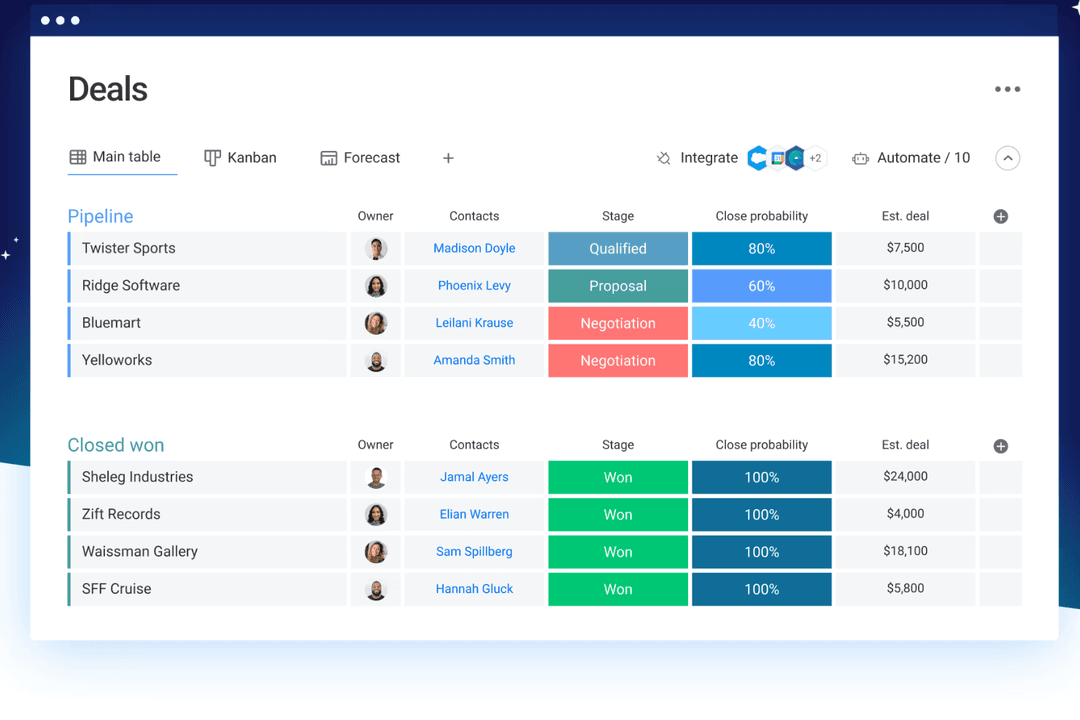
Le bacheche personalizzabili di monday CRM ti consentono di gestire trattative, attività e follow-up in un’unica visualizzazione visiva: una soluzione pratica se il tuo team deve gestire contemporaneamente il lavoro con i clienti e le operazioni interne nello stesso spazio.
L’assistente IA integrato di Zoho CRM, Zia, è ottimo per mettere in evidenza informazioni sui lead o suggerire i passaggi successivi, soprattutto se gestisci un volume elevato di lead in entrata. monday CRM mantiene le cose semplici e flessibili; Zoho punta maggiormente sull’automazione intelligente e sull’intelligence commerciale.
| monday CRM | Zoho CRM | |
|---|---|---|
| 2-Factor Authentication | No | Yes |
| API | Yes | Yes |
| Calendar Management | Yes | Yes |
| Call Tracking | No | Yes |
| Campaign Management | No | Yes |
| Click-to-Dial | No | Yes |
| Contact Management | Yes | Yes |
| Contact Sharing | No | Yes |
| Custom Data Forms | Yes | Yes |
| Customer Management | Yes | Yes |
| Dashboard | Yes | Yes |
| Data Export | Yes | Yes |
| Data Import | Yes | Yes |
| Data Visualization | Yes | Yes |
| Email Integration | Yes | Yes |
| External Integrations | Yes | Yes |
| File Sharing | Yes | Yes |
| File Transfer | Yes | Yes |
| Google Apps Integration | Yes | Yes |
| Lead Management | Yes | Yes |
| Lead Scoring | Yes | Yes |
| Marketing Automation | Yes | Yes |
| Mobile App | No | Yes |
| Multi-User | Yes | Yes |
| Notifications | Yes | Yes |
| Pipeline Management | Yes | Yes |
| Sales Automation | Yes | Yes |
| Scheduling | Yes | Yes |
| Social-Media Integration | Yes | Yes |
| Task Scheduling/Tracking | Yes | Yes |
| Third-Party Plugins/Add-Ons | Yes | Yes |
| Integrazione | monday CRM | Zoho CRM |
|---|---|---|
| IntegrazioneLinkedIn | monday CRM✅ | Zoho CRM❌ |
| IntegrazioneHubSpot | monday CRM✅ | Zoho CRM✅ |
| IntegrazioneSlack | monday CRM✅ | Zoho CRM✅ |
| IntegrazioneMicrosoft Teams | monday CRM✅ | Zoho CRM✅ |
| IntegrazioneGoogle Workspace | monday CRM✅ | Zoho CRM✅ |
| IntegrazioneSalesforce | monday CRM❌ | Zoho CRM✅ |
| IntegrazioneMailchimp | monday CRM✅ | Zoho CRM✅ |
| IntegrazioneQuickBooks | monday CRM❌ | Zoho CRM✅ |
| IntegrazioneAPI | monday CRM✅ | Zoho CRM✅ |
| IntegrazioneZapier | monday CRM✅ | Zoho CRM✅ |
L'integrazione di monday CRM con LinkedIn ti consente di automatizzare i post e monitorare le interazioni direttamente dal tuo CRM, una soluzione perfetta per i team che si concentrano sul coinvolgimento sui social media. Si integra inoltre in modo nativo con l'ecosistema di monday.com, inclusi il relativo strumento di gestione dei progetti e monday service. L'integrazione di Zoho CRM con Salesforce è ideale per i team che desiderano sincronizzare i dati di vendita o migrare senza problemi verso un nuovo software CRM, assicurandosi che tutte le interazioni con i clienti siano aggiornate.
Mentre monday CRM migliora la gestione dei social media, Zoho CRM eccelle nella sincronizzazione completa dei dati di vendita.
| Fattore | monday CRM | Zoho CRM |
|---|---|---|
| FattoreCrittografia dei dati | monday CRMmonday CRM utilizza la crittografia AES-256 per proteggere i dati sia in transito che a riposo. | Zoho CRMZoho CRM protegge i dati con la crittografia AES-256, garantendo privacy e protezione. |
| FattoreConformità normativa | monday CRMmonday CRM è conforme al GDPR e ad altri standard internazionali. | Zoho CRMZoho CRM soddisfa i requisiti del GDPR, del CCPA e di altri importanti standard di conformità. |
| FattoreAffidabilità | monday CRMmonday CRM garantisce un tempo di attività del 99.9%, assicurando un accesso costante agli strumenti. | Zoho CRMZoho CRM offre uno SLA con un tempo di attività del 99.9%, garantendo una disponibilità affidabile del servizio. |
monday CRM e Zoho CRM offrono entrambi solidi livelli di sicurezza e conformità, ma Zoho CRM copre una gamma più ampia di standard normativi. Per scegliere il fornitore giusto, valuta gli standard di conformità specifici che il tuo team deve rispettare e dai priorità alle funzionalità che migliorano la protezione dei dati, come la crittografia e le garanzie di disponibilità.
| Fattore | monday CRM | Zoho CRM |
|---|---|---|
| FattoreInterfaccia utente | monday CRMmonday CRM offre un'interfaccia visivamente accattivante e intuitiva con funzionalità di trascinamento. | Zoho CRMRicco di funzionalità ma più caotico, con una curva di apprendimento più ripida. |
| FattoreEsperienza di configurazione iniziale | monday CRMTutorial interattivi, modelli pronti all'uso e un processo di configurazione intuitivo con procedure guidate. | Zoho CRMOffre tutorial, guide dettagliate e assistenza personalizzata per la configurazione, ma richiede più tempo per essere configurato a causa della profondità e del numero di opzioni. |
| FattoreAssistenza clienti | monday CRMLa chat nell'app, l'assistenza via email, la base di conoscenze e il centro assistenza rendono facile trovare rapidamente le risposte. | Zoho CRML'assistenza è basata sui ticket, a meno che tu non abbia un piano premium. |
| FattorePersonalizzazione | monday CRMPannelli di controllo e campi altamente personalizzabili con semplici controlli dell'interfaccia. | Zoho CRMPersonalizzazione avanzata, ma trovare e configurare le opzioni richiede più tempo. |
| FattoreSemplicità dei flussi di lavoro | monday CRMÈ facile configurare le automazioni con blocchi logici senza codice. | Zoho CRMOffre potenti automazioni, ma la configurazione risulta più tecnica. |
monday CRM è apprezzato per la sua interfaccia intuitiva e ordinata e per la semplicità della configurazione iniziale, che lo rendono ideale per chi dà valore a una navigazione lineare e a un'esperienza utente senza complicazioni. Zoho CRM, pur offrendo un'ampia personalizzazione, può risultare complesso per i nuovi utenti.
monday CRM
- You can build and adjust pipelines without needing technical help.
- It’s easy to track tasks, emails, and contact history in one place.
- Automation features save your team time on repetitive tasks and streamline daily work.
- It can feel overwhelming with too many features for new users.
- Reporting feels limited if your team needs deeper performance or trend analysis.
- You can't manage complex sales territories or multi-layered account hierarchies.
Zoho CRM
- You can customize workflows to fit your team's specific needs.
- Robust automation tools that save you time on repetitive tasks.
- Integration with other Zoho apps enhances your team's productivity.
- The user interface can feel cluttered and overwhelming for new users.
- Some users find the advanced features difficult to navigate without support.
- Customer support response times can be slower compared to competitors.
monday CRM
- Customer Support TeamsYou can track tickets, manage handoffs, and log follow-ups all in one easy-to-navigate board.
- Sales Operations TeamsYou can build lightweight sales pipelines and reporting without relying on complex CRM tools.
- Small BusinessesSetup is quick, and you won’t need IT to change your workflows or customize fields.
- Account ManagementIt helps your team stay on top of renewals, upsells, and check-ins without switching tools.
- SaaS CompaniesYou can manage leads, onboard customers, and monitor ongoing relationships without bloated features.
- Marketing AgenciesIt’s easy to track client requests, campaign status, and deliverables across multiple accounts.
Zoho CRM
- Small BusinessesZoho CRM offers scalability and customization, making it a great fit for growing small businesses.
- Retail Sales TeamsThe CRM's automation tools simplify sales processes, perfect for retail environments.
- Tech StartupsIts integration with other Zoho products makes it an all-in-one tool for dynamic and tech-focused teams.
- Marketing DepartmentsZoho CRM's workflow enhances marketing automation and lead generation.
- Customer Support TeamsWith its robust ticketing and support features, customer service teams can streamline responses.
- Consulting FirmsZoho CRM's customization and reporting features help consultants manage client interactions effectively.
Chi dovrebbe usare monday CRM e chi dovrebbe usare Zoho CRM?
A mio parere, monday CRM è ideale per i team di assistenza e vendita che desiderano uno strumento rapido, visivo e facile da adattare, soprattutto se gestiscono le vendite insieme a progetti o attività per i clienti. Zoho CRM è più adatto se hai bisogno di funzionalità avanzate, ampia personalizzazione e un'integrazione più stretta con strumenti finanziari o di marketing.
monday CRM è adatto a startup, piccole imprese e team in crescita che danno valore alla semplicità e alla chiarezza visiva. Zoho è più adatto alle organizzazioni complesse in cui il controllo e la scalabilità sono più importanti della facilità d'uso.
| monday CRM | Zoho CRM | |
|---|---|---|
| Automation | monday CRM Drag-and-drop automation for tasks and updates. | Zoho CRM Rule-based automation of repetitive tasks that supports advanced logic and AI-powered triggers. |
| Integrations | monday CRM Seamless integration with project tools like Slack, Zoom, and DocuSign. | Zoho CRM Strong for back-office tools like Xero, Google Ads, and finance apps. |
| Pricing Model | monday CRM Per-user pricing with limits based on plan tier and seats. | Zoho CRM Tiered structure with multiple plans for varied functionality. |
| Setup Time | monday CRM Quick to launch with templates and guided flows. | Zoho CRM Takes longer to configure due to deep feature sets and custom rules. |
| User Interface | monday CRM Visual and clean, with boards that are easy to customize and navigate. | Zoho CRM Dense and traditional, with more menus and a higher learning curve. |
| CRM Features | Both let you track leads, manage pipelines, and automate tasks—monday CRM focuses on visual workflows, Zoho on data depth. |
|---|---|
| Customizable Dashboards | Each CRM solution offers strong customization options—monday through flexible boards and fields, Zoho through modules and rule-based logic. |
| Multi-Channel Support | Both provide multi-channel support, allowing your team to engage with customers via email, chat, and more, though Zoho CRM includes phone support. |
| Reporting | Each provides dashboards to track deal flow and team performance—monday CRM with visual widgets, Zoho with advanced filters. |
| Third-Party Integrations | Both connect with major tools like Gmail, Slack, and HubSpot, helping your team sync data across platforms. Plus, both use APIs and Zapier to connect with third-party apps. |