

De beste AI-chatbotene for kundeservice automatiserer brukerstøtte i stor skala – de besvarer vanlige spørsmål, reduserer antallet saker og frigjør medarbeidere til komplekse problemer. Du ønsker en chatbot som kan hjelpe deg med å gi raske og konsekvente svar på enkle kundehenvendelser, men du må finne ut hvilket alternativ som gir bedre resultater for kundene og medarbeiderne dine.
I denne artikkelen bruker jeg min erfaring med kundeopplevelse til å vurdere og sette opp en kortliste over de beste AI-chatbotene, slik at kundeserviceteam kan jobbe mer effektivt og tilby kundestøtte døgnet rundt.
Why Trust Our Software Recommendations
6,700+
Reviews
20
Industry experts
16+
Evaluation factors
14
Years
Our team has been testing and reviewing software since 2012. As CX leaders ourselves, we know how difficult—and important—it is to choose the right software.
For this guide, we evaluated tools using hands-on testing and independent research, scoring tools using our selection criteria.
Our reviews reflect our human editorial judgment, not a sales pitch.
 Gui DrusinaCreative Director
 Tim FisherVP of AI
Sammenligningstabell: AI-chatboter for kundeservice
Denne sammenligningstabellen oppsummerer mine utvalgte AI-chatboter for kundeservice:
| Tool | Best For | Trial Info | Price | ||
|---|---|---|---|---|---|
| 1 | Best for AI-powered ticket triage | 14-day free trial | From $19/user/month (billed annually) | Website | |
| 2 | Best for building AI agents without a technical ceiling | Free plan + free demo available | From $150/month (billed annually) | Website | |
| 3 | Best for AI-powered agent guidance | Free demo available | Pricing upon request | Website | |
| 4 | Best for auto-resolution across channels | Free plan available; 14-day free trial | From $16/user/month | Website | |
| 5 | Best with agentic AI that automates workflows | Free plan available | From $0.09/interaction | Website | |
| 6 | Best for strict enterprise security compliance | Not available | Pricing upon request | Website | |
| 7 | Best for ecommerce support on Shopify brands | Free demo + 30-day free trial available | From $40/month | Website | |
| 8 | Best for enterprise-grade AI agent control | Free demo available | Pricing upon request | Website | |
| 9 | Best for major marketplace integration | 14-day free trial + free demo available | From $39/user/month (billed annually) | Website | |
| 10 | Best for AI-powered voice and call transcription | Free trial available | From $30/license/month (billed annually) | Website |


Anmeldelser av de beste AI-chatbotene for kundeservice
Her er mine grundige anmeldelser av de 20 beste AI-chatbotene for kundeservice som kom med på kortlisten min.
 Best for AI-powered ticket triage
- 14-day free trial
- From $19/user/month (billed annually)
Visit WebsiteCustomer Rating:4.4/5
Freshservice provides a centralized repository of information and solutions for common IT issues. Freshdesk is a customer service platform built for support teams in businesses of all sizes who want to automate conversations, resolve tickets faster, and deliver consistent experiences across chat, email, and social channels using AI-driven tools.
Who Is Freshdesk Best For?
Freshdesk is a good fit for growing support teams that handle high ticket volumes across multiple channels and need AI tools to keep response times and workloads manageable.
Why I Picked Freshdesk
Freshdesk earns its spot on my shortlist because of how well Freddy AI handles ticket triage automatically. I particularly like the auto-triage feature, which reads incoming tickets and fills in fields like priority, category, and type without any manual input from agents. Freddy AI Copilot prioritizes tickets by customer sentiment, so my team can spot which conversations need urgent attention. This lets agents spend less time sorting and more time resolving issues.
Freshdesk Key Features
- Freddy AI Agent: An AI bot that handles customer questions directly across chat and email channels without agent involvement.
- Skill-based ticket assignment: Automatically routes tickets to agents based on their specific skills and expertise.
- Freddy AI Insights: Generates reports on support trends, ticket patterns, and team performance to surface operational gaps.
- Knowledge base: A multilingual self-service portal where customers can find answers to common questions without contacting support.
Freshdesk Integrations
Integrations include Playvox, Slack, MS Teams, Shopify, Salesforce, Jira, Tata, Jupiter, Springer, and Workato.
Pros and Cons
Pros:
- Features a no-code conversational bot builder for easy deployment
- Robust automation features to reduce manual tasks
- Asset management capabilities
Cons:
- Advanced reporting features are seen as complex by some
- Freddy AI is a paid add-on feature
Learn more about Freshdesk: Best for building AI agents without a technical ceiling
- Free plan + free demo available
- From $150/month (billed annually)
Visit WebsiteCustomer Rating:4.5/5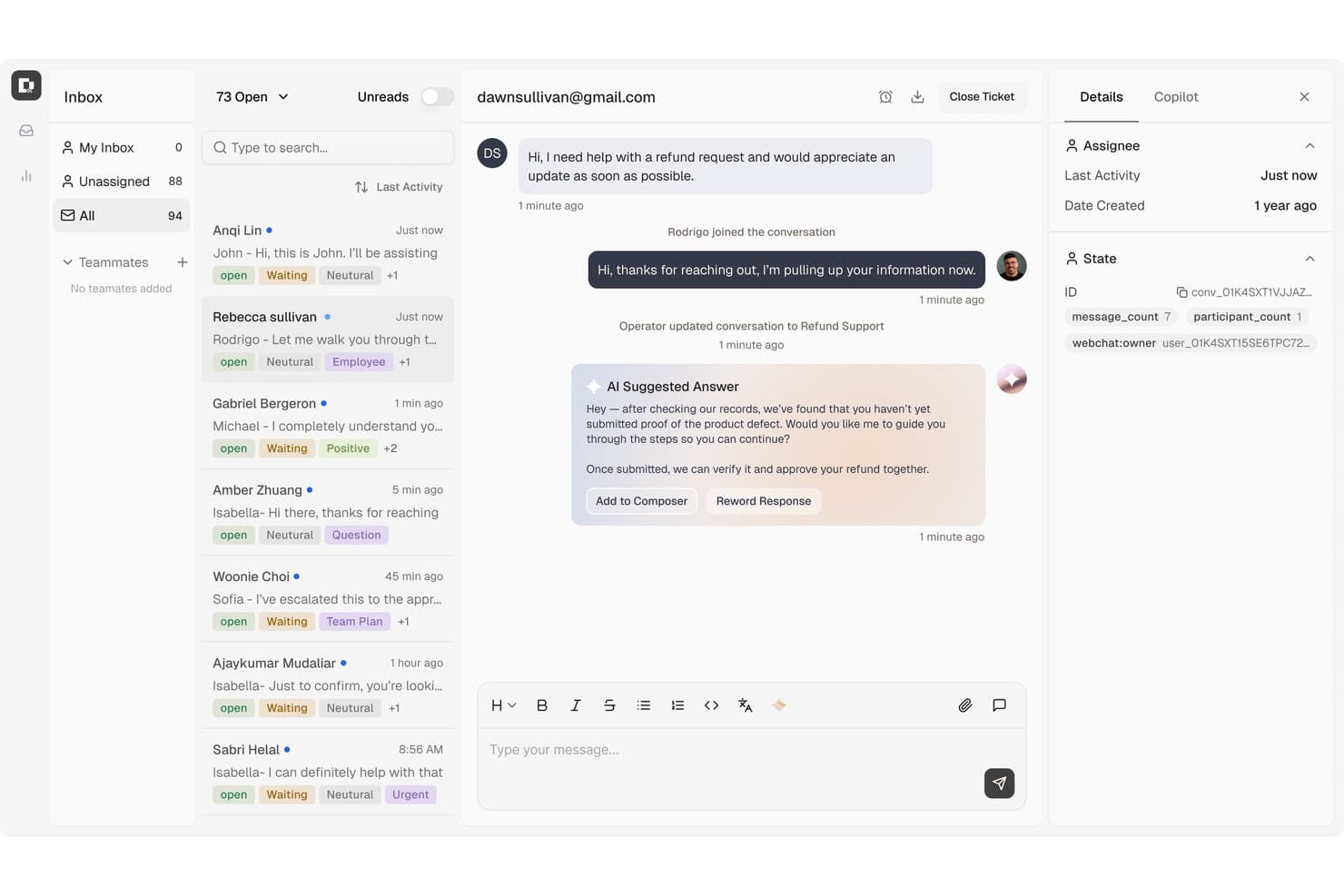
Botpress surfaces AI-suggested replies to speed up customer refund resolutions. Botpress is an AI-native customer support platform that combines a visual agent builder, an AI helpdesk, knowledge base integration, and omnichannel deployment across web, messaging, and voice channels.
Who Is Botpress Best For?
Botpress is a strong fit for technical teams and developers who want full control over how their customer support AI agents are built, customized, and extended.
Why I Picked Botpress
Botpress earns its spot on my shortlist because it genuinely has no ceiling on how complex or custom your support agent can get. I love that the Autonomous Node lets you configure exactly which knowledge bases, tools, workflows, and exit conditions the agent can access, so you're not wrestling with a black box when something goes wrong. The Inspect window shows you the agent's reasoning and tool calls in real time, which I've found invaluable for debugging misfires before they reach customers.
Botpress Key Features
- Autonomous Node: Configure exactly which tools, knowledge bases, and workflows an AI agent can access during a conversation.
- Botpress Desk ticket management: Organize support work with priorities, custom statuses, tags, custom fields, and threaded replies.
- Translator Agent: Automatically detect a user's language and translate messages across conversations using a configurable model.
- AI Actions: Connect to external systems so agents can issue refunds, retrieve order data, or update records within defined rules.
Botpress Integrations
Botpress has native integrations with Zendesk and Intercom, plus marketplace integrations for Shopify, BigCommerce, Magento, HubSpot, and Chatwoot. It also offers Chat, Admin, Files, Tables, and Runtime APIs, webhooks, and Zapier.
Pros and Cons
Pros:
- Reviewers praise visual bot-building controls
- Configurable workflows support complex service tasks
- Inspectable agent reasoning aids debugging
Cons:
- Advanced setups can require technical support
- Knowledge-base changes can alter chat results
Learn more about Botpress: Best for AI-powered agent guidance
- Free demo available
- Pricing upon request
Visit WebsiteCustomer Rating:5/5
Cresta uses AI to automate support and improve customer interactions. Cresta is an AI-powered customer service platform that combines autonomous AI agents, real-time agent assistance, and conversation intelligence to help organizations automate support and improve customer interactions across voice, chat, SMS, and digital channels.
Who Is Cresta Best For?
Cresta is best suited for enterprise and mid-market contact centers in industries such as financial services, insurance, telecommunications, and retail that manage large volumes of customer conversations and want to improve both automation and agent performance.
Why I Picked Cresta
I picked Cresta because it bridges the gap between AI automation and human support. While its AI agents can handle routine customer inquiries independently, the platform also provides real-time guidance to agents during live conversations. This allows organizations to automate repetitive requests while helping human agents deliver more consistent and accurate service when complex issues arise. I also like that Cresta combines conversation intelligence, quality management, and workflow automation into a single platform rather than requiring multiple point solutions.
Cresta Key Features
- AI Agent: Automates customer interactions across voice, chat, and messaging channels while handling common requests without agent intervention.
- Auto-summarization: Generates conversation summaries and notes automatically, reducing after-call work and administrative effort.
- Quality management: Evaluates customer interactions against predefined criteria and provides automated scoring insights at scale.
- Opera orchestration engine: Enables teams to build, manage, and optimize AI workflows and conversation paths through a no-code interface.
Cresta Integrations
Cresta integrates with Salesforce, ServiceNow, Microsoft Dynamics 365, Zendesk, Amazon Connect, Twilio, Five9, Genesys, NICE, HubSpot, Marketo, and Databricks. It also provides API access for custom integrations and enterprise workflow automation.
Pros and Cons
Pros:
- Automated quality management at scale
- Real-time guidance improves agent performance
- AI agents automate customer interactions
Cons:
- AI recommendations may require human oversight
- Best suited for larger organizations
Learn more about Cresta: Best for auto-resolution across channels
- Free plan available; 14-day free trial
- From $16/user/month
Visit WebsiteCustomer Rating:4.6/5
SparrowDesk's chatbot guides users with friendly, automated replies. SparrowDesk is an AI-powered customer service platform designed for support teams and businesses that want to automate responses, resolve queries faster, and manage conversations across multiple channels without sacrificing quality or consistency.
Who Is SparrowDesk Best For?
SparrowDesk is a good fit for mid-sized to enterprise support teams that handle high volumes of customer inquiries across multiple channels and need AI to resolve them automatically.
Why I Picked SparrowDesk
SparrowDesk earns its spot on my shortlist because of how well it handles auto-resolution across channels without requiring constant human intervention. I like that it uses AI to automatically close out common queries—things like order status, password resets, or account updates—across chat, email, and social in one unified flow. My team is able to set resolution rules per channel, so the bot doesn't just deflect tickets but actually closes them with a confirmed answer. That channel-specific control over automated resolution benefits high-volume support environments.
SparrowDesk Key Features
- AI intent detection: Identifies the purpose behind each customer message to route or respond with the right action automatically.
- Live agent handoff: Transfers conversations from the AI chatbot to a human agent when queries exceed the bot's resolution scope.
- Canned response library: Stores pre-approved replies that the AI can pull from to answer frequently asked questions consistently.
- Conversation analytics dashboard: Tracks chatbot performance metrics like resolution rate, response time, and escalation frequency.
SparrowDesk Integrations
Integrations include Attio, Zapier, SurveySparrow, HubSpot, and Okta.
Pros and Cons
Pros:
- Omnichannel inbox centralizes communication across platforms.
- Multilingual support caters to a global audience.
- AI Copilot assists agents with smart draft suggestions.
Cons:
- Limited native integrations could hinder seamless connectivity.
- Dependence on AI may not suit all customer service styles.
Learn more about SparrowDesk: Best with agentic AI that automates workflows
- Free plan available
- From $0.09/interaction
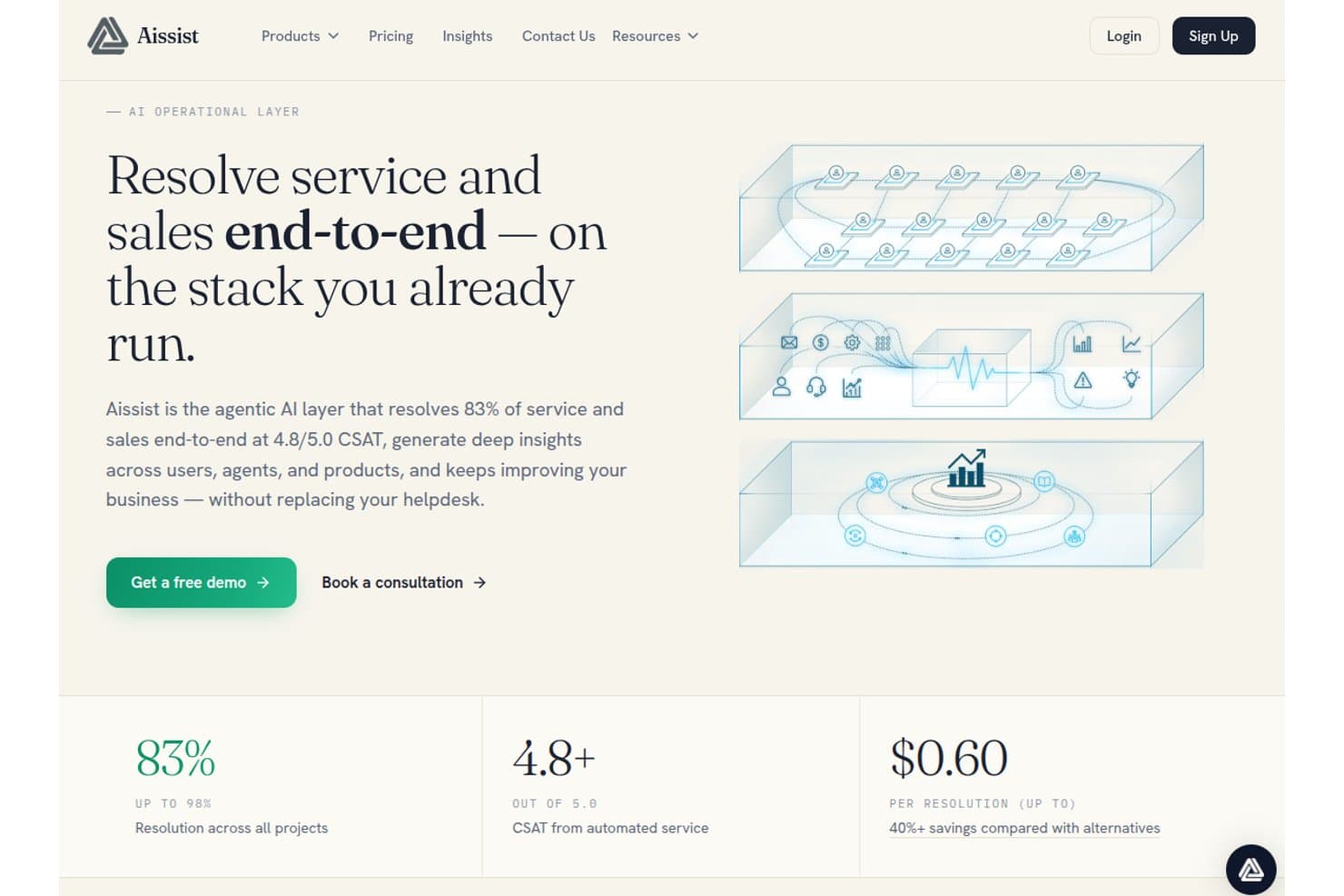
Aissist offers an agentic AI layer that resolves 83% of service and sales end-to-end at 4.8/5.0 CSAT for $0.60 per resolution. Aissist is a multi-agent AI platform for customer service teams that deploys digital AI agents to handle conversations, automate ticket workflows, and take action across helpdesks, CRMs, and messaging channels.
Who Is Aissist Best For?
Aissist suits support teams at growing businesses that need to automate high ticket volumes without replacing their existing helpdesk stack.
Why I Picked Aissist
I picked Aissist as one of the best because its AgentMesh multi-agent architecture goes further than typical chatbots. Where most bots answer a question and close the loop, Aissist's digital agents tag tickets, update records, and escalate cases in a single automated cycle. I particularly like the Evolve module, which detects patterns in live conversations and continuously tunes the AI's behavior without manual intervention.
Aissist Key Features
- Pulse analytics and reporting: Track key performance metrics, trends, and agent quality across all customer interactions.
- Multi-language support: Automatically detects and responds in over 65 languages for global coverage.
- Omnichannel conversation handling: Manages customer conversations across chat, email, WhatsApp, SMS, and social in one platform.
- Knowledge ingestion engine: Ingests company documents, past tickets, and support content for grounded, on-brand AI responses.
Aissist Integrations
Aissist offers native integrations with Zendesk, Intercom, Salesforce, Freshdesk, Gorgias, HubSpot, Kustomer, Front, Shopify, WooCommerce, and Magento, and provides an API for custom integrations.
Pros and Cons
Pros:
- Deploys across messaging, email, and chat simultaneously
- Continuously self-tunes from live conversation patterns
- AgentMesh handles multi-step workflows autonomously
Cons:
- Setup complexity increases with larger agent configurations
- Analytics dashboard lacks depth for enterprise teams
Learn more about Aissist: Best for strict enterprise security compliance
- Not available
- Pricing upon request
Visit WebsiteCustomer Rating:4.8/5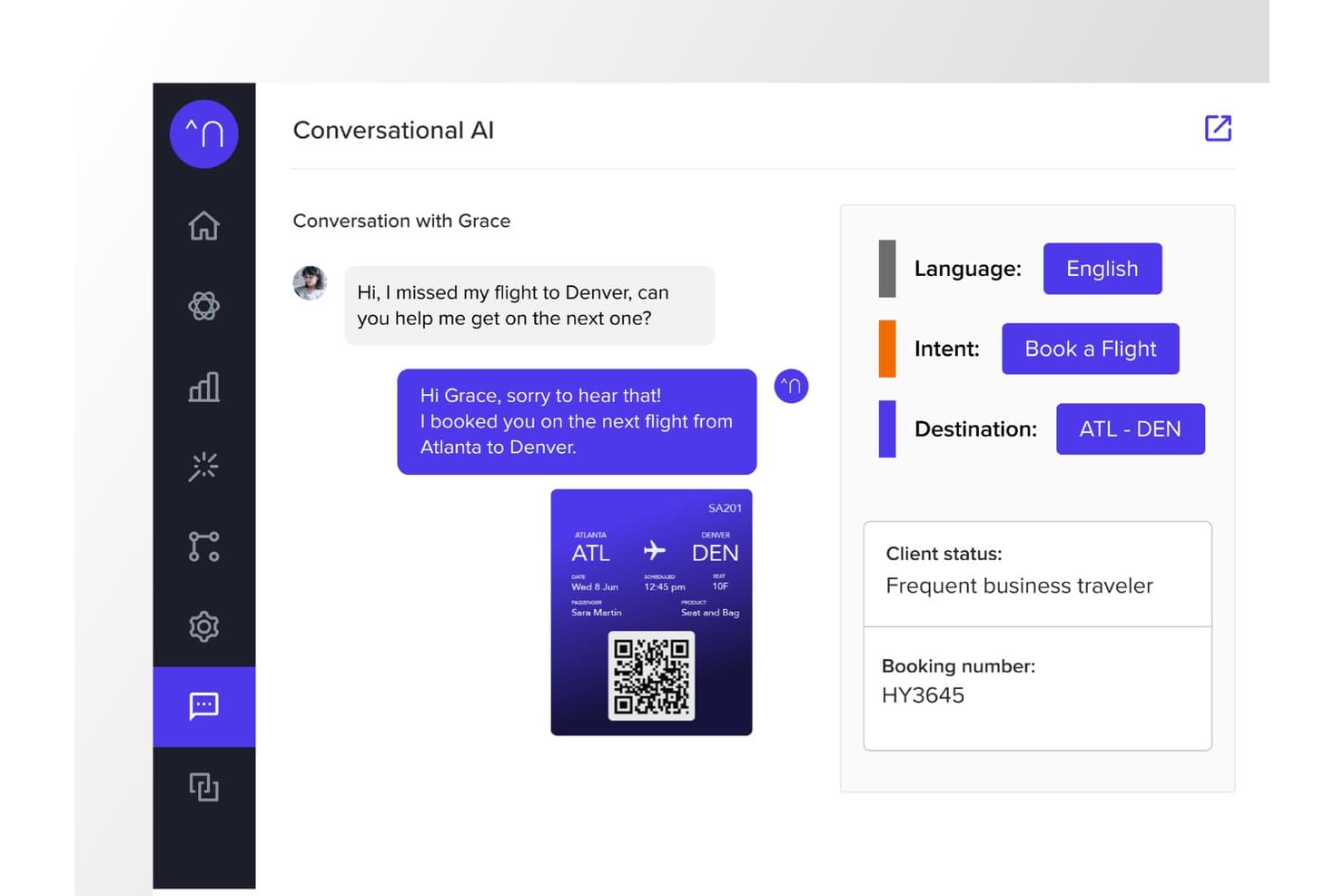
Netomi offers an AI-powered conversational interface that automatically detects customer intent, language, and destination to rebook missed flights in real time. Netomi is an enterprise agentic AI platform for customer service that combines autonomous AI agents, human agent co-pilot support, and omnichannel deployment across chat, email, voice, SMS, and messaging apps.
Who Is Netomi Best For?
Netomi is a strong fit for large enterprises in regulated industries like financial services, travel, insurance, and telecom that operate at high interaction volumes.
Why I Picked Netomi
I picked Netomi as one of the best because its security compliance credentials go well beyond a checkbox. The platform holds SOC 2 Type II, ISO 27001, HIPAA, and PCI DSS certifications, with governance controls built directly into the architecture. I particularly like its "sanctioned generative AI" approach: topic guardrails, prompt-injection defences, and duty-of-care controls run before every AI action, not as an afterthought added to a standard LLM.
Netomi Key Features
- Real-time multi-source knowledge ingestion: Ingests and synthesizes content from documents, URLs, files, and knowledge bases automatically.
- Omnichannel deployment: Delivers customer support across website, mobile app, email, SMS, and major messaging channels.
- Native helpdesk integrations: Connects with Zendesk, Salesforce, Kustomer, ServiceNow, Genesys, NICE, and other CX platforms out of the box.
- Confidence scoring with fallback logic: Assigns answer confidence levels and triggers customizable fallback workflows when certainty thresholds are not met.
Netomi Integrations
Netomi offers native integrations with Zendesk, Salesforce, Kustomer, ServiceNow, Genesys, NICE, Five9, Amazon Connect, Cisco, and LivePerson. An API is available for custom integrations.
Pros and Cons
Pros:
- Built-in topic guardrails prevent off-brand AI responses
- Autonomous AI agents handle complex multi-step resolutions
- Multi-certification compliance including HIPAA and PCI DSS
Cons:
- Limited self-serve onboarding without enterprise-level support
- Implementation complexity challenges smaller or mid-market teams
Learn more about Netomi: Best for ecommerce support on Shopify brands
- Free demo + 30-day free trial available
- From $40/month
Visit WebsiteCustomer Rating:4.6/5
Gorgias offers a customer support inbox with ticket details, customer profile, and AI-assisted responses in a unified helpdesk interface. Gorgias is an ecommerce-focused AI chatbot and helpdesk platform that combines a conversational AI agent, omnichannel inbox, and order management actions to handle customer support across chat, email, social, SMS, and WhatsApp.
Who Is Gorgias Best For?
Gorgias is a strong fit for mid-market ecommerce brands running on Shopify, BigCommerce, or Magento that need AI-powered customer support built around their store data.
Why I Picked Gorgias
Gorgias earns its spot on my shortlist because its AI Agent is trained specifically on ecommerce conversations, not generic support data. I love that it can cancel orders, apply discount codes, and manage subscriptions directly inside a chat thread, without switching tabs to a separate backend. The Shopping Assistant also engages shoppers proactively with personalized product recommendations, turning what would be a support interaction into an active sales moment.
Gorgias Key Features
- Omnichannel inbox: Manage email, chat, social, SMS, and WhatsApp support through a single unified workspace.
- Native ecommerce integrations: Connect directly with Shopify, BigCommerce, Magento, and WooCommerce for real-time order and customer data.
- Revenue attribution reporting: Track sales generated through customer service interactions and agent conversations.
- Automated ticket routing: Use intent and rules to automatically assign tickets to the right agent or escalation path.
Gorgias Integrations
Gorgias offers 300+ native integrations, including Shopify, BigCommerce, Magento, WooCommerce, Klaviyo, Yotpo, Attentive, Recharge, and Loop Returns. An API is available for custom integrations.
Pros and Cons
Pros:
- Proactive shopping assistant converts support into sales
- Handles order actions directly inside chat
- AI Agent resolves tickets without human input
Cons:
- Reporting lacks depth for non-revenue metrics
- Limited value outside ecommerce use cases
Learn more about Gorgias: 8Best for enterprise-grade AI agent control
Ada
- Free demo available
- Pricing upon request
Visit WebsiteCustomer Rating:4.7/5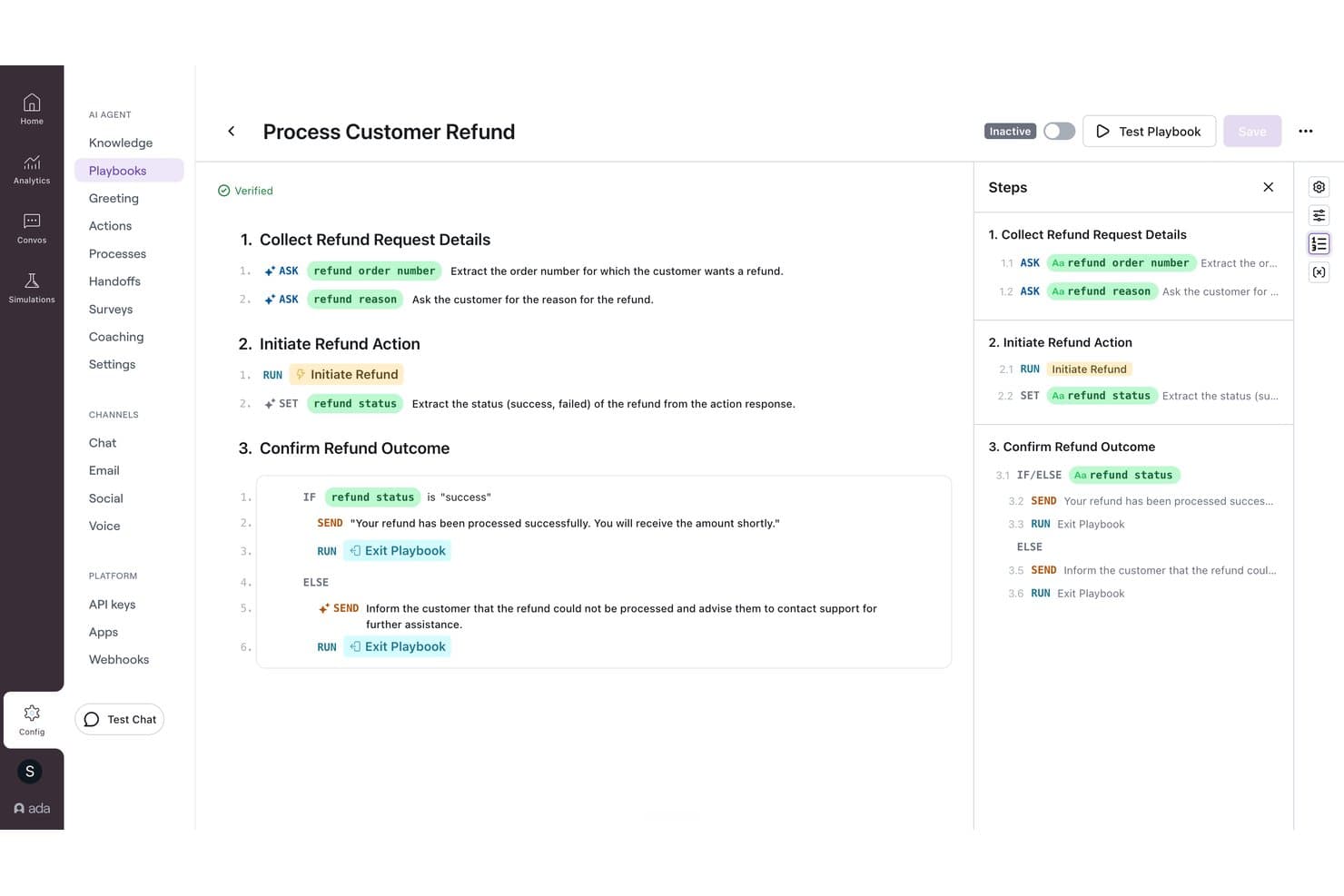
Ada offers a visual playbook builder that automates customer refund workflows with conditional logic and step-by-step AI-driven actions. Ada is an enterprise AI customer service platform that deploys AI agents across voice, chat, email, and messaging channels using a multi-LLM reasoning engine, with native helpdesk integrations and built-in human handoff capabilities.
Who Is Ada Best For?
Ada is a strong fit for large enterprises managing hundreds of thousands of customer interactions annually across multiple support channels.
Why I Picked Ada
Ada earns its spot on my shortlist because of the level of control it gives CX teams over how the AI agent behaves. I particularly like the Playbooks system, which lets managers refine AI responses by reviewing underperforming conversations and applying feedback without touching any code. Ada's Reasoning Engine also orchestrates models from OpenAI, Anthropic, and Amazon Bedrock, with Zero Data Retention agreements across all providers, which matters a lot when handling sensitive customer data at scale.
Ada Key Features
- Omnichannel deployment: Configure AI agents across voice, chat, email, SMS, WhatsApp, Messenger, and in-app channels from a single platform.
- Knowledge API ingestion: Integrate your own documentation systems using the Knowledge API for dynamic answer retrieval.
- Enterprise compliance: Includes SOC 2, GDPR, HIPAA, and PCI DSS certifications to support regulated industries.
- Role-based access controls: Manage agent, admin, and reviewer permissions for secure, scalable team management.
Ada Integrations
Ada offers native integrations with Zendesk, Salesforce, ServiceNow, Freshworks, Genesys, Dixa, Gladly, Kustomer, NICE CXone, Twilio Flex, and Amazon Connect. An API is available for custom integrations.
Pros and Cons
Pros:
- Omnichannel deployment across voice and messaging channels
- Multi-LLM engine with Zero Data Retention
- Granular AI behavior control via Playbooks
Cons:
- Reporting granularity lags behind some competitors
- Complex initial setup for smaller support teams
Learn more about Ada: Best for major marketplace integration
- 14-day free trial + free demo available
- From $39/user/month (billed annually)
Visit WebsiteCustomer Rating:4.4/5
eDesk chat widget lets customers start conversations and access help links easily. eDesk is an AI-powered customer service platform built for e-commerce businesses that need to manage high volumes of support across multiple channels and marketplaces.
Who Is eDesk Best For?
eDesk is a strong fit for e-commerce businesses selling across multiple online marketplaces who need a centralized hub for customer support.
Why I Picked eDesk
eDesk earns its spot on my shortlist because of how well it handles customer support across major marketplaces like Amazon, eBay, and Walmart from a single inbox. I like that it automatically pulls in order data alongside each customer message, so my team isn't switching between tabs to look up purchase details before responding. The AI-suggested replies are trained on ecommerce-specific contexts, so the responses fit marketplace interactions rather than generic support scenarios. I also find the automated order-status responses especially useful for cutting down repetitive "where's my order?" tickets at scale.
eDesk Key Features
- AI sentiment detection: Automatically identifies the emotional tone of incoming messages to help prioritize urgent or frustrated customer tickets.
- Live chat widget: Lets you deploy a chat window directly on your storefront to handle real-time customer conversations.
- Smart inbox: Groups related messages from the same customer across channels into a single conversation thread.
- Performance reporting: Tracks agent response times, resolution rates, and customer satisfaction scores in a built-in dashboard.
eDesk Integrations
Integrations include Amazon, eBay, Walmart, Shopify, WooCommerce, BigCommerce, Mirakl, and Etsy.
Pros and Cons
Pros:
- Integrates rich order data for enhanced customer service
- AI-powered automations improve response efficiency
- Designed to handle high volumes of ecommerce inquiries
Cons:
- Reporting customization is limited for complex analysis
- Primarily built for ecommerce, less flexible for other industries
Learn more about eDesk: 10Best for AI-powered voice and call transcription
Aircall
- Free trial available
- From $30/license/month (billed annually)
Visit WebsiteCustomer Rating:4.3/5
Aircall offers a unified inbox with real-time call handling, CRM insight cards, and AI-powered conversation summaries for support teams. Aircall is a cloud-based call center platform that combines AI Voice Agents, AI Messaging Agents for SMS and WhatsApp, call transcription, and real-time conversation intelligence for customer service teams.
Who Is Aircall Best For?
Aircall is a strong fit for contact center teams and customer support operations where voice is the primary service channel.
Why I Picked Aircall
Aircall earns its spot on my shortlist because of how its AI handles voice conversations end-to-end. I love that call transcription hits at least 85% accuracy, and AI Assist automatically surfaces key topics, sentiment, and talk-to-listen ratios after every call, with no manual review needed. AI Voice Agents can autonomously resolve frequent inbound questions and hand callers to a live agent with full conversation context already captured.
Aircall Key Features
- Smart call routing: Directs calls to agents based on skill, availability, or customer history across distributed teams.
- Salesforce Service Cloud Voice integration: Embeds voice, transcription, and AI call summaries in the Salesforce console.
- Analytics+: Offers unlimited call history, advanced filtering, and live call monitoring for managers.
- Softphone apps: Provides desktop, web, Android, and iOS apps so agents can handle calls from any device.
Aircall Integrations
Aircall offers 250+ native integrations, including Salesforce, HubSpot, Zendesk, Intercom, Freshdesk, Microsoft Teams, Shopify, Slack, Pipedrive, Zoho CRM, and an API for custom integrations.
Pros and Cons
Pros:
- Real-time sentiment detection flags at-risk callers
- AI Voice Agents autonomously resolve inbound calls
- AI transcription accuracy consistently reaches 85%
Cons:
- Not a standalone chatbot for self-service
- Weak web chat and messaging AI
Andre AI-chatboter for kundeservice
Her er noen andre plattformer for samtalebasert AI som ikke kom med på kortlisten min over den beste chatbot-programvaren, men som likevel er verdt å se nærmere på:
- 11My AskAIBest for quick deployment
- 12Comm100Best for AI automation in regulated industries
- 13ChatbaseBest for AI agents trained on your own data
- 14Gradient LabsBest for connecting chatbots to private data
- 15Robin Autonomous ITBest for automating ticket resolution workflows
- 16CrafterQBest for sentiment-driven response handling
- 17WeavBest for integrating chatbots into mobile apps
- 18StonlyBest for personalized knowledge sharing
- 19HiverBest for AI-driven automation
- 20ZendeskBest with no-code workflow automation
- 21HoratioBest for multilingual customer support
- 22Zoho DeskBest for AI-driven customer interactions
- 23Zoho SalesIQBest for visitor tracking insights
- 24TidioBest for automating customer inquiries
- 25ConversicaBest for real-time customer issue resolution
- 26monday serviceBest for customizable service dashboards
- 27FrontBest with automated quality assurance
- 28IntercomBest for advanced AI customer queries
- 29KommunicateBest for multilingual support
- 30CoSupport AIBest for automating customer inquiries
- 31ChatfuelBest with WhatsApp-first lead qualification
- 32Assembled AIBest for intelligent case routing
- 33DriftBest for real-time customer engagement
- 34ForethoughtBest for handling customer inquiries
- 35GuruBest for AI-driven knowledge access
- 36IBM Watson AssistantBest for understanding conversation context
- 37UshurBest for real-time customer interactions
- 38QuidgetBest for automating routine inquiries
- 39SAAS FirstBest for 24/7 AI customer support
- 40CompassBest for real-time AI chat assistance
Relaterte anmeldelser av CX-programvare
Hvis du fortsatt ikke har funnet det du leter etter her, kan du se på disse relaterte verktøyene for styring av kundeopplevelsen som vi har testet og vurdert.
- Kundeserviceprogramvare
- Programvare for brukerstøtte
- Programvare for kundesentre
- Plattform for kundekommunikasjon
- Plattform for digitale kundeopplevelser
- Verktøy for sentimentanalyse
Hva er en AI-chatbot for kundeservice?
En AI-chatbot for kundeservice er programvare som bruker naturlig språkbehandling og store språkmodeller til å automatisere brukerstøtte på tvers av nettprat, mobilapper og meldingskanaler. Disse systemene kobler seg direkte til underliggende databaser og verktøy for kunderelasjonshåndtering for å forstå brukerens hensikt og svare på spørsmål med flere trinn.
I motsetning til eldre regelbaserte verktøy analyserer moderne AI-agenter konteksten for å håndtere arbeidsflyter som å kontrollere kontostatus eller behandle endringer i abonnementer. Når en forespørsel overskrider de angitte parameterne, overfører programvaren hele samtalehistorikken direkte til kundestøtteteamet ditt.
Slik velger du en AI-chatbot for kundeservice
Når du skal velge en AI-chatbot, må du vurdere hvor godt programvaren kobler seg til teknologistakken din og håndterer brukerstøtteoperasjoner. Fokuser på funksjoner som påvirker løsningstid og teamets effektivitet.
| Viktige faktorer | Hva du bør vurdere |
|---|---|
| Viktige faktorerForretningsmål | Hva du bør vurdereRaske svar: Velg programvare med direkte synkronisering med kunnskapsbaser som henter inn hjelpedokumenter for å besvare vanlige spørsmål som gjentas. Håndtering av komplekse oppgaver: Velg verktøy med webhook-tilkoblinger som oppdaterer kontoregistre, behandler refusjoner eller endrer abonnementsplaner. Støtte for brukere over hele verden: Velg plattformer med automatisk oversettelse, ruting på tvers av tidssoner og støtte for både chat og e-post. |
| Viktige faktorerIntegrasjoner og import av kunnskapsbase | Hva du bør vurdereKontroller at det finnes direkte tilkoblinger til CRM-systemet, supportsystemene og de interne databasene dine. Roboten må hente inn hjelpeartikler og API-logger for å utføre handlinger som oppdatering av abonnementer. |
| Viktige faktorerOppsett og vedlikehold | Hva du bør vurdereVurder hvor mye arbeid som kreves for å lære opp modellregler, oppdatere kunnskapskilder og administrere løpende ytelse uten tekniske ressurser. |
| Viktige faktorerSamtaleruting | Hva du bør vurdereKontroller hvordan systemet håndterer komplekse forespørsler. Roboten bør overføre full samtalekontekst til kundestøtteagenter når samtaler eskaleres. |
| Viktige faktorerSikkerhet og samsvar | Hva du bør vurdereSørg for at plattformen oppfyller standarder som SOC 2 og GDPR. Kundedata må beskyttes under automatiserte interaksjoner. |
How I Evaluate AI Chatbots for Customer Service
Every tool here needs to go beyond scripted decision trees—I look for AI that actually resolves customer issues without a human stepping in. I split my evaluation into core functionality every solution must have to qualify, and differentiating factors that separate the best fit from the rest.
Core Functionality (Table Stakes For This List)
When I'm selecting tools for my list, I rank each one on a scale from 0 (does not offer the functionality) to 5 (excels in this area) for each core functionality listed below. Then, I calculate the tool's total score into a percentage. Each tool needs to achieve a minimum total score of 65% to be considered for inclusion.
- Conversational AI Engine: I evaluate whether the bot handles multi-turn conversations with real contextual understanding—like a customer asking about a return and then following up about a refund without restating the order number.
- Knowledge Base Integration: Each tool should pull verified answers from your existing help center, docs, or URLs rather than generating responses from scratch, so I check how sources are ingested and kept in sync.
- Omnichannel Deployment: I look at which channels the bot supports—website widget, mobile, WhatsApp, Messenger, SMS—and whether conversation context carries over when a customer switches between them.
- Human Agent Handoff: A smooth escalation path matters, so I evaluate whether the bot passes the full conversation transcript, customer details, and detected intent to the agent who picks up the case.
- Helpdesk & CRM Integrations: The bot needs to plug into platforms like Zendesk, Salesforce, Freshdesk, or Intercom, so I check for native connectors and two-way data sync that keeps ticket and customer records current.
- Analytics & Reporting: I look for dashboards that track containment rate, resolution rate, and CSAT—metrics that help support directors and operations managers tie bot performance back to real business outcomes.
Once I have a list of tools that meet the criteria, I consider what sets each platform apart.
Differentiating Factors (What Sets Vendors Apart)
Here's how I compare and contrast different vendors:
Standout Features
Agent assist is a feature I pay close attention to—when a bot can surface relevant articles and draft replies for agents mid-conversation, resolution times drop fast. I also evaluate no-code bot builders, since CX teams need to update flows and test new responses without filing dev tickets. Sentiment detection adds real value too, flagging frustrated customers and adjusting tone or routing to a senior agent before the experience deteriorates.
Beyond Features
Pricing structure matters here—I check whether vendors charge per resolution, per conversation, or per seat, because a bot handling thousands of monthly tickets can get expensive on the wrong model. AI guardrails deserve equal attention; I look at whether the platform lets you restrict topics, set confidence thresholds, and prevent hallucinations. Data security rounds out my evaluation, especially whether conversation data is used to train models and what compliance certifications the vendor holds.
Trender innen AI-chatboter for kundeservice
De nyeste trendene innen AI-chatbotteknologi drives av behovet for å løse spesifikke utfordringer i kundeservicearbeidet. Nedenfor utforsker jeg de viktigste trendene som former fremtiden for AI-chatboter.
- Følelsesmessig intelligente svar: Avanserte funksjoner innen naturlig språkbehandling (NLP) gjør det mulig for chatboter å forstå og svare på den følelsesmessige tonen i kundehenvendelser. Denne utviklingen imøtekommer behovet for mer empatiske og kontekstrelevante kundeinteraksjoner, noe som fører til høyere tilfredshet.
- Samtalegrensesnitt med talestyring: Integrering av talegjenkjenning gjør det mulig for brukere å samhandle med chatboter ved hjelp av naturlig tale. Dette gjør teknologien mer tilgjengelig og samsvarer med bruken av taleassisterte enheter.
- AI-etikk og begrensning av skjevheter: Etisk AI-praksis kan motvirke skjevheter i chatbotinteraksjoner. Dette gjenspeiler en økende bevissthet om og respons på de etiske konsekvensene av AI, og sikrer at chatbotene behandler alle brukere rettferdig og uten fordommer.
- Hyperautomatisering av kundeserviceprosesser: AI-chatboter brukes til mer enn bare enkle spørsmål, og automatiserer komplekse arbeidsflyter innen kundeservice. Dette omfatter integrering med baksystemer for å utføre oppgaver som ordrebehandling, timebestilling og problemløsning uten menneskelig inngripen.
- Kontinuerlig læring og tilpasning: Det er stor etterspørsel etter chatboter som kan lære av hver interaksjon og tilpasse svarene sine over tid. Denne funksjonen sikrer at tjenesten chatbotene leverer, blir mer presis og effektiv, og gjenspeiler behovet for kontinuerlig forbedring av kundeservicekvaliteten.
Funksjoner i AI-chatboter for kundeservice
Når du velger en AI-chatbot for kundeservice, bør du se etter følgende viktige funksjoner:
- Tilgjengelighet døgnet rundt: Håndter kundehenvendelser når som helst på døgnet, slik at kundene alltid får hjelp – også i ferier eller utenom åpningstid.
- Støtte på tvers av kanaler: Samhandle med brukere på flere plattformer, for eksempel nettsteder, sosiale medier og meldingsapper, slik at du kan møte kundene der de foretrekker å kommunisere.
- Umiddelbare svar: Gi raske svar i sanntid på vanlige spørsmål, slik at kundene kan løse problemer uten den tradisjonelle ventetiden.
- Sømløs eskalering: Overfør samtaler enkelt til menneskelige agenter når ting blir kompliserte, slik at kundene aldri føler seg fastlåst i en samtale med en robot når de trenger en ekte person.
- Tilpassbare arbeidsflyter: Tilpass samtaleflytene til virksomhetens unike tjenester, slik at du kan skreddersy chatbotens fremgangsmåte for å gi bedre brukeropplevelser.
- Brukervennlig grensesnitt: Gi både teamet og kundene dine en intuitiv og lettnavigert opplevelse som ikke krever en doktorgrad i teknologi for å bruke.
- Sikker datahåndtering: Beskytt kundedata med innebygde sikkerhetsfunksjoner som kryptering og samsvar med personvernstandarder, slik at alles informasjon holdes trygg.
- Detaljert analyse: Følg med på viktige måltall som svartider, kundetilfredshet og chatvolum, slik at du kontinuerlig kan forbedre tjenesten.
Vanlige AI-funksjoner i AI-chatboter for kundeservice
I tillegg til standardfunksjonene for AI-chatboter for kundeservice som er nevnt ovenfor, inkluderer mange av disse løsningene AI-funksjoner som:
- Naturlig språkbehandling: Forstå samtalespråk, slik at chatboten kan tolke kundespørsmål – selv når de stilles på uvanlige eller uventede måter.
- Følelsesanalyse: Oppdage hvordan kundene har det i sanntid, slik at chatboten kan tilpasse tonen eller eskalere saker basert på kundenes følelser.
- Prediktive forslag: Forutse hva kundene kan ha behov for basert på atferden deres og tidligere samtaler, og levere relevant støtte uten at de trenger å spørre.
- Automatisert læring og forbedring: Kontinuerlig lære av hver interaksjon, slik at chatboten blir smartere og mer effektiv til å besvare spørsmål over tid.
- Bevaring av kontekst: Huske detaljer fra tidligere interaksjoner, slik at kundene slipper å gjenta seg og kan fortsette samtalene akkurat der de slapp.
Fordeler med AI-chatboter for kundeservice
Ved å automatisere interaksjoner og tilby raske, intelligente svar har AI-chatboter endret hvordan bedrifter jobber med kundeservice, samt hvordan kunder samhandler med virksomheter. Her er fem viktige fordeler ved å ta i bruk denne teknologien:
- Umiddelbare svar: De gir svar i sanntid på kundehenvendelser, noe som reduserer tiden kundene bruker på å vente på svar, og forbedrer den generelle tilfredsheten.
- Skalerbarhet: AI-chatboter kan håndtere et økende antall henvendelser uten behov for ekstra ressurser, slik at bedrifter effektivt kan håndtere topper i etterspørselen etter kundeservice.
- Kostnadseffektivitet: Ved å automatisere rutinemessige henvendelser reduserer chatbotene arbeidsmengden for menneskelige kundebehandlere og senker driftskostnadene knyttet til kundestøtte.
- Personlige opplevelser: AI-chatboter kan tilpasse samtaler basert på kundedata og tilby personlige anbefalinger og støtte som forbedrer kundeopplevelsen.
- Reduksjon av menneskelige feil: Automatisering av svar på vanlige spørsmål og rutinemessige henvendelser gjør ikke bare tjenesten raskere, men reduserer også risikoen for at kundene får feil informasjon.
AI-chatboter for kundeservice representerer et betydelig skritt mot å skape mer dynamisk, effektiv og kundesentrert drift. Med evnen til å tilpasse seg, lære og skape verdi ved hvert kontaktpunkt er disse chatbotene ikke bare en trend, men en grunnleggende del av moderne kundeservicestrategier.
Kostnader og priser for AI-chatboter for kundeservice
Markedet for AI-chatboter for kundeservice tilbyr en rekke planalternativer for å imøtekomme ulike virksomheters behov og budsjetter. Her går vi gjennom de vanligste planalternativene og prisene deres for å hjelpe deg med å ta en informert beslutning.
| Plantype | Gjennomsnittspris | Vanlige funksjoner |
|---|---|---|
| PlantypeGratis | Gjennomsnittspris$0 | Vanlige funksjonerGrunnleggende chatbotfunksjoner, begrenset antall interaksjoner per måned, brukerstøtte fra fellesskapet, grunnleggende analyse |
| PlantypeStartpakke | Gjennomsnittspris$20 - $50/ måned | Vanlige funksjonerGrunnleggende pluss: tilpassbare chatbotutforminger, flere interaksjoner per måned, støtte på e-post |
| PlantypeProfesjonell | Gjennomsnittspris$100 - $500/ måned | Vanlige funksjonerStartpakke pluss: integrasjonsmuligheter, avansert analyse, prioritert støtte |
| PlantypeBedrift | Gjennomsnittspris$1000+/måned | Vanlige funksjonerProfesjonell pluss: muligheter for skreddersydd utvikling, opplæring av AI-modeller, støtte døgnet rundt, ubegrenset antall interaksjoner |
Hver plan er tilpasset ulike stadier av virksomhetens vekst, fra dem som nettopp utforsker AI-chatbotløsninger, til store virksomheter som trenger avanserte, skreddersydde funksjoner. Når du velger en plan, bør du ikke bare ta hensyn til virksomhetens nåværende behov, men også fremtidig vekst, slik at den valgte løsningen kan skaleres i takt med at behovene for kundeservice utvikler seg.
AI-chatbot for vanlige spørsmål om kundeservice
Her er svarene på spørsmålene jeg oftest får om AI, de beste AI-chatbotene og kundeservice generelt.
Hvordan velger jeg riktig AI-chatbot for supportkanalene mine?
Start med å liste opp de nåværende supportkanalene dine (chat, e-post, sosiale medier) og typene henvendelser dere mottar. Se etter AI-chatboter som støtter kanalene dine og kan integreres med CRM-systemet eller brukerstøttesystemet ditt. Vurder leverandørenes SLA-er, støtte for flere språk og fleksibiliteten i verktøyet for bygging av samtaleflyter. Be om bransjespesifikke kundehistorier i stedet for generelle demonstrasjoner, og kontroller at løsningen følger standarder som GDPR og HIPAA for å beskytte kundedata.
Hvilke integrasjoner bør jeg se etter i chatboter for kundeservice?
Prioriter API-integrasjoner med CRM-systemet, brukerstøttesystemet, livechatten og kunnskapsbasen din. Se også etter integrasjoner med felles innboks, kalender, saksbehandling og netthandel. En god integrasjon sørger for at AI-agentene sporer forespørsler om ordrestatus, tilpasser samhandlinger og automatiserer arbeidsflyter effektivt uten ekstra bryderi for teamet ditt.
Hvordan kan jeg sikre at AI-chatboten min leverer personlige kundeopplevelser?
Tren AI-drevne chatboter ved hjelp av CRM-data og tilbakemeldinger. Opprett detaljerte intensjonsbiblioteker med NLU og naturlig språkbehandling for å tilpasse produktanbefalinger basert på kjøpshistorikk. Gå regelmessig gjennom utskrifter av chatsamtaler for å finjustere svarene. Avansert samtale-AI gjenkjenner tilbakevendende kunder på tvers av meldingsapper, slik at den kan tilpasse hilsener og tilby relevant støtte.
Hvor lang tid tar det å implementere en AI-chatbot i et typisk kundeservicemiljø?
De fleste implementeringer av AI-chatboter tar 2–8 uker, avhengig av supportvolumet og integrasjonsbehovene dine. Enkle chatboter for vanlige spørsmål kan settes i drift på noen dager, mens komplekse implementeringer på tvers av flere kanaler kan kreve testing og opplæring. Involver både CX- og IT-teamene tidlig for å fremskynde innføringen og redusere uforutsette problemer.
Hvordan skiller AI- og maskinlæringsbaserte chatboter seg fra regelbaserte chatboter?
AI-chatboter bruker naturlig språkbehandling og maskinlæring til å forstå og svare på kundehenvendelser, selv når spørsmålene formuleres på nye måter. Regelbaserte boter følger forhåndsdefinerte beslutningstrær og gjenkjenner bare bestemte nøkkelord eller fraser. For CX-ledere er AI-chatboter bedre til å håndtere variasjon, mens regelbaserte boter er enklere, men mindre fleksible.
Hvordan kan jeg måle avkastningen på å bruke en AI-basert chatbot til kundeservice?
Mål avkastningen ved å følge med på hvor mange supportsaker som avledes, reduksjonen i svartider og agentenes arbeidsbelastning før og etter implementeringen av chatboten. Mål også kundetilfredshet og NPS-poengsummer. Bruk kostnadsbesparelser (færre agenter og kortere behandlingstid) og forbedret kundebevaring som viktige økonomiske indikatorer i beslutningsgrunnlaget ditt.
Hvordan oppretter jeg en chatbot for kundeservice?
For å bygge en chatbot for kundeservice i en virksomhet starter du med å koble CRM-systemet og kunnskapsbasene dine til en samtale-AI-plattform i bedriftsklassen. Kartlegg deretter arbeidsflyter for kundehenvendelser med høyt volum, og fastsett strenge regler for tilbakefall som videresender komplekse henvendelser til agenter. Test til slutt svarene for å kontrollere intensjonsnøyaktigheten, fastsett sikkerhetsparametere for personvern og distribuer løsningen i de viktigste digitale kanalene dine.
Kan jeg bruke ChatGPT til kundeservice?
Ja, du kan bruke OpenAI API eller LLM-instanser for virksomheter til å drive kundeserviceløsningen din, forutsatt at du kobler dem til virksomhetens egne data gjennom generering med utvidet gjenfinning (RAG). Vanlig ChatGPT for forbrukere mangler imidlertid sanntidsintegrasjoner med databasene og saksbehandlingssystemene dine, noe som skaper risiko for datasikkerheten. Ukontrollerte LLM-resultater kan også generere hallusinasjoner, føre til unøyaktige kontodetaljer og svekke tilliten til merkevaren uten strenge sikkerhetsmekanismer.
Hvordan brukes AI-chatboter i kundeservice?
CX-team bruker AI-chatboter til å løse rutinemessige saker på første nivå, håndtere forespørsler om kontosaldo og veilede kunder gjennom selvbetjent feilsøking døgnet rundt. Avanserte implementeringer bruker sentimentanalyse til å oppdage frustrerte kunder og umiddelbart eskalere kontoer med høy prioritet til liveagenter. Disse systemene oppsummerer også tidligere sakskontekst for menneskelige medarbeidere, noe som reduserer gjennomsnittlig behandlingstid på tvers av kontaktcentre med flere kanaler.