

Programvare for kundesenteranalyse sporer, måler og analyserer kundeinteraksjoner for å hjelpe teamet ditt med å forstå resultater, oppdage trender og forbedre servicekvaliteten. Hvis du leter etter den riktige analyseløsningen, står du sannsynligvis overfor utfordringer med fragmenterte data, uensartet rapportering eller vanskeligheter med å identifisere nyttig innsikt på tvers av kanaler. Den rette plattformen kan hjelpe deg med å overvåke agentaktivitet, avdekke kundesentiment og knytte analyser til forretningsresultater. I denne veiledningen finner du ekspertvurderte alternativer for programvare for kundesenteranalyse, slik at du kan sammenligne funksjoner og velge det som passer best for teamets behov i 2026.
Hvorfor du kan stole på våre programvareanbefalinger
6,700+
Reviews
20
Industry experts
16+
Evaluation factors
14
Years
Teamet vårt har testet og anmeldt programvare siden 2012. Vi er selv CX-ledere, så vi vet hvor vanskelig og hvor viktig det er å velge riktig programvare.
I denne guiden har vi vurdert verktøyene gjennom praktisk testing og uavhengig research og gitt dem poeng ut fra våre utvelgelseskriterier.
Anmeldelsene våre bygger på vår egen redaksjonelle vurdering. De er ikke et salgsargument.
 Gui DrusinaCreative Director
 Tim FisherVP of AI
Sammenligningstabell for programvare for kundesenteranalyse
Denne sammenligningstabellen oppsummerer prisdetaljene for mine beste utvalgte programmer for kundesenteranalyse.
| Tool | Best For | Trial Info | Price | ||
|---|---|---|---|---|---|
| 1 | Best for inbound and outbound call metrics | 14-day free trial | From $25/user/month (billed annually) | Website | |
| 2 | Best for agile team scaling and global expansion | Free demo available | From $25/month (billed annually) | Website | |
| 3 | Best for customizable analytics dashboards | Free demo available | Pricing upon request | Website | |
| 4 | Best for conversational AI automation | Free demo available | Pricing upon request | Website | |
| 5 | Best for integrated voice and messaging analytics | 14-day free trial + free demo available | Pricing upon request | Website | |
| 6 | Best for multilingual speech analytics | 30-day free trial | Pricing upon request | Website | |
| 7 | Best for omnichannel reporting capabilities | Free demo available | From $75/user/month (billed annually) | Website | |
| 8 | Best for automated sentiment analysis | Free demo available | Pricing upon request | Website | |
| 9 | Best for AI-driven performance management | Free demo available | Pricing upon request | Website | |
| 10 | Best for real-time agent coaching insights | Free demo available | Pricing upon request | Website |


Anmeldelser av programvare for kundesenteranalyse
Nedenfor finner du mine detaljerte sammendrag av programmer for kundesenteranalyse som kom med på kortlisten. Anmeldelsene mine gir et detaljert innblikk i funksjonene, egenskapene og de beste bruksområdene for hver plattform, slik at du kan finne den som passer best for deg.
 Best for inbound and outbound call metrics
- 14-day free trial
- From $25/user/month (billed annually)
Visit WebsiteCustomer Rating:4.4/5
CloudTalk tracks inbound and outbound call metrics to help teams monitor call center performance. Built for customer-facing teams, CloudTalk is a VoIP call center platform that pairs inbound and outbound calling with analytics tools such as sentiment analysis, live dashboards, and call tagging.
Who Is CloudTalk Best For?
CloudTalk is well-suited for sales and support teams at small to mid-sized businesses that need a VoIP call center with built-in analytics and performance tracking.
Why I Picked CloudTalk
I picked CloudTalk for its VoIP call statistics tracking that gives teams a granular, real-time view of call performance. The real-time dashboard surfaces live KPIs like call volume, wait times, agent occupancy, and abandonment rates in one place. I also like the group and agent reporting layers, which let you break down VoIP call data by individual rep or team, so you can spot where performance gaps exist rather than relying on blended averages.
CloudTalk Key Features
- AI Conversation Intelligence: Analyzes calls for sentiment, talk/listen ratio, and trending topics to reveal patterns in customer conversations.
- Call recording: Records inbound and outbound calls and stores them for review, quality monitoring, and coaching.
- Mandatory call tagging: Requires agents to categorize calls before closing them to keep reporting data organized.
- Call monitoring: Allows managers to listen to calls and review interactions to support quality assurance and agents.
CloudTalk Integrations
CloudTalk offers 70+ integrations, including Salesforce, HubSpot, Zendesk, Pipedrive, Intercom, Zoho CRM, Microsoft Teams, Freshdesk, Gorgias, and Shopify. It also connects with Zapier and Make for workflow automation, while API access supports custom integrations.
Pros and Cons
Pros:
- Call tagging keeps conversation context across teams
- Local numbers available in over 160 countries
- Real-time analytics track agent performance
Cons:
- Mobile app has fewer features than desktop version
- Reporting customization options can feel limitedcompetitors
 Best for agile team scaling and global expansion
- Free demo available
- From $25/month (billed annually)
Visit WebsiteCustomer Rating:4.8/5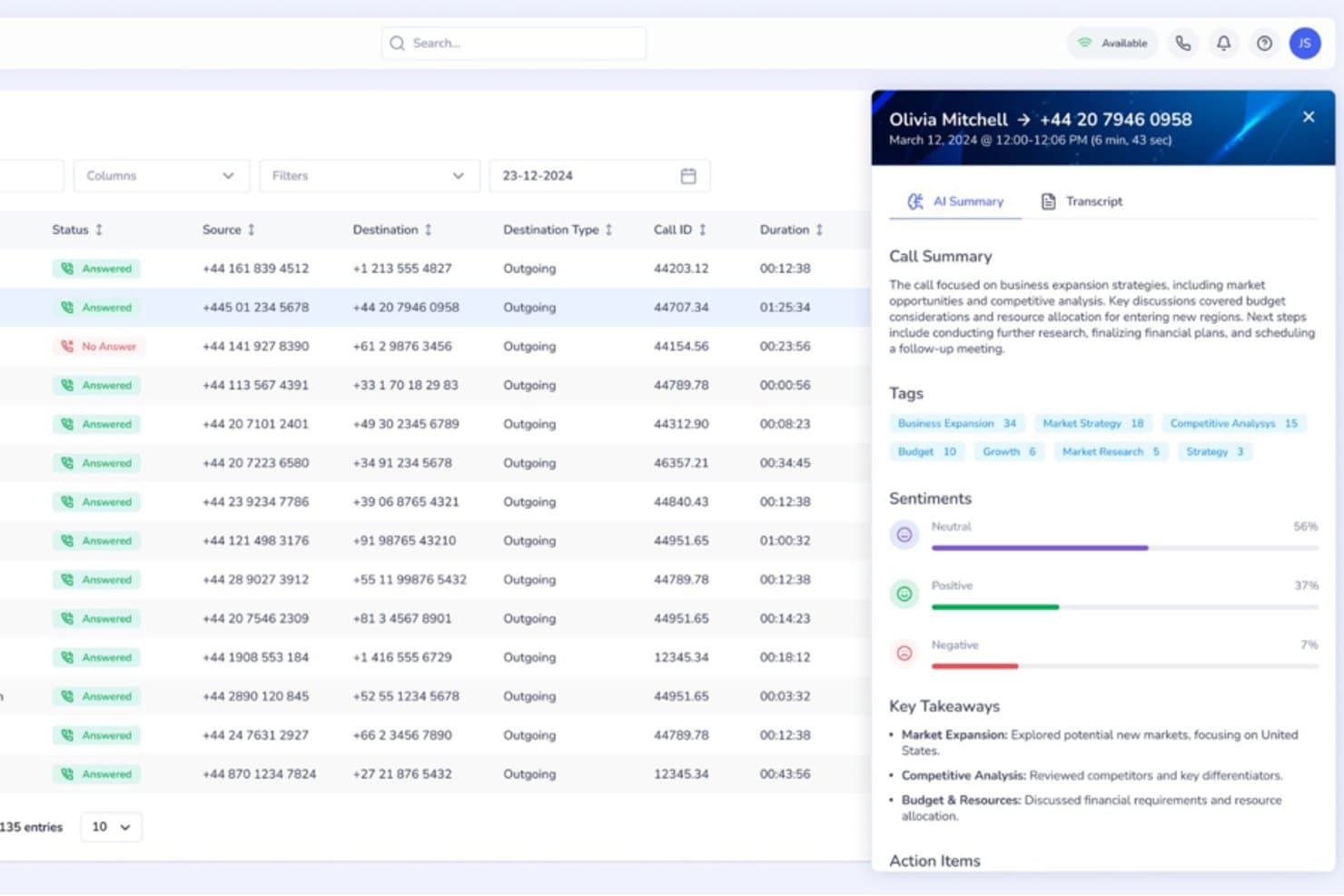
Squaretalk offers an AI-powered call analytics panel with call summaries, sentiment analysis, tags, and key takeaways for each call. Squaretalk is a cloud-based contact center platform with AI-powered conversation analytics, omnichannel communication, predictive dialing, and real-time performance monitoring across voice and messaging channels.
Who Is Squaretalk Best For?
Squaretalk suits SMB and mid-market sales and support teams that operate across multiple countries and need to add agents or phone numbers quickly without complex procurement.
Why I Picked Squaretalk
Squaretalk earns its spot as one of the best on my shortlist because it pairs real-time analytics across 80+ metrics with AI transcription in 100+ languages, so conversation insights stay consistent as my team expands into new regions. When I add agents or local numbers across 150+ destinations, the analytics layer scales alongside the operation. Sentiment analysis and keyword tagging work across voice and messaging channels from day one, with no reconfiguration needed.
Squaretalk Key Features
- Omnichannel messaging: Manage voice, WhatsApp Business, email, SMS, Viber, and Telegram conversations from one platform.
- Predictive dialer: Automatically calls leads and skips unanswered calls, connecting agents only to live prospects.
- Real-time call monitoring: Listen to live calls, supervise agent conversations, and use whisper mode for on-the-spot coaching.
- CRM integrations: Connects with Salesforce, HubSpot, Zoho CRM, Zendesk, monday.com, and more for seamless data flow.
Squaretalk Integrations
Squaretalk offers native integrations with Salesforce, Zoho CRM, Freshworks, Pipedrive, and more, and provides an API for custom integrations.
Pros and Cons
Pros:
- Transcription and sentiment analysis in 100+ languages
- Real-time monitoring with whisper and barge modes
- Omnichannel analytics across voice and messaging
Cons:
- Lacks forecasting and workforce management features
- No built-in automated QA scoring tools
Learn more about Squaretalk: Best for customizable analytics dashboards
- Free demo available
- Pricing upon request
Visit WebsiteCustomer Rating:4.4/5
Talkdesk dashboard displaying real-time service levels and agent status metrics. If you need analytics dashboards that adapt to your team’s unique KPIs, Talkdesk offers a flexible solution for contact centers. The platform is built for operations leaders and analysts who want to visualize, filter, and drill into real-time and historical data. With Talkdesk, you can design dashboards that match your reporting needs and quickly spot trends across channels.
Why I Picked Talkdesk
Customizable analytics dashboards are what set Talkdesk apart for call center analytics. The platform lets you build dashboards from scratch, choosing which metrics and visualizations matter most to your team. I appreciate how you can filter, segment, and drill down into data by agent, queue, or channel in real time. This flexibility makes Talkdesk a strong fit for teams that need analytics tailored to their specific workflows and reporting requirements.
Talkdesk Key Features
Some other features that make Talkdesk useful for analytics teams include:
- Speech Analytics: Analyze call recordings for keywords, sentiment, and compliance triggers.
- Automated Reporting: Schedule and deliver recurring reports to stakeholders directly from the platform.
- Real-Time Agent Monitoring: View live agent activity and performance metrics as calls happen.
- Custom Alerting: Set up notifications for specific metric thresholds or operational events.
Talkdesk Integrations
Integrations include Salesforce, Zendesk, Microsoft Teams, ServiceNow, HubSpot, Microsoft Dynamics 365, Zoom, Slack, Shopify, and Freshdesk.
Pros and Cons
Pros:
- Speech analytics includes keyword and sentiment tracking
- Real-time analytics updates instantly during calls
- Dashboard widgets support drag-and-drop arrangement
Cons:
- Custom report building requires advanced setup
- Historical data exports limited to CSV format
Learn more about Talkdesk: Best for conversational AI automation
- Free demo available
- Pricing upon request
Visit WebsiteCustomer Rating:4.8/5
Replicant analytics dashboard showing call flow performance and CSAT metrics. Replicant offers a conversational AI platform designed for contact centers that want to automate high-volume voice interactions. It’s a strong fit for enterprise support teams and operations leaders looking to reduce wait times and handle repetitive requests without human agents. Replicant’s AI can resolve common customer issues end-to-end, freeing up your team for more complex tasks.
Why I Picked Replicant
Replicant stands out for its focus on automating complex, conversational interactions in call centers using AI. I picked it because its platform can handle full customer conversations, not just simple routing or basic responses. Replicant’s AI listens, understands intent, and responds in real time, allowing it to resolve common issues like order status, account updates, or troubleshooting without human intervention. This level of conversational automation is especially valuable for teams looking to scale support and reduce agent workload.
Replicant Key Features
Some other features that make Replicant appealing for call center analytics include:
- Call Transcription: Automatically transcribes every customer conversation for later review and analysis.
- Analytics Dashboard: Visualizes call metrics, trends, and AI performance in a centralized dashboard.
- Intent Recognition: Detects and categorizes customer intents to help identify common issues and requests.
- Quality Monitoring Tools: Provides tools for supervisors to review, score, and coach AI-driven interactions.
Replicant Integrations
Integrations include Salesforce, Zendesk, ServiceNow, Genesys, NICE inContact, Five9, Talkdesk, Amazon Connect, Cisco, and Shopify.
Pros and Cons
Pros:
- Intent detection highlights trending customer issues
- Real-time analytics dashboard tracks call outcomes
- Conversational AI resolves calls without agents
Cons:
- No self-service analytics customization tools
- Limited support for non-English languages
Learn more about Replicant: Best for integrated voice and messaging analytics
- 14-day free trial + free demo available
- Pricing upon request
Visit WebsiteCustomer Rating:4.3/5
Dialpad call volume heatmap showing duration patterns and analytics tracking. Dialpad brings together voice and messaging analytics in a single platform, making it a strong choice for teams managing multichannel contact centers. It’s designed for supervisors and analysts who want to track conversations across calls, SMS, and chat without switching tools. With Dialpad, you can monitor agent performance and customer sentiment in real time, no matter which channel your customers use.
Why I Picked Dialpad
What makes Dialpad a strong fit for call center analytics is its ability to unify voice and messaging data in one place. I picked Dialpad because it automatically transcribes calls and messages, then applies AI-powered sentiment analysis across both channels. You can view conversation trends, keyword mentions, and agent performance metrics for calls, SMS, and chat together. This integrated approach helps teams spot issues and opportunities across all customer touchpoints without juggling multiple analytics tools.
Dialpad Key Features
Some other features that make Dialpad useful for analytics teams include:
- Live Call Monitoring: Listen in on active calls and provide coaching in real time.
- Customizable Analytics Dashboards: Build dashboards with widgets for the metrics that matter most to your team.
- Automated Call Summaries: Receive AI-generated summaries after each call, highlighting key topics and action items.
- Real-Time Alerts: Set up notifications for specific keywords or call events as they happen.
Dialpad Integrations
Integrations include Salesforce, HubSpot, Zendesk, Microsoft 365, Google Workspace, Zoho CRM, Intercom, Outreach, Okta, and Rippling.
Pros and Cons
Pros:
- Keyword tracking works for both voice and SMS
- Automated call summaries highlight key discussion points
- Analytics dashboards update instantly during conversations
Cons:
- No built-in call quality scoring tool
- Historical analytics limited to one year
 Best for multilingual speech analytics
- 30-day free trial
- Pricing upon request
Visit WebsiteCustomer Rating:4.6/5
SentiSum feedback dashboard with sentiment tracking and topic categorization. SentiSum is built for contact centers that need to analyze calls in multiple languages without manual effort. It’s especially useful for global CX teams and operations leaders who want to surface customer insights from diverse regions. With SentiSum, you can automatically detect topics, sentiment, and intent across every conversation, regardless of language.
Why I Picked SentiSum
What stands out about SentiSum is its ability to analyze speech data in over 100 languages, making it a strong choice for multilingual call centers. The platform automatically transcribes and tags calls for topics, sentiment, and intent, so you can track customer experience trends across regions without manual translation. I like that SentiSum’s AI models are trained to handle language nuances, which helps surface actionable insights from non-English conversations. This focus on multilingual analytics makes it especially valuable for global support teams and CX leaders.
SentiSum Key Features
In addition to its multilingual analytics capabilities, SentiSum offers several other features worth noting:
- Automated Root Cause Analysis: Identify the underlying reasons behind spikes in call volume or negative sentiment.
- Real-Time Alerts: Receive instant notifications when specific topics or issues are detected in calls.
- Customizable Reporting Dashboards: Build and share reports tailored to your team’s metrics and goals.
- API Access: Integrate SentiSum’s analytics with your existing systems for deeper data analysis.
SentiSum Integrations
Integrations include Zendesk, Freshdesk, Intercom, Dixa, Gorgias, and Survey Monkey.
Pros and Cons
Pros:
- Real-time alerts for emerging customer issues
- Automated topic detection for every conversation
- Multilingual speech analytics covers 100+ languages
Cons:
- Sentiment analysis accuracy varies by language
- Lacks direct connection to app stores
Learn more about SentiSum: Best for omnichannel reporting capabilities
- Free demo available
- From $75/user/month (billed annually)
Visit WebsiteCustomer Rating:4.4/5
Genesys dashboard displaying interaction volume, AHT, and ASA metrics. Genesys is built for organizations that need to track customer interactions across voice, chat, email, and social channels in one place. It’s especially useful for CX leaders and operations teams who want unified reporting and analytics for every touchpoint. With Genesys, you can break down channel silos and get a complete view of your contact center’s performance.
Why I Picked Genesys
What sets Genesys apart for call center analytics is its ability to bring together data from every customer channel into a single reporting environment. I picked Genesys because it lets you track and compare metrics across voice, chat, email, and social media without switching platforms. The platform’s omnichannel dashboards and customizable reports help you spot trends and performance gaps across all touchpoints. This unified approach is especially valuable for teams managing complex, multi-channel customer journeys.
Genesys Key Features
Some other features that make Genesys valuable for analytics teams include:
- Real-Time Performance Dashboards: Monitor live metrics for agents, queues, and channels as activity happens.
- Speech and Text Analytics: Analyze call recordings and written interactions for sentiment, keywords, and compliance.
- Custom Report Builder: Design and schedule reports tailored to your team’s specific KPIs and data needs.
- Workforce Management Integration: Connect analytics with forecasting, scheduling, and agent adherence tools.
Genesys Integrations
Integrations include Salesforce, Microsoft Teams, Zendesk, ServiceNow, Zoom, Okta, Amazon Lex, Google CCAI, eMite, and Brightmetrics.
Pros and Cons
Pros:
- Speech analytics support sentiment and compliance tracking
- Real-time dashboards display live agent performance
- Omnichannel analytics unify all customer interactions
Cons:
- Some integrations require additional third-party subscriptions
- Initial setup for analytics can be time-consuming


Verint dashboard shows capacity analysis metrics, service levels, and forecasts. Verint is designed for contact centers that want to automatically analyze customer sentiment across every interaction. It’s a strong fit for CX teams and quality managers who need to quickly surface trends in customer emotion and agent performance. With Verint, you can move beyond manual call reviews and use AI-driven analytics to pinpoint coaching opportunities and service issues.
Why I Picked Verint
What drew me to Verint for call center analytics is its focus on automated sentiment analysis using AI. The platform automatically scores every customer interaction for emotion, intent, and satisfaction, so you don’t have to rely on manual call sampling. I appreciate how Calabrio’s analytics dashboard highlights emerging sentiment trends and flags interactions that need attention. This makes it easier for quality managers to identify coaching needs and address service issues before they escalate.
Verint Key Features
Some other features that make Verint useful for analytics teams include:
- Omnichannel Interaction Capture: Collect and analyze data from calls, emails, chats, and social channels in one place.
- Customizable Dashboards: Build dashboards tailored to your team’s KPIs and reporting needs.
- Automated Quality Scoring: Automatically evaluate agent performance based on pre-set criteria and analytics.
- Speech-to-Text Transcription: Convert voice interactions into searchable, analyzable text records.
Verint Integrations
Integrations include Twilio, Amazon Connect, Genesys, NICE, Avaya, Cisco, Five9, RingCentral, Mitel, and Talkdesk.
Pros and Cons
Pros:
- Customizable dashboards for KPI tracking
- Speech-to-text transcription for call analysis
- Automated sentiment scoring for every interaction
Cons:
- Some analytics features require additional modules
- Sentiment analysis accuracy varies by language
Learn more about Verint: Best for AI-driven performance management
- Free demo available
- Pricing upon request

AmplifAI dashboard for tracking agent CSAT, coaching, and performance goals. AmplifAI brings AI-driven performance management to contact centers that want to personalize coaching and automate agent development. This platform is well-suited for operations leaders and supervisors who need to identify performance gaps and deliver targeted interventions at scale. If you’re looking to use data and automation to improve agent outcomes and engagement, AmplifAI offers tools built specifically for that purpose.
Why I Picked AmplifAI
What drew me to AmplifAI is its focus on AI-driven performance management, which is especially relevant for call centers looking to automate and personalize agent coaching. The platform uses AI to analyze agent performance data and recommend targeted coaching actions, helping supervisors address skill gaps quickly. I appreciate how AmplifAI automates recognition and rewards for top performers, making it easier to motivate teams based on real metrics. These features make AmplifAI a strong fit for organizations that want to use analytics to drive continuous improvement in agent performance.
AmplifAI Key Features
Some other features that make AmplifAI appealing for call center analytics teams include:
- Automated Task Assignment: Assign coaching, training, and follow-up tasks to agents based on performance data.
- Performance Dashboards: Visualize key metrics and trends for individuals, teams, and the entire organization.
- Speech and Text Analytics: Analyze customer interactions across calls, chats, and emails for deeper insights.
- Gamification Tools: Use leaderboards and achievement tracking to encourage healthy competition among agents.
AmplifAI Integrations
Integrations include NICE, Genesys, Five9, Talkdesk, Salesforce, Amazon Connect, RingCentral, Avaya, Cisco, and Zendesk.
Pros and Cons
Pros:
- Real-time performance dashboards for supervisors
- Automated recognition and rewards for agents
- Personalized coaching recommendations based on analytics
Cons:
- Some integrations require additional setup support
- Limited customization for dashboard visualizations
Learn more about AmplifAI:

Level AI dashboard showing key call metrics and agent performance scores. Level AI offers real-time agent coaching and conversation intelligence designed for contact centers that want to improve agent performance on the spot. This platform is a strong fit for teams looking to surface actionable insights from customer interactions and provide immediate feedback to agents. If you need to close performance gaps quickly and ensure consistent service quality, Level AI brings targeted analytics and coaching tools to your workflow.
Why I Picked Level AI
Level AI stands out for its real-time agent coaching insights, which are especially valuable for contact centers aiming to improve agent performance during live interactions. I picked this platform because it uses AI to analyze conversations as they happen and delivers instant feedback to agents, helping them adjust their approach on the spot. The tool’s live coaching cards and automated quality monitoring let supervisors identify coaching opportunities without waiting for post-call reviews. This focus on immediate, actionable insights makes Level AI a strong choice for teams that want to drive continuous improvement in agent-customer interactions.
Level AI Key Features
Some other features that make Level AI a strong option for call center analytics teams include:
- Omnichannel Conversation Analytics: Analyze customer interactions across voice, chat, and email channels in a single dashboard.
- Customizable Scorecards: Build and tailor evaluation forms to match your team’s quality assurance standards.
- Automated Compliance Monitoring: Flag conversations that may violate compliance requirements using AI-driven detection.
- Knowledge Base Integration: Surface relevant knowledge articles to agents during live conversations based on context.
Level AI Integrations
Integrations include Salesforce, Zendesk, Freshworks, Kustomer, Five9, Twilio, Talkdesk, Genesys, Amazon Connect, and Slack.
Pros and Cons
Pros:
- Automated quality assurance scoring for agents
- AI-driven conversation analytics across channels
- Real-time coaching prompts during live calls
Cons:
- No mobile app for on-the-go access
- Limited historical reporting depth for analytics
Learn more about Level AI:
Annen programvare for kundesenteranalyse
Her er noen flere alternativer for programvare for kundesenteranalyse som ikke kom med på kortlisten, men som likevel er verdt å undersøke:
- 11TethrBest for actionable conversation intelligence
- 12CrestaBest for live conversation guidance
- 13RingCentralBest for unified communications integration
- 14InMomentBest for experience data aggregation
- 15VonageBest for flexible API connectivity
- 16KustomerBest for timeline-based data views
- 17Observe.AIBest for AI-powered quality assurance
- 18QualtricsBest for customer feedback correlation
- 19Salesforce Best with CRM-driven analytics
- 20CallMinerBest for advanced interaction analytics
- 21Zoom Contact CenterBest for video-enabled interactions
How I Evaluate Call Center Analytics Software
I split my evaluation into baseline must-haves—like speech analytics and automated QA—and the differentiators that separate tools built for serious contact center operations from the rest.
Core Functionality (Table Stakes For This List)
When I'm selecting tools for my list, I rank each one on a scale from 0 (does not offer the functionality) to 5 (excels in this area) for each core functionality listed below. Then, I calculate the tool's total score into a percentage. Each tool needs to achieve a minimum total score of 65% to be considered for inclusion.
- Speech & Text Analytics: I check whether the tool transcribes and analyzes both voice and digital interactions, including how well it handles keyword spotting, topic clustering, and custom category tagging across channels.
- Real-Time Performance Dashboards: I evaluate how a platform surfaces live and historical KPIs like AHT, FCR, and abandonment rate, and whether supervisors can drill down by queue, team, or time period.
- Sentiment & Emotion Detection: The ability to score customer sentiment at the interaction or sentence level matters here, especially for flagging escalation-prone calls before they reach a supervisor's desk.
- Agent Performance Analytics: I look for tools that go beyond raw call counts to offer scorecards, peer benchmarking, and the ability to tie individual agent metrics back to specific coaching areas.
- Automated Quality Management: Manual QA sampling covers a fraction of calls. I evaluate whether a platform can auto-score 100% of interactions against configurable criteria like script adherence or compliance language.
- CCaaS & Telephony Integration: A tool's value depends on how well it connects with platforms like Genesys, Five9, Amazon Connect, or Talkdesk. I look for native connectors and real-time data ingestion.
Once I have a list of tools that meet this criteria, I consider what sets each platform apart.
Differentiating Factors (What Sets Vendors Apart)
Here's how I compare and contrast different vendors:
Standout Features
Generative AI summarization is a big one for me. Tools that auto-generate call summaries and dispositions cut after-call work significantly for agents. I also look at predictive analytics capabilities, specifically whether a platform can forecast churn risk or CSAT dips based on interaction trends. Conversational coaching tools round things out. The best implementations tie QA scores directly to personalized coaching plans, giving supervisors a clear path from insight to action.
Beyond Features
Compliance and data security weigh heavily in my evaluation. Contact centers in healthcare and finance handle sensitive customer data, so I check for PCI-DSS redaction, HIPAA support, and SOC 2 Type II certification. Integration ecosystem depth matters just as much. A tool that connects to your CRM, WFM platform, and BI tools like Tableau or Power BI becomes far more valuable than one that operates in isolation. I also consider time-to-value, looking at whether vendors offer pre-built scorecards and onboarding support to get teams producing insights quickly.
Slik velger du programvare for kundesenteranalyse
Det er lett å gå seg vill i lange funksjonslister og komplekse prismodeller. For å hjelpe deg med å holde fokus mens du går gjennom den unike prosessen med å velge programvare, får du her en sjekkliste over faktorer du bør ha i bakhodet:
| Faktor | Dette bør du vurdere |
|---|---|
| FaktorSkalerbarhet | Dette bør du vurdereVil programvaren håndtere dagens og forventede samtalevolumer? Spør om begrensninger, prisnivåer og hvordan vekst påvirker kostnadene. |
| FaktorIntegrasjoner | Dette bør du vurdereKan den kobles direkte til CRM-systemet, telefoni- og bemanningsstyringsverktøyene dine? Kontroller at den er kompatibel med den eksisterende teknologistakken din. |
| FaktorTilpasningsmuligheter | Dette bør du vurdereKan du tilpasse dashbord, rapporter og analyser til arbeidsflytene i teamet ditt? Vurder hvor stor fleksibilitet du trenger for prosessene dine. |
| FaktorBrukervennlighet | Dette bør du vurdereVil agentene og lederne dine ta den i bruk raskt? Se etter intuitiv navigasjon, tydelig datapresentasjon og minimale opplæringskrav. |
| FaktorImplementering og introduksjon | Dette bør du vurdereHvor lang tid vil oppsettet ta, og hvilke ressurser kreves? Spør om støtte ved migrering, introduksjonsprogrammer og typiske tidsrammer frem til driftsstart. |
| FaktorKostnad | Dette bør du vurdereEr prismodellene transparente og forutsigbare? Vær oppmerksom på skjulte gebyrer, nødvendige tillegg og minimumsperioder i avtalen. |
| FaktorSikkerhetstiltak | Dette bør du vurdereOppfyller plattformen standardene dine for personvern og datasikkerhet? Bekreft kryptering, tilgangskontroller og samsvarssertifiseringer. |
| FaktorTilgjengelig kundestøtte | Dette bør du vurdereHvilke supportkanaler og åpningstider tilbys? Vurder om du trenger hjelp døgnet rundt, dedikerte kundeansvarlige eller støtte på flere språk. |
Hva er programvare for kundesenteranalyse?
Programvare for kundesenteranalyse er en kategori verktøy som samler inn, behandler og analyserer data fra kundeinteraksjoner på tvers av tale- og digitale kanaler. Disse plattformene hjelper team med å overvåke agentprestasjoner, følge med på kundesentiment og identifisere trender eller problemer knyttet til etterlevelse. Ved å omgjøre rå samtaledata til handlingsrettet innsikt støtter programvare for kundesenteranalyse kontinuerlig forbedring av tjenestekvalitet, driftseffektivitet og kundeopplevelse.
Funksjoner i programvare for kundesenteranalyse
Når du velger programvare for kundesenteranalyse, bør du se etter følgende nøkkelfunksjoner:
- Opptak av samtaler: Fanger opp og lagrer lyd fra kundesamtaler, slik at ledere kan gjennomgå interaksjoner for kvalitetssikring og opplæringsformål.
- Tilpassbare instrumentpaneler: Lar brukere visualisere nøkkeltall og trender i sanntid, og tilpasse visningen slik at de mest relevante dataene fremheves for ulike roller.
- Sentimentanalyse: Evaluerer tone og følelser i kundesamtaler, slik at team kan forstå kundetilfredshet og identifisere potensielle problemer på et tidlig tidspunkt.
- Oppfølging av agentprestasjoner: Overvåker individuelle og teambaserte måltall, for eksempel samtalehåndteringstid, løsningsgrad og overholdelse av manus eller protokoller.
- Overvåking av etterlevelse: Flagger samtaler som kan bryte med lovpålagte eller interne standarder, og støtter risikostyring og revisjonsberedskap.
- Automatisert rapportering: Genererer planlagte rapporter eller rapporter på forespørsel som oppsummerer aktiviteten i kundesenteret, slik at det blir enklere å dele innsikt med interessenter.
- Omnikanalanalyse: Samler data fra tale, chat, e-post og andre kanaler for å gi en samlet oversikt over kundeinteraksjoner.
- Verktøy for kvalitetssikring: Tilbyr poengkort, evalueringsskjemaer og arbeidsflyter for å standardisere og dokumentere vurderinger av agenter.
- Sanntidsvarsler: Varsler ledere eller agenter umiddelbart når bestemte nøkkelord, uttrykk eller former for atferd oppdages under pågående interaksjoner.
Fordeler med programvare for kundesenteranalyse
Implementering av programvare for kundesenteranalyse gir flere fordeler for teamet og virksomheten din. Her er noen av fordelene du kan se frem til:
- Forbedret tjenestekvalitet: Tilgang til samtaleopptak, sentimentanalyse og verktøy for kvalitetssikring hjelper team med å identifisere muligheter for veiledning og opprettholde høye standarder.
- Raskere problemløsning: Sanntidsvarsler og omnikanalanalyse gjør det mulig for ledere å håndtere problemer etter hvert som de oppstår, noe som reduserer kundenes ventetid og antallet eskaleringer.
- Datadrevet beslutningstaking: Tilpassbare instrumentpaneler og automatisert rapportering gir ledere handlingsrettet innsikt som kan veilede bemanning, opplæring og prosessforbedringer.
- Forbedret styring av etterlevelse: Funksjoner for overvåking av etterlevelse bidrar til å sikre at lovpålagte krav oppfylles, og reduserer risikoen for kostbare brudd.
- Større driftseffektivitet: Automatisert poengsetting, oppfølging av prestasjoner og arbeidsflytverktøy reduserer manuelle oppgaver og frigjør tid til arbeid med høyere verdi.
- Samlet kundeoversikt: Ved å samle data fra flere kanaler får team en helhetlig forståelse av kundereiser og utfordringsområder.
- Større engasjement blant agenter: Gjennomsiktige prestasjonsmålinger og tilbakemeldingsmekanismer støtter agentenes utvikling og anerkjennelse.
Kostnader og priser for programvare for kundesenteranalyse
Valg av programvare for kundesenteranalyse krever en forståelse av de ulike prismodellene og abonnementene som er tilgjengelige. Kostnadene varierer basert på funksjoner, teamstørrelse, tillegg og mer. Tabellen nedenfor oppsummerer vanlige abonnementer, gjennomsnittsprisene deres og typiske funksjoner som er inkludert i programvareløsninger for kundesenteranalyse:
Sammenligningstabell for abonnementer for programvare for kundesenteranalyse
| Abonnementstype | Gjennomsnittspris | Vanlige funksjoner |
|---|---|---|
| AbonnementstypeGratisabonnement | Gjennomsnittspris$0 | Vanlige funksjonerGrunnleggende samtaleopptak, begrenset rapportering og enkle instrumentpaneler. |
| AbonnementstypePersonlig abonnement | Gjennomsnittspris$20–$40/bruker/måned | Vanlige funksjonerSamtaleopptak, grunnleggende analyse, sporing av sentiment og standard kundestøtte. |
| AbonnementstypeBedriftsabonnement | Gjennomsnittspris$50–$100/bruker/måned | Vanlige funksjonerAvansert analyse, tilpassbare instrumentpaneler, oppfølging av prestasjoner, overvåking av etterlevelse og integrasjonsalternativer. |
| AbonnementstypeForetaksabonnement | Gjennomsnittspris$120–$200/bruker/måned | Vanlige funksjonerOmnikanalanalyse, sanntidsvarsler, automatisering av arbeidsflyter, dedikert kundestøtte og avanserte sikkerhetskontroller. |
Vanlige spørsmål om programvare for analyse av kontaktsentre
Her er noen svar på vanlige spørsmål om programvare for analyse av kontaktsentre:
Hvordan bidrar programvare for analyse av kontaktsentre til resultatstyring av agenter?
Programvare for analyse av kontaktsentre sporer nøkkeltall som gjennomsnittlig behandlingstid, løsning ved første samtale og etterlevelse av manus, noe som gir en betydelig forbedring av agentenes produktivitet. Disse dataene fra kontaktsenteret hjelper ledere med å identifisere behov for veiledning, anerkjenne de beste medarbeiderne og sette tydelige nøkkelindikatorer for agenter. Ved å overvåke resultatene til kontaktsenteret kan ledere sørge for at kundetilfredshetsskårene holder seg høye.
Kan programvare for analyse av kontaktsentre analysere interaksjoner på tvers av flere kanaler?
Ja, de fleste programvareløsninger kan samle inn og analysere data fra telefonsamtaler, chat, e-post og noen ganger sosiale medier for å måle den samlede FCR-en. Denne enhetlige oversikten over alle kommunikasjonskanaler hjelper team med å forstå hele kundereisen, oppdage trender på tvers av alle kontaktpunkter og avdekke verdifull innsikt i kundenes atferd.
Hva bør jeg se etter for å sikre datasikkerheten i programvare for analyse av kontaktsentre?
Se etter funksjoner som ende-til-ende-kryptering, rollebaserte tilgangskontroller og samsvarssertifiseringer som SOC 2 eller GDPR for å beskytte sensitive kundedata. Spør leverandørene om lagringsrutinene deres, hvordan de håndterer konfidensiell informasjon, og hvordan de sikrer data som går gjennom IVR- eller rutesystemene deres, for å opprettholde en sterk net promoter score.
Hvor lang tid tar det å implementere programvare for analyse av kontaktsentre?
Tidsrammen for implementering varierer, men de fleste team kan forvente at oppsettet tar alt fra noen dager til flere uker. Faktorer som spiller inn, er behov for datamigrering, kompleksiteten ved integrasjoner og tilgjengeligheten av ressurser for innføring. Ved å ta deg tid til å sette opp verktøy som prediktiv analyse og maskinlæring på riktig måte, kan du forutsi kundefrafall mer nøyaktig og kartlegge kundenes behov.
Er det mulig å tilpasse rapporter og dashbord i programvare for analyse av kontaktsentre?
Ja, de fleste løsninger tilbyr tilpassbare dashbord og rapporteringsverktøy for å optimalisere arbeidsflytene dine. Du kan vanligvis tilpasse visningene slik at de fremhever de spesifikke nøkkeltallene for kontaktsenteret – som trender innen kundeopprettholdelse, NPS eller kvalitetsstyring – som er mest relevante for forretningsmålene dine.