

Kunder holder seg ikke til én kundestøttekanal. De kan starte en samtale via direktechat, følge opp på e-post og ta kontakt igjen på sosiale medier. Programvare for omnikanal-kundeservice samler disse interaksjonene, slik at teamet ditt kan håndtere dem uten å miste konteksten.
Som en nylig Gartner-undersøkelse viste, rapporterte hele 93 % av kundene høyere kundetilfredshet (CSAT) når de enkelt kunne gå fra én tjenestekanal til en annen. Jeg har testet og gjennomgått flere av disse løsningene uavhengig. Denne veiledningen hjelper deg med å snevre inn alternativene og finne den riktige plattformen for kundestøtteteamet ditt.
Why Trust Our Software Recommendations
6,700+
Reviews
20
Industry experts
16+
Evaluation factors
14
Years
Our team has been testing and reviewing software since 2012. As CX leaders ourselves, we know how difficult—and important—it is to choose the right software.
For this guide, we evaluated tools using hands-on testing and independent research, scoring tools using our selection criteria.
Our reviews reflect our human editorial judgment, not a sales pitch.
 Gui DrusinaCreative Director
 Tim FisherVP of AI
Sammenligningstabell for programvare for omnikanal-kundeservice
Denne sammenligningstabellen oppsummerer prisopplysningene for mine beste utvalgte programmer for omnikanal-kundeservice:
| Tool | Best For | Trial Info | Price | ||
|---|---|---|---|---|---|
| 1 | Best for unifying chat and email | Free plan available; 14-day free trial | From $16/user/month | Website | |
| 2 | Best for AI automation in regulated industries | 30-day free trial | From $31/agent/month (billed annually) | Website | |
| 3 | Best for internal customer service collaboration | Free plan available | From $35/user/month | Website | |
| 4 | Best for centralized customer interactions | 14-day free trial | From $19/user/month (billed annually) | Website | |
| 5 | Best for organized multi-channel inboxes | Free plan available | From $25/user/month (billed annually) | Website | |
| 6 | Best for B2B communication | 14-day free trial | From $45/user/month (billed annually) | Website | |
| 7 | Best for automated ticket distribution | 30-day free trial | From $15/user/month (billed annually) | Website | |
| 8 | Best for unified ecommerce customer communications | 14-day free trial + free demo available | From $39/user/month (billed annually) | Website | |
| 9 | Best for smart AI escalation | 7-day free trial + free plan + free demo available | From $32/month (billed annually) | Website | |
| 10 | Best for collaborative email spaces | 30-day free trial | From $24/user/month (billed annually) | Website |


Gjennomgang av den beste programvaren for omnikanal-kundeservice
Nedenfor finner du mine detaljerte sammendrag av den beste programvaren for omnikanal-kundeservice som kom med på kortlisten min. Gjennomgangene mine gir et grundig innblikk i de viktigste funksjonene, fordelene og ulempene, integrasjonene og ideelle bruksområdene for hvert verktøy, slik at du kan finne det som passer best for deg.
 Best for unifying chat and email
- Free plan available; 14-day free trial
- From $16/user/month
Visit WebsiteCustomer Rating:4.6/5
SparrowDesk offers an omnichannel inbox with all conversations, priority levels, assignees, and status tracking in one unified view. SparrowDesk is an AI-first customer support platform that unifies email and live chat into a shared inbox, with an AI agent, workflow automation, a knowledge base, and built-in CSAT reporting.
Who Is SparrowDesk Best For?
SparrowDesk suits startups and growing SMBs that need to handle high-ticket volumes across email and chat without expanding their support team.
Why I Picked SparrowDesk
SparrowDesk earns its spot on my shortlist because it does something specific really well: it pulls email and live chat into a single shared inbox without making agents switch contexts. I especially like Zoona AI, which auto-resolves over 60% of incoming tickets by learning from your existing docs, help center, and past conversations. The AI Copilot then handles what's left, giving agents instant conversation summaries and reply suggestions on any open ticket.
SparrowDesk Key Features
- Unified customer profile: View a single customer record with aggregated conversation history from email, chat, and integrated sources.
- SLAs and ticket workflows: Manage service levels, automate assignments, and control ticket routing with configurable workflows.
- Embedded help center: Launch a branded, searchable knowledge base for customer self-service powered by your own documentation.
- CSAT collection and reporting: Trigger post-resolution satisfaction surveys and view performance dashboards with agent and team metrics.
SparrowDesk Integrations
Native integrations are not currently listed by SparrowDesk.
Pros and Cons
Pros:
- Built-in CSAT and agent performance reporting
- Shared inbox merges chat and email natively
- AI auto-resolves tickets without agent input
Cons:
- Limited native integrations
- Limited channel support beyond live chat and email
Learn more about SparrowDesk: Best for AI automation in regulated industries
- 30-day free trial
- From $31/agent/month (billed annually)
Visit WebsiteCustomer Rating:4.4/5
Comm100 unifies channels like chat, email, and social in one platform. Comm100 is an omnichannel customer service platform that unifies live chat, email, voice, SMS, and 12+ social and messaging channels in a single agent console, with a built-in AI suite, cross-channel ticketing, and on-premises deployment support.
Who Is Comm100 Best For?
Comm100 is a strong fit for enterprise and mid-market teams in healthcare, government, finance, and higher education that need AI-driven support automation with strict compliance and data sovereignty requirements.
Why I Picked Comm100
I picked Comm100 as one of the best because its compliance stack is genuinely rare at this level: SOC 2 Type II, HIPAA with BAA, PCI DSS, ISO 27001, and TX-RAMP certification, plus full on-premises deployment for teams with strict data sovereignty needs. I also love that its AI Agent resolves up to 80% of queries autonomously across chat, SMS, social, and voice, with real case study evidence from organizations like Global Affairs Canada backing that number up.
Comm100 Key Features
- AI Agent: Uses natural language processing to answer customer questions based on connected knowledge sources.
- Custom actions: Configure the AI Agent to complete tasks during conversations, including booking appointments, checking balances, and triggering custom workflows.
- On-premises deployment: Supports on-premises deployment for organizations with specific data residency or regulatory requirements.
- Reporting dashboard: Track chatbot resolution rates, agent response times, and customer satisfaction scores from a centralized dashboard.
Comm100 Integrations
Comm100 has documented integrations with Salesforce, HubSpot, Microsoft Dynamics 365, Zendesk, ServiceNow, Twilio, Telnyx, Cisco UCCX/UCCE, and Webex Contact Center. It also supports Google Drive, SharePoint Online, Confluence Cloud, Calendly, Microsoft Bookings, an open API, webhooks, and Zapier.
Pros and Cons
Pros:
- Native coverage of Telegram, X, LINE, and WeChat
- Supports SOC 2 Type II, HIPAA, ISO 27001, and GDPR compliance
- Supports configurable tones and natural-language instructions
Cons:
- AI responses rely on the quality of connected knowledge sources
- Some users report challenges with CRM integrations
Learn more about Comm100: Best for internal customer service collaboration
- Free plan available
- From $35/user/month
Visit WebsiteCustomer Rating:4.7/5
Hiver enables support teams to manage omnichannel email tickets directly within Gmail. Hiver is an omnichannel customer service platform that runs natively inside Gmail and Outlook, unifying email, live chat, voice, WhatsApp, SMS, and social channels into a single inbox with ticketing, automation, and AI tools.
Who Is Hiver Best For?
Hiver suits small to mid-sized support teams that want a collaborative, inbox-native help desk without the complexity of a dedicated enterprise platform.
Why I Picked Hiver
I've included Hiver in my top picks because no other omnichannel platform matches its internal collaboration layer. Agents can leave private notes on conversations to share context or ask for help, and ensure the right teammate is looped in instantly. What I find genuinely useful is how these features sit natively inside Gmail, so there's no context switching when a live ticket needs a second opinion or an escalation.
Hiver Key Features
- Omnichannel inbox: Unifies email, live chat, SMS, WhatsApp, Slack, voice, and social messages in a single workspace.
- AI copilot: Drafts replies, summarizes tickets, and suggests next steps for agents across connected channels.
- Customer portal: Provides customers with a secure, branded portal to track ticket status and submit new requests.
- Help center builder: Lets you create and manage a public knowledge base with AI-powered article suggestions.
Hiver Integrations
Hiver offers native integrations with Aircall, Asana, Jira, Okta, QuickBooks, Salesforce, Slack, WhatsApp, and Zapier and 100+ other platforms.
Pros and Cons
Pros:
- Covers email, chat, SMS, WhatsApp, and voice
- Customer support from real humans available 24/7
- Runs natively inside Gmail and Outlook
Cons:
- Mobile experience isn’t as strong as the desktop one
- Fewer third-party integrations
Learn more about Hiver: Best for centralized customer interactions
- 14-day free trial
- From $19/user/month (billed annually)
Visit WebsiteCustomer Rating:4.4/5
Freshdesk offers an omnichannel inbox view with AI-powered conversation summaries, tone enhancement tools, and customer order details in a unified agent interface. Freshdesk is an AI-powered omnichannel customer service platform that unifies email, chat, voice, social, and messaging channels into a single agent workspace with built-in ticketing, intelligent routing, and Freddy AI for autonomous resolution and agent assist.
Who Is Freshdesk Best For?
Freshdesk is a strong fit for mid-market and enterprise support teams managing high volumes of customer interactions across multiple digital and voice channels.
Why I Picked Freshdesk
Freshdesk earns its spot on my shortlist because the Command Center pulls every customer conversation (email, chat, WhatsApp, voice, Instagram) into one workspace without requiring agents to toggle between tools. I especially like how Freddy AI Agent sits directly inside that same workspace, resolving a significant share of queries autonomously before they reach a live agent. That means my team handles more volume without opening extra tabs or switching platforms mid-conversation.
Freshdesk Key Features
- Knowledge base and customer portal: Agents and customers access articles, FAQs, and forums directly from the help center.
- Omnichannel analytics dashboard: Track CSAT, SLA, ticket trends, and agent productivity across all connected channels in real time.
- Skill-based and SLA-driven routing: Assigns tickets automatically to agents based on expertise and service level agreements.
- Multilingual helpdesk: Supports customers in multiple languages with localized portals and agent workflows.
Freshdesk Integrations
Freshdesk Omni offers 100+ native integrations, including Salesforce, HubSpot, Slack, Shopify, Microsoft Teams, Jira, Mailchimp, Zoom, Google Workspace, and WhatsApp. An API is available for custom integrations.
Pros and Cons
Pros:
- Built-in CSAT and NPS survey tools
- Unified inbox spans seven-plus channels natively
- Scenario automation reduces manual task load
Cons:
- Voice channel setup can be complex
- Advanced AI features locked behind higher tiers
Learn more about Freshdesk: Best for organized multi-channel inboxes
- Free plan available
- From $25/user/month (billed annually)
Visit WebsiteCustomer Rating:4.5/5
Help Scout offers an omnichannel inbox view with AI draft assistance, customer profiles, and conversation threading for streamlined support. Help Scout is a customer support platform that unifies email, live chat, social messaging, and knowledge base interactions into a shared inbox environment for support teams.
Who Is Help Scout Best For?
Help Scout is a strong fit for small to mid-sized businesses with growing support teams that need to move beyond shared email inboxes.
Why I Picked Help Scout
I picked Help Scout as one of the best because no other inbox-based tool handles multi-channel organization quite like it does. Collision detection stops two agents from responding to the same customer at once, and custom views let my team sort conversations by channel, tag, or status at a glance. Beacon layers live chat and knowledge base access into a single embeddable hub, so customers can find answers or start a conversation without ever leaving the page.
Help Scout Key Features
- AI-powered draft and summarize tools: Agents can quickly generate or condense replies across channels using built-in AI assistance.
- Multi-channel knowledge base (Docs): Create, organize, and publish help articles for self-service across web and chat channels.
- Advanced workflow automation: Set up rules to assign, tag, or escalate conversations based on channel, keywords, or customer properties.
- Out-of-the-box CSAT and NPS surveys: Collect, track, and report on customer satisfaction directly within the agent workspace.
Help Scout Integrations
Help Scout offers native integrations with HubSpot, Salesforce, Slack, Mailchimp, Shopify, Jira, and Aircall, and connects to Zapier and has an API for custom integrations.
Pros and Cons
Pros:
- Easy multi-channel message consolidation
- Embeds chat and self-service together
- Built-in AI tools for faster replies
Cons:
- Limited customization in lower tiers
- No native phone channel support
Learn more about Help Scout: Best for B2B communication
- 14-day free trial
- From $45/user/month (billed annually)
Visit WebsiteCustomer Rating:4.5/5
TeamSupport helps B2B teams have a detailed customer profile page with open/closed ticket charts, CDI rating, revenue data, and recent ticket history. TeamSupport is a B2B-focused customer support platform that unifies ticketing, live chat, SMS, and messaging alongside account-level customer intelligence and AI-assisted tools in a single agent workspace.
Who Is TeamSupport Best For?
TeamSupport is a strong fit for mid-market B2B technology and SaaS companies whose support teams manage multi-contact accounts rather than individual consumers.
Why I Picked TeamSupport
TeamSupport earns its spot on my shortlist because no other omnichannel support tool I've used tracks communication at the account level the way it does. The Customer Distress Index monitors sentiment and engagement across every conversation, so my team can spot at-risk accounts before a renewal is on the line. I also like that tickets thread across channels by account, not just by contact, which means nothing gets lost when multiple stakeholders from the same company are involved.
TeamSupport Key Features
- Messaging and live chat: Communicate with customers using chat, SMS, WhatsApp, and Facebook Messenger from one workspace.
- Integration with business systems: Connect natively to Salesforce, HubSpot, Microsoft Teams, and JIRA for data sync and workflow coordination.
- Knowledge base and customer portal: Publish resources for customers and surface relevant articles to agents within the support interface.
- Advanced analytics and reporting: Access dashboards that track CSAT, SLAs, and agent performance across channels.
TeamSupport Integrations
TeamSupport offers native integrations with Salesforce, HubSpot, Jira, Microsoft Teams, and Slack, and has an API for custom integrations.
Pros and Cons
Pros:
- AI powered ticket automation
- Customizable customer self service hub
- Real-time sentiment insights
Cons:
- Limited mobile app functionality
- Limited native social media channel support
Learn more about TeamSupport: Best for automated ticket distribution
- 30-day free trial
- From $15/user/month (billed annually)
Visit WebsiteCustomer Rating:4.6/5
LiveAgent offers a unified ticket management interface displaying all customer support tickets with status, importance, and agent assignment details. LiveAgent is a help desk and omnichannel customer service platform that unifies email, live chat, voice, and social messaging channels into a single agent workspace, with built-in ticketing, a native call center, and automation tools.
Who Is LiveAgent Best For?
LiveAgent is a strong fit for SMB and mid-market support teams that need multi-channel coverage—email, chat, phone, and social—without the complexity or cost of enterprise platforms.
Why I Picked LiveAgent
I've included LiveAgent in my top picks because its automated ticket distribution goes well beyond basic round-robin assignment. Incoming tickets are automatically routed based on department, agent skill set, and current workload, so a chat about a billing issue doesn't land in a technical support queue. I also like that SLA rules can trigger automatic reassignments when a ticket sits idle too long, keeping response times in check without any manual intervention.
LiveAgent Key Features
- Hybrid ticket stream: Threads conversations from email, chat, phone, and social into a single ticket for each customer.
- Built-in call center: Provides IVR, call queueing, in-call recording, and phone support natively within the platform.
- Knowledge base integration: Offers both internal and public knowledge bases with customizable portals and self-service tools.
- Multi-channel reporting: Delivers prebuilt dashboards that track tickets, agents, SLAs, and customer feedback across all supported channels.
LiveAgent Integrations
LiveAgent offers native integrations with Slack, Facebook, Instagram, WhatsApp, Shopify, Salesforce, Google Analytics, Mailchimp, and Zapier, and provides an API for custom integrations.
Pros and Cons
Pros:
- Strong SLA automation across all channels
- Includes AI tools to assist with drafting responses
- Built-in call center without add-on costs
Cons:
- Social media channels are limited to higher-tier plans
- Some users find the interface to be outdated
Learn more about LiveAgent: Best for unified ecommerce customer communications
- 14-day free trial + free demo available
- From $39/user/month (billed annually)
Visit WebsiteCustomer Rating:4.4/5
eDesk organizes ecommerce customer messages from marketplaces and online stores. For online retailers looking to improve customer support, eDesk provides a practical helpdesk solution that consolidates messages from multiple sales channels. Built for ecommerce teams, it automates routine support tasks and offers reporting tools to track response performance. With integrations across many platforms, eDesk helps teams manage customer inquiries more efficiently and maintain consistent support workflows.
Why I Picked eDesk
I chose eDesk for its ability to unify ecommerce customer communications across marketplaces and online store channels, which helps teams manage support across multiple sales channels more easily. Its automation tools reduce manual handling of routine support tasks, allowing agents to focus on more complex customer issues. The built-in pre-sales tools also help ecommerce teams respond to product questions and support purchase decisions.
eDesk Key Features
In addition to its standout capabilities, eDesk offers other valuable features:
- AI Chatbot: Provides 24/7 automated assistance, engaging visitors and supporting customer inquiries.
- Review Management: Automates the process of requesting reviews from satisfied customers to enhance brand reputation.
- Insights & Reporting: Delivers real-time analytics on support metrics and customer interactions, helping you refine your operations.
- Multi-language Support: Accommodates international eCommerce operations with support for various languages.
eDesk Integrations
Integrations include Amazon, eBay, Walmart, Shopify, Magento, WooCommerce, Facebook, WhatsApp, Instagram, and Google Shopping.
Pros and Cons
Pros:
- AI-powered automations improve response efficiency
- Designed to handle high volumes of ecommerce inquiries
- Integrates rich order data for enhanced customer service
Cons:
- Reporting customization is limited for complex analysis
- Primarily built for ecommerce, less flexible for other industries
Learn more about eDesk: Best for smart AI escalation
- 7-day free trial + free plan + free demo available
- From $32/month (billed annually)
Visit WebsiteCustomer Rating:4.4/5
Chatbase allows users to create custom server or client actions with configurable API settings and a live chat preview panel. Chatbase is an AI-powered platform that helps your team deliver consistent, omnichannel customer support through intelligent virtual agents. It deploys autonomous support agents across chat, email, voice, and social messaging channels, with a built-in helpdesk for AI-human collaboration.
Who Is Chatbase Best For?
Chatbase is a strong fit for small to mid-sized businesses that want to deploy AI-powered support agents without a development team.
Why I Picked Chatbase
I picked Chatbase as one of the best because its AI escalation logic is genuinely precise. Through its Guardrails feature, I can define exactly which topics the agent handles and which it routes to a human, like flagging refund requests directly to billing support. What I really like is that the Helpdesk module keeps the full conversation thread intact when that handoff happens, so my human agents pick up mid-conversation with complete context, not a blank slate.
Chatbase Key Features
- Multi-channel deployment: Launch support agents across website chat, email, voice, WhatsApp, Messenger, Instagram, and Slack.
- Procedures builder: Create step-by-step workflows using plain language to automate agent actions and responses.
- Helpdesk module: Manage customer conversations in a shared inbox with agent assignment and conversation history.
- Analytics dashboard: Monitor conversation topics, sentiment, and trends across all supported channels.
Chatbase Integrations
Chatbase offers native integrations with Shopify, Stripe, WhatsApp, Slack, Messenger, and Notion. An API is available for custom integrations.
Pros and Cons
Pros:
- Automate multi-step responses without code
- Deploys agents across 7+ channels
- Easy action configuration setup
Cons:
- Limited native voice channel support
- Requires training for optimization
Learn more about Chatbase: 10Best for collaborative email spaces
Missive
- 30-day free trial
- From $24/user/month (billed annually)
Visit WebsiteCustomer Rating:4.8/5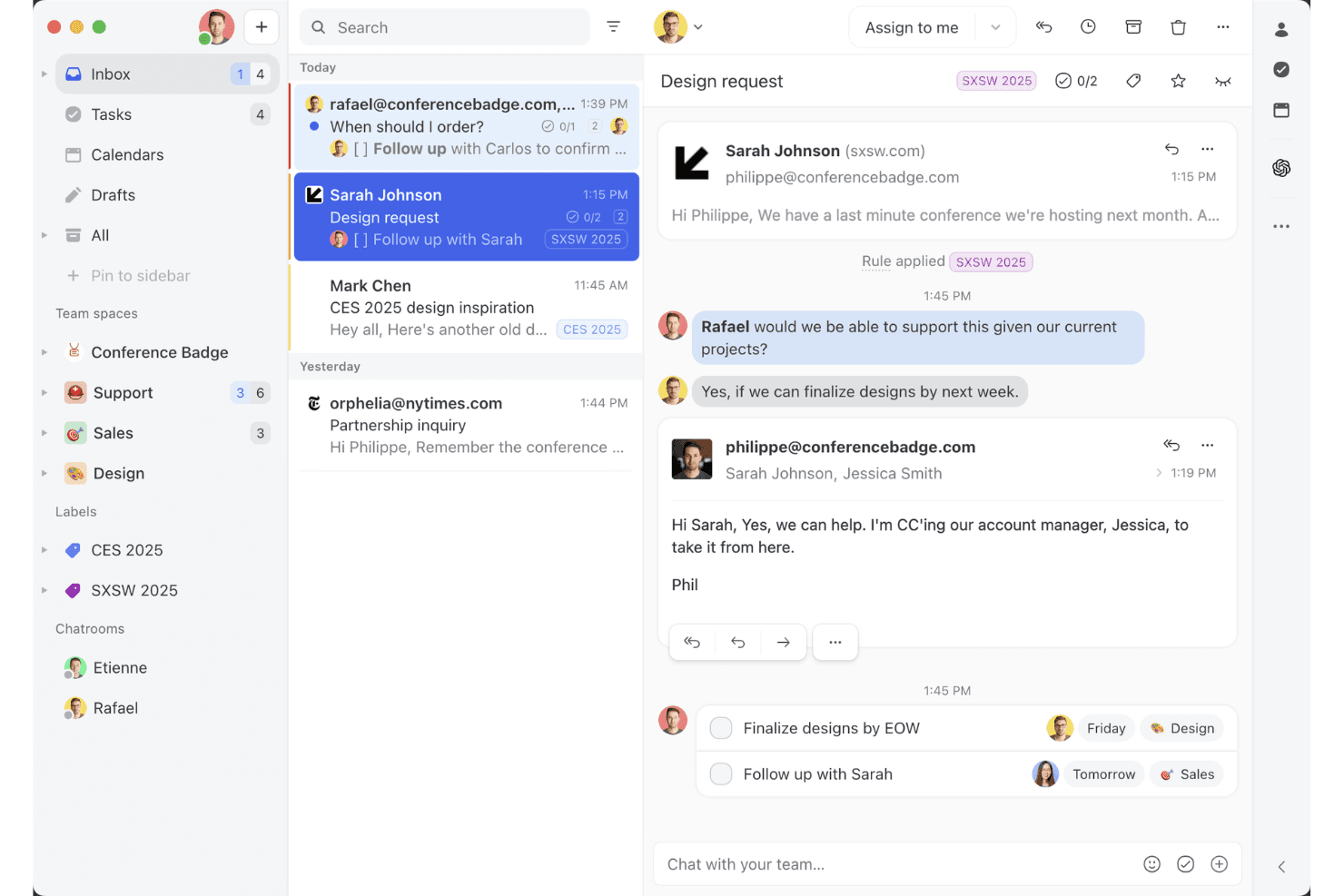
Missive’s shared inbox view shows how teams can collaborate on email threads, assign tasks, and manage client conversations in one workspace. Missive is a collaborative omnichannel inbox that unifies email, SMS, WhatsApp, Messenger, Instagram, and live chat into a single shared workspace with built-in team communication, AI-assisted routing, and cross-channel automation.
Who Is Missive Best For?
Missive is a strong fit for SMB and mid-market teams that handle customer conversations across email, SMS, and social channels and want built-in collaboration baked directly into the inbox.
Why I Picked Missive
I've included Missive in my top picks because its collaborative inbox model does something most omnichannel tools don't: it puts team discussion directly inside the customer conversation thread, so agents can loop in a specialist or escalate mid-reply without switching to Slack. I also like how its AI-powered routing classifies incoming messages by sentiment and language across every connected channel simultaneously, whether that's WhatsApp, SMS, or Instagram DMs. That cross-channel rule consistency is genuinely rare at this price point.
Missive Key Features
- Canned responses: Pre-built reply templates with variable fields let agents send consistent, on-brand messages across email, SMS, and WhatsApp without rewriting from scratch.
- Conversation merging: Threads from the same customer across different channels can be manually merged into one, keeping the full interaction history ina single view.
- Auto-assignment rules: Conversations are distributed across agents using round-robin, least-busy, or random logic, reducing manual triage for teamleads.
- Missive MCP Server: Connect external AI tools (like Claude or ChatGPT) to query customer service threads, check calendars, and draft replies—while keeping agent review required before sending.
Missive Integrations
Missive integrates with HubSpot, Salesforce, Shopify, Aircall, Dialpad, Twilio, and Zapier. Its REST API and webhooks support custom integrations, alongside its new MCP Server on Productive and Business plans (requires admin activation).
Pros and Cons
Pros:
- Flexible, AI-powered multi-channel routing
- Inline team chat in every conversation
- All channels unified in one inbox
Cons:
- No native customer satisfaction surveys
- No built-in AI chatbot for deflection
Learn more about Missive:
Annen programvare for omnikanal-kundeservice
Her er noen flere alternativer for programvare for omnikanal-kundeservice som ikke kom med på kortlisten min, men som likevel er verdt å undersøke:
- 11TidioBest for AI-powered assistant
- 12FrontBest for monitoring message quality
- 13IntercomBest for startups
- 14Bright PatternBest for AI-driven insights
- 15TalkdeskBest for call centers
- 16KustomerBest for CRM integration
- 17Assembled AIBest for intelligent case routing systems
- 18SprinklrBest for social media support
- 19CrescendoBest for generating actionable conversation data
- 20FreshworksBest for ease of use
How I Evaluate Omnichannel Customer Service Software
When a customer starts on chat and escalates to a call, I expect one agent record to follow them—that's the baseline I check before weighing what makes a platform stand out.
Core Functionality (Table Stakes For This List)
When I'm selecting tools for my list, I rank each one on a scale from 0 (does not offer the functionality) to 5 (excels in this area) for each core functionality listed below. Then, I calculate the tool's total score into a percentage. Each tool needs to achieve a minimum total score of 75% to be considered for inclusion.
- Multi-Channel Inbox: I check whether email, chat, social, SMS, and voice all land in one agent workspace—so reps aren't toggling between browser tabs.
- Unified Customer Profile: Each tool should surface a customer's full interaction history across channels in one view, including past tickets, purchases, and notes.
- Omnichannel Routing & Assignment: I look at how conversations get assigned—whether the platform supports skills-based routing, SLA priority rules, and load balancing across channels.
- Cross-Channel Ticketing: A customer who starts on chat and follows up via email should stay on one ticket thread, with full context intact for any agent who picks it up.
- Automation & AI Assistance: I evaluate whether workflow triggers, chatbots, and AI features like reply suggestions or auto-tagging work across all connected channels.
- Cross-Channel Analytics: Dashboards should aggregate metrics like CSAT, first response time, and resolution rate across every channel rather than siloing them.
Once I have a list of tools that meet the criteria, I consider what sets each platform apart.
Differentiating Factors (What Sets Vendors Apart)
Here's how I compare and contrast different vendors:
Standout Features
Proactive messaging matters a lot to me. Platforms that let you trigger a chat or SMS based on cart abandonment or onboarding milestones shift support from reactive to strategic. I also evaluate whether a built-in knowledge base surfaces AI-suggested articles to agents mid-conversation and powers a customer-facing self-service portal. For contact center leads managing large teams, native workforce management tools for shift scheduling and volume forecasting can eliminate the need for a separate WFM platform.
Beyond Features
Integration depth is one of the first things I check. A platform that connects natively to your CRM and ecommerce system means agents can pull up order status or account details without switching tools. I also look closely at total cost of ownership, especially whether AI features, premium channels like WhatsApp, or API usage carry add-on fees that inflate the price at scale. For teams in regulated industries like healthcare or finance, compliance certifications such as HIPAA or PCI-DSS can quickly narrow the shortlist.
Slik velger du programvare for omnikanal-kundeservice
Når du skal velge programvare for omnikanal-kundeservice, bør du vurdere hvor godt den kobler sammen de viktigste kundestøttekanalene, kundedataene og arbeidsflytene dine. Den bør gi kundebehandlerne konteksten de trenger for å håndtere samtaler uten at kundene må gjenta seg.
Vurder disse faktorene:
| Vurder | Hva du bør prioritere |
|---|---|
| VurderPrimærkanal | Hva du bør prioritereGod støtte for kanalene med høyest volum. Hvis telefon står for de fleste samtalene, bør du prioritere funksjoner for kontaktsentre. Hvis det er meldinger, bør du prioritere WhatsApp, SMS, sosiale medier og direktechat. |
| VurderTeamstørrelse | Hva du bør prioritereFunksjoner som passer måten teamet ditt arbeider på. Små team trenger kanskje bare en samlet innboks og enkel ruting. Større team kan trenge ferdighetsbasert ruting, tilgangstillatelser, kvalitetssikring, arbeidsstyringsadministrasjon og avansert rapportering. |
| VurderKundevolum | Hva du bør prioritereAutomatisering og ruting som kan håndtere kundestøttevolumet ditt. Team med høyere volum bør prioritere automatisert ruting, køadministrasjon, kunstig intelligens og verktøy som reduserer repeterende arbeid for kundebehandlerne. |
| VurderKompleksitet i kundestøtten | Hva du bør prioritereVerktøy for håndtering av overleveringer og eskaleringer. Hvis saker jevnlig flyttes mellom kundebehandlere eller avdelinger, bør du prioritere en delt kundeoversikt, internt samarbeid og arbeidsflyter for eskalering. |
| VurderBransje | Hva du bør prioritereFunksjoner som oppfyller kravene i bransjen din. Netthandelsteam kan trenge ordredata og handelsintegrasjoner, mens regulerte bransjer kan trenge sterkere sikkerhet, samsvarskontroller og revisjonsspor. |
Trender innen programvare for omnikanal-kundeservice
I undersøkelsene mine hentet jeg inn utallige produktoppdateringer, pressemeldinger og utgivelseslogger fra ulike leverandører av programvare for kundeservice i flere kanaler. Her er noen av de fremvoksende trendene jeg følger med på:
- KI-drevet personalisering: Mange leverandører bruker KI for å tilby personaliserte kundeinteraksjoner. Denne trenden vokser ettersom bedrifter ønsker å tilpasse opplevelser til den enkelte kundes behov. KI kan for eksempel analysere hele historikken til en kundeinteraksjon for å foreslå personaliserte svar og sikre kontinuitet i tjenesten.
- Talegjenkjenningsteknologi: Talegjenkjenning blir stadig vanligere, slik at kunder kan kommunisere med tjenester uten å bruke hendene. Denne trenden forbedrer tilgjengelighet og brukervennlighet, og enkelte leverandører integrerer talekommandoer i plattformene sine for bedre kundeengasjement.
- Proaktivt kundeengasjement: Verktøy utvikles for å engasjere kunder før de tar kontakt med problemer. Denne trenden innebærer bruk av dataanalyse for å forutse kundebehov og tilby løsninger proaktivt, noe som forbedrer tilfredsheten og reduserer antallet supportsaker.
- Omnikanalanalyse: Leverandører fokuserer på å gi innsikt som gjør det mulig for bedrifter å forstå kundeatferd og preferanser på tvers av plattformer, slik at de kan forbedre strategier og tjenester.
- Støtte via videochat: Videochat får stadig større betydning som støtteverktøy og gir en mer personlig opplevelse. Det er nyttig ved komplekse problemer der visuell veiledning er nødvendig, og enkelte leverandører integrerer denne funksjonen for å forbedre kundeinteraksjonene.
Hva er programvare for omnikanal-kundeservice?
Programvare for omnikanal-kundeservice er et verktøy som gjør det mulig for bedrifter å administrere kundeinteraksjoner på tvers av flere kommunikasjonskanaler fra én enkelt plattform. Kundeservicemedarbeidere og supportteam bruker vanligvis disse verktøyene for å forbedre responstidene og tilby konsekvent kundestøtte.
Funksjoner som KI-drevet personalisering, proaktivt kundeengasjement og omnikanalanalyse bidrar til å tilpasse kundeopplevelser, forutse behov og forstå atferd. Samlet sett forbedrer disse verktøyene kundetilfredsheten ved å sikre effektiv og personalisert service på tvers av alle kanaler.
Funksjoner i programvare for omnikanal-kundeservice
Når du velger programvare for omnikanal-kundeservice, bør du se etter følgende nøkkelfunksjoner:
- KI-drevet personalisering: Denne funksjonen bruker KI til å tilpasse interaksjoner basert på kundedata, noe som forbedrer kundeopplevelsen ved å gjøre samtalene mer relevante.
- Avansert samtaleruting: Dirigerer samtaler til den best egnede medarbeideren, forbedrer responstidene og sikrer at kundene raskt får hjelpen de trenger.
- Analyse på tvers av kanaler: Gir innsikt på tvers av alle kommunikasjonskanaler, slik at bedrifter kan forstå kundeatferd og optimalisere servicestrategier.
- Proaktivt kundeengasjement: Bruker data til å forutse kundebehov og tilby løsninger før problemer oppstår, noe som reduserer antallet supportsaker og øker tilfredsheten.
- Samlet kundetidslinje: Samler alle interaksjoner fra ulike kanaler i én visning, slik at medarbeiderne får konteksten de trenger for å tilby informert og personalisert kundestøtte.
- Støtte via videochat: Tilbyr en mer personlig måte å hjelpe kunder på og er spesielt nyttig ved komplekse problemer som krever visuell veiledning.
- Tilpassbare dashbord: Gjør det mulig for team å tilpasse arbeidsområdet etter behovene sine, noe som forbedrer effektiviteten og fokuset.
- Automatisering av arbeidsflyt: Effektiviserer repetitive oppgaver og frigjør teamet ditt, slik at det kan håndtere mer komplekse kundeinteraksjoner.
- Flerspråklig støtte: Gjør kommunikasjon med en mangfoldig kundebase mulig, utvider rekkevidden og forbedrer tilgjengeligheten.
- Sikkerhetstiltak: Beskytter kundedata ved å følge bransjestandarder og opprettholde tillit og pålitelighet.
Fordeler med programvare for omnikanal-kundeservice
Implementering av programvare for omnikanal-kundeservice, inkludert løsninger for kundeservice i sosiale medier, gir flere fordeler for teamet og virksomheten din. Her er noen av fordelene du kan se frem til:
- Forbedret kundetilfredshet: Kundene får rask, relevant og konsekvent støtte på tvers av kanaler, noe som forbedrer den helhetlige opplevelsen og dermed kundelojaliteten.
- Økt effektivitet: Arbeidsflytautomatisering og avansert samtaleruting hjelper teamet med å håndtere flere henvendelser med mindre innsats, noe som øker produktiviteten.
- Bedre innsikt: Omnikanal-analyse gir en helhetlig oversikt over kundeatferd og gjør det mulig å ta datadrevne beslutninger som forbedrer tjenestekvaliteten.
- Forbedret personalisering: KI-drevne funksjoner tilpasser samhandlinger til den enkelte kundes preferanser, noe som gjør kontakten mer meningsfull og effektiv.
- Kostnadsbesparelser: Virksomheter kan redusere driftskostnadene ved å minske behovet for flere plattformer og optimalisere ressursfordelingen.
- Større rekkevidde: Flerspråklig støtte og alternativer for videochat gjør det mulig å komme i kontakt med et bredere publikum og utvide kundebasen.
- Bedre sikkerhet: Samsvar med bransjestandarder sikrer at kundedataene er beskyttet, noe som skaper tillit og pålitelighet.
Kostnader og priser for omnikanal-programvare for kundeservice
Ved valg av omnikanal-programvare for kundeservice er det viktig å forstå de ulike prismodellene og abonnementene som er tilgjengelige. Kostnadene varierer basert på funksjoner, teamstørrelse, tillegg og mer. Tabellen nedenfor oppsummerer vanlige abonnementer, gjennomsnittsprisene deres og typiske funksjoner som inngår i løsninger for omnikanal-kundestøtte:
Sammenligningstabell for abonnementer for omnikanal-programvare for kundeservice
| Abonnementstype | Gjennomsnittspris | Vanlige funksjoner |
| Gratisabonnement | $0 | Grunnleggende supportsaksbehandling, e-poststøtte og begrenset analyse. |
| Privatabonnement | $5-$25/bruker/måned | E-post- og chatstøtte, grunnleggende rapportering og begrensede tilpasningsmuligheter. |
| Bedriftsabonnement | $30-$75/ bruker/måned | Støtte på tvers av flere kanaler, arbeidsflytautomatisering og avanserte rapporteringsverktøy. |
| Virksomhetsabonnement | $80-$150/ bruker/måned | Full tilpasning, KI-drevet analyse og dedikert kundeansvar. |
Vanlige spørsmål om programvare for omnikanal-kundeservice
Her er noen svar på vanlige spørsmål om programvare for omnikanal-kundestøtte:
Hva er forskjellen mellom omnikanal- og multikanalskundeservice?
Multikanals kundeservice tilbyr støtte på tvers av flere kanaler, mens omnikanal-kundeservice kobler disse kanalene sammen til én sammenhengende opplevelse. Med multikanalsstøtte kan for eksempel en kunde som starter i en direktechat og senere ringer, måtte forklare problemet på nytt. Med omnikanalstøtte kan telefonmedarbeideren se den tidligere chatten og fortsette der samtalen slapp.
Hvor mange kanaler bør en omnikanalplattform for kundeservice støtte?
Det finnes ikke et ideelt antall. En omnikanalplattform bør støtte kanalene kundene faktisk bruker, og koble dem sammen slik at medarbeiderne kan bevege seg mellom samtaler uten å miste konteksten. For mange virksomheter betyr det å starte med e-post, direktechat, telefon og sosiale medier eller meldingsapper.
Hvilke kanaler bør inngå i en omnikanalstrategi?
Se på hvor kundene allerede kontakter dere, og prioriter kanalene med størst etterspørsel. For mange team omfatter dette e-post, telefon, direktechat, sosiale medier, SMS og meldingsapper som WhatsApp – men kanalblandingen bør gjenspeile kundene deres.
Må dere bytte ut CRM-systemet for å implementere omnikanal-kundeservice?
Vanligvis ikke. En god omnikanalplattform bør integreres med det eksisterende CRM-systemet, slik at medarbeiderne får tilgang til kundedata sammen med kundestøttesamtalene. Det som betyr noe, er kvaliteten på integrasjonen: Undersøk hvilke data som synkroniseres, om oppdateringer skjer i sanntid, og om medarbeiderne får tilgang til informasjonen de trenger uten å måtte bytte mellom systemer.
Hva er den største ulempen med programvare for omnikanal-kundeservice?
Den største ulempen med omnikanalprogramvare er kompleksiteten ved implementeringen. Det krever et godt samordnet system som fungerer på tvers av flere kanaler. En omnikanaltilnærming kan være vanskelig å implementere i organisasjoner der det finnes datasiloer. Det kan være utfordrende å sikre konsekvente kundeopplevelser overalt, særlig uten riktig teknologi og gode prosesser.
Hvordan implementerer dere omnikanal-kundeservice?
For å implementere omnikanal-kundeservice bør dere begynne med å forstå kundenes forventninger og identifisere kanalene dere skal bruke (hint: se på kanalene kundene bruker). Invester i riktig teknologi for å støtte disse kanalene, og oppgrader kompetansen i teamet slik at de kan håndtere dem effektivt. Vurder også å opprette selvbetjeningsalternativer, og sørg for sikker håndtering av kundedata gjennom hele prosessen.
Hva er de fire C-ene innen omnikanal-kundeservice?
De fire C-ene innen omnikanal-kundeservice er kundeopplevelse, kontekst, innhold og samarbeid. Disse elementene fungerer sammen for å skape en helhetlig og engasjerende kundeopplevelse på tvers av alle kanaler, slik at interaksjonene blir relevante og konsekvente.
Hvordan forbedrer omnikanalprogramvare kundetilfredsheten (CSAT)?
Programvare for omnikanal-kundeservice forbedrer kundetilfredsheten ved å tilby konsekvent støtte på tvers av flere kanaler, noe som legger til rette for mer personlige og effektive interaksjoner. Funksjoner som proaktiv kontakt og samlede kundetidslinjer sørger for at kundene får rask og relevant hjelp, noe som forbedrer den samlede opplevelsen.