

Gode alternativer til Google Voice tilbyr fleksible VoIP-samtaler, pålitelig teksting, enkelt oppsett og gode integrasjonsmuligheter – uten å binde deg til Googles økosystem. Hvis du ser etter alternativer til Google Voice, ønsker du sannsynligvis flere funksjoner, bedre samtalekvalitet eller støtte for team som har vokst fra det grunnleggende. Kanskje du trenger avansert samtaleruting, analyse eller enklere nummeradministrasjon etter hvert som virksomheten vokser. Denne veiledningen gir deg en tydelig oversikt over de beste alternativene til Google Voice, slik at du kan sammenligne de beste alternativene dine og velge en VoIP-løsning som passer måten teamet ditt arbeider på.
Hva er Google Voice?
Google Voice er en skybasert VoIP-tjeneste som lar brukere ringe, sende tekstmeldinger og administrere talepost ved hjelp av ett telefonnummer på tvers av enheter. Tjenesten er populær på grunn av det enkle oppsettet, nettleserbaserte tilgangen og integrasjonen med andre Google Workspace-verktøy. Team bruker ofte Google Voice til grunnleggende samtalehåndtering, felles numre og fleksibel kommunikasjon – men løsningen kommer til kort for virksomheter som trenger avanserte funksjoner eller mer spesialiserte telefoniløsninger.
Why Trust Our Software Recommendations
6,700+
Reviews
20
Industry experts
16+
Evaluation factors
14
Years
Our team has been testing and reviewing software since 2012. As CX leaders ourselves, we know how difficult—and important—it is to choose the right software.
For this guide, we evaluated tools using hands-on testing and independent research, scoring tools using our selection criteria.
Our reviews reflect our human editorial judgment, not a sales pitch.
 Gui DrusinaCreative Director
 Tim FisherVP of AI
Sammenligningstabell for alternativer til Google Voice
Denne sammenligningstabellen oppsummerer prisopplysningene for mine beste utvalgte alternativer til Google Voice:
| Tool | Best For | Trial Info | Price | ||
|---|---|---|---|---|---|
| 1 | Best for small business scalability | Free demo available | From $15/user/month (billed annually) | Website | |
| 2 | Best international phone number options | 14-day free trial | From $25/user/month (billed annually) | Website | |
| 3 | Best analytics dashboard for call performance | 7-day free trial + free demo available | From $15/user/month (billed annually) | Website | |
| 4 | Best real-time transcription features | 14-day free trial + free demo available | Pricing upon request | Website | |
| 5 | Best SMS and calling automation | 14-day free trial | From $29/user/month (billed annually) | Website | |
| 6 | Best app integrations for support teams | Free demo available | Pricing upon request | Website | |
| 7 | Best for voice support in helpdesk tickets | 14-day free trial | From $55/user/month (billed annually) | Website | |
| 8 | Best for omnichannel customer engagement | Free trial available | From $75/user/month (billed annually) | Website | |
| 9 | Best AI-powered call routing | Free demo available | From $119/seat/month | Website | |
| 10 | Best unified communications platform | 14-day free trial | From £18/user/month | Website |


Anmeldelser av de beste alternativene til Google Voice
Nedenfor finner du mine detaljerte sammendrag av de beste alternativene til Google Voice som kom med på kortlisten min. Anmeldelsene mine gir en detaljert gjennomgang av funksjonene, integrasjonene og de beste bruksområdene for hver plattform, slik at du kan finne den som passer best for deg.
 Best for small business scalability
- Free demo available
- From $15/user/month (billed annually)
Visit WebsiteCustomer Rating:4.5/5
Nextiva's NextivaONE app features a clean dialpad interface and an organized contacts list with presence indicators and quick-call buttons. Nextiva is a unified VoIP and collaboration platform for small and midsize businesses that want to manage calls, video meetings, messaging, analytics, and customer interactions in a single app with strong scalability and automation.
Who Is Nextiva Best For?
Small businesses and distributed teams that need a scalable, feature-rich VoIP system to support growth and unified communications.
Why Nextiva Is a Good Google Voice Alternative
I picked Nextiva as one of the best because I can scale from a single small office to multiple locations, manage all business calls and messages in one app, and automate call routing with built-in AI tools as my team grows.
Nextiva Key Features
- Voicemail transcription: Voicemails are automatically converted to text so you can read messages in the app or by email.
- Threaded conversations: Call history, texts, and chats with each contact are displayed in a single timeline for context.
- HD video meetings: Host unlimited video conferences with HD quality, screen sharing, and chat for remote collaboration.
- Contact center integrations: Connect with CRM, helpdesk, and industry-specific apps to handle customer communications within your workflows.
Nextiva Integrations
Nextiva offers native integrations with Salesforce, HubSpot, Zendesk, ServiceNow, Zoho, Microsoft Teams, Bullhorn, Pipedrive, Oracle Sales Cloud, and Outlook Calendar. An API is available for custom integrations.
Pros and Cons
Pros:
- Advanced call routing with built-in AI
- Centralizes calls, video, chat, and SMS
- Scales easily from one to many users
Cons:
- Fewer international number options available
- Requires stable internet for reliable calls
 Best international phone number options
- 14-day free trial
- From $25/user/month (billed annually)
Visit WebsiteCustomer Rating:4.4/5
CloudTalk displays a power dialer campaign interface with client info, call activity history, and lead statuses in a single unified view. CloudTalk is a business VoIP platform designed for companies that need advanced call routing, global number coverage, and deep integrations—ideal for sales or support teams handling international communication at scale.
Who Is CloudTalk Best For?
CloudTalk suits global customer support teams and sales operations that need reliable international calling and integrations across multiple business systems.
Why CloudTalk Is a Good Google Voice Alternative
I picked CloudTalk as one of the best because I can activate international phone numbers in over 160 countries, manage global call routing, and ensure local presence for sales or support without juggling multiple providers.
CloudTalk Key Features
- AI voice agents: Use AI-powered receptionists and specialists to handle, qualify, and route incoming calls automatically.
- Live call monitoring: Listen, whisper, or barge into live calls for quality assurance and training.
- Power dialer and parallel dialer: Automate high-volume outbound calling with features that accelerate sales and support workflows.
- CRM and helpdesk integrations: Connect CloudTalk with tools like HubSpot, Salesforce, and Zendesk for data syncing.
CloudTalk Integrations
CloudTalk offers 100+ native integrations, including HubSpot, Salesforce, Zendesk, Freshdesk, Pipedrive, Zoho CRM, Microsoft Dynamics 365, Intercom, Aircall, Slack, and Zapier. An API is available for custom integrations.
Pros and Cons
Pros:
- AI-powered live call transcription available
- Advanced call routing and IVR options
- Local numbers in over 160 countries
Cons:
- Limits simultaneous file attachments
- Outbound international calls can increase costs
 Best analytics dashboard for call performance
- 7-day free trial + free demo available
- From $15/user/month (billed annually)
Visit WebsiteCustomer Rating:4.7/5
Ringover allows admins to configure detailed technical and supervisor access rights, including group and IVR selections, for individual users. Ringover is a cloud-based VoIP platform designed for sales, support, and distributed teams that need advanced call analytics, AI features, and real-time performance tracking well beyond what Google Voice and basic phone systems offer.
Who Is Ringover Best For?
Sales and customer service teams in mid-size or growing businesses that require advanced call management, analytics, and AI-driven performance insights.
Why Ringover Is a Good Google Voice Alternative
I picked Ringover as one of the best because I rely on its analytics dashboard for in-depth call performance tracking, real-time monitoring, and AI-powered coaching. My team uses built-in dashboards to analyze call volume, duration, and outcomes while instantly spotting trends across agents.
Ringover Key Features
- Omnichannel messaging: Connect with customers via SMS, WhatsApp, Messenger, Instagram, and email from a single platform.
- Customizable IVR and call routing: Set up multi-level IVR menus and advanced call distribution rules for efficient handling.
- 100+ CRM and helpdesk integrations: Sync call activity and contacts with systems like Salesforce, HubSpot, and Zendesk.
- Call recording and transcription: Automatically record calls and generate searchable transcriptions for easy review.
Ringover Integrations
Ringover offers 100+ native integrations, including Salesforce, HubSpot, Zendesk, Zoho, Pipedrive, Bullhorn, Microsoft 365, and Google Workspace. An API is available for custom integrations.
Pros and Cons
Pros:
- Omnichannel messaging beyond standard calls
- Real-time call monitoring and coaching features
- Advanced analytics dashboard for call insights
Cons:
- SMS support is limited by country and plan
- Limited bulk data extraction
 Best real-time transcription features
- 14-day free trial + free demo available
- Pricing upon request
Visit WebsiteCustomer Rating:4.3/5
Dialpad's Contact Centers interface displays agent status, queue types, and active toggle controls across multiple contact center queues. Dialpad is a cloud-based VoIP platform designed for businesses that want AI-powered calling, messaging, and meetings with integrated productivity tools to support both remote and hybrid teams looking for a modern Google Voice alternative.
Who Is Dialpad Best For?
Dialpad suits customer support and sales teams in growing companies that want unified communications powered by AI on one platform.
Why Dialpad Is a Good Google Voice Alternative
I picked Dialpad as one of the best because I use its real-time transcription to capture every detail of customer calls, and the AI-driven call summaries give my team instant insights right after meetings. Voice-to-text accuracy consistently stands out in my workflow.
Dialpad Key Features
- AI agent workspace: Lets agents manage calls, messages, and tasks from a single dashboard.
- Omnichannel routing: Distributes voice, SMS, and chat interactions automatically to the right agent.
- CRM integrations: Connect with tools like Salesforce, HubSpot, and Zendesk to sync customer data.
- Enterprise compliance controls: Include features like audit logs, SOC 2, and HIPAA-ready security.
Dialpad Integrations
Dialpad offers native integrations with Google Workspace, Microsoft 365, Salesforce, HubSpot, Zendesk, Slack, Front, Okta, Zoho CRM, and ServiceNow. An API is available for custom integrations.
Pros and Cons
Pros:
- Scalable for both small and large teams
- Automated call summaries and action items
- Extensive historical call logs
Cons:
- Reporting features can be limiting for call centers
- SMS coverage limited in some regions
 Best SMS and calling automation
- 14-day free trial
- From $29/user/month (billed annually)
Visit WebsiteCustomer Rating:4.1/5
JustCall displays a real-time dashboard with live call metrics, call volume charts, and performance statistics including service level and answer time. JustCall is a cloud-based VoIP platform designed for sales, support, and service teams that need advanced calling, SMS automation, and cost-effective unified communication tools with deep CRM integrations and AI-powered workflow tools to modernize customer business communications.
Who Is JustCall Best For?
Sales, customer service, and fast-growing startups looking for multi-channel communication, AI-powered workflow automation, and deep CRM connectivity to meet all their business needs.
Why JustCall Is a Good Google Voice Alternative
I picked JustCall as one of the best because I can automate SMS and calling with AI-powered tools, like SMS campaigns and voice workflows, that help my team handle high communication volumes and personalize outreach far beyond what a basic Google Voice number offers for simple personal use.
JustCall Key Features
- Multi-level IVR: Set up interactive voice menus to route incoming calls to the right team or agent automatically.
- Call recording and logs: Automatically record all calls and access searchable call logs for performance and compliance needs.
- Click-to-call browser extension: Place outbound calls directly from CRM and helpdesk tools using a Chrome extension.
- Local and international numbers: Instantly provision local phone numbers in over 70 countries for outbound and inbound calling.
JustCall Integrations
JustCall offers 100+ native integrations, including Salesforce, HubSpot, Zoho CRM, Pipedrive, Copper, Zendesk, Freshdesk, Intercom, ActiveCampaign, and Slack. Zapier and an API are also available for custom integrations.
Pros and Cons
Pros:
- Instant local numbers in 70+ countries
- AI-powered call analysis and coaching tools
- Advanced SMS and calling automation options
Cons:
- AI features limited to highest-tier plans
- High data usage requirements
 Best app integrations for support teams
- Free demo available
- Pricing upon request
Visit WebsiteCustomer Rating:4.4/5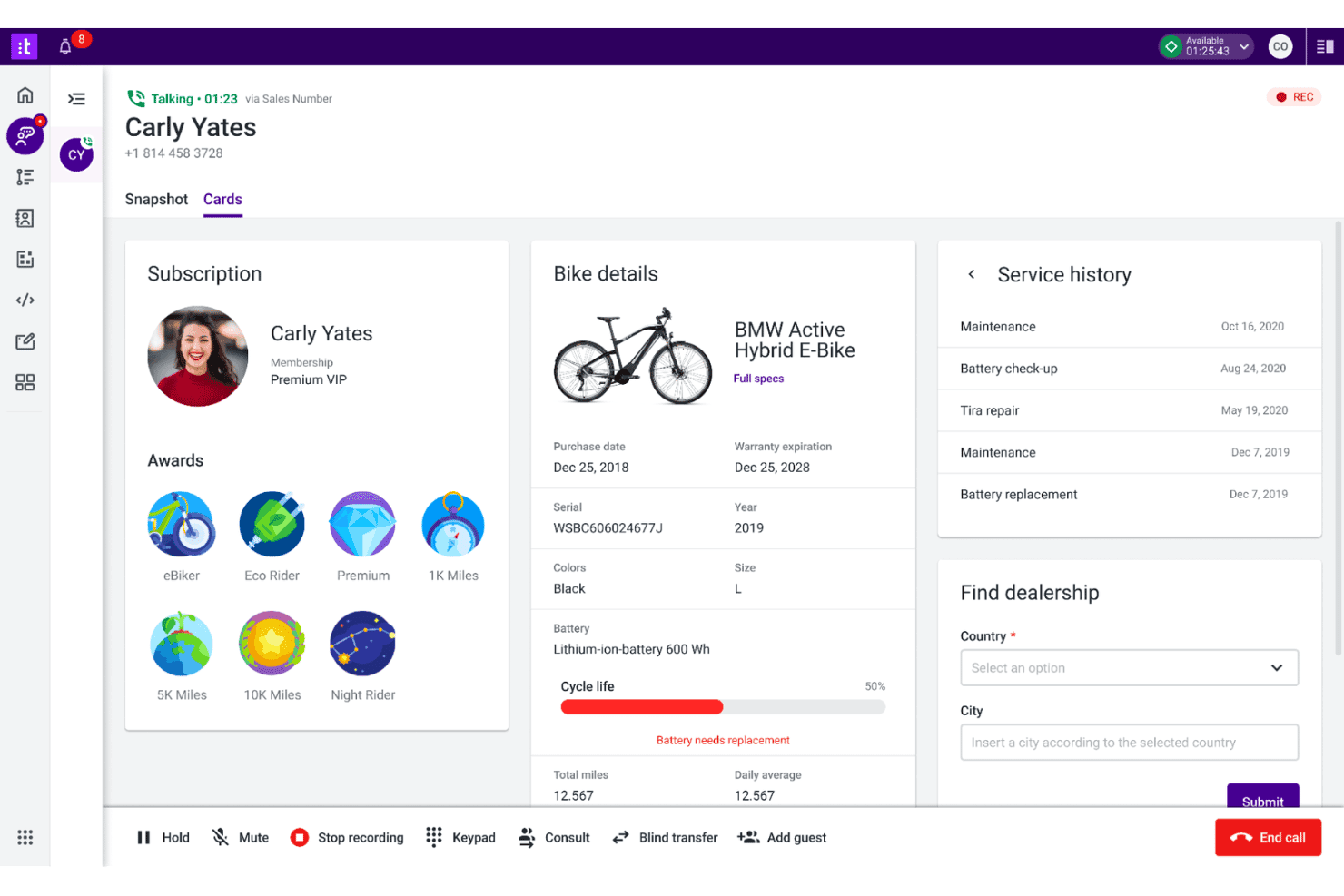
Talkdesk displays a live customer call interface with subscription details, bike product information, service history, and a dealership finder tool. Talkdesk is a cloud-based contact center platform designed for support teams and organizations that want advanced integrations, smart automation, and multichannel communications beyond the basics of Google Voice.
Who Is Talkdesk Best For?
Support leaders at midsize to enterprise companies who need deep app integrations and flexible call center workflows.
Why Talkdesk Is a Good Google Voice Alternative
I picked Talkdesk as one of the best Google Voice alternatives because I can connect it to my CRM, helpdesk, and messaging apps without extra hassle. My team uses its prebuilt app marketplace and advanced workflow automation to centralize channel management and customer data.
Talkdesk Key Features
- AI-powered agent assistance: Agents get real-time recommendations and automated call summaries to support conversations.
- Speech analytics: Analyze voice interactions using sentiment detection and keyword spotting tools.
- Omnichannel support: Route and handle contacts across voice, SMS, web chat, email, and social channels.
- Call recording and quality management: Record calls and score them for quality directly within the platform.
Talkdesk Integrations
Talkdesk offers native integrations with Salesforce, Zendesk, Slack, Microsoft Teams, ServiceNow, Google Workspace, Microsoft 365, Shopify, Zoom, and Oracle Service Cloud, and provides an API for custom integrations.
Pros and Cons
Pros:
- Flexible interactive voice response builder
- Advanced call routing and workflow builder
- AI-powered agent assistance for voice calls
Cons:
- No native fax transmission capabilities
- Lacks built-in hardware provisioning
Learn more about Talkdesk: Best for voice support in helpdesk tickets
- 14-day free trial
- From $55/user/month (billed annually)
Visit WebsiteCustomer Rating:4.4/5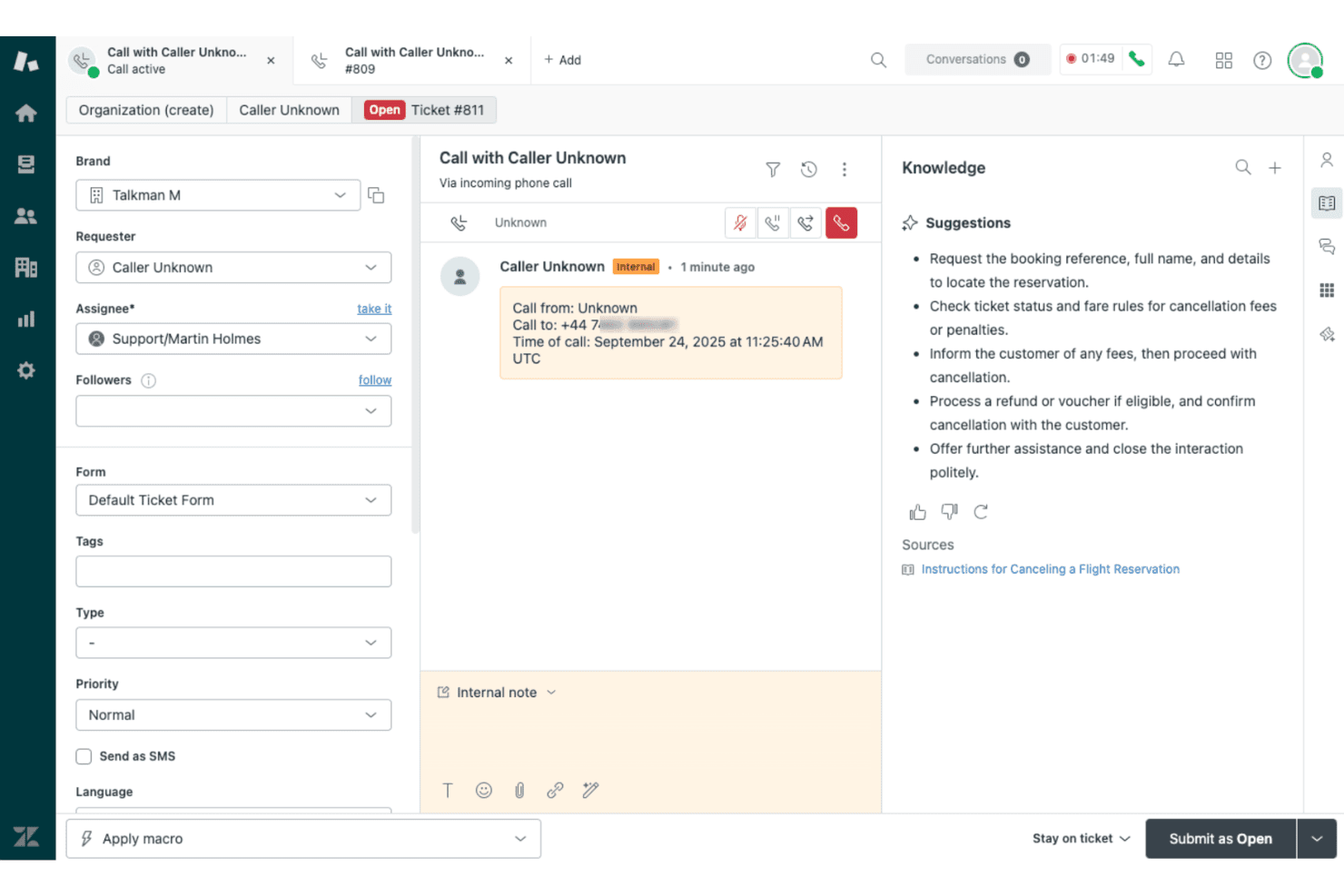
Zendesk Voice displays an active incoming call ticket with AI-powered knowledge suggestions for flight cancellation steps. Zendesk Voice is a native cloud telephony solution built for customer support teams that want every call routed, recorded, and resolved inside the same helpdesk workspace they already use for email, chat, and messaging.
Who Is Zendesk Voice Best For?
Zendesk Voice is a strong fit for mid-sized to enterprise support teams managing high call volumes across multiple channels from a centralized helpdesk.
Why Zendesk Voice Is a Good Best Google Voice Alternatives
I picked Zendesk Voice as one of the best because it turns every inbound call into a ticket automatically. When a customer calls, the interaction lands directly in the agent workspace alongside existing email and chat threads, so agents resolve calls with full context rather than switching tools. Voice Copilot surfaces real-time suggestions mid-call, and post-call AI writes the summary straight into the ticket record without any manual logging.
Zendesk Voice Key Features
- Unified agent workspace: Calls, chats, emails, and messages all appear in a single Zendesk ticket view for a complete customer conversation history.
- Quality assurance monitoring: Supervisors can review 100% of voice and digital interactions for compliance and performance.
- Advanced call analytics: Real-time dashboards and historical reporting provide detailed insights on call volume, agent activity, and resolution times.
- Zendesk Marketplace integrations: Connects with 1,800+ apps to embed telephony alongside CRM, collaboration, and workflow tools.
Zendesk Voice Integrations
Zendesk Voice offers native integrations with Amazon Connect, Microsoft Teams, Slack, and Jira, and supports over 1,800 apps through the Zendesk Marketplace. An API is available for custom integrations.
Pros and Cons
Pros:
- Real-time call monitoring and supervisor features
- AI-generated call summaries in ticket records
- Voice calls logged directly as helpdesk tickets
Cons:
- Requires entire team to use Zendesk workspace
- SMS capabilities less robust than top providers
Learn more about Zendesk Voice: Best for omnichannel customer engagement
- Free trial available
- From $75/user/month (billed annually)
Visit WebsiteCustomer Rating:4.4/5
Genesys Cloud CX offers an Admin panel with sections for Account Settings, People & Permissions, Directory, Integrations, Documents, and Contact Center management. Genesys Cloud CX is a unified communications and contact center platform designed for organizations that want advanced voice, digital, and AI customer engagement beyond what traditional VoIP tools like Google Voice deliver.
Who Is Genesys Cloud CX Best For?
Enterprises and large customer service teams handling high volumes of voice, digital, and AI-powered interactions across multiple channels.
Why Genesys Cloud CX Is a Good Google Voice Alternative
I picked Genesys Cloud CX because I can manage voice, chat, SMS, and social interactions all in one place, making it easy for my team to deliver connected experiences. I appreciate how omnichannel routing and AI-powered engagement let us unify communications beyond what Google Voice provides.
Genesys Cloud CX Key Features
- Integrated call recording: Capture, store, and review voice interactions automatically for compliance and quality assurance.
- Custom IVR design: Build interactive voice response menus with drag-and-drop tools to automate call handling.
- Workforce management suite: Schedule, forecast, and monitor team activity with built-in tools for large-scale operations.
- Real-time analytics dashboard: View live metrics and performance indicators for every communication channel.
Genesys Cloud CX Integrations
Genesys Cloud CX offers native integrations with Salesforce, Microsoft Teams, Zendesk, Zoom, Amazon Lex, and Google Cloud Dialogflow, plus an API for custom integrations. Additional integrations are available through the AppFoundry marketplace.
Pros and Cons
Pros:
- Supports complex call routing and escalation
- Offers advanced AI-powered automation and analytics
- Handles high call volumes across channels
Cons:
- Lacks standalone desktop client options
- Requires significant setup and configuration
Learn more about Genesys Cloud CX: Best AI-powered call routing
- Free demo available
- From $119/seat/month
Visit WebsiteCustomer Rating:4.1/5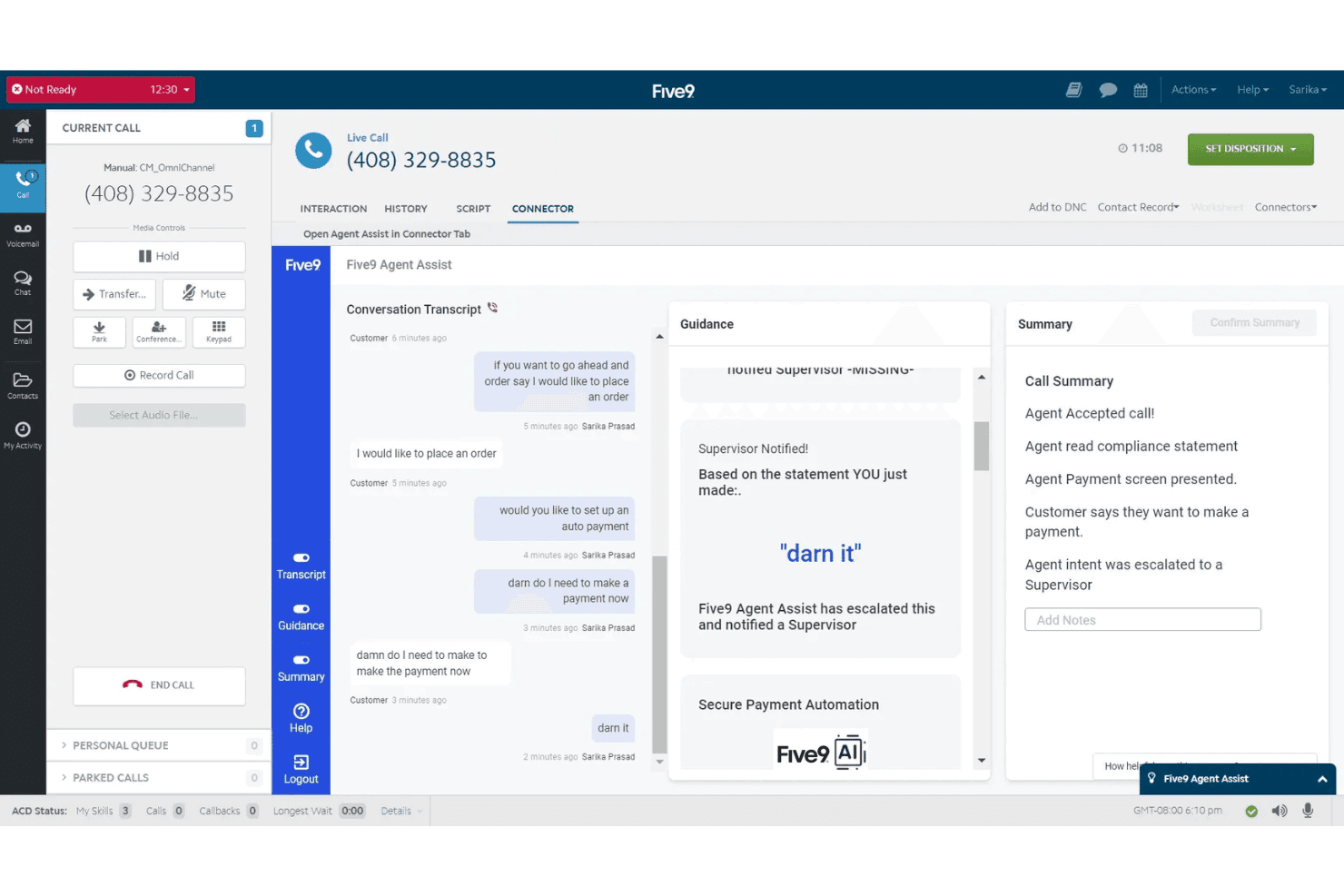
Five9 offers an AI-powered Agent Assist feature that transcribes live calls, provides real-time guidance, escalates flagged statements to supervisors, and generates automatic call summaries. Five9 is a cloud-based contact center solution designed for businesses that need advanced call routing, omnichannel communication, and AI-driven voice interactions—ideal for large teams that want to move beyond the basics of Google Voice and standard VoIP platforms.
Who Is Five9 Best For?
Large enterprise contact centers and support teams that need scalable, AI-powered call handling and deep CRM integrations.
Why Five9 Is a Good Google Voice Alternative
I picked Five9 as one of the best because its AI-powered call routing directs voice traffic to the right agents based on context and intent. I use features like real-time transcription and automated post-call summaries to boost agent productivity at scale.
Five9 Key Features
- Omnichannel communication: Connect with customers over voice, chat, email, SMS, and social messaging in one platform.
- CRM integrations: Sync customer data with Salesforce, ServiceNow, Microsoft Dynamics, Zendesk, and more.
- Workforce management: Schedule, forecast, and monitor agent performance using built-in WEM tools.
- Quality monitoring: Record, score, and review calls for agent coaching and compliance control.
Five9 Integrations
Five9 offers native integrations with Salesforce, ServiceNow, Microsoft Teams, Zoom, RingCentral, Oracle, Zendesk, and AT&T Office@Hand. An API is available for custom integrations.
Pros and Cons
Pros:
- Real-time analytics for live call monitoring
- Omnichannel support for voice, chat, and SMS
- AI routes calls to best available agent
Cons:
- Needs dedicated local network infrastructure
- Minimum seat requirement for all plans
Learn more about Five9: Best unified communications platform
- 14-day free trial
- From £18/user/month
Visit WebsiteCustomer Rating:4.2/5
RingCentral offers a unified messaging interface with team channels, direct messages, and a mobile notification panel for seamless collaboration. RingCentral is a cloud-based communications platform designed for businesses that want unified voice calling, SMS, video meetings, and team messaging with strong integration, AI, and compliance options as a Google Voice alternative.
Who Is RingCentral Best For?
RingCentral fits multi-location and hybrid teams in healthcare, finance, education, and other regulated industries that prioritize unified communication and compliance.
Why RingCentral Is a Good Google Voice Alternative
I picked RingCentral as one of the best because I can unify calling, SMS, team chat, video meetings, and webinars on one platform, plus rely on AI-driven call routing and advanced compliance for regulated industries.
RingCentral Key Features
- Call queue management: Organize, route, and prioritize inbound calls for teams or departments.
- Visual voicemail: Access, manage, and transcribe voicemails directly from the dashboard.
- Multi-level auto attendant: Set up dynamic call menus with custom greetings and routing rules.
- Customizable call analytics: Track usage, performance, and trends with built-in reporting dashboards.
RingCentral Integrations
RingCentral offers native integrations with Salesforce, HubSpot, Microsoft Teams, Zendesk, ServiceNow, Google Workspace, Slack, Box, Okta, and Dropbox. An API is available for custom integrations.
Pros and Cons
Pros:
- Centralized voice, chat, SMS, and meetings
- HIPAA and PCI compliance for regulated industries
- AI-powered receptionist handles inbound calls
Cons:
- Limited external storage options
- Extra charges for exceeding fair usage limits
Learn more about RingCentral:
Andre alternativer til Google Voice
Her er noen flere alternativer til Google Voice som ikke kom med på kortlisten min, men som likevel er verdt å undersøke:
- 11QuoBest for shared team phone numbers
- 12AircallBest for collaborative calling workflows
- 138x8Best advanced call security options
- 14MightyCallBest for freelancer call management
- 15VonageBest API customization for workflows
- 16GoTo ConnectBest visual call flow editor
- 17Zoom PhoneBest for integrating with video meetings
How I Evaluate Google Voice Alternatives
I start by checking whether a platform covers the core VoIP basics Google Voice offers—calling, texting, routing, and CRM integrations. Then I look at differentiators like AI transcription or global number coverage that set one tool apart.
Core Functionality (Table Stakes For This List)
When I'm selecting tools for my list, I rank each one on a scale from 0 (does not offer the functionality) to 5 (excels in this area) for each core functionality listed below. Then, I calculate the tool's total score as a percentage. Each tool needs to achieve a minimum total score of 75% to be considered for inclusion.
- VoIP Calling: I check for reliable cloud-based calling with business numbers, including local and toll-free options across multiple regions.
- Business SMS/Texting: Teams fielding order confirmations or appointment reminders need SMS and MMS from a business number, so I evaluate messaging depth.
- Call Routing & IVR: I look for auto-attendants, ring groups, and multi-level IVR menus that let support teams direct callers without manual transfers.
- Voicemail & Transcription: A busy support queue generates missed calls, so I evaluate whether voicemail transcriptions are accurate and easy to search.
- Multi-Device Access: I check that desktop, mobile, and web apps offer consistent features so agents can handle calls from the office or on the go.
- CX Tool Integrations: Platforms should connect to CRMs and helpdesks like Salesforce, HubSpot, or Zendesk to log calls and surface customer context automatically.
Once I have a list of tools that meet the criteria, I consider what sets each platform apart.
Differentiating Factors (What Sets Vendors Apart)
Here's how I compare and contrast different vendors:
Standout Features
AI call intelligence is a big differentiator—platforms like Dialpad and Five9 offer real-time transcription, sentiment analysis, and post-call summaries that help QA teams coach agents without reviewing every recording manually. I also look at international DID coverage, since distributed teams need local numbers in the regions they serve. CRM-embedded dialling matters too. Click-to-call, screen pops, and automatic call logging inside tools like Salesforce or HubSpot save agents from constant context-switching between apps.
Beyond Features
Number porting matters when you're migrating a team off Google Voice—I evaluate how smooth and fast each vendor makes it to transfer existing business numbers. Compliance is another key factor, especially for teams in healthcare or finance that need HIPAA or PCI-DSS certifications. I also compare pricing structures closely, since some platforms charge per user while others bundle minutes differently, and features like voicemail transcription that Google Voice includes for free can carry extra costs elsewhere.
Hvorfor se etter et alternativ til Google Voice?
Selv om Google Voice er et godt valg av VoIP-programvare, finnes det flere grunner til at noen brukere ser etter alternative løsninger. Du ser kanskje etter et gratis alternativ til Google Voice eller et betalt bedriftstelefonsystem som passer bedre til virksomhetens voksende behov fordi …
- Du trenger avansert samtaleruting, en virtuell resepsjonist eller en IVR-meny på flere nivåer
- Du ønsker globale telefonnumre eller gratisnumre utenfor områdene som støttes av Google Voice
- Du trenger HIPAA- eller PCI-DSS-samsvar for regulerte bransjer
- Ser etter dypere integrasjoner med CRM- og brukerstøttesystemer
- Har vokst fra abonnementer for én bruker med kostnadseffektive priser eller begrensninger for små team
- Trenger døgnåpen kundestøtte med ekte medarbeidere i stedet for kun selvbetjening
Hvis noe av dette høres kjent ut, har du kommet til rett sted. Listen min over de beste alternativene til Google Voice inneholder flere VoIP-leverandører og kommunikasjonsløsninger – som Grasshopper eller Openphone – som passer bedre for team som møter disse utfordringene med et standard Google Voice-nummer og ser etter alternative prisplaner.
Viktige funksjoner i Google Voice
Her er noen av de viktigste funksjonene i Google Voice, slik at du kan sammenligne hva alternative løsninger tilbyr:
- VoIP-anrop: Foreta og motta telefonsamtaler ved hjelp av en wifi- eller internettforbindelse i stedet for tradisjonelle fasttelefonlinjer eller en dedikert bordtelefon.
- Bedriftstekstmeldinger: Send og motta SMS-meldinger, og få ubegrenset tekstmeldinger fra et bedriftsnummer direkte fra enheten eller datamaskinen din.
- Transkripsjon av talemeldinger: Få automatiske transkripsjoner av talemeldinger, slik at du raskt kan skanne gjennom dem og prioritere svarene dine.
- Tilgang fra flere enheter: Bruk ett nummer på datamaskinen, i Android- eller iOS-mobilappen eller på nettbrettet for en samlet kommunikasjonsopplevelse.
- Viderekobling: Send innkommende samtaler til andre numre eller enheter, slik at du aldri går glipp av en viktig kundehenvendelse.
- Integrasjon med Google Workspace: Synkroniser med Gmail, Kalender og Kontakter for å forenkle den daglige arbeidsflyten for teammedlemmer som allerede bruker Google-produkter.
- Personlige hilsener: Spill inn ulike egendefinerte hilsener for grupper, små bedriftsteam eller enkeltpersoner, slik at kundekontakten blir mer personlig.
- Grunnleggende samtalestyring: Se informasjon om innringeren og avgjør om du vil svare på, rute eller blokkere samtaler, slik at det blir enklere å håndtere avbrytelser.
- Nummerportering: Ta med et eksisterende telefonnummer til Google Voice gjennom nummerportering, noe som gjør overgangen fra en annen tjenesteleverandør enklere.
- Ikke forstyrr: Sett statusen din til å sende samtaler direkte til talepost når du trenger konsentrert arbeidstid eller ikke er på kontoret.