

AI-plattformer for kundeselvbetjening er programvareverktøy som bruker kunstig intelligens til å hjelpe kunder med å finne svar, løse problemer og fullføre oppgaver uten å måtte snakke med en menneskelig medarbeider. Hvis du ser etter måter å håndtere store mengder kundestøttehenvendelser på, levere raskere løsninger eller tilby hjelp døgnet rundt, kan disse plattformene hjelpe teamet ditt med å møte kundenes økende forventninger. I denne listen finner du pålitelige AI-løsninger som automatiserer vanlige forespørsler, integreres med de eksisterende systemene dine og gir kundene mer kontroll – slik at du kan fokusere på komplekse saker og oppnå bedre resultater.
Hvorfor du kan stole på våre programvareanbefalinger
6,700+
Reviews
20
Industry experts
16+
Evaluation factors
14
Years
Teamet vårt har testet og anmeldt programvare siden 2012. Vi er selv CX-ledere, så vi vet hvor vanskelig og hvor viktig det er å velge riktig programvare.
I denne guiden har vi vurdert verktøyene gjennom praktisk testing og uavhengig research og gitt dem poeng ut fra våre utvelgelseskriterier.
Anmeldelsene våre bygger på vår egen redaksjonelle vurdering. De er ikke et salgsargument.
 Gui DrusinaCreative Director
 Tim FisherVP of AI
Sammenligningstabell for AI-plattformer for kundeselvbetjening
Denne sammenligningstabellen oppsummerer prisopplysningene for mine beste valg av AI-plattformer for kundeselvbetjening:
| Tool | Best For | Trial Info | Price | ||
|---|---|---|---|---|---|
| 1 | Best for agentic self-service with live data actions | Free plan + free demo available | From $150/month (billed annually) | Website | |
| 2 | Best for AI agents tested on real data | Free demo available | Pricing upon request | Website | |
| 3 | Best with real-time data integrations | 7-day free trial + free plan + free demo available | From $32/month (billed annually) | Website | |
| 4 | Best with no-code workflow customization | Free plan available | From $29/month (billed annually) | Website | |
| 5 | Best for instant AI chatbot responses | Free plan available; 7-day free trial | From $24.17/month (billed annually) | Website | |
| 6 | Best for e-commerce customer support automation | Free demo + 30-day free trial available | From $40/month | Website | |
| 7 | Best for automated ticket workflows | 14-day free trial | From $24/user/month (billed annually) | Website | |
| 8 | Best for unified AI customer support | Free demo available | Pricing upon request | Website | |
| 9 | Best for AI-powered support automation | 14-day free trial | From $20/user/month | Website | |
| 10 | Best for AI-driven unified customer support | 30-day free trial | Pricing upon request | Website |


Anmeldelser av AI-plattformer for kundeselvbetjening
Nedenfor finner du mine detaljerte sammendrag av de beste AI-plattformene for kundeselvbetjening som kom med på kortlisten. Anmeldelsene mine gir et detaljert innblikk i funksjonene, egenskapene og integrasjonene til hver plattform for å hjelpe deg med å finne den som passer best for deg.
 Best for agentic self-service with live data actions
- Free plan + free demo available
- From $150/month (billed annually)
Visit WebsiteCustomer Rating:4.5/5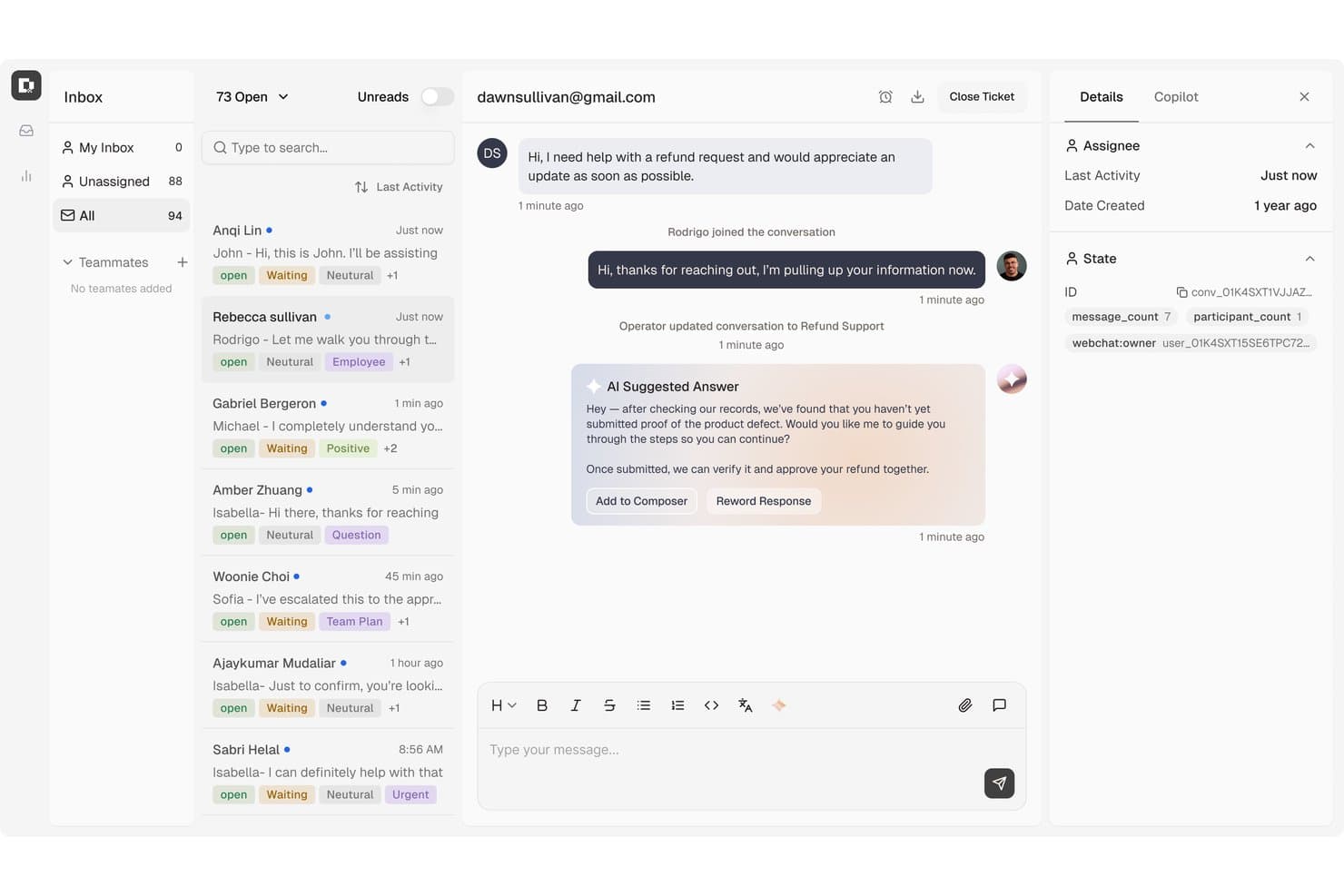
Botpress surfaces AI-suggested replies to speed up customer refund support. Botpress is an AI agent platform for customer self-service that combines a visual flow builder, LLM-powered conversational resolution, multi-channel deployment, and agentic task automation across support, account, and billing workflows.
Who Is Botpress Best For?
Botpress is a strong fit for support and CX teams that need agents to do more than answer questions—think live refunds, account lookups, and record updates without human intervention.
Why I Picked Botpress
I picked Botpress as one of the best because it goes beyond answering questions and actually does things, like processing refunds, pulling live order data, and updating records in connected systems without a human in the loop. I love how AI Actions and Viber Playbooks work together: you define the conditions once, and the agent knows exactly when to trigger a refund versus when to escalate. That kind of structured, agentic execution is what separates Botpress from tools that are purely conversational.
Botpress Key Features
- Multi-channel publishing: Deploy agents to Webchat, WhatsApp, Telegram, Instagram, Messenger, Slack, and voice channels from a single platform.
- Viber Gaps monitoring: Identifies unanswered or low-confidence questions from live conversations so you can correct and retrain agent behavior.
- Botpress Desk ticket management: Handles L1–L3 support tickets with priority routing, custom fields, macros, capacity-based team assignment, and RBAC.
- Knowledge Base ingestion: Pulls in websites, PDFs, spreadsheets, and structured data via API, webhooks, or scheduled jobs to keep agent answers current.
Botpress Integrations
Botpress offers marketplace integrations including Zendesk, Intercom, Salesforce, HubSpot, Slack, WhatsApp, and Shopify. It also provides Chat, Admin, Files, Tables, and Runtime APIs for custom integrations, plus Zapier.
Pros and Cons
Pros:
- Live knowledge gaps guide targeted corrections
- Agents can issue refunds and update records
- Visual flows pair with custom API logic
Cons:
- Conversation reporting offers limited export flexibility
- Complex answers need prompt testing
Learn more about Botpress: Best for AI agents tested on real data
- Free demo available
- Pricing upon request
Visit WebsiteCustomer Rating:5/5
Cresta offers AI-powered simulated visitor testing that evaluates self-service chat flows against distinct customer personas like the 'Self-Sufficient Resolver' to ensure complete and accurate responses. Cresta is an AI customer self-service platform that uses conversational AI, real-time agent assistance, and conversation analytics to automate and optimize service interactions across chat, voice, and messaging channels.
Who Is Cresta Best For?
Cresta is a strong fit for enterprise customer experience teams who manage large volumes of interactions across multiple channels.
Why I Picked Cresta
I picked Cresta as one of the best because it stands out for AI agents tested using real customer data. I like having access to autonomous conversation agents and real-time agent coaching that adapt based on actual, in-production service conversations.
Cresta Key Features
- Multichannel support: Manage customer conversations across chat, voice, and messaging from one unified platform.
- Conversation intelligence: Analyze interactions using natural language processing to surface trends and customer sentiment.
- Automated quality management: Score and review every conversation automatically for compliance and service standards.
- Live workflow automation: Trigger predefined workflows within customer interactions to streamline processes and reduce manual steps.
Cresta Integrations
Cresta offers native integrations with Salesforce, Twilio, Pipedrive, BigCommerce, Five9, Zendesk, and more. An API is available for custom integrations.
Pros and Cons
Pros:
- Real-time feedback for live agents
- Advanced analytics for every interaction
- AI adapts based on real conversations
Cons:
- Occasional intent recognition inaccuracies
- Complex workflows may require extra setup
Learn more about Cresta: Best with real-time data integrations
- 7-day free trial + free plan + free demo available
- From $32/month (billed annually)
Visit WebsiteCustomer Rating:4.4/5
Chatbase self-service AI agent builder displaying source uploads and automation features that enable businesses to deliver automated customer support. Chatbase is an AI chatbot platform designed for businesses and support teams who want to automate customer interactions, deliver instant answers, and reduce manual workload across websites and messaging channels.
Who Is Chatbase Best For?
Chatbase suits support and operations teams at growing businesses that want to automate customer service across digital channels.
Why I Picked Chatbase
I picked Chatbase as one of the best because I can connect my chatbots directly to live databases and APIs, letting them pull up-to-the-minute information for customers. My team uses the real-time data integrations to answer order status questions, check inventory, or provide account updates instantly. I like that we can set up webhooks and custom data sources, so our bots always respond with the latest details.
Chatbase Key Features
- No-code chatbot builder: Build and deploy chatbots using a drag-and-drop interface without coding.
- Multi-language support: Serve customers in multiple languages with built-in translation capabilities.
- Conversation analytics: Track chatbot performance and review detailed conversation logs and metrics.
- Customizable AI agent actions: Define specific actions and workflows for your AI agents to handle complex requests.
Chatbase Integrations
Chatbase offers native integrations with WhatsApp, Facebook Messenger, Telegram, Slack, Google Sheets, Shopify, and Zapier. An API is available for custom integrations.
Pros and Cons
Pros:
- Deploys chatbots across multiple messaging platforms
- Provides detailed conversation analytics and logs
- Enables multi-step, conditional AI agent actions
Cons:
- Custom branding options are only on paid plans
- Lacks built-in voice assistant integration
Learn more about Chatbase:

Weav offers a detailed agent reporting dashboard that tracks customer conversations. Weav is an AI customer self-service platform built around product-trained AI agents, chatbots, a unified human-AI inbox, internal knowledge search, and automated resolution reporting.
Who Is Weav Best For?
Weav is a good fit for small to mid-sized ecommerce and SaaS teams that want to automate customer support without relying on a large support staff.
Why I Picked Weav
I've included Weav in my top picks because its no-code agent customization genuinely sets it apart. You can set conversation tone, cap response length, define prohibited phrases, and inject additional context into agents using simple text prompts, no developer involvement needed. I also like that specialized agents can be built for distinct scenarios, like billing versus technical support, each trained separately on relevant content. The one-click training setup means your team can spin up and adjust agents without touching a single line of code.
Weav Key Features
- Knowledge base training: Train your AI agent by importing content from websites, uploaded files, Q&A pairs, and video transcripts.
- Unified inbox: Manage customer conversations across multiple channels in one view, with AI-drafted reply suggestions for human agents.
- Ask Weav: An internal AI search tool that lets support team members instantly surface answers from your connected knowledge sources.
- Resolution reporting: Track AI resolution rates, ticket volume, and agent performance across your support operations.
Weav Integrations
Weav offers native integrations with Stripe and Shopify, letting AI agents handle billing, subscription, and invoice workflows directly inside customer conversations. It also integrates with Google Drive. Beyond those, Weav supports custom actions that connect agents to any third-party HTTPS API, so you can build integrations with your own backend or tools like order management and booking systems.
Pros and Cons
Pros:
- Built-in automated confidence scoring
- Continuous learning from resolved tickets
- One-click training from existing documentation
Cons:
- Free plan caps AI messages at 20
- Limited native third-party integrations
Learn more about Weav: Best for instant AI chatbot responses
- Free plan available; 7-day free trial
- From $24.17/month (billed annually)
Visit WebsiteCustomer Rating:4.7/5
Tidio tracks handled, missed, and bot conversations with the analytics dashboard. If you want to add AI chat and automation to your customer support, Tidio is worth considering. It’s designed for e-commerce stores and small businesses that need to handle customer questions quickly across chat, email, and Messenger. Tidio helps you automate common queries and keep conversations organized in one place.
Who Is Tidio Best For?
Tidio suits small ecommerce businesses and support teams that want to automate customer conversations and manage live chat across multiple channels.
Why I Picked Tidio
What draws me to Tidio for AI customer self-service is its focus on combining live chat with AI-powered automation in a single platform. Tidio’s AI chatbot can answer common customer questions instantly, reducing the need for human intervention and helping teams handle higher volumes. I also like that you can set up automated workflows to qualify leads or route conversations based on customer responses. For businesses that want to offer real-time support while automating repetitive queries, Tidio’s approach to live chat and automation stands out.
Tidio Key Features
Some other features that make Tidio useful for AI customer self-service platforms include:
- Multichannel inbox: Manage conversations from live chat, email, Instagram, and Messenger in one unified dashboard.
- Visitor tracking: See real-time website visitor activity and trigger automated messages based on behavior.
- Canned responses: Create and use pre-written replies to answer frequent customer questions quickly.
- Widget customization: Adjust the chat widget’s appearance and branding to match your website’s look and feel.
Tidio Integrations
Integrations include Shopify, WordPress, Messenger, Instagram, WhatsApp, Zendesk, HubSpot, Salesforce, Microsoft Dynamics, and more.
Pros and Cons
Pros:
- Customizable chat widget matches brand style
- Real-time visitor tracking for proactive engagement
- Prebuilt chatbot templates for e-commerce use cases
Cons:
- Chatbot can miss complex queries
- Limited analytics for chatbot performance
Learn more about Tidio: Best for e-commerce customer support automation
- Free demo + 30-day free trial available
- From $40/month
Visit WebsiteCustomer Rating:4.6/5
Gorgias automates ecommerce support with deep Shopify integration. Gorgias is a customer service platform built for ecommerce brands that want to automate and personalize support at scale. It’s especially useful for online retailers looking to centralize customer conversations and automate repetitive tasks. With Gorgias, support teams can manage tickets from multiple channels and deliver faster, more consistent responses to shoppers.
Who Is Gorgias Best For?
Gorgias is a strong choice for e-commerce support teams at direct-to-consumer brands and online retailers.
Why I Picked Gorgias
I picked Gorgias because its deep Shopify integration makes it uniquely valuable for e-commerce brands that want to automate and personalize customer service. The platform pulls in order details, shipping status, and customer data directly from Shopify, allowing support agents and AI-powered workflows to resolve common e-commerce questions without switching tools. Gorgias also enables automated responses to repetitive inquiries, like order tracking or returns, which helps teams handle high ticket volumes efficiently. This focus on e-commerce-specific automation and data access sets Gorgias apart from more generic AI customer self-service platforms.
Gorgias Key Features
Some other features that make Gorgias a strong option for AI customer self-service platforms include:
- AI-powered intent detection: Automatically identifies the reason for each customer inquiry to route tickets and trigger relevant automations.
- Macros and templated responses: Lets teams create reusable replies for common questions, ensuring consistency and saving time.
- Multi-channel support: Centralizes customer conversations from email, live chat, social media, SMS, and WhatsApp in one dashboard.
- Self-service help center: Allows businesses to build and manage a branded knowledge base that customers can access 24/7.
Gorgias Integrations
Integrations include Shopify, Magento, BigCommerce, WooCommerce, Facebook, Instagram, Slack, Klaviyo, Yotpo, and more.
Pros and Cons
Pros:
- Macros speed up ticket resolution workflows
- Centralizes chat, email, and social messaging
- AI suggests responses for repetitive questions
Cons:
- Lacks advanced workflow branching logic
- No AI voice or phone support features
Learn more about Gorgias: Best for automated ticket workflows
- 14-day free trial
- From $24/user/month (billed annually)
Visit WebsiteCustomer Rating:4.5/5
HappyFox displays a ticketing system with contact history and active call features. If your team needs AI-driven ticketing with multilingual support, HappyFox is worth a look. It’s designed for organizations that want to automate customer service workflows and offer self-service options in multiple languages. HappyFox helps support teams manage complex inquiries while reducing manual workload and improving response consistency.
Who Is HappyFox Best For?
HappyFox suits mid-sized to large organizations that need multilingual AI ticketing and workflow automation for customer support.
Why I Picked HappyFox
What drew me to HappyFox is its focus on AI-powered ticketing combined with multilingual self-service and workflow automation. The platform’s AI can automatically categorize, prioritize, and route tickets, which is especially useful for teams handling large volumes of customer requests in different languages. I also like that HappyFox offers a multilingual knowledge base and self-service portal, making it easier for global customers to find answers on their own. Its workflow automation tools help support teams reduce manual steps and maintain consistent service quality across channels.
HappyFox Key Features
Some other features that make HappyFox a strong option for AI customer self-service platforms include:
- Canned actions: Create and use pre-defined responses for common customer queries to speed up ticket handling.
- Custom ticket fields: Add unique data fields to tickets to capture information specific to your business or workflow.
- Customer satisfaction surveys: Send automated surveys after ticket resolution to gather feedback and measure service quality.
- Role-based permissions: Control access to features and data by assigning roles and permissions to different team members.
HappyFox Integrations
Native integrations are not currently listed.
Pros and Cons
Pros:
- Workflow automation reduces manual ticket handling
- Multilingual self-service portal supports global users
- AI ticket classification improves response accuracy
Cons:
- Ticket sync delays reported across some channels
- AI features limited to higher-tier plans
 Best for unified AI customer support
- Free demo available
- Pricing upon request
Visit WebsiteCustomer Rating:4.5/5
Kustomer AI manages chats with AI booking and multi-conversation support. If your team needs a customer service platform that brings all channels and customer data together, Kustomer is worth a look. It’s designed for support teams in retail, ecommerce, and fast-growing businesses that want to automate and personalize service at scale. Kustomer helps you manage conversations, automate repetitive tasks, and deliver faster, more informed responses using AI.
Who Is Kustomer Best For?
Kustomer suits mid-sized to large support teams in retail and e-commerce that need to manage high volumes of omnichannel customer interactions.
Why I Picked Kustomer
What stands out to me about Kustomer is how it brings together omnichannel support and AI-powered automation in one platform. I picked it for this list because it lets you manage conversations from chat, email, social, and voice in a single timeline, so agents always have the full context. Kustomer’s AI features can automate routine tasks, suggest responses, and even route conversations based on intent, which helps teams handle high volumes without losing the personal touch. For businesses that want to unify customer data and automate service across channels, Kustomer offers a strong foundation.
Kustomer Key Features
Some other features that make Kustomer useful for AI customer self-service platforms include:
- Knowledge base management: Build and maintain a searchable help center for customers to find answers on their own.
- Customer timeline view: See a chronological record of every customer interaction, order, and activity in one place.
- Custom workflows: Design automated processes for ticket handling, escalations, and follow-ups using a visual workflow builder.
- Sentiment analysis: Automatically detect customer sentiment in conversations to prioritize and personalize responses.
Kustomer Integrations
Integrations include Shopify, TikTok Shop, Facebook, WhatsApp, Instagram, Gmail, Twilio, AfterShip, Narvar, and more.
Pros and Cons
Pros:
- Visual workflow builder for custom automations
- Sentiment analysis flags urgent conversations
- Knowledge base supports self-service and chatbots
Cons:
- Occasional delays syncing with e-commerce platforms
- Advanced AI features require higher-tier plans
Learn more about Kustomer: Best for AI-powered support automation
- 14-day free trial
- From $20/user/month
Visit WebsiteCustomer Rating:4.4/5
HubSpot Service Hub tracks contacts, deals, calls, and support tickets. If you’re looking for an AI-driven customer service platform that connects tickets, chat, and a knowledge base in one place, HubSpot Service Hub is worth a look. It’s a strong fit for growing businesses and teams that want to automate support while keeping all customer data unified. With HubSpot Service Hub, you can centralize customer conversations and empower users to find answers on their own.
Who Is HubSpot Service Hub Best For?
HubSpot Service Hub suits small to midsize businesses and support teams that want to unify customer service, automate workflows, and manage all interactions in a single platform.
Why I Picked HubSpot Service Hub
What stands out to me about HubSpot Service Hub is how it brings together ticketing, live chat, and knowledge base tools into a single, unified platform powered by AI automation. This unified approach means your team can automate repetitive support tasks, route tickets intelligently, and surface relevant help articles to customers without switching systems. I also appreciate that HubSpot’s AI tools can analyze conversations and suggest responses, which helps teams deliver faster, more consistent support. For businesses that want to centralize customer service and automate self-service, HubSpot Service Hub offers a strong, all-in-one solution.
HubSpot Service Hub Key Features
Some other features that make HubSpot Service Hub valuable for AI customer self-service platforms include:
- Customer feedback surveys: Collect and analyze customer satisfaction, NPS, and custom survey responses directly within the platform.
- SLAs and automation rules: Set service level agreements and automate ticket prioritization, escalation, and follow-up actions.
- Omnichannel messaging: Manage conversations from email, chat, Facebook Messenger, and more in a single inbox.
- Reporting dashboard: Track team performance, ticket volume, and customer trends with customizable analytics and reports.
HubSpot Service Hub Integrations
Integrations include Salesforce, Gmail, Outlook, Slack, Zoom, Microsoft Teams, Google Calendar, WordPress, Google Meet, and more.
Pros and Cons
Pros:
- Automated ticket routing based on rules
- Knowledge base integrates with live chat
- AI chatbots handle multi-step customer queries
Cons:
- Limited AI analytics for self-service usage
- Chatbot customization requires manual setup
Learn more about HubSpot Service Hub: 10Best for AI-driven unified customer support
Sprinklr
- 30-day free trial
- Pricing upon request
Visit WebsiteCustomer Rating:4/5
Sprinklr analyzes support tickets with exportable reports and date filters. Sprinklr offers a unified platform for businesses that want to manage customer self-service across multiple digital channels. It’s a strong fit for large enterprises and global brands that need advanced AI to automate and personalize support at scale. If your team handles high volumes of customer interactions and wants to centralize service operations, Sprinklr is worth a closer look.
Who Is Sprinklr Best For?
Sprinklr suits large enterprises and global brands that need unified, AI-driven self-service across multiple digital channels.
Why I Picked Sprinklr
What drew me to Sprinklr is its ability to unify AI-powered self-service across a wide range of digital channels. For teams managing customer interactions on web, social, messaging, and voice, Sprinklr’s platform brings everything together in one place. I appreciate how its AI can automate responses, route inquiries, and personalize self-service experiences based on customer context. This unified approach helps large organizations deliver consistent, scalable support without juggling multiple tools or fragmented workflows.
Sprinklr Key Features
Some other features that make Sprinklr useful for AI customer self-service platforms include:
- Knowledge base management: Build and manage a centralized library of articles and FAQs for customer self-service.
- Case management: Track, assign, and resolve customer issues with automated workflows and escalation rules.
- Sentiment analysis: Analyze customer messages in real time to detect tone and urgency.
- Multilingual support: Deliver AI-powered self-service and automated responses in multiple languages.
Sprinklr Integrations
Integrations include Salesforce, ServiceNow, Zendesk, Microsoft Teams, Slack, HubSpot, Google Analytics, Adobe Experience Manager, Freshdesk, and more.
Pros and Cons
Pros:
- Advanced analytics link performance to business outcomes
- AI-powered social listening surfaces trends insights
- Smart inbox consolidates messages across all social platforms
Cons:
- Custom reports need manual dashboard building
- Workflow setup requires navigating multiple modules
Learn more about Sprinklr:
Andre AI-plattformer for kundeselvbetjening
Her er noen flere alternativer for AI-plattformer for kundeselvbetjening som ikke kom med på kortlisten, men som likevel er verdt å undersøke:
- 11CrescendoBest for multilingual AI self-service support
- 12ZendeskBest for AI-driven customer service tools
- 13Zoho DeskBest for AI ticket routing and resolution
- 14Freshdesk Best for AI-powered help desk automation
- 15ZowieBest for AI chatbot customer support
- 16HiverBest for managing customer support via Gmail
- 17Comm100Best for omnichannel AI customer engagement
- 18DevRevBest for AI-powered support and product ops
- 19FeaturebaseBest for AI-driven feedback and self-service
- 20AiseraBest for enterprise service desk automation
- 21Help ScoutBest for simple customer support and knowledge bases
- 22IBM watsonx AssistantBest for enterprise AI chatbots
- 23NiCEBest for AI-driven customer experience analytics
- 24FinBest for automating support workflows with AI
- 25NiCE CognigyBest for conversational AI in contact centers
- 26Agentforce ServiceBest for AI support in Salesforce
How I Evaluate AI Customer Self-Service Platforms
I only consider platforms where the AI actually resolves customer issues—processing a return, answering a billing question, or guiding a troubleshooting flow—without routing everything to a live agent. From there, I evaluate each tool on two levels: the core functionality it needs to qualify and the differentiating factors that separate good options from great ones.
Core Functionality (Table Stakes For This List)
When I'm selecting tools for my list, I rank each one on a scale from 0 (does not offer the functionality) to 5 (excels in this area) for each core functionality listed below. Then, I calculate the tool's total score into a percentage. Each tool needs to achieve a minimum total score of 65% to be considered for inclusion.
- Conversational AI Agents: I evaluate whether the AI can hold multi-turn conversations that actually resolve issues, like walking a customer through a subscription change step by step.
- Generative AI Answers: Each tool should generate grounded, accurate responses from your content rather than just matching keywords to canned replies from a static FAQ.
- Knowledge Base Integration: I look at how well the platform ingests sources like Zendesk Guide articles, Confluence pages, or PDF documentation and keeps that content in sync.
- Multi-Channel Deployment: The AI experience should carry across web chat, mobile, email, and messaging apps so customers get the same quality of help regardless of channel.
- Human Agent Handoff: I check whether the platform passes full conversation context and intent data to the live agent, so the customer doesn't repeat themselves after escalation.
- Self-Service Analytics: Strong reporting on deflection rates, unresolved queries, and content gaps matters here—these insights are what help CX teams continuously close coverage holes.
Once I have a list of tools that meet the criteria, I consider what sets each platform apart.
Differentiating Factors (What Sets Vendors Apart)
Here's how I compare and contrast different vendors:
Standout Features
Agentic action execution is a major differentiator. Some platforms only answer questions, but I look for AI that can process a refund, cancel a subscription, or update shipping details through backend API connections. A no-code bot builder also matters because it lets CX teams adjust conversation flows without filing engineering tickets. I check for AI guardrails too—hallucination prevention, brand voice controls, and restricted topic settings keep responses accurate and on-brand.
Beyond Features
I evaluate each platform's integration ecosystem closely—native connectors to tools like Zendesk, Salesforce, or Intercom determine how smoothly the AI fits into your existing support workflow. Pricing transparency matters too, especially whether the vendor charges per resolution, per conversation, or per seat, since unpredictable costs can erode ROI as ticket volume scales. Security and compliance round out my review. I check for SOC 2 Type II certification, GDPR readiness, and clear policies on whether customer data is used to train shared models.
Slik velger du AI-plattformer for kundeselvbetjening
Det er lett å gå seg vill i lange funksjonslister og kompliserte prismodeller. For å hjelpe deg med å holde fokus mens du arbeider deg gjennom den unike programvareutvelgelsen din, får du her en sjekkliste over faktorer du bør ha i mente:
| Faktor | Hva bør du vurdere? |
|---|---|
| FaktorSkalerbarhet | Hva bør du vurdere?Vil plattformen håndtere dagens og forventede mengder kundestøttehenvendelser uten ytelsesproblemer? |
| FaktorIntegrasjoner | Hva bør du vurdere?Kobles den direkte til CRM-, billettsystem-, analyse- og kommunikasjonsverktøyene dine? |
| FaktorTilpasningsmuligheter | Hva bør du vurdere?Kan du tilpasse arbeidsflyter, merkevareprofilering og innhold i kunnskapsbasen etter organisasjonens behov? |
| FaktorBrukervennlighet | Hva bør du vurdere?Vil teamet og kundene dine oppleve grensesnittet som intuitivt, eller vil det kreve omfattende opplæring? |
| FaktorImplementering og innføring | Hva bør du vurdere?Hvor lang tid vil det ta å distribuere løsningen, overføre data og gjøre teamet ditt kjent med den? |
| FaktorKostnad | Hva bør du vurdere?Er prisnivåene tydelige, og samsvarer de med bruksmønstrene og budsjettbegrensningene dine? |
| FaktorSikkerhetstiltak | Hva bør du vurdere?Oppfyller plattformen kravene dine til personvern, kryptering og tilgangskontroll? |
| FaktorTilgjengelig kundestøtte | Hva bør du vurdere?Hvilke kundestøttekanaler og svartider tilbyr leverandøren, særlig ved kritiske problemer? |
Hva er AI-plattformer for kundeselvbetjening?
Plattformer for AI-basert kundeselvbetjening er kundeserviceprogramvare som bruker generativ AI, AI-agenter og copiloter for å hjelpe kunder med å løse problemer eller finne informasjon uten direkte hjelp fra mennesker. Disse plattformene inkluderer vanligvis chatboter, virtuelle agenter og automatiserte kunnskapsbaser som støtter hele kundereisen, håndterer vanlige spørsmål, veileder brukere gjennom prosesser og eskalerer komplekse saker ved behov. Med funksjoner som oppsett uten kode og arbeidsflytorkestrering hjelper de team med å optimalisere kundestøtteoperasjoner, forbedre løsningstidene og følge med på viktige måltall som CSAT. Ved å levere verdifull innsikt og lære av kundehistorier og kundesaker forbedrer disse plattformene AI-basert kundeservice samtidig som de er brukervennlige og skalerbare.
Funksjoner i plattformer for AI-basert kundeselvbetjening
Når du velger plattformer for AI-basert kundeselvbetjening, bør du se etter følgende viktige funksjoner:
- AI-drevne chatboter: Disse virtuelle agentene bruker naturlig språkbehandling til å svare på kundespørsmål, veilede brukere og løse vanlige problemer i sanntid.
- Automatisert kunnskapsbase: Et søkbart bibliotek med artikler og vanlige spørsmål som kunder kan få tilgang til når som helst, og som ofte oppdateres automatisk basert på nye henvendelser og trender.
- Omnikanalstøtte: Muligheten til å tilby konsekvente selvbetjeningsopplevelser på tvers av nett, mobil, sosiale medier, meldingsapper og mer.
- Eskalering av saker: Automatisk oppdagelse og videresending av komplekse eller sensitive problemer til menneskelige agenter når selvbetjening ikke kan løse problemet.
- Sentimentanalyse: AI-verktøy som analyserer kundemeldinger for å oppdage tone, hvor mye det haster og tilfredshet, slik at svar kan prioriteres og tilpasses.
- Flerspråklige funksjoner: Støtte for flere språk, slik at kunder fra ulike regioner kan bruke selvbetjening på språket de foretrekker.
- Arbeidsflytautomatisering: Verktøy for å utforme og automatisere gjentakende kundestøtteprosesser, som opprettelse av saker, oppfølginger og statusoppdateringer.
- Integrasjon med CRM- og kundestøtteverktøy: Innebygde tilkoblinger til systemer for kunderelasjonshåndtering og brukerstøtte for å synkronisere data og bevare kontekst.
- Analyse og rapportering: Dashbord og rapporter som følger med på bruk, løsningsgrad og kundetilfredshet, og identifiserer områder som kan forbedres.
- Tilpassbar merkevareprofil: Muligheter for å tilpasse utseendet, følelsen og tonen i selvbetjeningsgrensesnitt slik at de samsvarer med organisasjonens merkevare og uttrykksform.
Fordeler med plattformer for AI-basert kundeselvbetjening
Implementering av plattformer for AI-basert kundeselvbetjening gir flere fordeler for teamet og virksomheten din. Her er noen av fordelene du kan se frem til:
- Redusert mengde kundestøttesaker: Automatiserte chatboter og kunnskapsbaser løser vanlige spørsmål, noe som reduserer antallet saker som sendes videre til menneskelige agenter.
- Raskere svartider: AI-drevne selvbetjeningsverktøy gir umiddelbare svar og veiledning, slik at kunder kan finne løsninger uten å vente i kø.
- Konsekvente kundeopplevelser: Omnikanalstøtte og automatiserte arbeidsflyter sørger for at kundene får samme servicekvalitet i alle kanaler.
- Forbedret agentproduktivitet: Ved å håndtere gjentakende henvendelser frigjør disse plattformene kundestøtteteamene, slik at de kan fokusere på komplekse saker eller saker med høy verdi.
- Handlingsrettet innsikt: Analyse og sentimentanalyse gir data om kundenes behov, tilfredshet og trender, og støtter kontinuerlig forbedring.
- Skalerbare kundestøtteoperasjoner: AI-plattformer for selvbetjening kan håndtere store mengder interaksjoner uten flere ansatte, noe som gjør det enklere å vokse.
- Global tilgjengelighet: Flerspråklige funksjoner og tilpassbare grensesnitt gjør det mulig å betjene ulike kundegrupper over hele verden.
Kostnader og priser for plattformer for AI-basert kundeselvbetjening
Ved valg av plattformer for AI-basert kundeselvbetjening må du forstå de ulike prismodellene og tilgjengelige abonnementene. Kostnadene varierer basert på funksjoner, teamstørrelse, tillegg og mer. Tabellen nedenfor oppsummerer vanlige abonnementer, gjennomsnittsprisene deres og typiske funksjoner som er inkludert i løsninger for plattformer for AI-basert kundeselvbetjening:
Sammenligningstabell for abonnementer for plattformer for AI-basert kundeselvbetjening
| Plantype | Gjennomsnittlig pris | Vanlige funksjoner |
|---|---|---|
| PlantypeGratisabonnement | Gjennomsnittlig pris$0 | Vanlige funksjonerGrunnleggende chatbot-funksjonalitet, begrenset tilgang til kunnskapsbase, støtte for én kanal og grunnleggende analyse. |
| PlantypePersonlig abonnement | Gjennomsnittlig pris$10-$30/per bruker/måned | Vanlige funksjonerUtvidede chatbot-funksjoner, støtte for flere kanaler, begrensede integrasjoner og grunnleggende arbeidsflytautomatisering. |
| PlantypeForretningsabonnement | Gjennomsnittlig pris$40-$80/per bruker/måned | Vanlige funksjonerAvanserte AI-funksjoner, støtte for alle kanaler, CRM-integrasjoner, analysedashbord og tilpasset merkevarebygging. |
| PlantypeVirksomhetsabonnement | Gjennomsnittlig pris$100-$200/per bruker/måned | Vanlige funksjonerFull automatiseringspakke, avansert sikkerhet, støtte for flere språk, dedikert kontoadministrasjon og tilpassede integrasjoner. |
Vanlige spørsmål om AI-plattformer for kundeselvbetjening
Her er noen svar på vanlige spørsmål om AI-plattformer for kundeselvbetjening:
Hvordan forbedrer AI-plattformer for kundeselvbetjening kundetilfredsheten?
AI-plattformer for kundeselvbetjening forbedrer kundetilfredsheten ved å gi umiddelbare og nøyaktige svar samt støtte døgnet rundt. Kundene kan løse problemer raskt uten å vente på en kundebehandler, noe som fører til raskere løsninger og en bedre opplevelse.
Kan AI-plattformer for kundeselvbetjening integreres med eksisterende kundestøtteverktøy?
Ja, de fleste AI-plattformer for kundeselvbetjening tilbyr integrasjoner med populære CRM-, brukerstøtte- og kommunikasjonsverktøy. Dette gjør det mulig å synkronisere kundedata, opprettholde kontekst på tvers av kanaler og forenkle arbeidsflyter uten å forstyrre de eksisterende systemene dine.
Hvilke typer problemer kan AI-plattformer for kundeselvbetjening håndtere?
AI-plattformer for kundeselvbetjening håndterer rutinespørsmål, tilbakestilling av passord, ordresporing og andre vanlige forespørsler. De kan også veilede brukere gjennom feilsøkingstrinn og eskalere komplekse eller sensitive problemer til kundebehandlere ved behov.
Er AI-plattformer for kundeselvbetjening sikre?
Ja, anerkjente plattformer har sikkerhetstiltak som datakryptering, tilgangskontroller og samsvar med personvernregler. Gå alltid gjennom en leverandørs sikkerhetsdokumentasjon for å sikre at den oppfyller organisasjonens krav.
Hvor lang tid tar det å implementere en AI-plattform for kundeselvbetjening?
Implementeringstiden varierer, men mange plattformer tilbyr ressurser for oppstart, for eksempel produktomvisninger, maler og opplæringsvideoer. Enkle oppsett kan ta noen dager, mens mer komplekse integrasjoner eller tilpasninger kan kreve flere uker.