

SurveyMonkey er en populær nettbasert spørreundersøkelsesprogramvare som er kjent for brukervennlige verktøy for oppretting av spørreundersøkelser. Noen brukere kan imidlertid se etter alternativer på grunn av de begrensede tilpasningsmulighetene og høyere prisene for avanserte funksjoner.
Med utgangspunkt i min erfaring med programvare for kundeopplevelse testet og sammenlignet jeg flere av de beste tilgjengelige alternativene til SurveyMonkey. Deretter samlet jeg resultatene mine i detaljerte anmeldelser for å hjelpe deg med å finne den beste programvaren for dine unike behov.
Hva er SurveyMonkey?
SurveyMonkey er en nettbasert spørreundersøkelsesprogramvare som hjelper deg med å opprette og distribuere spørreundersøkelser på en enkel måte. Den brukes ofte av markedsførere, forskere og HR-team for å samle inn innsikt og tilbakemeldinger.
Funksjoner som maler som kan tilpasses, analyse og mobilkompatibilitet hjelper deg med å utforme spørreundersøkelser, samle inn svar og analysere resultater på en effektiv måte. Alt i alt gir SurveyMonkey teamet ditt en enkel måte å samle inn og forstå tilbakemeldinger fra kunder og ansatte på.
Why Trust Our Software Recommendations
6,700+
Reviews
20
Industry experts
16+
Evaluation factors
14
Years
Our team has been testing and reviewing software since 2012. As CX leaders ourselves, we know how difficult—and important—it is to choose the right software.
For this guide, we evaluated tools using hands-on testing and independent research, scoring tools using our selection criteria.
Our reviews reflect our human editorial judgment, not a sales pitch.
 Gui DrusinaCreative Director
 Tim FisherVP of AI
Sammenligningstabell over alternativer til SurveyMonkey
Denne sammenligningstabellen oppsummerer prisopplysningene for mine beste utvalgte alternativer til SurveyMonkey:
| Tool | Best For | Trial Info | Price | ||
|---|---|---|---|---|---|
| 1 | Best for multi-location feedback collection | 14-day free trial | Pricing upon request | Website | |
| 2 | Best for multi-channel feedback | 10-day free trial | From $114/month (billed annually) | Website | |
| 3 | Best for conversational surveys | Free plan available | From $19/month (billed annually) | Website | |
| 4 | Best for automating feedback-to-action workflows | 7-day free trial | From $26.25/user/month (billed annually) | Website | |
| 5 | Best for AI-powered surveys | 30-day free trial | From $2,000/month (billed annually) | Website | |
| 6 | Best for conversational forms | Free plan available | From $18/month | Website | |
| 7 | Best for enterprise research tools | Free demo available | Pricing upon request | Website | |
| 8 | Best for real-time user feedback | Free plan available | From $19.99/month (billed annually) | Website | |
| 9 | Best for Salesforce integration | Free demo available | Pricing upon request | Website | |
| 10 | Best for AI-driven insights | Free demo available | Pricing upon request | Website |


Anmeldelser av de beste alternativene til SurveyMonkey
Nedenfor finner du mine detaljerte sammendrag av de beste alternativene til SurveyMonkey som kom med på kortlisten min. Anmeldelsene mine gir en detaljert gjennomgang av de viktigste funksjonene, fordelene & ulempene, integrasjonene og ideelle bruksområdene for hvert verktøy, slik at du kan finne det som passer best for deg.
 Best for multi-location feedback collection
- 14-day free trial
- Pricing upon request
Visit WebsiteCustomer Rating:4.7/5
Zonka Feedback offers a Reputation Hub dashboard that displays customer reviews, key stats, average ratings, and review distribution across multiple locations. Built for CX teams seeking a SurveyMonkey alternative, Zonka Feedback is a survey and customer feedback platform that helps service businesses identify experience gaps and turn customer responses into practical improvements.
Who Is Zonka Feedback Best For?
Customer experience and operations teams at multi-location businesses that need to collect feedback consistently across branches, sites, or service locations.
Why I Picked Zonka Feedback
I picked Zonka Feedback for multi-location feedback collection because I can tailor surveys by branch and compare CSAT, NPS, or CES across locations. Location-level reports and leaderboards help me pinpoint where service issues cluster, while low-score alerts route feedback to the responsible team. That makes it a useful SurveyMonkey alternative when branch-level follow-up matters.
Zonka Feedback Key Features
- Survey builder: Create branded surveys with 30+ question types, templates, and skip logic.
- Offline survey app: Collect responses on iOS and Android devices, then sync them when online.
- Multichannel distribution: Share surveys through email, SMS, web embeds, QR codes, and in-app prompts.
- AI feedback analysis: Detect sentiment and recurring themes in open-ended responses.
Zonka Feedback Integrations
Zonka Feedback documents a native integration with Salesforce, plus integrations with HubSpot, Zendesk, Freshdesk, Intercom, Slack, Google Sheets, Mailchimp, Jira, and Microsoft Teams. It also supports Zapier, APIs, and webhooks for custom connections.
Pros and Cons
Pros:
- Analyze open-text feedback for sentiment and themes
- Collect responses offline across service sites
- Segment feedback by location, customer size, and tenure
Cons:
- Advanced reporting and automation take extra effort
- Aggregating results across surveys could be easier
Learn more about Zonka Feedback: Best for multi-channel feedback
- 10-day free trial
- From $114/month (billed annually)
Visit WebsiteCustomer Rating:4.6/5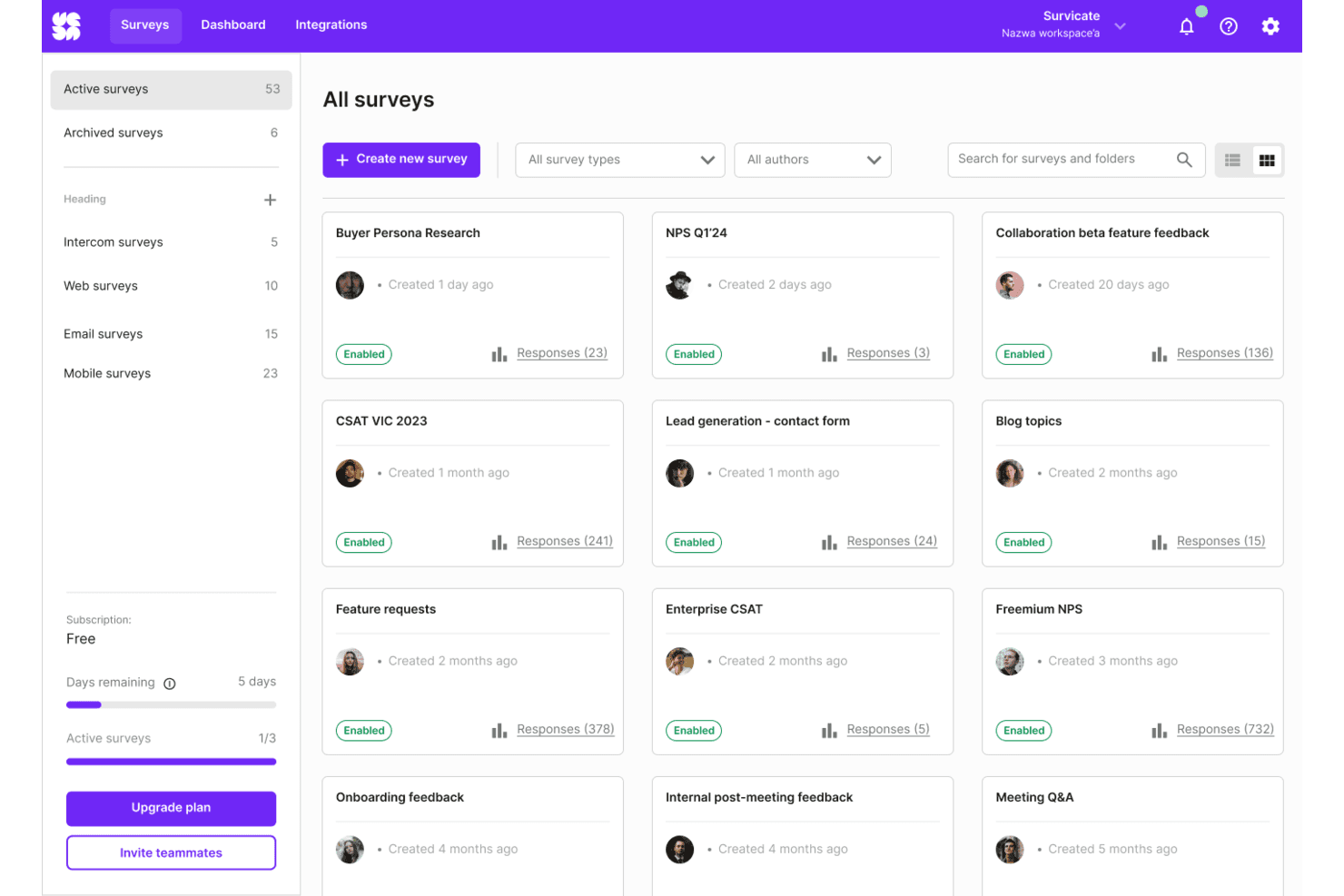
Survicate organizes all active surveys in a visual grid dashboard. Survicate is an online survey platform for CX, product, and support teams that need to collect customer insights, spot recurring friction, and guide service improvements.
Who Is Survicate Best For?
Survicate suits service operations teams that want to gather customer feedback across digital touchpoints and share findings with the teams responsible for service improvements.
Why I Picked Survicate
I picked Survicate among the best SurveyMonkey alternatives for its fit as “Best for multi-channel feedback.” I like that it collects responses through website, email, mobile app, and in-product surveys. Event-triggered prompts let me ask about a feature after use or customer satisfaction after a support interaction.
Survicate Key Features
- Survey templates: Start with templates for NPS, CSAT, CES, and product-market fit.
- Question branching: Use survey logic to show questions based on respondents’ answers.
- AI question suggestions: Get suggested questions when creating a survey.
- Response dashboards: View response segments, sentiment, and feedback trends over time.
Survicate Integrations
Survicate offers 40+ native integrations, including HubSpot, Salesforce, Slack, Zendesk, Intercom, and Klaviyo, plus Zapier. It also supports custom connections through webhooks and a Data Export API.
Pros and Cons
Pros:
- AI groups open-text responses into themes
- Event triggers capture feedback at key moments
- Surveys span web, email, mobile, and in-product
Cons:
- Cross-survey analysis may require exports
- Audience targeting and segmentation can feel limited
Learn more about Survicate: Best for conversational surveys
- Free plan available
- From $19/month (billed annually)
Visit WebsiteCustomer Rating:4.4/5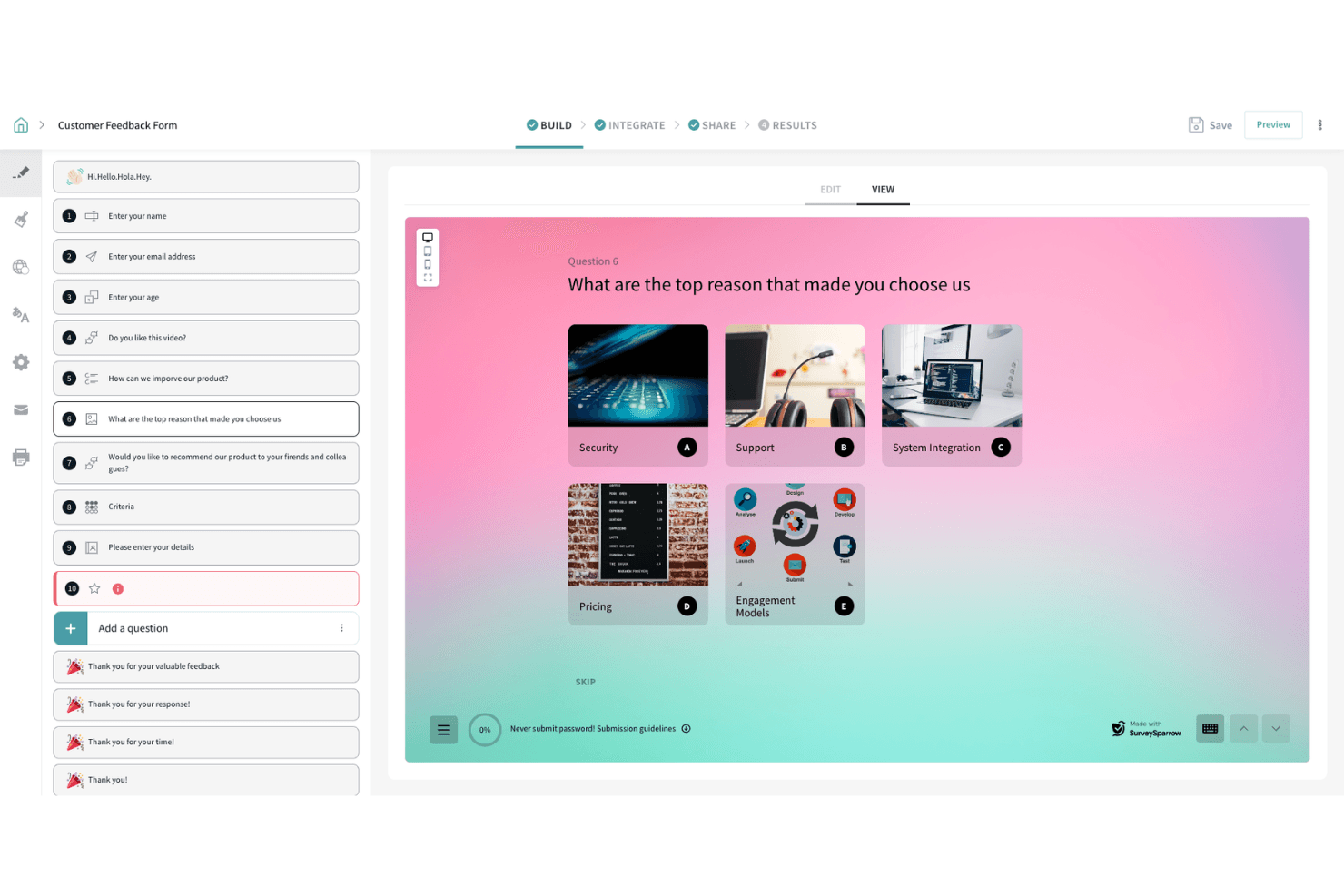
SurveySparrow lets users build image-choice questions for feedback forms. SurveySparrow helps customer experience and service teams collect feedback across touchpoints with chat-like surveys, making it a Best for conversational surveys option for teams comparing SurveyMonkey alternatives.
Who Is SurveySparrow Best For?
SurveySparrow suits customer experience teams that want to gather feedback during onboarding, support, and other service interactions.
Why I Picked SurveySparrow
I like SurveySparrow as a SurveyMonkey alternative because it’s Best for conversational surveys. Its chat-like surveys collect feedback during onboarding and after support interactions, capturing customer reactions in the moment across service touchpoints.
SurveySparrow Key Features
- Question branching: Route respondents to relevant questions based on earlier answers.
- Offline surveys: Collect responses on a mobile device without an internet connection.
- Scheduled reports: Send reports to your inbox on a chosen day, time, and frequency.
- Third-party integrations: Connect surveys with tools such as Salesforce, Zendesk, and Slack.
SurveySparrow Integrations
SurveySparrow lists 11 native integrations, including Zendesk, HubSpot, Slack, Intercom, Salesforce, Mailchimp, WordPress, Facebook Pixel, AWeber, and Zapier. It also offers an API and webhooks for custom integrations.
Pros and Cons
Pros:
- Offline mobile collection supports field teams
- Question branching creates tailored survey paths
- Chat-style surveys feel less like forms
Cons:
- Reporting options feel limited to reviewers
- Complex survey logic has limits
Learn more about SurveySparrow: Best for automating feedback-to-action workflows
- 7-day free trial
- From $26.25/user/month (billed annually)
Visit WebsiteCustomer Rating:4.4/5
Alchemer offers a feedback insights dashboard with sentiment distribution, ratings breakdown, and individual review cards filtered by date range. Alchemer is a survey and feedback platform for customer experience, research, and service teams that need to gather structured input and understand customer needs across touchpoints.
Who Is Alchemer Best For?
Alchemer suits customer experience and research teams that need to turn survey feedback into follow-up workflows and operational changes.
Why I Picked Alchemer
I picked Alchemer as a SurveyMonkey alternative for automating feedback-to-action workflows. Alchemer Connect can trigger surveys after support interactions and sync responses to Salesforce or Zendesk, where teams can launch follow-ups or create support tickets. I like that this links customer feedback to specific service actions.
Alchemer Key Features
- Survey logic: Use branching and skip logic to route respondents through relevant questions.
- Survey distribution: Share surveys through email, SMS, QR codes, and web links.
- Survey customization: Apply custom themes, dynamic content, and merge codes to tailor surveys.
- Multilingual surveys: Add translations and let respondents select an available language.
Alchemer Integrations
Alchemer offers built-in integrations with Salesforce, Zendesk, HubSpot, Google Sheets, and Slack, and connects with Zapier. It also provides a REST API for custom integrations, with API access limited to Enterprise accounts.
Pros and Cons
Pros:
- Privacy controls support sensitive customer surveys
- Automated routing helps trigger feedback follow-ups
- Flexible branching, randomization, and question logic
Cons:
- Reporting depth varies by plan
- Complex surveys can require custom scripting
Learn more about Alchemer: Best for AI-powered surveys
- 30-day free trial
- From $2,000/month (billed annually)
Visit WebsiteCustomer Rating:4.8/5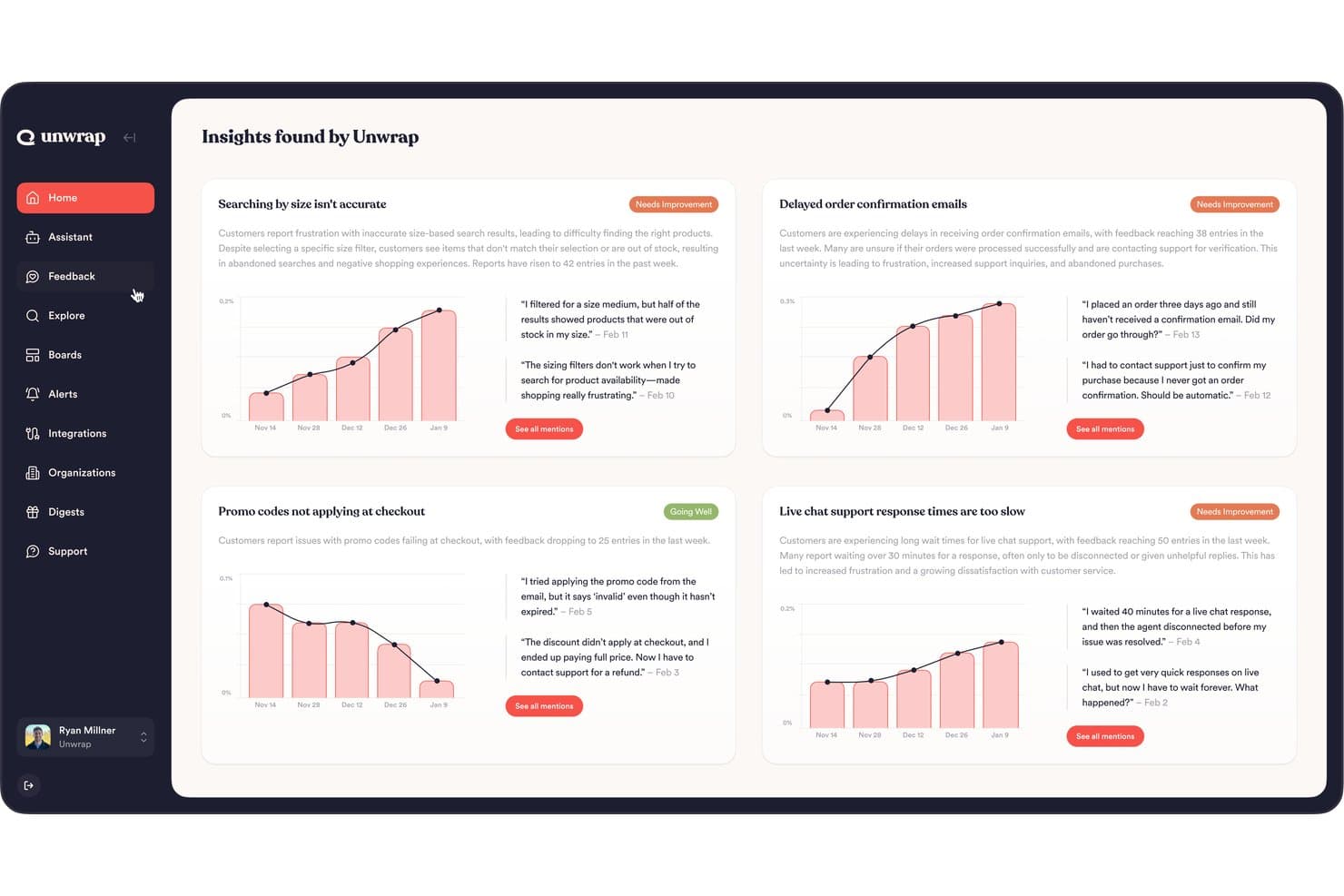
Unwrap surfaces AI-driven customer feedback insights across key issue categories. Unwrap gives customer experience and product teams a feedback platform that brings survey responses together with support conversations and reviews, helping them spot recurring customer issues and improve service and product decisions.
Who Is Unwrap Best For?
Unwrap suits customer experience and product teams that want AI-assisted surveys to gather and interpret customer feedback.
Why I Picked Unwrap
I picked Unwrap, my choice for Best for AI-powered surveys, because it brings survey responses together with support conversations and reviews. I use that combined feedback to spot recurring customer issues and inform product or service decisions, rather than reviewing survey results in isolation.
Unwrap Key Features
- Survey question types: Create rating, open-text, single-choice, multiple-choice, yes/no, and matrix questions.
- Survey delivery options: Send surveys by email, share a public link, or display them as website widgets.
- Conditional question paths: Route respondents to different questions based on yes/no, rating, or single-choice answers.
- On-site audience targeting: Set widget triggers by page, clicked element, or custom event, with optional audience conditions.
Unwrap Integrations
Unwrap has roughly 31 native integrations, including Qualtrics, Salesforce, Zendesk, HubSpot, and Intercom, and connects with Zapier. CSV imports and custom integrations are also available, with custom integrations offered on certain paid plans.
Pros and Cons
Pros:
- Detects emerging themes across customer feedback
- Combines survey responses with support and review feedback
- AI surveys ask intelligent follow-up questions
Cons:
- Less suited to one-off, quantitative-only research
- Taxonomy tuning takes time to refine
Learn more about Unwrap:
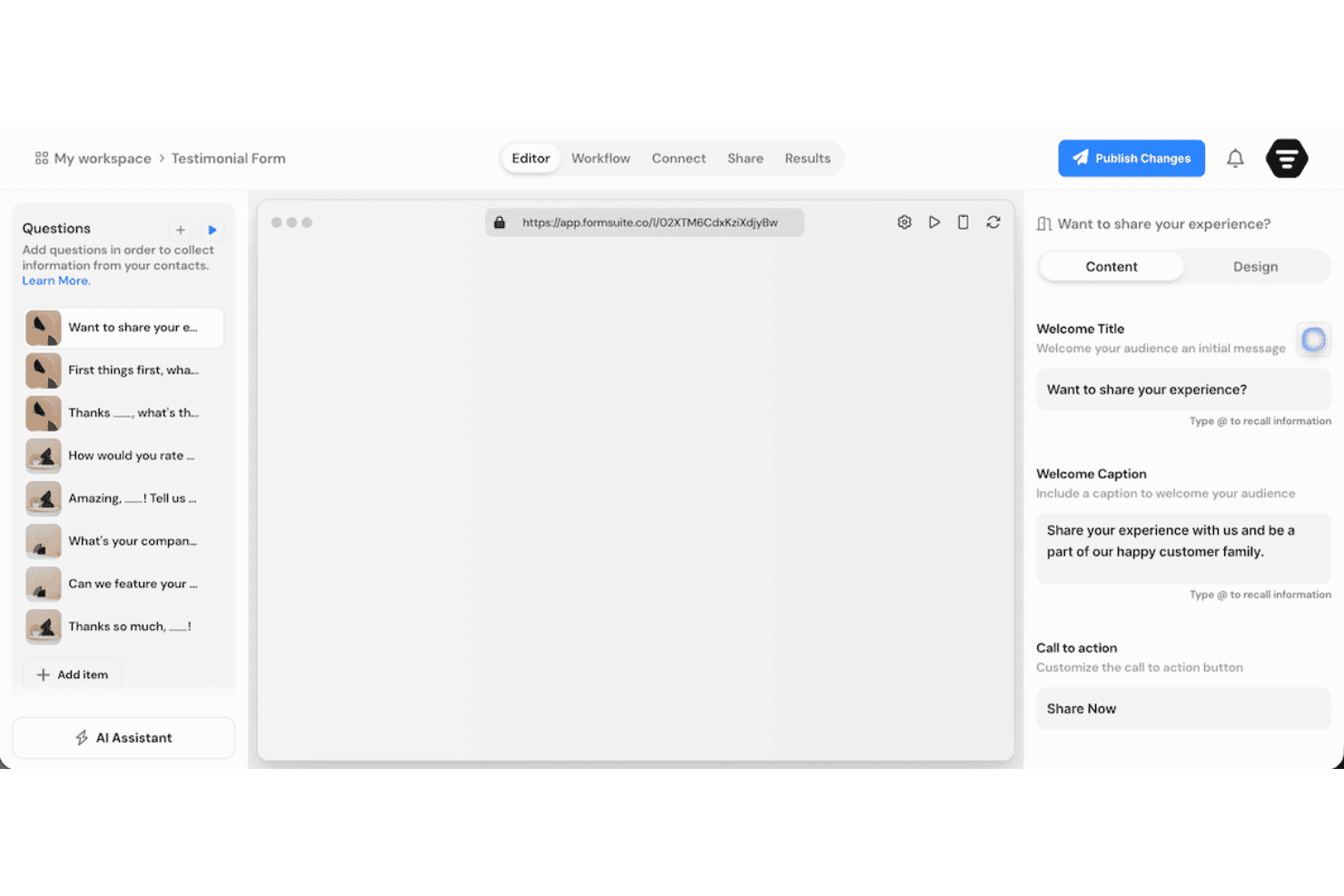
Formsuite lets users build and customize testimonial forms with ease. Formsuite is an online survey platform for customer experience teams that need to gather feedback, spot friction across support and onboarding, and improve service journeys.
Who Is Formsuite Best For?
Formsuite suits support and success teams that want to collect customer input through interactive, one-question-at-a-time forms.
Why I Picked Formsuite
I picked Formsuite as a SurveyMonkey alternative and my “Best for conversational forms” choice because it presents one question at a time in a chat-like flow. I like its conditional logic for routing customers to relevant follow-ups, such as asking about onboarding only when they report a setup issue. Answer recall can reference earlier responses, so customers don’t have to repeat themselves.
Formsuite Key Features
- Form analytics: Track submissions, completion rates, and question-level drop-offs.
- AI form creation: Generate forms from prompts with Formsuite’s AI builder.
- Templates: Start surveys from prebuilt form templates.
- Zapier integration: Send form submissions to connected apps through Zapier.
Formsuite Integrations
Formsuite lists Google Sheets, Notion, Airtable, Stripe, Slack, and Zapier as integrations, but doesn’t identify the first five as native connections. Zapier can send form responses and new contacts to connected apps; paid-plan webhooks also support custom endpoints and automation tools such as Make.com, n8n, and Pipedream.
Pros and Cons
Pros:
- AI summaries surface response themes quickly
- Conditional logic routes customers to relevant questions
- Conversational flows reduce survey fatigue
Cons:
- Customer service scored below usability
- Independent review evidence remains sparse
Learn more about Formsuite: Best for enterprise research tools
- Free demo available
- Pricing upon request
Visit WebsiteCustomer Rating:4.7/5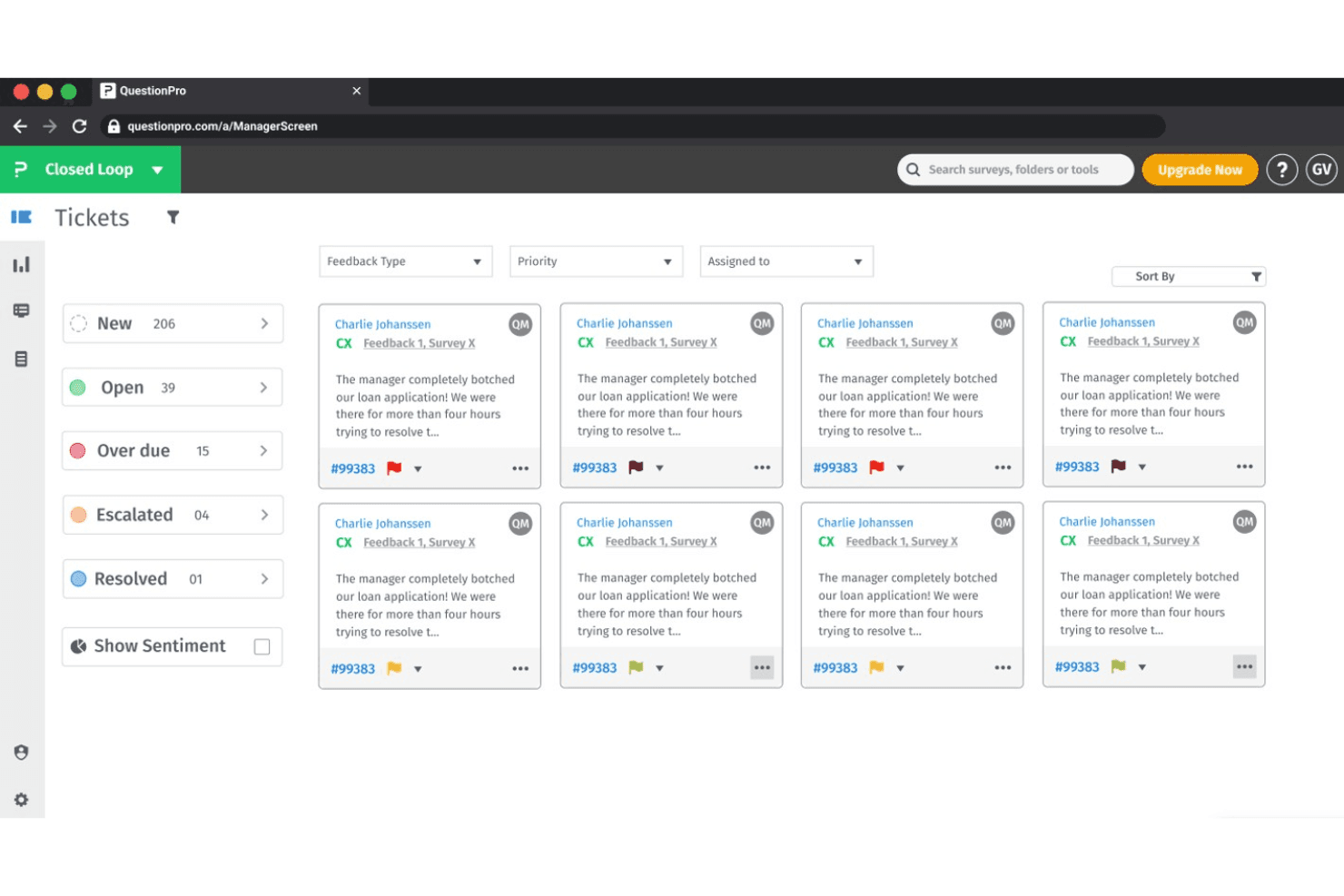
QuestionPro lets users manage customer feedback tickets by status and priority. For organizations managing complex feedback programs, QuestionPro is an online survey and research platform that helps CX and insights teams collect customer feedback, study audiences, and turn responses into decisions.
Who Is QuestionPro Best For?
QuestionPro suits enterprise insights and CX teams that run complex customer research programs across audiences and touchpoints.
Why I Picked QuestionPro
QuestionPro earns my pick as “Best for enterprise research tools” because it supports advanced studies beyond standard surveys. I use its Conjoint and MaxDiff analysis to compare product preferences or pricing trade-offs, then TURF analysis to assess which feature combinations reach the most customers. Role-based access and SSO also help research teams manage access across a larger organization.
QuestionPro Key Features
- Survey templates: Choose from prebuilt templates for customer feedback, employee evaluations, and research.
- Question types: Build surveys with options such as NPS, matrix, ranking, and open-ended questions.
- Survey logic: Use branching and skip logic to show respondents relevant questions.
- Offline surveys: Collect responses through the mobile app when an internet connection isn’t available.
QuestionPro Integrations
QuestionPro lists integrations with Salesforce, HubSpot, Microsoft Dynamics, Google Sheets, Tableau, Power BI, Slack, and Intercom; it also supports Zapier and provides an API and webhooks for custom connections.
Pros and Cons
Pros:
- Branching and piping handle complex questionnaires
- Offline mobile collection supports field research
- Built-in conjoint, MaxDiff, and TURF analysis
Cons:
- Complex survey logic takes time to verify
- Advanced reporting can overwhelm non-researchers
Learn more about QuestionPro: Best for real-time user feedback
- Free plan available
- From $19.99/month (billed annually)
Visit WebsiteCustomer Rating:4.6/5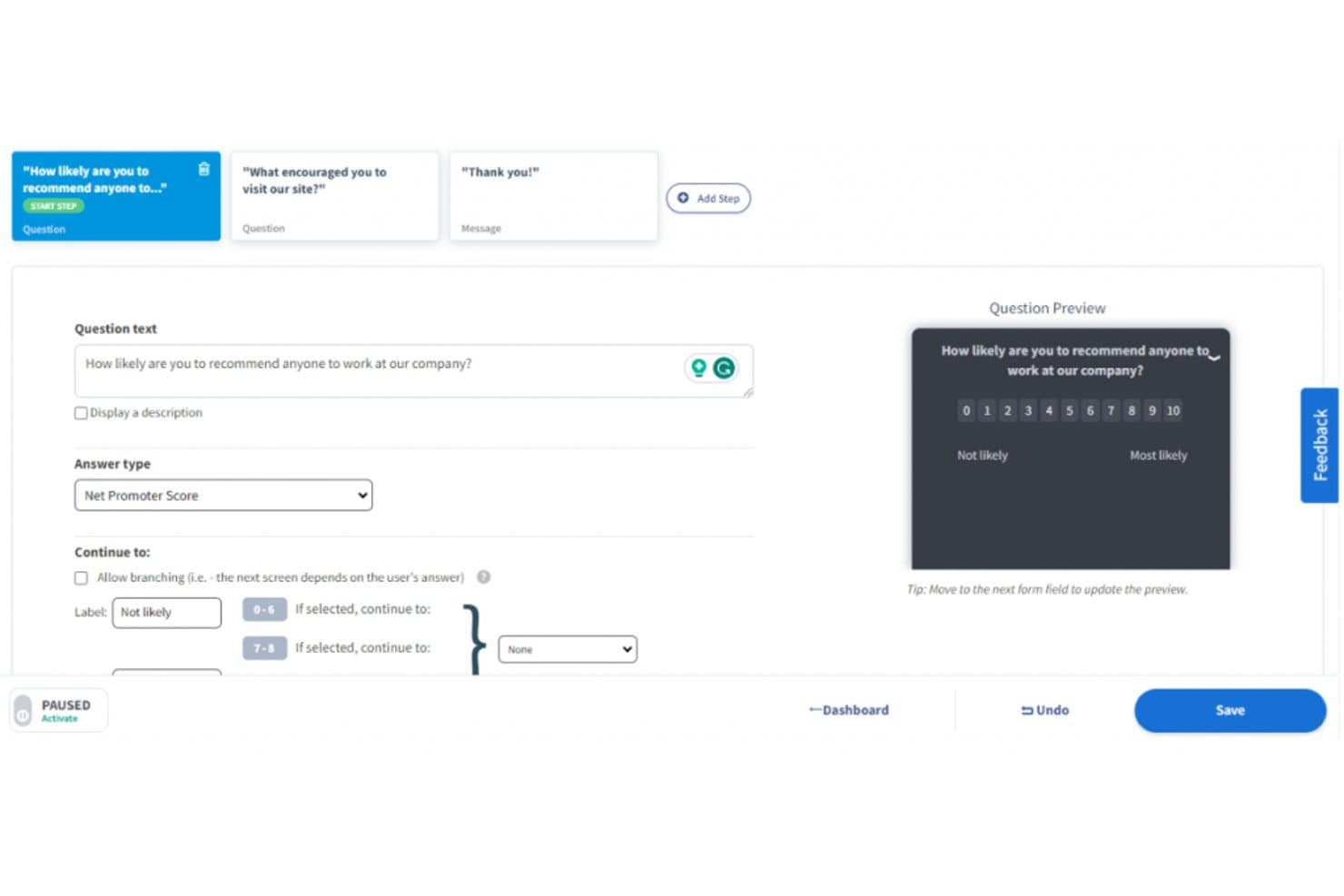
Qualaroo lets users build NPS surveys with branching logic. For CX and product teams comparing SurveyMonkey alternatives, Qualaroo is an online survey platform that places targeted questions across websites and apps to reveal user needs and locate experience friction.
Who Is Qualaroo Best For?
Qualaroo suits UX researchers and product managers who need contextual feedback from people as they navigate digital experiences.
Why I Picked Qualaroo
Best for real-time user feedback, Qualaroo is a SurveyMonkey alternative I picked for its on-site and in-app Nudges. I like that you can target questions by visitor behavior or page, such as asking about checkout friction while someone is still on the checkout page.
Qualaroo Key Features
- Survey question types: Choose from more than 10 types, including NPS, CES, and open-text questions.
- Question branching: Show follow-up questions based on a respondent’s answers.
- Sentiment analysis: Analyze open-text responses for sentiment, keywords, and emotional scores.
- Heatmaps and session recordings: Review clicks, scrolls, hesitation, and abandonment.
Qualaroo Integrations
Qualaroo documents integrations with Salesforce, Intercom, Slack, HubSpot, Google Analytics, Tableau, Power BI, Segment, and Zapier. It also offers Reporting and Custom Properties APIs for custom connections.
Pros and Cons
Pros:
- Pairs responses with heatmaps and session recordings
- Targets website and in-app surveys by behavior
- Captures feedback at specific journey moments
Cons:
- Audience rules can take trial and error
- Reporting dashboards offer limited customization
Learn more about Qualaroo: Best for Salesforce integration
- Free demo available
- Pricing upon request
Visit WebsiteCustomer Rating:4.4/5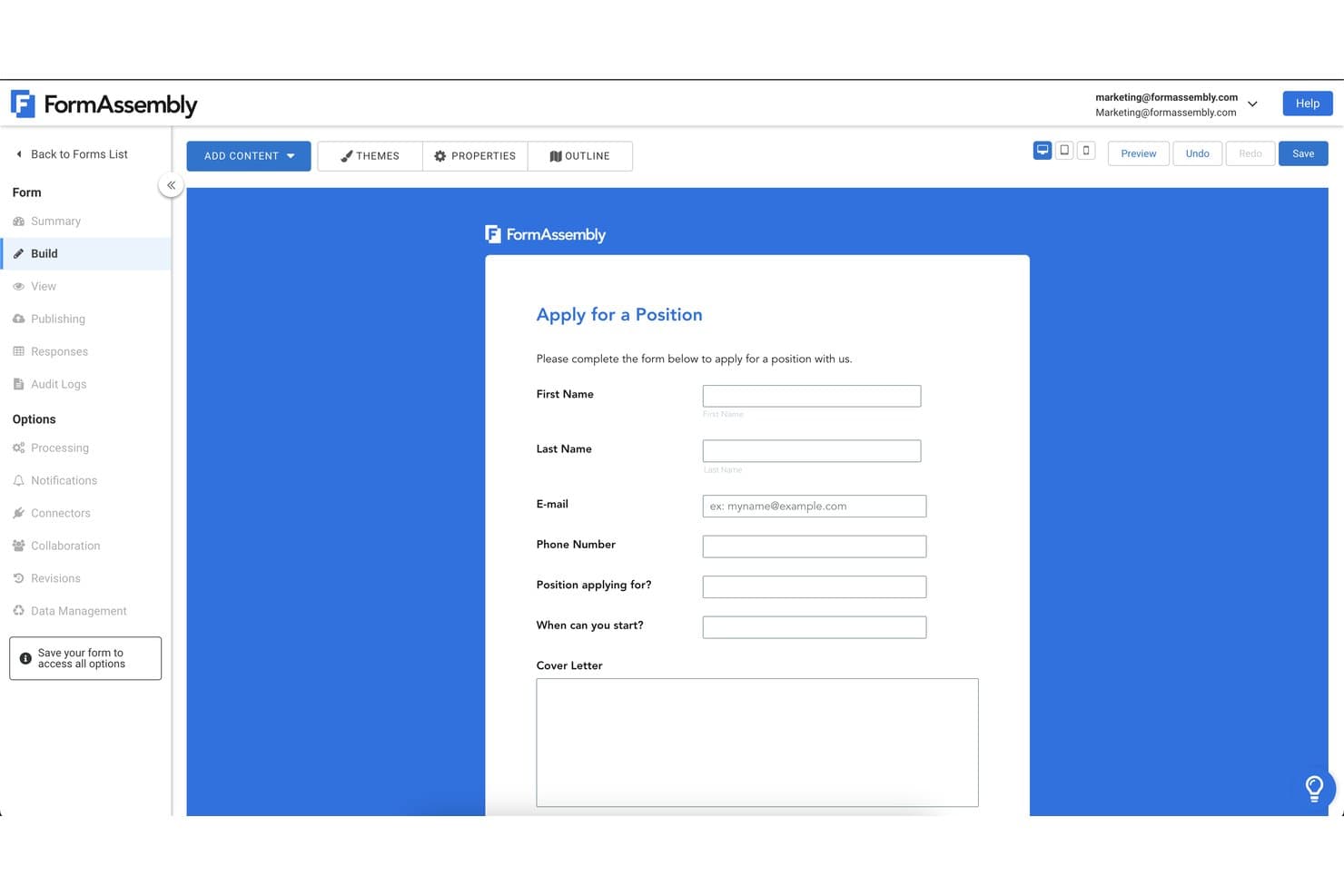
FormAssembly lets users build custom job application forms easily. FormAssembly is an online form and survey platform for customer experience teams that need to collect feedback, manage submissions, and connect responses to follow-up workflows.
Who Is FormAssembly Best For?
FormAssembly suits Salesforce-focused CX teams that need forms to capture customer data directly in their CRM.
Why I Picked FormAssembly
I picked FormAssembly as the “Best for Salesforce integration” option because its survey connector maps responses to standard or custom Salesforce objects and creates or updates records on submission. I also like its real-time prefill and dynamic picklists, which let a satisfaction survey show current Salesforce data and save feedback to the right customer record for follow-up.
FormAssembly Key Features
- Question types: Add open-text, multiple-choice, rating-scale, and date questions.
- Branching logic: Show or hide questions based on respondents’ answers.
- Branding customization: Apply your organization’s logo, colors, and fonts.
- Mobile-friendly design: Create surveys respondents can complete on mobile devices.
FormAssembly Integrations
FormAssembly offers 30+ native connectors, including Salesforce, HubSpot, Microsoft 365, Google Sheets, SharePoint, Excel, Stripe, PayPal, Google Drive, and Box; it also connects with Zapier. Webhooks and a REST API support custom integrations.
Pros and Cons
Pros:
- Supports multi-step workflows beyond simple surveys
- Custom styling keeps surveys on-brand
- Conditional logic supports detailed survey paths
Cons:
- Mobile respondents report occasional save failures
- Advanced logic takes time to configure
Learn more about FormAssembly: Best for AI-driven insights
- Free demo available
- Pricing upon request
Visit WebsiteCustomer Rating:4.3/5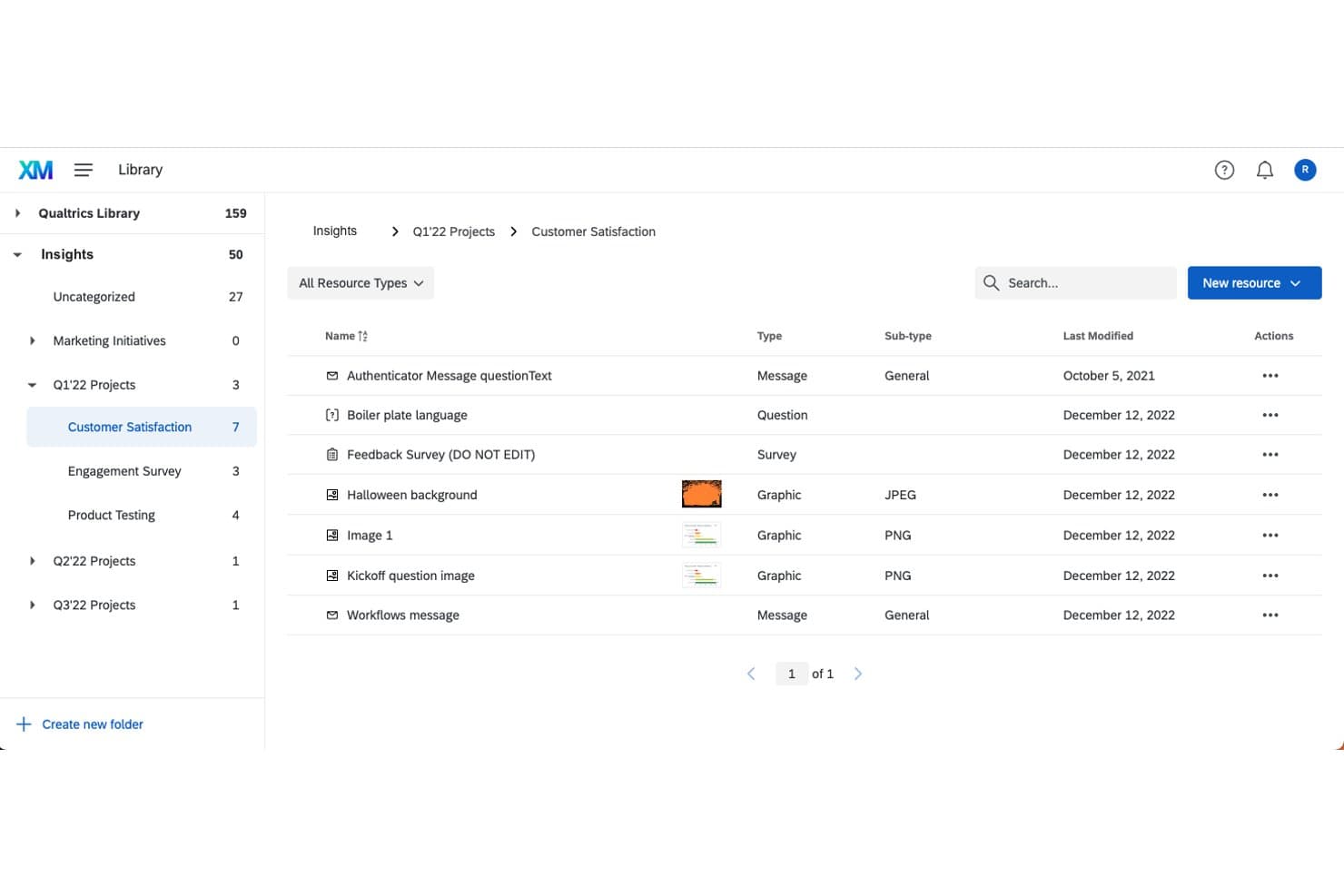
Qualtrics organizes survey assets in a structured library folder system. Qualtrics is an experience management and survey platform for customer experience teams that need to collect feedback across touchpoints, identify service friction, and guide improvements in support and operations.
Who Is Qualtrics Best For?
Qualtrics suits customer experience and service operations teams that need AI-assisted analysis to spot patterns in customer feedback and prioritize service improvements.
Why I Picked Qualtrics
I picked Qualtrics as a SurveyMonkey alternative for its AI-driven insights. Its Text iQ analyzes open-text survey responses for topics and sentiment, while dashboards help me spot recurring service issues. I use those patterns to pinpoint where customers get stuck and guide service improvements.
Qualtrics Key Features
- Omnichannel feedback capture: Collect feedback through calls, IVR, mobile, text, chat, chatbots, and SMS.
- Predictive analytics: Identify churn risks, operational opportunities, and agent-coaching needs.
- Feedback routing: Automatically send individual feedback to the appropriate team.
- Action plans: Assign collaborators, owners, and milestones, then track progress.
Qualtrics Integrations
Qualtrics offers out-of-the-box extensions for Salesforce, ServiceNow, Slack, Zendesk, HubSpot, Freshdesk, Microsoft Teams, and Tableau, plus Zapier; availability depends on your license, and extensions may require paid upgrades. It also provides an API for custom integrations.
Pros and Cons
Pros:
- Feedback routing assigns findings to action owners
- Predictive analytics flags churn and agent-coaching needs
- Text iQ groups open-text feedback by sentiment
Cons:
- Text iQ accuracy varies across non-English responses
- Complex setup can slow first-time survey teams
Andre alternativer til SurveyMonkey
Her er noen flere alternativer til SurveyMonkey som ikke kom med på kortlisten min, men som likevel er verdt å sjekke ut:
- 11FormstackBest for no-code form creation
- 12Zoho SurveyBest for data privacy focus
- 13LimeSurveyBest for self-hosting
- 14SurveyPlanetBest for unlimited free surveys
- 15SurveyKingBest for advanced question types
- 16Great QuestionBest for UX research integration
- 17TripettoBest for storyboard form design
- 18JotformBest for drag-and-drop form building
- 19TypeformBest for people-friendly forms
- 20MailchimpBest for email marketing integration
How I Evaluate SurveyMonkey Alternatives
I split my evaluation into two layers: the baseline capabilities a tool must have to run NPS, CSAT, and CES programs at scale, and the differentiators that set the best options apart for CX teams.
Core Functionality (Table Stakes For This List)
When I'm selecting tools for my list, I rank each one on a scale from 0 (does not offer the functionality) to 5 (excels in this area) for each core functionality listed below. Then, I calculate the tool's total score into a percentage. Each tool needs to achieve a minimum total score of 65% to be considered for inclusion.
- CX Survey Templates: I check whether each tool includes ready-to-deploy NPS, CSAT, and CES templates so teams can launch a feedback program in minutes rather than designing from scratch.
- Multi-Channel Survey Distribution: Reaching customers where they are matters, so I evaluate whether a tool supports email, SMS, web, in-app, and mobile survey delivery with unified tracking.
- Survey Logic & Branching: I look for conditional paths that adapt based on a respondent's input, like routing a detractor to a follow-up question while skipping promoters past it.
- Reporting & Analytics: Dashboards should let you segment responses by customer cohort, track score trends over time, and surface themes from open-ended answers without manual tagging.
- CX Platform Integrations: I evaluate native connections with CRMs, helpdesks, and CS platforms like Salesforce, Zendesk, and HubSpot to confirm respondent data syncs where teams already work.
- Closed-Loop Workflows: Tools that trigger alerts, create tickets, or assign follow-ups when a customer leaves negative feedback help CX teams act on insights before churn risk escalates.
Once I have a list of tools that meet this criteria, I consider what sets each platform apart.
Differentiating Factors (What Sets Vendors Apart)
Here's how I compare and contrast different vendors:
Standout Features
AI-powered text analytics is a major differentiator. I look for tools that automatically tag themes and detect sentiment across thousands of open-ended responses, saving hours of manual review. Benchmarking data also matters because knowing your NPS is 42 means little without industry context to compare against. Journey-based triggers are worth evaluating too, like sending a CES survey right after a support ticket closes instead of relying on manual batch sends.
Beyond Features
Data security is a priority since CX surveys collect customer PII. I check for GDPR and SOC 2 compliance, along with SSO and data residency options for teams running global programs. Scalability matters just as much—I evaluate whether a platform supports multi-language surveys and multi-brand setups under one account. I also consider ecosystem depth, particularly whether a tool connects to data warehouses like Snowflake or BI tools like Tableau for deeper CX analysis.
Hvorfor se etter et alternativ til SurveyMonkey?
Selv om SurveyMonkey er et godt valg av nettbasert spørreundersøkelsesprogramvare, finnes det flere grunner til at noen brukere ser etter alternative løsninger. Det kan hende du ser etter et alternativ til SurveyMonkey fordi:
- Du trenger mer avanserte tilpasningsmuligheter
- Du har et begrenset budsjett for premiumfunksjoner
- Du ønsker bedre integrasjonsmuligheter
- Du ønsker mer responsiv kundestøtte
- Teamet ditt trenger støtte for flere språk
- Du trenger bedre samsvar med kravene til personvern
Hvis noe av dette høres kjent ut, har du kommet til rett sted. Listen min inneholder flere alternativer for nettbasert spørreundersøkelsesprogramvare som passer bedre for team som møter disse utfordringene med SurveyMonkey og ser etter alternative løsninger.
Viktige funksjoner i SurveyMonkey
Her er noen av de viktigste funksjonene i SurveyMonkey, slik at du kan sammenligne hva alternative løsninger tilbyr:
- Tilpassbare maler: Hjelper deg med å velge mellom ulike maler for å tilpasse undersøkelsene dine til spesifikke behov, spare tid og sikre konsistens. Vishveshwar Jatain, grunnlegger av And/or Labs, har mye positivt å si om programvaren. "SurveyMonkey støtter ulike spørsmålsformater for innsamling av kvalitative og kvantitative data, inkludert vurderingsskalaer, åpne spørsmål og spørsmål med betinget logikk."
- Prediksjon av spørsmålstyper: Bruker AI-drevet teknologi til å foreslå de beste spørsmålsformatene, slik at du raskt kan lage effektive undersøkelser.
- Flerspråklig støtte: Hjelper deg med å lage undersøkelser på flere språk for å nå et bredere publikum, noe som gjør det enklere å innhente ulike innsikter.
- Avansert analyse: Analyserer dataene dine med effektive verktøy for filtrering og rapportering, slik at du kan avdekke trender og ta datadrevne beslutninger.
- Samarbeidsverktøy: Lar deg dele undersøkelser med teamet ditt, administrere tillatelser og sentralisere tilbakemeldinger for å styrke samarbeidet og effektivisere prosessene.
- Metoder for innsamling av svar: Lar deg bruke ulike kanaler, som e-post, QR-koder og sosiale medier, til å samle inn svar og sikre at du når målgruppen din. "Jeg fant også muligheten til å danne målgruppepaneler eller lage kortlister over undersøkelsesmålgrupper basert på bestemte demografiske kriterier og målrettingsparametere verdifull for å forbedre undersøkelsens nøyaktighet og svarenes relevans," la Vishveshwar Jatain til.
- Funksjoner for personvern: Bidrar til å sikre at dataene dine er trygge, med anonyme svar, passordbeskyttelse og samsvar med GDPR og CCPA.
- Integrasjonsmuligheter: Kobler deg til over 200 applikasjoner for å automatisere arbeidsflyter og øke produktiviteten i teamet ditt.