

Programvare for håndtering av kundeinteraksjoner hjelper CX- og supportteam med å få kontroll på kaoset fra flere kanaler – e-post, chat, sosiale medier og tale – slik at dere kan svare raskere, samarbeide bedre og levere konsekvente, personlig tilpassede opplevelser. Disse plattformene samler samtaler på ett sted, automatiserer ruting, synliggjør kontekst og gir tydelig analyse for å forbedre løsningstider, tilfredshet og teamets effektivitet.
Jeg har gjennomgått og testet disse verktøyene basert på graden av samarbeid, omnikanalstøtte, automatisering og kunstig intelligens, rapportering/analyse, integrasjoner (CRM, netthandel, telefoni), skalerbarhet og forholdet mellom pris og verdi. Denne veiledningen gir en oversikt over de beste alternativene, hvem de passer for, og hvilke avveininger du bør kjenne til, slik at du kan velge en plattform som passer teamets størrelse, bransje og supportmodell.
Why Trust Our Software Recommendations
6,700+
Reviews
20
Industry experts
16+
Evaluation factors
14
Years
Our team has been testing and reviewing software since 2012. As CX leaders ourselves, we know how difficult—and important—it is to choose the right software.
For this guide, we evaluated tools using hands-on testing and independent research, scoring tools using our selection criteria.
Our reviews reflect our human editorial judgment, not a sales pitch.
 Gui DrusinaCreative Director
 Tim FisherVP of AI
Sammenligningstabell: Programvare for håndtering av kundeinteraksjoner
Denne sammenligningstabellen oppsummerer prisdetaljer for mine beste utvalgte programmer for håndtering av kundeinteraksjoner.
| Tool | Best For | Trial Info | Price | ||
|---|---|---|---|---|---|
| 1 | Best for shared-inbox team collaboration | 30-day free trial | From $24/user/month (billed annually) | Website | |
| 2 | Best for marketplace integrations | 14-day free trial | From $19/user/month (billed annually) | Website | |
| 3 | Best for shared inbox management | 14-day free trial | From $25/user/month (billed annually) | Website | |
| 4 | Best for small teams | Free plan + free demo available | From $39.99/month | Website | |
| 5 | Best for sales teams | 14-day free trial | Pricing upon request | Website | |
| 6 | Best for social media integration | 30-day free trial | Pricing upon request | Website | |
| 7 | Best for large enterprises | Free demo available | From $75/user/month (billed annually) | Website | |
| 8 | Best for retail businesses | Free demo available | Pricing upon request | Website | |
| 9 | Best for appointment scheduling | Free demo available | Pricing upon request | Website | |
| 10 | Best for manufacturing firms | Free demo available | From $450/month | Website |


Anmeldelse av den beste programvaren for håndtering av kundeinteraksjoner
Nedenfor finner du mine detaljerte sammendrag av den beste programvaren for håndtering av kundeinteraksjoner som kom med på kortlisten. Anmeldelsene mine gir et detaljert innblikk i de viktigste funksjonene, fordelene og ulempene, integrasjonene og ideelle bruksområdene for hvert verktøy, slik at du kan finne det som passer best for deg.
 Best for shared-inbox team collaboration
- 30-day free trial
- From $24/user/month (billed annually)
Visit WebsiteCustomer Rating:4.8/5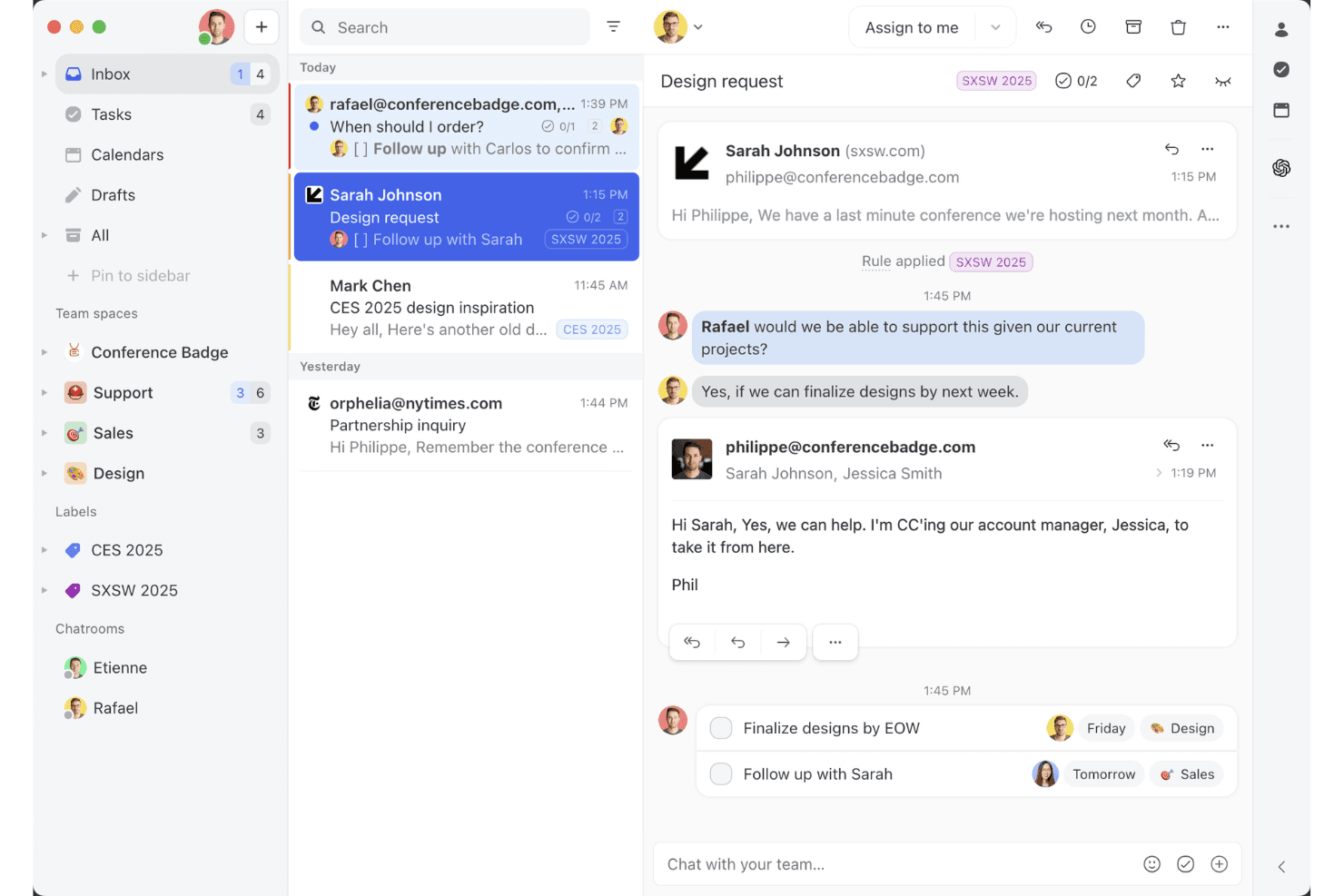
Missive offers a shared inbox feature for team collaboration. Missive is a shared-inbox platform that consolidates email, SMS, WhatsApp, Instagram DMs, Facebook Messenger, and live chat into a single interface, with built-in team collaboration, rule-based routing, and workflow automation.
Who Is Missive Best For?
Missive is a strong fit for small-to-medium support teams that handle high volumes of customer conversations across email, SMS, and social channels and need to collaborate internally without losing the thread.
Why I Picked Missive
Missive earns its spot on my shortlist because of how well it handles shared-inbox collaboration across a multi-channel support environment. I love that internal threads let teammates discuss a customer conversation without the customer ever seeing it, and that assignment rules with round-robin or least-busy routing keep queues moving without manual oversight. In practice, that means my team can handle email, SMS, WhatsApp, and Instagram DMs in one place while staying coordinated internally.
Missive Key Features
- AI-powered rules engine: AI rules analyze incoming messages for intent and urgency, then automatically label, escalate, or draft replies using Claude, GPT, or Gemini models.
- Canned responses with variables: Pre-built reply templates support dynamic variables like customer name and date, letting agents send consistent, personalized responses quickly.
- SOC 2 Type II compliance: Missive is independently audited and certified, with TLS encryption in transit, at-rest encryption, and optional SAML SSO on the Business plan.
- Shopify and CRM sidebar integrations: Agents can view customer order history from Shopify or pull live CRM records from HubSpot, Salesforce, or Pipedrive directly within a conversation.
- Missive MCP Server: Connect external AI tools (like Claude or ChatGPT) to query customer interaction threads, check calendars, and draft replies—while keeping agent review required before sending.
Missive Integrations
Missive offers native integrations with HubSpot, Salesforce, Pipedrive, Close, Daylite, and Shopify, plus REST API and webhooks for custom connections. It also supports Make, Relay.app, Integrately, Lindy.ai, Zapier, and its new MCP Server on Productive and Business plans (requires admin activation).
Pros and Cons
Pros:
- AI rules automate labeling, routing, drafting
- Multi-channel inbox centralizes all digital conversations
- Internal threads enable discreet team discussions
Cons:
- Lacks CSAT and sentiment analytics tools
- No native voice or chatbot included
Learn more about Missive: Best for marketplace integrations
- 14-day free trial
- From $19/user/month (billed annually)
Visit WebsiteCustomer Rating:4.4/5
Freshdesk offers a unified inbox view to simplify customer interaction management. Freshdesk is a customer interaction management platform that unifies email, chat, phone, and social messaging into a single omnichannel workspace, with AI-powered automation, ticketing, and a 1,200+ app marketplace for connecting your support stack.
Who Is Freshdesk Best For?
Freshdesk is well-suited to mid-size and enterprise support teams managing high volumes of customer interactions across multiple channels and regions.
Why I Picked Freshdesk
Freshdesk earns its spot on my shortlist because its marketplace depth is genuinely hard to match in the customer interaction management space. With 1,200+ apps, I can connect tools like Jira, Slack, Shopify, and Salesforce directly into the agent workspace without building custom middleware. I especially like the curated app collections, like the e-commerce and Office 365 bundles, which cut down the time I'd otherwise spend hunting for the right connectors.
Freshdesk Key Features
- Freddy AI Copilot: Assists agents in real time with reply suggestions, sentiment detection, and conversation summaries directly within the ticket view.
- Omnichannel ticketing: Consolidates customer conversations from email, chat, WhatsApp, phone, and social channels into a single unified inbox.
- Skill-based ticket routing: Automatically assigns incoming tickets to agents based on skill set, workload, or channel expertise.
- Custom analytics dashboards: Lets you build real-time reports tracking CSAT scores, ticket volumes, SLA compliance, and agent performance.
Freshdesk Integrations
Freshdesk offers 1,200+ marketplace integrations through the Freshworks Marketplace, including Slack, Microsoft Teams, Salesforce, Jira, Shopify, Google Calendar, Google Analytics, Playvox, and Aircall. It's also available on Zapier and provides an API for custom integrations.
Pros and Cons
Pros:
- Offers parent-child ticketing for complex issues
- Built-in gamification for agent ticket resolution
- Omnichannel ticketing spans email, chat, and social
Cons:
- Advanced reporting requires higher-tier plans
- Mobile app missing key desktop features
Learn more about Freshdesk: Best for shared inbox management
- 14-day free trial
- From $25/user/month (billed annually)
Visit WebsiteCustomer Rating:4.6/5
Front optimizes team collaboration with shared inbox management for clear communication. Front is a customer interaction management tool that excels in shared inbox management. It's designed for teams that need to collaborate on emails and messages efficiently, ensuring clear and organized communication.
Why I picked Front: It specializes in shared inbox management, offering features like email assignment that helps your team distribute workload effectively. The tool's internal comments allow team members to discuss emails privately without leaving the platform. Customizable workflows let you automate repetitive tasks, saving your team time. With analytics, you can track performance and optimize your team's communication strategies.
Standout features & integrations:
Features include customizable tagging that helps your team categorize and prioritize emails. The snooze function lets you temporarily remove emails from your inbox until you're ready to address them. Front's shared drafts feature allows your team to collaborate on responses before sending them out.
Integrations include Salesforce, Slack, Asana, Trello, HubSpot, Dropbox, Google Drive, Microsoft Teams, Zapier, and Intercom.
Pros and Cons
Pros:
- Shared drafts for collaboration
- Private internal commenting
- Effective email assignment
Cons:
- Occasional sync delays with email
- Basic mobile app functionality
Learn more about Front: Best for small teams
- Free plan + free demo available
- From $39.99/month
Visit WebsiteCustomer Rating:4.7/5
ProProfs Help Desk streamlines customer support for small teams. ProProfs Help Desk is a customer interaction management tool designed for small teams. It helps manage customer communications and support inquiries efficiently. Key functions include ticket management and multichannel support, making it ideal for businesses looking to enhance customer engagement.
Why I picked ProProfs Help Desk: It's tailored for small teams, offering features like a shared inbox and canned responses that simplify communication. SLA management ensures timely responses, while custom reporting provides insights into team performance. The tool's focus on collaboration is evident in its team collaboration features, making it stand out for small groups needing efficient interaction management.
Standout features & integrations:
Features include ticket management, which prioritizes customer queries for efficient resolution. Multichannel support allows interaction through email, chat, and social media, ensuring seamless communication. Customer satisfaction surveys help gather valuable feedback to maintain high service standards.
Integrations include Salesforce, Mailchimp, Trello, Slack, Google Analytics, Shopify, WordPress, Zendesk, Freshdesk, and Zoho CRM.
Pros and Cons
Pros:
- Automated ticket routing
- Multiple language support
- Customizable ticket views
Cons:
- Occasional performance lags
- Limited advanced features
Learn more about ProProfs Help Desk:

Pipedrive streamlines sales management by tracking leads and managing pipelines. Pipedrive is a customer management software tailored for sales teams. It helps sales professionals track leads, manage pipelines, and close deals efficiently, focusing on sales process management and organization.
Why I picked Pipedrive: It's designed specifically for sales teams, with features like deal tracking that help your team visualize sales processes. Pipedrive's customizable pipelines let you tailor the stages to fit your sales strategy. The tool's activity reminders ensure your team never misses a follow-up. With its intuitive interface, Pipedrive makes it easy for sales teams to stay organized and focused on closing deals.
Standout features & integrations:
Features include an insights dashboard that provides your team with a visual overview of performance metrics. The tool's sales forecasting helps anticipate revenue based on current deals. Additionally, Pipedrive offers goal-setting features that allow your team to set and track sales targets.
Integrations include Google Workspace, Microsoft Outlook, Slack, Trello, Mailchimp, Zapier, QuickBooks, Xero, HubSpot, and Asana.
Pros and Cons
Pros:
- Visual performance insights
- Strong activity reminder system
- Effective deal tracking
Cons:
- Occasional syncing issues with email
- Basic reporting features
Learn more about Pipedrive: Best for social media integration
- 30-day free trial
- Pricing upon request
Visit WebsiteCustomer Rating:4/5
Sprinklr manages social media interactions to enhance customer service and engagement. Sprinklr is a customer interaction management platform designed for businesses focusing on social media engagement. It helps teams manage customer interactions across various social media channels, enhancing customer service and engagement.
Why I picked Sprinklr: It's ideal for social media integration, offering features like unified messaging that lets your team manage all social interactions in one place. Its social listening capabilities allow you to monitor customer sentiments effectively. The platform's analytics provide insights into social media performance, helping you optimize strategies. Customizable dashboards ensure your team can track relevant metrics easily.
Standout features & integrations:
Features include advanced social listening tools that give you insights into customer conversations. The platform's sentiment analysis helps your team understand customer emotions and respond appropriately. Additionally, automated reporting saves time by providing detailed performance insights without manual effort.
Integrations include Facebook, X, Instagram, LinkedIn, YouTube, WhatsApp, Salesforce, Microsoft Dynamics, Zendesk, and ServiceNow.
Pros and Cons
Pros:
- Detailed reporting capabilities
- Excellent sentiment analysis
- Strong social media focus
Cons:
- Not ideal for small businesses
- Requires training for full use
Learn more about Sprinklr: Best for large enterprises
- Free demo available
- From $75/user/month (billed annually)
Visit WebsiteCustomer Rating:4.4/5
Genesys enhances enterprise customer service across multiple channels. Genesys provides customer interaction management solutions for customer service, engagement, and communication across multiple channels to improve customer experiences, aimed at large enterprises
Why I picked Genesys: It's designed for large enterprises, offering features like omnichannel routing that ensure your customers are connected to the right agent every time. Its workforce optimization tools help you manage and allocate resources efficiently. The platform supports complex workflows, making it suitable for large-scale operations. Real-time analytics provide insights into customer interactions, allowing you to make data-driven decisions.
Standout features & integrations:
Features include advanced call routing that directs customers to the appropriate department quickly. Its workforce management tools help your team schedule and manage shifts efficiently. Additionally, the platform offers customer journey mapping, enabling you to visualize and enhance customer experiences across touchpoints and avoid churns.
Integrations include Salesforce, Microsoft Dynamics 365, Zendesk, ServiceNow, Google Cloud, Amazon Web Services, Twilio, Zoom, Slack, and Oracle.
Pros and Cons
Pros:
- Extensive reporting options
- Detailed customer journey mapping
- Strong omnichannel capabilities
Cons:
- Requires ongoing technical support
- Complex initial setup process with steep learning curve for new users


Gladly streamlines retail customer service with unified, personalized interactions. Gladly is a customer interaction management platform designed for retail businesses. It focuses on enhancing customer service by providing a unified view of customer interactions across various channels, helping teams deliver personalized support.
Why I picked Gladly: It's tailored for retail businesses, featuring a single customer view that consolidates all interactions, enabling your team to provide personalized service. The tool's built-in chat and messaging features allow you to communicate with customers in real time. With its customer timeline, your team can track past interactions to better understand customer needs. Its focus on customer service makes it ideal for retail environments where personalized support is crucial.
Standout features & integrations:
Features include a robust self-service portal that empowers customers to find answers independently. The platform's voice capabilities let your team handle phone interactions efficiently. Additionally, its reporting tools provide insights into customer service performance, helping you identify areas for improvement.
Integrations include Salesforce, Shopify, Zendesk, Slack, Zapier, Magento, Google Calendar, Mailchimp, Twilio, and Stripe.
Pros and Cons
Pros:
- Suitable for high-volume retailers
- Comprehensive customer timeline
- Unified customer interaction view
Cons:
- Not ideal for non-retail sectors
- Higher cost for small businesses
Learn more about Gladly:

Q-nomy optimizes appointment scheduling and customer flow management for businesses. Q-nomy is a customer interaction management tool focused on appointment scheduling and customer flow management. It's designed for businesses that need to manage customer appointments efficiently, providing a streamlined experience for both staff and customers.
Why I picked Q-nomy: It's tailored for appointment scheduling, offering features like online booking and queue management that cater to businesses with high customer traffic. Its real-time analytics help your team monitor and adjust schedules to optimize customer flow. The tool's customization options allow you to adapt the system to your specific needs. With its focus on improving customer experience, Q-nomy ensures appointments are managed smoothly and efficiently.
Standout features & integrations:
Features include real-time queue management that helps your team keep track of customer flow and minimize wait times. The system's reporting tools provide detailed insights into appointment trends and staff performance. Additionally, its customizable interface allows you to tailor the scheduling process to fit your business requirements.
Integrations include Salesforce, Microsoft Dynamics, SAP, Oracle, Google Calendar, Outlook, Zoom, Twilio, Slack, and Mailchimp.
Pros and Cons
Pros:
- Suitable for high-traffic environments
- Customizable scheduling options
- Strong focus on appointment management
Cons:
- Limited to appointment-based businesses
- Complex setup and configuration
Learn more about Q-nomy:

CIMcloud streamlines order management and customer support for manufacturing firms. CIMcloud is a customer interaction management platform tailored for manufacturing firms. It focuses on enhancing business processes like order management and customer support to improve efficiency in manufacturing settings.
Why I picked CIMcloud: It caters specifically to manufacturing firms, offering features like order tracking and inventory management that align with industry needs. Its customer portals allow clients to access information directly, reducing your team's workload. The platform's ERP integration ensures that all your business functions are connected, aiding in smooth operations. Customizable dashboards provide insights into performance metrics, helping your team make informed decisions.
Standout features & integrations:
Features include a sales portal that empowers your sales team to manage orders, track inventory, and handle customer inquiries efficiently. The platform also offers customizable reporting tools that allow you to generate insights specific to your business needs. Additionally, its user-friendly interface ensures your team can adopt the system quickly without extensive training.
Integrations include QuickBooks, Salesforce, Microsoft Dynamics, Sage 100, UPS, FedEx, Shopify, Magento, PayPal, and Authorize.Net.
Pros and Cons
Pros:
- Direct customer portal access
- ERP integration capabilities
- Strong order management
Cons:
- Limited customization options
- Requires technical setup with steep learning curve
Learn more about CIMcloud:
Annen programvare for håndtering av kundeinteraksjoner
Her er noen flere alternativer for programvare for håndtering av kundeinteraksjoner som ikke kom med på kortlisten min, men som likevel er verdt å undersøke:
- 11Help ScoutBest for remote teams
- 12ZendeskBest for AI-powered ticket automation
- 13Zoho DeskBest for workflow automation
- 14Agentforce Service (formerly Service Cloud)Best for CRM integration
- 15TaskRayBest with Salesforce-native integration
- 16IntercomBest for live chat support
- 17KayakoBest for small business support
- 18DialpadBest for voice communication
- 19OzonetelBest for contact center solutions
- 20Adobe Experience CloudBest for personalized marketing
How I Evaluate Customer Interaction Management Software
I split my evaluation into two layers: the baseline requirements every platform must meet—like omnichannel routing and unified interaction history—and the differentiators that reveal which tools CX teams will actually rely on.
Core Functionality (Table Stakes For This List)
When I'm selecting tools for my list, I rank each one on a scale from 0 (does not offer the functionality) to 5 (excels in this area) for each core functionality listed below. Then, I calculate the tool's total score into a percentage. Each tool needs to achieve a minimum total score of 75% to be considered for inclusion.
- Omnichannel Communication Support: I check whether a platform brings email, live chat, voice, SMS, and social channels into a single system so agents aren't toggling between disconnected tools during a conversation.
- Unified Customer Interaction History: Every touchpoint—a chat from last week, a call from last month, a social DM from yesterday—should roll up into one searchable, chronological timeline per customer.
- Intelligent Routing & Queuing: I evaluate how the platform assigns incoming interactions, looking for skills-based routing, SLA-aware prioritization, and queue management beyond simple round-robin distribution.
- Automation & Workflow Tools: I look for triggered workflows, chatbot builders, and macro support that let teams automate repetitive tasks like tagging tickets, sending follow-ups, or escalating stale conversations.
- Interaction Analytics & Reporting: Dashboards should surface metrics like first response time, resolution rate, and agent utilization with enough filtering to compare performance across channels, teams, or time periods.
- CRM & Third-Party Integrations: The platform should connect to widely used CRMs like Salesforce or HubSpot and offer open APIs or webhooks so customer data stays synchronized across the broader tech stack.
Once I have a list of tools that meet this criteria, I consider what sets each platform apart.
Differentiating Factors (What Sets Vendors Apart)
Here's how I compare and contrast different vendors:
Standout Features
Generative AI assistance is a big differentiator. I look for platforms where agents get AI-drafted replies and conversation summaries that reduce handling time during busy periods. Proactive engagement triggers add real value too. A platform that sends a chat invite when a customer stalls on a checkout page turns support into an active retention tool. I also evaluate real-time sentiment analysis, which helps supervisors spot frustrated customers and intervene before a routine inquiry becomes an escalation.
Beyond Features
Security and compliance matter when your platform handles sensitive customer data. I check for SOC 2 Type II certification, data residency options, and role-based access controls that let you restrict agent visibility by team or region. Implementation and time-to-value also shape my evaluation. A platform with prebuilt workflow templates and guided onboarding gets a CX team operational faster than one that requires weeks of custom configuration. I also consider pricing transparency, especially whether AI features and additional channels come bundled or carry separate costs.
Slik velger du programvare for håndtering av kundeinteraksjoner
Det er lett å gå seg vill i lange funksjonslister og komplekse prismodeller. For å hjelpe deg med å holde fokus mens du går gjennom den unike prosessen med å velge programvare, får du her en sjekkliste over faktorer du bør ha i tankene:
| Faktor | Hva du bør vurdere |
| Skalerbarhet | Forsikre deg om at programvaren kan vokse sammen med virksomheten din. Se etter løsninger som støtter et økende antall kundeinteraksjoner og utvidelse av teamet uten ytelsesproblemer. |
| Integrasjoner | Kontroller om programvaren kan integreres med de eksisterende verktøyene dine, for eksempel CRM-systemer, e-postplattformer og kanaler for sosiale medier, slik at arbeidsflyten blir mer effektiv. |
| Tilpasningsmuligheter | Vurder hvor mye du kan tilpasse programvaren til teamets prosesser. Tilpassbare arbeidsflyter og kontrollpaneler kan øke produktiviteten betydelig. |
| Brukervennlighet | Velg et brukervennlig grensesnitt som minimerer opplæringstiden. Teamet ditt bør kunne navigere raskt og effektivt i systemet. |
| Budsjett | Tilpass prisen på programvaren til budsjettet ditt. Vurder de totale kostnadene, inkludert eventuelle skjulte gebyrer, og sørg for at verdien rettferdiggjør utgiftene. |
| Sikkerhetstiltak | Kontroller programvarens tiltak for databeskyttelse. Sørg for at den følger bransjestandarder og tilbyr funksjoner som kryptering og tilgangskontroller. |
| Kundestøtte | Se etter tilgjengelige supportalternativer, inkludert chat, telefon og e-post. Sørg for at det finnes en kunnskapsbase for selvbetjent hjelp. |
| Rapporteringsfunksjoner | Vurder kvaliteten på analyse- og rapporteringsverktøyene. Du trenger innsikt i kundeinteraksjonene for å kunne ta informerte beslutninger og forbedre tjenesten. |
Trender innen programvare for håndtering av kundeinteraksjoner
I arbeidet med undersøkelsen hentet jeg inn utallige produktoppdateringer, pressemeldinger og lanseringslogger fra ulike leverandører av programvare for håndtering av kundeinteraksjoner. Her er noen av de fremvoksende trendene jeg følger med på:
- KI-drevne innsikter: KI utvikler seg for å tilby dypere innsikt i kundenes atferd og preferanser. Denne trenden hjelper bedrifter med å tilpasse interaksjoner og forutse kundenes behov. Leverandører som Salesforce integrerer avanserte KI-verktøy for å forbedre beslutningstaking og tjenestekvalitet.
- Omnikanalopplevelser: Flere leverandører fokuserer på å tilby helhetlige kundeopplevelser på tvers av alle kanaler. Denne trenden er avgjørende ettersom kundene forventer ensartet service enten de bruker sosiale medier, e-post eller telefon. Plattformer som Freshdesk Omni går foran med integrert omnikanalstøtte.
- Integrasjon av tale og video: Fremveksten av tale- og videokommunikasjon i kundestøtten skaper store endringer. Disse funksjonene muliggjør mer personlige interaksjoner og raskere løsninger. Verktøy som Zoom integreres i økende grad i kundeserviceplattformer for å støtte denne trenden.
- Sentimentanalyse: Sentimentanalyse i sanntid blir en avgjørende faktor for å forstå kundenes følelser. Dette hjelper teamene med å svare bedre og forbedre tilfredsheten. Selskaper som Intercom bruker sentimentanalyse til å tilpasse interaksjoner basert på kundenes sinnsstemning.
- Kartlegging av kundereisen: Leverandørene forbedrer verktøyene som kartlegger hele kundereisen. Denne trenden hjelper bedrifter med å visualisere og optimalisere hvert kontaktpunkt, noe som forbedrer den samlede kundeopplevelsen. Adobe Experience Cloud er et eksempel på en plattform som tilbyr avanserte funksjoner for kartlegging av kundereisen.
Hva er programvare for håndtering av kundeinteraksjoner?
Programvare for håndtering av kundeinteraksjoner hjelper bedrifter med å organisere og forbedre kundekommunikasjon på tvers av kanaler som e-post, chat, sosiale medier og telefon. Den samler interaksjoner på ett sted, sporer samtaler og bruker verktøy som automatisering og KI for å forbedre responstiden, tilpasse opplevelser og styrke kunderelasjoner.
Funksjoner i programvare for håndtering av kundeinteraksjoner
Når du velger programvare for håndtering av kundeinteraksjoner, bør du se etter følgende viktige funksjoner:
- Omnikanalstøtte: Håndterer kundeinteraksjoner på tvers av ulike plattformer som e-post, chat og sosiale medier, og sikrer enhetlig kommunikasjon.
- KI-drevne innsikter: Gir datadrevet innsikt i kundenes atferd og preferanser for å tilpasse interaksjoner og forbedre beslutningstaking.
- Sentimentanalyse: Analyserer kundenes følelser i sanntid, slik at teamene kan tilpasse svarene og forbedre tilfredsheten.
- Automatisert saksregistrering: Effektiviserer prosessen med å tildele og håndtere kundehenvendelser, noe som sparer tid og reduserer feil.
- Tilpassbare arbeidsflyter: Gjør det mulig å tilpasse prosessene til teamets spesifikke behov, noe som øker produktiviteten og effektiviteten.
- Kartlegging av kundereisen: Visualiserer hele kundeopplevelsen og hjelper bedrifter med å optimalisere hvert kontaktpunkt og forbedre tjenesten.
- Rapportering i sanntid: Gir innsikt i teamets resultater og kundeinteraksjoner, slik at du kan ta velinformerte beslutninger.
- Selvbetjeningsportal: Gjør kundene i stand til å finne svar på egen hånd, noe som reduserer belastningen på kundestøtteteamene.
- Integrasjon av tale og video: Forbedrer kommunikasjonen ved å muliggjøre mer personlige interaksjoner og raskere løsninger gjennom tale- og videosamtaler.
- Kunnskapsbase: Tilbyr et sentralisert arkiv med artikler og veiledninger, slik at kunder og teammedlemmer raskt får tilgang til informasjon.
Fordeler med programvare for håndtering av kundeinteraksjoner
Implementering av programvare for håndtering av kundeinteraksjoner gir flere fordeler for teamet og virksomheten din. Her er noen av fordelene du kan se frem til:
- Bedre kundetilfredshet: Ved å håndtere interaksjoner på tvers av flere kanaler og tilpasse svarene kan teamet ditt oppnå fornøyde kunder.
- Økt effektivitet: Automatisert saksregistrering og tilpassbare arbeidsflyter reduserer manuelle oppgaver, slik at teamet kan fokusere på viktigere saker.
- Datadrevne beslutninger: KI-drevne innsikter og rapportering i sanntid gir verdifulle data som hjelper deg med å ta velinformerte forretningsbeslutninger.
- Bedre teamsamarbeid: Funksjoner som delte innbokser og interne kommentarer gjør det mulig for teamet å samarbeide effektivt om kundehenvendelser.
- Bedre kundeinnsikt: Sentimentanalyse og kartlegging av kundereisen gir deg en dypere forståelse av kundenes behov og preferanser.
- Kostnadsbesparelser: Selvbetjeningsportaler og kunnskapsbaser gjør kundene i stand til å finne løsninger på egen hånd, noe som reduserer etterspørselen etter hjelp fra kundestøtteteamet.
- Raskere problemløsning: Integrasjon av tale og video muliggjør mer personlig og raskere kommunikasjon, noe som fremskynder problemløsningen.
Kostnader og priser for programvare for håndtering av kundeinteraksjoner
Valg av programvare for håndtering av kundeinteraksjoner krever en forståelse av de ulike prismodellene og planene som er tilgjengelige. Kostnadene varierer basert på funksjoner, teamstørrelse, tillegg og mer. Tabellen nedenfor oppsummerer vanlige planer, gjennomsnittsprisene deres og typiske funksjoner som er inkludert i programvareløsninger for håndtering av kundeinteraksjoner:
Sammenligningstabell for programvare for håndtering av kundeinteraksjoner
| Plantype | Gjennomsnittspris | Vanlige funksjoner |
| Gratisplan | $0 | Grunnleggende supportsystem, e-poststøtte og begrenset rapportering. |
| Personlig plan | $5-$25/ bruker/måned | E-poststøtte, grunnleggende analyse og begrensede integrasjoner. |
| Bedriftsplan | $30-$60/ bruker/måned | Støtte på flere kanaler, tilpassbare arbeidsflyter og avansert rapportering. |
| Virksomhetsplan | $70-$120/ bruker/måned | Omnikanalstøtte, KI-innsikt, sentimentanalyse og full tilpasning. |
Vanlige spørsmål om programvare for håndtering av kundeinteraksjoner
Her er noen svar på vanlige spørsmål om programvare for håndtering av kundeinteraksjoner:
Hva er forskjellen mellom CRM og CIM?
CRM fokuserer på helhetlig håndtering av kunderelasjoner, mens CIM fokuserer på å håndtere individuelle interaksjoner på tvers av ulike kanaler. CRM hjelper deg med å utvikle langsiktige relasjoner, mens CIM handler om å håndtere spesifikke kundeinteraksjoner effektivt.
Hva er de tre største utfordringene innen kunderelasjonshåndtering?
De største utfordringene omfatter manglende kommunikasjon, manglende bruk på tvers av hele organisasjonen og manglende teknologiintegrasjon. Disse problemene kan hindre en effektiv implementering av CRM-systemer og påvirke hvor godt teamet ditt kan håndtere kundeinteraksjoner.
Hvordan vurderer du hvor effektiv CIM-programvaren er?
Vurder hvor effektiv CIM-programvaren er ved å se på hvilken innvirkning den har på kundetilfredshet, svartider og teamets produktivitet. Se etter forbedringer i måltall for kundeengasjement, og ta hensyn til tilbakemeldinger fra både kunder og teammedlemmer.
Hvorfor er omnikanalstøtte viktig i CIM-programvare?
Omnikanalstøtte er avgjørende fordi den sikrer konsekvent kommunikasjon på alle kontaktpunkter med kundene. Den gjør det mulig for teamet ditt å håndtere interaksjoner via e-post, chat, sosiale medier og telefon fra én enkelt plattform, noe som forbedrer kundeopplevelsen.
Hvordan kan KI-basert innsikt være til nytte for kundeserviceteamet mitt?
KI-basert innsikt kan analysere kundedata for å gi handlingsrettede anbefalinger, slik at teamet ditt kan tilpasse interaksjoner og forutse kundenes behov. Dette fører til økt kundetilfredshet og kundelojalitet samt mer effektiv tjenesteleveranse.
Hva bør jeg vurdere når jeg velger CIM-programvare for virksomheten min?
Vurder faktorer som skalerbarhet, integrasjonsmuligheter, brukervennlighet og kostnad. Sørg for at programvaren er i tråd med virksomhetens mål og kan støtte teamets spesifikke behov ved håndtering av kundeinteraksjoner.