

Det kan være krevende å administrere et kundesenter. Du må håndtere kundenes behov, teamets prestasjoner og det konstante presset om å forbedre servicen. Det er her programvare for kombinerte kundesentre kommer inn. Den hjelper deg med å balansere innkommende og utgående samtaler, slik at jobben blir enklere for teamet og kundene blir mer fornøyde.
Jeg har brukt tid på å teste og vurdere disse verktøyene for å gi deg en objektiv oversikt over de beste alternativene som finnes. I denne artikkelen deler jeg mine beste anbefalinger, med fokus på hva hvert verktøy gjør best og hvordan de kan passe til dine behov.
Enten du ønsker å øke effektiviteten eller forbedre kundetilfredsheten, finner du den rette løsningen her. La oss se nærmere på alternativene og finne den perfekte løsningen for teamet ditt.
Hvorfor du kan stole på våre programvareanbefalinger
6,700+
Reviews
20
Industry experts
16+
Evaluation factors
14
Years
Teamet vårt har testet og anmeldt programvare siden 2012. Vi er selv CX-ledere, så vi vet hvor vanskelig og hvor viktig det er å velge riktig programvare.
I denne guiden har vi vurdert verktøyene gjennom praktisk testing og uavhengig research og gitt dem poeng ut fra våre utvelgelseskriterier.
Anmeldelsene våre bygger på vår egen redaksjonelle vurdering. De er ikke et salgsargument.
 Gui DrusinaCreative Director
 Tim FisherVP of AI
Sammenligningstabell for programvare til kombinerte kundesentre
Denne sammenligningstabellen oppsummerer prisdetaljene for mine beste utvalgte programmer for kombinerte kundesentre:
| Tool | Best For | Trial Info | Price | ||
|---|---|---|---|---|---|
| 1 | Best for team collaboration | Free trial available | From $15/user/month (billed annually) | Website | |
| 2 | Best for real-time call monitoring | 14-day free trial | From $25/user/month (billed annually) | Website | |
| 3 | Best for building custom AI agents at scale | Free demo available | Pricing upon request | Website | |
| 4 | Best for remote teams | 7-day free trial + free demo available | From $15/user/month (billed annually) | Website | |
| 5 | Best for AI features | Free demo available | Pricing upon request | Website | |
| 6 | Best for sales teams | Free demo available | Pricing upon request | Website | |
| 7 | Best for small businesses | 14-day free trial + free demo available | Pricing upon request | Website | |
| 8 | Best for CRM integration | 14-day free trial | Pricing upon request | Website | |
| 9 | Best for call tracking | Free demo available | From $79/user/month (billed annually) | Website | |
| 10 | Best for enterprise solutions | Free demo available | From $119/seat/month | Website |


Anmeldelser av den beste programvaren for kombinerte kundesentre
Nedenfor finner du mine detaljerte sammendrag av den beste programvaren for kombinerte kundesentre som kom med på kortlisten. Anmeldelsene mine gir en detaljert oversikt over de viktigste funksjonene, fordelene og ulempene, integrasjonene og ideelle bruksområdene for hvert verktøy, slik at du kan finne det som passer best for deg.
 Best for team collaboration
- Free trial available
- From $15/user/month (billed annually)
Visit WebsiteCustomer Rating:4.5/5
Nextiva unified AI communications with voice, video, chat, and contact center tools. Nextiva is a cloud-based unified communication & AI-powered CXM platform for businesses of all sizes. It bundles VoIP phone service, video meetings, chat, SMS, and AI-driven contact center tools in one platform.
Why I picked Nextiva: The platform unifies all customer interactions across voice, video, chat, SMS, email, social, and more, giving teams a 360° customer view. Its AI-powered contact center and intelligent routing improve efficiency and support personalization at scale. The platform’s flexibility and scalability make it suitable for both small businesses and large enterprises.
Standout features & integrations:
Features include AI-driven call routing, real-time analytics, and unified communication tools that bring phone, video, messaging, and contact center operations together in one place. The platform’s automation and workflow tools help your team manage customer interactions efficiently and maintain consistent service quality.
Integrations include Salesforce, HubSpot, Zendesk, Zoho CRM, Microsoft Teams, Outlook, and Google Workspace.
Pros and Cons
Pros:
- Scalable for teams of all sizes
- AI-powered routing and analytics
- Unified voice and messaging platform
Cons:
- Pricing can be expensive in higher-tier plans
- May overwhelm very small teams
 Best for real-time call monitoring
- 14-day free trial
- From $25/user/month (billed annually)
Visit WebsiteCustomer Rating:4.4/5
CloudTalk offers a real-time call center dashboard for monitoring agent performance and call statistics. For businesses looking to improve how they manage calls, CloudTalk provides a solution for support and sales teams with real-time call monitoring. It helps teams handle inbound and outbound calls more effectively, making it suitable for organizations across different industries. Whether used in finance, real estate, or retail, CloudTalk supports clearer call management and day-to-day operations.
Why I Picked CloudTalk
I picked CloudTalk for its real-time call monitoring, which helps teams oversee live inbound and outbound calls as they happen. This makes it easier for supervisors to track call quality and step in when issues arise. Intelligent call routing and automated dialing also help agents handle calls more efficiently, supporting the day-to-day needs of blended call centers. These capabilities are crucial for businesses looking to improve their call center efficiency and customer engagement.
CloudTalk Key Features
In addition to real-time call monitoring, CloudTalk offers:
- Call Recording: Record calls for quality assurance and training to ensure consistent customer service standards.
- Interactive Voice Response (IVR): This tool helps in managing high call volumes by directing callers to the appropriate department or information.
- International SMS and WhatsApp Messaging: These features enable global communication, allowing you to reach customers worldwide.
CloudTalk Integrations
Integrations include HubSpot, Salesforce, Zoho, Zendesk, Odoo, Intercom, Salesloft, Outreach, Bullhorn, Monday, and Shopify.
Pros and Cons
Pros:
- Offers local, mobile, or toll-free numbers from over 140 countries
- Useful call analytics for tracking agent activity and call outcomes
- Integrates with popular CRMs to log calls automatically
Cons:
- Limited customization options in dashboards
- Occasional call connection issues reported by users
 Best for building custom AI agents at scale
- Free demo available
- Pricing upon request
Visit WebsiteCustomer Rating:5/5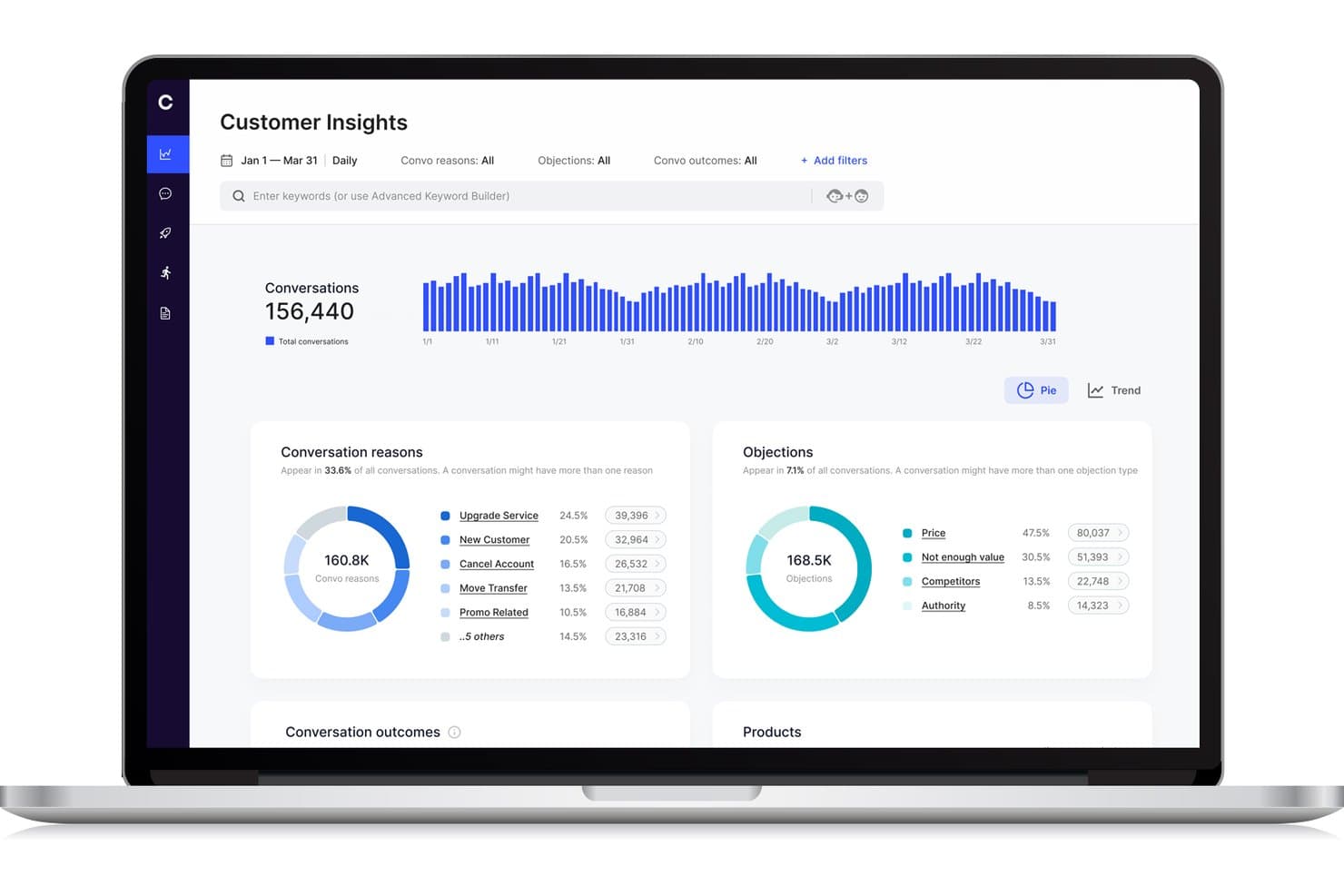
Cresta offers a Customer Insights dashboard that displays conversation reasons, objections, and trends across conversations for blended call center analytics. Cresta is an AI-powered contact center platform that unifies inbound and outbound operations through dynamic agent workflows, real-time conversation intelligence, and seamless integration with existing call center tools.
Who Is Cresta Best For?
Cresta suits enterprise contact centers needing scalable AI-driven call handling and dynamic agent workflows across complex, multi-channel environments.
Why I Picked Cresta
I picked Cresta as one of the best because I can build and deploy custom AI agents that handle blended call queues, automate dynamic agent assignment, and analyze every conversation in real time at enterprise scale.
Cresta Key Features
- Unified agent desktop: Agents manage all blended interactions from a single interface without switching tools.
- Real-time supervisor controls: Supervisors can monitor live activity and adjust agent workflows instantly.
- Skills-based routing: The system matches inbound and outbound contacts to agents based on defined skills and attributes.
- Customizable reporting dashboards: Users access blended analytics spanning agent occupancy, productivity, and campaign performance.
Cresta Integrations
Cresta offers native integrations with Salesforce, Twilio, Pipedrive, BigCommerce, Five9, Zendesk, and more. An API is available for custom integrations.
Pros and Cons
Pros:
- Dynamic queue blending across channels and teams
- Advanced conversation analytics for supervisors
- AI coaching during live calls and chats
Cons:
- Knowledge Assist needs ongoing model tuning
- Predictive dialer features not explicitly supported
Learn more about Cresta: Best for remote teams
- 7-day free trial + free demo available
- From $15/user/month (billed annually)
Visit WebsiteCustomer Rating:4.7/5
Ringover cloud communication boosts remote teamwork with calls and collaboration tools. Ringover is a cloud-based communication platform designed for businesses that need efficient call management and collaboration tools. It serves remote teams by offering features that enhance connectivity and productivity.
Why I picked Ringover: The platform is tailored for remote teams, providing tools that facilitate seamless communication. Its call management features help your team stay organized and efficient, even when working remotely. Ringover's collaboration tools ensure everyone stays connected and informed. The ability to make and receive calls from anywhere enhances flexibility and adaptability.
Standout features & integrations:
Features include call transfer and call queuing, which help your team manage high call volumes effectively. The platform offers call recording to ensure quality and compliance. Additionally, analytics provide insights into call performance and team productivity.
Integrations include Salesforce, HubSpot, Zoho CRM, Pipedrive, Slack, Zendesk, Freshdesk, monday.com, and Helpscout.
Pros and Cons
Pros:
- Supports high call volumes
- Flexible call management
- Strong integrations
Cons:
- Advanced features limited to higher plans
- Occasional connection issues


Talkdesk cloud contact center with AI insights, automation, and scalable customer support. Talkdesk is a cloud-based contact center platform that caters to businesses of all sizes that are looking to boost customer interactions. It offers a variety of communication solutions, focusing on improving customer experience and operational efficiency.
Why I picked Talkdesk: The platform's AI features are central to its value, providing tools that support predictive insights and automated workflows. Talkdesk's AI-powered virtual agents assist your team in handling repetitive tasks, freeing up time for more complex interactions. The real-time analytics offer deep insights into customer behavior and team performance. Its scalability ensures that as your business grows, Talkdesk can grow with you.
Standout features & integrations:
Features include call recording and monitoring, which help you maintain quality and compliance. The platform offers omnichannel support, enabling communication across multiple channels. Workforce management tools assist in optimizing agent schedules and productivity.
Integrations include Salesforce, Zendesk, Microsoft Teams, Slack, Zoom, HubSpot, and ServiceNow.
Pros and Cons
Pros:
- Rich analytics and reporting
- Strong CRM and third‑party integrations
- AI‑powered routing and automation
Cons:
- Expensive for small teams
- Interface can feel complex
Learn more about Talkdesk:

Convoso AI dialing boosts sales efficiency with real-time scoring and compliance. Convoso is an AI-driven call center software tailored for sales teams across industries like BPO, finance, and real estate. It enhances sales performance with features like real-time DID scoring and AI dialing optimization, boosting contact and conversion rates.
Why I picked Convoso: Convoso strengthens the performance of any outbound call center by optimizing phone calls through its AI-driven dialing capabilities. With tools such as a predictive dialer and auto dialer, teams can move through outbound campaigns more efficiently and concentrate on outgoing calls that are most likely to convert.
Real-time DID scoring helps you prioritize valuable prospects while tracking the metrics and KPIs that matter. Built on a scalable telephony infrastructure, the platform adapts as your team expands, and its compliance management helps you stay aligned with regulatory requirements. Additionally, forecasting features provide greater visibility into performance trends, allowing you to plan future campaigns with confidence.
Standout features & integrations:
Features include multimodal dialing that supports both inbound and outbound sales. Workflow automation helps your team manage tasks efficiently. Superior caller ID management ensures your calls are recognized and answered.
Integrations can be done through API and Zapier.
Pros and Cons
Pros:
- Real-time DID scoring
- High-speed scalability
- AI dialing optimization
Cons:
- Requires technical knowledge
- Complexity in setup
Learn more about Convoso: Best for small businesses
- 14-day free trial + free demo available
- Pricing upon request
Visit WebsiteCustomer Rating:4.3/5
Dialpad organizes customer conversations with integrated calling, messaging, and voicemail tools. Dialpad is an AI-powered customer communications platform tailored for small businesses seeking efficient customer service and sales solutions. It offers real-time AI tools that enhance productivity, including automated note-taking and insights.
Why I picked Dialpad: The platform's focus on small businesses makes it accessible and easy to implement. AI-driven features like automated note-taking help your team stay organized. Its scalability allows you to grow without worrying about technical limitations. With enterprise-grade security, Dialpad ensures your data is safe.
Standout features & integrations:
Features include AI-powered agents that can handle complex workflows such as refunds and rebookings while supporting high-volume customer engagement across multiple channels. Whether teams are managing inbound calls, responding to incoming calls from support queues, or interacting with customers through social media, the platform helps maintain a consistent, reliable experience.
As a blended contact center solution, it also ensures that phone calls and digital interactions receive the same level of attention. Behind the scenes, Dialpad provides enterprise-grade security and compliance, including HIPAA and SOC 2 certifications, to protect sensitive information.
Integrations include Salesforce, Microsoft Teams, Google Workspace, Zendesk, Slack, HubSpot, Zoho CRM, and ServiceNow.
Pros and Cons
Pros:
- Handles complex workflows
- Cloud-native and mobile-friendly
- Scalable to support growth
Cons:
- May require tech support
- Many advanced features require higher-tier plans


Pipedrive sales CRM simplifies pipelines with automation, reporting, and easy tracking. Pipedrive is a sales-focused CRM tool designed for small to medium-sized businesses. It helps teams manage leads and deals, providing a clear overview of sales activities and performance.
Why I picked Pipedrive: The tool is great for CRM integration, making it easy for your team to manage customer relationships. Its intuitive sales pipeline view helps you track deals and progress. Automation features reduce manual tasks, allowing your team to focus on selling. The reporting capabilities provide insights into sales performance, helping with decision-making.
Standout features & integrations:
Features include customizable pipelines that help you tailor the sales process to your needs. The activity reminders ensure your team never misses an important follow-up. Additionally, the goal-setting and tracking feature keeps your team aligned with business objectives.
Integrations include Mailchimp, Trello, Slack, Microsoft Teams, Zapier, Xero, Asana, QuickBooks, and HubSpot.
Pros and Cons
Pros:
- Customizable sales processes
- Strong reporting capabilities
- Automation reduces manual tasks
Cons:
- Requires ongoing management to optimize
- Advanced features can be complex
Learn more about Pipedrive: Best for call tracking
- Free demo available
- From $79/user/month (billed annually)
Visit WebsiteCustomer Rating:4.7/5
DialedIn cloud contact center improves productivity with routing, tracking, and analytics. DialedIn is a cloud-based contact center software designed for businesses in industries like healthcare, finance, and hospitality. It focuses on improving agent productivity and customer engagement through efficient call management.
Why I picked DialedIn: DialedIn's strength lies in its call tracking capabilities, which help your team manage and analyze calls effectively. Omnichannel communication ensures you can engage with customers through multiple platforms. The platform's in-depth analytics provide insights to improve operational efficiency.
Standout features & integrations:
Features include predictive dialing and skill-based routing enhance call handling, as well as automatic call distribution and interactive voice response. Predictive dialing helps your team reach more customers efficiently. Extensive analytics support decision-making and performance improvement.
Integrations include Salesforce, Microsoft Teams, HubSpot, Zoho, Slack, Zendesk, and Google Workspace.
Pros and Cons
Pros:
- Omnichannel communication support
- Efficient predictive dialing
- Strong predictive-dialer and blended inbound/outbound capabilities
Cons:
- Complexity in initial setup
- Limited customization options
Learn more about DialedIn: 10Best for enterprise solutions
Five9
- Free demo available
- From $119/seat/month
Visit WebsiteCustomer Rating:4.1/5
Five9 AI contact center for personalized support and seamless customer journeys. Five9 is a cloud-based contact center solution designed for enterprises aiming to enhance customer engagement. It provides AI-driven tools to personalize customer interactions and improve service delivery.
Why I picked Five9: Five9 delivers an AI-driven customer journey orchestration experience that supports a blended call center solution, helping teams manage both inbound and outbound interactions with clarity and efficiency. It helps with real-time insights, improving decision-making across ACD routing, call queues, and high-volume outreach. The platform also supports tools such as an intelligent dialer and automated callbacks, giving your team more control over performance and customer engagement.
Standout features & integrations:
Features include AI-driven customer journey orchestration, ensuring your team can manage interactions efficiently. The platform's human-centered AI empowers agents with real-time insights. Additionally, its open APIs allow for easy customization to fit your business needs.
Integrations include Salesforce, Zendesk, Microsoft Dynamics 365, Oracle, and ServiceNow.
Pros and Cons
Pros:
- Human-centered AI tools
- Customizable with open APIs
- Scalable for large enterprises
Cons:
- AI features might be overwhelming
- May not suit small businesses
Learn more about Five9:
Annen programvare for kombinerte kundesentre
Her er noen flere alternativer for programvare til kombinerte kundesentre som ikke kom med på kortlisten min, men som likevel er verdt å undersøke:
- 11LiveAgentBest for multi-channel support
- 12TCNBest for IVR systems
- 13iCallifyBest for startup companies
- 14RingCentralBest for mobile workforce management
- 153CXBest for small business setups
- 16Global Call ForwardingBest for international call routing
- 17SquaretalkBest for cloud-based call solutions
- 18VerintBest for workforce optimization
- 19VoiptimeBest for outbound call campaigns
How I Evaluate Blended Call Center Software
I split my evaluation into two layers: the baseline every tool must clear—true inbound/outbound blending, a real dialer, unified agent desktop—and the differentiators that set great platforms apart.
Core Functionality (Table Stakes For This List)
When I'm selecting tools for my list, I rank each one on a scale from 0 (does not offer the functionality) to 5 (excels in this area) for each core functionality listed below. Then, I calculate the tool's total score into a percentage. Each tool needs to achieve a minimum total score of 65% to be considered for inclusion.
- Inbound/Outbound Blending: I check whether agents auto-shift between queues and campaigns based on live volume, or if someone has to manually toggle modes.
- Automated Outbound Dialer: The dialer modes matter here. I look for predictive, progressive, and preview options so teams can match pacing to campaign type.
- ACD & Skills-Based Routing: Routing should match callers to agents by skill, language, or priority level—not just push calls to whoever's next in line.
- Unified Agent Desktop: I evaluate whether agents handle inbound and outbound work from one screen with full context, or juggle separate tools mid-call.
- Real-Time Supervisor Controls: Supervisors need to monitor queues, adjust blend ratios, and reassign agents on the fly—especially during unexpected volume spikes.
- Blended Reporting & Analytics: I look for consolidated dashboards that track inbound SLAs alongside outbound campaign metrics and overall agent occupancy in one view.
Once I have a list of tools that meet this criteria, I consider what sets each platform apart.
Differentiating Factors (What Sets Vendors Apart)
Here's how I compare and contrast different vendors:
Standout Features
AI agent assist is a major differentiator. I look for real-time transcription and next-best-action prompts that help agents handle rapid context switches between inbound service calls and outbound campaign work. Built-in workforce management matters too—forecasting and scheduling for blended teams is a unique challenge, and platforms with native blended staffing models save a lot of headaches. Compliance tooling rounds things out, especially for outbound. Automated DNC list scrubbing and consent management keep campaigns running without legal risk.
Beyond Features
CRM and helpdesk integrations are one of the first things I check. Blended agents need real-time customer context when switching between inbound and outbound work, so native connectors to platforms like Salesforce, Zendesk, or HubSpot matter. Scalability is another big factor—seasonal campaigns can double seat counts overnight, and I look for platforms that handle that without lengthy procurement cycles. Pricing models also vary widely. I evaluate whether licensing is per-seat, concurrent, or usage-based, since blended teams with shift rotations can overpay on the wrong structure.
Slik velger du programvare for kombinerte kundesentre
Det er lett å gå seg vill i lange funksjonslister og kompliserte prismodeller. For å hjelpe deg med å holde fokus mens du går gjennom den unike prosessen med å velge programvare, har jeg laget en sjekkliste over faktorer du bør ha i bakhodet:
| Faktor | Hva bør du vurdere? |
|---|---|
| FaktorSkalerbarhet | Hva bør du vurdere?Vil programvaren vokse med virksomheten din? Se etter fleksible brukergrenser og funksjoner som støtter utvidelse uten at det kreves en fullstendig omlegging. |
| FaktorIntegrasjoner | Hva bør du vurdere?Fungerer den med systemene du allerede bruker? Sjekk om den er kompatibel med viktige verktøy som CRM, e-post og kommunikasjonsplattformer for å unngå forstyrrelser i arbeidsflyten. |
| FaktorTilpasningsmuligheter | Hva bør du vurdere?Kan du tilpasse den etter behovene dine? Sørg for at programvaren gjør det mulig å justere arbeidsflyter, dashbord og brukertillatelser slik at de passer teamets spesifikke prosesser. |
| FaktorBrukervennlighet | Hva bør du vurdere?Er grensesnittet intuitivt? Test brukeropplevelsen for å sikre at teamet kan navigere i løsningen uten en bratt læringskurve eller omfattende opplæring. |
| FaktorImplementering og innføring | Hva bør du vurdere?Hvor lang tid tar det å komme i gang? Ta hensyn til oppsettstid, tilgjengelig kundestøtte og opplæringsressurser for å sikre en smidig overgang for teamet. |
| FaktorKostnad | Hva bør du vurdere?Hva er de totale eierkostnadene? Vurder prismodellen, inkludert skjulte gebyrer, for å sikre at den passer med budsjettet ditt. Ta hensyn til langsiktige kostnader utover den opprinnelige investeringen. |
| FaktorSikkerhetstiltak | Hva bør du vurdere?Er tiltakene for databeskyttelse tilstrekkelige? Se etter samsvar med bransjestandarder og krypteringsprotokoller for å beskytte sensitiv informasjon. |
| FaktorTilgjengelig kundestøtte | Hva bør du vurdere?Når kan du få hjelp ved behov? Sjekk leverandørens åpningstider for kundestøtte, kontaktkanaler og svartider for å sikre at de oppfyller teamets behov for hjelp. |
Hva er programvare for kombinerte kundesentre?
Programvare for kombinerte callsentre er et verktøy som håndterer både innkommende og utgående samtaler på én og samme plattform. Kundeservicemedarbeidere, salgsteam og supportmedarbeidere bruker vanligvis disse verktøyene for å effektivisere kommunikasjonen og samhandlingen med kundene. Funksjoner for samtaleruting, overvåking i sanntid og CRM-integrasjon bidrar til å håndtere samtaleflyten og forbedre medarbeidernes produktivitet. Samlet sett øker disse verktøyene den operasjonelle effektiviteten og forbedrer kundetilfredsheten.
Funksjoner
Når du velger programvare for kombinerte callsentre, bør du se etter følgende viktige funksjoner:
- Samtaleruting: Viderekobler samtaler til den best egnede medarbeideren, noe som bidrar til å redusere ventetiden og forbedre kundetilfredsheten.
- Sanntidsovervåking: Gjør det mulig for ledere å lytte til samtaler og gi veiledning, noe som forbedrer medarbeidernes prestasjoner og opplæring.
- CRM-integrasjon: Kobler seg til verktøy for kunderelasjonshåndtering for å gi medarbeiderne detaljert informasjon om innringeren og samtalehistorikken.
- Omnikanalkommunikasjon: Støtter samhandling på tvers av flere kanaler, som telefon, e-post og chat, og sikrer en konsekvent kundeopplevelse.
- Prediktiv oppringing: Automatiserer utgående samtaler, øker antallet samtaler som gjennomføres og forbedrer medarbeidernes effektivitet.
- Analyse og rapportering: Gir innsikt i samtaleprestasjoner og medarbeidernes produktivitet, slik at du kan ta velinformerte beslutninger.
- Interaktivt talesvar (IVR): Veileder innringere gjennom selvbetjeningsalternativer og reduserer behovet for at en medarbeider håndterer rutinemessige spørsmål.
- Tilpassbare dashbord: Gjør det mulig for brukerne å tilpasse grensesnittet slik at det viser den mest relevante informasjonen, noe som forbedrer arbeidsflytens effektivitet.
- Samtaleopptak: Tar opp samtaler for kvalitetssikring og etterlevelse, og gir et referansegrunnlag for opplæring og tvisteløsning.
- Arbeidsstyring: Bidrar til å optimalisere planlegging og bemanning for å møte etterspørselen, slik at ressursene brukes effektivt.
Fordeler
Implementering av programvare for kombinerte callsentre gir flere fordeler for teamet og virksomheten din. Her er noen av fordelene du kan se frem til:
- Forbedret effektivitet: Ved å håndtere innkommende og utgående samtaler på én plattform kan teamet administrere oppgaver mer effektivt og redusere inaktiv tid.
- Økt kundetilfredshet: Funksjoner som samtaleruting og IVR sørger for at kundene raskt kommer i kontakt med riktig medarbeider, noe som gir kortere løsningstid.
- Bedre beslutningstaking: Analyse og rapportering gir innsikt i prestasjonene og hjelper deg med å ta velinformerte beslutninger for å optimalisere driften.
- Større fleksibilitet: Omnikanalkommunikasjon gjør det mulig for teamet å kommunisere med kundene på deres foretrukne plattformer, noe som styrker engasjementet.
- Kostnadsbesparelser: Verktøy for arbeidsstyring hjelper deg med å optimalisere bemanningen, slik at ressursene fordeles effektivt og unødvendige utgifter reduseres.
- Skalerbarhet: Programvaren kan vokse i takt med virksomheten og tilpasses økt samtalevolum uten behov for store endringer.
- Jevn kvalitet: Samtaleopptak og sanntidsovervåking bidrar til å opprettholde høye servicestandarder og gir verdifulle opplæringsressurser.
Kostnader og priser
Ved valg av programvare for kombinerte callsentre må du ha en forståelse av de ulike prismodellene og abonnementene som er tilgjengelige. Kostnadene varierer basert på funksjoner, teamstørrelse, tillegg og mer. Tabellen nedenfor oppsummerer vanlige abonnementer, gjennomsnittsprisene deres og typiske funksjoner som er inkludert i programvareløsninger for kombinerte callsentre:
Sammenligningstabell for programvare for kombinerte callsentre
| Abonnementstype | Gjennomsnittspris | Vanlige funksjoner |
|---|---|---|
| AbonnementstypeGratisabonnement | Gjennomsnittspris$0 | Vanlige funksjonerGrunnleggende samtalehåndtering, begrensede integrasjoner og minimal rapportering. |
| AbonnementstypePersonlig abonnement | Gjennomsnittspris$5-$25/bruker/måned | Vanlige funksjonerSamtaleruting, grunnleggende analyse, CRM-integrasjon og viktige supportfunksjoner. |
| AbonnementstypeBedriftsabonnement | Gjennomsnittspris$30-$75/bruker/måned | Vanlige funksjonerAvansert samtalehåndtering, omnikanalstøtte, arbeidsstyring og forbedret rapportering. |
| AbonnementstypeEnterprise-abonnement | Gjennomsnittspris$80-$150/bruker/måned | Vanlige funksjonerTilpassbare dashbord, KI-drevet innsikt, full CRM-integrasjon og førsteklasses supporttjenester. |
Vanlige spørsmål om programvare for blandede callsentre
Her er noen svar på vanlige spørsmål om programvare for blandede callsentre:
Hvordan skiller programvare for blandede callsentre seg fra tradisjonell programvare for callsentre?
Programvare for blandede callsentre håndterer både innkommende og utgående samtaler på én plattform, i motsetning til tradisjonell programvare som vanligvis fokuserer på én type. Denne integrasjonen gjør det mulig for teamet ditt å bytte mellom samtaletyper basert på etterspørsel, noe som forbedrer effektiviteten. Den tilbyr også funksjoner som samtaleruting og CRM-integrasjon, som tradisjonelle systemer kanskje mangler. Ved å bruke en blandet tilnærming kan du optimalisere ressursfordelingen og forbedre kundeservicen.
Er det vanskelig å bytte fra tradisjonell programvare for callsentre til programvare for blandede callsentre?
Nei, det kan være enkelt å bytte med riktig støtte. Mange leverandører tilbyr hjelp med migrering og opplæring for å hjelpe teamet ditt med å tilpasse seg. Start med å vurdere det nåværende oppsettet ditt og identifisere de viktigste behovene. Ta kontakt med leverandøren tidlig for å forstå overgangsprosessen, og sørg for å bruke tilgjengelige ressurser som opplæringsvideoer og supportteam for å sikre en smidig overgang.
Kan programvare for blandede callsentre integreres med eksisterende forretningsverktøy?
Ja, de fleste løsninger for blandede callsentre kan integreres med populære forretningsverktøy som CRM-systemer, e-postplattformer og kommunikasjonsapper. Kontroller at de er kompatible med de eksisterende systemene dine før du kjøper. Integrasjoner bidrar til å sentralisere data og effektivisere arbeidsflyter, noe som gjør jobben enklere for teamet ditt. Vurder programvarens API-funksjoner hvis du har tilpassede verktøy, for å sikre sømløs integrasjon.
Hva slags støtte kan jeg forvente under og etter implementeringen?
Du kan forvente ulike støttealternativer, inkludert implementeringsveiledninger, opplæringsøkter og dedikerte kundeansvarlige. Mange leverandører tilbyr kundestøtte døgnet rundt gjennom flere kanaler, som chat, e-post og telefon. Benytt deg av disse ressursene for å håndtere eventuelle utfordringer under oppsettet og ved løpende bruk. Pålitelig støtte sikrer at teamet ditt raskt kan løse problemer og opprettholde produktiviteten.