A B2B SaaS Leader’s Blueprint for Value Continuity
Customer value naturally increases or declines over time, a concept known as Value Decay. The earliest indicators often appear in support interactions, long before renewal conversations begin.
TeamSupport transforms support tickets into actionable account health signals by connecting customer interactions with account data, ARR, renewal dates, and product usage. Instead of treating tickets as isolated events, TeamSupport identifies risk, updates your Customer Distress Index (CDI), and automatically routes insights to Customer Success and Revenue teams.
This guide shows how to configure TeamSupport to operationalize support data, detect risk earlier, and trigger proactive retention and expansion workflows.
Step 1: Establish Native Fusion (Account-Centricity Meets Product Schema)
Many traditional support platforms treat every ticket as an isolated transactional episode, while Customer Success platforms attempt to aggregate disconnected support data after the fact.
TeamSupport is built on Native Fusion. Support tickets, account ARR, product features, and adoption stages live in the same native database schema. This means your support team doesn't just see a ticket; they see the exact product feature causing friction, mapped directly against the account's ARR and renewal proximity.
[Native Database Schema]
- └── Customer Account (ARR, Renewal Date, Journey Stage)
- └── Product Database (Specific Modules, Core Features)
- └── Support Tickets (Sentiment, Sentiment Shift, Severity)
Instead of asking:
- How many tickets did we resolve for this user this week?
You can answer:
- Which high-ARR accounts are experiencing repeated friction with our core reporting module at Stage 2 of their adoption lifecycle?
Value Continuity Practice: Use the native relationship between tickets and your product feature map to pinpoint exactly which product features are threatening renewals for your highest-value cohorts.
Want to learn more about TeamSupport?
Step 2: Build a Centralized Knowledge Engine for Agentic AI
An AI agent is only as defensible as the proprietary signal and documentation it reasons over. To move support up the value chain, centralize your implementation guides, product release notes, and technical internal workflows natively within TeamSupport.
This creates the grounded knowledge base that powers your team’s agentic assistants, ensuring that both human agents and autonomous workflows communicate with absolute consistency.
The Strategic Output:
- Immediate Zero-Drafting: Agents receive highly accurate, context-aware reply drafts that match their historical writing style.
- Frictionless Onboarding: New support engineers can resolve complex, product-specific issues without escalating to product development.
By centralizing customer knowledge, every internal and external interaction becomes faster, smarter, and more consistent. Teams respond with greater accuracy, onboard new agents more quickly, deliver better customer experiences, and provide product teams with actionable feedback that drives continuous improvement — protecting ARR and NRR.
Step 3: Analyze Conversations for Behavioral Value Decay Signals
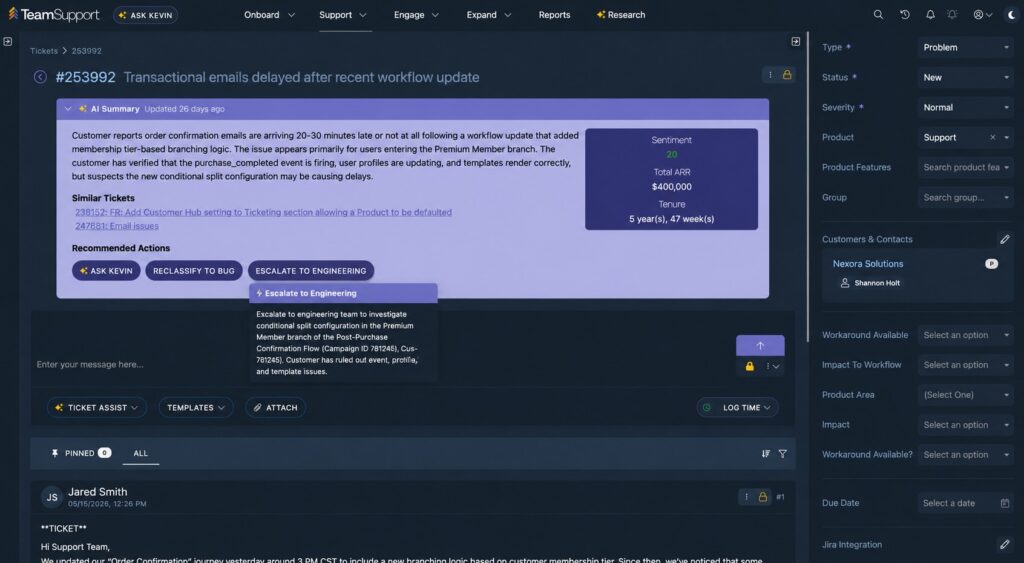
Reading thousands of historical tickets is operationally impossible, and simple sentiment analysis is too shallow for B2B SaaS environments. TeamSupport’s AI monitors the direction of travel across every customer account, extracting specific unstructured indicators of customer distress directly from ticket language, including:
- Workaround Language: "We had to build an external spreadsheet to parse this export…"
- Escalation Tone: Rising frustration levels relative to past historical baselines.
- Stalled Progress: Silence or inactivity immediately following an onboarding milestone.
When these behavioral signals are captured, they are automatically tied back to the customer's journey stage, allowing you to identify whether systemic onboarding or adoption gaps are emerging across your client base. By capturing silent signals hidden in support data, TeamSupport helps onboarding, support, success, and product teams identify and drive value continuity across your customer base.

Step 4: Intervene Early with the Customer Distress Index
Customers do not decide to churn overnight. The warning signs accumulate over weeks and months beforehand. TeamSupport captures this cumulative friction and translates it into a real-time, actionable score: the Customer Distress Index (CDI).
Unlike subjective manual health scores, CDI is an automated, objective, real-time calculation combining:
- Ticket volume spikes relative to account size
- Average SLA breach frequency
- Escalation frequency and volume
- Lingering open ticket duration
- Negative sentiment.
- Unstructured sentiment trajectory
Value Continuity Practice: Set up automatic notifications for your CS leadership team the moment a strategic account’s CDI crosses from moderate to high, triggering proactive intervention long before the customer ceases platform usage.
Step 5: Route Revenue Intelligence Cross-Functionally
Support operations holds the deepest real-time operational intelligence in your entire SaaS organization. TeamSupport structures and targets this data so it immediately informs the workflows of downstream teams:
| Team | Support-Driven Operational Action |
| Customer Success | Detects hidden Value Decay; prompts CSMs to launch an adoption recovery playbook. |
| Sales / Account Mgmt | Identifies expansion opportunities (e.g., requests for advanced functionality or seat increases). |
| Product & Engineering | Links engineering bugs in Jira directly to customer impact metrics and at-risk ARR. |
| Revenue Leadership | Monitors systemic product instability patterns across the highest-value ARR cohorts. |

TeamSupport helps transform support into a cross-functional source of customer intelligence. Users and leadership teams can ask AI for context-aware insights using natural language from nearly any page throughout the platform. TeamSupport’s page contextualized co-pilot surfaces insights on demand as teams review tickets.
Step 6: Automate Workflows and Manage AI Agent Capabilities
To scale customer operations without introducing latency, TeamSupport allows administrators to automate repetitive ticket triage, classification, and operational routing tasks.
AI agents autonomously analyze incoming ticket context to write directly to native database fields (such as Product ID, Severity, or Tags), while the event-based automation engine monitors these field updates to trigger downstream playbooks, notifications, and cross-functional alerts.
To manage which automated actions are permitted across customer-facing and internal workflows, administrators can configure permissions via the native Skills Matrix in the Admin UI:
Skills Matrix Example:
| UI Display Name / Skill | Internal Tool Name | App Agent (Type 1) | Triage Agent (Type 3) | Triage Agent (Type 4) | Web Agent (Widget) |
| Create Ticket | create_ticket | ✓ | ✓ | ✓ | Built-in |
| Add Private Comment | add_ticket_comment | ✓ | ✓ | ✓ | ✗ |
| Create Child Ticket | add_child_ticket | ✓ | ✓ | ✓ | ✗ |
| Link Related Ticket | add_related_ticket | ✓ | ✓ | ✓ | ✗ |
| Assign User/Group/Product/Severity | assign_ticket_* | ✓ | ✓ | ✓ | ✗ |
| Change Ticket Type | assign_ticket_type | ✓ | ✓ | ✓ | ✗ |
| Tag Ticket | tag_ticket | ✓ | ✓ | ✓ | ✗ |
| Create / Update KB Article | *_knowledge_base_article | ✓ | ✓ | ✓ | ✗ |
| Generate Solution | generate_solution | Always-On | Always-On | Always-On | ✓ (Toggle) |
| Slack Integration Skill | send_message, search_conversations, etc. | ✗ | ✗ | ✓ | ✗ |
Note: Always-On capabilities, such as Ticket Research (vector searches, status logs), Knowledge Base lookups, and Customer Intelligence profiles (CDI, notes, alerts) are universally enabled for internal App, Triage, and Slack Agents and cannot be turned off.
For additional information on how to use TeamSupport AI to scale support, watch this customer working session from our Director of Global Customer Support and CRO.
Step 7: Turn Support Signals into Defensible Expansion Revenue
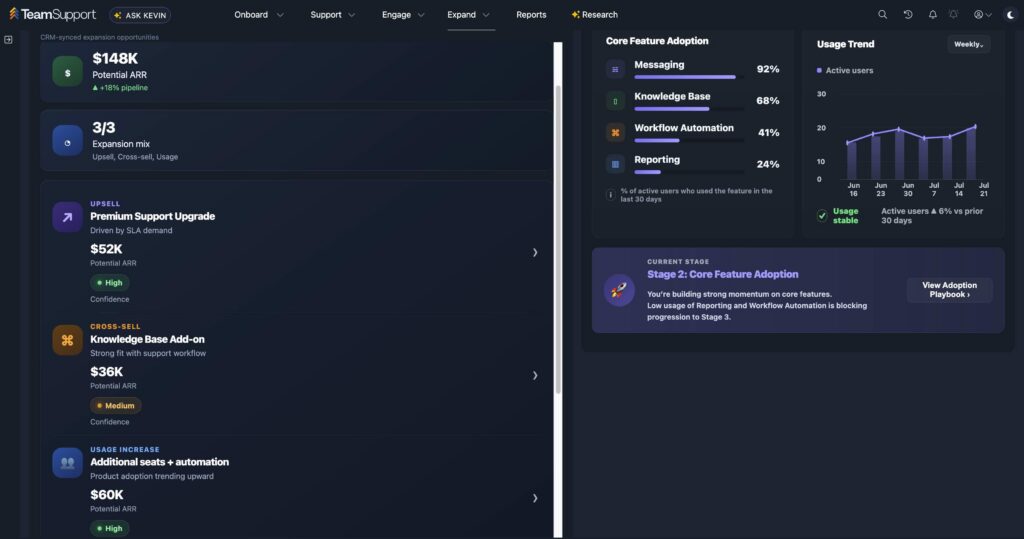
Support conversations often surface expansion opportunities months before a sales rep or CSM initiates a business review. TeamSupport’s AI automatically monitors conversations for growth signals:
- Requests for advanced APIs or third-party integrations.
- Inquiries about adding additional users or departments to the platform.
- Explicit interest in higher-tier SLAs or premium support packages to meet rising operational complexity.
By natively mapping these conversations to your CRM, TeamSupport surfaces high-confidence, context-rich expansion leads directly to your CS and sales teams, turning your support function into an aftermarket revenue pipeline.
Step 8: Measure Value Continuity, Not Just Queue Efficiency
While traditional metrics like First Response Time and CSAT are vital for operational discipline, they do not indicate whether you are successfully protecting your customer base. Leading B2B SaaS organizations measure and report on metrics that reflect Value Continuity:
- Value Decay Defended: The number of at-risk accounts identified by CDI that were successfully restored to healthy adoption levels.
- Product Friction Impact (PFI): The total ARR affected by active product-feature issues, giving product teams clear financial prioritization for their backlogs.
- Support-Influenced Expansion: Revenue generated from expansion signals identified and routed directly from the support queue.
Learn More About TeamSupport
TeamSupport is designed to go beyond ticket management by connecting conversations, knowledge, AI, and account-level insights into a unified customer operations platform for B2B SaaS operations. By natively fusing ticket behavior, customer journey states, product-level mapping, and real-time distress signals, TeamSupport equips support and customer success leaders to align, operate as one team, and prove their business impact.
Instead of simply resolving tickets, organizations can:
- Detect customer distress earlier
- Improve agent productivity with AI
- Surface expansion opportunities
- Provide better customer experiences
- Align Support, Customer Success, Sales, and Product around shared customer intelligence
TeamSupport enables your organization to detect Value Decay early, defend realized customer value continuously, and turn the support function into a vital engine of growth and ARR defense. To learn more or see a live demo, contact us here.