

Com tantas soluções de software de apoio técnico diferentes disponíveis, perceber qual se adequa melhor às suas necessidades é difícil — especialmente se pretende utilizar software gratuito de apoio técnico. Sabe que quer um software que o ajude a gerir tarefas essenciais de apoio e a resolver eficazmente as dúvidas dos clientes, mas precisa de perceber qual é o melhor sistema.
Neste artigo, vou ajudá-lo a tornar esta escolha mais simples, partilhando as minhas conclusões sobre o melhor software gratuito de apoio técnico para gerir pedidos de apoio ao cliente sem afetar os seus resultados financeiros.
Why Trust Our Software Recommendations
6,700+
Reviews
20
Industry experts
16+
Evaluation factors
14
Years
Our team has been testing and reviewing software since 2012. As CX leaders ourselves, we know how difficult—and important—it is to choose the right software.
For this guide, we evaluated tools using hands-on testing and independent research, scoring tools using our selection criteria.
Our reviews reflect our human editorial judgment, not a sales pitch.
 Gui DrusinaCreative Director
 Tim FisherVP of AI
Tabela de comparação: software gratuito de apoio técnico
Esta tabela de comparação resume os detalhes de preços das minhas principais escolhas de software gratuito de apoio técnico.
| Tool | Best For | Trial Info | Price | ||
|---|---|---|---|---|---|
| 1 | Best for omnichannel customer service software | 15-day free trial | Pricing upon request | Website | |
| 2 | Best for collaborative email-based ticket handling | 30-day free trial + free demo available | From $14/user/month (billed annually) | Website | |
| 3 | Best for AI-driven ticket automation | Free plan available; 14-day free trial | From $16/user/month | Website | |
| 4 | Best for its 15 years on the market | Free trial + free demo available | Pricing upon request | Website | |
| 5 | Best for collaboration features | Free plan + free demo available | From $29/user/month | Website | |
| 6 | Best for AI-powered ticket management | 14-day free trial | From $8/user/month (billed annually) | Website | |
| 7 | Best for multiple service level agreements | Free plan available | Free to use | Website | |
| 8 | Best for automated ticket quality assurance | 14-day free trial | From $25/user/month (billed annually) | Website | |
| 9 | Best chat widget for websites and apps | 14-day free trial | From $29/user/month (billed annually) | Website | |
| 10 | Best for a CX shared inbox | Free plan + free demo available | From $39.99/month | Website |


Avaliações do melhor software gratuito de apoio técnico
Eis uma breve descrição de cada software gratuito de apoio técnico, destacando o caso de utilização mais adequado para cada ferramenta, algumas funcionalidades relevantes e capturas de ecrã que oferecem uma visão geral da interface do utilizador.
 Best for omnichannel customer service software
- 15-day free trial
- Pricing upon request
Visit WebsiteCustomer Rating:4.4/5
The Zoho Desk dashboard shows you which tickets are currently in progress. Zoho Desk is a cloud-based help desk solution that helps you manage support tickets through a customer service portal. The software collects interactions received by email, phone, chat, social media, or forms. Features include ticket assignment, notification rules, service escalations, and time-based actions.
You can set workflow rules to reduce the need for human intervention, schedule reports, and measure customer happiness rates. A graphical dashboard makes it easy to analyze customer satisfaction levels. You can also customize the system by renaming tabs, adding new departments, or customizing email templates.
This tool integrates with business applications such as Google Workspace, ScreenMagic, Jira, Slack, and Salesforce.
ZohoDesk offers a free plan for up to three agents.
Learn more about Zoho Desk: Best for collaborative email-based ticket handling
- 30-day free trial + free demo available
- From $14/user/month (billed annually)
Visit WebsiteCustomer Rating:4.8/5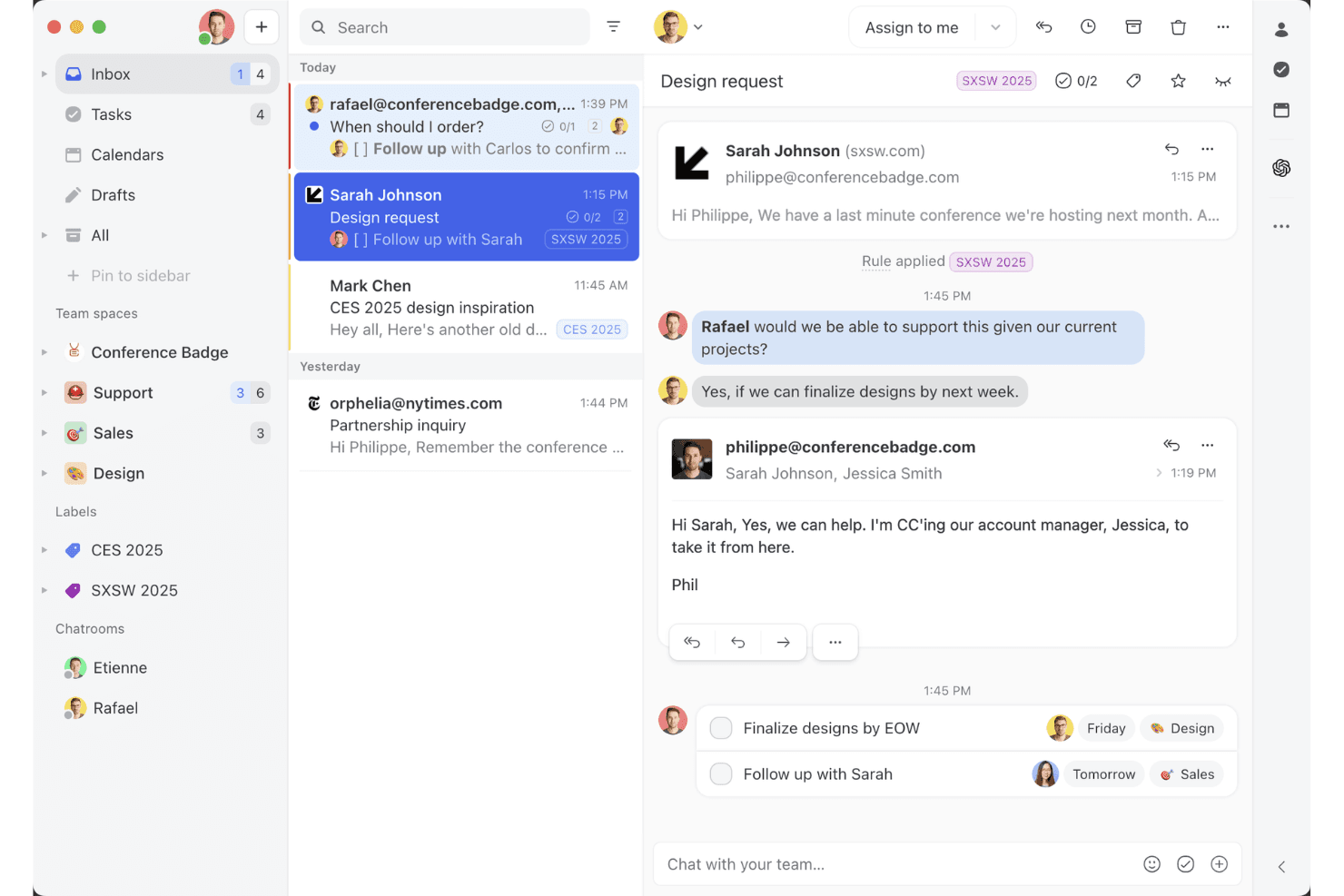
Missive’s shared inbox view shows how teams can collaborate on email threads, assign tasks, and manage client conversations in one workspace. Missive is a collaborative, multi-channel team inbox platform that centralizes email, SMS, WhatsApp, social messaging, live chat, and voice conversations with powerful assignment, automation, and real-time agent collaboration features.
Who Is Missive Best For?
Teams who want a collaborative shared inbox that centralizes multi-channel customer conversations in a familiar email-style interface.
Why I Picked Missive
I picked Missive because it makes collaborative email-based ticket handling easy for CX teams juggling multiple channels. I use features like real-time collaborative drafting and internal chat on conversations, which helps my team resolve cases without email chaos. Assignments, rules-based routing, and multi-channel inboxes keep everything visible and actionable.
Missive Key Features
- Multi-channel inbox: Centralizes email, SMS, WhatsApp, Instagram, Messenger, live chat, and voice conversations in one workspace.
- Rules-based automation: Allows up to 1,000 custom rules for routing, auto-tagging, escalations, and auto-replies.
- Missive MCP Server: Connect external AI clients (like Claude or ChatGPT) to mcp.missiveapp.com to search CX conversations, check calendars, and draft replies—keeping human approval required before sending.
- Real-time audit trails: Tracks every action and assignment on conversations with full user and timestamp logs.
- Mobile and desktop apps: Offers native apps for iOS, Android, macOS, Windows, and full web parity for on-the-go access.
Missive Integrations
Missive offers 25+ native integrations, including Aircall, HubSpot, Salesforce, Asana, Trello, ClickUp, Notion, Dialpad, Shopify, Stripe, Google Drive, Dropbox, and Zapier. Productive and Business plans also unlock custom REST API access and the new MCP Server when turned on by an admin.
What's Free?
Missive offers a 30-day free trial that unlocks all features, but does not provide a free-forever plan. After the trial, you’ll need to choose a paid plan to keep using the platform.
Pros and Cons
Pros:
- Guest access for external collaborators
- Real-time team chat on every conversation
- True shared inbox for multi-channel messages
Cons:
- No native knowledge base or CSAT
- No free-forever plan available
Learn more about Missive: Best for AI-driven ticket automation
- Free plan available; 14-day free trial
- From $16/user/month
Visit WebsiteCustomer Rating:4.6/5
SparrowDesk’s omnichannel inbox centralizes customer conversations, ticket status, priority levels, and agent assignments in a single dashboard. For those seeking a free help desk software solution, SparrowDesk offers an intriguing option with its AI-driven capabilities designed to automate a significant portion of support tickets. If you're a business aiming to enhance customer support efficiency, this platform provides a quick setup and powerful AI agents that can resolve queries instantly, helping you maintain consistency and improve response times. With SparrowDesk, you can tackle the challenges of managing customer interactions across various channels, ensuring a seamless experience for both your team and your customers.
Why I Picked SparrowDesk
I picked SparrowDesk for its unique ability to automate support tickets through AI agents, which is particularly appealing for those looking for free help desk software. This automation not only reduces the workload on your support team but also ensures that customer queries are handled swiftly and accurately. Additionally, the platform's omnichannel communication feature allows you to manage emails and chats within a single inbox, enhancing the efficiency of your support operations. These capabilities make SparrowDesk a strong contender for businesses aiming to streamline their customer support processes.
SparrowDesk Key Features
In addition to its automation and omnichannel communication, I also found the following features noteworthy:
- AI Copilot: Assists agents with instant summaries and context-aware replies, ensuring they have quick access to relevant information.
- Service Level Agreements (SLAs): Allows you to set and track performance metrics to ensure your team meets customer expectations.
- Multilingual Support: Provides the ability to communicate with customers in multiple languages, broadening your reach and improving customer satisfaction.
- Customizable Views: Enables you to tailor the dashboard to fit your specific needs, providing a personalized user experience.
SparrowDesk Integrations
Native integrations are not currently listed by SparrowDesk.
Pros and Cons
Pros:
- SLA tracking supports measurable support performance
- Omnichannel inbox centralizes customer conversations
- AI agents reduce manual ticket handling workload
Cons:
- Native integrations not publicly listed
- No free forever plan available
Learn more about SparrowDesk: Best for its 15 years on the market
- Free trial + free demo available
- Pricing upon request
Visit WebsiteCustomer Rating:4.2/5
ServiceDesk Plus provides a unified dashboard that incorporates multiple data and analytics, which includes SLA violations and change requests. ServiceDesk Plus is the full-stack service management software for enterprises from ManageEngine. It provides a wide range of IT solutions that support IT service management (ITSM) workflows, no-code customizations, advanced reporting, native integrations, and smart automation.
One of the key features of ServiceDesk Plus is its 13 distinct ITIL4-compatible practices including incident management, change enablement, and request management to help you improve your operations. The software also comes with comprehensive problem management features that provide IT support teams the ability to categorize, analyze, and resolve issues, while also identifying issues that are similar or repetitive so they can close tickets at a much faster pace.
The platform’s change management system is another feature that is designed to help IT teams better implement IT modifications with reduced risk, thanks to more streamlined planning, approval, and implementation processes. ServiceDesk Plus also has an integrated knowledge management system, a virtual assistant feature, and AI capabilities.
On the client side, the platform offers self-service portals where people can create requests and follow up on the status. It also has a live chat for real-time support, a knowledge base where you can record solutions to common problems for users, and help desk mobile apps that can help you get support whenever you need it.
Other capabilities of ServiceDesk Plus include automatic ticket routing, and escalation rule creation to avoid SLA violations.
Learn more about ManageEngine ServiceDesk Plus: Best for collaboration features
- Free plan + free demo available
- From $29/user/month
Visit WebsiteCustomer Rating:4.6/5
Collaborate on support tickets in the HelpDesk shared inbox. HelpDesk is easy-to-use software with all the features you need to manage support. The tool brings email, messaging, and chat into a single dashboard so you can respond to communication easily. And it gives each agent full visibility into the customer’s support history to provide context into their issues.
I like the collaboration features. They make it easy for agents to tag other people in a post to get specialist help. And these conversations are clearly marked as private so you know the customer can’t see it. It’s also easy for agents to see when people are already working on a ticket to avoid collisions.
The tool has several automation features that speed up support. A useful one is that you can automate replies based on keywords in the message. For example, if the text contains the word “refund,” you can automatically send a message with instructions about how to request a refund.
Other time-saving features include the ability to create templated responses and perform bulk actions.HelpDesk connects with Zapier to enable integrations.
It costs $34 per agent per month for the team plan. This also comes with unlimited viewer roles. You can sign up for a free trial on the website.
Learn more about HelpDesk: Best for AI-powered ticket management
- 14-day free trial
- From $8/user/month (billed annually)
Visit WebsiteCustomer Rating:4.6/5
monday Service's ticket dashboard provides a breakdown of tickets and other important metrics. monday Service is a versatile service management platform designed to improve service-related workflows across departments like IT, HR, legal, procurement, and customer support. It is highly customizable, allowing you to automate repetitive tasks through no-code automation so you can focus on more strategic activities.
Its AI-powered automation enhances ticket management by automatically tagging and routing tickets based on priority, department, and urgency, ensuring timely resolutions. The ability to customize workflows also makes it easy to adapt the platform to the specific needs of your CX team, making your processes more efficient.
With real-time communication features, you can comment on tickets, share files, and update each other on the progress of customer issues, ensuring everyone is aligned. The platform’s integrations with other tools, such as Slack, Microsoft Teams, and email, also help consolidate communication.
monday Service offers a 14-day free trial.
Learn more about monday service: Best for multiple service level agreements
- Free plan available
- Free to use
Visit WebsiteCustomer Rating:4.7/5
Raiseaticket offers powerful features on a free platform. Raiseaticket is a cloud-based help desk platform that organizes communications between customers and support agents. The software offers workflows to eliminate cluttered mailboxes and unaddressed support request issues. It also provides data-driven performance insights, data summarization, and quantifiable metrics.
You can assign tickets to teams or agents, attach files, add notes, and track the time spent on each ticket. Both email and portal-originated communications can be managed through a unified system. Raiseaticket allows you to create different SLAs for different customers.
Raiseaticket offers a free plan that includes a comprehensive range of features.
Learn more about Raiseaticket: Best for automated ticket quality assurance
- 14-day free trial
- From $25/user/month (billed annually)
Visit WebsiteCustomer Rating:4.6/5
Collaborate on emails in real time with Front’s shared inbox—assign conversations, loop in teammates, and see who’s reading or replying, all in one place. Front brings shared inbox and collaboration features to teams looking for a modern help desk solution. It’s designed for businesses that want to manage customer conversations across email, chat, and social channels in one place. If you need a tool that helps your team organize, assign, and respond to support requests efficiently, Front is worth considering.
Who Is Front Best For?
Front is a good fit for customer support and service teams in small to midsize businesses that need to manage high volumes of customer inquiries across multiple channels.
Why I Picked Front
Quality assurance is a top priority for support teams that want to maintain high standards across every customer interaction. I picked Front because it offers automated ticket quality assurance tools that review conversations for tone, completeness, and adherence to internal guidelines. With features like rule-based quality checks and conversation analytics, teams can quickly identify tickets that need attention or coaching. This automation helps ensure that every response meets your team’s standards without requiring manual review of every ticket.
Front Key Features
Some other features in Front that help teams manage support requests efficiently include:
- Shared inbox management: Organize and assign incoming messages from multiple channels to the right team members in one unified inbox.
- Collision detection: Get real-time alerts when another teammate is viewing or replying to the same conversation to avoid duplicate responses.
- Canned responses: Save and reuse message templates for common questions to speed up replies and maintain consistency.
- Analytics and reporting: Track metrics like response times, conversation volume, and team performance with built-in dashboards and reports.
Front Integrations
Integrations include Salesforce, Slack, Shopify, Aircall, Asana, Pipedrive, Twitter (X), Microsoft Outlook 365, Dialpad, and Todoist.
What's Free?
Front offers a free 14-day trial of its Professional plan. After the trial, continued use requires a paid subscription, and there is no free-forever plan available.
Pros and Cons
Pros:
- AI features for drafting, summarizing, and translation
- Automation rules for ticket routing and tagging
- Shared inbox supports real-time team collaboration
Cons:
- Voice support requires third-party integrations
- Ticketing lacks advanced sorting and export options
Learn more about Front: Best chat widget for websites and apps
- 14-day free trial
- From $29/user/month (billed annually)
Visit WebsiteCustomer Rating:4.4/5
The Intercom help desk inbox provides agents with essential context. It lets customers contact your support team from within your product or website, as well as via channels like social media and email. Meanwhile, agents can access important customer information such as past conversations and issue details. The stand out features are all the self-help options.
You can add resources to your chat widget and even customize what shows up depending on the page.Or you can use proactive support functionality to solve customer problems before they even occur. For example, you can send automated messages when users perform a particular action, such as spending a certain amount of time on a particular page.
Other self-help options include the ability to create product tours to help people get up to speed with your features, and automated messages that go out when customers show signs of struggling with your product.
The tool also has plenty of features that streamline live help. These include a help desk ticketing system, collaboration, ticket routing, and templated responses.
Intercom has a starter plan for very small businesses that costs $74 per month when billed annually. Larger businesses should contact the sales team for pricing information.
 Best for a CX shared inbox
- Free plan + free demo available
- From $39.99/month
Visit WebsiteCustomer Rating:4.7/5
ProProfs eliminates the confusion of multiple inboxes. ProProfs Help Desk is a customer service tool that helps support teams keep track of customer request issues. Managers can prioritize, assign, and label tickets to ensure they are handled most appropriately.
Core features include a shared inbox, canned responses, collaborative email, ticket prioritization, and reporting. You can apply filters and sort by labels, assignees, milestones, status, or workflow configuration.
You can also use Round-Robin or advanced ticket assignment to ensure that tickets are evenly distributed. The Gmail-style interface ensures that agents will feel comfortable using the system.
This tool integrates with business tools such as Survey Maker, Chat, and Knowledge Base.
ProProfs allows you to start with a free plan and upgrade when you are ready.
Learn more about ProProfs Help Desk:
Outro software gratuito de apoio técnico
Eis algumas opções adicionais de software de apoio técnico que também oferecem planos ou testes gratuitos. Embora estas ferramentas não tenham entrado na minha lista restrita, vale a pena analisá-las:
- 11Spiceworks Help DeskBest help desk software for IT teams
- 12ManageEngine ServiceDesk PlusBest for IT support
- 13Jira Service ManagementBest for advanced customization options
- 14Odoo HelpdeskBest for a kanban view of customer support activity
- 15GladlyHelp desk solution with advanced telephony features
- 16FrontBest for collaborative customer service
- 17ngDeskBest for combining sales, support, and marketing
- 1814.aiBest intent-aware customer response engine
- 19HiverBest for turning Gmail into a help desk
- 20LiveAgentBest for a popular chat widget
- 21TidioBest for its mix of live support and chatbots
- 22LiveChatBest free help desk software for call centers
- 23Help ScoutBest for creating proactive contact automations
- 24ZendeskHelp desk with advanced service features
- 25Zoho AssistBest for providing remote access support
- 26FreshdeskBest for integrated ticketing across email and social
Have an account? Log In
How I Evaluate Free Help Desk Software
I evaluate free help desk tools in two layers: the baseline every tool must meet—like real ticketing and a permanent free plan—and the factors that make one a better fit than another.
Core Functionality (Table Stakes For This List)
When I'm selecting tools for my list, I rank each one on a scale from 0 (does not offer the functionality) to 5 (excels in this area) for each core functionality listed below. Then, I calculate the tool's total score into a percentage. Each tool needs to achieve a minimum total score of 65% to be considered for inclusion.
- Free Plan Availability: I check whether each tool offers a permanent free tier—not just a 14- or 30-day trial—that gives a small support team real, ongoing access to core help desk features.
- Ticket Management: Each tool should let agents create, assign, prioritize, and track tickets through resolution, with options like tags, statuses, and custom fields to organize a growing queue.
- Multi-Channel Inbox: I look for tools that pull customer messages from at least email and one other channel—like chat or a web form—into a single queue so agents aren't toggling between platforms.
- Agent Collaboration: Support rarely lives with one person, so I evaluate whether agents can leave internal notes, hand off tickets, or use role-based permissions to split work across a team.
- Knowledge Base or Self-Service: I look for a customer-facing FAQ page or knowledge base where teams can publish answers to common questions like shipping policies or account setup steps to reduce ticket volume.
- Reporting & SLA Tracking: Basic metrics on ticket volume, first response time, and resolution time help team leads spot bottlenecks, so I evaluate what reporting ships with the free plan.
Once I have a list of tools that meet this criteria, I consider what sets each platform apart.
Differentiating Factors (What Sets Vendors Apart)
Here's how I compare and contrast different vendors:
Standout Features
AI-powered features like auto-triage and suggested replies make a real difference when a two-person team is handling dozens of tickets a day. I also look for a live chat widget that agents can manage alongside email tickets—it's a channel customers increasingly expect. Built-in CSAT surveys matter too, since they let team leads measure service quality right after resolution without plugging in a separate survey tool.
Beyond Features
The upgrade path from free to paid matters—I check whether a tool lets you grow into higher tiers without migrating your data or retraining your team. Integrations are equally important. A free help desk that connects to your CRM or Slack keeps agents working in one place instead of copying details between tabs. I also evaluate onboarding resources, since free plans rarely include dedicated support. Good documentation, community forums, and in-app setup guides make the difference between a smooth rollout and a stalled one.
Como escolher software gratuito de apoio técnico
As listas complexas de funcionalidades e as estruturas de preços podem dificultar a compreensão do que está realmente a obter com um software gratuito de apoio técnico. Para o ajudar a manter-se focado enquanto avança no processo de seleção do software, eis alguns fatores a ter em conta:
| Fator | O que considerar |
|---|---|
| FatorÂmbito da oferta gratuita | O que considerarVerifique o que está incluído no plano gratuito. Certifique-se de que abrange funcionalidades essenciais, como gestão de pedidos e suporte multicanal, sem custos ocultos. |
| FatorEscalabilidade | O que considerarConsidere se o software pode acompanhar o crescimento da sua equipa. Procure opções que ofereçam atualizações simples para planos pagos à medida que as suas necessidades aumentam. |
| FatorIntegrações | O que considerarVerifique a compatibilidade com as ferramentas que já utiliza, como CRM ou e-mail. Uma integração simples pode poupar tempo à sua equipa e reduzir o trabalho manual. |
| FatorFacilidade de utilização | O que considerarCertifique-se de que a interface é intuitiva e fácil de utilizar. Um design fácil de utilizar reduz o tempo de formação e ajuda a sua equipa a adaptar-se rapidamente. |
| FatorOpções de suporte | O que considerarAvalie o suporte ao cliente disponível para os utilizadores gratuitos. Procure chat em direto, suporte por e-mail e guias completos para ajudar a sua equipa quando necessário. |
| FatorPersonalização | O que considerarDetermine o nível de personalização oferecido. Poder adaptar o software ao seu fluxo de trabalho pode aumentar a produtividade e ajustá-lo aos processos da sua equipa. |
| FatorLimitações de utilizadores | O que considerarVerifique se existe um limite para o número de utilizadores no plano gratuito. Certifique-se de que acomoda o tamanho da sua equipa sem obrigar a uma atualização. |
| FatorSegurança | O que considerarAvalie as funcionalidades de segurança disponibilizadas. Certifique-se de que existem medidas de proteção de dados, como encriptação e conformidade com as normas do setor, para proteger os dados dos clientes. |
O que é um software de suporte técnico gratuito?
Os softwares de suporte técnico gratuitos são ferramentas baseadas na nuvem que ajudam as equipas de suporte ao cliente a organizar, acompanhar e resolver pedidos dos clientes, sem custos mensais.
Estas soluções SaaS gratuitas incluem as funcionalidades básicas de suporte técnico que seria de esperar, incluindo um sistema de gestão de pedidos para acompanhar problemas, capacidades básicas de automatização para tarefas repetitivas e ferramentas de comunicação que ajudam as equipas de serviço ao cliente a colaborar nos pedidos ou a encaminhá-los quando necessário. São uma forma económica de melhorar a eficiência das operações de serviço ao cliente sem incorrer em custos mensais adicionais.
Funcionalidades
Vamos analisar as funcionalidades habitualmente encontradas nos softwares de suporte técnico e quais são normalmente incluídas nos planos gratuitos e pagos.
Funcionalidades habitualmente incluídas nos softwares de suporte técnico gratuitos
- Gestão de pedidos: Organiza os pedidos dos clientes em pedidos geríveis para facilitar o acompanhamento e a resolução.
- Integração de e-mail: Liga o seu e-mail à ferramenta de suporte técnico para simplificar a comunicação com os clientes.
- Criação de uma base de conhecimento: Permite criar um repositório de perguntas frequentes e guias para suporte autónomo.
- Suporte multicanal: Permite gerir pedidos provenientes de vários canais, como e-mail, conversação e redes sociais.
- Relatórios básicos: Fornece informações sobre o desempenho do suporte através de relatórios simples sobre o estado dos pedidos e os tempos de resposta.
Funcionalidades habitualmente incluídas nos softwares de suporte técnico pagos
- Analítica avançada: Oferece informações detalhadas sobre o desempenho da equipa e as métricas de satisfação do cliente.
- Assistente de conversação com tecnologia de IA: Automatiza as respostas a perguntas comuns, libertando os agentes de suporte para questões complexas.
- Painéis personalizáveis: Permite adaptar a interface para apresentar métricas e informações relevantes para a sua equipa.
- Integração com redes sociais: Permite gerir diretamente as interações com os clientes em plataformas como o Facebook e o Twitter.
- Suporte multilingue: Permite disponibilizar suporte ao cliente em vários idiomas, aumentando o alcance global.
Benefícios
A implementação de um software de suporte técnico gratuito oferece vários benefícios para a sua equipa e para a sua empresa. Eis alguns dos benefícios que pode esperar:
- Solução económica: Oferece funcionalidades essenciais de apoio sem necessidade de um orçamento elevado, sendo ideal para startups e pequenas empresas.
- Melhor organização: A gestão de pedidos de assistência ajuda a manter organizadas as solicitações dos clientes, permitindo à sua equipa tratar os pedidos de forma mais eficiente.
- Comunicação melhorada: A integração de correio eletrónico garante que todas as interações com os clientes estejam num só lugar, facilitando uma comunicação mais eficaz.
- Opções de autoatendimento: Uma base de conhecimento permite aos clientes encontrar respostas por si próprios, reduzindo a carga sobre a sua equipa de apoio.
- Configuração rápida: As interfaces fáceis de utilizar e a integração inicial simples permitem que a sua equipa comece a utilizar o software com um mínimo de formação.
- Escalabilidade: Muitas ferramentas oferecem opções de atualização, permitindo-lhe expandir à medida que a sua empresa cresce sem perder os dados iniciais.
- Apoio multicanal: O tratamento de pedidos provenientes de diferentes plataformas garante que nenhuma questão dos clientes passe despercebida, melhorando a qualidade do serviço.
Custos e preços
Compreendo que chegou a este artigo à procura das melhores opções de software de apoio ao cliente disponíveis gratuitamente. No entanto, uma vez que os planos gratuitos oferecem apenas funcionalidades limitadas, é bastante provável que precise de atualizar o seu plano no futuro.
A tabela abaixo resume os planos mais comuns, os seus preços médios e as funcionalidades normalmente incluídas nas soluções de software de apoio ao cliente:
Tabela comparativa de planos de software de assistência
| Tipo de plano | Preço médio | Funcionalidades comuns |
|---|---|---|
| Tipo de planoPlano gratuito | Preço médio$0 | Funcionalidades comunsGestão básica de pedidos de assistência, apoio por correio eletrónico e uma base de conhecimento limitada. |
| Tipo de planoPlano pessoal | Preço médio$5-$25/utilizador/mês | Funcionalidades comunsGestão avançada de pedidos, relatórios básicos e integrações com plataformas de correio eletrónico e conversação. |
| Tipo de planoPlano empresarial | Preço médio$30-$60/utilizador/mês | Funcionalidades comunsPainéis personalizáveis, apoio multicanal e funcionalidades melhoradas de análise e elaboração de relatórios. |
| Tipo de planoPlano corporativo | Preço médio$70-$100/utilizador/mês | Funcionalidades comunsFuncionalidades baseadas em IA, opções avançadas de segurança e gestão e apoio dedicados à conta. |
Perguntas frequentes sobre software gratuito de assistência técnica
Eis as respostas a algumas perguntas frequentes sobre software gratuito de assistência técnica.
O software gratuito de assistência técnica pode integrar-se com outras ferramentas?
Sim, muitas ferramentas gratuitas de assistência técnica oferecem integrações com outros softwares, como plataformas de e-mail e CRM. Estas integrações ajudam a simplificar o fluxo de trabalho da sua equipa ao ligar diferentes sistemas, facilitando a gestão das interações com os clientes sem ter de alternar entre aplicações.
Como funciona o software gratuito de assistência técnica?
O software gratuito de assistência técnica oferece muitas das mesmas funcionalidades que o software pago de assistência técnica. Estas ferramentas são frequentemente níveis de entrada de planos que se estendem para opções de preço mais elevado à medida que adiciona funcionalidades mais abrangentes ou utilizadores. Algumas das ferramentas desta lista são planos freemium (ou seja, gratuitos para sempre), enquanto outras oferecem uma avaliação gratuita durante um período definido.
Quão seguro é o software gratuito de assistência técnica?
O software gratuito de assistência técnica inclui frequentemente funcionalidades de segurança básicas, como encriptação de dados e controlos de acesso seguros. No entanto, para obter opções de segurança mais avançadas, poderá ter de considerar planos pagos. Consulte sempre as políticas de segurança do fornecedor para garantir que cumprem os requisitos da sua empresa.
Existe um limite para o número de utilizadores nos planos gratuitos?
A maioria das soluções de software gratuito de assistência técnica tem um limite para o número de utilizadores ou agentes. Este limite varia consoante o fornecedor, pelo que é importante consultar as especificações de cada ferramenta para garantir que é adequada ao tamanho da sua equipa sem exigir uma atualização do plano.
Que tipo de suporte está disponível para utilizadores gratuitos?
O suporte para utilizadores gratuitos inclui normalmente o acesso a recursos online, como perguntas frequentes, bases de conhecimento e fóruns da comunidade. Alguns fornecedores poderão disponibilizar suporte por e-mail, mas o suporte por chat em direto e por telefone costuma estar reservado aos planos pagos.
O software gratuito de assistência técnica oferece opções de personalização?
O software gratuito de assistência técnica disponibiliza frequentemente opções básicas de personalização, como a alteração dos campos dos pedidos de suporte ou da imagem da interface. Para uma personalização mais abrangente, poderá ter de mudar para um plano pago que permita uma adaptação mais profunda às necessidades da sua empresa.