

O software de análise de centros de atendimento monitoriza, mede e analisa as interações com os clientes para ajudar a sua equipa a compreender o desempenho, identificar tendências e melhorar a qualidade do serviço. Se está à procura da solução de análise adequada, é provável que esteja a enfrentar desafios relacionados com dados fragmentados, relatórios inconsistentes ou dificuldade em identificar informações úteis em vários canais. A plataforma certa pode ajudá-lo a monitorizar a atividade dos agentes, descobrir o sentimento dos clientes e relacionar a análise com os resultados empresariais. Neste guia, encontrará opções de software de análise de centros de atendimento avaliadas por especialistas, para poder comparar funcionalidades e escolher a solução mais adequada às necessidades da sua equipa em 2026.
Why Trust Our Software Recommendations
6,700+
Reviews
20
Industry experts
16+
Evaluation factors
14
Years
Our team has been testing and reviewing software since 2012. As CX leaders ourselves, we know how difficult—and important—it is to choose the right software.
For this guide, we evaluated tools using hands-on testing and independent research, scoring tools using our selection criteria.
Our reviews reflect our human editorial judgment, not a sales pitch.
 Gui DrusinaCreative Director
 Tim FisherVP of AI
Tabela comparativa de software de análise de centros de atendimento
Esta tabela comparativa resume os detalhes de preços das minhas principais escolhas de software de análise de centros de atendimento.
| Tool | Best For | Trial Info | Price | ||
|---|---|---|---|---|---|
| 1 | Best for automating post-call documentation | Free demo available | Pricing upon request | Website | |
| 2 | Best for agile team scaling and global expansion | Free demo available | From $25/month (billed annually) | Website | |
| 3 | Best for inbound and outbound call metrics | Free plan + 14-day trial + free demo available | From $25/user/month (billed annually) | Website | |
| 4 | Best for customizable analytics dashboards | Free demo available | Pricing upon request | Website | |
| 5 | Best for conversational AI automation | Free demo available | Pricing upon request | Website | |
| 6 | Best for integrated voice and messaging analytics | 14-day free trial + free demo available | Pricing upon request | Website | |
| 7 | Best for multilingual speech analytics | 30-day free trial | Pricing upon request | Website | |
| 8 | Best for omnichannel reporting capabilities | Free demo available | From $75/user/month (billed annually) | Website | |
| 9 | Best for AI-driven performance management | Free demo available | Pricing upon request | Website | |
| 10 | Best for real-time agent coaching insights | Free demo available | Pricing upon request | Website |


Avaliações de software de análise de centros de atendimento
Apresentamos abaixo os meus resumos detalhados dos softwares de análise de centros de atendimento que entraram na minha lista restrita. As minhas avaliações oferecem uma análise detalhada das funcionalidades, capacidades e melhores casos de utilização de cada plataforma, para o ajudar a encontrar a melhor opção para si.
 Best for automating post-call documentation
- Free demo available
- Pricing upon request
Visit WebsiteCustomer Rating:3.7/5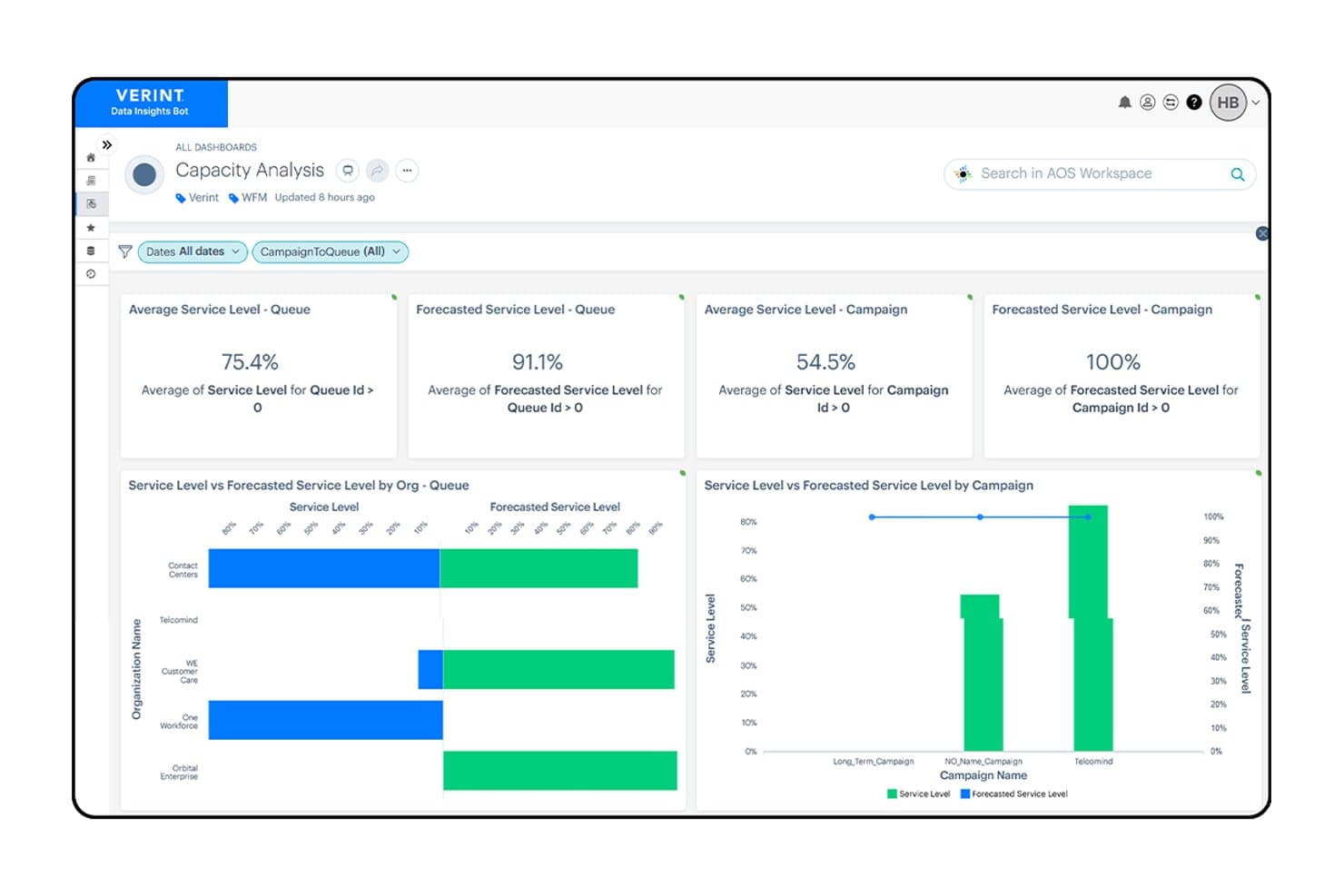
Verint tracks service levels and forecasted capacity across queues and campaigns. Verint Speech Analytics is a voice interaction analysis platform that transcribes 100% of recorded calls to surface sentiment, root-cause insights, compliance issues, and operational trends across contact center interactions.
Who Is Verint Best For?
Verint Speech Analytics is a strong fit for enterprise contact centers where QA teams need to move beyond manual sampling and automatically evaluate agent performance at scale.
Why I Picked Verint
Verint earns its spot on my shortlist because its Wrap Up Bot handles the post-call documentation that eats up agent time after every interaction. It captures audio directly from the ACD, transcribes it, generates a structured summary, and pushes it to the system of record in seconds. I also like that Quality Bot can autoscore up to 100% of those same interactions against custom evaluation forms, so QA teams get full coverage without manual sampling.
Verint Key Features
- Genie natural-language querying: Lets analysts ask plain-language questions about customer conversations and get insight-backed answers in minutes, complete with verified call examples.
- PII redaction: Automatically detects and masks sensitive data—including payment-card numbers, Social Security numbers, and addresses—in recordings and transcripts.
- Sentiment scoring across voice and digital interactions: Scores interactions for sentiment and tracks negative sentiment changes at the employee level to support targeted investigation.
- Operational insight discovery: Identifies specific drivers of handle time, silence, holds, repeat contacts, and knowledge gaps across 100% of recorded interactions.
Verint Integrations
Verint offers marketplace integrations with Intradiem and Zoom Contact Center through CSI and Time Collection adapters. An API is available for custom integrations.
Pros and Cons
Pros:
- Scores interactions beyond manual sampling
- Finds call trends and root causes
- Automates post-call summaries to the system of record
Cons:
- Reports can require manual assembly
- Transcription struggles with accents and terminology
Learn more about Verint: Best for agile team scaling and global expansion
- Free demo available
- From $25/month (billed annually)
Visit WebsiteCustomer Rating:4.8/5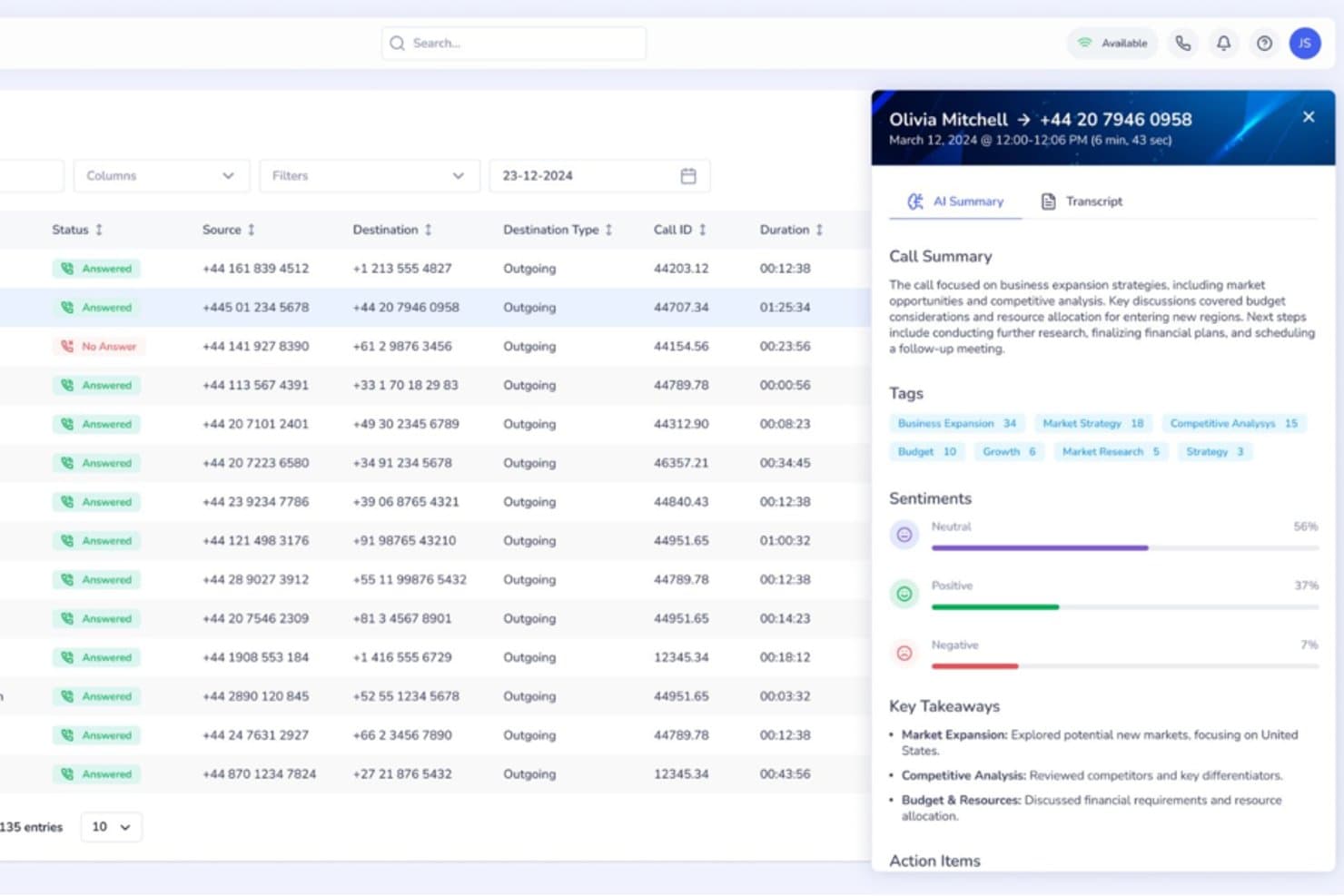
Squaretalk offers an AI-powered call analytics panel with call summaries, sentiment analysis, tags, and key takeaways for each call. Squaretalk is a cloud-based contact center platform with AI-powered conversation analytics, omnichannel communication, predictive dialing, and real-time performance monitoring across voice and messaging channels.
Who Is Squaretalk Best For?
Squaretalk suits SMB and mid-market sales and support teams that operate across multiple countries and need to add agents or phone numbers quickly without complex procurement.
Why I Picked Squaretalk
Squaretalk earns its spot as one of the best on my shortlist because it pairs real-time analytics across 80+ metrics with AI transcription in 100+ languages, so conversation insights stay consistent as my team expands into new regions. When I add agents or local numbers across 150+ destinations, the analytics layer scales alongside the operation. Sentiment analysis and keyword tagging work across voice and messaging channels from day one, with no reconfiguration needed.
Squaretalk Key Features
- Omnichannel messaging: Manage voice, WhatsApp Business, email, SMS, Viber, and Telegram conversations from one platform.
- Predictive dialer: Automatically calls leads and skips unanswered calls, connecting agents only to live prospects.
- Real-time call monitoring: Listen to live calls, supervise agent conversations, and use whisper mode for on-the-spot coaching.
- CRM integrations: Connects with Salesforce, HubSpot, Zoho CRM, Zendesk, monday.com, and more for seamless data flow.
Squaretalk Integrations
Squaretalk offers native integrations with Salesforce, Zoho CRM, Freshworks, Pipedrive, and more, and provides an API for custom integrations.
Pros and Cons
Pros:
- Transcription and sentiment analysis in 100+ languages
- Real-time monitoring with whisper and barge modes
- Omnichannel analytics across voice and messaging
Cons:
- Lacks forecasting and workforce management features
- No built-in automated QA scoring tools
Learn more about Squaretalk: Best for inbound and outbound call metrics
- Free plan + 14-day trial + free demo available
- From $25/user/month (billed annually)
Visit WebsiteCustomer Rating:4.2/5
CloudTalk tracks inbound and outbound call metrics to help teams monitor call center performance. Built for customer-facing teams, CloudTalk is a VoIP call center platform that pairs inbound and outbound calling with analytics tools such as sentiment analysis, live dashboards, and call tagging.
Who Is CloudTalk Best For?
CloudTalk is well-suited for sales and support teams at small to mid-sized businesses that need a VoIP call center with built-in analytics and performance tracking.
Why I Picked CloudTalk
I picked CloudTalk for its VoIP call statistics tracking that gives teams a granular, real-time view of call performance. The real-time dashboard surfaces live KPIs like call volume, wait times, agent occupancy, and abandonment rates in one place. I also like the group and agent reporting layers, which let you break down VoIP call data by individual rep or team, so you can spot where performance gaps exist rather than relying on blended averages.
CloudTalk Key Features
- AI Conversation Intelligence: Analyzes calls for sentiment, talk/listen ratio, and trending topics to reveal patterns in customer conversations.
- Call recording: Records inbound and outbound calls and stores them for review, quality monitoring, and coaching.
- Mandatory call tagging: Requires agents to categorize calls before closing them to keep reporting data organized.
- Call monitoring: Allows managers to listen to calls and review interactions to support quality assurance and agents.
CloudTalk Integrations
CloudTalk offers 70+ integrations, including Salesforce, HubSpot, Zendesk, Pipedrive, Intercom, Zoho CRM, Microsoft Teams, Freshdesk, Gorgias, and Shopify. It also connects with Zapier and Make for workflow automation, while API access supports custom integrations.
Pros and Cons
Pros:
- Call tagging keeps conversation context across teams
- Local numbers available in over 160 countries
- Real-time analytics track agent performance
Cons:
- Mobile app has fewer features than desktop version
- Reporting customization options can feel limitedcompetitors
 Best for customizable analytics dashboards
- Free demo available
- Pricing upon request
Visit WebsiteCustomer Rating:4.4/5
Talkdesk dashboard displaying real-time service levels and agent status metrics. If you need analytics dashboards that adapt to your team’s unique KPIs, Talkdesk offers a flexible solution for contact centers. The platform is built for operations leaders and analysts who want to visualize, filter, and drill into real-time and historical data. With Talkdesk, you can design dashboards that match your reporting needs and quickly spot trends across channels.
Why I Picked Talkdesk
Customizable analytics dashboards are what set Talkdesk apart for call center analytics. The platform lets you build dashboards from scratch, choosing which metrics and visualizations matter most to your team. I appreciate how you can filter, segment, and drill down into data by agent, queue, or channel in real time. This flexibility makes Talkdesk a strong fit for teams that need analytics tailored to their specific workflows and reporting requirements.
Talkdesk Key Features
Some other features that make Talkdesk useful for analytics teams include:
- Speech Analytics: Analyze call recordings for keywords, sentiment, and compliance triggers.
- Automated Reporting: Schedule and deliver recurring reports to stakeholders directly from the platform.
- Real-Time Agent Monitoring: View live agent activity and performance metrics as calls happen.
- Custom Alerting: Set up notifications for specific metric thresholds or operational events.
Talkdesk Integrations
Integrations include Salesforce, Zendesk, Microsoft Teams, ServiceNow, HubSpot, Microsoft Dynamics 365, Zoom, Slack, Shopify, and Freshdesk.
Pros and Cons
Pros:
- Speech analytics includes keyword and sentiment tracking
- Real-time analytics updates instantly during calls
- Dashboard widgets support drag-and-drop arrangement
Cons:
- Custom report building requires advanced setup
- Historical data exports limited to CSV format
Learn more about Talkdesk: Best for conversational AI automation
- Free demo available
- Pricing upon request
Visit WebsiteCustomer Rating:4.8/5
Replicant analytics dashboard showing call flow performance and CSAT metrics. Replicant offers a conversational AI platform designed for contact centers that want to automate high-volume voice interactions. It’s a strong fit for enterprise support teams and operations leaders looking to reduce wait times and handle repetitive requests without human agents. Replicant’s AI can resolve common customer issues end-to-end, freeing up your team for more complex tasks.
Why I Picked Replicant
Replicant stands out for its focus on automating complex, conversational interactions in call centers using AI. I picked it because its platform can handle full customer conversations, not just simple routing or basic responses. Replicant’s AI listens, understands intent, and responds in real time, allowing it to resolve common issues like order status, account updates, or troubleshooting without human intervention. This level of conversational automation is especially valuable for teams looking to scale support and reduce agent workload.
Replicant Key Features
Some other features that make Replicant appealing for call center analytics include:
- Call Transcription: Automatically transcribes every customer conversation for later review and analysis.
- Analytics Dashboard: Visualizes call metrics, trends, and AI performance in a centralized dashboard.
- Intent Recognition: Detects and categorizes customer intents to help identify common issues and requests.
- Quality Monitoring Tools: Provides tools for supervisors to review, score, and coach AI-driven interactions.
Replicant Integrations
Integrations include Salesforce, Zendesk, ServiceNow, Genesys, NICE inContact, Five9, Talkdesk, Amazon Connect, Cisco, and Shopify.
Pros and Cons
Pros:
- Intent detection highlights trending customer issues
- Real-time analytics dashboard tracks call outcomes
- Conversational AI resolves calls without agents
Cons:
- No self-service analytics customization tools
- Limited support for non-English languages
Learn more about Replicant: Best for integrated voice and messaging analytics
- 14-day free trial + free demo available
- Pricing upon request
Visit WebsiteCustomer Rating:4.3/5
Dialpad call volume heatmap showing duration patterns and analytics tracking. Dialpad brings together voice and messaging analytics in a single platform, making it a strong choice for teams managing multichannel contact centers. It’s designed for supervisors and analysts who want to track conversations across calls, SMS, and chat without switching tools. With Dialpad, you can monitor agent performance and customer sentiment in real time, no matter which channel your customers use.
Why I Picked Dialpad
What makes Dialpad a strong fit for call center analytics is its ability to unify voice and messaging data in one place. I picked Dialpad because it automatically transcribes calls and messages, then applies AI-powered sentiment analysis across both channels. You can view conversation trends, keyword mentions, and agent performance metrics for calls, SMS, and chat together. This integrated approach helps teams spot issues and opportunities across all customer touchpoints without juggling multiple analytics tools.
Dialpad Key Features
Some other features that make Dialpad useful for analytics teams include:
- Live Call Monitoring: Listen in on active calls and provide coaching in real time.
- Customizable Analytics Dashboards: Build dashboards with widgets for the metrics that matter most to your team.
- Automated Call Summaries: Receive AI-generated summaries after each call, highlighting key topics and action items.
- Real-Time Alerts: Set up notifications for specific keywords or call events as they happen.
Dialpad Integrations
Integrations include Salesforce, HubSpot, Zendesk, Microsoft 365, Google Workspace, Zoho CRM, Intercom, Outreach, Okta, and Rippling.
Pros and Cons
Pros:
- Keyword tracking works for both voice and SMS
- Automated call summaries highlight key discussion points
- Analytics dashboards update instantly during conversations
Cons:
- No built-in call quality scoring tool
- Historical analytics limited to one year
 Best for multilingual speech analytics
- 30-day free trial
- Pricing upon request
Visit WebsiteCustomer Rating:4.6/5
SentiSum feedback dashboard with sentiment tracking and topic categorization. SentiSum is built for contact centers that need to analyze calls in multiple languages without manual effort. It’s especially useful for global CX teams and operations leaders who want to surface customer insights from diverse regions. With SentiSum, you can automatically detect topics, sentiment, and intent across every conversation, regardless of language.
Why I Picked SentiSum
What stands out about SentiSum is its ability to analyze speech data in over 100 languages, making it a strong choice for multilingual call centers. The platform automatically transcribes and tags calls for topics, sentiment, and intent, so you can track customer experience trends across regions without manual translation. I like that SentiSum’s AI models are trained to handle language nuances, which helps surface actionable insights from non-English conversations. This focus on multilingual analytics makes it especially valuable for global support teams and CX leaders.
SentiSum Key Features
In addition to its multilingual analytics capabilities, SentiSum offers several other features worth noting:
- Automated Root Cause Analysis: Identify the underlying reasons behind spikes in call volume or negative sentiment.
- Real-Time Alerts: Receive instant notifications when specific topics or issues are detected in calls.
- Customizable Reporting Dashboards: Build and share reports tailored to your team’s metrics and goals.
- API Access: Integrate SentiSum’s analytics with your existing systems for deeper data analysis.
SentiSum Integrations
Integrations include Zendesk, Freshdesk, Intercom, Dixa, Gorgias, and Survey Monkey.
Pros and Cons
Pros:
- Real-time alerts for emerging customer issues
- Automated topic detection for every conversation
- Multilingual speech analytics covers 100+ languages
Cons:
- Sentiment analysis accuracy varies by language
- Lacks direct connection to app stores
Learn more about SentiSum: Best for omnichannel reporting capabilities
- Free demo available
- From $75/user/month (billed annually)
Visit WebsiteCustomer Rating:4.4/5
Genesys dashboard displaying interaction volume, AHT, and ASA metrics. Genesys is built for organizations that need to track customer interactions across voice, chat, email, and social channels in one place. It’s especially useful for CX leaders and operations teams who want unified reporting and analytics for every touchpoint. With Genesys, you can break down channel silos and get a complete view of your contact center’s performance.
Why I Picked Genesys
What sets Genesys apart for call center analytics is its ability to bring together data from every customer channel into a single reporting environment. I picked Genesys because it lets you track and compare metrics across voice, chat, email, and social media without switching platforms. The platform’s omnichannel dashboards and customizable reports help you spot trends and performance gaps across all touchpoints. This unified approach is especially valuable for teams managing complex, multi-channel customer journeys.
Genesys Key Features
Some other features that make Genesys valuable for analytics teams include:
- Real-Time Performance Dashboards: Monitor live metrics for agents, queues, and channels as activity happens.
- Speech and Text Analytics: Analyze call recordings and written interactions for sentiment, keywords, and compliance.
- Custom Report Builder: Design and schedule reports tailored to your team’s specific KPIs and data needs.
- Workforce Management Integration: Connect analytics with forecasting, scheduling, and agent adherence tools.
Genesys Integrations
Integrations include Salesforce, Microsoft Teams, Zendesk, ServiceNow, Zoom, Okta, Amazon Lex, Google CCAI, eMite, and Brightmetrics.
Pros and Cons
Pros:
- Speech analytics support sentiment and compliance tracking
- Real-time dashboards display live agent performance
- Omnichannel analytics unify all customer interactions
Cons:
- Some integrations require additional third-party subscriptions
- Initial setup for analytics can be time-consuming
 Best for AI-driven performance management
- Free demo available
- Pricing upon request

AmplifAI dashboard for tracking agent CSAT, coaching, and performance goals. AmplifAI brings AI-driven performance management to contact centers that want to personalize coaching and automate agent development. This platform is well-suited for operations leaders and supervisors who need to identify performance gaps and deliver targeted interventions at scale. If you’re looking to use data and automation to improve agent outcomes and engagement, AmplifAI offers tools built specifically for that purpose.
Why I Picked AmplifAI
What drew me to AmplifAI is its focus on AI-driven performance management, which is especially relevant for call centers looking to automate and personalize agent coaching. The platform uses AI to analyze agent performance data and recommend targeted coaching actions, helping supervisors address skill gaps quickly. I appreciate how AmplifAI automates recognition and rewards for top performers, making it easier to motivate teams based on real metrics. These features make AmplifAI a strong fit for organizations that want to use analytics to drive continuous improvement in agent performance.
AmplifAI Key Features
Some other features that make AmplifAI appealing for call center analytics teams include:
- Automated Task Assignment: Assign coaching, training, and follow-up tasks to agents based on performance data.
- Performance Dashboards: Visualize key metrics and trends for individuals, teams, and the entire organization.
- Speech and Text Analytics: Analyze customer interactions across calls, chats, and emails for deeper insights.
- Gamification Tools: Use leaderboards and achievement tracking to encourage healthy competition among agents.
AmplifAI Integrations
Integrations include NICE, Genesys, Five9, Talkdesk, Salesforce, Amazon Connect, RingCentral, Avaya, Cisco, and Zendesk.
Pros and Cons
Pros:
- Real-time performance dashboards for supervisors
- Automated recognition and rewards for agents
- Personalized coaching recommendations based on analytics
Cons:
- Some integrations require additional setup support
- Limited customization for dashboard visualizations
Learn more about AmplifAI:

Level AI dashboard showing key call metrics and agent performance scores. Level AI offers real-time agent coaching and conversation intelligence designed for contact centers that want to improve agent performance on the spot. This platform is a strong fit for teams looking to surface actionable insights from customer interactions and provide immediate feedback to agents. If you need to close performance gaps quickly and ensure consistent service quality, Level AI brings targeted analytics and coaching tools to your workflow.
Why I Picked Level AI
Level AI stands out for its real-time agent coaching insights, which are especially valuable for contact centers aiming to improve agent performance during live interactions. I picked this platform because it uses AI to analyze conversations as they happen and delivers instant feedback to agents, helping them adjust their approach on the spot. The tool’s live coaching cards and automated quality monitoring let supervisors identify coaching opportunities without waiting for post-call reviews. This focus on immediate, actionable insights makes Level AI a strong choice for teams that want to drive continuous improvement in agent-customer interactions.
Level AI Key Features
Some other features that make Level AI a strong option for call center analytics teams include:
- Omnichannel Conversation Analytics: Analyze customer interactions across voice, chat, and email channels in a single dashboard.
- Customizable Scorecards: Build and tailor evaluation forms to match your team’s quality assurance standards.
- Automated Compliance Monitoring: Flag conversations that may violate compliance requirements using AI-driven detection.
- Knowledge Base Integration: Surface relevant knowledge articles to agents during live conversations based on context.
Level AI Integrations
Integrations include Salesforce, Zendesk, Freshworks, Kustomer, Five9, Twilio, Talkdesk, Genesys, Amazon Connect, and Slack.
Pros and Cons
Pros:
- Automated quality assurance scoring for agents
- AI-driven conversation analytics across channels
- Real-time coaching prompts during live calls
Cons:
- No mobile app for on-the-go access
- Limited historical reporting depth for analytics
Learn more about Level AI:
Outro software de análise de centros de atendimento
Eis algumas opções adicionais de software de análise de centros de atendimento que não entraram na minha lista restrita, mas que vale a pena consultar:
- 11TethrBest for actionable conversation intelligence
- 12CrestaBest for live conversation guidance
- 13RingCentralBest for unified communications integration
- 14InMomentBest for experience data aggregation
- 15VonageBest for flexible API connectivity
- 16KustomerBest for timeline-based data views
- 17Observe.AIBest for AI-powered quality assurance
- 18QualtricsBest for customer feedback correlation
- 19Salesforce Best with CRM-driven analytics
- 20CallMinerBest for advanced interaction analytics
- 21Zoom Contact CenterBest for video-enabled interactions
How I Evaluate Call Center Analytics Software
I split my evaluation into baseline must-haves—like speech analytics and automated QA—and the differentiators that separate tools built for serious contact center operations from the rest.
Core Functionality (Table Stakes For This List)
When I'm selecting tools for my list, I rank each one on a scale from 0 (does not offer the functionality) to 5 (excels in this area) for each core functionality listed below. Then, I calculate the tool's total score into a percentage. Each tool needs to achieve a minimum total score of 65% to be considered for inclusion.
- Speech & Text Analytics: I check whether the tool transcribes and analyzes both voice and digital interactions, including how well it handles keyword spotting, topic clustering, and custom category tagging across channels.
- Real-Time Performance Dashboards: I evaluate how a platform surfaces live and historical KPIs like AHT, FCR, and abandonment rate, and whether supervisors can drill down by queue, team, or time period.
- Sentiment & Emotion Detection: The ability to score customer sentiment at the interaction or sentence level matters here, especially for flagging escalation-prone calls before they reach a supervisor's desk.
- Agent Performance Analytics: I look for tools that go beyond raw call counts to offer scorecards, peer benchmarking, and the ability to tie individual agent metrics back to specific coaching areas.
- Automated Quality Management: Manual QA sampling covers a fraction of calls. I evaluate whether a platform can auto-score 100% of interactions against configurable criteria like script adherence or compliance language.
- CCaaS & Telephony Integration: A tool's value depends on how well it connects with platforms like Genesys, Five9, Amazon Connect, or Talkdesk. I look for native connectors and real-time data ingestion.
Once I have a list of tools that meet this criteria, I consider what sets each platform apart.
Differentiating Factors (What Sets Vendors Apart)
Here's how I compare and contrast different vendors:
Standout Features
Generative AI summarization is a big one for me. Tools that auto-generate call summaries and dispositions cut after-call work significantly for agents. I also look at predictive analytics capabilities, specifically whether a platform can forecast churn risk or CSAT dips based on interaction trends. Conversational coaching tools round things out. The best implementations tie QA scores directly to personalized coaching plans, giving supervisors a clear path from insight to action.
Beyond Features
Compliance and data security weigh heavily in my evaluation. Contact centers in healthcare and finance handle sensitive customer data, so I check for PCI-DSS redaction, HIPAA support, and SOC 2 Type II certification. Integration ecosystem depth matters just as much. A tool that connects to your CRM, WFM platform, and BI tools like Tableau or Power BI becomes far more valuable than one that operates in isolation. I also consider time-to-value, looking at whether vendors offer pre-built scorecards and onboarding support to get teams producing insights quickly.
Como escolher software de análise de centros de atendimento
É fácil ficar sobrecarregado com listas extensas de funcionalidades e estruturas de preços complexas. Para o ajudar a manter-se concentrado enquanto analisa o seu processo específico de seleção de software, apresentamos uma lista de verificação com os fatores a ter em conta:
| Fator | O que deve considerar |
|---|---|
| FatorEscalabilidade | O que deve considerarO software será capaz de lidar com os volumes de chamadas atuais e previstos? Informe-se sobre os limites, os escalões de preços e o impacto do crescimento nos custos. |
| FatorIntegrações | O que deve considerarO software liga-se de forma nativa ao seu CRM, às ferramentas de telefonia e de gestão da força de trabalho? Verifique a compatibilidade com o seu conjunto de ferramentas atual. |
| FatorPersonalização | O que deve considerarPode adaptar os painéis, os relatórios e as análises aos fluxos de trabalho da sua equipa? Considere o grau de flexibilidade de que necessita para os seus processos. |
| FatorFacilidade de utilização | O que deve considerarOs seus agentes e gestores irão adotá-lo rapidamente? Procure uma navegação intuitiva, apresentações de dados claras e requisitos mínimos de formação. |
| FatorImplementação e integração inicial | O que deve considerarQuanto tempo demorará a configuração e que recursos serão necessários? Informe-se sobre o apoio à migração, os programas de integração inicial e os prazos habituais para a entrada em produção. |
| FatorCusto | O que deve considerarAs estruturas de preços são transparentes e previsíveis? Tenha atenção a taxas ocultas, suplementos obrigatórios e períodos contratuais mínimos. |
| FatorMedidas de segurança | O que deve considerarA plataforma cumpre as suas normas de privacidade e segurança dos dados? Confirme a encriptação, os controlos de acesso e as certificações de conformidade. |
| FatorDisponibilidade do apoio | O que deve considerarQue canais e horários de apoio são disponibilizados? Considere se necessita de assistência 24 horas por dia, 7 dias por semana, gestores de conta dedicados ou apoio multilingue. |
O que é o software de análise de centros de atendimento?
O software de análise de centros de contacto é uma categoria de ferramentas que captura, processa e analisa dados provenientes das interações com os clientes através de canais de voz e digitais. Estas plataformas ajudam as equipas a monitorizar o desempenho dos agentes, acompanhar o sentimento dos clientes e identificar tendências ou problemas de conformidade. Ao transformar dados brutos das conversas em informações úteis, o software de análise de centros de contacto apoia a melhoria contínua da qualidade do serviço, da eficiência operacional e da experiência do cliente.
Funcionalidades do software de análise de centros de contacto
Ao selecionar um software de análise de centros de contacto, procure as seguintes funcionalidades principais:
- Gravação de chamadas: Captura e armazena o áudio das chamadas dos clientes, permitindo aos supervisores rever as interações para fins de garantia da qualidade e formação.
- Painéis personalizáveis: Permitem aos utilizadores visualizar métricas e tendências importantes em tempo real, adaptando a apresentação para destacar os dados mais relevantes para diferentes funções.
- Análise de sentimentos: Avalia o tom e a emoção presentes nas conversas com os clientes, ajudando as equipas a compreender a satisfação dos clientes e a identificar potenciais problemas numa fase inicial.
- Acompanhamento do desempenho dos agentes: Monitoriza métricas individuais e das equipas, como o tempo de atendimento das chamadas, as taxas de resolução e o cumprimento de guiões ou protocolos.
- Monitorização da conformidade: Sinaliza chamadas que possam violar normas regulamentares ou internas, apoiando a gestão de riscos e a preparação para auditorias.
- Relatórios automatizados: Gera relatórios programados ou a pedido que resumem a atividade do centro de contacto, facilitando a partilha de informações com as partes interessadas.
- Análise omnicanal: Agrega dados de voz, conversação, e-mail e outros canais para proporcionar uma visão unificada das interações com os clientes.
- Ferramentas de garantia da qualidade: Disponibiliza grelhas de avaliação, formulários de avaliação e fluxos de trabalho para uniformizar e documentar as avaliações dos agentes.
- Alertas em tempo real: Notifica imediatamente os supervisores ou agentes quando são detetadas palavras-chave, expressões ou comportamentos específicos durante interações em direto.
Benefícios do software de análise de centros de contacto
A implementação de um software de análise de centros de contacto proporciona vários benefícios à sua equipa e à sua empresa. Eis alguns dos benefícios que pode esperar:
- Melhoria da qualidade do serviço: O acesso a gravações de chamadas, à análise de sentimentos e a ferramentas de garantia da qualidade ajuda as equipas a identificar oportunidades de formação e a manter padrões elevados.
- Resolução mais rápida de problemas: Os alertas em tempo real e a análise omnicanal permitem aos supervisores resolver os problemas à medida que surgem, reduzindo os tempos de espera dos clientes e os escalamentos.
- Tomada de decisões baseada em dados: Os painéis personalizáveis e os relatórios automatizados fornecem aos responsáveis informações úteis para orientar o planeamento das equipas, a formação e as melhorias dos processos.
- Melhoria da gestão da conformidade: As funcionalidades de monitorização da conformidade ajudam a garantir o cumprimento dos requisitos regulamentares e reduzem o risco de infrações dispendiosas.
- Maior eficiência operacional: A avaliação automatizada, o acompanhamento do desempenho e as ferramentas de fluxo de trabalho minimizam as tarefas manuais e libertam tempo para atividades de maior valor.
- Visão unificada do cliente: A agregação de dados provenientes de vários canais proporciona às equipas uma compreensão abrangente das jornadas dos clientes e dos seus pontos problemáticos.
- Maior envolvimento dos agentes: As métricas de desempenho transparentes e os mecanismos de feedback apoiam o desenvolvimento e o reconhecimento dos agentes.
Custos e preços do software de análise de centros de contacto
A seleção de um software de análise de centros de contacto exige uma compreensão dos vários modelos e planos de preços disponíveis. Os custos variam consoante as funcionalidades, a dimensão da equipa, os complementos, entre outros fatores. A tabela abaixo resume os planos mais comuns, os seus preços médios e as funcionalidades normalmente incluídas nas soluções de software de análise de centros de contacto:
Tabela de comparação de planos de software de análise de centros de contacto
| Tipo de plano | Preço médio | Funcionalidades comuns |
|---|---|---|
| Tipo de planoPlano gratuito | Preço médio$0 | Funcionalidades comunsGravação básica de chamadas, relatórios limitados e painéis simples. |
| Tipo de planoPlano pessoal | Preço médio$20–$40/utilizador/mês | Funcionalidades comunsGravação de chamadas, análise básica, acompanhamento de sentimentos e suporte padrão. |
| Tipo de planoPlano empresarial | Preço médio$50–$100/utilizador/mês | Funcionalidades comunsAnálise avançada, painéis personalizáveis, acompanhamento do desempenho, monitorização da conformidade e opções de integração. |
| Tipo de planoPlano empresarial de grande dimensão | Preço médio$120–$200/utilizador/mês | Funcionalidades comunsAnálise omnicanal, alertas em tempo real, automatização de fluxos de trabalho, suporte dedicado e controlos de segurança avançados. |
Perguntas frequentes sobre software de análise de centros de atendimento
Aqui estão algumas respostas a perguntas comuns sobre software de análise de centros de atendimento:
Como é que o software de análise de centros de atendimento ajuda na gestão do desempenho dos agentes?
O software de análise de centros de atendimento monitoriza métricas importantes, como o tempo médio de atendimento, a resolução no primeiro contacto e o cumprimento do guião, para melhorar significativamente a produtividade dos agentes. Estes dados do centro de atendimento ajudam os gestores a identificar necessidades de formação, reconhecer os melhores desempenhos e definir indicadores-chave de desempenho claros para os agentes. Ao monitorizar o desempenho do centro de atendimento, os responsáveis podem garantir que os índices de satisfação dos clientes se mantêm elevados.
O software de análise de centros de atendimento consegue analisar interações através de vários canais?
Sim, a maioria dos softwares consegue agregar e analisar dados de chamadas telefónicas, conversas por chat, e-mails e, por vezes, redes sociais, para medir a resolução no primeiro contacto global. Esta visão unificada de todos os canais de comunicação ajuda as equipas a compreender toda a jornada do cliente, identificar tendências em todos os pontos de contacto e descobrir informações valiosas sobre o comportamento dos clientes.
O que devo procurar para garantir a segurança dos dados num software de análise de centros de atendimento?
Procure funcionalidades como encriptação de ponta a ponta, controlos de acesso baseados em funções e certificações de conformidade, como SOC 2 ou RGPD, para proteger dados sensíveis dos clientes. Pergunte aos fornecedores sobre as suas práticas de armazenamento, a forma como lidam com informações confidenciais e como protegem os dados que passam pelos seus sistemas IVR ou de encaminhamento, de modo a manter uma pontuação elevada de recomendação líquida.
Quanto tempo demora a implementar um software de análise de centros de atendimento?
Os prazos de implementação variam, mas a maioria das equipas pode esperar que a configuração demore entre alguns dias e várias semanas. Os fatores incluem as necessidades de migração de dados, a complexidade da integração e a disponibilidade de recursos de integração inicial. Dedicar tempo à configuração adequada de ferramentas como a análise preditiva e a aprendizagem automática ajuda a prever com precisão a perda de clientes e a mapear as necessidades dos clientes.
É possível personalizar relatórios e painéis num software de análise de centros de atendimento?
Sim, a maioria das soluções disponibiliza painéis e ferramentas de elaboração de relatórios personalizáveis para otimizar os seus fluxos de trabalho. Normalmente, pode adaptar as vistas para destacar as métricas específicas do centro de atendimento — como as tendências de retenção, NPS ou gestão da qualidade — que são mais relevantes para os objetivos da sua empresa.