

Gerir um centro de atendimento pode ser difícil. Tem de conciliar as exigências dos clientes, o desempenho da equipa e a pressão constante para melhorar o serviço. É aí que entra o software de centro de atendimento misto. Este ajuda a equilibrar as chamadas recebidas e efetuadas, facilitando o trabalho da sua equipa e deixando os seus clientes mais satisfeitos.
Passei algum tempo a testar e analisar estas ferramentas para lhe proporcionar uma perspetiva imparcial sobre as melhores opções disponíveis. Neste artigo, partilho as minhas principais escolhas, destacando aquilo em que cada uma se distingue e a forma como pode responder às suas necessidades.
Quer procure melhorar a eficiência ou aumentar a satisfação dos clientes, encontrará aqui a solução certa. Vamos analisar as opções e encontrar a combinação perfeita para a sua equipa.
Why Trust Our Software Recommendations
6,700+
Reviews
20
Industry experts
16+
Evaluation factors
14
Years
Our team has been testing and reviewing software since 2012. As CX leaders ourselves, we know how difficult—and important—it is to choose the right software.
For this guide, we evaluated tools using hands-on testing and independent research, scoring tools using our selection criteria.
Our reviews reflect our human editorial judgment, not a sales pitch.
 Gui DrusinaCreative Director
 Tim FisherVP of AI
Tabela comparativa de softwares de centro de atendimento misto
Esta tabela comparativa resume os detalhes de preços das minhas principais escolhas de software de centro de atendimento misto:
| Tool | Best For | Trial Info | Price | ||
|---|---|---|---|---|---|
| 1 | Best for team collaboration | Free trial available | From $15/user/month (billed annually) | Website | |
| 2 | Best for real-time call monitoring | Free plan + 14-day trial + free demo available | From $25/user/month (billed annually) | Website | |
| 3 | Best for building custom AI agents at scale | Free demo available | Pricing upon request | Website | |
| 4 | Best for remote teams | 7-day free trial + free demo available | From $15/user/month (billed annually) | Website | |
| 5 | Best for AI features | Free demo available | Pricing upon request | Website | |
| 6 | Best for sales teams | Free demo available | Pricing upon request | Website | |
| 7 | Best for small businesses | 14-day free trial + free demo available | Pricing upon request | Website | |
| 8 | Best for CRM integration | 14-day free trial | From $14/user/month (billed annually) | Website | |
| 9 | Best for call tracking | Free demo available | From $79/user/month (billed annually) | Website | |
| 10 | Best for enterprise solutions | Free demo available | From $119/seat/month | Website |


Análises dos melhores softwares de centro de atendimento misto
Seguem-se os meus resumos detalhados dos melhores softwares de centro de atendimento misto que entraram na minha lista. As minhas análises apresentam uma perspetiva detalhada das principais funcionalidades, vantagens & desvantagens, integrações e casos de utilização ideais de cada ferramenta, para o ajudar a encontrar a melhor opção para si.
 Best for team collaboration
- Free trial available
- From $15/user/month (billed annually)
Visit WebsiteCustomer Rating:4.5/5
Nextiva unified AI communications with voice, video, chat, and contact center tools. Nextiva is a cloud-based unified communication & AI-powered CXM platform for businesses of all sizes. It bundles VoIP phone service, video meetings, chat, SMS, and AI-driven contact center tools in one platform.
Why I picked Nextiva: The platform unifies all customer interactions across voice, video, chat, SMS, email, social, and more, giving teams a 360° customer view. Its AI-powered contact center and intelligent routing improve efficiency and support personalization at scale. The platform’s flexibility and scalability make it suitable for both small businesses and large enterprises.
Standout features & integrations:
Features include AI-driven call routing, real-time analytics, and unified communication tools that bring phone, video, messaging, and contact center operations together in one place. The platform’s automation and workflow tools help your team manage customer interactions efficiently and maintain consistent service quality.
Integrations include Salesforce, HubSpot, Zendesk, Zoho CRM, Microsoft Teams, Outlook, and Google Workspace.
Pros and Cons
Pros:
- Scalable for teams of all sizes
- AI-powered routing and analytics
- Unified voice and messaging platform
Cons:
- Pricing can be expensive in higher-tier plans
- May overwhelm very small teams
 Best for real-time call monitoring
- Free plan + 14-day trial + free demo available
- From $25/user/month (billed annually)
Visit WebsiteCustomer Rating:4.2/5
CloudTalk offers a real-time call center dashboard for monitoring agent performance and call statistics. For businesses looking to improve how they manage calls, CloudTalk provides a solution for support and sales teams with real-time call monitoring. It helps teams handle inbound and outbound calls more effectively, making it suitable for organizations across different industries. Whether used in finance, real estate, or retail, CloudTalk supports clearer call management and day-to-day operations.
Why I Picked CloudTalk
I picked CloudTalk for its real-time call monitoring, which helps teams oversee live inbound and outbound calls as they happen. This makes it easier for supervisors to track call quality and step in when issues arise. Intelligent call routing and automated dialing also help agents handle calls more efficiently, supporting the day-to-day needs of blended call centers. These capabilities are crucial for businesses looking to improve their call center efficiency and customer engagement.
CloudTalk Key Features
In addition to real-time call monitoring, CloudTalk offers:
- Call Recording: Record calls for quality assurance and training to ensure consistent customer service standards.
- Interactive Voice Response (IVR): This tool helps in managing high call volumes by directing callers to the appropriate department or information.
- International SMS and WhatsApp Messaging: These features enable global communication, allowing you to reach customers worldwide.
CloudTalk Integrations
Integrations include HubSpot, Salesforce, Zoho, Zendesk, Odoo, Intercom, Salesloft, Outreach, Bullhorn, Monday, and Shopify.
Pros and Cons
Pros:
- Offers local, mobile, or toll-free numbers from over 140 countries
- Useful call analytics for tracking agent activity and call outcomes
- Integrates with popular CRMs to log calls automatically
Cons:
- Limited customization options in dashboards
- Occasional call connection issues reported by users
 Best for building custom AI agents at scale
- Free demo available
- Pricing upon request
Visit WebsiteCustomer Rating:5/5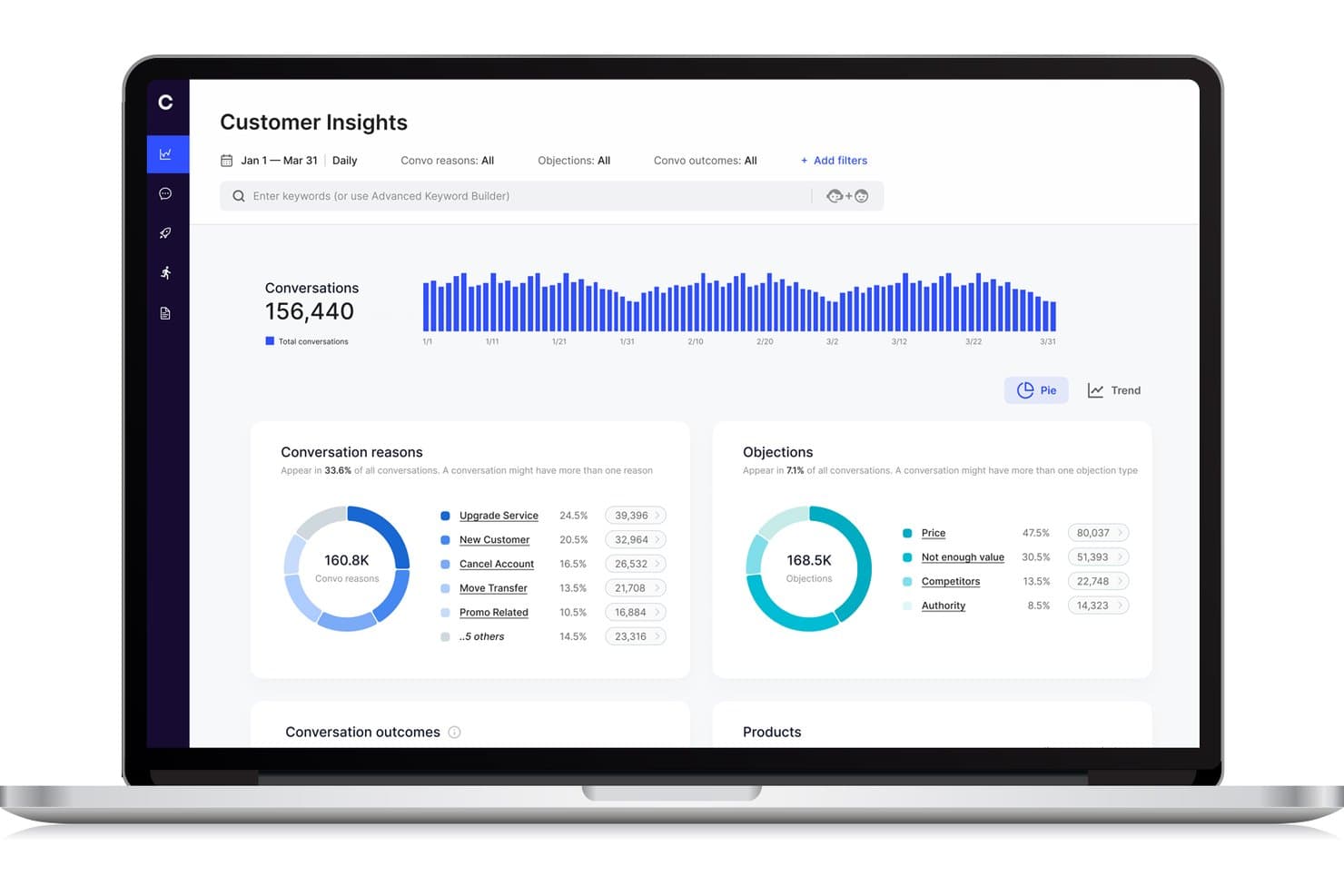
Cresta offers a Customer Insights dashboard that displays conversation reasons, objections, and trends across conversations for blended call center analytics. Cresta is an AI-powered contact center platform that unifies inbound and outbound operations through dynamic agent workflows, real-time conversation intelligence, and seamless integration with existing call center tools.
Who Is Cresta Best For?
Cresta suits enterprise contact centers needing scalable AI-driven call handling and dynamic agent workflows across complex, multi-channel environments.
Why I Picked Cresta
I picked Cresta as one of the best because I can build and deploy custom AI agents that handle blended call queues, automate dynamic agent assignment, and analyze every conversation in real time at enterprise scale.
Cresta Key Features
- Unified agent desktop: Agents manage all blended interactions from a single interface without switching tools.
- Real-time supervisor controls: Supervisors can monitor live activity and adjust agent workflows instantly.
- Skills-based routing: The system matches inbound and outbound contacts to agents based on defined skills and attributes.
- Customizable reporting dashboards: Users access blended analytics spanning agent occupancy, productivity, and campaign performance.
Cresta Integrations
Cresta offers native integrations with Salesforce, Twilio, Pipedrive, BigCommerce, Five9, Zendesk, and more. An API is available for custom integrations.
Pros and Cons
Pros:
- Dynamic queue blending across channels and teams
- Advanced conversation analytics for supervisors
- AI coaching during live calls and chats
Cons:
- Knowledge Assist needs ongoing model tuning
- Predictive dialer features not explicitly supported
Learn more about Cresta: Best for remote teams
- 7-day free trial + free demo available
- From $15/user/month (billed annually)
Visit WebsiteCustomer Rating:4.7/5
Ringover cloud communication boosts remote teamwork with calls and collaboration tools. Ringover is a cloud-based communication platform designed for businesses that need efficient call management and collaboration tools. It serves remote teams by offering features that enhance connectivity and productivity.
Why I picked Ringover: The platform is tailored for remote teams, providing tools that facilitate seamless communication. Its call management features help your team stay organized and efficient, even when working remotely. Ringover's collaboration tools ensure everyone stays connected and informed. The ability to make and receive calls from anywhere enhances flexibility and adaptability.
Standout features & integrations:
Features include call transfer and call queuing, which help your team manage high call volumes effectively. The platform offers call recording to ensure quality and compliance. Additionally, analytics provide insights into call performance and team productivity.
Integrations include Salesforce, HubSpot, Zoho CRM, Pipedrive, Slack, Zendesk, Freshdesk, monday.com, and Helpscout.
Pros and Cons
Pros:
- Supports high call volumes
- Flexible call management
- Strong integrations
Cons:
- Advanced features limited to higher plans
- Occasional connection issues


Talkdesk cloud contact center with AI insights, automation, and scalable customer support. Talkdesk is a cloud-based contact center platform that caters to businesses of all sizes that are looking to boost customer interactions. It offers a variety of communication solutions, focusing on improving customer experience and operational efficiency.
Why I picked Talkdesk: The platform's AI features are central to its value, providing tools that support predictive insights and automated workflows. Talkdesk's AI-powered virtual agents assist your team in handling repetitive tasks, freeing up time for more complex interactions. The real-time analytics offer deep insights into customer behavior and team performance. Its scalability ensures that as your business grows, Talkdesk can grow with you.
Standout features & integrations:
Features include call recording and monitoring, which help you maintain quality and compliance. The platform offers omnichannel support, enabling communication across multiple channels. Workforce management tools assist in optimizing agent schedules and productivity.
Integrations include Salesforce, Zendesk, Microsoft Teams, Slack, Zoom, HubSpot, and ServiceNow.
Pros and Cons
Pros:
- Rich analytics and reporting
- Strong CRM and third‑party integrations
- AI‑powered routing and automation
Cons:
- Expensive for small teams
- Interface can feel complex
Learn more about Talkdesk:

Convoso AI dialing boosts sales efficiency with real-time scoring and compliance. Convoso is an AI-driven call center software tailored for sales teams across industries like BPO, finance, and real estate. It enhances sales performance with features like real-time DID scoring and AI dialing optimization, boosting contact and conversion rates.
Why I picked Convoso: Convoso strengthens the performance of any outbound call center by optimizing phone calls through its AI-driven dialing capabilities. With tools such as a predictive dialer and auto dialer, teams can move through outbound campaigns more efficiently and concentrate on outgoing calls that are most likely to convert.
Real-time DID scoring helps you prioritize valuable prospects while tracking the metrics and KPIs that matter. Built on a scalable telephony infrastructure, the platform adapts as your team expands, and its compliance management helps you stay aligned with regulatory requirements. Additionally, forecasting features provide greater visibility into performance trends, allowing you to plan future campaigns with confidence.
Standout features & integrations:
Features include multimodal dialing that supports both inbound and outbound sales. Workflow automation helps your team manage tasks efficiently. Superior caller ID management ensures your calls are recognized and answered.
Integrations can be done through API and Zapier.
Pros and Cons
Pros:
- Real-time DID scoring
- High-speed scalability
- AI dialing optimization
Cons:
- Requires technical knowledge
- Complexity in setup
Learn more about Convoso: Best for small businesses
- 14-day free trial + free demo available
- Pricing upon request
Visit WebsiteCustomer Rating:4.3/5
Dialpad organizes customer conversations with integrated calling, messaging, and voicemail tools. Dialpad is an AI-powered customer communications platform tailored for small businesses seeking efficient customer service and sales solutions. It offers real-time AI tools that enhance productivity, including automated note-taking and insights.
Why I picked Dialpad: The platform's focus on small businesses makes it accessible and easy to implement. AI-driven features like automated note-taking help your team stay organized. Its scalability allows you to grow without worrying about technical limitations. With enterprise-grade security, Dialpad ensures your data is safe.
Standout features & integrations:
Features include AI-powered agents that can handle complex workflows such as refunds and rebookings while supporting high-volume customer engagement across multiple channels. Whether teams are managing inbound calls, responding to incoming calls from support queues, or interacting with customers through social media, the platform helps maintain a consistent, reliable experience.
As a blended contact center solution, it also ensures that phone calls and digital interactions receive the same level of attention. Behind the scenes, Dialpad provides enterprise-grade security and compliance, including HIPAA and SOC 2 certifications, to protect sensitive information.
Integrations include Salesforce, Microsoft Teams, Google Workspace, Zendesk, Slack, HubSpot, Zoho CRM, and ServiceNow.
Pros and Cons
Pros:
- Handles complex workflows
- Cloud-native and mobile-friendly
- Scalable to support growth
Cons:
- May require tech support
- Many advanced features require higher-tier plans
 Best for CRM integration
- 14-day free trial
- From $14/user/month (billed annually)
Visit WebsiteCustomer Rating:4.4/5
Pipedrive sales CRM simplifies pipelines with automation, reporting, and easy tracking. Pipedrive is a sales-focused CRM tool designed for small to medium-sized businesses. It helps teams manage leads and deals, providing a clear overview of sales activities and performance.
Why I picked Pipedrive: The tool is great for CRM integration, making it easy for your team to manage customer relationships. Its intuitive sales pipeline view helps you track deals and progress. Automation features reduce manual tasks, allowing your team to focus on selling. The reporting capabilities provide insights into sales performance, helping with decision-making.
Standout features & integrations:
Features include customizable pipelines that help you tailor the sales process to your needs. The activity reminders ensure your team never misses an important follow-up. Additionally, the goal-setting and tracking feature keeps your team aligned with business objectives.
Integrations include Mailchimp, Trello, Slack, Microsoft Teams, Zapier, Xero, Asana, QuickBooks, and HubSpot.
Pros and Cons
Pros:
- Customizable sales processes
- Strong reporting capabilities
- Automation reduces manual tasks
Cons:
- Requires ongoing management to optimize
- Advanced features can be complex
Learn more about Pipedrive: Best for call tracking
- Free demo available
- From $79/user/month (billed annually)
Visit WebsiteCustomer Rating:4.7/5
DialedIn cloud contact center improves productivity with routing, tracking, and analytics. DialedIn is a cloud-based contact center software designed for businesses in industries like healthcare, finance, and hospitality. It focuses on improving agent productivity and customer engagement through efficient call management.
Why I picked DialedIn: DialedIn's strength lies in its call tracking capabilities, which help your team manage and analyze calls effectively. Omnichannel communication ensures you can engage with customers through multiple platforms. The platform's in-depth analytics provide insights to improve operational efficiency.
Standout features & integrations:
Features include predictive dialing and skill-based routing enhance call handling, as well as automatic call distribution and interactive voice response. Predictive dialing helps your team reach more customers efficiently. Extensive analytics support decision-making and performance improvement.
Integrations include Salesforce, Microsoft Teams, HubSpot, Zoho, Slack, Zendesk, and Google Workspace.
Pros and Cons
Pros:
- Omnichannel communication support
- Efficient predictive dialing
- Strong predictive-dialer and blended inbound/outbound capabilities
Cons:
- Complexity in initial setup
- Limited customization options
Learn more about DialedIn: 10Best for enterprise solutions
Five9
- Free demo available
- From $119/seat/month
Visit WebsiteCustomer Rating:4.1/5
Five9 AI contact center for personalized support and seamless customer journeys. Five9 is a cloud-based contact center solution designed for enterprises aiming to enhance customer engagement. It provides AI-driven tools to personalize customer interactions and improve service delivery.
Why I picked Five9: Five9 delivers an AI-driven customer journey orchestration experience that supports a blended call center solution, helping teams manage both inbound and outbound interactions with clarity and efficiency. It helps with real-time insights, improving decision-making across ACD routing, call queues, and high-volume outreach. The platform also supports tools such as an intelligent dialer and automated callbacks, giving your team more control over performance and customer engagement.
Standout features & integrations:
Features include AI-driven customer journey orchestration, ensuring your team can manage interactions efficiently. The platform's human-centered AI empowers agents with real-time insights. Additionally, its open APIs allow for easy customization to fit your business needs.
Integrations include Salesforce, Zendesk, Microsoft Dynamics 365, Oracle, and ServiceNow.
Pros and Cons
Pros:
- Human-centered AI tools
- Customizable with open APIs
- Scalable for large enterprises
Cons:
- AI features might be overwhelming
- May not suit small businesses
Learn more about Five9:
Outros softwares de centro de atendimento misto
Eis algumas opções adicionais de software de centro de atendimento misto que não entraram na minha lista, mas que ainda vale a pena conhecer:
- 11LiveAgentBest for multi-channel support
- 12TCNBest for IVR systems
- 13iCallifyBest for startup companies
- 14RingCentralBest for mobile workforce management
- 153CXBest for small business setups
- 16SquaretalkBest for cloud-based call solutions
- 17Global Call ForwardingBest for international call routing
- 18VerintBest for workforce optimization
- 19VoiptimeBest for outbound call campaigns
Related Reviews
- Software para centros de atendimento telefónico de chamadas efetuadas
- Software de gestão da força de trabalho de centros de atendimento
- Software de centro de atendimento
- Software de centro de contacto baseado na nuvem
- Software para centros de atendimento de chamadas recebidas
- Software de gestão de horários de centros de atendimento
How I Evaluate Blended Call Center Software
I split my evaluation into two layers: the baseline every tool must clear—true inbound/outbound blending, a real dialer, unified agent desktop—and the differentiators that set great platforms apart.
Core Functionality (Table Stakes For This List)
When I'm selecting tools for my list, I rank each one on a scale from 0 (does not offer the functionality) to 5 (excels in this area) for each core functionality listed below. Then, I calculate the tool's total score into a percentage. Each tool needs to achieve a minimum total score of 65% to be considered for inclusion.
- Inbound/Outbound Blending: I check whether agents auto-shift between queues and campaigns based on live volume, or if someone has to manually toggle modes.
- Automated Outbound Dialer: The dialer modes matter here. I look for predictive, progressive, and preview options so teams can match pacing to campaign type.
- ACD & Skills-Based Routing: Routing should match callers to agents by skill, language, or priority level—not just push calls to whoever's next in line.
- Unified Agent Desktop: I evaluate whether agents handle inbound and outbound work from one screen with full context, or juggle separate tools mid-call.
- Real-Time Supervisor Controls: Supervisors need to monitor queues, adjust blend ratios, and reassign agents on the fly—especially during unexpected volume spikes.
- Blended Reporting & Analytics: I look for consolidated dashboards that track inbound SLAs alongside outbound campaign metrics and overall agent occupancy in one view.
Once I have a list of tools that meet this criteria, I consider what sets each platform apart.
Differentiating Factors (What Sets Vendors Apart)
Here's how I compare and contrast different vendors:
Standout Features
AI agent assist is a major differentiator. I look for real-time transcription and next-best-action prompts that help agents handle rapid context switches between inbound service calls and outbound campaign work. Built-in workforce management matters too—forecasting and scheduling for blended teams is a unique challenge, and platforms with native blended staffing models save a lot of headaches. Compliance tooling rounds things out, especially for outbound. Automated DNC list scrubbing and consent management keep campaigns running without legal risk.
Beyond Features
CRM and helpdesk integrations are one of the first things I check. Blended agents need real-time customer context when switching between inbound and outbound work, so native connectors to platforms like Salesforce, Zendesk, or HubSpot matter. Scalability is another big factor—seasonal campaigns can double seat counts overnight, and I look for platforms that handle that without lengthy procurement cycles. Pricing models also vary widely. I evaluate whether licensing is per-seat, concurrent, or usage-based, since blended teams with shift rotations can overpay on the wrong structure.
Como escolher um software de centro de atendimento misto
É fácil perder-se em listas extensas de funcionalidades e estruturas de preços complexas. Para o ajudar a manter o foco enquanto percorre o seu processo único de seleção de software, eis uma lista de fatores a ter em conta:
| Fator | O que deve considerar |
|---|---|
| FatorEscalabilidade | O que deve considerarO software acompanhará o crescimento da sua empresa? Procure limites de utilizadores flexíveis e funcionalidades que suportem a expansão sem exigir uma reformulação completa. |
| FatorIntegrações | O que deve considerarFunciona com os seus sistemas atuais? Verifique a compatibilidade com ferramentas essenciais, como CRM, e-mail e plataformas de comunicação, para evitar interrupções nos fluxos de trabalho. |
| FatorPersonalização | O que deve considerarPode adaptá-lo às suas necessidades? Certifique-se de que o software permite ajustar fluxos de trabalho, painéis e permissões de utilizadores para corresponder aos processos específicos da sua equipa. |
| FatorFacilidade de utilização | O que deve considerarA interface é intuitiva? Teste a experiência de utilização para garantir que a sua equipa consegue navegar no software sem uma curva de aprendizagem acentuada nem formação extensa. |
| FatorImplementação e integração inicial | O que deve considerarQuanto tempo será necessário para começar a utilizá-lo? Considere o tempo de configuração, o apoio disponível e os recursos de formação para garantir uma transição tranquila para a sua equipa. |
| FatorCusto | O que deve considerarQual é o custo total de propriedade? Avalie a estrutura de preços, incluindo taxas ocultas, para garantir que está alinhada com o seu orçamento. Considere os custos a longo prazo para além do investimento inicial. |
| FatorMedidas de segurança | O que deve considerarAs medidas de proteção de dados são adequadas? Procure conformidade com as normas do setor e protocolos de encriptação para proteger informações sensíveis. |
| FatorDisponibilidade do apoio | O que deve considerarQuando pode obter ajuda, se necessário? Verifique o horário, os canais e os tempos de resposta do apoio do fornecedor para garantir que correspondem às necessidades de assistência da sua equipa. |
O que é um software de centro de atendimento misto?
O software de centro de atendimento misto é uma ferramenta que gere chamadas recebidas e efetuadas numa única plataforma. Os representantes do serviço de apoio ao cliente, as equipas de vendas e os funcionários de suporte utilizam geralmente estas ferramentas para melhorar a eficiência da comunicação e a interação com os clientes. As funcionalidades de encaminhamento de chamadas, monitorização em tempo real e integração com CRM ajudam a gerir os fluxos de chamadas e a melhorar a produtividade dos agentes. De um modo geral, estas ferramentas aumentam a eficiência operacional e melhoram a satisfação dos clientes.
Funcionalidades
Ao selecionar software de centro de atendimento misto, procure as seguintes funcionalidades principais:
- Encaminhamento de chamadas: Direciona as chamadas para o agente mais adequado, ajudando a reduzir os tempos de espera e a melhorar a satisfação dos clientes.
- Monitorização em tempo real: Permite aos supervisores ouvir as chamadas e dar orientações, melhorando o desempenho e a formação dos agentes.
- Integração com CRM: Liga-se a ferramentas de gestão de relações com os clientes para fornecer aos agentes informações detalhadas e o histórico dos interlocutores.
- Comunicação omnicanal: Suporta interações através de vários canais, como telefone, e-mail e chat, garantindo uma experiência consistente para o cliente.
- Marcação preditiva: Automatiza as chamadas efetuadas, aumentando o número de chamadas realizadas e melhorando a eficiência dos agentes.
- Análise e relatórios: Fornece informações sobre o desempenho das chamadas e a produtividade dos agentes, contribuindo para uma tomada de decisões informada.
- Resposta interativa de voz (IVR): Orienta os interlocutores através de opções de autosserviço, reduzindo a necessidade de intervenção dos agentes em questões rotineiras.
- Painéis personalizáveis: Permite aos utilizadores adaptar a sua interface para apresentar as informações mais relevantes, melhorando a eficiência do fluxo de trabalho.
- Gravação de chamadas: Grava as chamadas para fins de garantia de qualidade e conformidade, fornecendo uma referência para formação e resolução de conflitos.
- Gestão da força de trabalho: Ajuda a otimizar o planeamento e o dimensionamento das equipas para responder à procura, garantindo que os recursos são utilizados de forma eficaz.
Vantagens
A implementação de software de centro de atendimento misto proporciona várias vantagens à sua equipa e à sua empresa. Eis algumas que pode esperar:
- Maior eficiência: Ao gerir chamadas recebidas e efetuadas numa única plataforma, a sua equipa pode gerir as tarefas de forma mais eficaz e reduzir os períodos de inatividade.
- Maior satisfação dos clientes: Funcionalidades como o encaminhamento de chamadas e o IVR garantem que os clientes chegam rapidamente ao agente certo, conduzindo a tempos de resolução mais rápidos.
- Melhor tomada de decisões: A análise e os relatórios fornecem informações sobre o desempenho, ajudando-o a tomar decisões informadas para otimizar as operações.
- Maior flexibilidade: A comunicação omnicanal permite à sua equipa interagir com os clientes nas plataformas que estes preferem, melhorando o envolvimento.
- Poupança de custos: As ferramentas de gestão da força de trabalho ajudam a otimizar o dimensionamento das equipas, garantindo que os recursos são distribuídos de forma eficiente e reduzindo despesas desnecessárias.
- Escalabilidade: O software pode acompanhar o crescimento da sua empresa, adaptando-se ao aumento do volume de chamadas sem exigir grandes alterações.
- Qualidade consistente: A gravação de chamadas e a monitorização em tempo real ajudam a manter padrões de serviço elevados e fornecem recursos de formação valiosos.
Custos e preços
A seleção de software de centro de atendimento misto exige uma compreensão dos vários modelos e planos de preços disponíveis. Os custos variam consoante as funcionalidades, o tamanho da equipa, os complementos, entre outros fatores. A tabela abaixo resume os planos comuns, os seus preços médios e as funcionalidades normalmente incluídas nas soluções de software de centro de atendimento misto:
Tabela de comparação de planos para software de centro de atendimento misto
| Tipo de plano | Preço médio | Funcionalidades comuns |
|---|---|---|
| Tipo de planoPlano gratuito | Preço médio$0 | Funcionalidades comunsGestão básica de chamadas, integrações limitadas e relatórios mínimos. |
| Tipo de planoPlano pessoal | Preço médio$5-$25/utilizador/mês | Funcionalidades comunsEncaminhamento de chamadas, análise básica, integração com CRM e funcionalidades essenciais de suporte. |
| Tipo de planoPlano empresarial | Preço médio$30-$75/utilizador/mês | Funcionalidades comunsGestão avançada de chamadas, suporte omnicanal, gestão da força de trabalho e relatórios melhorados. |
| Tipo de planoPlano empresarial avançado | Preço médio$80-$150/utilizador/mês | Funcionalidades comunsPainéis personalizáveis, informações baseadas em IA, integração completa com CRM e serviços de suporte premium. |
Perguntas frequentes sobre software de centros de atendimento mistos
Eis algumas respostas a perguntas comuns sobre software de centros de atendimento mistos:
Em que difere o software de centros de atendimento mistos do software tradicional de centros de atendimento?
O software de centros de atendimento mistos gere chamadas recebidas e efetuadas numa única plataforma, ao contrário do software tradicional, que normalmente se concentra num único tipo. Esta integração permite à sua equipa alternar entre tipos de chamadas consoante a procura, melhorando a eficiência. Também disponibiliza funcionalidades como o encaminhamento de chamadas e a integração com CRM, que podem não existir nos sistemas tradicionais. Ao utilizar uma abordagem mista, pode otimizar a alocação de recursos e melhorar o serviço ao cliente.
É difícil passar do software tradicional de centros de atendimento para software de centros de atendimento mistos?
Não, a mudança pode ser simples com o apoio adequado. Muitos fornecedores disponibilizam assistência na migração e formação para ajudar a sua equipa a adaptar-se. Comece por avaliar a configuração atual e identificar as necessidades principais. Contacte o fornecedor desde cedo para compreender o processo de transição e certifique-se de que utiliza os recursos disponíveis, como vídeos de formação e equipas de apoio, para garantir uma transição tranquila.
O software de centros de atendimento mistos pode integrar-se com as ferramentas empresariais existentes?
Sim, a maioria dos softwares de centros de atendimento mistos pode integrar-se com ferramentas empresariais populares, como CRMs, plataformas de correio eletrónico e aplicações de comunicação. Verifique a compatibilidade com os sistemas existentes antes de efetuar a compra. As integrações ajudam a centralizar os dados e a simplificar os fluxos de trabalho, facilitando o trabalho da sua equipa. Avalie as capacidades da API do software se utilizar ferramentas personalizadas, para garantir uma integração perfeita.
Que tipo de apoio posso esperar durante e após a implementação?
Pode contar com várias opções de apoio, incluindo guias de implementação, sessões de formação e gestores de conta dedicados. Muitos fornecedores disponibilizam apoio 24 horas por dia, 7 dias por semana, através de vários canais, como chat, correio eletrónico e telefone. Utilize estes recursos para resolver quaisquer dificuldades durante a fase de configuração e a utilização contínua. Ter um apoio fiável garante que a sua equipa consegue resolver rapidamente os problemas e manter a produtividade.