


monday CRM vs. Zoho CRM: Comparison & Expert Reviews For 2026

We review tools independently, and commissions help fund our testing. See our transparency policy, our methodology, or suggest a tool.
monday CRM is a visual, flexible workspace built to help teams manage relationships, deals, and internal processes all in one place. Zoho CRM is a long-standing platform focused on streamlining sales, marketing, and service touchpoints across the customer lifecycle.
Compared to monday CRM, Zoho CRM offers deeper enterprise features, while monday stands out for ease of use and fast setup. In this article, I’ll compare the tools head-to-head—their features, pros and cons, pricing, and how they stack up as customer relationship management (CRM) software for your team.
monday CRM
4.6/5
- 14-day free trial + free demo available
- From $12/seat/month (billed annually)
Zoho CRM


4.2/5
- 15-day free trial + free plan available
- From $14/user/month (billed annually)
Why Trust Our Software Recommendations
6,700+
Reviews
20
Industry experts
16+
Evaluation factors
14
Years
Our team has been testing and reviewing software since 2012. As CX leaders ourselves, we know how difficult—and important—it is to choose the right software.
For this guide, we evaluated tools using hands-on testing and independent research, scoring tools using our selection criteria.
Our reviews reflect our human editorial judgment, not a sales pitch.
 Gui DrusinaCreative Director
 Tim FisherVP of AI
| monday CRM | Zoho CRM | |
|---|---|---|
| Free Trial | 14-day free trial + free demo available | 15-day free trial + free plan available |
| Pricing | From $12/seat/month (billed annually) | From $14/user/month (billed annually) |
monday CRM vs. Zoho CRM Pricing & Hidden Costs
monday CRM pricing is based on a per-user, tiered model with core features gated behind higher plans and extra costs for automation limits, seats, or premium support. Zoho CRM pricing also runs on a per-user model but includes more built-in features at lower tiers, though advanced analytics, integrations, and add-ons can still drive up total cost.
To pick the right fit, map out how many users need access, what features you'll actually use day-to-day, and where you're likely to scale—especially if you're building out workflows or expanding to multiple teams.
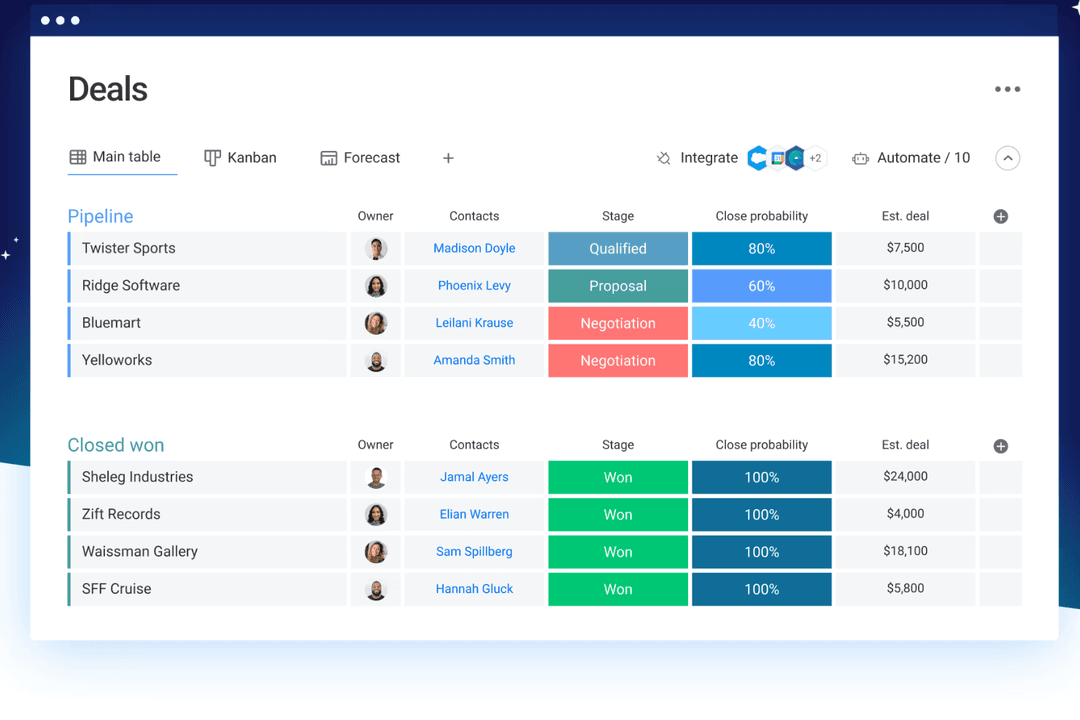
monday CRM’s customizable boards let you manage deals, tasks, and follow-ups in one visual view—handy if your team needs to juggle client work and internal ops in the same space.
Zoho CRM’s built-in AI assistant, Zia, is great for surfacing lead insights or suggesting next steps, especially if you’re managing a high volume of inbound leads. monday CRM keeps things simple and flexible; Zoho leans more into smart automation and sales intelligence.
| monday CRM | Zoho CRM | |
|---|---|---|
| 2-Factor Authentication | No | Yes |
| API | Yes | Yes |
| Calendar Management | Yes | Yes |
| Call Tracking | No | Yes |
| Campaign Management | No | Yes |
| Click-to-Dial | No | Yes |
| Contact Management | Yes | Yes |
| Contact Sharing | No | Yes |
| Custom Data Forms | Yes | Yes |
| Customer Management | Yes | Yes |
| Dashboard | Yes | Yes |
| Data Export | Yes | Yes |
| Data Import | Yes | Yes |
| Data Visualization | Yes | Yes |
| Email Integration | Yes | Yes |
| External Integrations | Yes | Yes |
| File Sharing | Yes | Yes |
| File Transfer | Yes | Yes |
| Google Apps Integration | Yes | Yes |
| Lead Management | Yes | Yes |
| Lead Scoring | Yes | Yes |
| Marketing Automation | Yes | Yes |
| Mobile App | No | Yes |
| Multi-User | Yes | Yes |
| Notifications | Yes | Yes |
| Pipeline Management | Yes | Yes |
| Sales Automation | Yes | Yes |
| Scheduling | Yes | Yes |
| Social-Media Integration | Yes | Yes |
| Task Scheduling/Tracking | Yes | Yes |
| Third-Party Plugins/Add-Ons | Yes | Yes |
| Integration | monday CRM | Zoho CRM |
|---|---|---|
| IntegrationLinkedIn | monday CRM✅ | Zoho CRM❌ |
| IntegrationHubSpot | monday CRM✅ | Zoho CRM✅ |
| IntegrationSlack | monday CRM✅ | Zoho CRM✅ |
| IntegrationMicrosoft Teams | monday CRM✅ | Zoho CRM✅ |
| IntegrationGoogle Workspace | monday CRM✅ | Zoho CRM✅ |
| IntegrationSalesforce | monday CRM❌ | Zoho CRM✅ |
| IntegrationMailchimp | monday CRM✅ | Zoho CRM✅ |
| IntegrationQuickBooks | monday CRM❌ | Zoho CRM✅ |
| IntegrationAPI | monday CRM✅ | Zoho CRM✅ |
| IntegrationZapier | monday CRM✅ | Zoho CRM✅ |
monday CRM's integration with LinkedIn lets you automate posts and track interactions directly from your CRM, perfect for teams focused on social media engagement. It also integrates natively with the monday.com ecosystem, including their project management tool and monday service. Zoho CRM's Salesforce integration is great for teams looking to sync their sales data or seamlessly migrate to a new CRM software, ensuring all customer interactions are up-to-date.
While monday CRM enhances social media management, Zoho CRM excels in comprehensive sales data synchronization.
| Factor | monday CRM | Zoho CRM |
|---|---|---|
| FactorData Encryption | monday CRMmonday CRM uses AES-256 encryption to protect data both in transit and at rest. | Zoho CRMZoho CRM secures data with AES-256 encryption, ensuring privacy and protection. |
| FactorRegulatory Compliance | monday CRMmonday CRM complies with GDPR and other international standards. | Zoho CRMZoho CRM meets GDPR, CCPA, and other major compliance requirements. |
| FactorReliability | monday CRMmonday CRM guarantees 99.9% uptime, ensuring consistent access to tools. | Zoho CRMZoho CRM offers a 99.9% uptime SLA, providing reliable service availability. |
monday CRM and Zoho CRM both offer robust security and compliance, but Zoho CRM covers a wider range of regulatory standards. To choose the right vendor, evaluate the specific compliance standards your team must meet and prioritize features that enhance data protection, such as encryption and uptime guarantees.
| Factor | monday CRM | Zoho CRM |
|---|---|---|
| FactorUser Interface | monday CRMmonday CRM offers a visually appealing and intuitive drag-and-drop interface. | Zoho CRMFeature-rich but more cluttered, with a steeper learning curve. |
| FactorOnboarding Experience | monday CRMInteractive tutorials, ready-made templates, and a user-friendly setup process with guided walkthroughs. | Zoho CRMOffers tutorials, detailed guides, and personalized setup assistance but takes longer to configure due to depth and options. |
| FactorCustomer Support | monday CRMIn-app chat, email support, knowledge base and a help center make it easy to find quick answers. | Zoho CRMSupport is ticket-based unless you’re on a premium plan. |
| FactorCustomization | monday CRMHighly customizable boards and fields with simple UI controls. | Zoho CRMDeep customization, but it takes more time to find and configure options. |
| FactorWorkflow Simplicity | monday CRMEasy to set up automations with no-code logic blocks. | Zoho CRMOffers powerful automation, but setup feels more technical. |
monday CRM is praised for its clean intuitive interface and simple onboarding, making it ideal for those who value straightforward navigation and an effortless user experience. Zoho CRM, while offering extensive customization, can be overwhelming for new users.
monday CRM
- You can build and adjust pipelines without needing technical help.
- It’s easy to track tasks, emails, and contact history in one place.
- Automation features save your team time on repetitive tasks and streamline daily work.
- It can feel overwhelming with too many features for new users.
- Reporting feels limited if your team needs deeper performance or trend analysis.
- You can't manage complex sales territories or multi-layered account hierarchies.
Zoho CRM
- You can customize workflows to fit your team's specific needs.
- Robust automation tools that save you time on repetitive tasks.
- Integration with other Zoho apps enhances your team's productivity.
- The user interface can feel cluttered and overwhelming for new users.
- Some users find the advanced features difficult to navigate without support.
- Customer support response times can be slower compared to competitors.
monday CRM
- Customer Support TeamsYou can track tickets, manage handoffs, and log follow-ups all in one easy-to-navigate board.
- Sales Operations TeamsYou can build lightweight sales pipelines and reporting without relying on complex CRM tools.
- Small BusinessesSetup is quick, and you won’t need IT to change your workflows or customize fields.
- Account ManagementIt helps your team stay on top of renewals, upsells, and check-ins without switching tools.
- SaaS CompaniesYou can manage leads, onboard customers, and monitor ongoing relationships without bloated features.
- Marketing AgenciesIt’s easy to track client requests, campaign status, and deliverables across multiple accounts.
Zoho CRM
- Small BusinessesZoho CRM offers scalability and customization, making it a great fit for growing small businesses.
- Retail Sales TeamsThe CRM's automation tools simplify sales processes, perfect for retail environments.
- Tech StartupsIts integration with other Zoho products makes it an all-in-one tool for dynamic and tech-focused teams.
- Marketing DepartmentsZoho CRM's workflow enhances marketing automation and lead generation.
- Customer Support TeamsWith its robust ticketing and support features, customer service teams can streamline responses.
- Consulting FirmsZoho CRM's customization and reporting features help consultants manage client interactions effectively.
Who Should Use monday CRM, and Who Should Use Zoho CRM?
In my opinion, monday CRM is best for service and sales teams that want something fast, visual, and easy to adapt—especially if you're managing sales alongside projects or client work. Zoho CRM makes more sense if you need deep features, heavy customization, and tighter integration with finance or marketing tools.
Monday CRM fits startups, small businesses, and growing teams that value simplicity and visual clarity. Zoho fits better in complex orgs where control and scalability matter more than ease of use.
| monday CRM | Zoho CRM | |
|---|---|---|
| Automation | monday CRM Drag-and-drop automation for tasks and updates. | Zoho CRM Rule-based automation of repetitive tasks that supports advanced logic and AI-powered triggers. |
| Integrations | monday CRM Seamless integration with project tools like Slack, Zoom, and DocuSign. | Zoho CRM Strong for back-office tools like Xero, Google Ads, and finance apps. |
| Pricing Model | monday CRM Per-user pricing with limits based on plan tier and seats. | Zoho CRM Tiered structure with multiple plans for varied functionality. |
| Setup Time | monday CRM Quick to launch with templates and guided flows. | Zoho CRM Takes longer to configure due to deep feature sets and custom rules. |
| User Interface | monday CRM Visual and clean, with boards that are easy to customize and navigate. | Zoho CRM Dense and traditional, with more menus and a higher learning curve. |
| CRM Features | Both let you track leads, manage pipelines, and automate tasks—monday CRM focuses on visual workflows, Zoho on data depth. |
|---|---|
| Customizable Dashboards | Each CRM solution offers strong customization options—monday through flexible boards and fields, Zoho through modules and rule-based logic. |
| Multi-Channel Support | Both provide multi-channel support, allowing your team to engage with customers via email, chat, and more, though Zoho CRM includes phone support. |
| Reporting | Each provides dashboards to track deal flow and team performance—monday CRM with visual widgets, Zoho with advanced filters. |
| Third-Party Integrations | Both connect with major tools like Gmail, Slack, and HubSpot, helping your team sync data across platforms. Plus, both use APIs and Zapier to connect with third-party apps. |