

SurveyMonkey, kullanımı kolay anket oluşturma araçlarıyla tanınan popüler bir çevrim içi anket yazılımıdır. Ancak bazı kullanıcılar, sınırlı özelleştirme seçenekleri ve gelişmiş özellikler için daha yüksek fiyatlar nedeniyle alternatifler arayabilir.
Müşteri deneyimi yazılımları konusundaki deneyimimi kullanarak, mevcut en iyi SurveyMonkey alternatiflerinden birkaçını test edip karşılaştırdım. Ardından sonuçlarımı, benzersiz ihtiyaçlarınız için en iyi yazılımı bulmanıza yardımcı olacak ayrıntılı incelemelerde derledim.
SurveyMonkey Nedir?
SurveyMonkey, anketleri kolayca oluşturmanıza ve dağıtmanıza yardımcı olan çevrim içi bir anket yazılımıdır. İçgörü ve geri bildirim toplamak için pazarlama profesyonelleri, araştırmacılar ve İK ekipleri tarafından yaygın olarak kullanılır.
Özelleştirilebilir şablonlar, analizler ve mobil uyumluluk gibi özellikler; anketler tasarlamanıza, yanıtları toplamanıza ve sonuçları verimli bir şekilde analiz etmenize yardımcı olur. Genel olarak SurveyMonkey, ekibinizin müşteri ve çalışan geri bildirimlerini toplaması ve anlaması için kolay bir yol sunar.
Why Trust Our Software Recommendations
6,700+
Reviews
20
Industry experts
16+
Evaluation factors
14
Years
Our team has been testing and reviewing software since 2012. As CX leaders ourselves, we know how difficult—and important—it is to choose the right software.
For this guide, we evaluated tools using hands-on testing and independent research, scoring tools using our selection criteria.
Our reviews reflect our human editorial judgment, not a sales pitch.
 Gui DrusinaCreative Director
 Tim FisherVP of AI
SurveyMonkey Alternatifleri Karşılaştırma Tablosu
En iyi SurveyMonkey alternatif seçimlerim için fiyatlandırma ayrıntılarını bu karşılaştırma tablosunda özetledim:
Sorted by: Default
| Tool | Starting Price | Website | |
|---|---|---|---|
Best for multi-location feedback collection | 4.7 out of 5 | Pricing upon request 14-day free trial available | Website |
Best for multi-channel feedback | 4.6 out of 5 | $114/month 10-day free trial | Website |
Best for conversational surveys | 4.4 out of 5 | $19/user/month Free plan available | Website |
Best for automating feedback-to-action workflows | 4.4 out of 5 | $55/user/month 7-day free trial | Book Demo |
Best for AI-powered surveys | 4.8 out of 5 | $2,000/month 30-day free trial | Book Demo |
Best for conversational forms | 5.0 out of 5 | $18/month Free plan available | Website |
Best for enterprise research tools | 4.7 out of 5 | Pricing upon request Free demo available | Website |
Best for real-time user feedback | 4.6 out of 5 | $19.99/month Free plan available | Website |
Best for Salesforce integration | 4.4 out of 5 | Pricing upon request Free trial available | Website |
Best for no-code form creation | 4.2 out of 5 | $83/month 14-day free trial | Website |


En İyi SurveyMonkey Alternatifleri İncelemeleri
Aşağıda, kısa listemde yer alan en iyi SurveyMonkey alternatiflerinin ayrıntılı özetlerini bulabilirsiniz. İncelemelerim, sizin için en iyisini bulmanıza yardımcı olmak amacıyla her aracın temel özelliklerine, artılarına ve eksilerine, entegrasyonlarına ve ideal kullanım alanlarına ayrıntılı bir bakış sunuyor.
 Best for multi-location feedback collection
- 14-day free trial available
- Pricing upon request
Visit WebsiteCustomer Rating:4.7/5
Zonka Feedback offers a Reputation Hub dashboard that displays customer reviews, key stats, average ratings, and review distribution across multiple locations. Built for CX teams seeking a SurveyMonkey alternative, Zonka Feedback is a survey and customer feedback platform that helps service businesses identify experience gaps and turn customer responses into practical improvements.
Who Is Zonka Feedback Best For?
Customer experience and operations teams at multi-location businesses that need to collect feedback consistently across branches, sites, or service locations.
Why I Picked Zonka Feedback
I picked Zonka Feedback for multi-location feedback collection because I can tailor surveys by branch and compare CSAT, NPS, or CES across locations. Location-level reports and leaderboards help me pinpoint where service issues cluster, while low-score alerts route feedback to the responsible team. That makes it a useful SurveyMonkey alternative when branch-level follow-up matters.
Zonka Feedback Key Features
- Survey builder: Create branded surveys with 30+ question types, templates, and skip logic.
- Offline survey app: Collect responses on iOS and Android devices, then sync them when online.
- Multichannel distribution: Share surveys through email, SMS, web embeds, QR codes, and in-app prompts.
- AI feedback analysis: Detect sentiment and recurring themes in open-ended responses.
Zonka Feedback Integrations
Zonka Feedback documents a native integration with Salesforce, plus integrations with HubSpot, Zendesk, Freshdesk, Intercom, Slack, Google Sheets, Mailchimp, Jira, and Microsoft Teams. It also supports Zapier, APIs, and webhooks for custom connections.
Pros and Cons
Pros:
- Analyze open-text feedback for sentiment and themes
- Collect responses offline across service sites
- Segment feedback by location, customer size, and tenure
Cons:
- Advanced reporting and automation take extra effort
- Aggregating results across surveys could be easier
Learn more about Zonka Feedback: Best for multi-channel feedback
- 10-day free trial
- From $114/month (billed annually)
Visit WebsiteCustomer Rating:4.6/5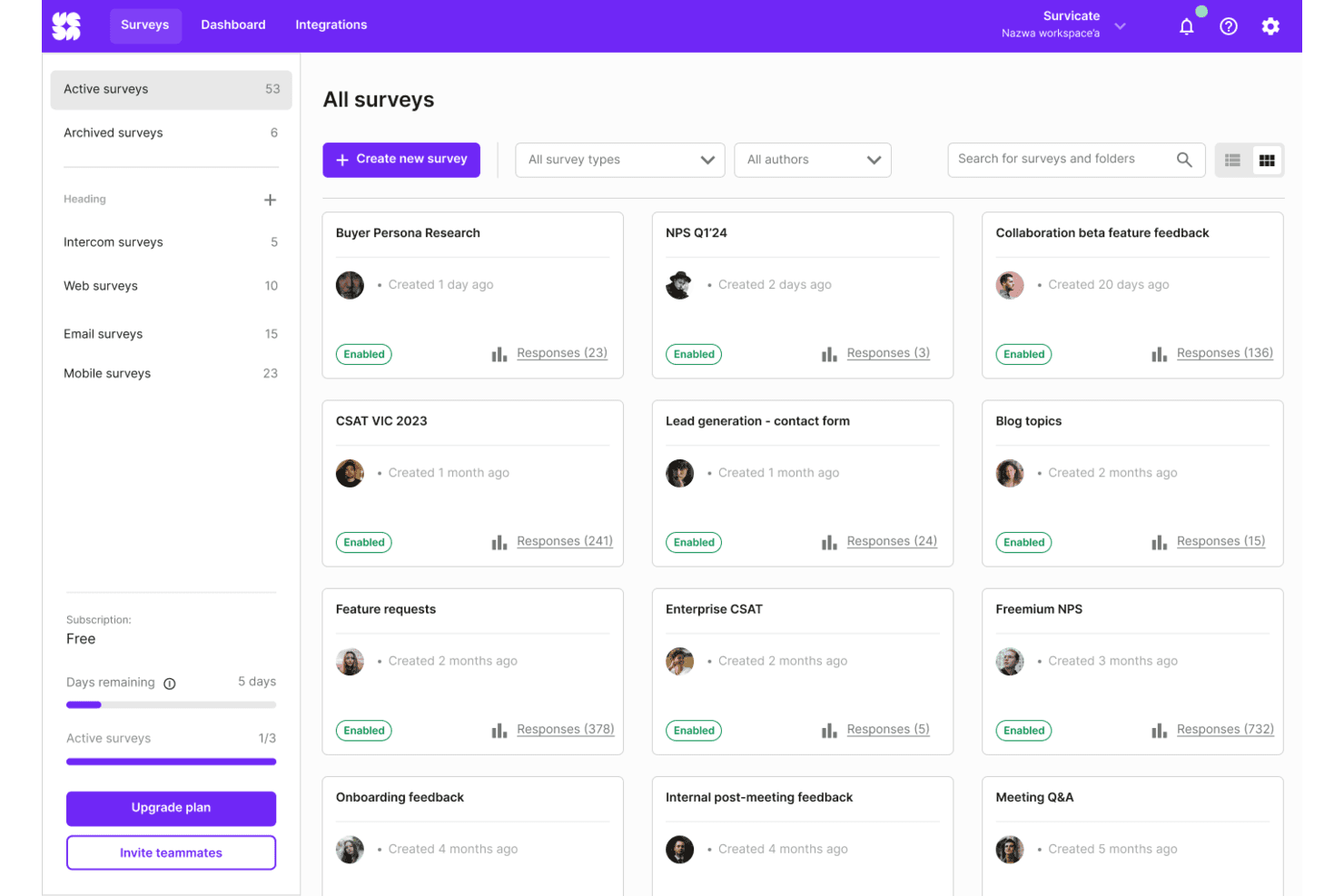
Survicate organizes all active surveys in a visual grid dashboard. Survicate is an online survey platform for CX, product, and support teams that need to collect customer insights, spot recurring friction, and guide service improvements.
Who Is Survicate Best For?
Survicate suits service operations teams that want to gather customer feedback across digital touchpoints and share findings with the teams responsible for service improvements.
Why I Picked Survicate
I picked Survicate among the best SurveyMonkey alternatives for its fit as “Best for multi-channel feedback.” I like that it collects responses through website, email, mobile app, and in-product surveys. Event-triggered prompts let me ask about a feature after use or customer satisfaction after a support interaction.
Survicate Key Features
- Survey templates: Start with templates for NPS, CSAT, CES, and product-market fit.
- Question branching: Use survey logic to show questions based on respondents’ answers.
- AI question suggestions: Get suggested questions when creating a survey.
- Response dashboards: View response segments, sentiment, and feedback trends over time.
Survicate Integrations
Survicate offers 40+ native integrations, including HubSpot, Salesforce, Slack, Zendesk, Intercom, and Klaviyo, plus Zapier. It also supports custom connections through webhooks and a Data Export API.
Pros and Cons
Pros:
- AI groups open-text responses into themes
- Event triggers capture feedback at key moments
- Surveys span web, email, mobile, and in-product
Cons:
- Cross-survey analysis may require exports
- Audience targeting and segmentation can feel limited
Learn more about Survicate: Best for conversational surveys
- Free plan available
- From $19/user/month (billed annually)
Visit WebsiteCustomer Rating:4.4/5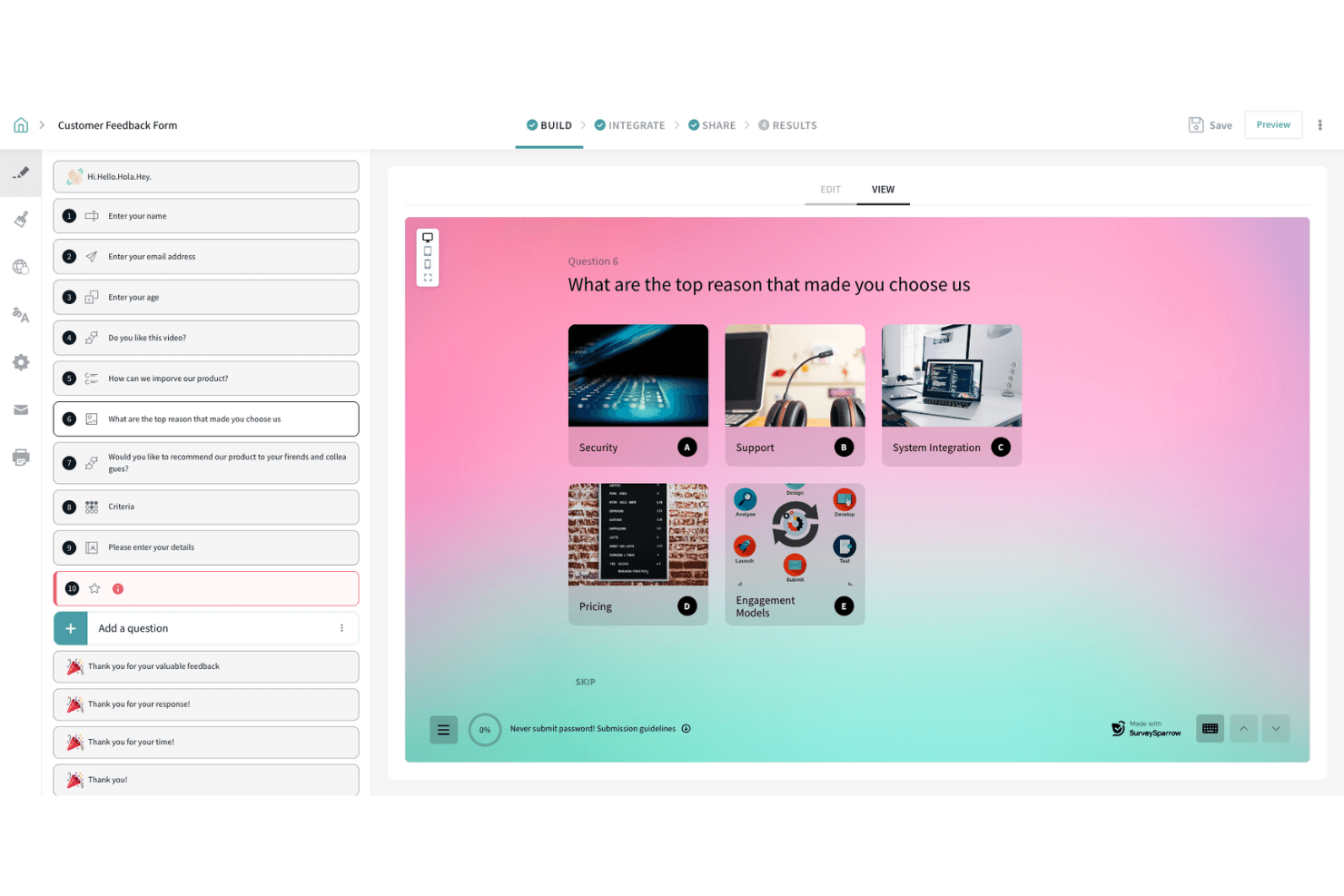
SurveySparrow lets users build image-choice questions for feedback forms. SurveySparrow helps customer experience and service teams collect feedback across touchpoints with chat-like surveys, making it a Best for conversational surveys option for teams comparing SurveyMonkey alternatives.
Who Is SurveySparrow Best For?
SurveySparrow suits customer experience teams that want to gather feedback during onboarding, support, and other service interactions.
Why I Picked SurveySparrow
I like SurveySparrow as a SurveyMonkey alternative because it’s Best for conversational surveys. Its chat-like surveys collect feedback during onboarding and after support interactions, capturing customer reactions in the moment across service touchpoints.
SurveySparrow Key Features
- Question branching: Route respondents to relevant questions based on earlier answers.
- Offline surveys: Collect responses on a mobile device without an internet connection.
- Scheduled reports: Send reports to your inbox on a chosen day, time, and frequency.
- Third-party integrations: Connect surveys with tools such as Salesforce, Zendesk, and Slack.
SurveySparrow Integrations
SurveySparrow lists 11 native integrations, including Zendesk, HubSpot, Slack, Intercom, Salesforce, Mailchimp, WordPress, Facebook Pixel, AWeber, and Zapier. It also offers an API and webhooks for custom integrations.
Pros and Cons
Pros:
- Offline mobile collection supports field teams
- Question branching creates tailored survey paths
- Chat-style surveys feel less like forms
Cons:
- Reporting options feel limited to reviewers
- Complex survey logic has limits
Learn more about SurveySparrow: Best for automating feedback-to-action workflows
- 7-day free trial
- From $55/user/month
Visit WebsiteCustomer Rating:4.4/5
Alchemer offers a feedback insights dashboard with sentiment distribution, ratings breakdown, and individual review cards filtered by date range. Alchemer is a survey and feedback platform for customer experience, research, and service teams that need to gather structured input and understand customer needs across touchpoints.
Who Is Alchemer Best For?
Alchemer suits customer experience and research teams that need to turn survey feedback into follow-up workflows and operational changes.
Why I Picked Alchemer
I picked Alchemer as a SurveyMonkey alternative for automating feedback-to-action workflows. Alchemer Connect can trigger surveys after support interactions and sync responses to Salesforce or Zendesk, where teams can launch follow-ups or create support tickets. I like that this links customer feedback to specific service actions.
Alchemer Key Features
- Survey logic: Use branching and skip logic to route respondents through relevant questions.
- Survey distribution: Share surveys through email, SMS, QR codes, and web links.
- Survey customization: Apply custom themes, dynamic content, and merge codes to tailor surveys.
- Multilingual surveys: Add translations and let respondents select an available language.
Alchemer Integrations
Alchemer offers built-in integrations with Salesforce, Zendesk, HubSpot, Google Sheets, and Slack, and connects with Zapier. It also provides a REST API for custom integrations, with API access limited to Enterprise accounts.
Pros and Cons
Pros:
- Privacy controls support sensitive customer surveys
- Automated routing helps trigger feedback follow-ups
- Flexible branching, randomization, and question logic
Cons:
- Reporting depth varies by plan
- Complex surveys can require custom scripting
Learn more about Alchemer: Best for AI-powered surveys
- 30-day free trial
- From $2,000/month (billed annually)
Visit WebsiteCustomer Rating:4.8/5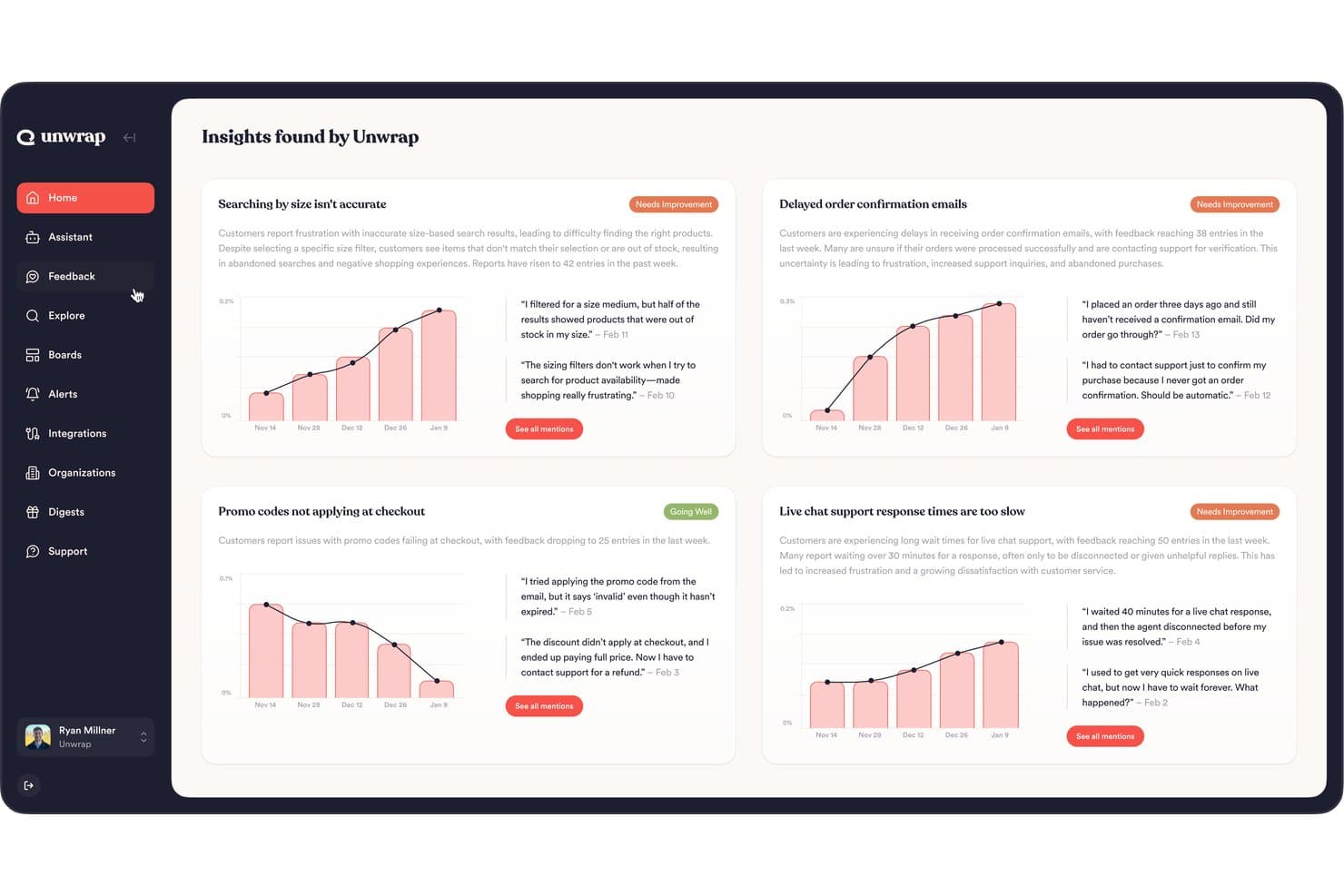
Unwrap surfaces AI-driven customer feedback insights across key issue categories. Unwrap gives customer experience and product teams a feedback platform that brings survey responses together with support conversations and reviews, helping them spot recurring customer issues and improve service and product decisions.
Who Is Unwrap Best For?
Unwrap suits customer experience and product teams that want AI-assisted surveys to gather and interpret customer feedback.
Why I Picked Unwrap
I picked Unwrap, my choice for Best for AI-powered surveys, because it brings survey responses together with support conversations and reviews. I use that combined feedback to spot recurring customer issues and inform product or service decisions, rather than reviewing survey results in isolation.
Unwrap Key Features
- Survey question types: Create rating, open-text, single-choice, multiple-choice, yes/no, and matrix questions.
- Survey delivery options: Send surveys by email, share a public link, or display them as website widgets.
- Conditional question paths: Route respondents to different questions based on yes/no, rating, or single-choice answers.
- On-site audience targeting: Set widget triggers by page, clicked element, or custom event, with optional audience conditions.
Unwrap Integrations
Unwrap has roughly 31 native integrations, including Qualtrics, Salesforce, Zendesk, HubSpot, and Intercom, and connects with Zapier. CSV imports and custom integrations are also available, with custom integrations offered on certain paid plans.
Pros and Cons
Pros:
- Detects emerging themes across customer feedback
- Combines survey responses with support and review feedback
- AI surveys ask intelligent follow-up questions
Cons:
- Less suited to one-off, quantitative-only research
- Taxonomy tuning takes time to refine
Learn more about Unwrap:
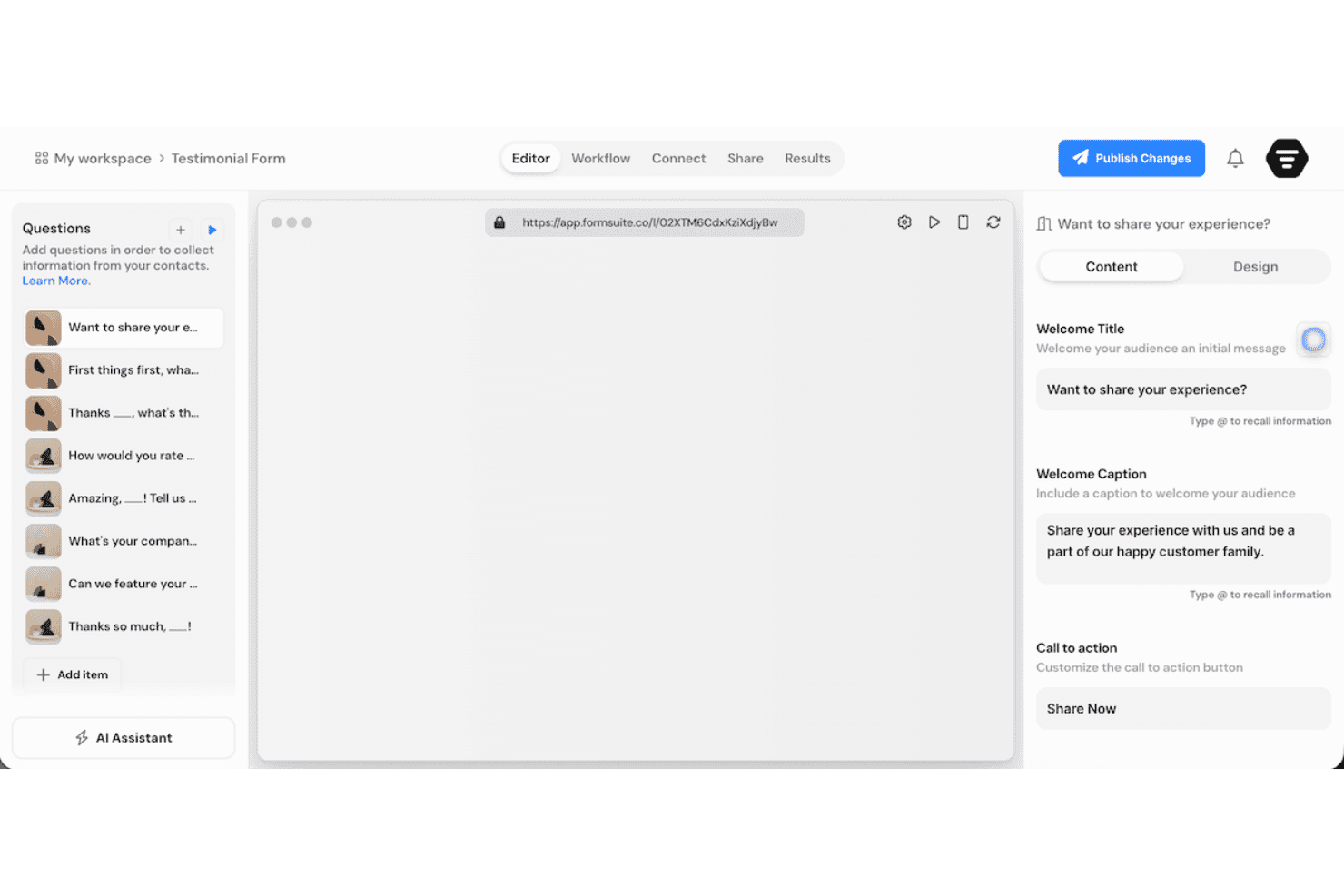
Formsuite lets users build and customize testimonial forms with ease. Formsuite is an online survey platform for customer experience teams that need to gather feedback, spot friction across support and onboarding, and improve service journeys.
Who Is Formsuite Best For?
Formsuite suits support and success teams that want to collect customer input through interactive, one-question-at-a-time forms.
Why I Picked Formsuite
I picked Formsuite as a SurveyMonkey alternative and my “Best for conversational forms” choice because it presents one question at a time in a chat-like flow. I like its conditional logic for routing customers to relevant follow-ups, such as asking about onboarding only when they report a setup issue. Answer recall can reference earlier responses, so customers don’t have to repeat themselves.
Formsuite Key Features
- Form analytics: Track submissions, completion rates, and question-level drop-offs.
- AI form creation: Generate forms from prompts with Formsuite’s AI builder.
- Templates: Start surveys from prebuilt form templates.
- Zapier integration: Send form submissions to connected apps through Zapier.
Formsuite Integrations
Formsuite lists Google Sheets, Notion, Airtable, Stripe, Slack, and Zapier as integrations, but doesn’t identify the first five as native connections. Zapier can send form responses and new contacts to connected apps; paid-plan webhooks also support custom endpoints and automation tools such as Make.com, n8n, and Pipedream.
Pros and Cons
Pros:
- AI summaries surface response themes quickly
- Conditional logic routes customers to relevant questions
- Conversational flows reduce survey fatigue
Cons:
- Customer service scored below usability
- Independent review evidence remains sparse
Learn more about Formsuite: Best for enterprise research tools
- Free demo available
- Pricing upon request
Visit WebsiteCustomer Rating:4.7/5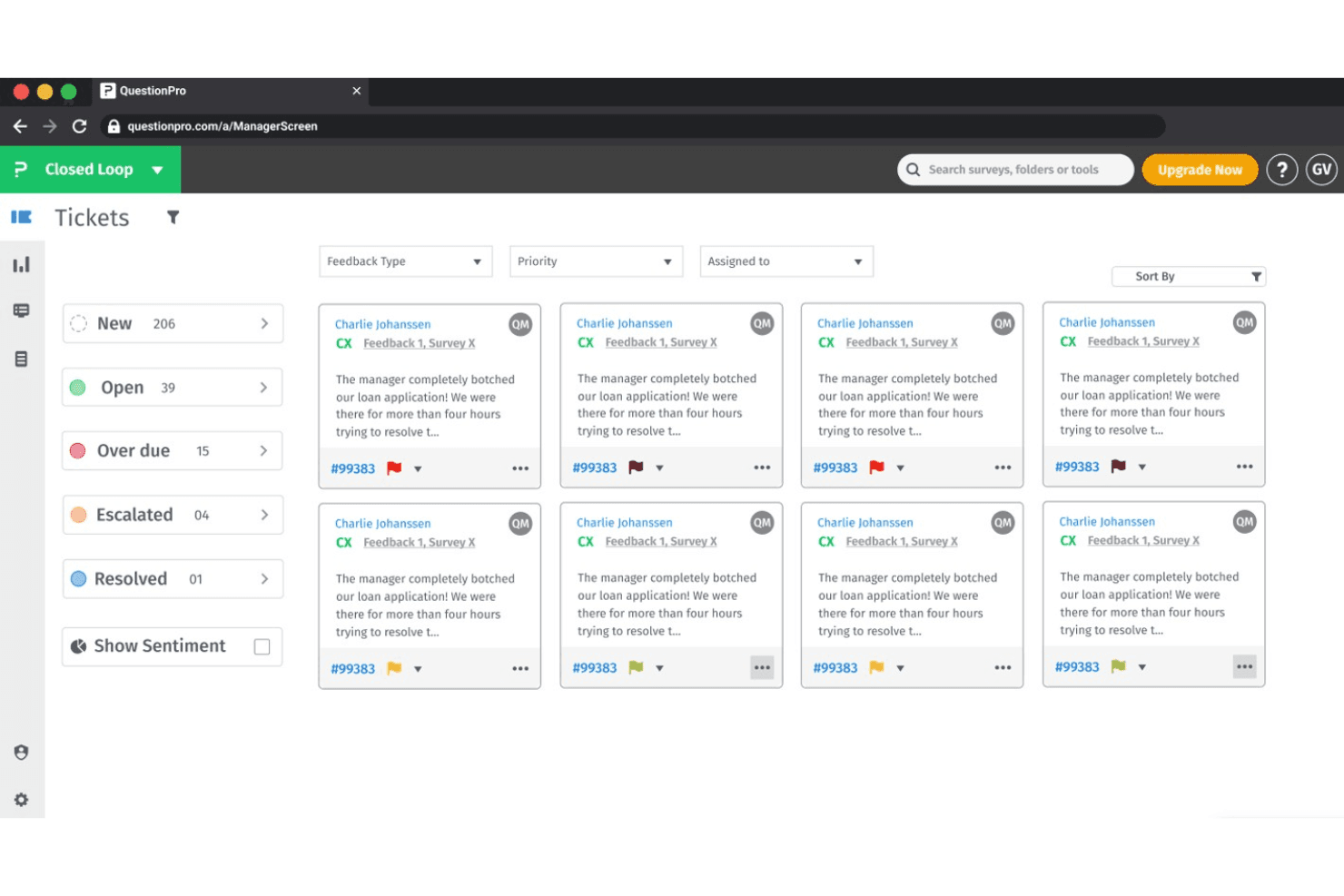
QuestionPro lets users manage customer feedback tickets by status and priority. For organizations managing complex feedback programs, QuestionPro is an online survey and research platform that helps CX and insights teams collect customer feedback, study audiences, and turn responses into decisions.
Who Is QuestionPro Best For?
QuestionPro suits enterprise insights and CX teams that run complex customer research programs across audiences and touchpoints.
Why I Picked QuestionPro
QuestionPro earns my pick as “Best for enterprise research tools” because it supports advanced studies beyond standard surveys. I use its Conjoint and MaxDiff analysis to compare product preferences or pricing trade-offs, then TURF analysis to assess which feature combinations reach the most customers. Role-based access and SSO also help research teams manage access across a larger organization.
QuestionPro Key Features
- Survey templates: Choose from prebuilt templates for customer feedback, employee evaluations, and research.
- Question types: Build surveys with options such as NPS, matrix, ranking, and open-ended questions.
- Survey logic: Use branching and skip logic to show respondents relevant questions.
- Offline surveys: Collect responses through the mobile app when an internet connection isn’t available.
QuestionPro Integrations
QuestionPro lists integrations with Salesforce, HubSpot, Microsoft Dynamics, Google Sheets, Tableau, Power BI, Slack, and Intercom; it also supports Zapier and provides an API and webhooks for custom connections.
Pros and Cons
Pros:
- Branching and piping handle complex questionnaires
- Offline mobile collection supports field research
- Built-in conjoint, MaxDiff, and TURF analysis
Cons:
- Complex survey logic takes time to verify
- Advanced reporting can overwhelm non-researchers
Learn more about QuestionPro: Best for real-time user feedback
- Free plan available
- From $19.99/month (billed annually)
Visit WebsiteCustomer Rating:4.6/5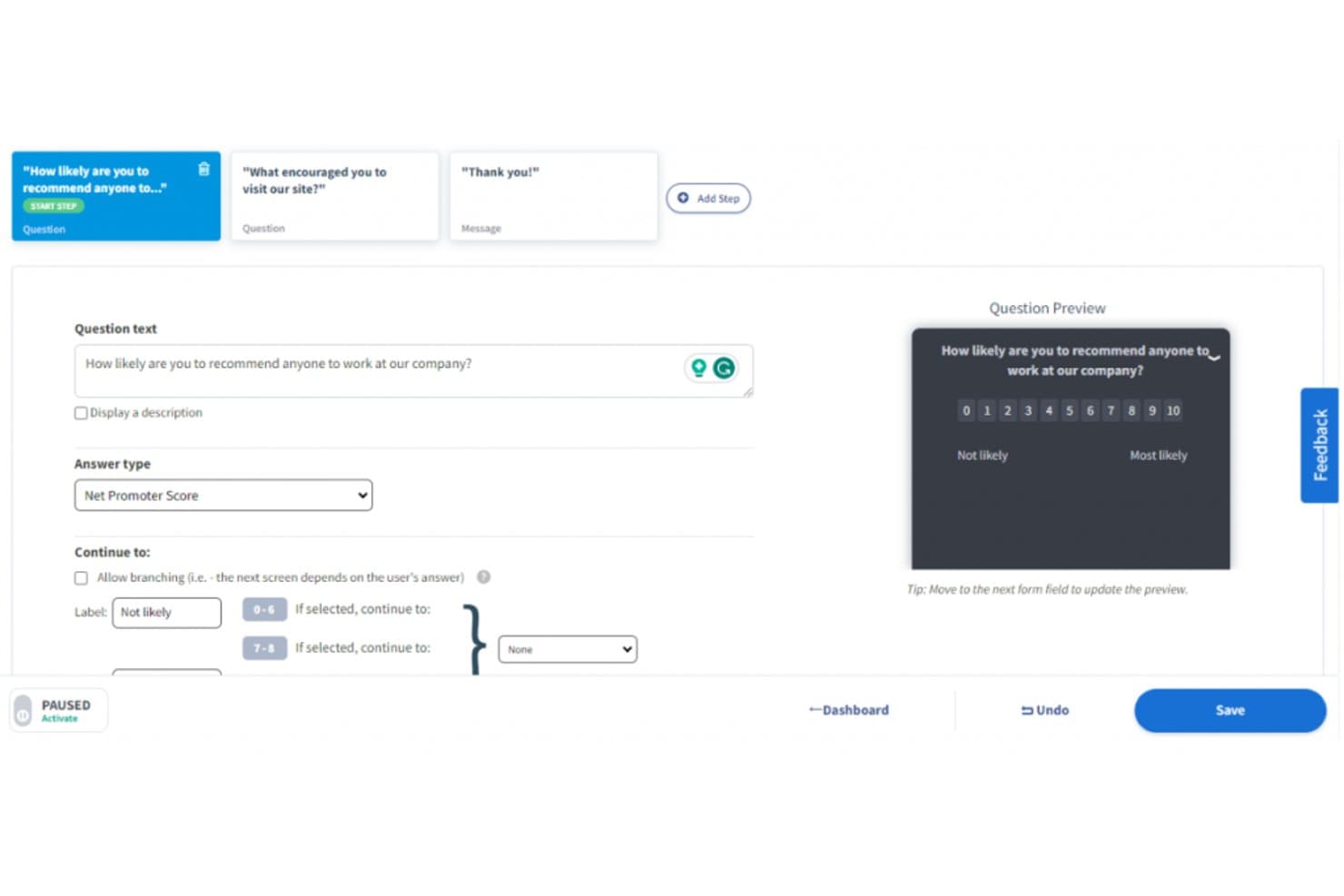
Qualaroo lets users build NPS surveys with branching logic. For CX and product teams comparing SurveyMonkey alternatives, Qualaroo is an online survey platform that places targeted questions across websites and apps to reveal user needs and locate experience friction.
Who Is Qualaroo Best For?
Qualaroo suits UX researchers and product managers who need contextual feedback from people as they navigate digital experiences.
Why I Picked Qualaroo
Best for real-time user feedback, Qualaroo is a SurveyMonkey alternative I picked for its on-site and in-app Nudges. I like that you can target questions by visitor behavior or page, such as asking about checkout friction while someone is still on the checkout page.
Qualaroo Key Features
- Survey question types: Choose from more than 10 types, including NPS, CES, and open-text questions.
- Question branching: Show follow-up questions based on a respondent’s answers.
- Sentiment analysis: Analyze open-text responses for sentiment, keywords, and emotional scores.
- Heatmaps and session recordings: Review clicks, scrolls, hesitation, and abandonment.
Qualaroo Integrations
Qualaroo documents integrations with Salesforce, Intercom, Slack, HubSpot, Google Analytics, Tableau, Power BI, Segment, and Zapier. It also offers Reporting and Custom Properties APIs for custom connections.
Pros and Cons
Pros:
- Pairs responses with heatmaps and session recordings
- Targets website and in-app surveys by behavior
- Captures feedback at specific journey moments
Cons:
- Audience rules can take trial and error
- Reporting dashboards offer limited customization
Learn more about Qualaroo: Best for Salesforce integration
- Free trial available
- Pricing upon request
Visit WebsiteCustomer Rating:4.4/5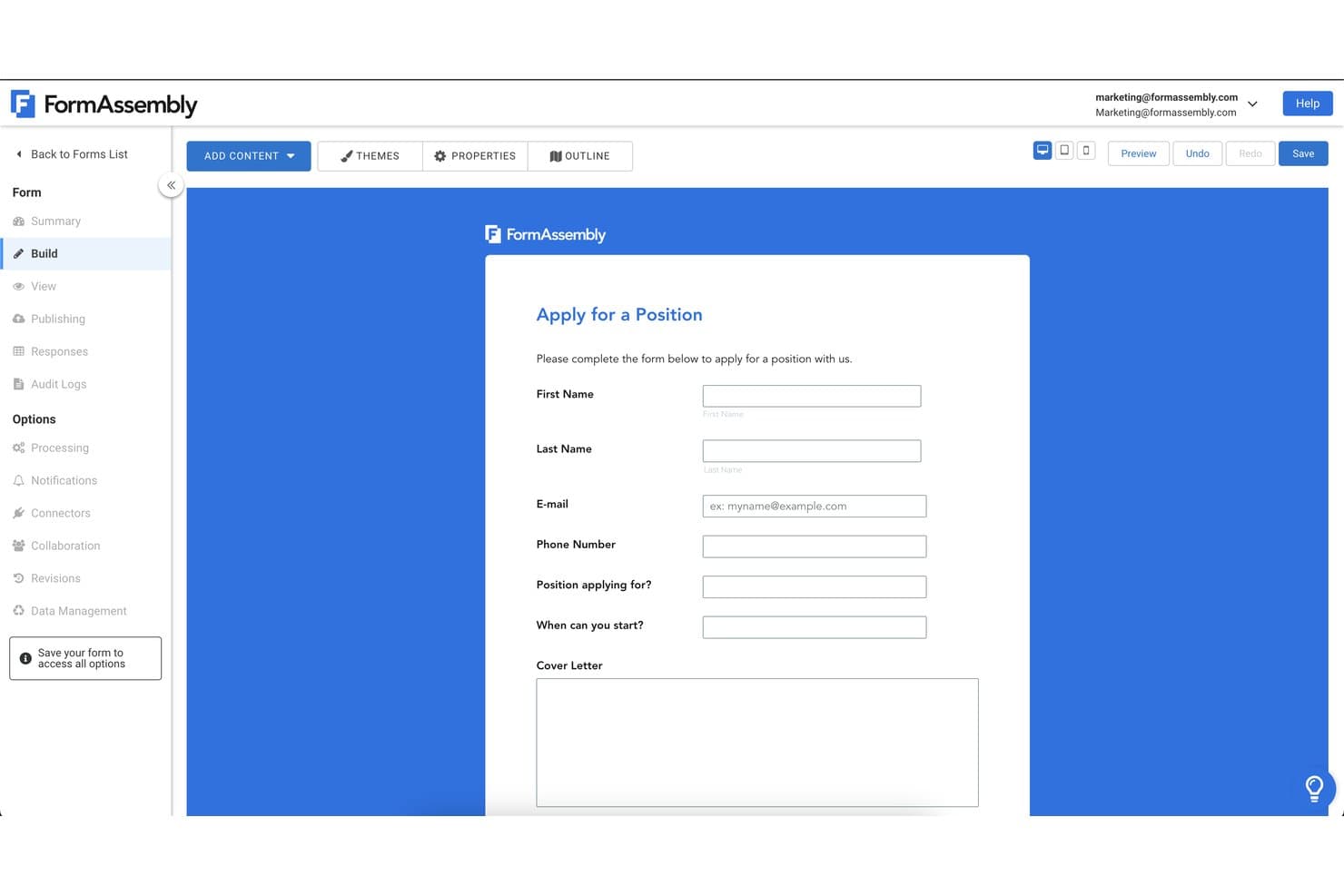
FormAssembly lets users build custom job application forms easily. FormAssembly is an online form and survey platform for customer experience teams that need to collect feedback, manage submissions, and connect responses to follow-up workflows.
Who Is FormAssembly Best For?
FormAssembly suits Salesforce-focused CX teams that need forms to capture customer data directly in their CRM.
Why I Picked FormAssembly
I picked FormAssembly as the “Best for Salesforce integration” option because its survey connector maps responses to standard or custom Salesforce objects and creates or updates records on submission. I also like its real-time prefill and dynamic picklists, which let a satisfaction survey show current Salesforce data and save feedback to the right customer record for follow-up.
FormAssembly Key Features
- Question types: Add open-text, multiple-choice, rating-scale, and date questions.
- Branching logic: Show or hide questions based on respondents’ answers.
- Branding customization: Apply your organization’s logo, colors, and fonts.
- Mobile-friendly design: Create surveys respondents can complete on mobile devices.
FormAssembly Integrations
FormAssembly offers 30+ native connectors, including Salesforce, HubSpot, Microsoft 365, Google Sheets, SharePoint, Excel, Stripe, PayPal, Google Drive, and Box; it also connects with Zapier. Webhooks and a REST API support custom integrations.
Pros and Cons
Pros:
- Supports multi-step workflows beyond simple surveys
- Custom styling keeps surveys on-brand
- Conditional logic supports detailed survey paths
Cons:
- Mobile respondents report occasional save failures
- Advanced logic takes time to configure
Learn more about FormAssembly: Best for no-code form creation
- 14-day free trial
- From $83/month (billed annually)
Visit WebsiteCustomer Rating:4.2/5
Formstack offers automation, e-signatures, and seamless CRM/ERP integration. Formstack is an online form and survey builder aimed at businesses and teams looking to create forms without coding knowledge. It supports industries needing efficient data collection and workflow automation.
Why Formstack is a good SurveyMonkey alternative: Formstack’s drag-and-drop interface allows you and your team to design forms intuitively without any technical skills. The software’s conditional logic helps optimize the form experience based on user response rates, enhancing data collection efficiency. With advanced security features, it also ensures your data remains protected during the form creation process.
Standout features & integrations:
Features include a powerful drag-and-drop form builder for creating custom forms without coding, workflow automation, and seamless integration with over 100+ apps. It also offers advanced data security, compliance tools, and e-signature capabilities, making it ideal for secure data collection and digital workflows.
Integrations include Salesforce, Google Sheets, Mailchimp, PayPal, HubSpot, Zapier, Microsoft Teams, QuickBooks, Dropbox, and Stripe.
Pros and Cons
Pros:
- Easy to use interface
- Dynamic form creation
- No coding required
Cons:
- Basic analytics features
- Limited customization options
Diğer SurveyMonkey Alternatifleri
Kısa listemde yer almayan ancak yine de göz atmaya değer bazı ek SurveyMonkey alternatifleri şunlardır:
- 11QualtricsBest for AI-driven insights
- 12Zoho SurveyBest for data privacy focus
- 13LimeSurveyBest for self-hosting
- 14SurveyPlanetBest for unlimited free surveys
- 15SurveyKingBest for advanced question types
- 16Great QuestionBest for UX research integration
- 17TripettoBest for storyboard form design
- 18JotformBest for drag-and-drop form building
- 19TypeformBest for people-friendly forms
- 20MailchimpBest for email marketing integration
How I Evaluate SurveyMonkey Alternatives
I split my evaluation into two layers: the baseline capabilities a tool must have to run NPS, CSAT, and CES programs at scale, and the differentiators that set the best options apart for CX teams.
Core Functionality (Table Stakes For This List)
When I'm selecting tools for my list, I rank each one on a scale from 0 (does not offer the functionality) to 5 (excels in this area) for each core functionality listed below. Then, I calculate the tool's total score into a percentage. Each tool needs to achieve a minimum total score of 65% to be considered for inclusion.
- CX Survey Templates: I check whether each tool includes ready-to-deploy NPS, CSAT, and CES templates so teams can launch a feedback program in minutes rather than designing from scratch.
- Multi-Channel Survey Distribution: Reaching customers where they are matters, so I evaluate whether a tool supports email, SMS, web, in-app, and mobile survey delivery with unified tracking.
- Survey Logic & Branching: I look for conditional paths that adapt based on a respondent's input, like routing a detractor to a follow-up question while skipping promoters past it.
- Reporting & Analytics: Dashboards should let you segment responses by customer cohort, track score trends over time, and surface themes from open-ended answers without manual tagging.
- CX Platform Integrations: I evaluate native connections with CRMs, helpdesks, and CS platforms like Salesforce, Zendesk, and HubSpot to confirm respondent data syncs where teams already work.
- Closed-Loop Workflows: Tools that trigger alerts, create tickets, or assign follow-ups when a customer leaves negative feedback help CX teams act on insights before churn risk escalates.
Once I have a list of tools that meet this criteria, I consider what sets each platform apart.
Differentiating Factors (What Sets Vendors Apart)
Here's how I compare and contrast different vendors:
Standout Features
AI-powered text analytics is a major differentiator. I look for tools that automatically tag themes and detect sentiment across thousands of open-ended responses, saving hours of manual review. Benchmarking data also matters because knowing your NPS is 42 means little without industry context to compare against. Journey-based triggers are worth evaluating too, like sending a CES survey right after a support ticket closes instead of relying on manual batch sends.
Beyond Features
Data security is a priority since CX surveys collect customer PII. I check for GDPR and SOC 2 compliance, along with SSO and data residency options for teams running global programs. Scalability matters just as much—I evaluate whether a platform supports multi-language surveys and multi-brand setups under one account. I also consider ecosystem depth, particularly whether a tool connects to data warehouses like Snowflake or BI tools like Tableau for deeper CX analysis.
Neden SurveyMonkey Alternatifi Aramalısınız?
SurveyMonkey iyi bir çevrim içi anket yazılımı seçeneği olsa da bazı kullanıcıların alternatif çözümler aramasının çeşitli nedenleri vardır. Aşağıdaki nedenlerden biri sizin için geçerliyse SurveyMonkey alternatifi arıyor olabilirsiniz:
- Daha gelişmiş özelleştirmeye ihtiyacınız vardır
- Premium özellikler için bütçeniz kısıtlıdır
- Daha iyi entegrasyon seçenekleri istiyorsunuzdur
- Daha hızlı yanıt veren müşteri desteği arıyorsunuzdur
- Ekibiniz çok dilli desteğe ihtiyaç duyuyordur
- Gelişmiş veri gizliliği uyumluluğuna ihtiyacınız vardır
Bunlardan herhangi biri size uyuyorsa doğru yere geldiniz. Listemde, SurveyMonkey ile ilgili bu zorluklarla karşılaşan ve alternatif çözümler arayan ekipler için daha uygun olan çeşitli çevrim içi anket yazılımı seçenekleri bulunuyor.
SurveyMonkey'nin Temel Özellikleri
Alternatif çözümlerin sunduklarını karşılaştırmanıza yardımcı olmak için SurveyMonkey'nin temel özelliklerinden bazılarını aşağıda bulabilirsiniz:
- Özelleştirilebilir Şablonlar: Anketlerinizi belirli ihtiyaçlara göre uyarlamak için farklı şablonlar arasından seçim yapmanıza yardımcı olarak zamandan tasarruf etmenizi ve tutarlılığı korumanızı sağlar. And/or Labs'in kurucusu Vishveshwar Jatain, yazılım hakkında övgüyle söz ediyor. "SurveyMonkey; derecelendirme ölçekleri, açık uçlu sorular ve koşullu mantık içeren sorular da dâhil olmak üzere nitel ve nicel veri toplama için çeşitli soru biçimlerini destekliyor."
- Soru Türü Tahmini: En iyi soru biçimlerini önermek için yapay zekâ destekli teknolojiyi kullanarak etkili anketleri hızlıca oluşturmanıza yardımcı olur.
- Çok Dilli Destek: Daha geniş bir kitleye ulaşmak için birden fazla dilde anketler oluşturmanıza yardımcı olur ve çeşitli içgörüler toplamayı kolaylaştırır.
- Gelişmiş Analiz: Güçlü filtreleme ve raporlama araçlarıyla verilerinizi analiz ederek eğilimleri ortaya çıkarmanıza ve verilere dayalı kararlar almanıza olanak tanır.
- İş Birliği Araçları: Ekip çalışmasını geliştirmek ve süreçleri kolaylaştırmak için anketleri ekibinizle paylaşmanıza, izinleri yönetmenize ve geri bildirimleri tek merkezde toplamanıza olanak tanır.
- Yanıt Toplama Yöntemleri: Hedef kitlenize ulaşmanızı sağlamak amacıyla yanıtları toplamak için e-posta, QR kodları ve sosyal medya gibi çeşitli kanalları kullanmanıza olanak tanır. Vishveshwar Jatain, "Anket doğruluğunu ve yanıtların uygunluğunu artırmada, belirli demografik ve hedefleme parametrelerine göre kitle panelleri oluşturma veya anket kitlelerini kısa listeye alma olanağını da değerli buldum," diye ekledi.
- Veri Gizliliği Özellikleri: Anonim yanıtlar, parola koruması ve GDPR ile CCPA uyumluluğu sayesinde verilerinizin güvende olmasını sağlamaya yardımcı olur.
- Entegrasyon Olanakları: İş akışlarını otomatikleştirmek ve ekibinizin üretkenliğini artırmak için sizi 200'den fazla uygulamaya bağlar.