

Bir çağrı merkezini yönetmek zor olabilir. Müşteri talepleri, ekip performansı ve hizmeti sürekli geliştirme baskısı arasında denge kurmanız gerekir. İşte harmanlanmış çağrı merkezi yazılımları bu noktada devreye girer. Bu yazılımlar, gelen ve giden çağrıları dengelemenize yardımcı olarak ekibinizin işini kolaylaştırır ve müşterilerinizi daha memnun eder.
Size en iyi seçenekler hakkında tarafsız bir değerlendirme sunmak için bu araçları test edip incelemeye zaman ayırdım. Bu makalede, her aracın en iyi yaptığı işlere ve ihtiyaçlarınıza nasıl uyum sağlayabileceğine odaklanarak en iyi seçimlerimi paylaşacağım.
İster verimliliği artırmak ister müşteri memnuniyetini yükseltmek istiyor olun, doğru çözümü burada bulacaksınız. Ekibiniz için mükemmel seçeneği bulmak üzere ayrıntılara birlikte bakalım.
Why Trust Our Software Recommendations
6,700+
Reviews
20
Industry experts
16+
Evaluation factors
14
Years
Our team has been testing and reviewing software since 2012. As CX leaders ourselves, we know how difficult—and important—it is to choose the right software.
For this guide, we evaluated tools using hands-on testing and independent research, scoring tools using our selection criteria.
Our reviews reflect our human editorial judgment, not a sales pitch.
 Gui DrusinaCreative Director
 Tim FisherVP of AI
Harmanlanmış Çağrı Merkezi Yazılımları Karşılaştırma Tablosu
Bu karşılaştırma tablosu, harmanlanmış çağrı merkezi yazılımları arasında en iyi seçimlerim için fiyatlandırma ayrıntılarını özetlemektedir:
Sorted by: Default
| Tool | Starting Price | Website | |
|---|---|---|---|
Best for real-time call monitoring | 4.2 out of 5 | $25/user/month Free plan + 14-day trial + free demo available | Website |
Best for building custom AI agents at scale | 5.0 out of 5 | Pricing upon request Free demo available | Website |
Best for remote teams | 4.7 out of 5 | $15/user/month 7-day free trial + free demo available | Website |
Best for AI features | 4.4 out of 5 | Pricing upon request Free demo available | Website |
Best for sales teams | 4.5 out of 5 | Pricing upon request Free demo available | Website |
Best for small businesses | 4.3 out of 5 | Pricing upon request 14-day free trial + free demo available | Website |
Best for CRM integration | 4.4 out of 5 | $14/user/month 14-day free trial | Website |
Best for call tracking | 4.7 out of 5 | $79/user/month Free demo available | Website |
Best for enterprise solutions | 4.1 out of 5 | $119/seat/month Free demo available | Website |
Best for multi-channel support | Not rated | $15/user/month 30-day free trial | Website |


En İyi Harmanlanmış Çağrı Merkezi Yazılımları İncelemeleri
Aşağıda, kısa listeme giren en iyi harmanlanmış çağrı merkezi yazılımlarının ayrıntılı özetlerini bulabilirsiniz. İncelemelerim, sizin için en uygun olanı bulmanıza yardımcı olmak amacıyla her aracın temel özelliklerine, artılarına ve eksilerine, entegrasyonlarına ve ideal kullanım alanlarına ayrıntılı bir bakış sunmaktadır.
 Best for real-time call monitoring
- Free plan + 14-day trial + free demo available
- From $25/user/month (billed annually)
Visit WebsiteCustomer Rating:4.2/5
CloudTalk offers a real-time call center dashboard for monitoring agent performance and call statistics. For businesses looking to improve how they manage calls, CloudTalk provides a solution for support and sales teams with real-time call monitoring. It helps teams handle inbound and outbound calls more effectively, making it suitable for organizations across different industries. Whether used in finance, real estate, or retail, CloudTalk supports clearer call management and day-to-day operations.
Why I Picked CloudTalk
I picked CloudTalk for its real-time call monitoring, which helps teams oversee live inbound and outbound calls as they happen. This makes it easier for supervisors to track call quality and step in when issues arise. Intelligent call routing and automated dialing also help agents handle calls more efficiently, supporting the day-to-day needs of blended call centers. These capabilities are crucial for businesses looking to improve their call center efficiency and customer engagement.
CloudTalk Key Features
In addition to real-time call monitoring, CloudTalk offers:
- Call Recording: Record calls for quality assurance and training to ensure consistent customer service standards.
- Interactive Voice Response (IVR): This tool helps in managing high call volumes by directing callers to the appropriate department or information.
- International SMS and WhatsApp Messaging: These features enable global communication, allowing you to reach customers worldwide.
CloudTalk Integrations
Integrations include HubSpot, Salesforce, Zoho, Zendesk, Odoo, Intercom, Salesloft, Outreach, Bullhorn, Monday, and Shopify.
Pros and Cons
Pros:
- Offers local, mobile, or toll-free numbers from over 140 countries
- Useful call analytics for tracking agent activity and call outcomes
- Integrates with popular CRMs to log calls automatically
Cons:
- Limited customization options in dashboards
- Occasional call connection issues reported by users
 Best for building custom AI agents at scale
- Free demo available
- Pricing upon request
Visit WebsiteCustomer Rating:5/5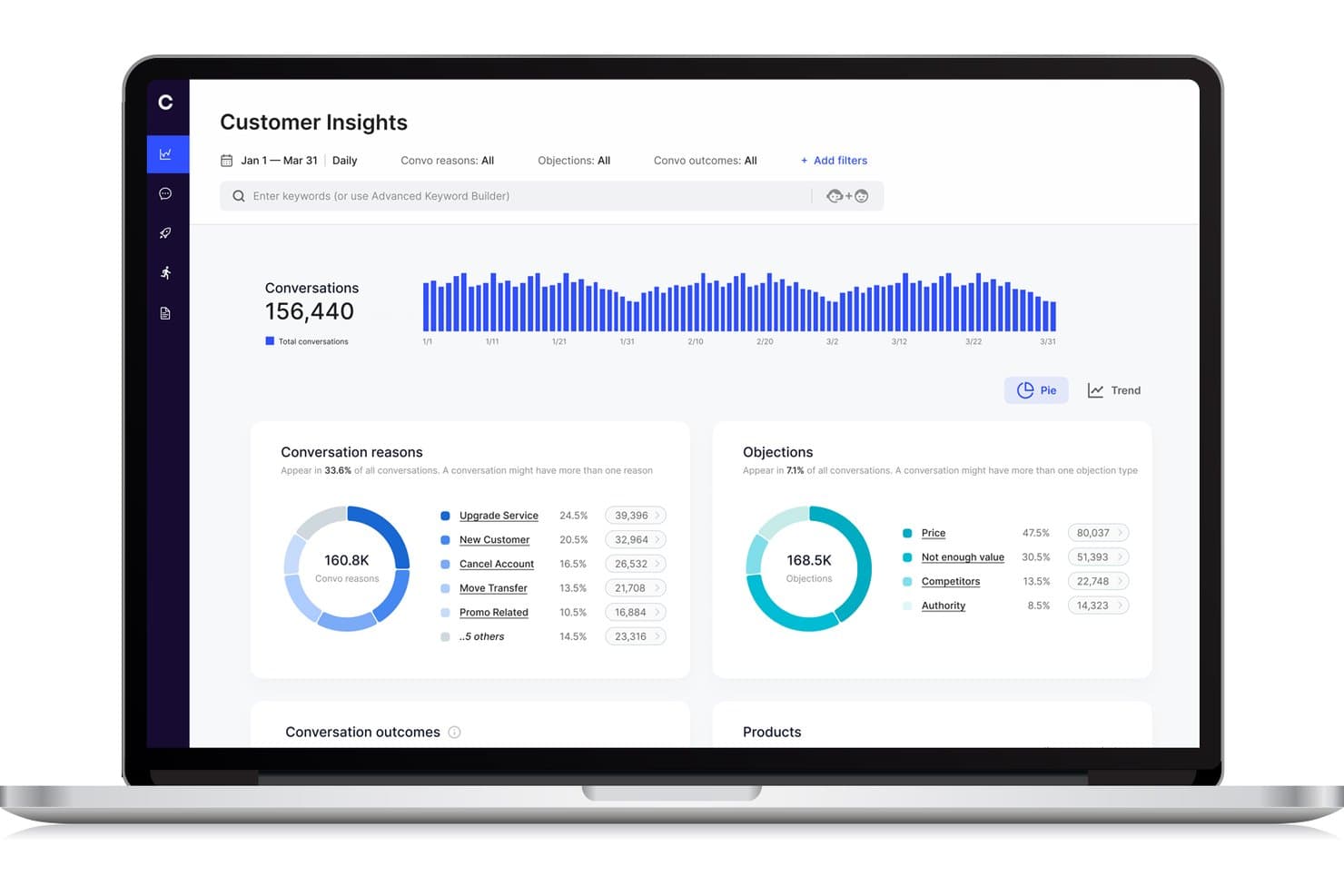
Cresta offers a Customer Insights dashboard that displays conversation reasons, objections, and trends across conversations for blended call center analytics. Cresta is an AI-powered contact center platform that unifies inbound and outbound operations through dynamic agent workflows, real-time conversation intelligence, and seamless integration with existing call center tools.
Who Is Cresta Best For?
Cresta suits enterprise contact centers needing scalable AI-driven call handling and dynamic agent workflows across complex, multi-channel environments.
Why I Picked Cresta
I picked Cresta as one of the best because I can build and deploy custom AI agents that handle blended call queues, automate dynamic agent assignment, and analyze every conversation in real time at enterprise scale.
Cresta Key Features
- Unified agent desktop: Agents manage all blended interactions from a single interface without switching tools.
- Real-time supervisor controls: Supervisors can monitor live activity and adjust agent workflows instantly.
- Skills-based routing: The system matches inbound and outbound contacts to agents based on defined skills and attributes.
- Customizable reporting dashboards: Users access blended analytics spanning agent occupancy, productivity, and campaign performance.
Cresta Integrations
Cresta offers native integrations with Salesforce, Twilio, Pipedrive, BigCommerce, Five9, Zendesk, and more. An API is available for custom integrations.
Pros and Cons
Pros:
- Dynamic queue blending across channels and teams
- Advanced conversation analytics for supervisors
- AI coaching during live calls and chats
Cons:
- Knowledge Assist needs ongoing model tuning
- Predictive dialer features not explicitly supported
Learn more about Cresta: Best for remote teams
- 7-day free trial + free demo available
- From $15/user/month (billed annually)
Visit WebsiteCustomer Rating:4.7/5
Ringover cloud communication boosts remote teamwork with calls and collaboration tools. Ringover is a cloud-based communication platform designed for businesses that need efficient call management and collaboration tools. It serves remote teams by offering features that enhance connectivity and productivity.
Why I picked Ringover: The platform is tailored for remote teams, providing tools that facilitate seamless communication. Its call management features help your team stay organized and efficient, even when working remotely. Ringover's collaboration tools ensure everyone stays connected and informed. The ability to make and receive calls from anywhere enhances flexibility and adaptability.
Standout features & integrations:
Features include call transfer and call queuing, which help your team manage high call volumes effectively. The platform offers call recording to ensure quality and compliance. Additionally, analytics provide insights into call performance and team productivity.
Integrations include Salesforce, HubSpot, Zoho CRM, Pipedrive, Slack, Zendesk, Freshdesk, monday.com, and Helpscout.
Pros and Cons
Pros:
- Supports high call volumes
- Flexible call management
- Strong integrations
Cons:
- Advanced features limited to higher plans
- Occasional connection issues


Talkdesk cloud contact center with AI insights, automation, and scalable customer support. Talkdesk is a cloud-based contact center platform that caters to businesses of all sizes that are looking to boost customer interactions. It offers a variety of communication solutions, focusing on improving customer experience and operational efficiency.
Why I picked Talkdesk: The platform's AI features are central to its value, providing tools that support predictive insights and automated workflows. Talkdesk's AI-powered virtual agents assist your team in handling repetitive tasks, freeing up time for more complex interactions. The real-time analytics offer deep insights into customer behavior and team performance. Its scalability ensures that as your business grows, Talkdesk can grow with you.
Standout features & integrations:
Features include call recording and monitoring, which help you maintain quality and compliance. The platform offers omnichannel support, enabling communication across multiple channels. Workforce management tools assist in optimizing agent schedules and productivity.
Integrations include Salesforce, Zendesk, Microsoft Teams, Slack, Zoom, HubSpot, and ServiceNow.
Pros and Cons
Pros:
- Rich analytics and reporting
- Strong CRM and third‑party integrations
- AI‑powered routing and automation
Cons:
- Expensive for small teams
- Interface can feel complex
Learn more about Talkdesk:

Convoso AI dialing boosts sales efficiency with real-time scoring and compliance. Convoso is an AI-driven call center software tailored for sales teams across industries like BPO, finance, and real estate. It enhances sales performance with features like real-time DID scoring and AI dialing optimization, boosting contact and conversion rates.
Why I picked Convoso: Convoso strengthens the performance of any outbound call center by optimizing phone calls through its AI-driven dialing capabilities. With tools such as a predictive dialer and auto dialer, teams can move through outbound campaigns more efficiently and concentrate on outgoing calls that are most likely to convert.
Real-time DID scoring helps you prioritize valuable prospects while tracking the metrics and KPIs that matter. Built on a scalable telephony infrastructure, the platform adapts as your team expands, and its compliance management helps you stay aligned with regulatory requirements. Additionally, forecasting features provide greater visibility into performance trends, allowing you to plan future campaigns with confidence.
Standout features & integrations:
Features include multimodal dialing that supports both inbound and outbound sales. Workflow automation helps your team manage tasks efficiently. Superior caller ID management ensures your calls are recognized and answered.
Integrations can be done through API and Zapier.
Pros and Cons
Pros:
- Real-time DID scoring
- High-speed scalability
- AI dialing optimization
Cons:
- Requires technical knowledge
- Complexity in setup
Learn more about Convoso: Best for small businesses
- 14-day free trial + free demo available
- Pricing upon request
Visit WebsiteCustomer Rating:4.3/5
Dialpad organizes customer conversations with integrated calling, messaging, and voicemail tools. Dialpad is an AI-powered customer communications platform tailored for small businesses seeking efficient customer service and sales solutions. It offers real-time AI tools that enhance productivity, including automated note-taking and insights.
Why I picked Dialpad: The platform's focus on small businesses makes it accessible and easy to implement. AI-driven features like automated note-taking help your team stay organized. Its scalability allows you to grow without worrying about technical limitations. With enterprise-grade security, Dialpad ensures your data is safe.
Standout features & integrations:
Features include AI-powered agents that can handle complex workflows such as refunds and rebookings while supporting high-volume customer engagement across multiple channels. Whether teams are managing inbound calls, responding to incoming calls from support queues, or interacting with customers through social media, the platform helps maintain a consistent, reliable experience.
As a blended contact center solution, it also ensures that phone calls and digital interactions receive the same level of attention. Behind the scenes, Dialpad provides enterprise-grade security and compliance, including HIPAA and SOC 2 certifications, to protect sensitive information.
Integrations include Salesforce, Microsoft Teams, Google Workspace, Zendesk, Slack, HubSpot, Zoho CRM, and ServiceNow.
Pros and Cons
Pros:
- Handles complex workflows
- Cloud-native and mobile-friendly
- Scalable to support growth
Cons:
- May require tech support
- Many advanced features require higher-tier plans
 Best for CRM integration
- 14-day free trial
- From $14/user/month (billed annually)
Visit WebsiteCustomer Rating:4.4/5
Pipedrive sales CRM simplifies pipelines with automation, reporting, and easy tracking. Pipedrive is a sales-focused CRM tool designed for small to medium-sized businesses. It helps teams manage leads and deals, providing a clear overview of sales activities and performance.
Why I picked Pipedrive: The tool is great for CRM integration, making it easy for your team to manage customer relationships. Its intuitive sales pipeline view helps you track deals and progress. Automation features reduce manual tasks, allowing your team to focus on selling. The reporting capabilities provide insights into sales performance, helping with decision-making.
Standout features & integrations:
Features include customizable pipelines that help you tailor the sales process to your needs. The activity reminders ensure your team never misses an important follow-up. Additionally, the goal-setting and tracking feature keeps your team aligned with business objectives.
Integrations include Mailchimp, Trello, Slack, Microsoft Teams, Zapier, Xero, Asana, QuickBooks, and HubSpot.
Pros and Cons
Pros:
- Customizable sales processes
- Strong reporting capabilities
- Automation reduces manual tasks
Cons:
- Requires ongoing management to optimize
- Advanced features can be complex
Learn more about Pipedrive: Best for call tracking
- Free demo available
- From $79/user/month (billed annually)
Visit WebsiteCustomer Rating:4.7/5
DialedIn cloud contact center improves productivity with routing, tracking, and analytics. DialedIn is a cloud-based contact center software designed for businesses in industries like healthcare, finance, and hospitality. It focuses on improving agent productivity and customer engagement through efficient call management.
Why I picked DialedIn: DialedIn's strength lies in its call tracking capabilities, which help your team manage and analyze calls effectively. Omnichannel communication ensures you can engage with customers through multiple platforms. The platform's in-depth analytics provide insights to improve operational efficiency.
Standout features & integrations:
Features include predictive dialing and skill-based routing enhance call handling, as well as automatic call distribution and interactive voice response. Predictive dialing helps your team reach more customers efficiently. Extensive analytics support decision-making and performance improvement.
Integrations include Salesforce, Microsoft Teams, HubSpot, Zoho, Slack, Zendesk, and Google Workspace.
Pros and Cons
Pros:
- Omnichannel communication support
- Efficient predictive dialing
- Strong predictive-dialer and blended inbound/outbound capabilities
Cons:
- Complexity in initial setup
- Limited customization options
Learn more about DialedIn: Best for enterprise solutions
- Free demo available
- From $119/seat/month
Visit WebsiteCustomer Rating:4.1/5
Five9 AI contact center for personalized support and seamless customer journeys. Five9 is a cloud-based contact center solution designed for enterprises aiming to enhance customer engagement. It provides AI-driven tools to personalize customer interactions and improve service delivery.
Why I picked Five9: Five9 delivers an AI-driven customer journey orchestration experience that supports a blended call center solution, helping teams manage both inbound and outbound interactions with clarity and efficiency. It helps with real-time insights, improving decision-making across ACD routing, call queues, and high-volume outreach. The platform also supports tools such as an intelligent dialer and automated callbacks, giving your team more control over performance and customer engagement.
Standout features & integrations:
Features include AI-driven customer journey orchestration, ensuring your team can manage interactions efficiently. The platform's human-centered AI empowers agents with real-time insights. Additionally, its open APIs allow for easy customization to fit your business needs.
Integrations include Salesforce, Zendesk, Microsoft Dynamics 365, Oracle, and ServiceNow.
Pros and Cons
Pros:
- Human-centered AI tools
- Customizable with open APIs
- Scalable for large enterprises
Cons:
- AI features might be overwhelming
- May not suit small businesses
Learn more about Five9: Best for multi-channel support
- 30-day free trial
- From $15/user/month (billed annually)

LiveAgent multichannel helpdesk with tickets, chat, and scalable customer support. LiveAgent is a helpdesk and customer support software ideal for businesses that need to manage multiple communication channels efficiently. It caters to companies of all sizes, providing tools to enhance customer interaction and support.
Why I picked LiveAgent: The platform excels in offering multi-channel support, allowing your team to handle customer inquiries from various sources in one place. Features like ticket management and live chat ensure timely responses. The software's scalability makes it suitable for growing businesses. Its customizable dashboards help you tailor the interface to your team's needs.
Standout features & integrations:
Features include a universal inbox that consolidates all customer communications in one place. The platform offers a built-in call center, enabling voice support alongside other channels. Additionally, the reporting and analytics tools provide insights into customer interactions and team performance.
Integrations include Slack, Shopify, Mailchimp, WordPress, Magento, Google Analytics, Salesforce, HubSpot, Pipedrive, and Stripe.
Pros and Cons
Pros:
- Good automation and reporting
- Scalable for growing businesses
- Omnichannel inbox (chat, email, phone, social)
Cons:
- Mobile app / mobile use is weaker than the desktop version
- Interface can feel cluttered at first
Learn more about LiveAgent:
Diğer Harmanlanmış Çağrı Merkezi Yazılımları
Kısa listeme giremeyen, ancak yine de incelemeye değer bazı ek harmanlanmış çağrı merkezi yazılımı seçenekleri şunlardır:
- 11TCNBest for IVR systems
- 12iCallifyBest for startup companies
- 13NextivaBest for team collaboration
- 14RingCentralBest for mobile workforce management
- 153CXBest for small business setups
- 16SquaretalkBest for cloud-based call solutions
- 17Global Call ForwardingBest for international call routing
- 18VerintBest for workforce optimization
- 19VoiptimeBest for outbound call campaigns
Related Reviews
How I Evaluate Blended Call Center Software
I split my evaluation into two layers: the baseline every tool must clear—true inbound/outbound blending, a real dialer, unified agent desktop—and the differentiators that set great platforms apart.
Core Functionality (Table Stakes For This List)
When I'm selecting tools for my list, I rank each one on a scale from 0 (does not offer the functionality) to 5 (excels in this area) for each core functionality listed below. Then, I calculate the tool's total score into a percentage. Each tool needs to achieve a minimum total score of 65% to be considered for inclusion.
- Inbound/Outbound Blending: I check whether agents auto-shift between queues and campaigns based on live volume, or if someone has to manually toggle modes.
- Automated Outbound Dialer: The dialer modes matter here. I look for predictive, progressive, and preview options so teams can match pacing to campaign type.
- ACD & Skills-Based Routing: Routing should match callers to agents by skill, language, or priority level—not just push calls to whoever's next in line.
- Unified Agent Desktop: I evaluate whether agents handle inbound and outbound work from one screen with full context, or juggle separate tools mid-call.
- Real-Time Supervisor Controls: Supervisors need to monitor queues, adjust blend ratios, and reassign agents on the fly—especially during unexpected volume spikes.
- Blended Reporting & Analytics: I look for consolidated dashboards that track inbound SLAs alongside outbound campaign metrics and overall agent occupancy in one view.
Once I have a list of tools that meet this criteria, I consider what sets each platform apart.
Differentiating Factors (What Sets Vendors Apart)
Here's how I compare and contrast different vendors:
Standout Features
AI agent assist is a major differentiator. I look for real-time transcription and next-best-action prompts that help agents handle rapid context switches between inbound service calls and outbound campaign work. Built-in workforce management matters too—forecasting and scheduling for blended teams is a unique challenge, and platforms with native blended staffing models save a lot of headaches. Compliance tooling rounds things out, especially for outbound. Automated DNC list scrubbing and consent management keep campaigns running without legal risk.
Beyond Features
CRM and helpdesk integrations are one of the first things I check. Blended agents need real-time customer context when switching between inbound and outbound work, so native connectors to platforms like Salesforce, Zendesk, or HubSpot matter. Scalability is another big factor—seasonal campaigns can double seat counts overnight, and I look for platforms that handle that without lengthy procurement cycles. Pricing models also vary widely. I evaluate whether licensing is per-seat, concurrent, or usage-based, since blended teams with shift rotations can overpay on the wrong structure.
Harmanlanmış Çağrı Merkezi Yazılımı Nasıl Seçilir?
Uzun özellik listeleri ve karmaşık fiyatlandırma yapılarına kendinizi kaptırmanız kolaydır. Benzersiz yazılım seçim süreciniz üzerinde çalışırken odaklanmanıza yardımcı olmak için göz önünde bulundurmanız gereken faktörlerin bir kontrol listesini burada bulabilirsiniz:
| Faktör | Dikkat Edilmesi Gerekenler |
|---|---|
| FaktörÖlçeklenebilirlik | Dikkat Edilmesi GerekenlerYazılım işletmenizle birlikte büyüyecek mi? Baştan sona bir yenileme gerektirmeden genişlemeyi destekleyen esnek kullanıcı sınırları ve özellikleri arayın. |
| FaktörEntegrasyonlar | Dikkat Edilmesi GerekenlerMevcut sistemlerinizle çalışıyor mu? İş akışı kesintilerini önlemek için CRM, e-posta ve iletişim platformları gibi temel araçlarla uyumluluğunu kontrol edin. |
| FaktörÖzelleştirilebilirlik | Dikkat Edilmesi Gerekenlerİhtiyaçlarınıza uyacak şekilde uyarlayabilir misiniz? Yazılımın iş akışlarında, panolarda ve kullanıcı izinlerinde ekibinizin özel süreçlerine uygun ayarlamalar yapılmasına izin verdiğinden emin olun. |
| FaktörKullanım kolaylığı | Dikkat Edilmesi GerekenlerArayüz sezgisel mi? Ekibinizin zorlu öğrenme süreçleri veya kapsamlı eğitimler olmadan yazılımda gezinebildiğinden emin olmak için kullanıcı deneyimini test edin. |
| FaktörUygulama ve işe alıştırma | Dikkat Edilmesi GerekenlerÇalışır duruma gelmek ne kadar sürecek? Ekibiniz için sorunsuz bir geçiş sağlamak üzere kurulum süresini, mevcut desteği ve eğitim kaynaklarını göz önünde bulundurun. |
| FaktörMaliyet | Dikkat Edilmesi GerekenlerToplam sahip olma maliyeti nedir? Bütçenizle uyumlu olduğundan emin olmak için gizli ücretler de dâhil olmak üzere fiyatlandırma yapısını değerlendirin. İlk yatırımın ötesindeki uzun vadeli maliyetleri de hesaba katın. |
| FaktörGüvenlik önlemleri | Dikkat Edilmesi GerekenlerVeri koruma önlemleri yeterli mi? Hassas bilgileri korumak için sektör standartlarına ve şifreleme protokollerine uygunluk arayın. |
| FaktörDestek erişilebilirliği | Dikkat Edilmesi Gerekenlerİhtiyaç duyduğunuzda ne zaman yardım alabilirsiniz? Sağlayıcının destek saatlerini, kanallarını ve yanıt sürelerini kontrol ederek ekibinizin yardım ihtiyaçlarını karşıladığından emin olun. |
Harmanlanmış Çağrı Merkezi Yazılımı Nedir?
Birleşik çağrı merkezi yazılımı, gelen ve giden çağrıları tek bir platform içinde yöneten bir araçtır. Müşteri hizmetleri temsilcileri, satış ekipleri ve destek personeli, iletişim verimliliğini ve müşteri etkileşimini artırmak için genellikle bu araçları kullanır. Çağrı yönlendirme, gerçek zamanlı izleme ve CRM entegrasyonu özellikleri, çağrı akışlarının yönetilmesine ve temsilci verimliliğinin artırılmasına yardımcı olur. Genel olarak bu araçlar operasyonel verimliliği artırır ve müşteri memnuniyetini iyileştirir.
Özellikler
Birleşik çağrı merkezi yazılımı seçerken aşağıdaki temel özelliklere dikkat edin:
- Çağrı yönlendirme: Çağrıları en uygun temsilciye yönlendirerek bekleme sürelerinin azaltılmasına ve müşteri memnuniyetinin artırılmasına yardımcı olur.
- Gerçek zamanlı izleme: Yöneticilerin çağrıları dinlemesine ve rehberlik sağlamasına olanak tanıyarak temsilci performansını ve eğitimini geliştirir.
- CRM entegrasyonu: Temsilcilere arayan kişi hakkında ayrıntılı bilgi ve geçmiş sunmak için müşteri ilişkileri yönetimi araçlarına bağlanır.
- Çok kanallı iletişim: Tutarlı bir müşteri deneyimi sağlamak amacıyla telefon, e-posta ve sohbet gibi birden fazla kanaldaki etkileşimleri destekler.
- Tahmine dayalı arama: Giden aramaları otomatikleştirerek yapılan çağrı sayısını artırır ve temsilci verimliliğini geliştirir.
- Analiz ve raporlama: Çağrı performansı ve temsilci verimliliği hakkında bilgiler sunarak bilinçli kararlar alınmasına yardımcı olur.
- Etkileşimli sesli yanıt (IVR): Arayan kişileri self servis seçenekler arasında yönlendirerek rutin sorularda temsilci müdahalesi ihtiyacını azaltır.
- Özelleştirilebilir panolar: Kullanıcıların arayüzlerini en alakalı bilgileri görüntüleyecek şekilde uyarlamasına olanak tanıyarak iş akışı verimliliğini artırır.
- Çağrı kaydı: Kalite güvencesi ve uyumluluk amacıyla çağrıları kaydeder; eğitim ve anlaşmazlıkların çözümü için bir başvuru kaynağı sağlar.
- İşgücü yönetimi: Talebi karşılamak için planlama ve personel düzenini optimize etmeye yardımcı olur ve kaynakların etkili bir şekilde kullanılmasını sağlar.
Avantajlar
Birleşik çağrı merkezi yazılımının uygulanması, ekibiniz ve işletmeniz için çeşitli avantajlar sağlar. Yararlanabileceğiniz avantajlardan bazıları şunlardır:
- Geliştirilmiş verimlilik: Gelen ve giden çağrıları tek bir platformda yöneterek ekibiniz görevleri daha etkili bir şekilde yönetebilir ve boşta geçen zamanı azaltabilir.
- Artırılmış müşteri memnuniyeti: Çağrı yönlendirme ve IVR gibi özellikler, müşterilerin doğru temsilciye hızla ulaşmasını sağlayarak daha kısa çözüm süreleri sunar.
- Daha iyi karar alma: Analiz ve raporlama, performans hakkında bilgiler sunarak operasyonları optimize etmek için bilinçli kararlar almanıza yardımcı olur.
- Artırılmış esneklik: Çok kanallı iletişim, ekibinizin müşterilerle tercih ettikleri platformlar üzerinden etkileşim kurmasına olanak tanıyarak etkileşimi geliştirir.
- Maliyet tasarrufu: İşgücü yönetimi araçları, personel düzenini optimize etmenize yardımcı olur; kaynakların verimli bir şekilde tahsis edilmesini sağlar ve gereksiz giderleri azaltır.
- Ölçeklenebilirlik: Yazılım işletmenizle birlikte büyüyebilir ve büyük değişikliklere ihtiyaç duymadan artan çağrı hacimlerine uyum sağlayabilir.
- Tutarlı kalite: Çağrı kaydı ve gerçek zamanlı izleme, yüksek hizmet standartlarının korunmasına yardımcı olur ve değerli eğitim kaynakları sağlar.
Maliyetler ve Fiyatlandırma
Birleşik çağrı merkezi yazılımı seçmek, mevcut çeşitli fiyatlandırma modellerinin ve planların anlaşılmasını gerektirir. Maliyetler özelliklere, ekip büyüklüğüne, eklentilere ve daha fazlasına göre değişir. Aşağıdaki tabloda, birleşik çağrı merkezi yazılımı çözümlerinde yaygın olarak sunulan planlar, ortalama fiyatları ve tipik özellikleri özetlenmiştir:
Birleşik Çağrı Merkezi Yazılımı İçin Plan Karşılaştırma Tablosu
| Plan Türü | Ortalama Fiyat | Yaygın Özellikler |
|---|---|---|
| Plan TürüÜcretsiz Plan | Ortalama Fiyat$0 | Yaygın ÖzelliklerTemel çağrı yönetimi, sınırlı entegrasyonlar ve minimum düzeyde raporlama. |
| Plan TürüKişisel Plan | Ortalama Fiyat$5-$25/kullanıcı/ay | Yaygın ÖzelliklerÇağrı yönlendirme, temel analiz, CRM entegrasyonu ve temel destek özellikleri. |
| Plan Türüİşletme Planı | Ortalama Fiyat$30-$75/kullanıcı/ay | Yaygın ÖzelliklerGelişmiş çağrı yönetimi, çok kanallı destek, işgücü yönetimi ve geliştirilmiş raporlama. |
| Plan TürüKurumsal Plan | Ortalama Fiyat$80-$150/kullanıcı/ay | Yaygın ÖzelliklerÖzelleştirilebilir panolar, yapay zekâ destekli içgörüler, eksiksiz CRM entegrasyonu ve üst düzey destek hizmetleri. |
Karma Çağrı Merkezi Yazılımı Hakkında SSS
Karma çağrı merkezi yazılımı hakkında sık sorulan bazı soruların yanıtları:
Karma çağrı merkezi yazılımı, geleneksel çağrı merkezi yazılımından nasıl farklıdır?
Karma çağrı merkezi yazılımı, genellikle tek bir çağrı türüne odaklanan geleneksel yazılımların aksine, gelen ve giden çağrıları tek bir platformda yönetir. Bu entegrasyon, ekibinizin talebe göre çağrı türleri arasında geçiş yapmasını sağlayarak verimliliği artırır. Ayrıca, geleneksel sistemlerde bulunmayabilecek çağrı yönlendirme ve CRM entegrasyonu gibi özellikler de sunar. Karma bir yaklaşım kullanarak kaynak tahsisini optimize edebilir ve müşteri hizmetlerini geliştirebilirsiniz.
Geleneksel çağrı merkezi yazılımından karma çağrı merkezi yazılımına geçmek zor mudur?
Hayır, doğru destekle geçiş kolay olabilir. Birçok sağlayıcı, ekibinizin uyum sağlamasına yardımcı olmak için geçiş desteği ve eğitim sunar. Mevcut kurulumunuzu değerlendirerek ve temel ihtiyaçlarınızı belirleyerek başlayın. Geçiş sürecini anlamak için sağlayıcıyla erkenden iletişime geçin ve sorunsuz bir geçiş sağlamak amacıyla eğitim videoları ve destek ekipleri gibi mevcut kaynaklardan yararlandığınızdan emin olun.
Karma çağrı merkezi yazılımı mevcut iş araçlarıyla entegre olabilir mi?
Evet, karma çağrı merkezi yazılımlarının çoğu CRM’ler, e-posta platformları ve iletişim uygulamaları gibi popüler iş araçlarıyla entegre olabilir. Satın almadan önce mevcut sistemlerinizle uyumluluğu kontrol edin. Entegrasyonlar verileri merkezileştirir ve iş akışlarını kolaylaştırarak ekibinizin işini kolaylaştırır. Özel araçlarınız varsa sorunsuz entegrasyon sağlamak için yazılımın API özelliklerini değerlendirin.
Uygulama sırasında ve sonrasında ne tür bir destek bekleyebilirim?
Uygulama kılavuzları, eğitim oturumları ve özel müşteri yöneticileri dahil olmak üzere çeşitli destek seçenekleri bekleyebilirsiniz. Birçok sağlayıcı sohbet, e-posta ve telefon gibi birden fazla kanal üzerinden 7/24 destek sunar. Kurulum aşamasında ve devam eden kullanım sırasında karşılaşabileceğiniz zorlukları çözmek için bu kaynaklardan yararlanın. Güvenilir desteğe sahip olmak, ekibinizin sorunları hızlı bir şekilde çözmesini ve verimliliğini korumasını sağlar.