

Kayako, sadeliği, paylaşılan gelen kutusu ve çok kanallı desteğiyle tanınan popüler bir yardım masası platformudur. Ekiplerin talepleri yönetmesine, iletişimi kolaylaştırmasına ve müşteri etkileşimleri genelinde görünürlüğü artırmasına yardımcı olur.
Ancak ekipler büyüdükçe veya destek ihtiyaçları daha karmaşık hale geldikçe Kayako’nun sınırlı esnekliği, otomasyonu ve analiz özellikleri ilerlemenizi engelleyebilir. Birçok müşteri deneyimi lideri daha fazla özelleştirme, yapay zekâ araçları ve çok kanallı özellikler sunan alternatifler arar. Ekibinizin hedefleri ve müşteri destek stratejiniz için doğru seçeneği bulmanıza yardımcı olmak amacıyla önde gelen Kayako alternatiflerini inceledim ve test ettim.
Kayako Nedir?
Kayako, ekiplerin destek taleplerini, canlı sohbeti ve müşteri iletişimini tek bir yerden yönetmesine yardımcı olan bir müşteri hizmetleri platformudur. Düzenli, çok kanallı destek ve yerleşik raporlama araçları sayesinde iş akışlarını kolaylaştırır, yanıt sürelerini iyileştirir ve müşteri memnuniyetini artırır.
Why Trust Our Software Recommendations
6,700+
Reviews
20
Industry experts
16+
Evaluation factors
14
Years
Our team has been testing and reviewing software since 2012. As CX leaders ourselves, we know how difficult—and important—it is to choose the right software.
For this guide, we evaluated tools using hands-on testing and independent research, scoring tools using our selection criteria.
Our reviews reflect our human editorial judgment, not a sales pitch.
 Gui DrusinaCreative Director
 Tim FisherVP of AI
Kayako Alternatifleri Karşılaştırma Tablosu
Bu karşılaştırma tablosu, en iyi Kayako alternatifi seçimlerim için fiyatlandırma ayrıntılarını özetlemektedir:
Score legend (out of 5)
- Excellent4.5–5
- Good4–4.4
- Average3–3.9
- Below average2–2.9
- Poor1–1.9
Sorted by: Default
| Tool | Starting Price | Website | |||||||
|---|---|---|---|---|---|---|---|---|---|
Best with multilingual AI support | 3.5 out of 5 | 3 | 4 | 4 | 4 | 2 | 4 | $32/month 7-day free trial + demo available | Website |
Best for B2B SaaS focus | 4.5 out of 5 | 4 | 5 | 5 | 4 | 5 | 4 | $32/user/month Free trial + demo available | Website |
Best for proactive customer engagement | 4.2 out of 5 | 4 | 5 | 4 | 4 | 4 | 4 | $26.1/user/month 14-day free trial + free demo available | Website |
Best for AI-powered messaging | 4.0 out of 5 | 5 | 4 | 3 | 4 | 4 | 4 | $45/month Free plan + 14-day trial + demo available | Website |
Best for ticket-volume pricing | 4.2 out of 5 | 4 | 4 | 4 | 5 | 4 | 4 | $10/month Free trial + free demo available | Website |
Best for connecting support to retention work | 4.0 out of 5 | 4 | 4 | 4 | 4 | 4 | 4 | $20/user/month Free plan + 14-day trial + demo available | Website |
Best for omnichannel support | 4.2 out of 5 | 4 | 4 | 4 | 5 | 4 | 4 | $19/user/month Free plan + 15-day trial available | Website |
Best for enterprise scaling | 4.5 out of 5 | 4 | 4 | 4 | 5 | 5 | 5 | $19/agent/month 14-day free trial + free demo available | Website |
Best for customer and employee service | 4.2 out of 5 | 4 | 4 | 4 | 5 | 4 | 4 | $25/user/month 30-day free trial | Website |
Best for advanced ticketing system | 4.5 out of 5 | 5 | 5 | 4 | 5 | 4 | 4 | $15/user/month Free trial available | Website |
Best for AI-driven insights | 4.0 out of 5 | 3 | 5 | 4 | 4 | 4 | 4 | $7/user/month Free plan + 15-day trial + demo available | Website |


2020’den beri müşteri deneyimi yazılımlarını test ediyor ve inceliyoruz. Biz de müşteri deneyimi yöneticileri olarak yazılım seçerken doğru kararı vermenin ne kadar kritik ve zor olduğunu biliyoruz. Okuyucularımızın daha iyi yazılım satın alma kararları vermesine yardımcı olmak için kapsamlı araştırmalara yatırım yapıyoruz.
Farklı müşteri deneyimi kullanım alanları için 2.000’den fazla aracı test ettik ve 1.000’den fazla kapsamlı yazılım incelemesi yazdık. Şeffaflığımızı nasıl koruduğumuzu öğrenin ve yazılım inceleme metodolojimize göz atın.
En İyi Kayako Alternatifleri İncelemeleri
Aşağıda kısa listeme giren en iyi Kayako alternatiflerine ilişkin ayrıntılı özetlerimi bulabilirsiniz. İncelemelerim, sizin için en iyi seçeneği bulmanıza yardımcı olmak amacıyla her aracın temel özelliklerine, artılarına ve eksilerine, entegrasyonlarına ve ideal kullanım alanlarına derinlemesine bir bakış sunuyor.
 Best with multilingual AI support
- 7-day free trial + demo available
- From $32/month (billed annually)
Visit WebsiteCustomer Rating:4.4/5
Chatbase lets users build AI support agents from custom sources. Chatbase is an AI-first customer support platform that lets support teams handle tickets across email, chat, WhatsApp, voice, and social channels from one shared inbox—making it a practical fit for small businesses and growing teams that want to automate repetitive interactions before they reach a human agent.
Who Is Chatbase Best For?
Chatbase is a strong fit for small to mid-sized support teams that handle customer conversations across multiple languages and channels, particularly those prioritizing AI-first automation before tickets reach a human agent.
Why I Picked Chatbase
I picked Chatbase as one of the best because its multilingual AI support is genuinely built into how the agent operates, not bolted on. I've seen teams use it to handle visitor questions in multiple languages across WhatsApp, email, and chat simultaneously, all from one Helpdesk inbox. What I appreciate most is that the AI resolves conversations before they ever reach a human agent, and when escalation is needed, the full thread carries over so no context is lost.
Chatbase Key Features
- Helpdesk triggers: Set multi-condition automation rules that route tickets, change status, assign agents, and post Slack alerts when tickets are created or updated.
- CSAT surveys: Send post-closure satisfaction surveys via email with thumbs, star, or smiley ratings, and track results with response rate and coverage metrics in Helpdesk analytics.
- Ticket assignment algorithms: Configure balanced assignment or round robin to distribute tickets automatically to available agents based on workload or recency.
- Backstage AI assistant: Ask the AI questions about customers and open issues directly from the Helpdesk to surface summaries and suggested next steps (Enterprise).
Chatbase Integrations
Chatbase offers native integrations with Zendesk, Freshdesk, Gorgias, Zoho Desk, Intercom, Help Scout, HubSpot, Salesforce, WhatsApp, and Slack. API access is available on Basic and higher plans through REST and webhooks, and Zapier is also supported.
Pros and Cons
Pros:
- Connects CSAT feedback to ticket outcomes
- Routes tickets with conditional triggers
- Handles multilingual questions across support channels
Cons:
- AI pauses after ticket handoff
- No documented searchable customer help center
Learn more about Chatbase: Best for B2B SaaS focus
- Free trial + demo available
- From $32/user/month (billed annually)
Visit WebsiteCustomer Rating:4.9/5
Supportbench lets users manage and track knowledge base articles. Supportbench is a customer support platform built for B2B teams that need account-level context, dynamic SLAs, escalation workflows, and AI-assisted case management across email, chat, and self-service channels.
Who Is Supportbench Best For?
Supportbench is a strong fit for B2B SaaS and technology companies whose support teams manage accounts with complex escalation paths, tiered SLAs, and health scoring needs.
Why I Picked Supportbench
I picked Supportbench as one of the best because it's purpose-built for B2B SaaS teams in a way most Kayako alternatives simply aren't. Dynamic SLAs let you tie response commitments directly to account data, so a tier-1 enterprise customer automatically gets different treatment than a standard account. I also love the multi-level escalation paths with AI-prepared handoff drafts, which means my team can move a case from Tier 1 to Tier 3 without losing context or scrambling to write a summary.
Supportbench Key Features
- Customer health scoring: Monitors account health based on interaction history to flag at-risk customers before issues escalate.
- Knowledge-powered AI bots: Answer customer questions automatically using configured knowledge base and FAQ content, reducing agent load.
- Collision detection: Alerts agents in real time when another agent is already viewing or replying to the same case.
- CSAT, NPS, and CES surveys: Collects satisfaction, loyalty, and effort scores tied directly to individual customers and cases.
Supportbench Integrations
Supportbench offers native integrations with Salesforce, HubSpot, Microsoft Dynamics 365, Jira, Azure DevOps, Linear, Slack, Microsoft Teams, Intercom, and RingCentral. It also provides REST API access, account webhooks, BI service endpoints, and Zapier.
Pros and Cons
Pros:
- Reviewers value dashboards and health scores
- Dynamic SLAs route high-value cases
- Account context stays beside every ticket
Cons:
- Report exports and date filters frustrate
- Duplicate-ticket merging takes extra clicks
Learn more about Supportbench: Best for proactive customer engagement
- 14-day free trial + free demo available
- From $26.1/user/month (billed annually)
Visit WebsiteCustomer Rating:4.7/5
Re:amaze lets users customize AI tone, guidelines, and context URLs. Re:amaze is a customer service platform that unifies email, live chat, social media, and SMS into a shared inbox, making it a natural fit for small to mid-sized teams that want to manage every customer conversation without juggling multiple tools.
Who Is Re:amaze Best For?
Re:amaze is a strong fit for small to mid-sized ecommerce teams that need to engage customers proactively across chat, email, and social from a single inbox.
Why I Picked Re:amaze
I picked Re:amaze because its proactive engagement tools go beyond reactive support in ways I find genuinely impressive. Cues let my team send automated, targeted messages based on real-time customer behavior, like cart abandonment or repeated page visits, before a customer ever opens a ticket. Paired with the live customer dashboard, which shows who's active on the site right now, my team can reach out to the right person at exactly the right moment.
Re:amaze Key Features
- Shared inbox: Consolidates email, Facebook, Instagram, Twitter, Messenger, and SMS/MMS conversations into one unified workspace for your team.
- Collision detection: Alerts agents when a teammate is already viewing or replying to a conversation, preventing duplicate responses.
- Workflow automation: Uses multi-condition triggers with And/Or logic to auto-tag, route, assign, and respond to incoming conversations.
- Customer satisfaction surveys: Sends automated post-conversation CSAT surveys in smiley-face, descriptive-rating, or star formats, with built-in reporting on results.
Re:amaze Integrations
Re:amaze lists Shopify, Stripe, Slack, and Google Analytics integrations, and supports Zapier. Its REST-like JSON API provides custom connectivity for conversations, contacts, FAQs, reports, and other records.
Pros and Cons
Pros:
- Collision detection reduces duplicate agent replies
- Live visitor activity helps time outreach
- Proactive cues target customers before tickets
Cons:
- Reviewers report clunky FAQ editing and previews
- Kayako-specific migration support remains unverified
Learn more about Re:amaze: Best for AI-powered messaging
- Free plan + 14-day trial + demo available
- From $45/month
Visit WebsiteCustomer Rating:4.5/5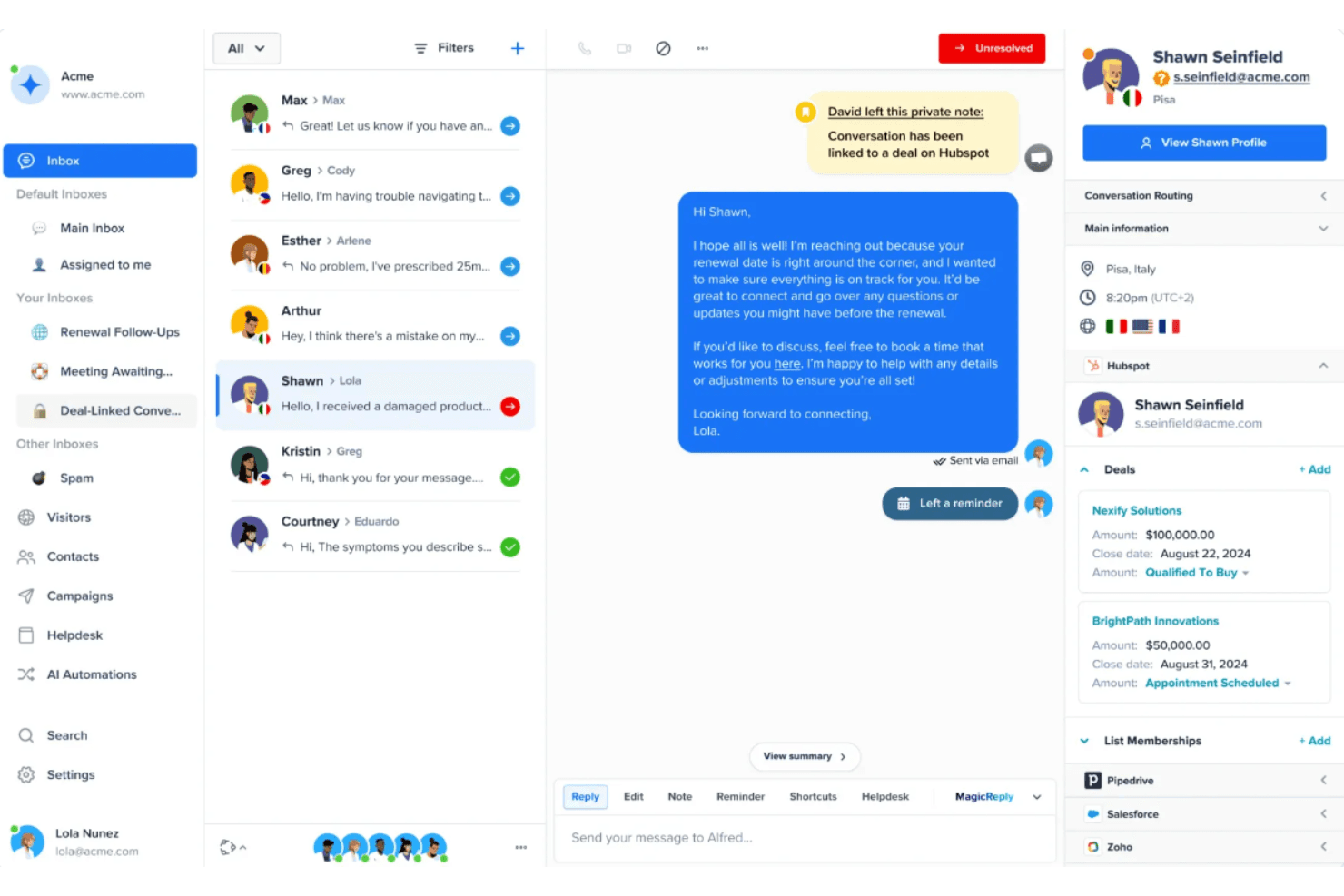
Crisp centralizes customer conversations with CRM deal tracking. Crisp is a customer messaging and support platform that brings live chat, email, WhatsApp, and social channels into one shared inbox—making it a practical fit for growing teams that want to consolidate customer conversations and reduce manual triage without paying per-seat pricing.
Who Is Crisp Best For?
Crisp is a strong fit for growing teams that want to consolidate customer conversations across chat, email, and social channels without paying per-seat pricing.
Why I Picked Crisp
Crisp earns its spot on my shortlist because its AI layer goes well beyond basic chatbot responses. I'm particularly impressed by the AI copilot, which pulls from live conversation context and your company's knowledge sources to suggest accurate replies in real time, and the AI agent, which can handle full conversations autonomously across WhatsApp, Messenger, Instagram, and email. When a customer messages at 2 a.m. with a billing question, Crisp's AI can resolve it without queuing it for a human.
Crisp Key Features
- Omnichannel shared inbox: Centralizes conversations from chat, email, WhatsApp, Messenger, Instagram, Telegram, X, Viber, and Line into one workspace.
- No-code workflow builder: Creates automated routing, assignment, and response workflows using a visual, condition-based editor.
- Multilingual knowledge base: Publishes help articles in multiple languages with branded customization, a custom domain, and built-in usage analytics.
- Customer satisfaction ratings: Collects post-conversation ratings automatically and surfaces results in the Analytics dashboard.
Crisp Integrations
Crisp offers 100+ integrations, including native WhatsApp Business and marketplace integrations for Salesforce, HubSpot, Shopify, WooCommerce, Jira, and Jira Service Management. It also supports REST and RTM APIs, webhooks, SDKs, and Zapier.
Pros and Cons
Pros:
- Live chat supports co-browsing and video
- Shared inbox preserves cross-channel customer context
- AI handles routine questions across channels
Cons:
- Analytics exports omit full conversation records
- Conversation-first workflow differs from ticket-first Kayako
Learn more about Crisp: Best for ticket-volume pricing
- Free trial + free demo available
- From $10/month
Visit WebsiteCustomer Rating:4.6/5
Gorgias displays full customer conversation history and order timeline. Gorgias is an ecommerce-focused helpdesk that unifies email, chat, social media, SMS, and voice into one inbox—letting support teams manage tickets and take order actions without leaving the platform.
Who Is Gorgias Best For?
Gorgias is a strong fit for ecommerce teams that want to pay based on ticket volume rather than headcount.
Why I Picked Gorgias
I picked Gorgias as one of the best because its ticket-volume pricing model means you're not penalized for growing your team. Plans start at $10/month for 50 tickets and scale by conversation volume, not headcount, so adding agents doesn't raise your bill. I especially like the per-ticket overage structure: $0.40 per extra ticket on lower tiers keeps costs predictable during busy seasons without forcing an immediate plan upgrade.
Gorgias Key Features
- Omnichannel inbox: Centralizes email, live chat, social media, SMS, WhatsApp, and voice tickets into a single shared queue with full conversation history.
- Rules-based automation: Builds conditional workflows using triggers, actions, and nested IF/AND/OR/ELSE logic to auto-tag, assign, reply to, or close tickets.
- CSAT surveys: Sends automated post-resolution satisfaction surveys on all Helpdesk plans, with configurable ticket types, survey messages, and sending delays.
- Customer Timeline: Displays a unified view of a customer's ticket history and Shopify order data alongside any open ticket.
Gorgias Integrations
Gorgias has a native Shopify integration and 100+ marketplace integrations, including Facebook, Recharge, Loop Returns, AfterShip Tracking, and TikTok Shop. It also offers a REST API for custom integrations.
Pros and Cons
Pros:
- Searchable help center supports self-service
- Conditional rules automate repetitive ticket work
- Unified history across customer channels
Cons:
- Reporting depth draws reviewer criticism
- Usage-based charges can become unpredictable
Learn more about Gorgias: Best for connecting support to retention work
- Free plan + 14-day trial + demo available
- From $20/user/month
Visit WebsiteCustomer Rating:4.4/5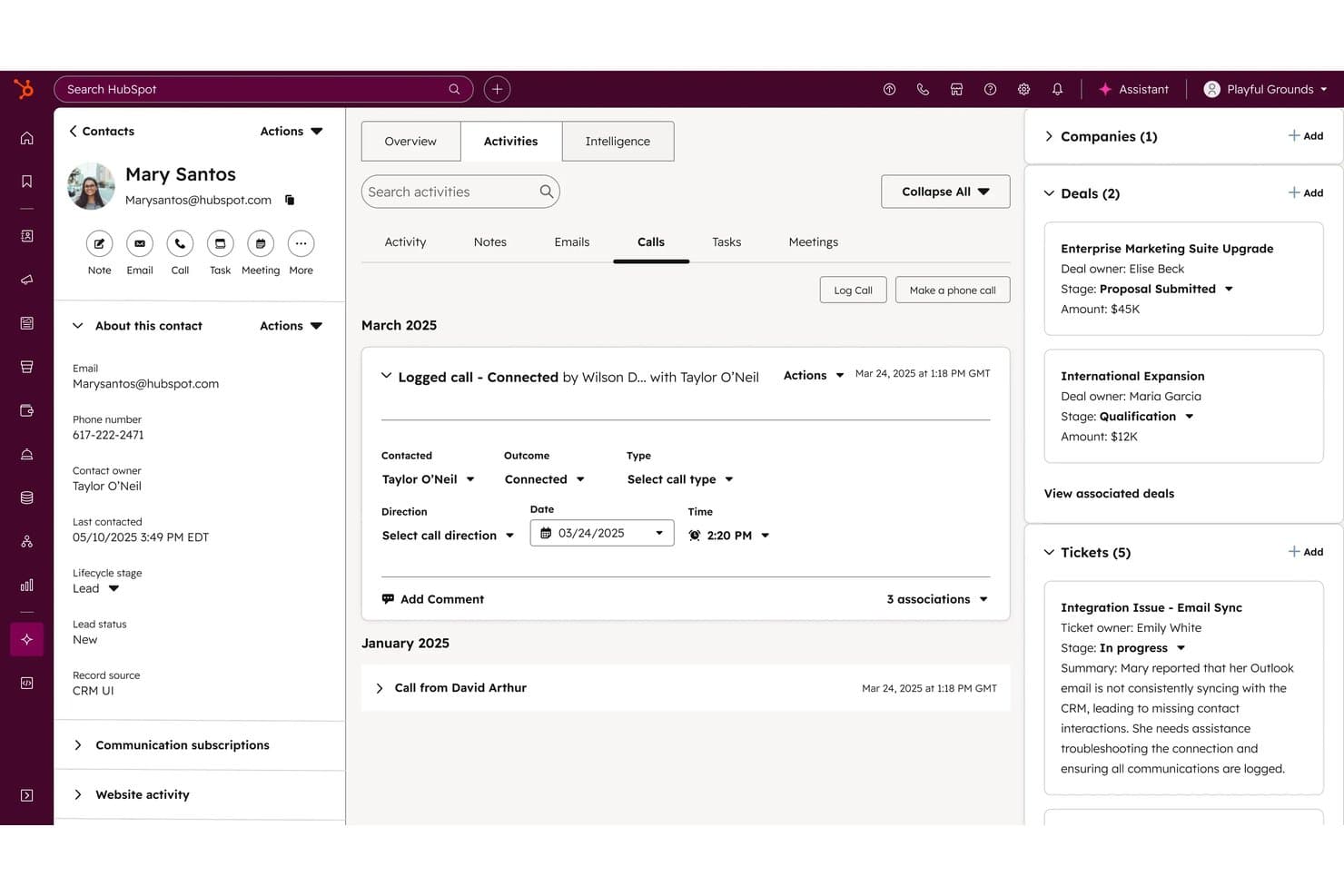
HubSpot Service Hub tracks contact calls, deals, and open tickets in one view. HubSpot Service Hub is a customer service platform that connects ticketing, live chat, a shared inbox, and a customer success workspace in one place—making it a natural fit for teams that want their support work tied directly to CRM data, retention signals, and the full customer journey.
Who Is HubSpot Service Hub Best For?
HubSpot Service Hub is a strong fit for customer experience teams that want support tickets, CRM data, and retention signals in one connected platform.
Why I Picked HubSpot Service Hub
I picked HubSpot Service Hub because it's the only tool on this list that ties support tickets directly to CRM data, deal stages, and retention signals in one place. When a ticket closes, Service Hub can surface upsell signals and generate AI-powered follow-ups, so your success team acts before a customer churns. I also love the customer success workspace, which lets reps manage health scores and CSAT alongside open tickets without switching tools.
HubSpot Service Hub Key Features
- Multi-channel help desk workspace: Brings email, chat, WhatsApp, SMS, Facebook Messenger, and calling into one unified ticket management workspace.
- Knowledge base: Lets you build a searchable self-service portal that integrates directly with live chat so customers can find answers without waiting for an agent.
- Workflow automation: Automates ticket routing, follow-ups, and task triggers using multi-condition rules, with macros available to speed up repetitive agent actions.
- Service analytics suite: Tracks ticket volume, reply times, time to close, CSAT, and SLA progress through customizable dashboards filtered by agent, team, or channel.
HubSpot Service Hub Integrations
HubSpot Service Hub supports more than 2,000 apps and web services, including a native Salesforce integration and Marketplace integrations such as Jira, Pendo, Segment, and SurveyMonkey. APIs, webhooks, and custom actions support additional connections.
Pros and Cons
Pros:
- Combines customer success and support context
- Routes tickets with clear ownership and reporting
- Connects support history to retention signals
Cons:
- Complex automation loops need workarounds
- Kayako history may require migration testing
Learn more about HubSpot Service Hub: Best for omnichannel support
- Free plan + 15-day trial available
- From $19/user/month
Visit WebsiteCustomer Rating:3.9/5
Chatwoot centralizes multi-channel customer conversations in one inbox. Chatwoot is an open-source customer support platform that lets support teams manage conversations from email, live chat, WhatsApp, Instagram, SMS, and more—all in one shared inbox—making it a strong fit for teams that need broad channel coverage without the cost of tools like Intercom or Zendesk.
Who Is Chatwoot Best For?
Chatwoot is a strong fit for support teams that need to manage customer conversations across many channels without paying Intercom or Zendesk prices.
Why I Picked Chatwoot
I picked Chatwoot as one of the best because of how well it handles omnichannel support without forcing your team to juggle multiple tools. I appreciate that email, WhatsApp, Instagram, Telegram, SMS, and live chat all feed into a single shared inbox, so agents see a unified conversation history no matter which channel a customer used. What I find especially useful is the collision detection: typing indicators show when another agent is already handling a conversation, which prevents duplicate replies in real time.
Chatwoot Key Features
- Automation rules: Set up event-triggered rules with AND/OR conditions and chained actions to handle assignments, labels, status changes, and messages automatically.
- CSAT surveys: Send customer satisfaction surveys per inbox when a conversation is resolved, with emoji or five-star rating options and filterable results reports.
- Multiple Help Center portals: Create separate self-service portals with their own categories, custom domains, and content for different products or audiences.
- Role-based access control: Assign agent permissions and control access levels across your team to manage who can view or act on conversations and account settings.
Chatwoot Integrations
Chatwoot lists 15 native integrations, including Slack, Linear, Stripe, Dialogflow, and LeadSquared; seven are available, while eight are planned for Q4 {{year}}. Its REST API and webhooks support custom integrations.
Pros and Cons
Pros:
- Self-hosting gives teams control over customer data
- Supports Kayako data imports through its API
- Unifies social, email, and chat histories
Cons:
- Reporting customization can frustrate complex teams
- Reviewers report occasional WhatsApp sync delays
Learn more about Chatwoot: Best for enterprise scaling
- 14-day free trial + free demo available
- From $19/agent/month (billed annually)

Zendesk Support Suite centralizes messaging, internal notes, and customer history. Zendesk Suite is an AI-powered customer service platform that unifies email, chat, voice, and social conversations into a single agent workspace, making it a strong fit for support teams that need omnichannel ticket management, automated workflows, and self-service tools at scale.
Who Is Zendesk Support Suite Best For?
Zendesk Suite is a strong fit for growing support teams that need to manage high ticket volumes across multiple channels without losing context between conversations.
Why I Picked Zendesk Support Suite
Zendesk Support Suite earns its spot on my shortlist because it's built to handle the kind of ticket volume and channel complexity that Kayako simply can't keep pace with at scale. I appreciate how omnichannel routing automatically distributes tickets from email, WhatsApp, voice, and social channels based on agent capacity and skills, so nothing gets stuck in a queue. The AI agents can resolve common requests end-to-end without human intervention, and intelligent triage classifies incoming tickets to inform routing and reporting from the start.
Zendesk Support Suite Key Features
- Multi-brand help center: Create separate, branded help centers for distinct product lines or customer segments, each with its own contact points and ticket routing.
- Side conversations: Loop in teammates via email, Slack, or Microsoft Teams directly from a ticket without exposing the internal discussion to the customer.
- CSAT surveys: Automatically send customizable satisfaction surveys to customers after tickets are solved, with adjustable rating scales and optional comments.
- Skills-based routing: Assign incoming tickets to agents based on their documented expertise, available on Suite Professional and above.
Zendesk Support Suite Integrations
Zendesk Suite documents 1,000+ prebuilt apps and integrations, including marketplace integrations with Pipedrive, Fullstory, and Microsoft Teams for Support. Its APIs and SDKs support custom connections across ticketing, messaging, voice, Help Center, and apps.
Pros and Cons
Pros:
- Migration guidance covers tickets, users, and articles
- Automated routing reduces repetitive agent work
- Unified conversations preserve ticket context
Cons:
- Custom reports take setup and work
- Costs rise as teams add capabilities
Learn more about Zendesk Support Suite: Best for customer and employee service
- 30-day free trial
- From $25/user/month

Salesforce Service Cloud organizes case details, feed, and related info in one console view. Salesforce Service Cloud is a customer service platform that connects case management, omni-channel messaging, AI-powered automation, and CRM data in one workspace—making it a strong fit for support and CX teams that want to handle customer and employee service from a single system.
Who Is Salesforce Service Cloud Best For?
Salesforce Service Cloud is a strong fit for mid-size to enterprise support and CX teams that already run on Salesforce and want to manage customer and employee service without switching platforms.
Why I Picked Salesforce Service Cloud
Salesforce Service Cloud earns its spot on my shortlist because it's one of the few platforms that handles both customer and employee service without splitting your stack. I particularly like how the Service Console unifies case history, omni-channel conversations, and CRM data in one workspace, so reps never have to context-switch mid-interaction. The Command Center gives service leaders real-time visibility into rep and AI agent performance across every channel, which is something I find genuinely useful when managing at scale.
Salesforce Service Cloud Key Features
- Omni-Channel routing: Automatically routes incoming cases and messages from email, chat, WhatsApp, SMS, and other channels to the right queue or rep based on configured rules.
- AI-generated service replies: Generates draft responses grounded in customer context, case history, and organizational knowledge for reps to review and send.
- Case escalation rules: Automatically escalates cases that meet defined criteria, such as time thresholds or priority levels, to the appropriate team or queue.
- Workforce management: Forecasts demand, plans capacity, schedules reps, and tracks attendance to help contact center leaders manage staffing in real time.
Salesforce Service Cloud Integrations
Salesforce Service Cloud offers native integrations with Gmail, Microsoft Outlook, and Slack. It also provides marketplace integrations through AgentExchange and a REST Enhanced Chat API for custom connections.
Pros and Cons
Pros:
- Connects employee and customer service operations
- Routes cases and automates repeat escalations
- Keeps customer history beside active cases
Cons:
- Kayako migration needs manual mapping and validation
- Complex workflows need ongoing technical administration
Learn more about Salesforce Service Cloud: Best for advanced ticketing system
- Free trial available
- From $15/user/month (billed annually)
Visit WebsiteCustomer Rating:4.6/5
LiveAgent centralizes all your support tickets from various channels, like phone, email, social media, and live chat. LiveAgent is a versatile customer support software designed to enhance the way you manage customer interactions. By integrating a variety of tools such as ticketing systems, live chat, and call center capabilities, it offers a comprehensive solution for businesses aiming to improve customer service.
Why LiveAgent is a good Kayako alternative: LiveAgent is a strong Kayako alternative, offering an advanced ticketing system that centralizes customer inquiries for efficient responses. It also includes social media management tools for seamless engagement, built-in call center capabilities for handling phone support, and live chat for real-time communication, making it a comprehensive solution for improving customer experience.
Standout features & integrations:
Features include an AI-powered chatbot that assists in automating responses to common queries, reducing the workload on your team. The knowledge base feature allows you to create a repository of helpful articles and FAQs, enabling customers to find answers on their own. Additionally, LiveAgent offers a multi-channel communication system, allowing you to manage emails, chats, and calls from a single interface, thereby improving your team's productivity.
Integrations include WhatsApp, WordPress, Prestashop, Magento, Shopify, Mailchimp, Pipedrive, Slack, Hero Internet, Orion Telekom, FlowHunt, and Redspot.
Pros and Cons
Pros:
- Includes AI tools to assist with drafting responses
- Supports multiple languages
- Provides robust automation options
Cons:
- Social media channels are limited to higher-tier plans or are paid add-ons
- Some users find the interface to be outdated
Learn more about LiveAgent: Best for AI-driven insights
- Free plan + 15-day trial + demo available
- From $7/user/month (billed annually)
Visit WebsiteCustomer Rating:4.4/5
Zoho Desk lets users edit, move, clone, or delete tickets via a dropdown menu. Zoho Desk is a help desk platform built for support teams that want AI-powered ticketing, omnichannel conversation management, and workflow automation in one place—without the enterprise price tag.
Who Is Zoho Desk Best For?
Zoho Desk is a strong fit for support teams that want AI-driven ticket insights and broad channel coverage without paying enterprise-tier prices.
Why I Picked Zoho Desk
Zoho Desk earns its spot on my shortlist because Zia, its built-in AI, surfaces insights that actually change how agents work: ticket sentiment analysis, topic tagging, and thread summaries that condense up to 30 conversations into a single, translatable snapshot. I appreciate how Zia also predicts unusual ticket activity and flags trends like recurring customer questions, so my team isn't waiting for a monthly report to spot a problem. That kind of real-time intelligence is what makes Zoho Desk a genuinely modern step up from Kayako.
Zoho Desk Key Features
- Ticket collision detection: Shows which agents are viewing or actively working a ticket in real time, preventing duplicate replies.
- Blueprint process flows: Guides agents through multi-step support workflows with defined transitions, conditions, and required actions at each stage.
- Multilingual help center: Publishes knowledge base articles in more than 40 languages, letting teams support customers across regions from one platform.
- Kayako data migration tool: Imports tickets, contacts, accounts, agents, and knowledge base articles from Kayako directly into Zoho Desk.
Zoho Desk Integrations
Zoho Desk identifies 360+ apps, including native integrations with Zoho CRM and Zoho BugTracker, plus integrations with Jira, Salesforce, Slack, Microsoft Teams, and HubSpot. It also supports marketplace extensions, APIs, webhooks, SDKs, custom functions, and Zapier.
Pros and Cons
Pros:
- Automated routing keeps support queues moving
- Collision alerts help prevent duplicate agent replies
- Zia summarizes long ticket threads and surfaces sentiment
Cons:
- Crowded settings can complicate migration setup
- Advanced workflow rules take time to configure
Learn more about Zoho Desk:
Diğer Kayako Alternatifleri
Kısa listeme girmeyen ancak yine de göz atmaya değer bazı ek Kayako alternatifleri şunlardır:
- 12IntercomBest for in-app product guidance
- 13TeamSupportBest for B2B customer support
- 14HappyFoxBest for guided Kayako migrations
- 15Help ScoutBest for multi-brand help centers
- 16HiverBest for omnichannel communication
- 17RichpanelBest for e-commerce businesses
- 18BoldDeskBest for customizable workflows
- 19HelpDeskBest for simple ticketing needs
- 20Freshdesk Best for small business support
- 21FaveoBest for recurring or perpetual licenses
- 22EnchantBest for task automation
- 23ServiceTonicBest for ITIL alignment
How I Evaluate Kayako Alternatives
I split my evaluation into three parts, with core functionality carrying the most weight: an alternative must unify tickets across channels and support shared team inbox collaboration. I also look for standout features like AI ticket summarization or multi-brand help center support. Beyond features, I consider pricing transparency and migration support.
Core Functionality (Table Stakes For This List)
When I'm selecting tools for my list, I score each one on a scale from 0 (does not offer the functionality) to 5 (excels in this area) for each core functionality listed below. I then convert the total into a percentage to help assess each tool's overall fit, with extra weight on any functionalities I’ve deemed essential.
- Multi-Channel Ticketing (Essential): I look for email, chat, and social inquiries to land in one trackable ticket with the conversation history intact.
- Shared Team Inbox (Essential): I assess whether agents can assign ownership, add internal notes, and avoid duplicate replies during busy shifts.
- Knowledge Base: I check for searchable, organized help articles customers can use to solve routine issues without contacting support.
- Workflow Automation: I look for rules that route tickets by topic or status and handle repetitive tasks such as follow-up reminders.
- Reporting & Analytics: I consider whether teams can track ticket volume, response times, and resolutions across agents or channels.
- Live Chat: I evaluate real-time chat routing, conversation history, and how easily an agent can turn a chat into a ticket.
Once I have a list of tools that meet the criteria, I consider what sets each platform apart.
Differentiating Factors (What Sets Vendors Apart)
Here's how I compare and contrast different vendors:
Standout Features
I look for AI-powered ticket summarization that condenses long threads into a quick brief—useful when an agent picks up a ticket mid-conversation after a shift change. Side conversations matter too, because agents often need to loop in billing or engineering without cluttering the customer-facing thread. I also evaluate multi-brand help center support, since teams running several product lines need distinct knowledge bases managed from one backend.
Beyond Features
I check whether a vendor offers dedicated migration tools or white-glove onboarding, since moving off Kayako mid-operation means your queue doesn't pause while ticket history and macros transfer over. Pricing transparency matters too—I look for predictable per-agent costs without hidden fees for automation or API access that only surface after you've committed. I also evaluate the integration ecosystem, because native connections to tools like Salesforce or Jira give agents customer context without relying on middleware.
Neden Kayako Alternatifi Aramalısınız?
Kayako iyi bir müşteri hizmetleri yazılımı olsa da bazı müşteri deneyimi ekiplerinin alternatif çözümler aramasının çeşitli nedenleri vardır. Şu nedenlerle bir Kayako alternatifi arıyor olabilirsiniz…
- Gelişmiş özelleştirme seçeneklerinden yoksundur
- Ekibinizin daha iyi mobil desteğe ihtiyacı vardır
- Sınırlı entegrasyon olanaklarıyla karşı karşıyasınızdır
- Daha ölçeklenebilir bir çözüme ihtiyacınız vardır
- İşletmenizin birden fazla dil desteğine ihtiyacı vardır
Bunlardan herhangi biri size uyuyorsa doğru yere geldiniz. Listemde, Kayako ile ilgili bu zorluklarla karşılaşan ve alternatif çözümler arayan ekipler için daha uygun olan çeşitli müşteri hizmetleri yazılımı seçenekleri bulunuyor.
Kayako Alternatiflerinin Temel Özellikleri
Pazardaki diğer çözümlerin sunduklarını karşılaştırmanıza yardımcı olmak için Kayako alternatiflerinin temel özelliklerinden bazıları şunlardır:
- Talep yönetimi: Zamanında yanıt verilmesini sağlamak için müşteri sorularını kolayca takip edin ve yönetin.
- Canlı sohbet: Destek deneyimini iyileştirerek müşterilerinizle gerçek zamanlı olarak etkileşim kurun.
- E-posta entegrasyonu: Verimli iletişim için e-postalarınızı tek bir platformda birleştirin.
- Raporlama ve analiz: Ayrıntılı raporlarla ekibinizin performansına ilişkin içgörüler elde edin.
- Bilgi tabanı: Müşterilere self servis seçenekleri sunarak ekibinizin iş yükünü azaltın.
- SLA yönetimi: Farklı hizmet düzeyi anlaşmalarına dayalı yanıt süresi taahhütlerinin ekibiniz tarafından tutarlı bir şekilde karşılanmasını sağlayın.
- Çok kanallı destek: Müşteri sorularını çeşitli kanallardan tek bir yerden yönetin.
- Özelleştirilebilir iş akışları: Sistemi ekibinizin özel ihtiyaçlarına uyacak şekilde düzenleyin.
- Müşteri veritabanı: Daha iyi hizmet sunmak için müşteri etkileşimlerine ilişkin ayrıntılı kayıtlar tutun.
- Otomasyon araçları: Zamandan tasarruf etmek ve verimliliği artırmak için tekrarlayan görevleri otomatikleştirin.