

Birden fazla talebi aynı anda yönetmeye, yanıt sürelerini düşük tutmaya ve her müşterinin dinlendiğini hissetmesini sağlamaya çalışıyorsunuz. Bu, başa çıkılması zor bir iş olabilir; müşteri hizmetleri e-posta yönetimi yazılımları da tam bu noktada devreye girer.
Bu araçlar ekibinizin düzenli kalmasına, daha hızlı yanıt vermesine ve genel müşteri deneyimini iyileştirmesine yardımcı olur. Deneyimlerime göre verimlilik ve memnuniyet açısından büyük bir fark yaratırlar.
Bu çözümlerin birçoğunu bağımsız olarak test edip inceledim. Amacım, mevcut en iyi seçenekler hakkında tarafsız bilgiler paylaşmak. Karşılaştığınız zorlukları ele alan ve ekibinizin işini kolaylaştıran, kapsamlı araştırmalara dayalı en iyi seçenekler listesini bulacaksınız. Müşteri etkileşimlerini yönetme biçiminizi dönüştürebilecek çözümlere birlikte göz atalım.
Why Trust Our Software Recommendations
6,700+
Reviews
20
Industry experts
16+
Evaluation factors
14
Years
Our team has been testing and reviewing software since 2012. As CX leaders ourselves, we know how difficult—and important—it is to choose the right software.
For this guide, we evaluated tools using hands-on testing and independent research, scoring tools using our selection criteria.
Our reviews reflect our human editorial judgment, not a sales pitch.
 Gui DrusinaCreative Director
 Tim FisherVP of AI
Müşteri Hizmetleri E-posta Yönetimi Yazılımları Karşılaştırma Tablosu
Score legend (out of 5)
- Excellent4.5–5
- Good4–4.4
- Average3–3.9
- Below average2–2.9
- Poor1–1.9
Sorted by: Default
| Tool | Starting Price | Website | |||||||
|---|---|---|---|---|---|---|---|---|---|
Best for small business service desks | 3.5 out of 5 | 4 | 3 | 4 | 3 | 3 | 4 | $29/user/month 14-day free trial available | Book Demo |
Best for automating customer interactions | 3.7 out of 5 | 4 | 4 | 4 | 3 | 4 | 3 | $16/agent/month Free plan + 14-day trial + free demo available | Website |
Best for customer support and experience | 3.3 out of 5 | 3 | 4 | 4 | 3 | 3 | 3 | $25/user/month Free plan + 15-day free trial + free demo available | Website |
Best for shared inbox team collaboration | 3.8 out of 5 | 3 | 4 | 4 | 4 | 5 | 3 | $14/user/month 30-day free trial available | Website |
Best for AI-powered email management | 4.3 out of 5 | 4 | 5 | 4 | 4 | 5 | 4 | $25/user/month 7-day free trial + free demo available | Book Demo |
Best for turning support into tracked work | 3.8 out of 5 | 4 | 4 | 4 | 3 | 4 | 4 | $25/user/month 14-day free trial + free demo available | Website |
Best for CRM-led service and retention | 3.8 out of 5 | 4 | 4 | 4 | 4 | 3 | 4 | $20/user/month Free plan + 14-day trial + demo available | Website |
Best for integrating with legacy software | 3.0 out of 5 | 3 | 2 | 4 | 3 | 3 | 3 | $75/user/month Free trial available | Website |
Best with built-in analytics | 3.7 out of 5 | 4 | 4 | 4 | 3 | 3 | 4 | $7/user/month Free plan + 15-day trial + demo available | Website |
Best email management tool for startups | 3.7 out of 5 | 4 | 4 | 4 | 3 | 3 | 4 | $25/agent/month Free trial available | Book Demo |
Best for HIPAA-compliant support in Gmail | 4.0 out of 5 | 4 | 4 | 4 | 4 | 4 | 4 | $19/user/month 14-day free trial available | Website |
Best for linking product onboarding to support | 3.5 out of 5 | 5 | 3 | 4 | 3 | 2 | 4 | $19/user/month 14-day free trial + demo available | Website |


En İyi 10 Müşteri Hizmetleri E-posta Yönetimi Yazılımına Genel Bakış
Listemde yer alan en iyi e-posta yönetim sistemlerinin her birinin en iyi yaptığı işi açıklayan kısa bir tanımın yanı sıra bazı özellikleri gösteren ekran görüntülerini burada bulabilirsiniz.
 Best for small business service desks
- 14-day free trial available
- From $29/user/month (billed annually)
Visit WebsiteCustomer Rating:4.4/5
Designed for team collaborations, helping you do so much more than just send a reply. Freshdesk (a product of Freshworks Inc.) is a customer support platform designed for teams that want a straightforward way to manage customer inquiries. It centers on ticket based workflows and supports messages from multiple channels, helping teams keep communication organized within a single system.
Why I picked Freshdesk: I picked Freshdesk for its interface, which is structured in a way that makes daily support tasks easier to follow. When managing incoming requests, the ticketing system helps you organize conversations and track their status without relying on multiple tools. It also includes Freddy AI, which can assist with drafting responses and summarizing tickets within the existing workflow. The ability to handle inquiries from email, phone, and social channels in one place supports more consistent responses across channels. Customizable dashboards add visibility into workload and response activity.
Standout features & integrations:
Features include a ticketing system that helps teams organize, prioritize, and resolve customer inquiries. Its multi-channel support allows messages from different platforms to be managed within the same workflow.
Integrations include tools such as Slack, Microsoft Teams, Salesforce, Shopify, Google Workspace, Trello, Asana, Mailchimp, Dropbox, and HubSpot, allowing support activity to connect with collaboration, CRM, and productivity tools.
Pros and Cons
Pros:
- Clear, easy to follow ticket workflows
- Efficient ticket management
- Multi-channel support
Cons:
- Requires frequent updates
- Limited advanced reporting
Learn more about Freshdesk: Best for automating customer interactions
- Free plan + 14-day trial + free demo available
- From $16/agent/month (billed annually)
Visit WebsiteCustomer Rating:4.6/5
SparrowDesk inbox showing active conversations with statuses, sources, and assigned agents. SparrowDesk is an AI-driven support platform built to bring email and chat conversations into a single workspace where your team can manage all customer communication with full context and automation. If your team handles a mix of email threads, chat support and needs a system that can route, prioritize and automate replies, SparrowDesk might appeal—especially for mid-sized businesses in e-commerce, SaaS or support-heavy roles where reducing agent load and improving consistency matter.
Why I Picked SparrowDesk
I picked SparrowDesk for its unique approach to integrating AI into customer service email management. The platform's AI Agents automatically handle the majority of customer inquiries, reducing the workload on your team and allowing them to concentrate on more critical tasks. Additionally, the AI Copilot feature offers real-time assistance to agents by providing summaries and smart draft suggestions, further enhancing the speed and quality of responses. This combination of automation and AI support directly addresses the need for efficient email management in customer service environments.
SparrowDesk Key Features
Aside from its AI-driven capabilities, SparrowDesk offers several features that enhance its utility as a customer service email management tool:
- Omnichannel Inbox: Consolidates all customer interactions from chat and email into a single, manageable interface.
- Quick-Action Macros: Automate repetitive tasks and responses, saving time and ensuring consistency in communication.
- Interactive Analytics: Provides real-time insights into team performance and customer trends through comprehensive dashboards.
- Custom Views & Filters: Allows the creation of personalized views to prioritize and track important conversations effectively.
SparrowDesk Integrations
Native integrations are not currently listed by SparrowDesk.
Pros and Cons
Pros:
- No code workflow builder automates routing and notifications
- Copilot features summarize long conversations inside the agent inbox
- AI agents designed to auto resolve many repetitive tickets
Cons:
- Limited native integrations could hinder seamless connectivity
- Channels currently focus on email and live chat, not voice or social
Learn more about SparrowDesk: Best for customer support and experience
- Free plan + 15-day free trial + free demo available
- From $25/user/month (billed annually)
Visit WebsiteCustomer Rating:4.5/5
Easily toggle between email, chat, requests, and add to the queue all in one interface. Help Scout is a customer support platform aimed at small to medium-sized businesses that want to deliver personalized customer service. It focuses on managing customer emails and providing tools for efficient communication and support.
Why I picked Help Scout: It excels in providing personalized support with features that focus on customer interaction and satisfaction. The platform's shared inbox allows your team to manage emails collaboratively, ensuring nothing slips through the cracks. Help Scout's customer profiles give your team context for each interaction, enhancing the support experience. The reporting tools help you track performance and improve your team's efficiency.
Standout features & integrations:
Features include a shared inbox that enables collaborative email management. Customer profiles provide context for every interaction, making it easier to deliver personalized support. Reporting tools track performance and help improve team efficiency.
Integrations include Slack, HubSpot, Salesforce, Mailchimp, Shopify, WordPress, WooCommerce, Magento, Google Workspace, and Trello.
Pros and Cons
Pros:
- Strong focus on customer interaction
- Detailed customer profiles
- Easy collaboration within teams
Cons:
- Requires regular training
- Limited automation features
Learn more about Help Scout: Best for shared inbox team collaboration
- 30-day free trial available
- From $14/user/month (billed annually)
Visit WebsiteCustomer Rating:4.8/5
Missive lets teams handle email and chat in a single unified view. Missive is a collaborative email management platform that brings shared inboxes, multi-channel messaging, internal threading, and AI-powered automation together in one workspace for customer-facing teams.
Who Is Missive Best For?
Missive is a strong fit for small to mid-sized customer support teams that handle high email volumes collaboratively and need their whole team working inside one shared inbox.
Why I Picked Missive
Missive earns its spot as one of the best on my shortlist because its shared inbox collaboration is genuinely unlike anything else in this category. I love that multiple agents can co-edit a single reply in real time, so a senior rep can jump in and polish a draft before it ever reaches the customer. Internal threads let my team debate the right response directly on the email thread, with no CC chains or Slack back-and-forth needed.
Missive Key Features
- Multi-channel inbox: Missive consolidates email, WhatsApp, SMS, Facebook Messenger, Instagram DMs, and live chat into a single shared workspace.
- AI-powered automation rules: Missive's rule engine detects sentiment, deadlines, and spam to trigger automated actions likeescalations, labels, and task creation.
- CRM and e-commerce sidebar: Native integrations with HubSpot, Salesforce, Pipedrive, and Shopify surface customer history and deal data directly alongside email threads.
- Workload-balanced auto-assignment: Conversations can be routed to agents using round-robin, least-busy, all-at-once, or random distribution methods.
- Missive MCP Server: Connect external AI tools (like Claude or ChatGPT) to query customer service email threads, check calendars, and draft replies—while keeping agent review required before sending.
Missive Integrations
Missive offers native integrations with HubSpot, Salesforce, Pipedrive, Close, Shopify, ChargeDesk, Asana, ClickUp, and Google Drive. It also provides an open REST API with webhooks, Zapier connectivity for custom workflows, and its new MCP Server on Productive and Business plans (requires admin activation).
Pros and Cons
Pros:
- AI-powered rules automate tagging and escalation
- Internal email-only chat eliminates messy CC chains
- Teams can co-edit replies in real time
Cons:
- SLA tracking relies on manual rule configuration
- No native CSAT or satisfaction survey tool
Learn more about Missive: Best for AI-powered email management
- 7-day free trial + free demo available
- From $25/user/month (billed annually)
Visit WebsiteCustomer Rating:4.7/5
Hiver combines with your Gmail to create a new, colorful workplace for your team. Hiver is a modern AI-powered customer service platform that helps teams manage customer emails with ease. It helps teams manage all their customer service channels from a left-side panel and get a complete overview of ongoing, pending, and resolved conversations for each channel.
Why I picked Hiver: Hiver is suited for fast-moving teams that want the powerful features of a full-fledged help desk tool but without the complexity and baggage it brings. There’s a shared inbox for assigning and tracking queries, along with collaboration tools like notes, @mentions, and shared drafts that keep teams aligned. You get workflow automations and SLA management to ensure timely responses, plus detailed analytics to monitor performance and customer satisfaction. The knowledge base helps agents avoid having to deal with common, frequently asked queries.
Standout features & integrations:
Features include Hiver AI, which embeds AI capabilities across all touchpoints of the customer support journey. For example, AI Copilot helps agents respond to customers through contextual answers, reply drafts, and more, while AI Agents help you set up autonomous workflows to handle FAQs, follow-ups, and other actions. It also has AI Insights that use conversations to forecast issues and risks.
Integrations include Aircall, Asana, Jira, Okta, QuickBooks, Salesforce, Slack, WhatsApp, and Zapier and 100+ other platforms.
Pros and Cons
Pros:
- AI features embedded at all stages of customer support journey
- Customer support from real humans available 24/7 via chat or email, across all plans (including free one)
- Strong internal collaboration features
Cons:
- Compared to some other platforms, Hiver offers fewer third party integrations
- Mobile experience isn’t as strong as the desktop one
Learn more about Hiver: Best for turning support into tracked work
- 14-day free trial + free demo available
- From $25/user/month (billed annually)
Visit WebsiteCustomer Rating:4.6/5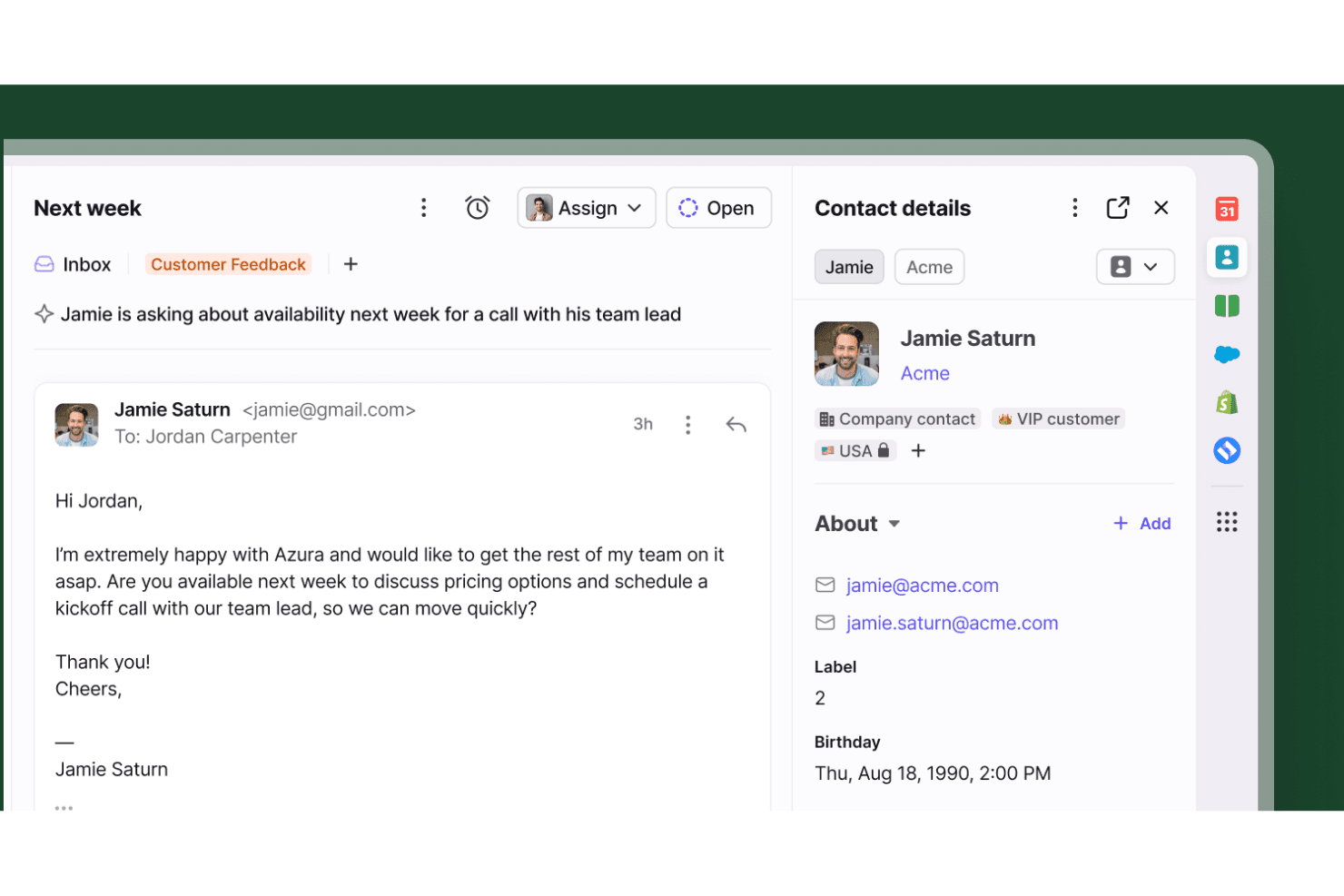
Front displays an active customer email alongside a right-hand sidebar with rich contact details and native integration shortcuts. Front is a customer operations platform that unifies email, shared inboxes, and other support channels with ticket routing, workflow automation, internal collaboration, and analytics.
Who Is Front Best For?
Front works well for support teams that want email to feel collaborative without abandoning the familiar inbox experience for a traditional ticketing system.
Why I Picked Front
I picked Front as one of the best because it treats email not as a pile of messages to clear, but as trackable work with clear ownership. When a customer email comes in, your team can assign it, add internal comments, set a custom ticket status, and link it to an internal action item, all without leaving the inbox. I especially like that SLA timers run against open tickets, so nothing quietly ages past your response target.
Front Key Features
- Shared drafts: Multiple teammates can contribute to a reply before it's sent, keeping responses aligned without back-and-forth over email.
- Rules-based automation: Set up routing, tagging, and assignment rules to handle incoming messages automatically, with up to unlimited rules on Enterprise.
- AI Compose and Summarize: Draft or refine replies with AI assistance and generate conversation summaries to get teammates up to speed quickly.
- Omnichannel inbox: Manage email, SMS, chat, WhatsApp, Slack, and social channels from a single shared workspace on Professional plans and above.
Front Integrations
Front offers 160+ integrations, including HubSpot, Salesforce, Jira, Slack, Aircall, Dialpad, and Asana. Its REST API, webhooks, Channel API, and Plugin SDK support custom connections.
Pros and Cons
Pros:
- SLA timers and routing expose aging work
- Email-like inbox keeps channel context together
- Shared drafts and comments clarify handoffs
Cons:
- Complex rules can demand ongoing upkeep
- Outlook actions may not sync consistently
Learn more about Front: Best for CRM-led service and retention
- Free plan + 14-day trial + demo available
- From $20/user/month
Visit WebsiteCustomer Rating:4.4/5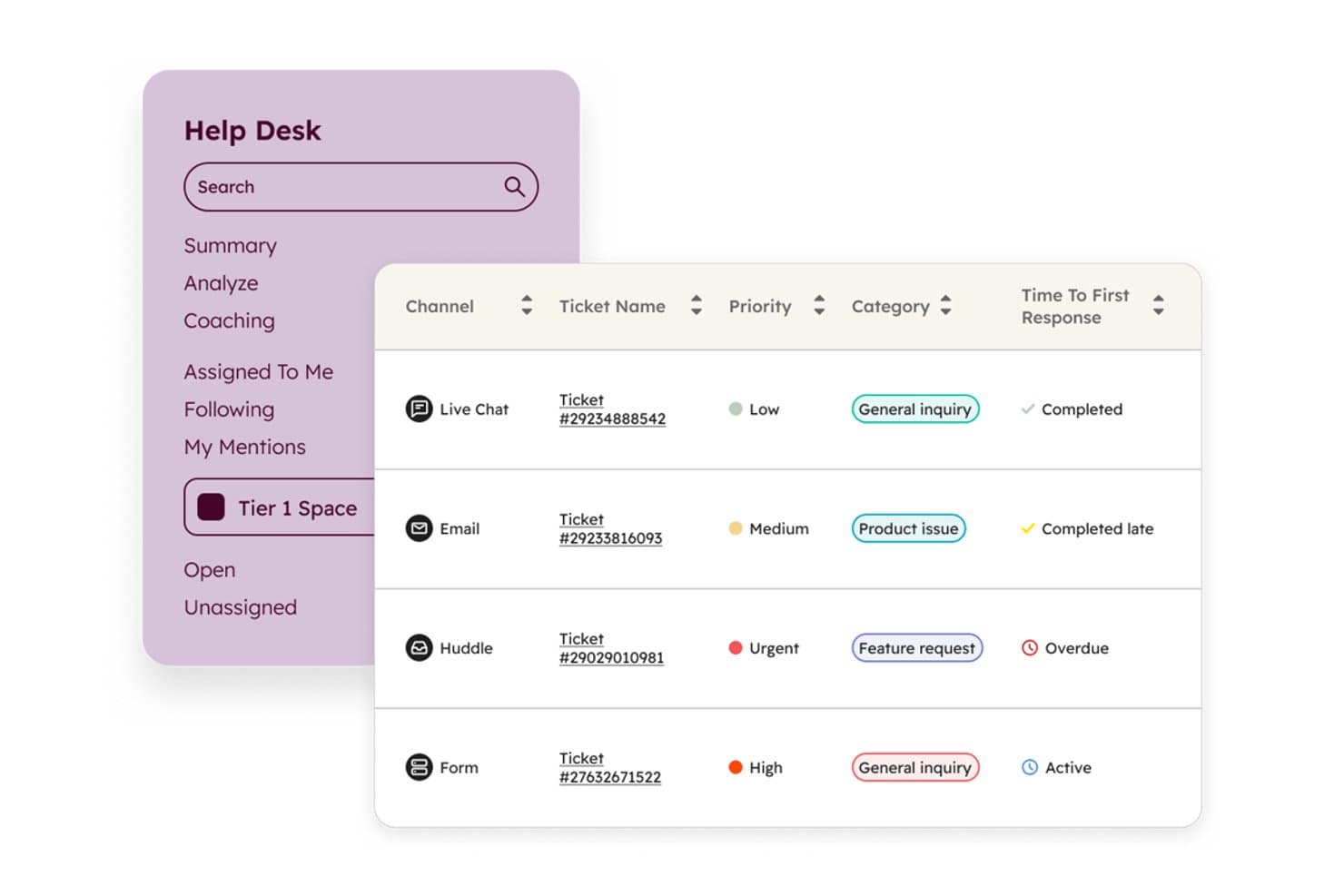
HubSpot Service Hub centralizes support tickets across email, chat, and more. HubSpot Service Hub is a CRM-native customer service platform that combines shared inbox management, help desk ticketing, omnichannel support, and AI-powered automation to handle customer email and service interactions in one workspace.
Who Is HubSpot Service Hub Best For?
HubSpot Service Hub is a strong fit for support teams that already use HubSpot's CRM and want their service, sales, and marketing data in one place.
Why I Picked HubSpot Service Hub
I picked HubSpot Service Hub because it's the only tool on this list where email support and CRM data live in the same system by design. When a customer emails your team, agents see the full contact record, including past purchases, open deals, and previous tickets, without switching tabs. I also love the Help Desk Workspace, which centralizes ticket triage and lets teams assign, prioritize, and respond to email threads with AI-generated reply recommendations built in.
HubSpot Service Hub Key Features
- Canned snippets and email templates: Store up to 5,000 canned snippets and 10,000 email templates that agents can search and insert directly into replies.
- SLA management: Set and track service-level targets, with automated ticket routing that triggers based on SLA rules to keep response times on track.
- Customer feedback surveys: Send NPS, CSAT, and CES surveys to collect customer feedback and measure satisfaction across service interactions.
- Customer Success Workspace: A dedicated workspace for managing customer accounts, tracking health scores, and prioritizing success activities across your book of business.
HubSpot Service Hub Integrations
HubSpot says Service Hub supports more than 2,000 custom integrations, including native Slack, Facebook Messenger, WhatsApp, and Salesforce connections, plus marketplace apps such as Jira, Aircall, Zoom, SurveyMonkey, and Segment. APIs and webhooks support custom integrations.
Pros and Cons
Pros:
- Shared inbox connects email with chat
- Ticket ownership keeps email work organized
- Customer history appears beside support emails
Cons:
- Busy screens can slow email triage
- Advanced email routing requires higher tiers
Learn more about HubSpot Service Hub: Best for integrating with legacy software
- Free trial available
- From $75/user/month
Visit WebsiteCustomer Rating:4.4/5
Salesforce Service Cloud allows users to create and use email templates to send to customers. Salesforce Service Cloud is a customer service platform tailored for large enterprises seeking to enhance their customer support operations. It facilitates case management, automates workflows, and provides multi-channel support to improve service efficiency.
Why I picked Salesforce Service Cloud: Designed with large enterprises in mind, it offers extensive customization options to fit complex business needs. Its case management system efficiently handles high volumes of customer interactions. The platform's automation features help reduce manual work, freeing your team to focus on resolving customer issues. Additionally, its analytics tools provide valuable insights to improve decision-making.
Standout features & integrations:
Features include a comprehensive case management system that tracks customer inquiries from start to finish. The platform offers automation tools that help reduce repetitive tasks. Its analytics provide in-depth insights into customer interactions and service performance.
Integrations include Slack, Microsoft Teams, Google Workspace, Mailchimp, HubSpot, Zendesk, Dropbox, QuickBooks, Asana, and Trello.
Pros and Cons
Pros:
- Scalable for growing businesses
- Strong community support
- Highly customizable interface
Cons:
- Requires significant customization
- Steep learning curve
Learn more about Agentforce Service (formerly Service Cloud): Best with built-in analytics
- Free plan + 15-day trial + demo available
- From $7/user/month (billed annually)
Visit WebsiteCustomer Rating:4.4/5
Keep track of and manage customer support tickets from email, social media, chat, and phone in one place. Zoho Desk is a customer service platform designed primarily for small businesses, helping them manage support tickets and customer interactions efficiently. It offers tools for ticket management, multi-channel communication, and customer insights to enhance service delivery.
Why I picked Zoho Desk: Ideal for small businesses with its affordable pricing and easy setup. The platform provides a simple ticketing system that allows your team to track and resolve customer queries. Its multi-channel support lets you handle inquiries from email, social media, and phone in one place. The built-in analytics offer insights into team performance, helping you make informed decisions.
Standout features & integrations:
Features include a simple ticketing system that organizes customer queries efficiently. The multi-channel support feature lets you manage email, social media, and phone inquiries in one place. The analytics tools provide insights into team performance and customer satisfaction.
Integrations include Slack, Microsoft Teams, Shopify, Zoho CRM, Google Workspace, Mailchimp, Trello, Asana, QuickBooks, and Salesforce.
Pros and Cons
Pros:
- Multi-channel support
- Affordable for small businesses
- Easy to customize workflows
Cons:
- Limited offline capabilities
- Basic reporting tools
Learn more about Zoho Desk: 10Best email management tool for startups
Zendesk
- Free trial available
- From $25/agent/month (billed annually)
Visit WebsiteCustomer Rating:4.3/5
Easily track and prioritize tickets with Zendesk integrated support. Zendesk is a customer service platform designed for businesses of all sizes that need scalable solutions for managing customer inquiries. It provides tools for ticketing, support, and customer engagement, facilitating efficient communication and service delivery.
Why I picked Zendesk: It offers scalability, making it suitable for growing businesses that need a flexible support system. The ticketing system helps your team manage customer inquiries efficiently. With customizable workflows, you can tailor the platform to fit your specific business needs. The analytics tools provide insights into customer interactions, helping you optimize your support operations.
Standout features & integrations:
Features include a comprehensive ticketing system that efficiently organizes customer inquiries. Customizable workflows let you tailor the platform to your business needs. Analytics tools offer insights into customer interactions and service performance.
Integrations include Salesforce, Slack, Google Workspace, Shopify, Mailchimp, Trello, Asana, HubSpot, Microsoft Teams, and SurveyMonkey.
Pros and Cons
Pros:
- Highly scalable for growing businesses
- Supports multi-channel communication
- Efficient ticketing system
Cons:
- Limited offline capabilities
- Can be complex to set up
Learn more about Zendesk: 11Best for HIPAA-compliant support in Gmail
Keeping
- 14-day free trial available
- From $19/user/month
Visit WebsiteCustomer Rating:4.5/5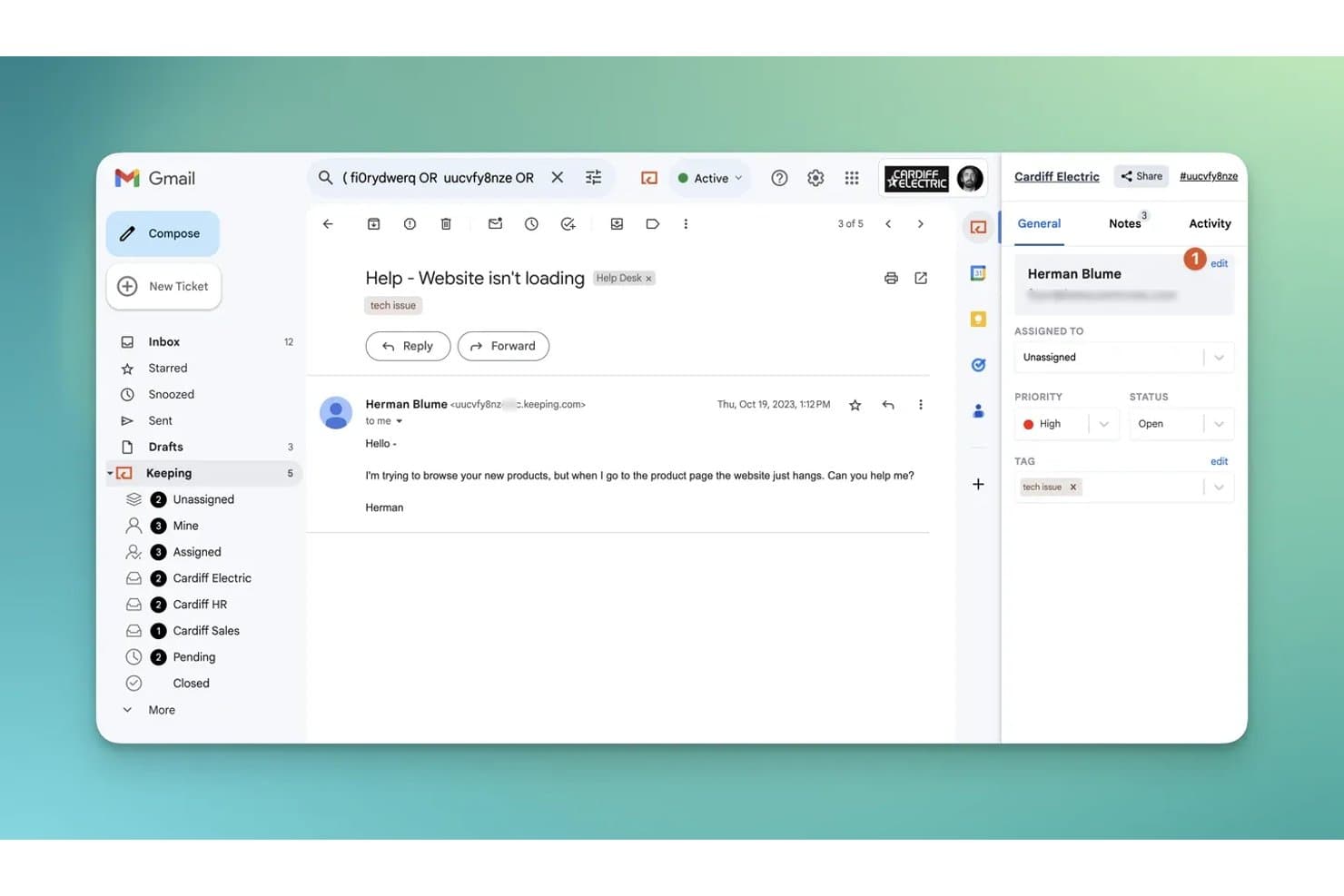
Keeping manages support tickets directly inside Gmail. Keeping is a Gmail-native shared inbox tool that lets support teams manage customer emails with conversation ownership, collision detection, ticket statuses, internal notes, automated routing, and team performance reporting.
Who Is Keeping Best For?
Keeping is a great fit for healthcare and other compliance-sensitive teams that need to manage customer email directly inside Gmail without leaving Google Workspace.
Why I Picked Keeping
I picked Keeping as one of the best because it's the only shared inbox tool I've found that pairs full Gmail-native collaboration with a dedicated HIPAA-compliant tier, including an executed BAA. For healthcare teams, that means handling sensitive patient inquiries directly in Gmail with collision detection preventing duplicate replies and fine-grained mailbox permissions controlling exactly who sees what. The HIPAA plan also includes an SLA uptime guarantee and a dedicated account manager, which matters when compliance isn't optional.
Keeping Key Features
- Round-robin assignment: Automatically distributes incoming conversations among available teammates so no single agent gets overloaded.
- Workflow automation: Triggers actions like tagging, priority setting, and status changes based on conditions in incoming email.
- CSAT surveys: Adds a customer satisfaction survey to outgoing replies and compiles the results into dedicated reports.
- Shared email templates: Lets your team save, organize, and share response templates with dynamic variables for consistent replies.
Keeping Integrations
Keeping offers native integrations with Salesforce, HubSpot, Slack, Asana, Jira, Shopify, WooCommerce, and monday.com. It supports MCP connections for Claude, ChatGPT, and Gemini, plus hundreds of other apps via Zapier.
Pros and Cons
Pros:
- Shared inbox reporting tracks agent response times
- HIPAA plan includes an executed BAA
- Gmail-native collaboration prevents duplicate replies
Cons:
- Gmail-only support excludes other email platforms
- Mobile access relies on the web inbox
Learn more about Keeping: 12Best for linking product onboarding to support
Intercom
- 14-day free trial + demo available
- From $19/user/month (billed annually)
Visit WebsiteCustomer Rating:4.4/5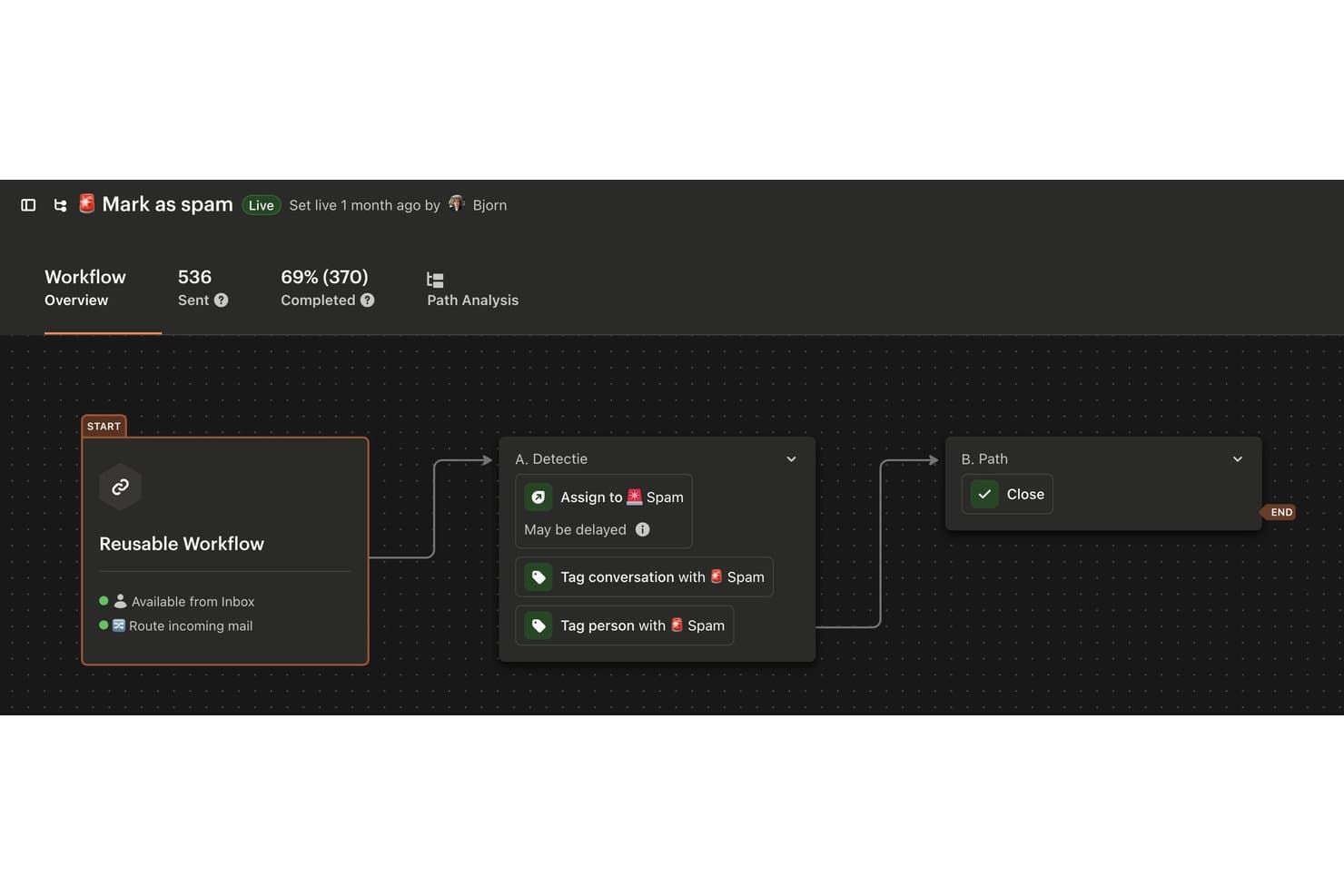
Intercom automates spam detection with tagging and routing workflows. Intercom is an AI-powered customer service platform that brings email, live chat, phone, and social channels into a shared inbox, with built-in ticketing, workflow automation, and product messaging tools.
Who Is Intercom Best For?
Intercom is a strong fit for SaaS and digital-first product teams that want to connect in-app onboarding and proactive messaging with day-to-day customer support in one place.
Why I Picked Intercom
I picked Intercom as one of the best because it's the only tool on my list that genuinely bridges product onboarding and customer support in a single platform. Features like Product Tours and in-app checklists let you guide users through setup, while the shared inbox catches support emails the moment something goes wrong. I also love that back-office tickets let agents loop in internal teams privately, without breaking the customer-facing email thread.
Intercom Key Features
- Omnichannel inbox: Manage email, live chat, WhatsApp, SMS, phone, and social messages from a single shared workspace.
- Workflow automation builder: Use a visual, no-code builder to automate conversation assignments, ticket routing, and SLA triggers.
- Custom reporting: Build reports with up to ten chart types, advanced filters, and exportable data to track team and conversation metrics.
- Macros: Apply saved replies and bulk actions—like assigning or closing a conversation—to common queries with one click.
Intercom Integrations
Intercom offers 450+ marketplace integrations, including Salesforce, HubSpot, Shopify, Jira Cloud, Slack, WhatsApp, Freshdesk, and Zapier. REST APIs, webhooks, and SDKs support custom integrations.
Pros and Cons
Pros:
- Routing and reports help manage email volume
- Macros speed replies and case tracking
- Product tours connect onboarding with support
Cons:
- Seat and usage costs can be unpredictable
- Email deliverability complaints appear in reviews
Diğer Müşteri Hizmetleri E-posta Yönetimi Yazılımı Seçenekleri
Birkaç e-posta yönetimi aracına daha ihtiyaç duyuyorsanız size yardımcı olabilirim.
- 13KayakoBest for pay-per-resolution AI rollouts
- 14LiveAgentBest for switching with migration support
- 15GmeliusBest for support SLAs without leaving Gmail
- 16GorgiasBest for Shopify support with order actions
- 17monday serviceBest for turning requests into project work
- 18DragBest for visual support workflows in Gmail
- 19HelpwiseBest for balancing agent workloads
- 20HelplyBest for support-led account intelligence
How I Evaluate Customer Service Email Management Software
I split my evaluation into three parts, with core functionality carrying the most weight: route emails to the right agent and prevent duplicate replies. Next, I look for standout features such as AI reply drafts or shared drafts. Finally, I consider beyond-feature factors, including migration support, onboarding, and value as your team grows.
Core Functionality (Table Stakes For This List)
When I'm selecting tools for my list, I score each one on a scale from 0 (does not offer the functionality) to 5 (excels in this area) for each core functionality listed below. I then convert the total into a percentage to help assess each tool's overall fit, with extra weight on any functionalities I’ve deemed essential.
- Shared Inbox Collaboration (Essential): I look for clear ownership and collision alerts so agents can coordinate on a customer thread without sending duplicate replies.
- Ticket Assignment & Routing (Essential): I check for manual assignment and rules that route messages by topic or team, such as sending billing questions to the right queue.
- Email Status & Workflow: I assess whether agents can track each conversation from open to resolved and see which requests need follow-up.
- Reply Templates: I look for searchable, reusable replies that agents can personalize for recurring questions, such as setup or account access.
- Internal Notes: I check whether agents can add private context or tag a colleague on a thread without exposing it to the customer.
- Email Metrics: I assess reporting on response and resolution times, including whether teams can review results by agent or team.
Once I have a list of tools that meet the criteria, I consider what sets each platform apart.
Differentiating Factors (What Sets Vendors Apart)
Here's how I compare and contrast different vendors:
Standout Features
I look for shared drafts and side conversations because they let agents co-write a reply or pull in another department without the customer seeing the back-and-forth. AI draft suggestions also matter—I evaluate whether the AI can summarize a long thread and propose a reply an agent can edit, not just insert a canned response. I check for built-in CSAT surveys tied to individual threads, since linking a satisfaction score to a specific conversation gives managers actionable data instead of abstract averages.
Beyond Features
I evaluate how quickly a team can migrate existing mailboxes and historical threads without losing data, since a messy import means agents lose context on open issues. Integration depth matters too—I check whether a tool connects natively to your CRM and collaboration apps like Slack, because middleware workarounds tend to break when you need them most. I also look at role-based permissions and audit logs, especially for teams handling regulated customer data where accountability for deleted or reassigned messages is non-negotiable.
Müşteri Hizmetleri E-posta Yönetimi Yazılımı Nasıl Seçilir?
Uzun özellik listeleri ve karmaşık fiyatlandırma yapılarına takılıp kalmak kolaydır. Kendinize özgü yazılım seçimi sürecinizi yürütürken odaklanmanıza yardımcı olmak için göz önünde bulundurmanız gereken faktörleri içeren bir kontrol listesi hazırladım:
| Faktör | Dikkat Edilmesi Gerekenler |
|---|---|
| FaktörÖlçeklenebilirlik | Dikkat Edilmesi GerekenlerYazılımın ekibinizle birlikte büyüyebildiğinden, artan e-posta hacimlerini ve kullanıcı sayılarını yönetebildiğinden emin olun. |
| FaktörEntegrasyonlar | Dikkat Edilmesi GerekenlerCRM sistemleri ve yardım masası yazılımı gibi ekibinizin hâlihazırda kullandığı araçlarla entegre olan yazılımları tercih edin, |
| FaktörÖzelleştirilebilirlik | Dikkat Edilmesi Gerekenlerİş akışlarını, panoları ve özellikleri ekibinizin özel ihtiyaçlarına göre uyarlayıp uyarlayamayacağınızı kontrol edin. |
| FaktörKullanım Kolaylığı | Dikkat Edilmesi GerekenlerArayüzün ne kadar sezgisel olduğunu ve ekibinizin ne kadar hızlı adapte olabileceğini değerlendirin. |
| FaktörBütçe | Dikkat Edilmesi GerekenlerGizli maliyetler veya ek ücretler de dâhil olmak üzere fiyatlandırmanın bütçenizle uyumlu olup olmadığını değerlendirin. |
| FaktörGüvenlik Önlemleri | Dikkat Edilmesi GerekenlerMüşteri bilgilerinizin güvende kalması için yazılımın güçlü veri koruma önlemlerine sahip olduğunu doğrulayın. |
| FaktörDestek Seçenekleri | Dikkat Edilmesi Gerekenler7/24 destek imkânı, birden fazla iletişim kanalı ve kapsamlı bir bilgi tabanına erişim sunan çözümleri tercih edin. |
| FaktörAnalitik | Dikkat Edilmesi GerekenlerAracın ekibinizin performansı ve müşteri etkileşimleri hakkında içgörüler sağlayan raporlama özellikleri sunduğundan emin olun. |
Müşteri Hizmetleri E-posta Yönetimi Yazılımlarındaki Trendler
Araştırmamda, farklı müşteri hizmetleri e-posta yönetimi yazılımı sağlayıcılarından sayısız ürün güncellemesi, basın bülteni ve sürüm günlüğü derledim. Takip ettiğim yükselen trendlerden bazıları şunlar:
- Yapay Zekâ Destekli Kişiselleştirme: Yapay zekâ, geçmiş davranışlara ve tercihlere göre müşteri etkileşimlerini uyarlamak için kullanılıyor. Bu trend, işletmelerin daha ilgili destek sunmasına yardımcı olarak müşteri memnuniyetini artırıyor. Zendesk gibi sağlayıcılar, kişiselleştirilmiş yanıtlar önermek için yapay zekâyı entegre etti.
- Çok Kanallı Destek Entegrasyonu: Şirketler, e-postayı sosyal medya ve canlı sohbet gibi diğer iletişim kanallarıyla birleştiren platformlara yöneliyor. Bu entegrasyon, kullanıcıların tüm etkileşimleri tek bir yerden yönetmesine olanak tanıyarak bütünlüklü bir müşteri deneyimi sunuyor. Freshdesk, bu trendi benimseyen platformlara bir örnektir.
- Gerçek Zamanlı Analiz: Gerçek zamanlı veri analizi, hizmet verimliliğini artırmak için giderek daha önemli hâle geliyor. Bu analizler, ekip performansı ve müşteri etkileşimleri hakkında gerçekleştiği anda içgörüler sağlayarak hızlı karar almayı mümkün kılıyor. Salesforce Service Cloud gibi platformlar bu özellikleri sunuyor.
- Uzaktan İş Birliği Özellikleri: Daha fazla ekip uzaktan çalıştıkça, iş birliğini geliştiren araçlara olan talep artıyor. Ortak gelen kutuları ve dahili yorumlar gibi özellikler, ekiplerin konumdan bağımsız olarak etkili biçimde birlikte çalışmasına olanak tanıyor. Front, güçlü uzaktan iş birliği özellikleriyle tanınıyor.
- Kullanıcı Deneyimine Odaklanma: Eğitim süresini azaltmak ve benimsemeyi artırmak için sezgisel tasarıma ve kullanım kolaylığına giderek daha fazla önem veriliyor. Basit arayüzlere ve kullanıcı dostu gezinmeye sahip yazılımlar işletmeler için öncelik hâline geliyor. Help Scout, mükemmel bir kullanıcı deneyimi sunma konusundaki kararlılığıyla öne çıkıyor.
Müşteri Hizmetleri E-posta Yönetimi Yazılımı Nedir?
Müşteri hizmetleri e-posta yönetimi yazılımı, işletmelerin e-posta yoluyla alınan müşteri taleplerini yönetmesine ve düzenlemesine yardımcı olan bir araçtır. Genellikle müşteri destek ekipleri tarafından kullanılan bu araçlar, yanıt sürelerini iyileştirerek ve tutarlı iletişim sağlayarak değer sunar.
Destek talebi yönetimi, gerçek zamanlı analiz ve çok kanallı destek gibi özellikler; taleplerin düzenlenmesine, performansın analiz edilmesine ve entegre müşteri etkileşimleri sunulmasına yardımcı olur. Genel olarak bu araçlar, müşteri hizmetleri operasyonlarının verimliliğini ve etkinliğini artırır.
Müşteri Hizmetleri E-posta Yönetimi Yazılımının Özellikleri
Müşteri hizmetleri e-posta yönetimi yazılımı seçerken aşağıdaki temel özelliklere dikkat edin:
- Destek talebi yönetimi: Müşteri taleplerini yönetilebilir destek talepleri hâlinde düzenleyerek hiçbir şeyin gözden kaçmamasını sağlar.
- Çok kanallı destek: Çeşitli iletişim kanallarını entegre ederek platformlar arasında sorunsuz müşteri etkileşimleri kurulmasına olanak tanır.
- Gerçek zamanlı analiz: Ekip performansı ve müşteri etkileşimleri hakkında içgörüler sağlayarak hızlı düzenlemeler ve iyileştirmeler yapılmasını mümkün kılar.
- Özelleştirilebilir iş akışları: Ekiplerin süreçleri belirli işletme ihtiyaçlarına uyacak şekilde uyarlamasına olanak tanıyarak verimliliği artırır.
- Yapay zekâ destekli kişiselleştirme: Müşteri geçmişine göre yanıtları uyarlamak için yapay zekâdan yararlanarak memnuniyeti ve etkileşimi artırır.
- Ortak gelen kutuları: Birden fazla ekip üyesinin e-postalara ortak bir gelen kutusundan erişmesine ve e-postaları yönetmesine olanak tanıyarak iş birliğini kolaylaştırır.
- Otomasyon araçları: Yanıtlar ve destek talebi atamaları gibi tekrarlayan süreçleri otomatikleştirerek manuel görevleri azaltır.
- Müşteri profilleri: Her müşteri hakkında ayrıntılı içgörüler sunarak hizmet kalitesinin kişiselleştirilmesine ve iyileştirilmesine yardımcı olur.
- Raporlama araçları: Performans ölçümlerini izler ve analiz eder; stratejik karar alma süreçlerine ve performans optimizasyonuna yardımcı olur.
- Güvenlik önlemleri: Güçlü güvenlik tedbirleriyle müşteri verilerinin korunmasını sağlayarak güveni ve uyumluluğu sürdürür.
Müşteri Hizmetleri E-posta Yönetimi Yazılımının Faydaları
Müşteri hizmetleri e-posta yönetimi yazılımını uygulamak, ekibiniz ve işletmeniz için çeşitli faydalar sağlar. Yararlanabileceğiniz birkaç fayda şunlardır:
- Yanıt sürelerinin iyileştirilmesi: Otomasyon araçları, ekibinizin müşteri taleplerine daha hızlı yanıt vermesine yardımcı olarak müşteri memnuniyetini artırır.
- Geliştirilmiş iş birliği: Paylaşılan gelen kutuları ve dahili yorum özellikleri, ekibinizin müşteri sorunları üzerinde birlikte çalışmasını kolaylaştırır.
- Daha iyi müşteri içgörüleri: Müşteri profilleri ve gerçek zamanlı analizler, değerli bilgiler sunarak desteğin bireysel ihtiyaçlara göre uyarlanmasına yardımcı olur.
- Artan verimlilik: Talep yönetimi ve özelleştirilebilir iş akışları süreçleri kolaylaştırarak ekibinizin iş yükünü azaltır.
- Tutarlı iletişim: Çok kanallı destek, müşterilerin tüm kanallarda aynı hizmeti almasını sağlayarak deneyimi iyileştirir.
- Veriye dayalı kararlar: Raporlama araçları ve analizler, performans hakkında içgörüler sunarak stratejik planlama ve iyileştirmelere katkıda bulunur.
- İyileştirilmiş KPI'lar: CSAT, NPS ve CES gibi iyileştirilmiş müşteri memnuniyeti ölçümleri, memnuniyeti değerlendirmeye, deneyimleri iyileştirmeye ve sadakati artırmaya yardımcı olur.
Müşteri Hizmetleri E-posta Yönetimi Yazılımının Maliyetleri ve Fiyatlandırması
Müşteri hizmetleri e-posta yönetimi yazılımı seçmek, mevcut çeşitli fiyatlandırma modellerini ve planları anlamayı gerektirir. Maliyetler özelliklere, ekip büyüklüğüne, eklentilere ve daha fazlasına göre değişir. Aşağıdaki tablo, müşteri hizmetleri e-posta yönetimi yazılımı çözümlerinde yaygın olarak sunulan planları, ortalama fiyatlarını ve tipik özelliklerini özetlemektedir:
Müşteri Hizmetleri E-posta Yönetimi Yazılımı İçin Plan Karşılaştırma Tablosu
| Plan Türü | Ortalama Fiyat | Yaygın Özellikler |
|---|---|---|
| Plan TürüÜcretsiz Plan | Ortalama Fiyat$0 | Yaygın ÖzelliklerTemel talep yönetimi, sınırlı e-posta desteği ve temel raporlama. |
| Plan TürüKişisel Plan | Ortalama Fiyat$5-$25/kullanıcı/ay | Yaygın ÖzelliklerTalep yönetimi, e-posta desteği, sınırlı özelleştirme ve temel analizler. |
| Plan Türüİşletme Planı | Ortalama Fiyat$30-$75/kullanıcı/ay | Yaygın ÖzelliklerGelişmiş talep yönetimi, çok kanallı destek, özelleştirilebilir iş akışları ve gerçek zamanlı analizler. |
| Plan TürüKurumsal Plan | Ortalama Fiyat$80-$150/kullanıcı/ay | Yaygın ÖzelliklerTam özelleştirme, gelişmiş raporlama, yapay zekâ destekli içgörüler ve özel hesap yönetimi. |
Müşteriler Ayrıca Soruyor: Müşteri Hizmetleri E-posta Yönetimi Hakkında Her Şey
Bir müşteri hizmetleri e-posta yönetimi yazılımı platformuyla çalışmakla ilgileniyorsanız, başlamadan önce muhtemelen birkaç sorunuz vardır. Aşağıda sık sorulan bazı soruların yanıtlarını bulabilirsiniz.
Müşteri hizmetleri e-posta yönetimi yazılımı ne amaçla kullanılır?
Müşteri hizmetleri e-posta yönetimi yazılımı, müşteri e-postalarına yanıt verme sürecini kolaylaştırmak için kullanılır. Bu araçlar, e-postaları uygun ekiplere ve kişilere yönlendirmek üzere iş akışları oluşturmanıza, zamandan tasarruf etmek için müşteri hizmetleri e-posta şablonları geliştirip kullanmanıza ve müşteri sorunlarını çözerken ekiplerin birbiriyle iş birliği yapmasına yardımcı olabilir.
Daha fazla seçenek mi istiyorsunuz? Müşteri destek ekibinizin gelen kutularını yönetmesine yardımcı olacak diğer araçlar için e-posta yardım masası yazılımı hakkındaki makalemize göz atın.
Ne tür işletmeler müşteri hizmetleri e-posta yönetimi yazılımı kullanır?
2022 tarihli bir Statista raporuna göre e-posta, tüketicilerin Amerika Birleşik Devletleri’nde tercih ettiği müşteri hizmetleri kanalı olma konusunda web sohbeti ve sosyal medyayı %15’ten fazla bir farkla geride bırakmıştır. Bu nedenle müşteri hizmetleri e-posta yönetimi yazılımı, çeşitli sektörlerde faaliyet gösteren ve farklı büyüklüklerdeki kuruluşlar için kesinlikle yararlı olabilir. İster çok uluslu bir şirket ister hızla büyüyen küçük bir girişim olun, bu araçlar e-posta yanıt sürelerinizi iyileştirmenize ve müşterilerinize daha iyi bir hizmet deneyimi sunmanıza yardımcı olabilir.
Bu listedeki araçlar çeşitli fiyat noktalarını ve özellikleri temsil eder. Bazıları daha kapsamlıdır ve büyük işletmeler için daha uygundur. Diğerleri yalnızca ihtiyaç duyduğunuz özellikleri seçme olanağı sunar, daha düşük bir fiyatla çalışır ve KOBİ’ler için daha uygun olabilir.