

Çağrı merkezi analiz yazılımı, ekibinizin performansı anlamasına, eğilimleri belirlemesine ve hizmet kalitesini iyileştirmesine yardımcı olmak için müşteri etkileşimlerini izler, ölçer ve analiz eder. Doğru analiz çözümünü arıyorsanız parçalı veriler, tutarsız raporlama veya kanallar arasındaki uygulanabilir içgörüleri belirlemede yaşanan zorluklar gibi sorunlarla karşı karşıya olabilirsiniz. Doğru platform, temsilci etkinliğini izlemenize, müşteri duyarlılığını ortaya çıkarmanıza ve analizleri iş sonuçlarıyla ilişkilendirmenize yardımcı olabilir. Bu rehberde, çağrı merkezi analiz yazılımı için uzmanlar tarafından incelenmiş seçenekleri bulabilir, böylece özellikleri karşılaştırabilir ve 2026 yılında ekibinizin ihtiyaçlarına en uygun seçeneği belirleyebilirsiniz.
Why Trust Our Software Recommendations
6,700+
Reviews
20
Industry experts
16+
Evaluation factors
14
Years
Our team has been testing and reviewing software since 2012. As CX leaders ourselves, we know how difficult—and important—it is to choose the right software.
For this guide, we evaluated tools using hands-on testing and independent research, scoring tools using our selection criteria.
Our reviews reflect our human editorial judgment, not a sales pitch.
 Gui DrusinaCreative Director
 Tim FisherVP of AI
Çağrı Merkezi Analiz Yazılımı Karşılaştırma Tablosu
Bu karşılaştırma tablosu, en iyi çağrı merkezi analiz yazılımı seçimlerim için fiyatlandırma ayrıntılarını özetlemektedir.
Sorted by: Default
| Tool | Starting Price | Website | |
|---|---|---|---|
Best for automating post-call documentation | 4.5 out of 5 | Pricing upon request Free demo available | Website |
Best for agile team scaling and global expansion | 4.8 out of 5 | $25/month Free demo available | Website |
Best for inbound and outbound call metrics | 4.2 out of 5 | $25/user/month Free plan + 14-day trial + free demo available | Website |
Best for customizable analytics dashboards | 4.4 out of 5 | Pricing upon request Free demo available | Website |
Best for conversational AI automation | 4.8 out of 5 | Pricing upon request Free demo available | Website |
Best for integrated voice and messaging analytics | 4.3 out of 5 | Pricing upon request 14-day free trial + free demo available | Website |
Best for multilingual speech analytics | 4.6 out of 5 | Pricing upon request 30-day free trial | Website |
Best for omnichannel reporting capabilities | 4.4 out of 5 | $75/user/month Free demo available | Website |
Best for AI-driven performance management | Not rated | Pricing upon request Free demo available | Website |
Best for real-time agent coaching insights | Not rated | Pricing upon request Free demo available | Website |


Çağrı Merkezi Analiz Yazılımı İncelemeleri
Aşağıda, kısa listeme giren çağrı merkezi analiz yazılımlarıyla ilgili ayrıntılı özetlerimi bulabilirsiniz. İncelemelerim, her platformun özelliklerine, yeteneklerine ve en uygun kullanım alanlarına ayrıntılı bir bakış sunarak sizin için en iyi seçeneği bulmanıza yardımcı olur.
 Best for automating post-call documentation
- Free demo available
- Pricing upon request
Visit WebsiteCustomer Rating:4.5/5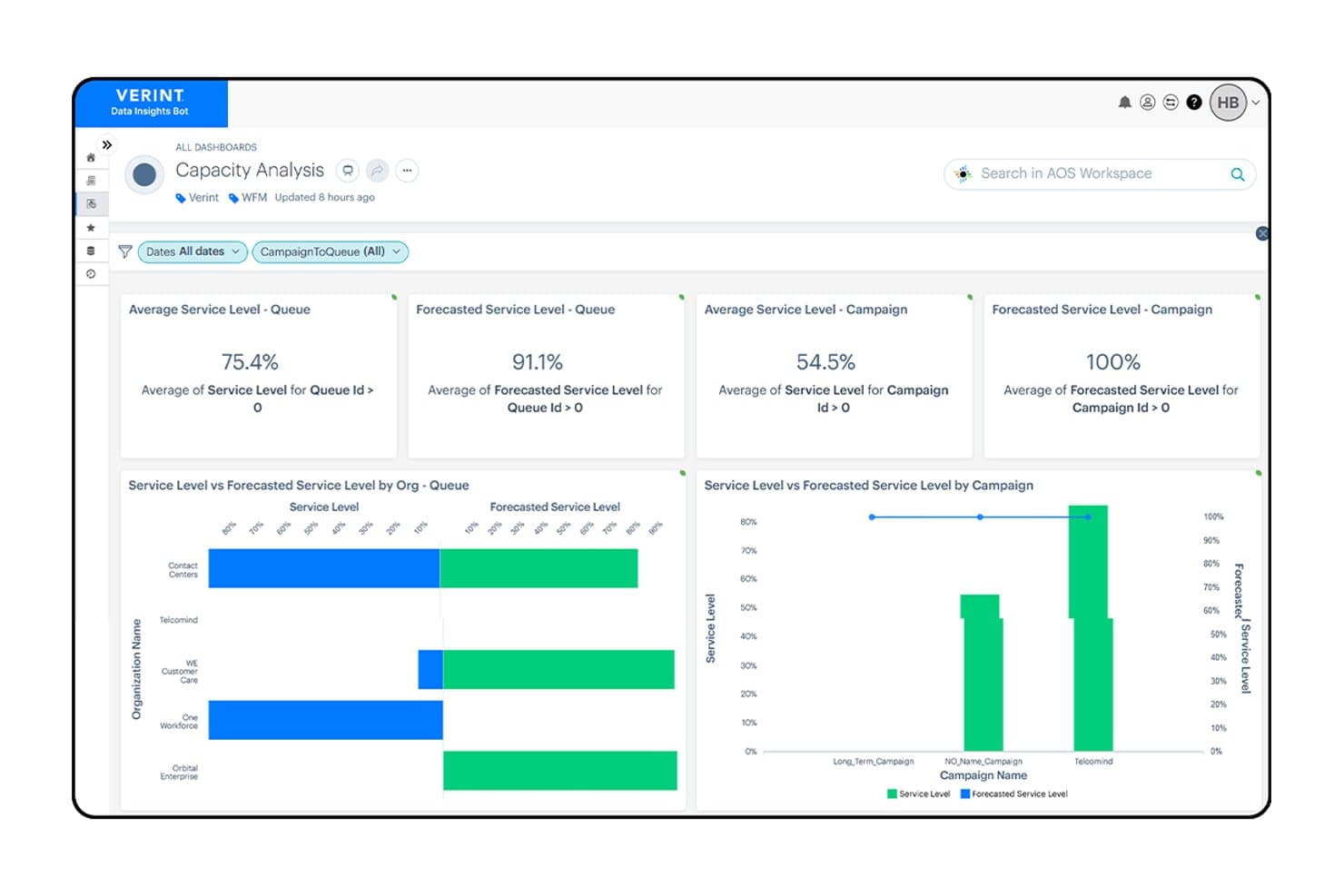
Verint tracks service levels and forecasted capacity across queues and campaigns. Verint Speech Analytics is a voice interaction analysis platform that transcribes 100% of recorded calls to surface sentiment, root-cause insights, compliance issues, and operational trends across contact center interactions.
Who Is Verint Best For?
Verint Speech Analytics is a strong fit for enterprise contact centers where QA teams need to move beyond manual sampling and automatically evaluate agent performance at scale.
Why I Picked Verint
Verint earns its spot on my shortlist because its Wrap Up Bot handles the post-call documentation that eats up agent time after every interaction. It captures audio directly from the ACD, transcribes it, generates a structured summary, and pushes it to the system of record in seconds. I also like that Quality Bot can autoscore up to 100% of those same interactions against custom evaluation forms, so QA teams get full coverage without manual sampling.
Verint Key Features
- Genie natural-language querying: Lets analysts ask plain-language questions about customer conversations and get insight-backed answers in minutes, complete with verified call examples.
- PII redaction: Automatically detects and masks sensitive data—including payment-card numbers, Social Security numbers, and addresses—in recordings and transcripts.
- Sentiment scoring across voice and digital interactions: Scores interactions for sentiment and tracks negative sentiment changes at the employee level to support targeted investigation.
- Operational insight discovery: Identifies specific drivers of handle time, silence, holds, repeat contacts, and knowledge gaps across 100% of recorded interactions.
Verint Integrations
Verint offers marketplace integrations with Intradiem and Zoom Contact Center through CSI and Time Collection adapters. An API is available for custom integrations.
Pros and Cons
Pros:
- Scores interactions beyond manual sampling
- Finds call trends and root causes
- Automates post-call summaries to the system of record
Cons:
- Reports can require manual assembly
- Transcription struggles with accents and terminology
Learn more about Verint: Best for agile team scaling and global expansion
- Free demo available
- From $25/month (billed annually)
Visit WebsiteCustomer Rating:4.8/5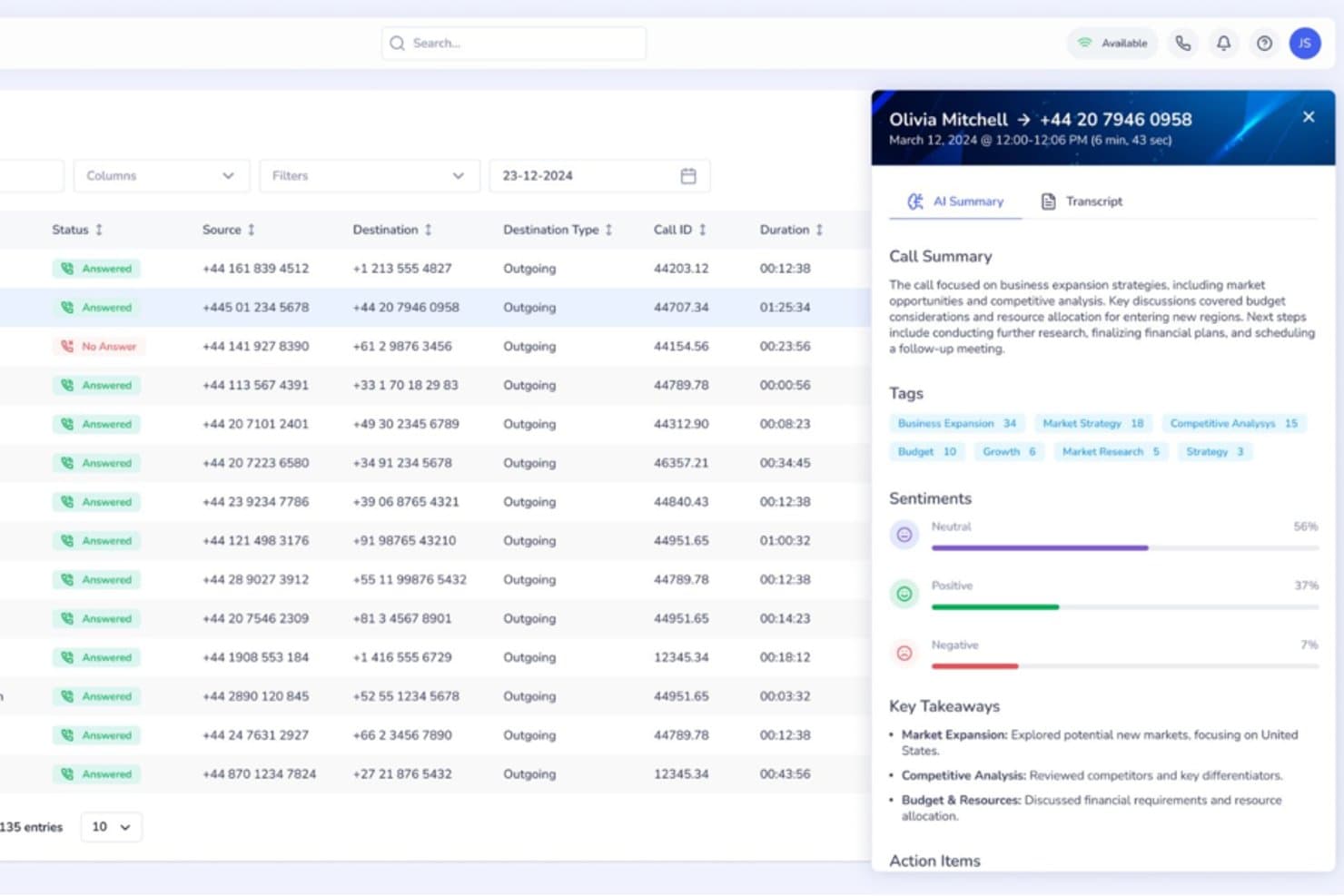
Squaretalk offers an AI-powered call analytics panel with call summaries, sentiment analysis, tags, and key takeaways for each call. Squaretalk is a cloud-based contact center platform with AI-powered conversation analytics, omnichannel communication, predictive dialing, and real-time performance monitoring across voice and messaging channels.
Who Is Squaretalk Best For?
Squaretalk suits SMB and mid-market sales and support teams that operate across multiple countries and need to add agents or phone numbers quickly without complex procurement.
Why I Picked Squaretalk
Squaretalk earns its spot as one of the best on my shortlist because it pairs real-time analytics across 80+ metrics with AI transcription in 100+ languages, so conversation insights stay consistent as my team expands into new regions. When I add agents or local numbers across 150+ destinations, the analytics layer scales alongside the operation. Sentiment analysis and keyword tagging work across voice and messaging channels from day one, with no reconfiguration needed.
Squaretalk Key Features
- Omnichannel messaging: Manage voice, WhatsApp Business, email, SMS, Viber, and Telegram conversations from one platform.
- Predictive dialer: Automatically calls leads and skips unanswered calls, connecting agents only to live prospects.
- Real-time call monitoring: Listen to live calls, supervise agent conversations, and use whisper mode for on-the-spot coaching.
- CRM integrations: Connects with Salesforce, HubSpot, Zoho CRM, Zendesk, monday.com, and more for seamless data flow.
Squaretalk Integrations
Squaretalk offers native integrations with Salesforce, Zoho CRM, Freshworks, Pipedrive, and more, and provides an API for custom integrations.
Pros and Cons
Pros:
- Transcription and sentiment analysis in 100+ languages
- Real-time monitoring with whisper and barge modes
- Omnichannel analytics across voice and messaging
Cons:
- Lacks forecasting and workforce management features
- No built-in automated QA scoring tools
Learn more about Squaretalk: Best for inbound and outbound call metrics
- Free plan + 14-day trial + free demo available
- From $25/user/month (billed annually)
Visit WebsiteCustomer Rating:4.2/5
CloudTalk tracks inbound and outbound call metrics to help teams monitor call center performance. Built for customer-facing teams, CloudTalk is a VoIP call center platform that pairs inbound and outbound calling with analytics tools such as sentiment analysis, live dashboards, and call tagging.
Who Is CloudTalk Best For?
CloudTalk is well-suited for sales and support teams at small to mid-sized businesses that need a VoIP call center with built-in analytics and performance tracking.
Why I Picked CloudTalk
I picked CloudTalk for its VoIP call statistics tracking that gives teams a granular, real-time view of call performance. The real-time dashboard surfaces live KPIs like call volume, wait times, agent occupancy, and abandonment rates in one place. I also like the group and agent reporting layers, which let you break down VoIP call data by individual rep or team, so you can spot where performance gaps exist rather than relying on blended averages.
CloudTalk Key Features
- AI Conversation Intelligence: Analyzes calls for sentiment, talk/listen ratio, and trending topics to reveal patterns in customer conversations.
- Call recording: Records inbound and outbound calls and stores them for review, quality monitoring, and coaching.
- Mandatory call tagging: Requires agents to categorize calls before closing them to keep reporting data organized.
- Call monitoring: Allows managers to listen to calls and review interactions to support quality assurance and agents.
CloudTalk Integrations
CloudTalk offers 70+ integrations, including Salesforce, HubSpot, Zendesk, Pipedrive, Intercom, Zoho CRM, Microsoft Teams, Freshdesk, Gorgias, and Shopify. It also connects with Zapier and Make for workflow automation, while API access supports custom integrations.
Pros and Cons
Pros:
- Call tagging keeps conversation context across teams
- Local numbers available in over 160 countries
- Real-time analytics track agent performance
Cons:
- Mobile app has fewer features than desktop version
- Reporting customization options can feel limitedcompetitors
 Best for customizable analytics dashboards
- Free demo available
- Pricing upon request
Visit WebsiteCustomer Rating:4.4/5
Talkdesk dashboard displaying real-time service levels and agent status metrics. If you need analytics dashboards that adapt to your team’s unique KPIs, Talkdesk offers a flexible solution for contact centers. The platform is built for operations leaders and analysts who want to visualize, filter, and drill into real-time and historical data. With Talkdesk, you can design dashboards that match your reporting needs and quickly spot trends across channels.
Why I Picked Talkdesk
Customizable analytics dashboards are what set Talkdesk apart for call center analytics. The platform lets you build dashboards from scratch, choosing which metrics and visualizations matter most to your team. I appreciate how you can filter, segment, and drill down into data by agent, queue, or channel in real time. This flexibility makes Talkdesk a strong fit for teams that need analytics tailored to their specific workflows and reporting requirements.
Talkdesk Key Features
Some other features that make Talkdesk useful for analytics teams include:
- Speech Analytics: Analyze call recordings for keywords, sentiment, and compliance triggers.
- Automated Reporting: Schedule and deliver recurring reports to stakeholders directly from the platform.
- Real-Time Agent Monitoring: View live agent activity and performance metrics as calls happen.
- Custom Alerting: Set up notifications for specific metric thresholds or operational events.
Talkdesk Integrations
Integrations include Salesforce, Zendesk, Microsoft Teams, ServiceNow, HubSpot, Microsoft Dynamics 365, Zoom, Slack, Shopify, and Freshdesk.
Pros and Cons
Pros:
- Speech analytics includes keyword and sentiment tracking
- Real-time analytics updates instantly during calls
- Dashboard widgets support drag-and-drop arrangement
Cons:
- Custom report building requires advanced setup
- Historical data exports limited to CSV format
Learn more about Talkdesk: Best for conversational AI automation
- Free demo available
- Pricing upon request
Visit WebsiteCustomer Rating:4.8/5
Replicant analytics dashboard showing call flow performance and CSAT metrics. Replicant offers a conversational AI platform designed for contact centers that want to automate high-volume voice interactions. It’s a strong fit for enterprise support teams and operations leaders looking to reduce wait times and handle repetitive requests without human agents. Replicant’s AI can resolve common customer issues end-to-end, freeing up your team for more complex tasks.
Why I Picked Replicant
Replicant stands out for its focus on automating complex, conversational interactions in call centers using AI. I picked it because its platform can handle full customer conversations, not just simple routing or basic responses. Replicant’s AI listens, understands intent, and responds in real time, allowing it to resolve common issues like order status, account updates, or troubleshooting without human intervention. This level of conversational automation is especially valuable for teams looking to scale support and reduce agent workload.
Replicant Key Features
Some other features that make Replicant appealing for call center analytics include:
- Call Transcription: Automatically transcribes every customer conversation for later review and analysis.
- Analytics Dashboard: Visualizes call metrics, trends, and AI performance in a centralized dashboard.
- Intent Recognition: Detects and categorizes customer intents to help identify common issues and requests.
- Quality Monitoring Tools: Provides tools for supervisors to review, score, and coach AI-driven interactions.
Replicant Integrations
Integrations include Salesforce, Zendesk, ServiceNow, Genesys, NICE inContact, Five9, Talkdesk, Amazon Connect, Cisco, and Shopify.
Pros and Cons
Pros:
- Intent detection highlights trending customer issues
- Real-time analytics dashboard tracks call outcomes
- Conversational AI resolves calls without agents
Cons:
- No self-service analytics customization tools
- Limited support for non-English languages
Learn more about Replicant: Best for integrated voice and messaging analytics
- 14-day free trial + free demo available
- Pricing upon request
Visit WebsiteCustomer Rating:4.3/5
Dialpad call volume heatmap showing duration patterns and analytics tracking. Dialpad brings together voice and messaging analytics in a single platform, making it a strong choice for teams managing multichannel contact centers. It’s designed for supervisors and analysts who want to track conversations across calls, SMS, and chat without switching tools. With Dialpad, you can monitor agent performance and customer sentiment in real time, no matter which channel your customers use.
Why I Picked Dialpad
What makes Dialpad a strong fit for call center analytics is its ability to unify voice and messaging data in one place. I picked Dialpad because it automatically transcribes calls and messages, then applies AI-powered sentiment analysis across both channels. You can view conversation trends, keyword mentions, and agent performance metrics for calls, SMS, and chat together. This integrated approach helps teams spot issues and opportunities across all customer touchpoints without juggling multiple analytics tools.
Dialpad Key Features
Some other features that make Dialpad useful for analytics teams include:
- Live Call Monitoring: Listen in on active calls and provide coaching in real time.
- Customizable Analytics Dashboards: Build dashboards with widgets for the metrics that matter most to your team.
- Automated Call Summaries: Receive AI-generated summaries after each call, highlighting key topics and action items.
- Real-Time Alerts: Set up notifications for specific keywords or call events as they happen.
Dialpad Integrations
Integrations include Salesforce, HubSpot, Zendesk, Microsoft 365, Google Workspace, Zoho CRM, Intercom, Outreach, Okta, and Rippling.
Pros and Cons
Pros:
- Keyword tracking works for both voice and SMS
- Automated call summaries highlight key discussion points
- Analytics dashboards update instantly during conversations
Cons:
- No built-in call quality scoring tool
- Historical analytics limited to one year
 Best for multilingual speech analytics
- 30-day free trial
- Pricing upon request
Visit WebsiteCustomer Rating:4.6/5
SentiSum feedback dashboard with sentiment tracking and topic categorization. SentiSum is built for contact centers that need to analyze calls in multiple languages without manual effort. It’s especially useful for global CX teams and operations leaders who want to surface customer insights from diverse regions. With SentiSum, you can automatically detect topics, sentiment, and intent across every conversation, regardless of language.
Why I Picked SentiSum
What stands out about SentiSum is its ability to analyze speech data in over 100 languages, making it a strong choice for multilingual call centers. The platform automatically transcribes and tags calls for topics, sentiment, and intent, so you can track customer experience trends across regions without manual translation. I like that SentiSum’s AI models are trained to handle language nuances, which helps surface actionable insights from non-English conversations. This focus on multilingual analytics makes it especially valuable for global support teams and CX leaders.
SentiSum Key Features
In addition to its multilingual analytics capabilities, SentiSum offers several other features worth noting:
- Automated Root Cause Analysis: Identify the underlying reasons behind spikes in call volume or negative sentiment.
- Real-Time Alerts: Receive instant notifications when specific topics or issues are detected in calls.
- Customizable Reporting Dashboards: Build and share reports tailored to your team’s metrics and goals.
- API Access: Integrate SentiSum’s analytics with your existing systems for deeper data analysis.
SentiSum Integrations
Integrations include Zendesk, Freshdesk, Intercom, Dixa, Gorgias, and Survey Monkey.
Pros and Cons
Pros:
- Real-time alerts for emerging customer issues
- Automated topic detection for every conversation
- Multilingual speech analytics covers 100+ languages
Cons:
- Sentiment analysis accuracy varies by language
- Lacks direct connection to app stores
Learn more about SentiSum: Best for omnichannel reporting capabilities
- Free demo available
- From $75/user/month (billed annually)
Visit WebsiteCustomer Rating:4.4/5
Genesys dashboard displaying interaction volume, AHT, and ASA metrics. Genesys is built for organizations that need to track customer interactions across voice, chat, email, and social channels in one place. It’s especially useful for CX leaders and operations teams who want unified reporting and analytics for every touchpoint. With Genesys, you can break down channel silos and get a complete view of your contact center’s performance.
Why I Picked Genesys
What sets Genesys apart for call center analytics is its ability to bring together data from every customer channel into a single reporting environment. I picked Genesys because it lets you track and compare metrics across voice, chat, email, and social media without switching platforms. The platform’s omnichannel dashboards and customizable reports help you spot trends and performance gaps across all touchpoints. This unified approach is especially valuable for teams managing complex, multi-channel customer journeys.
Genesys Key Features
Some other features that make Genesys valuable for analytics teams include:
- Real-Time Performance Dashboards: Monitor live metrics for agents, queues, and channels as activity happens.
- Speech and Text Analytics: Analyze call recordings and written interactions for sentiment, keywords, and compliance.
- Custom Report Builder: Design and schedule reports tailored to your team’s specific KPIs and data needs.
- Workforce Management Integration: Connect analytics with forecasting, scheduling, and agent adherence tools.
Genesys Integrations
Integrations include Salesforce, Microsoft Teams, Zendesk, ServiceNow, Zoom, Okta, Amazon Lex, Google CCAI, eMite, and Brightmetrics.
Pros and Cons
Pros:
- Speech analytics support sentiment and compliance tracking
- Real-time dashboards display live agent performance
- Omnichannel analytics unify all customer interactions
Cons:
- Some integrations require additional third-party subscriptions
- Initial setup for analytics can be time-consuming
 Best for AI-driven performance management
- Free demo available
- Pricing upon request

AmplifAI dashboard for tracking agent CSAT, coaching, and performance goals. AmplifAI brings AI-driven performance management to contact centers that want to personalize coaching and automate agent development. This platform is well-suited for operations leaders and supervisors who need to identify performance gaps and deliver targeted interventions at scale. If you’re looking to use data and automation to improve agent outcomes and engagement, AmplifAI offers tools built specifically for that purpose.
Why I Picked AmplifAI
What drew me to AmplifAI is its focus on AI-driven performance management, which is especially relevant for call centers looking to automate and personalize agent coaching. The platform uses AI to analyze agent performance data and recommend targeted coaching actions, helping supervisors address skill gaps quickly. I appreciate how AmplifAI automates recognition and rewards for top performers, making it easier to motivate teams based on real metrics. These features make AmplifAI a strong fit for organizations that want to use analytics to drive continuous improvement in agent performance.
AmplifAI Key Features
Some other features that make AmplifAI appealing for call center analytics teams include:
- Automated Task Assignment: Assign coaching, training, and follow-up tasks to agents based on performance data.
- Performance Dashboards: Visualize key metrics and trends for individuals, teams, and the entire organization.
- Speech and Text Analytics: Analyze customer interactions across calls, chats, and emails for deeper insights.
- Gamification Tools: Use leaderboards and achievement tracking to encourage healthy competition among agents.
AmplifAI Integrations
Integrations include NICE, Genesys, Five9, Talkdesk, Salesforce, Amazon Connect, RingCentral, Avaya, Cisco, and Zendesk.
Pros and Cons
Pros:
- Real-time performance dashboards for supervisors
- Automated recognition and rewards for agents
- Personalized coaching recommendations based on analytics
Cons:
- Some integrations require additional setup support
- Limited customization for dashboard visualizations
Learn more about AmplifAI:

Level AI dashboard showing key call metrics and agent performance scores. Level AI offers real-time agent coaching and conversation intelligence designed for contact centers that want to improve agent performance on the spot. This platform is a strong fit for teams looking to surface actionable insights from customer interactions and provide immediate feedback to agents. If you need to close performance gaps quickly and ensure consistent service quality, Level AI brings targeted analytics and coaching tools to your workflow.
Why I Picked Level AI
Level AI stands out for its real-time agent coaching insights, which are especially valuable for contact centers aiming to improve agent performance during live interactions. I picked this platform because it uses AI to analyze conversations as they happen and delivers instant feedback to agents, helping them adjust their approach on the spot. The tool’s live coaching cards and automated quality monitoring let supervisors identify coaching opportunities without waiting for post-call reviews. This focus on immediate, actionable insights makes Level AI a strong choice for teams that want to drive continuous improvement in agent-customer interactions.
Level AI Key Features
Some other features that make Level AI a strong option for call center analytics teams include:
- Omnichannel Conversation Analytics: Analyze customer interactions across voice, chat, and email channels in a single dashboard.
- Customizable Scorecards: Build and tailor evaluation forms to match your team’s quality assurance standards.
- Automated Compliance Monitoring: Flag conversations that may violate compliance requirements using AI-driven detection.
- Knowledge Base Integration: Surface relevant knowledge articles to agents during live conversations based on context.
Level AI Integrations
Integrations include Salesforce, Zendesk, Freshworks, Kustomer, Five9, Twilio, Talkdesk, Genesys, Amazon Connect, and Slack.
Pros and Cons
Pros:
- Automated quality assurance scoring for agents
- AI-driven conversation analytics across channels
- Real-time coaching prompts during live calls
Cons:
- No mobile app for on-the-go access
- Limited historical reporting depth for analytics
Learn more about Level AI:
Diğer Çağrı Merkezi Analiz Yazılımları
Kısa listeme girmeyen ancak yine de göz atmaya değer bazı ek çağrı merkezi analiz yazılımı seçenekleri şunlardır:
- 11TethrBest for actionable conversation intelligence
- 12CrestaBest for live conversation guidance
- 13RingCentralBest for unified communications integration
- 14InMomentBest for experience data aggregation
- 15VonageBest for flexible API connectivity
- 16KustomerBest for timeline-based data views
- 17Observe.AIBest for AI-powered quality assurance
- 18QualtricsBest for customer feedback correlation
- 19Salesforce Best with CRM-driven analytics
- 20CallMinerBest for advanced interaction analytics
- 21Zoom Contact CenterBest for video-enabled interactions
How I Evaluate Call Center Analytics Software
I split my evaluation into baseline must-haves—like speech analytics and automated QA—and the differentiators that separate tools built for serious contact center operations from the rest.
Core Functionality (Table Stakes For This List)
When I'm selecting tools for my list, I rank each one on a scale from 0 (does not offer the functionality) to 5 (excels in this area) for each core functionality listed below. Then, I calculate the tool's total score into a percentage. Each tool needs to achieve a minimum total score of 65% to be considered for inclusion.
- Speech & Text Analytics: I check whether the tool transcribes and analyzes both voice and digital interactions, including how well it handles keyword spotting, topic clustering, and custom category tagging across channels.
- Real-Time Performance Dashboards: I evaluate how a platform surfaces live and historical KPIs like AHT, FCR, and abandonment rate, and whether supervisors can drill down by queue, team, or time period.
- Sentiment & Emotion Detection: The ability to score customer sentiment at the interaction or sentence level matters here, especially for flagging escalation-prone calls before they reach a supervisor's desk.
- Agent Performance Analytics: I look for tools that go beyond raw call counts to offer scorecards, peer benchmarking, and the ability to tie individual agent metrics back to specific coaching areas.
- Automated Quality Management: Manual QA sampling covers a fraction of calls. I evaluate whether a platform can auto-score 100% of interactions against configurable criteria like script adherence or compliance language.
- CCaaS & Telephony Integration: A tool's value depends on how well it connects with platforms like Genesys, Five9, Amazon Connect, or Talkdesk. I look for native connectors and real-time data ingestion.
Once I have a list of tools that meet this criteria, I consider what sets each platform apart.
Differentiating Factors (What Sets Vendors Apart)
Here's how I compare and contrast different vendors:
Standout Features
Generative AI summarization is a big one for me. Tools that auto-generate call summaries and dispositions cut after-call work significantly for agents. I also look at predictive analytics capabilities, specifically whether a platform can forecast churn risk or CSAT dips based on interaction trends. Conversational coaching tools round things out. The best implementations tie QA scores directly to personalized coaching plans, giving supervisors a clear path from insight to action.
Beyond Features
Compliance and data security weigh heavily in my evaluation. Contact centers in healthcare and finance handle sensitive customer data, so I check for PCI-DSS redaction, HIPAA support, and SOC 2 Type II certification. Integration ecosystem depth matters just as much. A tool that connects to your CRM, WFM platform, and BI tools like Tableau or Power BI becomes far more valuable than one that operates in isolation. I also consider time-to-value, looking at whether vendors offer pre-built scorecards and onboarding support to get teams producing insights quickly.
Çağrı Merkezi Analiz Yazılımı Nasıl Seçilir?
Uzun özellik listeleri ve karmaşık fiyatlandırma yapılarına kapılmak kolaydır. Kendinize özgü yazılım seçim sürecinizi yürütürken odaklanmanızı korumanıza yardımcı olmak için göz önünde bulundurmanız gereken faktörleri içeren bir kontrol listesi hazırladık:
| Faktör | Göz önünde bulundurulması gerekenler |
|---|---|
| FaktörÖlçeklenebilirlik | Göz önünde bulundurulması gerekenlerYazılım mevcut ve öngörülen çağrı hacimlerinizi yönetebilecek mi? Sınırları, fiyatlandırma kademelerini ve büyümenin maliyetleri nasıl etkilediğini sorun. |
| FaktörEntegrasyonlar | Göz önünde bulundurulması gerekenlerCRM, telefon ve iş gücü yönetimi araçlarınıza yerel olarak bağlanıyor mu? Mevcut teknoloji yığınınızla uyumluluğunu kontrol edin. |
| FaktörÖzelleştirilebilirlik | Göz önünde bulundurulması gerekenlerPanoları, raporları ve analizleri ekibinizin iş akışlarına göre uyarlayabilir misiniz? Süreçleriniz için ne kadar esnekliğe ihtiyacınız olduğunu değerlendirin. |
| FaktörKullanım kolaylığı | Göz önünde bulundurulması gerekenlerTemsilcileriniz ve yöneticileriniz yazılımı hızla benimseyecek mi? Sezgisel gezinme, anlaşılır veri gösterimleri ve minimum eğitim gereksinimleri arayın. |
| FaktörUygulama ve işe alıştırma | Göz önünde bulundurulması gerekenlerKurulum ne kadar sürecek ve hangi kaynaklar gerekecek? Veri taşıma desteği, işe alıştırma programları ve tipik kullanıma alma süreleri hakkında bilgi alın. |
| FaktörMaliyet | Göz önünde bulundurulması gerekenlerFiyatlandırma yapıları şeffaf ve öngörülebilir mi? Gizli ücretlere, zorunlu eklentilere ve minimum sözleşme sürelerine dikkat edin. |
| FaktörGüvenlik önlemleri | Göz önünde bulundurulması gerekenlerPlatform, veri gizliliği ve güvenlik standartlarınızı karşılıyor mu? Şifrelemeyi, erişim denetimlerini ve uyumluluk sertifikalarını doğrulayın. |
| FaktörDestek erişilebilirliği | Göz önünde bulundurulması gerekenlerHangi destek kanalları ve saatleri sunuluyor? 7/24 yardıma, özel müşteri yöneticilerine veya çok dilli desteğe ihtiyacınız olup olmadığını değerlendirin. |
Çağrı Merkezi Analiz Yazılımı Nedir?
Çağrı merkezi analitiği yazılımı, sesli ve dijital kanallardaki müşteri etkileşimlerinden veri toplayan, işleyen ve analiz eden araçlar kategorisidir. Bu platformlar, ekiplerin temsilci performansını izlemesine, müşteri duyarlılığını takip etmesine ve eğilimleri veya uyumluluk sorunlarını belirlemesine yardımcı olur. Ham konuşma verilerini eyleme geçirilebilir içgörülere dönüştüren çağrı merkezi analitiği yazılımı; hizmet kalitesinde, operasyonel verimlilikte ve müşteri deneyiminde sürekli iyileştirmeyi destekler.
Çağrı Merkezi Analitiği Yazılımının Özellikleri
Çağrı merkezi analitiği yazılımı seçerken aşağıdaki temel özelliklere dikkat edin:
- Çağrı kaydı: Müşteri çağrılarındaki sesleri kaydeder ve saklar; yöneticilerin kalite güvencesi ve eğitim amaçları doğrultusunda etkileşimleri incelemesine olanak tanır.
- Özelleştirilebilir gösterge panoları: Kullanıcıların temel ölçümleri ve eğilimleri gerçek zamanlı olarak görselleştirmesine, farklı roller için en ilgili verileri öne çıkaracak şekilde görünümü uyarlamasına olanak tanır.
- Duyarlılık analizi: Müşteri konuşmalarındaki üslubu ve duyguyu değerlendirerek ekiplerin müşteri memnuniyetini anlamasına ve olası sorunları erkenden belirlemesine yardımcı olur.
- Temsilci performansı takibi: Çağrı işlem süresi, çözüm oranları ve komut dosyalarına veya protokollere uyum gibi bireysel ve ekip ölçümlerini izler.
- Uyumluluk izleme: Düzenleyici veya kurum içi standartları ihlal edebilecek çağrıları işaretleyerek risk yönetimini ve denetime hazırlığı destekler.
- Otomatik raporlama: Çağrı merkezi faaliyetlerini özetleyen planlanmış veya isteğe bağlı raporlar oluşturarak içgörülerin paydaşlarla paylaşılmasını kolaylaştırır.
- Çok kanallı analitik: Müşteri etkileşimlerine ilişkin birleşik bir görünüm sunmak için ses, sohbet, e-posta ve diğer kanallardan gelen verileri bir araya getirir.
- Kalite güvencesi araçları: Temsilci değerlendirmelerini standartlaştırmak ve belgelendirmek için puan kartları, değerlendirme formları ve iş akışları sağlar.
- Gerçek zamanlı uyarılar: Canlı etkileşimler sırasında belirli anahtar kelimeler, ifadeler veya davranışlar tespit edildiğinde yöneticileri ya da temsilcileri anında bilgilendirir.
Çağrı Merkezi Analitiği Yazılımının Faydaları
Çağrı merkezi analitiği yazılımının uygulanması, ekibiniz ve işletmeniz için çeşitli faydalar sağlar. Yararlanabileceğiniz birkaç fayda şunlardır:
- Hizmet kalitesinde iyileşme: Çağrı kayıtlarına, duyarlılık analizine ve kalite güvencesi araçlarına erişim, ekiplerin koçluk fırsatlarını belirlemesine ve yüksek standartları korumasına yardımcı olur.
- Sorunların daha hızlı çözülmesi: Gerçek zamanlı uyarılar ve çok kanallı analitik, yöneticilerin sorunları ortaya çıktıkça ele almasını sağlayarak müşteri bekleme sürelerini ve üst kademeye aktarımları azaltır.
- Veriye dayalı karar alma: Özelleştirilebilir gösterge panoları ve otomatik raporlama, yöneticilere personel planlaması, eğitim ve süreç iyileştirmelerine yön verecek eyleme geçirilebilir içgörüler sunar.
- Uyumluluk yönetiminde iyileşme: Uyumluluk izleme özellikleri, düzenleyici gerekliliklerin karşılanmasını sağlamaya ve maliyetli ihlal riskini azaltmaya yardımcı olur.
- Daha yüksek operasyonel verimlilik: Otomatik puanlama, performans takibi ve iş akışı araçları manuel görevleri en aza indirerek daha yüksek değerli işler için zaman kazandırır.
- Birleşik müşteri görünümü: Birden fazla kanaldan gelen verilerin bir araya getirilmesi, ekiplerin müşteri yolculuklarını ve sorunlu noktaları bütünsel olarak anlamasını sağlar.
- Temsilci etkileşiminde artış: Şeffaf performans ölçümleri ve geri bildirim mekanizmaları, temsilci gelişimini ve takdir edilmesini destekler.
Çağrı Merkezi Analitiği Yazılımının Maliyetleri ve Fiyatlandırması
Çağrı merkezi analitiği yazılımı seçmek, mevcut çeşitli fiyatlandırma modellerinin ve planların anlaşılmasını gerektirir. Maliyetler özelliklere, ekip büyüklüğüne, eklentilere ve daha fazlasına göre değişir. Aşağıdaki tablo, çağrı merkezi analitiği yazılımı çözümlerinde yaygın planları, bunların ortalama fiyatlarını ve genellikle dahil edilen özellikleri özetlemektedir:
Çağrı Merkezi Analitiği Yazılımı İçin Plan Karşılaştırma Tablosu
| Plan Türü | Ortalama Fiyat | Yaygın Özellikler |
|---|---|---|
| Plan TürüÜcretsiz Plan | Ortalama Fiyat$0 | Yaygın ÖzelliklerTemel çağrı kaydı, sınırlı raporlama ve basit gösterge panoları. |
| Plan TürüKişisel Plan | Ortalama Fiyat$20–$40/kullanıcı/ay | Yaygın ÖzelliklerÇağrı kaydı, temel analitik, duyarlılık takibi ve standart destek. |
| Plan Türüİşletme Planı | Ortalama Fiyat$50–$100/kullanıcı/ay | Yaygın ÖzelliklerGelişmiş analitik, özelleştirilebilir gösterge panoları, performans takibi, uyumluluk izleme ve entegrasyon seçenekleri. |
| Plan TürüKurumsal Plan | Ortalama Fiyat$120–$200/kullanıcı/ay | Yaygın ÖzelliklerÇok kanallı analitik, gerçek zamanlı uyarılar, iş akışı otomasyonu, özel destek ve gelişmiş güvenlik denetimleri. |
Çağrı Merkezi Analiz Yazılımı SSS
Çağrı merkezi analiz yazılımı hakkında sık sorulan bazı soruların yanıtları:
Çağrı merkezi analiz yazılımı, temsilci performans yönetimine nasıl yardımcı olur?
Çağrı merkezi analiz yazılımı; ortalama işlem süresi, ilk aramada çözüm ve senaryoya uyum gibi temel ölçümleri izleyerek temsilci verimliliğini önemli ölçüde artırır. Bu çağrı merkezi verileri, yöneticilerin koçluk gereksinimlerini belirlemesine, en iyi performans gösterenleri takdir etmesine ve temsilciler için net temel performans göstergeleri belirlemesine yardımcı olur. Çağrı merkezi performansını izleyen yöneticiler, müşteri memnuniyeti puanlarının yüksek kalmasını sağlayabilir.
Çağrı merkezi analiz yazılımı, birden fazla kanaldaki etkileşimleri analiz edebilir mi?
Evet, çoğu yazılım; genel FCR’yi ölçmek için sesli telefon görüşmeleri, sohbet, e-posta ve bazen sosyal medyadaki verileri bir araya getirip analiz edebilir. Tüm iletişim kanallarını kapsayan bu birleşik görünüm, ekiplerin müşteri yolculuğunun tamamını anlamasına, tüm temas noktalarındaki eğilimleri fark etmesine ve müşteri davranışına ilişkin değerli içgörüleri ortaya çıkarmasına yardımcı olur.
Çağrı merkezi analiz yazılımında veri güvenliğini sağlamak için nelere dikkat etmeliyim?
Hassas müşteri verilerini korumak için uçtan uca şifreleme, role dayalı erişim kontrolleri ve SOC 2 veya GDPR gibi uyumluluk sertifikaları sunan özellikleri arayın. Güçlü bir net destekçi puanını korumak için satıcılara depolama uygulamalarını, gizli bilgileri nasıl işlediklerini ve IVR veya yönlendirme sistemlerinizden geçen verileri nasıl güvence altına aldıklarını sorun.
Çağrı merkezi analiz yazılımını uygulamak ne kadar sürer?
Uygulama süreleri değişiklik gösterir, ancak çoğu ekip kurulumun birkaç gün ile birkaç hafta arasında sürmesini bekleyebilir. Süreyi etkileyen faktörler arasında veri taşıma gereksinimleri, entegrasyonun karmaşıklığı ve işe alıştırma kaynaklarının kullanılabilirliği bulunur. Tahmine dayalı analiz ve makine öğrenimi gibi araçları doğru şekilde kurmak için zaman ayırmak, müşteri kaybını doğru biçimde tahmin etmenize ve müşteri ihtiyaçlarını belirlemenize yardımcı olur.
Çağrı merkezi analiz yazılımındaki raporları ve panoları özelleştirmek mümkün mü?
Evet, çoğu çözüm iş akışlarınızı optimize etmek için özelleştirilebilir panolar ve raporlama araçları sunar. Görünümleri genellikle işletme hedeflerinizle en ilgili çağrı merkezi ölçümlerini (elde tutma, nps veya kalite yönetimi eğilimleri gibi) öne çıkaracak şekilde uyarlayabilirsiniz.